
Networking Theory CSCI 201 Principles of Software Development












- Slides: 31
Networking Theory CSCI 201 Principles of Software Development Jeffrey Miller, Ph. D. jeffrey. miller@usc. edu
Outline • Networking Overview – IP Addressing – DNS – Ports – NAT – Subnets – DHCP • Test Yourself USC CSCI 201 L
Networking Overview ▪ A server is a computer that has at least one program running on it that can service requests from another program ▪ A client is a computer that requests a service to be performed by another computer ▪ Consider browsing the web. What is the service provided by a web server? USC CSCI 201 L 3/31
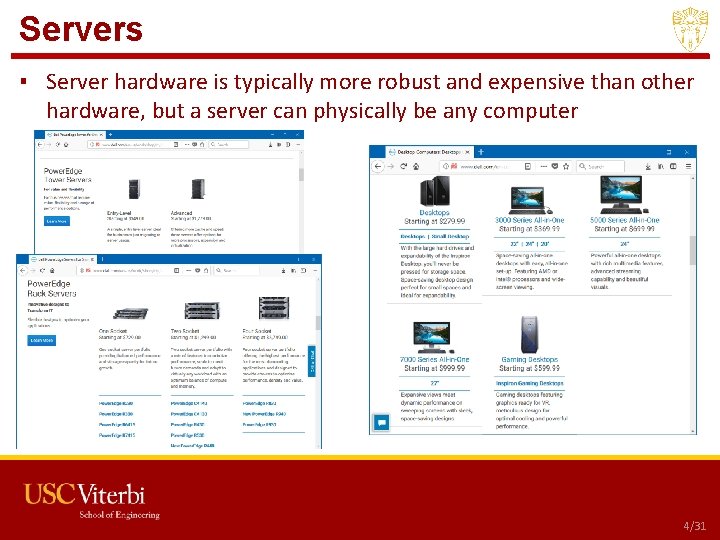
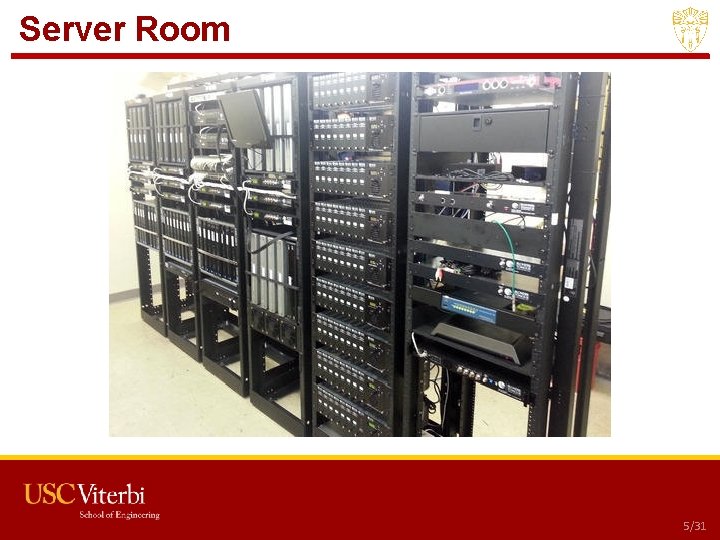
Servers ▪ Server hardware is typically more robust and expensive than other hardware, but a server can physically be any computer USC CSCI 201 L 4/31
Server Room USC CSCI 201 L 5/31
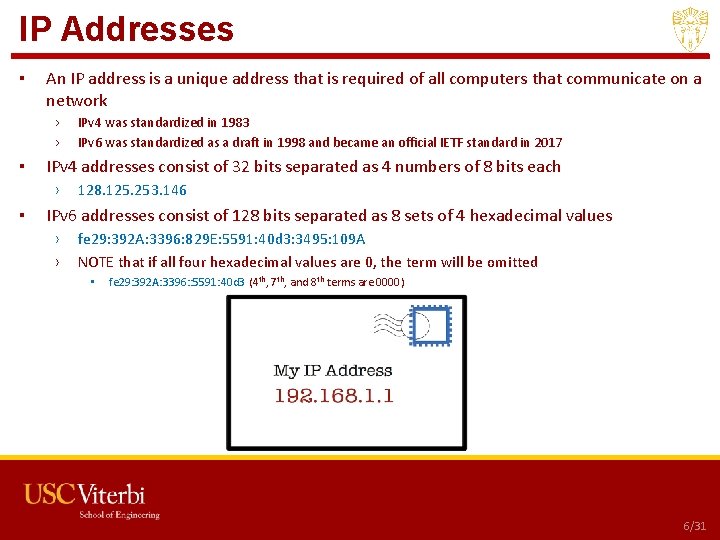
IP Addresses ▪ An IP address is a unique address that is required of all computers that communicate on a network › › ▪ IPv 4 addresses consist of 32 bits separated as 4 numbers of 8 bits each › ▪ IPv 4 was standardized in 1983 IPv 6 was standardized as a draft in 1998 and became an official IETF standard in 2017 128. 125. 253. 146 IPv 6 addresses consist of 128 bits separated as 8 sets of 4 hexadecimal values › › fe 29: 392 A: 3396: 829 E: 5591: 40 d 3: 3495: 109 A NOTE that if all four hexadecimal values are 0, the term will be omitted • fe 29: 392 A: 3396: : 5591: 40 d 3 (4 th, 7 th, and 8 th terms are 0000) USC CSCI 201 L 6/31
IPv 6 Address Space ▪ How many IPv 4 addresses are there? › 32 bits = 232 addresses = 22 * 230 addresses = 4, 294, 967, 296 addresses ▪ How many IPv 6 addresses are there? › 128 bits = 2128 addresses = 28 * 2120 addresses = 256 * 2120 addresses = 340, 282, 366, 920, 938, 463, 374, 607, 431, 768, 211, 456 addresses 210 = 1024 = ~103 = thousand 220 = 1, 048, 576 = ~106 = million 230 = ~109 = billion 240 = ~1012 = trillion 250 = ~1015 = quadrillion 260 = ~1018 = quintillion 270 = ~1021 = sextillion 280 = ~1024 = septillion 290 = ~1027 = octillion 2100 = ~1030 = nonillion 2110 = ~1033 = decillion 2120 = ~1036 = undecillion USC CSCI 201 L 7/31
IPv 4 Classes ▪ Network numbers are managed by ICANN ▪ The Internet Assigned Numbers Authority (IANA) was founded by USC/ISI in 1976 by Jon Postel and transferred to ICANN in 1998 › ICANN was founded primarily to take over control of IANA USC CSCI 201 L 8/31
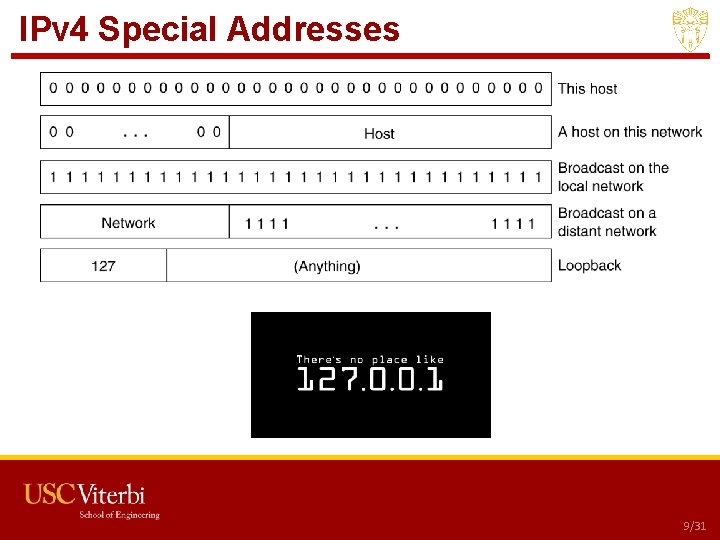
IPv 4 Special Addresses USC CSCI 201 L 9/31
Finding Your IP Address ▪ Open a command line and type ipconfig in Windows ifconfig in Mac or Linux USC CSCI 201 L 10/31
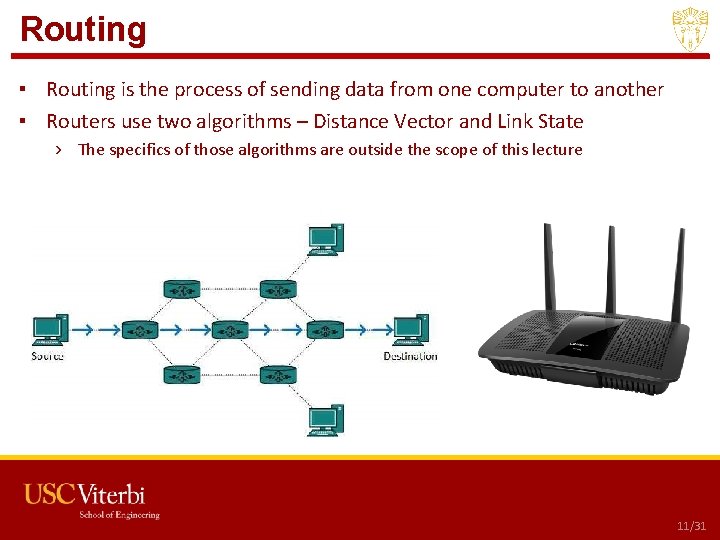
Routing ▪ Routing is the process of sending data from one computer to another ▪ Routers use two algorithms – Distance Vector and Link State › The specifics of those algorithms are outside the scope of this lecture USC CSCI 201 L 11/31
Routing Source Destination USC CSCI 201 L 12/31
Finding a Route ▪ This is a very complicated process, but running tracert (Windows) or traceroute (Mac, Linux) from a command line or terminal will show you all the routers visited from your computer to a destination USC CSCI 201 L 13/31
Trans-Oceanic Pipelines USC CSCI 201 L 14/31
Trans-Oceanic Pipelines Microsoft and Facebook finished MAREA, a 4000 mile long transatlantic communication cable, transmitting 160 Tb/sec, connecting Virginia to Spain around 1700 feet below the surface, in February 2018 USC CSCI 201 L 15/31
Satellite Communication USC CSCI 201 L 16/31
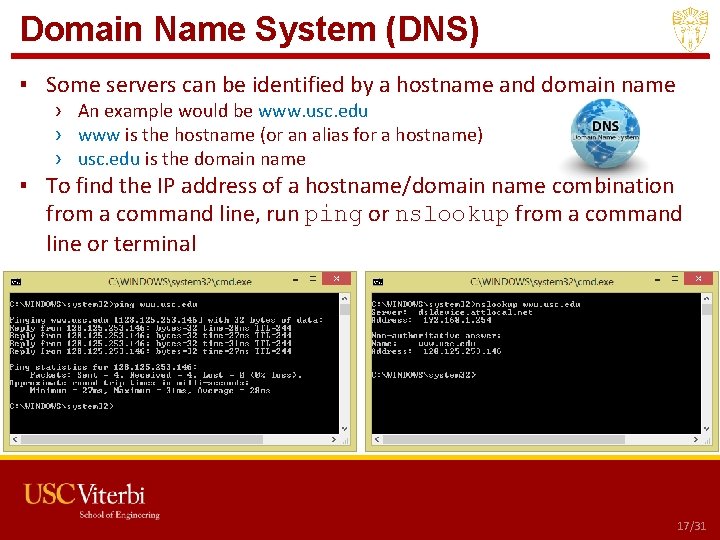
Domain Name System (DNS) ▪ Some servers can be identified by a hostname and domain name › An example would be www. usc. edu › www is the hostname (or an alias for a hostname) › usc. edu is the domain name ▪ To find the IP address of a hostname/domain name combination from a command line, run ping or nslookup from a command line or terminal USC CSCI 201 L 17/31
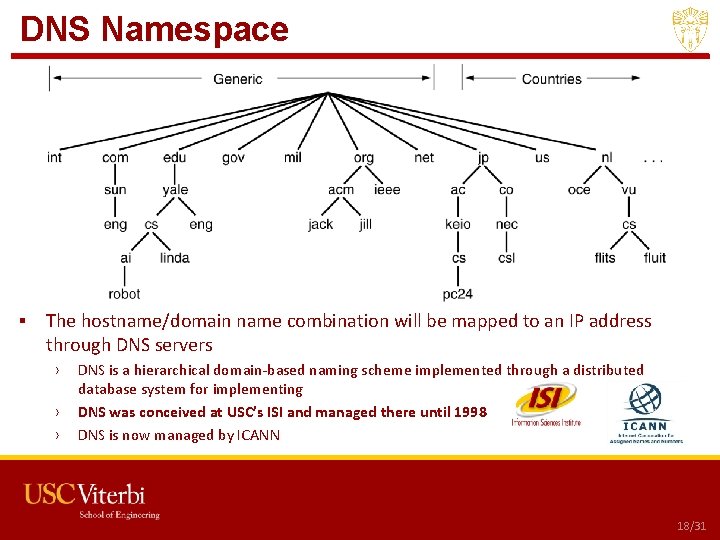
DNS Namespace ▪ The hostname/domain name combination will be mapped to an IP address through DNS servers › › › DNS is a hierarchical domain-based naming scheme implemented through a distributed database system for implementing DNS was conceived at USC’s ISI and managed there until 1998 DNS is now managed by ICANN USC CSCI 201 L 18/31
Actual DNS Records USC CSCI 201 L 19/31
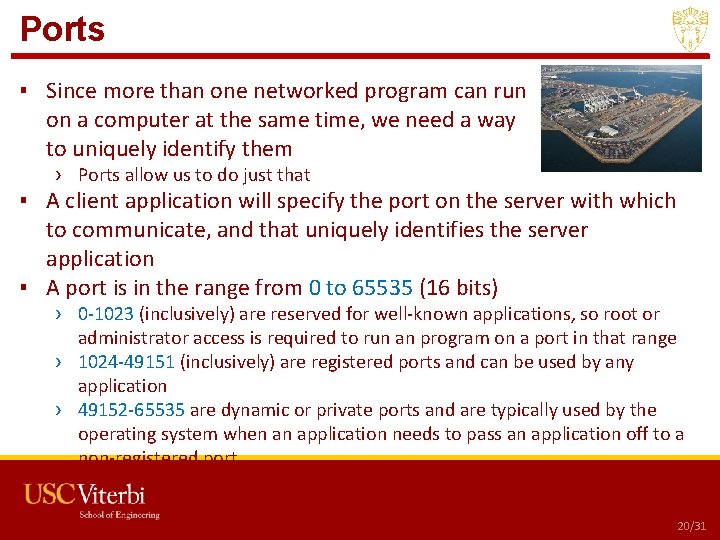
Ports ▪ Since more than one networked program can run on a computer at the same time, we need a way to uniquely identify them › Ports allow us to do just that ▪ A client application will specify the port on the server with which to communicate, and that uniquely identifies the server application ▪ A port is in the range from 0 to 65535 (16 bits) › 0 -1023 (inclusively) are reserved for well-known applications, so root or administrator access is required to run an program on a port in that range › 1024 -49151 (inclusively) are registered ports and can be used by any application › 49152 -65535 are dynamic or private ports and are typically used by the operating system when an application needs to pass an application off to a non-registered port USC CSCI 201 L 20/31
Well-Known Ports Port Application 20 FTP data 21 FTP control 22 SSH 23 Telnet 25 SMTP 53 DNS 80 HTTP 143 IMAP 443 HTTPS ▪ There are many others, but these are some of the more popular ones USC CSCI 201 L 21/31
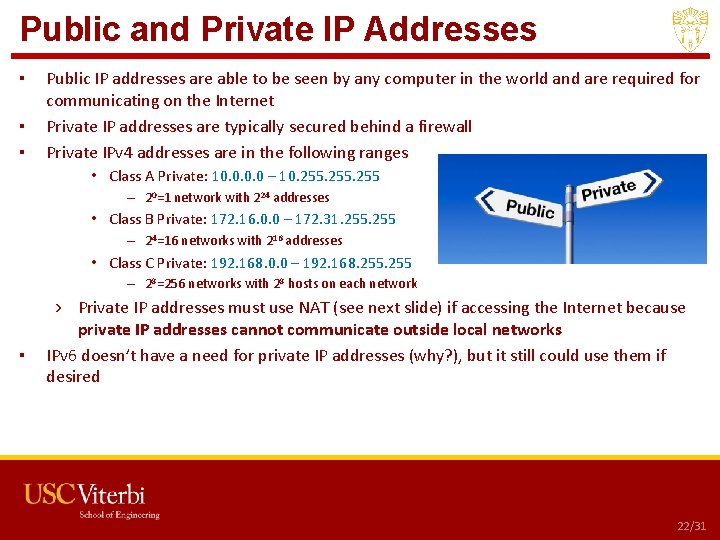
Public and Private IP Addresses ▪ ▪ ▪ Public IP addresses are able to be seen by any computer in the world and are required for communicating on the Internet Private IP addresses are typically secured behind a firewall Private IPv 4 addresses are in the following ranges • Class A Private: 10. 0 – 10. 255 – 20=1 network with 224 addresses • Class B Private: 172. 16. 0. 0 – 172. 31. 255 – 24=16 networks with 216 addresses • Class C Private: 192. 168. 0. 0 – 192. 168. 255 – 28=256 networks with 28 hosts on each network ▪ › Private IP addresses must use NAT (see next slide) if accessing the Internet because private IP addresses cannot communicate outside local networks IPv 6 doesn’t have a need for private IP addresses (why? ), but it still could use them if desired USC CSCI 201 L 22/31
NAT ▪ Network Address Translation (or IP Masquerading) allows a computer to have a private IP address › Private IP addresses are not able to be accessed by hosts outside of the local network › A NAT server (usually implemented in a router) substitutes its own public IP address in place of the computer’s private IP address › The NAT server must maintain a NAT table that links the private IP address and TCP/UDP source port combination to the destination IP address • Since the NAT server’s public IP address has been substituted for the computer’s private IP address in the packet, the response from the destination computer will come back to the NAT server • The port will let the NAT server know to which computer to forward the response USC CSCI 201 L 23/31
NAT Example 20/31
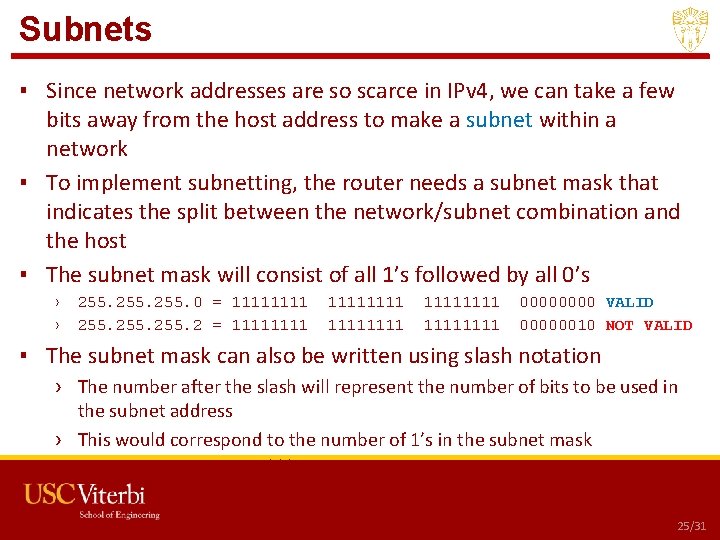
Subnets ▪ Since network addresses are so scarce in IPv 4, we can take a few bits away from the host address to make a subnet within a network ▪ To implement subnetting, the router needs a subnet mask that indicates the split between the network/subnet combination and the host ▪ The subnet mask will consist of all 1’s followed by all 0’s › › 255. 0 = 1111 255. 2 = 11111111 1111 0000 VALID 00000010 NOT VALID ▪ The subnet mask can also be written using slash notation › The number after the slash will represent the number of bits to be used in the subnet address › This would correspond to the number of 1’s in the subnet mask › 255. 0 could be written as /24 USC CSCI 201 L 25/31
Subnets in IPv 6 ▪ Subnetting exists in IPv 6, but because there are so many bits in the IP address, we don’t need to take bits from the host › Bits 1 -48 - Network address › Bits 49 -64 – Subnet address › Bits 65 -128 – Host address ▪ Slash notation is used to identify the number of bits used in the network and subnet, but regardless, there always 264 hosts on every subnet › A /64 means there is no subnetting › A /48 means there are 216 subnets available on that network • This is the maximum number of subnets available on an IPv 6 network USC CSCI 201 L 26/31
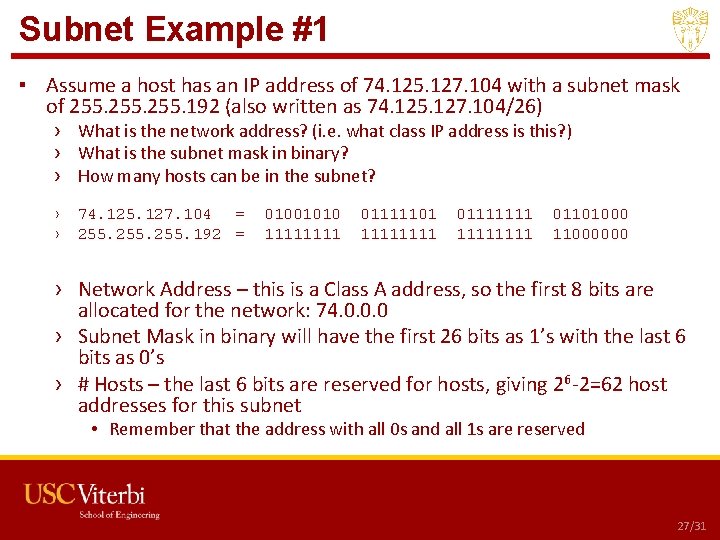
Subnet Example #1 ▪ Assume a host has an IP address of 74. 125. 127. 104 with a subnet mask of 255. 192 (also written as 74. 125. 127. 104/26) › What is the network address? (i. e. what class IP address is this? ) › What is the subnet mask in binary? › How many hosts can be in the subnet? › › 74. 125. 127. 104 = 255. 192 = 01001010 1111 01111101 1111 01111111 01101000 11000000 › Network Address – this is a Class A address, so the first 8 bits are allocated for the network: 74. 0. 0. 0 › Subnet Mask in binary will have the first 26 bits as 1’s with the last 6 bits as 0’s › # Hosts – the last 6 bits are reserved for hosts, giving 26 -2=62 host addresses for this subnet • Remember that the address with all 0 s and all 1 s are reserved USC CSCI 201 L 27/31
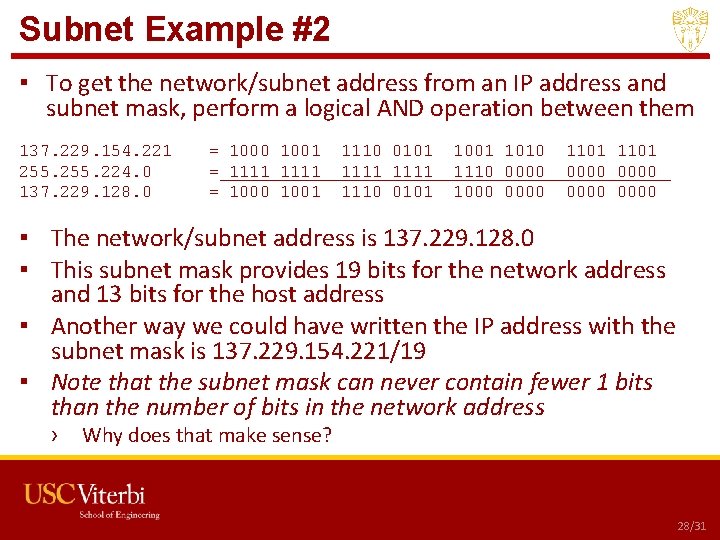
Subnet Example #2 ▪ To get the network/subnet address from an IP address and subnet mask, perform a logical AND operation between them 137. 229. 154. 221 255. 224. 0 137. 229. 128. 0 = 1000 1001 = 1111 = 1000 1001 1110 0101 1111 1110 0101 1010 1110 0000 1000 0000 1101 0000 ▪ The network/subnet address is 137. 229. 128. 0 ▪ This subnet mask provides 19 bits for the network address and 13 bits for the host address ▪ Another way we could have written the IP address with the subnet mask is 137. 229. 154. 221/19 ▪ Note that the subnet mask can never contain fewer 1 bits than the number of bits in the network address › Why does that make sense? USC CSCI 201 L 28/31
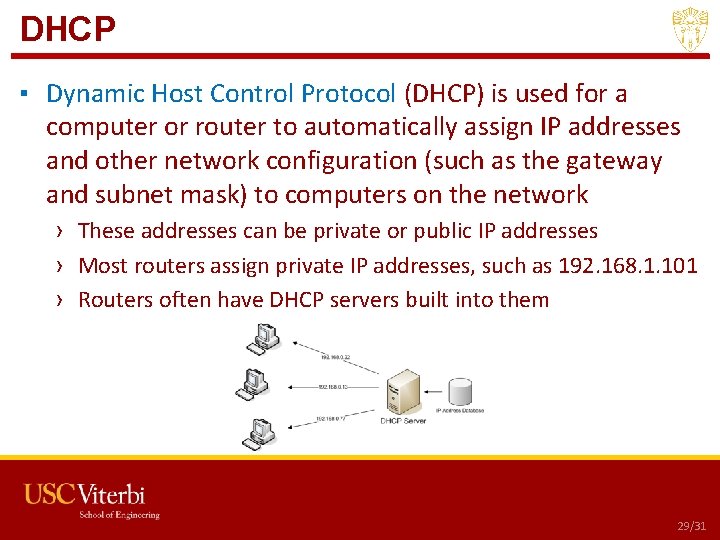
DHCP ▪ Dynamic Host Control Protocol (DHCP) is used for a computer or router to automatically assign IP addresses and other network configuration (such as the gateway and subnet mask) to computers on the network › These addresses can be private or public IP addresses › Most routers assign private IP addresses, such as 192. 168. 1. 101 › Routers often have DHCP servers built into them USC CSCI 201 L 29/31
Outline • Networking Overview – IP Addressing – DNS – Ports – NAT – Subnets – DHCP • Test Yourself USC CSCI 201 L
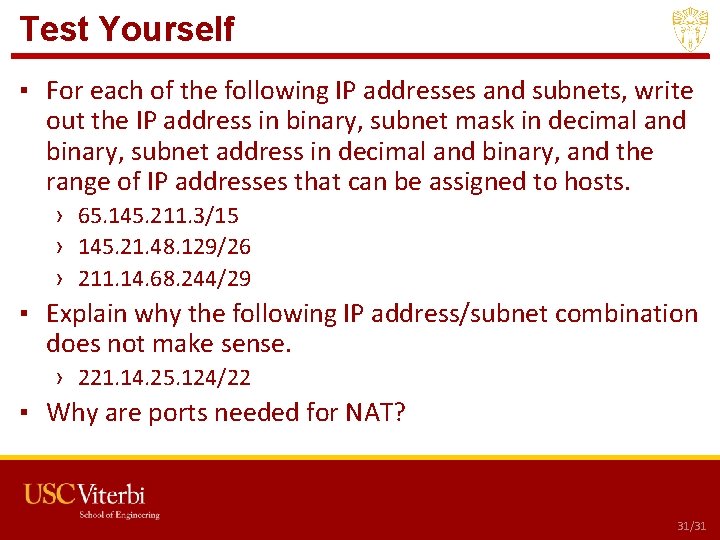
Test Yourself ▪ For each of the following IP addresses and subnets, write out the IP address in binary, subnet mask in decimal and binary, subnet address in decimal and binary, and the range of IP addresses that can be assigned to hosts. › 65. 145. 211. 3/15 › 145. 21. 48. 129/26 › 211. 14. 68. 244/29 ▪ Explain why the following IP address/subnet combination does not make sense. › 221. 14. 25. 124/22 ▪ Why are ports needed for NAT? USC CSCI 201 L 31/31