
Networking CS 161 Lecture 19 41221 Network Cards




- Slides: 32
Networking CS 161: Lecture 19 4/12/21
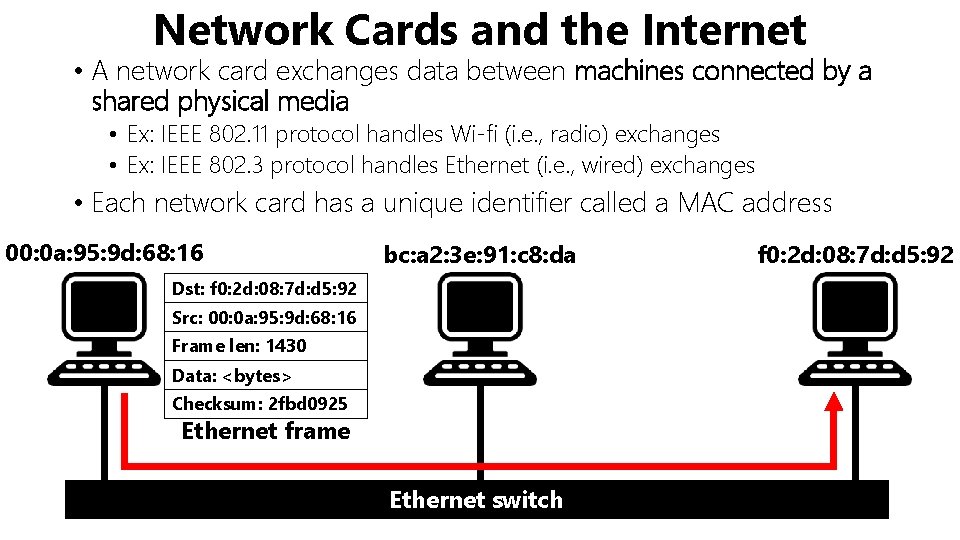
Network Cards and the Internet • A network card exchanges data between machines connected by a shared physical media • Ex: IEEE 802. 11 protocol handles Wi-fi (i. e. , radio) exchanges • Ex: IEEE 802. 3 protocol handles Ethernet (i. e. , wired) exchanges • Each network card has a unique identifier called a MAC address 00: 0 a: 95: 9 d: 68: 16 bc: a 2: 3 e: 91: c 8: da Dst: f 0: 2 d: 08: 7 d: d 5: 92 Src: 00: 0 a: 95: 9 d: 68: 16 Frame len: 1430 Data: <bytes> Checksum: 2 fbd 0925 Ethernet frame Ethernet switch f 0: 2 d: 08: 7 d: d 5: 92
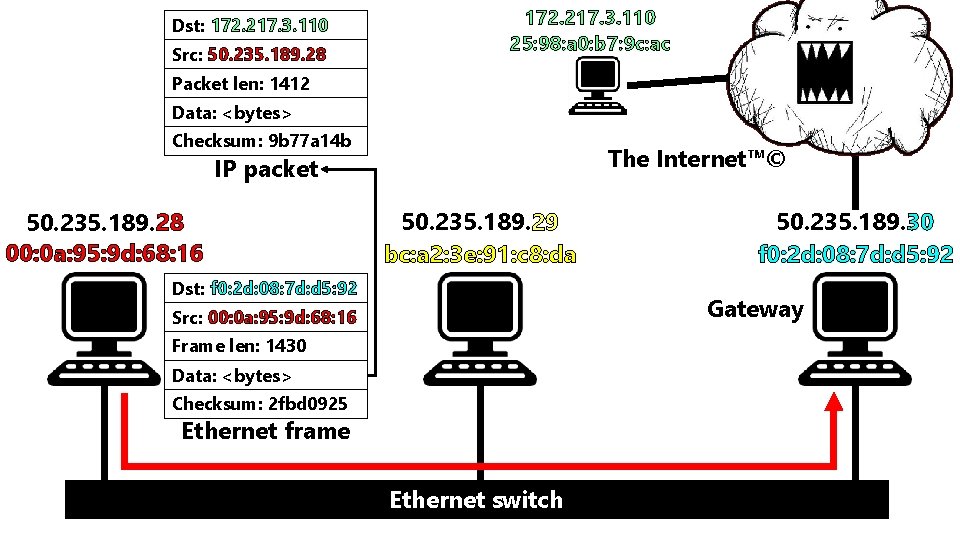
Network Cards and the Internet • The Internet™© consists of protocols that are layered above single-hop, point-to-point protocols like Ethernet • Example: The IP protocol connects machines across multiple hops • An Ethernet frame’s data is an IP packet • IP packet’s header has a source IP address and destination IP address • The “gateway” on a LAN knows how to forward IP packets destined for external hosts 00: 0 a: 95: 9 d: 68: 16 bc: a 2: 3 e: 91: c 8: da Dst: f 0: 2 d: 08: 7 d: d 5: 92 Src: 00: 0 a: 95: 9 d: 68: 16 Frame len: 1430 Data: <bytes> Checksum: 2 fbd 0925 Ethernet frame Ethernet switch f 0: 2 d: 08: 7 d: d 5: 92
Dst: 172. 217. 3. 110 Src: 50. 235. 189. 28 172. 217. 3. 110 25: 98: a 0: b 7: 9 c: ac Packet len: 1412 Data: <bytes> Checksum: 9 b 77 a 14 b The Internet™© IP packet 50. 235. 189. 28 00: 0 a: 95: 9 d: 68: 16 50. 235. 189. 29 bc: a 2: 3 e: 91: c 8: da Dst: f 0: 2 d: 08: 7 d: d 5: 92 50. 235. 189. 30 f 0: 2 d: 08: 7 d: d 5: 92 Gateway Src: 00: 0 a: 95: 9 d: 68: 16 Frame len: 1430 Data: <bytes> Checksum: 2 fbd 0925 Ethernet frame Ethernet switch
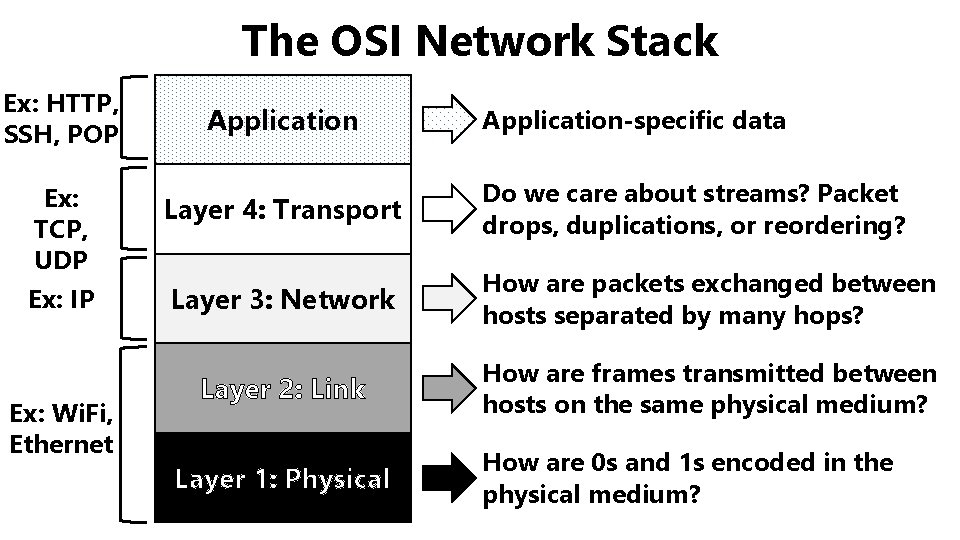
The OSI Network Stack Ex: HTTP, SSH, POP Ex: TCP, UDP Ex: IP Ex: Wi. Fi, Ethernet Application-specific data Layer 4: Transport Do we care about streams? Packet drops, duplications, or reordering? Layer 3: Network How are packets exchanged between hosts separated by many hops? Layer 2: Link How are frames transmitted between hosts on the same physical medium? Layer 1: Physical How are 0 s and 1 s encoded in the physical medium?
Today’s lecture: How does the kernel. . . • Receive an arriving Ethernet frame from a NIC • Send an outgoing Ethernet frame to the NIC . . . ?
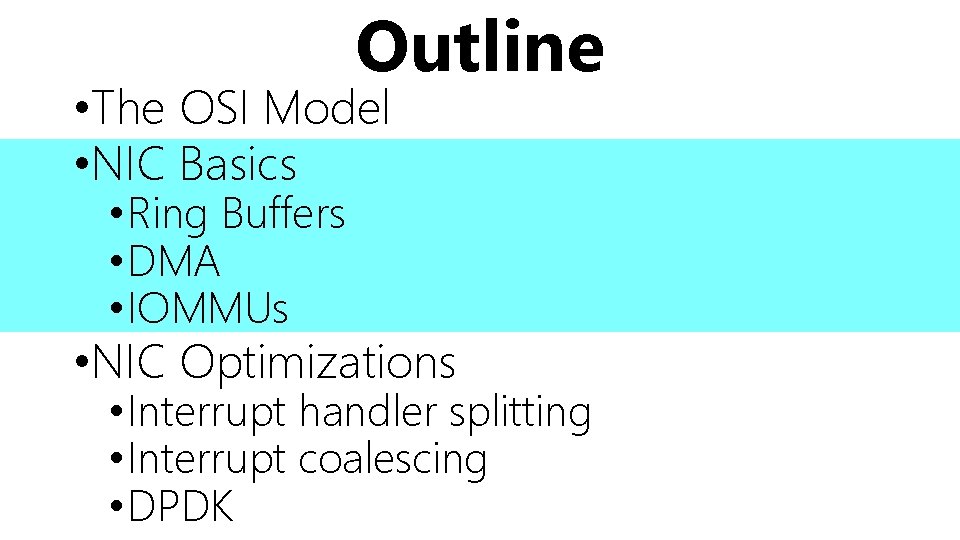
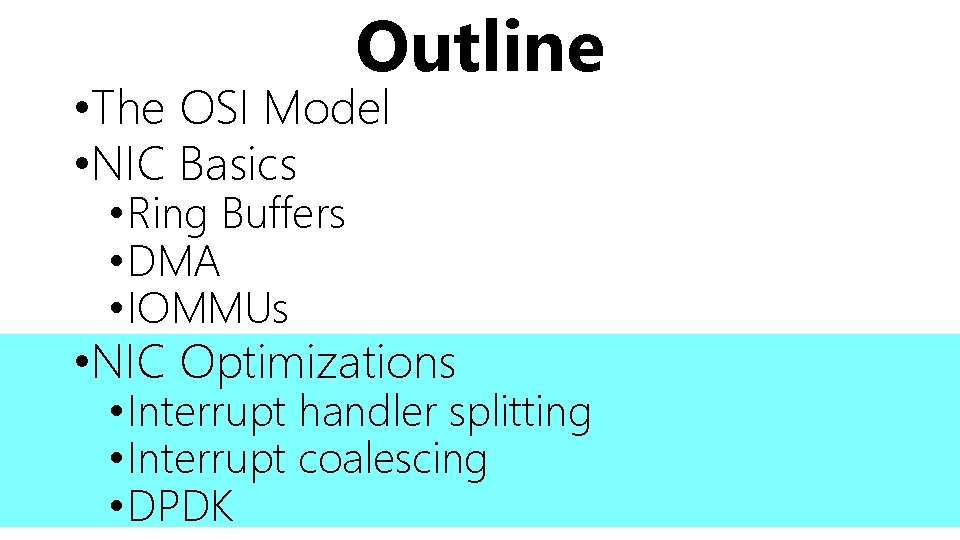
Outline • The OSI Model • NIC Basics • Ring Buffers • DMA • IOMMUs • NIC Optimizations • Interrupt handler splitting • Interrupt coalescing • DPDK
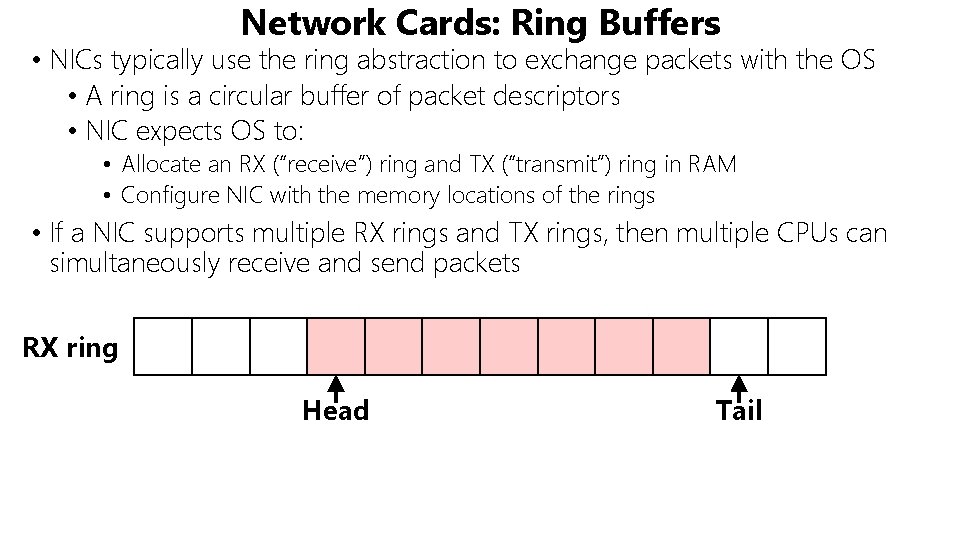
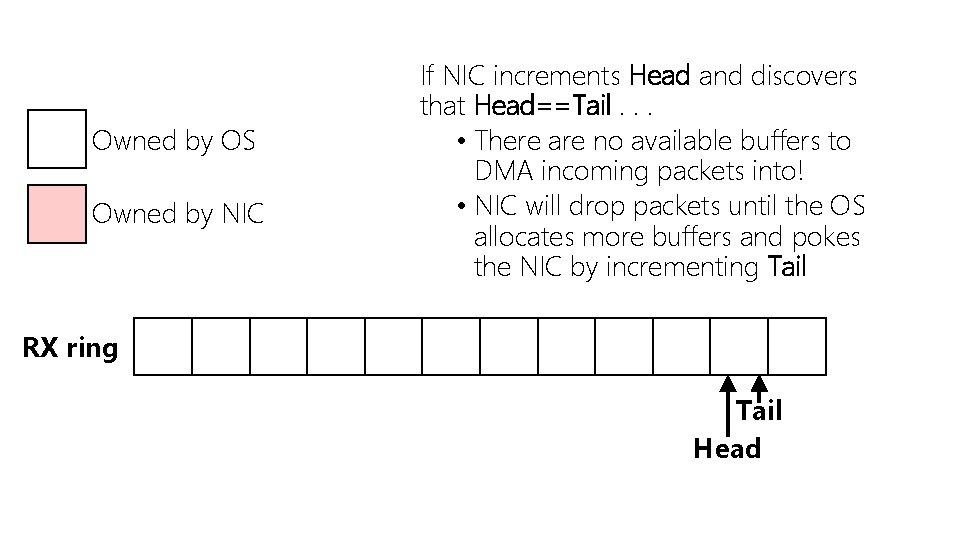
Network Cards: Ring Buffers • NICs typically use the ring abstraction to exchange packets with the OS • A ring is a circular buffer of packet descriptors • NIC expects OS to: • Allocate an RX (“receive”) ring and TX (“transmit”) ring in RAM • Configure NIC with the memory locations of the rings • If a NIC supports multiple RX rings and TX rings, then multiple CPUs can simultaneously receive and send packets RX ring Head Tail
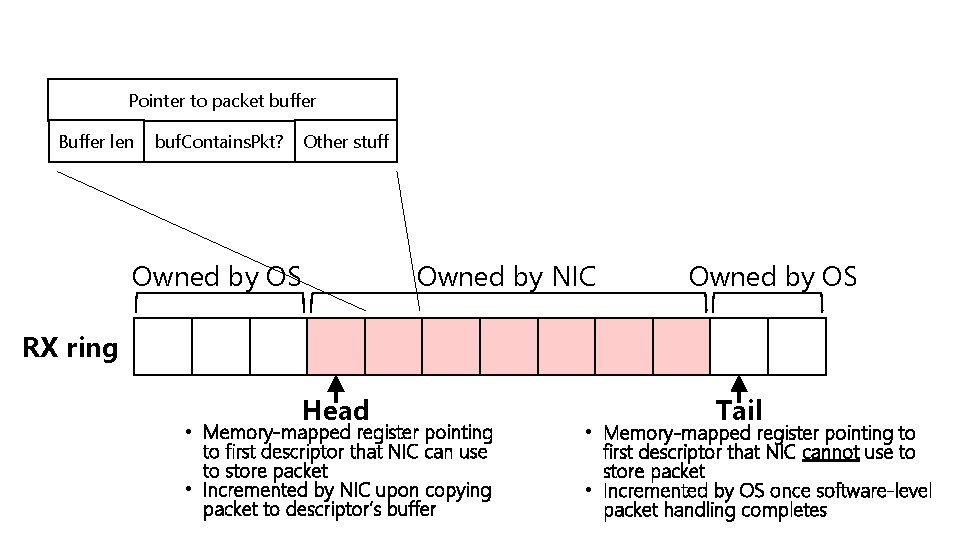
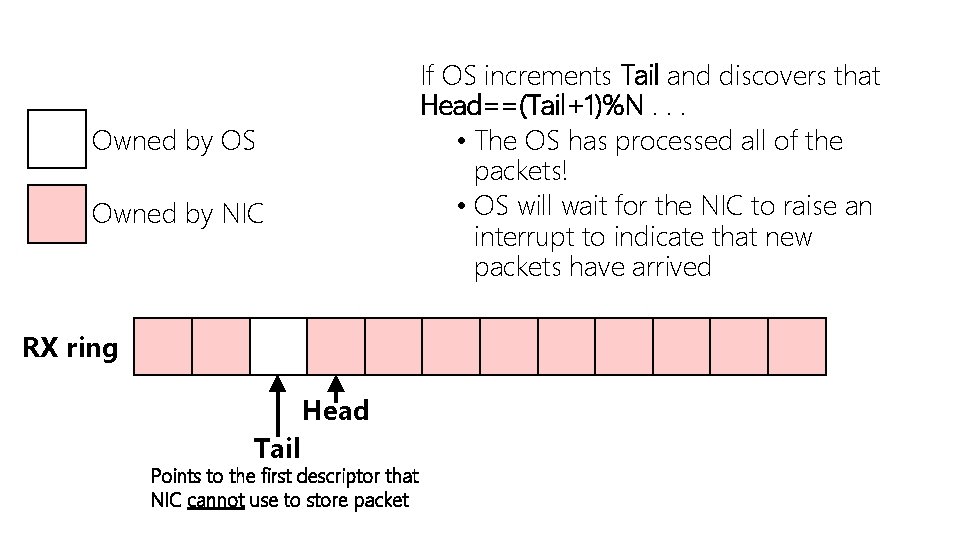
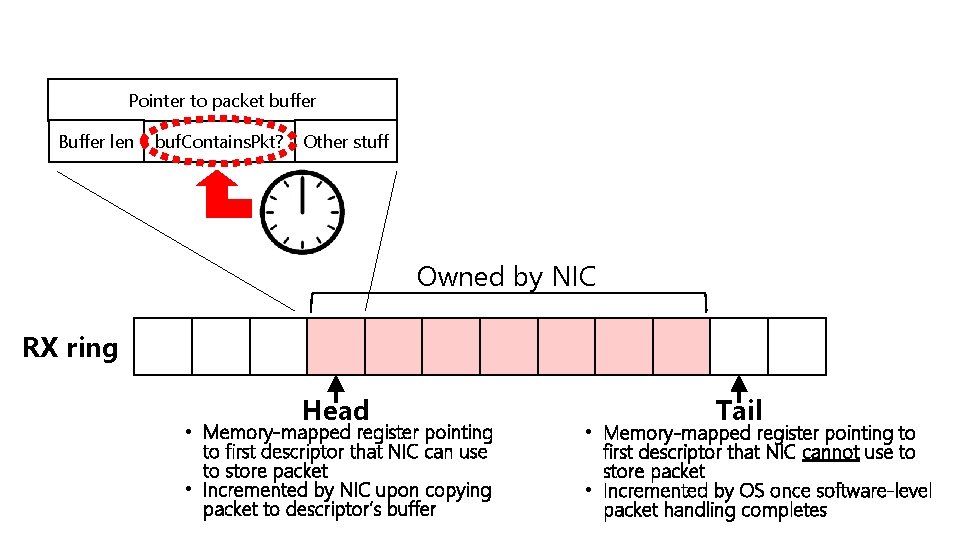
Pointer to packet buffer Buffer len Other stuff buf. Contains. Pkt? Owned by OS Owned by NIC Owned by OS RX ring Head • Memory-mapped register pointing to first descriptor that NIC can use to store packet • Incremented by NIC upon copying packet to descriptor’s buffer Tail • Memory-mapped register pointing to first descriptor that NIC cannot use to store packet • Incremented by OS once software-level packet handling completes
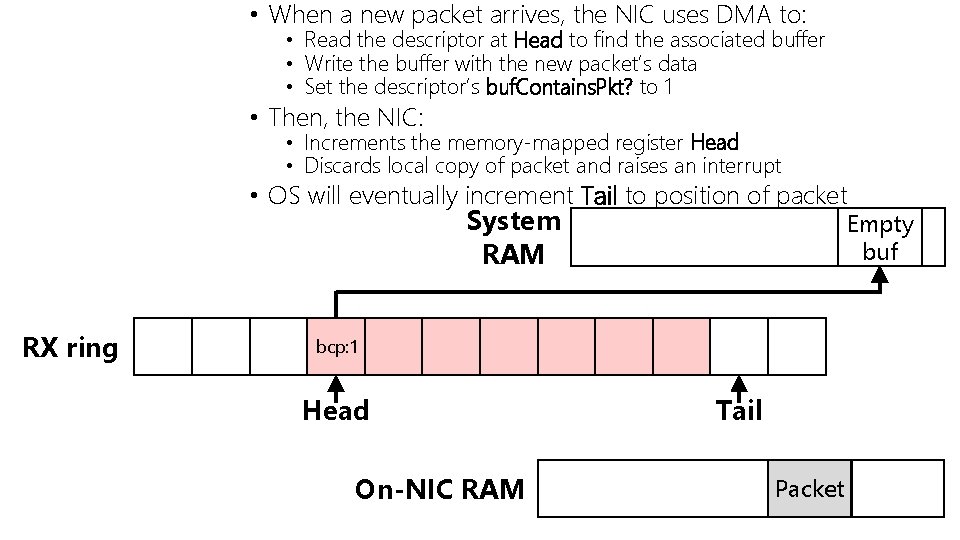
• When a new packet arrives, the NIC uses DMA to: • Read the descriptor at Head to find the associated buffer • Write the buffer with the new packet’s data • Set the descriptor’s buf. Contains. Pkt? to 1 • Then, the NIC: • Increments the memory-mapped register Head • Discards local copy of packet and raises an interrupt • OS will eventually increment Tail to position of packet System RAM RX ring Empty buf bcp: 0 bcp: 1 Head On-NIC RAM Tail Packet
Owned by OS Owned by NIC If NIC increments Head and discovers that Head==Tail. . . • There are no available buffers to DMA incoming packets into! • NIC will drop packets until the OS allocates more buffers and pokes the NIC by incrementing Tail RX ring Tail Head
If OS increments Tail and discovers that Head==(Tail+1)%N. . . • The OS has processed all of the packets! • OS will wait for the NIC to raise an interrupt to indicate that new packets have arrived Owned by OS Owned by NIC RX ring Head Tail Points to the first descriptor that NIC cannot use to store packet
How Does TX Work?
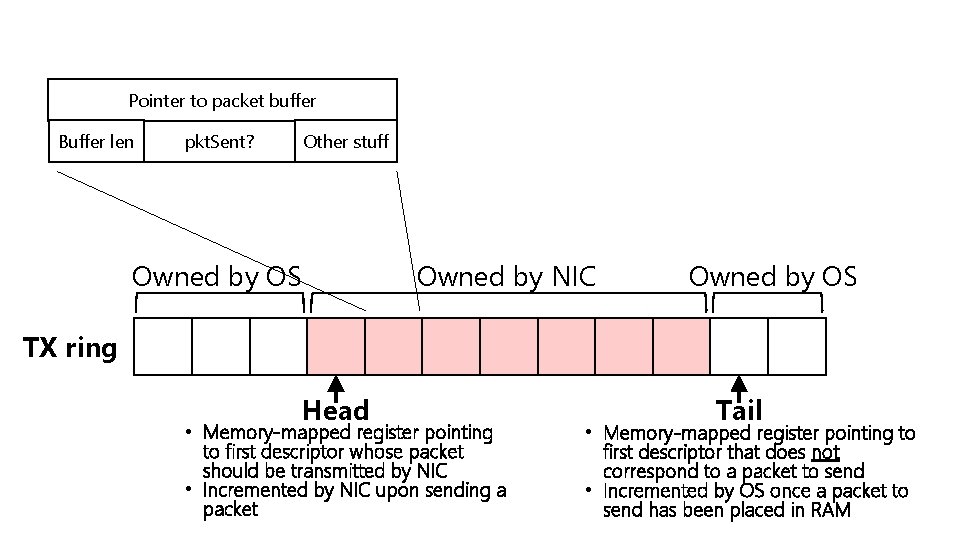
Pointer to packet buffer Buffer len Other stuff pkt. Sent? Owned by OS Owned by NIC Owned by OS TX ring Head • Memory-mapped register pointing to first descriptor whose packet should be transmitted by NIC • Incremented by NIC upon sending a packet Tail • Memory-mapped register pointing to first descriptor that does not correspond to a packet to send • Incremented by OS once a packet to send has been placed in RAM
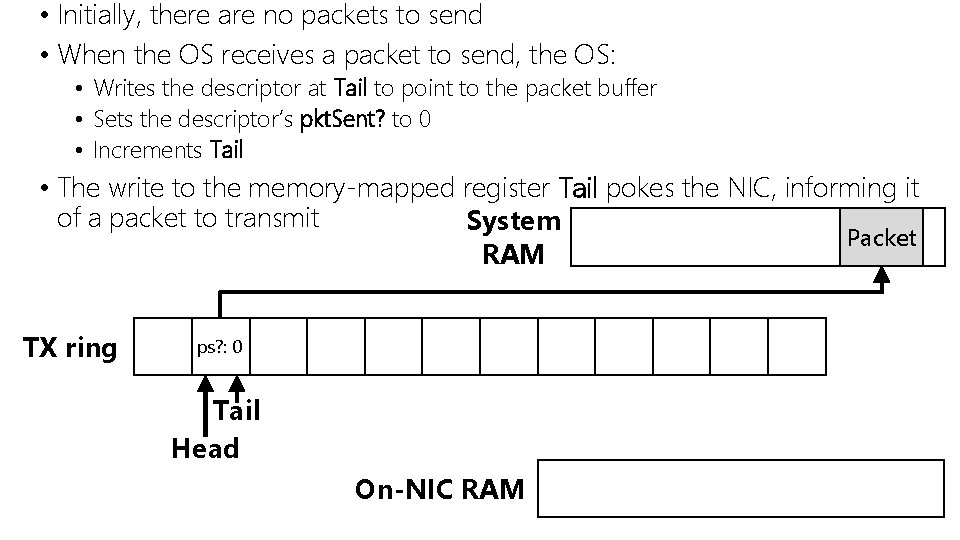
• Initially, there are no packets to send • When the OS receives a packet to send, the OS: • Writes the descriptor at Tail to point to the packet buffer • Sets the descriptor’s pkt. Sent? to 0 • Increments Tail • The write to the memory-mapped register Tail pokes the NIC, informing it of a packet to transmit System Packet RAM TX ring ps? : 0 Tail Head On-NIC RAM
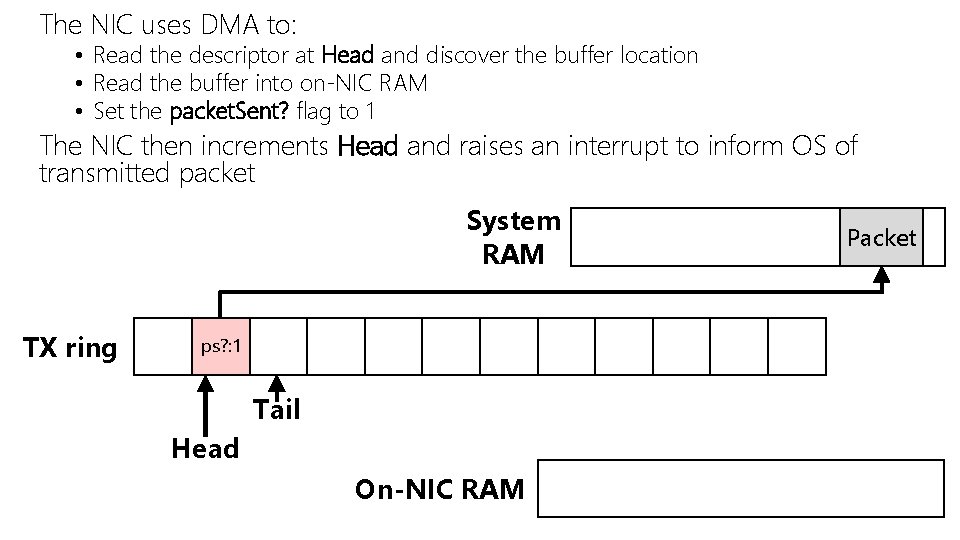
The NIC uses DMA to: • Read the descriptor at Head and discover the buffer location • Read the buffer into on-NIC RAM • Set the packet. Sent? flag to 1 The NIC then increments Head and raises an interrupt to inform OS of transmitted packet System RAM TX ring ps? : 1 ps? : 0 Tail Head On-NIC RAM Packet
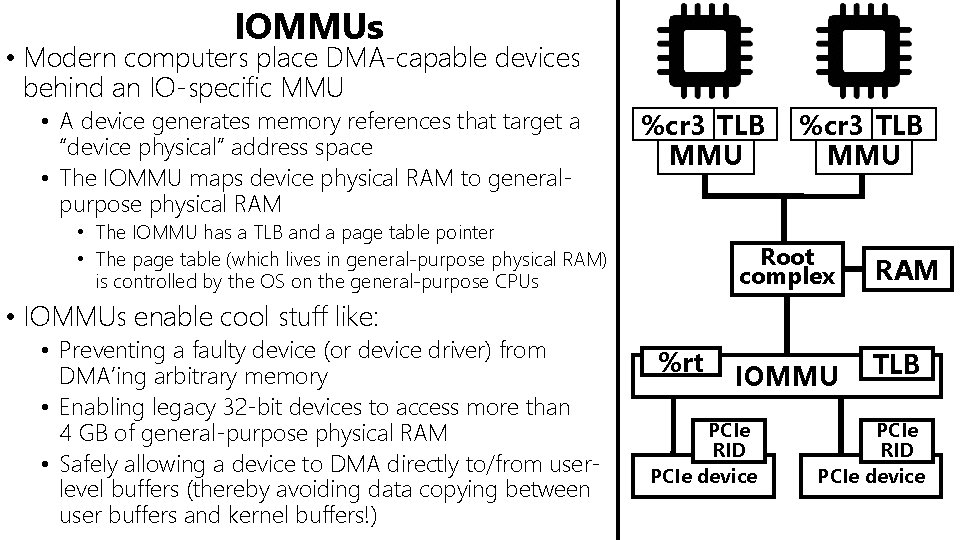
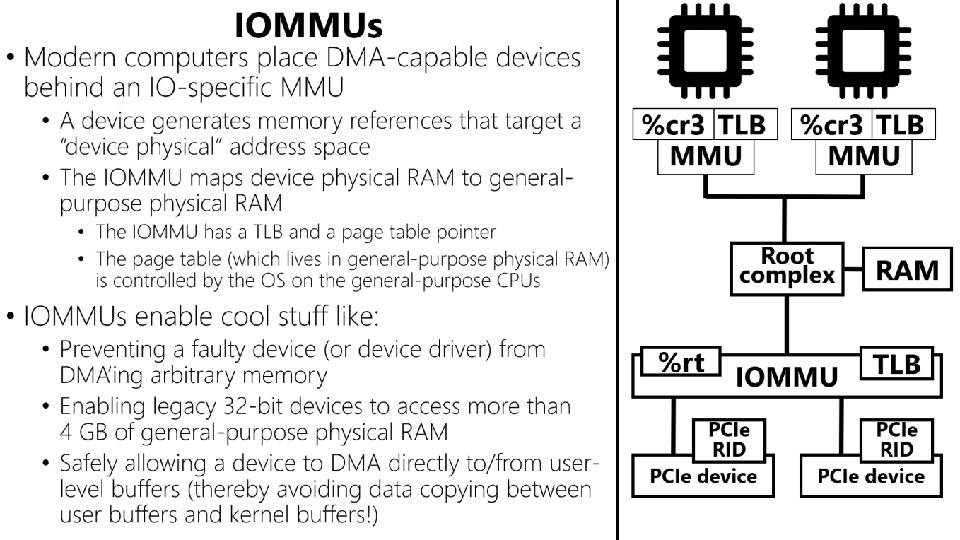
IOMMUs • Modern computers place DMA-capable devices behind an IO-specific MMU • A device generates memory references that target a “device physical” address space • The IOMMU maps device physical RAM to generalpurpose physical RAM %cr 3 TLB MMU • The IOMMU has a TLB and a page table pointer • The page table (which lives in general-purpose physical RAM) is controlled by the OS on the general-purpose CPUs %cr 3 TLB MMU Root complex RAM • IOMMUs enable cool stuff like: • Preventing a faulty device (or device driver) from DMA’ing arbitrary memory • Enabling legacy 32 -bit devices to access more than 4 GB of general-purpose physical RAM • Safely allowing a device to DMA directly to/from userlevel buffers (thereby avoiding data copying between user buffers and kernel buffers!) %rt IOMMU PCIe RID PCIe device TLB PCIe RID PCIe device
Outline • The OSI Model • NIC Basics • Ring Buffers • DMA • IOMMUs • NIC Optimizations • Interrupt handler splitting • Interrupt coalescing • DPDK
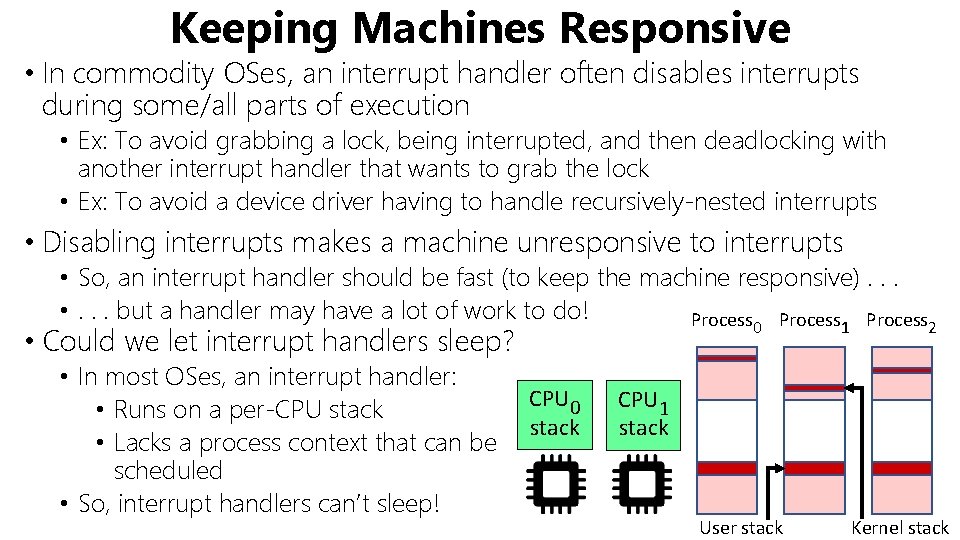
Keeping Machines Responsive • In commodity OSes, an interrupt handler often disables interrupts during some/all parts of execution • Ex: To avoid grabbing a lock, being interrupted, and then deadlocking with another interrupt handler that wants to grab the lock • Ex: To avoid a device driver having to handle recursively-nested interrupts • Disabling interrupts makes a machine unresponsive to interrupts • So, an interrupt handler should be fast (to keep the machine responsive). . . • . . . but a handler may have a lot of work to do! Process 0 • Could we let interrupt handlers sleep? • In most OSes, an interrupt handler: • Runs on a per-CPU stack • Lacks a process context that can be scheduled • So, interrupt handlers can’t sleep! CPU 0 stack 1 2 CPU 1 stack User stack Kernel stack
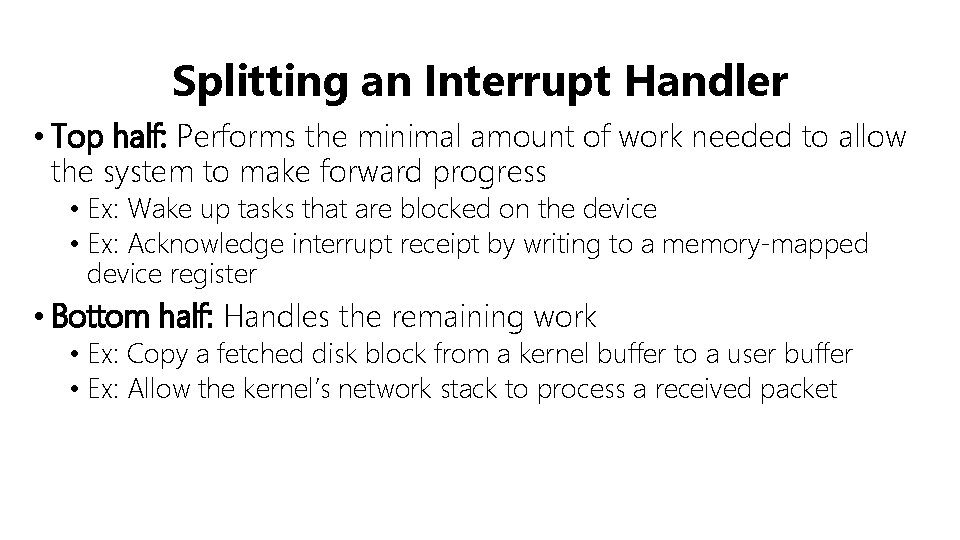
Splitting an Interrupt Handler • Top half: Performs the minimal amount of work needed to allow the system to make forward progress • Ex: Wake up tasks that are blocked on the device • Ex: Acknowledge interrupt receipt by writing to a memory-mapped device register • Bottom half: Handles the remaining work • Ex: Copy a fetched disk block from a kernel buffer to a user buffer • Ex: Allow the kernel’s network stack to process a received packet
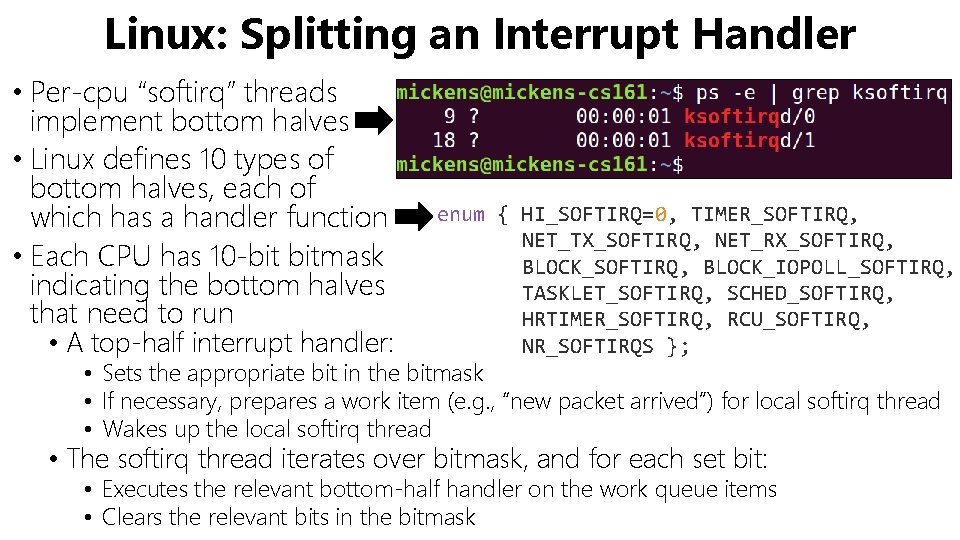
Linux: Splitting an Interrupt Handler • Per-cpu “softirq” threads implement bottom halves • Linux defines 10 types of bottom halves, each of which has a handler function • Each CPU has 10 -bit bitmask indicating the bottom halves that need to run • A top-half interrupt handler: enum { HI_SOFTIRQ=0, TIMER_SOFTIRQ, NET_TX_SOFTIRQ, NET_RX_SOFTIRQ, BLOCK_IOPOLL_SOFTIRQ, TASKLET_SOFTIRQ, SCHED_SOFTIRQ, HRTIMER_SOFTIRQ, RCU_SOFTIRQ, NR_SOFTIRQS }; • Sets the appropriate bit in the bitmask • If necessary, prepares a work item (e. g. , “new packet arrived”) for local softirq thread • Wakes up the local softirq thread • The softirq thread iterates over bitmask, and for each set bit: • Executes the relevant bottom-half handler on the work queue items • Clears the relevant bits in the bitmask
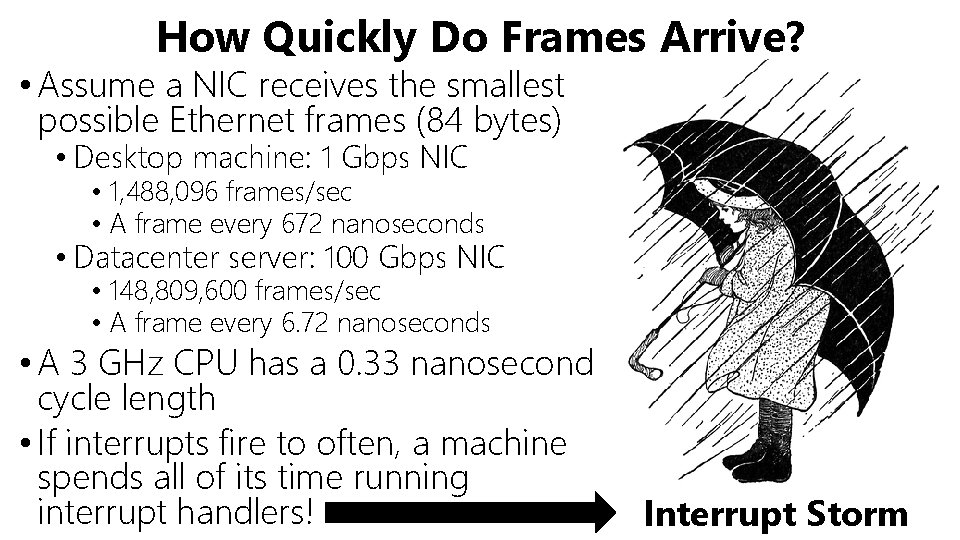
How Quickly Do Frames Arrive? • Assume a NIC receives the smallest possible Ethernet frames (84 bytes) • Desktop machine: 1 Gbps NIC • 1, 488, 096 frames/sec • A frame every 672 nanoseconds • Datacenter server: 100 Gbps NIC • 148, 809, 600 frames/sec • A frame every 6. 72 nanoseconds • A 3 GHz CPU has a 0. 33 nanosecond cycle length • If interrupts fire to often, a machine spends all of its time running interrupt handlers! Interrupt Storm
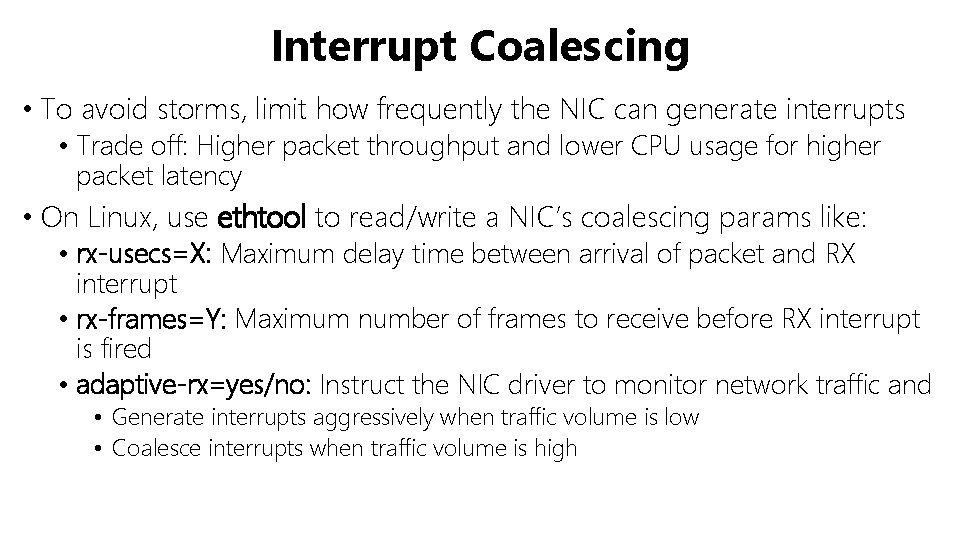
Interrupt Coalescing • To avoid storms, limit how frequently the NIC can generate interrupts • Trade off: Higher packet throughput and lower CPU usage for higher packet latency • On Linux, use ethtool to read/write a NIC’s coalescing params like: • rx-usecs=X: Maximum delay time between arrival of packet and RX interrupt • rx-frames=Y: Maximum number of frames to receive before RX interrupt is fired • adaptive-rx=yes/no: Instruct the NIC driver to monitor network traffic and • Generate interrupts aggressively when traffic volume is low • Coalesce interrupts when traffic volume is high
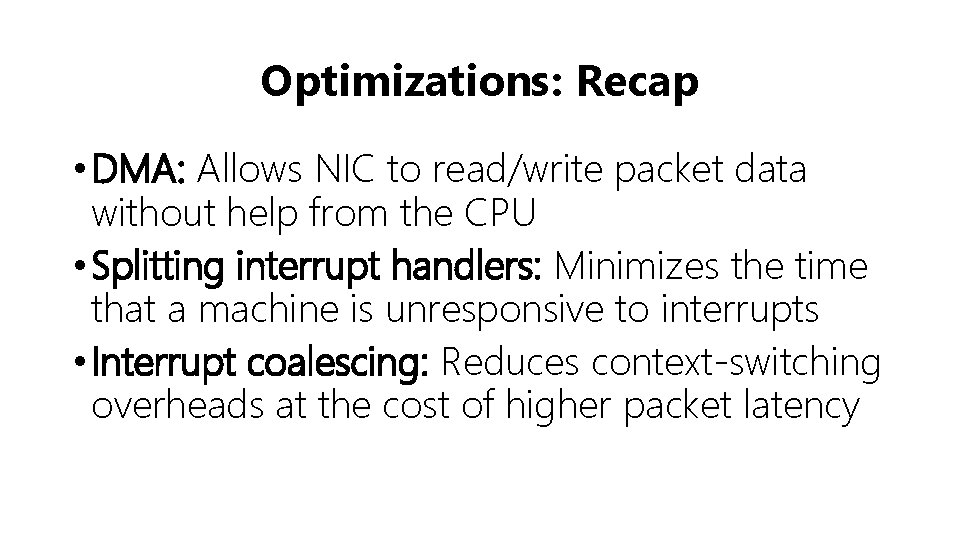
Optimizations: Recap • DMA: Allows NIC to read/write packet data without help from the CPU • Splitting interrupt handlers: Minimizes the time that a machine is unresponsive to interrupts • Interrupt coalescing: Reduces context-switching overheads at the cost of higher packet latency
I WANT EVEN MORE OPTIMIZATION
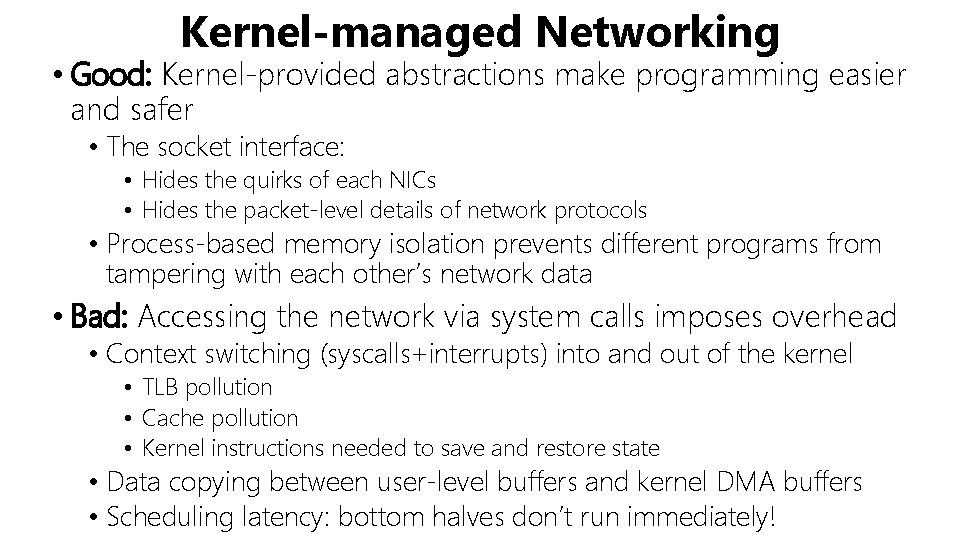
Kernel-managed Networking • Good: Kernel-provided abstractions make programming easier and safer • The socket interface: • Hides the quirks of each NICs • Hides the packet-level details of network protocols • Process-based memory isolation prevents different programs from tampering with each other’s network data • Bad: Accessing the network via system calls imposes overhead • Context switching (syscalls+interrupts) into and out of the kernel • TLB pollution • Cache pollution • Kernel instructions needed to save and restore state • Data copying between user-level buffers and kernel DMA buffers • Scheduling latency: bottom halves don’t run immediately!
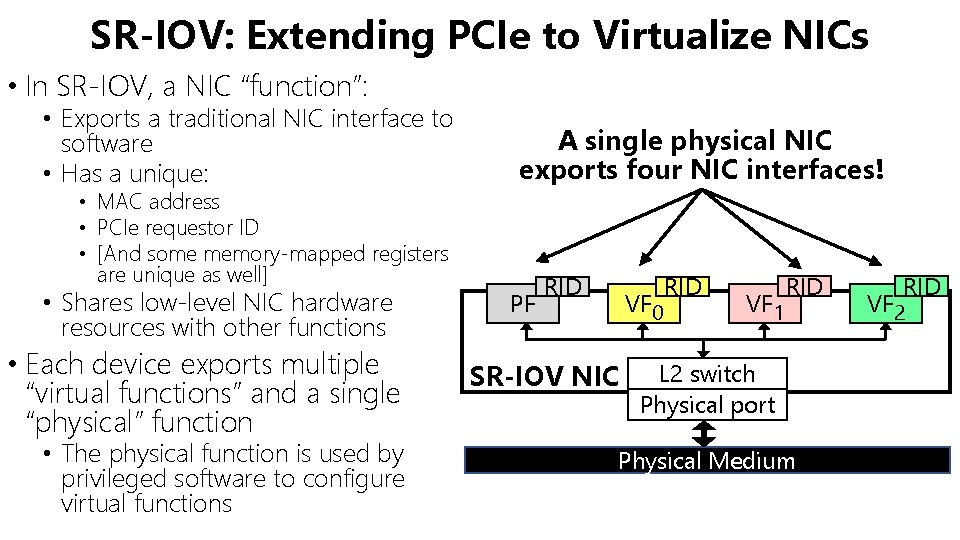
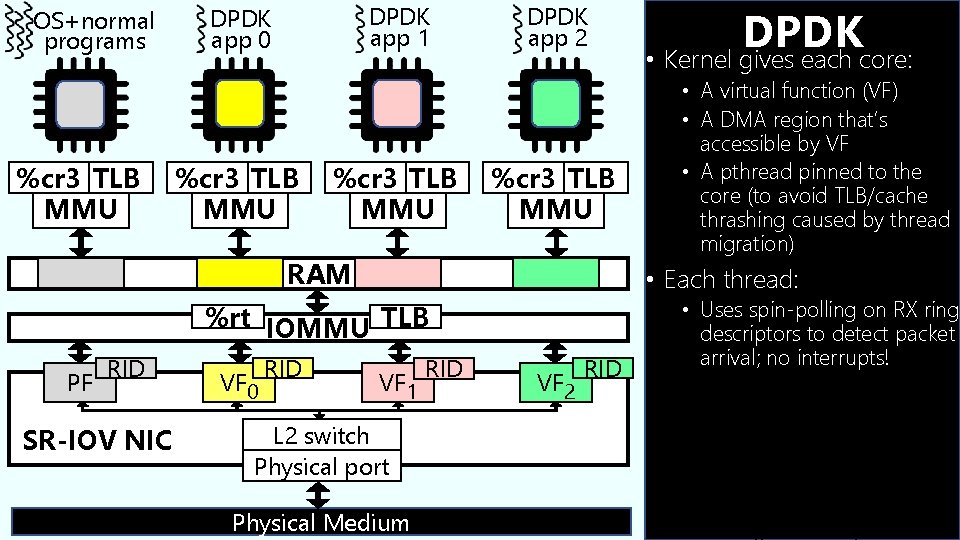
SR-IOV: Extending PCIe to Virtualize NICs • In SR-IOV, a NIC “function”: • Exports a traditional NIC interface to software • Has a unique: • MAC address • PCIe requestor ID • [And some memory-mapped registers are unique as well] • Shares low-level NIC hardware resources with other functions • Each device exports multiple “virtual functions” and a single “physical” function • The physical function is used by privileged software to configure virtual functions A single physical NIC exports four NIC interfaces! PF RID VF 0 SR-IOV NIC RID VF 1 RID L 2 switch Physical port Physical Medium RID VF 2
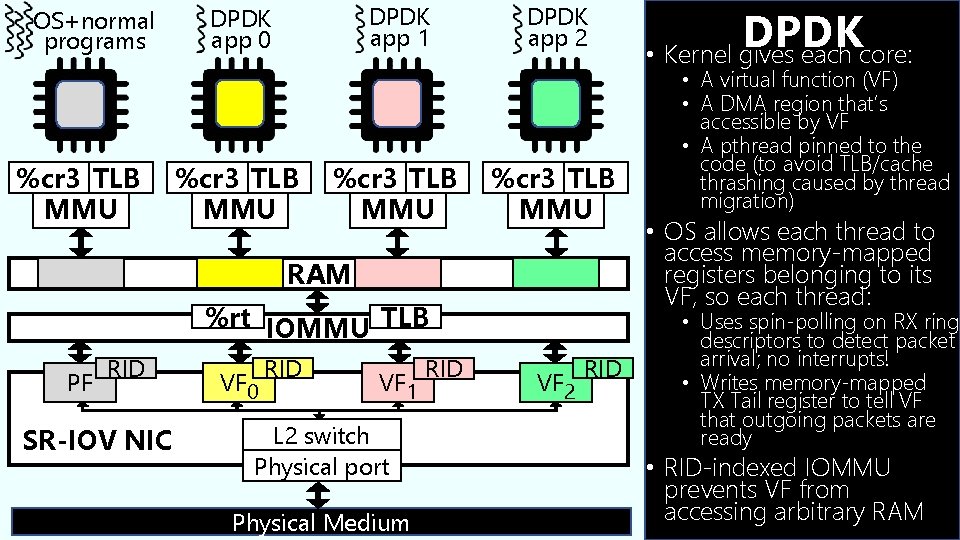
OS+normal programs %cr 3 TLB MMU DPDK app 1 DPDK app 0 %cr 3 TLB MMU DPDK app 2 %cr 3 TLB MMU RAM RID SR-IOV NIC VF 0 RID • A virtual function (VF) • A DMA region that’s accessible by VF • A pthread pinned to the core (to avoid TLB/cache thrashing caused by thread migration) • Each thread: %rt IOMMU TLB PF DPDK • Kernel gives each core: VF 1 L 2 switch Physical port Physical Medium RID VF 2 RID • Uses spin-polling on RX ring descriptors to detect packet arrival; no interrupts! • Writes memory-mapped TX registers to tell VF that outgoing packets are ready • RID-indexed IOMMU prevents VF from accessing arbitrary RAM
Pointer to packet buffer Buffer len buf. Contains. Pkt? Other stuff Owned by NIC RX ring Head • Memory-mapped register pointing to first descriptor that NIC can use to store packet • Incremented by NIC upon copying packet to descriptor’s buffer Tail • Memory-mapped register pointing to first descriptor that NIC cannot use to store packet • Incremented by OS once software-level packet handling completes
OS+normal programs %cr 3 TLB MMU DPDK app 1 DPDK app 0 %cr 3 TLB MMU DPDK app 2 %cr 3 TLB MMU RAM %rt IOMMU TLB PF RID SR-IOV NIC VF 0 RID VF 1 L 2 switch Physical port Physical Medium RID VF 2 RID DPDK • Kernel gives each core: • A virtual function (VF) • A DMA region that’s accessible by VF • A pthread pinned to the code (to avoid TLB/cache thrashing caused by thread migration) • OS allows each thread to access memory-mapped registers belonging to its VF, so each thread: • Uses spin-polling on RX ring descriptors to detect packet arrival; no interrupts! • Writes memory-mapped TX Tail register to tell VF that outgoing packets are ready • RID-indexed IOMMU prevents VF from accessing arbitrary RAM
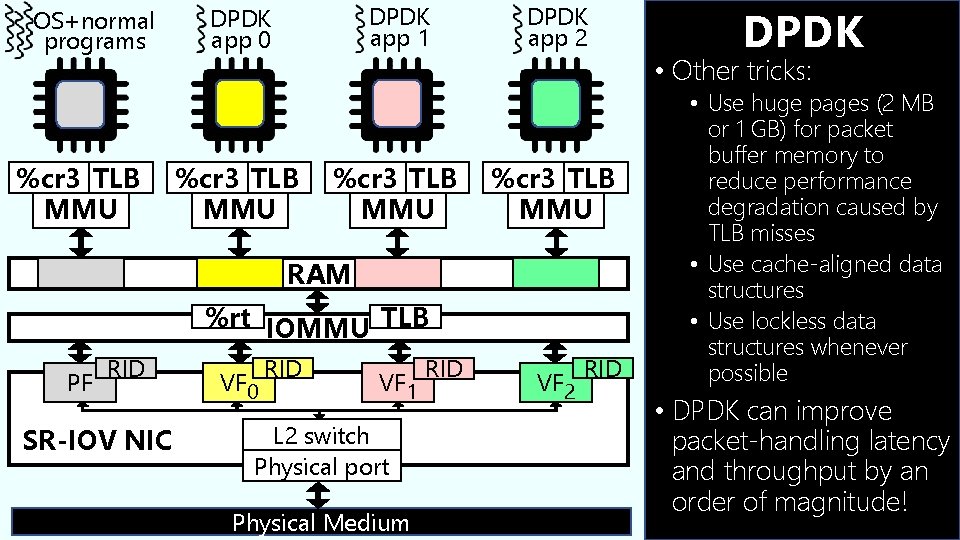
OS+normal programs %cr 3 TLB MMU DPDK app 1 DPDK app 0 %cr 3 TLB MMU DPDK app 2 %cr 3 TLB MMU RAM %rt IOMMU TLB PF RID SR-IOV NIC VF 0 RID VF 1 L 2 switch Physical port Physical Medium RID VF 2 RID DPDK • Other tricks: • Use huge pages (2 MB or 1 GB) for packet buffer memory to reduce performance degradation caused by TLB misses • Use cache-aligned data structures • Use lockless data structures whenever possible • DPDK can improve packet-handling latency and throughput by an order of magnitude!