
Network Security and Cryptography Topic 8 Access Control



- Slides: 39
Network Security and Cryptography Topic 8: Access Control V 1. 0 © NCC Education Limited
Network Security and Cryptography Topic 8 – Lecture 1: Packet Filters & Access Control Lists V 1. 0 © NCC Education Limited
Access Control Topic 8 - 8. 3 Scope and Coverage This topic will cover: • • V 1. 0 Packet filtering Access control lists NAT IDS © NCC Education Limited
Access Control Topic 8 - 8. 4 Learning Outcomes By the end of this topic students will be able to: • Configure access control mechanisms • Apply and manage port forwarding rules V 1. 0 © NCC Education Limited
Access Control Topic 8 - 8. 5 Access Control • Network traffic is in the form of IP/TCP/UDP packets • The headers of these packets contain information as to source and destination of the packets • Routing devices uses the source and destination addresses to route traffic through the network • These addresses can be used to create access control rules • We will examine methods for determining if traffic is allowed on a network or section of a network V 1. 0 © NCC Education Limited
Access Control Topic 8 - 8. 6 Packet Filtering • Routing devices examine a packet's destination address and decide where to send it • Packet filtering adds an extra layer to this process • First the destination address is examined • If the router determines that it should process the packet it then applies a set of rules to determine what happens to it • Can apply these rules to both incoming and outgoing packets V 1. 0 © NCC Education Limited
Access Control Topic 8 - 8. 7 Filtering Rules • Implement security policies as services that are allowed or disallowed • Examples: - Packets for particular machines can be blocked - Specific types of packets can be blocked - Packets going out of your network can be blocked • Packet filtering rules can be very general or can be applied to specific machines or ports V 1. 0 © NCC Education Limited
Access Control Topic 8 - 8. 8 Use of Packet Filtering • Commonly used to protect a network from attack from machines outside of the network • Most routing devices have packet filtering capabilities • An inexpensive option as no extra equipment required • Very powerful tool • Does not provide full protection V 1. 0 © NCC Education Limited
Access Control Topic 8 - 8. 9 Packet Filtering Possibilities • Can be applied to: a. Machines b. Ports c. Combinations of machines and ports • Examples: a. Block all traffic to machine A b. Block all traffic to port 80 (http) c. Block all traffic to port 80 except on machine A V 1. 0 © NCC Education Limited
Access Control Topic 8 - 8. 10 Stateless Filtering - 1 • Simple rules • Easy to implement • Not flexible • For example: - If all traffic to port 80 is blocked a static filter will block all http traffic - It cannot be set to block all traffic to port 80 except that from http: //campus. nccedu. com in a single rule V 1. 0 © NCC Education Limited
Access Control Topic 8 - 8. 11 Stateless Filtering - 2 • Filtering process is “dumb” - Applies a set of static rules to every packet - Does not store any results from previous packets - No intelligence or learning built into the filtering system • The set of rules is an Access Control List (ACL) - Rules are checked in a specific order - The first matching rule found is applied to the packet - If there are no rules matching the packet is blocked V 1. 0 © NCC Education Limited
Access Control Topic 8 - 8. 12 Stateful Filtering • Also known as Dynamic Packet Filtering • Uses a state table that stores detail of legitimate traffic requests: - IP addresses Ports Handshake status Route/Time • Compare packets with previous valid traffic • Allows traffic based upon connections V 1. 0 © NCC Education Limited
Access Control Topic 8 - 8. 13 Configuring Static Packet Filters • There are three main steps to correctly configuring static packet filters 1. Decide what traffic to permit and what traffic to block - Determined by nature of business and assessment of security risks 2. Define this as a set of rules that includes IP addresses and port numbers 3. Translate these rules into a language that the router or other device understands - May be vendor specific so we do not cover this V 1. 0 © NCC Education Limited
Access Control Topic 8 - 8. 14 What is Permitted? • This is done at a conceptual level - Is internet access allowed - Can individual machines accept email from the Internet or will it all come through a central mail server - Are all messages from a specific location blocked • A good general rule is to block all packets except those that have been specifically allowed - Default is to block all packets not processed by the rule list V 1. 0 © NCC Education Limited
Access Control Topic 8 - 8. 15 Access Control Lists - 1 • A simple tabular template should be used that has one rule for each line of the table • The following columns should be included: - Source IP address Source port Destination IP address Destination port Action (block/allow) Comments (allow a brief text explanation) • Protocol can be included in this V 1. 0 © NCC Education Limited
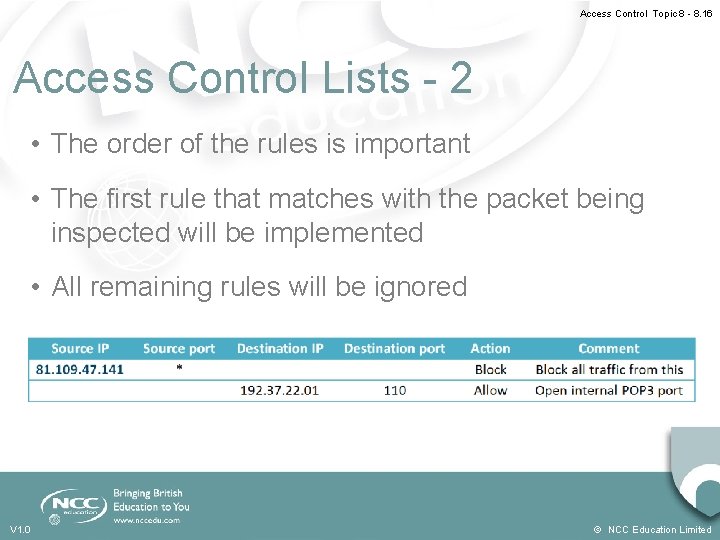
Access Control Topic 8 - 8. 16 Access Control Lists - 2 • The order of the rules is important • The first rule that matches with the packet being inspected will be implemented • All remaining rules will be ignored V 1. 0 © NCC Education Limited
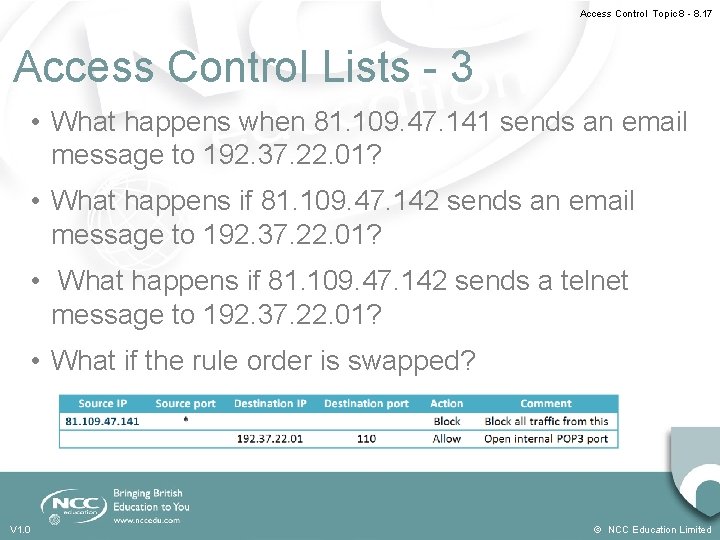
Access Control Topic 8 - 8. 17 Access Control Lists - 3 • What happens when 81. 109. 47. 141 sends an email message to 192. 37. 22. 01? • What happens if 81. 109. 47. 142 sends a telnet message to 192. 37. 22. 01? • What if the rule order is swapped? V 1. 0 © NCC Education Limited
Network Security and Cryptography Topic 8 – Lecture 2: NAT and IDS V 1. 0 © NCC Education Limited
Access Control Topic 8 - 8. 19 Network Address Translation • NAT provides a means to connect multiple computers to an IP network using only one IP address • Three reasons this is useful: - Shortage of IP addresses (under IPv 4) - Security - Flexible network administration V 1. 0 © NCC Education Limited
Access Control Topic 8 - 8. 20 The Number of IP Addresses • A typical IP address is written as dotted quad - E. g. 81. 109. 47. 141 • In IPv 4 there was theoretical limit on the number of available IP addresses - 4 bytes = 232 = 4, 294, 967, 296 possible addresses • Method was required to create “extra” IP addresses or the Internet would reach capacity • The main reason for the use of NAT originally was to create “extra” IP addresses V 1. 0 © NCC Education Limited
Access Control Topic 8 - 8. 21 The IP Address • An IP address has two parts: - a network number - a host number • Computers on one physical network have the same network number - Think street name in a postal address • The rest of the IP address defines an individual computer - Think house number in a postal address V 1. 0 © NCC Education Limited
Access Control Topic 8 - 8. 22 IP Address Classes - 1 • The network size determines the class of IP address • There is a network and host part in each IP address • IP addresses come in 4 classes (A, B, C and D) • Each class suits a different network size V 1. 0 © NCC Education Limited
Access Control Topic 8 - 8. 23 IP Address Classes - 2 • Network addresses with first byte between 1 and 126 are class A with approx. 17 million hosts each • Network addresses with first byte between 128 and 191 are class B with approx. 65000 hosts each • Network addresses with first byte between 192 and 223 are class C with 256 hosts • All other networks are class D, used for special functions, or class E which is reserved V 1. 0 © NCC Education Limited
Access Control Topic 8 - 8. 24 Dynamically Assigning Addresses • Internet Service Providers (ISPs) usually allocate a single address to a single customer • This is assigned dynamically - every time a client connects to the ISP a different address is provided • Large companies can buy several addresses • It is more economic for small businesses to use a single address V 1. 0 © NCC Education Limited
Access Control Topic 8 - 8. 25 Connecting Multiple Computers • In theory one IP address means only one computer can connect to the Internet • By using a NAT gateway running on a single computer, multiple local computers can connect using the single IP address • To the Internet this appears as a single computer • End-to-end connections are not created and this can prevent some protocols from working V 1. 0 © NCC Education Limited
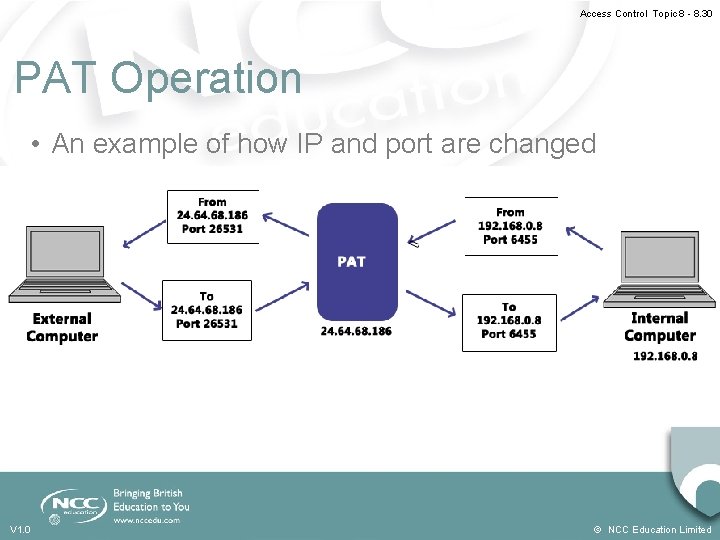
Access Control Topic 8 - 8. 26 Dynamic NAT • A small number of public IP addresses are dynamically assigned to a large number of private IP addresses • Port Address Translation (PAT) is a variant of NAT: - Allows one or more private networks to share a single public IP address - Commonly used in small businesses - Remaps both source and destination addresses and source and destination ports of packets V 1. 0 © NCC Education Limited
Access Control Topic 8 - 8. 27 NAT and Security • NAT only allows connections that come from inside the network • Internal servers can allow connections from outside via inbound mapping - Specific ports are mapped to specific internal addresses - Makes services such as FTP or the Internet available but in a highly controlled way • NATs use their own protocol stack not that of the host machine - Protects against some attacks V 1. 0 © NCC Education Limited
Access Control Topic 8 - 8. 28 NAT and Network Administration • Can aid network administration in several ways: - May contain a dynamic host configuration protocol (DHCP) server - Provide methods for restricting Internet access - Have traffic logging capabilities - Can divide a network into sub-networks V 1. 0 © NCC Education Limited
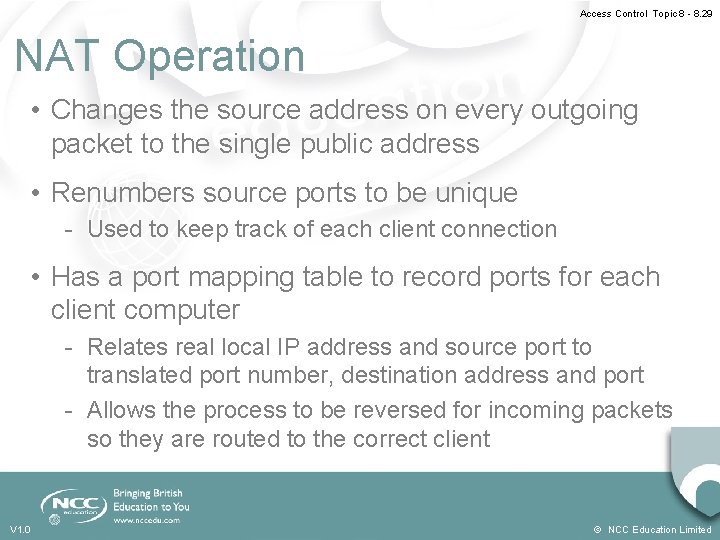
Access Control Topic 8 - 8. 29 NAT Operation • Changes the source address on every outgoing packet to the single public address • Renumbers source ports to be unique - Used to keep track of each client connection • Has a port mapping table to record ports for each client computer - Relates real local IP address and source port to translated port number, destination address and port - Allows the process to be reversed for incoming packets so they are routed to the correct client V 1. 0 © NCC Education Limited
Access Control Topic 8 - 8. 30 PAT Operation • An example of how IP and port are changed V 1. 0 © NCC Education Limited
Access Control Topic 8 - 8. 31 Intrusion Detection Systems (IDS) • Monitors network traffic for suspicious activity • Alerts the network administrator if suspicious activity discovered • May also respond to suspicious traffic by: - blocking the user from accessing the network - blocking the IP address from accessing the network • Different types that use different methods to detect suspicious activity V 1. 0 © NCC Education Limited
Access Control Topic 8 - 8. 32 IDS Types • Network based intrusion detection systems (NIDS) • Host based intrusion detection systems (HIDS) • IDS that look for signatures of known threats • IDS that compare traffic patterns against a network baseline and look for anomalies in the patterns V 1. 0 © NCC Education Limited
Access Control Topic 8 - 8. 33 NIDS • Positioned in strategic locations in the network • Monitor all traffic to and from network devices • In a perfect world all traffic would be monitored • This would create a bottleneck in the network with a huge processing overhead - It would deteriorate network speed V 1. 0 © NCC Education Limited
Access Control Topic 8 - 8. 34 HIDS • Operate on individual hosts or network devices • Monitors all inbound and outbound packets but only to and from the device it operates on • If suspicious activity is detected it usually alerts the user and/or network administrator of that activity V 1. 0 © NCC Education Limited
Access Control Topic 8 - 8. 35 Signature-based IDS • Monitors packets on the network • Compare packets against a stored database of known malicious threats - Similar to the operation of antivirus software • When a new threat appears there is a period of time before this is added to the database • Any new threat is undetected until such time as the database is updated to include this threat - Similar to the operation of antivirus software V 1. 0 © NCC Education Limited
Access Control Topic 8 - 8. 36 Anomaly-based IDS • Monitors network traffic • Compare network traffic with a baseline • Baseline is “normal” traffic for that network: - Bandwidth Protocols Ports Devices • User and/or network administrator is alerted if there is a significant change from the baseline V 1. 0 © NCC Education Limited
Access Control Topic 8 - 8. 37 IDS Overview • Ideal for monitoring and protecting a network • Can be prone to false alarms • Must be correctly set up to recognize what is normal traffic on the network • Network administrators and users must: - Understand the alerts - Know the most effective course of action upon receiving an alert V 1. 0 © NCC Education Limited
Access Control Topic 8 - 8. 38 References • Scambrey, J. , Mc. Clure, S. and Kurtz, J. (2001). Hacking Exposed: Network Security Secrets & Solutions. 2 nd Edition. Mc. Graw Hill. V 1. 0 © NCC Education Limited
Access Control Topic 8 - 8. 39 Topic 8 – Access Control Any Questions? V 1. 0 © NCC Education Limited