
Network Security 2 Module 8 PIX Security Appliance
![Enabling and Disabling Multiple Context Mode ciscoasa(config)# mode {single | multiple} [noconfirm] Selects the](https://slidetodoc.com/presentation_image_h/e92972e6697b5568d77d710ad08fa294/image-16.jpg "Enabling and Disabling Multiple Context Mode ciscoasa(config)# mode {single | multiple} [noconfirm] Selects the")
![Config Context Submode: Allocating Interfaces ciscoasa(config-ctx)# allocate-interface physical_interface. subinterface[physical_interface. subinterface] [map_name[-map_name]] [visible | invisible]](https://slidetodoc.com/presentation_image_h/e92972e6697b5568d77d710ad08fa294/image-20.jpg "Config Context Submode: Allocating Interfaces ciscoasa(config-ctx)# allocate-interface physical_interface. subinterface[physical_interface. subinterface] [map_name[-map_name]] [visible | invisible]")
![Viewing Context Information ciscoasa# show context [name | detail | count] Displays contexts and](https://slidetodoc.com/presentation_image_h/e92972e6697b5568d77d710ad08fa294/image-30.jpg "Viewing Context Information ciscoasa# show context [name | detail | count] Displays contexts and")
![Viewing Context Information (Cont. ) ciscoasa# show context [name | detail | count] The](https://slidetodoc.com/presentation_image_h/e92972e6697b5568d77d710ad08fa294/image-31.jpg "Viewing Context Information (Cont. ) ciscoasa# show context [name | detail | count] The")
- Slides: 35
Network Security 2 Module 8 – PIX Security Appliance Contexts, Failover, and Management © 2006 Cisco Systems, Inc. All rights reserved.
Module 8 – PIX Security Appliance Contexts, Failover, and Management Lesson 8. 1 Configure a PIX Security Appliance to Perform in Multiple Context Mode © 2006 Cisco Systems, Inc. All rights reserved.
Security Context Overview © 2006 Cisco Systems, Inc. All rights reserved.
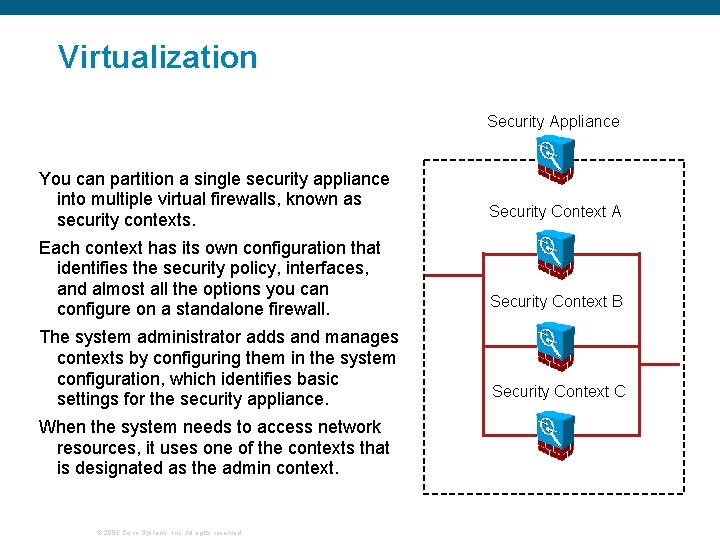
Virtualization Security Appliance You can partition a single security appliance into multiple virtual firewalls, known as security contexts. Each context has its own configuration that identifies the security policy, interfaces, and almost all the options you can configure on a standalone firewall. The system administrator adds and manages contexts by configuring them in the system configuration, which identifies basic settings for the security appliance. When the system needs to access network resources, it uses one of the contexts that is designated as the admin context. © 2006 Cisco Systems, Inc. All rights reserved. Security Context A Security Context B Security Context C
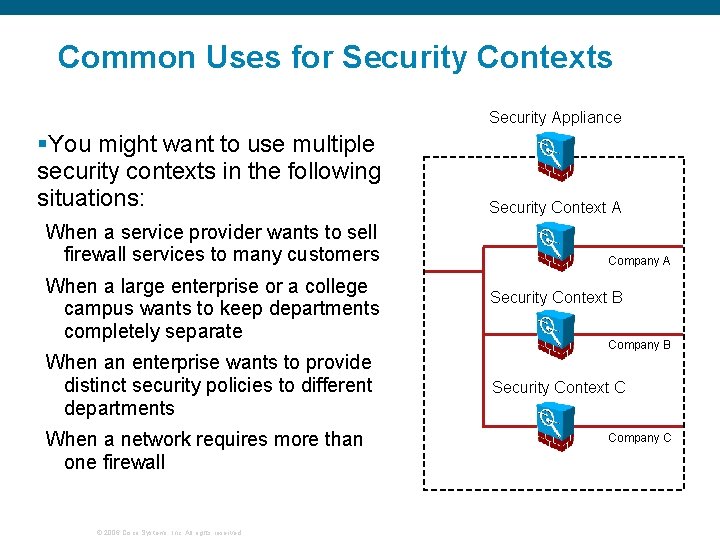
Common Uses for Security Contexts Security Appliance §You might want to use multiple security contexts in the following situations: When a service provider wants to sell firewall services to many customers When a large enterprise or a college campus wants to keep departments completely separate When an enterprise wants to provide distinct security policies to different departments When a network requires more than one firewall © 2006 Cisco Systems, Inc. All rights reserved. Security Context A Company A Security Context B Company B Security Context C Company C
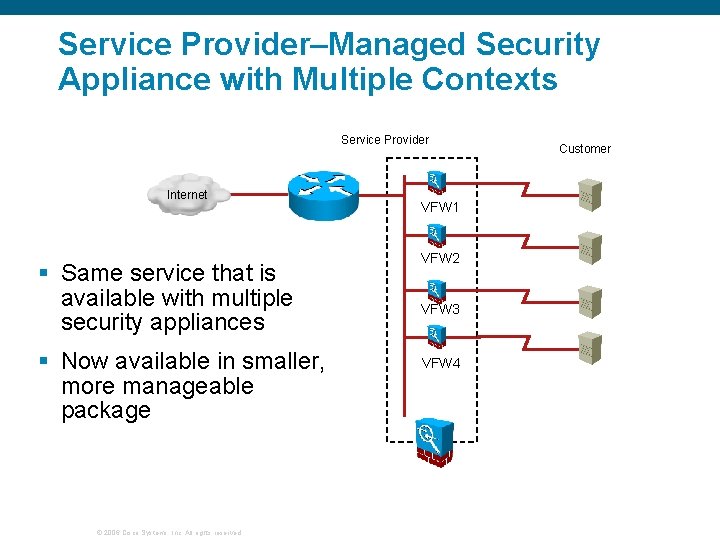
Service Provider–Managed Security Appliance with Multiple Contexts Service Provider Internet § Same service that is available with multiple security appliances § Now available in smaller, more manageable package © 2006 Cisco Systems, Inc. All rights reserved. VFW 1 VFW 2 VFW 3 VFW 4 Customer
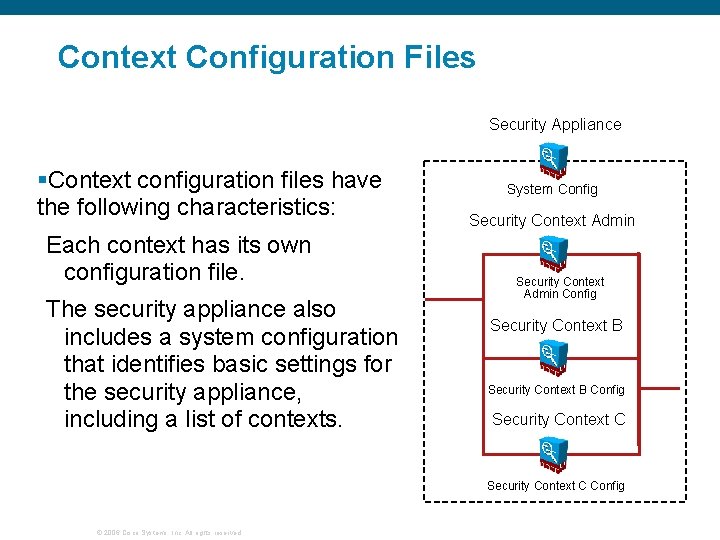
Context Configuration Files Security Appliance §Context configuration files have the following characteristics: Each context has its own configuration file. The security appliance also includes a system configuration that identifies basic settings for the security appliance, including a list of contexts. System Config Security Context Admin Config Security Context B Config Security Context C Config © 2006 Cisco Systems, Inc. All rights reserved.
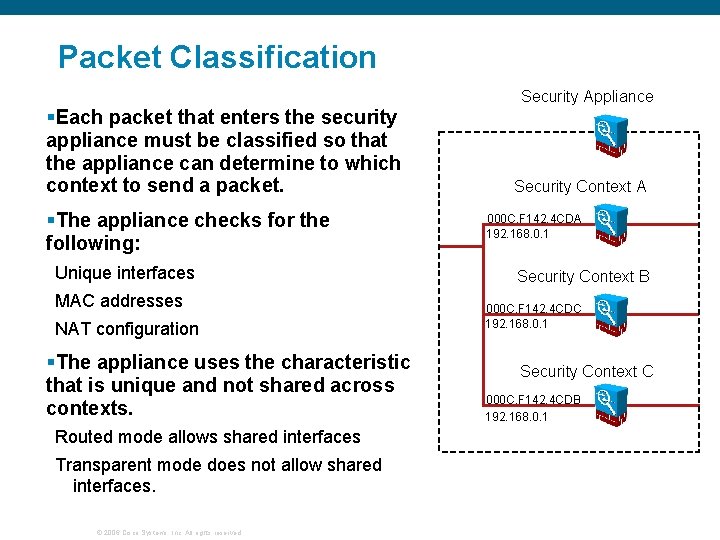
Packet Classification §Each packet that enters the security appliance must be classified so that the appliance can determine to which context to send a packet. §The appliance checks for the following: Unique interfaces MAC addresses NAT configuration §The appliance uses the characteristic that is unique and not shared across contexts. Routed mode allows shared interfaces Transparent mode does not allow shared interfaces. © 2006 Cisco Systems, Inc. All rights reserved. Security Appliance Security Context A 000 C. F 142. 4 CDA 192. 168. 0. 1 Security Context B 000 C. F 142. 4 CDC 192. 168. 0. 1 Security Context C 000 C. F 142. 4 CDB 192. 168. 0. 1
Resource Management © 2006 Cisco Systems, Inc. All rights reserved.
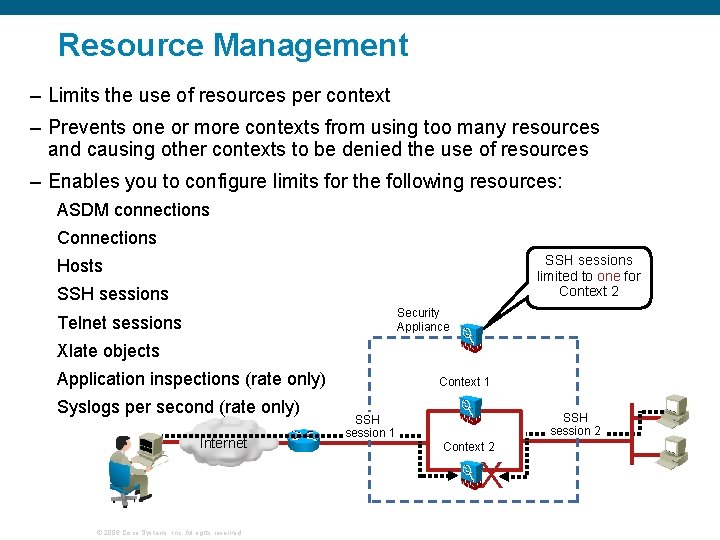
Resource Management – Limits the use of resources per context – Prevents one or more contexts from using too many resources and causing other contexts to be denied the use of resources – Enables you to configure limits for the following resources: ASDM connections Connections SSH sessions limited to one for Context 2 Hosts SSH sessions Security Appliance Telnet sessions Xlate objects Application inspections (rate only) Syslogs per second (rate only) Internet Context 1 SSH session 2 SSH session 1 Context 2 X © 2006 Cisco Systems, Inc. All rights reserved.
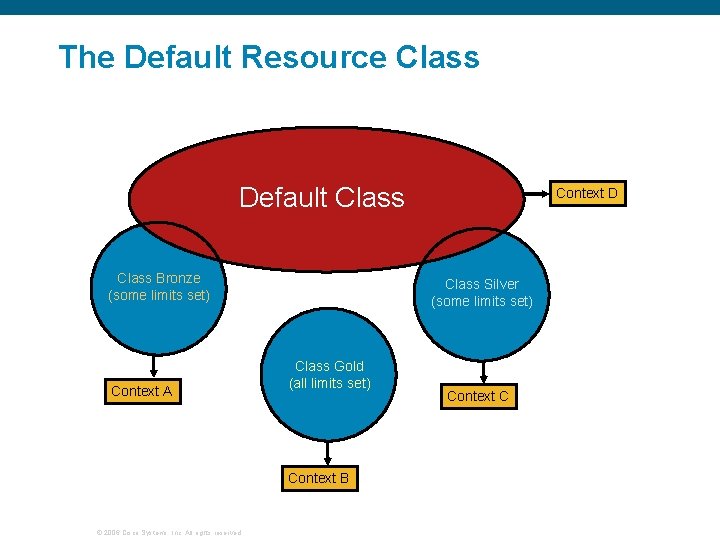
The Default Resource Class Default Class Bronze (some limits set) Context A Class Silver (some limits set) Class Gold (all limits set) Context B © 2006 Cisco Systems, Inc. All rights reserved. Context D Context C
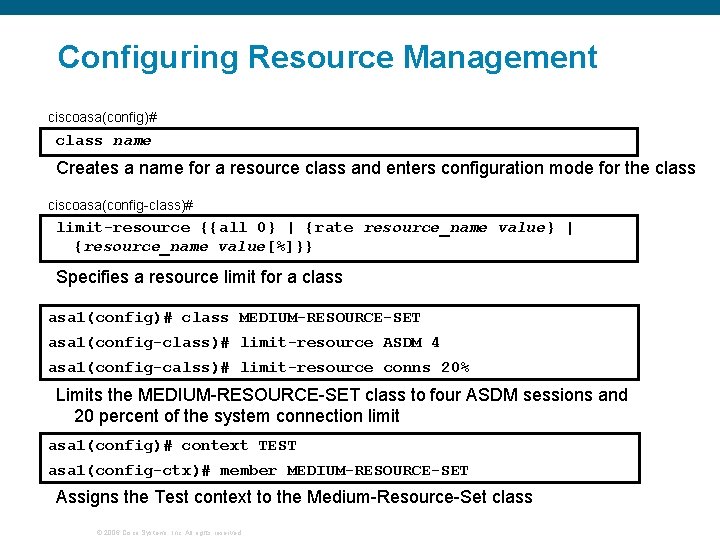
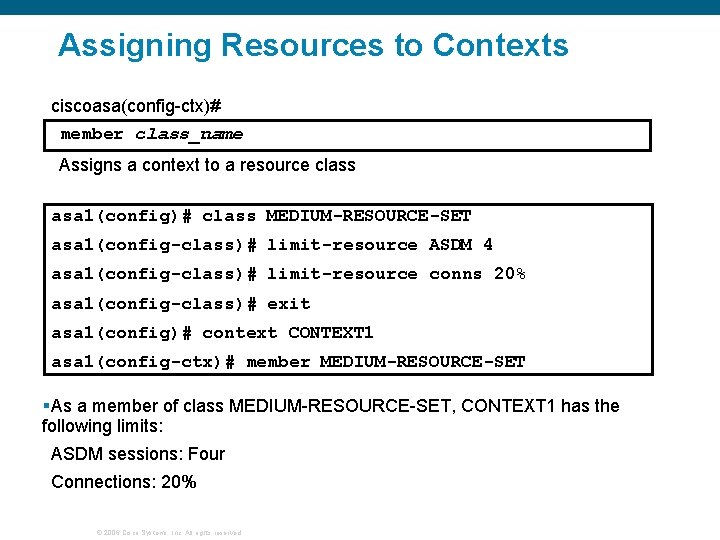
Configuring Resource Management ciscoasa(config)# class name Creates a name for a resource class and enters configuration mode for the class ciscoasa(config-class)# limit-resource {{all 0} | {rate resource_name value} | {resource_name value[%]}} Specifies a resource limit for a class asa 1(config)# class MEDIUM-RESOURCE-SET asa 1(config-class)# limit-resource ASDM 4 asa 1(config-calss)# limit-resource conns 20% Limits the MEDIUM-RESOURCE-SET class to four ASDM sessions and 20 percent of the system connection limit asa 1(config)# context TEST asa 1(config-ctx)# member MEDIUM-RESOURCE-SET Assigns the Test context to the Medium-Resource-Set class © 2006 Cisco Systems, Inc. All rights reserved.
Enabling Multiple Context Mode © 2006 Cisco Systems, Inc. All rights reserved.
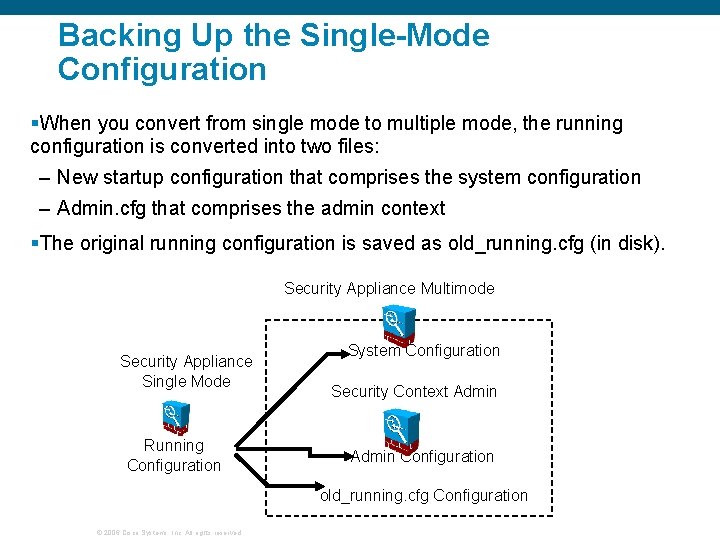
Backing Up the Single-Mode Configuration §When you convert from single mode to multiple mode, the running configuration is converted into two files: – New startup configuration that comprises the system configuration – Admin. cfg that comprises the admin context §The original running configuration is saved as old_running. cfg (in disk). Security Appliance Multimode Security Appliance Single Mode Running Configuration System Configuration Security Context Admin Configuration old_running. cfg Configuration © 2006 Cisco Systems, Inc. All rights reserved.
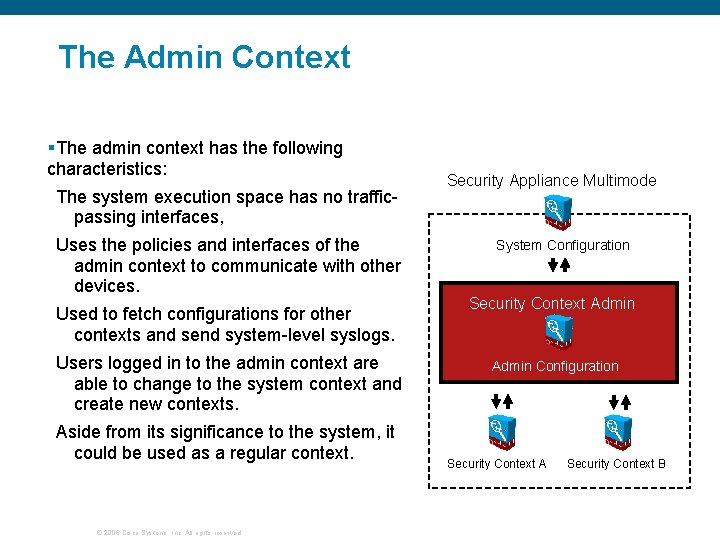
The Admin Context §The admin context has the following characteristics: The system execution space has no trafficpassing interfaces, Uses the policies and interfaces of the admin context to communicate with other devices. Used to fetch configurations for other contexts and send system-level syslogs. Users logged in to the admin context are able to change to the system context and create new contexts. Aside from its significance to the system, it could be used as a regular context. © 2006 Cisco Systems, Inc. All rights reserved. Security Appliance Multimode System Configuration Security Context Admin Configuration Security Context A Security Context B
Enabling and Disabling Multiple Context Mode ciscoasa(config)# mode {single | multiple} [noconfirm] Selects the context mode as follows: multiple: Sets multiple context mode (mode with security contexts) single: Sets single context mode (mode without security contexts) noconfirm: Sets the mode without prompting you for confirmation §Before you convert from multiple mode to single mode, copy the backup version of the original running configuration to the current startup configuration. asa 1(config)# mode multiple © 2006 Cisco Systems, Inc. All rights reserved.
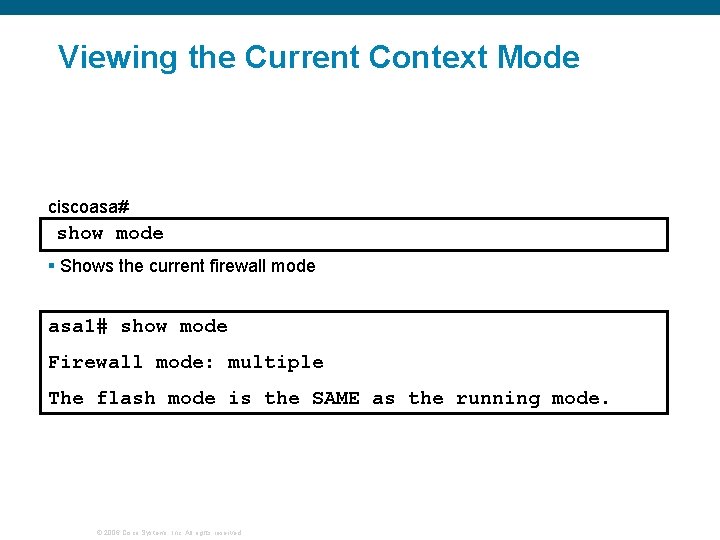
Viewing the Current Context Mode ciscoasa# show mode § Shows the current firewall mode asa 1# show mode Firewall mode: multiple The flash mode is the SAME as the running mode. © 2006 Cisco Systems, Inc. All rights reserved.
Configuring a Security Context © 2006 Cisco Systems, Inc. All rights reserved.
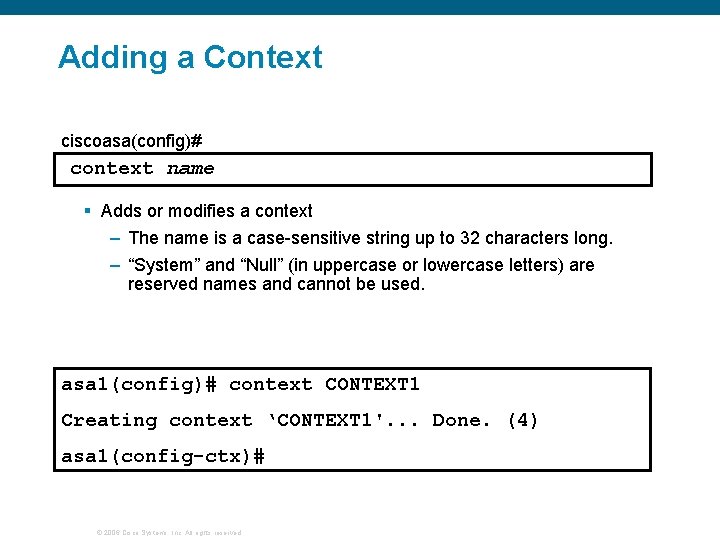
Adding a Context ciscoasa(config)# context name § Adds or modifies a context – The name is a case-sensitive string up to 32 characters long. – “System” and “Null” (in uppercase or lowercase letters) are reserved names and cannot be used. asa 1(config)# context CONTEXT 1 Creating context ‘CONTEXT 1'. . . Done. (4) asa 1(config-ctx)# © 2006 Cisco Systems, Inc. All rights reserved.
Config Context Submode: Allocating Interfaces ciscoasa(config-ctx)# allocate-interface physical_interface. subinterface[physical_interface. subinterface] [map_name[-map_name]] [visible | invisible] § Allocates interfaces to a security context – Interfaces must initially be enabled in system configuration mode before being allocated to a context. – Initially the context created will not have access to any interfaces. asa 1(config-ctx)# allocate-interface gigabitethernet 0/1 asa 1(config-ctx)# allocate-interface gigabitethernet 1/1. 100 int 1 © 2006 Cisco Systems, Inc. All rights reserved.
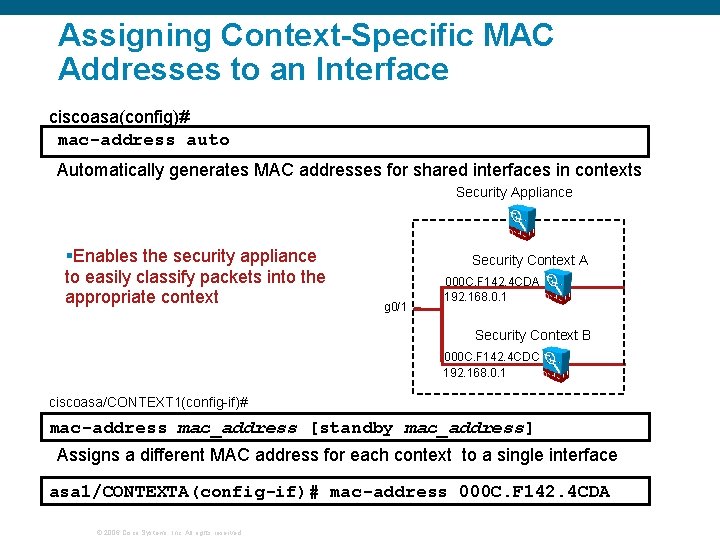
Assigning Context-Specific MAC Addresses to an Interface ciscoasa(config)# mac-address auto Automatically generates MAC addresses for shared interfaces in contexts Security Appliance §Enables the security appliance to easily classify packets into the appropriate context Security Context A g 0/1 000 C. F 142. 4 CDA 192. 168. 0. 1 Security Context B 000 C. F 142. 4 CDC 192. 168. 0. 1 ciscoasa/CONTEXT 1(config-if)# mac-address mac_address [standby mac_address] Assigns a different MAC address for each context to a single interface asa 1/CONTEXTA(config-if)# mac-address 000 C. F 142. 4 CDA © 2006 Cisco Systems, Inc. All rights reserved.
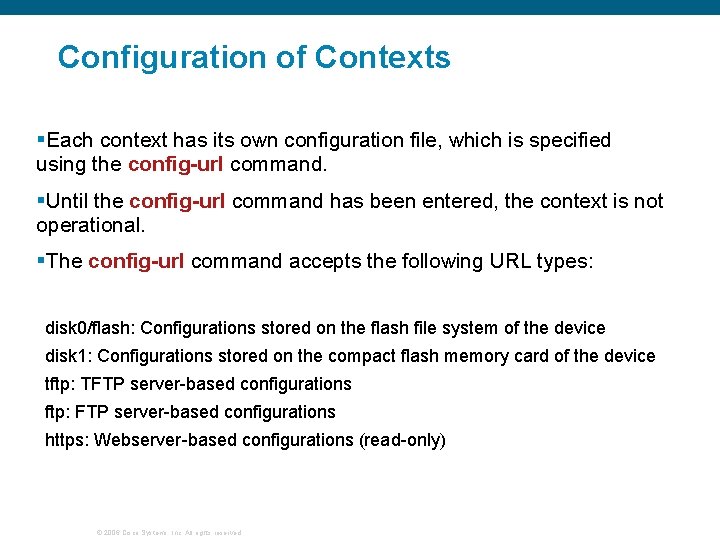
Configuration of Contexts §Each context has its own configuration file, which is specified using the config-url command. §Until the config-url command has been entered, the context is not operational. §The config-url command accepts the following URL types: disk 0/flash: Configurations stored on the flash file system of the device disk 1: Configurations stored on the compact flash memory card of the device tftp: TFTP server-based configurations ftp: FTP server-based configurations https: Webserver-based configurations (read-only) © 2006 Cisco Systems, Inc. All rights reserved.
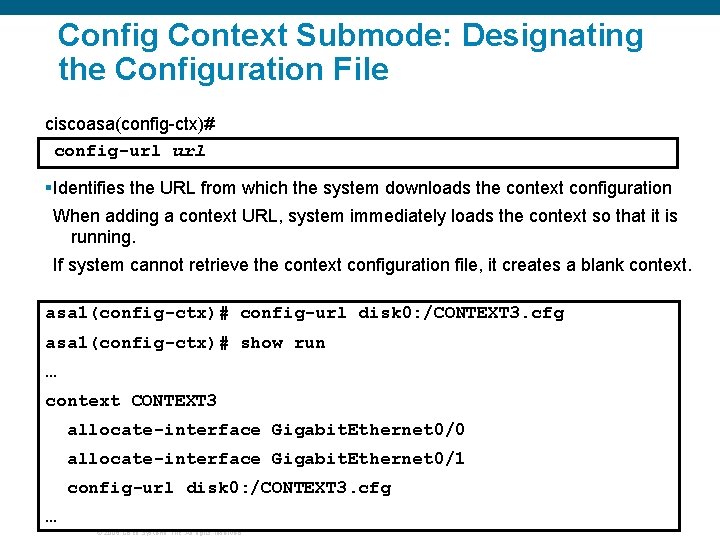
Config Context Submode: Designating the Configuration File ciscoasa(config-ctx)# config-url §Identifies the URL from which the system downloads the context configuration When adding a context URL, system immediately loads the context so that it is running. If system cannot retrieve the context configuration file, it creates a blank context. asa 1(config-ctx)# config-url disk 0: /CONTEXT 3. cfg asa 1(config-ctx)# show run … context CONTEXT 3 allocate-interface Gigabit. Ethernet 0/0 allocate-interface Gigabit. Ethernet 0/1 config-url disk 0: /CONTEXT 3. cfg … © 2006 Cisco Systems, Inc. All rights reserved.
Assigning Resources to Contexts ciscoasa(config-ctx)# member class_name Assigns a context to a resource class asa 1(config)# class MEDIUM-RESOURCE-SET asa 1(config-class)# limit-resource ASDM 4 asa 1(config-class)# limit-resource conns 20% asa 1(config-class)# exit asa 1(config)# context CONTEXT 1 asa 1(config-ctx)# member MEDIUM-RESOURCE-SET §As a member of class MEDIUM-RESOURCE-SET, CONTEXT 1 has the following limits: ASDM sessions: Four Connections: 20% © 2006 Cisco Systems, Inc. All rights reserved.
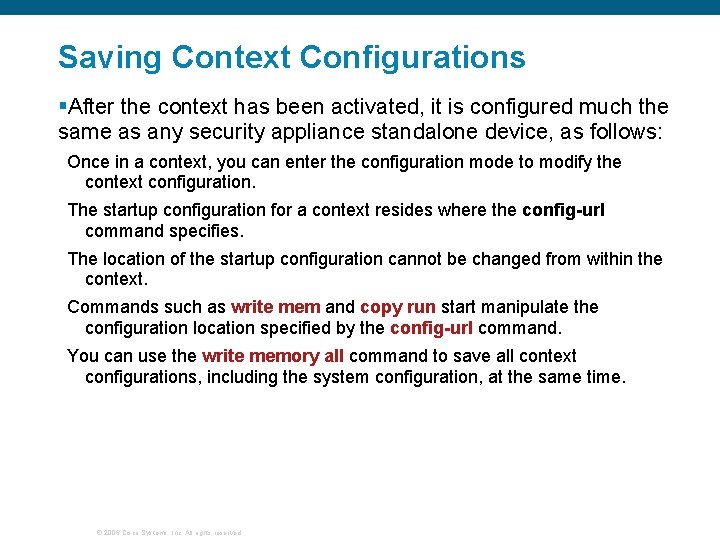
Saving Context Configurations §After the context has been activated, it is configured much the same as any security appliance standalone device, as follows: Once in a context, you can enter the configuration mode to modify the context configuration. The startup configuration for a context resides where the config-url command specifies. The location of the startup configuration cannot be changed from within the context. Commands such as write mem and copy run start manipulate the configuration location specified by the config-url command. You can use the write memory all command to save all context configurations, including the system configuration, at the same time. © 2006 Cisco Systems, Inc. All rights reserved.
Managing Security Contexts © 2006 Cisco Systems, Inc. All rights reserved.
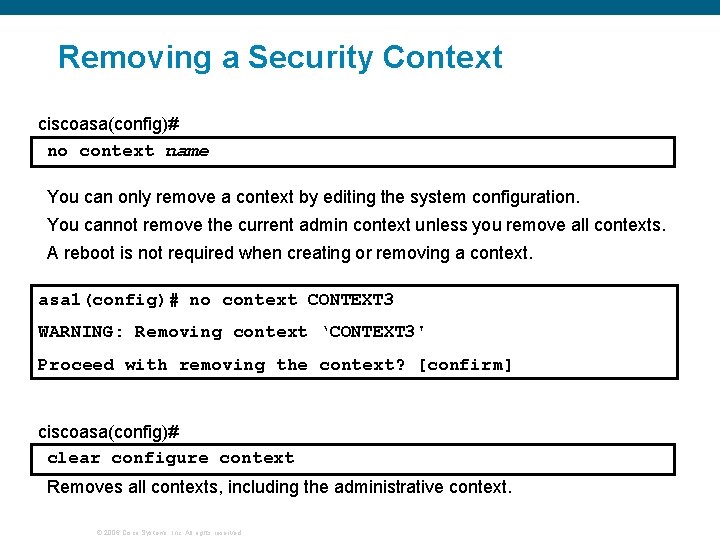
Removing a Security Context ciscoasa(config)# no context name You can only remove a context by editing the system configuration. You cannot remove the current admin context unless you remove all contexts. A reboot is not required when creating or removing a context. asa 1(config)# no context CONTEXT 3 WARNING: Removing context ‘CONTEXT 3' Proceed with removing the context? [confirm] ciscoasa(config)# clear configure context Removes all contexts, including the administrative context. © 2006 Cisco Systems, Inc. All rights reserved.
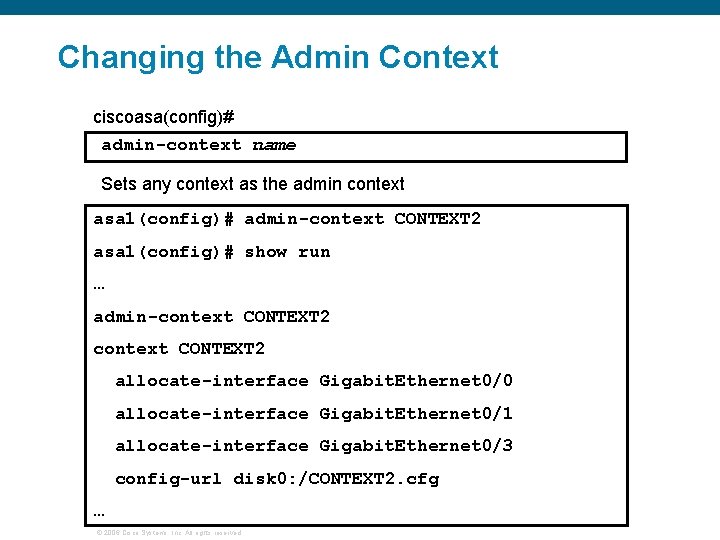
Changing the Admin Context ciscoasa(config)# admin-context name Sets any context as the admin context asa 1(config)# admin-context CONTEXT 2 asa 1(config)# show run … admin-context CONTEXT 2 allocate-interface Gigabit. Ethernet 0/0 allocate-interface Gigabit. Ethernet 0/1 allocate-interface Gigabit. Ethernet 0/3 config-url disk 0: /CONTEXT 2. cfg … © 2006 Cisco Systems, Inc. All rights reserved.
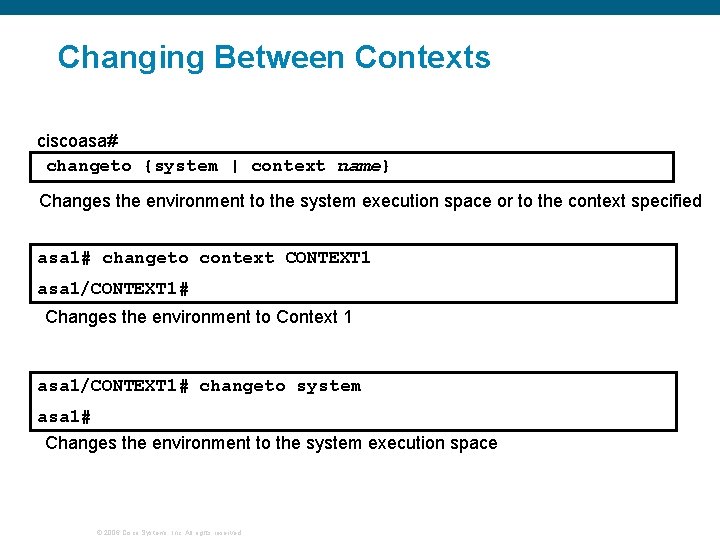
Changing Between Contexts ciscoasa# changeto {system | context name} Changes the environment to the system execution space or to the context specified asa 1# changeto context CONTEXT 1 asa 1/CONTEXT 1# Changes the environment to Context 1 asa 1/CONTEXT 1# changeto system asa 1# Changes the environment to the system execution space © 2006 Cisco Systems, Inc. All rights reserved.
Viewing Context Information ciscoasa# show context [name | detail | count] Displays contexts and context information An asterisk (*) designates an admin context. asa 1# show context Context Name Interfaces *admin Gigabit. Ethernet 0/0 URL disk 0: /admin. cfg Gigabit. Ethernet 0/1 CONTEXT 1 Gigabit. Ethernet 0/0 Gigabit. Ethernet 0/2 CONTEXT 2 Gigabit. Ethernet 0/0 disk 0: /CONTEXT 2. cfg Gigabit. Ethernet 0/3 Total active Security Contexts: 3… © 2006 Cisco Systems, Inc. All rights reserved. disk 0: /CONTEXT 1. cfg
Viewing Context Information (Cont. ) ciscoasa# show context [name | detail | count] The detail option shows additional information. The count option shows the total number of contexts. asa 1# show context detail Context "admin", has been created, but initial ACL rules not complete Config URL: disk 0: /admin. cfg Real Interfaces: Gigabit. Ethernet 0/0, Gigabit. Ethernet 0/1 Mapped Interfaces: Gigabit. Ethernet 0/0, Gigabit. Ethernet 0/1 Flags: 0 x 00000013, ID: 1 … © 2006 Cisco Systems, Inc. All rights reserved.
Summary © 2006 Cisco Systems, Inc. All rights reserved.
Summary Virtual firewalls allow you to separate the security appliance into multiple independent firewalls called security contexts. Packets can be classified by: Unique interfaces MAC addresses NAT configuration You can assign a different MAC address to each context that uses a shared interface. You can configure resource management to limit the use of resources per context. Security contexts can be managed and configured independently. © 2006 Cisco Systems, Inc. All rights reserved.
Q and A © 2006 Cisco Systems, Inc. All rights reserved.
© 2006 Cisco Systems, Inc. All rights reserved.