
Network Management Protocols Network Management Spring 2013 Bahador
Network Management Protocols Network Management Spring 2013 Bahador Bakhshi CE & IT Department, Amirkabir University of Technology This presentation is based on the slides listed in references.
Outline Ø Network Management Protocol Ø Communication Patterns Ø SNMP Ø CLI Ø syslog Ø Netconf Ø Net. Flow/IPFIX 2

Outline Ø Network Management Protocol Ø Communication Patterns Ø SNMP Ø CLI Ø syslog Ø Netconf Ø Net. Flow/IPFIX 3
Introduction Ø Interactions between managers and agents follow certain basic patterns Ø Regardless of the particular management protocol Ø The pattern includes Ø Management protocol layering Ø Manager initiated communications Ø Agent initiated communications 4
Layers of Management Interactions Ø Network management is based on protocols stack (the layering) Ø Similar to other networked applications Ø Management protocol is an application layer protocol Ø Provides primitives for management applications Ø E. g. , Whole web application use HTTP Ø To simplify & organize the discussion Ø Layering of network management protocol 5
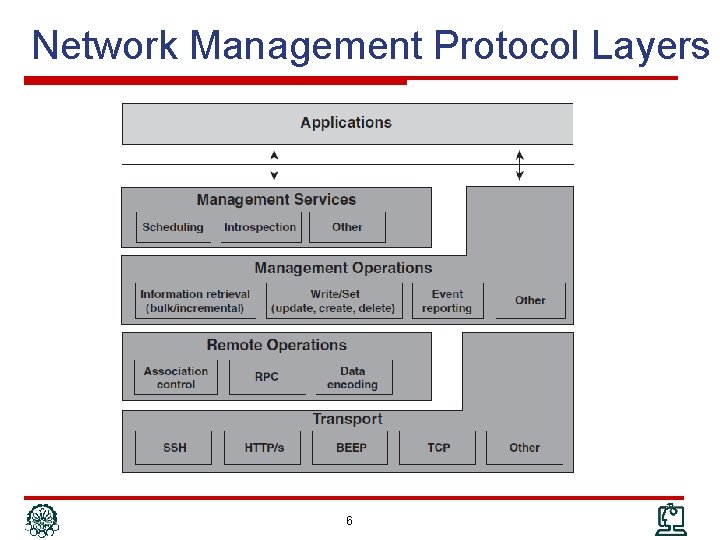
Network Management Protocol Layers 6
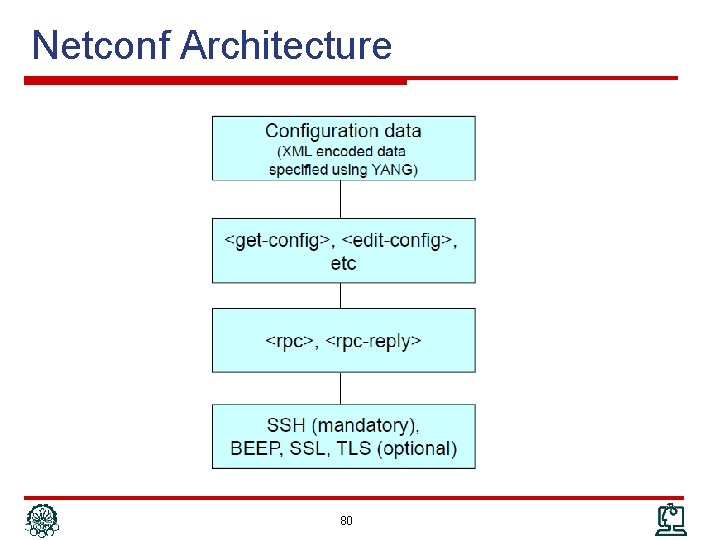
NM Protocol: Transport Ø A L 4/7 protocol for end-to-end communication Ø In fact, it is a separated independent protocol Ø However, NM protocols impose restrictions on transport protocols Ø Make assumptions and depend on it Ø Management interface specifies it Ø E. g. , Ø SNMP: UDP Ø Net. Conf: RPC on SSH on TCP 7
NM Protocol: Remote Operation Ø Mechanism to implement performing remote operations Ø Are not a separated protocol Ø Are provided by the management protocol Ø May not present in every NM protocol Ø Major functionalities Ø Association control Ø Remote operation call/invocation Ø Payload encoding 8
NM Protocol: Remote Operation (cont’d) Ø Association control Ø How to establish and tear down management sessions It is independent of transport protocol: connection oriented/less Ø Mutual understanding between manager and agent that transport protocol is not aware of Ø E. g. , to negotiate a particular functional profile to use Ø Ø Remote operation Ø Mechanism to delineate management requests and responses in communication exchanges, E. g. , RPC Ø Managing Request/Response IDs because of asynchronous communication due to its efficiency Ø Encoding Ø How to encode management data in PDU: BER, XML, UTF-8, … 9
NM Protocol: Management Operations Ø The core of management protocol stack Ø Management primitives Ø Typical operations Ø Read/Get: To read the value of a MO Ø Write/Set: To modify the value of a MO Create or Deletion of a MO Ø Event: To report occurrence of event to manager Ø Action: To perform an operation on agent Ø Some rarely used: subscribe, … Ø Ø Not every protocol provides all operations 10
NM Protocol: Management Service Ø Additional offering to management applications Ø Builds itself on the Management Operations layer Ø Combine the management primitives with additional capabilities Ø Examples Ø Subscription to specific events Ø Scheduling management operations Ø Actually management services are not really a layer because management operations are still accessible to management applications 11
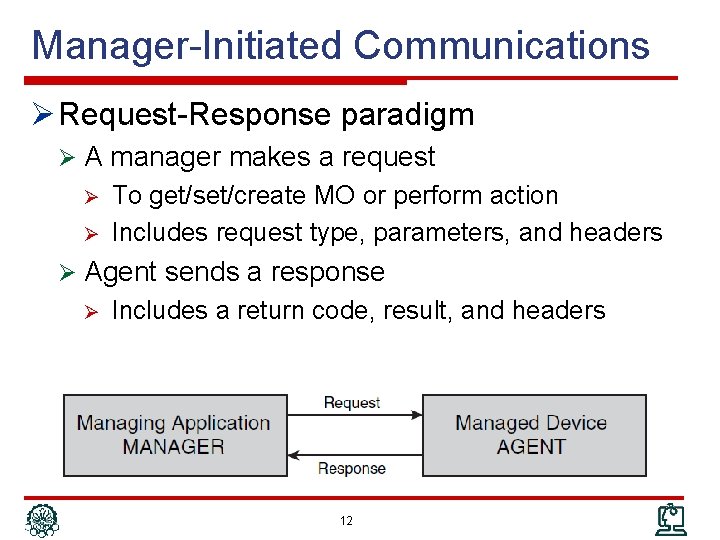
Manager-Initiated Communications Ø Request-Response paradigm Ø A manager makes a request Ø Ø To get/set/create MO or perform action Includes request type, parameters, and headers Ø Agent sends a response Ø Includes a return code, result, and headers 12
Manager-Initiated Communications Ø Information Retrieval: Polling Ø Basic types Ø Requests for Configuration Information Ø Requests for Operational Data and State Information Ø Advanced types Ø Bulk Requests and Incremental Operations Ø Historical Information Ø Configuration Operations Ø Main issue: Failure Recovery Ø Actions 13
Manager-Initiated: Information Retrieval Ø Polling mechanism steps: Ø The manager asks the agent for a particular piece, or pieces, of management information Ø The agent checks the validity of the request and retrieves the requested information Ø The agent then responds, Ø The requested information Ø An error-response code why request could not be fulfilled Ø An error message is sent in case the agent Ø Does not understand the request Ø Does not know the type of management information 14
Polling (cont’d) Ø Requests for configuration information Ø Physical or logical configuration information Discovery, Provisioning, Fault, … Ø Typically infrequent and (maybe) external changes Ø Caching is efficient Management DBs Ø Ø Requests for operational and state information Ø Network monitoring Fault detection, performance, accounting, … Ø Manager cannot change the information Ø Typically frequent changes Ø (Typically) no Caching DB; on demand snapshots Ø These requests can also be Ø Bulk request: Ask several MO which has the same attributes Ø Historical information: Snapshot of management data in an interval 15
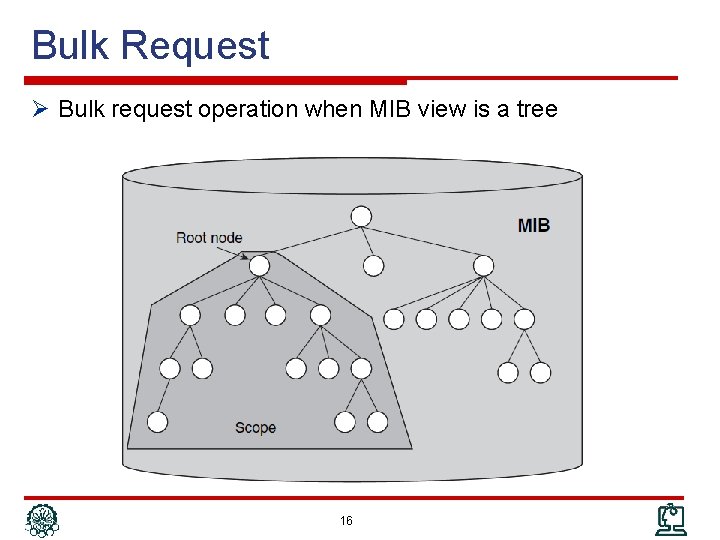
Bulk Request Ø Bulk request operation when MIB view is a tree 16
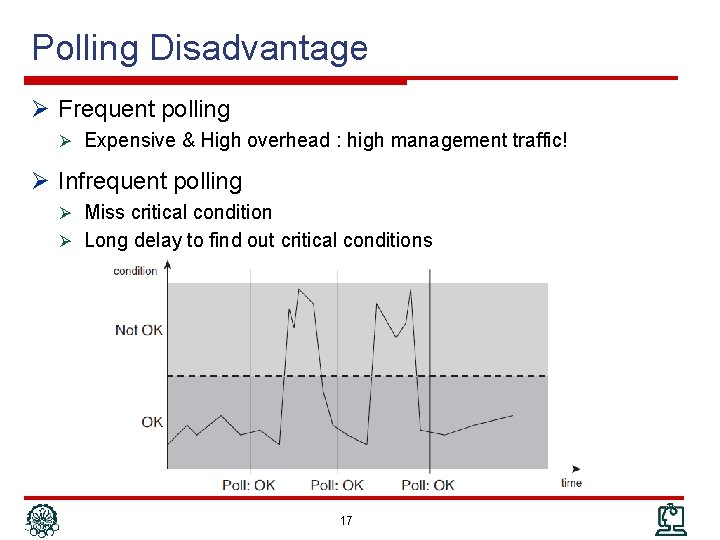
Polling Disadvantage Ø Frequent polling Ø Expensive & High overhead : high management traffic! Ø Infrequent polling Ø Miss critical condition Ø Long delay to find out critical conditions 17
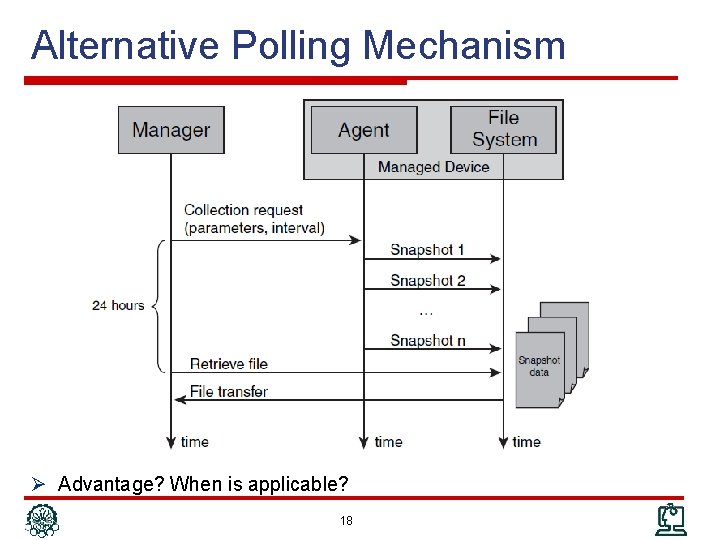
Alternative Polling Mechanism Ø Advantage? When is applicable? 18
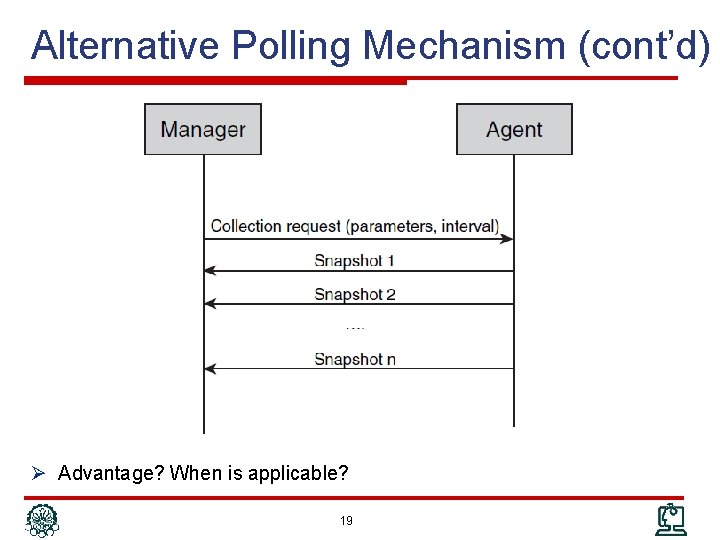
Alternative Polling Mechanism (cont’d) Ø Advantage? When is applicable? 19
Manager-Initiated: Configuration Ø To change configuration information Ø Parameter settings to affect agent’s behavior Ø Some aspects are fundamentally different from information retrieval requests Ø Failure recovery Failure in configuration is much more than information retrieval Ø Configuration is much more sensitive to failures Ø Response of configuration requests are typically a success/failure status code not huge data Ø 20
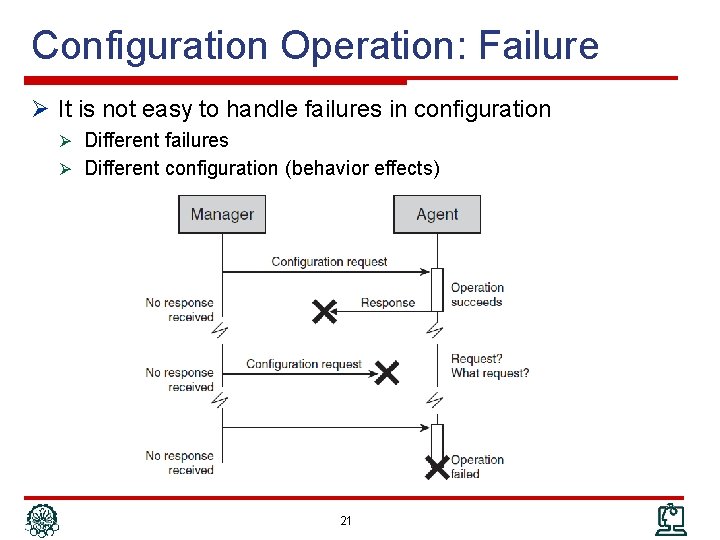
Configuration Operation: Failure Ø It is not easy to handle failures in configuration Ø Different failures Ø Different configuration (behavior effects) 21
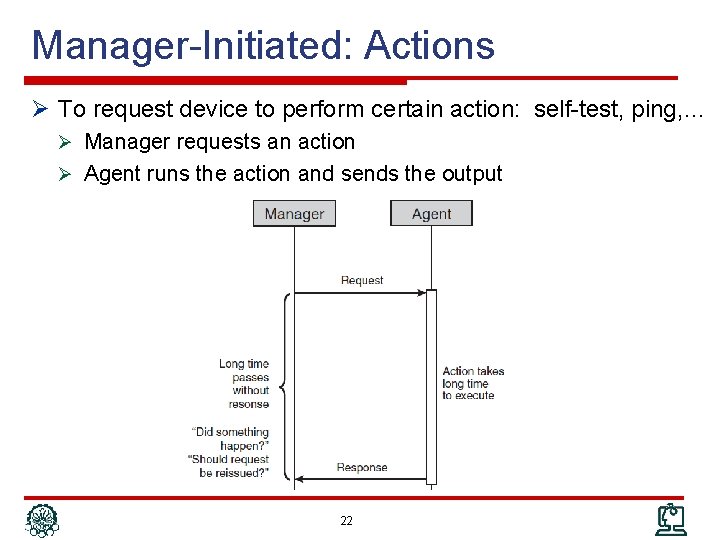
Manager-Initiated: Actions Ø To request device to perform certain action: self-test, ping, … Ø Manager requests an action Ø Agent runs the action and sends the output 22
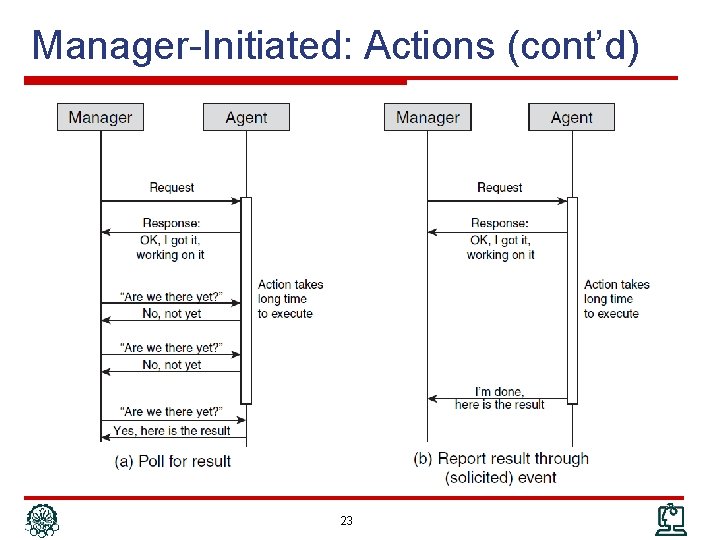
Manager-Initiated: Actions (cont’d) 23
Agent-Initiated Communications Ø Agent sends the manager an event (trap) message to bring something to the manager’s attention Ø Event messages correspond to interrupts that help managers do their jobs better Ø Unsolicited communications Ø Categories Ø Alarms: Requires management attention Ø Configuration-change: Inform of a configuration change in the device. Ø Threshold-crossing: Performance-related state variable has exceeded a certain value Ø Might require management attention Ø Logging: Occur regularly in network operation Ø Typically, do not require an operator’s attention Ø But need to be logged 24
Event Messages Ø The included information in event messages: Ø The system from which the event originated Ø IP, Name, ID, … Ø A time stamp of when the event occurred Ø The type of event that has occurred Ø Security, Fault, …. Ø Event detail information 25
Event: Alarms Ø Alarm: unexpected event has occurred that likely requires management attention Ø Examples Ø Router line card failure Ø Loss of connectivity Ø Alarm: condition that persists over a period of time; two states Ø On: Abnormal condition starts Ø Off: Conditions back to normal case Ø Additional information in alarm messages Ø Alarm severity: Critical, Major, Minor, Warning, Cleared Ø Additional information to troubleshoot the alarm 26
Event: Configuration Change Ø 1) Many applications need accurate information of network configuration Ø 2) Due to infrequent changes, configuration information are cached Ø 3) Configuration can be modified externally (not through the NM application), e. g. , CLI Ø 1 + 2 + 3 configuration change event Ø To keep update the cache Ø Ø Without wasting bandwidth Without out-of-date cache periods 27
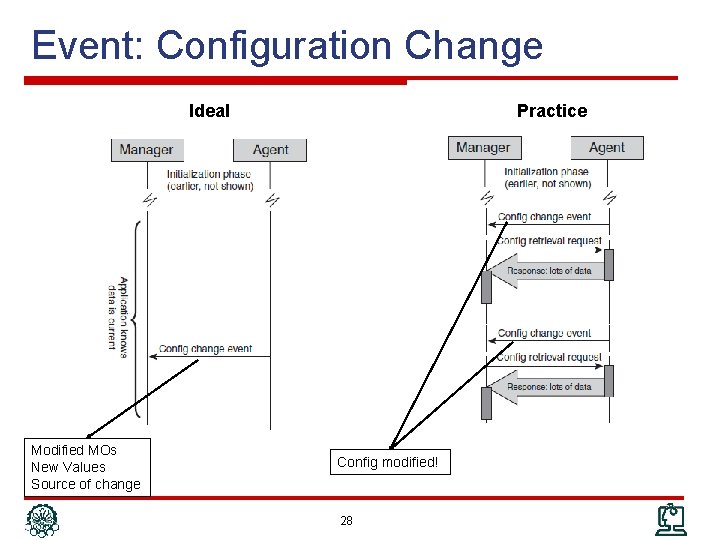
Event: Configuration Change Ideal Modified MOs New Values Source of change Practice Config modified! 28
Event: Threshold Crossing Ø A monitored MIB (MO) has crossed a certain preconfigured value (threshold) Ø Similar to alarms Ø Two states: on & off Ø Information included in this event Ø The name & value of the monitored MIB Ø The value of the threshold Ø Whether the threshold has been crossed or cleared Ø Oscillation around the threshold Ø Lot of cross & clear events Ø Hysteresis threshold to clear the event 29
Event vs. Polling Ø Event-based management is more efficient Ø Less wasteful, more scalable, more responsive Ø Wherever possible, event-based management should be the pattern of choice Ø However; event-based is not possible in every case (is not efficient & convenient) Ø Example: Service provisioning Ø Event reliability Ø In polling based, initiator wait for response can detect failures Ø In event based, initiator does not need response Ø Ø Reliable transport protocol Request acknowledge for events 30
Outline Ø Network Management Protocol Ø Communication Patterns Ø SNMP Ø CLI Ø syslog Ø Netconf Ø Net. Flow/IPFIX 31
SNMP Ø Simple Network Management Protocol Ø Widely, successful Ø To retrieve operational data Ø Original SNMP: SNMPv 1 Ø Keep SNMP agent implementations simple Ø User extensible with new management information Ø Current version: SNMPv 3 Ø Not quite as simple, more complex than original one Ø Adds security and scalability to design goals Ø SNMPv 1, SNMPv 2 c and SNMPv 3 all in use today 32
SNMP Standard Ø SNMP is a series of IETF RFCs: Ø 1) The protocol itself Ø 2) The MIB specification language Ø SMIv 2 Ø 3) Series of standard MIB definitions Ø 4) The architecture of agent implementations 33
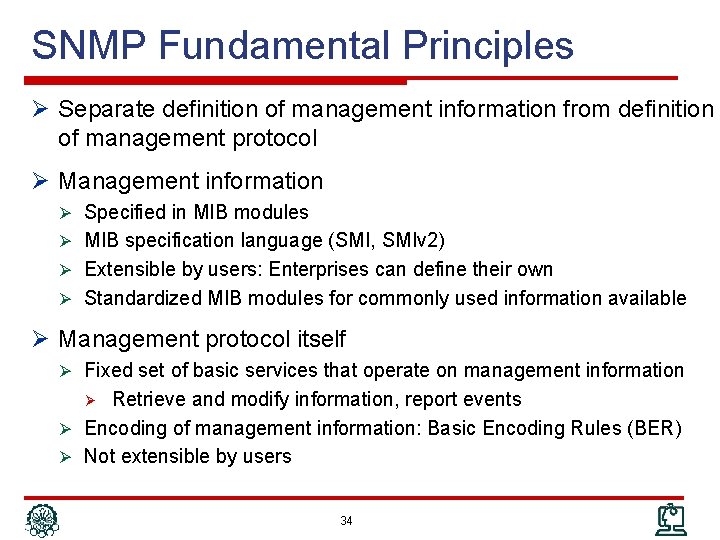
SNMP Fundamental Principles Ø Separate definition of management information from definition of management protocol Ø Management information Ø Specified in MIB modules Ø MIB specification language (SMI, SMIv 2) Ø Extensible by users: Enterprises can define their own Ø Standardized MIB modules for commonly used information available Ø Management protocol itself Ø Fixed set of basic services that operate on management information Retrieve and modify information, report events Ø Encoding of management information: Basic Encoding Rules (BER) Ø Not extensible by users Ø 34
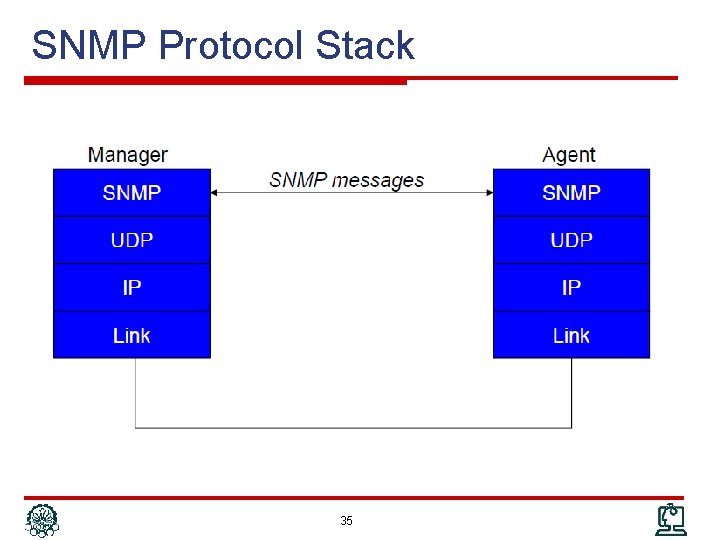
SNMP Protocol Stack 35
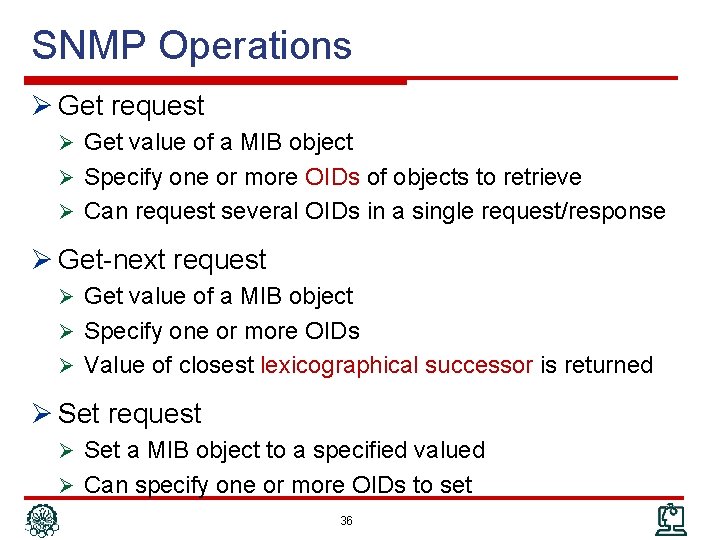
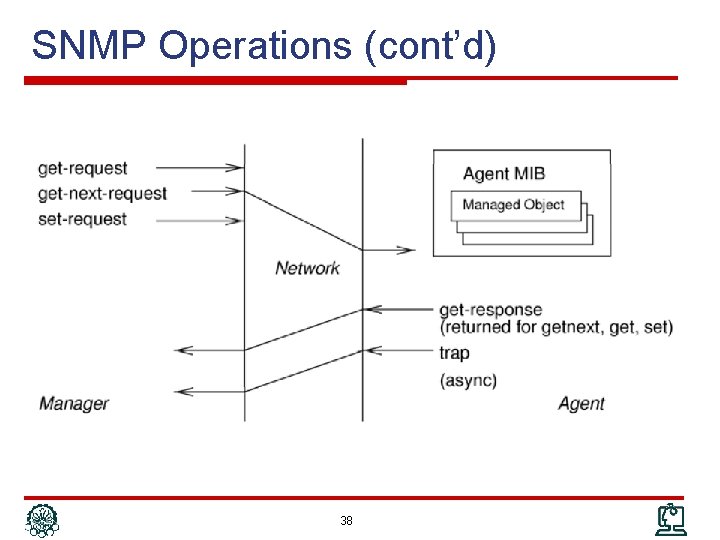
SNMP Operations Ø Get request Ø Get value of a MIB object Ø Specify one or more OIDs of objects to retrieve Ø Can request several OIDs in a single request/response Ø Get-next request Ø Get value of a MIB object Ø Specify one or more OIDs Ø Value of closest lexicographical successor is returned Ø Set request Ø Set a MIB object to a specified valued Ø Can specify one or more OIDs to set 36
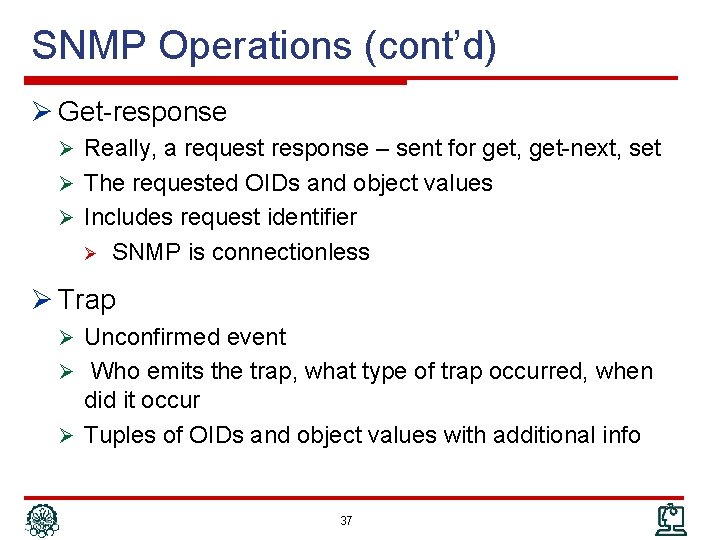
SNMP Operations (cont’d) Ø Get-response Ø Really, a request response – sent for get, get-next, set Ø The requested OIDs and object values Ø Includes request identifier Ø SNMP is connectionless Ø Trap Ø Unconfirmed event Ø Who emits the trap, what type of trap occurred, when did it occur Ø Tuples of OIDs and object values with additional info 37
SNMP Operations (cont’d) 38
Actions in SNMP Ø SNMP does not provide the ability to invoke an “action” Ø Retrieve or Set management information, Ø But do not cause the device to “do” something Ø Work around: model actions as management information Ø Action Design Pattern: Ø One MIB object to serve as “action trigger” Ø MIB objects for input parameters, as required Ø One MIB object to contain return code 39
SNMPv 1 Evolution Ø SNMPv 1 design goals Ø There’s a big “S” in SNMP Ø Focus on easy implementation on agent devices Ø Many vendors were interested to implement it Ø Separation between protocol operations and management information visionary at the time Wide success due to the design choices Ø However, SNMPv 1 drawbacks motivated development of newer SNMP versions Ø SNMPv 2 c, SNMPv 3 Ø MIBs can be used with newer protocol versions Ø SNMPv 1 continues to be widely used 40
SNMPv 2 c Ø Addresses some of the bulk retrieval issues, unreliability issues Ø Does not address security issues Ø SNMPv 2 tried to but security model broken Ø SNMPv 2 used in conjunction with community strings termed SNMPv 2 c – “SNMPv 2 with Community strings” Ø Adds two new operations Ø Inform request Ø Get bulk request 41
SNMPv 3 Ø “SNMPv 2 c plus security” Ø No changes to SNMP operations Ø Additions Ø SNMP messages can carry proper security parameters This is the most important change Ø Significant expansion of scope Ø Includes standardized and modularized architecture for SNMP agent implementations Ø Does not affect interoperability aspects between agents and managers Ø 42
SNMPv 3 Assessment Ø SNMPv 3 is, finally, a secure protocol Ø This means, “sets” are secure Ø Could be used for provisioning and configuration Ø Too late? Ø Ø Management apps developed their workarounds, learned to live with limitations SNMP data models may be awkward for provisioning operations Ø Ø Ø Lack of task orientation Lack of transaction support New, more powerful protocols for configuration (e. g. Netconf) Ø It is also far more complex than the original SNMP Ø IETF does not pursue further evolution of SNMP 43
Outline Ø Network Management Protocol Ø Communication Patterns Ø SNMP Ø CLI Ø syslog Ø Netconf Ø Net. Flow/IPFIX 44
CLI Ø Command Line Interface Ø Administrator interface for networking devices Ø It is for human operator to interact with the device Ø Not intended for (but also used by) electronic applications issues Ø Accessible via Console, Telnet, SSH Ø Very comprehensive and complete Ø Anything you can configure you can do through CLI Ø Most (not all) information can be viewed using CLI Ø Not a standard – different flavors exist but same concepts Ø Different vendors – Cisco, Juniper, Huawei, … Ø Not fixed set of command, new features add new commands Ø Different from SNMP which has fixed set of primitives 45
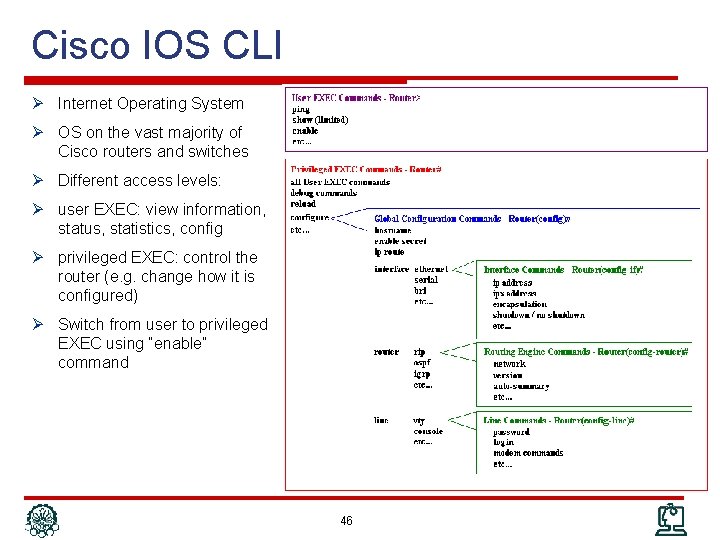
Cisco IOS CLI Ø Internet Operating System Ø OS on the vast majority of Cisco routers and switches Ø Different access levels: Ø user EXEC: view information, status, statistics, config Ø privileged EXEC: control the router (e. g. change how it is configured) Ø Switch from user to privileged EXEC using “enable” command 46
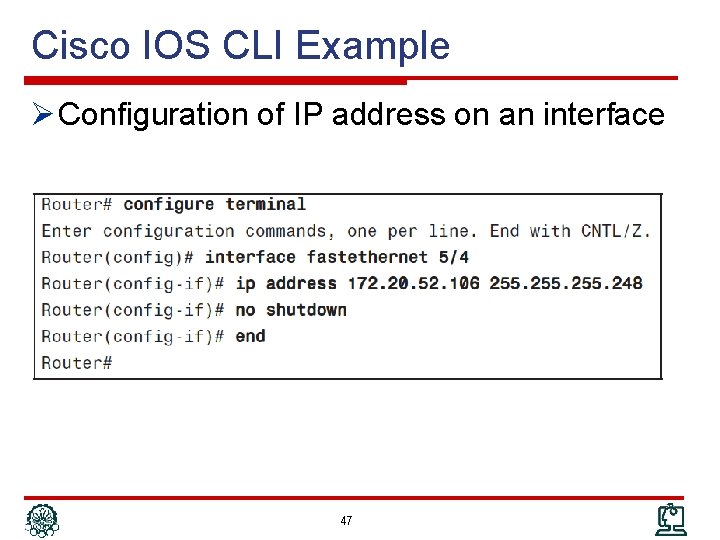
Cisco IOS CLI Example Ø Configuration of IP address on an interface 47
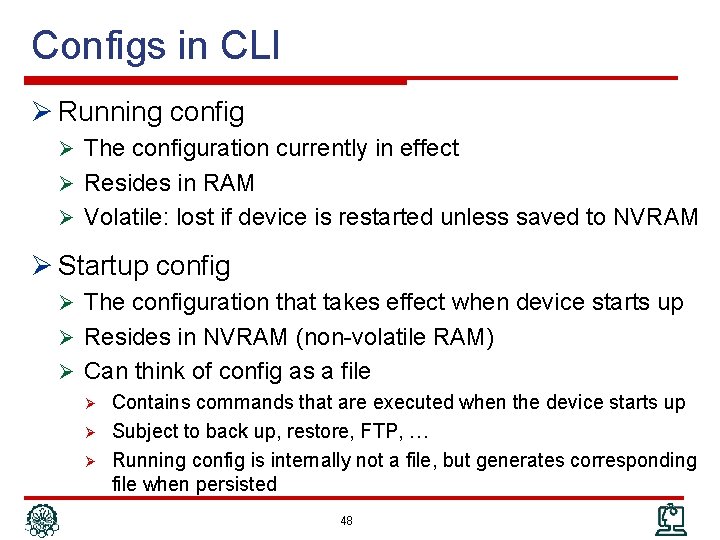
Configs in CLI Ø Running config Ø The configuration currently in effect Ø Resides in RAM Ø Volatile: lost if device is restarted unless saved to NVRAM Ø Startup config Ø The configuration that takes effect when device starts up Ø Resides in NVRAM (non-volatile RAM) Ø Can think of config as a file Ø Contains commands that are executed when the device starts up Ø Subject to back up, restore, FTP, … Ø Running config is internally not a file, but generates corresponding file when persisted 48
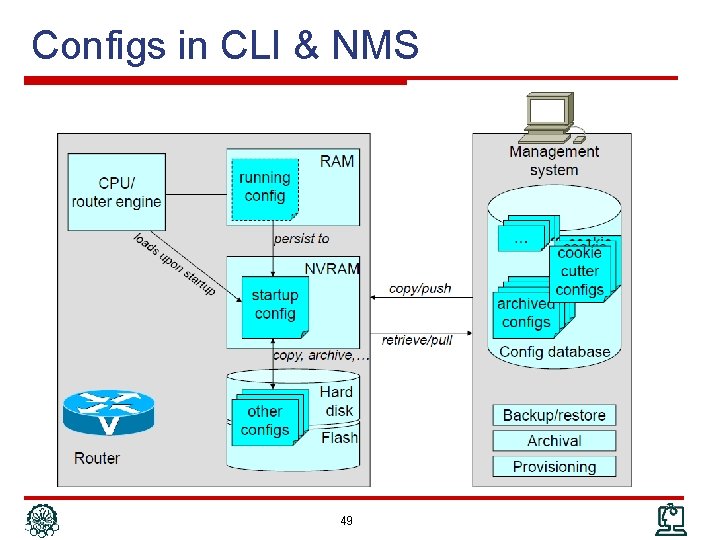
Configs in CLI & NMS 49
CLI for Humans Ø Many features to simplify interactions Ø Help functions, Autocompletion, History, Editing, … Ø Very rich set of functionality Ø Literally, thousands of commands Ø Every new features extends the set Ø Ø New options/ subcommand modes Additional information that can be retrieved Ø Commands highly productive for human administrators Ø Large user base, trained work force 50
CLI as an Electronic Interface Ø CLI intended for humans, not management applications Ø So why even consider it Ø Very rich set of functionality Ø Not all features are covered via SNMP or other management interfaces Ø Successfully used with provisioning systems Ø Limited set of commands needed Ø Information flows from NMS to managed device Ø In many cases: management system does not issue command directly but manages configuration files 51
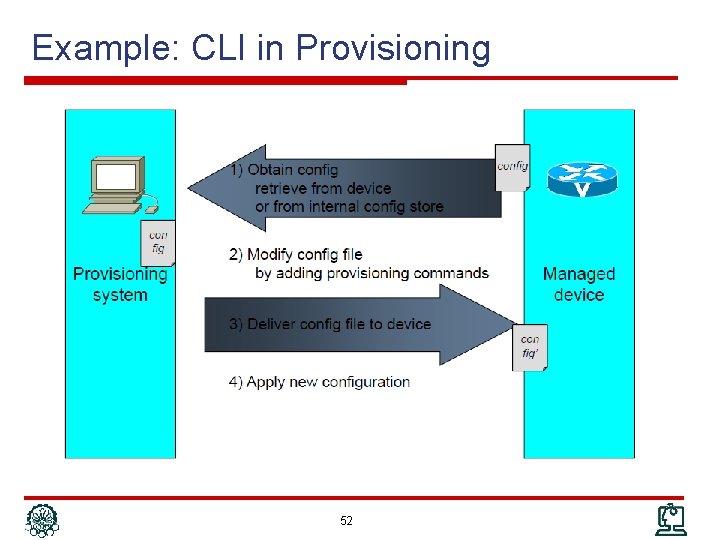
Example: CLI in Provisioning 52
CLI Issues Ø How to process the response Ø Easily interpretable by humans, not so easily by applications Ø No consistent grammar Ø Different delimiters Ø Parameter labels: in front, or after, or not at all Ø Horizontal or vertical arrangements (tables) Ø show output is just “printf” Ø Techniques Ø Regular expression matching Ø Application of “templates” Ø Can deal with on a case-by-case basis, but… Ø Large number commands Ø Variations between vendors, device types, versions 53
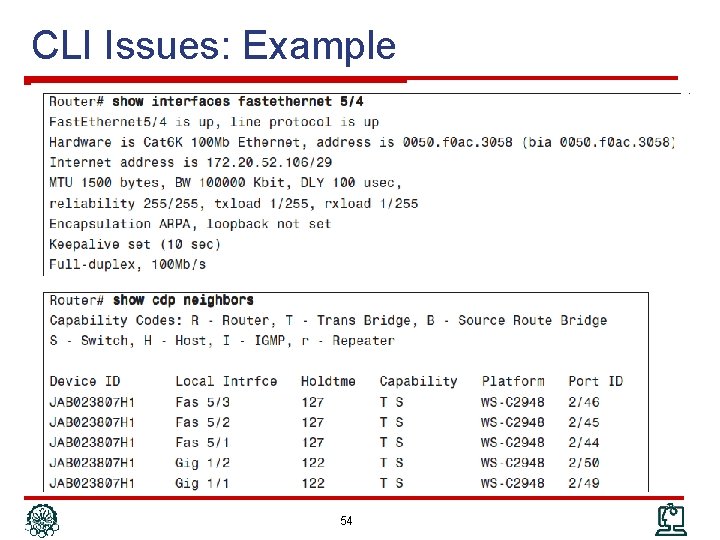
CLI Issues: Example 54
CLI Concluded Ø Very rich set of functionality Ø Literally, thousands of commands Ø Every new features extends the set Ø New options/subcommand modes Ø Commands productive for human administrators Ø Large user base, trained work force Ø Not well suited (and never intended) for managemen applications Ø Retrieval and interpretation of management information has challenges Ø No event reporting (CLI should join with other protocols) 55
Outline Ø Network Management Protocol Ø Communication Patterns Ø SNMP Ø CLI Ø syslog Ø Netconf Ø Net. Flow/IPFIX 56
syslog Ø System messages written to a log Ø Provide trail of device activity Ø Each syslog message is an entry in that log Ø Offline analysis of logs by system administrator Ø Not specific to network devices (servers, …) Ø The “message” can be Ø Error messages … system debug messages Ø The “log” can be Ø A local file on filesystem Ø A socket to send log messages directly to remote host 57
syslog (cont’d) Ø Used as general event mechanism Ø Very comprehensive coverage of events Ø Management applications as users Ø Near-real time Ø Compare with CLI Ø Easy instrumentation Ø Comprehensive coverage Ø Consumption intended for administrators Ø Processed also by management applications Ø syslog usage Ø Many syslog messages might never be of any practical use Ø Under certain circumstances, the capability to retrace much of the device’s activity trail is invaluable Ø Ø Services degrading severely Suspected network break-ins 58
syslog Messages Ø Each message is a line in the log Ø Header: Prefix of the line Ø Body: Content of message Ø Header Ø Minimal but essential information about the message Ø Very structured manner: Time, Host, Severity, Subsystem, Sequence #, … Ø Body Ø The informal content of message Ø Even plain English text Ø However there is not one common standard header for all devices 59
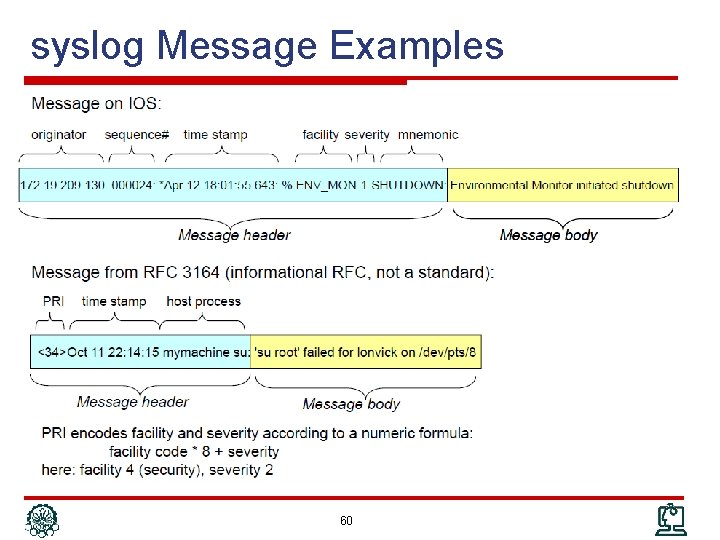
syslog Message Examples 60
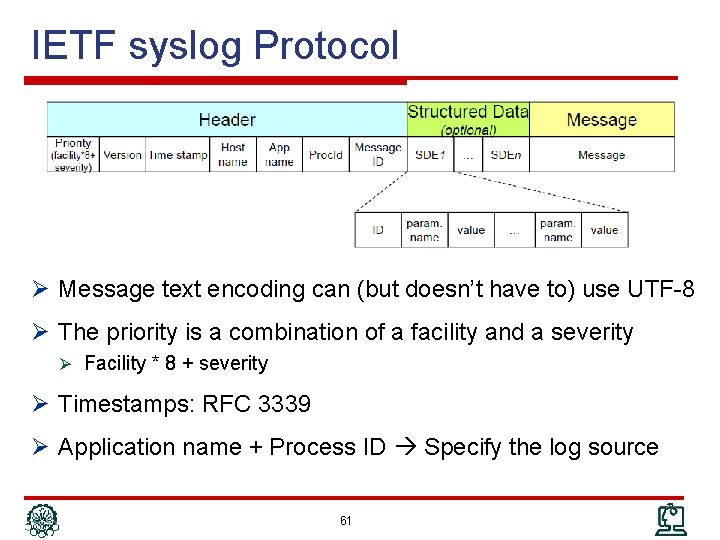
IETF syslog Protocol Ø Message text encoding can (but doesn’t have to) use UTF-8 Ø The priority is a combination of a facility and a severity Ø Facility * 8 + severity Ø Timestamps: RFC 3339 Ø Application name + Process ID Specify the log source 61
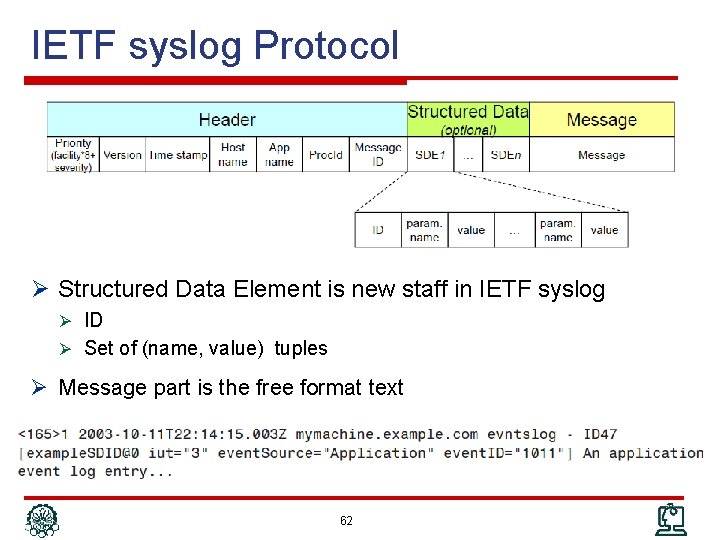
IETF syslog Protocol Ø Structured Data Element is new staff in IETF syslog Ø ID Ø Set of (name, value) tuples Ø Message part is the free format text 62
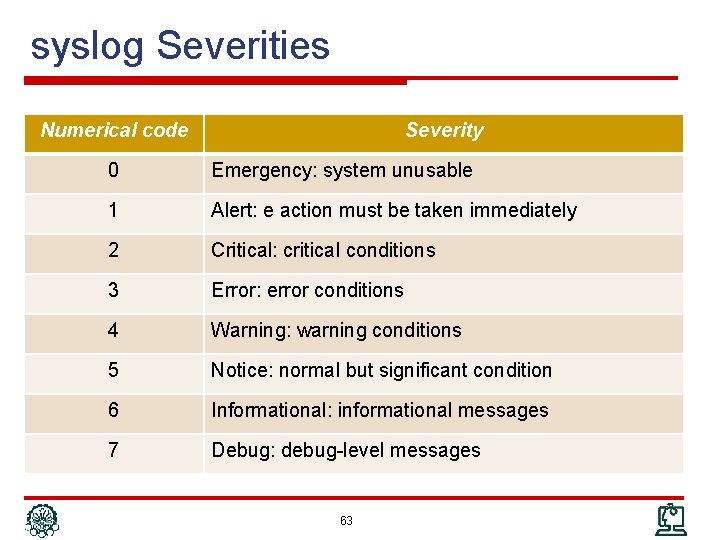
syslog Severities Numerical code Severity 0 Emergency: system unusable 1 Alert: e action must be taken immediately 2 Critical: critical conditions 3 Error: error conditions 4 Warning: warning conditions 5 Notice: normal but significant condition 6 Informational: informational messages 7 Debug: debug-level messages 63
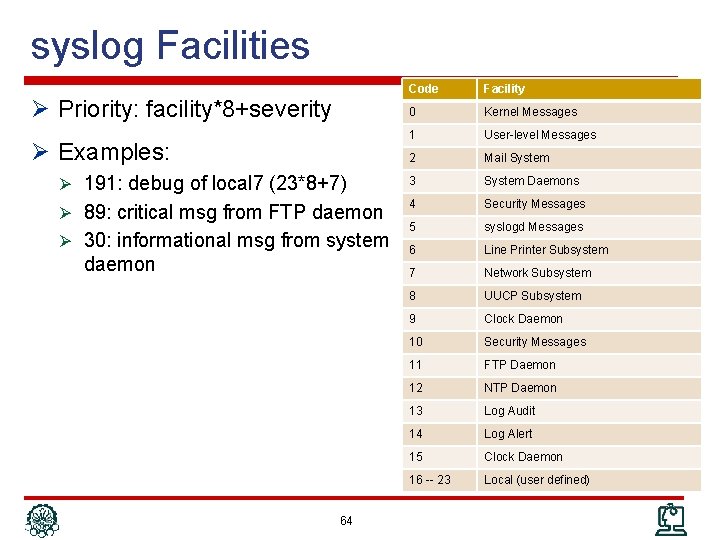
syslog Facilities Code Facility 0 Kernel Messages 1 User-level Messages 2 Mail System Ø 191: debug of local 7 (23*8+7) 3 System Daemons Ø 89: critical msg from FTP daemon 4 Security Messages 5 syslogd Messages 6 Line Printer Subsystem 7 Network Subsystem 8 UUCP Subsystem 9 Clock Daemon 10 Security Messages 11 FTP Daemon 12 NTP Daemon 13 Log Audit 14 Log Alert 15 Clock Daemon 16 -- 23 Local (user defined) Ø Priority: facility*8+severity Ø Examples: Ø 30: informational msg from system daemon 64
syslog Deployment: Definitions Ø A machine that can generate a message will be called a "device" Ø A machine that can receive the message and forward it to another machine will be called a "relay" Ø A machine that receives the message and does not relay it to any other machines will be called a "collector" Ø This has been known as a "syslog server" 65
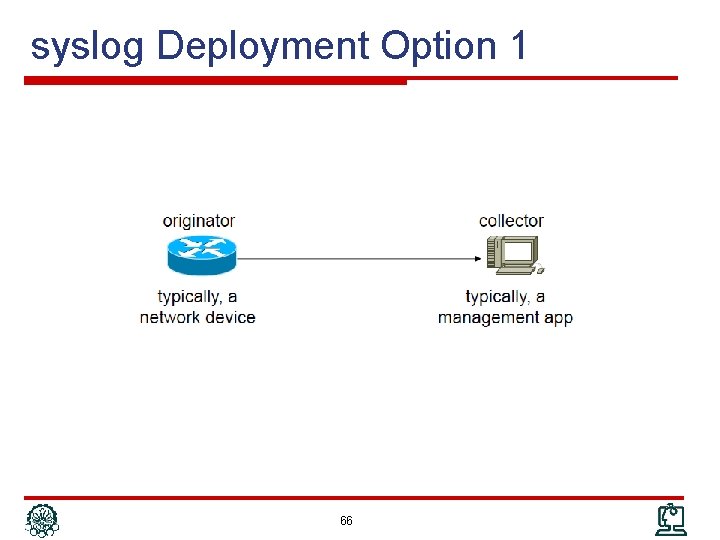
syslog Deployment Option 1 66
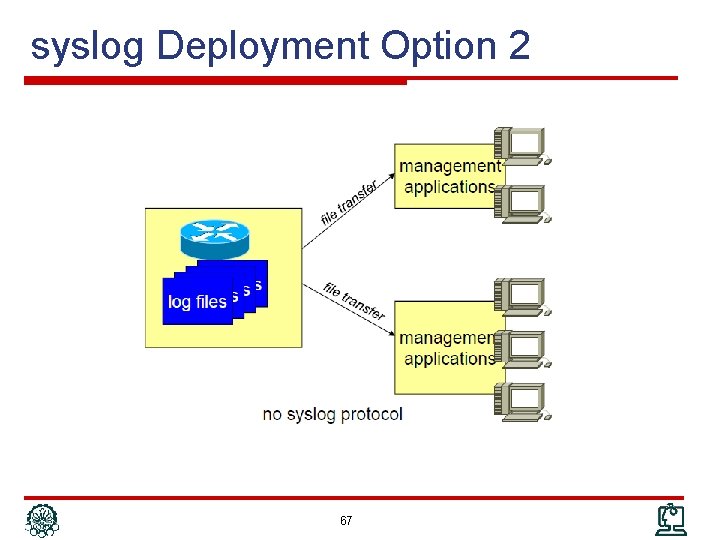
syslog Deployment Option 2 67
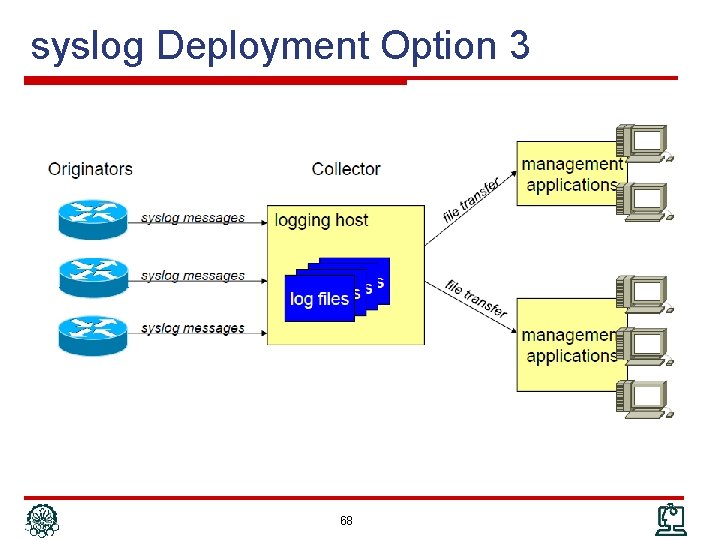
syslog Deployment Option 3 68
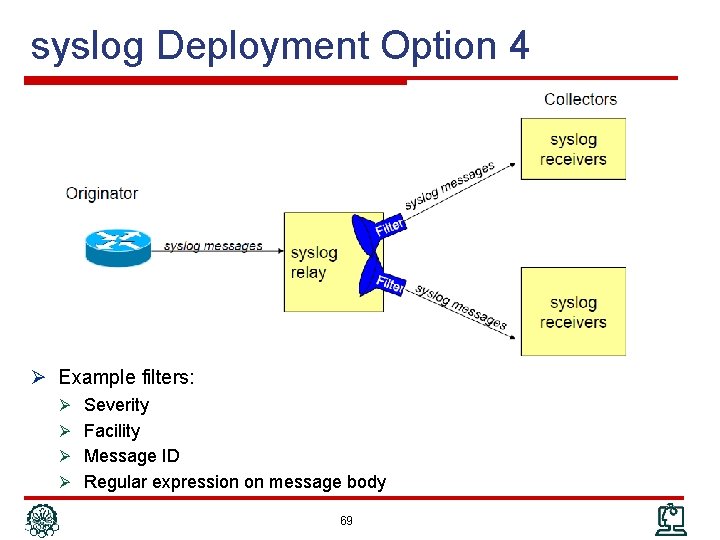
syslog Deployment Option 4 Ø Example filters: Ø Severity Ø Facility Ø Message ID Ø Regular expression on message body 69
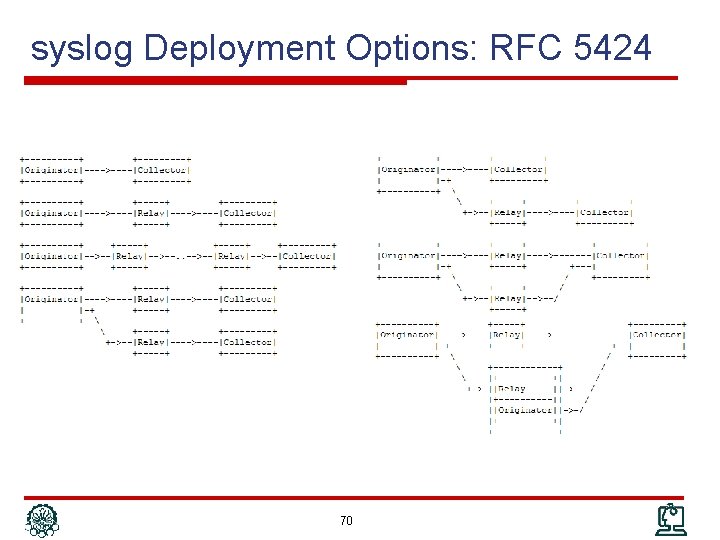
syslog Deployment Options: RFC 5424 70
syslog Deployment: Security & Reliability Ø Authentication: No authentication mechanism Ø Misconfigured devices or attacker can send fake log Ø Integrity: No integrity mechanism Ø Confidentiality: Plain-text protocol Ø Sequenced delivery: No guarantee for ordered delivery Ø Reliable delivery: No acknowledgement Ø If these are major concerns Ø syslog over TCP: RFC 6587 Ø syslog over TLS: RFC 5425 71
Outline Ø Network Management Protocol Ø Communication Patterns Ø SNMP Ø CLI Ø syslog Ø Netconf Ø Net. Flow/IPFIX 72
Netconf Ø SNMP not well suited for configuration management Ø Security concerns (real (v 1, v 2 c) or perceived (v 3)) Ø Non-task oriented data model or transaction support Ø CLI not well suited as programmatic interface Ø Screen scraping Ø Lack of transactionality Ø Lack of programmatic return codes Ø As a result, room for a programmatic interface to address configuration management needs Netconf 73
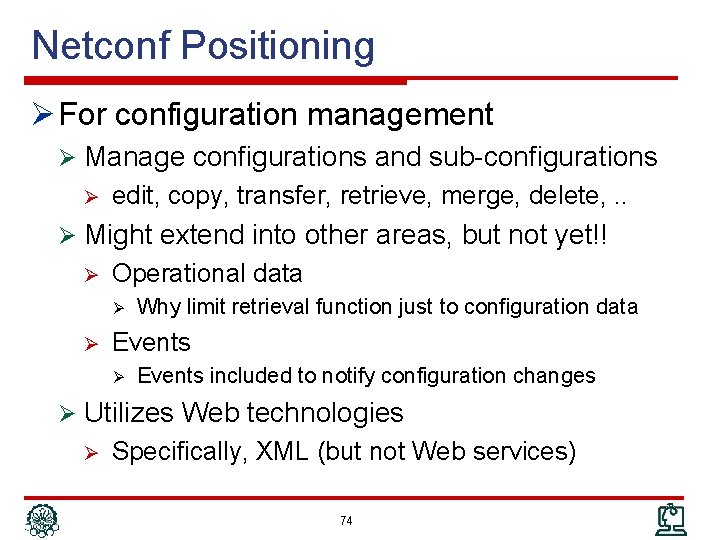
Netconf Positioning Ø For configuration management Ø Manage configurations and sub-configurations Ø edit, copy, transfer, retrieve, merge, delete, . . Ø Might extend into other areas, but not yet!! Ø Operational data Ø Ø Why limit retrieval function just to configuration data Events Ø Events included to notify configuration changes Ø Utilizes Web technologies Ø Specifically, XML (but not Web services) 74
Netconf Status Ø Championed by 2 IETF working groups Ø Netconf – Netconf itself Ø Netconf protocol a standard since early 2008, revised 2011 Ø YANG (Netconf’s SMIv 2) a standard since 2010 Ø Netconf implementations by Cisco and Juniper Ø No commercial management applications yet Ø Still young - success yet to be determined – but increasing traction 75
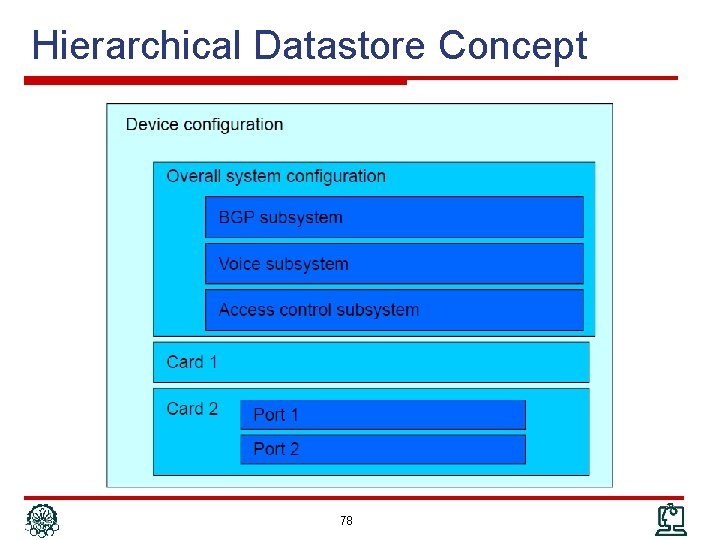
Netconf Datastores Ø Document-oriented approach for device configuration Ø Configuration can be considered as structured document Ø Can be retrieved or manipulated Ø A filtering mechanism to retrieve/modify a subset of configuration Ø Configuration information contained in datastore Ø In essence, the Netconf MIB Ø Hierarchical structure: datastore contains other datastores 76
Netconf Datastores (cont’d) Ø Multiple datastores can exist (think configuration files) Ø <running>– like running config Ø <startup> – like startup config Ø <candidate> – a separate datastore to hold a configuration that could be applied at some other point in time Ø Does not need to be supported Ø Availability “negotiated” during connection establishment Ø In Netconf terminology, Managing the device means managing its datastore(s) Ø Operations applied against datastores Ø Subtree filtering: apply operation against a particular subset Ø E. g. configuration of a card or subsystem 77
Hierarchical Datastore Concept 78
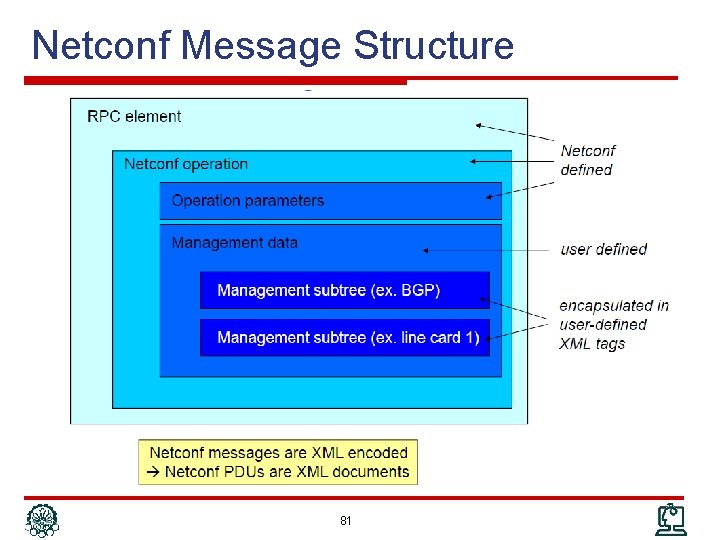
Netconf & XML Ø Every management operation (every request and every response) is encoded as an XML document Ø The requested operation & response Ø The operation parameters Ø Configuration information inside a datastore is itself encoded in XML Ø datastore contains tags that divide the configuration information into different portions Ø No predefined tags Ø Management information must be “XML-ized” Ø Sophisticated XML document Ø A set of XML tags to delimit a configuration file in its entirety Ø Just a few XML tags for lot of CLI command 79
Netconf Architecture 80
Netconf Message Structure 81
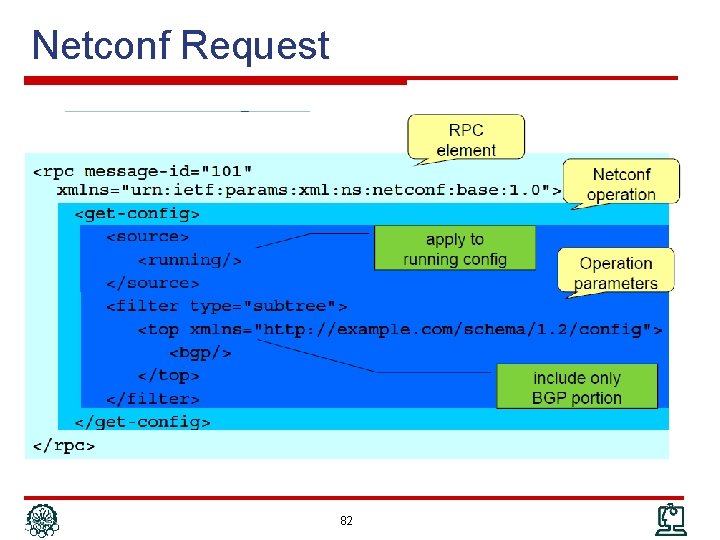
Netconf Request 82
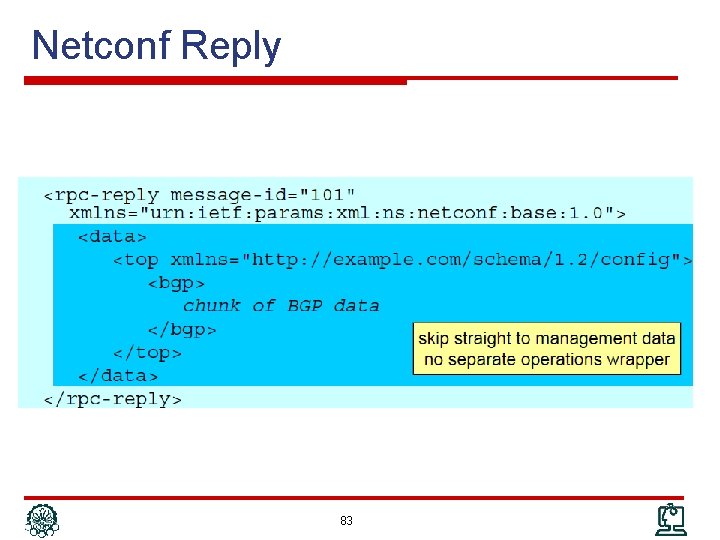
Netconf Reply 83
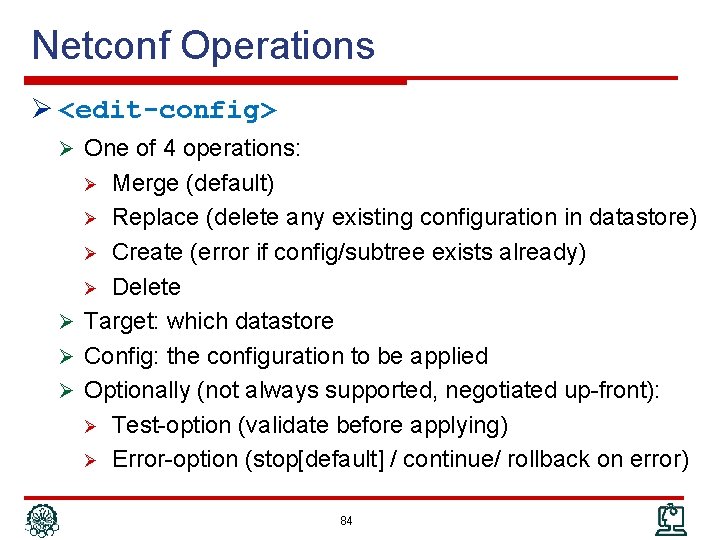
Netconf Operations Ø <edit-config> Ø One of 4 operations: Merge (default) Ø Replace (delete any existing configuration in datastore) Ø Create (error if config/subtree exists already) Ø Delete Ø Target: which datastore Ø Config: the configuration to be applied Ø Optionally (not always supported, negotiated up-front): Ø Test-option (validate before applying) Ø Error-option (stop[default] / continue/ rollback on error) Ø 84
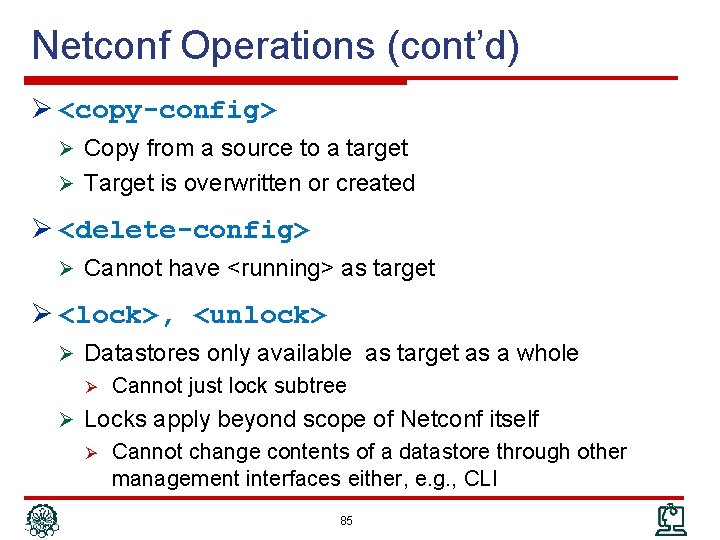
Netconf Operations (cont’d) Ø <copy-config> Ø Copy from a source to a target Ø Target is overwritten or created Ø <delete-config> Ø Cannot have <running> as target Ø <lock>, <unlock> Ø Datastores only available as target as a whole Ø Cannot just lock subtree Ø Locks apply beyond scope of Netconf itself Ø Cannot change contents of a datastore through other management interfaces either, e. g. , CLI 85
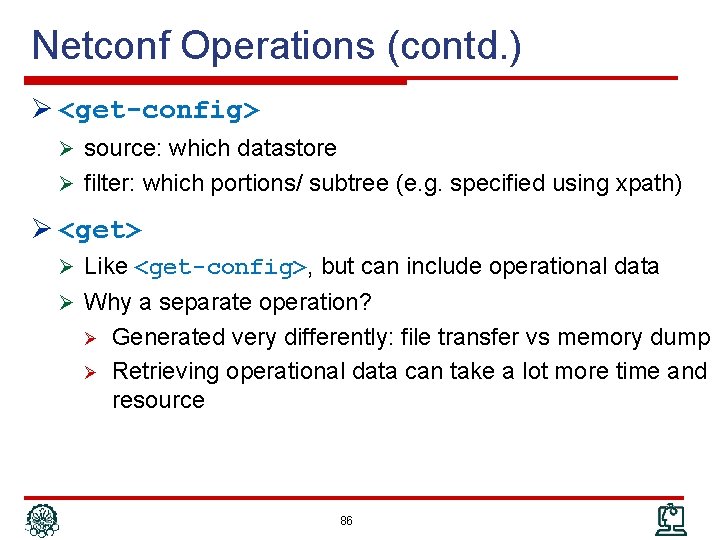
Netconf Operations (contd. ) Ø <get-config> Ø source: which datastore Ø filter: which portions/ subtree (e. g. specified using xpath) Ø <get> Ø Like <get-config>, but can include operational data Ø Why a separate operation? Ø Ø Generated very differently: file transfer vs memory dump Retrieving operational data can take a lot more time and resource 86
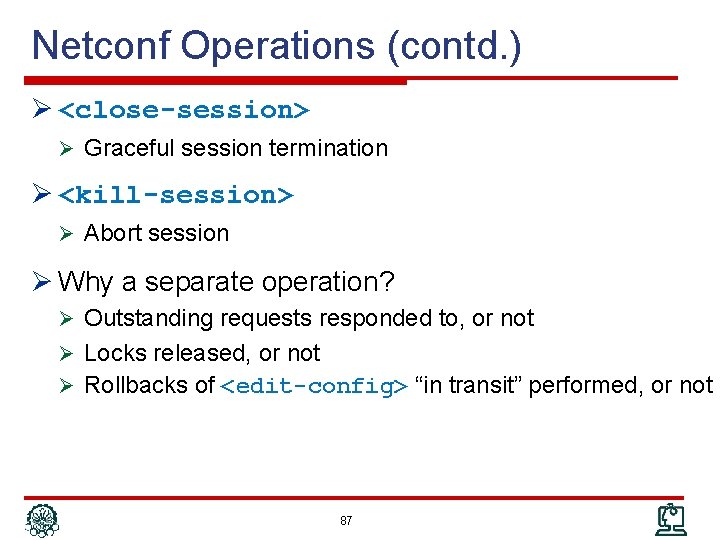
Netconf Operations (contd. ) Ø <close-session> Ø Graceful session termination Ø <kill-session> Ø Abort session Ø Why a separate operation? Ø Outstanding requests responded to, or not Ø Locks released, or not Ø Rollbacks of <edit-config> “in transit” performed, or not 87
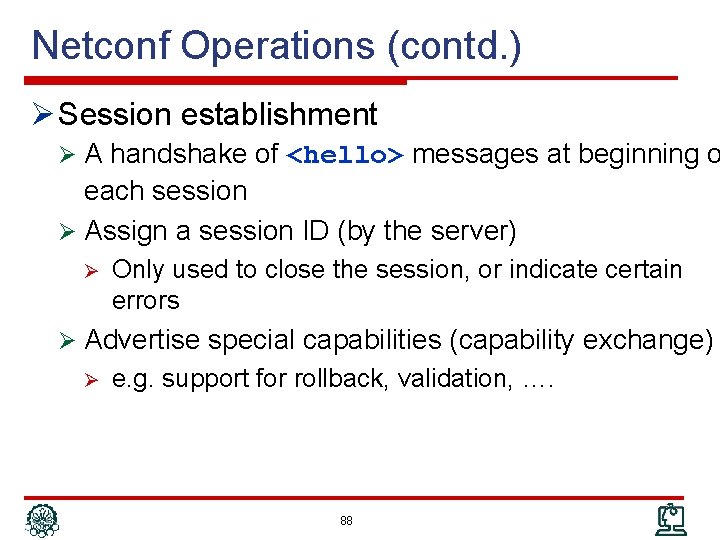
Netconf Operations (contd. ) Ø Session establishment Ø A handshake of <hello> messages at beginning o each session Ø Assign a session ID (by the server) Ø Only used to close the session, or indicate certain errors Ø Advertise special capabilities (capability exchange) Ø e. g. support for rollback, validation, …. 88
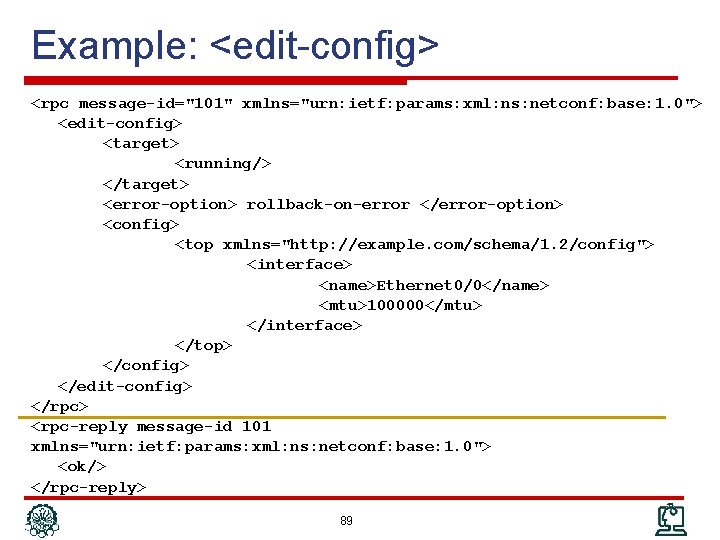
Example: <edit-config> <rpc message-id="101" xmlns="urn: ietf: params: xml: ns: netconf: base: 1. 0"> <edit-config> <target> <running/> </target> <error-option> rollback-on-error </error-option> <config> <top xmlns="http: //example. com/schema/1. 2/config"> <interface> <name>Ethernet 0/0</name> <mtu>100000</mtu> </interface> </top> </config> </edit-config> </rpc> <rpc-reply message-id 101 xmlns="urn: ietf: params: xml: ns: netconf: base: 1. 0"> <ok/> </rpc-reply> 89
Netconf Content Ø Netconf itself does not specify content, nor how content needs to be described; early days: Vendor-specific Ø Mostly, tagged CLI Ø CLI blob legal but arguably constitutes “abuse” Ø YANG – Yet Another Next-Generation Ø Data-Definition Language for Netconf Ø Analogous role as SMIv 2 for SNMP Ø More powerful and semantically richer Ø Capabilities for reuse, definition of RPCs, support for containment, conditions, constraints No more OIDs Ø Considerably more complex to author Ø Data encoding as XML, not ASN. 1 BER Ø 90
Outline Ø Network Management Protocol Ø Communication Patterns Ø SNMP Ø CLI Ø syslog Ø Netconf Ø Net. Flow/IPFIX 91
Netflow / IPFIX Ø Collect network usage data from routers Ø Which type of traffic Ø Between which sources and destinations Ø At which time Ø Applications Ø Traffic analysis and monitoring Ø Usage-based billing Ø More detailed questions Ø Who are my top N talkers? Which percentage. Which protocols do they use? HTTP? FTP? SMTP? P 2 P? DOS attack detection, … Ø 2 flavors: Ø Netflow (in various versions): Cisco-invented, “industry standard” Ø IPFIX (IP Flow Information e. Xport): IETF standard 92
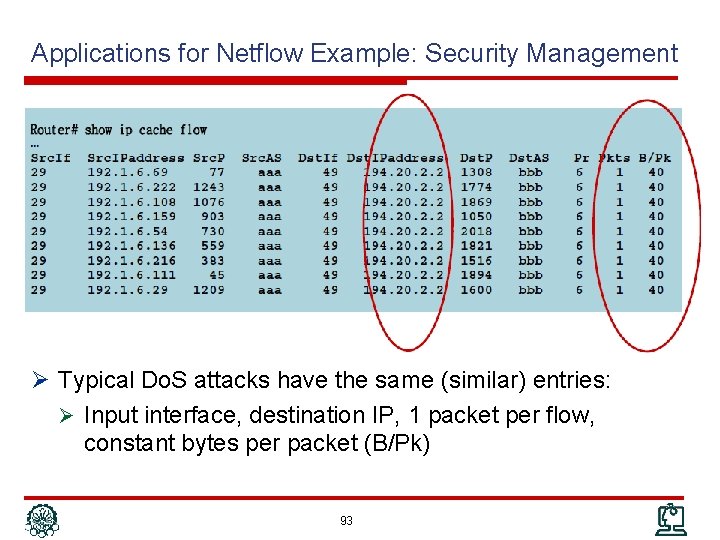
Applications for Netflow Example: Security Management Ø Typical Do. S attacks have the same (similar) entries: Ø Input interface, destination IP, 1 packet per flow, constant bytes per packet (B/Pk) 93
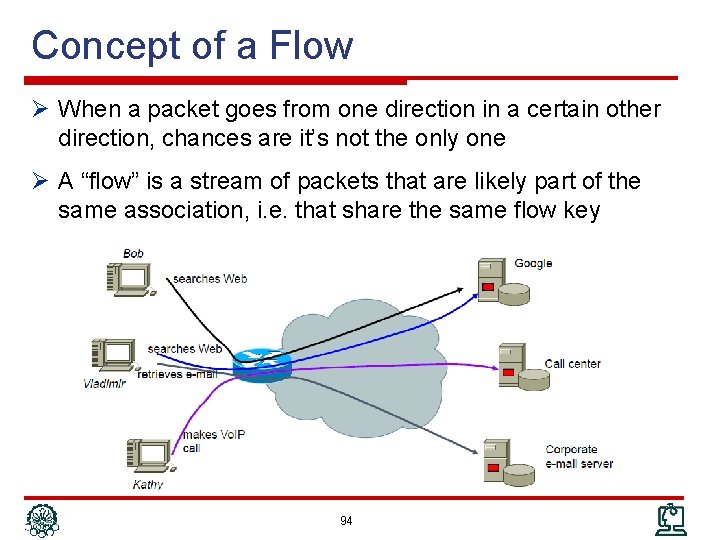
Concept of a Flow Ø When a packet goes from one direction in a certain other direction, chances are it’s not the only one Ø A “flow” is a stream of packets that are likely part of the same association, i. e. that share the same flow key 94
Challenges Ø How to identify flows Ø IP is connection less protocol Ø Network address are translated Ø How to detect start and end of flows Ø No connection establishment / tear down in IP Ø So many flows in the network Ø Large volumes of information need to be collected, processed, and transferred 95
History Ø Netflow cache first introduced to improve routing performance Ø Cache routing decisions Ø More efficient than route lookup for each packet Ø Relevance of cache contents for management not recognized until later Ø Export of cache contents led to definition of Netflow protocol Ø Important Netflow versions Ø v 1: Original Netflow Ø v 5: Most deployed today, includes BGP information Ø v 8: Aggregation capability Ø v 9: Customization of exported data Ø IPFIX: IETF-standardized version based on v 9 96
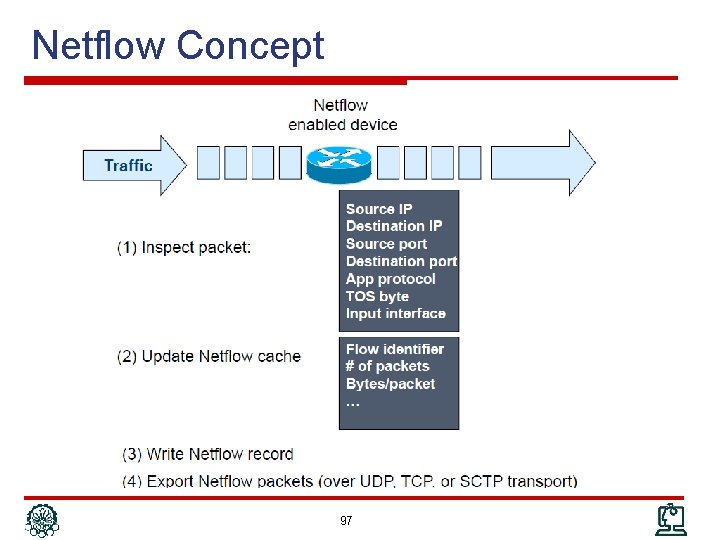
Netflow Concept 97
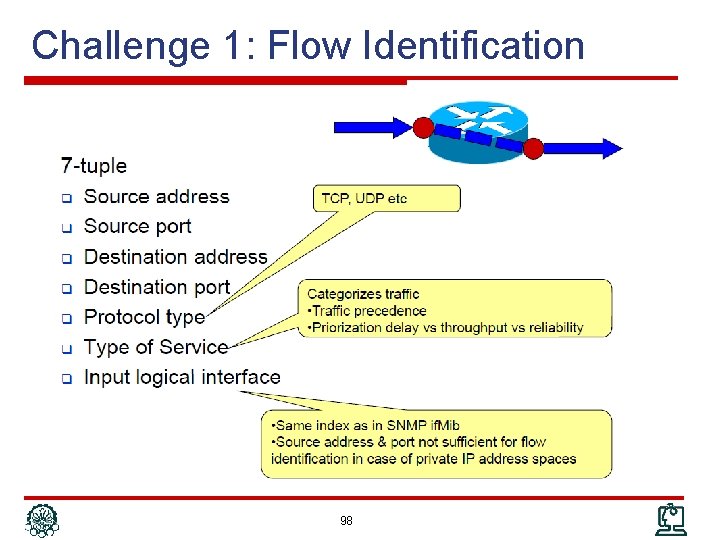
Challenge 1: Flow Identification 98
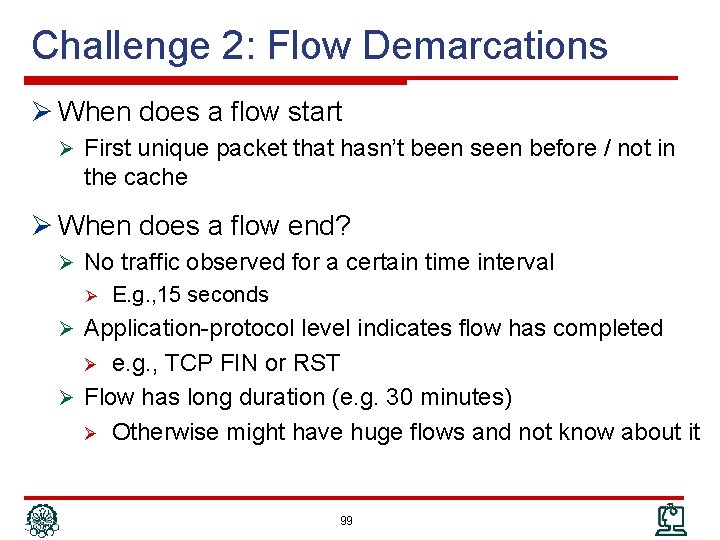
Challenge 2: Flow Demarcations Ø When does a flow start Ø First unique packet that hasn’t been seen before / not in the cache Ø When does a flow end? Ø No traffic observed for a certain time interval Ø E. g. , 15 seconds Ø Application-protocol level indicates flow has completed e. g. , TCP FIN or RST Ø Flow has long duration (e. g. 30 minutes) Ø Otherwise might have huge flows and not know about it Ø 99
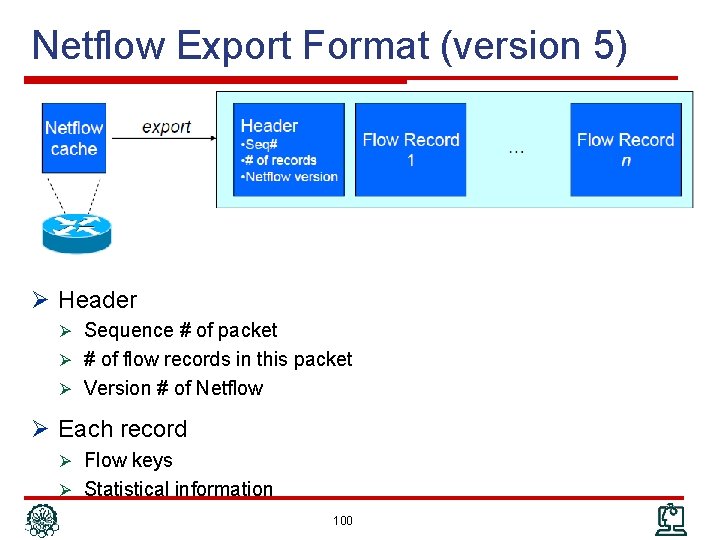
Netflow Export Format (version 5) Ø Header Ø Sequence # of packet Ø # of flow records in this packet Ø Version # of Netflow Ø Each record Ø Flow keys Ø Statistical information 100
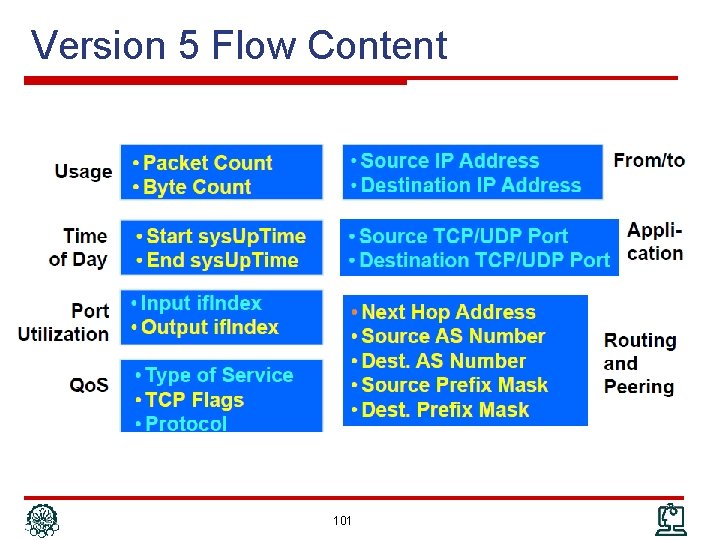
Version 5 Flow Content 101
Evolving Netflow: Sampled Netflow (RFC 5476) Ø CPU utilization in high-speed links Ø Approach: choose only a sampling of packets Ø Fixed sample intervals Inaccuracies in case of fixed traffic patterns Ø Random sample intervals Ø Statistically more accurate Ø Ø Some inaccuracies: Ø Misses small flows Ø Tends to underestimate flow duration 102
Evolving Netflow: Extending & Customizing Ø Extensibility Ø Allow to specify new information fields to export Ø Examples: VLAN information, wireless parameters, … Ø Need to separate Netflow protocol from information Ø Customization of fields to export Ø Specify templates to indicate the required subset Ø Defining new / different keys Ø Custom definition of a “flow” Ø Addressed in Netflow v 9 and IPFIX 103
IPFIX Ø IP Flow Information e. Xport Ø IETF standard, built on Netflow v 9 Ø Distinguish between templates and data records Ø Templates define structure and interpretation of fields in data records Ø Data records carry the actual data Ø Refer to previously transported template records (using the template number) Ø Option templates provide a mechanism for exporter for additional information such as sampling parameters, or statistics such as the number of packets processed, or … 104
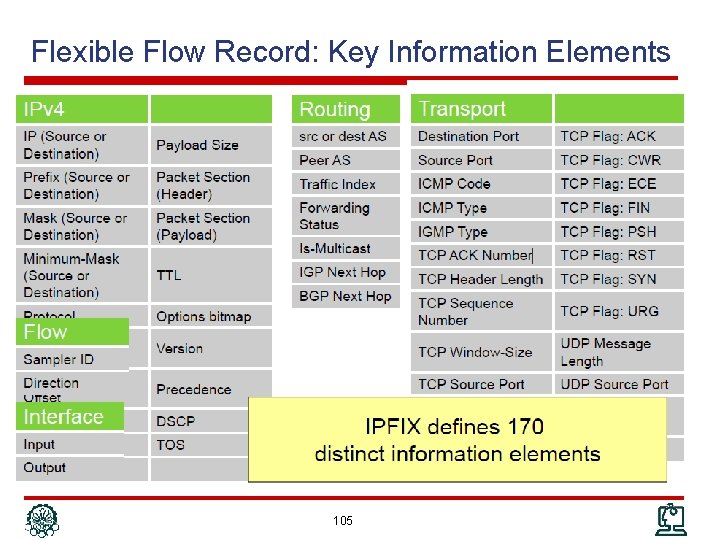
Flexible Flow Record: Key Information Elements 105
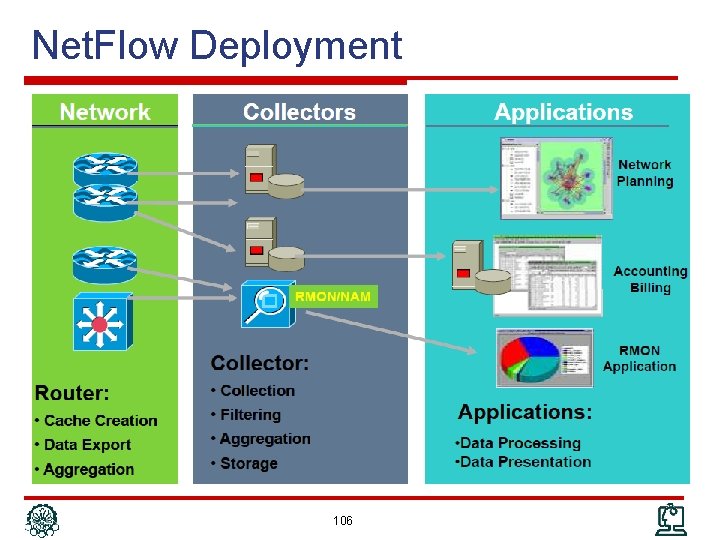
Net. Flow Deployment 106
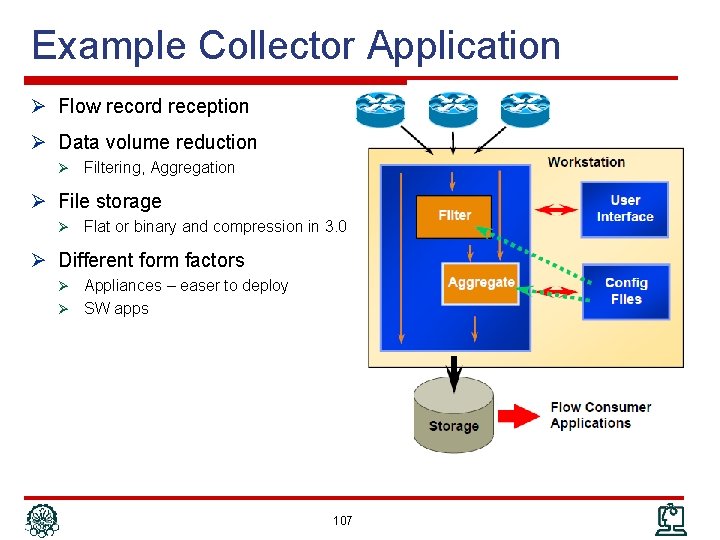
Example Collector Application Ø Flow record reception Ø Data volume reduction Ø Filtering, Aggregation Ø File storage Ø Flat or binary and compression in 3. 0 Ø Different form factors Appliances – easer to deploy Ø SW apps Ø 107
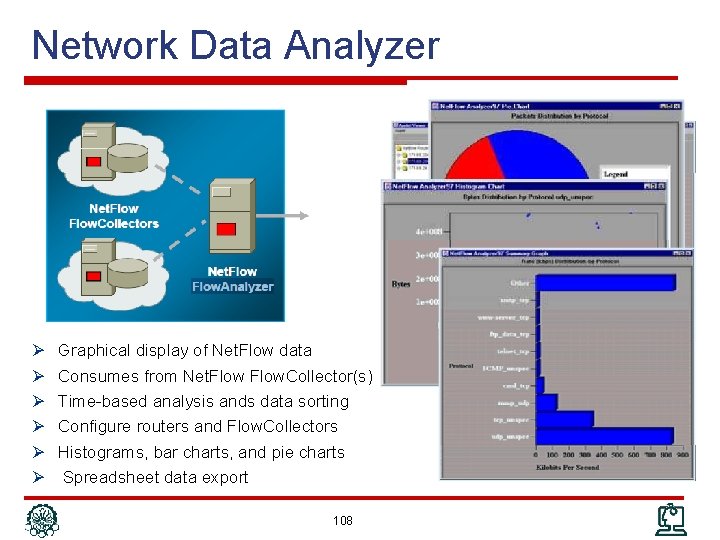
Network Data Analyzer Ø Ø Ø Graphical display of Net. Flow data Consumes from Net. Flow. Collector(s) Time-based analysis ands data sorting Configure routers and Flow. Collectors Histograms, bar charts, and pie charts Spreadsheet data export 108
Outline Ø Network Management Protocol Ø Communication Patterns Ø SNMP Ø CLI Ø syslog Ø Netconf Ø Net. Flow/IPFIX 109
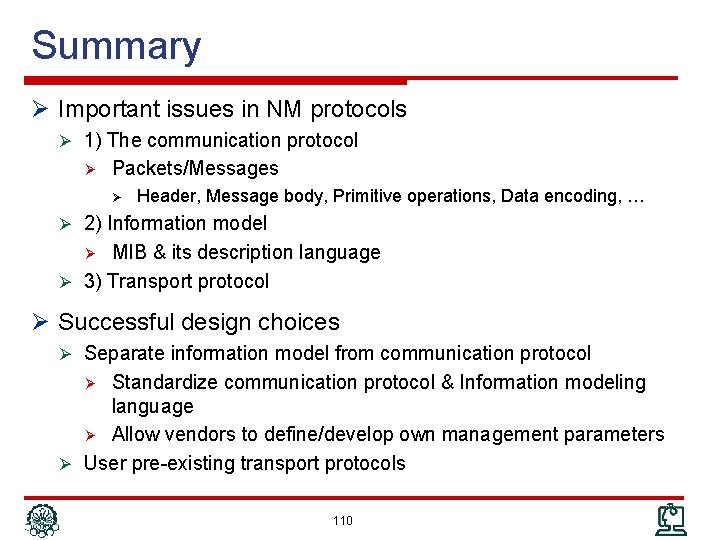
Summary Ø Important issues in NM protocols Ø 1) The communication protocol Ø Packets/Messages Ø Header, Message body, Primitive operations, Data encoding, … Ø 2) Information model MIB & its description language Ø 3) Transport protocol Ø Ø Successful design choices Ø Separate information model from communication protocol Standardize communication protocol & Information modeling language Ø Allow vendors to define/develop own management parameters Ø User pre-existing transport protocols Ø 110
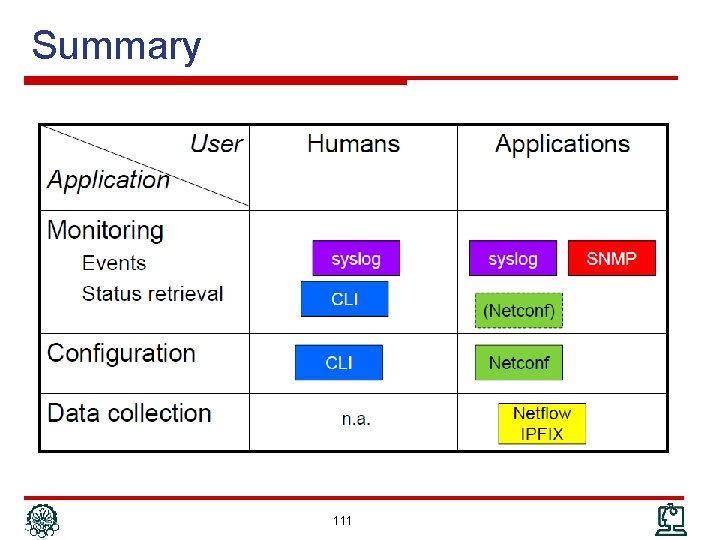
Summary 111
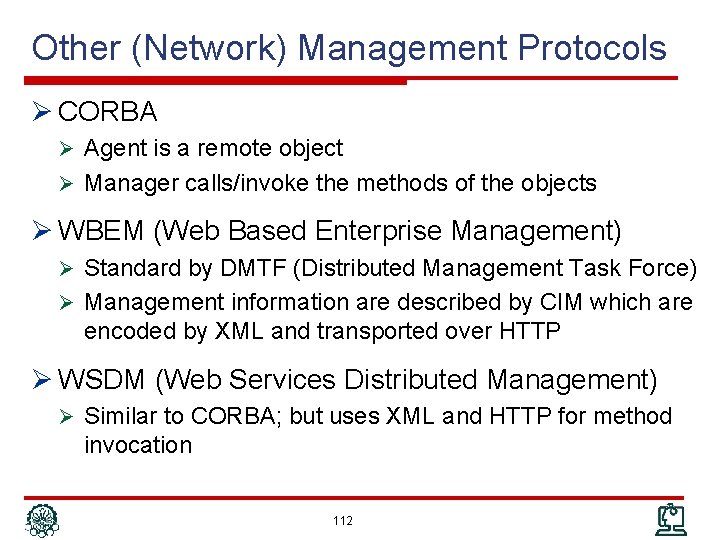
Other (Network) Management Protocols Ø CORBA Ø Agent is a remote object Ø Manager calls/invoke the methods of the objects Ø WBEM (Web Based Enterprise Management) Ø Standard by DMTF (Distributed Management Task Force) Ø Management information are described by CIM which are encoded by XML and transported over HTTP Ø WSDM (Web Services Distributed Management) Ø Similar to CORBA; but uses XML and HTTP for method invocation 112
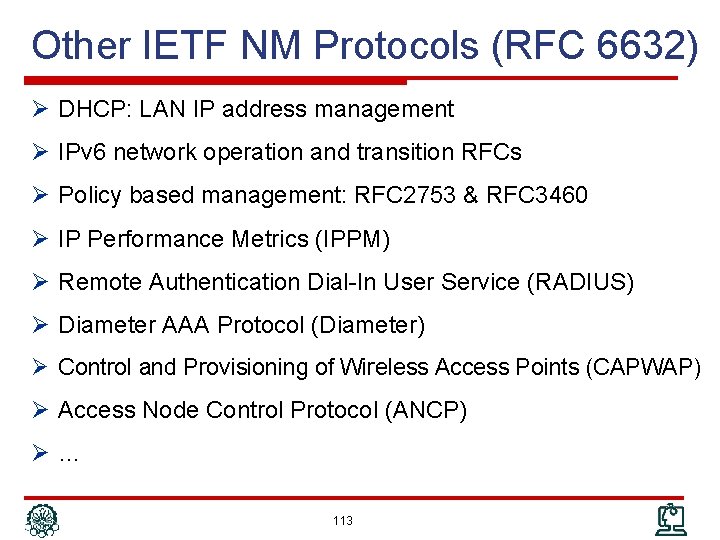
Other IETF NM Protocols (RFC 6632) Ø DHCP: LAN IP address management Ø IPv 6 network operation and transition RFCs Ø Policy based management: RFC 2753 & RFC 3460 Ø IP Performance Metrics (IPPM) Ø Remote Authentication Dial-In User Service (RADIUS) Ø Diameter AAA Protocol (Diameter) Ø Control and Provisioning of Wireless Access Points (CAPWAP) Ø Access Node Control Protocol (ANCP) Ø… 113
References Ø Reading Assignment: Chapters 7 and 8 of “Alexander Clemm, ‘Network Management Fundamentals’, Cisco Press, 2007” Ø Alexander Clemm, “Network Management”, Santa Clara University, http: //www. engr. scu. edu/~aclemm Ø Woraphon Lilakiatsakun, “Network Management”, Mahanakorn University of Technology, http: //www. msit 2005. mut. ac. th/msit_media/1_2553/ITEC 4611/Lecture/ 114
- Slides: 114