
Network Guide to Networks 7 th Edition Chapter
































- Slides: 70
Network+ Guide to Networks 7 th Edition Chapter 5 Network Cabling © 2016 Cengage Learning®. May not be scanned, copied or duplicated, or posted to a publicly accessible website, in whole or in part.
Objectives • Explain basic data transmission concepts, including signaling, data modulation, multiplexing, bandwidth, baseband, and broadband • Describe the physical characteristics and Ethernet standards of coaxial cable, STP, UTP, and fiberoptic media • Compare the benefits and limitations of different networking media Network+ Guide to Networks, 7 th Edition © Cengage Learning 2016 2
Objectives • Explore the connectors, converters, and couplers for each cabling type • Examine common cable problems and differentiate between various tools for troubleshooting those problems Network+ Guide to Networks, 7 th Edition © Cengage Learning 2016 3
Transmission Basics • Transmission techniques in use on today’s network are complex and varied • This section covers fundamental characteristics that define today’s data transmission Network+ Guide to Networks, 7 th Edition © Cengage Learning 2016 4
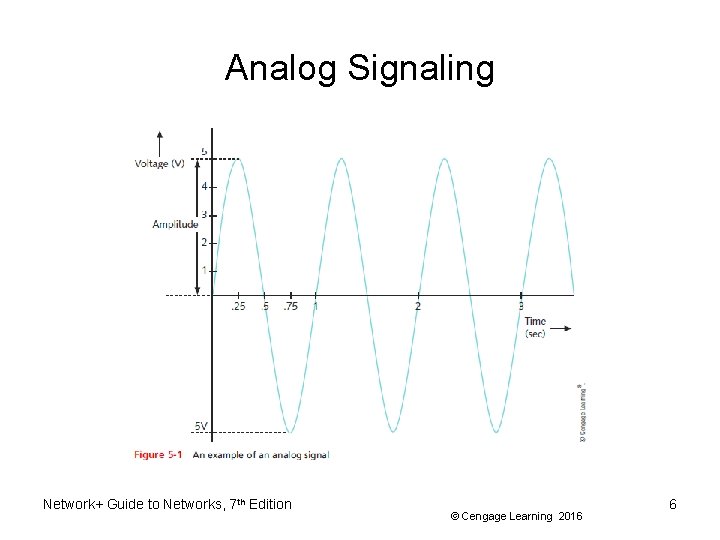
Analog Signaling • Analog signals - vary infinitely and continuously – Appear as a wavy line when graphed over time • Analog signals are characterized by four properties: – Amplitude • Measure of strength at given point in time – Frequency • Number of times amplitude cycles over fixed time – Wavelength • Distance between one peak and the next – Phase • Progress of wave over time compared to a fixed point Network+ Guide to Networks, 7 th Edition © Cengage Learning 2016 5
Analog Signaling Network+ Guide to Networks, 7 th Edition © Cengage Learning 2016 6
Analog Signaling • Drawback of analog signals – Varied and imprecise voltage • Susceptible to transmission flaws Network+ Guide to Networks, 7 th Edition © Cengage Learning 2016 7
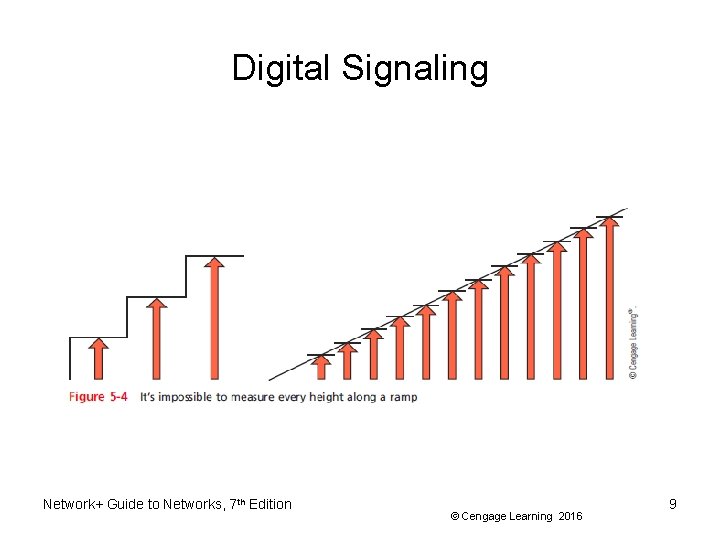
Digital Signaling • Digital signals – Pulses of voltages • Positive voltage represents a 1 • Zero voltage represents a 0 Network+ Guide to Networks, 7 th Edition © Cengage Learning 2016 8
Digital Signaling Network+ Guide to Networks, 7 th Edition © Cengage Learning 2016 9
Data Modulation • Data relies on digital transmission • Network connection may handle only analog signals • Modem – Accomplishes this translation – Modulator/demodulator • Data modulation – Technology modifying analog signals into digital signals and vice versa – Make analog signals suitable for carrying data over a communication path Network+ Guide to Networks, 7 th Edition © Cengage Learning 2016 10
Data Modulation • Carrier wave – Combined with another analog signal – Produces unique signal • Transmitted from one node to another – Preset properties – Purpose: convey information • Information wave (data wave) – Added to carrier wave – Modifies one carrier wave property Network+ Guide to Networks, 7 th Edition © Cengage Learning 2016 11
Data Modulation • Frequency modulation – Carrier frequency modified by application of data signal • Amplitude modulation – Carrier signal amplitude modified by application of data signal • Digital subscriber line (DSL) – Also makes use of modulation Network+ Guide to Networks, 7 th Edition © Cengage Learning 2016 12
Data Modulation Network+ Guide to Networks, 7 th Edition © Cengage Learning 2016 13
Baseband Broadband • Baseband transmission – Digital signals that are carried on a single channel – Requires exclusive use of wire’s capacity – Example: Ethernet • Broadband transmission – Multiple transmissions share a single media – Transmission sharing the same media rely on multiplexing to manage multiple signals – Example: Cable TV and cable Internet Network+ Guide to Networks, 7 th Edition © Cengage Learning 2016 14
Multiplexing • Multiplexing – A form of transmission that allows multiple signals to travel simultaneously over one medium • Subchannels – Logical multiple smaller channels • Multiplexer (mux) – Combines many channel signals – Required at the transmitting end of the channel • Demultiplexer (demux) – Separates the combined signals Network+ Guide to Networks, 7 th Edition © Cengage Learning 2016 15
Multiplexing • TDM (Time division multiplexing) – Divides channel into multiple time intervals Network+ Guide to Networks, 7 th Edition © Cengage Learning 2016 16
Multiplexing • Statistical multiplexing – Transmitter assigns slots to nodes • According to priority, need – More efficient than TDM Network+ Guide to Networks, 7 th Edition © Cengage Learning 2016 17
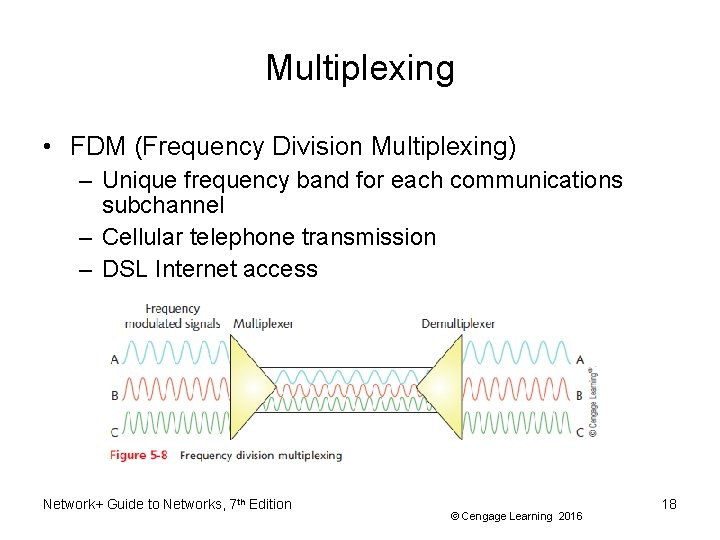
Multiplexing • FDM (Frequency Division Multiplexing) – Unique frequency band for each communications subchannel – Cellular telephone transmission – DSL Internet access Network+ Guide to Networks, 7 th Edition © Cengage Learning 2016 18
Multiplexing • WDM (Wavelength Division Multiplexing) – One fiber-optic connection – Carries multiple light signals simultaneously Network+ Guide to Networks, 7 th Edition © Cengage Learning 2016 19
Multiplexing • DWDM (Dense Wavelength Division Multiplexing) – Used on most modern fiber-optic networks – Extraordinary capacity – Typically used on high-bandwidth or long-distance WAN links • CWDM (Coarse Wavelength Division Multiplexing) – Developed after DWDM in an effort to lower the cost of the transceiver equipment needed – Channels are spaced more widely apart across entire frequency band Network+ Guide to Networks, 7 th Edition © Cengage Learning 2016 20
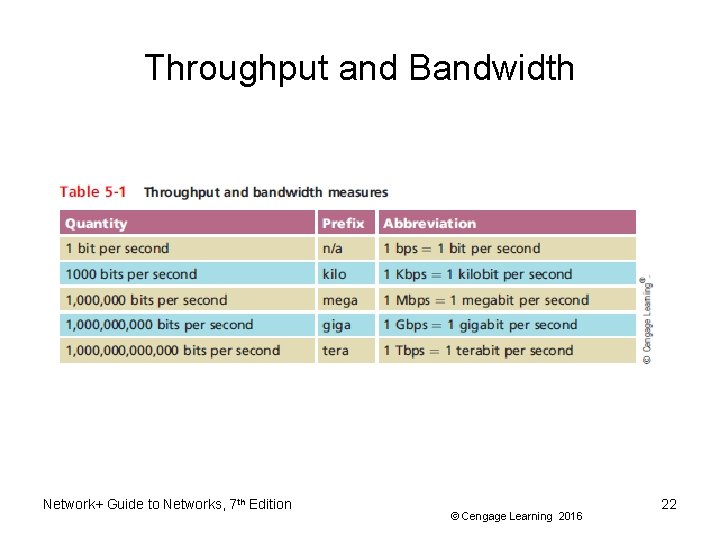
Throughput and Bandwidth • Throughput – Amount of data transmitted during given time period – Also called payload rate or effective data rate – Expressed as bits transmitted per second • Bandwidth (strict definition) – Difference between highest and lowest frequencies medium can transmit – Range of frequencies • Both are commonly expressed as bits transmitted per second, called bit rate Network+ Guide to Networks, 7 th Edition © Cengage Learning 2016 21
Throughput and Bandwidth Network+ Guide to Networks, 7 th Edition © Cengage Learning 2016 22
Twisted-Pair Cable • Color-coded insulated copper wire pairs – 0. 4 to 0. 8 mm diameter – Encased in a plastic sheath – Every two wires are twisted together Network+ Guide to Networks, 7 th Edition © Cengage Learning 2016 23
Twisted-Pair Cable • More wire pair twists per foot – More resistance to cross talk – Higher-quality – More expensive • Twist ratio – Twists per meter or foot • High twist ratio – Greater attenuation Network+ Guide to Networks, 7 th Edition © Cengage Learning 2016 24
Twisted-Pair Cable • Hundreds of different designs – Twist ratio, number of wire pairs, copper grade, shielding type, shielding materials – 1 to 4200 wire pairs possible • Wiring standard specification – TIA/EIA 568 • Most common twisted pair types – Category (cat) 3, 5, 5 e, 6, 6 a, 7 – CAT 5 e or higher used in modern LANs Network+ Guide to Networks, 7 th Edition © Cengage Learning 2016 25
Twisted-Pair Cable • Advantages – – – Relatively inexpensive Flexible Easy installation Spans significant distance before requiring repeater Accommodates several different topologies • Two categories – Shielded twisted pair (STP) – Unshielded twisted pair (UTP) Network+ Guide to Networks, 7 th Edition © Cengage Learning 2016 26
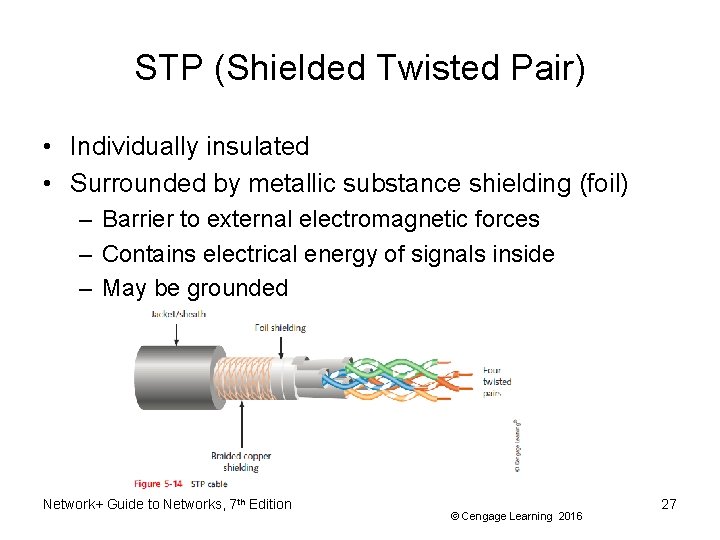
STP (Shielded Twisted Pair) • Individually insulated • Surrounded by metallic substance shielding (foil) – Barrier to external electromagnetic forces – Contains electrical energy of signals inside – May be grounded Network+ Guide to Networks, 7 th Edition © Cengage Learning 2016 27
UTP (Unshielded Twisted Pair) • One or more insulated wire pairs – Encased in plastic sheath – No additional shielding • Less expensive, less noise resistance Network+ Guide to Networks, 7 th Edition © Cengage Learning 2016 28
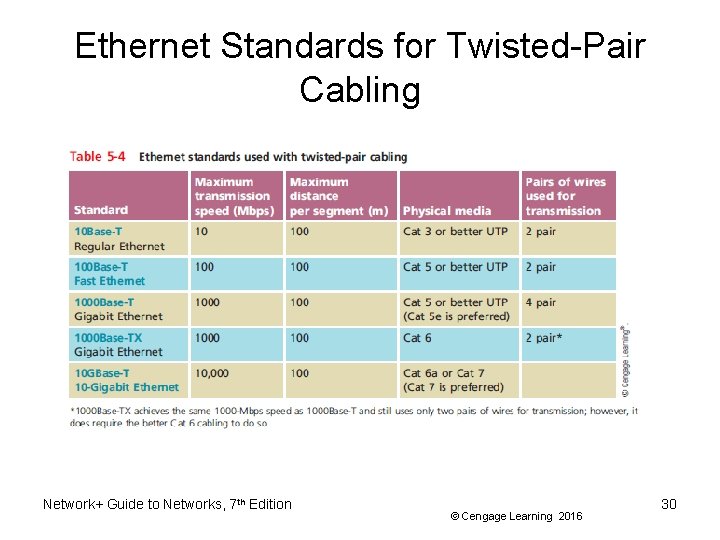
Comparing STP and UTP • Throughput – STP and UTP can transmit the same rates • Cost – STP and UTP vary in cost • Connector – STP and UTP use Registered Jack 45 • Noise immunity – STP more noise resistant • Size and scalability – Maximum segment length for both: 100 meters Network+ Guide to Networks, 7 th Edition © Cengage Learning 2016 29
Ethernet Standards for Twisted-Pair Cabling Network+ Guide to Networks, 7 th Edition © Cengage Learning 2016 30
Cable Pinouts • Proper cable termination is a requirement for two nodes on a network to communicate • TIA/EIA specifies two methods of inserting wires into RJ-45 plugs – TIA/EIA 568 A – TIA/EIA 568 B • No functional difference between the two standards – Just make sure you use the same standard on every RJ-45 plug and jack Network+ Guide to Networks, 7 th Edition © Cengage Learning 2016 31
Cable Pinouts Network+ Guide to Networks, 7 th Edition © Cengage Learning 2016 32
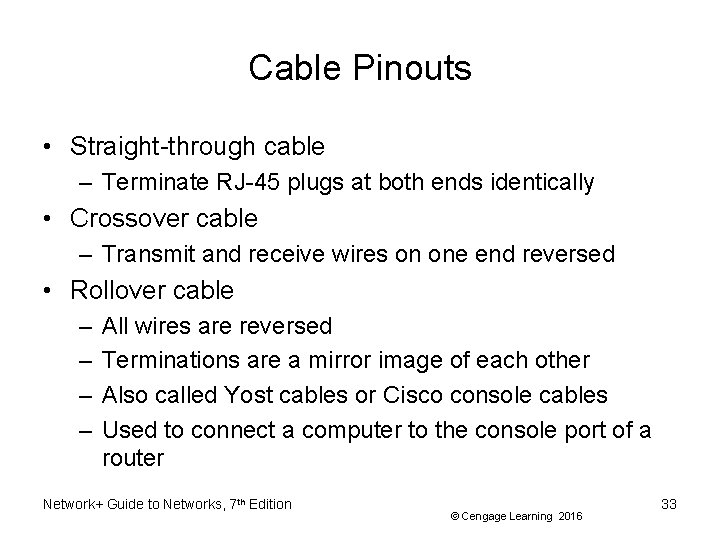
Cable Pinouts • Straight-through cable – Terminate RJ-45 plugs at both ends identically • Crossover cable – Transmit and receive wires on one end reversed • Rollover cable – – All wires are reversed Terminations are a mirror image of each other Also called Yost cables or Cisco console cables Used to connect a computer to the console port of a router Network+ Guide to Networks, 7 th Edition © Cengage Learning 2016 33
Copper Connectors and Couplers • Media converter – Enables networks or segments running on different media to interconnect and exchange signals • Coupler – Passes data through a homogenous connection without any modification Network+ Guide to Networks, 7 th Edition © Cengage Learning 2016 34
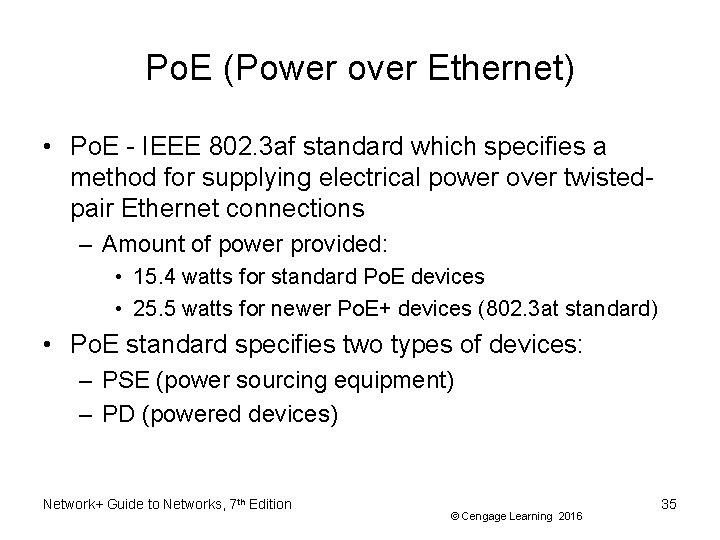
Po. E (Power over Ethernet) • Po. E - IEEE 802. 3 af standard which specifies a method for supplying electrical power over twistedpair Ethernet connections – Amount of power provided: • 15. 4 watts for standard Po. E devices • 25. 5 watts for newer Po. E+ devices (802. 3 at standard) • Po. E standard specifies two types of devices: – PSE (power sourcing equipment) – PD (powered devices) Network+ Guide to Networks, 7 th Edition © Cengage Learning 2016 35
Po. E (Power over Ethernet) • The IEEE standard requires that a PSE device first determine whether a node is Po. E-capable before attempting to supply it with power • On networks that demand Po. E but don’t have Po. Ecapable equipment, you can add Po. E adapters Network+ Guide to Networks, 7 th Edition © Cengage Learning 2016 36
Fiber-Optic Cable • Fiber-optic cable (fiber) – One or more glass or plastic fibers at its center (core) • Data transmission – Pulsing light sent from laser or light-emitting diode (LED) through central fibers • Cladding – – Layer of glass or plastic surrounding fibers Different density from glass or plastic in strands Reflects light back to core Allows fiber to bend Network+ Guide to Networks, 7 th Edition © Cengage Learning 2016 37
Fiber-Optic Cable • Plastic buffer outside cladding – Protects cladding and core – Opaque to absorb escaping light – Surrounded by Kevlar (polymeric fiber) strands • Plastic sheath covers Kevlar strands Network+ Guide to Networks, 7 th Edition © Cengage Learning 2016 38
Fiber-Optic Cable • Benefits over copper cabling – – – Extremely high throughput Very high noise resistance Excellent security Able to carry signals for longer distances Industry standard for high-speed networking • Drawbacks – More expensive than twisted pair cable – Requires special equipment to splice Network+ Guide to Networks, 7 th Edition © Cengage Learning 2016 39
Fiber-Optic Cable • Throughput – Proven reliable in transmitting data at rates that can reach 100 gigabits per second per channel • Cost – Most expensive transmission medium • Noise immunity – Unaffected by EMI • Size and scalability – Segment lengths vary from 150 to 40, 000 meters – Depends on the light’s wavelength and type of cable Network+ Guide to Networks, 7 th Edition © Cengage Learning 2016 40
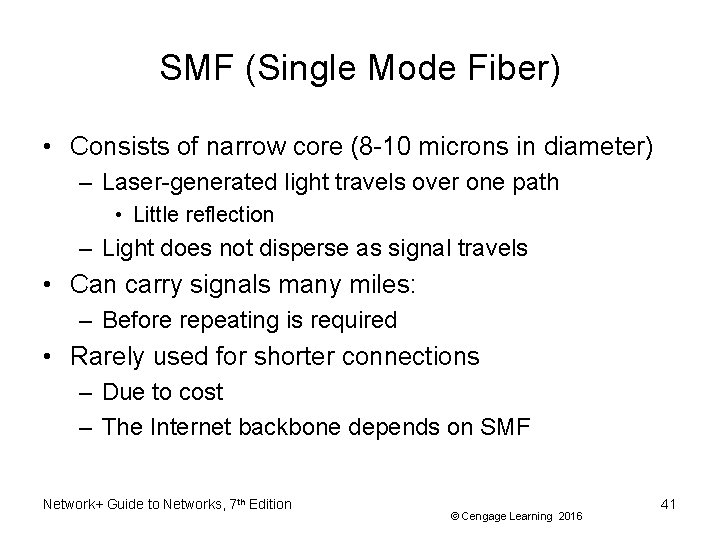
SMF (Single Mode Fiber) • Consists of narrow core (8 -10 microns in diameter) – Laser-generated light travels over one path • Little reflection – Light does not disperse as signal travels • Can carry signals many miles: – Before repeating is required • Rarely used for shorter connections – Due to cost – The Internet backbone depends on SMF Network+ Guide to Networks, 7 th Edition © Cengage Learning 2016 41
MMF (Multimode Fiber) • Contains a core with a larger diameter than single mode fiber – Common sizes: 50 or 62. 5 microns • Laser or LED generated light pulses travel at different angles • Greater attenuation than single-mode fiber • Common uses – Cables connecting router to a switch – Cables connecting server on network backbone Network+ Guide to Networks, 7 th Edition © Cengage Learning 2016 42
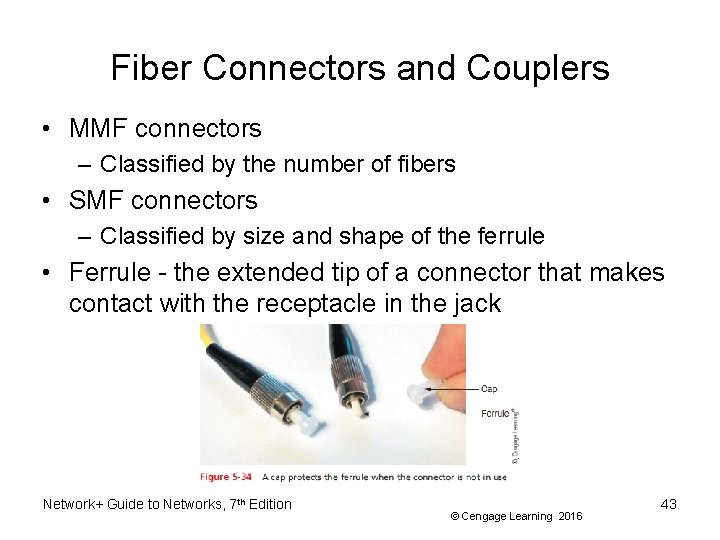
Fiber Connectors and Couplers • MMF connectors – Classified by the number of fibers • SMF connectors – Classified by size and shape of the ferrule • Ferrule - the extended tip of a connector that makes contact with the receptacle in the jack Network+ Guide to Networks, 7 th Edition © Cengage Learning 2016 43
Fiber Connectors and Couplers • Shapes and polishes used by SMF ferrules to reduce back reflection: – Physical Contact (PC) – Ultra Polished Connector (UPC) – Angle Polished Connector (APC) Network+ Guide to Networks, 7 th Edition © Cengage Learning 2016 44
Fiber Connectors and Couplers • SMF connectors are typically available with a 1. 25 mm ferrule or a 2. 5 -mm ferrule – Most common 1. 25 -mm connector is the LC – Three 2. 5 -mm connectors are the SC, ST, and FC • Most common MMF connector is the MT-RJ • Existing fiber networks might use ST or SC connectors – LC and MT-RJ are used on the very latest fiber-optic technology Network+ Guide to Networks, 7 th Edition © Cengage Learning 2016 45
Fiber-Optic Converters and Modular Interfaces • Converters are required to connect multimode fiber networks to single-mode fiber networks – Also fiber- and copper-based parts of a network • Bidirectional converter accepts the signal from one part of the network, then regenerates the signal and sends it to the next part of the network • GBIC - a standard type of modular interface designed for Gigabit Ethernet connections – May contain RJ-45 or fiber-optic cable ports Network+ Guide to Networks, 7 th Edition © Cengage Learning 2016 46
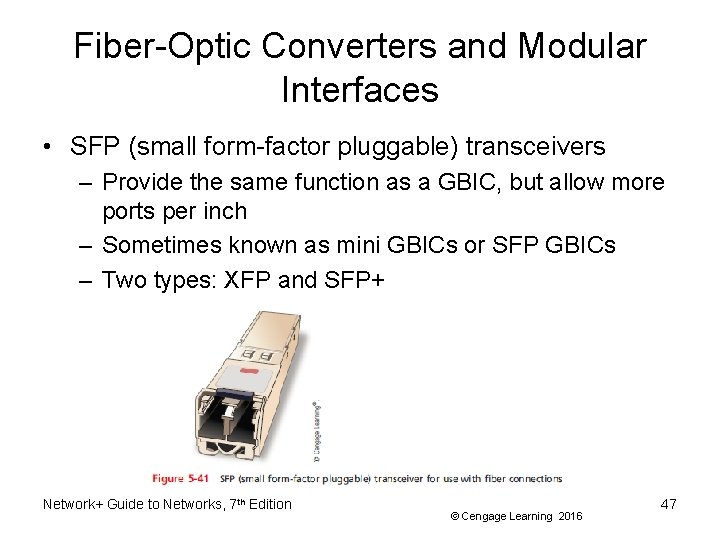
Fiber-Optic Converters and Modular Interfaces • SFP (small form-factor pluggable) transceivers – Provide the same function as a GBIC, but allow more ports per inch – Sometimes known as mini GBICs or SFP GBICs – Two types: XFP and SFP+ Network+ Guide to Networks, 7 th Edition © Cengage Learning 2016 47
Fiber-Optic Converters and Modular Interfaces • Installing a GBIC or SFP – Slide the transceiver into a socket on the back of the connectivity device – Most SFPs come with a tab or latch system and keyed so that they will slide into the socket when aligned properly Network+ Guide to Networks, 7 th Edition © Cengage Learning 2016 48
Fiber-Optic Converters and Modular Interfaces • Loopback adapter – A helpful tool when testing an SFP’s functionality or checking for a mismatch Network+ Guide to Networks, 7 th Edition © Cengage Learning 2016 49
Ethernet Standards for Fiber-Optic Cable Network+ Guide to Networks, 7 th Edition © Cengage Learning 2016 50
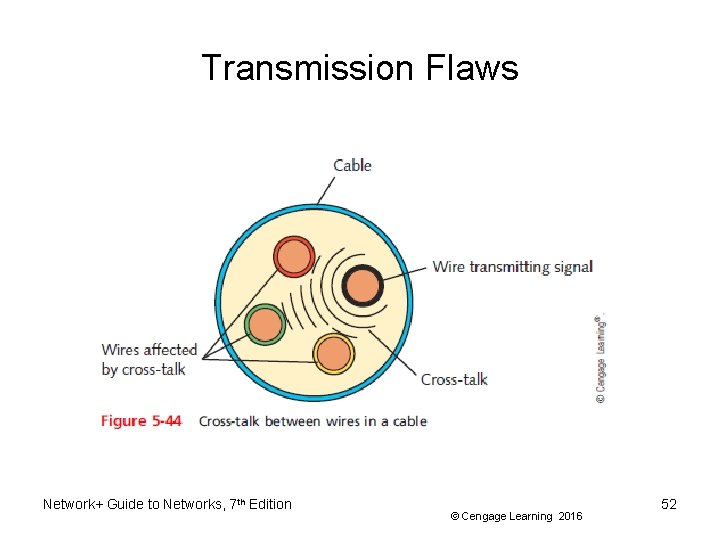
Transmission Flaws • Noise – Any undesirable influence degrading or distorting signal • Types of noise – EMI (electromagnetic interference) • Example: radio frequency interference – Cross-talk • • Signal on one wire infringes on adjacent wire signal Alien cross-talk occurs between two cables Near end cross-talk (NEXT) occurs near source Far end cross-talk (FEXT) occurs at the far end Network+ Guide to Networks, 7 th Edition © Cengage Learning 2016 51
Transmission Flaws Network+ Guide to Networks, 7 th Edition © Cengage Learning 2016 52
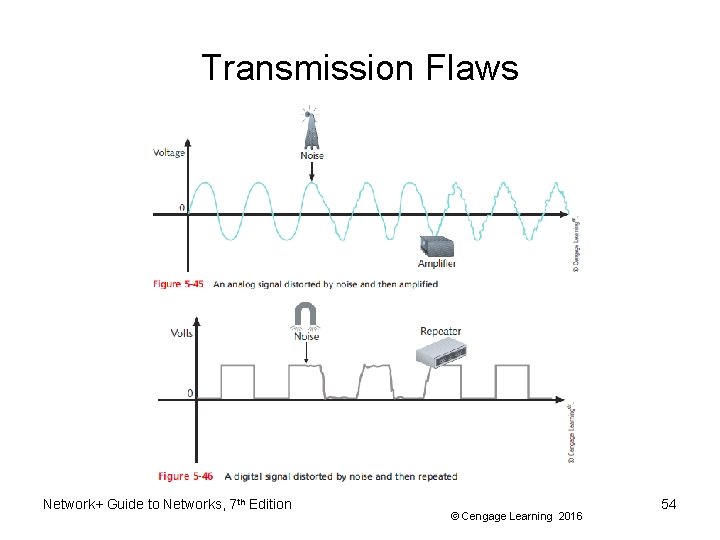
Transmission Flaws • Attenuation – Loss of signal’s strength as it travels away from source • Two ways analog and digital signals are boosted: – Amplifier - increases the voltage, or strength, of signals • Can also boot the noise that has accumulated in the signal – Repeater - regenerates a digital signal in its original form • Without noise previously accumulated Network+ Guide to Networks, 7 th Edition © Cengage Learning 2016 53
Transmission Flaws Network+ Guide to Networks, 7 th Edition © Cengage Learning 2016 54
Transmission Flaws • Latency – Delay between signal transmission and receipt – May cause network transmission errors • Latency causes – Cable length – Intervening connectivity device • Round trip time (RTT) – Time for packet to go from sender to receiver, then back from receiver to sender Network+ Guide to Networks, 7 th Edition © Cengage Learning 2016 55
Transmission Flaws • Common Fiber Cable Problems: – Fiber type mismatch • More of a fiber core mismatch • Even same-mode cables can be mismatched if the cores have different widths – Wavelength mismatch • SMF, MMF, and POF (Plastic Optical Fiber) use different wavelengths – Dirty connectors • Signal loss and other errors can start to cause problems Network+ Guide to Networks, 7 th Edition © Cengage Learning 2016 56
Troubleshooting Tools • Tone generator (toner) – Small electronic device – Issues signal on wire pair • Tone locator (probe) – Emits tone when electrical activity detected • Probe kit or toner probe – Generator and locator combination • Testing requires trial and error • Used to determine where wired pair terminates • Not used to determine cable characteristics Network+ Guide to Networks, 7 th Edition © Cengage Learning 2016 57
Troubleshooting Tools Network+ Guide to Networks, 7 th Edition © Cengage Learning 2016 58
Troubleshooting Tools • Multimeter – Measures electric circuit characteristics • Resistance, voltage, and impedance • Use a multimeter to do the following: – Measure voltage to verify cable is conducting electricity – Check for the presence of noise – Verify the amount of resistance is appropriate – Test for short or open circuits in the wire Network+ Guide to Networks, 7 th Edition © Cengage Learning 2016 59
Troubleshooting Tools • Cable continuity testers (cable testers) – Tests whether cable carries signal to destination • Copper-based cable tester – Consists of two parts • Base unit generates voltage • Remote unit detects voltage • Series of lights, audible tone – Used to signal pass/fail Network+ Guide to Networks, 7 th Edition © Cengage Learning 2016 60
Troubleshooting Tools • Some continuity testers verify UTP, STP wires paired correctly – Not shorted, exposed, crossed • Fiber optic continuity tester – Issues light pulses on fiber – Determines whether pulses reach other end • Test all cables to ensure meeting network’s required standards – Homemade or purchased • Offer convenience: portable, lightweight, low cost Network+ Guide to Networks, 7 th Edition © Cengage Learning 2016 61
Troubleshooting Tools Network+ Guide to Networks, 7 th Edition © Cengage Learning 2016 62
Troubleshooting Tools • Cable performance tester, line tester, or certifier – Performs similarly to continuity testers but can be used to: • Measure distance to a connectivity device, termination point, or cable fault • Measure attenuation • Measure near end cross-talk • Measure termination resistance and impedance • Issue pass/fail ratings for Cat 3 -7 standards • Store and print results or save to a computer database • Graphically depict attenuation and cross-talk Network+ Guide to Networks, 7 th Edition © Cengage Learning 2016 63
Troubleshooting Tools • TDR (time domain reflectometer) – Issue signal, measures signal bounce back – Indicates distance between nodes – Indicates whether terminators properly installed, functional • OTDRs (optical time domain reflectometers) – Measure fiber length – Determine faulty splice locations, breaks, connectors, bends and measure attenuation over cable – Expensive Network+ Guide to Networks, 7 th Edition © Cengage Learning 2016 64
Troubleshooting Tools Network+ Guide to Networks, 7 th Edition © Cengage Learning 2016 65
Troubleshooting Tools • OPM (Optical Power Meter) – Also called a laser power meter or a light meter – Measures the amount of light power transmitted on a fiber-optic line – Must be calibrated precisely following highly accurate optical power standards – Surrounding room temperature, connection type, and the skill of the technician all affect the final test results Network+ Guide to Networks, 7 th Edition © Cengage Learning 2016 66
Summary • Computers generate and interpret data signals as electrical current where voltage is finitely measured as on or off and interpreted as binary data • A channel is a distinct communication path between nodes and may be separated logically or physically • A baseband transmission is the only transmission on the media, in broadband, multiple transmissions share a single media – Broadband transmission require multiplexing • Throughput is the measure of how much data is transmitted during a given time period Network+ Guide to Networks, 7 th Edition © Cengage Learning 2016 67
Summary • Coaxial cable was the foundation for Ethernet networks in the 1980 s • Twisted-pair cable consists of color-coded pairs of insulated copper wires that are twisted in pairs • STP cable consists of twisted-pair wires that are not only individually insulated, but also surrounded by a shielding made of a metallic substance • UTP does not contain additional shielding • TIA/EIA has specified two different methods of inserting wires into RJ-45 plugs: 568 A and 568 B Network+ Guide to Networks, 7 th Edition © Cengage Learning 2016 68
Summary • A rollover cable uses a reverse image of the pinout of the other end of a cable • Fiber-optic cable contains one or more several glass or plastic fibers at it core • SMF accommodates the highest bandwidths and longest distances of all network transmission media • MMF contains a core with a larger diameter • Fiber-optic cabling is the best medium for delivering high throughput • A common source of noise is EMI Network+ Guide to Networks, 7 th Edition © Cengage Learning 2016 69
Summary • Cross-talk occurs when a signal traveling on one wire or cable infringes on the signal traveling on an adjacent wire or cable • Attenuation is the loss of a signal’s strength • Latency is the delay between the instant data leaves the source and when it arrives at its destination • A multimeter is a simple instrument that measures resistance, voltage, impedance, and other characteristics • Tools used to test cables: cable checkers, continuity testers, cable testers, and light meters (for fiber) Network+ Guide to Networks, 7 th Edition © Cengage Learning 2016 70