
Network Devices Introduction Network NICs Segments Repeaters Hubs
Network Devices
Introduction � Network � NICs Segments � Repeaters � Hubs � Bridges � Switches � Routers and Brouters � Gateways 2
Network Segments � The more devices which are added to the network the more traffic – solution use a device to ‘filter’ the traffic � Such a device reduces congestion, and improves overall performance � Dividing a network in to segments allows the majority of traffic to stay remain local 3
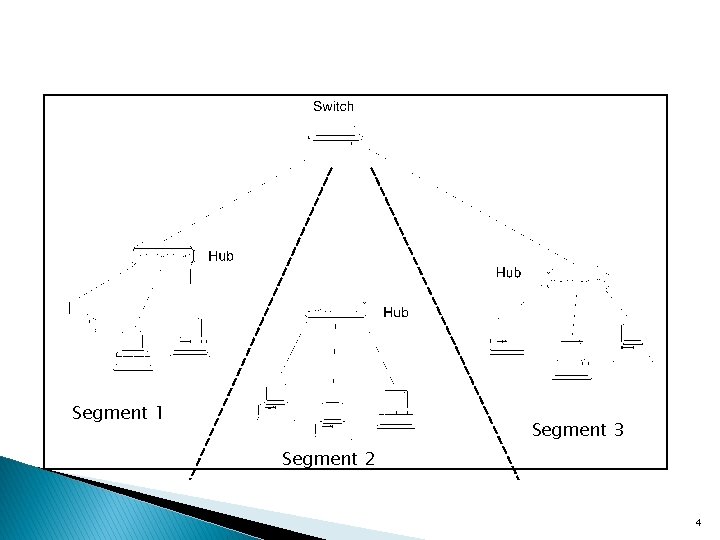
Segment 1 Segment 3 Segment 2 4
Network Interface Card (NIC) � At source: ◦ Receives the data packet from the Network Layer ◦ Attaches its the MAC address to the data packet ◦ Attaches the MAC address of the destination device to the data packet ◦ Converts data in to packets suitable for the particular network (Ethernet, Token Ring, FDDI) ◦ Converts packets in to electrical, light or radio signals ◦ Provides the physical connection to the media 5
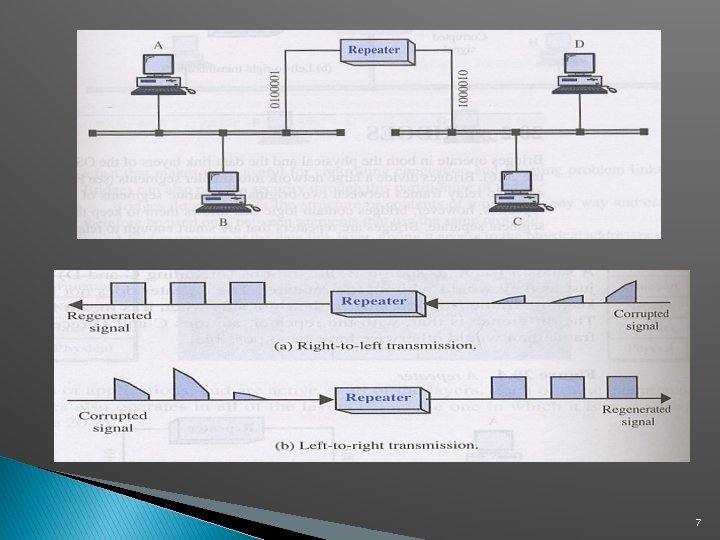
Repeater � Allows the connection of segments � Extends the network beyond the maximum length of a single segment � Functions at the Physical Layer of the OSI model � A multi-port repeater is known as a Hub � Connects segments of the same network, even if they use different media � Has three basic functions ◦ Receives a signal which it cleans up ◦ Re-times the signal to avoid collisions ◦ Transmits the signal on to the next segment 6
7
Hub �A central point of a star topology �Allows the multiple connection of devices �Can be more than a basic Hub – providing additional services (Managed Hubs, Switched Hubs, Intelligent Hubs) �In reality a Hub is a Repeater with multiple ports �Functions in a similar manner to a Repeater 8
Bridge �Like a Repeater or Hub it connects segments �Works at Data Layer – not Physical �Uses Mac address to make decisions �Acts as a ’filter’, by determining whether or not to forward a packet on to another segment 9
Bridge (2) � Builds a Bridging Table, keeps track of devices on each segment � Filters packets, does not forward them, by examining their MAC address � It forwards packets whose destination address is on a different segment from its own � It divides a network in to multiple collision domains – so reducing the number of collisions 10
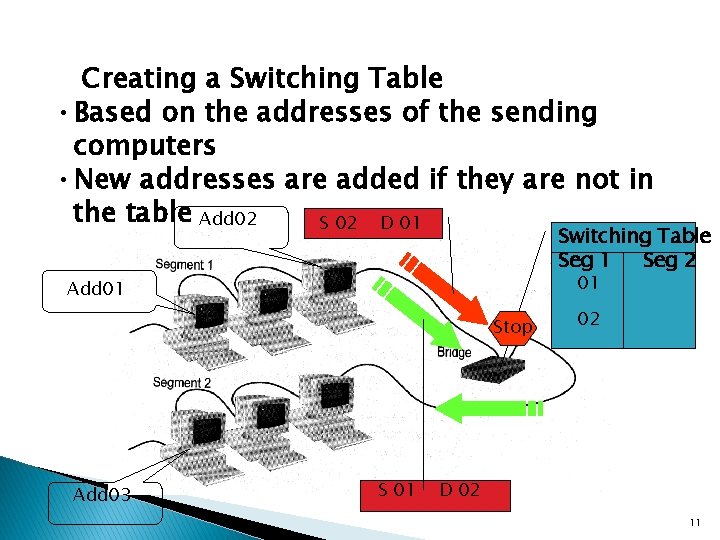
Creating a Switching Table • Based on the addresses of the sending computers • New addresses are added if they are not in the table Add 02 S 02 D 01 Switching Table Seg 1 Seg 2 01 Add 01 Stop Add 03 S 01 02 D 02 11
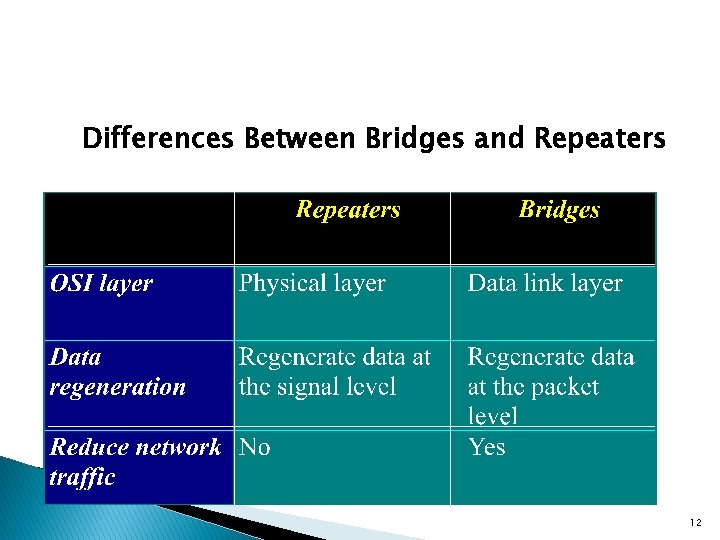
Differences Between Bridges and Repeaters 12
Switch �A multiport Bridge, functioning at the Data Link Layer � Each port of the bridge decides whether to forward data packets to the attached network � Keeps track of the Mac addresses of all attached devices (just like a bridge) � Similarly priced to Hubs – making them popular � Acts like a Hub, but filters like a Bridge � Each port on a Switch is a collision domain 13
Advantages of Switches • Switches divide a network into several isolated channels (or collision domains) • Reduce the possibility of collision • Collision only occurs when two devices try to get access to one channel • Can be solved by buffering one of them for later access • Each channel has its own network capacity • Suitable for real-time applications, e. g. video conferencing • Since isolated, hence secure • Data will only go to the destination, but not others 14
Router (1) Works at Network Layer in an intelligent manner � Can connect different network segments, if they are in the same building or even on the opposite side of the globe � Work in LAN, MAN and WAN environments � Allows access to resources by selecting the best path � Can interconnect different networks – Ethernet with Token Ring � Changes packet size and format to match the requirements of the destination network � 15
Router (2) � Two primary functions – to determine the ‘best path’ and to share details of routes with other routers � Routing Table – a database which keeps track of the routes to networks and the associated costs � Static Routing – routes are manually configured by a network administrator � Dynamic Routing – adjust automatically to changes in network topology, and information it receives from other routers � Routing Protocol – uses a special algorithm to route data across a network eg RIP 16
Routing Protocol Example - RIP for IP Routing • RIP (Routing Information Protocol) ― the oldest one • Use no. of hops between nodes to determine best path • Does not consider the network congestion condition • Broadcast every 30 sec the routing table to neighboring routers to convey routing information • RIP is limited to interpreting a maximum of 16 hops • Not suitable for large network (e. g. Internet) • Can create excessive network traffic due to broadcasting • May take a long time to reach the far reaches 17
Routing Protocol Example - OSPF for IP • OSPF - Open Shortest Path First • Make up the limitations of RIP - can coexist with RIP • In general case, best path refers to the shortest path • In case of traffic congestion, can go a longer path • Each router maintains a database of other router’s links • If link failure notice is received, router can rapidly compute an alternate path • Require more memory and CPU power 18
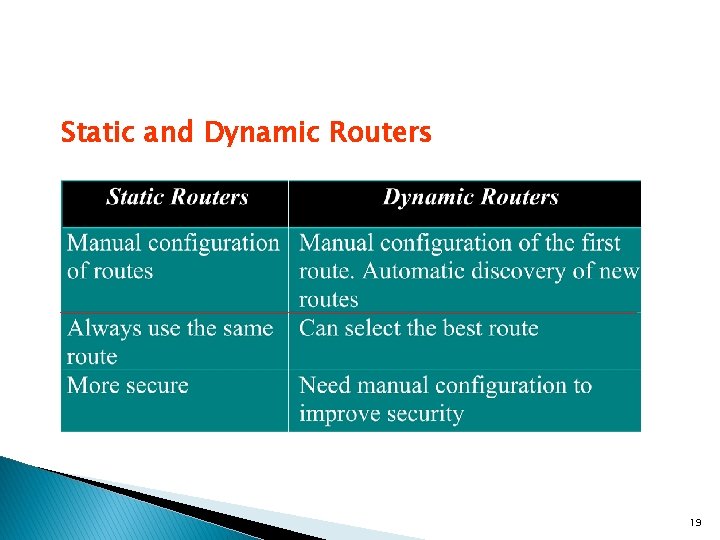
Static and Dynamic Routers 19
Brouter � Functions both as Bridge and a Router – hence name � Can work on networks using different protocols � Can be programmed only to pass data packets using a specific protocol forward to a segment – in this case it is functioning in a similar manner to a Bridge � If a Brouter is set to route data packets to the appropriate network with a routed protocol such as IP, it is functioning as a Router 20
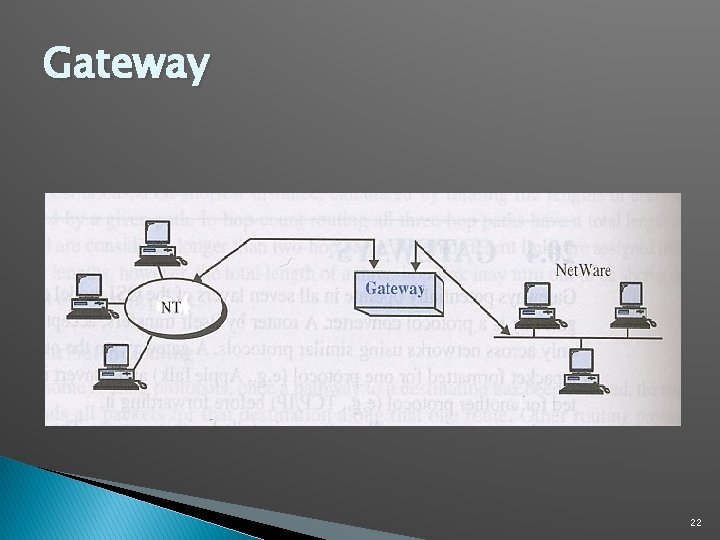
Gateway � Allows different networks to communicate by offering a translation service from one protocol stack to another � They work at all levels of the OSI model – due to the type of translation service they are providing � Address Gateway – connects networks using the same protocol, but using different directory spaces such as Message Handling Service � Protocol Gateway – connects network using different protocols. Translates source protocol so destination can understand it � Application Gateway – translates between applications such as from an Internet email server to a messaging server 21
Gateway 22
- Slides: 22