
NETW 1010 IOT Design An Embedded System Overview
NETW 1010 IOT Design: An Embedded System Overview Definitions DAY Dr. Eng. Amr T. Abdel-Hamid Fall 2016
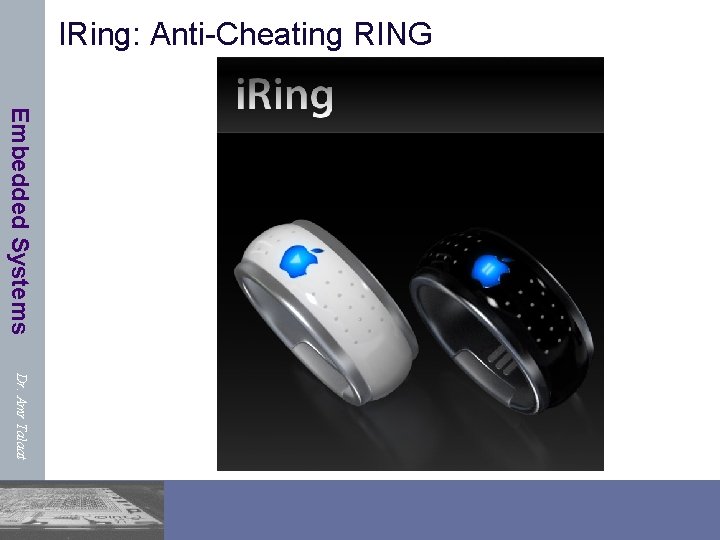
IRing: Anti-Cheating RING Embedded Systems Dr. Amr Talaat
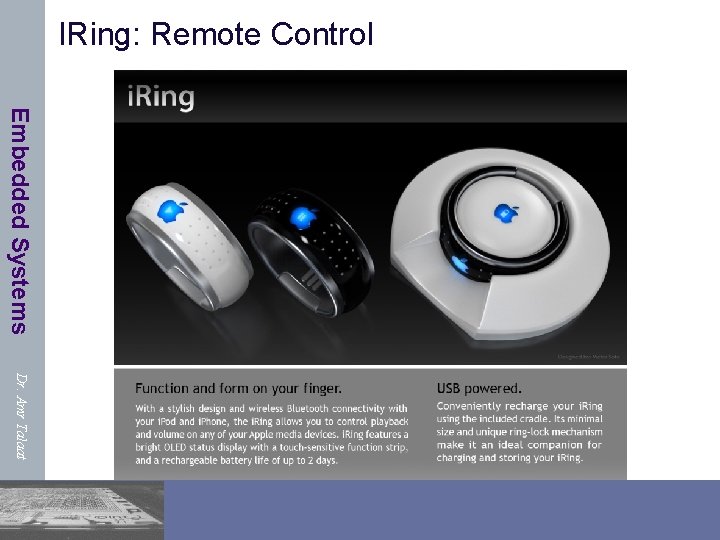
IRing: Remote Control Embedded Systems Dr. Amr Talaat
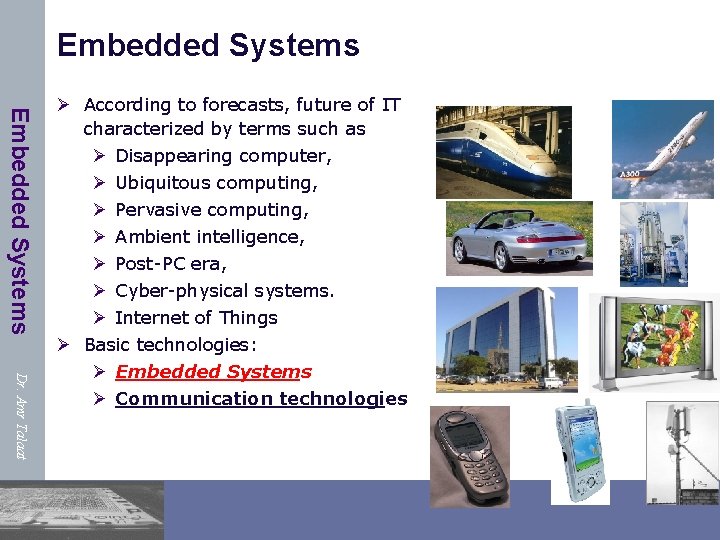
Embedded Systems Dr. Amr Talaat Ø According to forecasts, future of IT characterized by terms such as Ø Disappearing computer, Ø Ubiquitous computing, Ø Pervasive computing, Ø Ambient intelligence, Ø Post-PC era, Ø Cyber-physical systems. Ø Internet of Things Ø Basic technologies: Ø Embedded Systems Ø Communication technologies
![Embedded Systems & Cyber-Physical Systems Embedded Systems “Dortmund“ Definition: [Peter Marwedel] Embedded systems are](http://slidetodoc.com/presentation_image/2cb0a6cce869c362b594727a05385358/image-5.jpg "Embedded Systems & Cyber-Physical Systems Embedded Systems “Dortmund“ Definition: [Peter Marwedel] Embedded systems are")
Embedded Systems & Cyber-Physical Systems Embedded Systems “Dortmund“ Definition: [Peter Marwedel] Embedded systems are information processing systems embedded into a larger product Berkeley: [Edward A. Lee]: Embedded software is software integrated with physical processes. The technical problem is managing time and concurrency in computational systems. Dr. Amr Talaat Definition: Cyber-Physical (cy-phy) Systems (CPS) are integrations of computation with physical processes [Edward Lee, 2006].
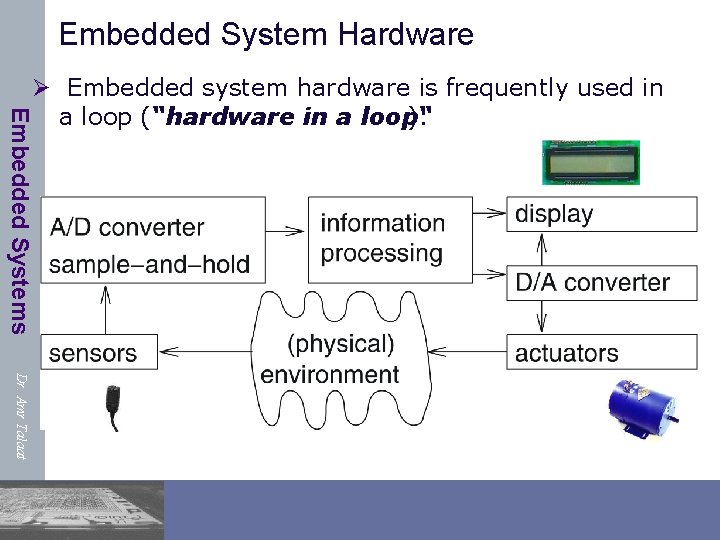
Embedded System Hardware Embedded Systems Ø Embedded system hardware is frequently used in a loop (“hardware in a loop“ ): Dr. Amr Talaat
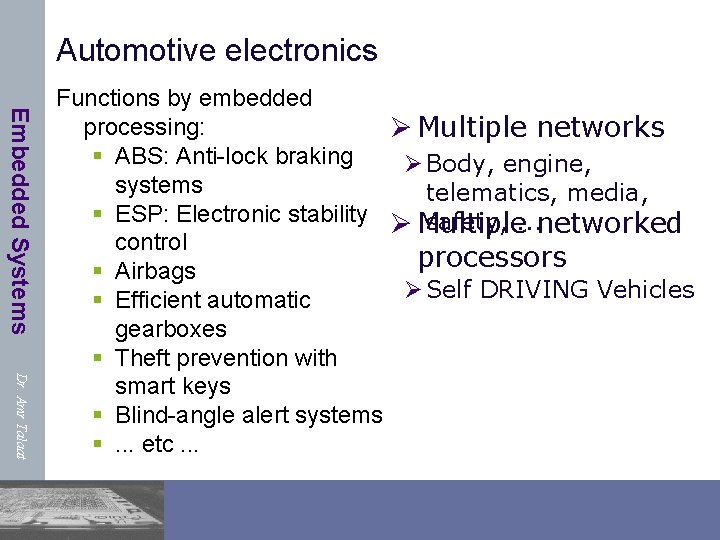
Automotive electronics Embedded Systems Dr. Amr Talaat Functions by embedded processing: Ø Multiple networks § ABS: Anti-lock braking Ø Body, engine, systems telematics, media, § ESP: Electronic stability Ø Multiple safety, . . . networked control processors § Airbags Ø Self DRIVING Vehicles § Efficient automatic gearboxes § Theft prevention with smart keys § Blind-angle alert systems §. . . etc. . .
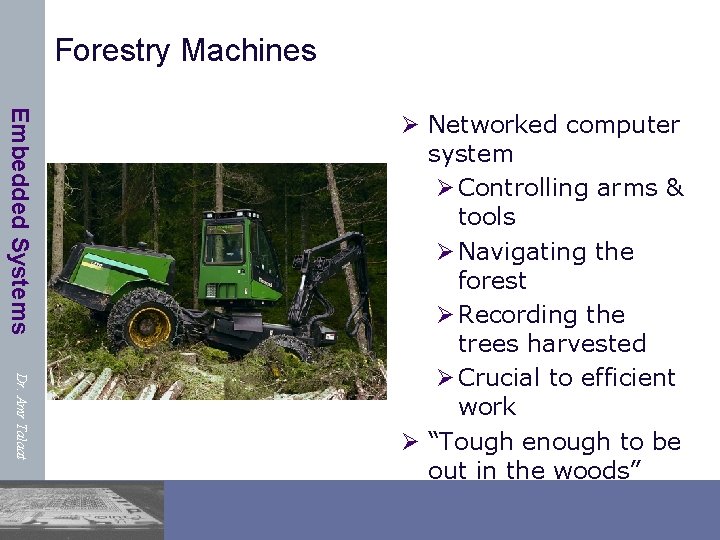
Forestry Machines Embedded Systems Dr. Amr Talaat Ø Networked computer system Ø Controlling arms & tools Ø Navigating the forest Ø Recording the trees harvested Ø Crucial to efficient work Ø “Tough enough to be out in the woods”
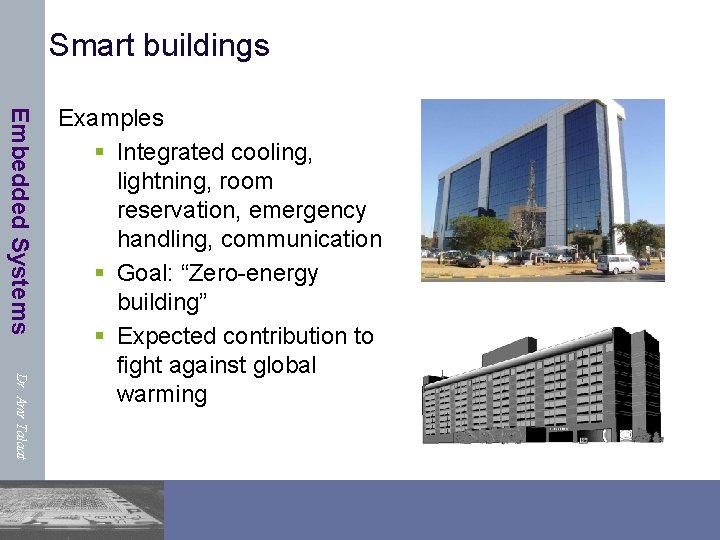
Smart buildings Embedded Systems Dr. Amr Talaat Examples § Integrated cooling, lightning, room reservation, emergency handling, communication § Goal: “Zero-energy building” § Expected contribution to fight against global warming
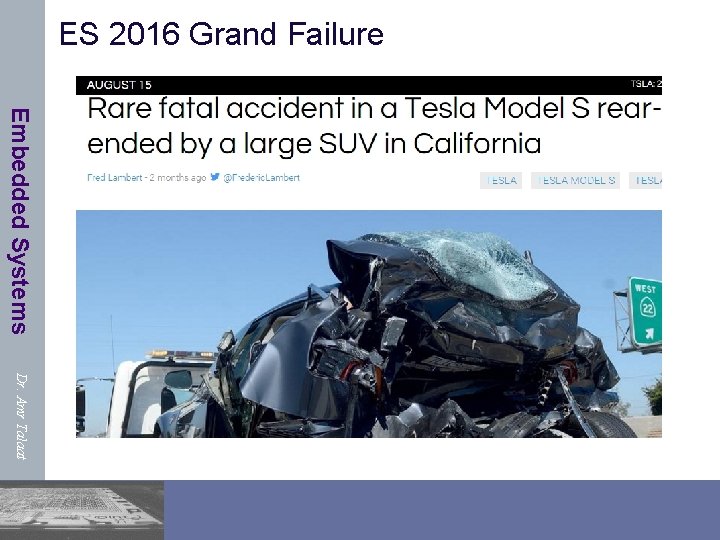
ES 2016 Grand Failure Embedded Systems Dr. Amr Talaat
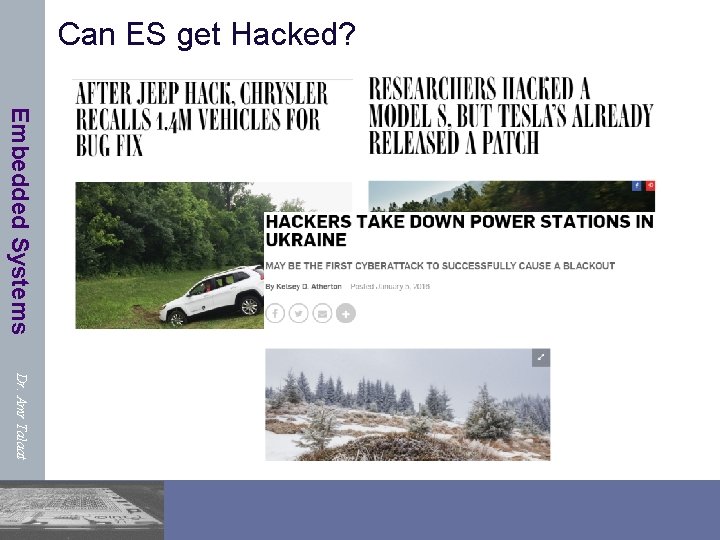
Can ES get Hacked? Embedded Systems Dr. Amr Talaat
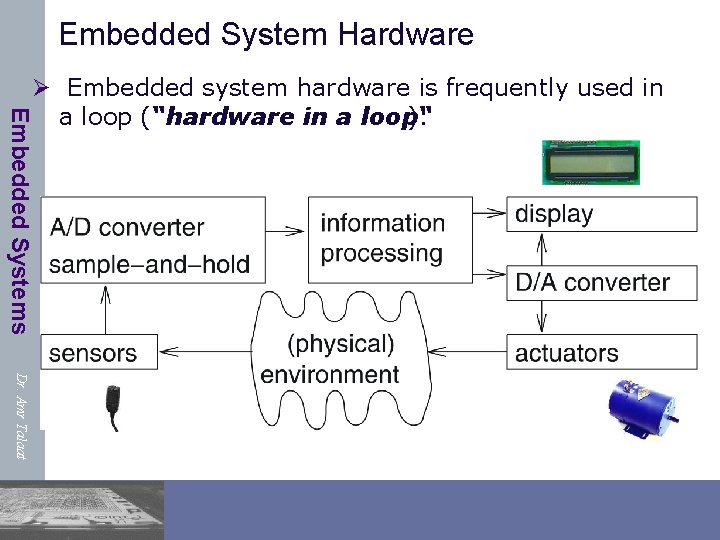
Embedded System Hardware Embedded Systems Ø Embedded system hardware is frequently used in a loop (“hardware in a loop“ ): Dr. Amr Talaat
Some common characteristics of ES Embedded Systems Dr. Amr Talaat Ø Dependability Ø Single-functioned (dedicated System) Ø Executes a single program, repeatedly Ø Tightly-constrained (Efficient) Ø Low cost, low power, small, fast, etc. Ø Reactive and real-time Ø Continually reacts to changes in the system’s environment Ø Must compute certain results in real-time without delay 13
Dependability Embedded Systems § ES Must be dependable, • Reliability R(t) = probability of system working correctly provided that is was working at t=0 • Maintainability M(d) = probability of system working correctly d time units after error occurred. • Availability A(t): probability of system working at time t • Safety: no harm to be caused • Security: confidential and authentic communication Dr. Amr Talaat Even perfectly designed systems can fail if the assumptions about the workload and possible errors turn out to be wrong. Making the system dependable must not be an after-thought, it must be considered from the very beginning
Efficiency Embedded Systems Ø ES must be efficient ØCode-size efficient ØRun-time efficient ØWeight efficient ØCost efficient ØEnergy efficient Dr. Amr Talaat
Real-time constraints Embedded Systems Dr. Amr Talaat Ø Many ES must meet real-time constraints Ø A real-time system must react to stimuli from the controlled object (or the operator) within the time interval dictatedby the environment. Ø For real-time systems, right answers arriving too late are wrong. Ø “A real-time constraint is called hard, if not meeting that constraint could result in a catastrophe“ [Kopetz, 1997]. Ø All other time-constraints are called soft. Ø A guaranteed system response has to be explained without statistical arguments
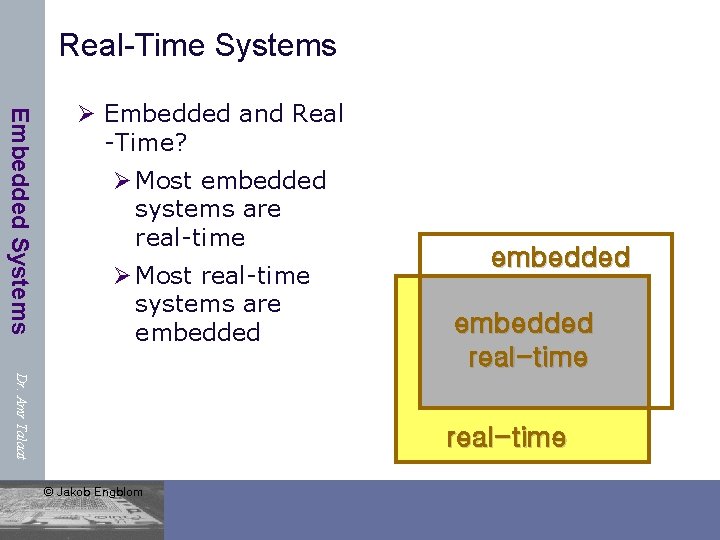
Real-Time Systems Embedded Systems Ø Embedded and Real -Time? Ø Most embedded systems are real-time Ø Most real-time systems are embedded real-time Dr. Amr Talaat real-time © Jakob Engblom
Reactive & hybrid systems Embedded Systems Ø Typically, ES are reactive systems : “A reactive system is one which is in continual interaction with is environment and executes at a pace determined by that environment“ [Bergé, 1995] Behavior depends on input and current state. automata model appropriate, model of computable functions inappropriate. Ø Hybrid systems (analog + digital parts). Dr. Amr Talaat
Dedicated systems Embedded Systems Ø Dedicatedtowards a certain application Knowledge about behavior at design time can be used to minimize resources and to maximize robustness Ø Dedicated user interface (no mouse, keyboard and screen) Dr. Amr Talaat
Design Challenge Embedded Systems Ø Time-to-prototype : the time needed to build a working version of the system Ø Time-to-market : the time required to develop a system to the point that it can be released and sold to customers Ø NRE cost (Non-Recurring Engineering cost): The one-time monetary cost of designing the system Ø Flexibility : the ability to change the functionality of the system without incurring heavy NRE cost Dr. Amr Talaat
Design challenge – optimizing design metrics Embedded Systems Dr. Amr Talaat Ø Obvious design goal: Ø Construct an implementation with desired functionality Ø Key design challenge: Ø Simultaneously optimize numerous design metrics Ø Design metric Ø A measurable feature of a system’s implementation Ø Optimizing design metrics is a key challenge
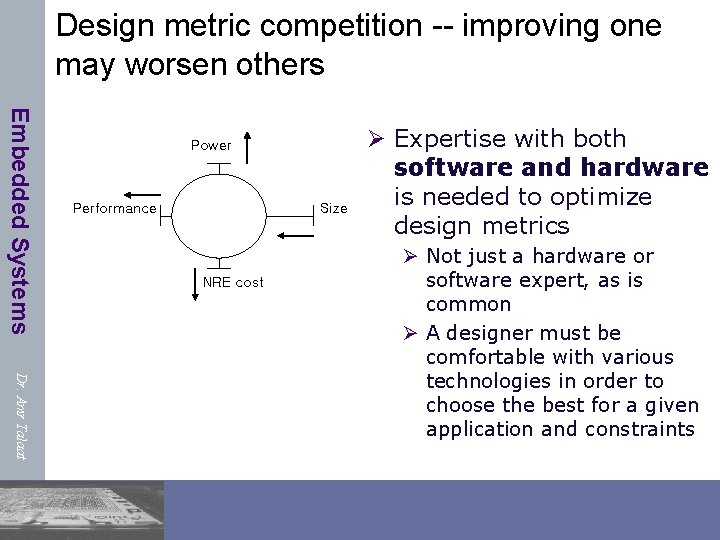
Design metric competition -- improving one may worsen others Embedded Systems Power Performance Size NRE cost Ø Expertise with both software and hardware is needed to optimize design metrics Dr. Amr Talaat Ø Not just a hardware or software expert, as is common Ø A designer must be comfortable with various technologies in order to choose the best for a given application and constraints
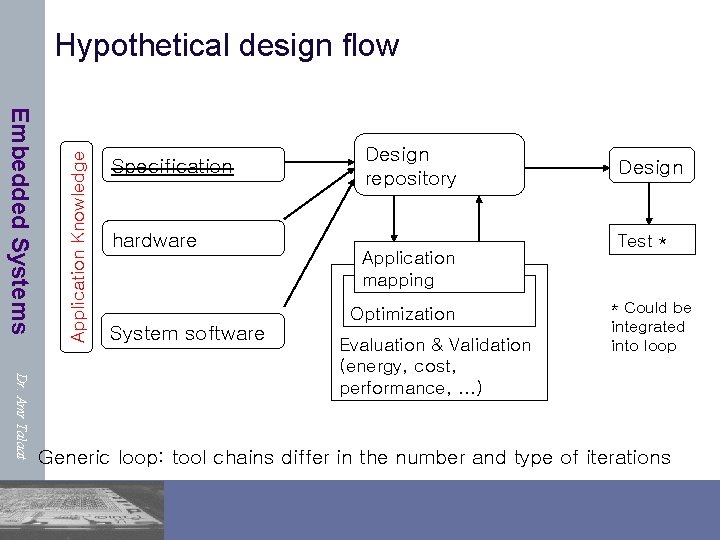
Embedded Systems Application Knowledge Hypothetical design flow Specification hardware System software Design repository Application mapping Optimization Dr. Amr Talaat Evaluation & Validation (energy, cost, performance, …) Design Test * * Could be integrated into loop Generic loop: tool chains differ in the number and type of iterations
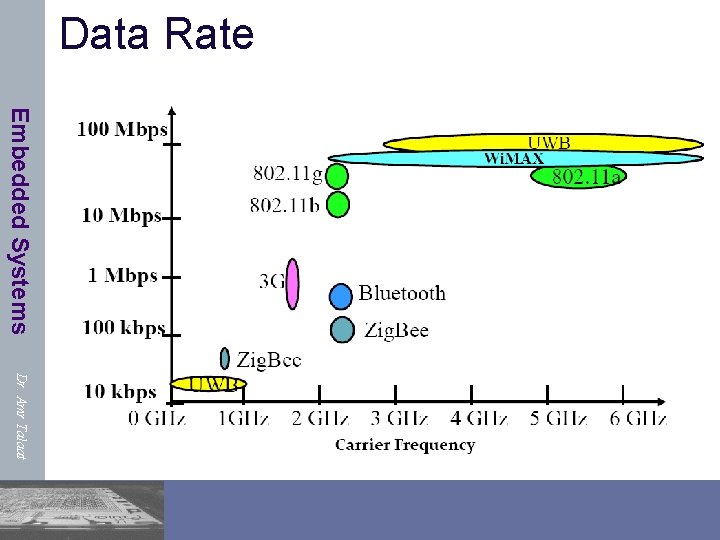
Design Questions Embedded Systems Ø How much Power is needed? Ø Is power an issue? Ø Average Current needed? Ø Max. Transient Current Dr. Amr Talaat Ø Do I need communications/Networking module? Ø How far? (Distance Travelled) Ø Authorized Frequencies Ø Antenna Size Ø Required Power Ø It is 1 device or in a network? Ø Do I need routing? …………
Data Rate Embedded Systems Dr. Amr Talaat
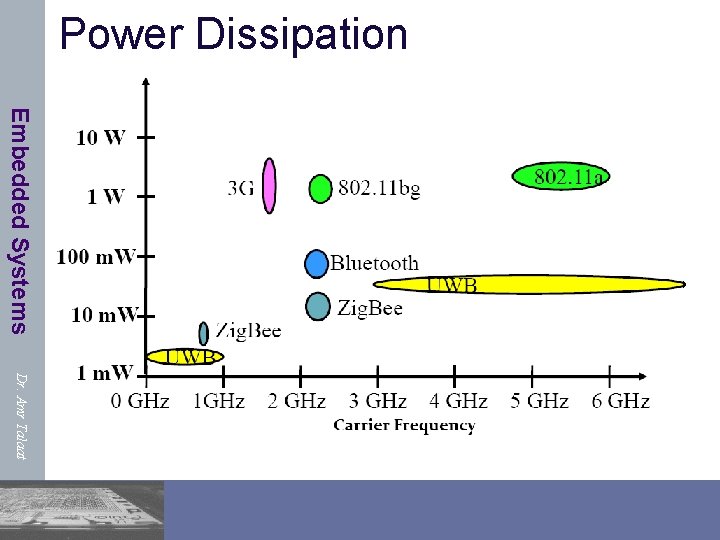
Power Dissipation Embedded Systems Dr. Amr Talaat
IOT EXTRA Design Challenges Embedded Systems Dr. Amr Talaat Ø Larger Scale: Scalability, the ability of a network to support the increase of its limiting parameters. We discuss the first four scalability issues here. Ø Large Network Size: In the Internet of Things, we are talking about interaction with thousands of devices in one place. Ø Massive Number of Events: A significant challenge is posed by the enormous number of events generated by objects. Ø Mobility Rate: Higher mobility rate causes more breakage of links and causes more routing information becoming out-of-date. Ø Heterogeneous Devices: In the Internet of Things there is a wide variety of hardware and devices, in all shapes and sizes.
IOT EXTRA Design Challenges (cont. ) Embedded Systems Ø Spontaneous Interaction : Sudden interactions happen as the objects move around and come into other objects’ wireless range. This leads to the spontaneous generation of events. Ø Zero Infrastructure : In the Internet of Things setting, devices need to discover each other as well as the resources provided by other devices in the surroundings. The challenge here is that there is no fixed infrastructure to manage resource publication, discovery and communication. Dr. Amr Talaat
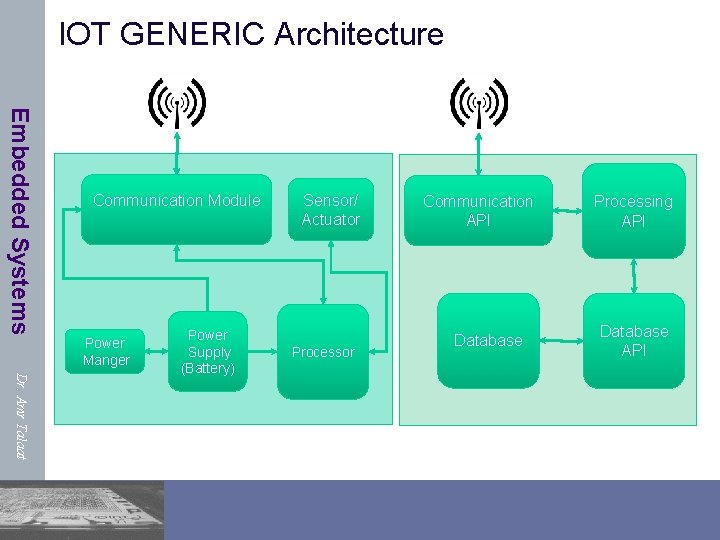
IOT GENERIC Architecture Embedded Systems Communication Module Power Manger Dr. Amr Talaat Power Supply (Battery) Sensor/ Actuator Processor Communication API Database Processing API Database API
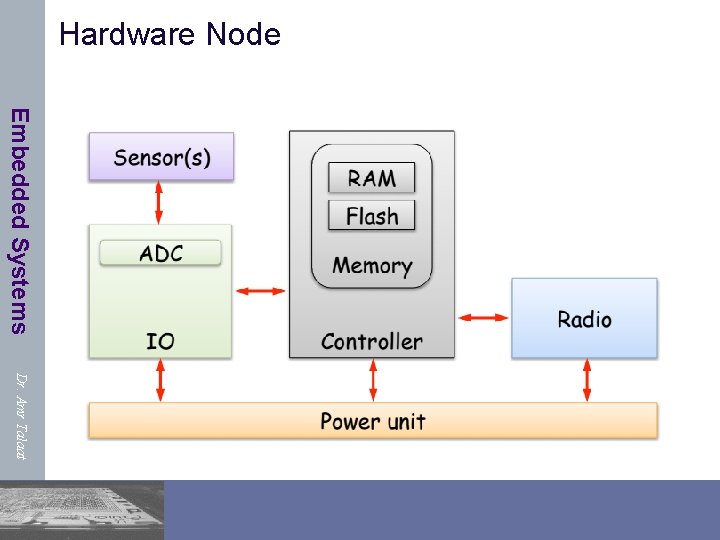
Hardware Node Embedded Systems Dr. Amr Talaat
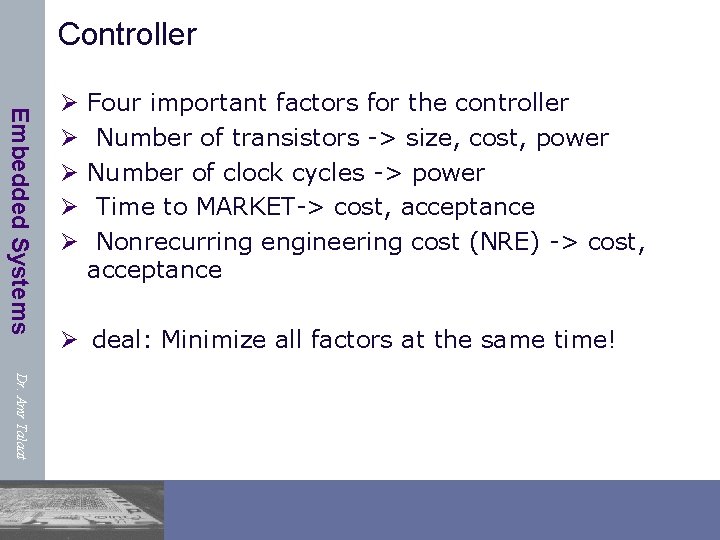
Controller Embedded Systems Ø Ø Ø Four important factors for the controller Number of transistors -> size, cost, power Number of clock cycles -> power Time to MARKET-> cost, acceptance Nonrecurring engineering cost (NRE) -> cost, acceptance Ø deal: Minimize all factors at the same time! Dr. Amr Talaat
Tasks of the controller Embedded Systems Ø Running of (real time) data processing and communication protocols Ø Perform and control the application program Ø Energy management of the node Ø Different operation modes available (active, idle, listen, sleep, etc. ) Dr. Amr Talaat
Embedded processors (Micro. Controllers ) Embedded Systems Dr. Amr Talaat Ø Programmed once by manufacturer of system Ø Executes a single program (or a limited suite) with few parameters Ø Task-specific Ø can be optimized for specific application Ø Interacts with environment in many ways Ø direct sensing and control of signal wires Ø communication protocols to environment and other devices Ø real-time interactions and constraints
Microprocessors and Microcontrollers Embedded Systems Dr. Amr Talaat • A microprocessor unit (MPU) is a processor on one silicon chip. • Microcontrollers are used in embedded computing. • A Microcontroller unit (MCU) is a microprocessor with some added circuitry on one silicon chip.
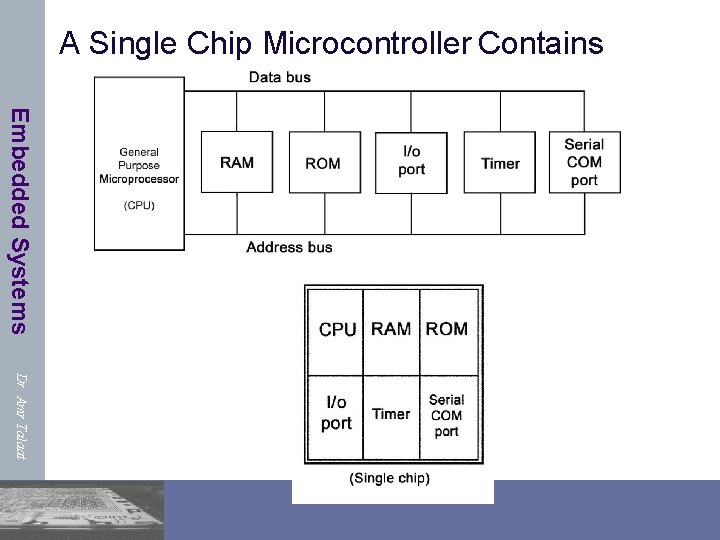
A Single Chip Microcontroller Contains Embedded Systems Dr. Amr Talaat
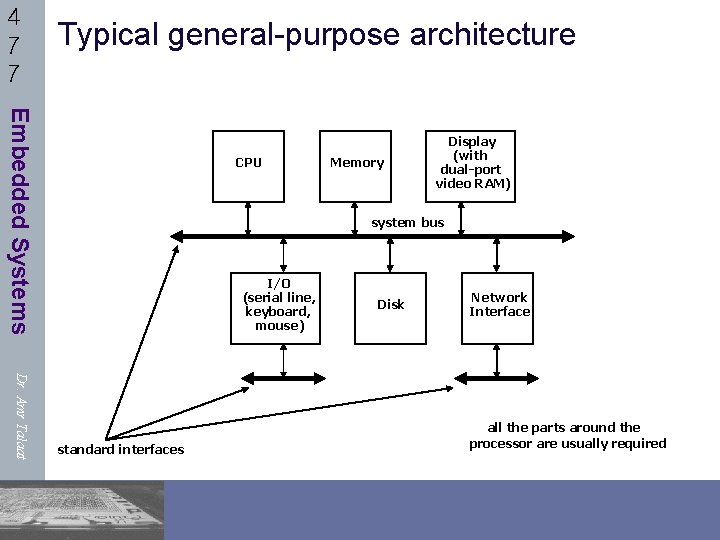
4 7 7 Typical general-purpose architecture Embedded Systems CPU Memory Display (with dual-port video RAM) system bus I/O (serial line, keyboard, mouse) Dr. Amr Talaat standard interfaces Disk Network Interface all the parts around the processor are usually required
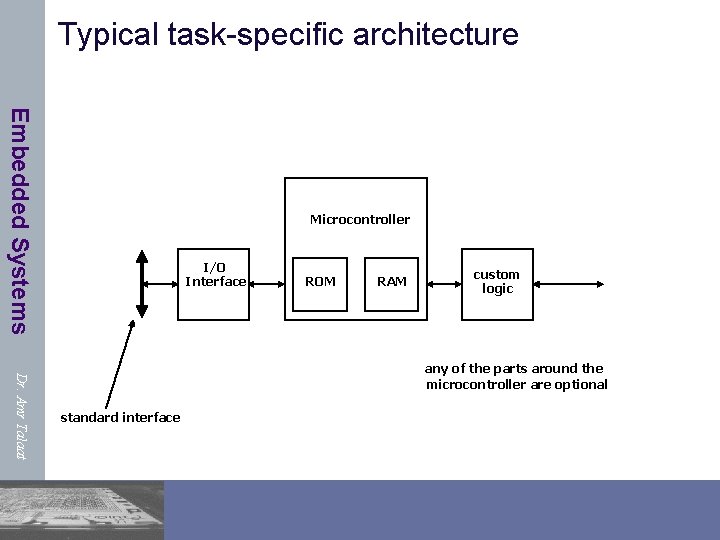
Typical task-specific architecture Embedded Systems Microcontroller I/O Interface ROM RAM custom logic Dr. Amr Talaat any of the parts around the microcontroller are optional standard interface
Introduction to Embedded Systems & Microcontrollers MCU Types Embedded Systems • MCUs can be classified according: • MCU bits (e. g. 8 -bit, 16 -bit, 32 -bit) • Instruction Set Architecture (ISA) Dr. Amr Talaat CSEN 701: Embedded Systems 38
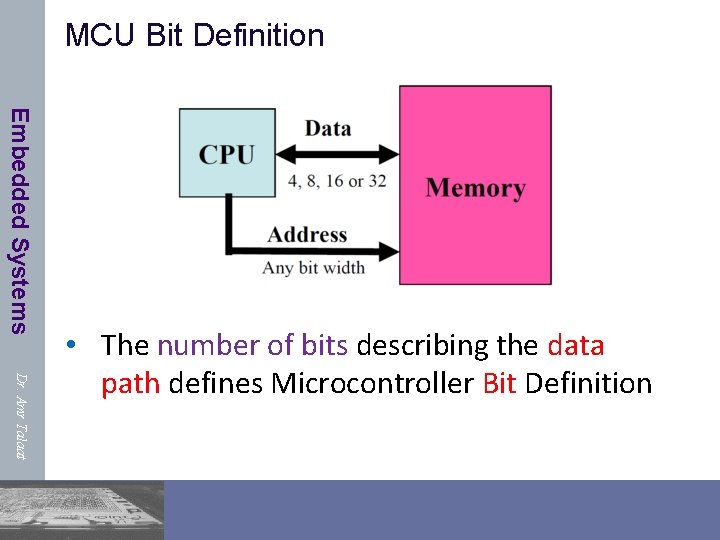
MCU Bit Definition Embedded Systems Dr. Amr Talaat • The number of bits describing the data path defines Microcontroller Bit Definition
Instruction Set Architecture Embedded Systems • Instruction Set Architecture (ISA) is the part of the computer architecture related to programming, including the native data types, instructions, registers, addressing modes, memory architecture, interrupt and exception handling, and external I/O. • The ISA defines: • • Operations that the processor can execute, The mechanism of Data Transfer and how to access data, Control Mechanisms (branch, jump, etc) “Contract” between programmer/compiler and hardware Dr. Amr Talaat • The main ISAs are CISC and RISC: • CISC stands for Complex Instruction Set Computer • RISC stands for Reduced Instruction Set Computer
The CISC Approach Embedded Systems • Emphasis on hardware • Includes multi-clock Instructions • Has a large amount of different (in length) and • complex instructions • The philosophy behind it is that hardware is always faster than software, therefore one should make a powerful instruction-set, • Memory-to-memory: • "LOAD" and "STORE“ are incorporated in instructions Dr. Amr Talaat • Small code sizes (use less number of instructions), • Requires more transistors
The RISC Approach Embedded Systems Dr. Amr Talaat • RISC processors only use simple instructions that can be executed within one clock cycle. • Because there are more lines of code, more RAM is needed to store the assembly level instructions. The compiler must also perform more work to convert a high-level language statement into code of this form. • Because each instruction requires only one clock cycle to execute, the entire program will execute in approximately the same amount of time as the multi-cycle "MULT" command. • These RISC "reduced instructions" require less transistors of hardware space than the complex instructions, leaving more room for general purpose registers. • Because all of the instructions execute in a uniform amount of time • (i. e. one clock), pipelining is possible. • It’s also called : Load-Store Architecture
Microcontroller Features Embedded Systems Ø Processor speed : Fundamental measure of processing rate of device Ø Value of interest is in MIPS, not MHz Ø Supply voltage/current: Measure of the amount of power required to run the device Ø Multiple modes (sleep, idle, etc) Dr. Amr Talaat
Common Memory Types in MCUs Embedded Systems • RAM • EEPROM • Flash Memory Dr. Amr Talaat
RAM: Random Access Memory Embedded Systems • • Volatile or Non-Permanent Memory, i. e. , data is lost after the removal of power, Can be Written too Many Times, It is a general purpose memory which is typically used for storing user data, temporary or Changeable Data Most microcontrollers have some amount of internal RAM. Generally, 1 kbytes (“Embedded” in MCUs) is a common amount, although some microcontrollers have more, some less. Dr. Amr Talaat
EEPROM: Electrically Erasable Programmable Read-Only Memory Embedded Systems Dr. Amr Talaat ØIt is electrically-erasable-and-programmable. ØInternally, they are similar to EPROMs, but the erase operation is accomplished electrically , rather than by exposure to ultraviolet light. Any byte within an EEPROM may be erased and rewritten. – Erased by higher voltage. ØThe primary tradeoff for this improved Øfunctionality is higher cost , though write cycles are also significantly longer than writes to a RAM. ØEEPROM are typically used to store permanent data
Flash Memory • Flash memory devices are Embedded Systems • • high density, low cost, nonvolatile, fast (to read, but not to write), and electrically reprogrammable. Write/Erase large blocks of bytes Read bytes • EEPROM is similar to flash memory (sometimes called flash EEPROM). • The principal difference is that Dr. Amr Talaat • EEPROM requires data to be written or erased one byte at a time whereas flash memory allows data to be written or erased in blocks. • Flash memory is typically used in MCUs for storing program code
Popular Microcontrollers Embedded Systems • • Intel 8051 Microchip PIC Atmel AVR ARM Dr. Amr Talaat
Embedded Systems Why study the ARM architecture (and the Cortex-M 3 in particular)? Dr. Amr Talaat 49

Lots of manufacturers ship ARM products Embedded Systems Dr. Amr Talaat 50
Introduction to ARM Embedded Systems Dr. Amr Talaat Ø Acorn Computers Ltd. (Cambridge, England) Nov. 1990 Ø First called Acorn RISC Machine, then Advanced RISC Machine Ø Based on RISC architecture work done at UCal Berkley and Stanford Ø ARM only sells licenses for its core architecture design Ø Optimized for low power & performance Ø Versatile. Express board with Cortex-A 9 (ARMv 7) core will be “emulated” using Linaro builds. Ø This also means some things may not work. You’ve been warned.
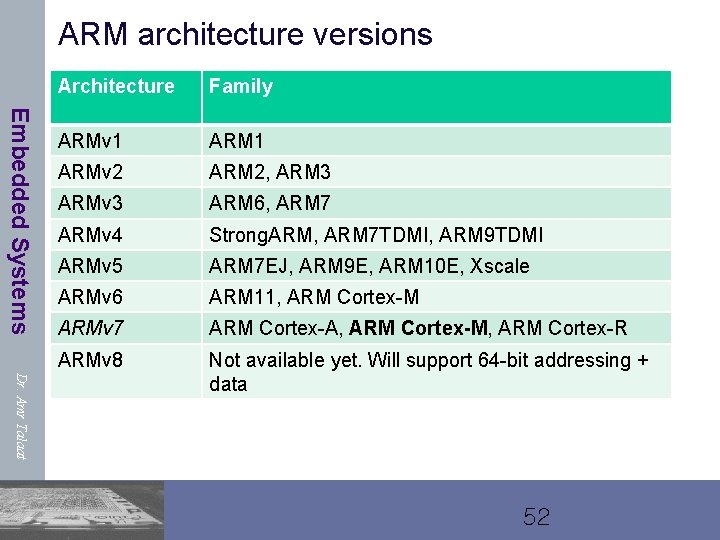
ARM architecture versions Embedded Systems Dr. Amr Talaat Architecture Family ARMv 1 ARMv 2 ARM 2, ARM 3 ARMv 3 ARM 6, ARM 7 ARMv 4 Strong. ARM, ARM 7 TDMI, ARM 9 TDMI ARMv 5 ARM 7 EJ, ARM 9 E, ARM 10 E, Xscale ARMv 6 ARM 11, ARM Cortex-M ARMv 7 ARM Cortex-A, ARM Cortex-M, ARM Cortex-R ARMv 8 Not available yet. Will support 64 -bit addressing + data 52
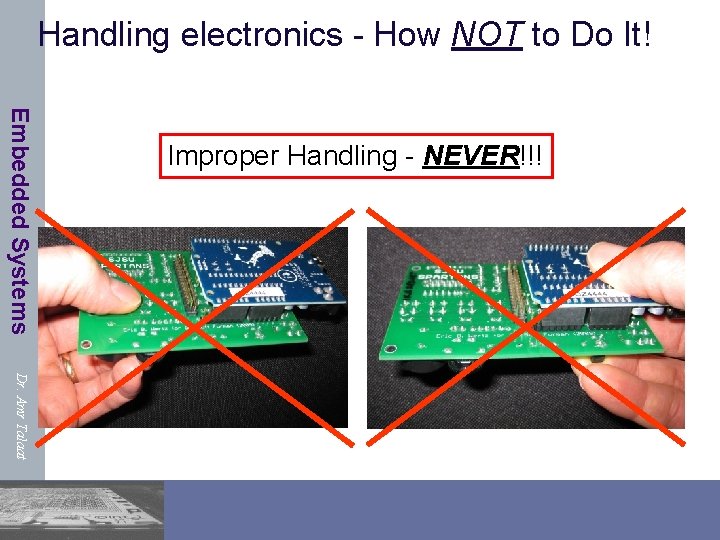
Handling electronics - How NOT to Do It! Embedded Systems Improper Handling - NEVER!!! Dr. Amr Talaat
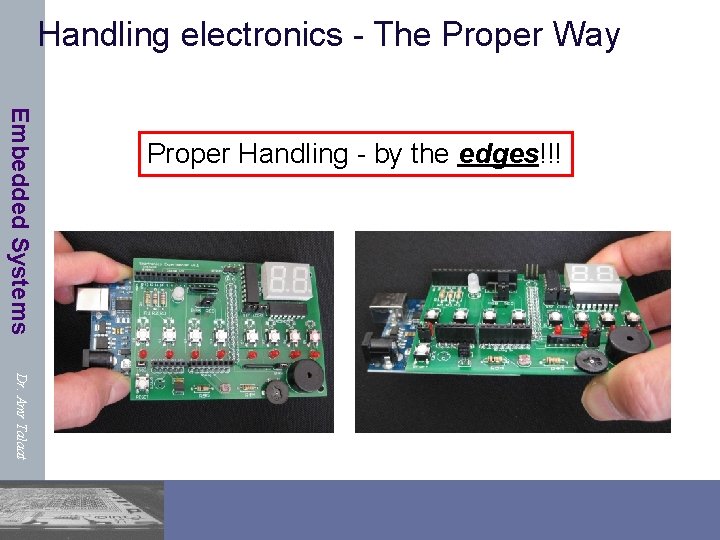
Handling electronics - The Proper Way Embedded Systems Proper Handling - by the edges!!! Dr. Amr Talaat
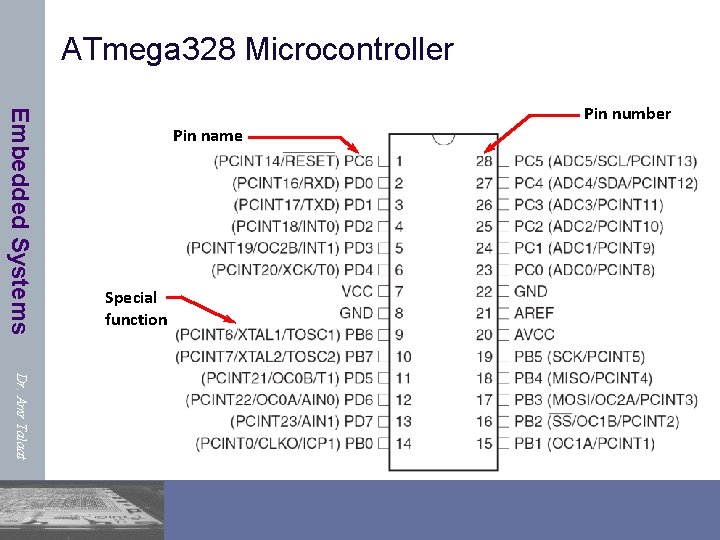
ATmega 328 Microcontroller Embedded Systems Pin name Special function Pin number Dr. Amr Talaat
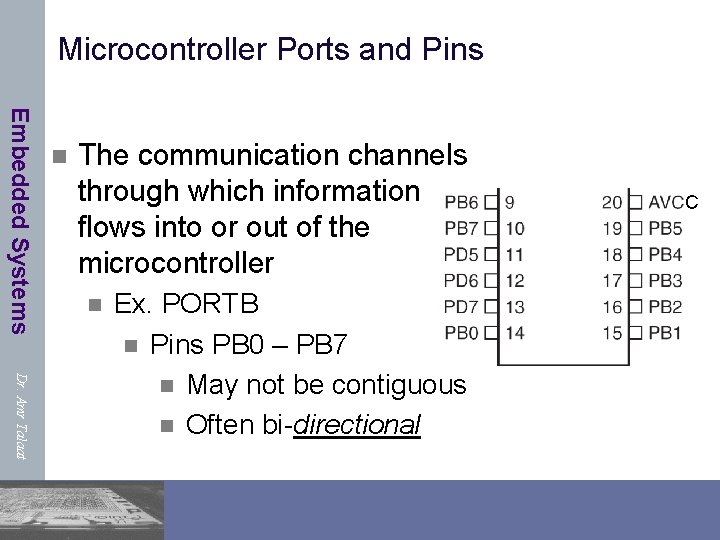
Microcontroller Ports and Pins Embedded Systems n The communication channels through which information flows into or out of the microcontroller n Dr. Amr Talaat Ex. PORTB n Pins PB 0 – PB 7 n May not be contiguous n Often bi-directional C
Port Pin Data Directionality Embedded Systems Ø Input Ø When you want to take information from the external world (sensors) into the MCU Ø Output Ø When you want to change the state of something outside the MCU (turn a motor on or off, etc. ) Dr. Amr Talaat Ø Pins default to input direction on power-up or reset Ø Your program can set or change the directionality of a pin at any time
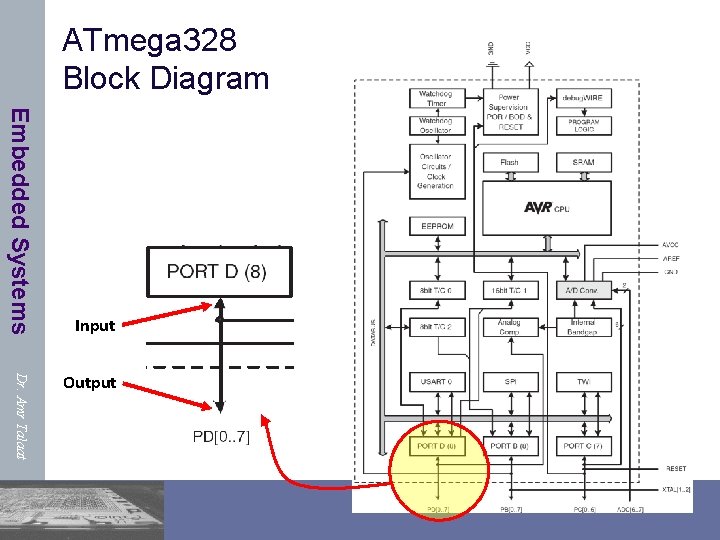
ATmega 328 Block Diagram Embedded Systems Input Dr. Amr Talaat Output
Setting the Pin Data Direction Embedded Systems Ø Arduino Ø pin. Mode(pin_no. , dir) ØEx. Make Arduino pin 3 (PD 3) an output Øpin. Mode(3, OUTPUT); Øpin. Mode(PIN_D 3, OUTPUT); // with me 106. h Dr. Amr Talaat Ø Note: one pin at a time ØSuppose you wanted Arduino pins 3, 5, and 7 (PD 3, PD 5, and PD 7) to be outputs? ØIs there a way to make them all outputs at the same time? ØYes! Answer coming later…
Pin Voltages Embedded Systems Dr. Amr Talaat Ø Microcontrollers are fundamentally digitaldevices. For digital IO pins: Ø Information is ‘coded’ in two discrete states: ØHIGH or LOW (logic: 1 or 0) ØVoltages ØTTL Ø 5 V (for HIGH) Ø 0 V (for LOW) Ø 3. 3 V CMOS Ø 3. 3 V (for HIGH) Ø 0 V (for LOW)
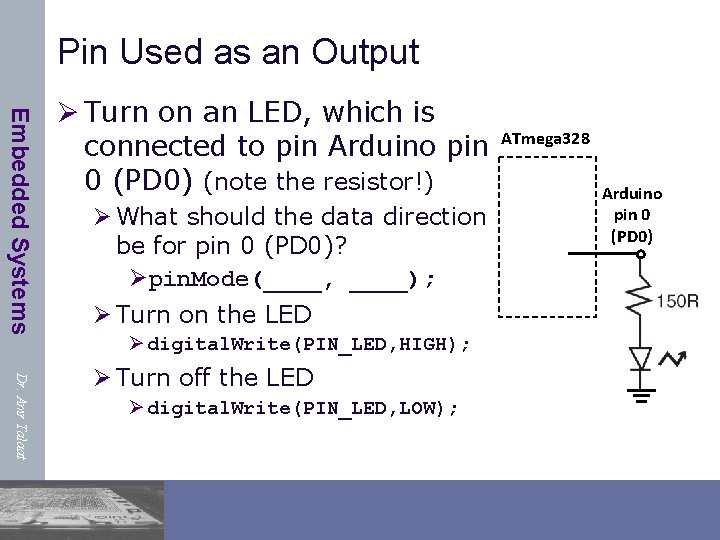
Pin Used as an Output Embedded Systems Ø Turn on an LED, which is connected to pin Arduino pin 0 (PD 0) (note the resistor!) Ø What should the data direction be for pin 0 (PD 0)? Øpin. Mode(____, ____); Ø Turn on the LED Ø digital. Write(PIN_LED, HIGH); Dr. Amr Talaat Ø Turn off the LED Ø digital. Write(PIN_LED, LOW); ATmega 328 Arduino pin 0 (PD 0)
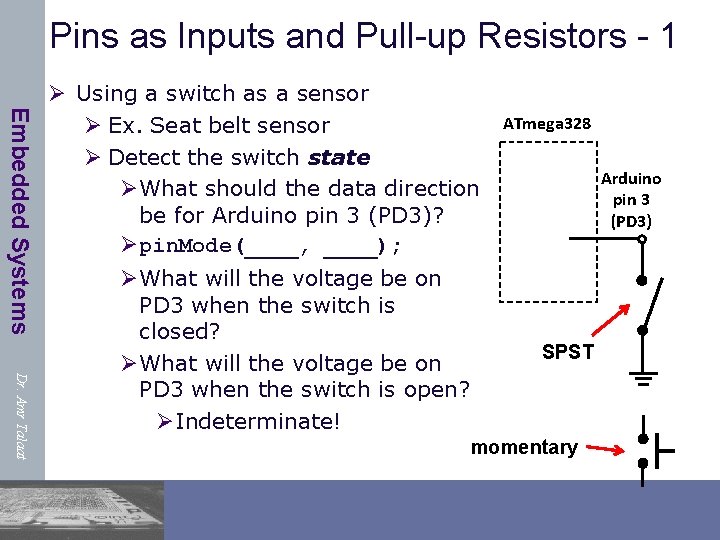
Pins as Inputs and Pull-up Resistors - 1 Embedded Systems Ø Using a switch as a sensor Ø Ex. Seat belt sensor Ø Detect the switch state ØWhat should the data direction be for Arduino pin 3 (PD 3)? Øpin. Mode(____, ____); Dr. Amr Talaat ØWhat will the voltage be on PD 3 when the switch is closed? ØWhat will the voltage be on PD 3 when the switch is open? ØIndeterminate! ATmega 328 Arduino pin 3 (PD 3) SPST momentary
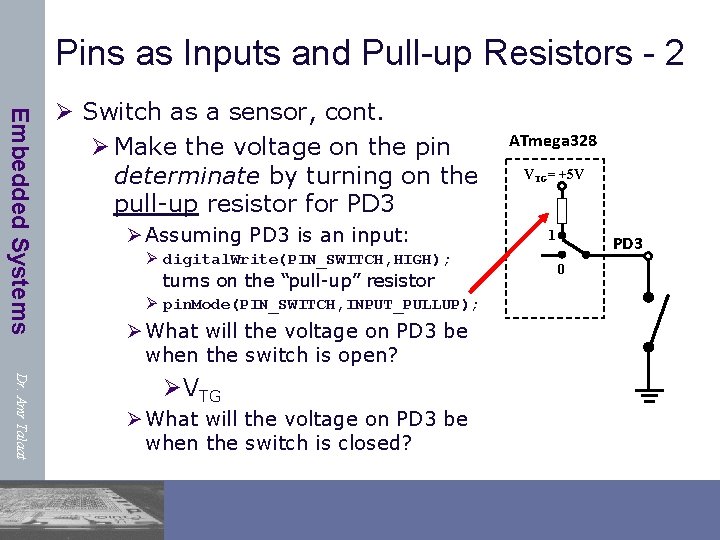
Pins as Inputs and Pull-up Resistors - 2 Embedded Systems Ø Switch as a sensor, cont. Ø Make the voltage on the pin determinate by turning on the pull-up resistor for PD 3 Ø Assuming PD 3 is an input: Ø digital. Write(PIN_SWITCH, HIGH); turns on the “pull-up” resistor Ø pin. Mode(PIN_SWITCH, INPUT_PULLUP); Ø What will the voltage on PD 3 be when the switch is open? Dr. Amr Talaat ØVTG Ø What will the voltage on PD 3 be when the switch is closed? ATmega 328 VTG= +5 V 1 PD 3 0
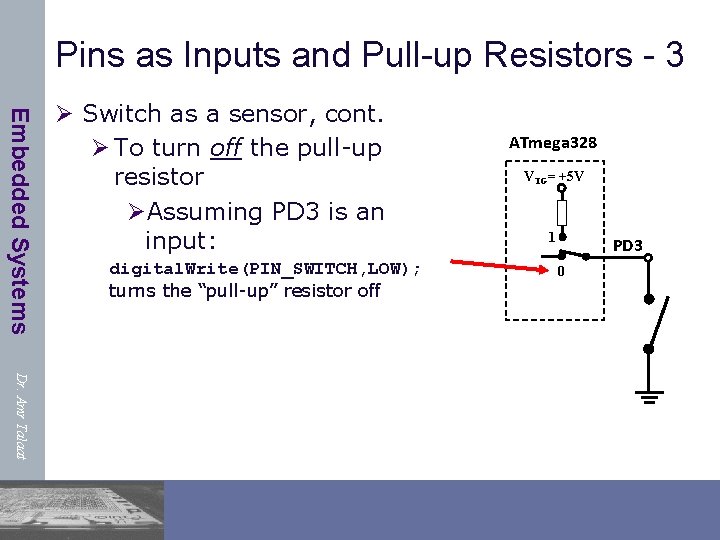
Pins as Inputs and Pull-up Resistors - 3 Embedded Systems Ø Switch as a sensor, cont. Ø To turn off the pull-up resistor ØAssuming PD 3 is an input: digital. Write(PIN_SWITCH, LOW); turns the “pull-up” resistor off ATmega 328 VTG= +5 V 1 PD 3 0 Dr. Amr Talaat
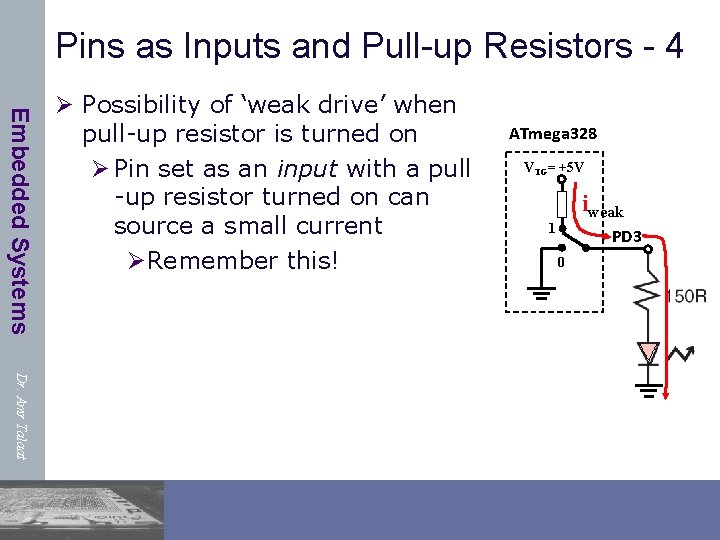
Pins as Inputs and Pull-up Resistors - 4 Embedded Systems Ø Possibility of ‘weak drive’ when pull-up resistor is turned on Ø Pin set as an input with a pull -up resistor turned on can source a small current ØRemember this! ATmega 328 VTG= +5 V iweak 1 PD 3 0 Dr. Amr Talaat
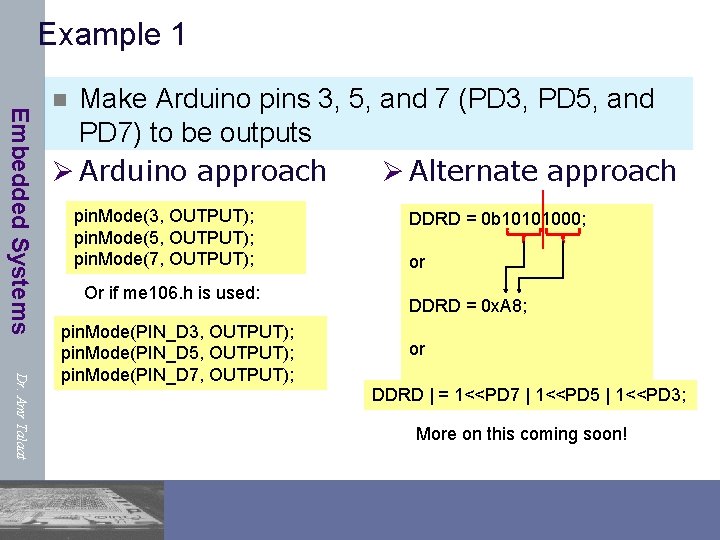
Example 1 Embedded Systems Make Arduino pins 3, 5, and 7 (PD 3, PD 5, and PD 7) to be outputs Ø Arduino approach Ø Alternate approach n pin. Mode(3, OUTPUT); pin. Mode(5, OUTPUT); pin. Mode(7, OUTPUT); Or if me 106. h is used: Dr. Amr Talaat pin. Mode(PIN_D 3, OUTPUT); pin. Mode(PIN_D 5, OUTPUT); pin. Mode(PIN_D 7, OUTPUT); DDRD = 0 b 10101000; or DDRD = 0 x. A 8; or DDRD | = 1<<PD 7 | 1<<PD 5 | 1<<PD 3; More on this coming soon!
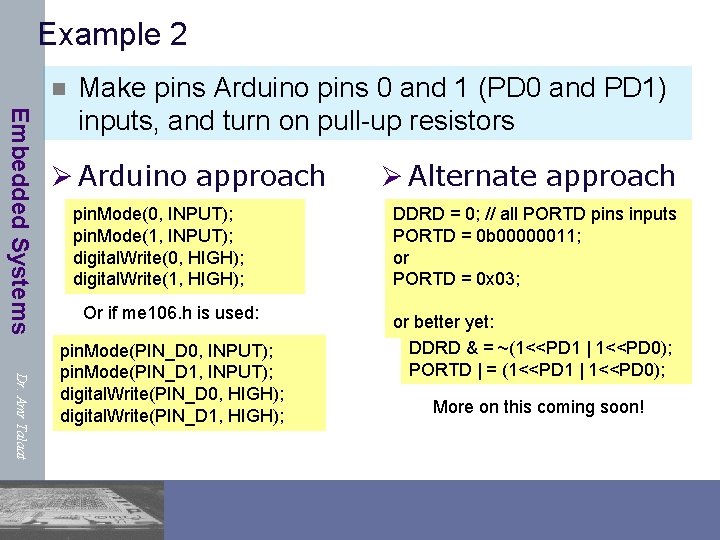
Example 2 n Embedded Systems Make pins Arduino pins 0 and 1 (PD 0 and PD 1) inputs, and turn on pull-up resistors Ø Arduino approach pin. Mode(0, INPUT); pin. Mode(1, INPUT); digital. Write(0, HIGH); digital. Write(1, HIGH); Or if me 106. h is used: Dr. Amr Talaat pin. Mode(PIN_D 0, INPUT); pin. Mode(PIN_D 1, INPUT); digital. Write(PIN_D 0, HIGH); digital. Write(PIN_D 1, HIGH); Ø Alternate approach DDRD = 0; // all PORTD pins inputs PORTD = 0 b 00000011; or PORTD = 0 x 03; or better yet: DDRD & = ~(1<<PD 1 | 1<<PD 0); PORTD | = (1<<PD 1 | 1<<PD 0); More on this coming soon!
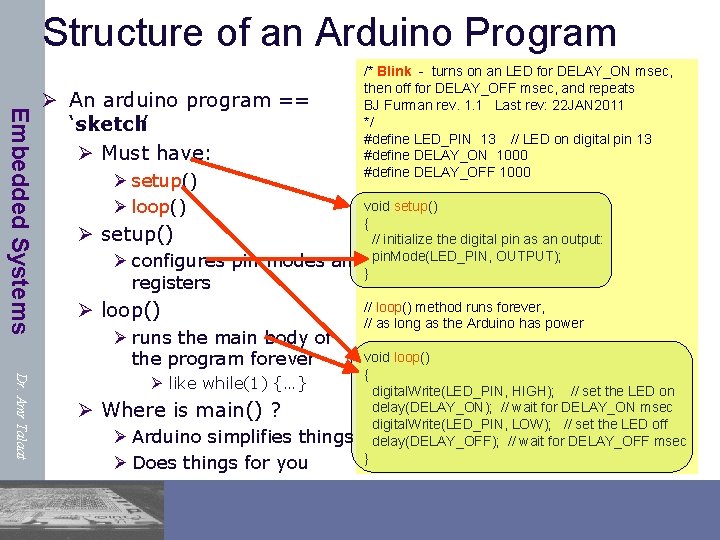
Structure of an Arduino Program Embedded Systems /* Blink - turns on an LED for DELAY_ON msec, then off for DELAY_OFF msec, and repeats BJ Furman rev. 1. 1 Last rev: 22 JAN 2011 */ #define LED_PIN 13 // LED on digital pin 13 #define DELAY_ON 1000 #define DELAY_OFF 1000 Ø An arduino program == ‘sketch’ Ø Must have: Ø setup() Ø loop() Ø setup() Ø configures pin modes registers void setup() { // initialize the digital pin as an output: and pin. Mode(LED_PIN, OUTPUT); } Ø loop() Ø runs the main body of the program forever Dr. Amr Talaat Ø like while(1) {…} Ø Where is main() ? Ø Arduino simplifies things Ø Does things for you // loop() method runs forever, // as long as the Arduino has power void loop() { digital. Write(LED_PIN, HIGH); // set the LED on delay(DELAY_ON); // wait for DELAY_ON msec digital. Write(LED_PIN, LOW); // set the LED off delay(DELAY_OFF); // wait for DELAY_OFF msec }
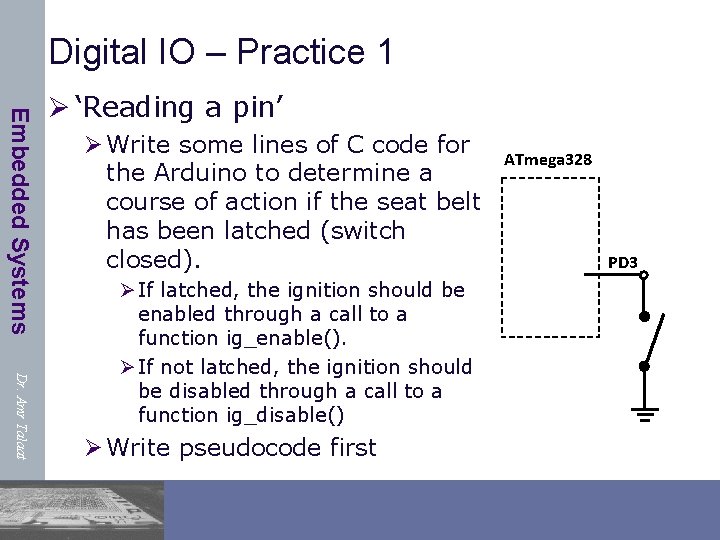
Digital IO – Practice 1 Embedded Systems Ø ‘Reading a pin’ Ø Write some lines of C code for the Arduino to determine a course of action if the seat belt has been latched (switch closed). Dr. Amr Talaat Ø If latched, the ignition should be enabled through a call to a function ig_enable(). Ø If not latched, the ignition should be disabled through a call to a function ig_disable() Ø Write pseudocode first ATmega 328 PD 3
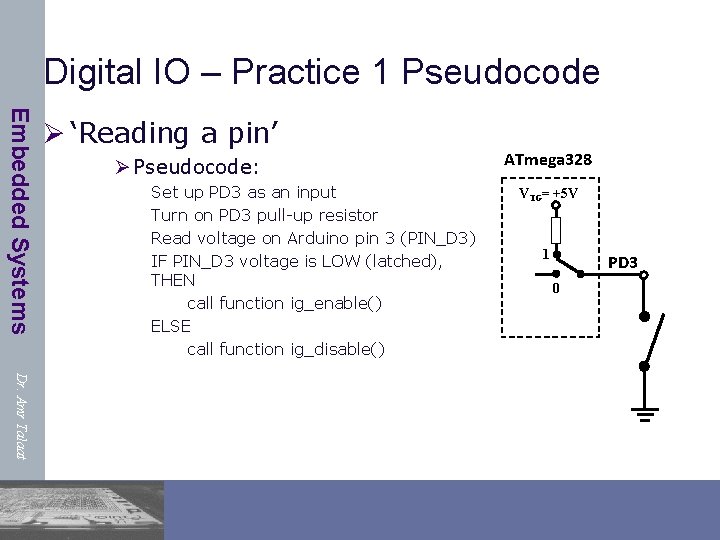
Digital IO – Practice 1 Pseudocode Embedded Systems Ø ‘Reading a pin’ Ø Pseudocode: Set up PD 3 as an input Turn on PD 3 pull-up resistor Read voltage on Arduino pin 3 (PIN_D 3) IF PIN_D 3 voltage is LOW (latched), THEN call function ig_enable() ELSE call function ig_disable() ATmega 328 VTG= +5 V 1 PD 3 0 Dr. Amr Talaat
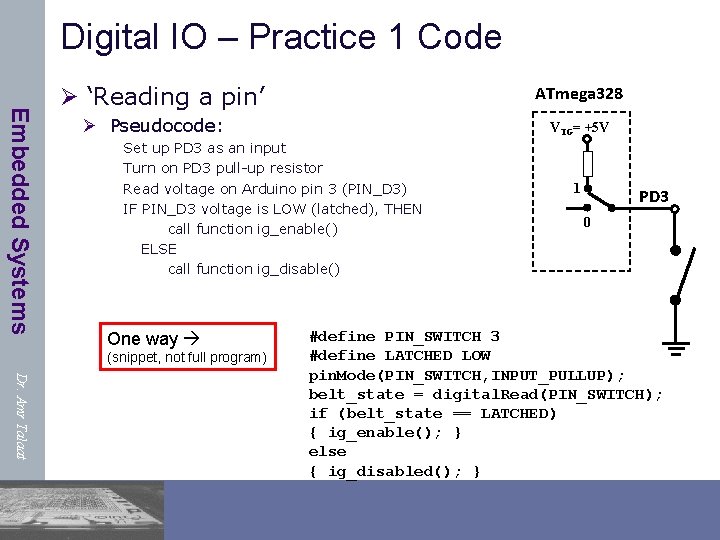
Digital IO – Practice 1 Code Embedded Systems Ø ‘Reading a pin’ ATmega 328 Ø Pseudocode: VTG= +5 V Set up PD 3 as an input Turn on PD 3 pull-up resistor Read voltage on Arduino pin 3 (PIN_D 3) IF PIN_D 3 voltage is LOW (latched), THEN call function ig_enable() ELSE call function ig_disable() One way (snippet, not full program) 1 PD 3 0 Dr. Amr Talaat #define PIN_SWITCH 3 #define LATCHED LOW pin. Mode(PIN_SWITCH, INPUT_PULLUP); belt_state = digital. Read(PIN_SWITCH); if (belt_state == LATCHED) { ig_enable(); } else { ig_disabled(); }
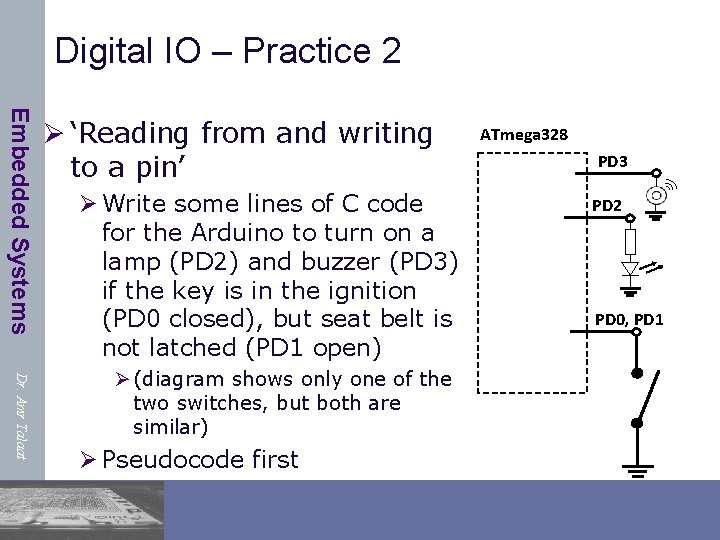
Digital IO – Practice 2 Embedded Systems Ø ‘Reading from and writing to a pin’ Ø Write some lines of C code for the Arduino to turn on a lamp (PD 2) and buzzer (PD 3) if the key is in the ignition (PD 0 closed), but seat belt is not latched (PD 1 open) Dr. Amr Talaat Ø (diagram shows only one of the two switches, but both are similar) Ø Pseudocode first ATmega 328 PD 3 PD 2 PD 0, PD 1
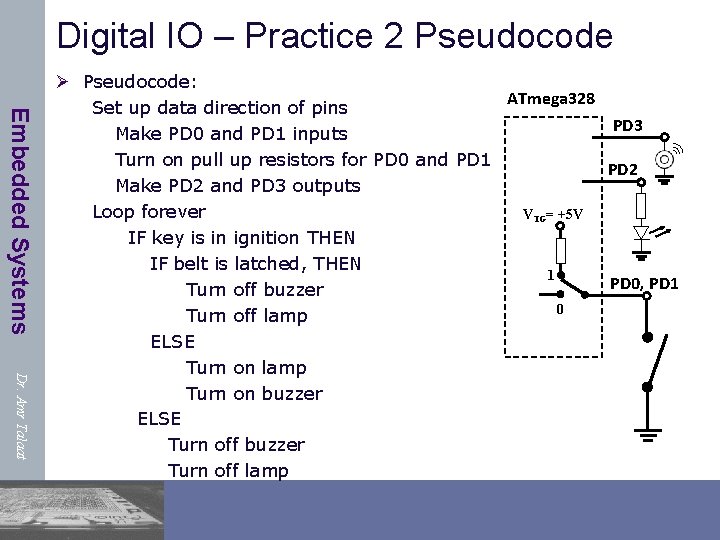
Digital IO – Practice 2 Pseudocode Embedded Systems Dr. Amr Talaat Ø Pseudocode: ATmega 328 Set up data direction of pins PD 3 Make PD 0 and PD 1 inputs Turn on pull up resistors for PD 0 and PD 1 PD 2 Make PD 2 and PD 3 outputs Loop forever VTG= +5 V IF key is in ignition THEN IF belt is latched, THEN 1 PD 0, PD 1 Turn off buzzer 0 Turn off lamp ELSE Turn on lamp Turn on buzzer ELSE Turn off buzzer Turn off lamp
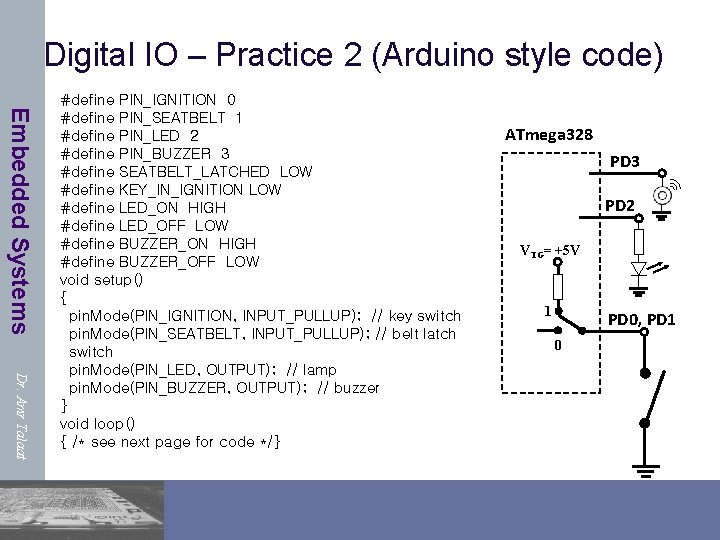
Digital IO – Practice 2 (Arduino style code) Embedded Systems Dr. Amr Talaat #define PIN_IGNITION 0 #define PIN_SEATBELT 1 #define PIN_LED 2 #define PIN_BUZZER 3 #define SEATBELT_LATCHED LOW #define KEY_IN_IGNITION LOW #define LED_ON HIGH #define LED_OFF LOW #define BUZZER_ON HIGH #define BUZZER_OFF LOW void setup() { pin. Mode(PIN_IGNITION, INPUT_PULLUP); // key switch pin. Mode(PIN_SEATBELT, INPUT_PULLUP); // belt latch switch pin. Mode(PIN_LED, OUTPUT); // lamp pin. Mode(PIN_BUZZER, OUTPUT); // buzzer } void loop() { /* see next page for code */} ATmega 328 PD 3 PD 2 VTG= +5 V 1 PD 0, PD 1 0
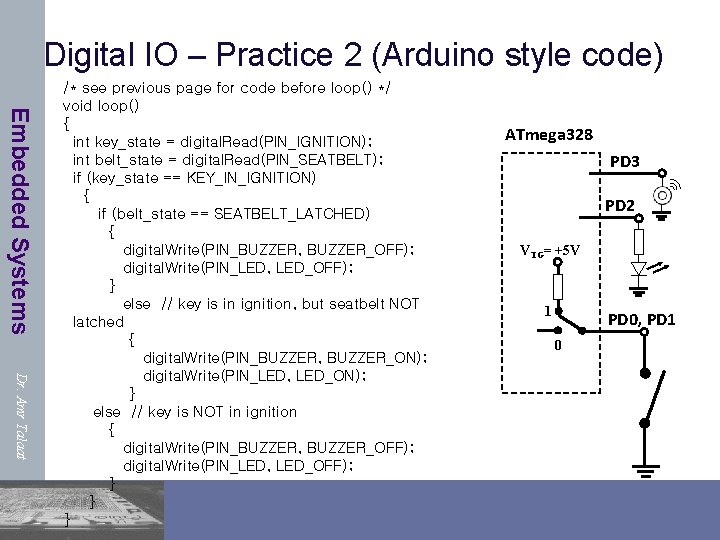
Digital IO – Practice 2 (Arduino style code) Embedded Systems Dr. Amr Talaat /* see previous page for code before loop() */ void loop() { int key_state = digital. Read(PIN_IGNITION); int belt_state = digital. Read(PIN_SEATBELT); if (key_state == KEY_IN_IGNITION) { if (belt_state == SEATBELT_LATCHED) { digital. Write(PIN_BUZZER, BUZZER_OFF); digital. Write(PIN_LED, LED_OFF); } else // key is in ignition, but seatbelt NOT latched { digital. Write(PIN_BUZZER, BUZZER_ON); digital. Write(PIN_LED, LED_ON); } else // key is NOT in ignition { digital. Write(PIN_BUZZER, BUZZER_OFF); digital. Write(PIN_LED, LED_OFF); } } } ATmega 328 PD 3 PD 2 VTG= +5 V 1 PD 0, PD 1 0
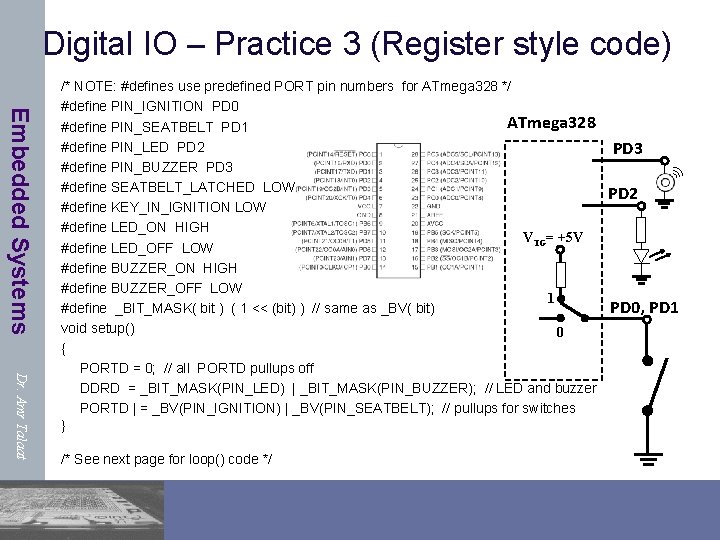
Digital IO – Practice 3 (Register style code) Embedded Systems Dr. Amr Talaat /* NOTE: #defines use predefined PORT pin numbers for ATmega 328 */ #define PIN_IGNITION PD 0 ATmega 328 #define PIN_SEATBELT PD 1 #define PIN_LED PD 2 #define PIN_BUZZER PD 3 #define SEATBELT_LATCHED LOW #define KEY_IN_IGNITION LOW #define LED_ON HIGH VTG= +5 V #define LED_OFF LOW #define BUZZER_ON HIGH #define BUZZER_OFF LOW 1 #define _BIT_MASK( bit ) ( 1 << (bit) ) // same as _BV( bit) void setup() 0 { PORTD = 0; // all PORTD pullups off DDRD = _BIT_MASK(PIN_LED) | _BIT_MASK(PIN_BUZZER); // LED and buzzer PORTD | = _BV(PIN_IGNITION) | _BV(PIN_SEATBELT); // pullups for switches } /* See next page for loop() code */ PD 3 PD 2 PD 0, PD 1
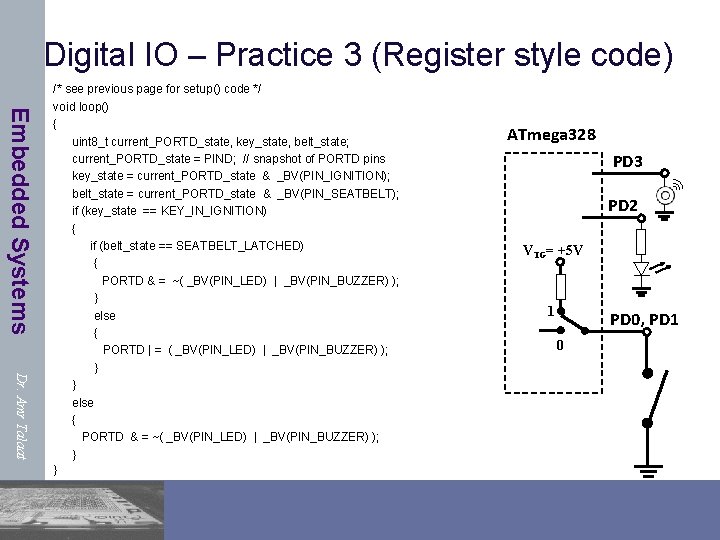
Digital IO – Practice 3 (Register style code) Embedded Systems Dr. Amr Talaat /* see previous page for setup() code */ void loop() { uint 8_t current_PORTD_state, key_state, belt_state; current_PORTD_state = PIND; // snapshot of PORTD pins key_state = current_PORTD_state & _BV(PIN_IGNITION); belt_state = current_PORTD_state & _BV(PIN_SEATBELT); if (key_state == KEY_IN_IGNITION) { if (belt_state == SEATBELT_LATCHED) { PORTD & = ~( _BV(PIN_LED) | _BV(PIN_BUZZER) ); } else { PORTD | = ( _BV(PIN_LED) | _BV(PIN_BUZZER) ); } } else { PORTD & = ~( _BV(PIN_LED) | _BV(PIN_BUZZER) ); } } ATmega 328 PD 3 PD 2 VTG= +5 V 1 PD 0, PD 1 0
- Slides: 77