
Net Brain End User Training Intel Net Brain
![Net. Brain End User Training [Intel] Net. Brain Technologies 15 Network Drive Burlington, MA](https://slidetodoc.com/presentation_image_h2/3b92403bdf0740056d37f234a524b75c/image-1.jpg "Net. Brain End User Training [Intel] Net. Brain Technologies 15 Network Drive Burlington, MA")
Net. Brain End User Training [Intel] Net. Brain Technologies 15 Network Drive Burlington, MA 01803 +1 800. 605. 7964 education@netbraintech. com www. netbraintech. com
What is Net. Brain? Net. Brain Technologies 15 Network Drive Burlington, MA 01803 +1 800. 605. 7964 education@netbraintech. com www. netbraintech. com
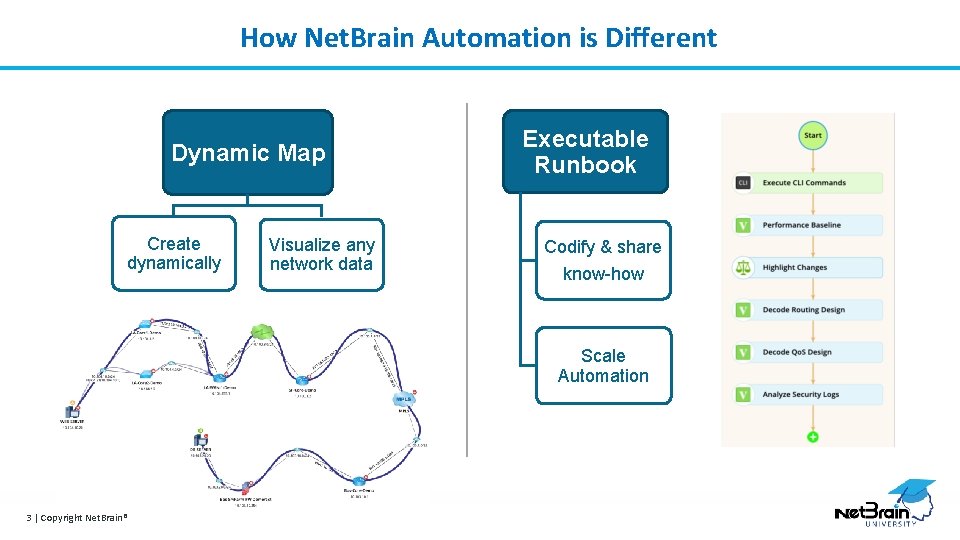
How Net. Brain Automation is Different Dynamic Map Create dynamically Visualize any network data Executable Runbook Codify & share know-how Scale Automation 3 | Copyright Net. Brain®
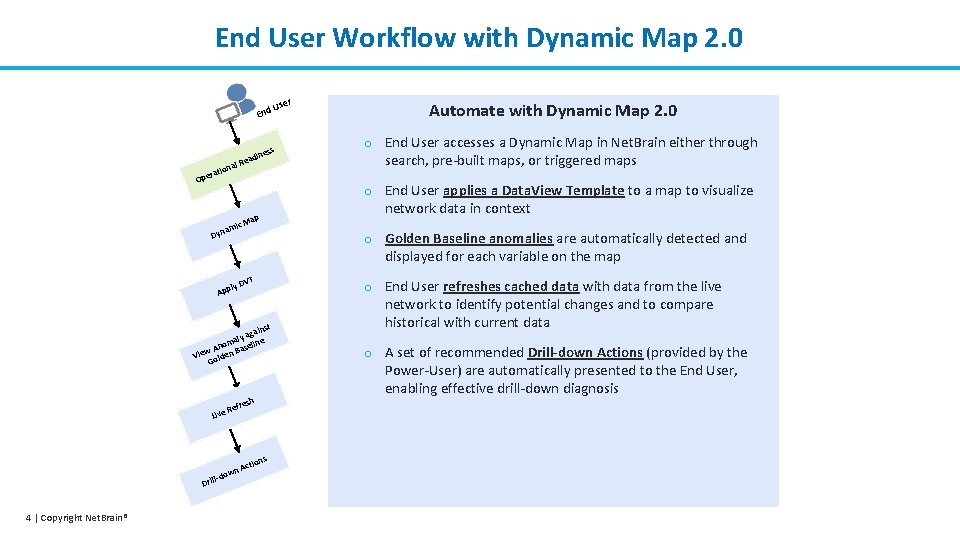
End User Workflow with Dynamic Map 2. 0 End s es adin e ra Ope al R tion ap VT st in aga aly line m o An Base View olden G l-d Dril 4 | Copyright Net. Brain® o End User accesses a Dynamic Map in Net. Brain either through search, pre-built maps, or triggered maps o Golden Baseline anomalies are automatically detected and displayed for each variable on the map ly D App resh Ref A own Automate with Dynamic Map 2. 0 o End User applies a Data. View Template to a map to visualize network data in context c. M ami Dyn Live r Use ns ctio o End User refreshes cached data with data from the live network to identify potential changes and to compare historical with current data o A set of recommended Drill-down Actions (provided by the Power-User) are automatically presented to the End User, enabling effective drill-down diagnosis
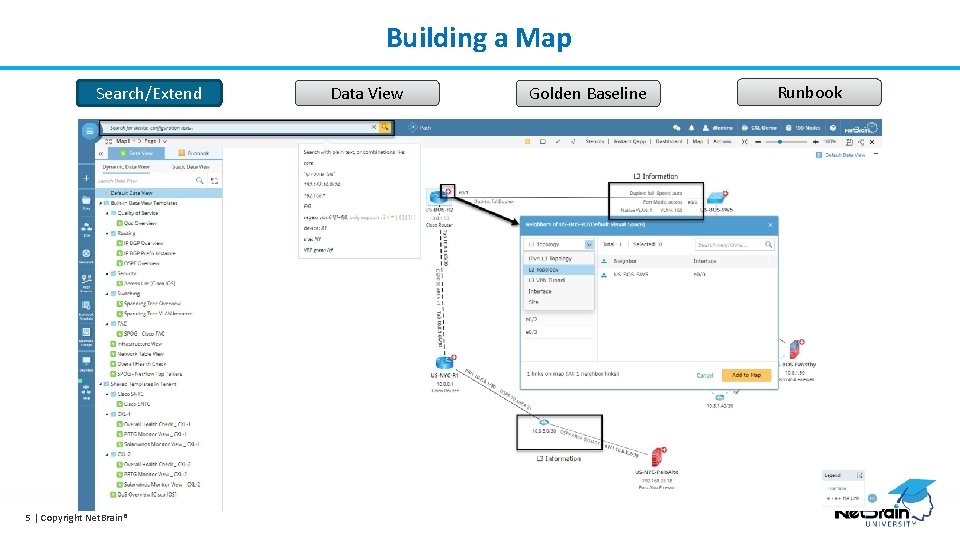
Building a Map Search/Extend 5 | Copyright Net. Brain® Data View Golden Baseline Runbook
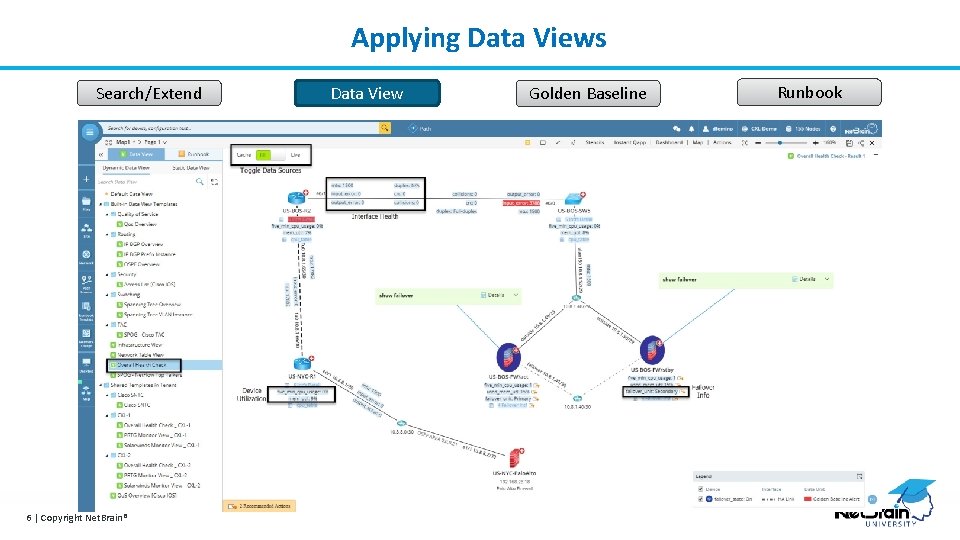
Applying Data Views Search/Extend 6 | Copyright Net. Brain® Data View Golden Baseline Runbook

Network Baseline Search/Extend 7 | Copyright Net. Brain® Data View Golden Baseline Runbook
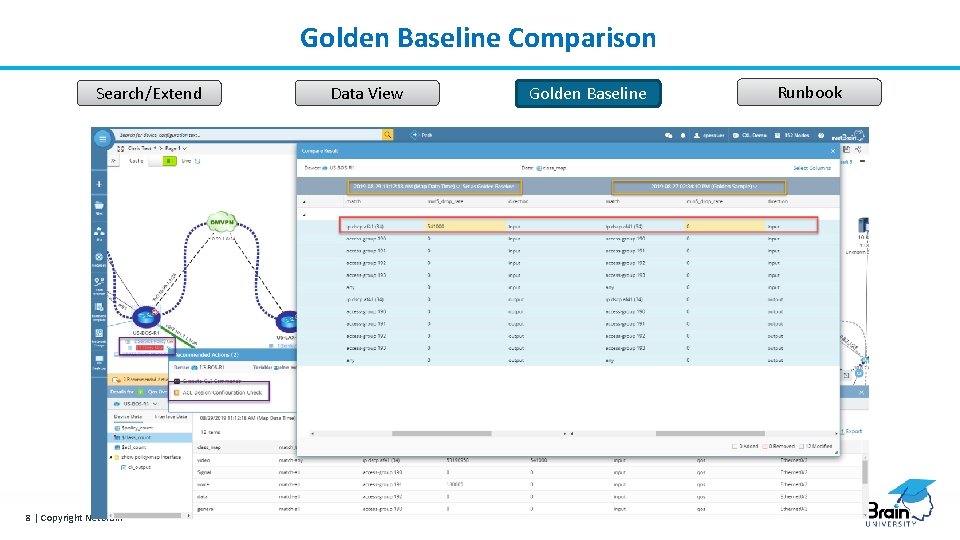
Golden Baseline Comparison Search/Extend 8 | Copyright Net. Brain® Data View Golden Baseline Runbook
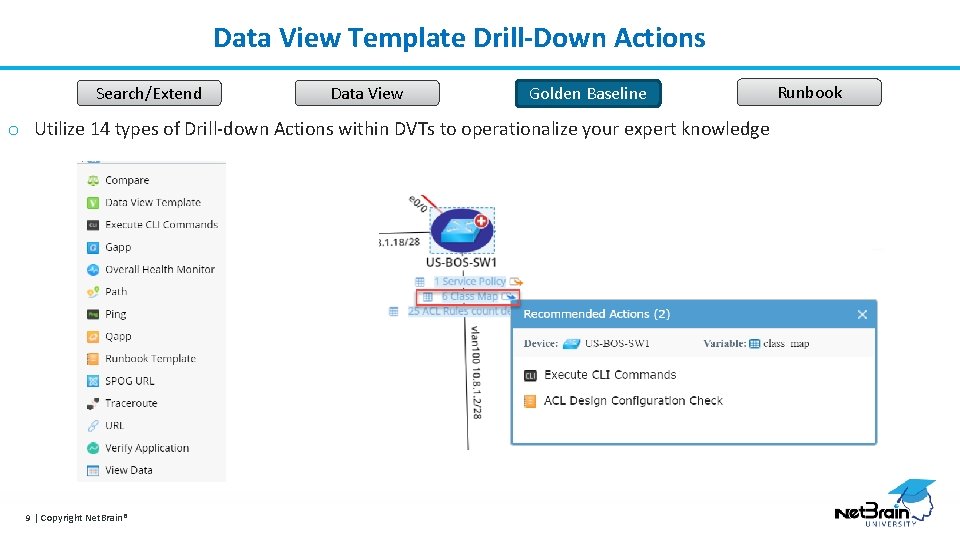
Data View Template Drill-Down Actions Search/Extend Data View Golden Baseline o Utilize 14 types of Drill-down Actions within DVTs to operationalize your expert knowledge 9 | Copyright Net. Brain® Runbook
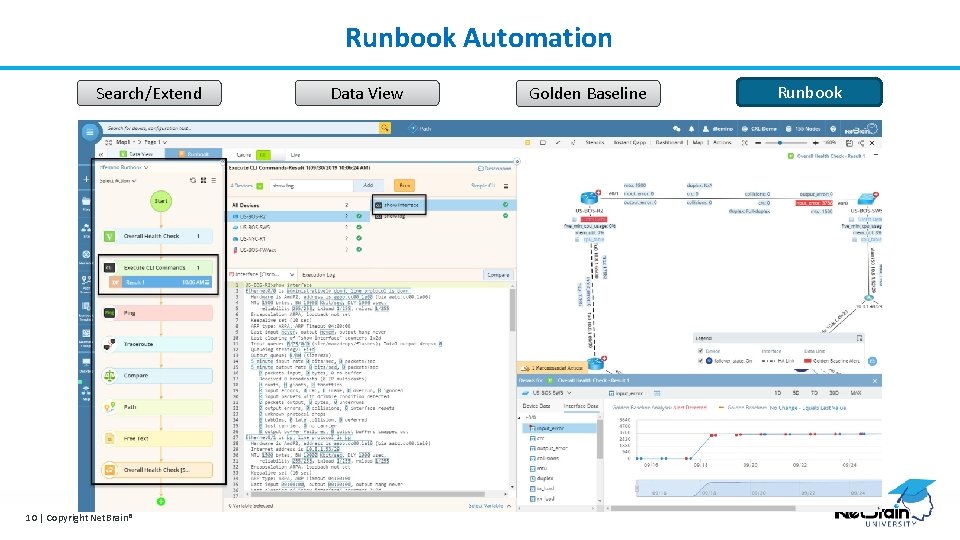
Runbook Automation Search/Extend 10 | Copyright Net. Brain® Data View Golden Baseline Runbook
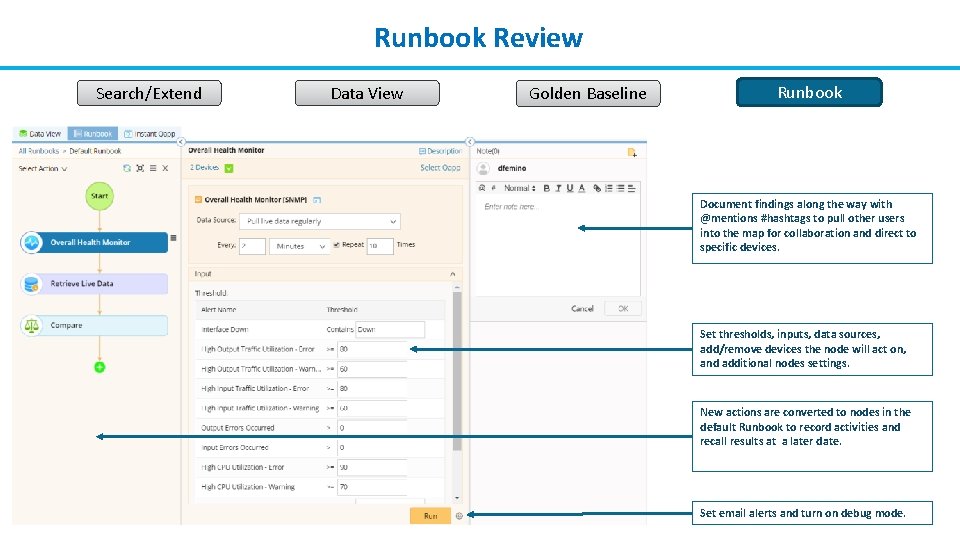
Runbook Review Search/Extend Data View Golden Baseline Runbook Document findings along the way with @mentions #hashtags to pull other users into the map for collaboration and direct to specific devices. Set thresholds, inputs, data sources, add/remove devices the node will act on, and additional nodes settings. New actions are converted to nodes in the default Runbook to record activities and recall results at a later date. 11 | Copyright Net. Brain® Set email alerts and turn on debug mode.
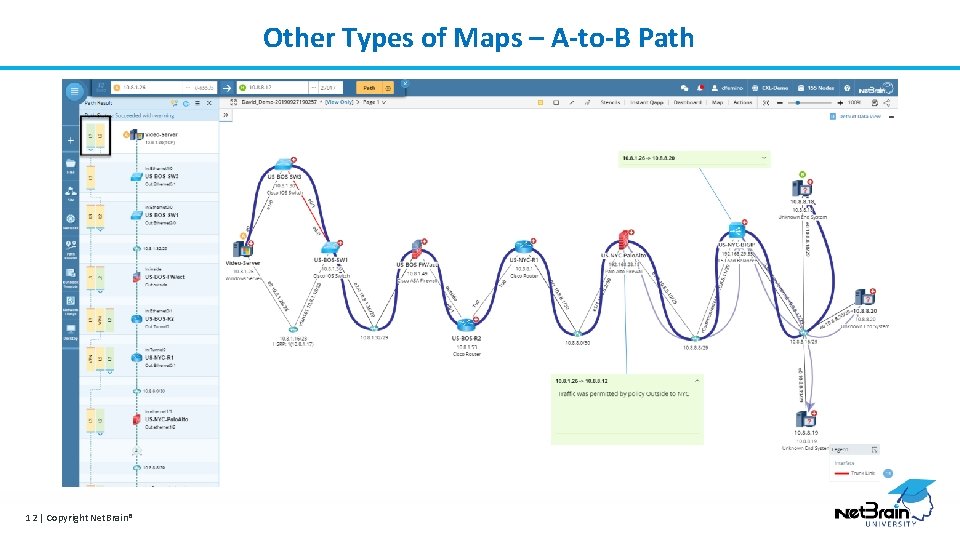
Other Types of Maps – A-to-B Path 12 | Copyright Net. Brain®
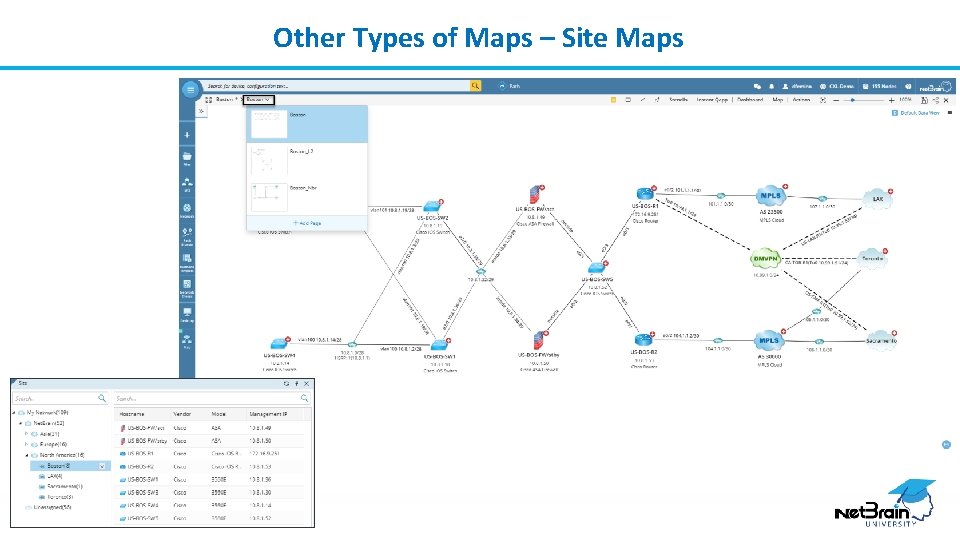
Other Types of Maps – Site Maps 13 | Copyright Net. Brain®

Let’s see it in Action! Live Demonstration Net. Brain Technologies 15 Network Drive Burlington, MA 01803 +1 800. 605. 7964 education@netbraintech. com www. netbraintech. com

Additional Resources More Training Options Net. Brain Technologies 15 Network Drive Burlington, MA 01803 +1 800. 605. 7964 education@netbraintech. com www. netbraintech. com
Additional Resources Net. Brain University / Learning Management Site https: //nbu. netbraintech. com/ (Please contact your Account Executive to set up) To Open support cases Email: Support@netbraintech. com OR Visit: https: //www. netbraintech. com/submit-a-ticket/ Community Forum Start a discussion with the community of Net. Brain employees and customers Visit: http: //forums. netbraintech. com/ Net. Brain Blog Visit: https: //www. netbraintech. com/blog/ 16 | Copyright Net. Brain®
Training Catalog Ready to learn more? Check our Live Web Training Catalog for all classes and dates. Course preview below: NB 100 – Getting Started with Using Net. Brain Description: Learn the main workflows to get you started with using and creating Net. Brain Automation. Who should take this class: This is the first class that all end users and administrators of the Net. Brain platform should take to familiarize themselves with the core functions and framework included with Net. Brain. NB 110 - Net. Brain Setup and Maintenance Description: Learn how to administer the Net. Brain platform, including learning the ongoing maintenance best practices to ensure data is accurate, and the platform performs smoothly. Who should take this class: Any users of the platform that will be required to setup or maintain the Net. Brain platform. NB 200 – Adapting Net. Brain to Your Environment Description: Learn how to leverage Net. Brain’s automation toolsets to adapt to new operational requirements for devices, technology, and workflows. Who should take this class: Any users of the platform that will be required to setup, install, customize, or maintain the Net. Brain platform. Deep-Dive Training Videos can be found in the NBU Now system: Go to: https: //nbu. netbraintech. com/ Questions about anything Net. Brain? Email us at: education@netbraintech. com 17 | Copyright Net. Brain®

Appendix Additional Resources Net. Brain Technologies 15 Network Drive Burlington, MA 01803 +1 800. 605. 7964 education@netbraintech. com www. netbraintech. com
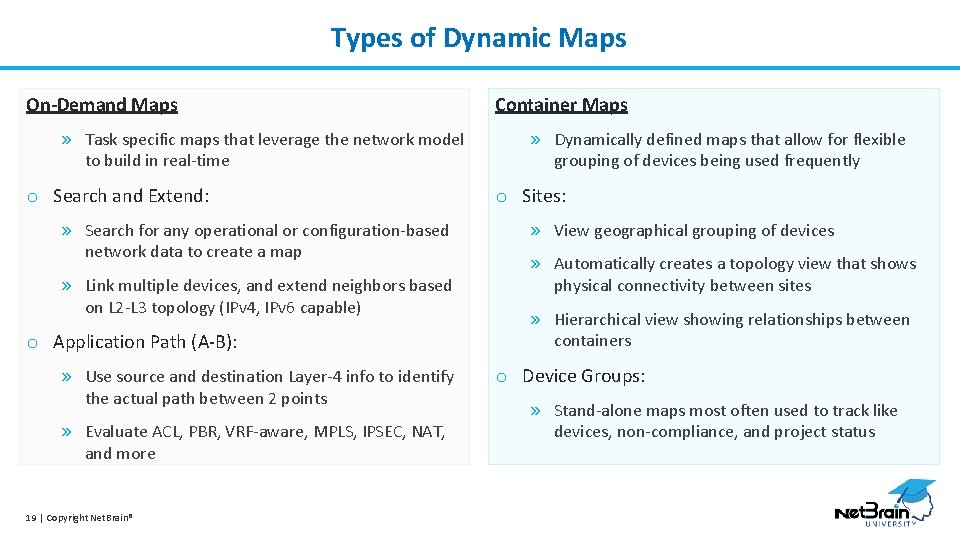
Types of Dynamic Maps On-Demand Maps » Task specific maps that leverage the network model to build in real-time o Search and Extend: » Search for any operational or configuration-based network data to create a map » Link multiple devices, and extend neighbors based on L 2 -L 3 topology (IPv 4, IPv 6 capable) o Application Path (A-B): » Use source and destination Layer-4 info to identify the actual path between 2 points » Evaluate ACL, PBR, VRF-aware, MPLS, IPSEC, NAT, and more 19 | Copyright Net. Brain® Container Maps » Dynamically defined maps that allow for flexible grouping of devices being used frequently o Sites: » View geographical grouping of devices » Automatically creates a topology view that shows physical connectivity between sites » Hierarchical view showing relationships between containers o Device Groups: » Stand-alone maps most often used to track like devices, non-compliance, and project status
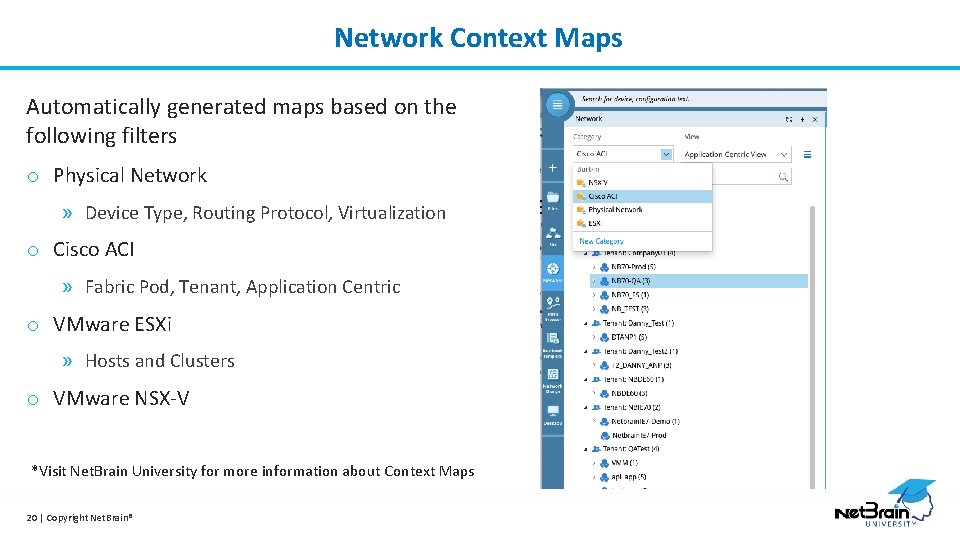
Network Context Maps Automatically generated maps based on the following filters o Physical Network » Device Type, Routing Protocol, Virtualization o Cisco ACI » Fabric Pod, Tenant, Application Centric o VMware ESXi » Hosts and Clusters o VMware NSX-V *Visit Net. Brain University for more information about Context Maps 20 | Copyright Net. Brain®
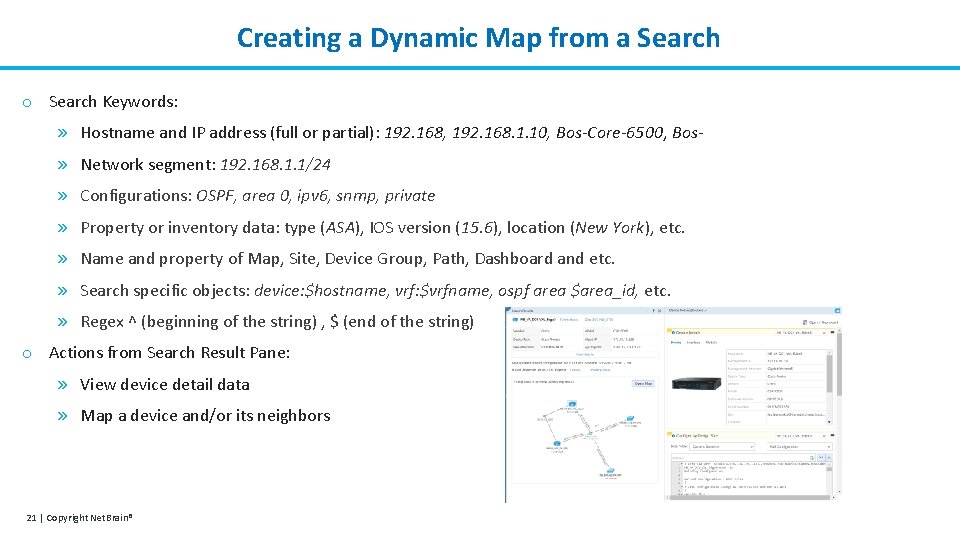
Creating a Dynamic Map from a Search o Search Keywords: » Hostname and IP address (full or partial): 192. 168, 192. 168. 1. 10, Bos-Core-6500, Bos» Network segment: 192. 168. 1. 1/24 » Configurations: OSPF, area 0, ipv 6, snmp, private » Property or inventory data: type (ASA), IOS version (15. 6), location (New York), etc. » Name and property of Map, Site, Device Group, Path, Dashboard and etc. » Search specific objects: device: $hostname, vrf: $vrfname, ospf area $area_id, etc. » Regex ^ (beginning of the string) , $ (end of the string) o Actions from Search Result Pane: » View device detail data » Map a device and/or its neighbors 21 | Copyright Net. Brain®
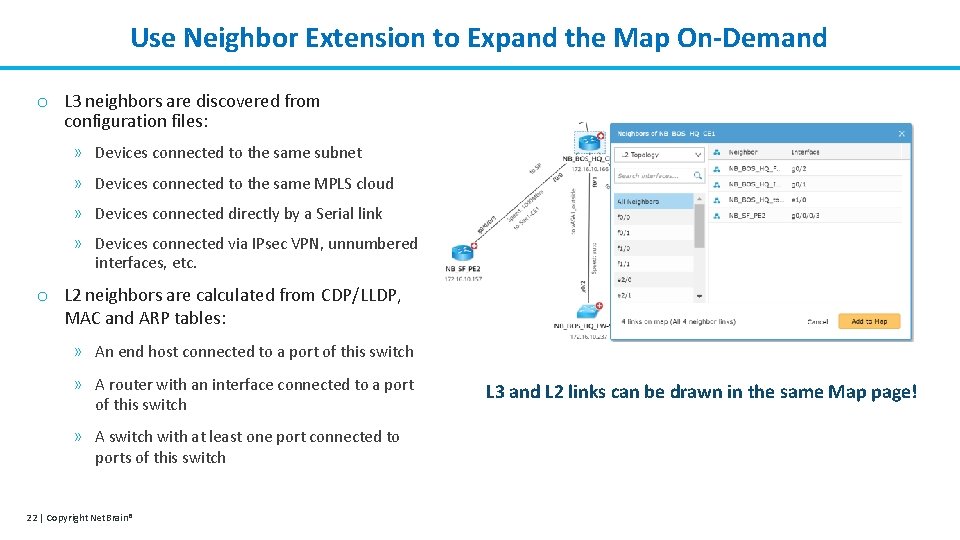
Use Neighbor Extension to Expand the Map On-Demand o L 3 neighbors are discovered from configuration files: » Devices connected to the same subnet » Devices connected to the same MPLS cloud » Devices connected directly by a Serial link » Devices connected via IPsec VPN, unnumbered interfaces, etc. o L 2 neighbors are calculated from CDP/LLDP, MAC and ARP tables: » An end host connected to a port of this switch » A router with an interface connected to a port of this switch » A switch with at least one port connected to ports of this switch 22 | Copyright Net. Brain® L 3 and L 2 links can be drawn in the same Map page!
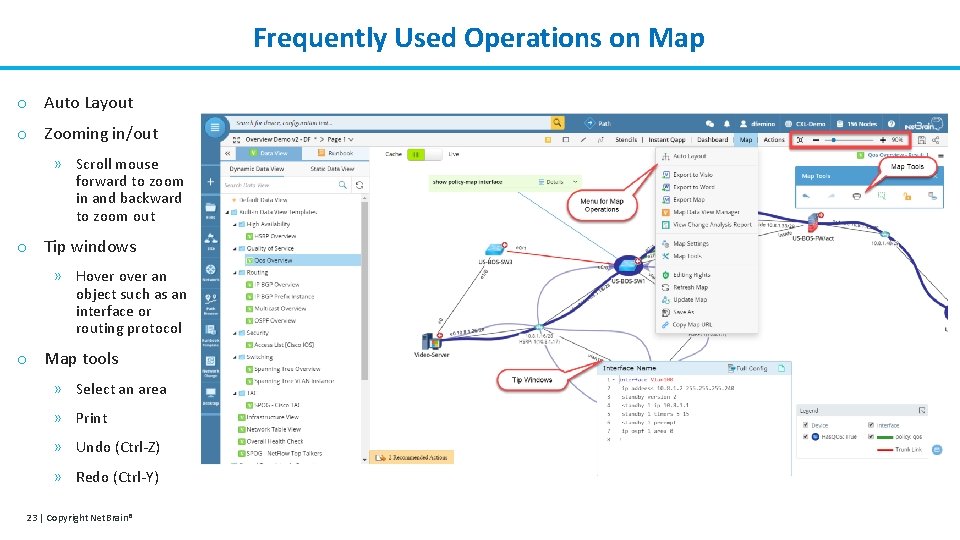
Frequently Used Operations on Map o Auto Layout o Zooming in/out » Scroll mouse forward to zoom in and backward to zoom out o Tip windows » Hover an object such as an interface or routing protocol o Map tools » Select an area » Print » Undo (Ctrl-Z) » Redo (Ctrl-Y) 23 | Copyright Net. Brain®
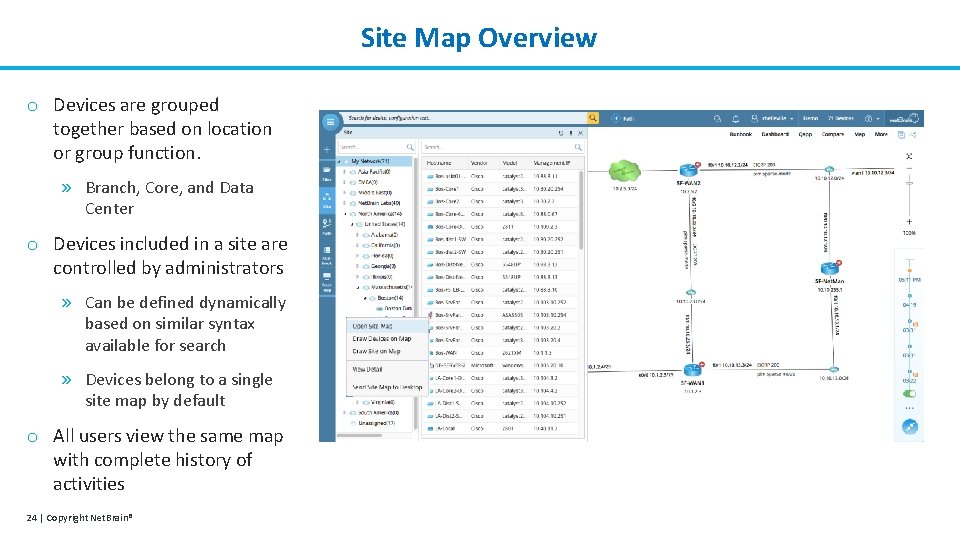
Site Map Overview o Devices are grouped together based on location or group function. » Branch, Core, and Data Center o Devices included in a site are controlled by administrators » Can be defined dynamically based on similar syntax available for search » Devices belong to a single site map by default o All users view the same map with complete history of activities 24 | Copyright Net. Brain®
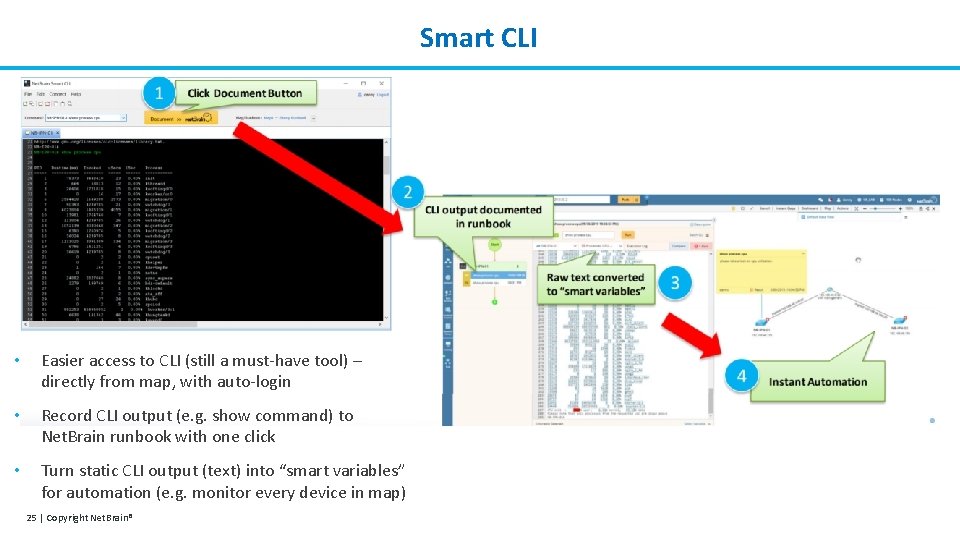
Smart CLI • Easier access to CLI (still a must-have tool) – directly from map, with auto-login • Record CLI output (e. g. show command) to Net. Brain runbook with one click • Turn static CLI output (text) into “smart variables” for automation (e. g. monitor every device in map) 25 | Copyright Net. Brain®
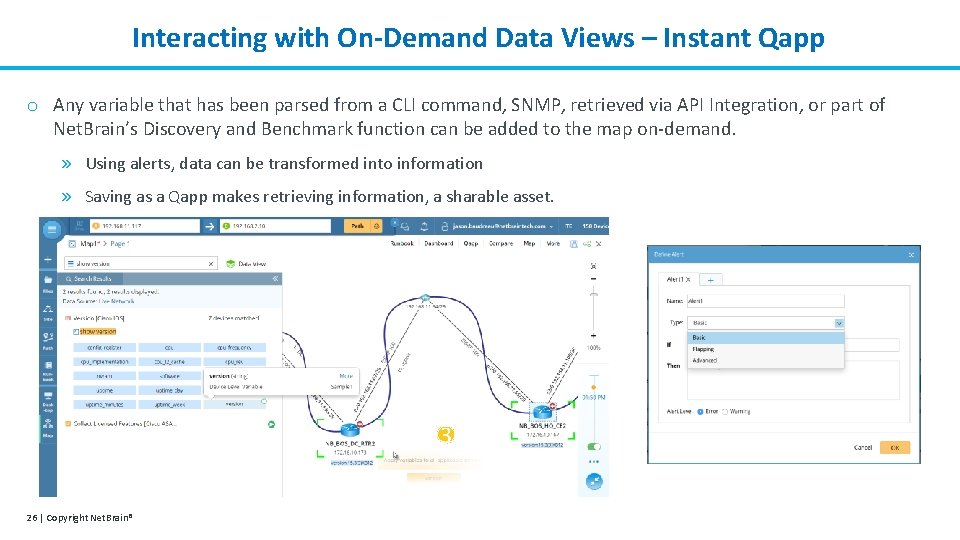
Interacting with On-Demand Data Views – Instant Qapp o Any variable that has been parsed from a CLI command, SNMP, retrieved via API Integration, or part of Net. Brain’s Discovery and Benchmark function can be added to the map on-demand. » Using alerts, data can be transformed into information » Saving as a Qapp makes retrieving information, a sharable asset. 3 26 | Copyright Net. Brain®
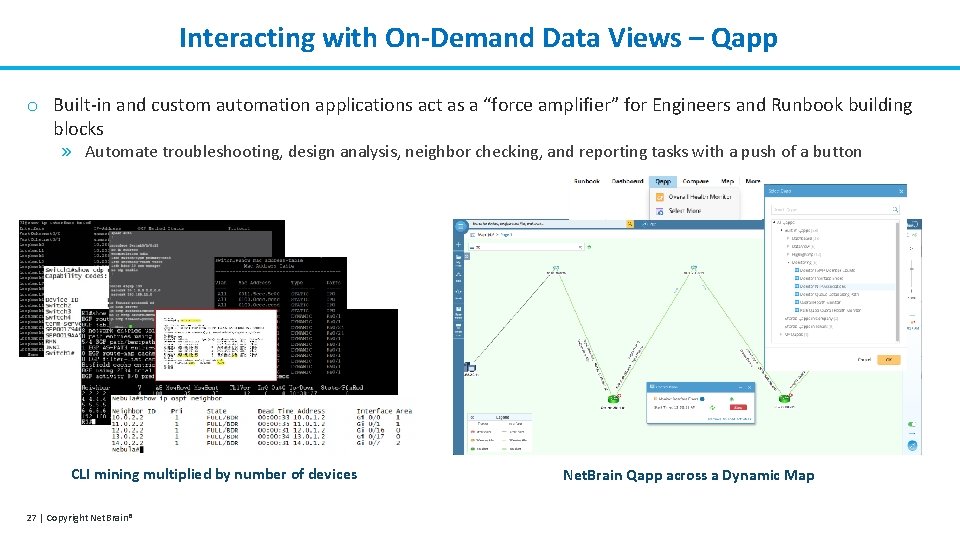
Interacting with On-Demand Data Views – Qapp o Built-in and custom automation applications act as a “force amplifier” for Engineers and Runbook building blocks » Automate troubleshooting, design analysis, neighbor checking, and reporting tasks with a push of a button CLI mining multiplied by number of devices 27 | Copyright Net. Brain® Net. Brain Qapp across a Dynamic Map
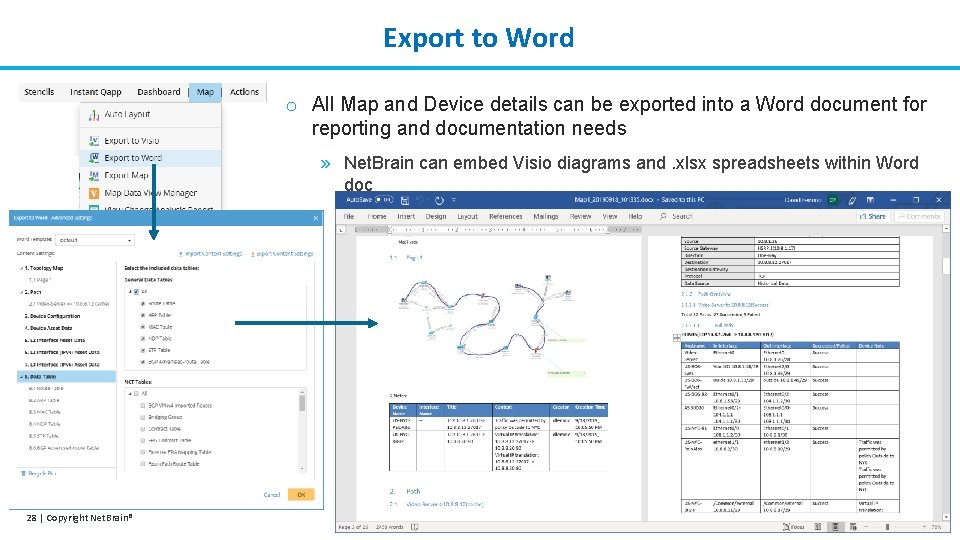
Export to Word o All Map and Device details can be exported into a Word document for reporting and documentation needs » Net. Brain can embed Visio diagrams and. xlsx spreadsheets within Word doc 28 | Copyright Net. Brain®
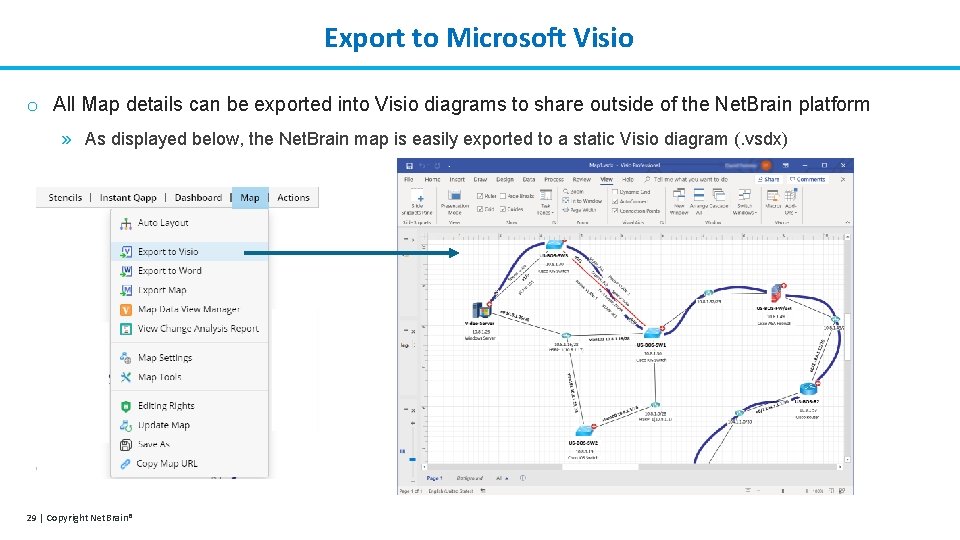
Export to Microsoft Visio o All Map details can be exported into Visio diagrams to share outside of the Net. Brain platform » As displayed below, the Net. Brain map is easily exported to a static Visio diagram (. vsdx) 29 | Copyright Net. Brain®
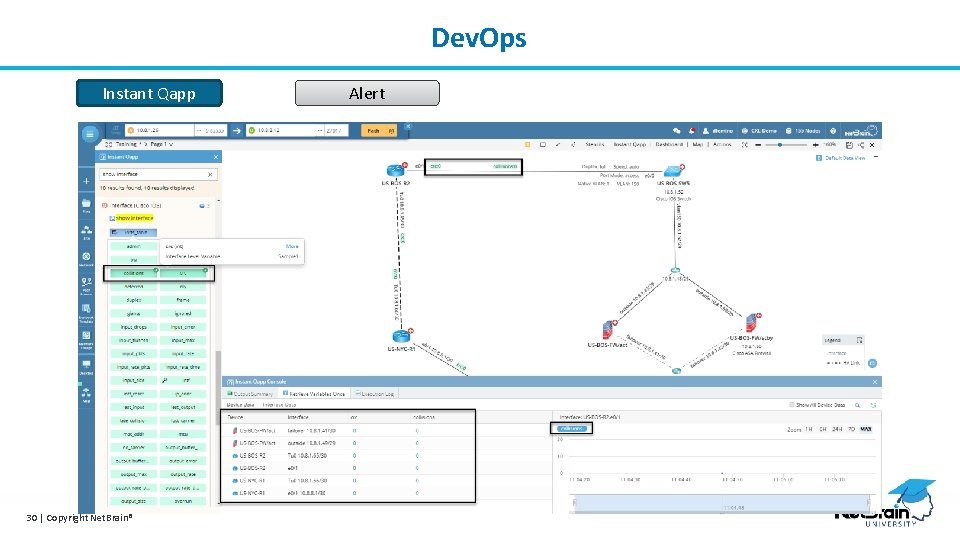
Dev. Ops Instant Qapp 30 | Copyright Net. Brain® Alert
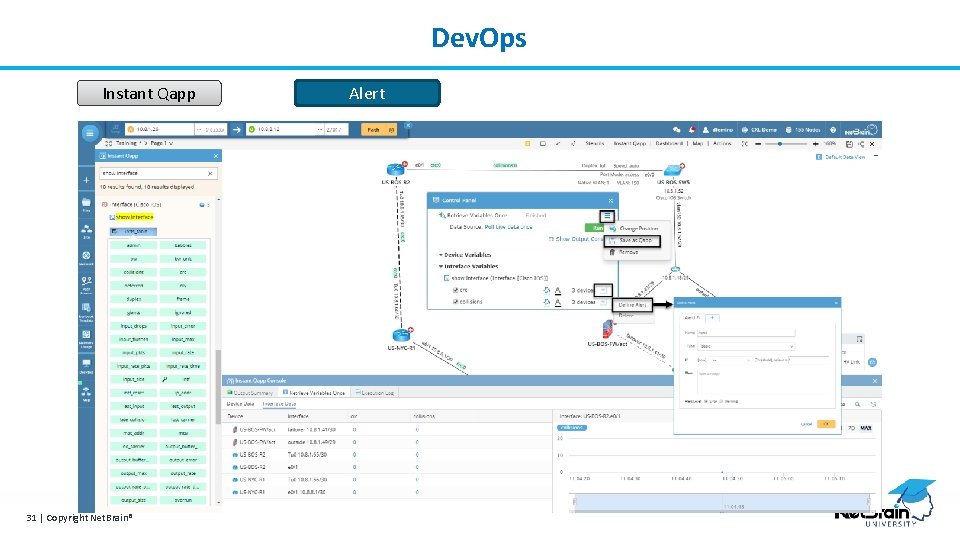
Dev. Ops Instant Qapp 31 | Copyright Net. Brain® Alert
- Slides: 31