
Nesstar Publisher Training Trainers Carol Perry University of
Nesstar Publisher Training Trainers: Carol Perry, University of Guelph Ernie Boyko, Carleton University Ontario DLI Training Guelph University, Guelph, ON April 10 -11 , 2006 Copyright Nesstar Americas Inc. All rights reserved.
Outline § § § § Overview The basics Getting Ready Opening your file Adding tags Templates Managing the server Publishing your file Copyright Nesstar Americas Inc. All rights reserved.
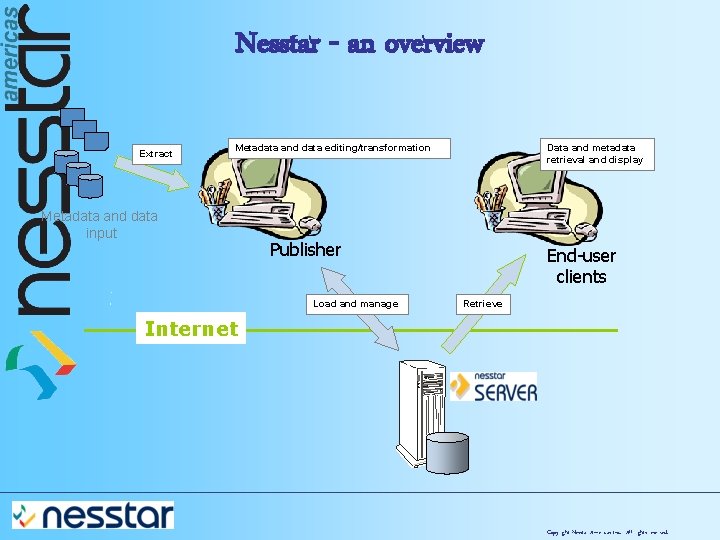
Nesstar - an overview Extract Metadata and data editing/transformation Metadata and data input Data and metadata retrieval and display Publisher Load and manage End-user clients Retrieve Internet Copyright Nesstar Americas Inc. All rights reserved.
Nesstar Publisher § Nesstar Publisher is the ETL (Extract, Transform, Load) tool of the Nesstar product suite. It enables you to: § extract data and metadata from a variety of sources, systems and formats § clean, change, edit and extend the data and metadata, and § publish data and metadata to a Nesstar Server § Can also be used to manage the content on a Nesstar server § Can be used independently of the Nesstar System as a general data/metadata entry and editing tool Copyright Nesstar Americas Inc. All rights reserved.
Nesstar Publisher cont. § The Publisher supports: § § micro-data (e. g. survey-data) hierarchical data (e. g. household studies) aggregated data (multidimensional tables or cubes) additional information objects (e. g. reports, factsheets, pictures) to be stored on a Nesstar server Today we will be working with micro-data Copyright Nesstar Americas Inc. All rights reserved.
Preparing & publishing micro-data Metadata Data Nesstar Publisher NSDstat file Server Hierarchical Publisher Copyright Nesstar Americas Inc. All rights reserved.
What do we mean by data? § Tabular data § Indicators § Time series § Maps § Survey data § Non-data resources § Documents § Pictures All stored with descriptive information Copyright Nesstar Americas Inc. All rights reserved.
Metadata § What is metadata? Basically defined as ‘data about data’ § Aim of metadata is to make a resource ‘findable’ and ‘manageable’ and to enable the effective, efficient and accurate use of data resources § Within the Nesstar system - metadata added by using templates Copyright Nesstar Americas Inc. All rights reserved.
Metadata standards supported by Nesstar Publisher § DDI (http: //www. icpsr. umich. edu/DDI) “Enables the effective, efficient and accurate use” of data resources § Dublin Core (http: //uk. dublincore. org/) “A standard for cross-domain information resource description” § e-Government Metadata Standard (e-GMS) (http: //www. govtalk. gov. uk/) “To ensure maximum consistency of metadata across public sector organisations” Copyright Nesstar Americas Inc. All rights reserved.
Importing / Exporting of data Formats for: Import: § DDI document *. xml § SPSS: *. sav, *. por, *. sps § SAS: *. sp 1 § Stata: *. dta § Statistica: *. sta § NSDstat: *. nsf § d. Base: *. dbf § DIF: *. dif § Fixed Format ASCII § Delimited text: *. txt, *. csv § PC-Axis *. px Export: *. sav, *. por, *. sps *. sas (syntax) (STATA 7 & STATA 8) *. dta *. sta *. nsf *. dbf *. dif *. dat *. txt Copyright Nesstar Americas Inc. All rights reserved.
Demonstration § First steps § SPSS § Importing files Copyright Nesstar Americas Inc. All rights reserved.
SPSS Files – First Things First § Nesstar assumes you have a clean SPSS file. This is NOT always the case. § If you need to re-import your data, you will lose any work done in Nesstar § To avoid this, you should make sure to check the following: Copyright Nesstar Americas Inc. All rights reserved.
SPSS Checklist § Make sure that: § § § The respondents have an id variable All the variable labels and value labels are correct All the missing values have been declared All the recoded variables are correct The weight has been turned OFF Copyright Nesstar Americas Inc. All rights reserved.
Variable level metadata § Variable labels can easily be added/edited § Category labels can easily be added/edited § Identify ‘Weight’ variables § Add question text and variable notes: § to each variable separately § to a block of variables Copyright Nesstar Americas Inc. All rights reserved.
Variable Groups § Useful for grouping together variables that relate to the same topic or theme § A hierarchy of groups can be created, e. g. topics within a ‘Self-completion’ section § Variables can belong to more than one group § Groups can be arranged in any order § Information about that group can be added, e. g. a group definition Advantages: § Make it easier for end-users to navigate the dataset § Reduce the load time of a dataset when published Copyright Nesstar Americas Inc. All rights reserved.
Manage Server § Provides the means to link to Nesstar Servers to enable publishing § Enables the data publisher to manage the resources on a Nesstar server so that they can then: § § § Create new catalogues then name and describe them Reorganise the catalogue hierarchy Add files to a catalogue Move files between catalogues Delete files and catalogues Copyright Nesstar Americas Inc. All rights reserved.
Publishing § Add a Nesstar Server using the Server-URL, or locating the Server directory on a LAN, and entering an appropriate username and password § Can publish to a Nesstar Server over a local area network (LAN) or over the Internet § Able to publish to multiple Servers in a single operation § Options to publish ‘data and metadata’, ‘metadata only’ or to ‘Republish’ Copyright Nesstar Americas Inc. All rights reserved.
Templates in Nesstar § Templates contain default information that can be reused if you are importing a series of surveys. § This saves having to re-enter the same information over and over Copyright Nesstar Americas Inc. All rights reserved.
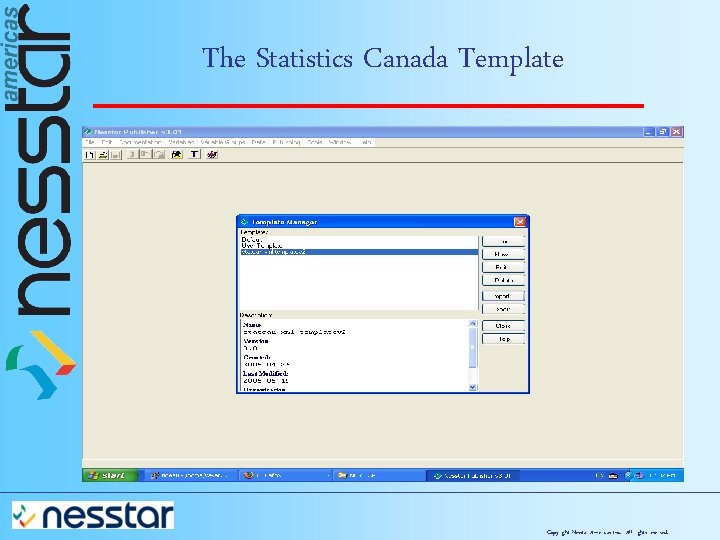
The Statistics Canada Template Copyright Nesstar Americas Inc. All rights reserved.
- Slides: 19