
National Fire Information Council NFIC Training NFIRS Web

National Fire Information Council (NFIC) Training NFIRS Web Reporting Development Craig Prall Aerient, LLC NFIRS System Developer 2

Why a New Reporting System? Rationale for New Reporting Framework • Replacing an aging, expensive, proprietary system based on Actuate with newer, cheaper open source tools • Licensing costs for Actuate were prohibitive • Adding new reports was difficult and error prone • Current closed architecture was not flexible • Portions of the current reports and SQL behind the reports was tailored to the capabilities of Actuate rather than streamlined for NFIRS • Open source report generator (Jasper. Reports) is embedded in an application that is much more “NFIRS-aware” • Moving to new, faster hardware to which the current licenses will not transfer 3
Live Demo • There are screenshots of this demo in the appendix of this handout 4

Future Efforts (1 of 5) (In roughly time-order) • Retrieve, change, and re-submit previous reports • Will be live when the system is released • Online Analytical Processing (OLAP) Cubes • Currently, the reporting database is almost a mirror of production, but going forward, it will be optimized on the server side for reporting • Data cubes (dimensions) • Better organization for reporting • Data ordered by day, month, quarter, year • FDID, groups and states • Develop pivot tables and “measures” for commonly derived data • Pre-compute items such as day of week, individual arrival (elapsed) time, average arrival times, incident key fields (as an aggregate) 5

Future Efforts (2 of 5) • Many more module fields available for filters • Almost all module fields available for most reports such as zip codes, street names, personnel names, person involved names, shift, alarms, etc. • Any module field can be made available as a filter so long as it doesn’t otherwise invalidate the report (e. g. , Won’t be able to select mutual aid types for the Mutual Aid Incidents report) • Additional “fields” such as last-saved date and created-by name 6
Future Efforts (3 of 5) • More options for the filter fields • OR-ing allows for multiple text line input (for making lists of names, streets, zip codes, coded-fields, etc. ) • “Wildcarding” of text fields (starts with, ends with and contains) • Case sensitive and case insensitive searches • AND-ing and OR-ing of most filters as well as NOT • Saving of partial templates of reports and report filters • Textual explanation of the ad-hoc filters and groups as they are being constructed 7
Future Efforts (4 of 5) • New reports (partial list): • Fire Dept’s identified by vendor software used. • Wildland fire report summarizing acres burned from both fire and wildland modules. • Reporting on same FDID activity over multiple years. (Essentially a “same-store sales” report, but for fire dept’s - compares activity to the same month of previous year to indicate trends. ) • Statewide reporting status level (which is currently available only at the US level) to show amount of data reported and released in the national DB by FDID • Various data quality reports (e. g. , large dollar loss, response time) 8
Future Efforts (5 of 5) § § Exporting/Sharing report templates & filters § Initial implementation may be a simple export to file/import from file scheme § Online sharing with library of templates and filters published by NFIRS program office, state program office and on down to a dept Scheduled reports § Reports can be scheduled to run daily, weekly, monthly and yearly with parameterized date fields for from/to dates. § Parameterization of other fields such as a list of FDIDs or groups (or lists of lists) 9
And Finally … § § We would like to hear from you concerning: § Reports that you and your departments need that are currently not available to you § Which fields you and your departments need most (or other data in the national DB you would like to be able to select incidents on) § Any other concerns regarding the new reporting system Send email to: Dave Marron at david. marron@associates. dhs. gov 10
Appendix 11
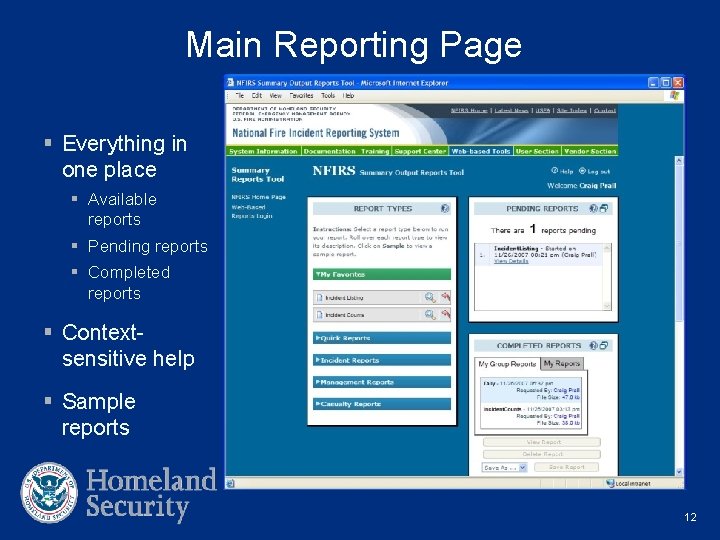
Main Reporting Page § Everything in one place § Available reports § Pending reports § Completed reports § Contextsensitive help § Sample reports 12
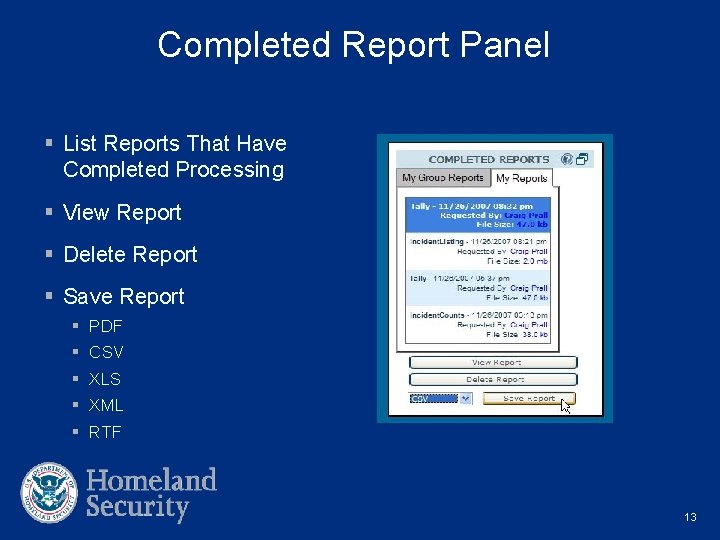
Completed Report Panel § List Reports That Have Completed Processing § View Report § Delete Report § Save Report § PDF § CSV § XLS § XML § RTF 13
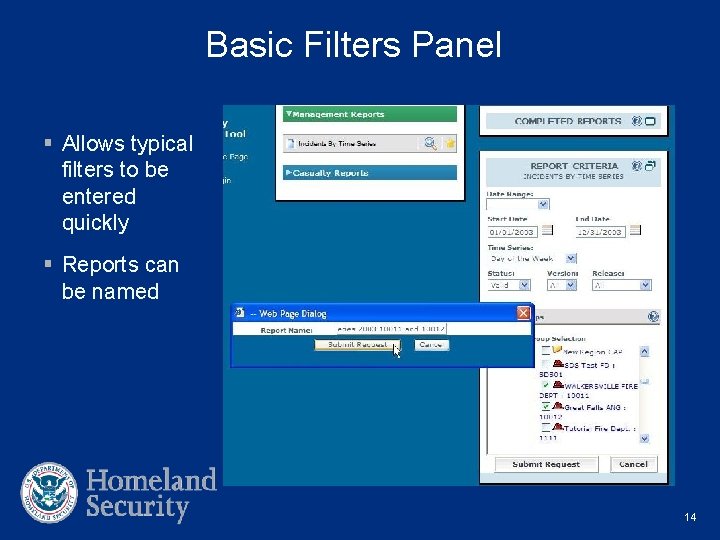
Basic Filters Panel § Allows typical filters to be entered quickly § Reports can be named 14
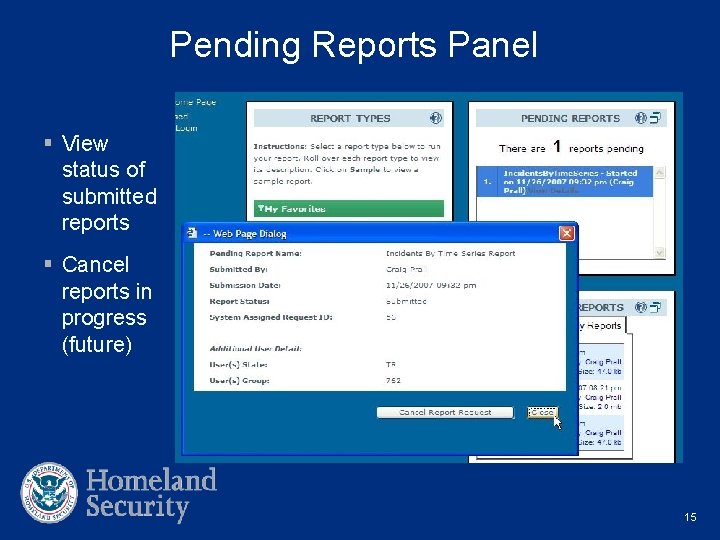
Pending Reports Panel § View status of submitted reports § Cancel reports in progress (future) 15
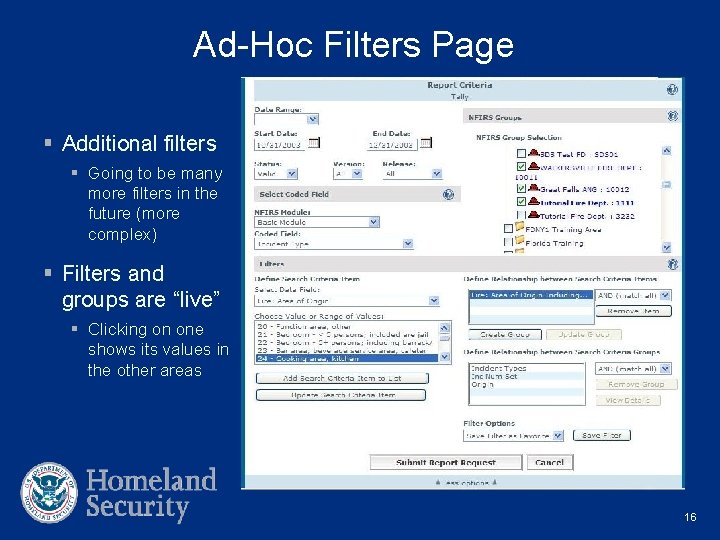
Ad-Hoc Filters Page § Additional filters § Going to be many more filters in the future (more complex) § Filters and groups are “live” § Clicking on one shows its values in the other areas 16
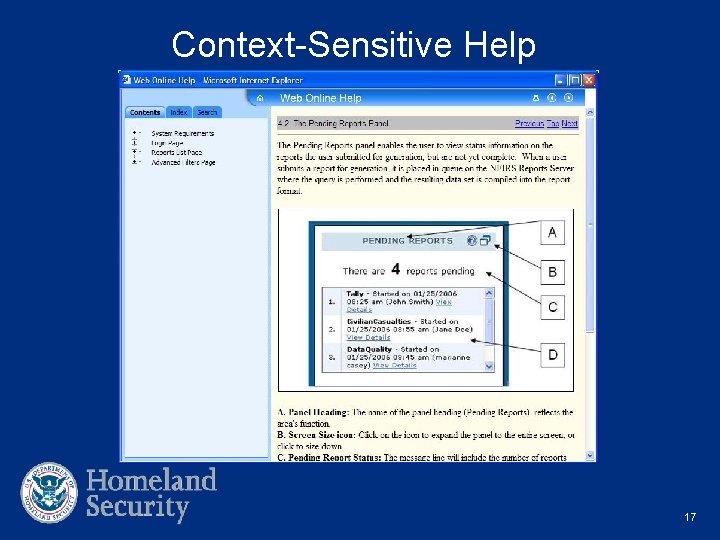
Context-Sensitive Help 17
- Slides: 17