
National Automated Clearing House Presentation by team PCMC
National Automated Clearing House Presentation by team PCMC , CO (CRM)
v Why NACH ? v What is NACH ? v How Existing ECS will migrate to NACH ?
Salient features v Available at all locations v Participation of over 1100 CBS Banks v Validation of mandate by customers’ bank v No possibility of debit from wrong account v Invoice generation only on acceptance of mandate v Accounting of only clear funds. v Existing ECS policies will be migrated to NACH through Legacy Data.
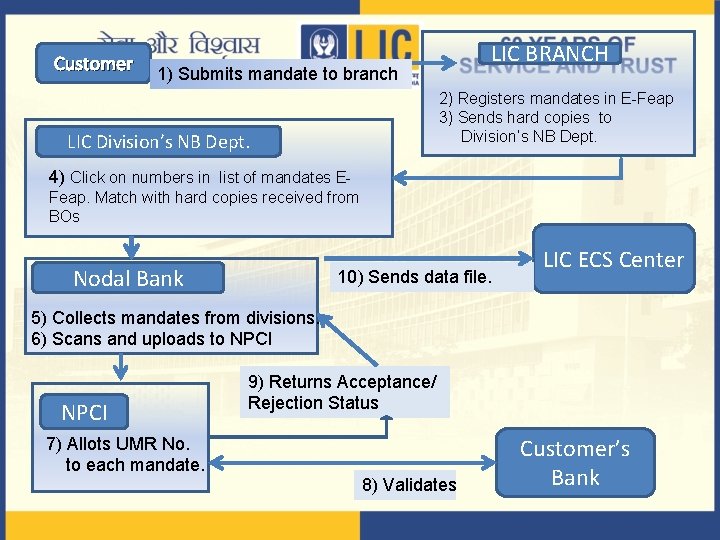
Customer LIC BRANCH 1) Submits mandate to branch 2) Registers mandates in E-Feap 3) Sends hard copies to Division’s NB Dept. LIC Division’s NB Dept. 4) Click on numbers in list of mandates EFeap. Match with hard copies received from BOs Nodal Bank 10) Sends data file. LIC ECS Center 5) Collects mandates from divisions. 6) Scans and uploads to NPCI 7) Allots UMR No. to each mandate. 9) Returns Acceptance/ Rejection Status 8) Validates Customer’s Bank
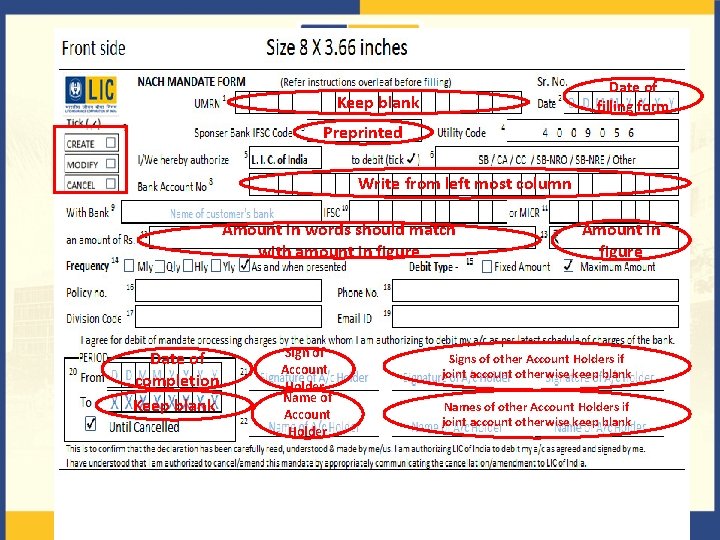
Date of filling form Keep blank Preprinted Write from left most column Amount in words should match with amount in figure Date of completion Keep blank Sign of Account Holder Name of Account Holder Amount in figure Signs of other Account Holders if joint account otherwise keep blank Names of other Account Holders if joint account otherwise keep blank
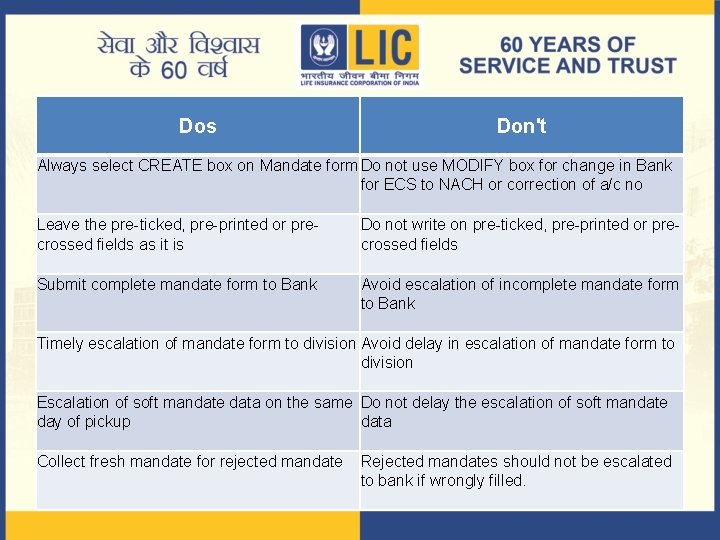
Dos Don't Always select CREATE box on Mandate form Do not use MODIFY box for change in Bank for ECS to NACH or correction of a/c no Leave the pre-ticked, pre-printed or precrossed fields as it is Do not write on pre-ticked, pre-printed or precrossed fields Submit complete mandate form to Bank Avoid escalation of incomplete mandate form to Bank Timely escalation of mandate form to division Avoid delay in escalation of mandate form to division Escalation of soft mandate data on the same Do not delay the escalation of soft mandate day of pickup data Collect fresh mandate for rejected mandate Rejected mandates should not be escalated to bank if wrongly filled.
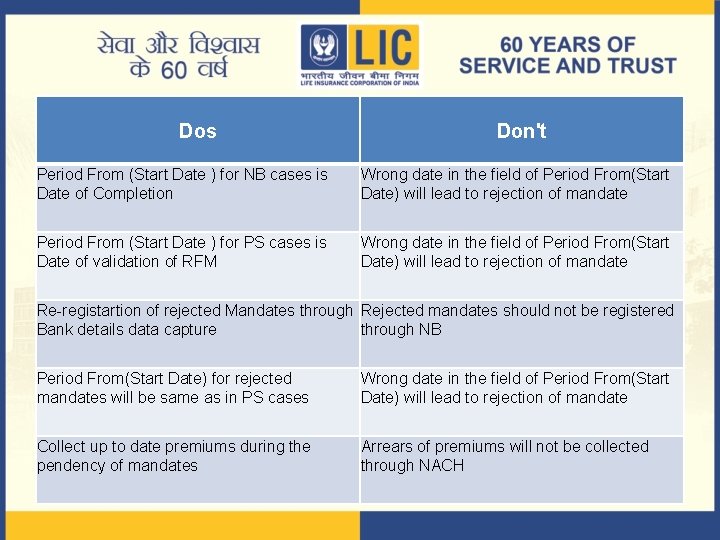
Dos Don't Period From (Start Date ) for NB cases is Date of Completion Wrong date in the field of Period From(Start Date) will lead to rejection of mandate Period From (Start Date ) for PS cases is Date of validation of RFM Wrong date in the field of Period From(Start Date) will lead to rejection of mandate Re-registartion of rejected Mandates through Rejected mandates should not be registered Bank details data capture through NB Period From(Start Date) for rejected mandates will be same as in PS cases Wrong date in the field of Period From(Start Date) will lead to rejection of mandate Collect up to date premiums during the pendency of mandates Arrears of premiums will not be collected through NACH
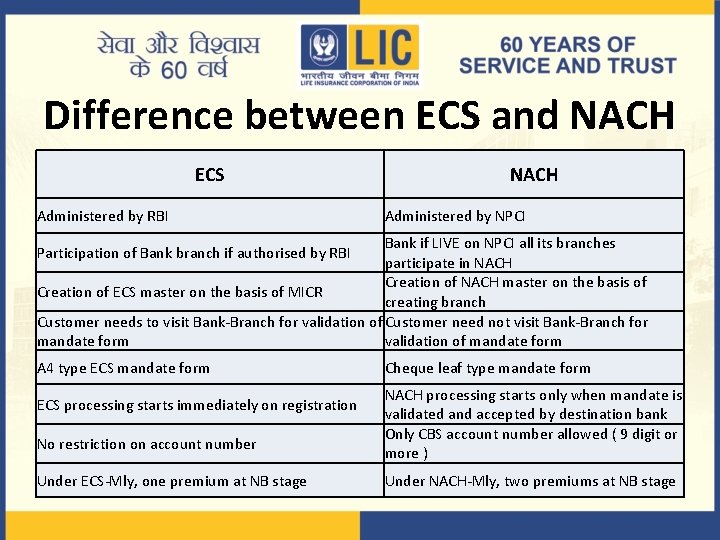
Difference between ECS and NACH ECS Administered by RBI NACH Administered by NPCI Bank if LIVE on NPCI all its branches participate in NACH Creation of NACH master on the basis of Creation of ECS master on the basis of MICR creating branch Customer needs to visit Bank-Branch for validation of Customer need not visit Bank-Branch for mandate form validation of mandate form Participation of Bank branch if authorised by RBI A 4 type ECS mandate form ECS processing starts immediately on registration No restriction on account number Under ECS-Mly, one premium at NB stage Cheque leaf type mandate form NACH processing starts only when mandate is validated and accepted by destination bank Only CBS account number allowed ( 9 digit or more ) Under NACH-Mly, two premiums at NB stage
Thank you
- Slides: 9