
Names Category Options Select from a name e
- Slides: 2
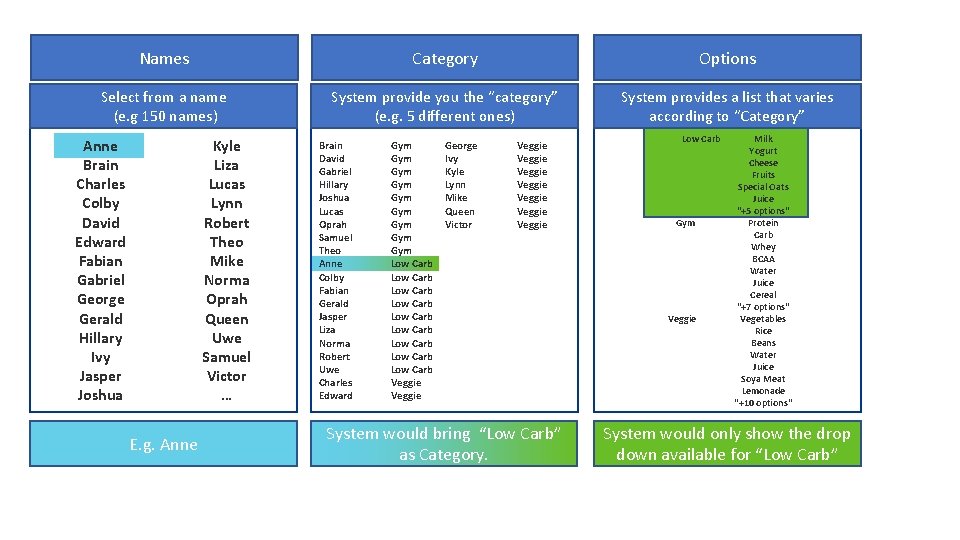
Names Category Options Select from a name (e. g 150 names) System provide you the “category” (e. g. 5 different ones) System provides a list that varies according to “Category” Anne Brain Charles Colby David Edward Fabian Gabriel George Gerald Hillary Ivy Jasper Joshua Kyle Liza Lucas Lynn Robert Theo Mike Norma Oprah Queen Uwe Samuel Victor … E. g. Anne Brain David Gabriel Hillary Joshua Lucas Oprah Samuel Theo Anne Colby Fabian Gerald Jasper Liza Norma Robert Uwe Charles Edward Gym Gym Gym Low Carb Low Carb Low Carb Veggie George Ivy Kyle Lynn Mike Queen Victor Veggie Veggie System would bring “Low Carb” as Category. Low Carb Gym Veggie Milk Yogurt Cheese Fruits Special Oats Juice "+5 options" Protein Carb Whey BCAA Water Juice Cereal "+7 options" Vegetables Rice Beans Water Juice Soya Meat Lemonade "+10 options" System would only show the drop down available for “Low Carb”
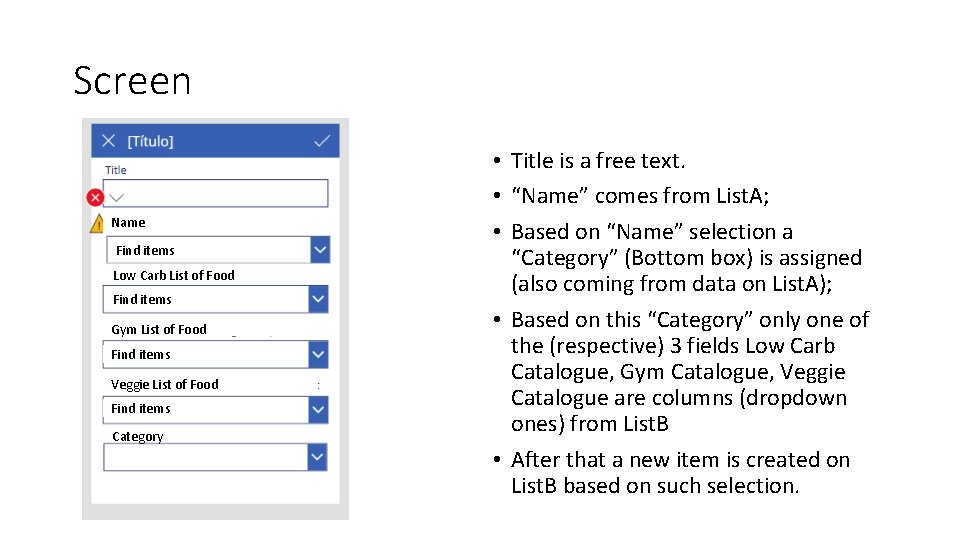
Screen Name Find items Low Carb List of Food Find items Gym List of Food Find items Veggie List of Food Find items Category • Title is a free text. • “Name” comes from List. A; • Based on “Name” selection a “Category” (Bottom box) is assigned (also coming from data on List. A); • Based on this “Category” only one of the (respective) 3 fields Low Carb Catalogue, Gym Catalogue, Veggie Catalogue are columns (dropdown ones) from List. B • After that a new item is created on List. B based on such selection.