
MultiRail LNet for Lustre Olaf Weber Senior Software
Multi-Rail LNet for Lustre Olaf Weber Senior Software Engineer SGI Storage Software Amir Shehata Lustre Network Engineer Intel High Performance Data Division Intel and the Intel logo are trademarks or registered trademarks of Intel Corporation or its subsidiaries in the United States and other countries. *Other names and brands may be claimed as the property of others. All products, dates, and figures are preliminary and are subject to change without any notice. Copyright © 2016, Intel Corporation.
Multi-Rail LNet: What and Why
Multi-Rail LNet Multi-Rail is a long-standing wish list item known under a variety of names: § Multi-Rail § Interface Bonding § Channel Bonding The various names do imply some technical differences. This implementation is a collaboration between SGI and Intel. Our goal is to land multi-rail support in Lustre. Intel and the Intel logo are trademarks or registered trademarks of Intel Corporation or its subsidiaries in the United States and other countries. *Other names and brands may be claimed as the property of others. All products, dates, and figures are preliminary and are subject to change without any notice. Copyright © 2016, Intel Corporation. 3
What Is Multi-Rail? Multi-Rail allows nodes to communicate across multiple interfaces: § Using multiple interfaces connected to one network § Using multiple interfaces connected to several networks § These interfaces are used simultaneously 4
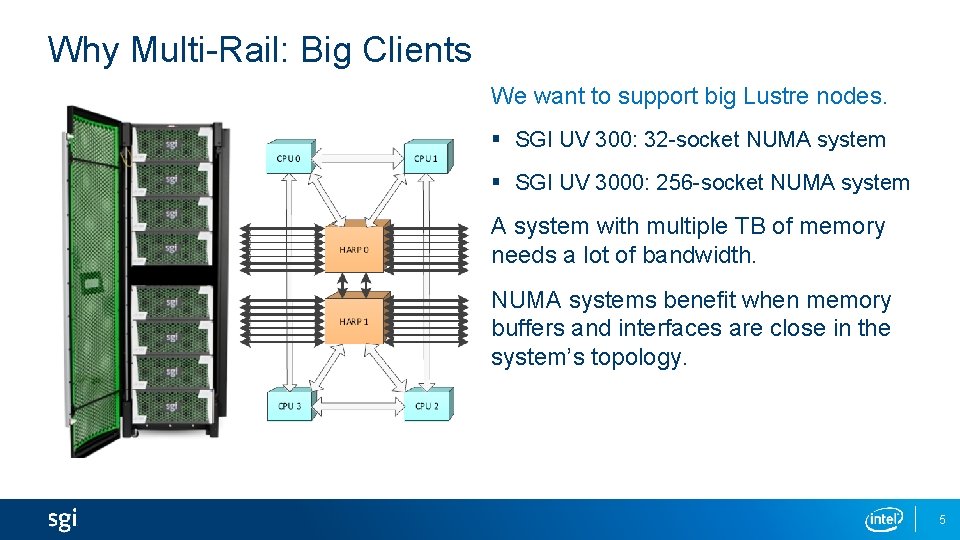
Why Multi-Rail: Big Clients We want to support big Lustre nodes. § SGI UV 300: 32 -socket NUMA system § SGI UV 3000: 256 -socket NUMA system with multiple TB of memory needs a lot of bandwidth. NUMA systems benefit when memory buffers and interfaces are close in the system’s topology. 5
Why Multi-Rail: Increasing Server Bandwidth In big clusters, bandwidth to the server nodes becomes a bottleneck. Adding faster interfaces implies replacing much or all of the network. § Adding faster interfaces only to the servers does not work Adding more interfaces to the servers increases the bandwidth. § Using those interfaces requires a redesign of the LNet networks § Without Multi-Rail each interface connects to a separate LNet network § Clients must be distributed across these networks It should be simpler than this. 6
The Multi-Rail Project § Add basic multi-rail capability • Multiplexing across interfaces, as opposed to striping across them • Multiple data streams are therefore needed to profit § Extend peer discovery to simplify configuration • Discover peer interfaces • Discover peer multi-rail capability § Configuration can be changed at runtime • This includes adding or removing interfaces • lnetctl is used for configuration § Compatible with non-Multi-Rail nodes § Add resiliency by using alternate paths in case of failures 7
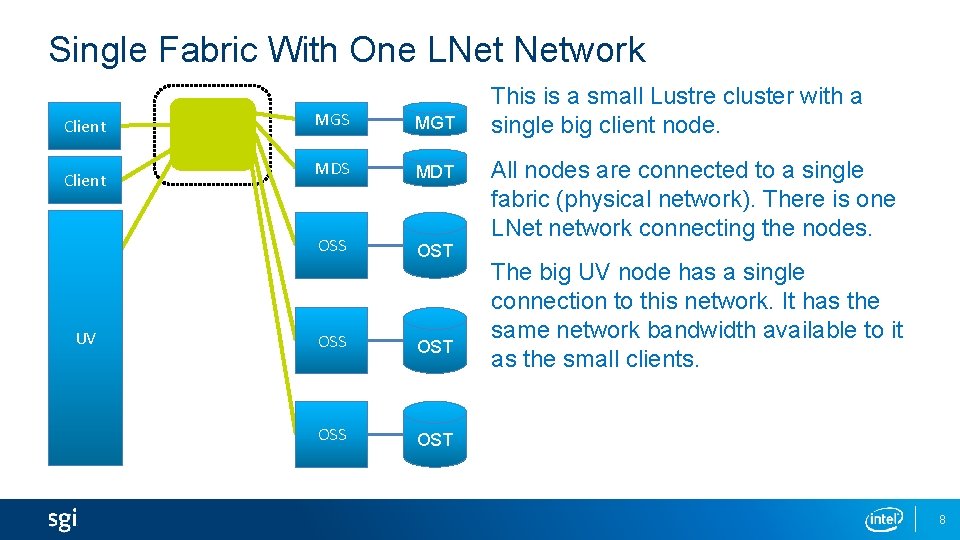
Single Fabric With One LNet Network Client UV MGS MGT MDS MDT OSS OST This is a small Lustre cluster with a single big client node. All nodes are connected to a single fabric (physical network). There is one LNet network connecting the nodes. The big UV node has a single connection to this network. It has the same network bandwidth available to it as the small clients. 8
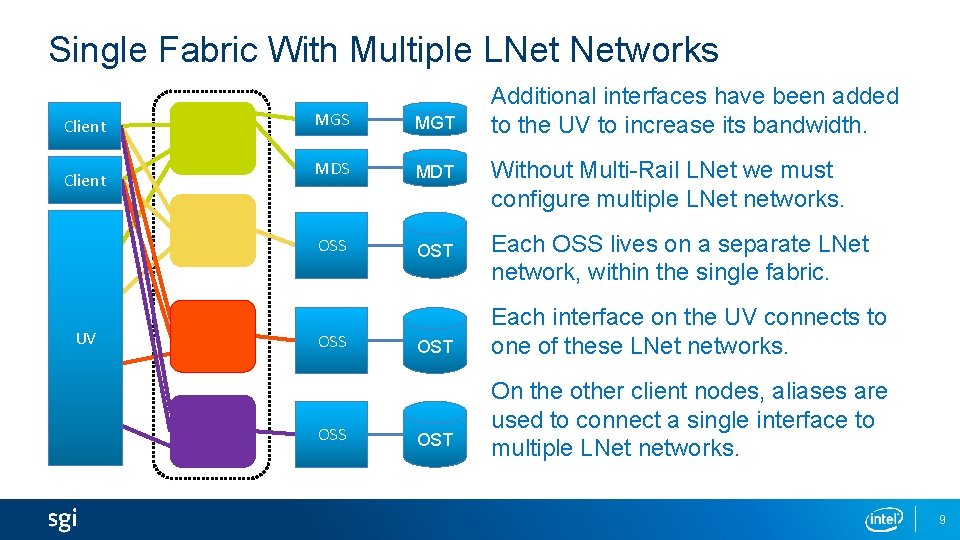
Single Fabric With Multiple LNet Networks Client UV MGS MGT MDS MDT OSS OSS OST Additional interfaces have been added to the UV to increase its bandwidth. Without Multi-Rail LNet we must configure multiple LNet networks. Each OSS lives on a separate LNet network, within the single fabric. Each interface on the UV connects to one of these LNet networks. On the other client nodes, aliases are used to connect a single interface to multiple LNet networks. 9
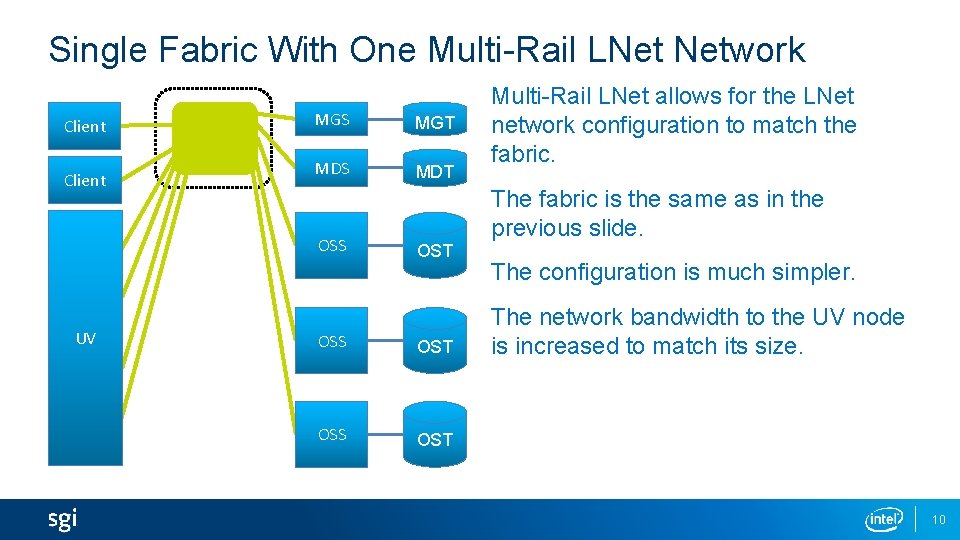
Single Fabric With One Multi-Rail LNet Network Client MGS MGT MDS MDT OSS UV Multi-Rail LNet allows for the LNet network configuration to match the fabric. The fabric is the same as in the previous slide. OST OSS OST The configuration is much simpler. The network bandwidth to the UV node is increased to match its size. 10
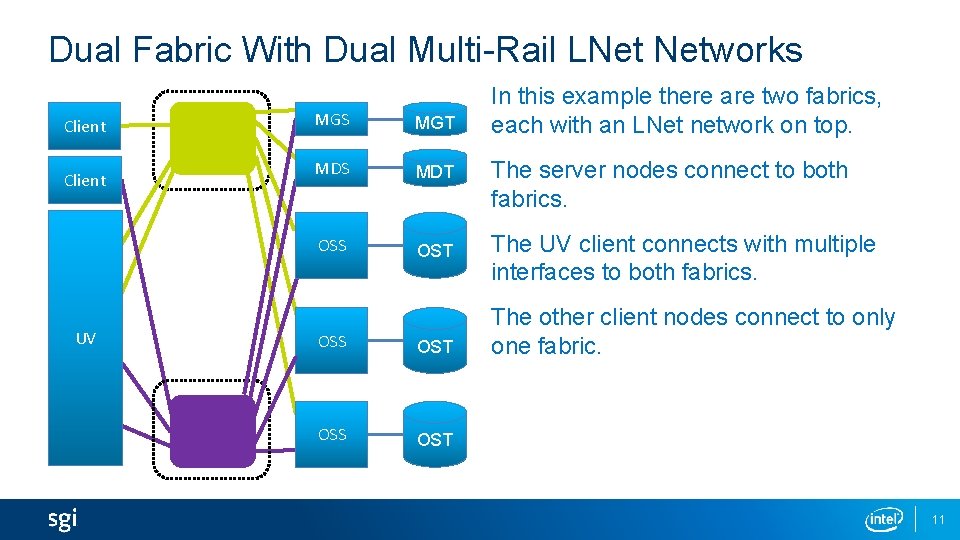
Dual Fabric With Dual Multi-Rail LNet Networks Client UV MGS MGT MDS MDT OSS OST In this example there are two fabrics, each with an LNet network on top. The server nodes connect to both fabrics. The UV client connects with multiple interfaces to both fabrics. The other client nodes connect to only one fabric. 11
Configuring Multi-Rail LNet
Use Cases § Improved performance § Improved resiliency § Better usage of large clients • The Multi-Rail code is NUMA aware § Fine grained control of traffic § Simplify multi-network file system access 13
Two Types of Configuration Methods Multi-Rail can be configured statically with lnetctl. § The following must be configured statically • Local network interfaces – The network interfaces by which a node sends messages • Selection rules – The rules which determine the local/remote network interface pair used to communicate between a node and a peer – Default is weighted round-robin § The following may be configured statically, but can be discovered dynamically • Peer network interfaces – The remote network interfaces of peer nodes to which a node sends messages Enable dynamic peer discovery to have LNet configure peers automatically 14
Static Configuration – Basic Concepts On a node: § Configure local network interfaces • Example: tcp(eth 0, eth 1) – <eth 0 IP>@tcp, <eth 1 IP>@tcp § Configure remote network interfaces • Specify the peer’s Network Interface IDs (NIDs) – <peer. X primary NID>, <peer. X NID 2>, … § Configure selection rules 15
Dynamic Configuration – Basic Concepts LNet can dynamically discover a peer’s NIDs. On a node: § Local network interfaces must be configured as before § Selection rules must be configured as before § Peers are discovered as messages are sent and received • An LNet ping is used to get a list of the peer’s NIDs • A feature bit indicates whether the peer supports Multi-Rail • The node pushes a list of its NIDs to Multi-Rail peers 16
Selection Rules – Basic Concepts Selection rules work by adding priorities § Higher priorities are preferred § The rules specify patterns The following types of rules are supported § Network § Local NID § Peer NID § Local NID / peer NID pair • These rules have two NID patterns, one for the local NID, one for the peer NID • They are used to specify preferred paths 17
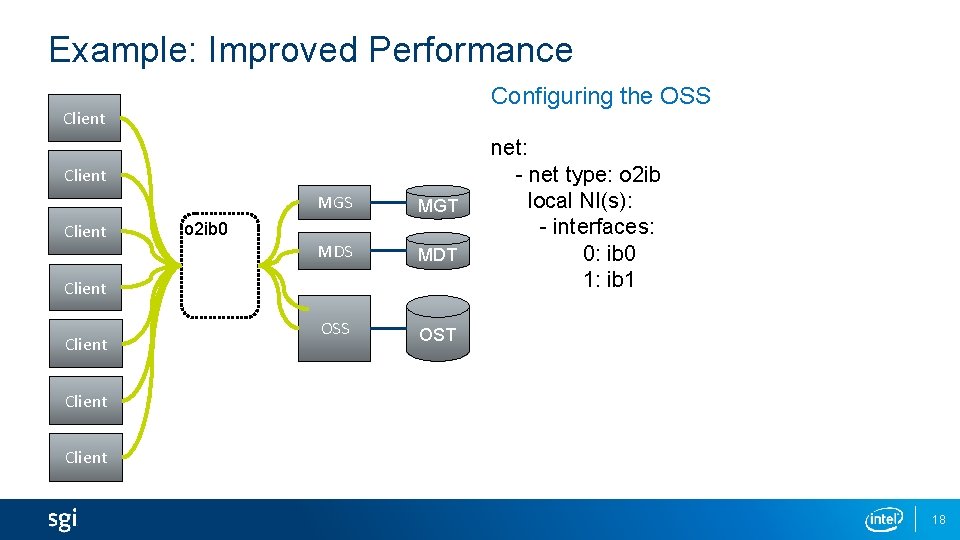
Example: Improved Performance Configuring the OSS Client MGS MGT MDS MDT OSS OST o 2 ib 0 Client net: - net type: o 2 ib local NI(s): - interfaces: 0: ib 0 1: ib 1 Client 18
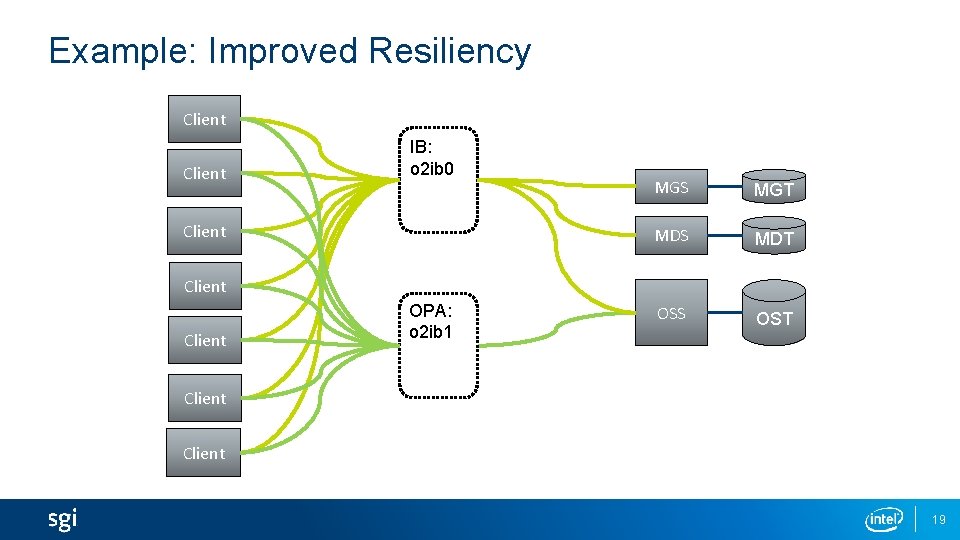
Example: Improved Resiliency Client IB: o 2 ib 0 Client MGS MGT MDS MDT OSS OST Client OPA: o 2 ib 1 Client 19
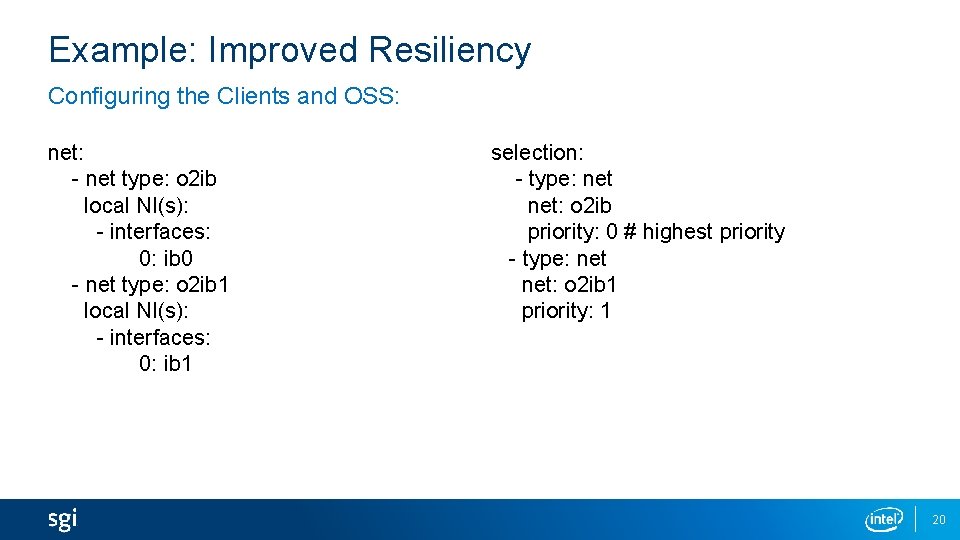
Example: Improved Resiliency Configuring the Clients and OSS: net: - net type: o 2 ib local NI(s): - interfaces: 0: ib 0 - net type: o 2 ib 1 local NI(s): - interfaces: 0: ib 1 selection: - type: net: o 2 ib priority: 0 # highest priority - type: net: o 2 ib 1 priority: 1 20
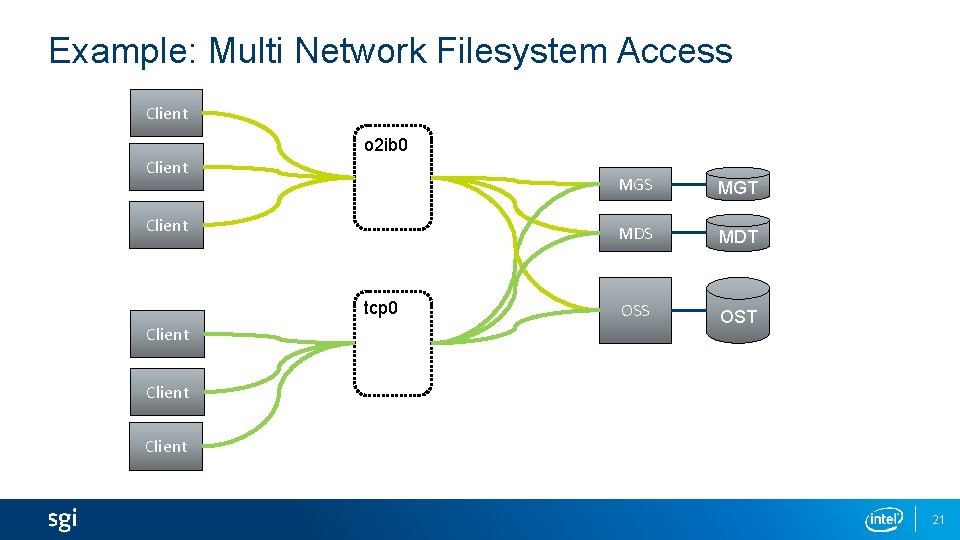
Example: Multi Network Filesystem Access Client o 2 ib 0 Client tcp 0 Client MGS MGT MDS MDT OSS OST Client 21
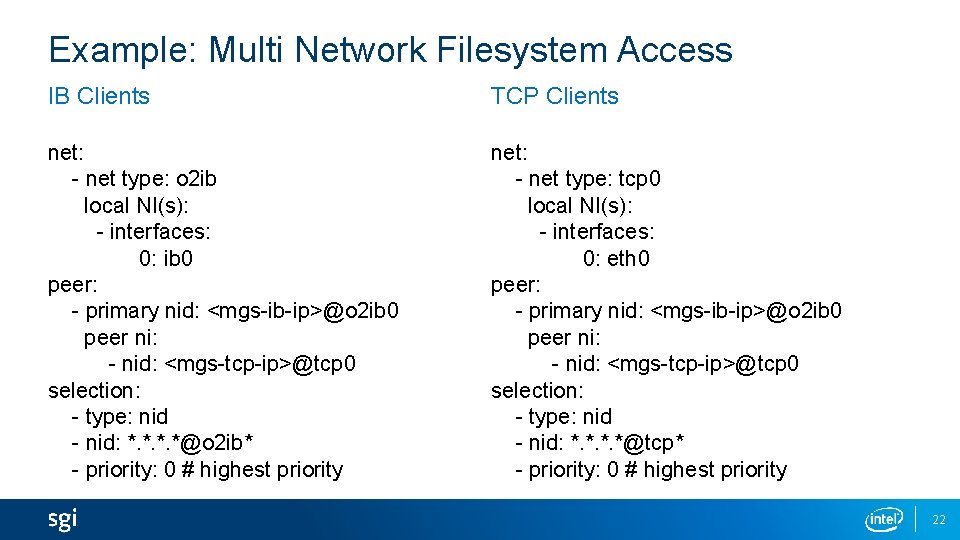
Example: Multi Network Filesystem Access IB Clients TCP Clients net: - net type: o 2 ib local NI(s): - interfaces: 0: ib 0 peer: - primary nid: <mgs-ib-ip>@o 2 ib 0 peer ni: - nid: <mgs-tcp-ip>@tcp 0 selection: - type: nid - nid: *. *@o 2 ib* - priority: 0 # highest priority net: - net type: tcp 0 local NI(s): - interfaces: 0: eth 0 peer: - primary nid: <mgs-ib-ip>@o 2 ib 0 peer ni: - nid: <mgs-tcp-ip>@tcp 0 selection: - type: nid - nid: *. *@tcp* - priority: 0 # highest priority 22
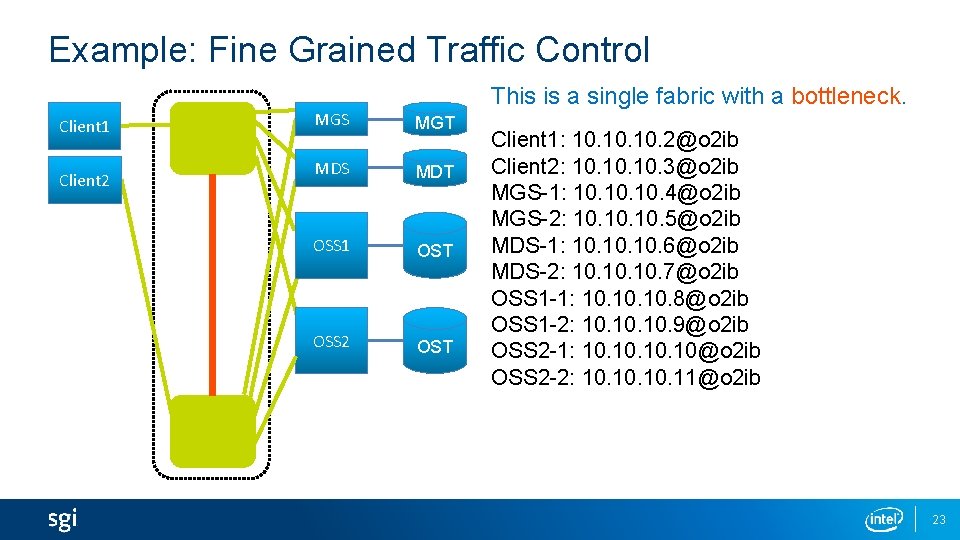
Example: Fine Grained Traffic Control Client 1 Client 2 This is a single fabric with a bottleneck. MGS MGT MDS MDT OSS 1 OST OSS 2 OST Client 1: 10. 10. 2@o 2 ib Client 2: 10. 10. 3@o 2 ib MGS-1: 10. 10. 4@o 2 ib MGS-2: 10. 10. 5@o 2 ib MDS-1: 10. 10. 6@o 2 ib MDS-2: 10. 10. 7@o 2 ib OSS 1 -1: 10. 10. 8@o 2 ib OSS 1 -2: 10. 10. 9@o 2 ib OSS 2 -1: 10. 10. 10@o 2 ib OSS 2 -2: 10. 10. 11@o 2 ib 23
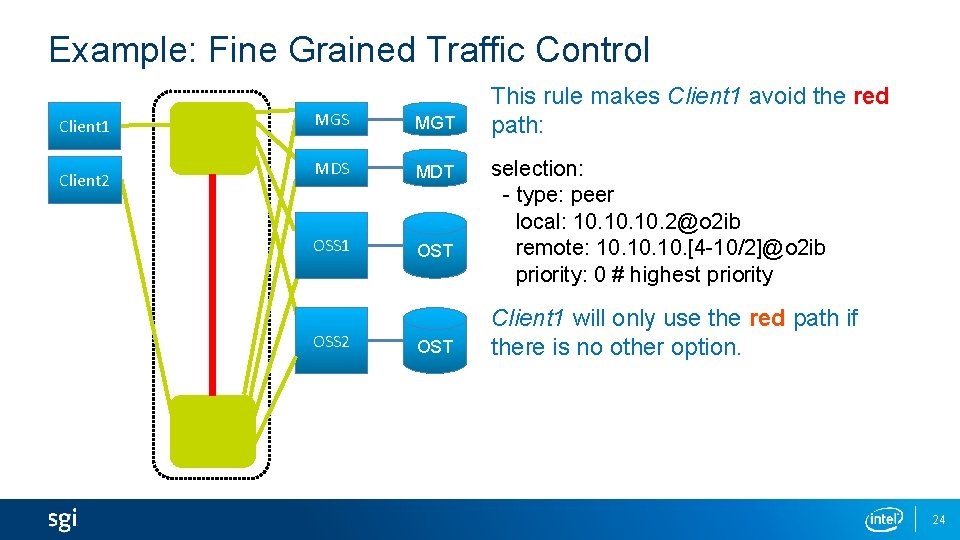
Example: Fine Grained Traffic Control Client 1 Client 2 MGS MGT MDS MDT OSS 1 OST OSS 2 OST This rule makes Client 1 avoid the red path: selection: - type: peer local: 10. 10. 2@o 2 ib remote: 10. 10. [4 -10/2]@o 2 ib priority: 0 # highest priority Client 1 will only use the red path if there is no other option. 24
Multi-Rail LNet Project Status
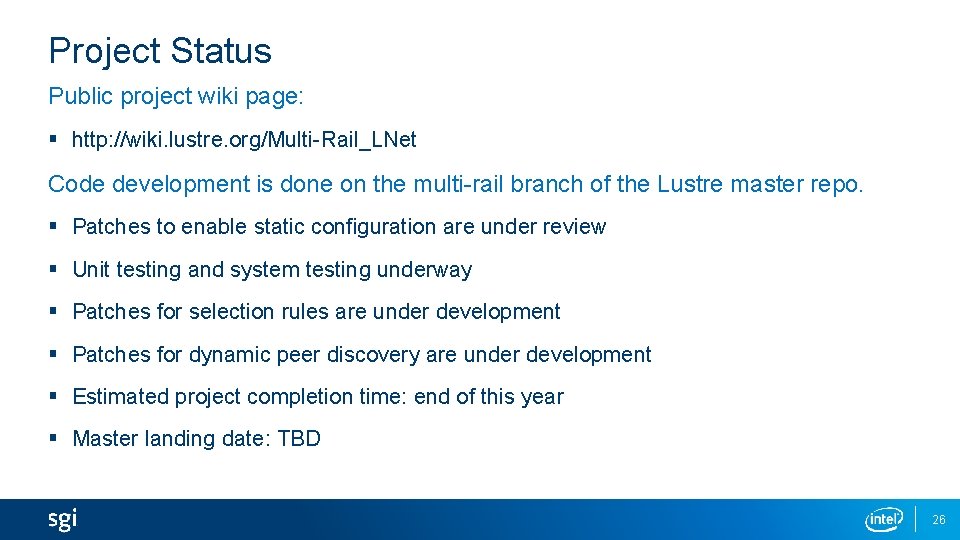
Project Status Public project wiki page: § http: //wiki. lustre. org/Multi-Rail_LNet Code development is done on the multi-rail branch of the Lustre master repo. § Patches to enable static configuration are under review § Unit testing and system testing underway § Patches for selection rules are under development § Patches for dynamic peer discovery are under development § Estimated project completion time: end of this year § Master landing date: TBD 26

- Slides: 27