
Multimedia VideoAudio Compression T SharonA Frank Hybrid coding
Multimedia Video/Audio Compression T. Sharon-A. Frank
Hybrid coding • Images: – JPEG • Video/Audio – M-JPEG – MPEG (1, 2, 4) – Other codings – H. 26 x 2 T. Sharon-A. Frank
Video Coding Requirements • • • 3 Random access Fast forward /reverse searches Reverse playback Audio-visual synchronization Robustness to errors Low coding/decoding delay Editability Format flexibility Cost tradeoffs T. Sharon-A. Frank
Video Compression • Spatial (intra-frame) compression: – Compresses each frame in isolation, treating it as a bitmapped image. – Based on quantization of DCT coefficients. • Temporal (inter-frame) compression: – Compresses sequences of frames by only storing differences between them. – Record displacement of object plus changed pixels in area exposed by its movement. – Based on Motion Compensation (MC). 4 T. Sharon-A. Frank
Spatial Compression • Image compression applied to each frame. • Can therefore be lossless or lossy, but lossless rarely produces sufficiently high compression ratios for volume of data. • Lossless compression implies a loss of quality if decompressed then recompressed. • Ideally, work with uncompressed video during post-production. 5 T. Sharon-A. Frank
Temporal Compression • Key frames are spatially compressed only – Key frames often regularly spaced (e. g. , every 12 frames). • Difference frames only store the differences between the frame and the preceding frame or most recent key frame. • Difference frames can be efficiently spatially compressed. 6 T. Sharon-A. Frank
Motion-JPEG (M-JPEG) 7 • Purely spatial compression. • Apply JPEG compression to each video frame. • Compression rates: 2: 1 to 12: 1 – lossy: up to 5: 1 is considered broadcast quality. • No standard, but MJPEG-A format widely supported. • Excellent when there are rapid scene changes in the video. T. Sharon-A. Frank • Easy to edit.
Video Compression Coding of video is carried out in a series of steps: • Divide Image to blocks – 16 x 16 luminance – 8 x 8 chrominance (color) Usually • Use DCT based techniques for spatial redundancy removal (Intra-frame compression). • Use MC (Motion Compensation) techniques for temporal redundancy removal (Inter-frame compression). • Final stage is two dimensional run-length coding. 8 T. Sharon-A. Frank
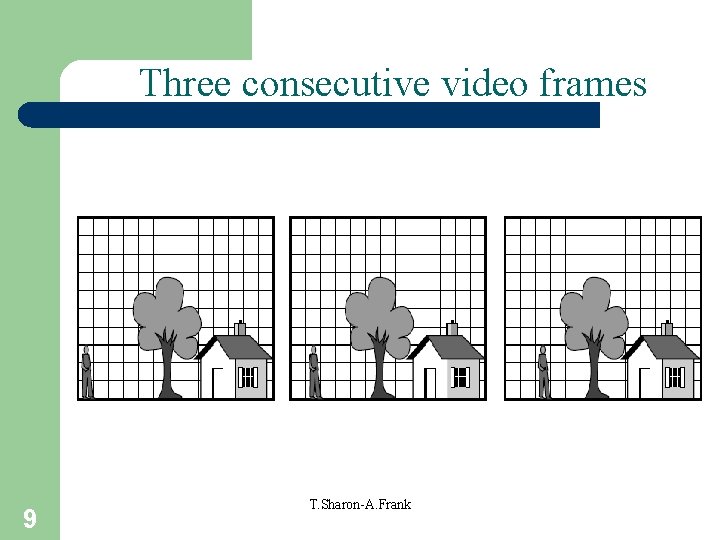
Three consecutive video frames 9 T. Sharon-A. Frank
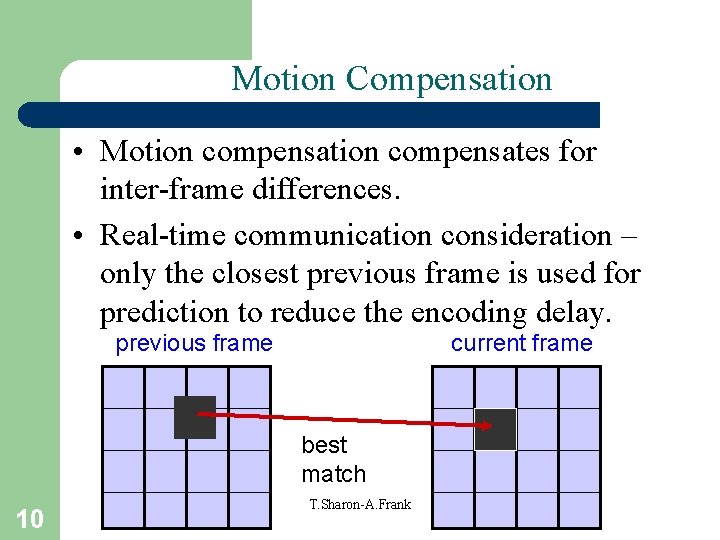
Motion Compensation • Motion compensates for inter-frame differences. • Real-time communication consideration – only the closest previous frame is used for prediction to reduce the encoding delay. previous frame current frame best match 10 T. Sharon-A. Frank
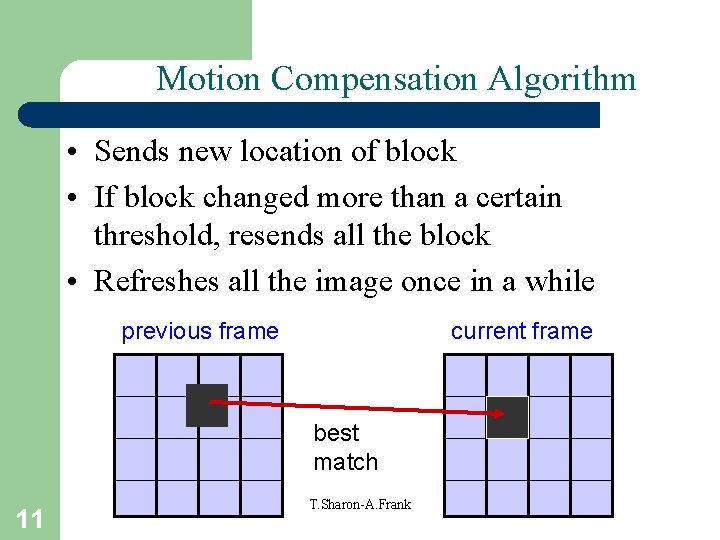
Motion Compensation Algorithm • Sends new location of block • If block changed more than a certain threshold, resends all the block • Refreshes all the image once in a while previous frame current frame best match 11 T. Sharon-A. Frank
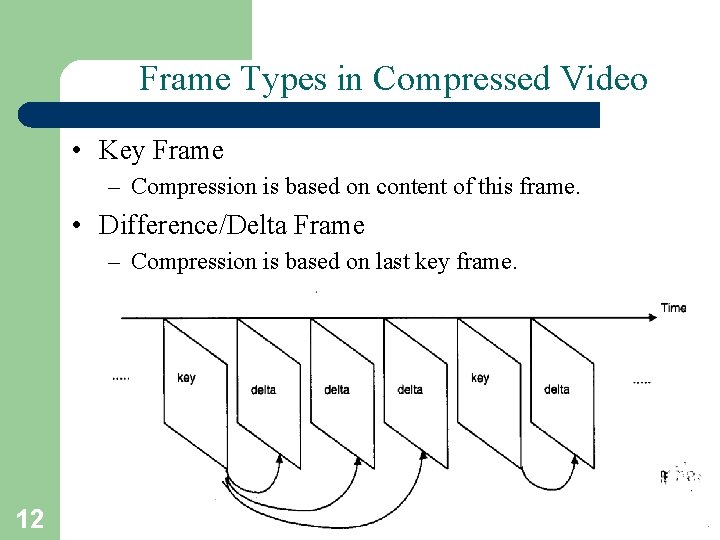
Frame Types in Compressed Video • Key Frame – Compression is based on content of this frame. • Difference/Delta Frame – Compression is based on last key frame. 12 T. Sharon-A. Frank
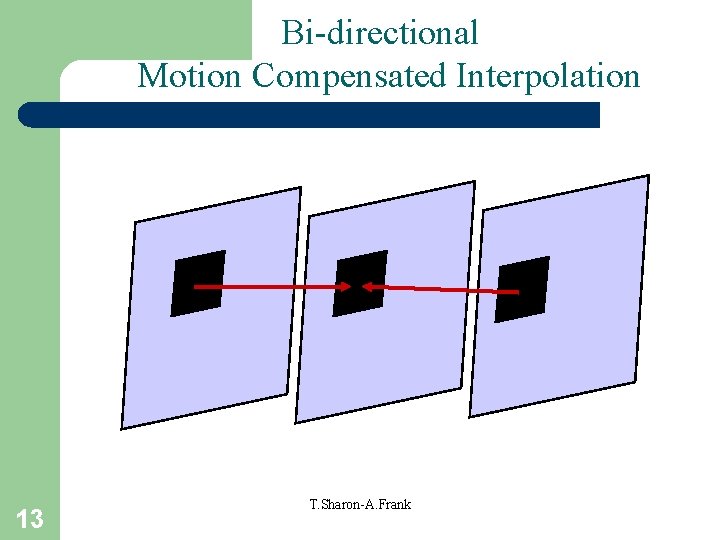
Bi-directional Motion Compensated Interpolation 13 T. Sharon-A. Frank
MPEG Dynamics • Delicate balance between Intra-frame and Inter-frame coding. • Two basic techniques: – Transform domain DCT-based compression for the reduction of spatial redundancy (intra-frame). – Block-based bi-directional MC for reduction of the temporal redundancy (inter-frame). 14 T. Sharon-A. Frank
The MPEG Standard Three types of MPEG-2 frames processed by the viewing program: 1. I (Intracoded) frames: self-contained JPEG-encoded still pictures. 2. P (Predictive) frames: block-by-block difference with the last frame. 3. B (Bidirectional) frames: differences with the last and next frame. 15 T. Sharon-A. Frank
Use of MPEG Image Types <I> Intra-picture/frame/image – Access points for random access – Moderate Compression <P> Predicted pictures – Coded with a reference to a past picture – Used as reference for future predicted pictures <B> Bi-directional prediction (interpolated pictures) – Require past and future reference for prediction – Highest compression 16 T. Sharon-A. Frank
MPEG GOPs • Group of Pictures (GOP): 17 – Repeating sequence of I-, P- and B-pictures. – Always begins with an I-picture. – Display order – frames in order they will be displayed. – Bitstream order – re-ordered so that every P- or B-picture comes after frames it depends on, allowing reconstruction of the complete frames. T. Sharon-A. Frank
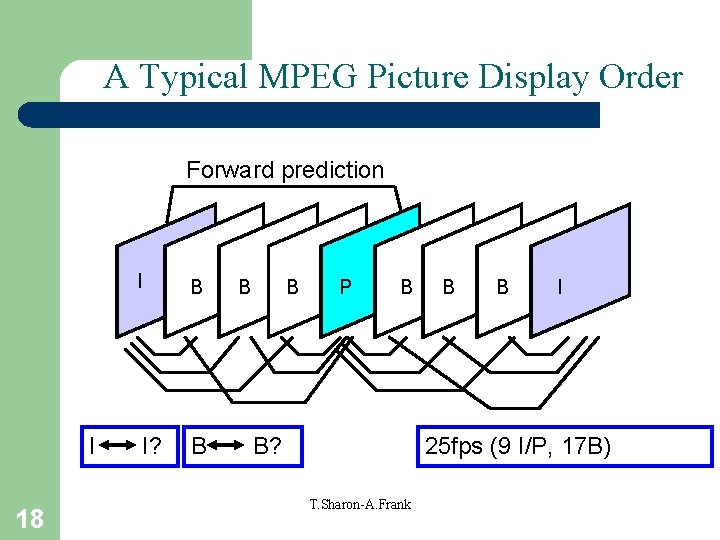
A Typical MPEG Picture Display Order Forward prediction I 18 I B I? B B B P B B? B B I 25 fps (9 I/P, 17 B) T. Sharon-A. Frank
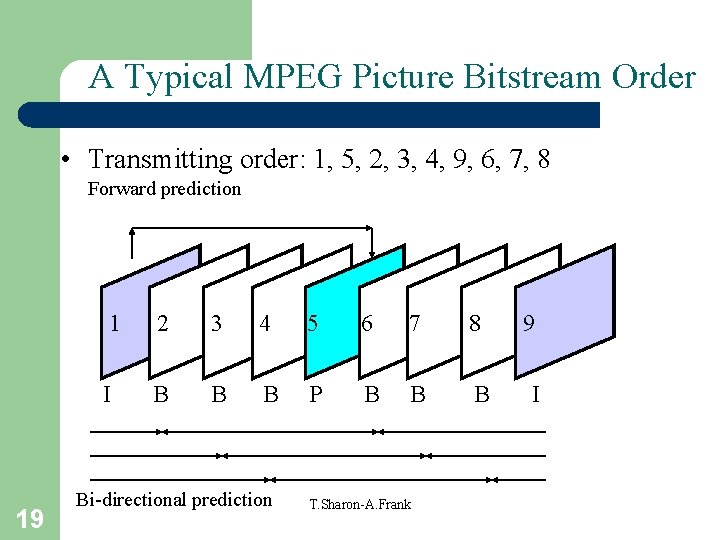
A Typical MPEG Picture Bitstream Order • Transmitting order: 1, 5, 2, 3, 4, 9, 6, 7, 8 Forward prediction 19 1 2 3 4 5 6 7 8 I B B B P B Bi-directional prediction T. Sharon-A. Frank 9 I
MPEG Standards • MPEG-1 – 352 x 240 at 30 fps. – Quality is slightly below standard VCR videos. • MPEG-2 – 720 x 480 & 1280 x 720 at 60 fps, with full CD-quality audio. – Sufficient for television (including HDTV). – Used on DVD-ROMs. • MP 3 20 – Audio compression. – Reduces digital sound files by 12: 1 ratio with virtually no T. Sharon-A. Frank loss in quality.
MPEG-1 Compression • Source Interchange Format (SIF) – 4: 2: 0 chrominance sub-sampling – 352 x 240 pixel frame • MPEG-1 compressed SIF video at 30 frames per second has data rate of 1. 86 Mbps (CD video – 40 mins of video at that rate). • MPEG-1 can be scaled up to larger frames, but cannot handle interlacing. 21 T. Sharon-A. Frank
MPEG Profiles & Levels • Profiles define subsets of the features of the data stream. • Levels define parameters such as frame size and data rate. • Each profile may be implemented at one or more levels. • Notation: profile@level, e. g. MP@ML. 22 T. Sharon-A. Frank
MPEG-2 Main Profile & Level • MPEG-2 Main Profile at Main Level (MP@ML) used for DVD video: – CCIR 601 scanning – 4: 2: 0 chrominance sub-sampling – 15 Mbits per second – Most elaborate representation of MPEG-2 compressed data. 23 T. Sharon-A. Frank
MPEG-4 (1) • Refinement of MPEG-1 compression: – I-pictures compressed by quantizing and Huffman coding DCT coefficients. – Improved motion compensation leads to better quality than MPEG-1 at same bit rates. • Designed to support a range of multimedia data at bit rates from 10 Kbps to >1. 8 Mbps. • Applications from mobile phones to HDTV. • Video codec becoming popular for Internet use – is incorporated in Quick. Time, Real. Media and Div. X. 24 T. Sharon-A. Frank
MPEG-4 (2) • Standard defines an encoding for multimedia streams made up of different sorts of object – video, still images, animation, 3 -D models… • Higher profiles divide a scene into arbitrarily shaped video objects were each one may be compressed and transmitted separately; scene is composed at receiving end by combining them. • SP and ASP profiles restricted to rectangular objects, usually complete frames. 25 T. Sharon-A. Frank
MPEG-4 Profiles & Levels • Simple Profile (SP), suitable for low bandwidth streaming over Internet: – P-pictures only – Efficient decompression, suitable for PDAs, etc – SP@L 1, 64 kbps, 176 x 144 pixel frame. • Advanced Simple Profile (ASP) suitable for broadband streaming: – – 26 B-pictures Global Motion Compensation Sub-pixel motion compensation ASP@L 5, 8000 Kbps, full CCIR 601 frame. T. Sharon-A. Frank
DV Compression • Starts with chrominance sub-sampling of CCIR 601. • Constant data rate 25 Mbits per second; higher quality than MJPEG at same rate. • Apply DCT, quantization, run-length and Huffman coding on zig-zag sequence – like JPEG – to 8 x 8 blocks of pixels. • If little or no difference between fields (almost static frame), apply DCT to block containing alternate lines from odd and even fields. • If motion between fields, apply DCT to two 8 x 4 blocks (one from each field) separately, leading to more efficient compression of frames with motion. 27 T. Sharon-A. Frank
DVI (Digital Video Interactive) • • Developed by General Electric. Uses specialized processors for compression. Hardware-only codec – lossless transforms. Compression rate: 80: 1 -160: 1 – 10 sec video clip is compressed to ~2 MB. • Intel – software version of DVI algorithms, marketed as Indeo (a software only codec): – there is also an audio version of Indeo. – latest version uses hybrid wavelet transform for compression algorithm. 28 T. Sharon-A. Frank
Cinepak • Developed by Apple and Super. Mac. • Outputs 320 x 240 (quarter screen) at 15 fps with good quality – data rate that even slow single-speed and 2 x CD-ROM players can deliver. • Software only codec supported by Microsoft’s Video for Windows and Apple’s Quick. Time. • Better color definition than other codecs, so good for natural video without graphics or animation. 29 T. Sharon-A. Frank
Quick. Time • Developed by Apple but is now crossplatform. • Supports Cinepak, Indeo, M-JPEG and MPEG-1, and is extensible to support future codecs, such as DVCAM. • Synchronizes all types of digital media. • For example, video frames are dropped if necessary for synchronization with audio. 30 T. Sharon-A. Frank
Video For Windows • Microsoft (therefore, not cross-platform). • Uses generic AVI (audio video interleaved) format which is provided by MCI (media control interface). • Supports a number of compression methods in real-time, non-real-time, with or without hardware assistance – Cinepak, Indeo, Microsoft Video-1. 31 T. Sharon-A. Frank
Active. Movie (API from Microsoft) • • Now called Direct. Show (supports DVD). Solves problems of Vf. W and Quick. Time. Cross-platform. Supports codecs supported by Vf. W as well as MPEG audio, WAV audio, MPEG video, and Apple Quick. Time video. • Fully integrated with Direct. X technology, allowing use of Direct. X components and more graphics card features. 32 T. Sharon-A. Frank
Video Streaming Players • Real. Video (from Real. Networks) – G 2 Player also plays Real. Audio. – Uses a variety of compression techniques. • Real. Producer (also from Real. Networks) – Allows you to create streaming audio and video. – Free software just like G 2! 33 T. Sharon-A. Frank
H. 261 (Px 64) • Video compression for videoconferences – Compression in real-time – Targeted to ISDN • Compressed data stream: p*64 Kbits/s, p=1, …, 30) • 2 resolutions: – Common Intermediate Format (CIF) – Quarter CIF (QCIF) 34 T. Sharon-A. Frank
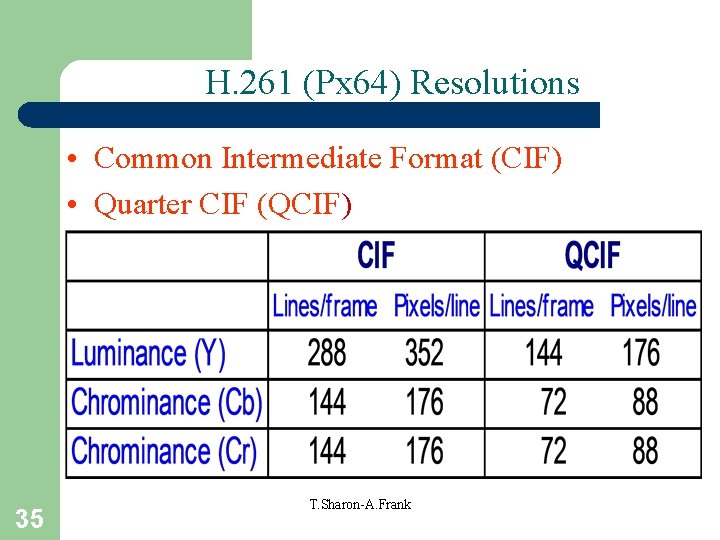
H. 261 (Px 64) Resolutions • Common Intermediate Format (CIF) • Quarter CIF (QCIF) 35 T. Sharon-A. Frank
Image Preparation • Uncompressed CIF – One frame = 288*352*8 + 2*144*176*8 = 1, 216, 512 bits – 30 fps – Bandwidth = 1, 216, 512*30 = 36. 4 Mbits/s • Uncompressed QCIF = 9. 1 Mbits/s • ISDN channels: 64 Kbits/s-2 Mbits/s => bit reduction required 36 T. Sharon-A. Frank
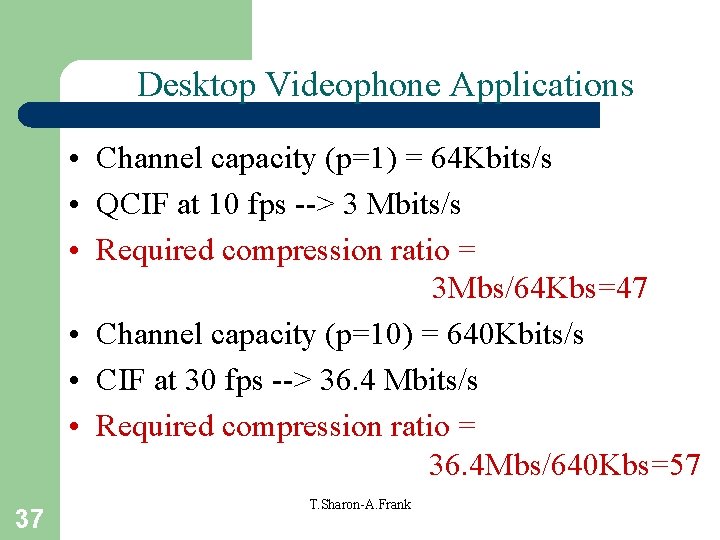
Desktop Videophone Applications • Channel capacity (p=1) = 64 Kbits/s • QCIF at 10 fps --> 3 Mbits/s • Required compression ratio = 3 Mbs/64 Kbs=47 • Channel capacity (p=10) = 640 Kbits/s • CIF at 30 fps --> 36. 4 Mbits/s • Required compression ratio = 36. 4 Mbs/640 Kbs=57 37 T. Sharon-A. Frank
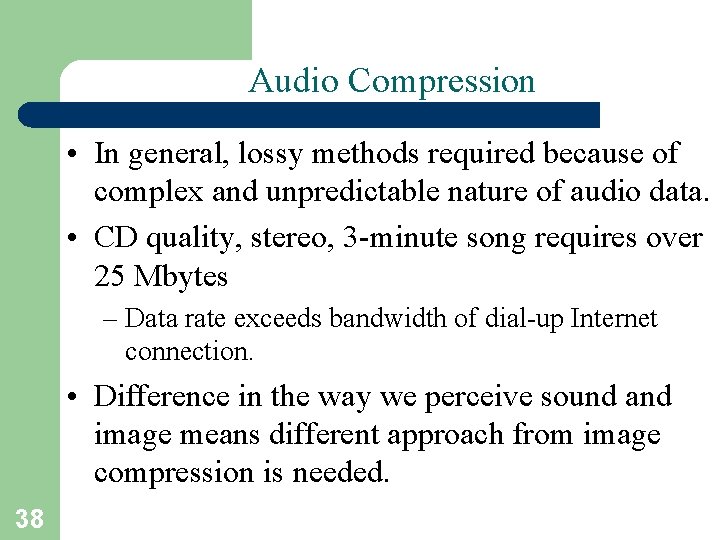
Audio Compression • In general, lossy methods required because of complex and unpredictable nature of audio data. • CD quality, stereo, 3 -minute song requires over 25 Mbytes – Data rate exceeds bandwidth of dial-up Internet connection. • Difference in the way we perceive sound and image means different approach from image compression is needed. 38
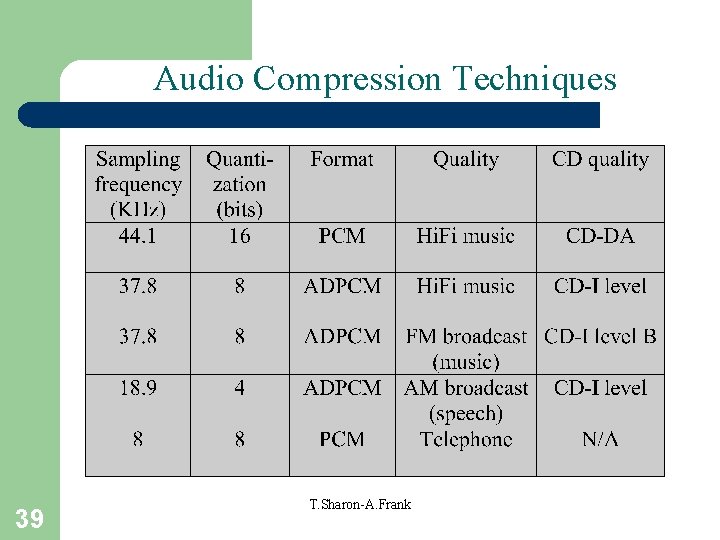
Audio Compression Techniques 39 T. Sharon-A. Frank
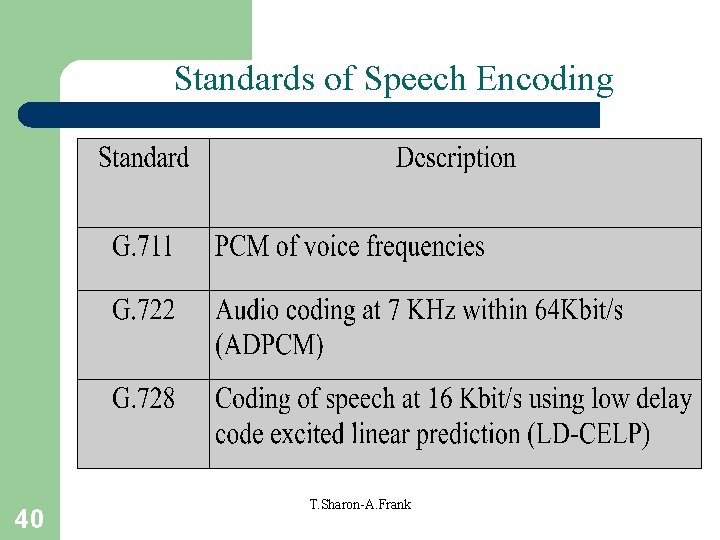
Standards of Speech Encoding 40 T. Sharon-A. Frank
![Basic Steps of Audio Encoding Uncompressed audio data Filter-Banks 32 Sub-Bands [] Quantization Psychoacoustical](http://slidetodoc.com/presentation_image/0a4444c2d3c1a07081aaa21046c2b960/image-41.jpg "Basic Steps of Audio Encoding Uncompressed audio data Filter-Banks 32 Sub-Bands [] Quantization Psychoacoustical")
Basic Steps of Audio Encoding Uncompressed audio data Filter-Banks 32 Sub-Bands [] Quantization Psychoacoustical Model Control 41 T. Sharon-A. Frank Multiplexer Entropy Coder Compressed audio data
MP 3 • MP 3 = MPEG-1 Audio, Layer 3 • Three layers of audio compression in MPEG-1 (MPEG-2 essentially identical). • Layer 1. . . Layer 3, encoding proces increases in complexity, data rate for same quality decreases – e. g. Same quality 192 kbps at Layer 1, 128 kbps at Layer 2, 64 kbps at Layer 3. • 10: 1 compression ratio at high quality. • Variable bit rate coding (VBR). 42
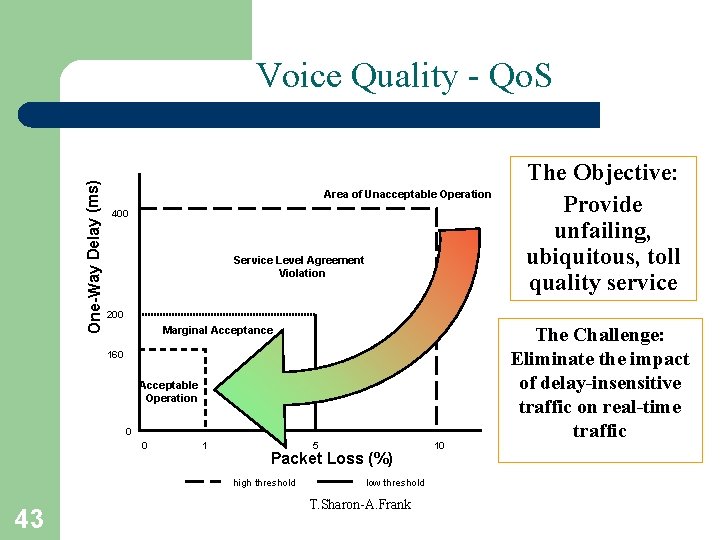
One-Way Delay (ms) Voice Quality - Qo. S Area of Unacceptable Operation 400 Service Level Agreement Violation 200 Marginal Acceptance 160 Acceptable Operation 0 0 1 5 Packet Loss (%) high threshold 43 The Objective: Provide unfailing, ubiquitous, toll quality service low threshold T. Sharon-A. Frank 10 The Challenge: Eliminate the impact of delay-insensitive traffic on real-time traffic
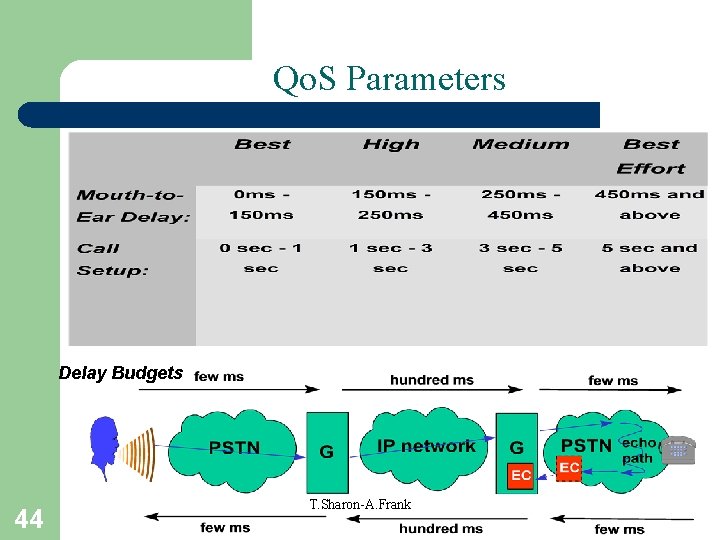
Qo. S Parameters Delay Budgets 44 T. Sharon-A. Frank
- Slides: 44