
Multimedia for the Web Creating Digital Excitement Planning
Multimedia for the Web: Creating Digital Excitement Planning the Multimedia Web Site
Chapter Concepts Understand the Design Strategy Identify Web Site Categories Define the Planning Documents Explore Organizational Structure Investigate Navigational Structure Discuss Additional Web Site Tasks Multimedia for the Web Chapter 2 2
Introduction Web site development is projectbased process Well-developed plan for site will – Save time – Money – Multiple modifications Rule of thumb for development is 80% planning and 20% production Multimedia for the Web Chapter 2 3
Introduction Plan provides structure Web architecture is blueprint for site: – State purpose – Target audience – Organizational/navigational structures – Multimedia elements – User interface – Layout and design Multimedia for the Web Chapter 2 4
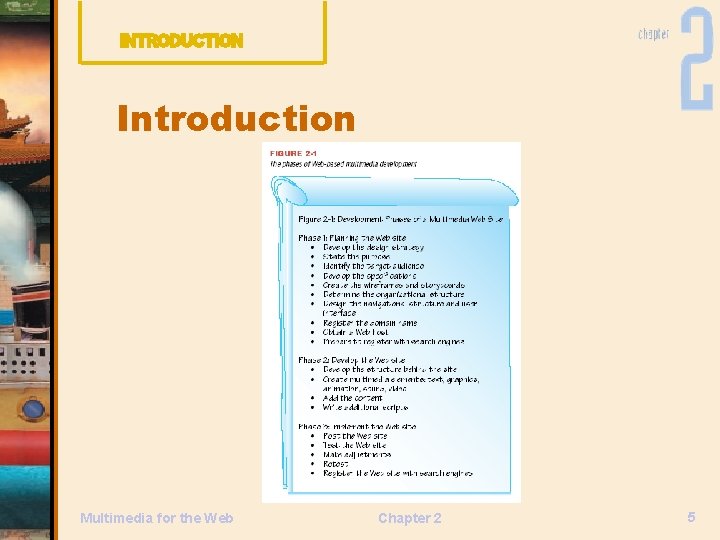
Introduction Multimedia for the Web Chapter 2 5

Understand the Design Strategy Develop a Design Strategy Ensures your Web site effectively achieves purpose for intended audience Shared vision; client and multimedia team clarify the purpose and identify target audience Multimedia for the Web Chapter 2 6
Purpose Succinct purpose defined by goals and objectives Goals support the purpose Objectives must be clear, measurable, and obtainable Writing goals and objectives is critical as they guide the development process Multimedia for the Web Chapter 2 7
Purpose To determine purpose: – How will users be using this Web site? – Why visit this site? – What will users gain from Web site? – Which browser/platform will users use to access this Web site? – What types of features will be most useful to the users? Multimedia for the Web Chapter 2 8
Purpose Imperative to determine what your client wants in advance Ask client site specifics: – How to handle secured transactions – What action should user take after visiting site? – Is there a specific budget? – What is the domain name? Multimedia for the Web Chapter 2 9
Purpose Part of planning is educating client about what is practical, possible and eye-catching Client is the visionary of the Web site Important for multimedia team to articulate that vision Multimedia for the Web Chapter 2 10
Target Audience Consider the audience Focus on the user Tailor Web site to meet user’s needs and wants User profile: picture about the people using the site — their online and offline habits Multimedia for the Web Chapter 2 11
Target Audience Ways to determine user profile include – In-person interviews – Online surveys – Focus groups Users like to feel in control; give users opportunity to choose of create their own experience Multimedia for the Web Chapter 2 12

Target Audience Determine technology available to view your Web site Many users require adaptive technologies Alternate text used by screen readers for blind users Multimedia for the Web Chapter 2 13
Target Audience sets the tone, approach, metaphor and emphasis of site Tone: makes a statement Approach: direction to user Metaphor: a theme to aid user Emphasis: whether site will utilize multimedia elements Multimedia for the Web Chapter 2 14
Technology Specifications Playback system: – Operating system, bandwidth, browser Multimedia elements to be included: – Style sheets for comparable quality Functionality – How program reacts to an action User Interface Multimedia for the Web Chapter 2 15
Creative Brief Creative brief provides summary of the design strategy and process including: – Objectives – Purpose – Target Audience Multimedia for the Web Chapter 2 16
Identify Web Site Categories Static Sites – Serve the purpose of self-branding – Passive, require few design or technology changes Dynamic Sites – Provide information and offer some form of interactivity Multimedia for the Web Chapter 2 17
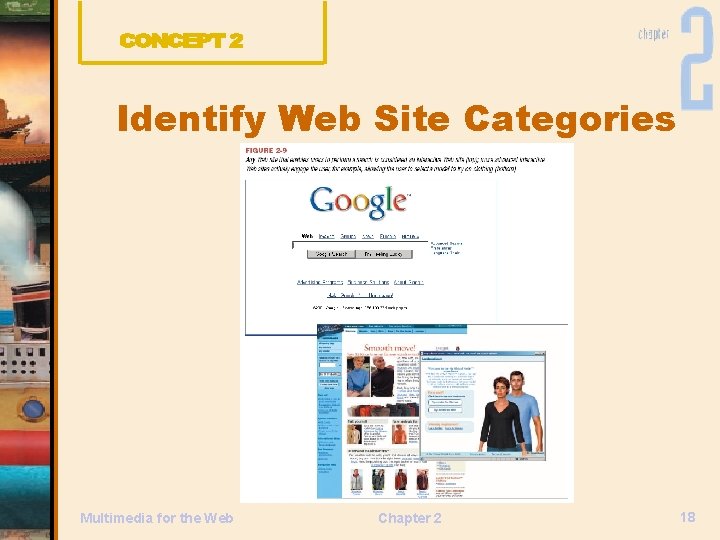
Identify Web Site Categories Multimedia for the Web Chapter 2 18
Define the Planning Documents used to establish the scope and feel of the site Flowcharts Wireframes Storyboards Multimedia for the Web Chapter 2 19
Flowcharts Visual guide of the Web site Graphical representation of how info in site is organized and flows Flowchart is a flexible document Used to illustrate interactivity Multimedia for the Web Chapter 2 20
Wireframes and Storyboards Wireframes created to answer “what” questions related to site – Text-only skeletal structure of every click-through possibility Storyboards answer “how” questions related to the site – Diagrams of the layout of each page Multimedia for the Web Chapter 2 21
Wireframes and Storyboards Describe the content and sequence of each page Specify how text, graphics, animation, multimedia elements are positioned on each screen Design changes here save money on development Multimedia for the Web Chapter 2 22
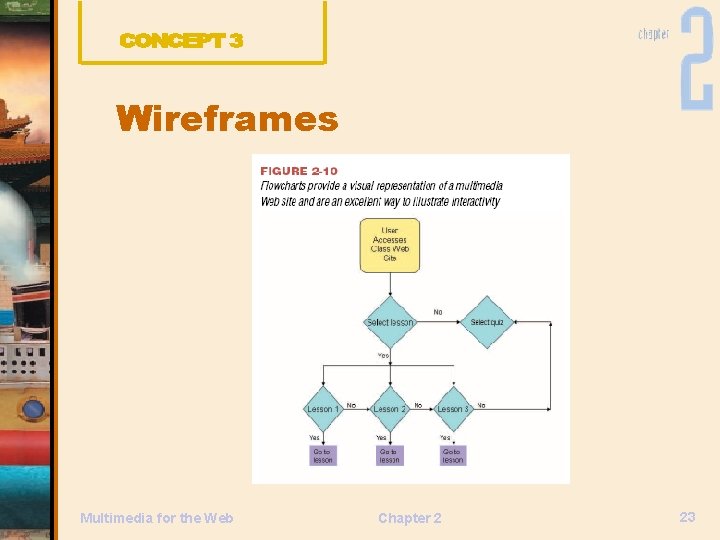
Wireframes Multimedia for the Web Chapter 2 23
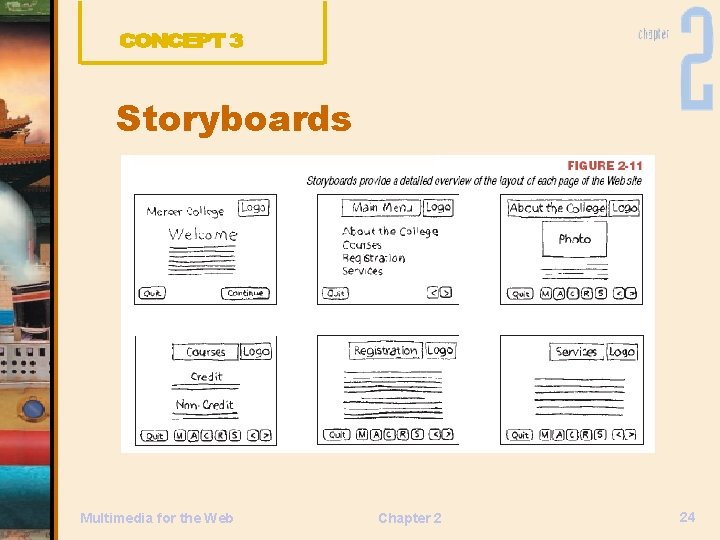
Storyboards Multimedia for the Web Chapter 2 24
Explore Organizational Structure Organizational structure: the way in which information is organized Hierarchical Nonlinear Linear Data-base driven Multimedia for the Web Chapter 2 25
Hierarchical Organizational Structure Top-down approach Sets and subsets of information form a hierarchy Information is chunked down Can be ‘broad and shallow’ or ‘deep and narrow’ Multimedia for the Web Chapter 2 26
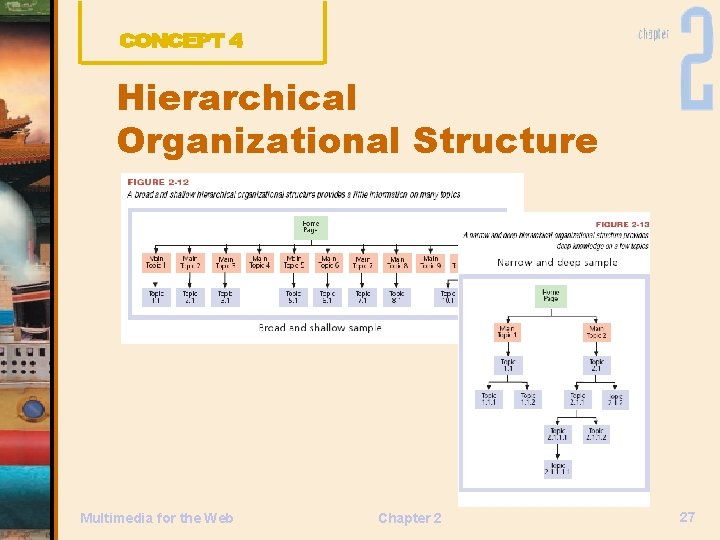
Hierarchical Organizational Structure Multimedia for the Web Chapter 2 27
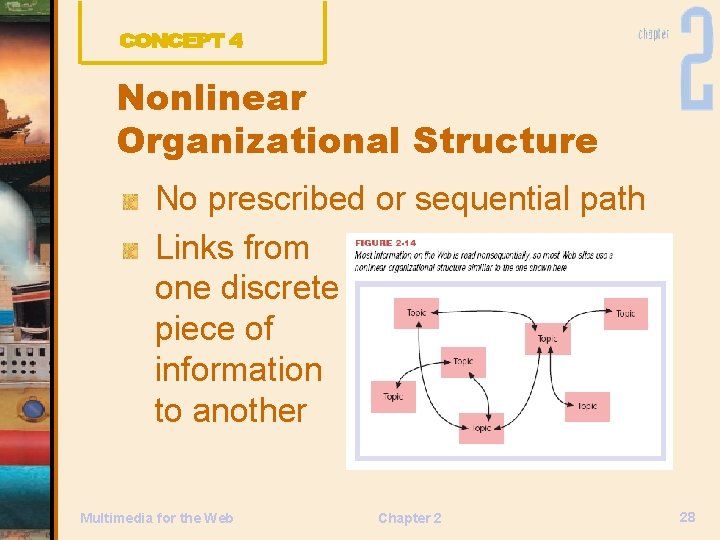
Nonlinear Organizational Structure No prescribed or sequential path Links from one discrete piece of information to another Multimedia for the Web Chapter 2 28
Linear Organizational Structure Organizes information sequentially Traditional method of navigation with a set sequence Examples include training sites, online slide show Multimedia for the Web Chapter 2 29
Database-Driven Organizational Structure Increasingly popular Large volume of short bits of information Sites that use internal search engine use databases Common examples are library, research, and e-commerce sites Multimedia for the Web Chapter 2 30
Site and Link Maps Site map – Overview of the organizational structure of site – Graphical or text-based menu format Link map – Schematic illustrating interconnectivity with site as well as external links Multimedia for the Web Chapter 2 31
Investigate Navigational Structure Means through which users know where they are, where they have been, and where they want to go Limit the amount of data the user must keep in short-term memory Multimedia for the Web Chapter 2 32
Investigate Navigational Structure Use small, discrete units of information, not long, undifferentiated units Offer simple, consistent navigation available from every page Multimedia for the Web Chapter 2 33
Frames divide screen into multiple pages One region of screen remains constant Good for navigation Con: Cannot bookmark specific page Multimedia for the Web Chapter 2 34
Navigation Bar Found on almost every Web site in one form or another Text-only navigation bar is practical for vision-impaired users who rely on screen readers Text often used with images/icons Multimedia for the Web Chapter 2 35
Navigation Bar Position consistently on every page Drawback to image-based navigation bars: – Larger file size makes page slower to download – Not accessible to screen readers unless alternative text is present Multimedia for the Web Chapter 2 36
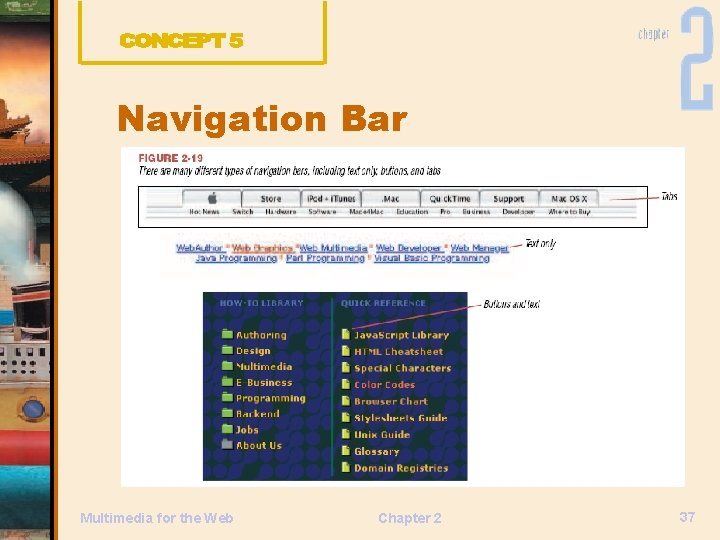
Navigation Bar Multimedia for the Web Chapter 2 37
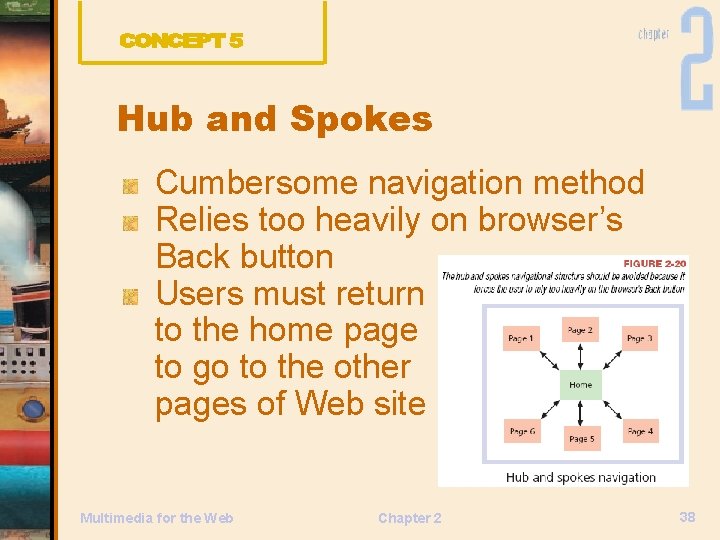
Hub and Spokes Cumbersome navigation method Relies too heavily on browser’s Back button Users must return to the home page to go to the other pages of Web site Multimedia for the Web Chapter 2 38
Search Users navigate directly to content of interest Enter specific search terms Follows standard search guidelines Provides interface for more complicated searches Multimedia for the Web Chapter 2 39
Directed Navigational Structure Efficient: tailoring site to user User asked to provide information when entering site – zip code, for example Based on information entered, user directed to a specific page Multimedia for the Web Chapter 2 40
Discuss Additional Multimedia Web Site Tasks Domain Name Selection Web Site Hosting Search Engine Registration Multimedia for the Web Chapter 2 41
Domain Name Selection Numeric address called IP Address (Internet Protocol) Points to a specific location or Web page on the Internet Domain names uses easy-toremember names instead of numeric string Multimedia for the Web Chapter 2 42
Domain Name Selection Domain name is a pointer to a numeric Web address Organized according to DNS naming hierarchy: – Structured arrangement of ascending authority – Root is referred to as “. ” (dot) and directly beneath are top-level domains Multimedia for the Web Chapter 2 43
Domain Name Selection Powerful marketing tool Select a name easy to use Name must be registered with registry authority to issue and license domain names Multimedia for the Web Chapter 2 44
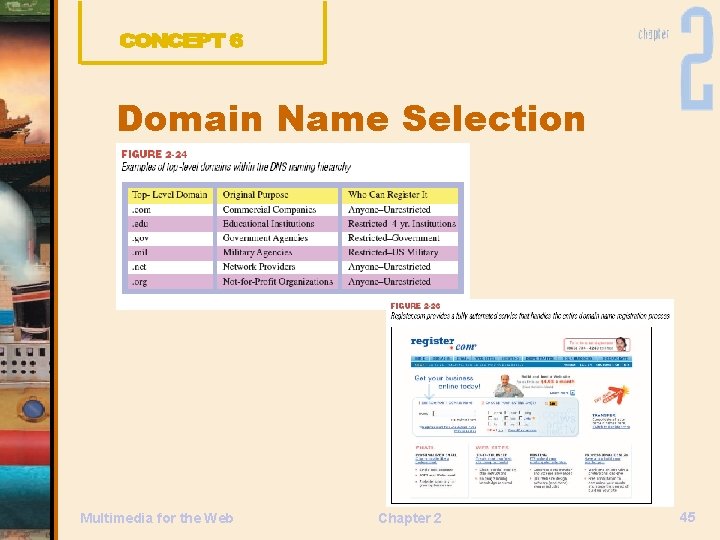
Domain Name Selection Multimedia for the Web Chapter 2 45
Web Site Hosting Once designed, site must be uploaded to Web server accessible to Internet community Can buy a Web server and host site in-house, or outsource to Web-hosting company Multimedia for the Web Chapter 2 46
Web Site Hosting Web-host maintains server, network connections, and security of your site on 24 -hour basis Different prices for different services Free sites available, but have limitations Multimedia for the Web Chapter 2 47
Web Site Hosting Considerations Storage space for Web site Bandwidth for connection speed Peering: host has multiple Internet connections to route traffic in and out Performance Technical support Multimedia for the Web Chapter 2 48
Web Site Hosting Considerations E-commerce Scripts and software to use to add features to the site Co-location facilities offer a secure place to physically house hardware Site administration Multimedia for the Web Chapter 2 49

Web Site Hosting Considerations Security keeps data secure from hackers Customer Services Price: cheaper is not always better Compare features to effectively compare prices Multimedia for the Web Chapter 2 50
Search Engine Registration Register with search engines in order for users to find your multimedia site Use a business who specializes in registering, or use online services Basic information about your site will need to be supplied Multimedia for the Web Chapter 2 51
Summary Understand the Design Strategy Purpose Target Audience Technology Specifications Creative Brief Identify Web Site Categories Multimedia for the Web Chapter 2 52
Summary Define the Planning Documents Flowcharts Wireframes and Storyboards Explore Organizational Structure Hierarchical Organizational Structure Nonlinear Organizational Structure Multimedia for the Web Chapter 2 53
Summary Linear Organizational Structure Data-base Driven Organizational Structure Site and Link Maps Frames Navigation Bar Hub and Spokes Multimedia for the Web Chapter 2 54
Summary Search Directed Navigational Structure Domain Name Selection Web Site Hosting Considerations Search Engine Registration Multimedia for the Web Chapter 2 55
- Slides: 55