
Multi level serial prediction patterns in the holdings
- Slides: 45
Multi level serial prediction patterns in the holdings record Yoel Kortick Senior Librarian 1
Agenda • Introduction • Our sample serial • Types of in the Community Zone • Opening the predicted items • Receiving and summary holdings creation • Summary 2
Introduction • The Alma serial prediction pattern resides in the holdings record and complies with full MARC standards. • The prediction pattern fields with which this presentation will deal are: 1. 853 - Captions and Pattern - Basic Bibliographic Unit 2. 854 - Captions and Pattern - Supplementary Material 3. 855 - Captions and Pattern - Indexes 3
Introduction • For details regarding how serial prediction patterns are used in Alma see presentation “Serials - Prediction Patterns and Serial Check-in. pptx” at https: //knowledge. exlibrisgroup. com/@api/deki/files/51920/S erials_-_Prediction_Patterns_and_Serial_Check-in. pptx • See also other presentations at https: //knowledge. exlibrisgroup. com/Alma/Training/Extended _Training/Presentations_and_Documents_-_Serials • This particular presentation here will focus exclusively on how one serials holdings record may have multi level prediction patterns, for example an 853, 854 and 855 field (or any combination thereof) all in one record. 4
Agenda • Introduction • Our sample serial • Creating the multi level serial prediction pattern • Opening the predicted items • Receiving and summary holdings creation • Summary 5
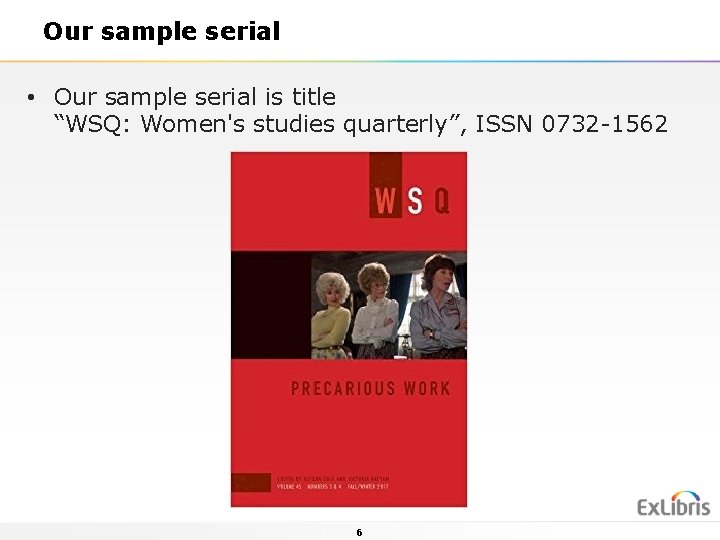
Our sample serial • Our sample serial is title “WSQ: Women's studies quarterly”, ISSN 0732 -1562 6
Our sample serial • This serial: • Is a quarterly publication • Includes an annual index • Includes an annual supplement • Note: While in actuality this publication does not really have an annual index and an annual supplement we are “pretending it does” in order to show the Alma functionality of having this information in the prediction pattern. 7
Our sample serial • The quarterly publication will use the standard Alma cataloging template ‘serial prediction quarterly seasons’ which utilizes the 853 field • The annual index will use the standard Alma cataloging template ‘serial prediction annual index’ which utilizes the 854 field • The annual supplement will use the standard Alma cataloging template ‘serial prediction annual supplement’ which utilizes the 855 field 8
Agenda • Introduction • Our sample serial • Creating the multi level serial prediction pattern • Opening the predicted items • Receiving and summary holdings creation • Summary 9
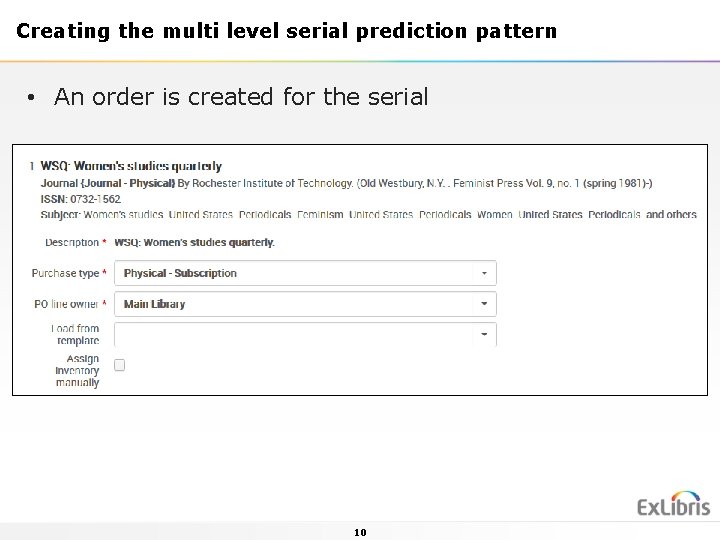
Creating the multi level serial prediction pattern • An order is created for the serial 10
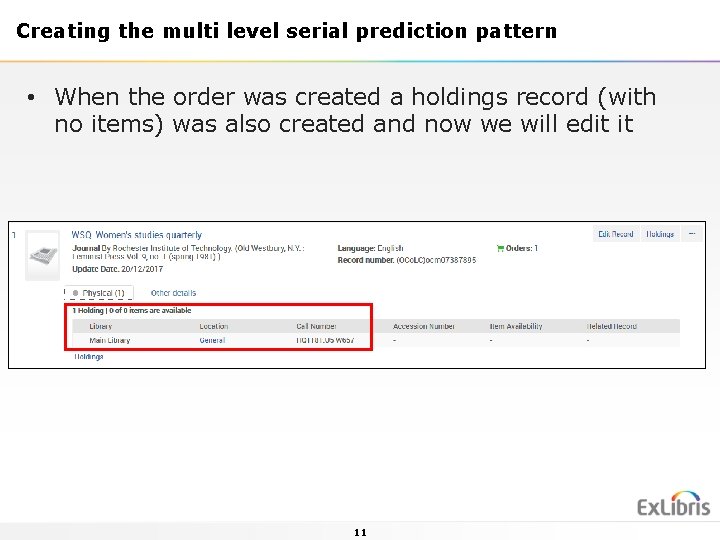
Creating the multi level serial prediction pattern • When the order was created a holdings record (with no items) was also created and now we will edit it 11
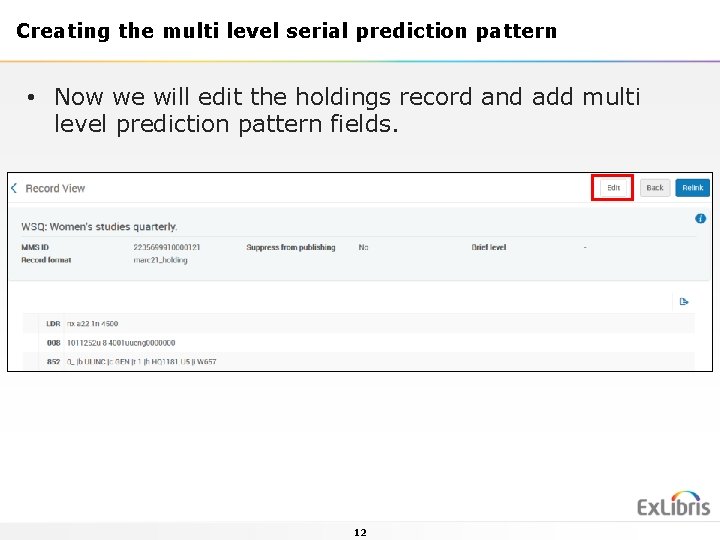
Creating the multi level serial prediction pattern • Now we will edit the holdings record and add multi level prediction pattern fields. 12
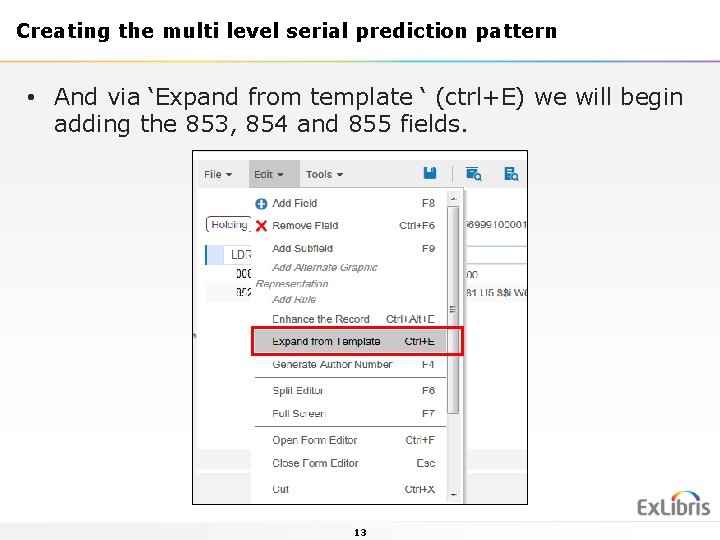
Creating the multi level serial prediction pattern • And via ‘Expand from template ‘ (ctrl+E) we will begin adding the 853, 854 and 855 fields. 13
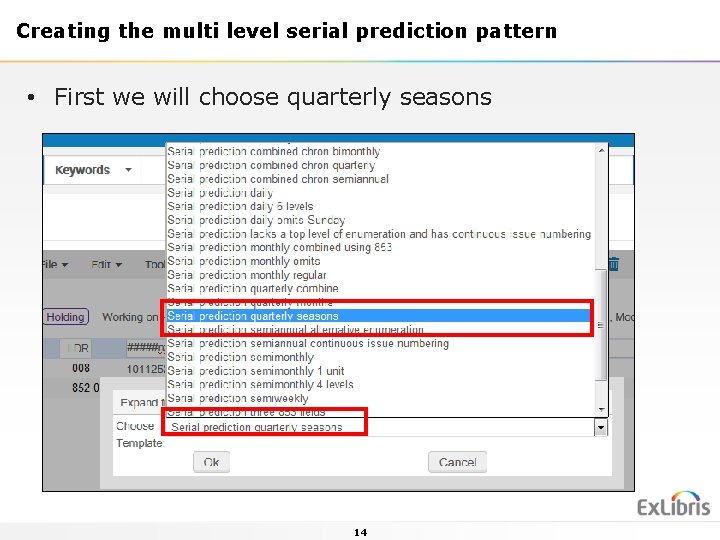
Creating the multi level serial prediction pattern • First we will choose quarterly seasons 14
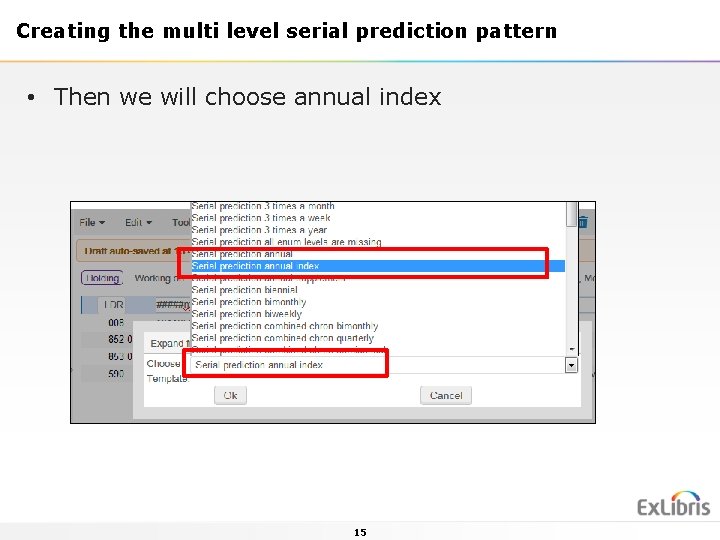
Creating the multi level serial prediction pattern • Then we will choose annual index 15
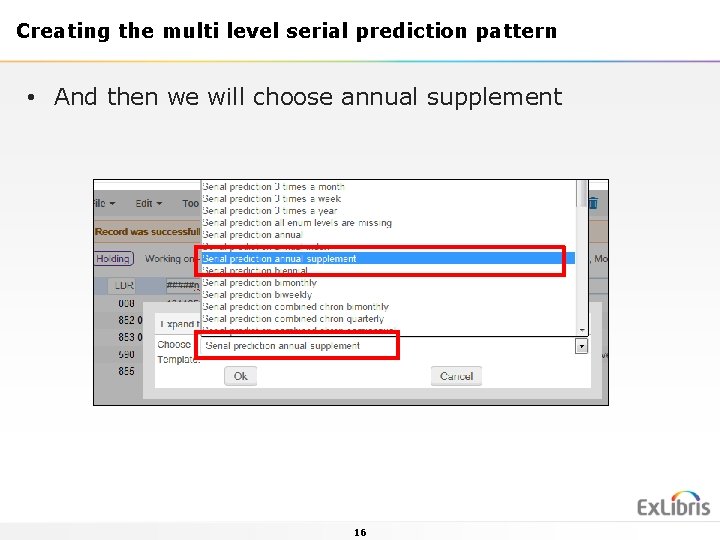
Creating the multi level serial prediction pattern • And then we will choose annual supplement 16
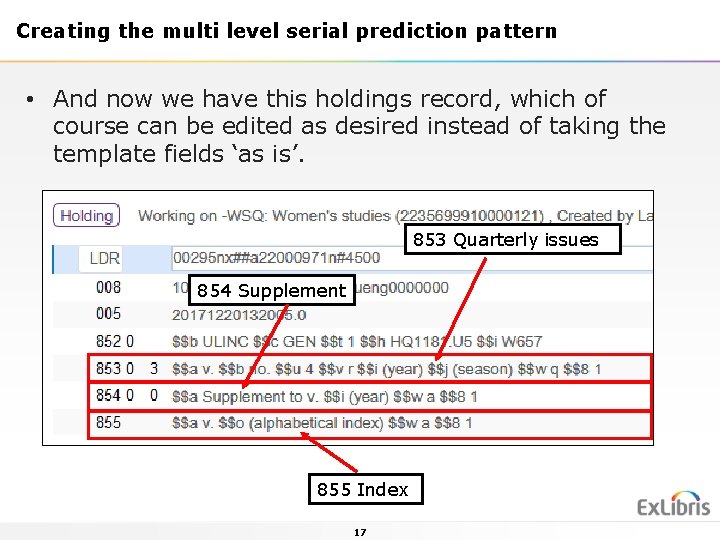
Creating the multi level serial prediction pattern • And now we have this holdings record, which of course can be edited as desired instead of taking the template fields ‘as is’. 853 Quarterly issues 854 Supplement 855 Index 17
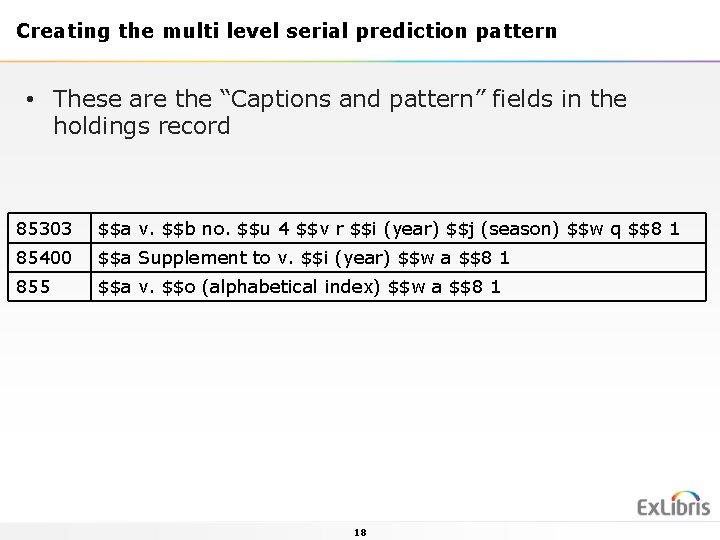
Creating the multi level serial prediction pattern • These are the “Captions and pattern” fields in the holdings record 85303 $$a v. $$b no. $$u 4 $$v r $$i (year) $$j (season) $$w q $$8 1 85400 $$a Supplement to v. $$i (year) $$w a $$8 1 855 $$a v. $$o (alphabetical index) $$w a $$8 1 18
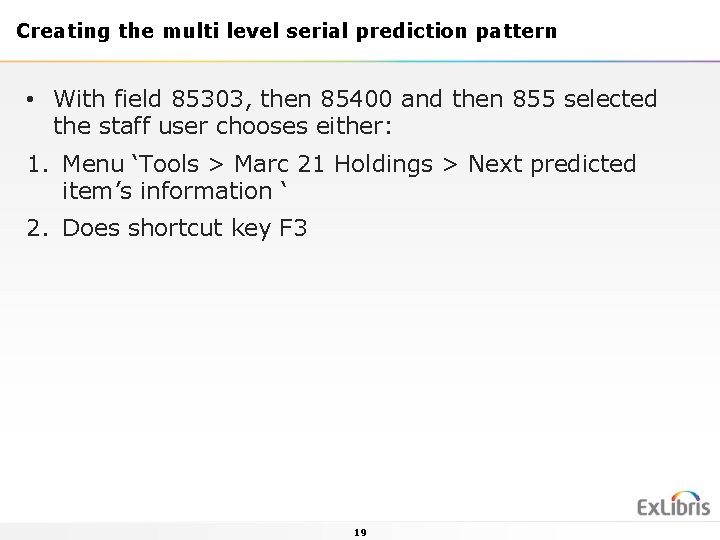
Creating the multi level serial prediction pattern • With field 85303, then 85400 and then 855 selected the staff user chooses either: 1. Menu ‘Tools > Marc 21 Holdings > Next predicted item’s information ‘ 2. Does shortcut key F 3 19
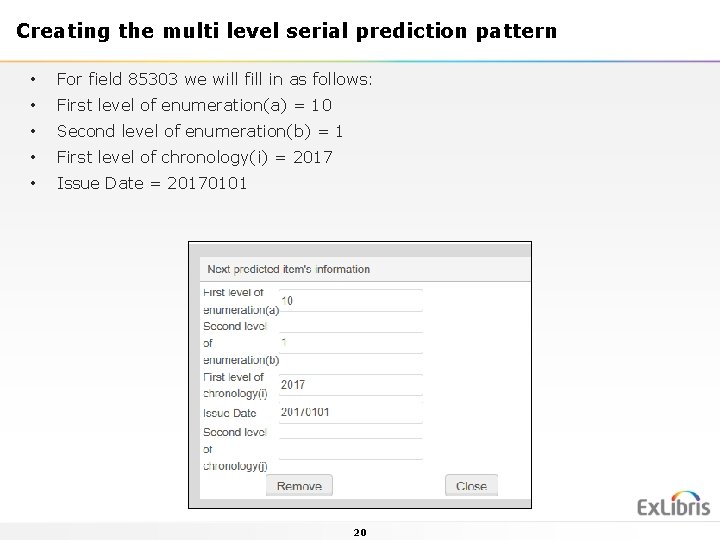
Creating the multi level serial prediction pattern • For field 85303 we will fill in as follows: • First level of enumeration(a) = 10 • Second level of enumeration(b) = 1 • First level of chronology(i) = 2017 • Issue Date = 20170101 20
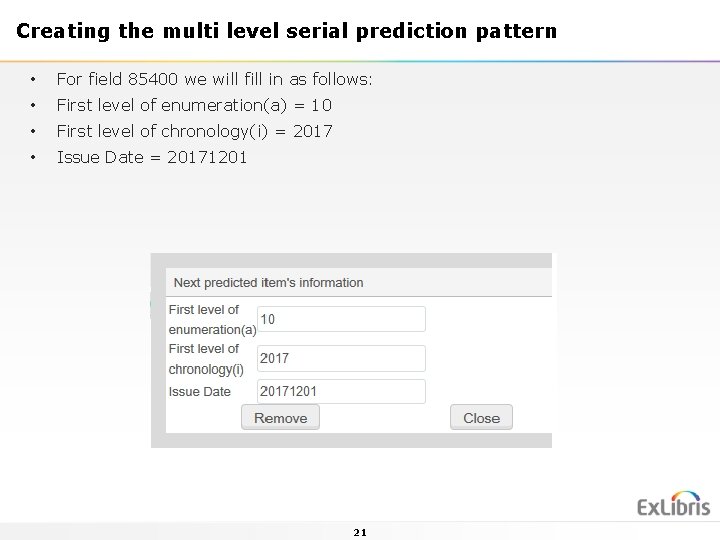
Creating the multi level serial prediction pattern • For field 85400 we will fill in as follows: • First level of enumeration(a) = 10 • First level of chronology(i) = 2017 • Issue Date = 20171201 21
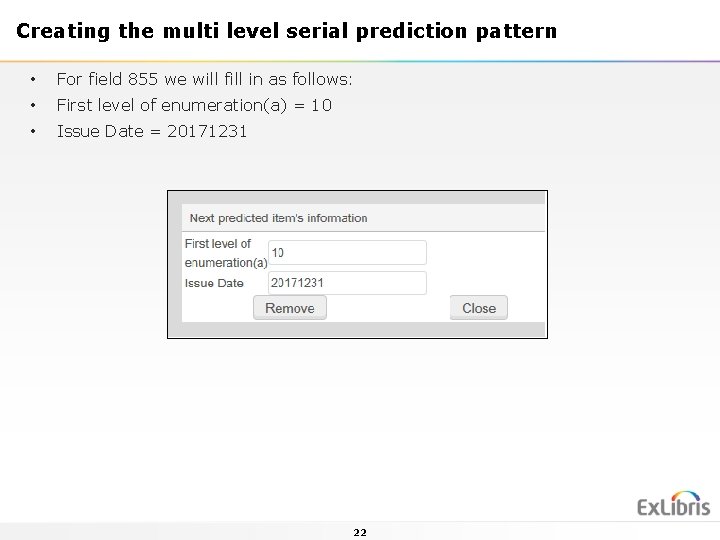
Creating the multi level serial prediction pattern • For field 855 we will fill in as follows: • First level of enumeration(a) = 10 • Issue Date = 20171231 22
Agenda • Introduction • Our sample serial • Creating the multi level serial prediction pattern • Opening the predicted items • Receiving and summary holdings creation • Summary 23
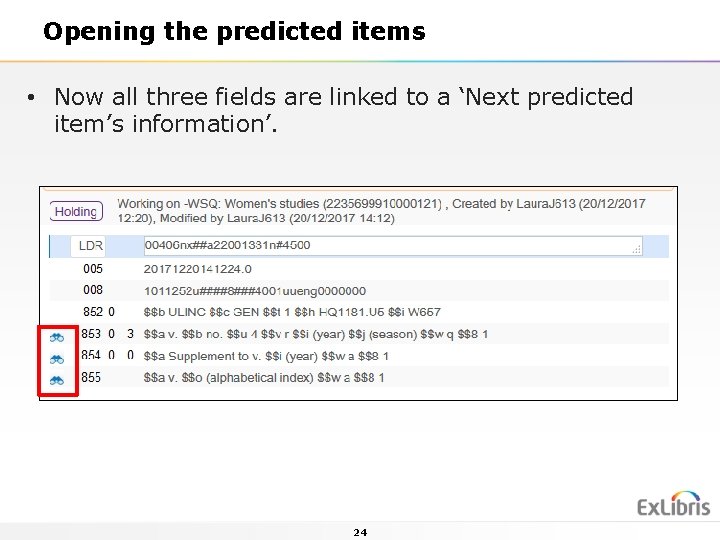
Opening the predicted items • Now all three fields are linked to a ‘Next predicted item’s information’. 24
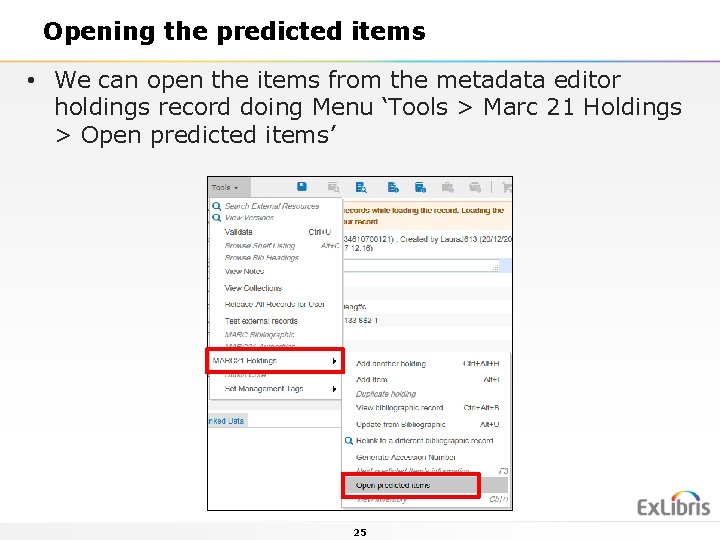
Opening the predicted items • We can open the items from the metadata editor holdings record doing Menu ‘Tools > Marc 21 Holdings > Open predicted items’ 25
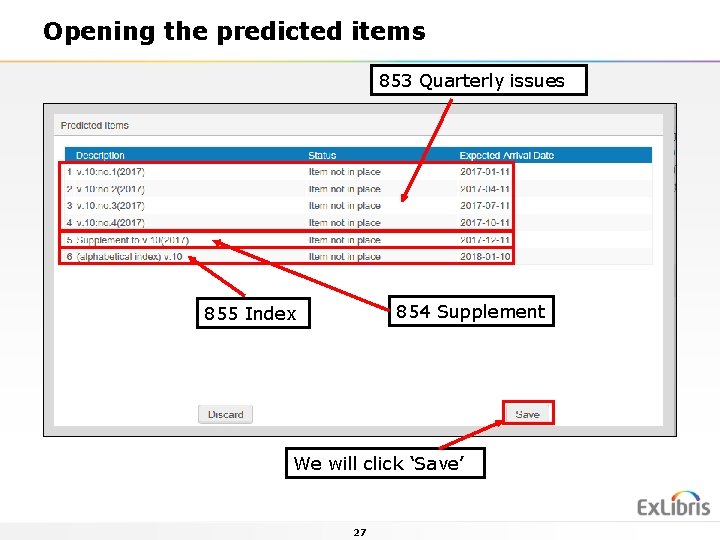
Opening the predicted items • The user is presented with the items as they will appear and if he ‘approves’ (does not want to first change the ‘Next predicted item’s information and try again) then he can click ‘save’. • Note that in our case the expected arrival date will be 10 days after the publication date because in the related POL we have ‘subscription interval’ = ‘ 10’ 26
Opening the predicted items 853 Quarterly issues 854 Supplement 855 Index We will click ‘Save’ 27
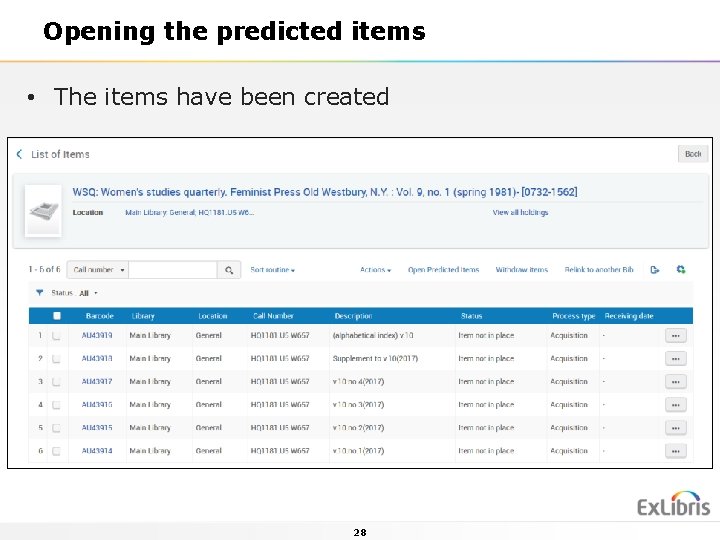
Opening the predicted items • The items have been created 28
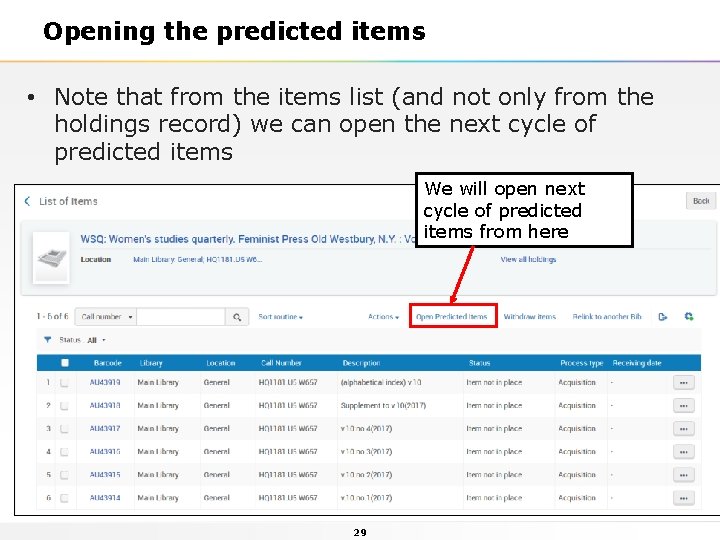
Opening the predicted items • Note that from the items list (and not only from the holdings record) we can open the next cycle of predicted items We will open next cycle of predicted items from here 29
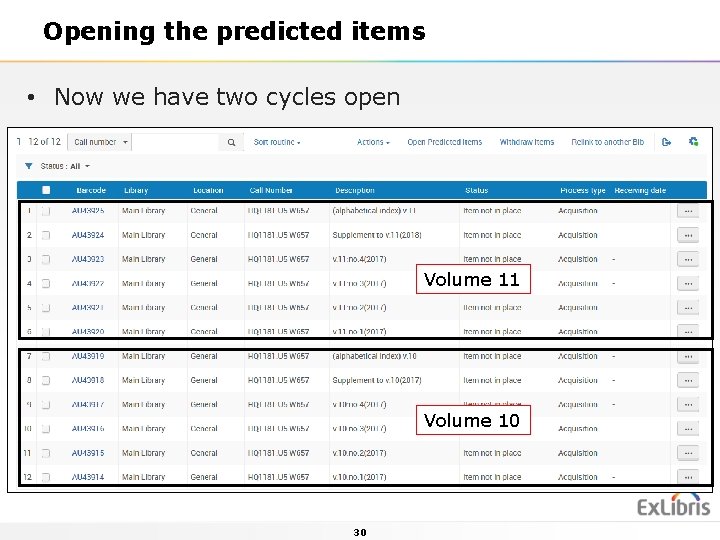
Opening the predicted items • Now we have two cycles open Volume 11 Volume 10 30
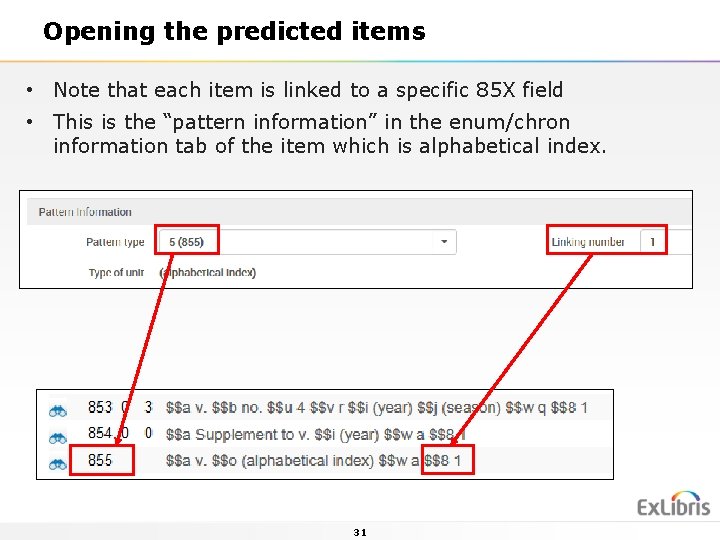
Opening the predicted items • Note that each item is linked to a specific 85 X field • This is the “pattern information” in the enum/chron information tab of the item which is alphabetical index. 31
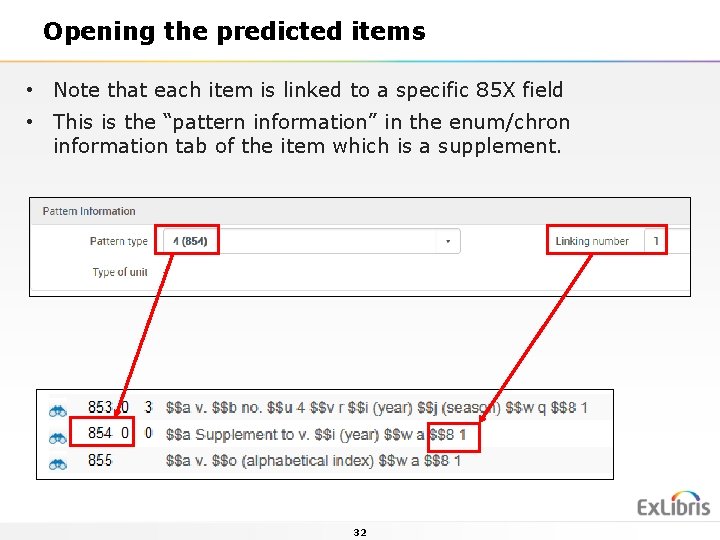
Opening the predicted items • Note that each item is linked to a specific 85 X field • This is the “pattern information” in the enum/chron information tab of the item which is a supplement. 32
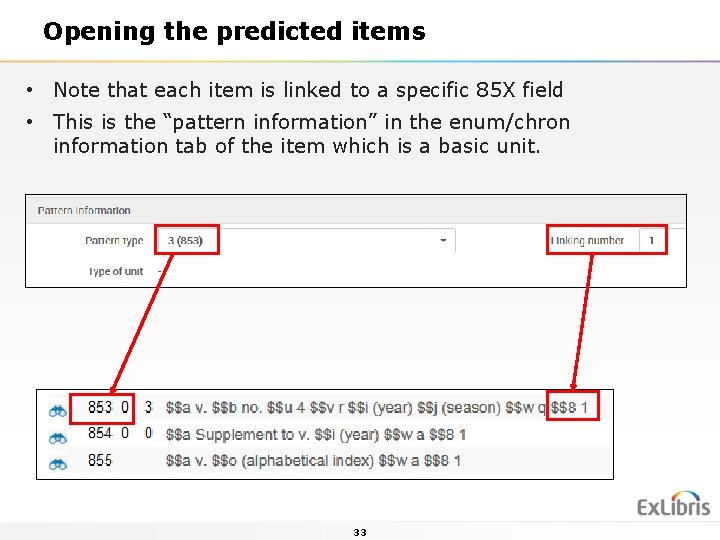
Opening the predicted items • Note that each item is linked to a specific 85 X field • This is the “pattern information” in the enum/chron information tab of the item which is a basic unit. 33
Agenda • Introduction • Our sample serial • Creating the multi level serial prediction pattern • Opening the predicted items • Receiving and summary holdings creation • Summary 34
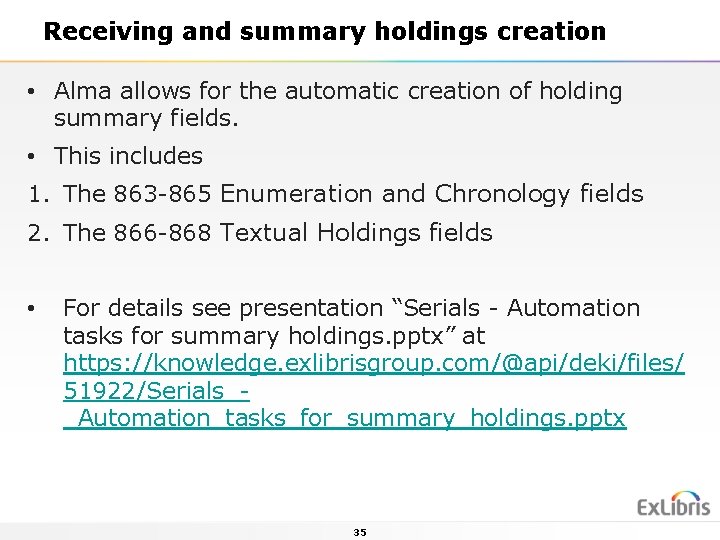
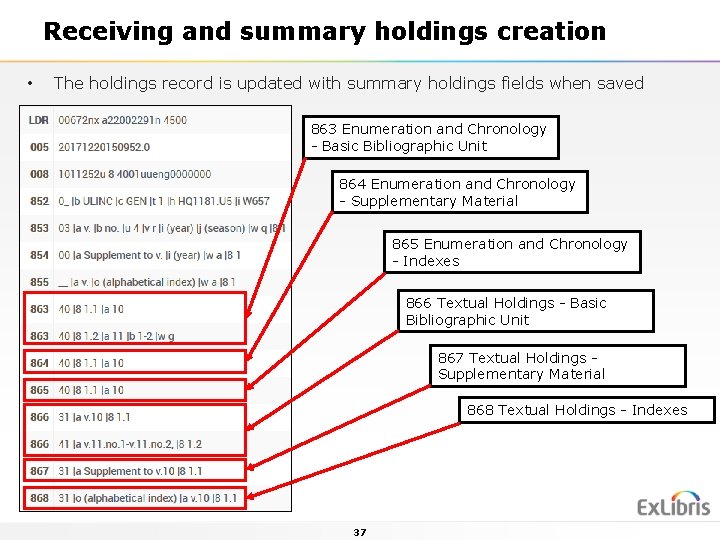
Receiving and summary holdings creation • Alma allows for the automatic creation of holding summary fields. • This includes 1. The 863 -865 Enumeration and Chronology fields 2. The 866 -868 Textual Holdings fields • For details see presentation “Serials - Automation tasks for summary holdings. pptx” at https: //knowledge. exlibrisgroup. com/@api/deki/files/ 51922/Serials__Automation_tasks_for_summary_holdings. pptx 35
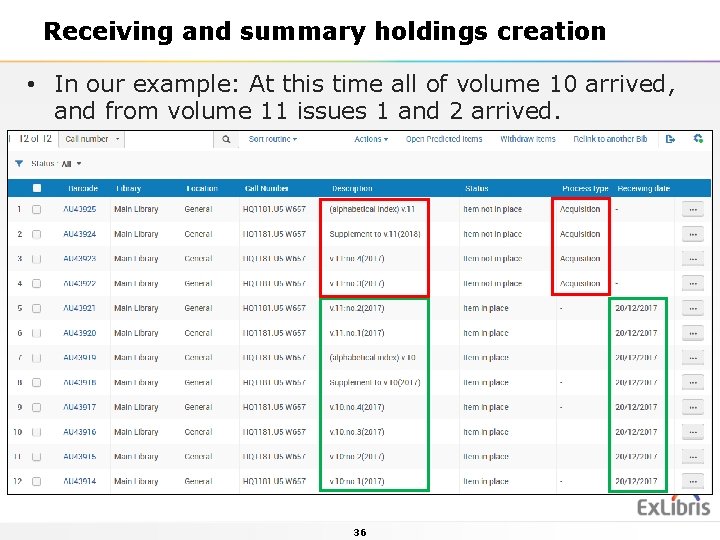
Receiving and summary holdings creation • In our example: At this time all of volume 10 arrived, and from volume 11 issues 1 and 2 arrived. 36
Receiving and summary holdings creation • The holdings record is updated with summary holdings fields when saved 863 Enumeration and Chronology - Basic Bibliographic Unit 864 Enumeration and Chronology - Supplementary Material 865 Enumeration and Chronology - Indexes 866 Textual Holdings - Basic Bibliographic Unit 867 Textual Holdings Supplementary Material 868 Textual Holdings - Indexes 37
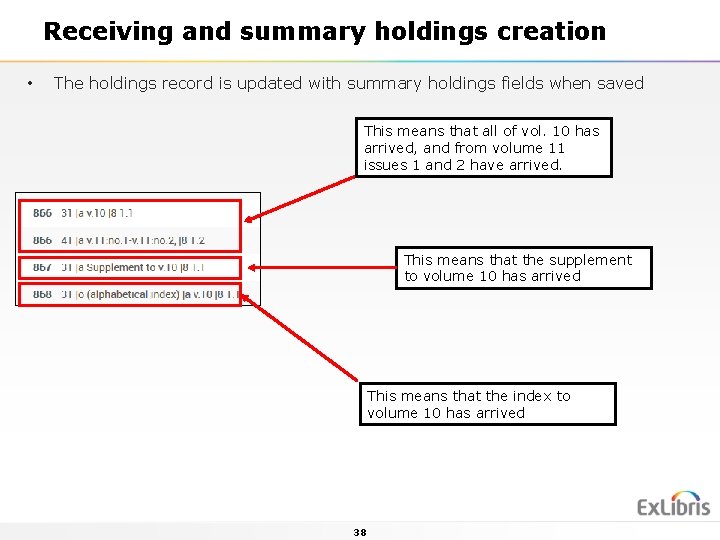
Receiving and summary holdings creation • The holdings record is updated with summary holdings fields when saved This means that all of vol. 10 has arrived, and from volume 11 issues 1 and 2 have arrived. This means that the supplement to volume 10 has arrived This means that the index to volume 10 has arrived 38
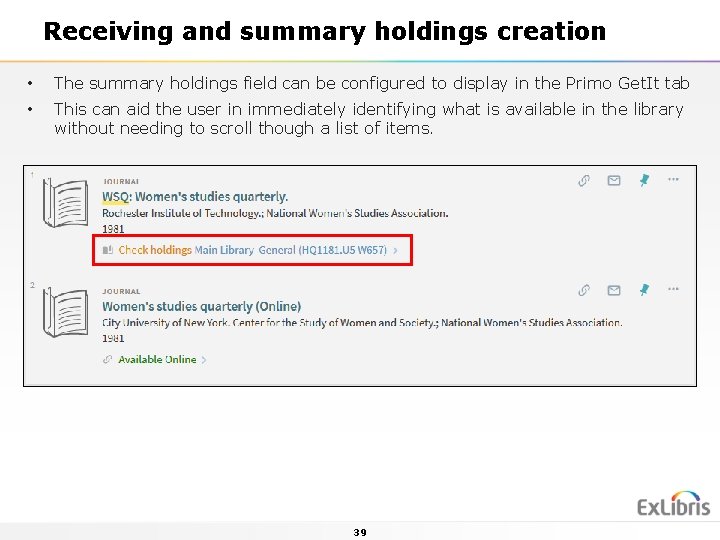
Receiving and summary holdings creation • The summary holdings field can be configured to display in the Primo Get. It tab • This can aid the user in immediately identifying what is available in the library without needing to scroll though a list of items. 39
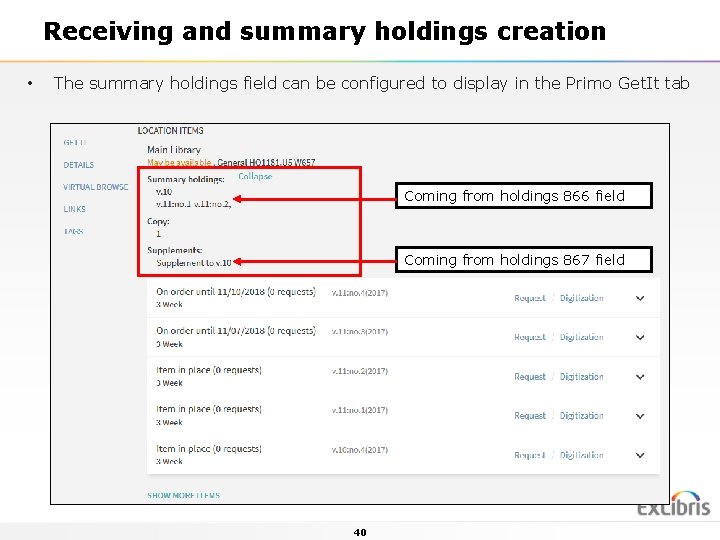
Receiving and summary holdings creation • The summary holdings field can be configured to display in the Primo Get. It tab Coming from holdings 866 field Coming from holdings 867 field 40
Agenda • Introduction • Our sample serial • Creating the multi level serial prediction pattern • Opening the predicted items • Receiving and summary holdings creation • Summary 41
Summary • One Alma Holdings record can contain multiple predication pattern fields on multiple levels including: • 853 - Captions and Pattern - Basic Bibliographic Unit • 854 - Captions and Pattern - Supplementary Material • 855 - Captions and Pattern - Indexes 42
Summary • The prediction pattern fields can easily be added to the holdings record by the cataloger using one of a variety of predefined templates. • After adding the prediction pattern fields from the template they can be edited if desired. • The relevant enumeration and chronology of each of the prediction pattern fields can easily be added via a user friendly form in the metadata editor. 43
Summary • The predicted items can be opened (created) either from within the metadata editor or from within the list of items. • Summary holdings information is automatically added to the holdings record using normalization routines and processes. • The summary holdings fields can appear in Primo thereby aiding the end user. 44
Thank You 45