
MTR Mobile Screen flow when customer open the
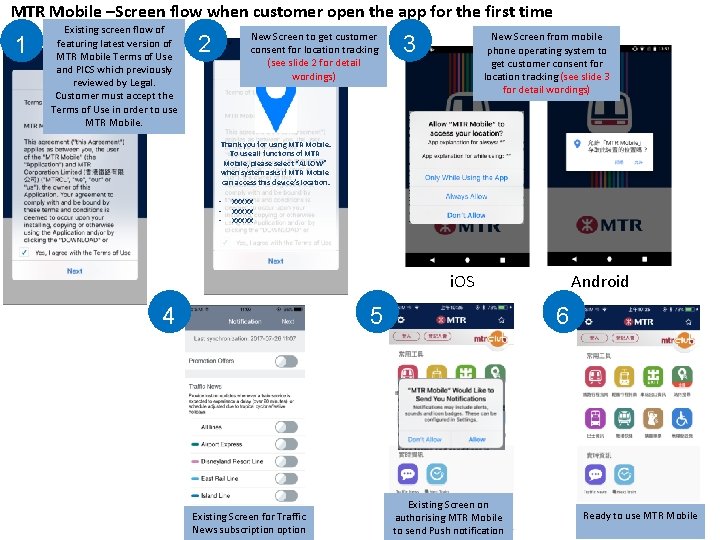
MTR Mobile –Screen flow when customer open the app for the first time 1 Existing screen flow of featuring latest version of MTR Mobile Terms of Use and PICS which previously reviewed by Legal. Customer must accept the Terms of Use in order to use MTR Mobile. New Screen to get customer consent for location tracking (see slide 2 for detail wordings) 2 New Screen from mobile phone operating system to get customer consent for location tracking (see slide 3 for detail wordings) 3 Thank you for using MTR Mobile. To use all functions of MTR Mobile, please select “ALLOW” when system asks if MTR Mobile can access this device’s location. • • • XXXXX Android i. OS 4 5 Existing Screen for Traffic News subscription option 6 Existing Screen on authorising MTR Mobile to send Push notification Ready to use MTR Mobile
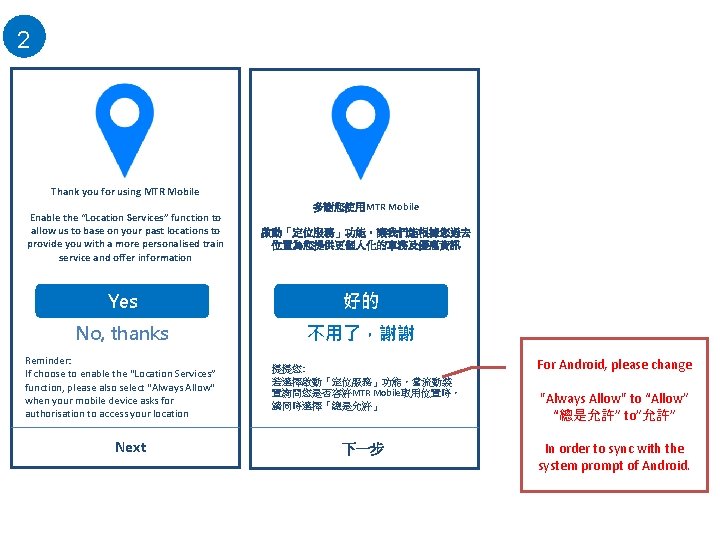
2 Thank you for using MTR Mobile Enable the “Location Services” function to allow us to base on your past locations to provide you with a more personalised train service and offer information Yes No, thanks Reminder: 不了 If choose to enable the “Location Services” function, please also select "Always Allow" when your mobile device asks for authorisation to access your location Next 當 多謝您使用MTR Mobile 啟動「定位服務」功能,讓我們能根據您過去 位置為您提供更個人化的車務及優惠資訊 好的 不用了,謝謝 提提您: 若選擇啟動「定位服務」功能,當流動裝 置詢問您是否容許MTR Mobile取用位置時, 請同時選擇「總是允許」 當下一步 For Android, please change "Always Allow" to “Allow” “總是允許” to”允許” In order to sync with the system prompt of Android.
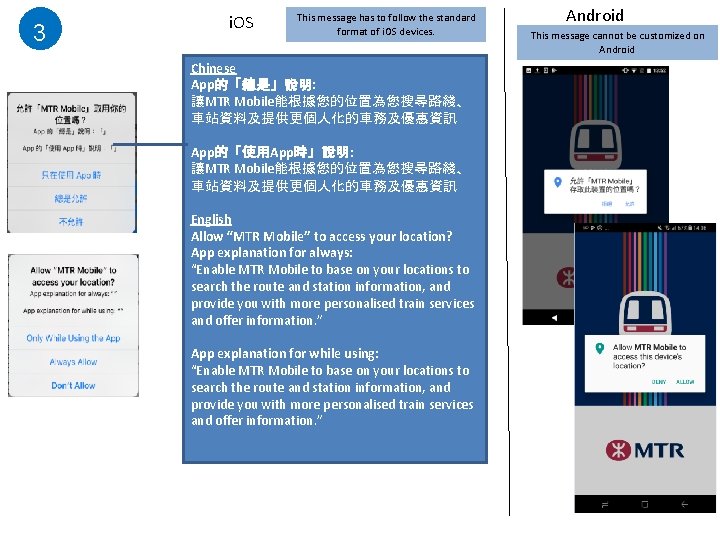
3 i. OS This message has to follow the standard format of i. OS devices. Chinese App的「總是」說明: 讓MTR Mobile能根據您的位置為您搜尋路綫、 車站資料及提供更個人化的車務及優惠資訊 App的「使用App時」說明: 讓MTR Mobile能根據您的位置為您搜尋路綫、 車站資料及提供更個人化的車務及優惠資訊 English Allow “MTR Mobile” to access your location? App explanation for always: “Enable MTR Mobile to base on your locations to search the route and station information, and provide you with more personalised train services and offer information. ” App explanation for while using: “Enable MTR Mobile to base on your locations to search the route and station information, and provide you with more personalised train services and offer information. ” Android This message cannot be customized on Android
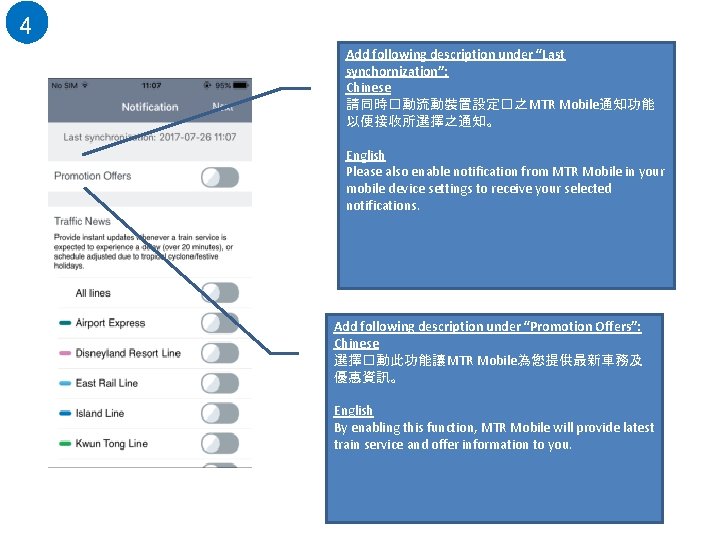
4 Add following description under “Last synchornization”: Chinese 請同時�動流動裝置設定�之 MTR Mobile通知功能 以便接收所選擇之通知。 English Please also enable notification from MTR Mobile in your mobile device settings to receive your selected notifications. Add following description under “Promotion Offers”: Chinese 選擇�動此功能讓 MTR Mobile為您提供最新車務及 優惠資訊。 English By enabling this function, MTR Mobile will provide latest train service and offer information to you.
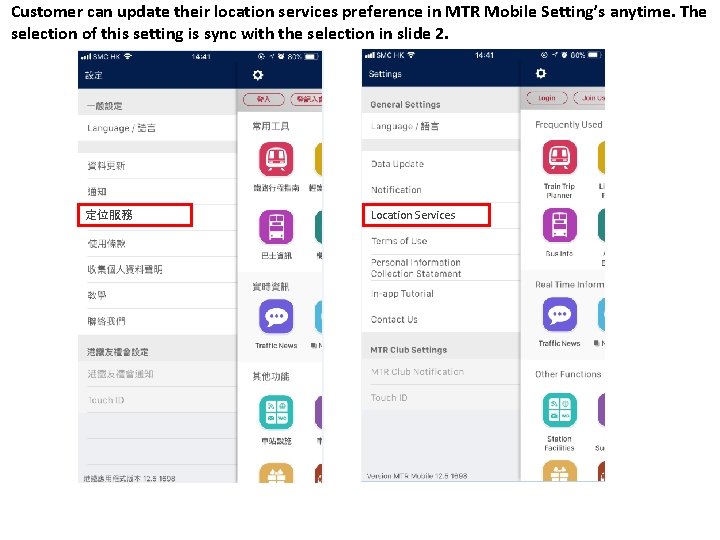
Customer can update their location services preference in MTR Mobile Setting’s anytime. The selection of this setting is sync with the selection in slide 2. 定位服務 Location Services
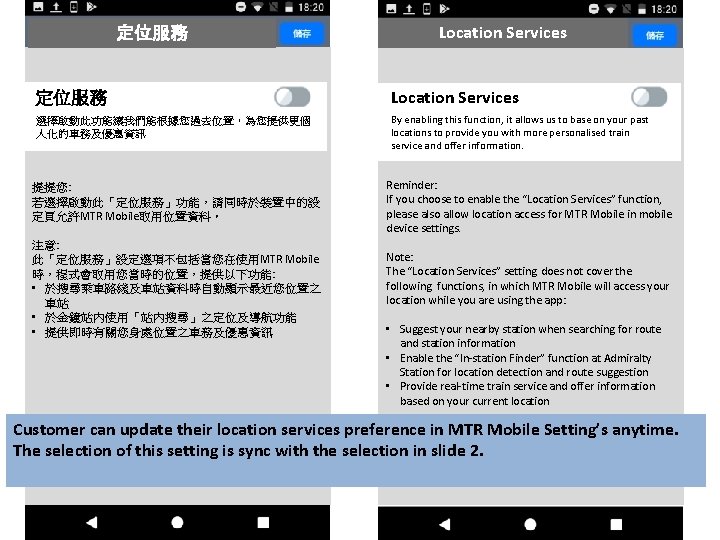
定位服務 Location Services 選擇啟動此功能讓我們能根據您過去位置,為您提供更個 人化的車務及優惠資訊 By enabling this function, it allows us to base on your past locations to provide you with more personalised train service and offer information. 提提您: 若選擇啟動此「定位服務」功能,請同時於裝置中的設 定頁允許MTR Mobile取用位置資料。 注意: 此「定位服務」設定選項不包括當您在使用MTR Mobile 時,程式會取用您當時的位置,提供以下功能: • 於搜尋乘車路綫及車站資料時自動顯示最近您位置之 車站 • 於金鐘站內使用「站內搜尋」之定位及導航功能 • 提供即時有關您身處位置之車務及優惠資訊 Reminder: If you choose to enable the “Location Services” function, please also allow location access for MTR Mobile in mobile device settings. Note: The “Location Services” setting does not cover the following functions, in which MTR Mobile will access your location while you are using the app: • Suggest your nearby station when searching for route and station information • Enable the “In-station Finder” function at Admiralty Station for location detection and route suggestion • Provide real-time train service and offer information based on your current location Customer can update their location services preference in MTR Mobile Setting’s anytime. The selection of this setting is sync with the selection in slide 2.
- Slides: 6