
MSC Nastran 2020 Whats New Presented By Bhoomi

MSC Nastran 2020 What’s New Presented By: Bhoomi Gadhia, Product Marketing Manager May 5 th, 2020 1 | hexagonmi. com | mscsoftware. com
Introduction and Agenda: Ø Static and Dynamics Analysis Enhancements: • Frequency as a function of temperature for frequency dependent materials PEM enhancements Ø Nonlinear Enhancements • Geometric imperfection in SOL 400 • Nonlinear buckling in SOL 400 • New MATVE format Ø Rotor-dynamics Enhancements Ø Topology Optimization Enhancements Ø Elements Ø Fatigue Enhancements – 1 -2 slides Ø Numerical methods / HPC • Performance and efficiency improvements of the AVL Excite interface • CASI iterative solver support for inertia relief • GPU out of core for large problems ØQ&A 2 | hexagonmi. com | mscsoftware. com

Dynamics Enhancements 3 | hexagonmi. com | mscsoftware. com
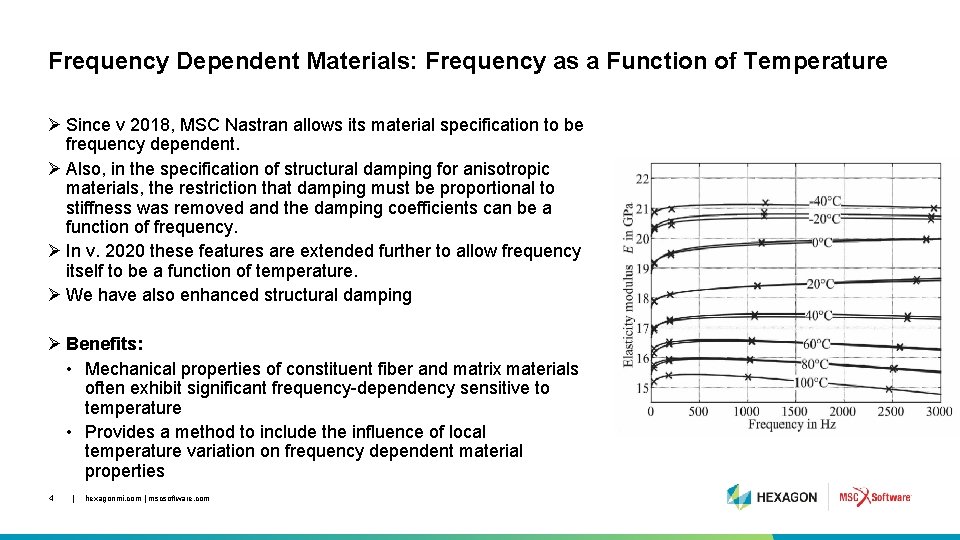
Frequency Dependent Materials: Frequency as a Function of Temperature Ø Since v 2018, MSC Nastran allows its material specification to be frequency dependent. Ø Also, in the specification of structural damping for anisotropic materials, the restriction that damping must be proportional to stiffness was removed and the damping coefficients can be a function of frequency. Ø In v. 2020 these features are extended further to allow frequency itself to be a function of temperature. Ø We have also enhanced structural damping Ø Benefits: • Mechanical properties of constituent fiber and matrix materials often exhibit significant frequency-dependency sensitive to temperature • Provides a method to include the influence of local temperature variation on frequency dependent material properties 4 | hexagonmi. com | mscsoftware. com
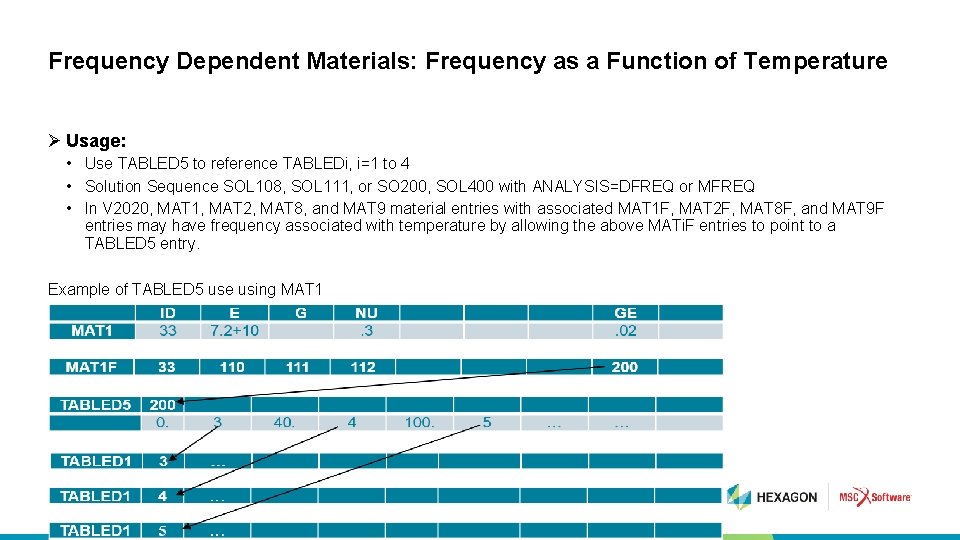
Frequency Dependent Materials: Frequency as a Function of Temperature Ø Usage: • Use TABLED 5 to reference TABLEDi, i=1 to 4 • Solution Sequence SOL 108, SOL 111, or SO 200, SOL 400 with ANALYSIS=DFREQ or MFREQ • In V 2020, MAT 1, MAT 2, MAT 8, and MAT 9 material entries with associated MAT 1 F, MAT 2 F, MAT 8 F, and MAT 9 F entries may have frequency associated with temperature by allowing the above MATi. F entries to point to a TABLED 5 entry. Example of TABLED 5 use using MAT 1 5 | hexagonmi. com | mscsoftware. com
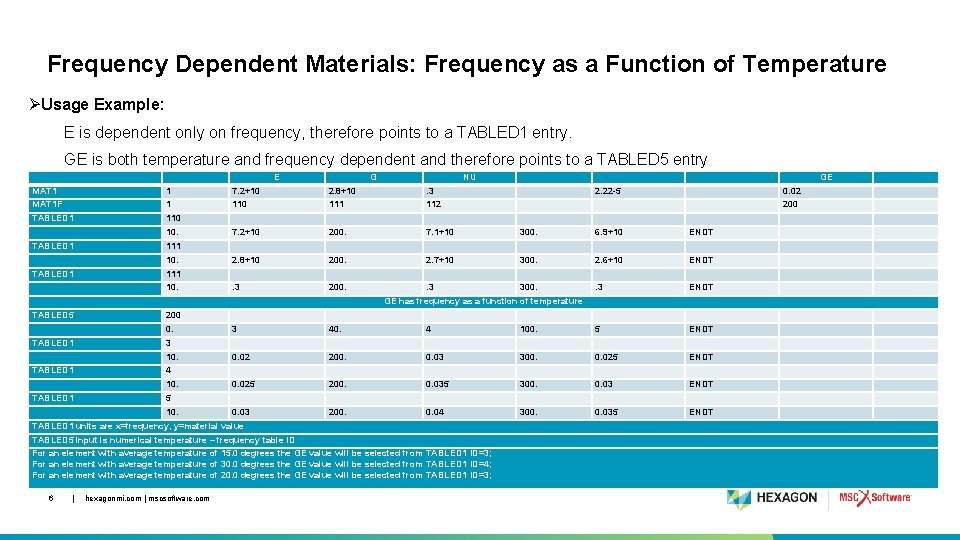
Frequency Dependent Materials: Frequency as a Function of Temperature ØUsage Example: E is dependent only on frequency, therefore points to a TABLED 1 entry. GE is both temperature and frequency dependent and therefore points to a TABLED 5 entry E G NU GE MAT 1 1 7. 2+10 2. 8+10 . 3 MAT 1 F 1 110 111 112 TABLED 1 110 7. 2+10 200. 7. 1+10 300. 6. 9+10 ENDT 2. 8+10 200. 2. 7+10 300. 2. 6+10 ENDT . 3 200. . 3 300. . 3 ENDT 10. TABLED 1 0. 02 200 111 10. TABLED 1 2. 22 -5 111 10. GE has frequency as a function of temperature TABLED 5 200 0. TABLED 1 4 100. 5 ENDT 0. 02 200. 0. 03 300. 0. 025 ENDT 0. 025 200. 0. 035 300. 0. 03 ENDT 0. 03 200. 0. 04 300. 0. 035 ENDT 4 10. TABLED 1 40. 3 10. TABLED 1 3 5 10. TABLED 1 units are x=frequency, y=material value TABLED 5 input is numerical temperature – frequency table ID For an element with average temperature of 15. 0 degrees the GE value will be selected from TABLED 1 ID=3; For an element with average temperature of 30. 0 degrees the GE value will be selected from TABLED 1 ID=4; For an element with average temperature of 20. 0 degrees the GE value will be selected from TABLED 1 ID=3; 6 | hexagonmi. com | mscsoftware. com

Frequency Dependent Materials: Frequency as a Function of Temperature Ø Limitations and Guidelines: • MATi. F entries and MATTi entries that point to the same MATi entry are incompatible – a fatal message will be issued • Frequency as a function of temperature is a spatial feature and TEMP, TEMPD entries are required to specify the spatial temperature of the model • No advantage of Subcase control structure reusing existing stiffness, mass, and loads as all are recomputed for any change in TEMP(INIT) • Frequency as a function of temperature is a spatial feature and requires a double interpolation • For large models, analysis time can be significantly longer 7 | hexagonmi. com | mscsoftware. com

Other Dynamics Enhancements • Modal Damping in the MSC Nastran / AVL EXCITE Interface • EXTSE Based Data Recovery for Adams MNF Interface 8 | hexagonmi. com | mscsoftware. com
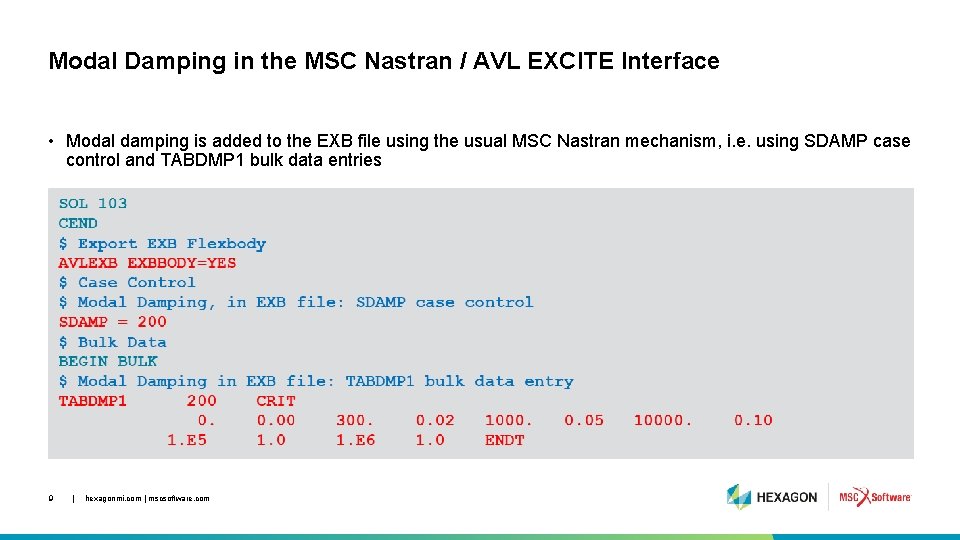
Modal Damping in the MSC Nastran / AVL EXCITE Interface • Modal damping is added to the EXB file using the usual MSC Nastran mechanism, i. e. using SDAMP case control and TABDMP 1 bulk data entries 9 | hexagonmi. com | mscsoftware. com
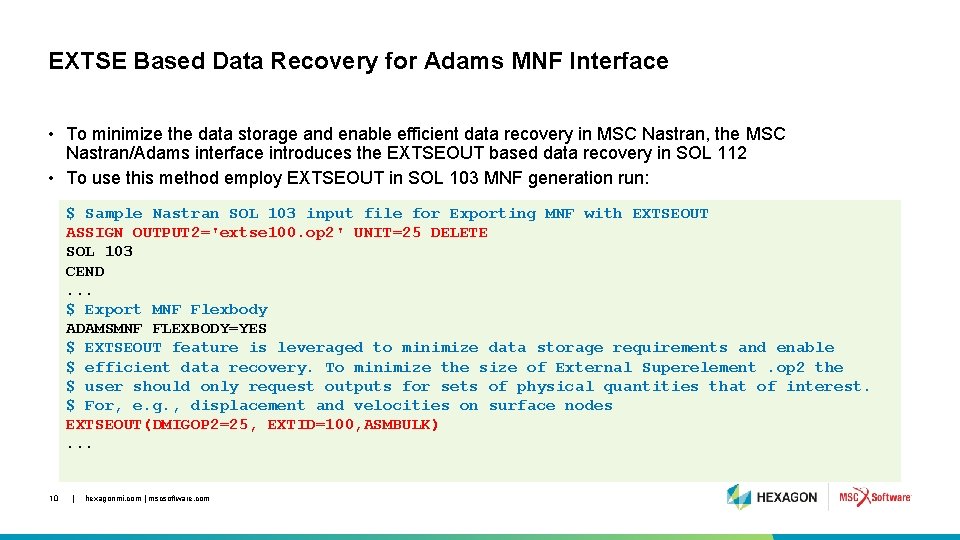
EXTSE Based Data Recovery for Adams MNF Interface • To minimize the data storage and enable efficient data recovery in MSC Nastran, the MSC Nastran/Adams interface introduces the EXTSEOUT based data recovery in SOL 112 • To use this method employ EXTSEOUT in SOL 103 MNF generation run: $ Sample Nastran SOL 103 input file for Exporting MNF with EXTSEOUT ASSIGN OUTPUT 2='extse 100. op 2' UNIT=25 DELETE SOL 103 CEND. . . $ Export MNF Flexbody ADAMSMNF FLEXBODY=YES $ EXTSEOUT feature is leveraged to minimize data storage requirements and enable $ efficient data recovery. To minimize the size of External Superelement. op 2 the $ user should only request outputs for sets of physical quantities that of interest. $ For, e. g. , displacement and velocities on surface nodes EXTSEOUT(DMIGOP 2=25, EXTID=100, ASMBULK). . . 10 | hexagonmi. com | mscsoftware. com
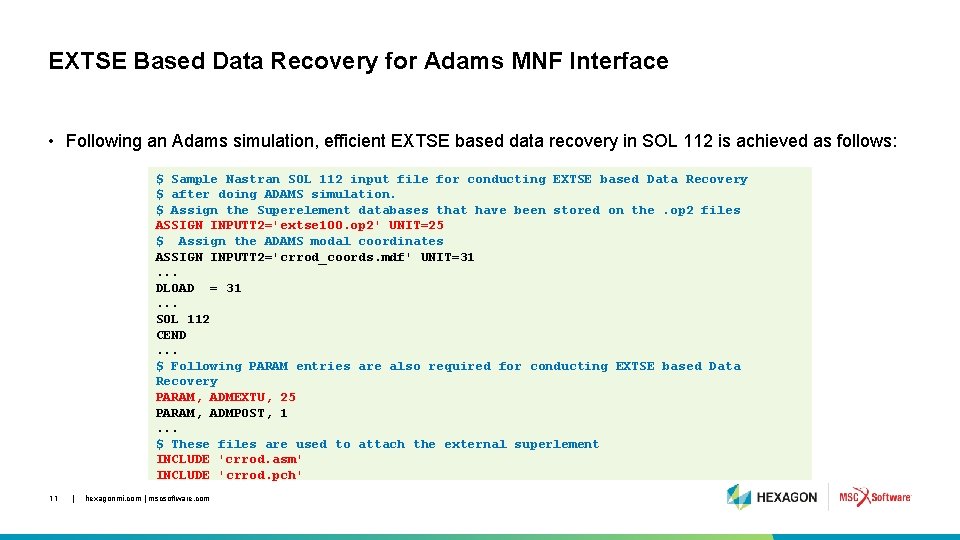
EXTSE Based Data Recovery for Adams MNF Interface • Following an Adams simulation, efficient EXTSE based data recovery in SOL 112 is achieved as follows: $ Sample Nastran SOL 112 input file for conducting EXTSE based Data Recovery $ after doing ADAMS simulation. $ Assign the Superelement databases that have been stored on the. op 2 files ASSIGN INPUTT 2='extse 100. op 2' UNIT=25 $ Assign the ADAMS modal coordinates ASSIGN INPUTT 2='crrod_coords. mdf' UNIT=31. . . DLOAD = 31. . . SOL 112 CEND. . . $ Following PARAM entries are also required for conducting EXTSE based Data Recovery PARAM, ADMEXTU, 25 PARAM, ADMPOST, 1. . . $ These files are used to attach the external superlement INCLUDE 'crrod. asm' INCLUDE 'crrod. pch' 11 | hexagonmi. com | mscsoftware. com
Porous-Elastic Material (PEM) Enhancements • TRMC interior grid data recovery • TRMC coupling definition with EID • PEM job restart • PEM support in SOL 108 12 | hexagonmi. com | mscsoftware. com
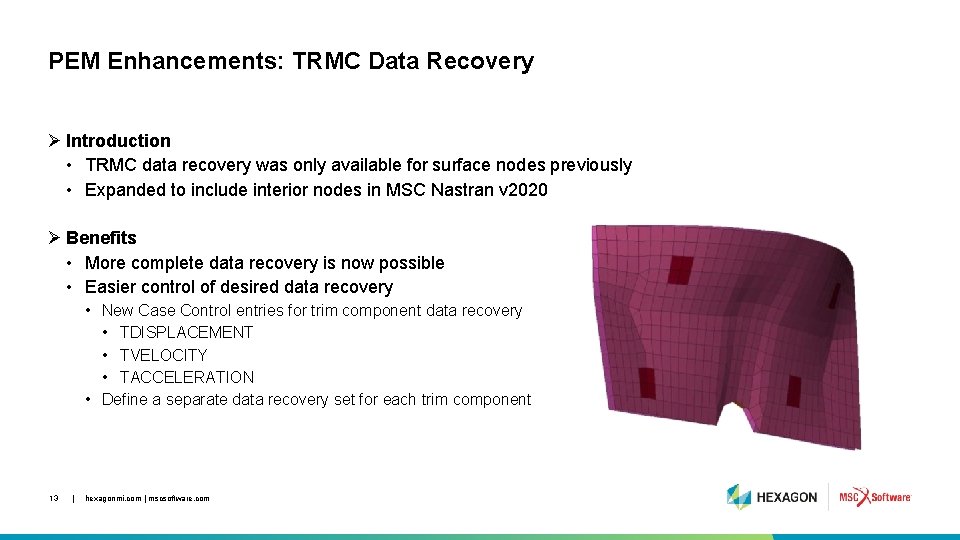
PEM Enhancements: TRMC Data Recovery Ø Introduction • TRMC data recovery was only available for surface nodes previously • Expanded to include interior nodes in MSC Nastran v 2020 Ø Benefits • More complete data recovery is now possible • Easier control of desired data recovery • New Case Control entries for trim component data recovery • TDISPLACEMENT • TVELOCITY • TACCELERATION • Define a separate data recovery set for each trim component 13 | hexagonmi. com | mscsoftware. com
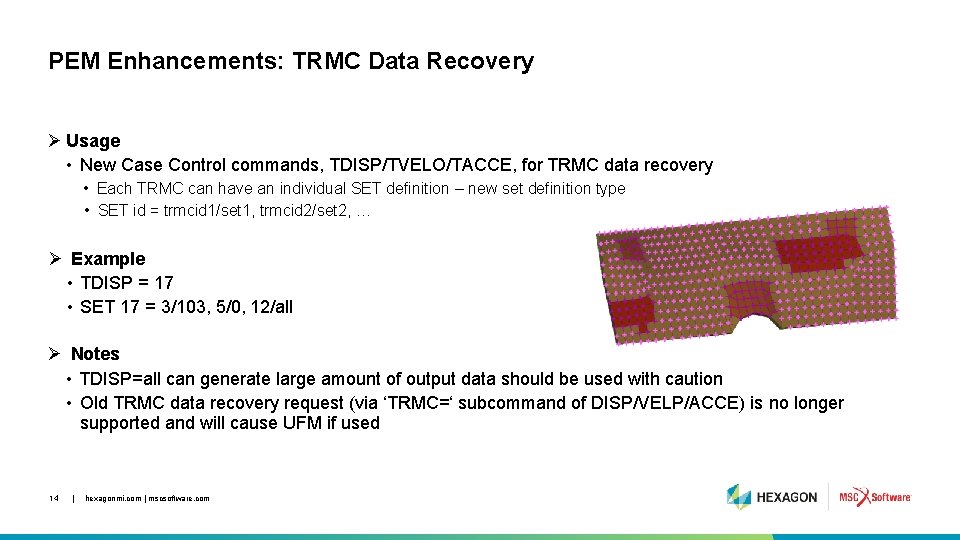
PEM Enhancements: TRMC Data Recovery Ø Usage • New Case Control commands, TDISP/TVELO/TACCE, for TRMC data recovery • Each TRMC can have an individual SET definition – new set definition type • SET id = trmcid 1/set 1, trmcid 2/set 2, … Ø Example • TDISP = 17 • SET 17 = 3/103, 5/0, 12/all Ø Notes • TDISP=all can generate large amount of output data should be used with caution • Old TRMC data recovery request (via ‘TRMC=‘ subcommand of DISP/VELP/ACCE) is no longer supported and will cause UFM if used 14 | hexagonmi. com | mscsoftware. com
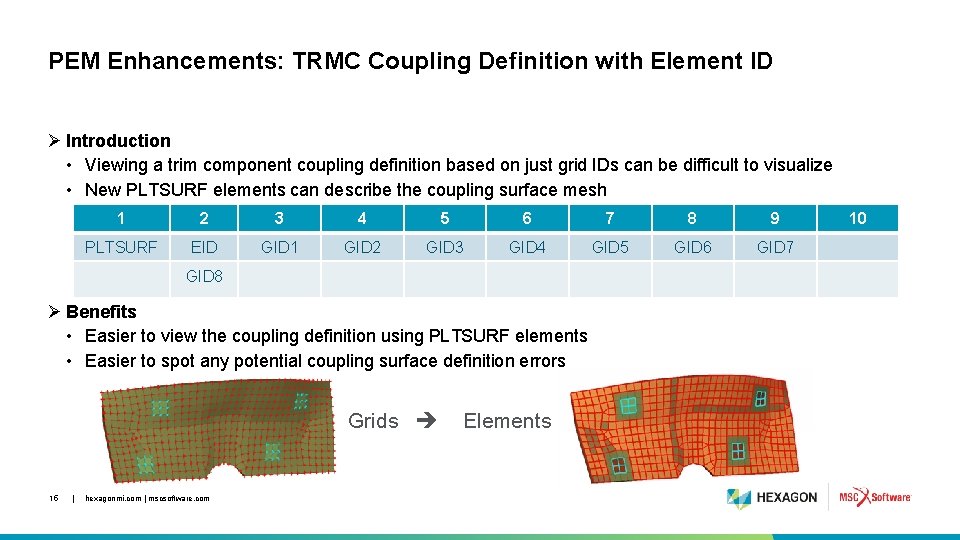
PEM Enhancements: TRMC Coupling Definition with Element ID Ø Introduction • Viewing a trim component coupling definition based on just grid IDs can be difficult to visualize • New PLTSURF elements can describe the coupling surface mesh 1 2 3 4 5 6 7 8 9 PLTSURF EID GID 1 GID 2 GID 3 GID 4 GID 5 GID 6 GID 7 GID 8 Ø Benefits • Easier to view the coupling definition using PLTSURF elements • Easier to spot any potential coupling surface definition errors Grids 15 | hexagonmi. com | mscsoftware. com Elements 10
PEM Enhancements: TRMC Coupling Definition with Element ID Ø Usage • Connects 3, 4, 6 or 8 grids mirroring TRIA 3, QUAD 4, TRIA 6 and QUAD 8 surface elements • PLTSURF ID can be used to describe of trim component surface coupling on ACPEMCP • PLTSURF ID must be referenced on SET 3 with ELEM descriptor – element ID set definition • Do not use SET 1 (grid ID set definition) – will result in incorrect coupling or fatal error • PLTSURF elements are similar to PLOTELs – nonstructural, visualization only elements • To create PLTSURF • Surface wrapper elements can be created over TRMC using TRIA 3/QUAD 4/TRIA 6/QUAD 8 • Change TRIA 3/QUAD 4/TRIA 6/QUAD 8 to PLTSURF and remove PID field • For QUAD 8 with mid-side nodes, further editing is needed 16 | hexagonmi. com | mscsoftware. com
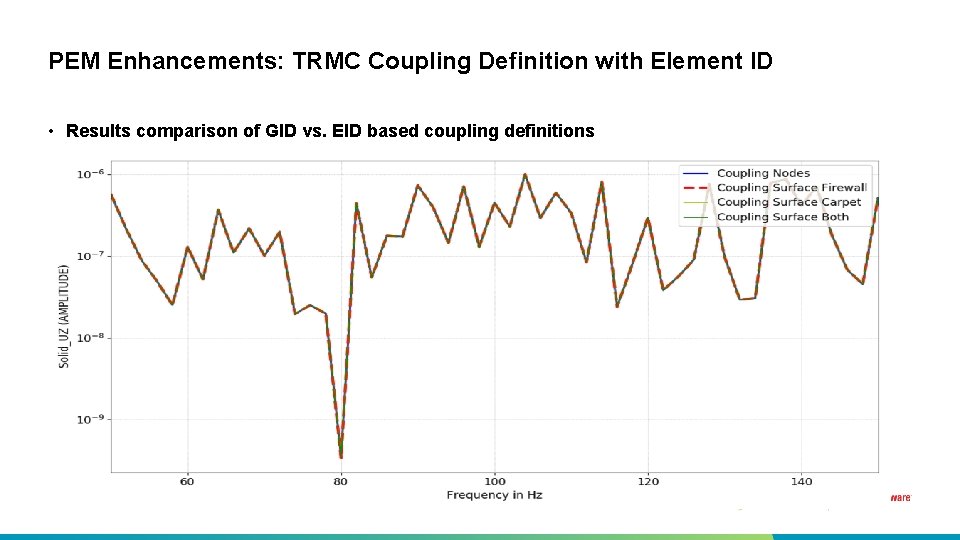
PEM Enhancements: TRMC Coupling Definition with Element ID • Results comparison of GID vs. EID based coupling definitions 17 | hexagonmi. com | mscsoftware. com
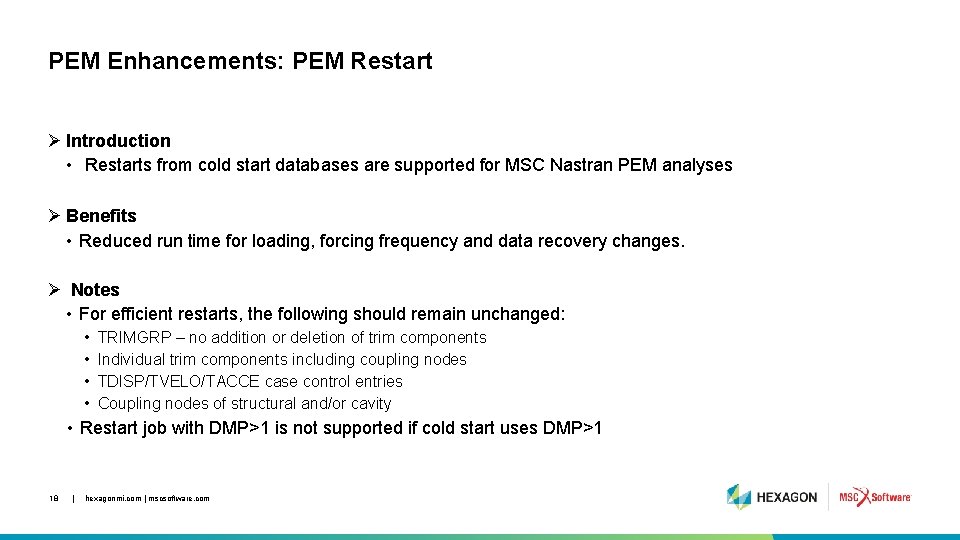
PEM Enhancements: PEM Restart Ø Introduction • Restarts from cold start databases are supported for MSC Nastran PEM analyses Ø Benefits • Reduced run time for loading, forcing frequency and data recovery changes. Ø Notes • For efficient restarts, the following should remain unchanged: • • TRIMGRP – no addition or deletion of trim components Individual trim components including coupling nodes TDISP/TVELO/TACCE case control entries Coupling nodes of structural and/or cavity • Restart job with DMP>1 is not supported if cold start uses DMP>1 18 | hexagonmi. com | mscsoftware. com
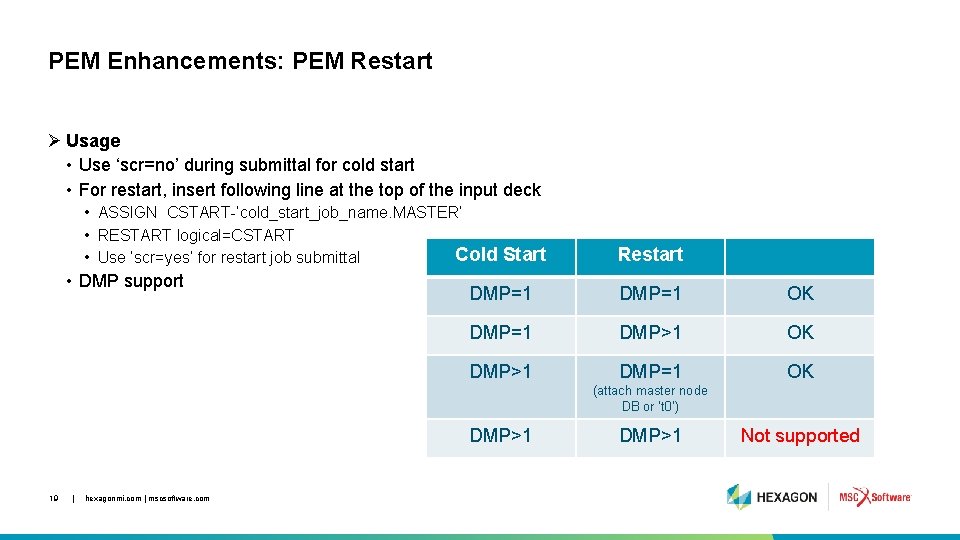
PEM Enhancements: PEM Restart Ø Usage • Use ‘scr=no’ during submittal for cold start • For restart, insert following line at the top of the input deck • ASSIGN CSTART-’cold_start_job_name. MASTER’ • RESTART logical=CSTART Cold Start • Use ‘scr=yes’ for restart job submittal • DMP support Restart DMP=1 OK DMP=1 DMP>1 OK DMP>1 DMP=1 OK (attach master node DB or ‘t 0’) DMP>1 19 | hexagonmi. com | mscsoftware. com DMP>1 Not supported
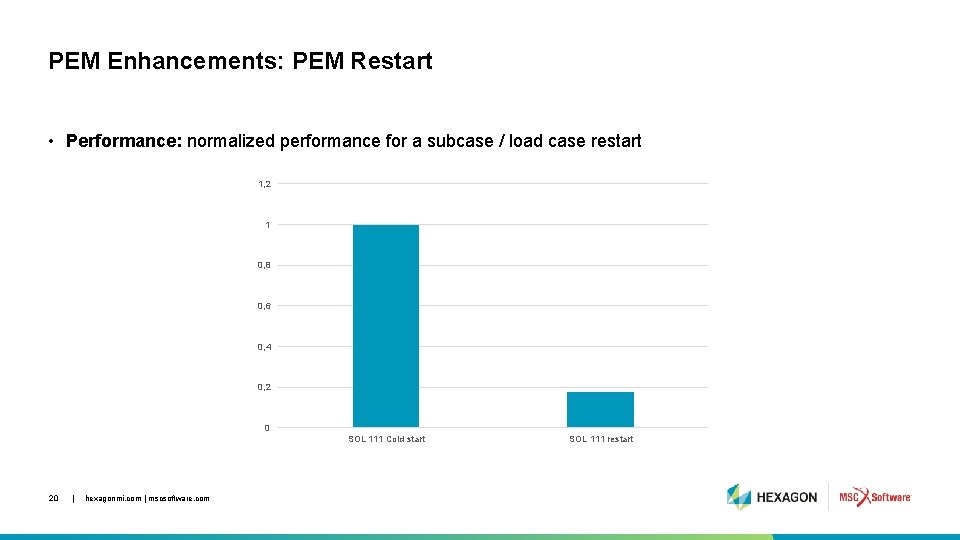
PEM Enhancements: PEM Restart • Performance: normalized performance for a subcase / load case restart 1, 2 1 0, 8 0, 6 0, 4 0, 2 0 SOL 111 Cold start 20 | hexagonmi. com | mscsoftware. com SOL 111 restart
PEM Enhancements: PEM support in SOL 108 Ø Introduction • PEM support is extended to SOL 108 Ø Benefits • Extends PEM analysis method to include a direct as well as modal approach • Method to verify SOL 111 results Ø Notes • SOL 108 PEM analysis will be always much slower than SOL 111 PEM analysis • Much bigger problem size - uses physical vs. modal coordinates 21 | hexagonmi. com | mscsoftware. com
PEM Enhancements: PEM support of SOL 108 Ø Usage • Steps to turn SOL 111 PEM deck to SOL 108 PEM deck • • • 22 | change SOL 111 to SOL 108 remove or comment out DOMAINSOLVER command, if any remove or comment out METHOD case control commands Recommend significantly reducing number of forcing frequencies to <5% of original Change master frequencies of each TRMC to match forcing frequencies to improve performance and reduce disk space demand hexagonmi. com | mscsoftware. com
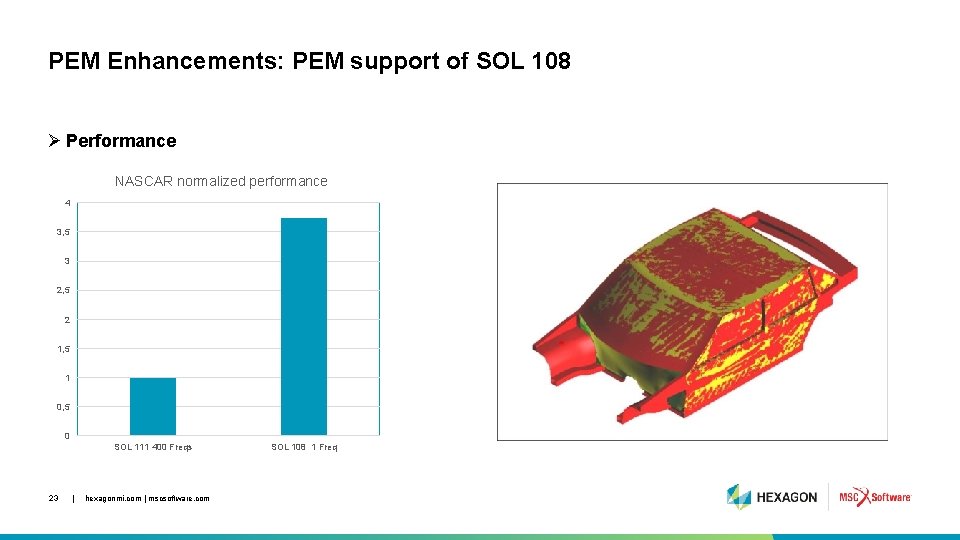
PEM Enhancements: PEM support of SOL 108 Ø Performance NASCAR normalized performance 4 3, 5 3 2, 5 2 1, 5 1 0, 5 0 SOL 111 400 Freqs 23 | hexagonmi. com | mscsoftware. com SOL 108 1 Freq

Nonlinear Enhancements 24 | hexagonmi. com | mscsoftware. com
Geometric Imperfection in SOL 400 • Introduction and benefit • Input user Interface • Output • Examples 25 | hexagonmi. com | mscsoftware. com
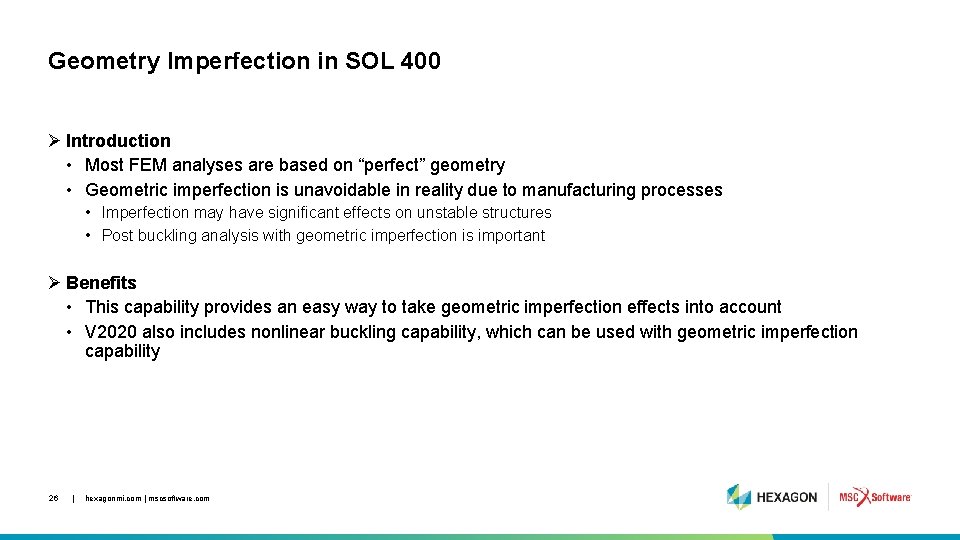
Geometry Imperfection in SOL 400 Ø Introduction • Most FEM analyses are based on “perfect” geometry • Geometric imperfection is unavoidable in reality due to manufacturing processes • Imperfection may have significant effects on unstable structures • Post buckling analysis with geometric imperfection is important Ø Benefits • This capability provides an easy way to take geometric imperfection effects into account • V 2020 also includes nonlinear buckling capability, which can be used with geometric imperfection capability 26 | hexagonmi. com | mscsoftware. com
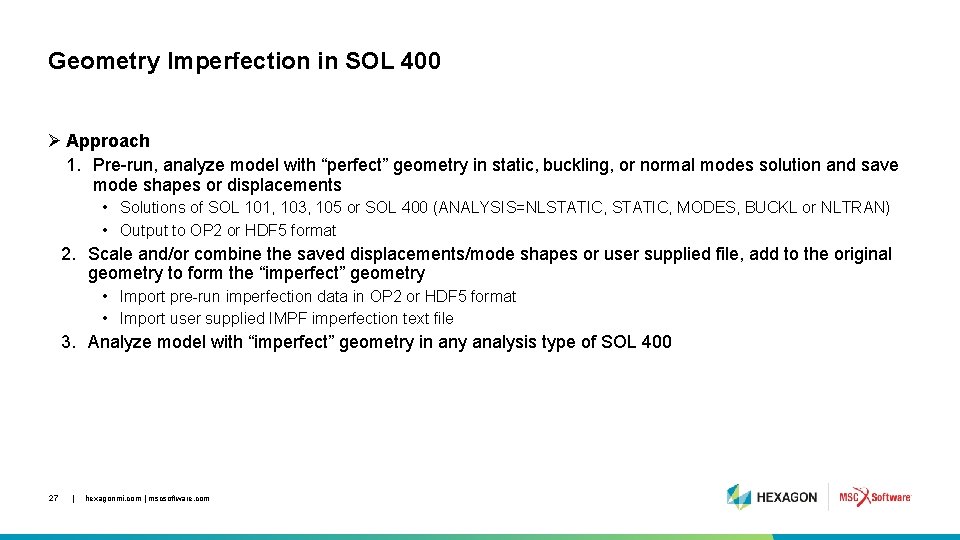
Geometry Imperfection in SOL 400 Ø Approach 1. Pre-run, analyze model with “perfect” geometry in static, buckling, or normal modes solution and save mode shapes or displacements • Solutions of SOL 101, 103, 105 or SOL 400 (ANALYSIS=NLSTATIC, MODES, BUCKL or NLTRAN) • Output to OP 2 or HDF 5 format 2. Scale and/or combine the saved displacements/mode shapes or user supplied file, add to the original geometry to form the “imperfect” geometry • Import pre-run imperfection data in OP 2 or HDF 5 format • Import user supplied IMPF imperfection text file 3. Analyze model with “imperfect” geometry in any analysis type of SOL 400 27 | hexagonmi. com | mscsoftware. com
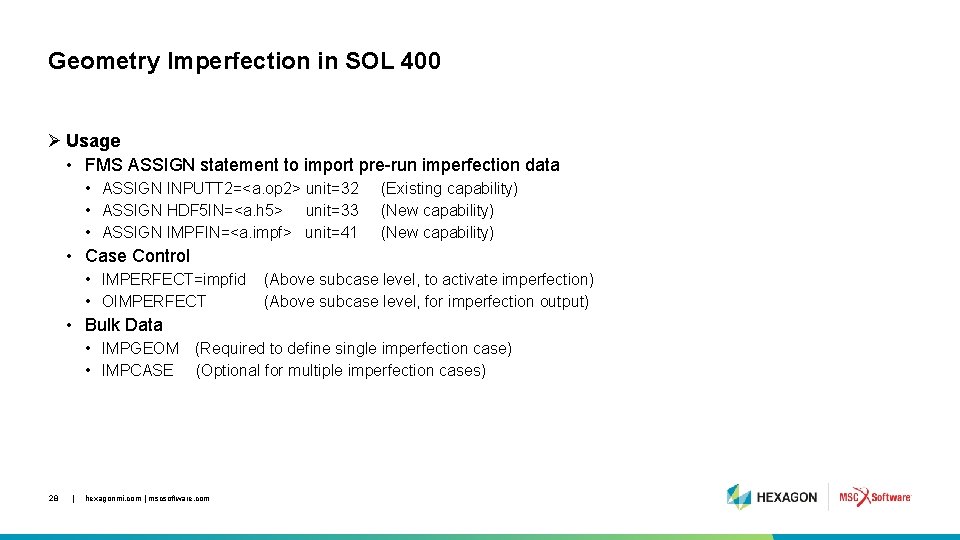
Geometry Imperfection in SOL 400 Ø Usage • FMS ASSIGN statement to import pre-run imperfection data • ASSIGN INPUTT 2=<a. op 2> unit=32 • ASSIGN HDF 5 IN=<a. h 5> unit=33 • ASSIGN IMPFIN=<a. impf> unit=41 (Existing capability) (New capability) • Case Control • IMPERFECT=impfid • OIMPERFECT (Above subcase level, to activate imperfection) (Above subcase level, for imperfection output) • Bulk Data • IMPGEOM (Required to define single imperfection case) • IMPCASE (Optional for multiple imperfection cases) 28 | hexagonmi. com | mscsoftware. com
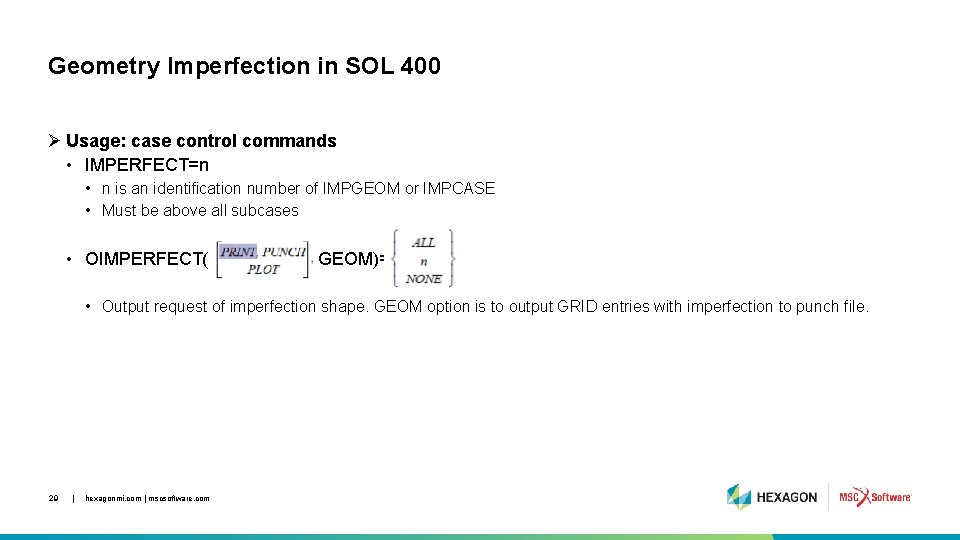
Geometry Imperfection in SOL 400 Ø Usage: case control commands • IMPERFECT=n • n is an identification number of IMPGEOM or IMPCASE • Must be above all subcases • OIMPERFECT( GEOM)= • Output request of imperfection shape. GEOM option is to output GRID entries with imperfection to punch file. 29 | hexagonmi. com | mscsoftware. com
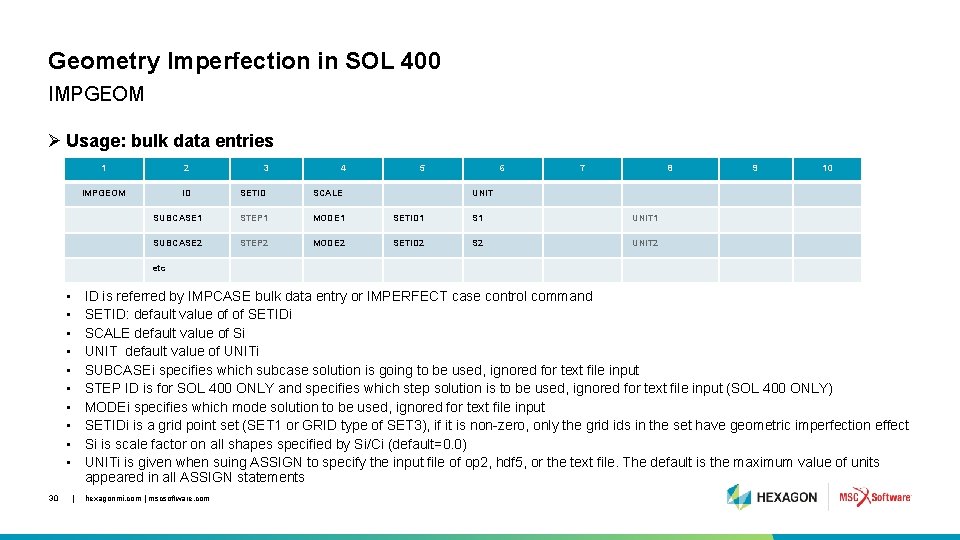
Geometry Imperfection in SOL 400 IMPGEOM Ø Usage: bulk data entries 1 2 IMPGEOM ID 3 4 5 6 7 8 SETID SCALE SUBCASE 1 STEP 1 MODE 1 SETID 1 S 1 UNIT 1 SUBCASE 2 STEP 2 MODE 2 SETID 2 S 2 UNIT 2 9 10 UNIT etc • • • 30 ID is referred by IMPCASE bulk data entry or IMPERFECT case control command SETID: default value of of SETIDi SCALE default value of Si UNIT default value of UNITi SUBCASEi specifies which subcase solution is going to be used, ignored for text file input STEP ID is for SOL 400 ONLY and specifies which step solution is to be used, ignored for text file input (SOL 400 ONLY) MODEi specifies which mode solution to be used, ignored for text file input SETIDi is a grid point set (SET 1 or GRID type of SET 3), if it is non-zero, only the grid ids in the set have geometric imperfection effect Si is scale factor on all shapes specified by Si/Ci (default=0. 0) UNITi is given when suing ASSIGN to specify the input file of op 2, hdf 5, or the text file. The default is the maximum value of units appeared in all ASSIGN statements | hexagonmi. com | mscsoftware. com
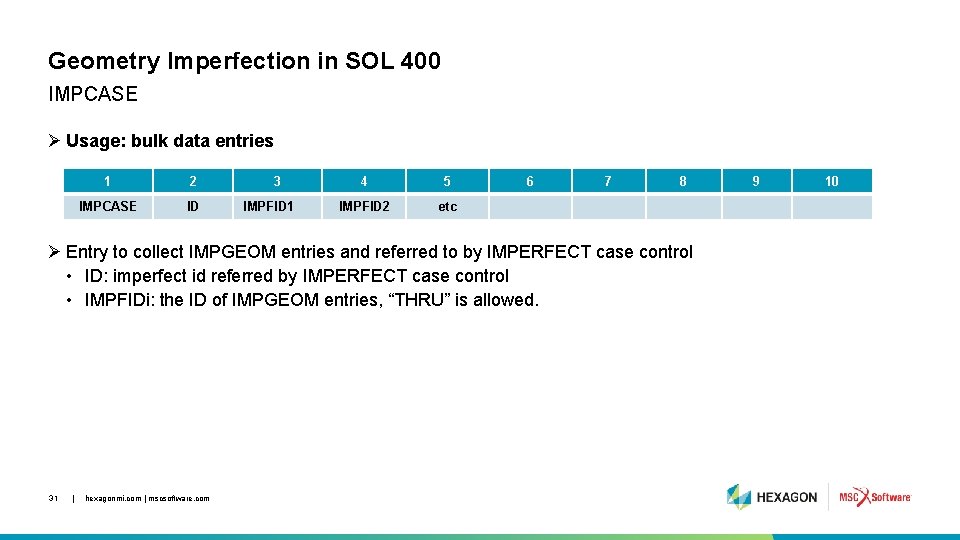
Geometry Imperfection in SOL 400 IMPCASE Ø Usage: bulk data entries 1 2 IMPCASE ID 3 IMPFID 1 4 5 IMPFID 2 etc 6 7 8 Ø Entry to collect IMPGEOM entries and referred to by IMPERFECT case control • ID: imperfect id referred by IMPERFECT case control • IMPFIDi: the ID of IMPGEOM entries, “THRU” is allowed. 31 | hexagonmi. com | mscsoftware. com 9 10
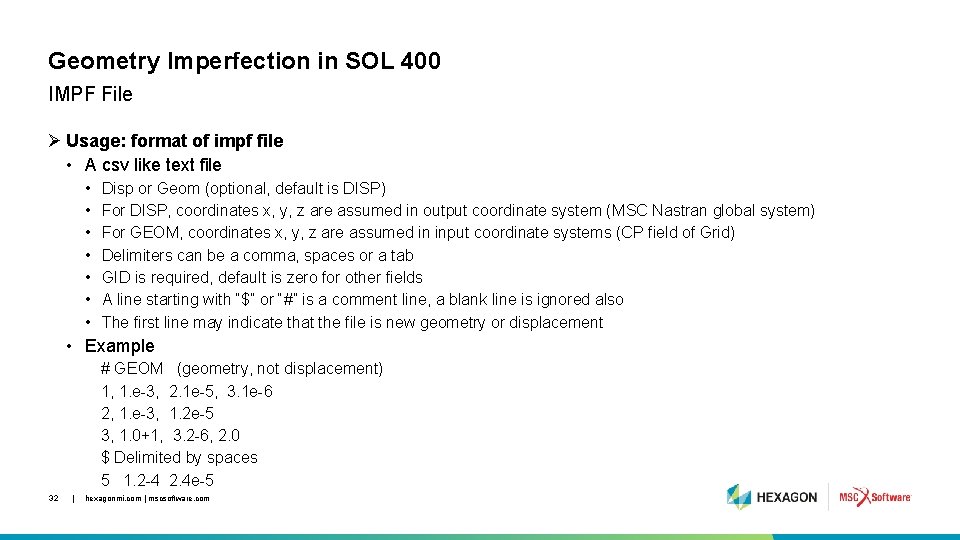
Geometry Imperfection in SOL 400 IMPF File Ø Usage: format of impf file • A csv like text file • • Disp or Geom (optional, default is DISP) For DISP, coordinates x, y, z are assumed in output coordinate system (MSC Nastran global system) For GEOM, coordinates x, y, z are assumed in input coordinate systems (CP field of Grid) Delimiters can be a comma, spaces or a tab GID is required, default is zero for other fields A line starting with “$” or “#” is a comment line, a blank line is ignored also The first line may indicate that the file is new geometry or displacement • Example # GEOM (geometry, not displacement) 1, 1. e-3, 2. 1 e-5, 3. 1 e-6 2, 1. e-3, 1. 2 e-5 3, 1. 0+1, 3. 2 -6, 2. 0 $ Delimited by spaces 5 1. 2 -4 2. 4 e-5 32 | hexagonmi. com | mscsoftware. com

Example Cylinder Buckling with Imperfection 33 | hexagonmi. com | mscsoftware. com
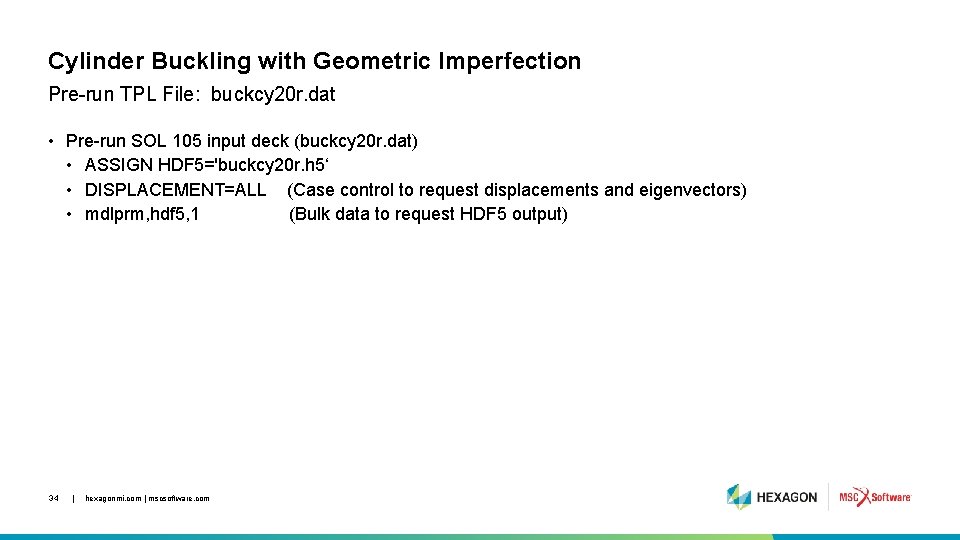
Cylinder Buckling with Geometric Imperfection Pre-run TPL File: buckcy 20 r. dat • Pre-run SOL 105 input deck (buckcy 20 r. dat) • ASSIGN HDF 5='buckcy 20 r. h 5‘ • DISPLACEMENT=ALL (Case control to request displacements and eigenvectors) • mdlprm, hdf 5, 1 (Bulk data to request HDF 5 output) 34 | hexagonmi. com | mscsoftware. com
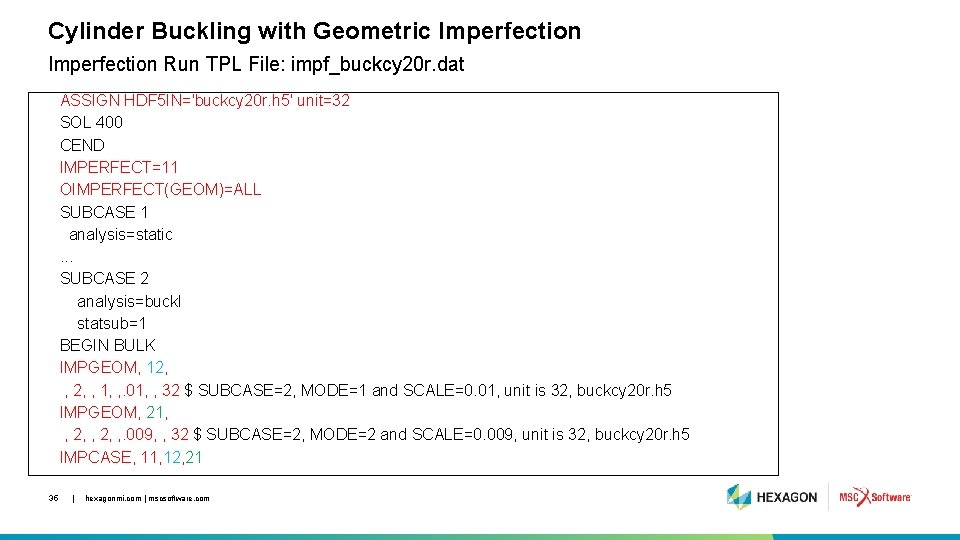
Cylinder Buckling with Geometric Imperfection Run TPL File: impf_buckcy 20 r. dat ASSIGN HDF 5 IN='buckcy 20 r. h 5' unit=32 SOL 400 CEND IMPERFECT=11 OIMPERFECT(GEOM)=ALL SUBCASE 1 analysis=static. . . SUBCASE 2 analysis=buckl statsub=1 BEGIN BULK IMPGEOM, 12, , 1, , . 01, , 32 $ SUBCASE=2, MODE=1 and SCALE=0. 01, unit is 32, buckcy 20 r. h 5 IMPGEOM, 21, , 2, , . 009, , 32 $ SUBCASE=2, MODE=2 and SCALE=0. 009, unit is 32, buckcy 20 r. h 5 IMPCASE, 11, 12, 21 35 | hexagonmi. com | mscsoftware. com
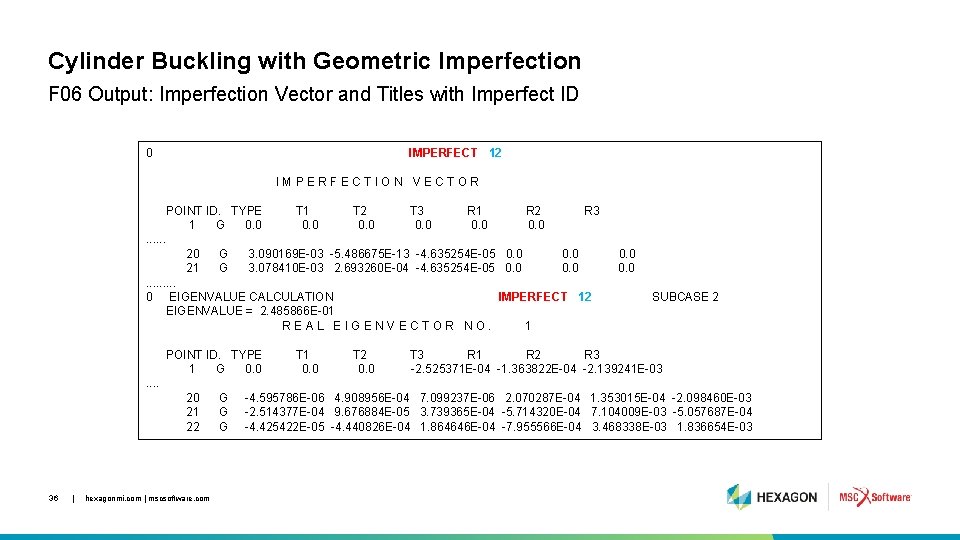
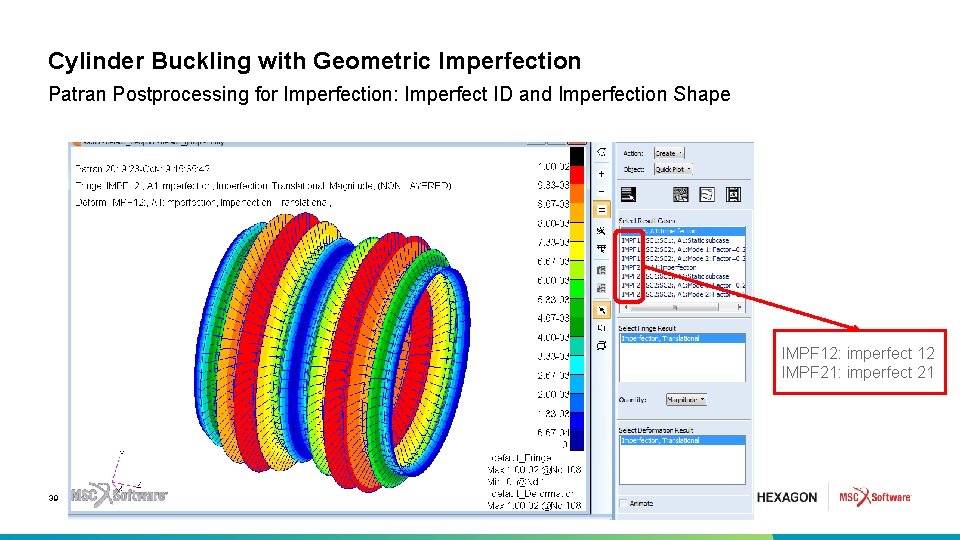
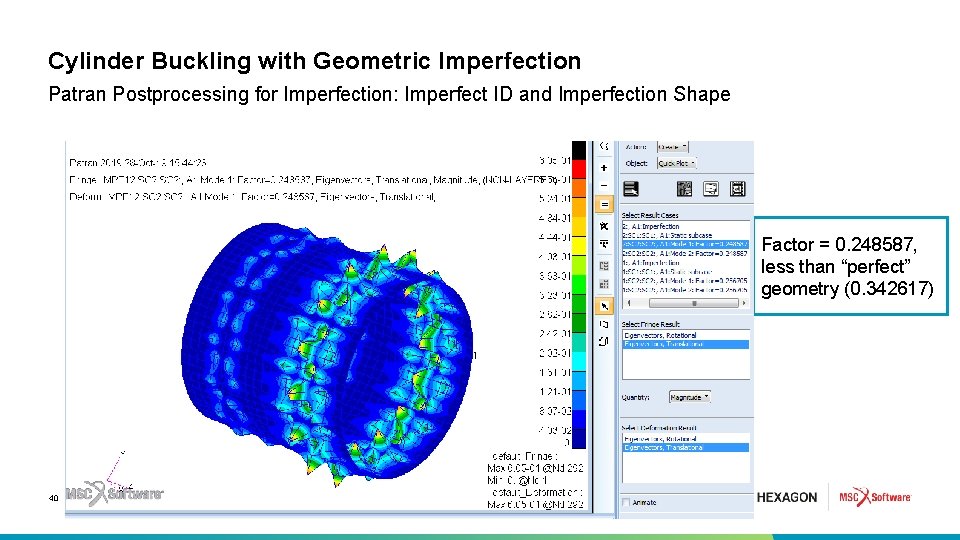
Cylinder Buckling with Geometric Imperfection F 06 Output: Imperfection Vector and Titles with Imperfect ID 0 IMPERFECT 12 IMPERFECTION VECTOR POINT ID. TYPE 1 G 0. 0 T 1 0. 0 T 2 0. 0 T 3 0. 0 R 1 0. 0 R 2 0. 0 R 3 . . . 20 21 G G 3. 090169 E-03 -5. 486675 E-13 -4. 635254 E-05 0. 0 3. 078410 E-03 2. 693260 E-04 -4. 635254 E-05 0. 0 . . 0 EIGENVALUE CALCULATION IMPERFECT 12 EIGENVALUE = 2. 485866 E-01 REAL EIGENVECTOR NO. 1 POINT ID. TYPE 1 G 0. 0 T 1 0. 0 T 2 0. 0 SUBCASE 2 T 3 R 1 R 2 R 3 -2. 525371 E-04 -1. 363822 E-04 -2. 139241 E-03 . . 20 21 22 36 | hexagonmi. com | mscsoftware. com G G G -4. 595786 E-06 4. 908956 E-04 7. 099237 E-06 2. 070287 E-04 1. 353015 E-04 -2. 098460 E-03 -2. 514377 E-04 9. 676884 E-05 3. 739365 E-04 -5. 714320 E-04 7. 104009 E-03 -5. 057687 E-04 -4. 425422 E-05 -4. 440826 E-04 1. 864646 E-04 -7. 955566 E-04 3. 468338 E-03 1. 836654 E-03
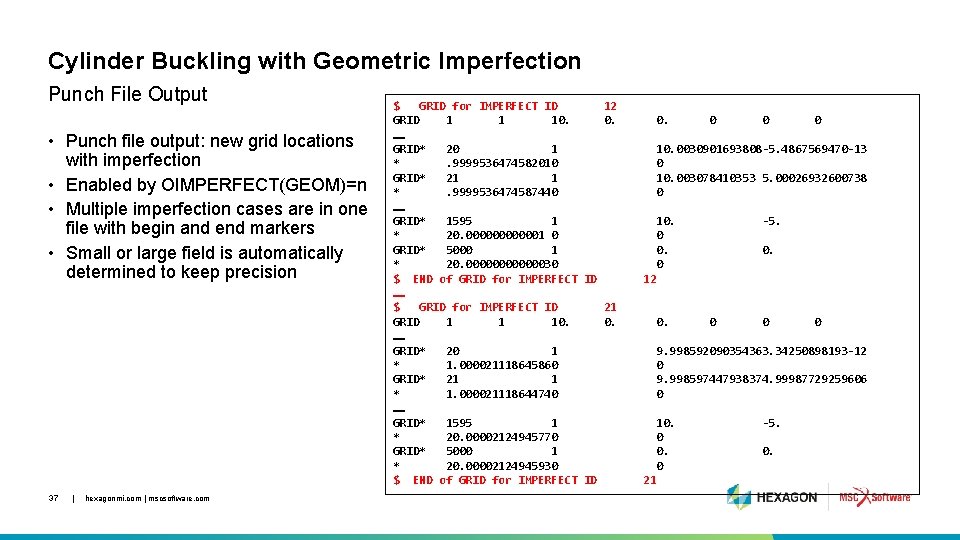
Cylinder Buckling with Geometric Imperfection Punch File Output • Punch file output: new grid locations with imperfection • Enabled by OIMPERFECT(GEOM)=n • Multiple imperfection cases are in one file with begin and end markers • Small or large field is automatically determined to keep precision 37 | hexagonmi. com | mscsoftware. com $ GRID for IMPERFECT ID 12 GRID 1 1 10. 0. …… GRID* 20 1 *. 9999536474582010 GRID* 21 1 *. 9999536474587440 …… GRID* 1595 1 * 20. 0000001 0 GRID* 5000 1 * 20. 00000030 $ END of GRID for IMPERFECT ID …… $ GRID for IMPERFECT ID 21 GRID 1 1 10. 0. …… GRID* 20 1 * 1. 000021118645860 GRID* 21 1 * 1. 000021118644740 …… GRID* 1595 1 * 20. 00002124945770 GRID* 5000 1 * 20. 00002124945930 $ END of GRID for IMPERFECT ID 0. 0 0 0 10. 0030901693808 -5. 4867569470 -13 0 10. 003078410353 5. 00026932600738 0 10. 0 -5. 0. 12 0. 0 0 0 9. 998592090354363. 34250898193 -12 0 9. 998597447938374. 99987729259606 0 10. 0 21 -5. 0.
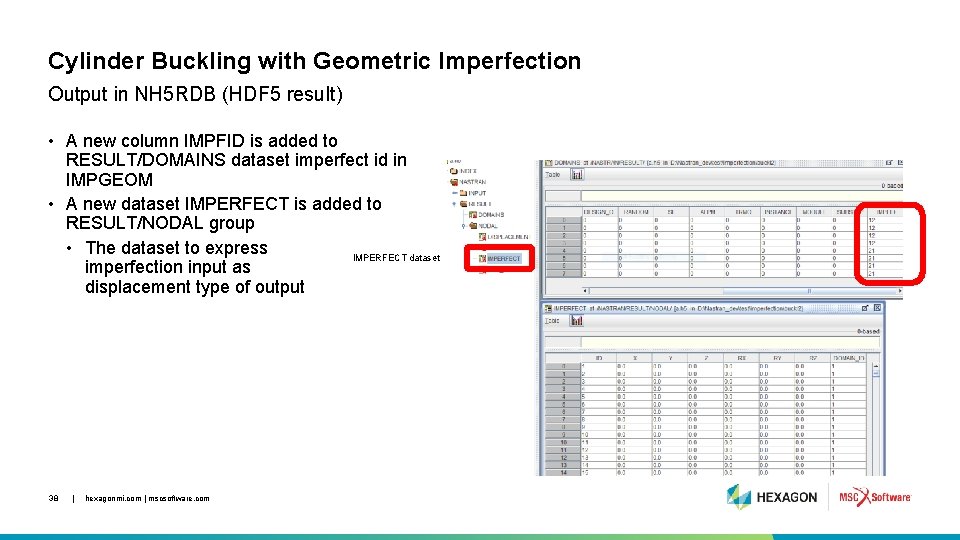
Cylinder Buckling with Geometric Imperfection Output in NH 5 RDB (HDF 5 result) • A new column IMPFID is added to RESULT/DOMAINS dataset imperfect id in IMPGEOM • A new dataset IMPERFECT is added to RESULT/NODAL group • The dataset to express IMPERFECT dataset imperfection input as displacement type of output 38 | hexagonmi. com | mscsoftware. com
Cylinder Buckling with Geometric Imperfection Patran Postprocessing for Imperfection: Imperfect ID and Imperfection Shape IMPF 12: imperfect 12 IMPF 21: imperfect 21 39 | hexagonmi. com | mscsoftware. com
Cylinder Buckling with Geometric Imperfection Patran Postprocessing for Imperfection: Imperfect ID and Imperfection Shape Factor = 0. 248587, less than “perfect” geometry (0. 342617) 40 | hexagonmi. com | mscsoftware. com
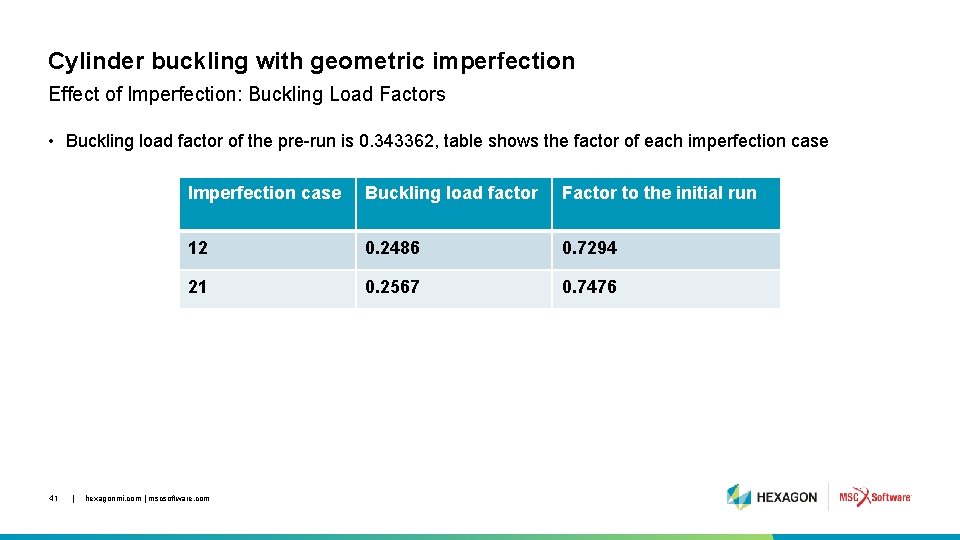
Cylinder buckling with geometric imperfection Effect of Imperfection: Buckling Load Factors • Buckling load factor of the pre-run is 0. 343362, table shows the factor of each imperfection case 41 | Imperfection case Buckling load factor Factor to the initial run 12 0. 2486 0. 7294 21 0. 2567 0. 7476 hexagonmi. com | mscsoftware. com

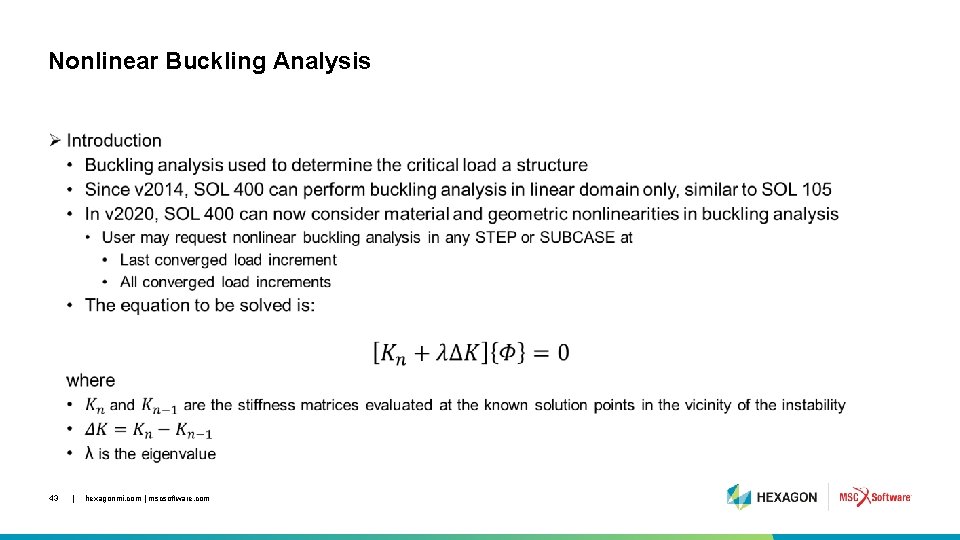
Nonlinear Buckling Analysis • Introduction • Benefits • User Interface • Usage • Guidelines and Limitations 42 | hexagonmi. com | mscsoftware. com
Nonlinear Buckling Analysis • 43 | hexagonmi. com | mscsoftware. com

Nonlinear Buckling Analysis • 44 | hexagonmi. com | mscsoftware. com .

Nonlinear Buckling Analysis Introduction (cont. ) • 45 | hexagonmi. com | mscsoftware. com .

Nonlinear Buckling Analysis Ø Benefits: • Large structures like an airplane, automobile, etc. with many parts and different materials can no longer be assumed to behave linearly under all loading conditions • Contact, geometric and material nonlinearities must be considered, and a nonlinear buckling analysis may provide more accurate results than linear buckling • V 2020 also includes imperfection analysis and when combined with nonlinear buckling analysis gives the engineer a powerful tool to analyze structures which are more likely to buckle at a lower load if not built perfectly to specifications 46 | hexagonmi. com | mscsoftware. com
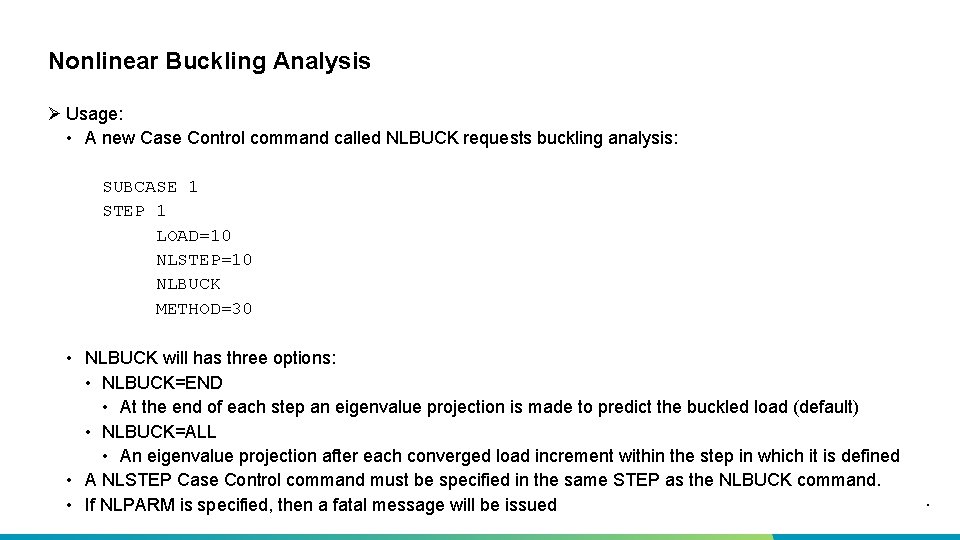
Nonlinear Buckling Analysis Ø Usage: • A new Case Control command called NLBUCK requests buckling analysis: SUBCASE 1 STEP 1 LOAD=10 NLSTEP=10 NLBUCK METHOD=30 47 • NLBUCK will has three options: • NLBUCK=END • At the end of each step an eigenvalue projection is made to predict the buckled load (default) • NLBUCK=ALL • An eigenvalue projection after each converged load increment within the step in which it is defined • A NLSTEP Case Control command must be specified in the same STEP as the NLBUCK command. | hexagonmi. com | mscsoftware. com • If NLPARM is specified, then a fatal message will be issued .
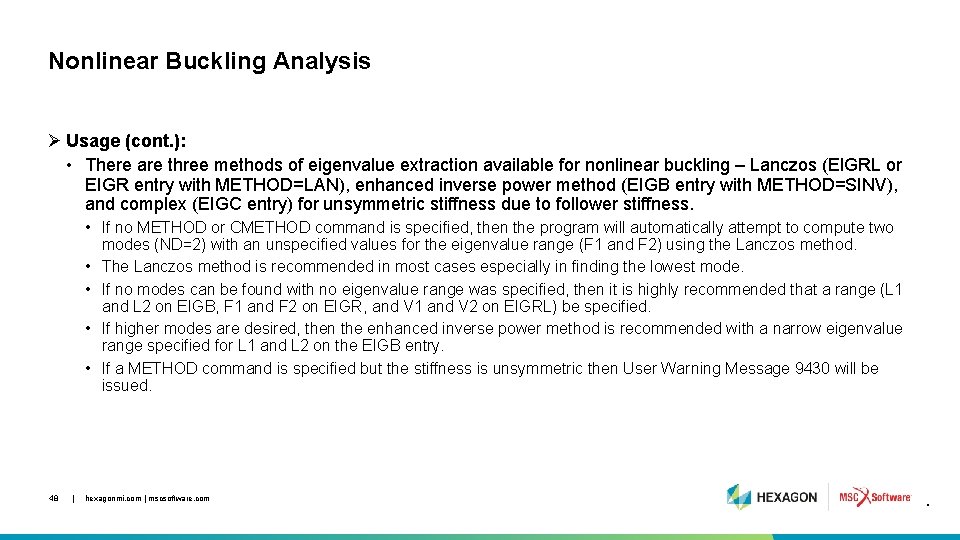
Nonlinear Buckling Analysis Ø Usage (cont. ): • There are three methods of eigenvalue extraction available for nonlinear buckling – Lanczos (EIGRL or EIGR entry with METHOD=LAN), enhanced inverse power method (EIGB entry with METHOD=SINV), and complex (EIGC entry) for unsymmetric stiffness due to follower stiffness. • If no METHOD or CMETHOD command is specified, then the program will automatically attempt to compute two modes (ND=2) with an unspecified values for the eigenvalue range (F 1 and F 2) using the Lanczos method. • The Lanczos method is recommended in most cases especially in finding the lowest mode. • If no modes can be found with no eigenvalue range was specified, then it is highly recommended that a range (L 1 and L 2 on EIGB, F 1 and F 2 on EIGR, and V 1 and V 2 on EIGRL) be specified. • If higher modes are desired, then the enhanced inverse power method is recommended with a narrow eigenvalue range specified for L 1 and L 2 on the EIGB entry. • If a METHOD command is specified but the stiffness is unsymmetric then User Warning Message 9430 will be issued. 48 | hexagonmi. com | mscsoftware. com .
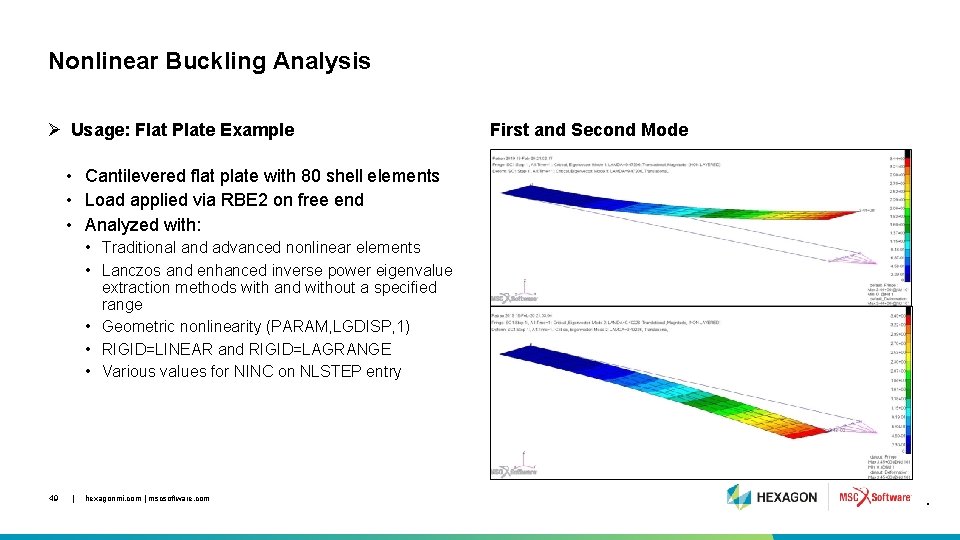
Nonlinear Buckling Analysis Ø Usage: Flat Plate Example First and Second Mode • Cantilevered flat plate with 80 shell elements • Load applied via RBE 2 on free end • Analyzed with: • Traditional and advanced nonlinear elements • Lanczos and enhanced inverse power eigenvalue extraction methods with and without a specified range • Geometric nonlinearity (PARAM, LGDISP, 1) • RIGID=LINEAR and RIGID=LAGRANGE • Various values for NINC on NLSTEP entry 49 | hexagonmi. com | mscsoftware. com .
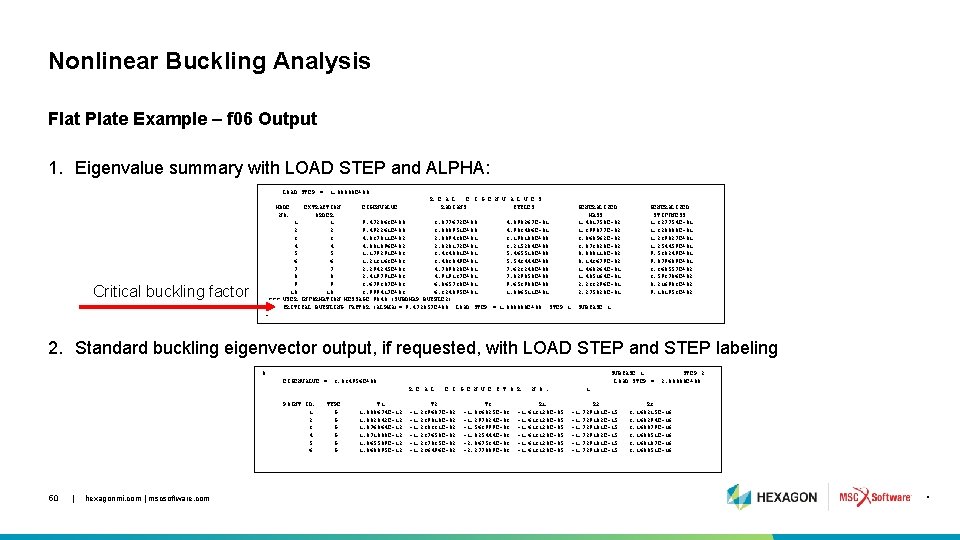
Nonlinear Buckling Analysis Flat Plate Example – f 06 Output 1. Eigenvalue summary with LOAD STEP and ALPHA: LOAD STEP = 1. 00000 E+00 R E A L E I G E N V A L U E S EXTRACTION EIGENVALUE RADIANS CYCLES ORDER 1 1 9. 472063 E+00 3. 077672 E+00 4. 898267 E-01 2 2 9. 492261 E+00 3. 080951 E+00 4. 903486 E-01 3 3 4. 037811 E+02 2. 009430 E+01 3. 198108 E+00 4 4 4. 081096 E+02 2. 020172 E+01 3. 215204 E+00 5 5 1. 179291 E+03 3. 434081 E+01 5. 465510 E+00 6 6 1. 213163 E+03 3. 483049 E+01 5. 543444 E+00 7 7 2. 294245 E+03 4. 789828 E+01 7. 623248 E+00 8 8 2. 419791 E+03 4. 919137 E+01 7. 829050 E+00 9 9 3. 679307 E+03 6. 065730 E+01 9. 653908 E+00 10 10 3. 999417 E+03 6. 324095 E+01 1. 006511 E+01 *** USER INFORMATION MESSAGE 9040 (SUBDMAP BUCKLE 2) CRITICAL BUCKLING FACTOR (ALPHA)= 9. 472057 E+00 LOAD STEP = 1. 000000 E+00 STEP 1 MODE NO. Critical buckling factor GENERALIZED MASS 1. 401758 E-02 1. 399877 E-02 3. 068562 E-02 3. 073828 E-02 8. 088118 E-02 8. 143679 E-02 1. 468264 E-01 1. 485164 E-01 2. 233296 E-01 2. 275820 E-01 GENERALIZED STIFFNESS 1. 327754 E-01 1. 328800 E-01 1. 239027 E+01 1. 254459 E+01 9. 538249 E+01 9. 879609 E+01 3. 368557 E+02 3. 593786 E+02 8. 216983 E+02 9. 101953 E+02 SUBCASE 1 - 2. Standard buckling eigenvector output, if requested, with LOAD STEP and STEP labeling 0 EIGENVALUE = SUBCASE 1 LOAD STEP = 3. 034956 E+00 R E A L POINT ID. 1 2 3 4 5 6 50 | hexagonmi. com | mscsoftware. com TYPE G G G T 1 1. 088674 E-12 1. 082842 E-12 1. 076864 E-12 1. 071008 E-12 1. 065589 E-12 1. 060895 E-12 E I G E N V E C T O R T 2 -1. 239687 E-02 -1. 239018 E-02 -1. 238331 E-02 -1. 237658 E-02 -1. 237035 E-02 -1. 236496 E-02 T 3 -1. 036825 E-03 -1. 297024 E-03 -1. 563999 E-03 -1. 825444 E-03 -2. 067534 E-03 -2. 277009 E-03 N O. R 1 -1. 613120 E-05 STEP 2 2. 00000 E+00 1 R 2 -1. 729181 E-15 -1. 729182 E-15 -1. 729181 E-15 R 3 3. 168215 E-16 3. 168294 E-16 3. 168079 E-16 3. 168051 E-16 3. 168187 E-16 3. 168051 E-16 .
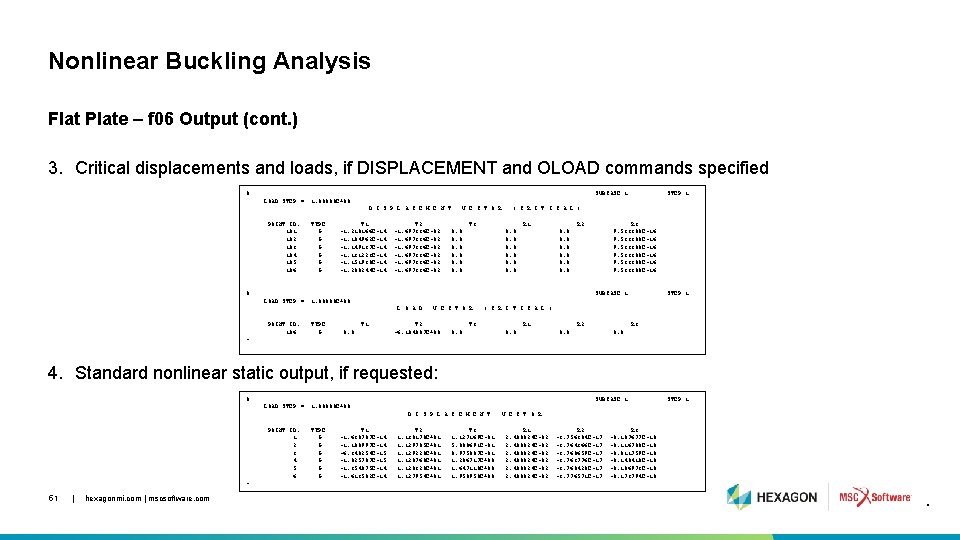
Nonlinear Buckling Analysis Flat Plate – f 06 Output (cont. ) 3. Critical displacements and loads, if DISPLACEMENT and OLOAD commands specified 0 SUBCASE 1 LOAD STEP = D I S P L A C E M E N T POINT ID. 101 102 103 104 105 106 STEP 1 1. 00000 E+00 TYPE G G G T 1 -1. 210166 E-14 -1. 104962 E-14 -1. 149137 E-14 -1. 131223 E-14 -1. 151930 E-14 -1. 200244 E-14 T 2 -1. 697336 E-02 V E C T O R ( C R I T I C A L ) T 3 R 1 0. 0 0. 0 R 2 R 3 9. 533388 E-16 0. 0 0 SUBCASE 1 LOAD STEP = L O A D POINT ID. 106 STEP 1 1. 00000 E+00 TYPE G T 1 0. 0 V E C T O R T 2 -6. 184007 E+00 ( C R I T I C A L ) T 3 0. 0 R 1 0. 0 R 2 R 3 0. 0 - 4. Standard nonlinear static output, if requested: 0 SUBCASE 1 LOAD STEP = D I S P L A C E M E N T POINT ID. 1 2 3 4 5 6 STEP 1 1. 00000 E+00 TYPE G G G T 1 -1. 638787 E-14 -1. 100997 E-14 -6. 348254 E-15 -1. 825787 E-15 -1. 354875 E-14 -1. 613582 E-14 T 2 1. 130170 E+01 1. 129705 E+01 1. 129228 E+01 1. 128760 E+01 1. 128328 E+01 1. 127954 E+01 T 3 1. 127169 E-01 5. 000691 E-01 8. 975087 E-01 1. 286717 E+00 1. 647110 E+00 1. 958950 E+00 V E C T O R R 1 2. 400824 E-02 R 2 -3. 756304 E-17 -3. 764366 E-17 -3. 768659 E-17 -3. 763776 E-17 -3. 768420 E-17 -3. 776571 E-17 R 3 -8. 107677 E-18 -8. 116708 E-18 -8. 011759 E-18 -8. 148418 E-18 -8. 106973 E-18 -8. 173794 E-18 - 51 | hexagonmi. com | mscsoftware. com .
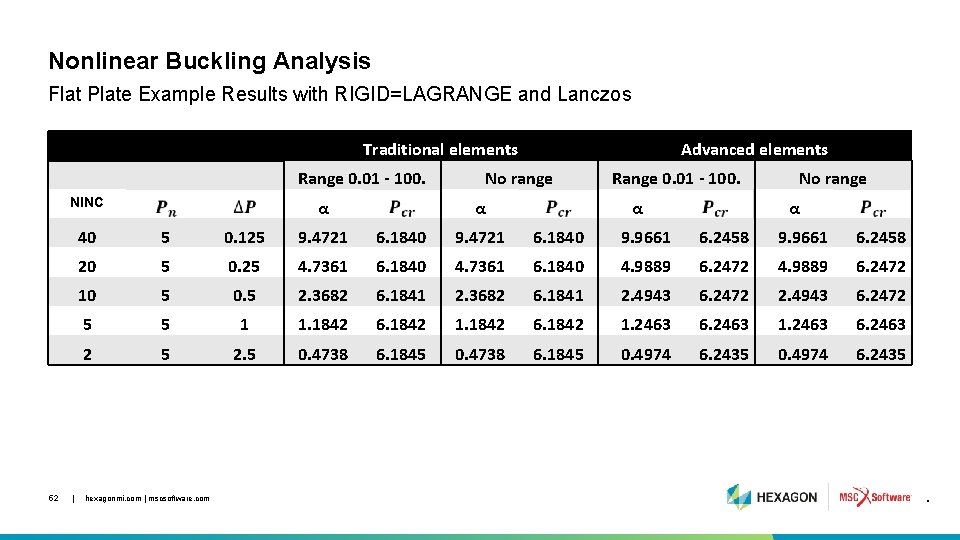
Nonlinear Buckling Analysis Flat Plate Example Results with RIGID=LAGRANGE and Lanczos Traditional elements Range 0. 01 - 100. NINC 52 | α Advanced elements No range α Range 0. 01 - 100. α No range α 40 5 0. 125 9. 4721 6. 1840 9. 9661 6. 2458 20 5 0. 25 4. 7361 6. 1840 4. 9889 6. 2472 10 5 0. 5 2. 3682 6. 1841 2. 4943 6. 2472 5 5 1 1. 1842 6. 1842 1. 2463 6. 2463 2 5 2. 5 0. 4738 6. 1845 0. 4974 6. 2435 hexagonmi. com | mscsoftware. com .

Example Imperfection with nonlinear buckling tpl/imperf/imp_sbuckl 2 a_nlb. dat 53 | hexagonmi. com | mscsoftware. com
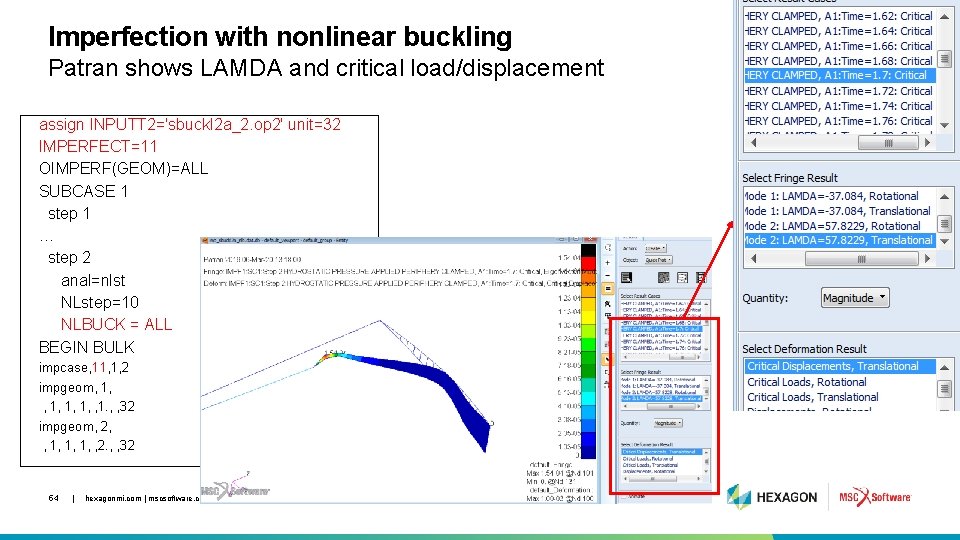
Imperfection with nonlinear buckling Patran shows LAMDA and critical load/displacement assign INPUTT 2='sbuckl 2 a_2. op 2' unit=32 IMPERFECT=11 OIMPERF(GEOM)=ALL SUBCASE 1 step 1 … step 2 anal=nlst NLstep=10 NLBUCK = ALL BEGIN BULK impcase, 11, 1, 2 impgeom, 1, 1, 1, , 1. , , 32 impgeom, 2, , 1, 1, 1, , 2. , , 32 54 | hexagonmi. com | mscsoftware. com
Nonlinear Buckling Analysis Ø Guidelines and Limitations: • NLPARM Case Control command is not permitted in a nonlinear buckling step • NLSTEP must be specified in the nonlinear buckling step • KMETHOD=PFNT (default) is strongly recommended along with NO=1 for FIXED time stepping or INTOUT=YES for ADAPT time stepping • If KMETHOD=ITER then KSTEP=1 is strongly recommended • It is strongly recommended that PARAM, LGDISP, 1 is specified • RIGID=LAGRANGE or LGELIM with advanced nonlinear elements is not supported • It is strongly recommended to specify an eigenvalue range on the EIGR, EIGRL, EIGB, and EIGC Bulk Data entries, but with NLBUCK=ALL it may be difficult to define a range for all load increments • Node-to-segment is not recommended except in the case of permanent glue contact 55 | hexagonmi. com | mscsoftware. com

New MATVE Format 56 | hexagonmi. com | mscsoftware. com
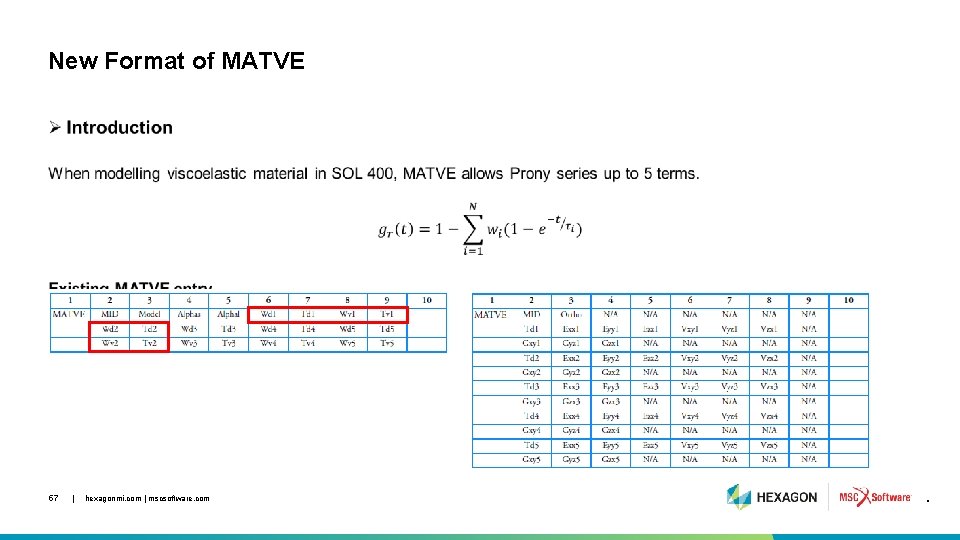
New Format of MATVE • 57 | hexagonmi. com | mscsoftware. com .
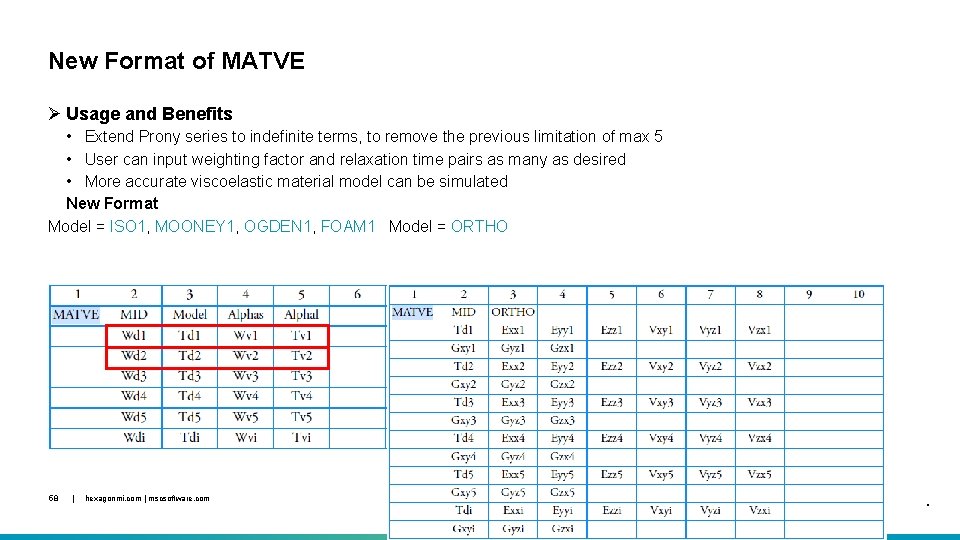
New Format of MATVE Ø Usage and Benefits • Extend Prony series to indefinite terms, to remove the previous limitation of max 5 • User can input weighting factor and relaxation time pairs as many as desired • More accurate viscoelastic material model can be simulated New Format Model = ISO 1, MOONEY 1, OGDEN 1, FOAM 1 Model = ORTHO 58 | hexagonmi. com | mscsoftware. com .
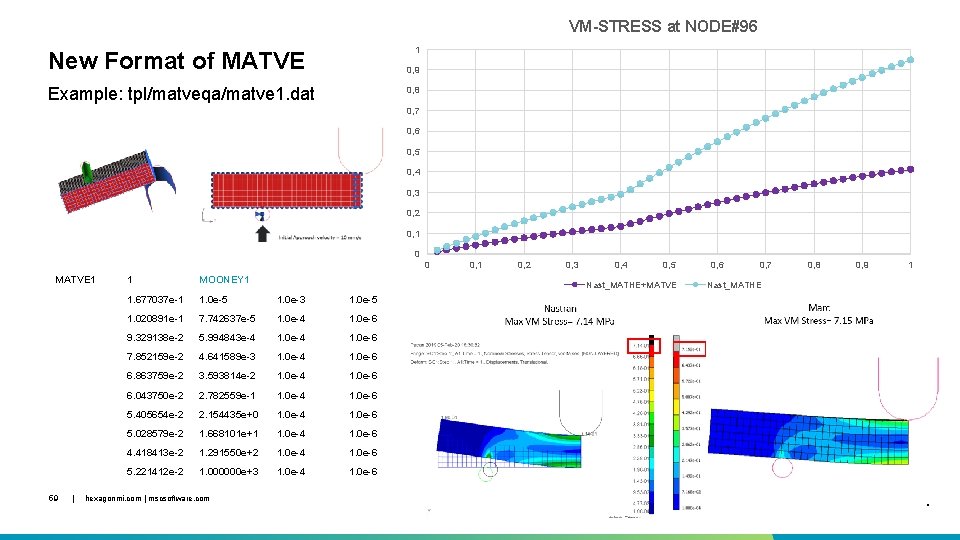
VM-STRESS at NODE#96 1 New Format of MATVE 0, 9 Example: tpl/matveqa/matve 1. dat 0, 8 0, 7 0, 6 0, 5 0, 4 0, 3 0, 2 0, 1 0 0 MATVE 1 59 | 1 MOONEY 1 1. 677037 e-1 1. 0 e-5 1. 0 e-3 1. 0 e-5 1. 020891 e-1 7. 742637 e-5 1. 0 e-4 1. 0 e-6 9. 329138 e-2 5. 994843 e-4 1. 0 e-6 7. 852159 e-2 4. 641589 e-3 1. 0 e-4 1. 0 e-6 6. 863759 e-2 3. 593814 e-2 1. 0 e-4 1. 0 e-6 6. 043750 e-2 2. 782559 e-1 1. 0 e-4 1. 0 e-6 5. 405654 e-2 2. 154435 e+0 1. 0 e-4 1. 0 e-6 5. 028579 e-2 1. 668101 e+1 1. 0 e-4 1. 0 e-6 4. 418413 e-2 1. 291550 e+2 1. 0 e-4 1. 0 e-6 5. 221412 e-2 1. 000000 e+3 1. 0 e-4 1. 0 e-6 hexagonmi. com | mscsoftware. com 0, 1 0, 2 0, 3 0, 4 0, 5 Nast_MATHE+MATVE 0, 6 0, 7 0, 8 0, 9 1 Nast_MATHE .

Rotordynamics Enhancements 60 | hexagonmi. com | mscsoftware. com
Rotordynamics: Enhancements to Bearing Modeling Introduction • There is increasing interest in rotordynamics, and bearing modeling, from the OEMs and this enhancement serves to improved bearing and damper representation as function of speed • Achieved through user-defined subroutines (UDS) to accurately represent linear and nonlinear behavior using customized routines • Linear 2 D bush element (CBUSH 2 D) now allows specification of 2 x 2 K, B, M terms • For nominal conditions using PBUSH 2 D • For frequency dependent conditions using PBSH 2 DT and/or ELEMUDS • Available in SOLs 107, 108, 110, 111, 128 and 400 • Nonlinear squeeze film damper (NLRSFD) element can now take acceleration terms into the new userdefined subroutines • Available in SOL 128 and SOL 400 61 | hexagonmi. com | mscsoftware. com

Rotordynamics: Enhancements to Bearing Modeling Benefits • Traditionally, 2 D bush elements are modeled to represent lateral, vertical and cross-coupled K and B properties of a bearing as 2 x 2 terms • Bearing properties vary as a function of rotor speed – accuracy depends on modeling bearing properties at all operating scenarios • New capability allows bearing properties (2 x 2 terms) to be represented as a function of speed for linear and nonlinear solutions • Squeeze film damper representation is also enhanced to accurately capture the properties as a function of rotor speed • Externally supported routine can accept displacement, velocity and acceleration at connected grids • New UDS enable users to represent both linear and nonlinear dampers as a function of speed • UDS also support external bearing codes 62 | hexagonmi. com | mscsoftware. com
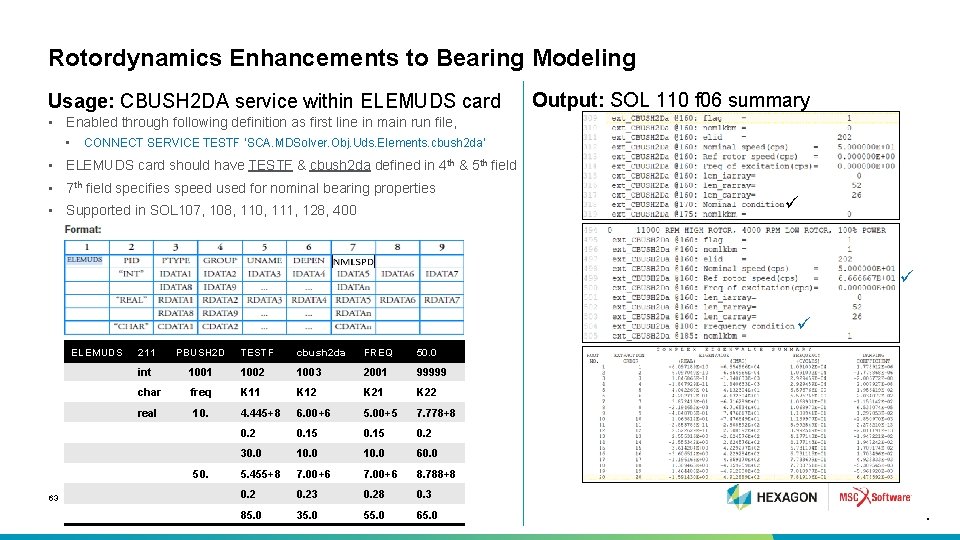
Rotordynamics Enhancements to Bearing Modeling Usage: CBUSH 2 DA service within ELEMUDS card Output: SOL 110 f 06 summary • Enabled through following definition as first line in main run file, • CONNECT SERVICE TESTF ‘SCA. MDSolver. Obj. Uds. Elements. cbush 2 da’ • ELEMUDS card should have TESTF & cbush 2 da defined in 4 th & 5 th field • 7 th field specifies speed used for nominal bearing properties • Supported in SOL 107, 108, 110, 111, 128, 400 ELEMUDS 211 PBUSH 2 D TESTF cbush 2 da FREQ 50. 0 int 1001 1002 1003 2001 99999 char freq K 11 K 12 K 21 K 22 real 10. 4. 445+8 6. 00+6 5. 00+5 7. 778+8 0. 2 0. 15 0. 2 30. 0 10. 0 60. 0 5. 455+8 7. 00+6 8. 788+8 0. 23 0. 28 0. 3 85. 0 35. 0 55. 0 65. 0 50. 63 | hexagonmi. com | mscsoftware. com .
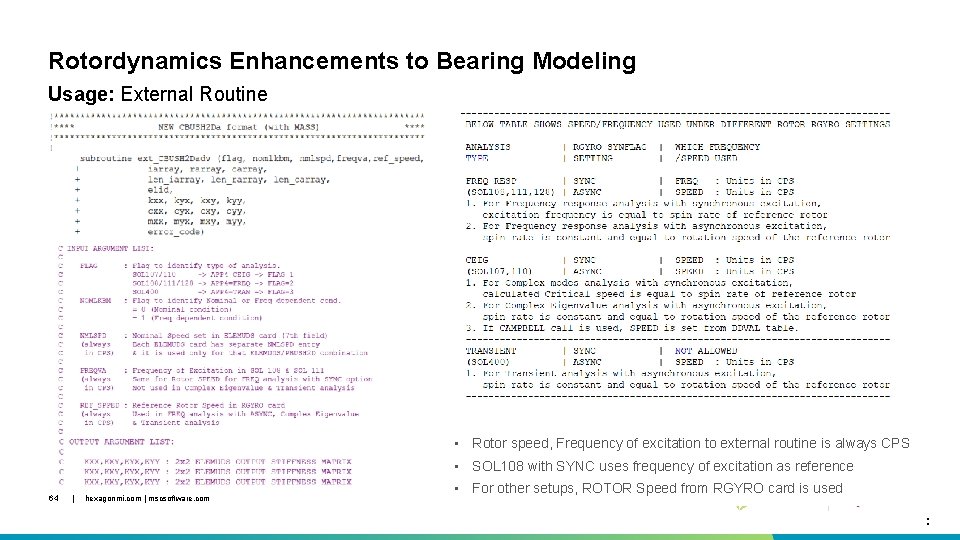
Rotordynamics Enhancements to Bearing Modeling Usage: External Routine • Rotor speed, Frequency of excitation to external routine is always CPS • SOL 108 with SYNC uses frequency of excitation as reference 64 | hexagonmi. com | mscsoftware. com • For other setups, ROTOR Speed from RGYRO card is used . .
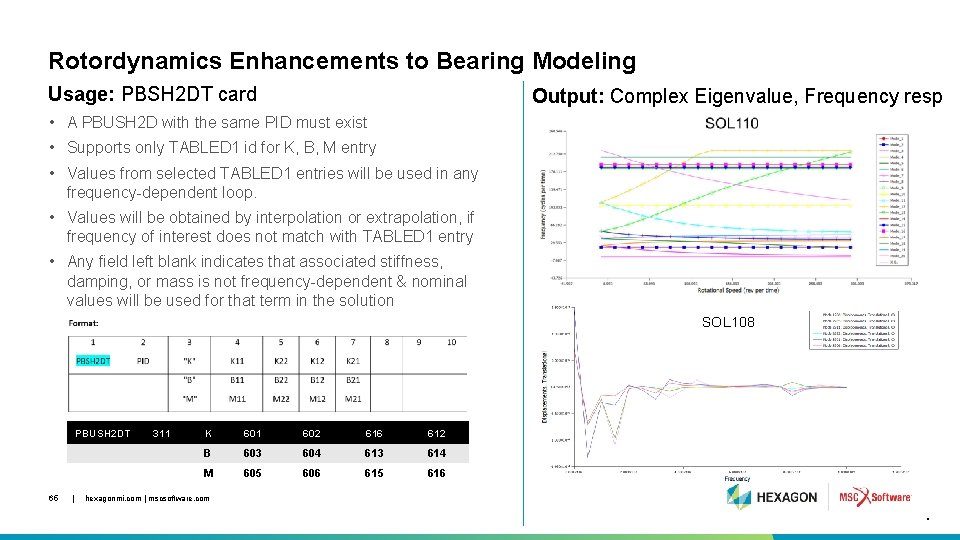
Rotordynamics Enhancements to Bearing Modeling Usage: PBSH 2 DT card Output: Complex Eigenvalue, Frequency resp • A PBUSH 2 D with the same PID must exist • Supports only TABLED 1 id for K, B, M entry • Values from selected TABLED 1 entries will be used in any frequency-dependent loop. • Values will be obtained by interpolation or extrapolation, if frequency of interest does not match with TABLED 1 entry • Any field left blank indicates that associated stiffness, damping, or mass is not frequency-dependent & nominal values will be used for that term in the solution SOL 108 PBUSH 2 DT 65 | 311 K 601 602 616 612 B 603 604 613 614 M 605 606 615 616 hexagonmi. com | mscsoftware. com .
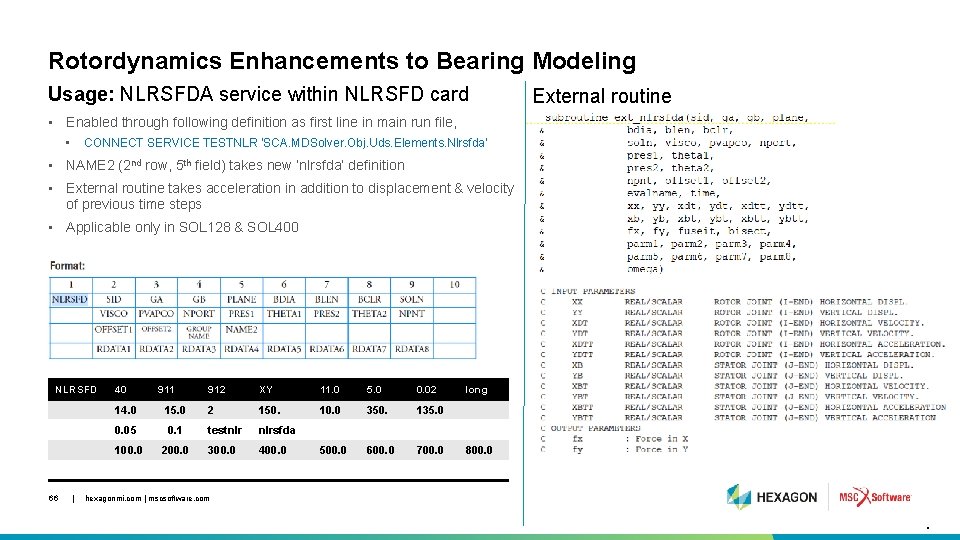
Rotordynamics Enhancements to Bearing Modeling Usage: NLRSFDA service within NLRSFD card External routine • Enabled through following definition as first line in main run file, • CONNECT SERVICE TESTNLR 'SCA. MDSolver. Obj. Uds. Elements. Nlrsfda' • NAME 2 (2 nd row, 5 th field) takes new ‘nlrsfda’ definition • External routine takes acceleration in addition to displacement & velocity of previous time steps • Applicable only in SOL 128 & SOL 400 NLRSFD 66 | 40 911 912 XY 11. 0 5. 0 0. 02 10. 0 350. 135. 0 500. 0 600. 0 700. 0 14. 0 15. 0 2 150. 0. 05 0. 1 testnlr nlrsfda 100. 0 200. 0 300. 0 400. 0 long 800. 0 hexagonmi. com | mscsoftware. com .
Rotordynamics Enhancements to Bearing Modeling Limitations Ø Limitations • PBSH 2 DT bulk data requires the existence of a PBUSH 2 D card of same PID • User cannot use both old CBUSH 2 D CONNECT SERVICE and new CBUSH 2 DA CONNECT SERVICE in the same analysis • User can combine new CBUSH 2 DA CONNECT SERVICE with PBSH 2 DT bulk data definition only if the PIDs are different • User cannot use both the old NLRSFD CONNECT SERVICE and the new NLRSFDA CONNECT SERVICE in the same analysis • Both PBSH 2 DT & CBUSH 2 DA SERVICE works only for rotordynamics analysis – ignored if there is no rotor in the model 67 • For running user defined external CONNECT SERVICE, correct SDK (Software Development Kit) need | to hexagonmi. com | mscsoftware. com be installed.

Optimization Enhancements 68 | hexagonmi. com | mscsoftware. com
Optimization Enhancements • • 69 Overhang constraints Anisotropic solid elements in a topological design group Element iterative solver CASI for segment to segment permanent glued contact Easier DRESP 2 interface to maximize structural stiffness and fundamental frequency | hexagonmi. com | mscsoftware. com .
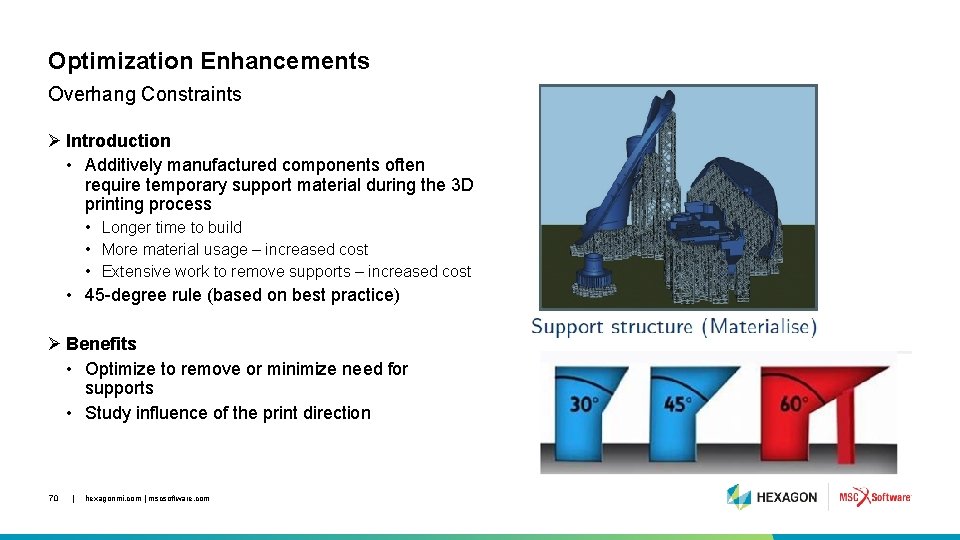
Optimization Enhancements Overhang Constraints Ø Introduction • Additively manufactured components often require temporary support material during the 3 D printing process • Longer time to build • More material usage – increased cost • Extensive work to remove supports – increased cost • 45 -degree rule (based on best practice) Ø Benefits • Optimize to remove or minimize need for supports • Study influence of the print direction 70 | hexagonmi. com | mscsoftware. com
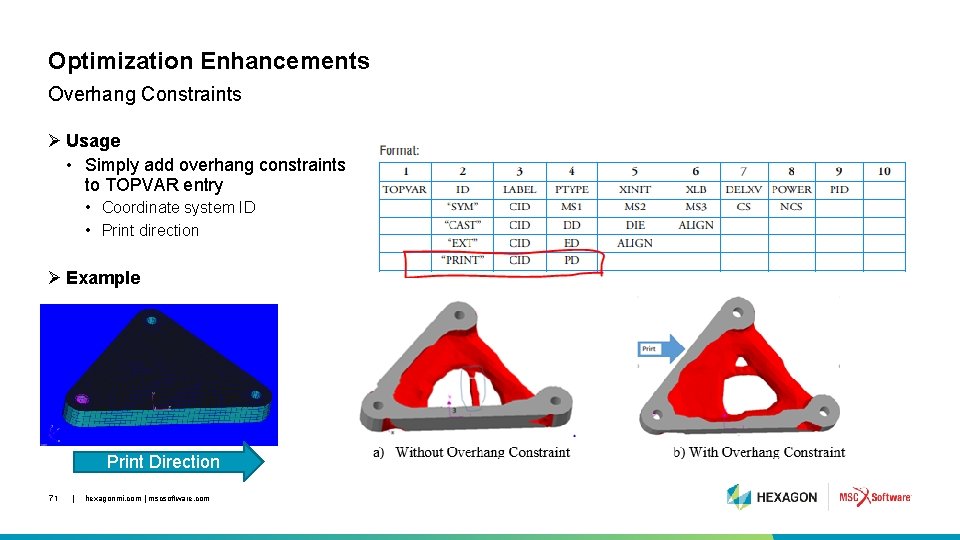
Optimization Enhancements Overhang Constraints Ø Usage • Simply add overhang constraints to TOPVAR entry • Coordinate system ID • Print direction Ø Example Print Direction 71 | hexagonmi. com | mscsoftware. com
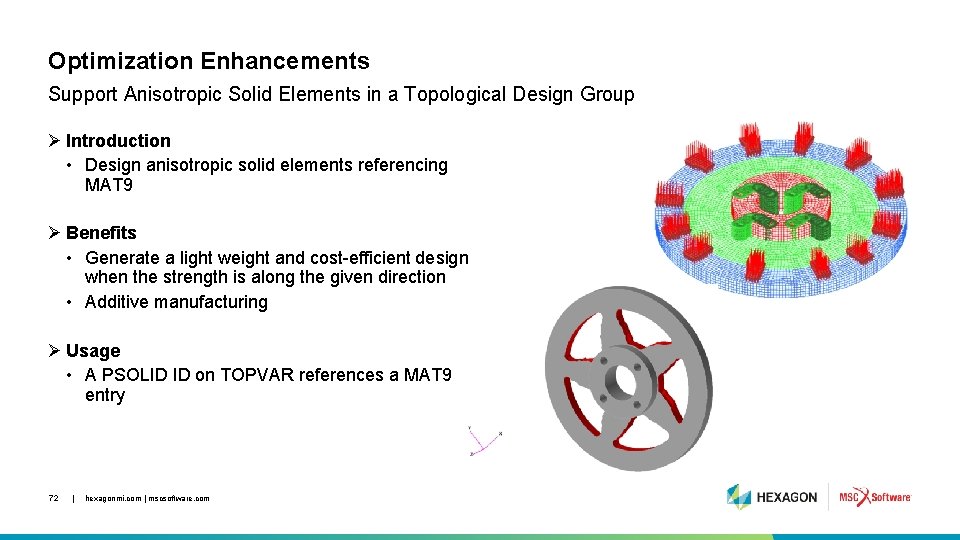
Optimization Enhancements Support Anisotropic Solid Elements in a Topological Design Group Ø Introduction • Design anisotropic solid elements referencing MAT 9 Ø Benefits • Generate a light weight and cost-efficient design when the strength is along the given direction • Additive manufacturing Ø Usage • A PSOLID ID on TOPVAR references a MAT 9 entry 72 | hexagonmi. com | mscsoftware. com
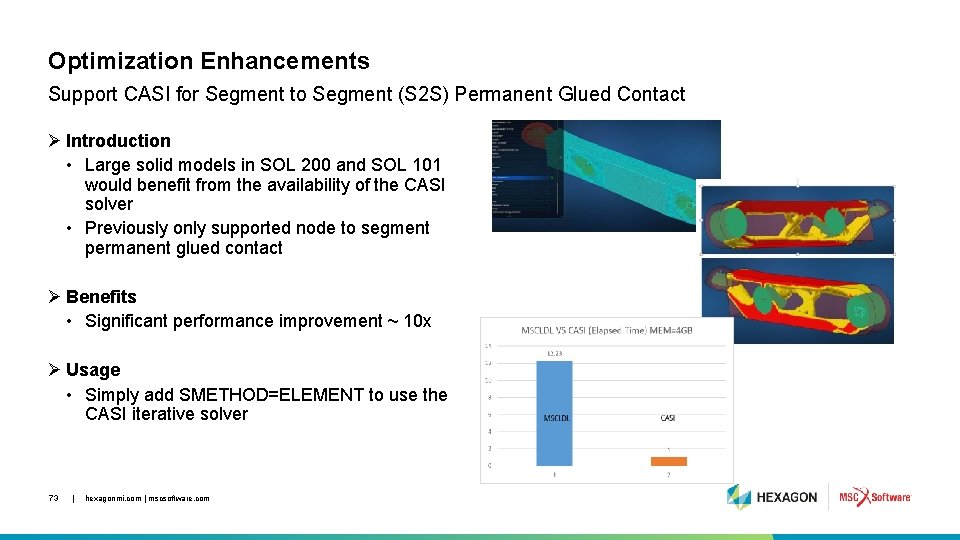
Optimization Enhancements Support CASI for Segment to Segment (S 2 S) Permanent Glued Contact Ø Introduction • Large solid models in SOL 200 and SOL 101 would benefit from the availability of the CASI solver • Previously only supported node to segment permanent glued contact Ø Benefits • Significant performance improvement ~ 10 x Ø Usage • Simply add SMETHOD=ELEMENT to use the CASI iterative solver 73 | hexagonmi. com | mscsoftware. com
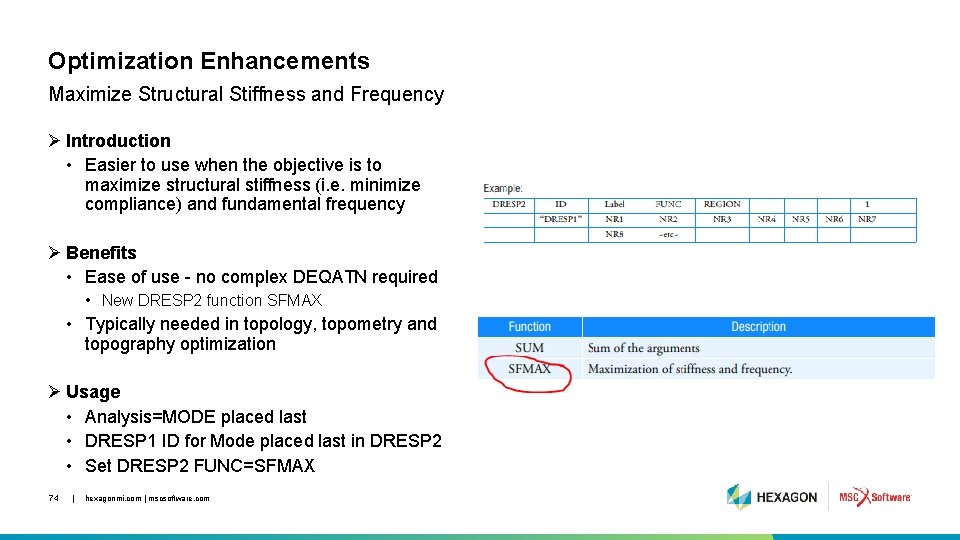
Optimization Enhancements Maximize Structural Stiffness and Frequency Ø Introduction • Easier to use when the objective is to maximize structural stiffness (i. e. minimize compliance) and fundamental frequency Ø Benefits • Ease of use - no complex DEQATN required • New DRESP 2 function SFMAX • Typically needed in topology, topometry and topography optimization Ø Usage • Analysis=MODE placed last • DRESP 1 ID for Mode placed last in DRESP 2 • Set DRESP 2 FUNC=SFMAX 74 | hexagonmi. com | mscsoftware. com

Elements 75 | hexagonmi. com | mscsoftware. com

Thermal Loading for CBUSH and CFAST Elements 76 | hexagonmi. com | mscsoftware. com
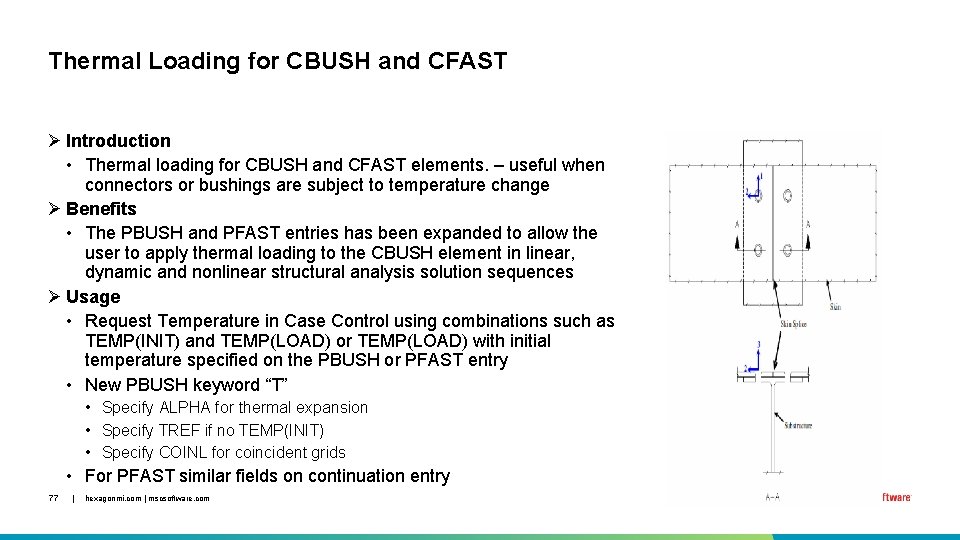
Thermal Loading for CBUSH and CFAST Ø Introduction • Thermal loading for CBUSH and CFAST elements. – useful when connectors or bushings are subject to temperature change Ø Benefits • The PBUSH and PFAST entries has been expanded to allow the user to apply thermal loading to the CBUSH element in linear, dynamic and nonlinear structural analysis solution sequences Ø Usage • Request Temperature in Case Control using combinations such as TEMP(INIT) and TEMP(LOAD) or TEMP(LOAD) with initial temperature specified on the PBUSH or PFAST entry • New PBUSH keyword “T” • Specify ALPHA for thermal expansion • Specify TREF if no TEMP(INIT) • Specify COINL for coincident grids • For PFAST similar fields on continuation entry 77 | hexagonmi. com | mscsoftware. com

Layered Solids and Solid Shells 78 | hexagonmi. com | mscsoftware. com
Layered Solids and Solid Shells Introduction Ø Solid Composite Elements and Solid-Shell Composite Elements are available in: • Linear statics (SOL 101) • Normal modes (SOL 103) • Linear buckling (SOL 105) • Direct complex eigenvalue (SOL 107) • Direct frequency response (SOL 108) • Direct transient response (SOL 109) • Modal complex eigenvalue (SOL 110) • Modal frequency response (SOL 111) • Modal transient response (SOL 112) • Analysis only in SOL 200 • Already available in SOL 400 79 | hexagonmi. com | mscsoftware. com
Layered Solids and Solid Shells Benefits Ø Benefits: • Modelling of thick composite beams, thick composite shells, composite solids • • • 80 | Modelling of large composite parts such as gas turbine blades, stringers for pressure vessels, etc. Modelling of thick laminates, laminates subjected to three-dimensional state of stress Cases with loads in direction of laminate thickness Layered solid shells useful in cases where bending is dominant and model has fewer layers through thickness All above-mentioned scenarios can be simulated in all linear solution sequences in MSC Nastran hexagonmi. com | mscsoftware. com
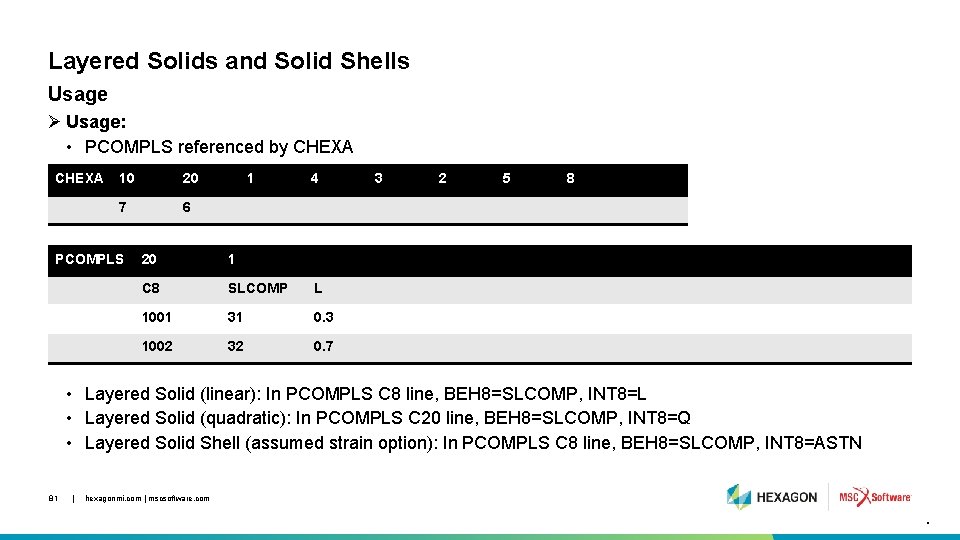
Layered Solids and Solid Shells Usage Ø Usage: • PCOMPLS referenced by CHEXA 10 20 7 6 PCOMPLS 1 4 20 1 C 8 SLCOMP L 1001 31 0. 3 1002 32 0. 7 3 2 5 8 • Layered Solid (linear): In PCOMPLS C 8 line, BEH 8=SLCOMP, INT 8=L • Layered Solid (quadratic): In PCOMPLS C 20 line, BEH 8=SLCOMP, INT 8=Q • Layered Solid Shell (assumed strain option): In PCOMPLS C 8 line, BEH 8=SLCOMP, INT 8=ASTN 81 | hexagonmi. com | mscsoftware. com .
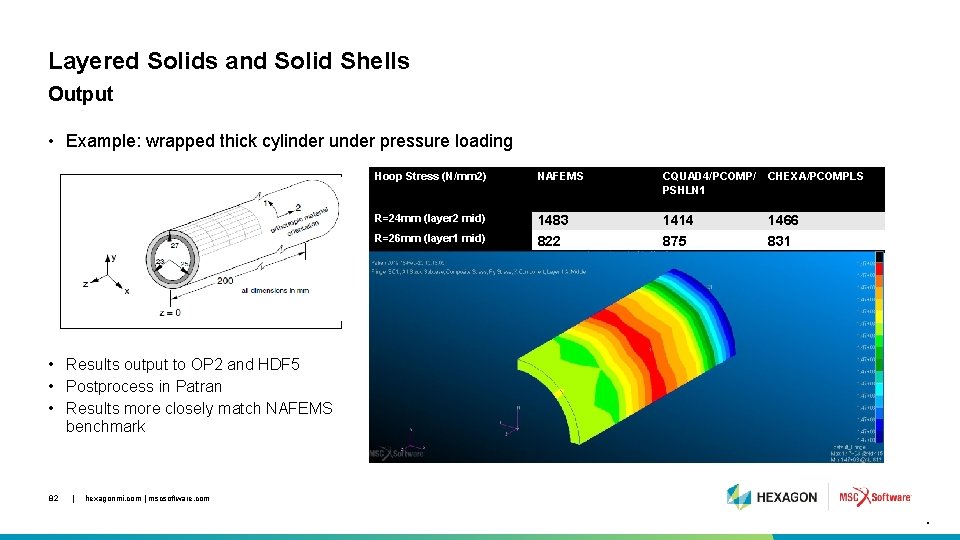
Layered Solids and Solid Shells Output • Example: wrapped thick cylinder under pressure loading Hoop Stress (N/mm 2) NAFEMS CQUAD 4/PCOMP/ PSHLN 1 CHEXA/PCOMPLS R=24 mm (layer 2 mid) 1483 822 1414 875 1466 831 R=26 mm (layer 1 mid) • Results output to OP 2 and HDF 5 • Postprocess in Patran • Results more closely match NAFEMS benchmark 82 | hexagonmi. com | mscsoftware. com .

Nastran Embedded Fatigue Enhancements 83 | hexagonmi. com | mscsoftware. com
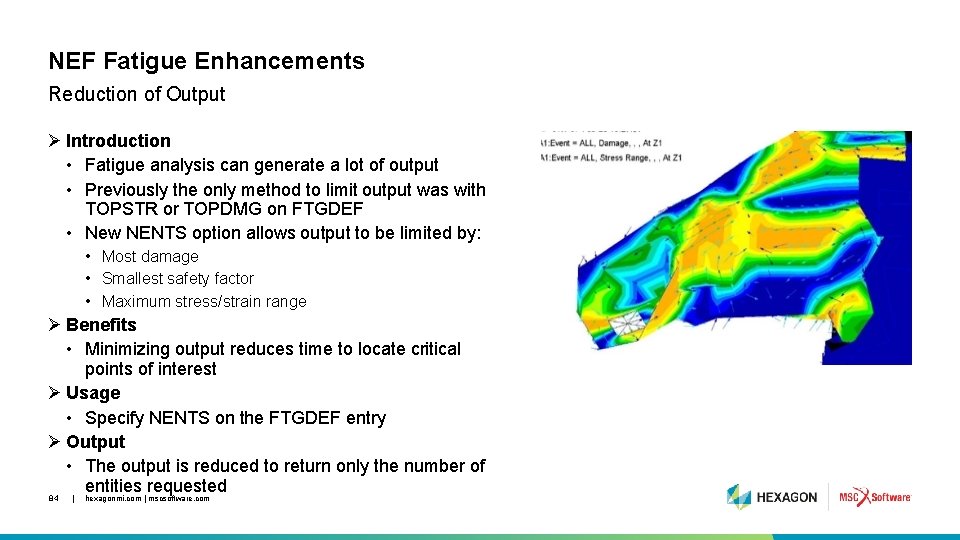
NEF Fatigue Enhancements Reduction of Output Ø Introduction • Fatigue analysis can generate a lot of output • Previously the only method to limit output was with TOPSTR or TOPDMG on FTGDEF • New NENTS option allows output to be limited by: • Most damage • Smallest safety factor • Maximum stress/strain range Ø Benefits • Minimizing output reduces time to locate critical points of interest Ø Usage • Specify NENTS on the FTGDEF entry Ø Output • The output is reduced to return only the number of entities requested 84 | hexagonmi. com | mscsoftware. com
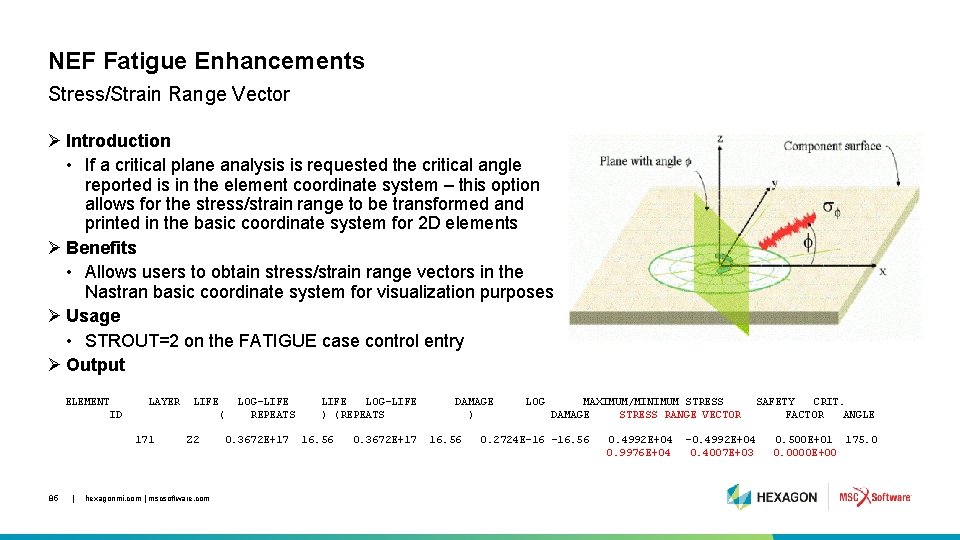
NEF Fatigue Enhancements Stress/Strain Range Vector Ø Introduction • If a critical plane analysis is requested the critical angle reported is in the element coordinate system – this option allows for the stress/strain range to be transformed and printed in the basic coordinate system for 2 D elements Ø Benefits • Allows users to obtain stress/strain range vectors in the Nastran basic coordinate system for visualization purposes Ø Usage • STROUT=2 on the FATIGUE case control entry Ø Output ELEMENT LAYER LIFE ID 171 85 | LOG-LIFE REPEATS ( Z 2 hexagonmi. com | mscsoftware. com 0. 3672 E+17 LIFE LOG-LIFE ) (REPEATS 16. 56 0. 3672 E+17 DAMAGE ) 16. 56 LOG MAXIMUM/MINIMUM STRESS DAMAGE STRESS RANGE VECTOR 0. 2724 E-16 -16. 56 0. 4992 E+04 0. 9976 E+04 -0. 4992 E+04 0. 4007 E+03 SAFETY CRIT. FACTOR ANGLE 0. 500 E+01 175. 0 0. 0000 E+00
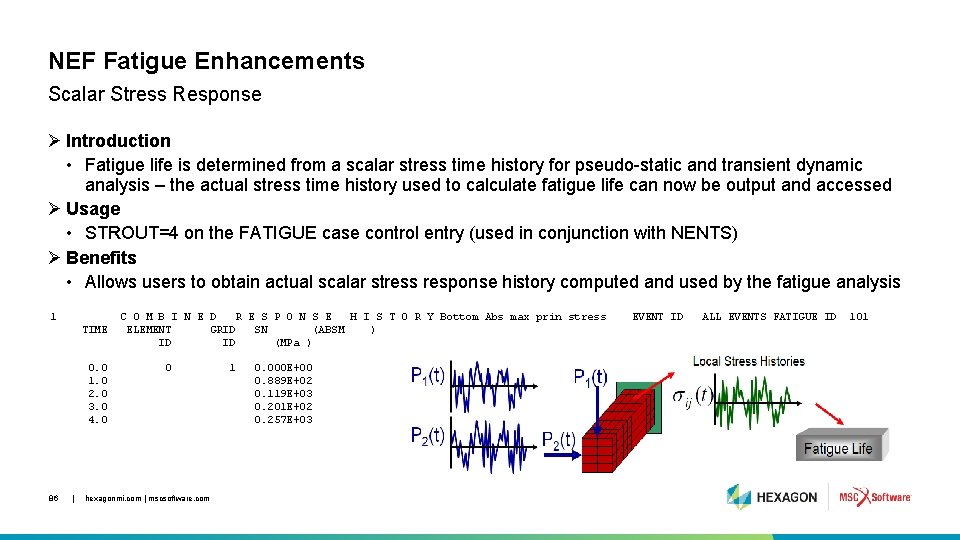
NEF Fatigue Enhancements Scalar Stress Response Ø Introduction • Fatigue life is determined from a scalar stress time history for pseudo-static and transient dynamic analysis – the actual stress time history used to calculate fatigue life can now be output and accessed Ø Usage • STROUT=4 on the FATIGUE case control entry (used in conjunction with NENTS) Ø Benefits • Allows users to obtain actual scalar stress response history computed and used by the fatigue analysis 1 TIME 0. 0 1. 0 2. 0 3. 0 4. 0 86 | C O M B I N E D R E S P O N S E H I S T O R Y Bottom Abs max prin stress ELEMENT GRID SN (ABSM ) ID ID (MPa ) 0 hexagonmi. com | mscsoftware. com 1 0. 000 E+00 0. 889 E+02 0. 119 E+03 0. 201 E+02 0. 257 E+03 EVENT ID ALL EVENTS FATIGUE ID 101
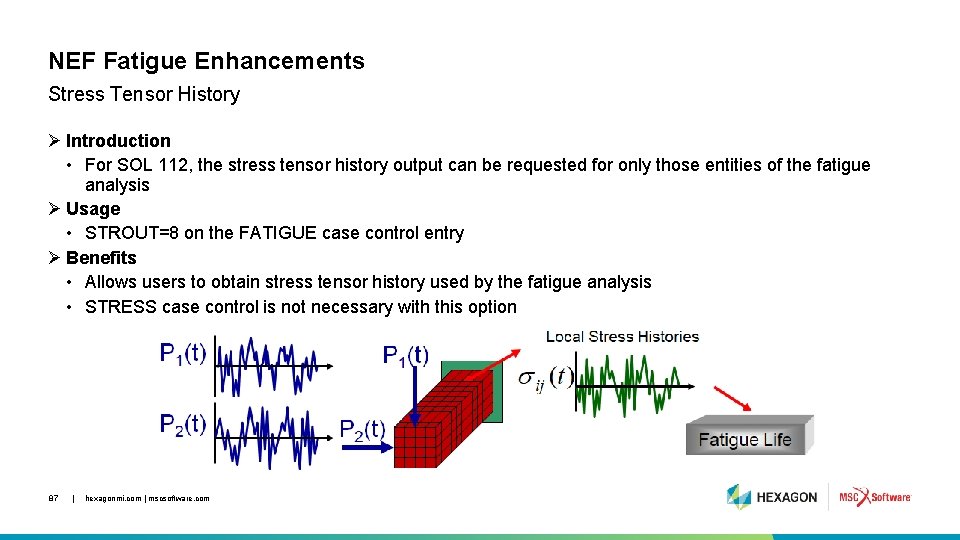
NEF Fatigue Enhancements Stress Tensor History Ø Introduction • For SOL 112, the stress tensor history output can be requested for only those entities of the fatigue analysis Ø Usage • STROUT=8 on the FATIGUE case control entry Ø Benefits • Allows users to obtain stress tensor history used by the fatigue analysis • STRESS case control is not necessary with this option 87 | hexagonmi. com | mscsoftware. com
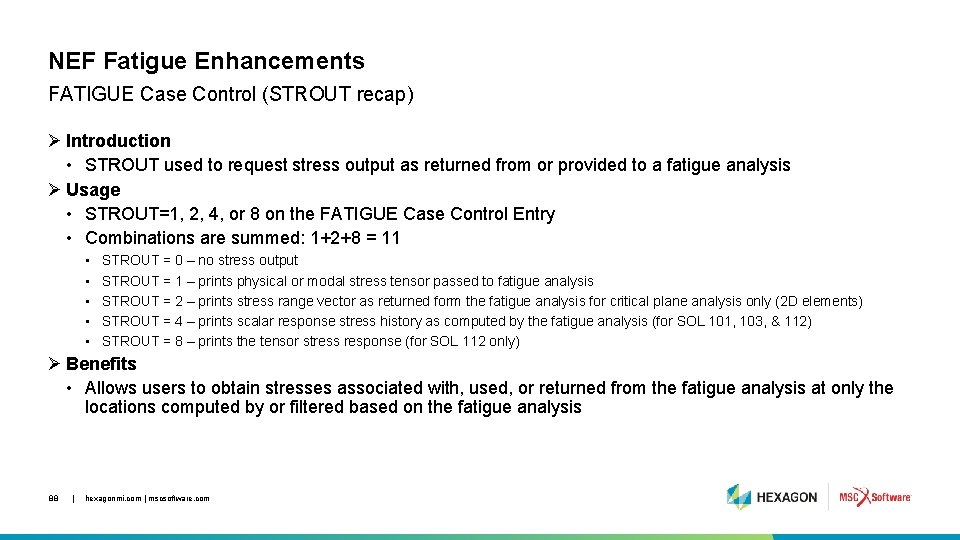
NEF Fatigue Enhancements FATIGUE Case Control (STROUT recap) Ø Introduction • STROUT used to request stress output as returned from or provided to a fatigue analysis Ø Usage • STROUT=1, 2, 4, or 8 on the FATIGUE Case Control Entry • Combinations are summed: 1+2+8 = 11 • • • STROUT = 0 – no stress output STROUT = 1 – prints physical or modal stress tensor passed to fatigue analysis STROUT = 2 – prints stress range vector as returned form the fatigue analysis for critical plane analysis only (2 D elements) STROUT = 4 – prints scalar response stress history as computed by the fatigue analysis (for SOL 101, 103, & 112) STROUT = 8 – prints the tensor stress response (for SOL 112 only) Ø Benefits • Allows users to obtain stresses associated with, used, or returned from the fatigue analysis at only the locations computed by or filtered based on the fatigue analysis 88 | hexagonmi. com | mscsoftware. com
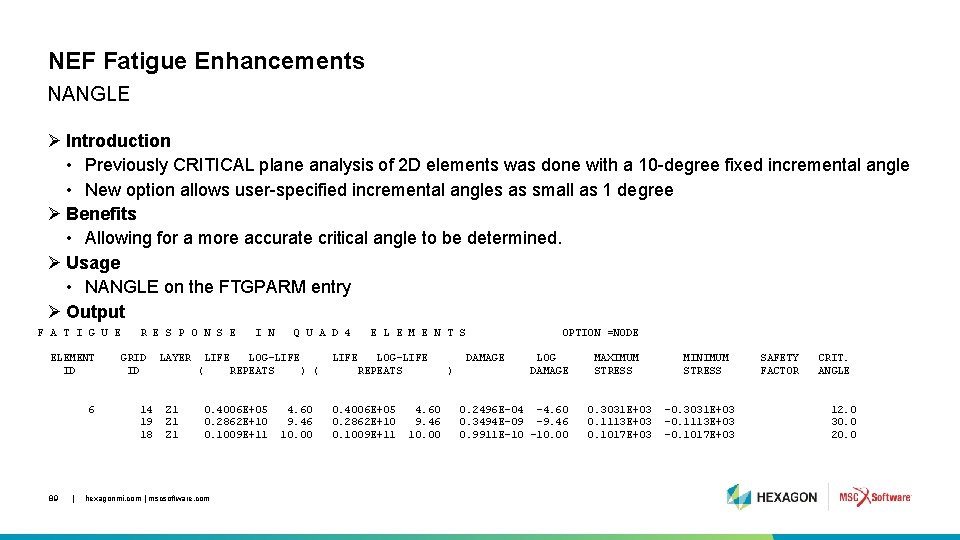
NEF Fatigue Enhancements NANGLE Ø Introduction • Previously CRITICAL plane analysis of 2 D elements was done with a 10 -degree fixed incremental angle • New option allows user-specified incremental angles as small as 1 degree Ø Benefits • Allowing for a more accurate critical angle to be determined. Ø Usage • NANGLE on the FTGPARM entry Ø Output F A T I G U E ELEMENT ID 6 89 | R E S P O N S E GRID ID 14 19 18 LAYER Q U A D 4 LIFE LOG-LIFE REPEATS ) ( ( Z 1 Z 1 I N 0. 4006 E+05 0. 2862 E+10 0. 1009 E+11 hexagonmi. com | mscsoftware. com 4. 60 9. 46 10. 00 E L E M E N T S LIFE LOG-LIFE REPEATS 0. 4006 E+05 0. 2862 E+10 0. 1009 E+11 4. 60 9. 46 10. 00 OPTION =NODE DAMAGE ) LOG DAMAGE 0. 2496 E-04 -4. 60 0. 3494 E-09 -9. 46 0. 9911 E-10 -10. 00 MAXIMUM STRESS 0. 3031 E+03 0. 1113 E+03 0. 1017 E+03 MINIMUM STRESS -0. 3031 E+03 -0. 1113 E+03 -0. 1017 E+03 SAFETY FACTOR CRIT. ANGLE 12. 0 30. 0 20. 0
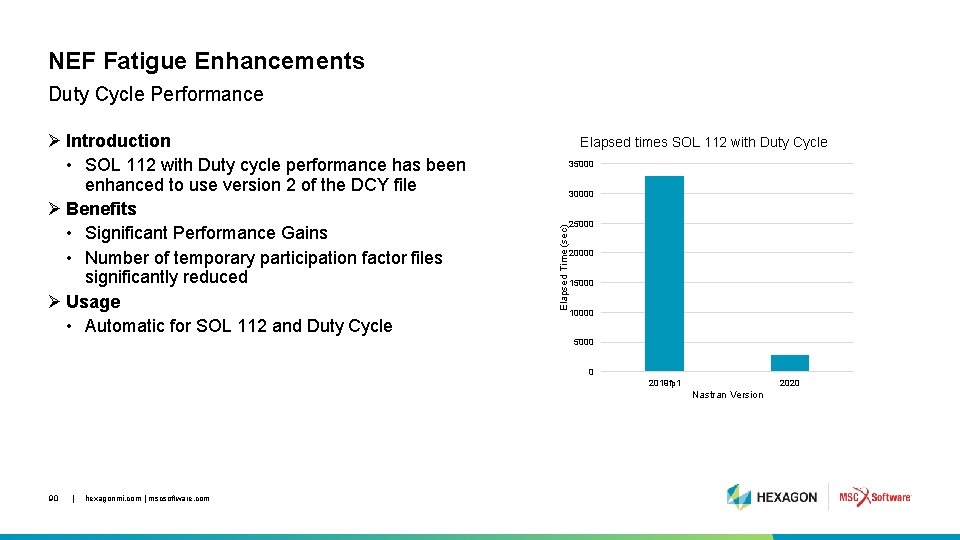
NEF Fatigue Enhancements Duty Cycle Performance Elapsed times SOL 112 with Duty Cycle 35000 30000 Elapsed Time (sec) Ø Introduction • SOL 112 with Duty cycle performance has been enhanced to use version 2 of the DCY file Ø Benefits • Significant Performance Gains • Number of temporary participation factor files significantly reduced Ø Usage • Automatic for SOL 112 and Duty Cycle 25000 20000 15000 10000 5000 0 2019 fp 1 2020 Nastran Version 90 | hexagonmi. com | mscsoftware. com
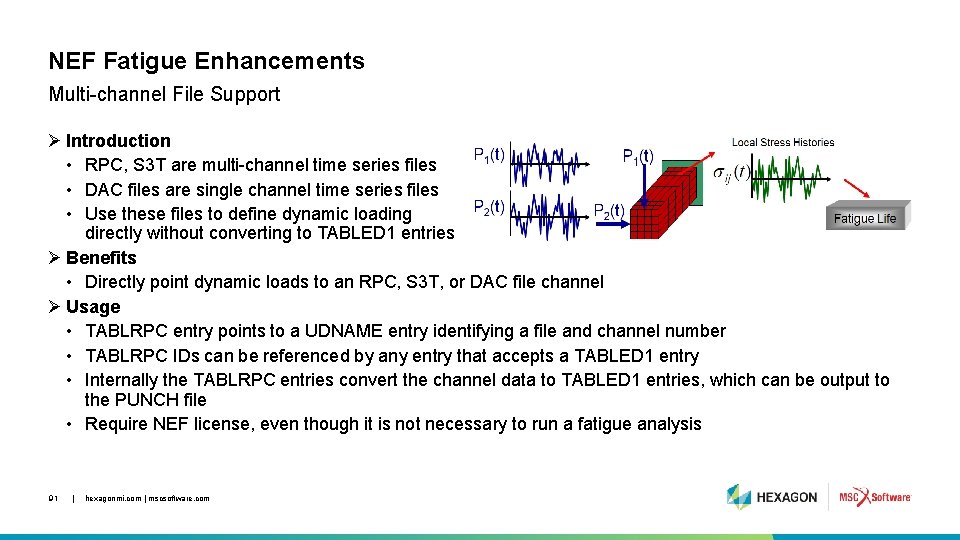
NEF Fatigue Enhancements Multi-channel File Support Ø Introduction • RPC, S 3 T are multi-channel time series files • DAC files are single channel time series files • Use these files to define dynamic loading directly without converting to TABLED 1 entries Ø Benefits • Directly point dynamic loads to an RPC, S 3 T, or DAC file channel Ø Usage • TABLRPC entry points to a UDNAME entry identifying a file and channel number • TABLRPC IDs can be referenced by any entry that accepts a TABLED 1 entry • Internally the TABLRPC entries convert the channel data to TABLED 1 entries, which can be output to the PUNCH file • Require NEF license, even though it is not necessary to run a fatigue analysis 91 | hexagonmi. com | mscsoftware. com

Numerical Methods / HPC 92 | hexagonmi. com | mscsoftware. com
Performance and Efficiency Improvements for the Nastran AVL EXCITE Interface SOL 103 with ACMS and Reduction to A-set Boundary Points 93 | hexagonmi. com | mscsoftware. com
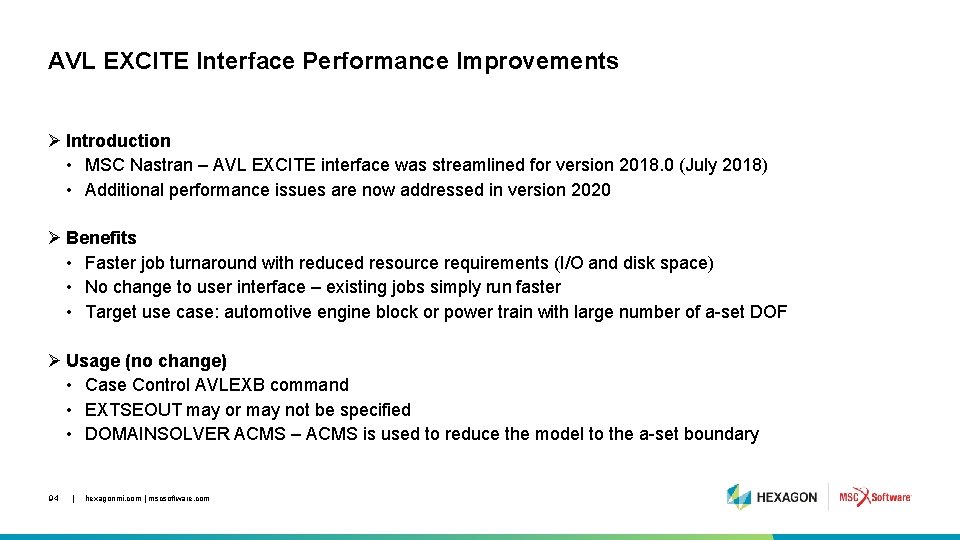
AVL EXCITE Interface Performance Improvements Ø Introduction • MSC Nastran – AVL EXCITE interface was streamlined for version 2018. 0 (July 2018) • Additional performance issues are now addressed in version 2020 Ø Benefits • Faster job turnaround with reduced resource requirements (I/O and disk space) • No change to user interface – existing jobs simply run faster • Target use case: automotive engine block or power train with large number of a-set DOF Ø Usage (no change) • Case Control AVLEXB command • EXTSEOUT may or may not be specified • DOMAINSOLVER ACMS – ACMS is used to reduce the model to the a-set boundary 94 | hexagonmi. com | mscsoftware. com
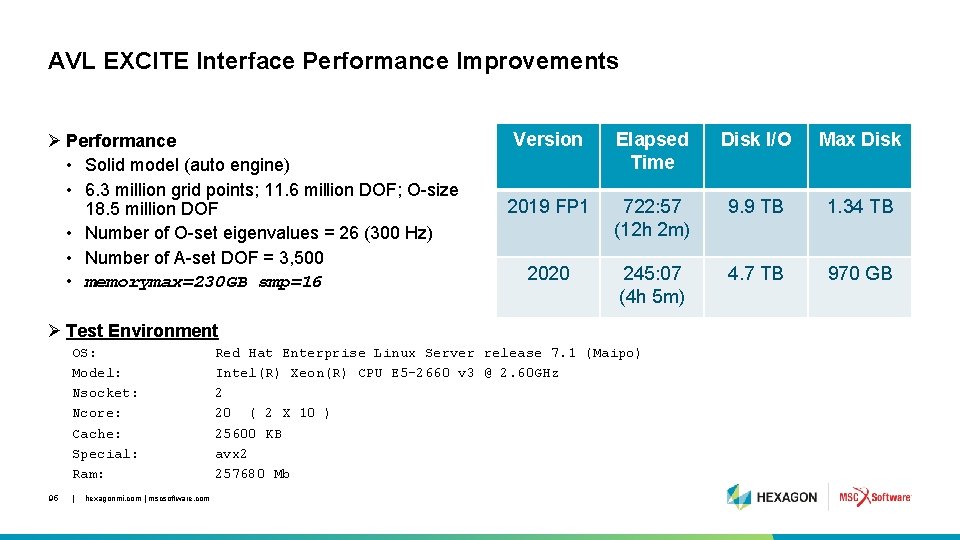
AVL EXCITE Interface Performance Improvements Ø Performance • Solid model (auto engine) • 6. 3 million grid points; 11. 6 million DOF; O-size 18. 5 million DOF • Number of O-set eigenvalues = 26 (300 Hz) • Number of A-set DOF = 3, 500 • memorymax=230 GB smp=16 Version Elapsed Time Disk I/O Max Disk 2019 FP 1 722: 57 (12 h 2 m) 9. 9 TB 1. 34 TB 2020 245: 07 (4 h 5 m) 4. 7 TB 970 GB Ø Test Environment OS: Model: Nsocket: Ncore: Cache: Special: Ram: 95 | hexagonmi. com | mscsoftware. com Red Hat Enterprise Linux Server release 7. 1 (Maipo) Intel(R) Xeon(R) CPU E 5 -2660 v 3 @ 2. 60 GHz 2 20 ( 2 X 10 ) 25600 KB avx 2 257680 Mb
CASI Iterative Solver Support for Inertia Relief (INREL=-1) Linear Statics SOL 101 96 | hexagonmi. com | mscsoftware. com
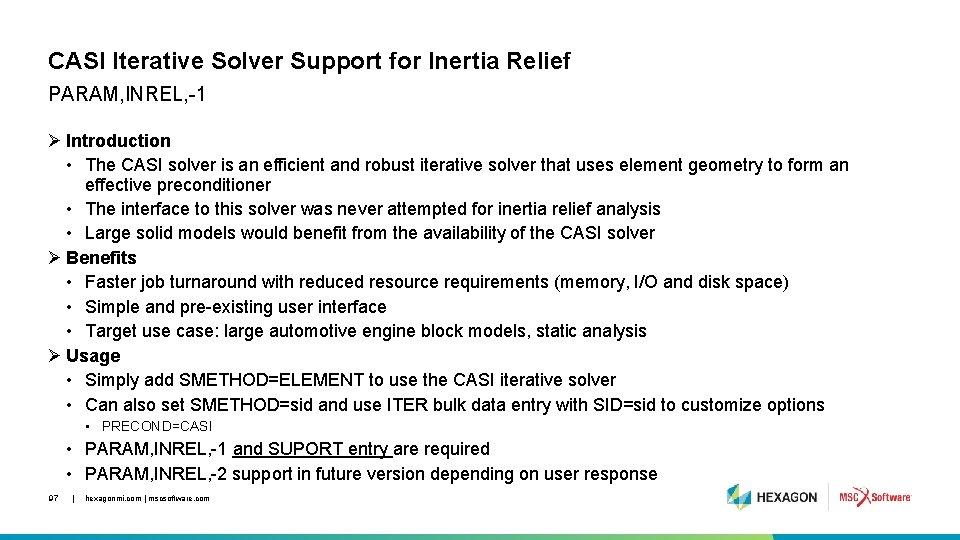
CASI Iterative Solver Support for Inertia Relief PARAM, INREL, -1 Ø Introduction • The CASI solver is an efficient and robust iterative solver that uses element geometry to form an effective preconditioner • The interface to this solver was never attempted for inertia relief analysis • Large solid models would benefit from the availability of the CASI solver Ø Benefits • Faster job turnaround with reduced resource requirements (memory, I/O and disk space) • Simple and pre-existing user interface • Target use case: large automotive engine block models, static analysis Ø Usage • Simply add SMETHOD=ELEMENT to use the CASI iterative solver • Can also set SMETHOD=sid and use ITER bulk data entry with SID=sid to customize options • PRECOND=CASI • PARAM, INREL, -1 and SUPORT entry are required • PARAM, INREL, -2 support in future version depending on user response 97 | hexagonmi. com | mscsoftware. com
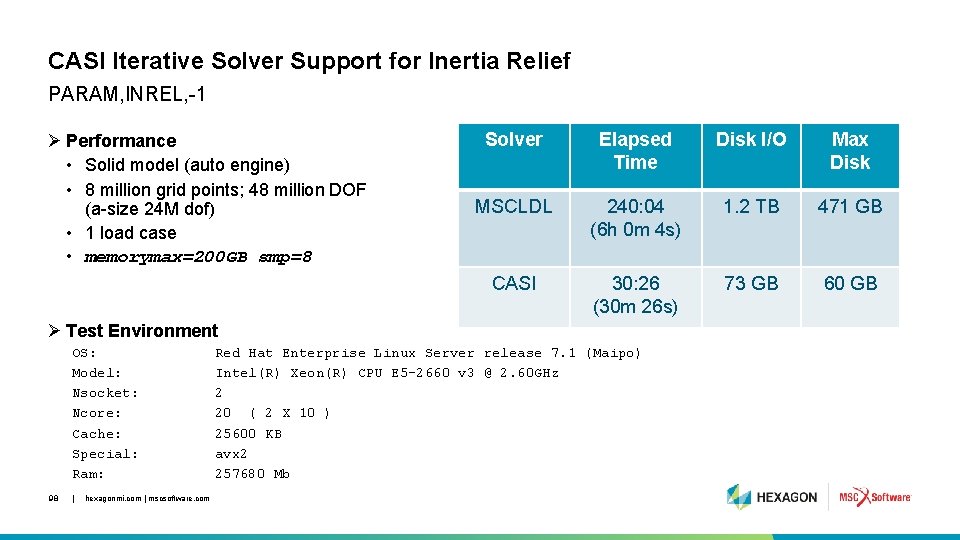
CASI Iterative Solver Support for Inertia Relief PARAM, INREL, -1 Ø Performance • Solid model (auto engine) • 8 million grid points; 48 million DOF (a-size 24 M dof) • 1 load case • memorymax=200 GB smp=8 Solver Elapsed Time Disk I/O Max Disk MSCLDL 240: 04 (6 h 0 m 4 s) 1. 2 TB 471 GB CASI 30: 26 (30 m 26 s) 73 GB 60 GB Ø Test Environment OS: Model: Nsocket: Ncore: Cache: Special: Ram: 98 | hexagonmi. com | mscsoftware. com Red Hat Enterprise Linux Server release 7. 1 (Maipo) Intel(R) Xeon(R) CPU E 5 -2660 v 3 @ 2. 60 GHz 2 20 ( 2 X 10 ) 25600 KB avx 2 257680 Mb

Improved GPU Acceleration 99 | hexagonmi. com | mscsoftware. com
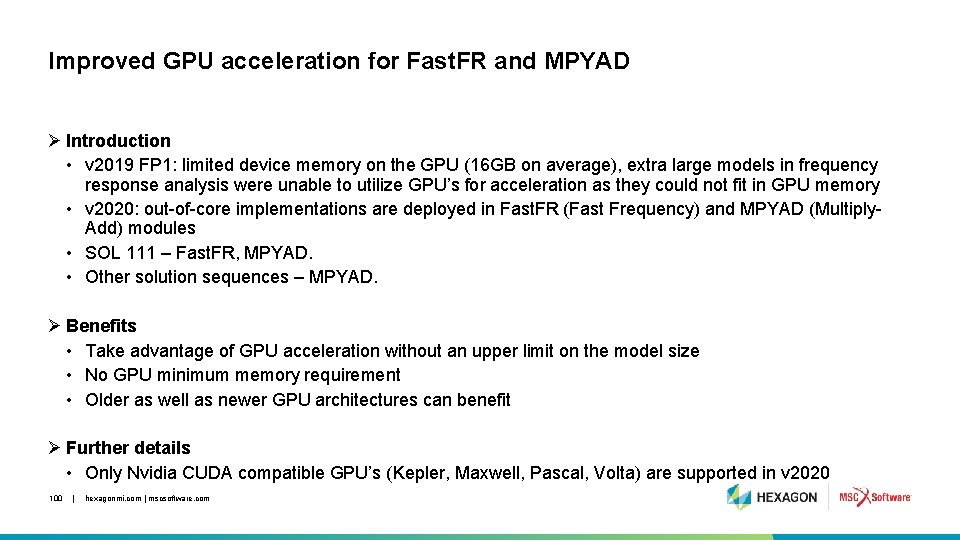
Improved GPU acceleration for Fast. FR and MPYAD Ø Introduction • v 2019 FP 1: limited device memory on the GPU (16 GB on average), extra large models in frequency response analysis were unable to utilize GPU’s for acceleration as they could not fit in GPU memory • v 2020: out-of-core implementations are deployed in Fast. FR (Fast Frequency) and MPYAD (Multiply. Add) modules • SOL 111 – Fast. FR, MPYAD. • Other solution sequences – MPYAD. Ø Benefits • Take advantage of GPU acceleration without an upper limit on the model size • No GPU minimum memory requirement • Older as well as newer GPU architectures can benefit Ø Further details • Only Nvidia CUDA compatible GPU’s (Kepler, Maxwell, Pascal, Volta) are supported in v 2020 100 | hexagonmi. com | mscsoftware. com
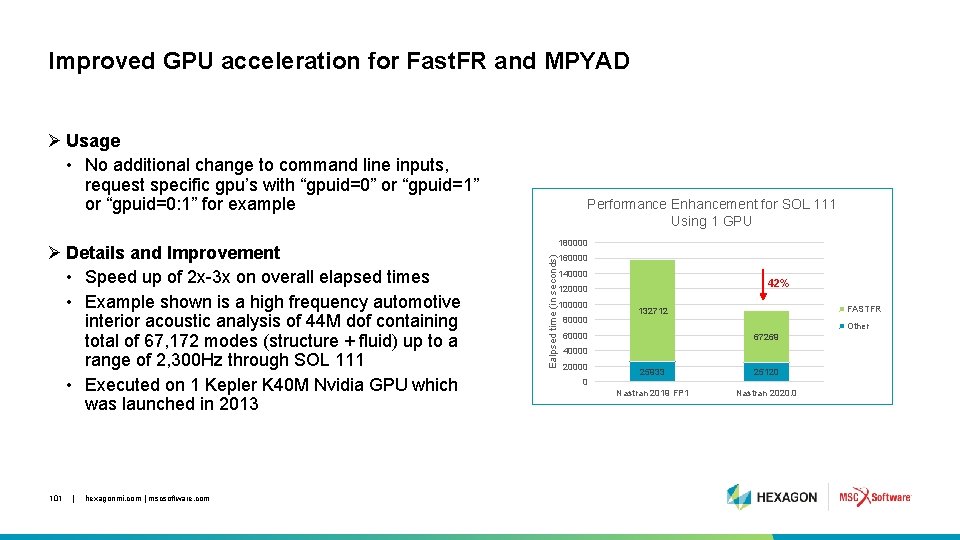
Improved GPU acceleration for Fast. FR and MPYAD Ø Usage • No additional change to command line inputs, request specific gpu’s with “gpuid=0” or “gpuid=1” or “gpuid=0: 1” for example 101 | hexagonmi. com | mscsoftware. com 180000 Ealpsed time (in seconds) Ø Details and Improvement • Speed up of 2 x-3 x on overall elapsed times • Example shown is a high frequency automotive interior acoustic analysis of 44 M dof containing total of 67, 172 modes (structure + fluid) up to a range of 2, 300 Hz through SOL 111 • Executed on 1 Kepler K 40 M Nvidia GPU which was launched in 2013 Performance Enhancement for SOL 111 Using 1 GPU 160000 140000 42% 120000 100000 80000 FASTFR 132712 Other 60000 67269 40000 20000 0 25933 25120 Nastran 2019 FP 1 Nastran 2020. 0

Other Updates 102 | hexagonmi. com | mscsoftware. com
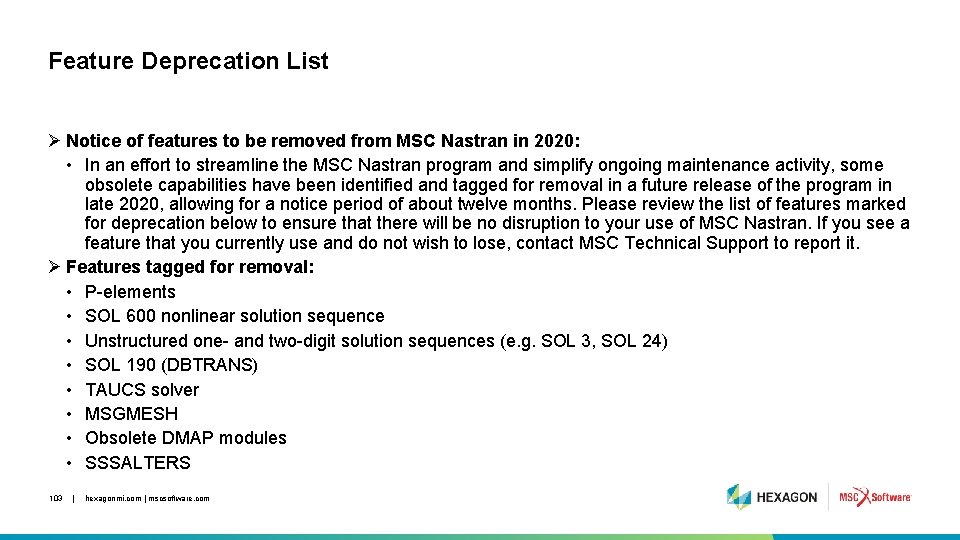
Feature Deprecation List Ø Notice of features to be removed from MSC Nastran in 2020: • In an effort to streamline the MSC Nastran program and simplify ongoing maintenance activity, some obsolete capabilities have been identified and tagged for removal in a future release of the program in late 2020, allowing for a notice period of about twelve months. Please review the list of features marked for deprecation below to ensure that there will be no disruption to your use of MSC Nastran. If you see a feature that you currently use and do not wish to lose, contact MSC Technical Support to report it. Ø Features tagged for removal: • P-elements • SOL 600 nonlinear solution sequence • Unstructured one- and two-digit solution sequences (e. g. SOL 3, SOL 24) • SOL 190 (DBTRANS) • TAUCS solver • MSGMESH • Obsolete DMAP modules • SSSALTERS 103 | hexagonmi. com | mscsoftware. com
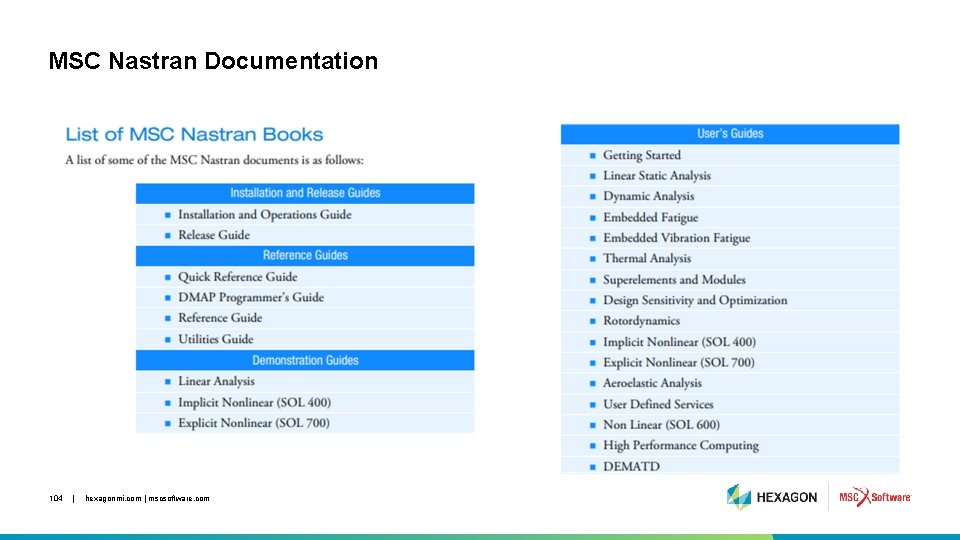
MSC Nastran Documentation 104 | hexagonmi. com | mscsoftware. com

Thank You! 105 | hexagonmi. com | mscsoftware. com
- Slides: 105