
MRP and ERP Chapter 12 Learning Objectives Describe
MRP and ERP Chapter 12
Learning Objectives • Describe the inputs, outputs, and nature of MRP processing. • Explain bill of materials • Explain time-phased product structure • Describe differences between MRP and ERP

MRP • Material requirements planning (MRP): – A computer-based information system that translates master schedule requirements for end items into timephased requirements for subassemblies, components, and raw materials. – The MRP is designed to answer three questions: 1. What is needed? 2. How much is needed? 3. When is it needed?
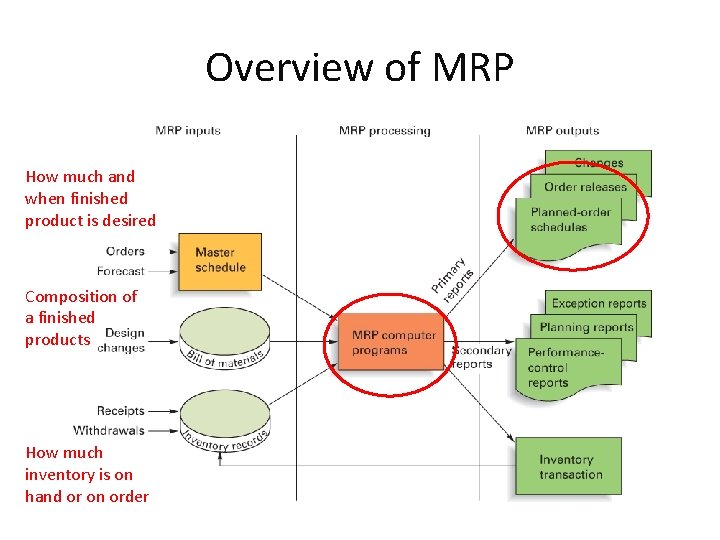
Overview of MRP How much and when finished product is desired Composition of a finished products How much inventory is on hand or on order
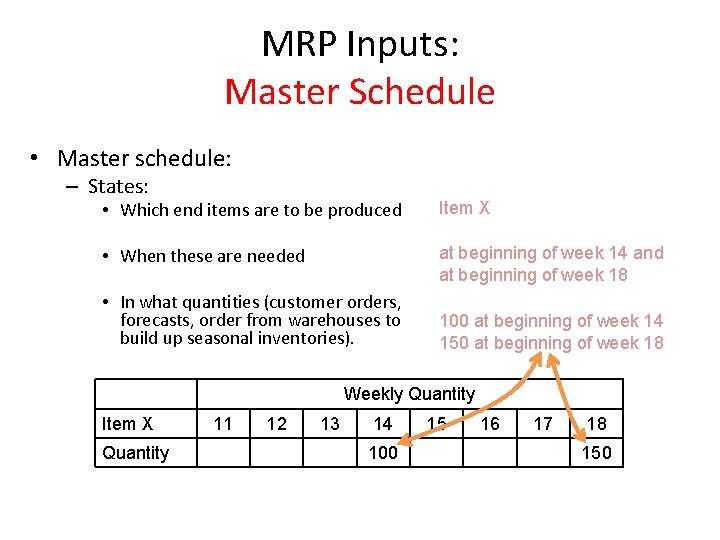
MRP Inputs: Master Schedule • Master schedule: – States: • Which end items are to be produced Item X • When these are needed at beginning of week 14 and at beginning of week 18 • In what quantities (customer orders, forecasts, order from warehouses to build up seasonal inventories). 100 at beginning of week 14 150 at beginning of week 18 Weekly Quantity Item X Quantity 11 12 13 14 100 15 16 17 18 150

Cumulative Lead Time �The master schedule should cover a period that is at least equivalent to the cumulative lead time – Cumulative lead time » The sum of the lead times that sequential phases of a process require, from ordering of parts or raw materials to completion of final assembly. CLT = 9 weeks
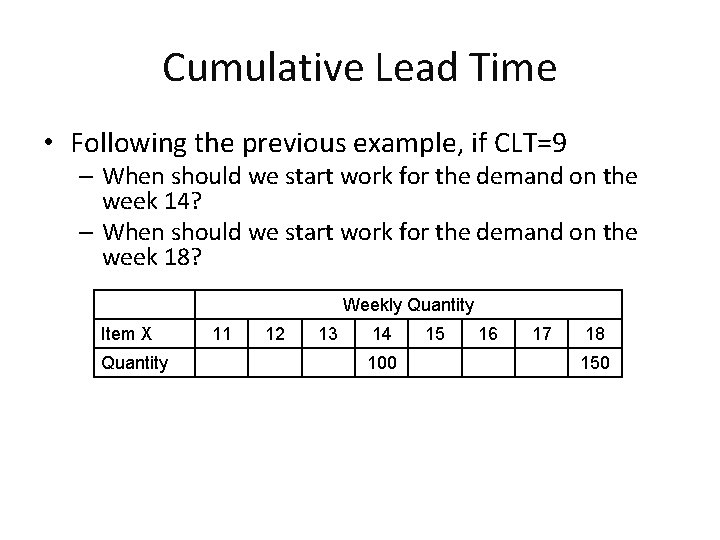
Cumulative Lead Time • Following the previous example, if CLT=9 – When should we start work for the demand on the week 14? – When should we start work for the demand on the week 18? Weekly Quantity Item X Quantity 11 12 13 14 100 15 16 17 18 150
MRP Inputs: Bill of Materials • Bill of Materials (BOM) – A hierarchical listing of all of the assemblies, subassemblies, parts, and raw materials needed to produce one unit of a product – Each finished product has its own BOM – Product structure tree • A visual depiction of the requirements in a bill of materials, where all components are listed by levels
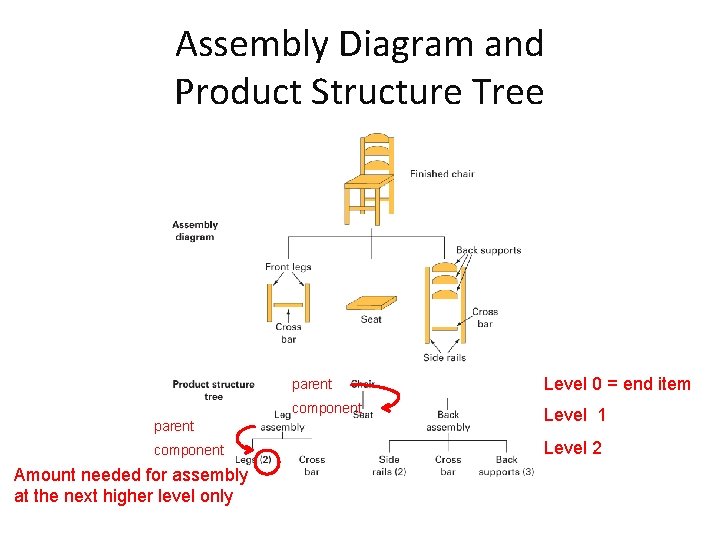
Assembly Diagram and Product Structure Tree parent component Amount needed for assembly at the next higher level only parent Level 0 = end item component Level 1 Level 2
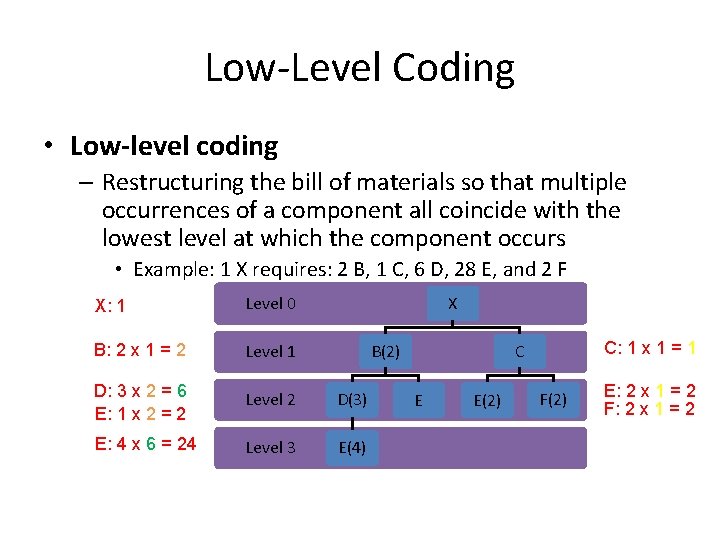
Low-Level Coding • Low-level coding – Restructuring the bill of materials so that multiple occurrences of a component all coincide with the lowest level at which the component occurs • Example: 1 X requires: 2 B, 1 C, 6 D, 28 E, and 2 F X X: 1 Level 0 B: 2 x 1 = 2 Level 1 D: 3 x 2 = 6 E: 1 x 2 = 2 Level 2 D(3) E: 4 x 6 = 24 Level 3 E(4) B(2) C: 1 x 1 = 1 C E E(2) F(2) E: 2 x 1 = 2 F: 2 x 1 = 2
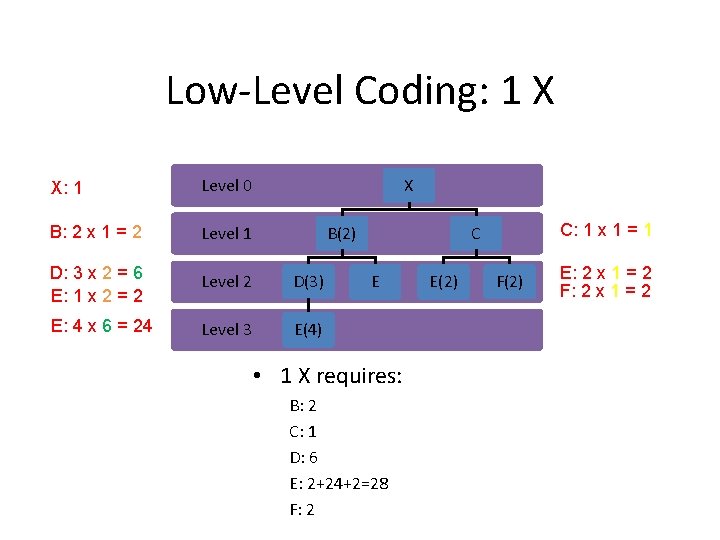
Low-Level Coding: 1 X X X: 1 Level 0 B: 2 x 1 = 2 Level 1 D: 3 x 2 = 6 E: 1 x 2 = 2 Level 2 D(3) E: 4 x 6 = 24 Level 3 E(4) B(2) C: 1 x 1 = 1 C E • 1 X requires: B: 2 C: 1 D: 6 E: 2+24+2=28 F: 2 E(2) F(2) E: 2 x 1 = 2 F: 2 x 1 = 2
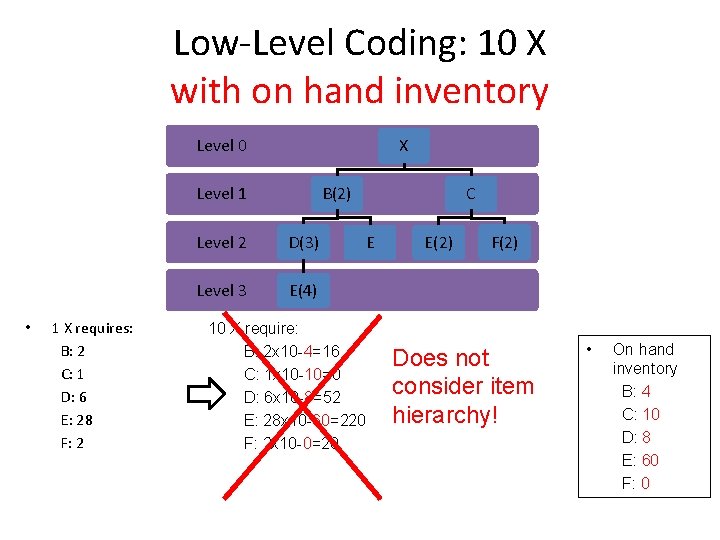
Low-Level Coding: 10 X with on hand inventory X Level 0 B(2) Level 1 • 1 X requires: B: 2 C: 1 D: 6 E: 28 F: 2 Level 2 D(3) Level 3 E(4) C E 10 X require: B: 2 x 10 -4=16 C: 1 x 10 -10=0 D: 6 x 10 -8=52 E: 28 x 10 -60=220 F: 2 x 10 -0=20 E(2) F(2) Does not consider item hierarchy! • On hand inventory B: 4 C: 10 D: 8 E: 60 F: 0
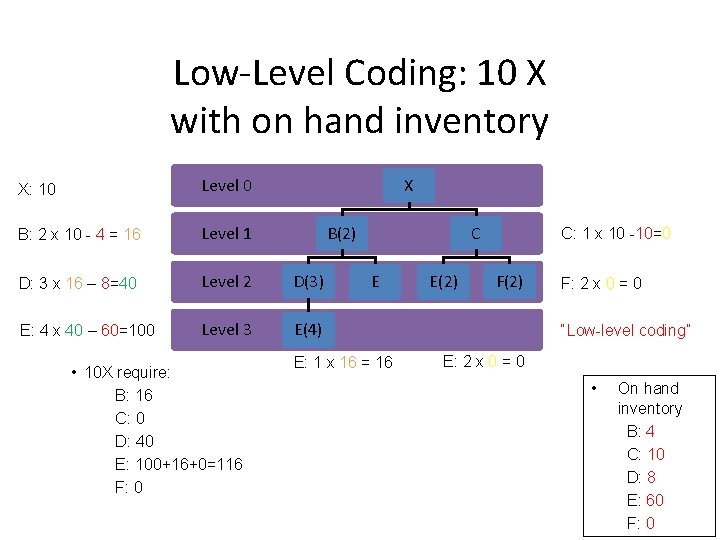
Low-Level Coding: 10 X with on hand inventory X X: 10 Level 0 B: 2 x 10 - 4 = 16 Level 1 D: 3 x 16 – 8=40 Level 2 D(3) E: 4 x 40 – 60=100 Level 3 E(4) • 10 X require: B: 16 C: 0 D: 40 E: 100+16+0=116 F: 0 B(2) C E E: 1 x 16 = 16 E(2) C: 1 x 10 -10=0 F(2) F: 2 x 0 = 0 “Low-level coding” E: 2 x 0 = 0 • On hand inventory B: 4 C: 10 D: 8 E: 60 F: 0
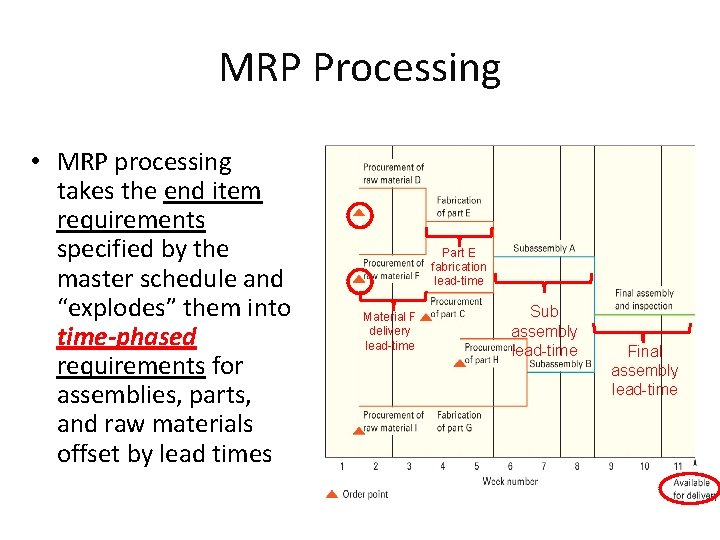
MRP Processing • MRP processing takes the end item requirements specified by the master schedule and “explodes” them into time-phased requirements for assemblies, parts, and raw materials offset by lead times Part E fabrication lead-time Material F delivery lead-time Sub assembly lead-time Final assembly lead-time
MRP Inputs: Inventory Records • Inventory records – Includes information on the status of each item by time period (called time buckets) • Information about – Gross requirements – Scheduled receipts – Expected amount on hand • Other details for each item such as – Supplier – Lead time – Lot size policy – Changes due to stock receipts and withdrawals – Canceled orders and similar events
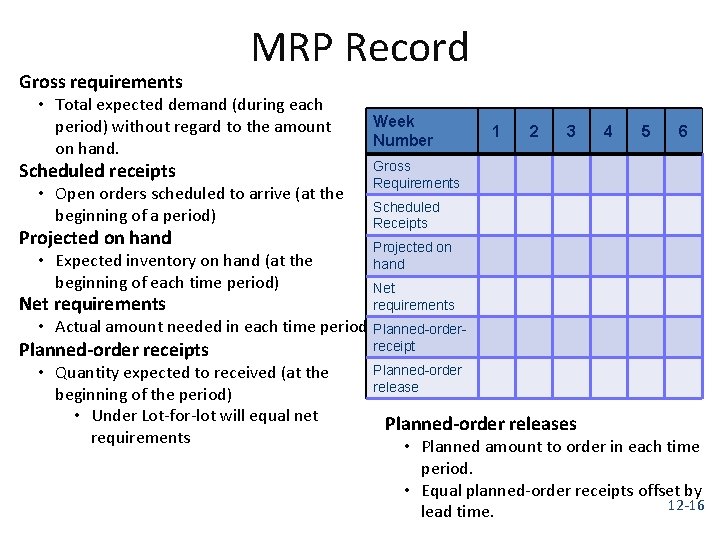
Gross requirements MRP Record • Total expected demand (during each period) without regard to the amount on hand. Scheduled receipts • Open orders scheduled to arrive (at the beginning of a period) Projected on hand • Expected inventory on hand (at the beginning of each time period) Week Number 1 2 3 4 5 6 Gross Requirements Scheduled Receipts Projected on hand Net requirements Planned-order receipts receipt • Actual amount needed in each time period Planned-order • Quantity expected to received (at the beginning of the period) • Under Lot-for-lot will equal net requirements Planned-order releases • Planned amount to order in each time period. • Equal planned-order receipts offset by 12 -16 lead time.
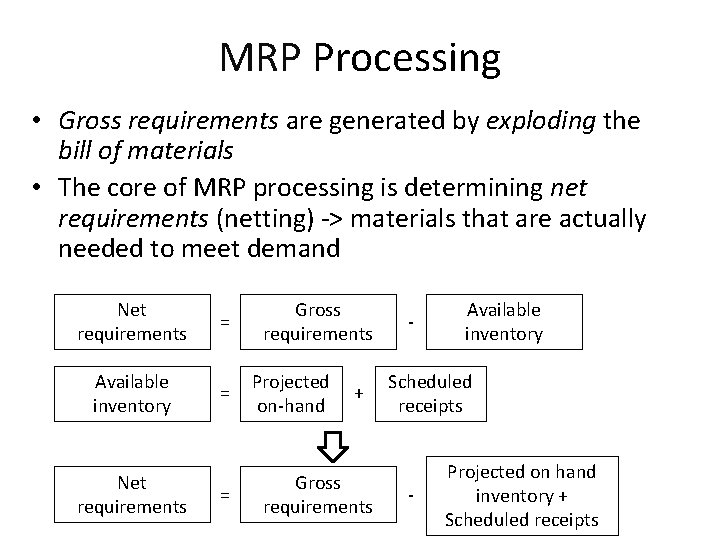
MRP Processing • Gross requirements are generated by exploding the bill of materials • The core of MRP processing is determining net requirements (netting) -> materials that are actually needed to meet demand Net requirements = Available inventory = Net requirements = Gross requirements Projected on-hand + Gross requirements - Available inventory Scheduled receipts - Projected on hand inventory + Scheduled receipts
MRP: Development • The MRP is based on the product structure tree diagram • Requirements are determined level by level, beginning with the end item and working down the tree • The timing and quantity of each “parent” becomes the basis for determining the timing and quantity of the “children” items directly below it. • The “children” items then become the “parent” items for the next level, and so on
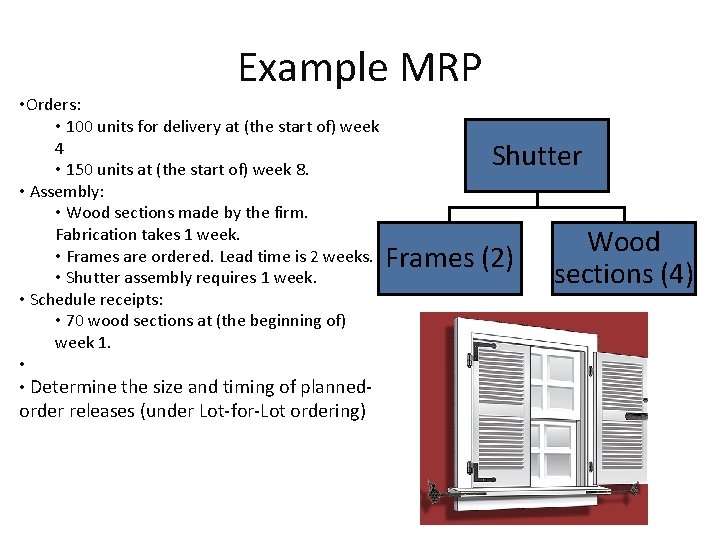
Example MRP • Orders: • 100 units for delivery at (the start of) week 4 • 150 units at (the start of) week 8. • Assembly: • Wood sections made by the firm. Fabrication takes 1 week. • Frames are ordered. Lead time is 2 weeks. • Shutter assembly requires 1 week. • Schedule receipts: • 70 wood sections at (the beginning of) week 1. • • Determine the size and timing of planned- order releases (under Lot-for-Lot ordering) Shutter Frames (2) Wood sections (4)
![MRP Lot-For-Lot Ordering Shutter [LT=1 week] Frames (2) [LT=2 weeks] Wood sections (4) [LT=](http://slidetodoc.com/presentation_image_h/da8dae613062447cce58ea2ed456b0bd/image-20.jpg "MRP Lot-For-Lot Ordering Shutter [LT=1 week] Frames (2) [LT=2 weeks] Wood sections (4) [LT=")
MRP Lot-For-Lot Ordering Shutter [LT=1 week] Frames (2) [LT=2 weeks] Wood sections (4) [LT= 1 weeks]
![MRP Lot-For-Lot Ordering Shutter [LT=1 week] 200*1 330*3 300*1 600*3 Frames (2) Wood sections](http://slidetodoc.com/presentation_image_h/da8dae613062447cce58ea2ed456b0bd/image-21.jpg "MRP Lot-For-Lot Ordering Shutter [LT=1 week] 200*1 330*3 300*1 600*3 Frames (2) Wood sections")
MRP Lot-For-Lot Ordering Shutter [LT=1 week] 200*1 330*3 300*1 600*3 Frames (2) Wood sections (4) [LT=2 weeks] [LT= 1 weeks] Widget (1) Widget (3) [LT=1 weeks]
Updating the System • An MRP is not a static document – As time passes • • Some orders get completed Other orders are nearing completion New orders will have been entered Existing orders will have been altered – Quantity changes – Delays – Missed deliveries – Rolling Horizon
MRP Outputs: Primary • Primary Outputs – Planned orders • A schedule indicating the amount and timing of future orders – Order releases • Authorizing the execution of planned orders – Changes • Revisions of the dates or quantities, or the cancellation of orders
MRP Outputs: Secondary �Secondary Outputs �Performance-control reports �Evaluation of system operation, including deviations from plans and cost information – e. g. , missed deliveries and stockouts �Planning reports �Data useful for assessing future material requirements – e. g. , purchase commitments �Exception reports �Data on any major discrepancies encountered – E. g. , late and overdue orders, excessive scrap rates, requirements for nonexistent parts
Enterprise Resource Planning (ERP) • Many organizations use a functional structure. Information tends to flow freely within each function but less so between functions. • Enterprise Resource Planning (ERP) – ERP was the next step in an evolution that began with MRP – ERP typically has an MRP core – ERP represents an expanded effort to integrate standardized record keeping that will permit information sharing among different areas of an organization in order to manage the system more effectively – A system to capture and make data available in real-time to decision makers throughout the organization. – ERP systems are composed of a collection of integrated modules
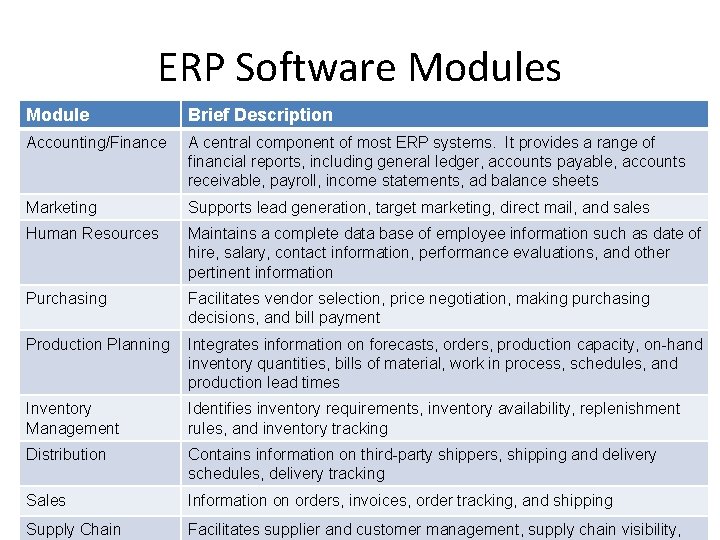
ERP Software Modules Module Brief Description Accounting/Finance A central component of most ERP systems. It provides a range of financial reports, including general ledger, accounts payable, accounts receivable, payroll, income statements, ad balance sheets Marketing Supports lead generation, target marketing, direct mail, and sales Human Resources Maintains a complete data base of employee information such as date of hire, salary, contact information, performance evaluations, and other pertinent information Purchasing Facilitates vendor selection, price negotiation, making purchasing decisions, and bill payment Production Planning Integrates information on forecasts, orders, production capacity, on-hand inventory quantities, bills of material, work in process, schedules, and production lead times Inventory Management Identifies inventory requirements, inventory availability, replenishment rules, and inventory tracking Distribution Contains information on third-party shippers, shipping and delivery schedules, delivery tracking Sales Information on orders, invoices, order tracking, and shipping Supply Chain Facilitates supplier and customer management, supply chain visibility,
Focused Reading (MIS Major Required) 1. Enterprise resource planning (ERP)—A brief history 2. 13 Common ERP Mistakes and How to Avoid Making Them 3. ERP and Business Process Re-engineering • ERP: The Business Process Re-engineering Dilemma • To BPR, or not to BPR, that is the question 4. Cloud ERP • What Is Cloud ERP, and How Is It Different from Traditional Solutions? • Benefits of Cloud ERP Software
ERP History • MRP: focus on cost reporting, materials, manufacturing – tapes – IBM – 1960~1970 • MRPII: scheduling, procurement – 1980 s • ERP – SAP, Peoplesoft, – 1990 – Client-server architecture
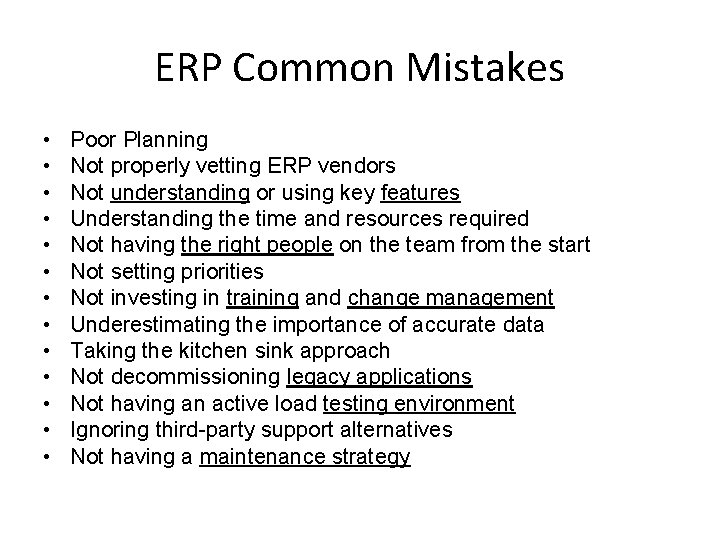
ERP Common Mistakes • • • • Poor Planning Not properly vetting ERP vendors Not understanding or using key features Understanding the time and resources required Not having the right people on the team from the start Not setting priorities Not investing in training and change management Underestimating the importance of accurate data Taking the kitchen sink approach Not decommissioning legacy applications Not having an active load testing environment Ignoring third-party support alternatives Not having a maintenance strategy
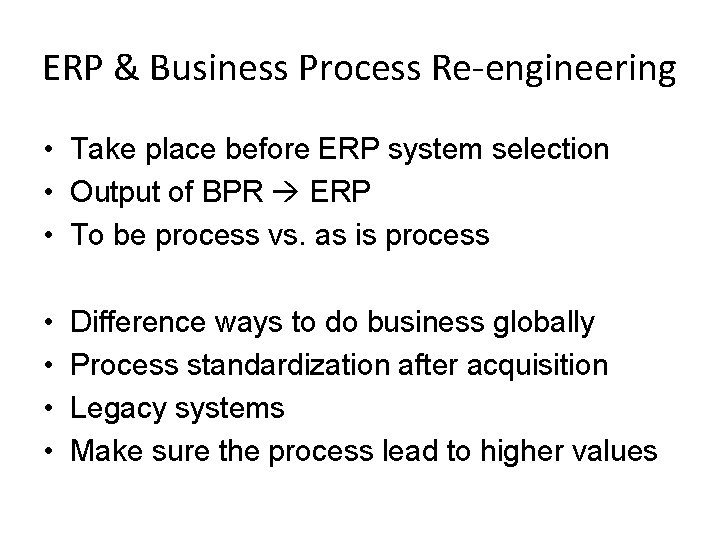
ERP & Business Process Re-engineering • Take place before ERP system selection • Output of BPR ERP • To be process vs. as is process • • Difference ways to do business globally Process standardization after acquisition Legacy systems Make sure the process lead to higher values
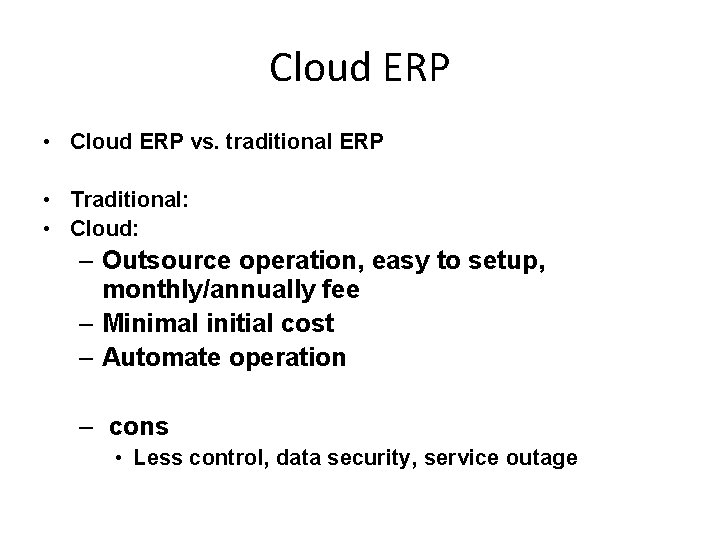
Cloud ERP • Cloud ERP vs. traditional ERP • Traditional: • Cloud: – Outsource operation, easy to setup, monthly/annually fee – Minimal initial cost – Automate operation – cons • Less control, data security, service outage
- Slides: 31