
MPJ Express An Implementation of MPI in Java

![Additional Runtime Arguments § The mpjrun. [sh/bat] script accepts some additional arguments which can](https://slidetodoc.com/presentation_image_h/93263a4c8cdbba5065d63b302fe67e3c/image-15.jpg "Additional Runtime Arguments § The mpjrun. [sh/bat] script accepts some additional arguments which can")

- Slides: 19
MPJ Express: An Implementation of MPI in Java Version: 0. 35 (Beta Release) Aamir Shafi, Bryan Carpenter, Mark Baker aamir. shafi@seecs. edu. pk, bryan. carpenter@port. ac. uk, mark. baker@computer. org 11/24/2020 1
Introduction § MPJ Express is a message passing library that be can be used by the application developers to develop and execute parallel Java applications on compute clusters or network of computers. § MPJ Express is originally designed for distributed memory machines like clusters but also supports efficient execution of parallel applications on desktops or laptops that contain shared memory or multicore processors § MPJ Express is a reference implementation of mpi. Java 1. 2 API, which is an MPI-like API for Java defined by the Java Grande Forum § The current release contains: – The core library – The runtime infrastructure – The test-suite 11/24/2020 2
MPJ Express Configurations § MPJ Express can be configured in two ways: – Multicore Configuration: This configuration is used by developers who want to execute their parallel Java applications on multicore or shared memory machines (laptops and desktops). – Cluster Configuration: This configuration is used by developers who want to execute their parallel Java applications on distributed memory platforms including clusters and network of computers. 11/24/2020 3
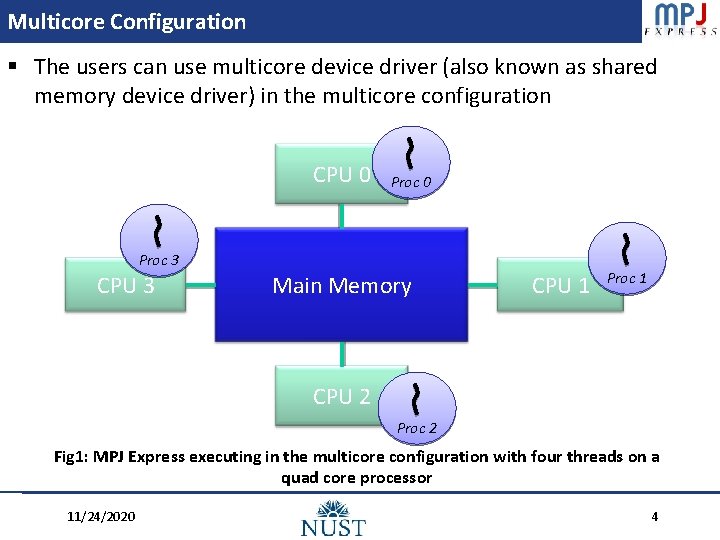
Multicore Configuration § The users can use multicore device driver (also known as shared memory device driver) in the multicore configuration CPU 0 Proc 3 CPU 3 Main Memory CPU 1 Proc 1 CPU 2 Proc 2 Fig 1: MPJ Express executing in the multicore configuration with four threads on a quad core processor 11/24/2020 4
Advantages of Multicore Configuration § Incremental Development: – Users can first develop parallel applications on desktops/laptops using multicore configuration and then take the same code to distributed memory platforms including clusters § Teaching Purposes: – This configuration is preferred for teaching purposes since students can execute message passing code on their personal computers § Debugging and Profiling: – IDEs like Eclipse can be used for easier debugging and profiling 11/24/2020 5
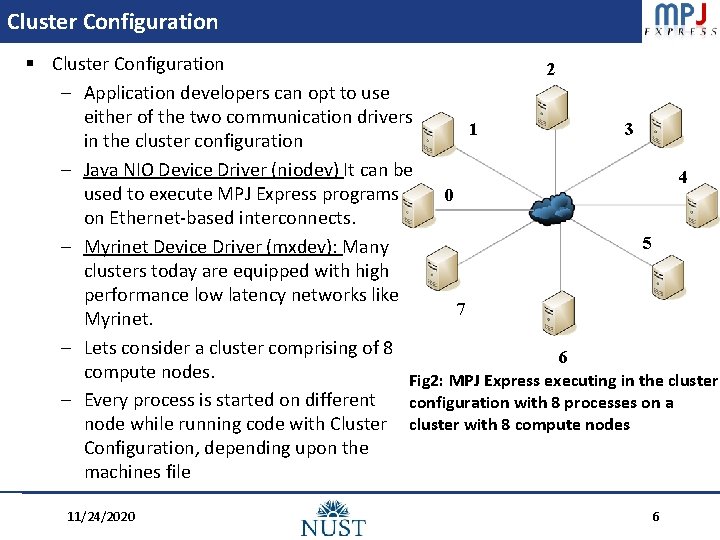
Cluster Configuration § Cluster Configuration 2 – Application developers can opt to use either of the two communication drivers 1 3 in the cluster configuration – Java NIO Device Driver (niodev) It can be 4 used to execute MPJ Express programs 0 on Ethernet-based interconnects. 5 – Myrinet Device Driver (mxdev): Many clusters today are equipped with high performance low latency networks like 7 Myrinet. – Lets consider a cluster comprising of 8 6 compute nodes. Fig 2: MPJ Express executing in the cluster – Every process is started on different configuration with 8 processes on a node while running code with Cluster cluster with 8 compute nodes Configuration, depending upon the machines file 11/24/2020 6
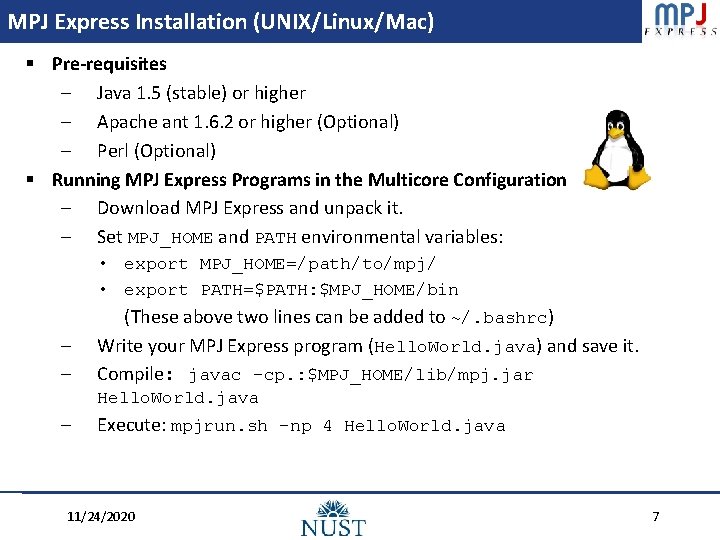
MPJ Express Installation (UNIX/Linux/Mac) § Pre-requisites – Java 1. 5 (stable) or higher – Apache ant 1. 6. 2 or higher (Optional) – Perl (Optional) § Running MPJ Express Programs in the Multicore Configuration – Download MPJ Express and unpack it. – Set MPJ_HOME and PATH environmental variables: • export MPJ_HOME=/path/to/mpj/ • export PATH=$PATH: $MPJ_HOME/bin – – (These above two lines can be added to ~/. bashrc) Write your MPJ Express program (Hello. World. java) and save it. Compile: javac -cp. : $MPJ_HOME/lib/mpj. jar Hello. World. java – Execute: mpjrun. sh -np 4 Hello. World. java 11/24/2020 7
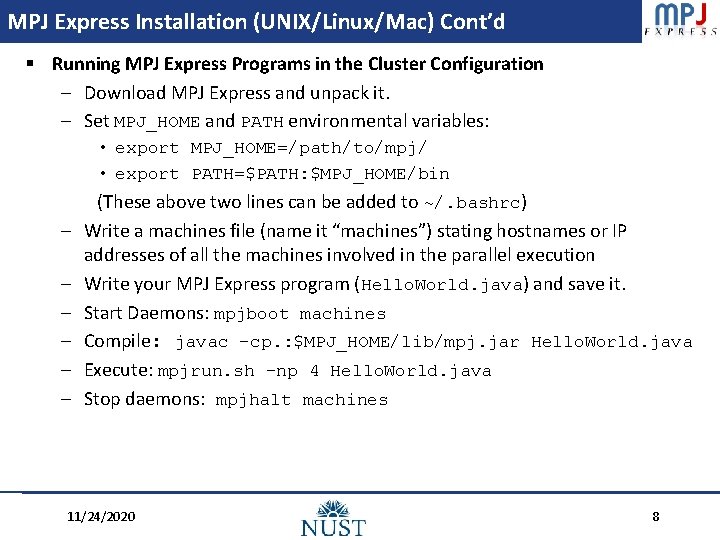
MPJ Express Installation (UNIX/Linux/Mac) Cont’d § Running MPJ Express Programs in the Cluster Configuration – Download MPJ Express and unpack it. – Set MPJ_HOME and PATH environmental variables: • export MPJ_HOME=/path/to/mpj/ • export PATH=$PATH: $MPJ_HOME/bin – – – (These above two lines can be added to ~/. bashrc) Write a machines file (name it “machines”) stating hostnames or IP addresses of all the machines involved in the parallel execution Write your MPJ Express program (Hello. World. java) and save it. Start Daemons: mpjboot machines Compile: javac -cp. : $MPJ_HOME/lib/mpj. jar Hello. World. java Execute: mpjrun. sh -np 4 Hello. World. java Stop daemons: mpjhalt machines 11/24/2020 8
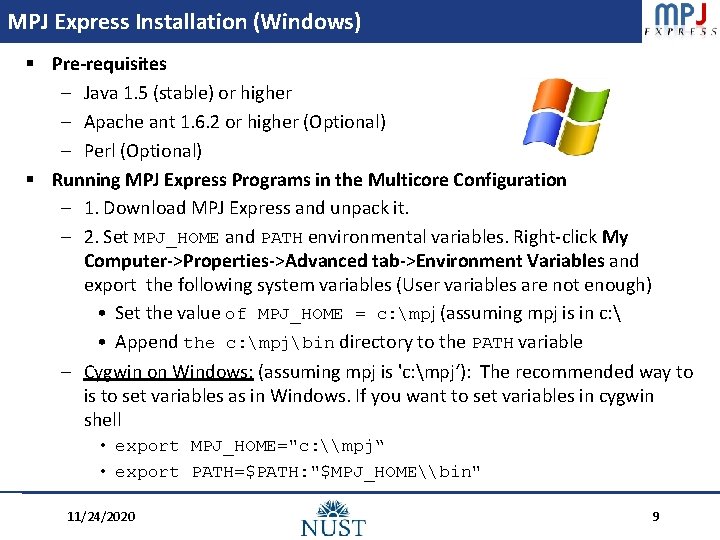
MPJ Express Installation (Windows) § Pre-requisites – Java 1. 5 (stable) or higher – Apache ant 1. 6. 2 or higher (Optional) – Perl (Optional) § Running MPJ Express Programs in the Multicore Configuration – 1. Download MPJ Express and unpack it. – 2. Set MPJ_HOME and PATH environmental variables. Right-click My Computer->Properties->Advanced tab->Environment Variables and export the following system variables (User variables are not enough) • Set the value of MPJ_HOME = c: mpj (assuming mpj is in c: • Append the c: mpjbin directory to the PATH variable – Cygwin on Windows: (assuming mpj is 'c: mpj‘): The recommended way to is to set variables as in Windows. If you want to set variables in cygwin shell • export MPJ_HOME="c: \mpj“ • export PATH=$PATH: "$MPJ_HOME\bin" 11/24/2020 9
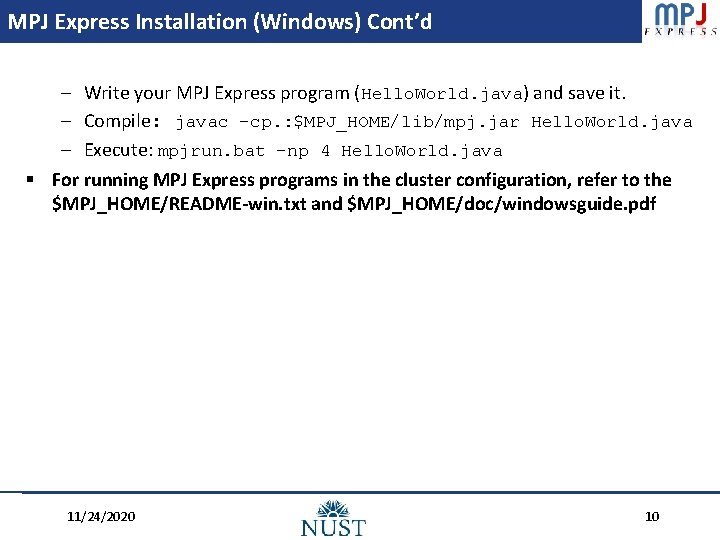
MPJ Express Installation (Windows) Cont’d – Write your MPJ Express program (Hello. World. java) and save it. – Compile: javac -cp. : $MPJ_HOME/lib/mpj. jar Hello. World. java – Execute: mpjrun. bat -np 4 Hello. World. java § For running MPJ Express programs in the cluster configuration, refer to the $MPJ_HOME/README-win. txt and $MPJ_HOME/doc/windowsguide. pdf 11/24/2020 10
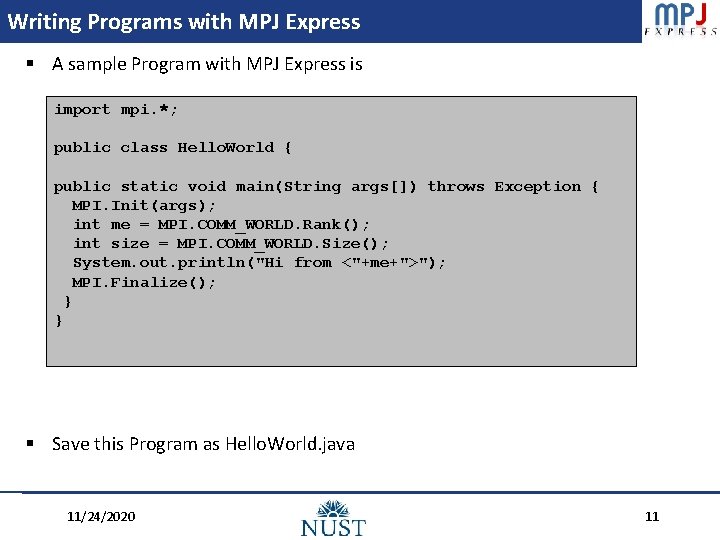
Writing Programs with MPJ Express § A sample Program with MPJ Express is import mpi. *; public class Hello. World { public static void main(String args[]) throws Exception { MPI. Init(args); int me = MPI. COMM_WORLD. Rank(); int size = MPI. COMM_WORLD. Size(); System. out. println("Hi from <"+me+">"); MPI. Finalize(); } } § Save this Program as Hello. World. java 11/24/2020 11
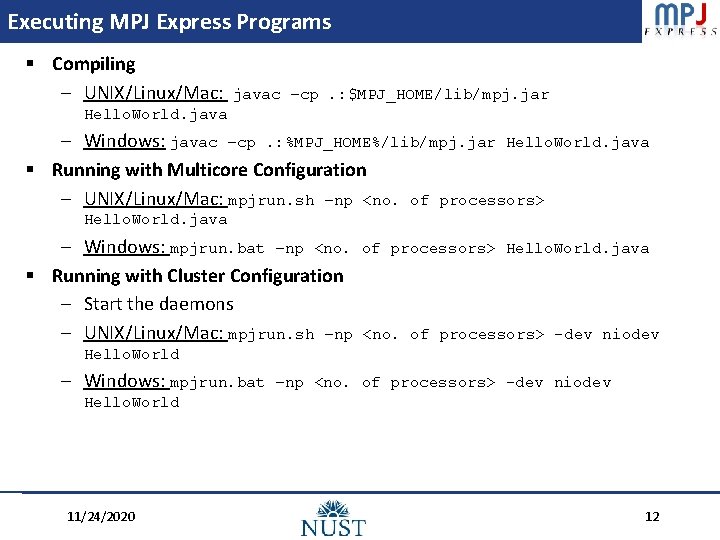
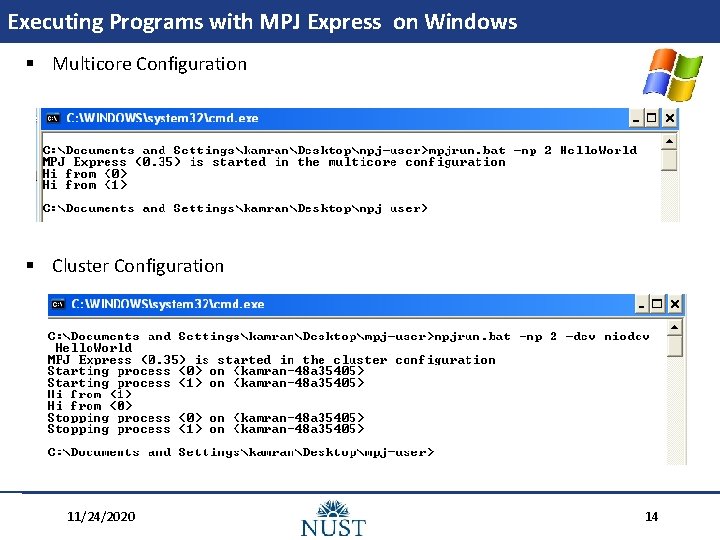
Executing MPJ Express Programs § Compiling – UNIX/Linux/Mac: javac –cp. : $MPJ_HOME/lib/mpj. jar Hello. World. java – Windows: javac –cp. : %MPJ_HOME%/lib/mpj. jar Hello. World. java § Running with Multicore Configuration – UNIX/Linux/Mac: mpjrun. sh –np <no. of processors> Hello. World. java – Windows: mpjrun. bat –np <no. of processors> Hello. World. java § Running with Cluster Configuration – Start the daemons – UNIX/Linux/Mac: mpjrun. sh –np <no. of processors> -dev niodev Hello. World – Windows: mpjrun. bat –np <no. of processors> -dev niodev Hello. World 11/24/2020 12
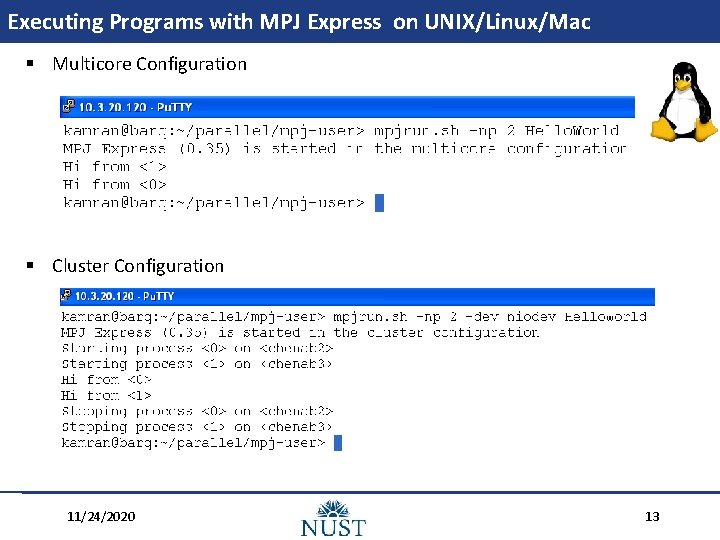
Executing Programs with MPJ Express on UNIX/Linux/Mac § Multicore Configuration § Cluster Configuration 11/24/2020 13
Executing Programs with MPJ Express on Windows § Multicore Configuration § Cluster Configuration 11/24/2020 14
Additional Runtime Arguments § The mpjrun. [sh/bat] script accepts some additional arguments which can be passed according to the user preferences. Some of them are – np switch: If a value is specified, then MPJ Express starts those many processes for the user application. It can be specified like mpjrun. [sh/bat] –np 2 Program. Name. – dev switch: This switch can be given at runtime to change to the appropriate device driver. It can be used as mpjrun. [sh/bat] –dev multicore/niodev/mxdev Program. Name. – machinesfile switch: While running programs, MPJ Express runtime expects a file with name “machines” in the current directory. User can also specify a machines file with different name using machinesfile switch as mpjrun. [sh/bat] machinesfile my. File Program. Name – wdir switch: If your programs reads some file, then it may be a good idea to separate this file from your application classes, or copy it to a tmp directory and specify this tmp directory as working directory using -wdir switch. 11/24/2020 15
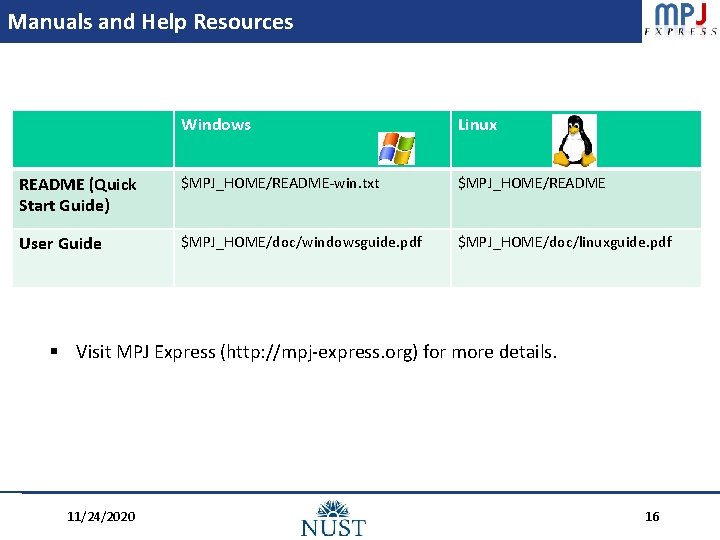
Manuals and Help Resources Windows Linux README (Quick Start Guide) $MPJ_HOME/README-win. txt $MPJ_HOME/README User Guide $MPJ_HOME/doc/windowsguide. pdf $MPJ_HOME/doc/linuxguide. pdf § Visit MPJ Express (http: //mpj-express. org) for more details. 11/24/2020 16
Contact and Support § MPJ Express Users Mailing List (http: //www. lists. rdg. ac. uk/mailman/listinfo/mpj-user) § Alternatively, the users can contact us directly by email. – Aamir Shafi (aamir. shafi@seecs. edu. pk) – Bryan Carpenter (bryan. carpenter@port. ac. uk) – Mark Baker (mark. baker@computer. org) 11/24/2020 17
Contributors Aamir Shafi Jawad Manzoor Kamran Hamid Mohsan Jameel Bryan Carpenter Mark Baker Hong Ong Guillermo Taboada Sabela Ramos 11/24/2020 18
Acknowledgements § The project partners received a generous grant from the British Council under the PMI 2 Connect program (http: //www. britishcouncil. org/learning-pmi 2 -connect. htm) § Project Title: Coll. Aborative Multicore Programming Using Scientific Java Messaging § § Project Start Date: September 2008 Duration: 2 Years 11/24/2020 19