
Moog Flight Simulator Visual Display Zach Bolotin Cody
Moog Flight Simulator. Visual Display Zach Bolotin Cody Hatch Robert Swartz

Agenda Ø Project Overview Ø Confirm Customer Needs/Engineering Specs Ø Functional Decomposition Ø Concept Generation Ø Design Introduction Ø Design Overviews & Details Ø Pugh Chart Ø Risk Assessment Ø Project Plans
Project Overview Visual Display Ø The purpose of this project is to design and build a system for displaying the flight simulator program. Ø The visualization technology and mounting system need to be selected. Ø It will important to analyze the system, taking into account the effect that the 6 DOF table will have on the components.
Customer Needs Ø Immersive Visual Environment Ø Robust Mounting Strategy Ø Interface with Flight Simulation Software Engineering Specs ·Cost · Weight · Screen Size · Resolution · Brightness · Acceleration Tolerance · Vibration Tolerance · Material Strength
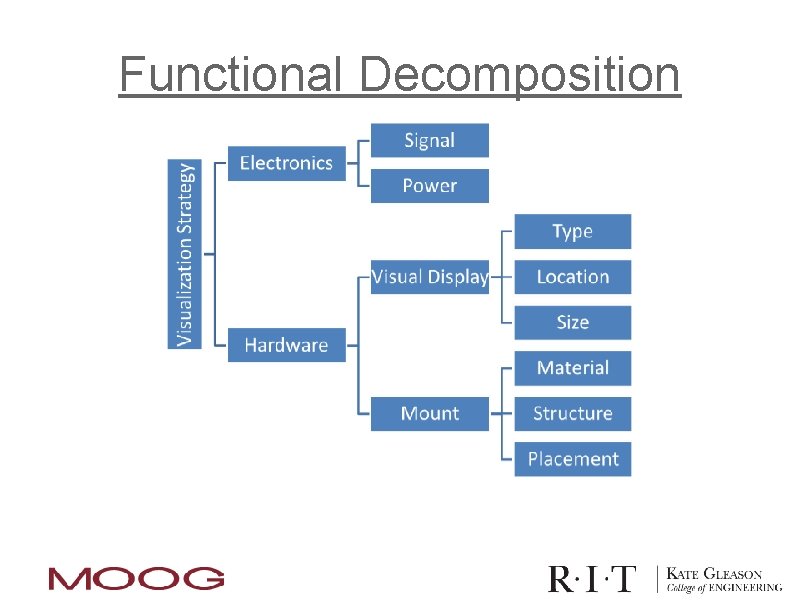
Functional Decomposition

Concept Generation
Design Introduction Ø The main focus of the Visual Display design so far, has been in determining the best technology and general concept to design with. Ø The concept generation flow chart has helped us to come up with different Designs. Ø Five general plans have been developed analyzed in an effort to make this decision Ø After a concept is selected, additional design and analysis will be done to finalize the design.
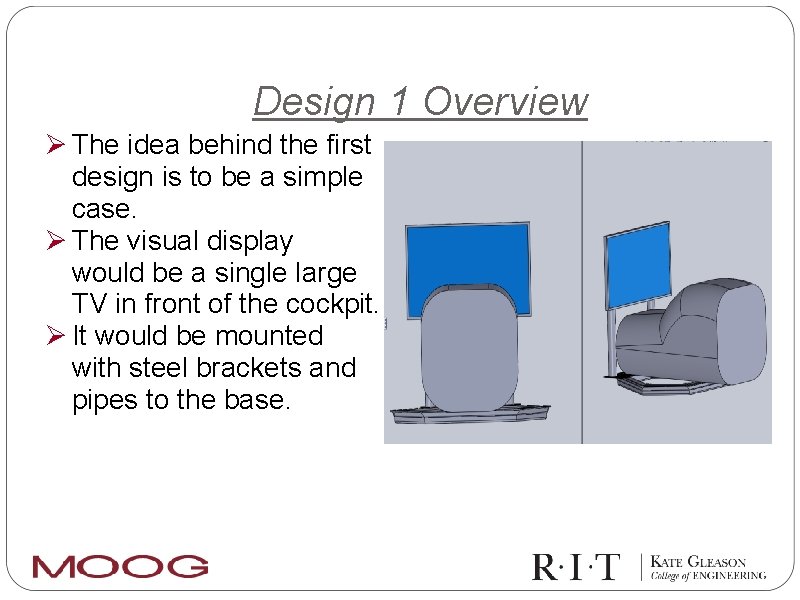
Design 1 Overview Ø The idea behind the first design is to be a simple case. Ø The visual display would be a single large TV in front of the cockpit. Ø It would be mounted with steel brackets and pipes to the base.
Design 1 Details Ø $3, 200 - $4, 200 (includes frame) Ø 210 - 235 lbs. Ø There are several concerns with the first design. Ø In order to get the most out of a single screen, it would be desirable to get the largest TV allowed by the budget. Ø This would drive up to cost and the weight on the stand. Ø It is a concern that a single large TV would be put alot of stress on the mounting system.
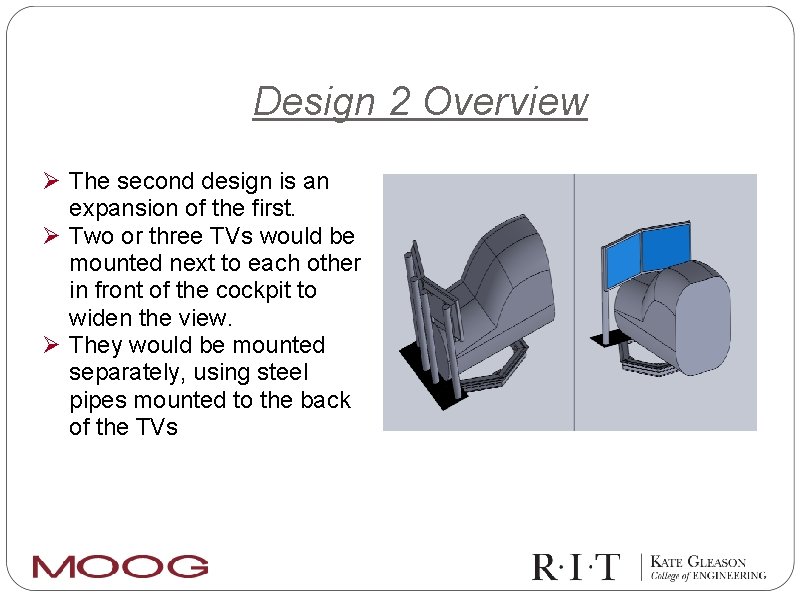
Design 2 Overview Ø The second design is an expansion of the first. Ø Two or three TVs would be mounted next to each other in front of the cockpit to widen the view. Ø They would be mounted separately, using steel pipes mounted to the back of the TVs
Design 2 Details Ø $1, 500 - $2, 100 Ø 220 - 260 lbs Ø Using two slightly smaller TVs would help to relieve some of the weight on the mounting system. Ø One effect of a move to multiple TVs is that there would now be a stripe of black between the screens, eliminating some of the desired immersion of the pilot.
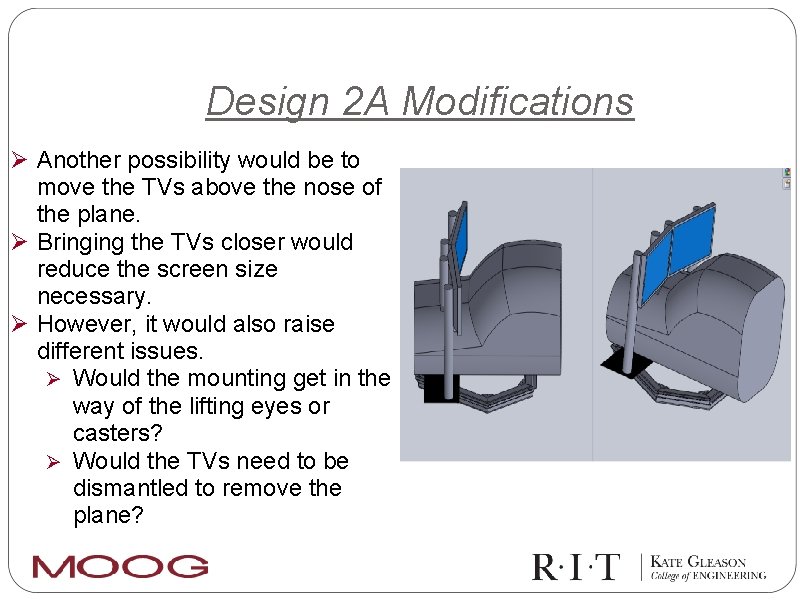
Design 2 A Modifications Ø Another possibility would be to move the TVs above the nose of the plane. Ø Bringing the TVs closer would reduce the screen size necessary. Ø However, it would also raise different issues. Ø Would the mounting get in the way of the lifting eyes or casters? Ø Would the TVs need to be dismantled to remove the plane?
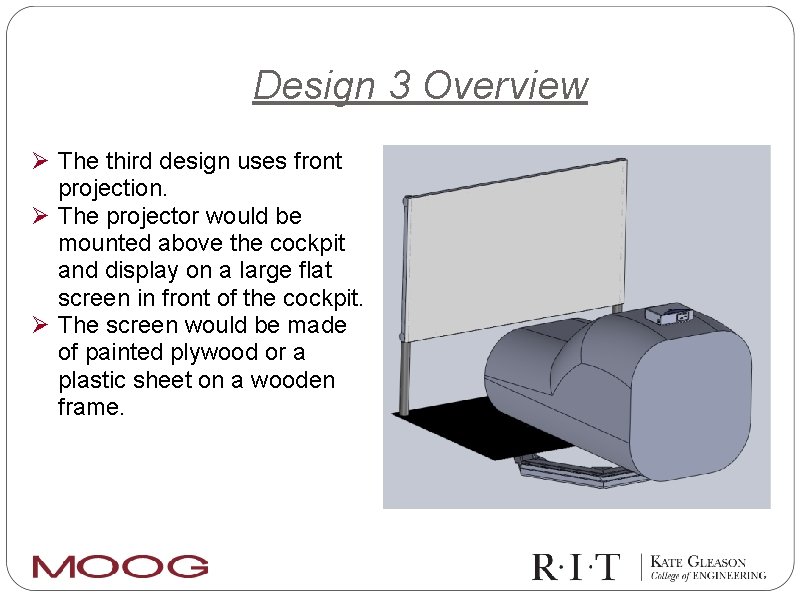
Design 3 Overview Ø The third design uses front projection. Ø The projector would be mounted above the cockpit and display on a large flat screen in front of the cockpit. Ø The screen would be made of painted plywood or a plastic sheet on a wooden frame.
Design 3 Details Ø $1, 800 - $4, 200 Ø 40 - 45 lbs Ø One concern with the projector, is the imaging shaking when the platform is moving. Ø Another concern is that the screen will deform under the movement of the table
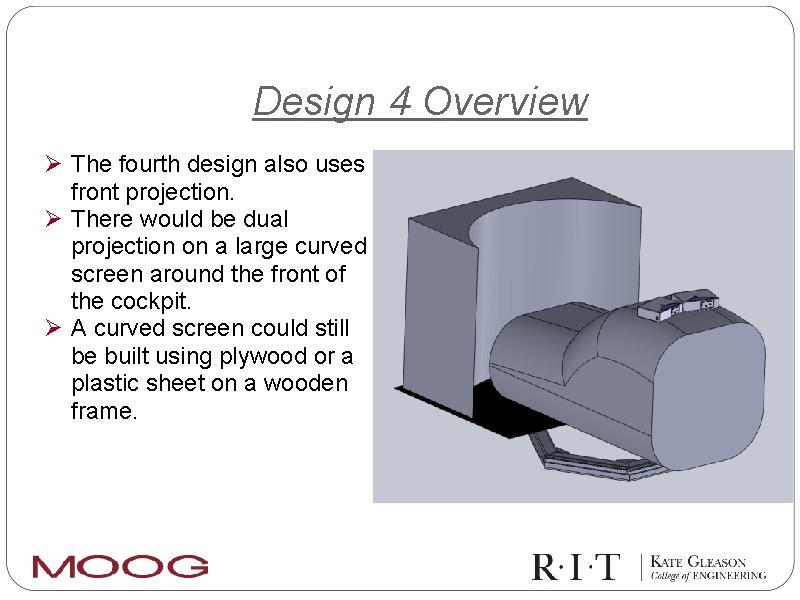
Design 4 Overview Ø The fourth design also uses front projection. Ø There would be dual projection on a large curved screen around the front of the cockpit. Ø A curved screen could still be built using plywood or a plastic sheet on a wooden frame.
Design 4 Details Ø $2, 780 - $4, 480 Ø 30 - 45 lbs Ø A concern with the projectors would be that the image shakes when the platform moves. This would be compounded by having multiple projectors. Ø Another option, would be to have multiple projectors on flat screens, we could use cheaper projectors for this method, and the screen design would be easier.
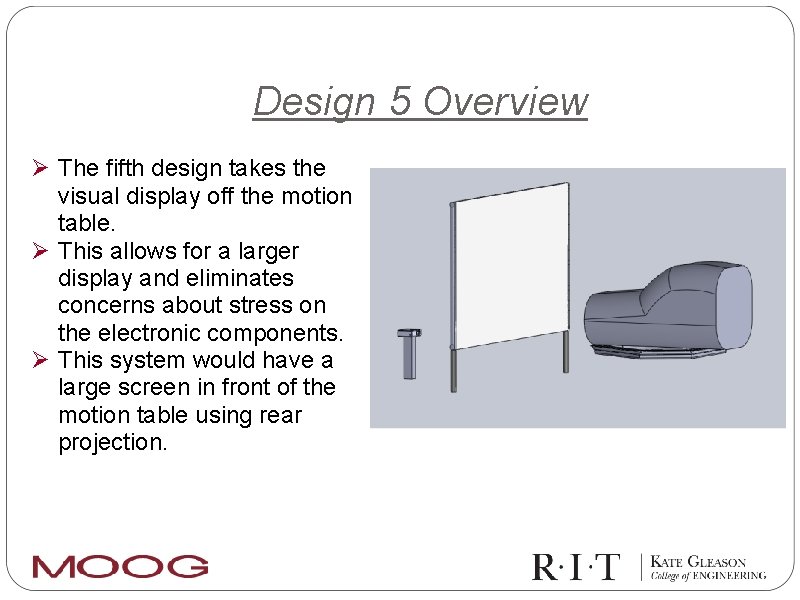
Design 5 Overview Ø The fifth design takes the visual display off the motion table. Ø This allows for a larger display and eliminates concerns about stress on the electronic components. Ø This system would have a large screen in front of the motion table using rear projection.
Design 5 Details Ø $3, 000 - $4, 200 Ø Weight ~ N/A Ø This design is off the table. This may require a modification of the software to ensure the proper image is seen. Ø With this design there are multiple possibilities for the screen size and shape to achieve total immersion
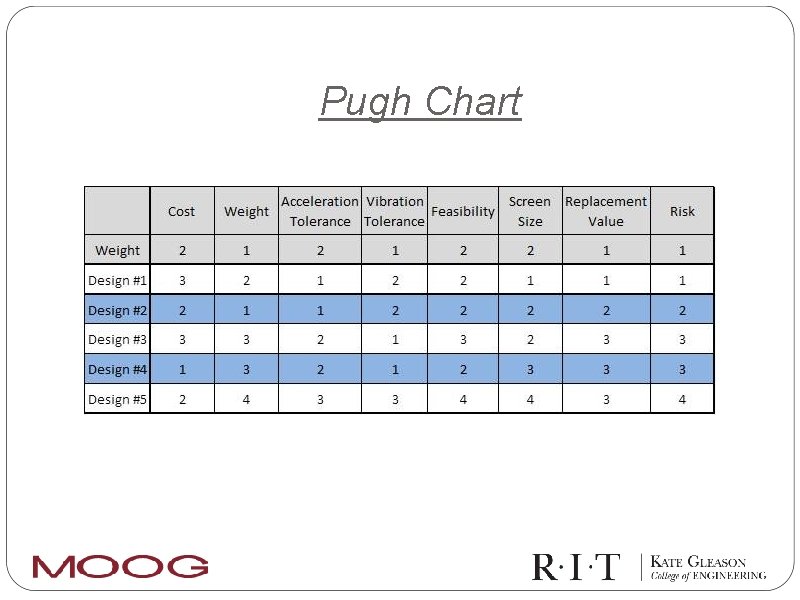
Pugh Chart
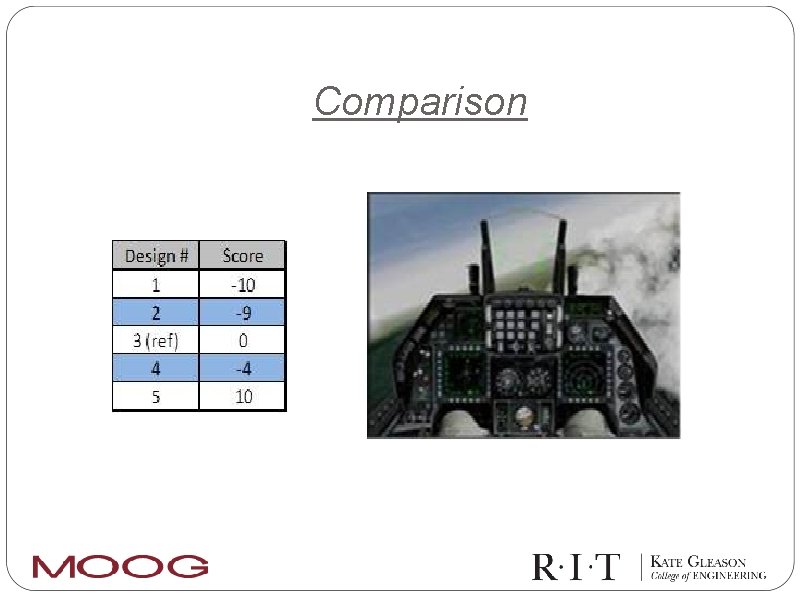
Comparison
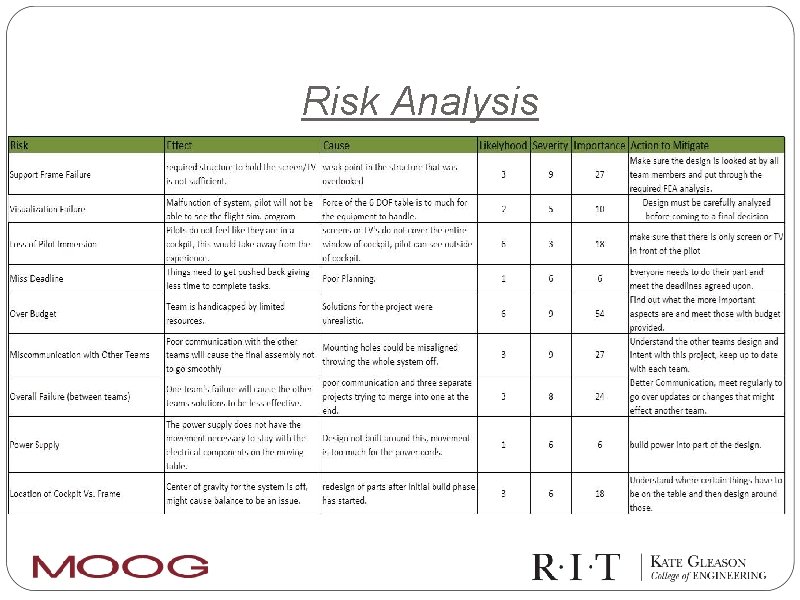
Risk Analysis
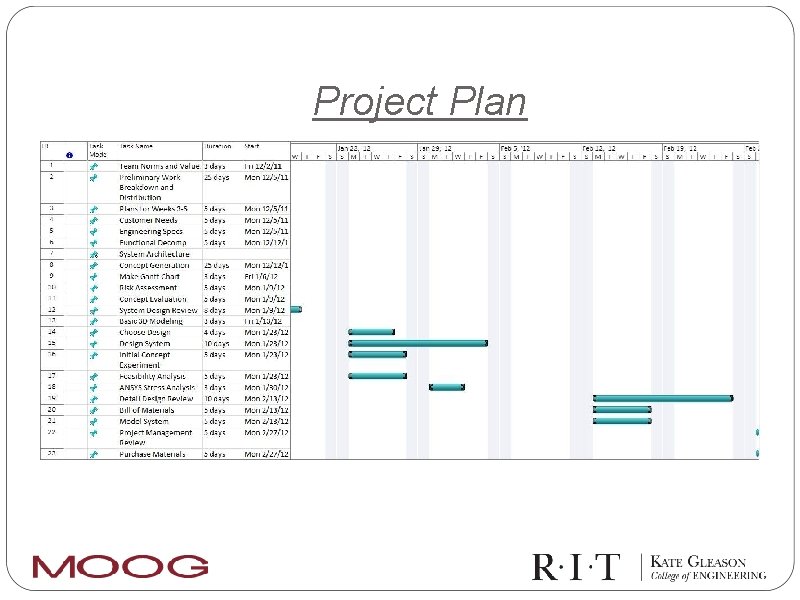
Project Plan
- Slides: 22