
Module I Overview of Computer Architecture and Organization
- Slides: 31
Module I Overview of Computer Architecture and Organization
Introduction of Computer Architecture and Organization
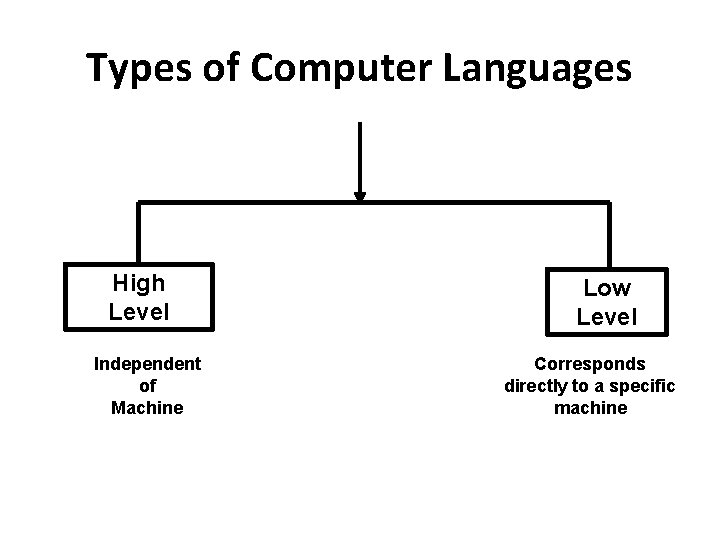
Types of Computer Languages High Level Independent of Machine Low Level Corresponds directly to a specific machine
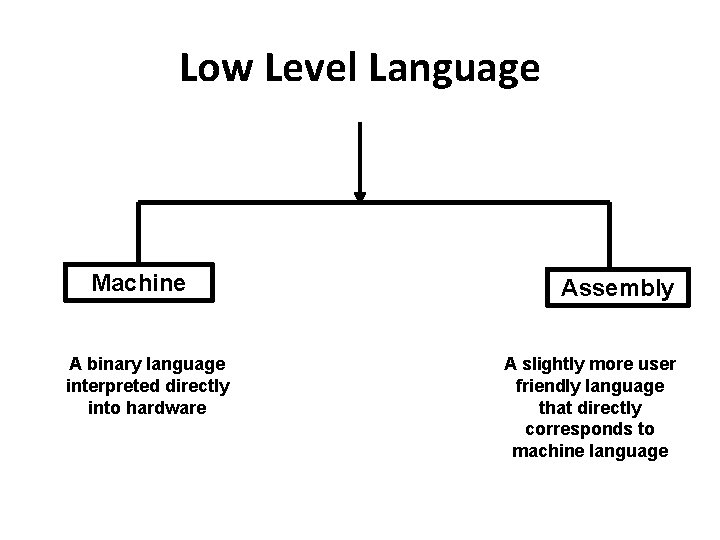
Low Level Language Machine A binary language interpreted directly into hardware Assembly A slightly more user friendly language that directly corresponds to machine language
Machine Language • most elementary level of programming language • First type of programming language • It is usually written in hex. • It is represented by a string of binary digits 0 and 1. • The symbol – 0 => absence of an electric pulse – 1 => presence of an electric pulse.
Machine Language : Advantages • It makes fast and efficient use of computer. • It requires no translator since it is directly understood by the computer.
Machine Language : Disadvantages • All operation codes have to be remembered • All memory addresses have to be remembered. • It is hard to amend or find errors
Assembly Language • It was developed to overcome inconveniences of machine language. • In this, operation codes and operands are given in the form of alphanumeric symbols • It can combine in a maximum of five-letter combinations e. g. ADD for addition, SUB for subtraction, START, LABEL etc.
Assembly Language • also called Symbolic Programming Language • It is also very difficult and needs a lot of practice to master it. • They are used to help in compiler orientations. • The instructions are converted to machine codes by translator and then executed.
Assembly Language : Advantages • It is easier to understand use compared to machine language • It is easy to locate and correct errors • It can be easily modified.
Assembly Language : Disadvantages • It is machine dependent hence the programmer has to understand the hardware
High Level Languages • It uses formats that are similar to English • It enable people to write programs in their own native language (English)
High Level Language: Advantages • User-friendly • Uses English Vocabulary and well-known symbols • Easy to learn • Easier to maintain • Problem oriented • Translation to lower language is easy • Independent of machine
High Level Language: Disadvantages • High level to machine level languages takes time • Code generated may not be efficient.
History of Computers • First Generation : Vacuum tubes • First General Purpose Computer : ENIAC (Electronic Numerical Integrator and Calculator) – Made in University of Pennsylvania – For World War II
ENIAC • Made in Army’s Ballistics Research Laboratory (BRL) • For range and trajectory tables for new weapons • 200 people were employed. • Table preparation took many days
ENIAC • Professor John Mauchly and John Eckert proposed first computer • In 1943, proposal was accepted. • ENIAC: – 30 tons – 18000 vacuum tubes – 140 KW power consumption – 5000 additions per second
ENIAC • ENIAC: – Decimal rather than binary – 20 Accumulators – 10 digit decimal for one accumulator – Ring of 10 vacuum tubes made a digit. • Drawback : Manual programming by setting switches • Completed in 1946
ENIAC • First task : feasibility study of Hydrogen bomb • Operated under BRL until 1955 and then it was disassembled.
Von-Neumann Machine
Von Neumann Model • ENIAC: the major drawback was wired programming • The idea of stored program in memory was introduced by Von Neumann.
University Question • What is stored program concept in digital computer? (03 Marks)
Stored Program Concept • The programming could be facilitated if the program could be represented in a form suitable for storing in memory alongside data. • Thus – Computer could get its instruction by reading them from memory & – Program could be set and altered by setting values of a portion of memory • This idea is called Stored Program Concept
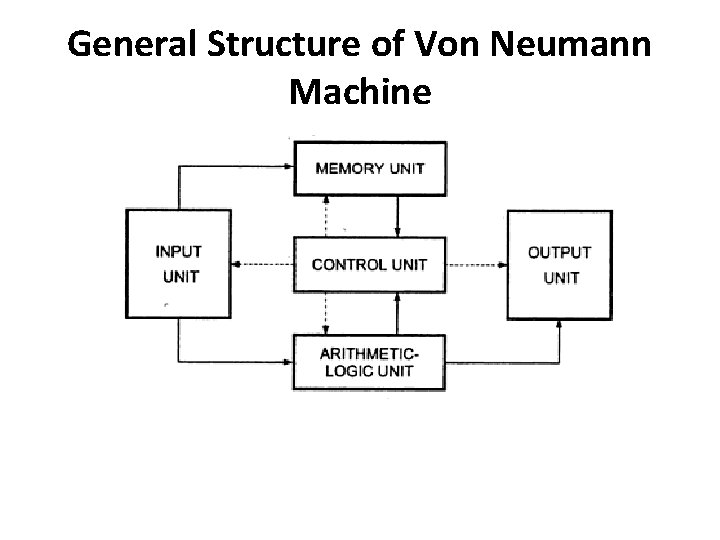
General Structure of Von Neumann Machine
Von Neumann Model • It consist of 5 basic units: 1. Input: Transfers data and program from outside world to machine 2. Memory: stores both data and instruction 3. ALU: performs arithmetic and logical operations 4. Control Unit: fetches, interprets and executes instruction 5. Output Unit: transfer results to the outside world
Von Neumann’s Proposal 1. This device(computer) perform elementary arithmetic operation (+, -, x, /) and hence it should contain specialized organ called Central Arithmetic part (CA) 2. The logical control is done by Central Control (CC) organ
Von Neumann’s Proposal 3. For long and complicated sequence of operation, memory (M) is needed. CA , CC and M correspond to associative neurons. – The effective sensory (afferent) : input – and motor (efferent) : output – The input and output contact thru outside recording medium (R) –
Von Neumann’s Proposal 4. The device must have organs to transfer information from R to CA , CC and M 5. The device must have organs to transfer information from CA , CC and M to R • All of the today’s computer have this structure & hence referred as Von Neumann Machine
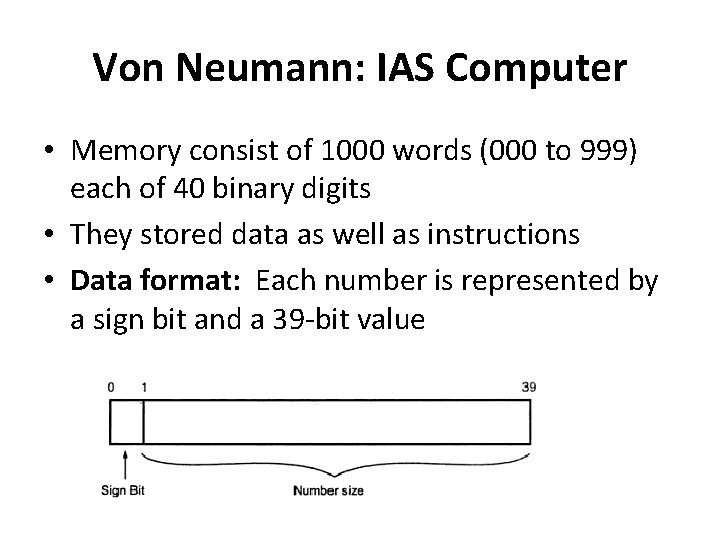
Von Neumann: IAS Computer • Memory consist of 1000 words (000 to 999) each of 40 binary digits • They stored data as well as instructions • Data format: Each number is represented by a sign bit and a 39 -bit value
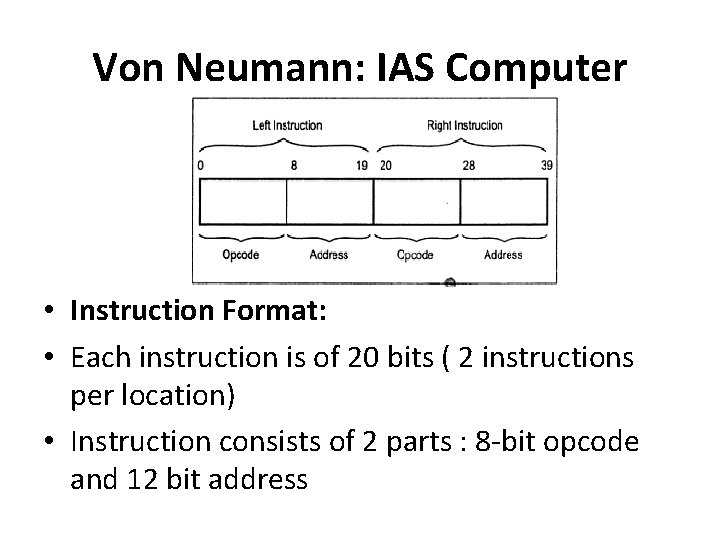
Von Neumann: IAS Computer • Instruction Format: • Each instruction is of 20 bits ( 2 instructions per location) • Instruction consists of 2 parts : 8 -bit opcode and 12 bit address
Von Neumann: IAS Computer • Opcode defines operation to be performed • Address part identifies location to store the operand