
Module 2 Introduction to UML q Background q
Module 2: Introduction to UML q Background q What is UML for? q Building blocks of UML q Appendix: Process for Using UML 1
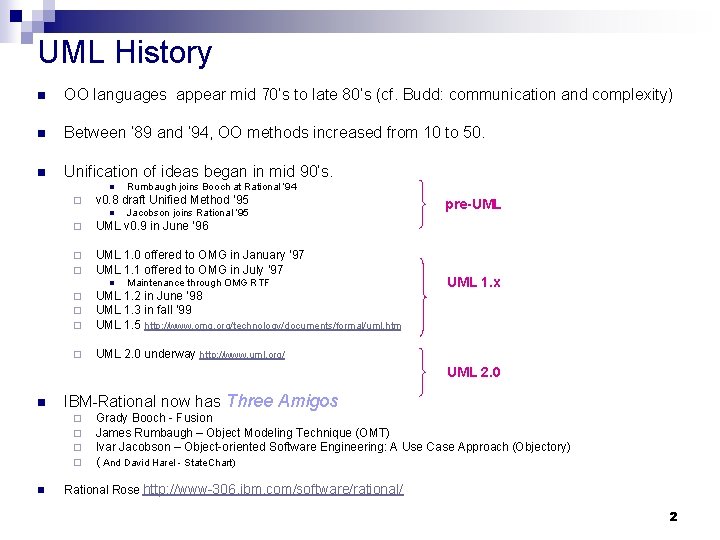
UML History n OO languages appear mid 70’s to late 80’s (cf. Budd: communication and complexity) n Between ’ 89 and ’ 94, OO methods increased from 10 to 50. n Unification of ideas began in mid 90’s. n ¨ Rumbaugh joins Booch at Rational ’ 94 v 0. 8 draft Unified Method ’ 95 n Jacobson joins Rational ’ 95 ¨ UML v 0. 9 in June ’ 96 ¨ ¨ UML 1. 0 offered to OMG in January ’ 97 UML 1. 1 offered to OMG in July ’ 97 ¨ ¨ ¨ UML 1. 2 in June ’ 98 UML 1. 3 in fall ’ 99 UML 1. 5 http: //www. omg. org/technology/documents/formal/uml. htm ¨ UML 2. 0 underway http: //www. uml. org/ n Maintenance through OMG RTF pre-UML 1. x UML 2. 0 n IBM-Rational now has Three Amigos ¨ ¨ n Grady Booch - Fusion James Rumbaugh – Object Modeling Technique (OMT) Ivar Jacobson – Object-oriented Software Engineering: A Use Case Approach (Objectory) ( And David Harel - State. Chart) Rational Rose http: //www-306. ibm. com/software/rational/ 2
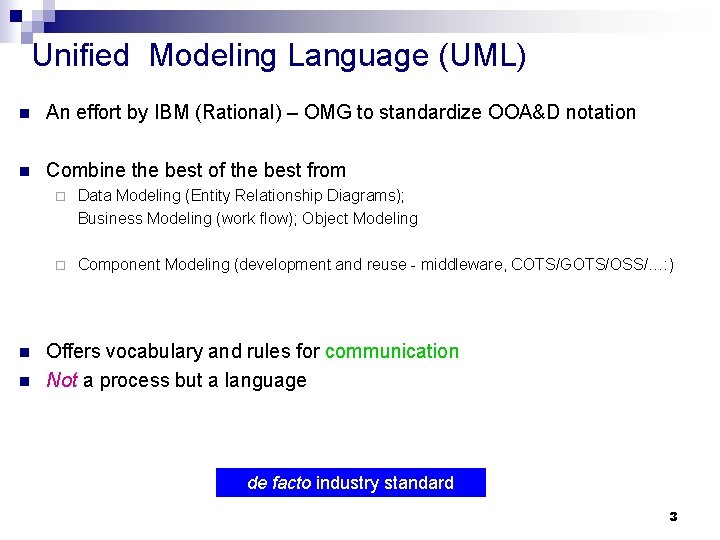
Unified Modeling Language (UML) n An effort by IBM (Rational) – OMG to standardize OOA&D notation n Combine the best of the best from n n ¨ Data Modeling (Entity Relationship Diagrams); Business Modeling (work flow); Object Modeling ¨ Component Modeling (development and reuse - middleware, COTS/GOTS/OSS/…: ) Offers vocabulary and rules for communication Not a process but a language de facto industry standard 3
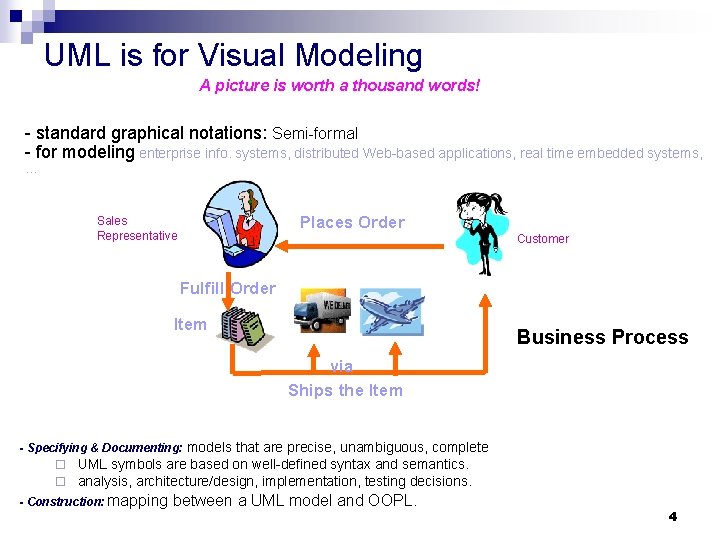
UML is for Visual Modeling A picture is worth a thousand words! - standard graphical notations: Semi-formal - for modeling enterprise info. systems, distributed Web-based applications, real time embedded systems, … Places Order Sales Representative Customer Fulfill Order Item Business Process via Ships the Item - Specifying & Documenting: models that are precise, unambiguous, complete ¨ UML symbols are based on well-defined syntax and semantics. ¨ analysis, architecture/design, implementation, testing decisions. - Construction: mapping between a UML model and OOPL. 4
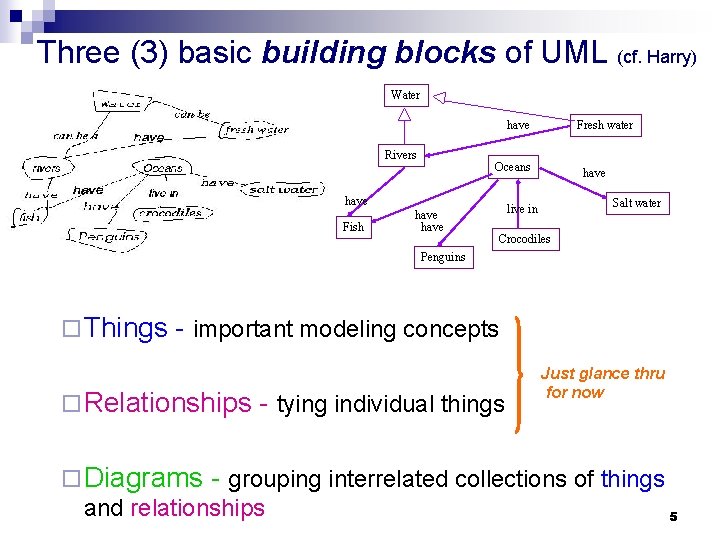
Three (3) basic building blocks of UML (cf. Harry) Water have Rivers Oceans have Fish Fresh water have Salt water live in Crocodiles Penguins ¨ Things - important modeling concepts ¨ Relationships - tying individual things Just glance thru for now ¨ Diagrams - grouping interrelated collections of things and relationships 5
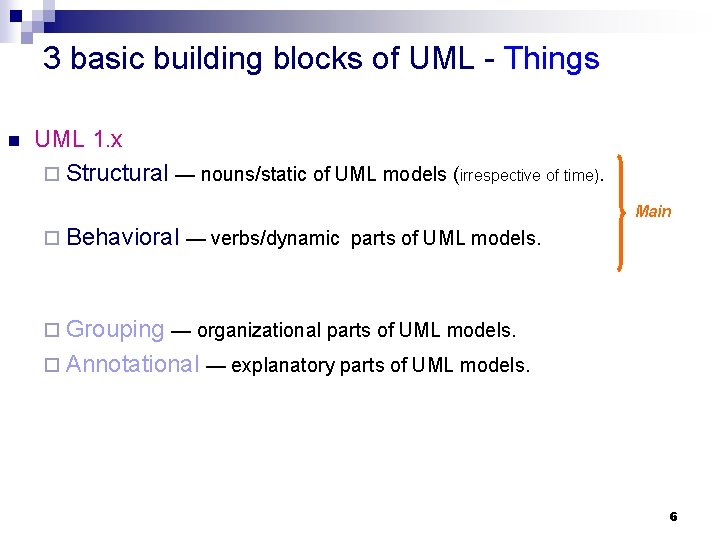
3 basic building blocks of UML - Things n UML 1. x ¨ Structural — nouns/static of UML models (irrespective of time). Main ¨ Behavioral — verbs/dynamic parts of UML models. ¨ Grouping — organizational parts of UML models. ¨ Annotational — explanatory parts of UML models. 6
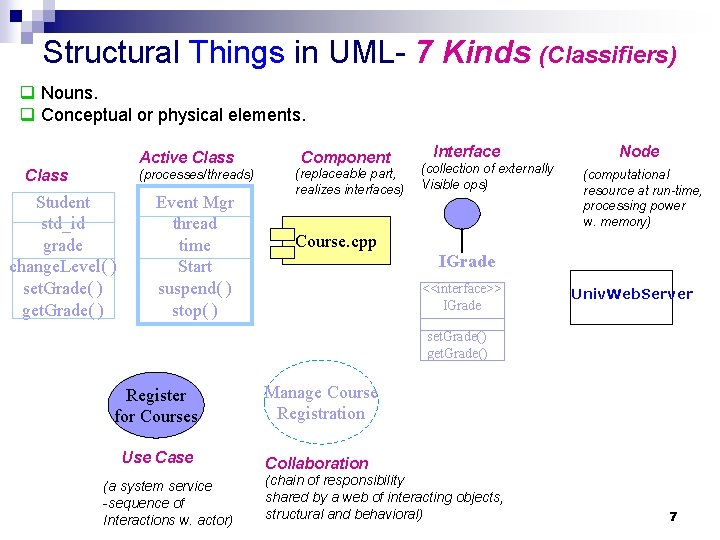
Structural Things in UML- 7 Kinds (Classifiers) q Nouns. q Conceptual or physical elements. Active Class (processes/threads) Student std_id grade change. Level( ) set. Grade( ) get. Grade( ) Event Mgr thread time Start suspend( ) stop( ) Component (replaceable part, realizes interfaces) Interface (collection of externally Visible ops) Node (computational resource at run-time, processing power w. memory) Course. cpp IGrade <<interface>> IGrade Univ. Web. Server set. Grade() get. Grade() Register for Courses Manage Course Registration Use Case Collaboration (a system service -sequence of Interactions w. actor) (chain of responsibility shared by a web of interacting objects, structural and behavioral) 7
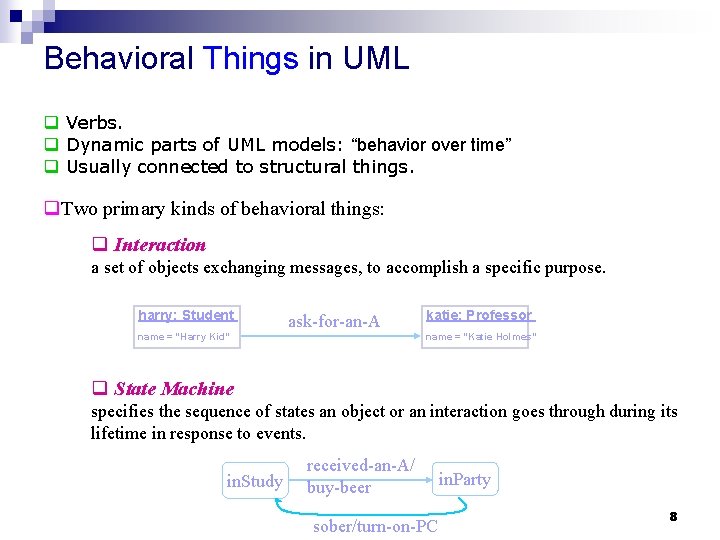
Behavioral Things in UML q Verbs. q Dynamic parts of UML models: “behavior over time” q Usually connected to structural things. q. Two primary kinds of behavioral things: q Interaction a set of objects exchanging messages, to accomplish a specific purpose. harry: Student ask-for-an-A name = “Harry Kid” katie: Professor name = “Katie Holmes” q State Machine specifies the sequence of states an object or an interaction goes through during its lifetime in response to events. in. Study received-an-A/ buy-beer sober/turn-on-PC in. Party 8

Grouping Things in UML: Packages - For organizing elements (structural/behavioral) into groups. - Purely conceptual; only exists at development time. - Can be nested. - Variations of packages are: Frameworks, models, & subsystems. University Administration Course Manager Student Admission -Student +Department Annotational Things in UML: Note - Explanatory/Comment parts of UML models - usually called adornments - Expressed in informal or formal text. flexible drop-out dates operation() {for all g in children g. operation() } 9
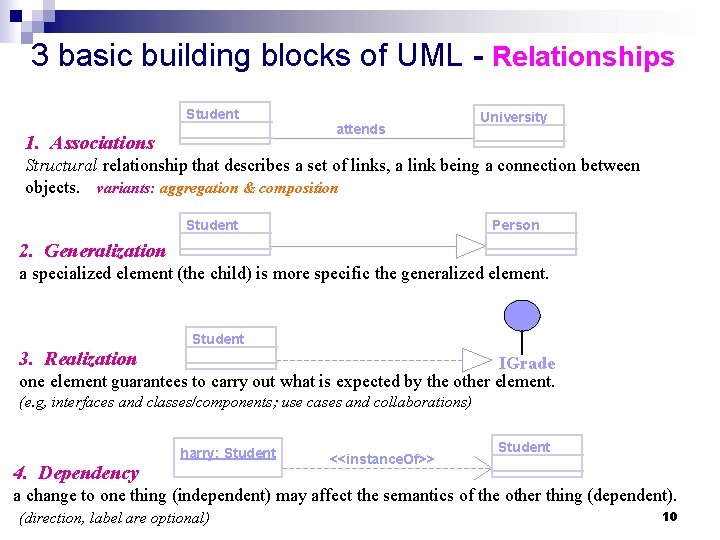
3 basic building blocks of UML - Relationships Student 1. Associations attends University Structural relationship that describes a set of links, a link being a connection between objects. variants: aggregation & composition Student Person 2. Generalization a specialized element (the child) is more specific the generalized element. Student 3. Realization IGrade one element guarantees to carry out what is expected by the other element. (e. g, interfaces and classes/components; use cases and collaborations) harry: Student 4. Dependency <<instance. Of>> Student a change to one thing (independent) may affect the semantics of the other thing (dependent). (direction, label are optional) 10

3 basic building blocks of UML - Diagrams A connected graph: Vertices are things; Arcs are relationships/behaviors. UML 1. x: 9 diagram types. UML 2. 0: 12 diagram types Structural Diagrams Represent the static aspects of a system. ¨ Class; Object ¨ Component ¨ Deployment ¨ ¨ ¨ Behavioral Diagrams Represent the dynamic aspects. ¨ Use case ¨ Sequence; Collaboration ¨ Statechart ¨ Activity Class; Object Component Deployment Composite Structure Package Behavioral Diagrams ¨ Interaction Diagrams Use case ¨ Sequence; Communication Statechart ¨ Activity ¨ Interaction Overvie 11 ¨ Timing ¨
Diagrams in UML The UTD wants to computerize its registration system n The Registrar sets up the curriculum for a semester n Students select 3 core courses and 2 electives n Once a student registers for a semester, the billing system is notified so the student may be billed for the semester n Students may use the system to add/drop courses for a period of time after registration n Professors use the system to set their preferred course offerings and receive their course offering rosters after students register n Users of the registration system are assigned passwords which are used at logon validation What’s most important? 12

Diagrams in UML – Actors in Use Case Diagram n An actor is someone or some thing that must interact with the system under development The UTD wants to computerize its registration system n The Registrar sets up the curriculum for a semester Registrar n Students select 3 core courses and 2 electives n Once a student registers for a semester, the billing system is notified so the student may be billed for the semester Student Billing System n Students may use the system to add/drop courses for a period of time after registration n Professors use the system to set their preferred course offerings and receive their course offering rosters after students register n Users of the registration system are assigned passwords which are used at logon validation Professor 13
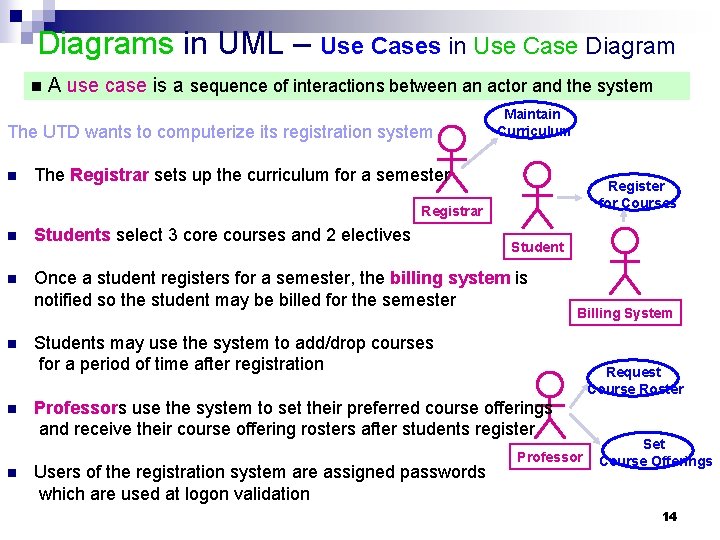
Diagrams in UML – Use Cases in Use Case Diagram n A use case is a sequence of interactions between an actor and the system The UTD wants to computerize its registration system n Maintain Curriculum The Registrar sets up the curriculum for a semester Register for Courses Registrar n Students select 3 core courses and 2 electives n Once a student registers for a semester, the billing system is notified so the student may be billed for the semester n n n Students may use the system to add/drop courses for a period of time after registration Billing System Request Course Roster Professors use the system to set their preferred course offerings and receive their course offering rosters after students register Users of the registration system are assigned passwords which are used at logon validation Set Professor Course Offerings 14
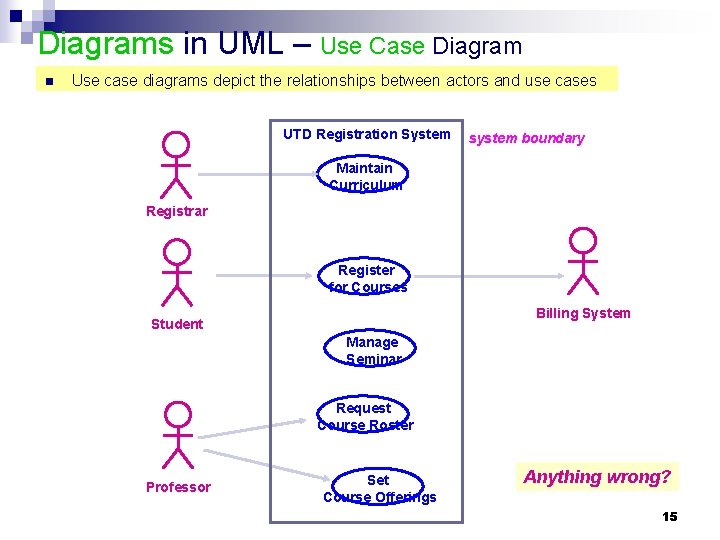
Diagrams in UML – Use Case Diagram n Use case diagrams depict the relationships between actors and use cases UTD Registration System system boundary Maintain Curriculum Registrar Register for Courses Billing System Student Manage Seminar Request Course Roster Professor Set Course Offerings Anything wrong? 15
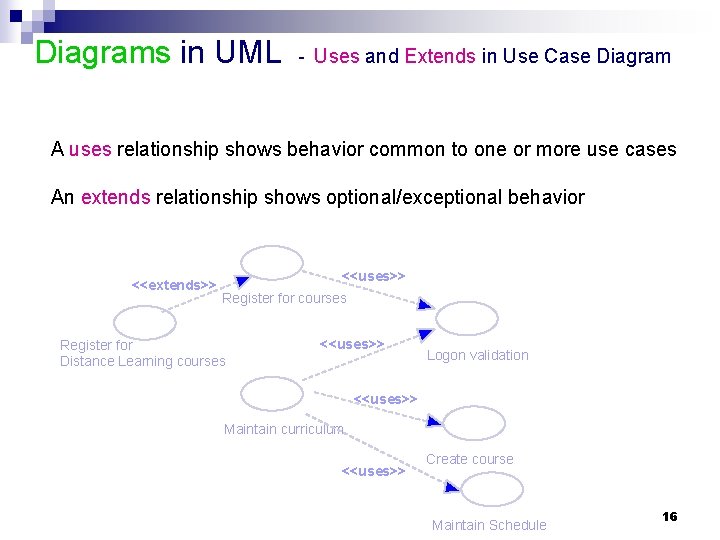
Diagrams in UML - Uses and Extends in Use Case Diagram A uses relationship shows behavior common to one or more use cases An extends relationship shows optional/exceptional behavior <<extends>> <<uses>> Register for courses Register for Distance Learning courses <<uses>> Logon validation <<uses>> Maintain curriculum <<uses>> Create course Maintain Schedule 16
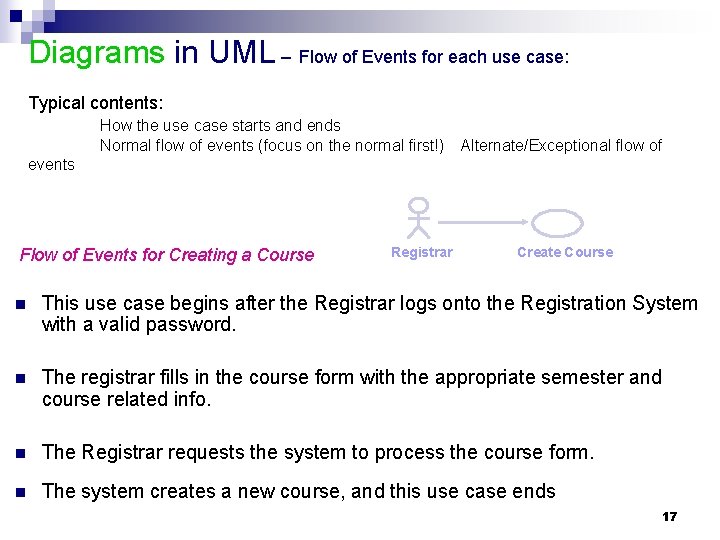
Diagrams in UML – Flow of Events for each use case: Typical contents: How the use case starts and ends Normal flow of events (focus on the normal first!) Alternate/Exceptional flow of events Flow of Events for Creating a Course Registrar Create Course n This use case begins after the Registrar logs onto the Registration System with a valid password. n The registrar fills in the course form with the appropriate semester and course related info. n The Registrar requests the system to process the course form. n The system creates a new course, and this use case ends 17
Diagrams in UML – Interaction Diagrams A use case diagram presents an outside view of the system. Then, how about the inside view of the system? n Interaction diagrams describe how use cases are realized in terms of interacting objects. n Two types of interaction diagrams Sequence diagrams ¨ Collaboration (Communication) diagrams ¨ 18

Diagrams in UML - Sequence Diagram n A sequence diagram displays object interactions arranged in a time sequence Registrar Create Course This use case begins after the Registrar logs onto the Registration System with a valid password. The registrar fills in the course form with the appropriate semester and course related info. The Registrar requests the system to process the course form. The system creates a new course, and this use case ends : Registrar Traceability! course form : Course. Form the. Manager : Curriculum. Manager 1: set course info 2: request processing 3: add course 4: <<create>> a. Course : Course 19
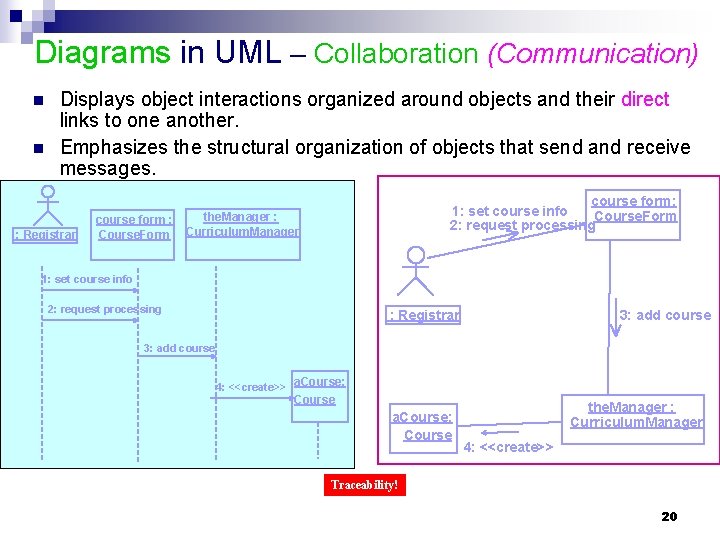
Diagrams in UML – Collaboration (Communication) n n Displays object interactions organized around objects and their direct links to one another. Emphasizes the structural organization of objects that send and receive messages. : Registrar course form: 1: set course info Course. Form 2: request processing the. Manager : course form : Course. Form Curriculum. Manager 1: set course info 2: request processing : Registrar 3: add course 4: <<create>> a. Course: Course the. Manager : Curriculum. Manager 4: <<create>> Traceability! 20
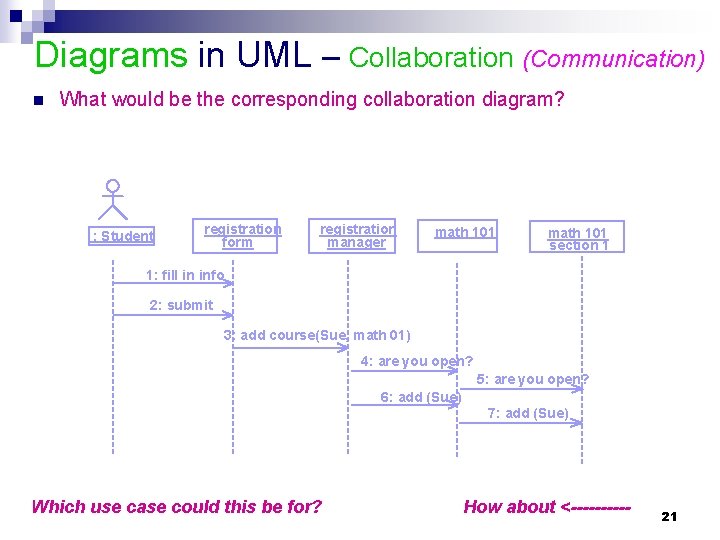
Diagrams in UML – Collaboration (Communication) n What would be the corresponding collaboration diagram? : Student registration form registration manager math 101 section 1 1: fill in info 2: submit 3: add course(Sue, math 01) 4: are you open? 5: are you open? 6: add (Sue) 7: add (Sue) Which use case could this be for? How about <----- 21
Skip the following for now: In M 3. 2 22
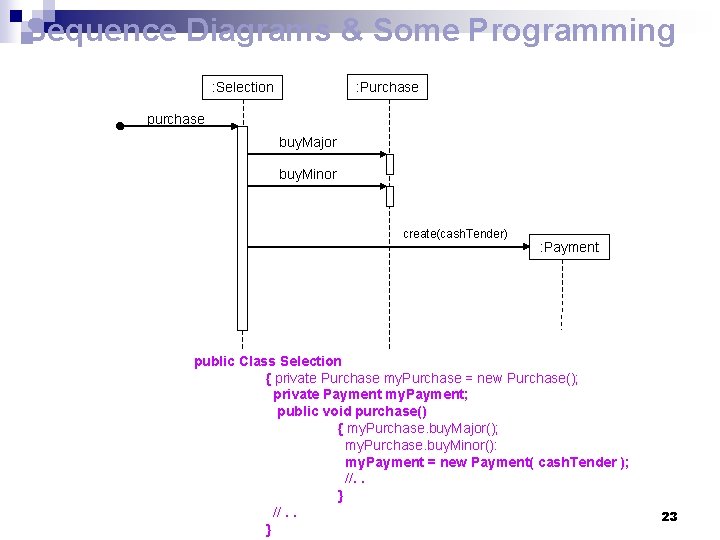
Sequence Diagrams & Some Programming : Purchase : Selection purchase buy. Major buy. Minor create(cash. Tender) : Payment public Class Selection { private Purchase my. Purchase = new Purchase(); private Payment my. Payment; public void purchase() { my. Purchase. buy. Major(); my. Purchase. buy. Minor(): my. Payment = new Payment( cash. Tender ); //. . } 23
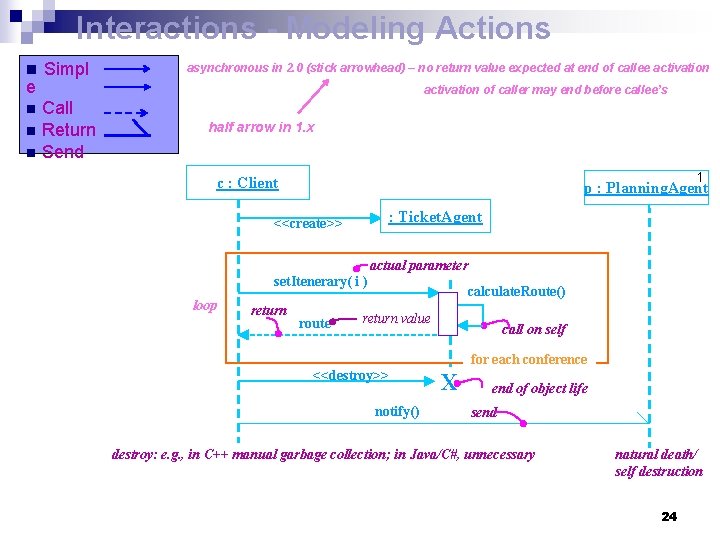
Interactions - Modeling Actions n Simpl asynchronous in 2. 0 (stick arrowhead) – no return value expected at end of callee activation e Call n Return n Send activation of caller may end before callee’s n half arrow in 1. x 1 c : Client p : Planning. Agent : Ticket. Agent <<create>> actual parameter set. Itenerary( i ) loop return route calculate. Route() return value call on self for each conference <<destroy>> notify() X end of object life send destroy: e. g. , in C++ manual garbage collection; in Java/C#, unnecessary natural death/ self destruction 24
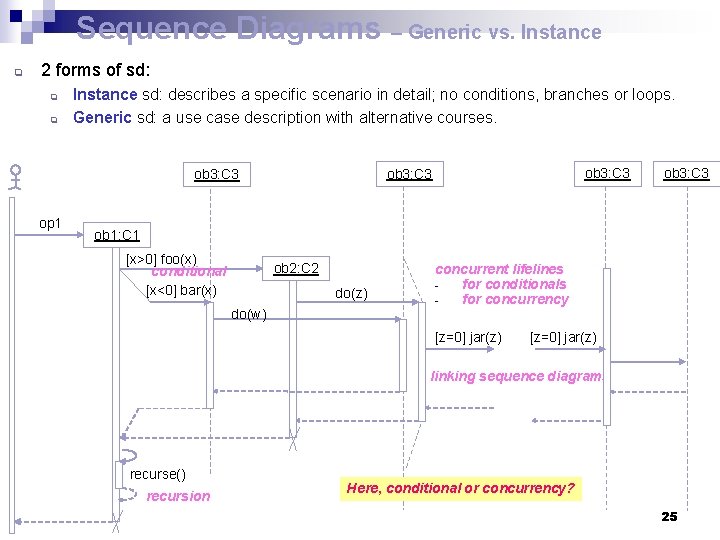
Sequence Diagrams – Generic vs. Instance q 2 forms of sd: q q Instance sd: describes a specific scenario in detail; no conditions, branches or loops. Generic sd: a use case description with alternative courses. op 1 ob 3: C 3 ob 1: C 1 [x>0] foo(x) conditional [x<0] bar(x) ob 2: C 2 do(z) do(w) concurrent lifelines for conditionals for concurrency [z=0] jar(z) linking sequence diagrams recurse() recursion Here, conditional or concurrency? 25
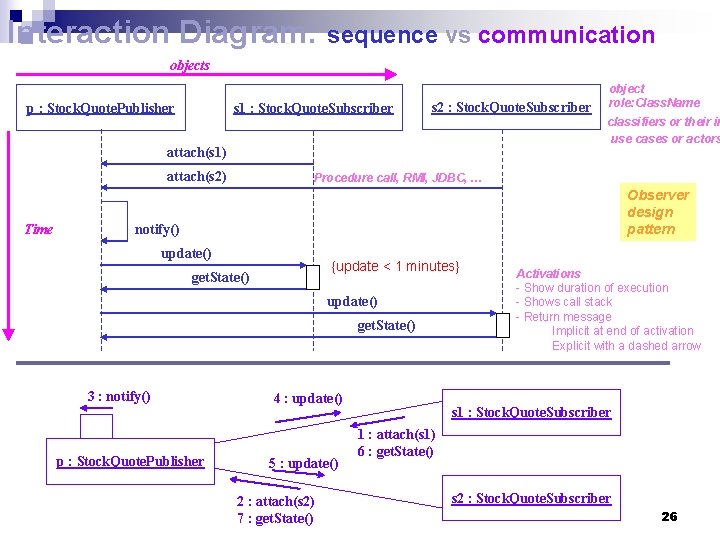
Interaction Diagram: sequence vs communication objects p : Stock. Quote. Publisher s 1 : Stock. Quote. Subscriber s 2 : Stock. Quote. Subscriber classifiers or their in use cases or actors attach(s 1) attach(s 2) Time object role: Class. Name Procedure call, RMI, JDBC, … Observer design pattern notify() update() {update < 1 minutes} get. State() update() get. State() 3 : notify() p : Stock. Quote. Publisher 4 : update() 5 : update() 2 : attach(s 2) 7 : get. State() Activations - Show duration of execution - Shows call stack - Return message Implicit at end of activation Explicit with a dashed arrow s 1 : Stock. Quote. Subscriber 1 : attach(s 1) 6 : get. State() s 2 : Stock. Quote. Subscriber 26
Skip end: resume 27

Diagrams in UML - Class Diagrams n A class diagram shows the existence of classes and their relationships n Recall: A class is a collection of objects with common structure, common behavior, common relationships and common semantics Some classes are shown through the objects in sequence/collaboration diagram n the. Manager : Curriculum. Manager 4: <<create>> Curriculum. Manager Course a. Course : Course Traceability! registration form registration manager 3: add course(Sue, math 01) Registration. Manager add. Course(Student, Course) 28
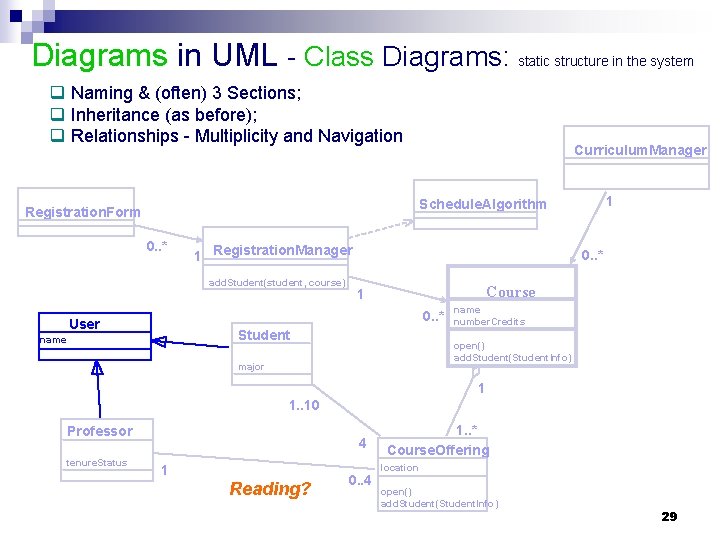
Diagrams in UML - Class Diagrams: static structure in the system q Naming & (often) 3 Sections; q Inheritance (as before); q Relationships - Multiplicity and Navigation Curriculum. Manager 1 Schedule. Algorithm Registration. Form 0. . * 1 Registration. Manager add. Student(student, course) 0. . * Course 1 0. . * User Student name number. Credits open() add. Student(Student. Info) major 1 1. . 10 Professor tenure. Status 4 1 Reading? 0. . 4 1. . * Course. Offering location open() add. Student(Student. Info) 29
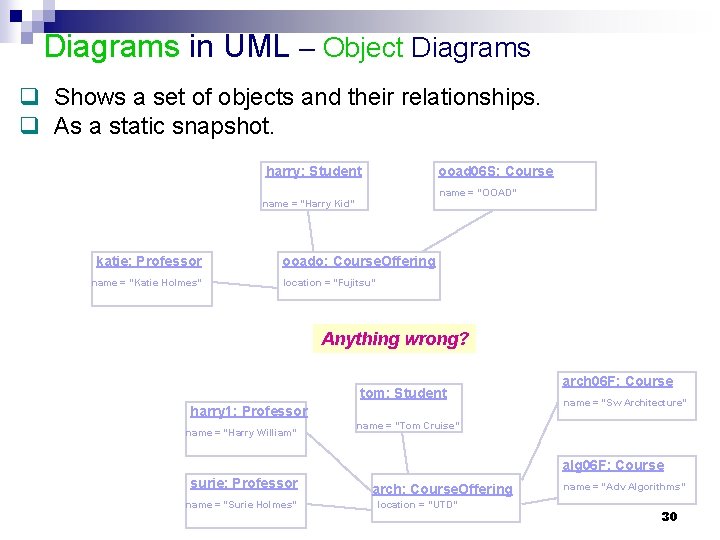
Diagrams in UML – Object Diagrams q Shows a set of objects and their relationships. q As a static snapshot. harry: Student ooad 06 S: Course name = “OOAD” name = “Harry Kid” katie: Professor name = “Katie Holmes” ooado: Course. Offering location = “Fujitsu” Anything wrong? tom: Student harry 1: Professor name = “Harry William” arch 06 F: Course name = “Sw Architecture” name = “Tom Cruise” alg 06 F: Course surie: Professor name = “Surie Holmes” arch: Course. Offering location = “UTD” name = “Adv Algorithms” 30
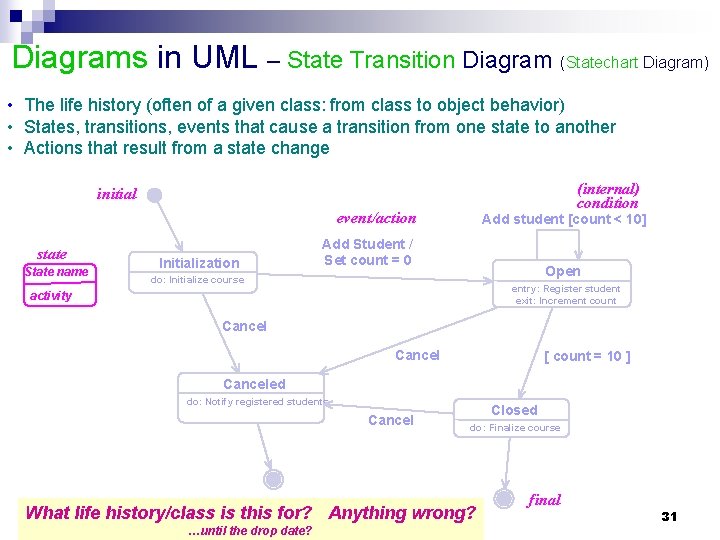
Diagrams in UML – State Transition Diagram (Statechart Diagram) • The life history (often of a given class: from class to object behavior) • States, transitions, events that cause a transition from one state to another • Actions that result from a state change (internal) condition initial event/action state State name Initialization Add student [count < 10] Add Student / Set count = 0 Open do: Initialize course entry: Register student exit: Increment count activity Cancel [ count = 10 ] Canceled do: Notify registered students Cancel Closed do: Finalize course What life history/class is this for? Anything wrong? …until the drop date? final 31
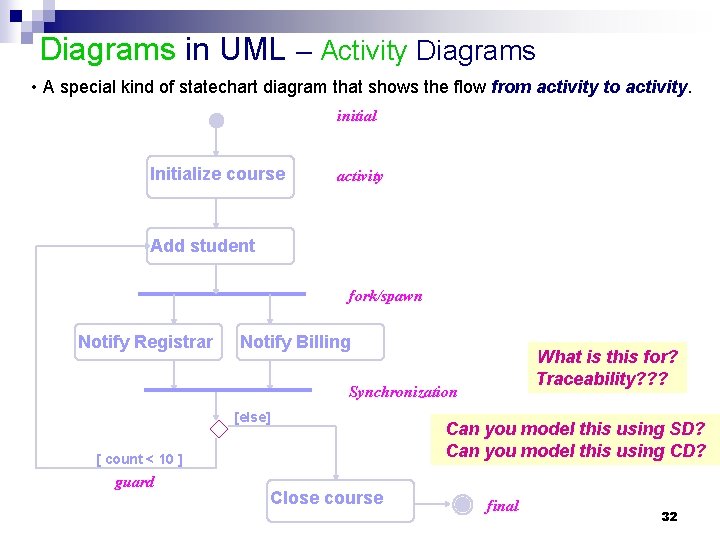
Diagrams in UML – Activity Diagrams • A special kind of statechart diagram that shows the flow from activity to activity. initial Initialize course activity Add student fork/spawn Notify Registrar Notify Billing What is this for? Traceability? ? ? Synchronization [else] [ count < 10 ] guard Close course Can you model this using SD? Can you model this using CD? final 32
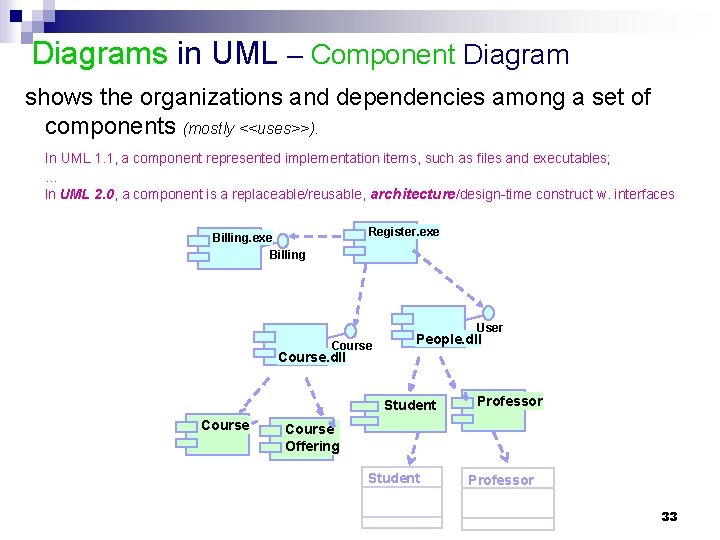
Diagrams in UML – Component Diagram shows the organizations and dependencies among a set of components (mostly <<uses>>). In UML 1. 1, a component represented implementation items, such as files and executables; … In UML 2. 0, a component is a replaceable/reusable, architecture/design-time construct w. interfaces Register. exe Billing User Course People. dll Course. dll Student Course Professor Course Offering Student Professor 33
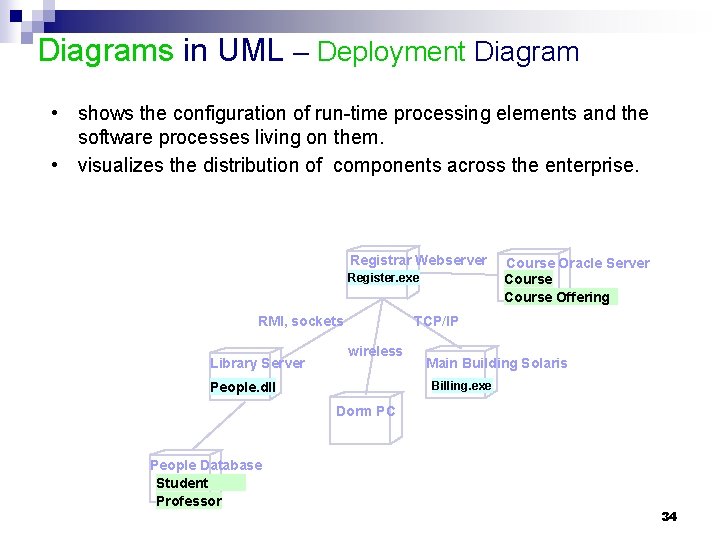
Diagrams in UML – Deployment Diagram • shows the configuration of run-time processing elements and the software processes living on them. • visualizes the distribution of components across the enterprise. Registrar Webserver Register. exe RMI, sockets Library Server Course Oracle Server Course Offering TCP/IP wireless Main Building Solaris Billing. exe People. dll Dorm PC People Database Student Professor 34
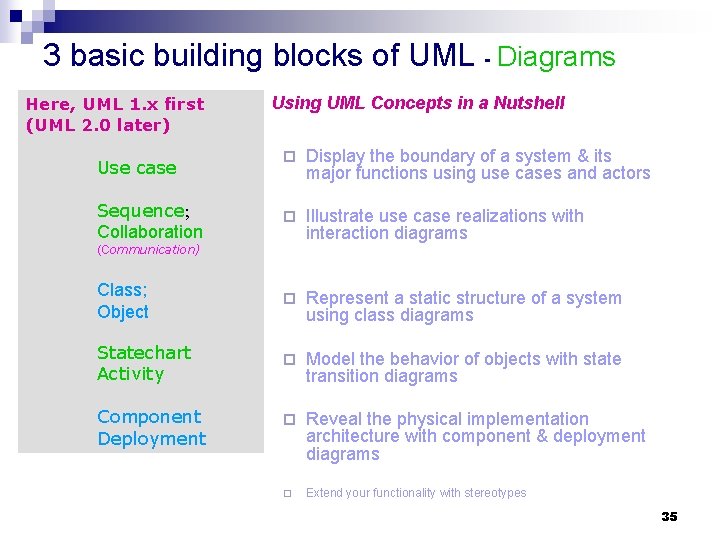
3 basic building blocks of UML - Diagrams Here, UML 1. x first (UML 2. 0 later) Using UML Concepts in a Nutshell ¨ Display the boundary of a system & its major functions using use cases and actors ¨ Illustrate use case realizations with interaction diagrams Class; Object ¨ Represent a static structure of a system using class diagrams Statechart Activity ¨ Model the behavior of objects with state transition diagrams Component Deployment ¨ Reveal the physical implementation architecture with component & deployment diagrams ¨ Extend your functionality with stereotypes Use case Sequence; Collaboration (Communication) 35
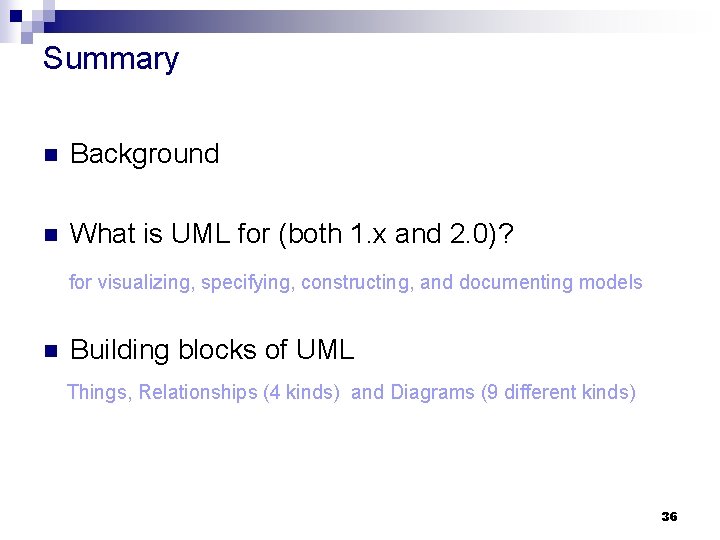
Summary n Background n What is UML for (both 1. x and 2. 0)? for visualizing, specifying, constructing, and documenting models n Building blocks of UML Things, Relationships (4 kinds) and Diagrams (9 different kinds) 36
Module 2: Introduction to UML Appendix 37
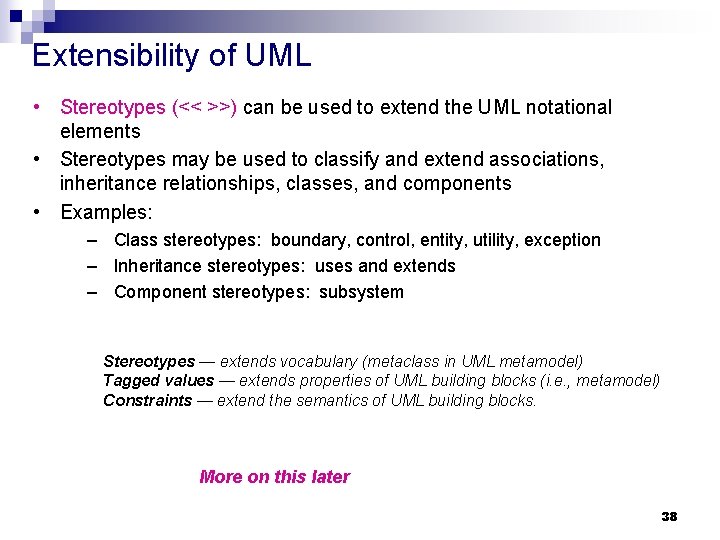
Extensibility of UML • Stereotypes (<< >>) can be used to extend the UML notational elements • Stereotypes may be used to classify and extend associations, inheritance relationships, classes, and components • Examples: – Class stereotypes: boundary, control, entity, utility, exception – Inheritance stereotypes: uses and extends – Component stereotypes: subsystem Stereotypes — extends vocabulary (metaclass in UML metamodel) Tagged values — extends properties of UML building blocks (i. e. , metamodel) Constraints — extend the semantics of UML building blocks. More on this later 38
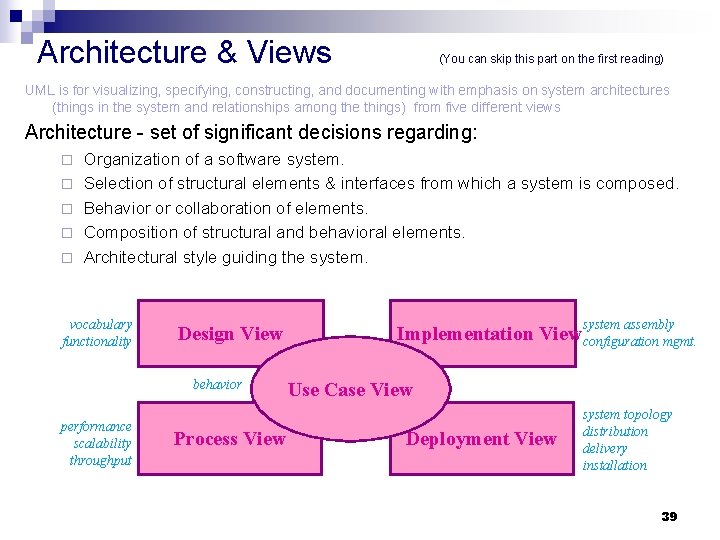
Architecture & Views (You can skip this part on the first reading) UML is for visualizing, specifying, constructing, and documenting with emphasis on system architectures (things in the system and relationships among the things) from five different views Architecture - set of significant decisions regarding: ¨ ¨ ¨ Organization of a software system. Selection of structural elements & interfaces from which a system is composed. Behavior or collaboration of elements. Composition of structural and behavioral elements. Architectural style guiding the system. vocabulary functionality Design View behavior performance scalability throughput Process View system assembly Implementation View configuration mgmt. Use Case View Deployment View system topology distribution delivery installation 39
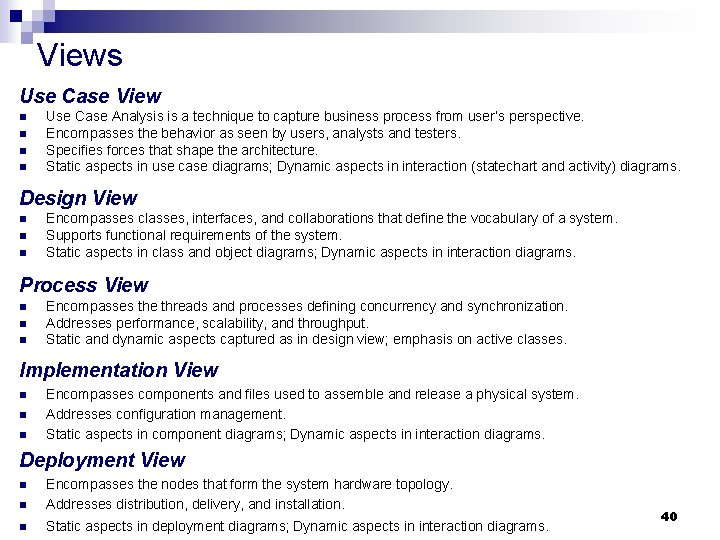
Views Use Case View n n Use Case Analysis is a technique to capture business process from user’s perspective. Encompasses the behavior as seen by users, analysts and testers. Specifies forces that shape the architecture. Static aspects in use case diagrams; Dynamic aspects in interaction (statechart and activity) diagrams. Design View n n n Encompasses classes, interfaces, and collaborations that define the vocabulary of a system. Supports functional requirements of the system. Static aspects in class and object diagrams; Dynamic aspects in interaction diagrams. Process View n n n Encompasses the threads and processes defining concurrency and synchronization. Addresses performance, scalability, and throughput. Static and dynamic aspects captured as in design view; emphasis on active classes. Implementation View n n n Encompasses components and files used to assemble and release a physical system. Addresses configuration management. Static aspects in component diagrams; Dynamic aspects in interaction diagrams. Deployment View n Encompasses the nodes that form the system hardware topology. Addresses distribution, delivery, and installation. n Static aspects in deployment diagrams; Dynamic aspects in interaction diagrams. n 40
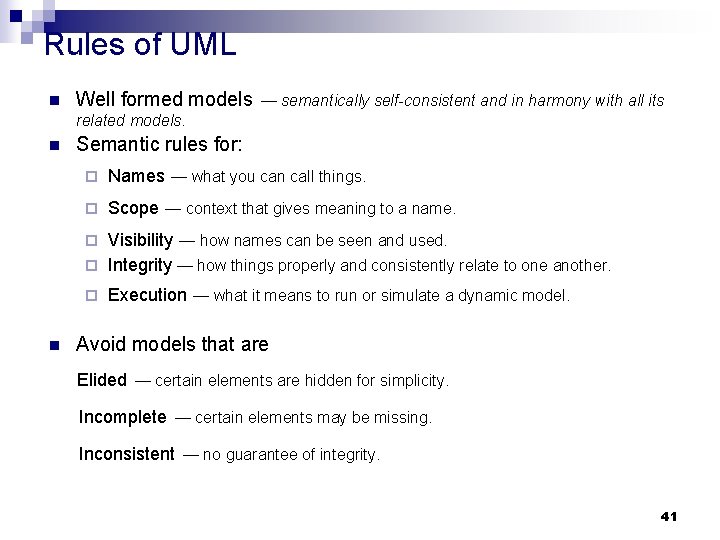
Rules of UML n Well formed models — semantically self-consistent and in harmony with all its related models. n Semantic rules for: ¨ Names — what you can call things. ¨ Scope — context that gives meaning to a name. Visibility — how names can be seen and used. ¨ Integrity — how things properly and consistently relate to one another. ¨ ¨ n Execution — what it means to run or simulate a dynamic model. Avoid models that are Elided — certain elements are hidden for simplicity. Incomplete — certain elements may be missing. Inconsistent — no guarantee of integrity. 41
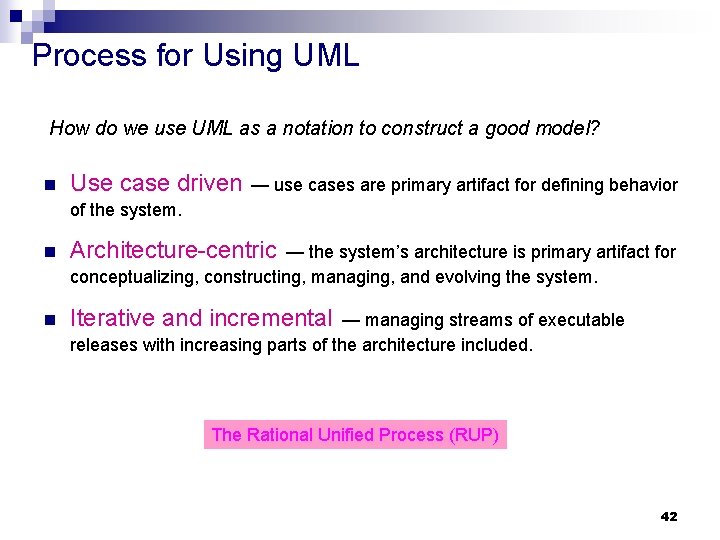
Process for Using UML How do we use UML as a notation to construct a good model? n Use case driven — use cases are primary artifact for defining behavior of the system. n Architecture-centric n Iterative and incremental — the system’s architecture is primary artifact for conceptualizing, constructing, managing, and evolving the system. — managing streams of executable releases with increasing parts of the architecture included. The Rational Unified Process (RUP) 42
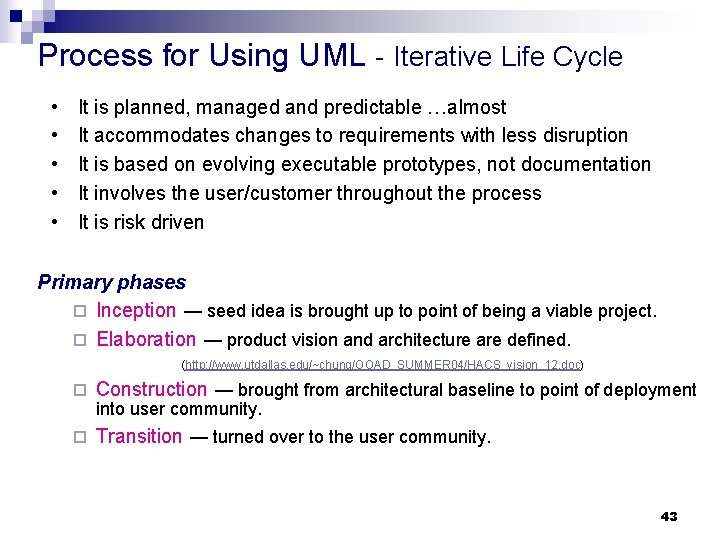
Process for Using UML - Iterative Life Cycle • • • It is planned, managed and predictable …almost It accommodates changes to requirements with less disruption It is based on evolving executable prototypes, not documentation It involves the user/customer throughout the process It is risk driven Primary phases ¨ Inception — seed idea is brought up to point of being a viable project. ¨ Elaboration — product vision and architecture are defined. (http: //www. utdallas. edu/~chung/OOAD_SUMMER 04/HACS_vision_12. doc) ¨ Construction — brought from architectural baseline to point of deployment ¨ Transition — turned over to the user community. into user community. 43
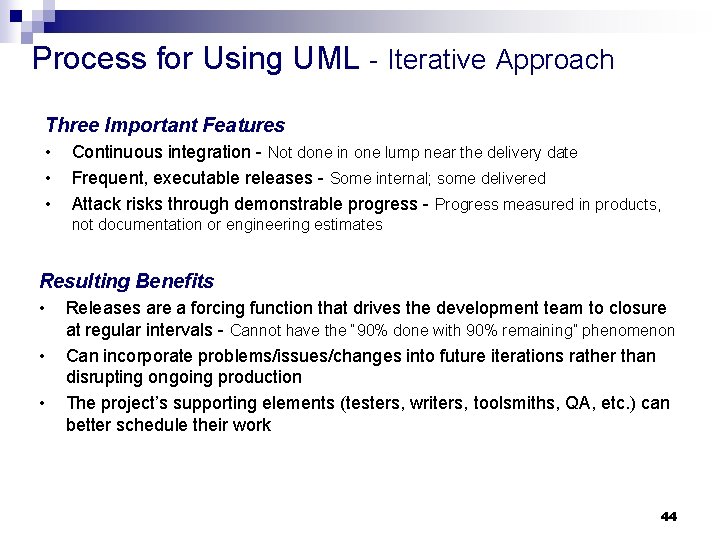
Process for Using UML - Iterative Approach Three Important Features • • • Continuous integration - Not done in one lump near the delivery date Frequent, executable releases - Some internal; some delivered Attack risks through demonstrable progress - Progress measured in products, not documentation or engineering estimates Resulting Benefits • • • Releases are a forcing function that drives the development team to closure at regular intervals - Cannot have the “ 90% done with 90% remaining” phenomenon Can incorporate problems/issues/changes into future iterations rather than disrupting ongoing production The project’s supporting elements (testers, writers, toolsmiths, QA, etc. ) can better schedule their work 44
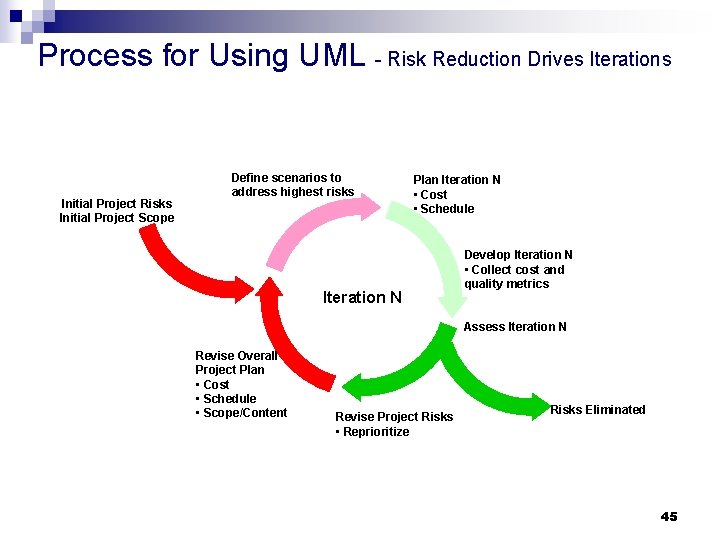
Process for Using UML - Risk Reduction Drives Iterations Initial Project Risks Initial Project Scope Define scenarios to address highest risks Plan Iteration N • Cost • Schedule Iteration N Develop Iteration N • Collect cost and quality metrics Assess Iteration N Revise Overall Project Plan • Cost • Schedule • Scope/Content Revise Project Risks • Reprioritize Risks Eliminated 45
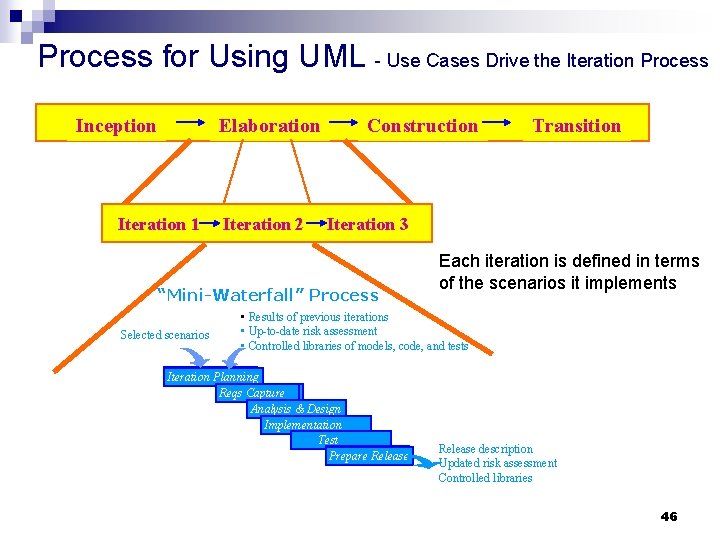
Process for Using UML - Use Cases Drive the Iteration Process Inception Elaboration Iteration 1 Iteration 2 Construction Iteration 3 “Mini-Waterfall” Process Selected scenarios Transition Each iteration is defined in terms of the scenarios it implements • Results of previous iterations • Up-to-date risk assessment • Controlled libraries of models, code, and tests Iteration Planning Reqs Capture Analysis & Design Implementation Test Prepare Release description Updated risk assessment Controlled libraries 46
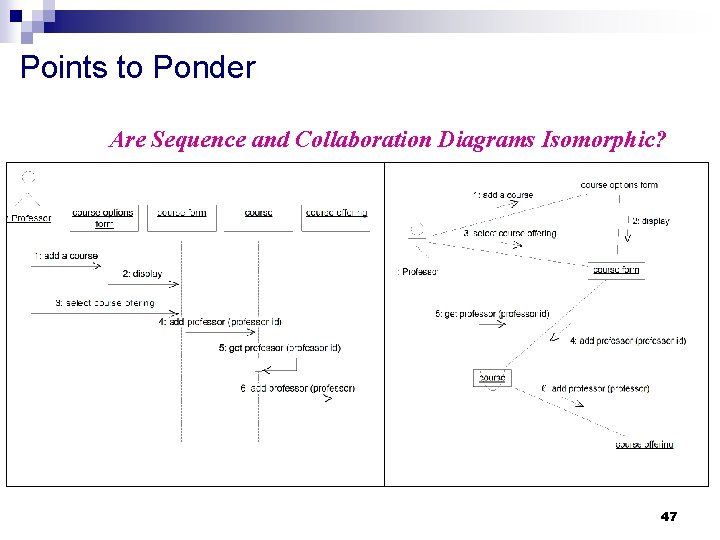
Points to Ponder Are Sequence and Collaboration Diagrams Isomorphic? 47
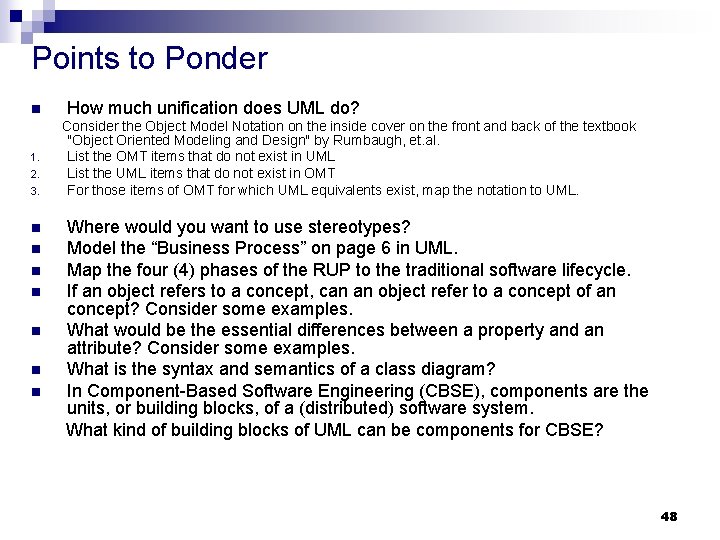
Points to Ponder n 1. 2. 3. n n n n How much unification does UML do? Consider the Object Model Notation on the inside cover on the front and back of the textbook "Object Oriented Modeling and Design" by Rumbaugh, et. al. List the OMT items that do not exist in UML List the UML items that do not exist in OMT For those items of OMT for which UML equivalents exist, map the notation to UML. Where would you want to use stereotypes? Model the “Business Process” on page 6 in UML. Map the four (4) phases of the RUP to the traditional software lifecycle. If an object refers to a concept, can an object refer to a concept of an concept? Consider some examples. What would be the essential differences between a property and an attribute? Consider some examples. What is the syntax and semantics of a class diagram? In Component-Based Software Engineering (CBSE), components are the units, or building blocks, of a (distributed) software system. What kind of building blocks of UML can be components for CBSE? 48
- Slides: 48