
Module 15 IP Static Routing Switching Routing and












- Slides: 43
Module 15: IP Static Routing Switching, Routing, and Wireless Essentials v 7. 0 (SRWE)
Module Objectives Module Title: IP Static Routing Module Objective: Configure IPv 4 and IPv 6 static routes. Topic Title Topic Objective Static Routes Describe the command syntax for static routes. Configure IP Static Routes Configure IPv 4 and IPv 6 static routes. Configure IP Default Static Routes Configure IPv 4 and IPv 6 default static routes. Configure Floating Static Routes Configure a floating static route to provide a backup connection. Configure Static Host Routes Configure IPv 4 and IPv 6 static host routes that direct traffic to a specific host. © 2016 Cisco and/or its affiliates. All rights reserved. Cisco Confidential 2
15. 1 Static Routes © 2016 Cisco and/or its affiliates. All rights reserved. Cisco Confidential 3
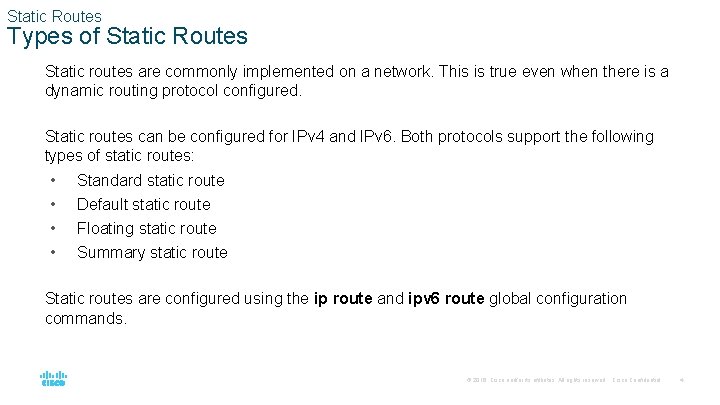
Static Routes Types of Static Routes Static routes are commonly implemented on a network. This is true even when there is a dynamic routing protocol configured. Static routes can be configured for IPv 4 and IPv 6. Both protocols support the following types of static routes: • • Standard static route Default static route Floating static route Summary static route Static routes are configured using the ip route and ipv 6 route global configuration commands. © 2016 Cisco and/or its affiliates. All rights reserved. Cisco Confidential 4
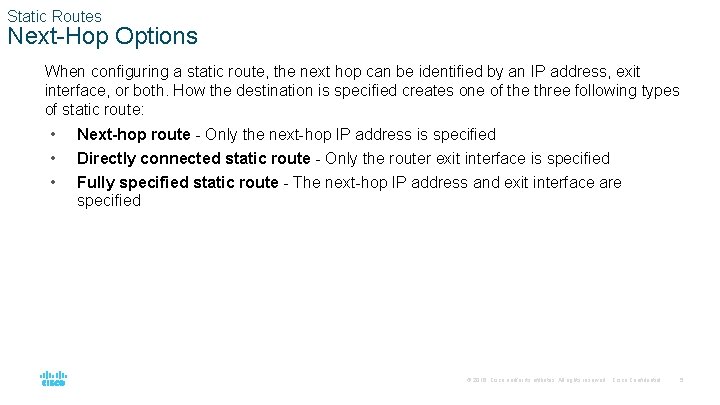
Static Routes Next-Hop Options When configuring a static route, the next hop can be identified by an IP address, exit interface, or both. How the destination is specified creates one of the three following types of static route: • • • Next-hop route - Only the next-hop IP address is specified Directly connected static route - Only the router exit interface is specified Fully specified static route - The next-hop IP address and exit interface are specified © 2016 Cisco and/or its affiliates. All rights reserved. Cisco Confidential 5
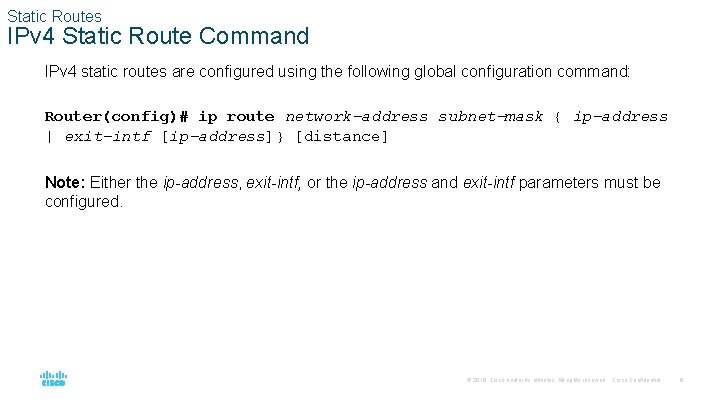
Static Routes IPv 4 Static Route Command IPv 4 static routes are configured using the following global configuration command: Router(config)# ip route network-address subnet-mask { ip-address | exit-intf [ip-address]} [distance] Note: Either the ip-address, exit-intf, or the ip-address and exit-intf parameters must be configured. © 2016 Cisco and/or its affiliates. All rights reserved. Cisco Confidential 6
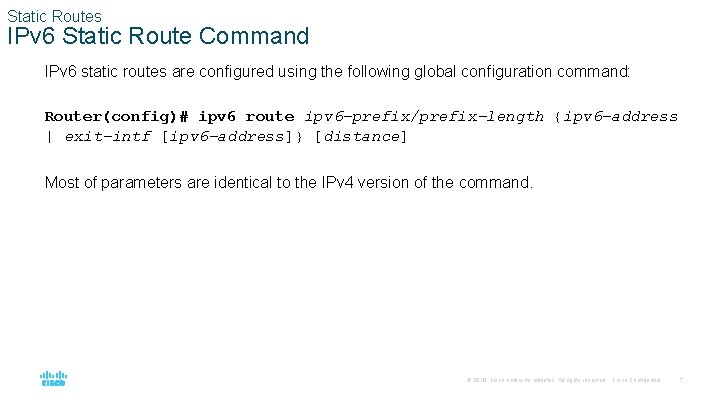
Static Routes IPv 6 Static Route Command IPv 6 static routes are configured using the following global configuration command: Router(config)# ipv 6 route ipv 6 -prefix/prefix-length {ipv 6 -address | exit-intf [ipv 6 -address]} [distance] Most of parameters are identical to the IPv 4 version of the command. © 2016 Cisco and/or its affiliates. All rights reserved. Cisco Confidential 7
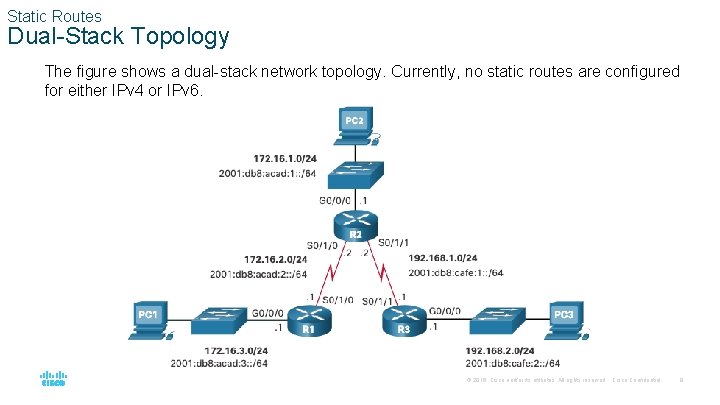
Static Routes Dual-Stack Topology The figure shows a dual-stack network topology. Currently, no static routes are configured for either IPv 4 or IPv 6. © 2016 Cisco and/or its affiliates. All rights reserved. Cisco Confidential 8
Static Routes IPv 4 Starting Routing Tables • • Each router has entries only for directly connected networks and associated local addresses. R 1 can ping R 2, but cannot ping the R 3 LAN R 1# show ip route | begin Gateway of last resort is not set 172. 16. 0. 0/16 is variably subnetted, 4 subnets, 2 masks C 172. 16. 2. 0/24 is directly connected, Serial 0/1/0 L 172. 16. 2. 1/32 is directly connected, Serial 0/1/0 C 172. 16. 3. 0/24 is directly connected, Gigabit. Ethernet 0/0/0 L 172. 16. 3. 1/32 is directly connected, Gigabit. Ethernet 0/0/0 R 1# ping 172. 16. 2. 2 Type escape sequence to abort. Sending 5, 100 -byte ICMP Echos to 172. 16. 2. 2, timeout is 2 seconds: !!!!! Success rate is 100 percent (5/5) R 1# ping 192. 168. 2. 1 Type escape sequence to abort. Sending 5, 100 -byte ICMP Echos to 192. 168. 2. 1, timeout is 2 seconds: . . . Success rate is 0 percent (0/5) © 2016 Cisco and/or its affiliates. All rights reserved. Cisco Confidential 9
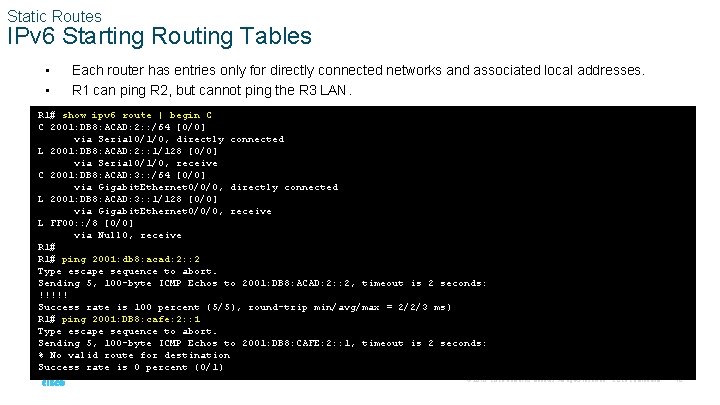
Static Routes IPv 6 Starting Routing Tables • • Each router has entries only for directly connected networks and associated local addresses. R 1 can ping R 2, but cannot ping the R 3 LAN. R 1# show ipv 6 route | begin C C 2001: DB 8: ACAD: 2: : /64 [0/0] via Serial 0/1/0, directly connected L 2001: DB 8: ACAD: 2: : 1/128 [0/0] via Serial 0/1/0, receive C 2001: DB 8: ACAD: 3: : /64 [0/0] via Gigabit. Ethernet 0/0/0, directly connected L 2001: DB 8: ACAD: 3: : 1/128 [0/0] via Gigabit. Ethernet 0/0/0, receive L FF 00: : /8 [0/0] via Null 0, receive R 1# ping 2001: db 8: acad: 2: : 2 Type escape sequence to abort. Sending 5, 100 -byte ICMP Echos to 2001: DB 8: ACAD: 2: : 2, timeout is 2 seconds: !!!!! Success rate is 100 percent (5/5), round-trip min/avg/max = 2/2/3 ms) R 1# ping 2001: DB 8: cafe: 2: : 1 Type escape sequence to abort. Sending 5, 100 -byte ICMP Echos to 2001: DB 8: CAFE: 2: : 1, timeout is 2 seconds: % No valid route for destination Success rate is 0 percent (0/1) © 2016 Cisco and/or its affiliates. All rights reserved. Cisco Confidential 10
15. 2 Configure IP Static Routes © 2016 Cisco and/or its affiliates. All rights reserved. Cisco Confidential 11
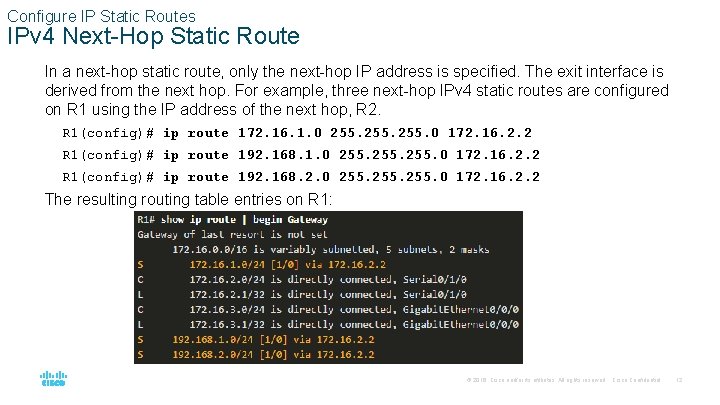
Configure IP Static Routes IPv 4 Next-Hop Static Route In a next-hop static route, only the next-hop IP address is specified. The exit interface is derived from the next hop. For example, three next-hop IPv 4 static routes are configured on R 1 using the IP address of the next hop, R 2. R 1(config)# ip route 172. 16. 1. 0 255. 0 172. 16. 2. 2 R 1(config)# ip route 192. 168. 2. 0 255. 0 172. 16. 2. 2 The resulting routing table entries on R 1: © 2016 Cisco and/or its affiliates. All rights reserved. Cisco Confidential 12
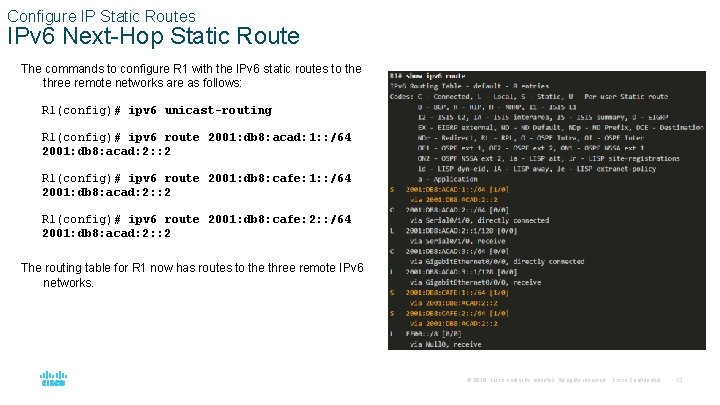
Configure IP Static Routes IPv 6 Next-Hop Static Route The commands to configure R 1 with the IPv 6 static routes to the three remote networks are as follows: R 1(config)# ipv 6 unicast-routing R 1(config)# ipv 6 route 2001: db 8: acad: 1: : /64 2001: db 8: acad: 2: : 2 R 1(config)# ipv 6 route 2001: db 8: cafe: 2: : /64 2001: db 8: acad: 2: : 2 The routing table for R 1 now has routes to the three remote IPv 6 networks. © 2016 Cisco and/or its affiliates. All rights reserved. Cisco Confidential 13
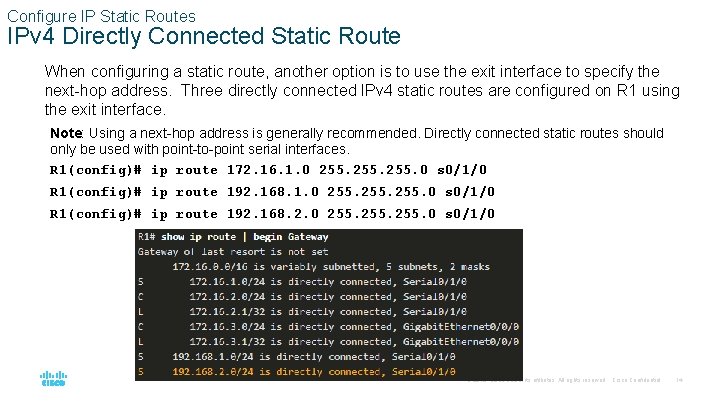
Configure IP Static Routes IPv 4 Directly Connected Static Route When configuring a static route, another option is to use the exit interface to specify the next-hop address. Three directly connected IPv 4 static routes are configured on R 1 using the exit interface. Note: Using a next-hop address is generally recommended. Directly connected static routes should only be used with point-to-point serial interfaces. R 1(config)# ip route 172. 16. 1. 0 255. 0 s 0/1/0 R 1(config)# ip route 192. 168. 2. 0 255. 0 s 0/1/0 © 2016 Cisco and/or its affiliates. All rights reserved. Cisco Confidential 14
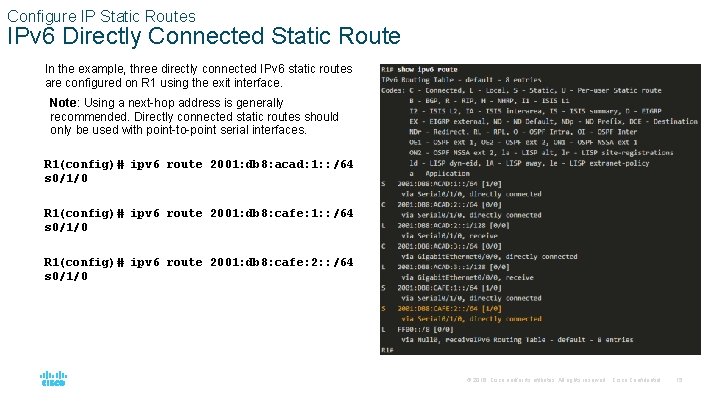
Configure IP Static Routes IPv 6 Directly Connected Static Route In the example, three directly connected IPv 6 static routes are configured on R 1 using the exit interface. Note: Using a next-hop address is generally recommended. Directly connected static routes should only be used with point-to-point serial interfaces. R 1(config)# ipv 6 route 2001: db 8: acad: 1: : /64 s 0/1/0 R 1(config)# ipv 6 route 2001: db 8: cafe: 2: : /64 s 0/1/0 © 2016 Cisco and/or its affiliates. All rights reserved. Cisco Confidential 15
Configure IP Static Routes IPv 4 Fully Specified Static Route • • In a fully specified static route, both the exit interface and the next-hop IP address are specified. This form of static route is used when the exit interface is a multi-access interface and it is necessary to explicitly identify the next hop. The next hop must be directly connected to the specified exit interface. Using an exit interface is optional, however it is necessary to use a next-hop address. It is recommended that when the exit interface is an Ethernet network, that the static route includes a next-hop address. You can also use a fully specified static route that includes both the exit interface and the nexthop address. © 2016 Cisco and/or its affiliates. All rights reserved. Cisco Confidential 16
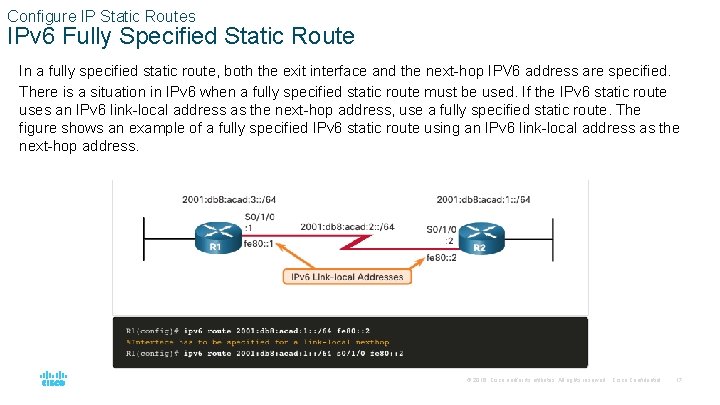
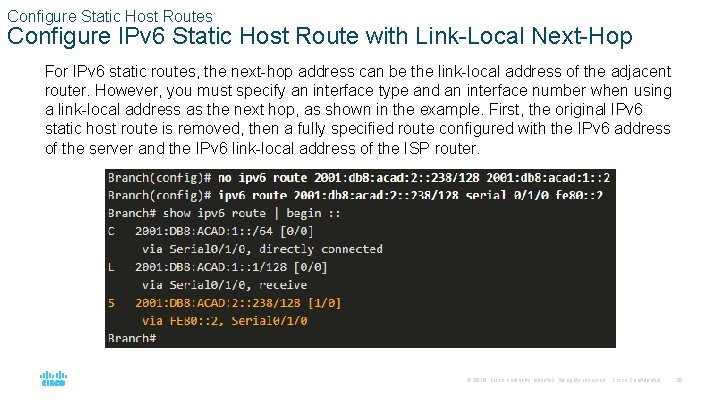
Configure IP Static Routes IPv 6 Fully Specified Static Route In a fully specified static route, both the exit interface and the next-hop IPV 6 address are specified. There is a situation in IPv 6 when a fully specified static route must be used. If the IPv 6 static route uses an IPv 6 link-local address as the next-hop address, use a fully specified static route. The figure shows an example of a fully specified IPv 6 static route using an IPv 6 link-local address as the next-hop address. © 2016 Cisco and/or its affiliates. All rights reserved. Cisco Confidential 17
Configure IP Static Routes IPv 6 Fully Specified Static Route (Cont. ) The reason a fully specified static route must be used is because IPv 6 link-local addresses are not contained in the IPv 6 routing table. Link-local addresses are only unique on a given link or network. The next-hop link-local address may be a valid address on multiple networks connected to the router. Therefore, it is necessary that the exit interface be included. The following example shows the IPv 6 routing table entry for this route. Notice that both the next-hop link-local address and the exit interface are included. © 2016 Cisco and/or its affiliates. All rights reserved. Cisco Confidential 18
Configure IP Static Routes Verify a Static Route Along with show ip route, show ipv 6 route, ping and traceroute, other useful commands to verify static routes include the following: • show ip route static • show ip route network • show running-config | section ip route Replace ip with ipv 6 for the IPv 6 versions of the command. © 2016 Cisco and/or its affiliates. All rights reserved. Cisco Confidential 19
15. 3 Configure IP Default Static Routes © 2016 Cisco and/or its affiliates. All rights reserved. Cisco Confidential 20
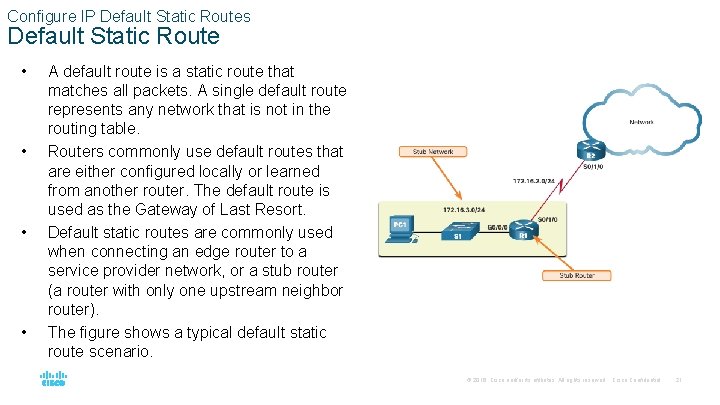
Configure IP Default Static Routes Default Static Route • • A default route is a static route that matches all packets. A single default route represents any network that is not in the routing table. Routers commonly use default routes that are either configured locally or learned from another router. The default route is used as the Gateway of Last Resort. Default static routes are commonly used when connecting an edge router to a service provider network, or a stub router (a router with only one upstream neighbor router). The figure shows a typical default static route scenario. © 2016 Cisco and/or its affiliates. All rights reserved. Cisco Confidential 21
Configure IP Default Static Routes Default Static Route (Cont. ) IPv 4 Default Static Route: The command syntax for an IPv 4 default static route is similar to any other IPv 4 static route, except that the network address is 0. 0 and the subnet mask is 0. 0. The 0. 0 in the route will match any network address. Note: An IPv 4 default static route is commonly referred to as a quad-zero route. The basic command syntax for an IPv 4 default static route is as follows: Router(config)# ip route 0. 0 {ip-address | exit-intf} IPv 6 Default Static Route: The command syntax for an IPv 6 default static route is similar to any other IPv 6 static route, except that the ipv 6 -prefix/prefix-length is : : /0, which matches all routes. The basic command syntax for an IPv 6 default static route is as follows: Router(config)# ipv 6 route : : /0 {ipv 6 -address | exit-intf} © 2016 Cisco and/or its affiliates. All rights reserved. Cisco Confidential 22
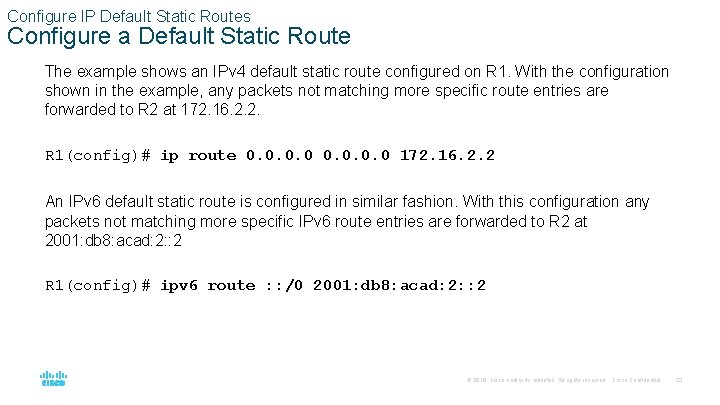
Configure IP Default Static Routes Configure a Default Static Route The example shows an IPv 4 default static route configured on R 1. With the configuration shown in the example, any packets not matching more specific route entries are forwarded to R 2 at 172. 16. 2. 2. R 1(config)# ip route 0. 0 172. 16. 2. 2 An IPv 6 default static route is configured in similar fashion. With this configuration any packets not matching more specific IPv 6 route entries are forwarded to R 2 at 2001: db 8: acad: 2: : 2 R 1(config)# ipv 6 route : : /0 2001: db 8: acad: 2: : 2 © 2016 Cisco and/or its affiliates. All rights reserved. Cisco Confidential 23
Configure IP Default Static Routes Verify a Default Static Route The show ip route static command output from R 1 displays the contents of the static routes in the routing table. Note the asterisk (*) next to the route with code ‘S’. The asterisk indicates that this static route is a candidate default route, which is why it is selected as the Gateway of Last Resort. Notice that the static default route configuration uses the /0 mask for IPv 4 default routes. Remember that the IPv 4 subnet mask in a routing table determines how many bits must match between the destination IP address of the packet and the route in the routing table. A /0 mask indicates that none of the bits are required to match. As long as a more specific match does not exist, the default static route matches all packets. © 2016 Cisco and/or its affiliates. All rights reserved. Cisco Confidential 24
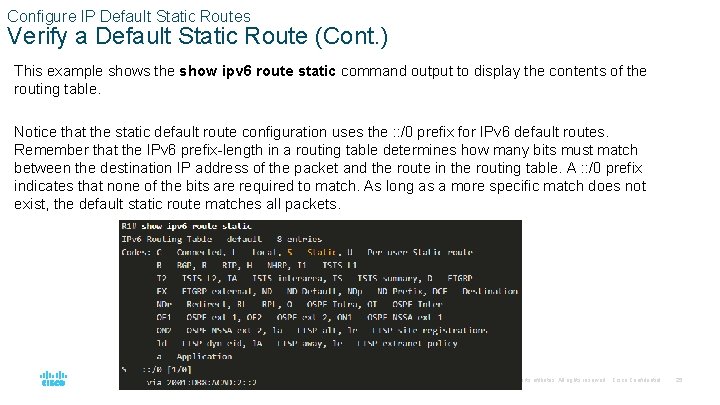
Configure IP Default Static Routes Verify a Default Static Route (Cont. ) This example shows the show ipv 6 route static command output to display the contents of the routing table. Notice that the static default route configuration uses the : : /0 prefix for IPv 6 default routes. Remember that the IPv 6 prefix-length in a routing table determines how many bits must match between the destination IP address of the packet and the route in the routing table. A : : /0 prefix indicates that none of the bits are required to match. As long as a more specific match does not exist, the default static route matches all packets. © 2016 Cisco and/or its affiliates. All rights reserved. Cisco Confidential 25
15. 4 Configure Floating Static Routes © 2016 Cisco and/or its affiliates. All rights reserved. Cisco Confidential 26
Configure Floating Static Routes • • Another type of static route is a floating static route. Floating static routes are static routes that are used to provide a backup path to a primary static or dynamic route. The floating static route is only used when the primary route is not available. To accomplish this, the floating static route is configured with a higher administrative distance than the primary route. The administrative distance represents the trustworthiness of a route. If multiple paths to the destination exist, the router will choose the path with the lowest administrative distance. By default, static routes have an administrative distance of 1, making them preferable to routes learned from dynamic routing protocols. The administrative distance of a static route can be increased to make the route less desirable than that of another static route or a route learned through a dynamic routing protocol. In this way, the static route “floats” and is not used when the route with the better administrative distance is active. © 2016 Cisco and/or its affiliates. All rights reserved. Cisco Confidential 27
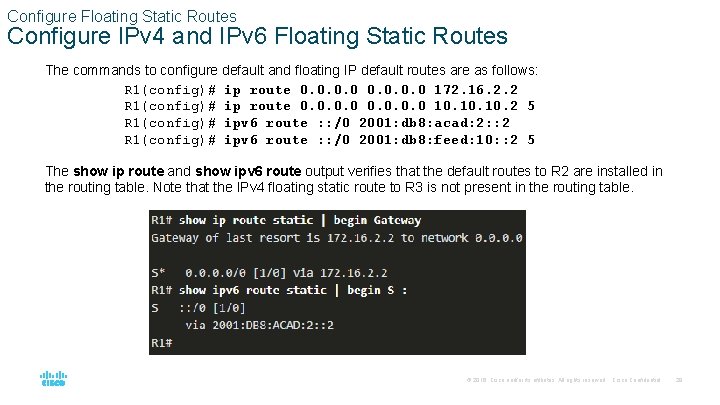
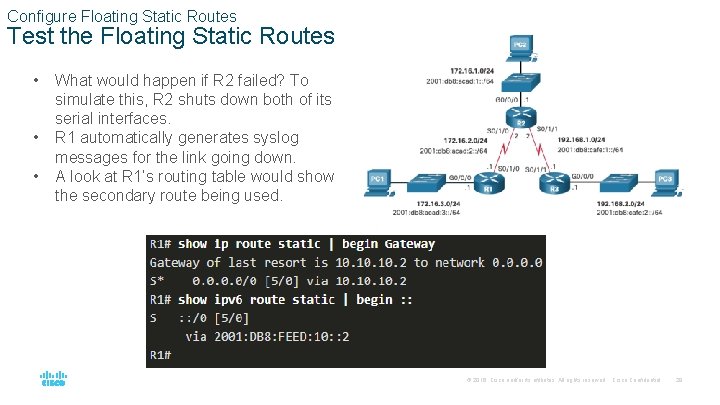
Configure Floating Static Routes Configure IPv 4 and IPv 6 Floating Static Routes The commands to configure default and floating IP default routes are as follows: R 1(config)# ip route 0. 0 172. 16. 2. 2 R 1(config)# ip route 0. 0 10. 10. 2 5 R 1(config)# ipv 6 route : : /0 2001: db 8: acad: 2: : 2 R 1(config)# ipv 6 route : : /0 2001: db 8: feed: 10: : 2 5 The show ip route and show ipv 6 route output verifies that the default routes to R 2 are installed in the routing table. Note that the IPv 4 floating static route to R 3 is not present in the routing table. © 2016 Cisco and/or its affiliates. All rights reserved. Cisco Confidential 28
Configure Floating Static Routes Test the Floating Static Routes • • • What would happen if R 2 failed? To simulate this, R 2 shuts down both of its serial interfaces. R 1 automatically generates syslog messages for the link going down. A look at R 1’s routing table would show the secondary route being used. © 2016 Cisco and/or its affiliates. All rights reserved. Cisco Confidential 29
15. 5 Configure Static Host Routes © 2016 Cisco and/or its affiliates. All rights reserved. Cisco Confidential 30
Configure Static Host Routes A host route is an IPv 4 address with a 32 -bit mask, or an IPv 6 address with a 128 -bit mask. The following shows the three ways a host route can be added to the routing table: • Automatically installed when an IP address is configured on the router • Configured as a static host route • Host route automatically obtained through other methods (discussed in later courses) © 2016 Cisco and/or its affiliates. All rights reserved. Cisco Confidential 31
Configure Static Host Routes Automatically Installed Host Routes • • • Cisco IOS automatically installs a host route, also known as a local host route, when an interface address is configured on the router. A host route allows for a more efficient process for packets that are directed to the router itself, rather than for packet forwarding. This is in addition to the connected route, designated with a C in the routing table for the network address of the interface. The local routes are marked with L in the output of the routing table. © 2016 Cisco and/or its affiliates. All rights reserved. Cisco Confidential 32
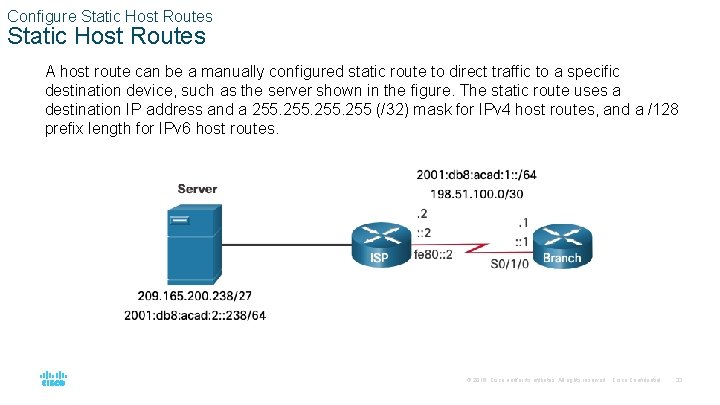
Configure Static Host Routes A host route can be a manually configured static route to direct traffic to a specific destination device, such as the server shown in the figure. The static route uses a destination IP address and a 255 (/32) mask for IPv 4 host routes, and a /128 prefix length for IPv 6 host routes. © 2016 Cisco and/or its affiliates. All rights reserved. Cisco Confidential 33
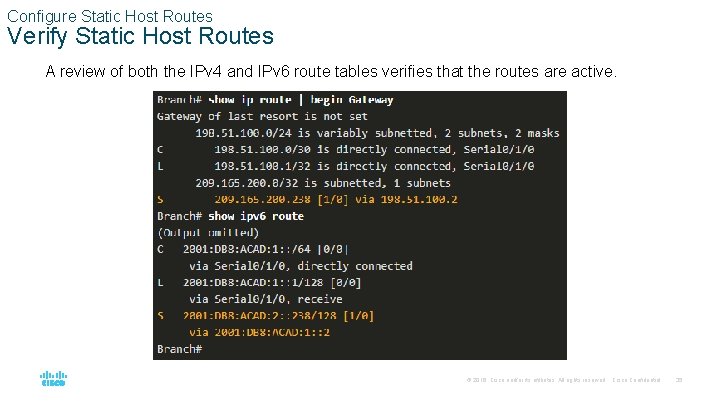
Configure Static Host Routes The example shows the IPv 4 and IPv 6 static host route configuration on the Branch router to access the server. Branch(config)# ip route 209. 165. 200. 238 255 198. 51. 100. 2 Branch(config)# ipv 6 route 2001: db 8: acad: 2: : 238/128 2001: db 8: acad: 1: : 2 Branch(config)# exit Branch# © 2016 Cisco and/or its affiliates. All rights reserved. Cisco Confidential 34
Configure Static Host Routes Verify Static Host Routes A review of both the IPv 4 and IPv 6 route tables verifies that the routes are active. © 2016 Cisco and/or its affiliates. All rights reserved. Cisco Confidential 35
Configure Static Host Routes Configure IPv 6 Static Host Route with Link-Local Next-Hop For IPv 6 static routes, the next-hop address can be the link-local address of the adjacent router. However, you must specify an interface type and an interface number when using a link-local address as the next hop, as shown in the example. First, the original IPv 6 static host route is removed, then a fully specified route configured with the IPv 6 address of the server and the IPv 6 link-local address of the ISP router. © 2016 Cisco and/or its affiliates. All rights reserved. Cisco Confidential 36
15. 6 Module Practice and Quiz © 2016 Cisco and/or its affiliates. All rights reserved. Cisco Confidential 37
Module Practice and Quiz Packet Tracer – Configure IPv 4 and IPv 6 Static and Default Routes In this Packet Tracer, you will do the following: • • • Configure IPv 4 Static and floating static default routers Configure IPv 6 static and floating static default routes Configure. IPv 4 static and floating static routes to internal LANs Configure IPv 6 static and floating static routes to the internal LANS Configure IPv 4 host routes Configure IPv 6 host routes © 2016 Cisco and/or its affiliates. All rights reserved. Cisco Confidential 38
Module Practice and Quiz Lab - Configure IPv 4 and IPv 6 Static and Default Routes In this lab, you will complete the following objectives: • Build the Network and Configure Basic Device Settings • Configure and Verify IP and IPv 6 Addressing on R 1 and R 2 • Configure and Verify Static and Default Routing for IPv 4 on R 1 and R 2 • Configure and Verify Static and Default Routing for IPv 6 on R 1 and R 2 © 2016 Cisco and/or its affiliates. All rights reserved. Cisco Confidential 39
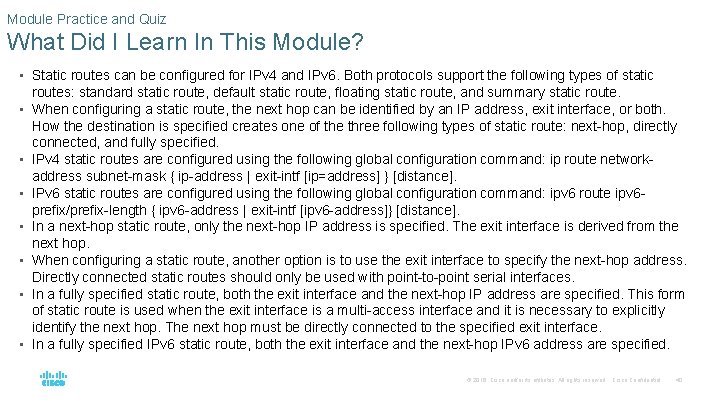
Module Practice and Quiz What Did I Learn In This Module? • Static routes can be configured for IPv 4 and IPv 6. Both protocols support the following types of static • • routes: standard static route, default static route, floating static route, and summary static route. When configuring a static route, the next hop can be identified by an IP address, exit interface, or both. How the destination is specified creates one of the three following types of static route: next-hop, directly connected, and fully specified. IPv 4 static routes are configured using the following global configuration command: ip route networkaddress subnet-mask { ip-address | exit-intf [ip=address] } [distance]. IPv 6 static routes are configured using the following global configuration command: ipv 6 route ipv 6 prefix/prefix-length { ipv 6 -address | exit-intf [ipv 6 -address]} [distance]. In a next-hop static route, only the next-hop IP address is specified. The exit interface is derived from the next hop. When configuring a static route, another option is to use the exit interface to specify the next-hop address. Directly connected static routes should only be used with point-to-point serial interfaces. In a fully specified static route, both the exit interface and the next-hop IP address are specified. This form of static route is used when the exit interface is a multi-access interface and it is necessary to explicitly identify the next hop. The next hop must be directly connected to the specified exit interface. In a fully specified IPv 6 static route, both the exit interface and the next-hop IPv 6 address are specified. © 2016 Cisco and/or its affiliates. All rights reserved. Cisco Confidential 40
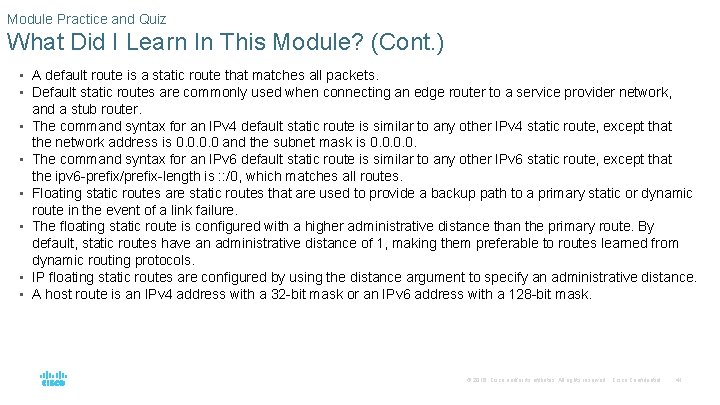
Module Practice and Quiz What Did I Learn In This Module? (Cont. ) • A default route is a static route that matches all packets. • Default static routes are commonly used when connecting an edge router to a service provider network, • • • and a stub router. The command syntax for an IPv 4 default static route is similar to any other IPv 4 static route, except that the network address is 0. 0 and the subnet mask is 0. 0. The command syntax for an IPv 6 default static route is similar to any other IPv 6 static route, except that the ipv 6 -prefix/prefix-length is : : /0, which matches all routes. Floating static routes are static routes that are used to provide a backup path to a primary static or dynamic route in the event of a link failure. The floating static route is configured with a higher administrative distance than the primary route. By default, static routes have an administrative distance of 1, making them preferable to routes learned from dynamic routing protocols. IP floating static routes are configured by using the distance argument to specify an administrative distance. A host route is an IPv 4 address with a 32 -bit mask or an IPv 6 address with a 128 -bit mask. © 2016 Cisco and/or its affiliates. All rights reserved. Cisco Confidential 41
Module Practice and Quiz What Did I Learn In This Module? (Cont. ) • There are three ways a host route can be added to the routing table: automatically installed when an IP address is configured on the router, configured as a static host route, or automatically obtained through other methods not covered in this module. • Cisco IOS automatically installs a host route, also known as a local host route, when an interface address is configured on the router. • A host route can be a manually configured static route to direct traffic to a specific destination device. • For IPv 6 static routes, the next-hop address can be the link-local address of the adjacent router; however, you must specify an interface type and an interface number when using a link-local address as the next hop. To do this, the original IPv 6 static host route is removed, then a fully specified route is configured with the IPv 6 address of the server and the IPv 6 link-local address of the ISP router. © 2016 Cisco and/or its affiliates. All rights reserved. Cisco Confidential 42