
MODULE 10 BACKUP AND ARCHIVE EMC Proven Professional
MODULE – 10 BACKUP AND ARCHIVE EMC Proven Professional. Copyright © 2012 EMC Corporation. All Rights Reserved. Module 10: Backup and Archive 1
Module 10: Backup and Archive Upon completion of this module, you should be able to: • Describe backup granularities • Explain backup and recovery operations • Describe various backup targets • Explain data deduplication • Describe backup in virtualized environment • Explain data archive EMC Proven Professional. Copyright © 2012 EMC Corporation. All Rights Reserved. Module 10: Backup and Archive 2
Module 10: Backup and Archive Lesson 1: Backup Overview During this lesson the following topics are covered: • Backup granularity • Backup method • Backup architecture • Backup and recovery operations EMC Proven Professional. Copyright © 2012 EMC Corporation. All Rights Reserved. Module 10: Backup and Archive 3
What is Backup? Backup It is an additional copy of production data that is created and retained for the sole purpose of recovering lost or corrupted data. • Organization also takes backup to comply with regulatory • requirements Backups are performed to serve three purposes: 4 Disaster recovery 4 Operational recovery 4 Archive EMC Proven Professional. Copyright © 2012 EMC Corporation. All Rights Reserved. Module 10: Backup and Archive 4
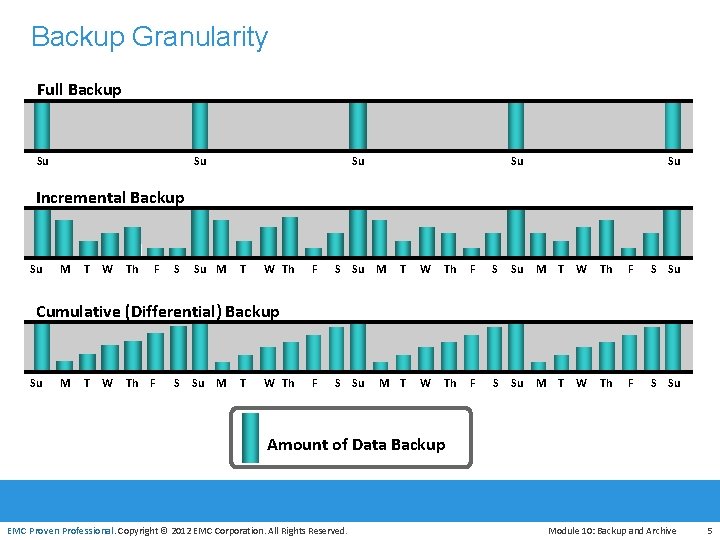
Backup Granularity Full Backup Su Su Su Incremental Backup Su M T W Th F S Su M T W Th F S Su M F S Su Cumulative (Differential) Backup Su M T W Th F EMC Proven Professional S Su M T W Th Amount of Data Backup EMC Proven Professional. Copyright © 2012 EMC Corporation. All Rights Reserved. Module 10: Backup and Archive 5
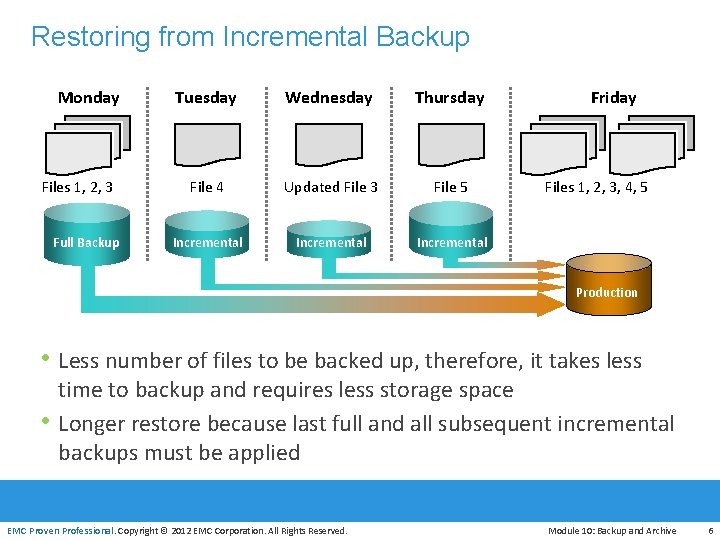
Restoring from Incremental Backup Monday Files 1, 2, 3 Full Backup Tuesday Wednesday Thursday File 4 Updated File 3 File 5 Incremental Friday Files 1, 2, 3, 4, 5 Production • Less number of files to be backed up, therefore, it takes less time to backup and requires less storage space • Longer restore because last full and all subsequent incremental EMC Proven Professional backups must be applied EMC Proven Professional. Copyright © 2012 EMC Corporation. All Rights Reserved. Module 10: Backup and Archive 6
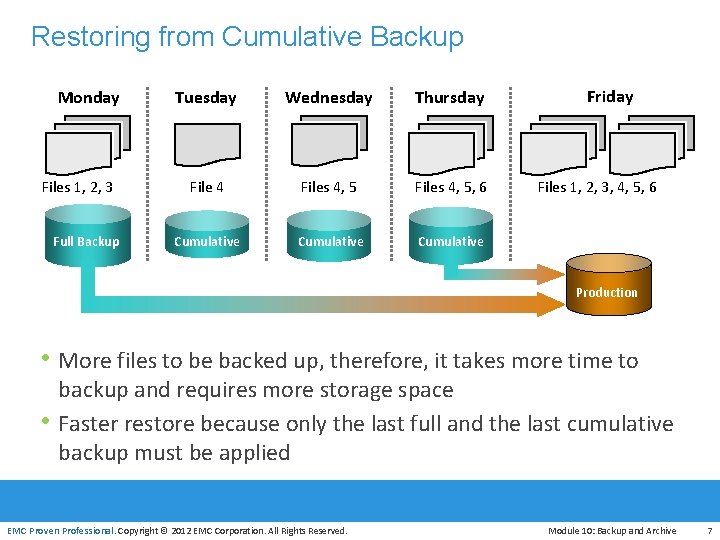
Restoring from Cumulative Backup Monday Files 1, 2, 3 Full Backup Tuesday Wednesday Thursday File 4 Files 4, 5, 6 Cumulative Friday Files 1, 2, 3, 4, 5, 6 Production • More files to be backed up, therefore, it takes more time to backup and requires more storage space • Faster restore because only the last full and the last cumulative EMC Proven Professional backup must be applied EMC Proven Professional. Copyright © 2012 EMC Corporation. All Rights Reserved. Module 10: Backup and Archive 7
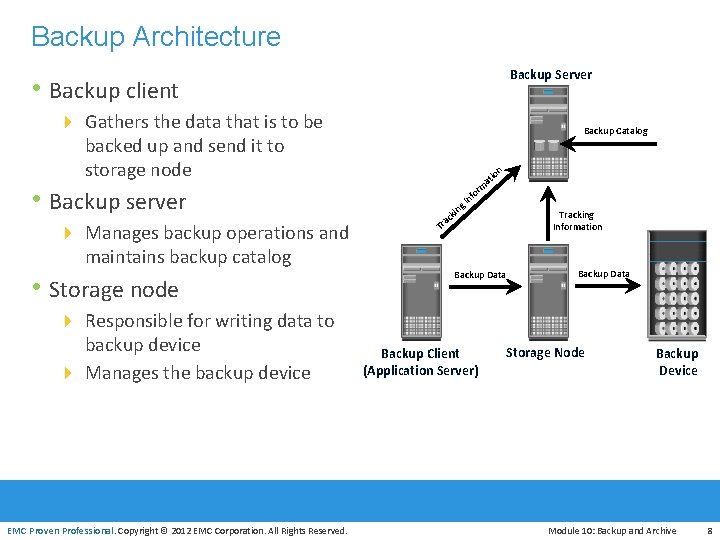
Backup Architecture Backup Server • Backup client 4 Gathers the data that is to be Backup Catalog backed up and send it to storage node rm • Backup server 4 Manages backup operations and maintains backup catalog • Storage node at g kin ac fo In n io Tr Backup Data Tracking Information Backup Data 4 Responsible for writing data to backup device 4 Manages the backup device Backup Client (Application Server) Storage Node Backup Device EMC Proven Professional. Copyright © 2012 EMC Corporation. All Rights Reserved. Module 10: Backup and Archive 8
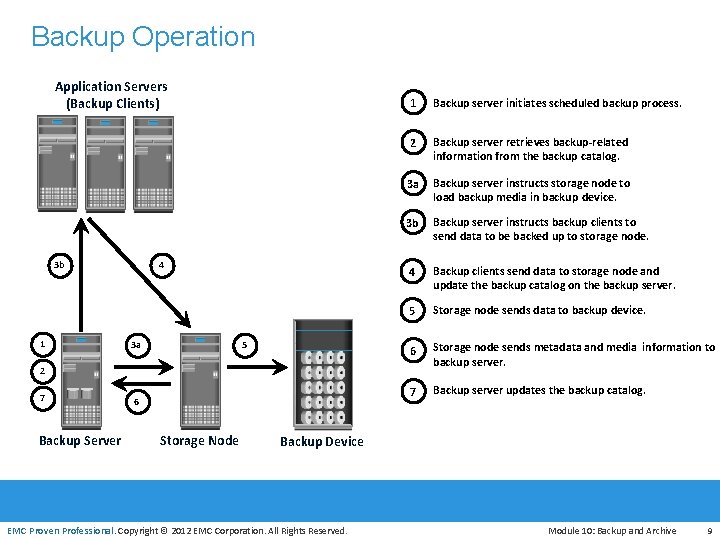
Backup Operation Application Servers (Backup Clients) 4 3 b 1 3 a 5 1 Backup server initiates scheduled backup process. 2 Backup server retrieves backup-related information from the backup catalog. 3 a Backup server instructs storage node to load backup media in backup device. 3 b Backup server instructs backup clients to send data to be backed up to storage node. 4 Backup clients send data to storage node and update the backup catalog on the backup server. 5 Storage node sends data to backup device. 6 Storage node sends metadata and media information to backup server. 7 Backup server updates the backup catalog. 2 7 6 EMC Proven Professional Backup Server Storage Node Backup Device EMC Proven Professional. Copyright © 2012 EMC Corporation. All Rights Reserved. Module 10: Backup and Archive 9
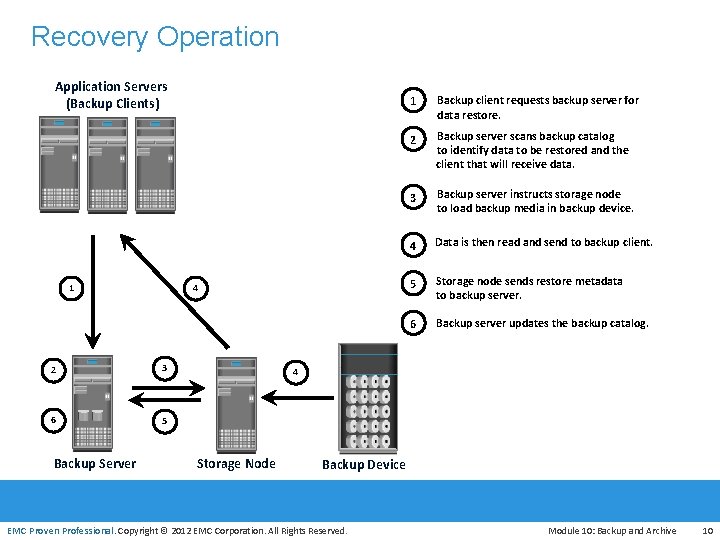
Recovery Operation Application Servers (Backup Clients) 1 4 2 3 6 5 1 Backup client requests backup server for data restore. 2 Backup server scans backup catalog to identify data to be restored and the client that will receive data. 3 Backup server instructs storage node to load backup media in backup device. 4 Data is then read and send to backup client. 5 Storage node sends restore metadata to backup server. 6 Backup server updates the backup catalog. 4 EMC Proven Professional Backup Server Storage Node Backup Device EMC Proven Professional. Copyright © 2012 EMC Corporation. All Rights Reserved. Module 10: Backup and Archive 10
Backup Methods • Two methods of backup, based on the state of the application when the backup is performed 4 Hot or Online 8 Application is up and running, with users accessing their data during backup 8 Open file agent can be used to backup open files 4 Cold or Offline 8 Requires application to be shutdown during the backup process • Bare-metal recovery 4 OS, hardware, and application configurations are appropriately backed up for a full system recovery 4 Server configuration backup (SCB) can also recover a server onto EMC Proven Professional dissimilar hardware EMC Proven Professional. Copyright © 2012 EMC Corporation. All Rights Reserved. Module 10: Backup and Archive 11
Server Configuration Backup • Creates and backs up server configuration profiles, based on user-defined schedules 4 Profiles are used to configure the recovery server in case of production server failure 4 Profiles include OS configurations, network configurations, security configurations, registry settings, application configurations • Two types of profiles used 4 Base profile 8 Contains the key elements of the OS required to recover the server 4 Extended profile 8 Typically larger than base profile and contains all necessary information to rebuild application environment EMC Proven Professional. Copyright © 2012 EMC Corporation. All Rights Reserved. Module 10: Backup and Archive 12
Key Backup/Restore Considerations • Customer business needs determine: 4 What are the restore requirements – RPO & RTO? 4 Which data needs to be backed up? 4 How frequently should data be backed up? 4 How long will it take to backup? 4 How many copies to create? 4 How long to retain backup copies? 4 Location, size, and number of files? EMC Proven Professional. Copyright © 2012 EMC Corporation. All Rights Reserved. Module 10: Backup and Archive 13
Module 10: Backup and Archive Lesson 2: Backup Topologies and Backup in NAS Environment During this lesson the following topics are covered: • Common backup topologies • Backup in NAS environment EMC Proven Professional. Copyright © 2012 EMC Corporation. All Rights Reserved. Module 10: Backup and Archive 14
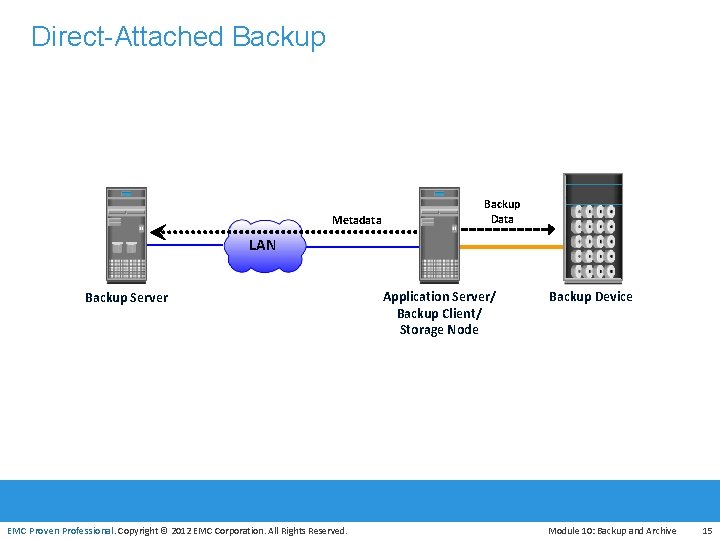
Direct-Attached Backup Metadata Backup Data LAN Backup Server Application Server/ Backup Client/ Storage Node Backup Device EMC Proven Professional. Copyright © 2012 EMC Corporation. All Rights Reserved. Module 10: Backup and Archive 15
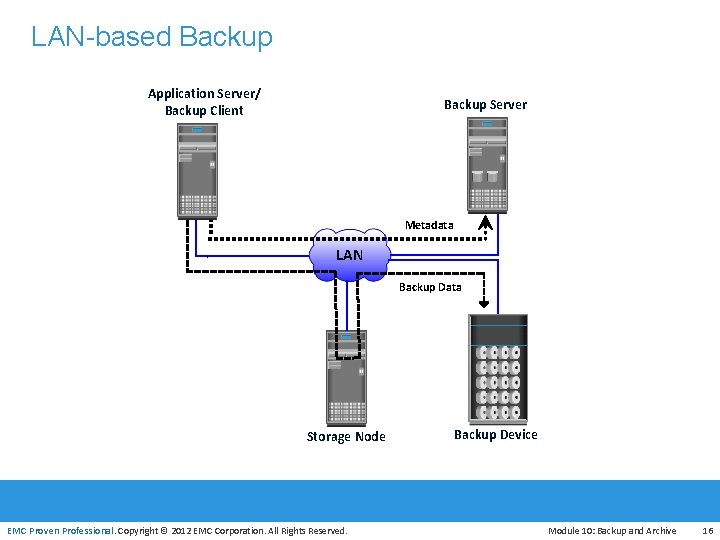
LAN-based Backup Application Server/ Backup Client Backup Server Metadata LAN Backup Data EMC Proven Professional Storage Node EMC Proven Professional. Copyright © 2012 EMC Corporation. All Rights Reserved. Backup Device Module 10: Backup and Archive 16
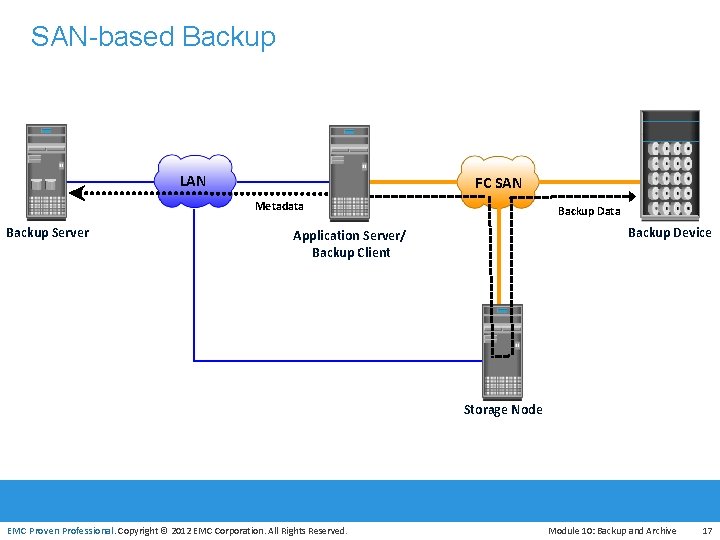
SAN-based Backup LAN FC SAN Metadata Backup Server Backup Data Backup Device Application Server/ Backup Client Storage Node EMC Proven Professional. Copyright © 2012 EMC Corporation. All Rights Reserved. Module 10: Backup and Archive 17
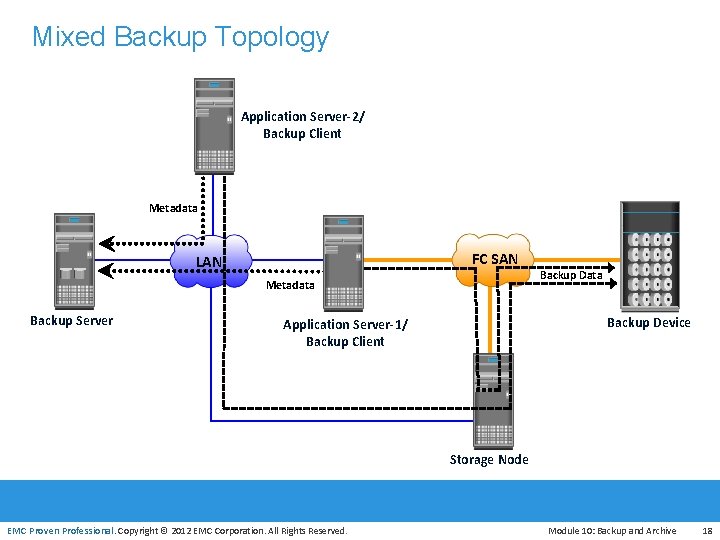
Mixed Backup Topology Application Server-2/ Backup Client Metadata FC SAN LAN Metadata Backup Server Backup Data Backup Device Application Server-1/ Backup Client EMC Proven Professional Storage Node EMC Proven Professional. Copyright © 2012 EMC Corporation. All Rights Reserved. Module 10: Backup and Archive 18
Backup in NAS Environment • Common backup implementations in a NAS environment are: 4 Server-based backup 4 Serverless backup 4 NDMP 2 -way backup 4 NDMP 3 -way backup EMC Proven Professional. Copyright © 2012 EMC Corporation. All Rights Reserved. Module 10: Backup and Archive 19
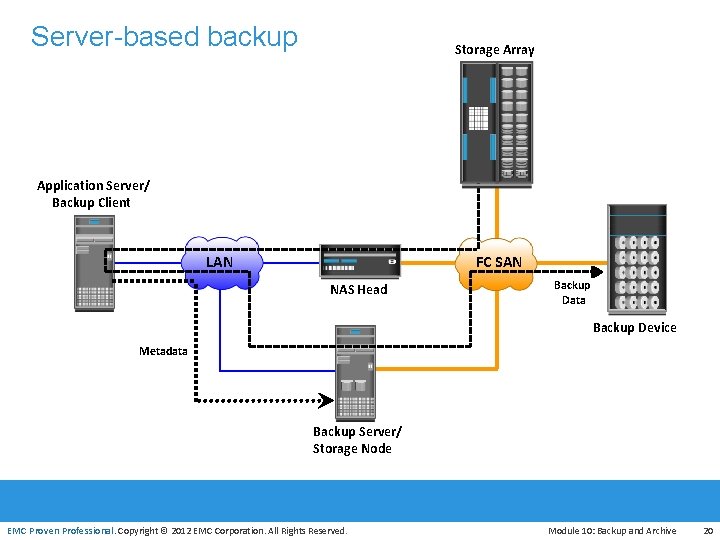
Server-based backup Storage Array Application Server/ Backup Client LAN FC SAN NAS Head Backup Data Backup Device Metadata EMC Proven Professional Backup Server/ Storage Node EMC Proven Professional. Copyright © 2012 EMC Corporation. All Rights Reserved. Module 10: Backup and Archive 20
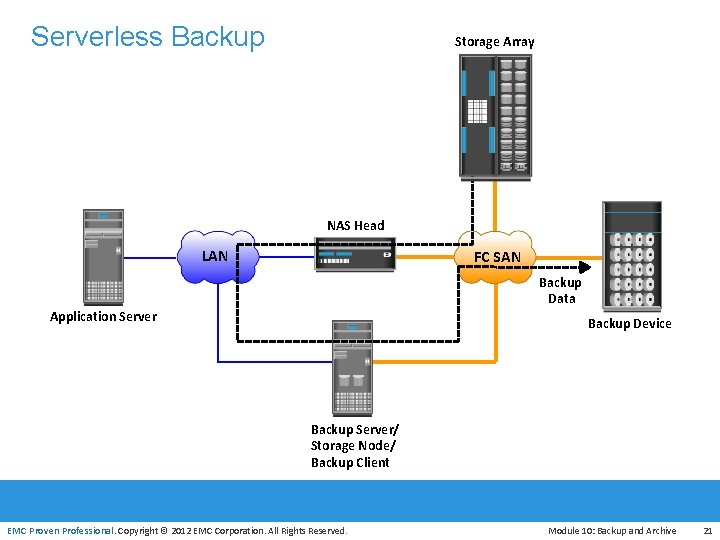
Serverless Backup Storage Array NAS Head LAN FC SAN Backup Data Application Server EMC Proven Professional Backup Device Backup Server/ Storage Node/ Backup Client EMC Proven Professional. Copyright © 2012 EMC Corporation. All Rights Reserved. Module 10: Backup and Archive 21
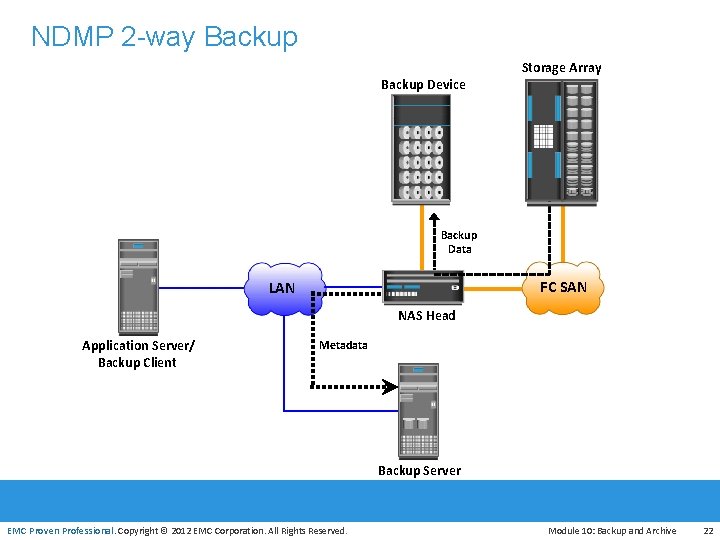
NDMP 2 -way Backup Device Storage Array Backup Data FC SAN LAN NAS Head Application Server/ Backup Client Metadata EMC Proven Professional Backup Server EMC Proven Professional. Copyright © 2012 EMC Corporation. All Rights Reserved. Module 10: Backup and Archive 22
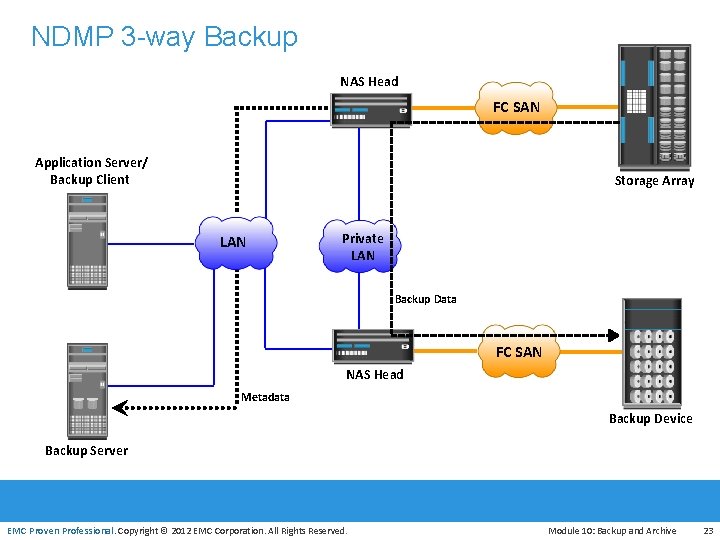
NDMP 3 -way Backup NAS Head FC SAN Application Server/ Backup Client Storage Array LAN Private LAN Backup Data FC SAN NAS Head Metadata Backup Device EMC Proven Professional Backup Server EMC Proven Professional. Copyright © 2012 EMC Corporation. All Rights Reserved. Module 10: Backup and Archive 23
Module 10: Backup and Archive Lesson 3: Backup Targets During this lesson the following topics are covered: • Backup to Tape • Backup to Disk • Backup to Virtual Tape EMC Proven Professional. Copyright © 2012 EMC Corporation. All Rights Reserved. Module 10: Backup and Archive 24
Backup to Tape • Traditionally low cost solution • Tape drives are used to read/write data from/to a tape • Sequential/linear access • Multiple streaming to improve media performance 4 Writes data from multiple streams on a single tape • Limitation of tape 4 Backup and recovery operations are slow due to sequential access 4 Wear and tear of tape 4 Shipping/handling challenges 4 Controlled environment is required for tape storage 4 Causes “shoe shining effect” or “backhitching” EMC Proven Professional. Copyright © 2012 EMC Corporation. All Rights Reserved. Module 10: Backup and Archive 25
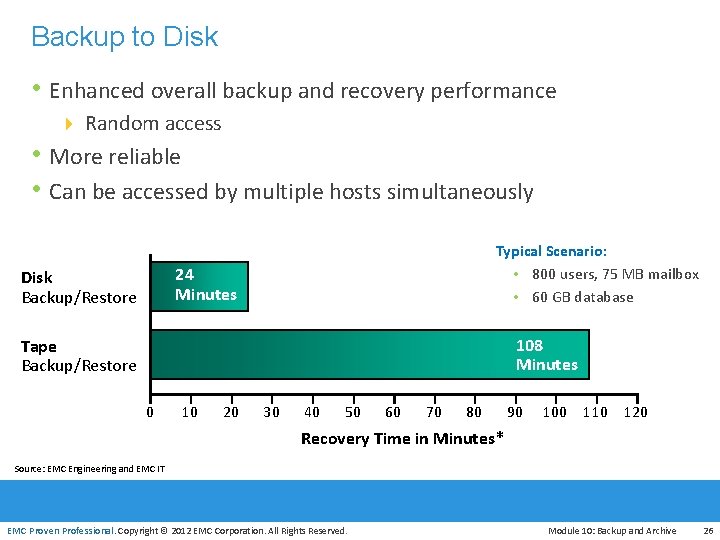
Backup to Disk • Enhanced overall backup and recovery performance 4 Random access • More reliable • Can be accessed by multiple hosts simultaneously Typical Scenario: 800 users, 75 MB mailbox 60 GB database 24 Minutes Disk Backup/Restore 108 Minutes Tape Backup/Restore 0 EMC Proven Professional 10 20 30 40 50 60 70 80 90 100 110 120 Recovery Time in Minutes* Source: EMC Engineering and EMC IT EMC Proven Professional. Copyright © 2012 EMC Corporation. All Rights Reserved. Module 10: Backup and Archive 26
Backup to Virtual Tape • Disks are emulated and presented as tapes to backup software • Does not require any additional modules or changes in the • • legacy backup software Provides better single stream performance and reliability over physical tape Online and random disk access 4 Provides faster backup and recovery EMC Proven Professional. Copyright © 2012 EMC Corporation. All Rights Reserved. Module 10: Backup and Archive 27
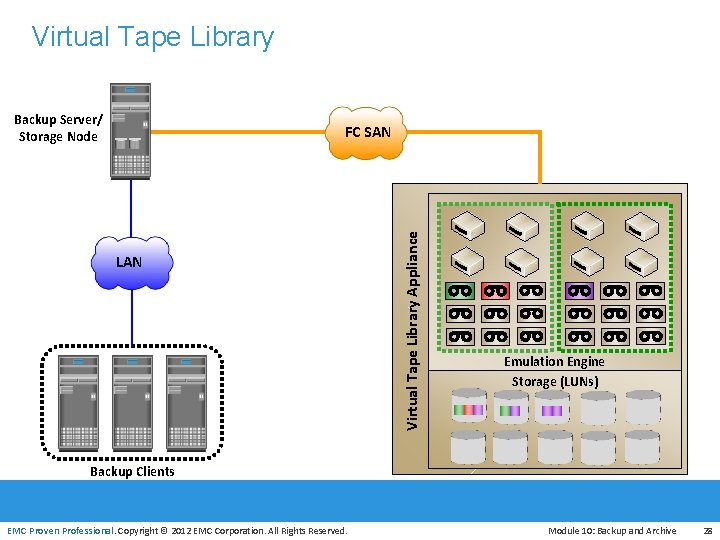
Virtual Tape Library Backup Server/ Storage Node LAN EMC Proven Professional Virtual Tape Library Appliance FC SAN Emulation Engine Storage (LUNs) Backup Clients EMC Proven Professional. Copyright © 2012 EMC Corporation. All Rights Reserved. Module 10: Backup and Archive 28
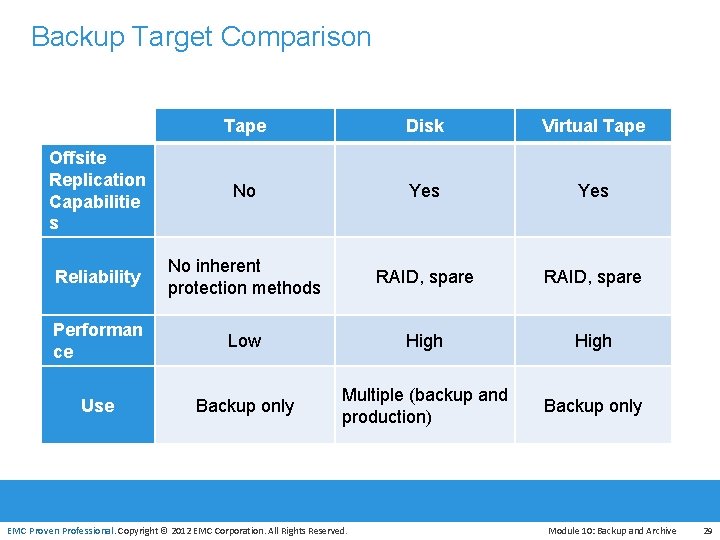
Backup Target Comparison Tape Disk Virtual Tape Offsite Replication Capabilitie s No Yes Reliability No inherent protection methods RAID, spare Performan ce Low High Use Backup only Multiple (backup and production) Backup only EMC Proven Professional. Copyright © 2012 EMC Corporation. All Rights Reserved. Module 10: Backup and Archive 29
Module 10: Backup and Archive Lesson 4: Data Deduplication During this lesson the following topics are covered: • Deduplication overview • Deduplication methods • Deduplication implementations • Key benefits of deduplication EMC Proven Professional. Copyright © 2012 EMC Corporation. All Rights Reserved. Module 10: Backup and Archive 30
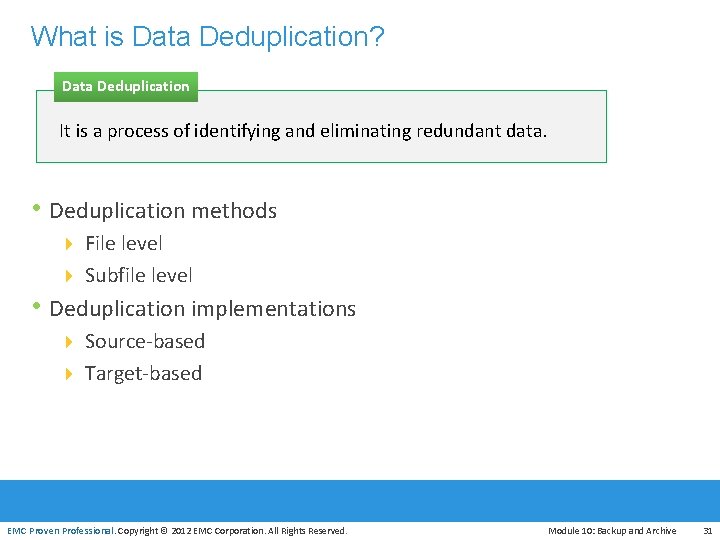
What is Data Deduplication? Data Deduplication It is a process of identifying and eliminating redundant data. • Deduplication methods 4 File level 4 Subfile level • Deduplication implementations 4 Source-based 4 Target-based EMC Proven Professional. Copyright © 2012 EMC Corporation. All Rights Reserved. Module 10: Backup and Archive 31
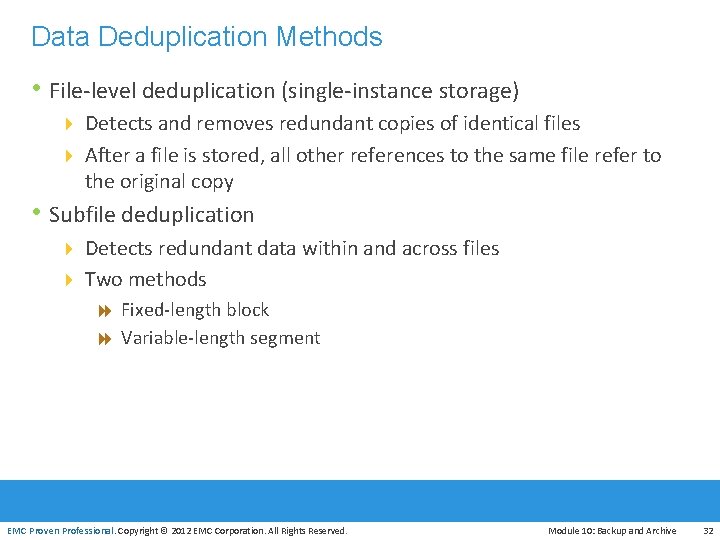
Data Deduplication Methods • File-level deduplication (single-instance storage) 4 Detects and removes redundant copies of identical files 4 After a file is stored, all other references to the same file refer to the original copy • Subfile deduplication 4 Detects redundant data within and across files 4 Two methods 8 Fixed-length block 8 Variable-length segment EMC Proven Professional. Copyright © 2012 EMC Corporation. All Rights Reserved. Module 10: Backup and Archive 32
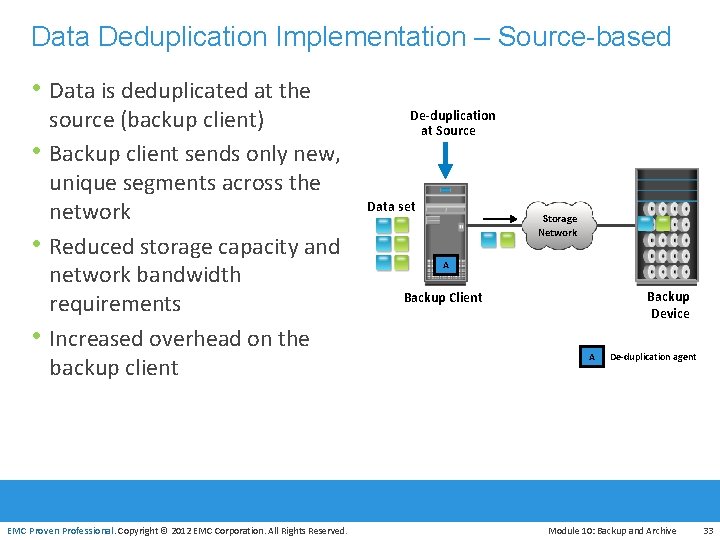
Data Deduplication Implementation – Source-based • Data is deduplicated at the • • • source (backup client) Backup client sends only new, unique segments across the network Reduced storage capacity and network bandwidth requirements Increased overhead on the backup client De-duplication at Source Data set Storage Network A Backup Device Backup Client A De-duplication agent EMC Proven Professional. Copyright © 2012 EMC Corporation. All Rights Reserved. Module 10: Backup and Archive 33
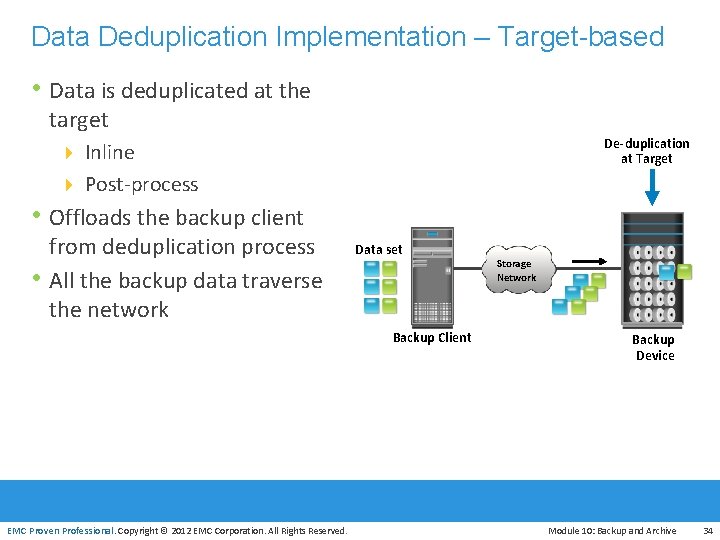
Data Deduplication Implementation – Target-based • Data is deduplicated at the target De-duplication at Target 4 Inline 4 Post-process • Offloads the backup client • from deduplication process All the backup data traverse the network Data set Backup Client Storage Network Backup Device EMC Proven Professional. Copyright © 2012 EMC Corporation. All Rights Reserved. Module 10: Backup and Archive 34
Data Deduplication – Key Benefits • Reduces infrastructure costs 4 By eliminating redundant data, less storage is required to hold the backup images • Enables longer retention periods 4 Reduces the amount of redundant content in the daily backup, and hence, users can extend their retention policies • Reduces backup window 4 Less data to be backed up, which reduces backup window • Reduces backup bandwidth requirement 4 Source based de-duplication eliminates redundant data before data is sent over the network EMC Proven Professional. Copyright © 2012 EMC Corporation. All Rights Reserved. Module 10: Backup and Archive 35
Use Case: Remote Office/Branch Office Backup • Protecting data at an organization’s branch and remote offices, • across multiple locations, is critical for business Backing up data from remote offices to a centralized data center was restricted due to 4 Time and cost involved in sending huge volumes of data over the network • Disk-based backup solution, along with source-based deduplication, eliminates the challenges in centrally backing up remote-office data 4 Reduces the network bandwidth requirement 4 Reduces the backup window EMC Proven Professional. Copyright © 2012 EMC Corporation. All Rights Reserved. Module 10: Backup and Archive 36
Module 10: Backup and Archive Lesson 5: Backup in Virtualized Environment During this lesson the following topics are covered: • Traditional backup approach • Image-based backup EMC Proven Professional. Copyright © 2012 EMC Corporation. All Rights Reserved. Module 10: Backup and Archive 37
Backup in Virtualized Environment Overview • Backup options 4 Traditional backup approach 4 Image-based backup approach • Backup optimization 4 Deduplication EMC Proven Professional. Copyright © 2012 EMC Corporation. All Rights Reserved. Module 10: Backup and Archive 38
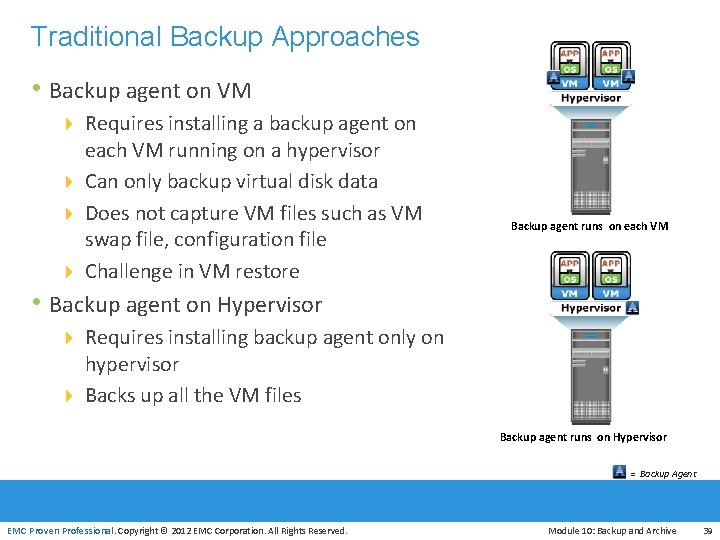
Traditional Backup Approaches • Backup agent on VM 4 Requires installing a backup agent on each VM running on a hypervisor 4 Can only backup virtual disk data 4 Does not capture VM files such as VM swap file, configuration file 4 Challenge in VM restore Backup agent runs on each VM • Backup agent on Hypervisor 4 Requires installing backup agent only on hypervisor 4 Backs up all the VM files EMC Proven Professional Backup agent runs on Hypervisor = Backup Agent EMC Proven Professional. Copyright © 2012 EMC Corporation. All Rights Reserved. Module 10: Backup and Archive 39
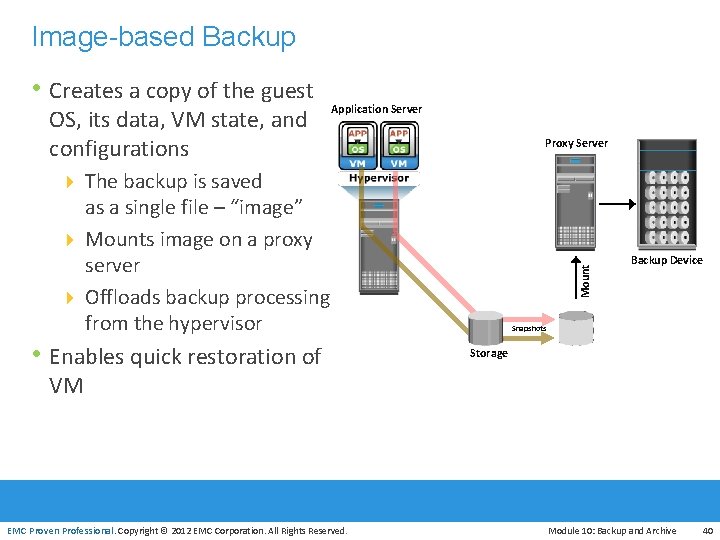
Image-based Backup • Creates a copy of the guest OS, its data, VM state, and configurations Application Server Proxy Server 4 The backup is saved • Enables quick restoration of Mount as a single file – “image” 4 Mounts image on a proxy server 4 Offloads backup processing from the hypervisor Backup Device Snapshots Storage VM EMC Proven Professional. Copyright © 2012 EMC Corporation. All Rights Reserved. Module 10: Backup and Archive 40
Module 10: Backup and Archive Lesson 6: Data Archive During this lesson the following topics are covered: • Fixed content • Data archive • Archive solution architecture EMC Proven Professional. Copyright © 2012 EMC Corporation. All Rights Reserved. Module 10: Backup and Archive 41
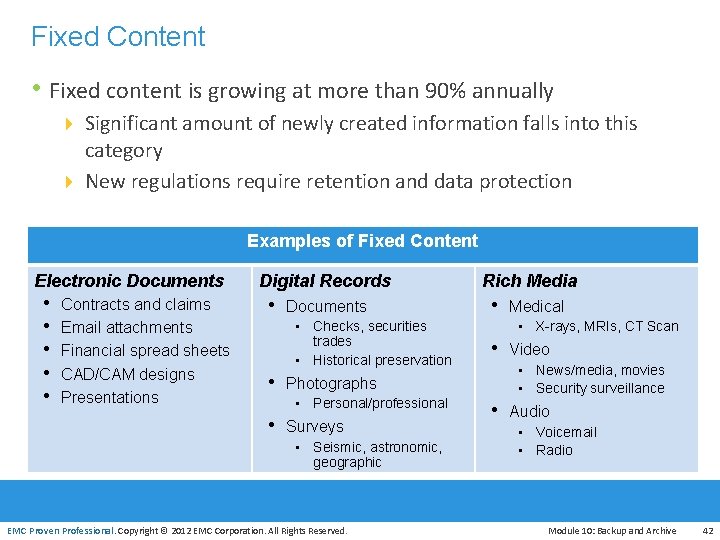
Fixed Content • Fixed content is growing at more than 90% annually 4 Significant amount of newly created information falls into this category 4 New regulations require retention and data protection Examples of Fixed Content Electronic Documents • • • Contracts and claims Email attachments Financial spread sheets CAD/CAM designs Presentations EMC Proven Professional Digital Records • Documents • Checks, securities trades • Historical preservation • Photographs • Personal/professional • Surveys • Seismic, astronomic, geographic EMC Proven Professional. Copyright © 2012 EMC Corporation. All Rights Reserved. Rich Media • Medical • X-rays, MRIs, CT Scan • Video • News/media, movies • Security surveillance • Audio • Voicemail • Radio Module 10: Backup and Archive 42
Data Archive • A repository where fixed content is stored • Enables organizations retaining their data for an extended period of time in order to 4 Meet regulatory compliance 4 Plan new revenue strategies • Archive can be implemented as 4 Online 4 Nearline 4 Offline EMC Proven Professional. Copyright © 2012 EMC Corporation. All Rights Reserved. Module 10: Backup and Archive 43
Challenges of Traditional Archiving Solutions • Both tape and optical are susceptible to wear and tear 4 Involve operational, management, and maintenance overhead • Have no intelligence to identify duplicate data 4 Same content could be archived many times • Inadequate for long-term preservation (years-decades) • Unable to provide online and fast access to fixed content EMC Proven Professional. Copyright © 2012 EMC Corporation. All Rights Reserved. Module 10: Backup and Archive 44
Content Addressed Storage – An Archival Solution • Disk-based storage that has emerged as an alternative to • • • traditional archiving solutions Provides online accessibility to archive data Enables organization to meet the required SLAs Provides features that are required for storing archive data 4 Content authenticity and content integrity 4 Location independence 4 Single-instance storage 4 Retention enforcement 4 Data protection EMC Proven Professional. Copyright © 2012 EMC Corporation. All Rights Reserved. Module 10: Backup and Archive 45
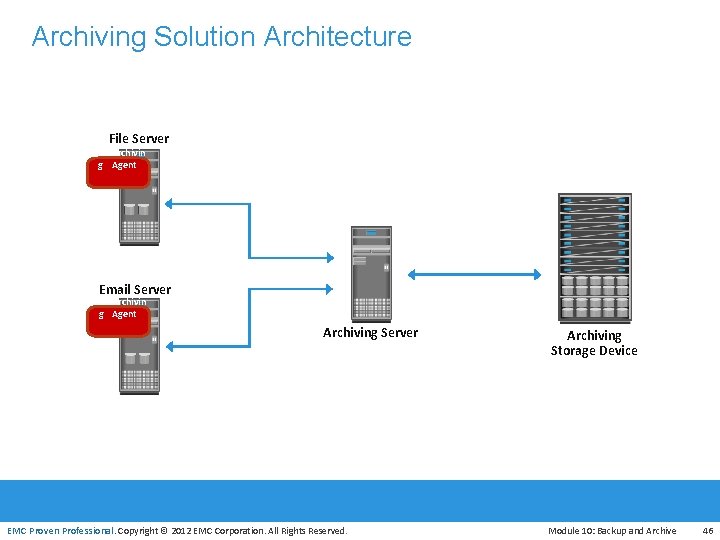
Archiving Solution Architecture File Server Archivin g Agent Email Server Archivin g Agent Archiving Server Archiving Storage Device EMC Proven Professional. Copyright © 2012 EMC Corporation. All Rights Reserved. Module 10: Backup and Archive 46
Use Case: Email Archiving • Moves the emails from primary to archive storage, based on • • policy Saves space on primary storage Enables to retain emails in the archive for longer period to meet regulatory requirements Gives end users virtually unlimited mailbox space File archiving is another use case that benefits from an archival solution EMC Proven Professional. Copyright © 2012 EMC Corporation. All Rights Reserved. Module 10: Backup and Archive 47
Module 10: Backup and Archive Concepts in Practice • EMC Net. Worker • EMC Avamar • EMC Data Domain EMC Proven Professional. Copyright © 2012 EMC Corporation. All Rights Reserved. Module 10: Backup and Archive 48
EMC Net. Worker • Centralizes, automates, and accelerates data backup and • recovery operations across the enterprise Key features 4 Supports heterogeneous platforms such as Windows, UNIX, Linux, and also supports virtual environments 4 Supports different backup targets – tapes, disks, and virtual tapes 4 Supports Multiplexing (or multi-streaming) of data 4 Provides both source-based and target-based deduplication capabilities by integrating with EMC Avamar and EMC Data Domain respectively 4 Cloud-backup option enables backing up data to cloud EMC Proven Professional. Copyright © 2012 EMC Corporation. All Rights Reserved. Module 10: Backup and Archive 49
EMC Avamar • Disk-based backup and recovery solution that provides source • • based data deduplication Three major components include Avamar server, Avamar backup clients, and Avamar administrator Avamar server includes 4 Software only, Avamar Data Store, Avamar Virtual Edition EMC Proven Professional. Copyright © 2012 EMC Corporation. All Rights Reserved. Module 10: Backup and Archive 50
EMC Data Domain • Target-based deduplication solution • Provides technological advantages 4 Data invulnerability architecture 4 Data Domain Stream-Informed Segment Layout (SISL) scaling architecture 4 Support native replication technology 4 Global compression • EMC Data Domain Archiver 4 Solution for long term retention of backup and archive data 4 Designed with internal tiering approach 4 Supports deduplication technology EMC Proven Professional. Copyright © 2012 EMC Corporation. All Rights Reserved. Module 10: Backup and Archive 51
Module 10: Summary Key points covered in this module: • Backup granularity • Backup and recovery operations • Backup topologies • Backup targets • Data deduplication • Backup in virtualized environment • Data archive EMC Proven Professional. Copyright © 2012 EMC Corporation. All Rights Reserved. Module 10: Backup and Archive 52
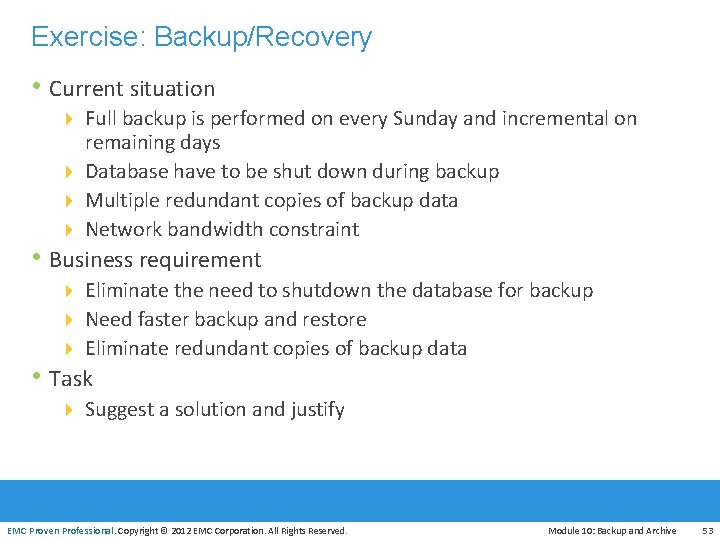
Exercise: Backup/Recovery • Current situation 4 Full backup is performed on every Sunday and incremental on remaining days 4 Database have to be shut down during backup 4 Multiple redundant copies of backup data 4 Network bandwidth constraint • Business requirement 4 Eliminate the need to shutdown the database for backup 4 Need faster backup and restore 4 Eliminate redundant copies of backup data • Task 4 Suggest a solution and justify EMC Proven Professional. Copyright © 2012 EMC Corporation. All Rights Reserved. Module 10: Backup and Archive 53
- Slides: 53