
Modular Design OBJECTIVES After reading this chapter and
Modular Design • OBJECTIVES Ø After reading this chapter and completing the exercises, you will be able to: q Explain the use of modular design in software development q Explain the specification of modules q Explain the process of top-down design q Describe the concept of a stack q Differentiate between unit testing and integration testing q Become familiar with the use of docstrings in Python q Explain the use of modules and namespaces in Python q Describe and use the different forms of module import in Python q Develop well-specified Python programs using top-down design
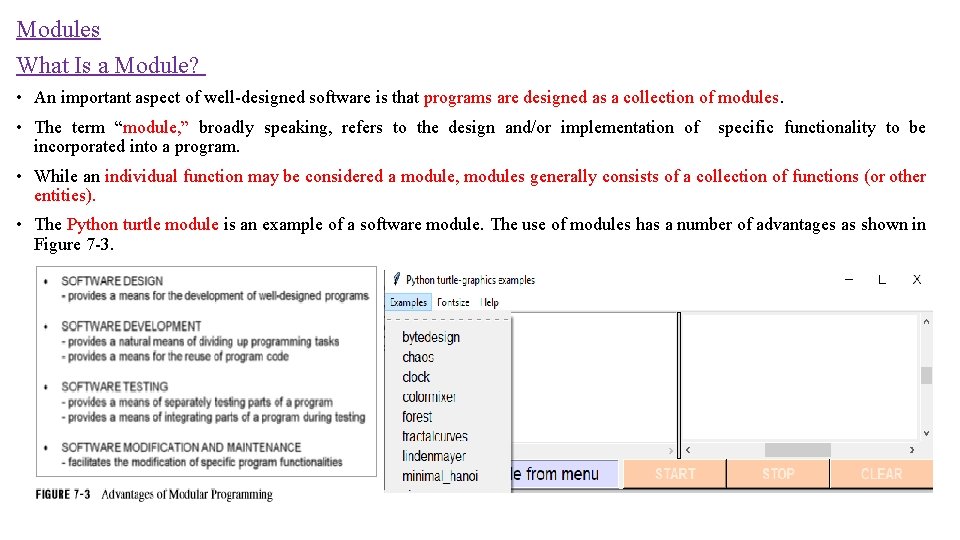
Modules What Is a Module? • An important aspect of well-designed software is that programs are designed as a collection of modules. • The term “module, ” broadly speaking, refers to the design and/or implementation of specific functionality to be incorporated into a program. • While an individual function may be considered a module, modules generally consists of a collection of functions (or other entities). • The Python turtle module is an example of a software module. The use of modules has a number of advantages as shown in Figure 7 -3.
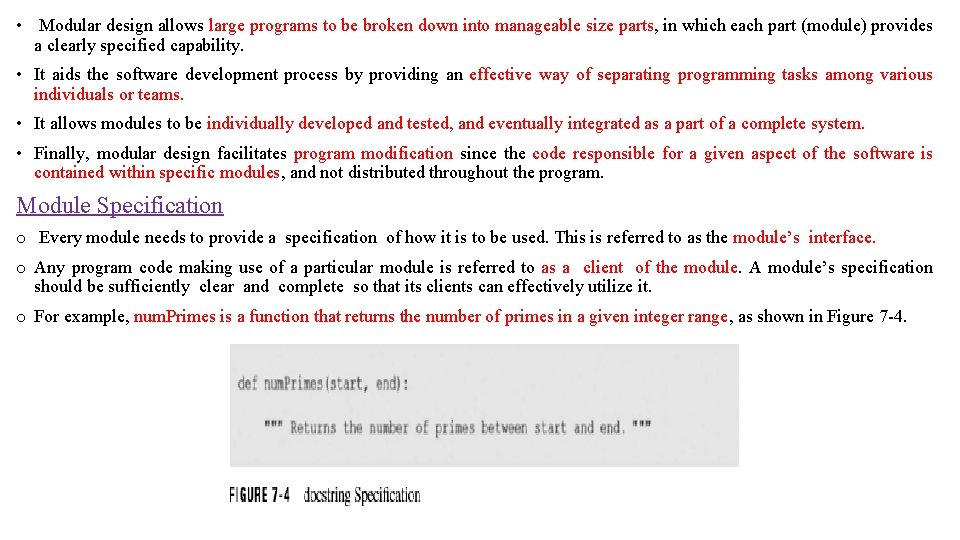
• Modular design allows large programs to be broken down into manageable size parts, in which each part (module) provides a clearly specified capability. • It aids the software development process by providing an effective way of separating programming tasks among various individuals or teams. • It allows modules to be individually developed and tested, and eventually integrated as a part of a complete system. • Finally, modular design facilitates program modification since the code responsible for a given aspect of the software is contained within specific modules, and not distributed throughout the program. Module Specification o Every module needs to provide a specification of how it is to be used. This is referred to as the module’s interface. o Any program code making use of a particular module is referred to as a client of the module. A module’s specification should be sufficiently clear and complete so that its clients can effectively utilize it. o For example, num. Primes is a function that returns the number of primes in a given integer range, as shown in Figure 7 -4.
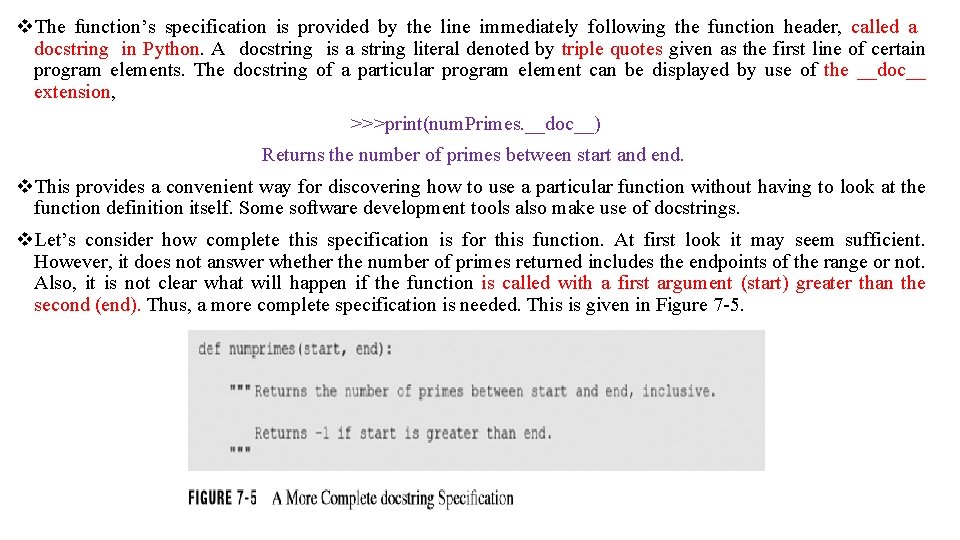
v. The function’s specification is provided by the line immediately following the function header, called a docstring in Python. A docstring is a string literal denoted by triple quotes given as the first line of certain program elements. The docstring of a particular program element can be displayed by use of the __doc__ extension, >>>print(num. Primes. __doc__) Returns the number of primes between start and end. v. This provides a convenient way for discovering how to use a particular function without having to look at the function definition itself. Some software development tools also make use of docstrings. v. Let’s consider how complete this specification is for this function. At first look it may seem sufficient. However, it does not answer whether the number of primes returned includes the endpoints of the range or not. Also, it is not clear what will happen if the function is called with a first argument (start) greater than the second (end). Thus, a more complete specification is needed. This is given in Figure 7 -5.
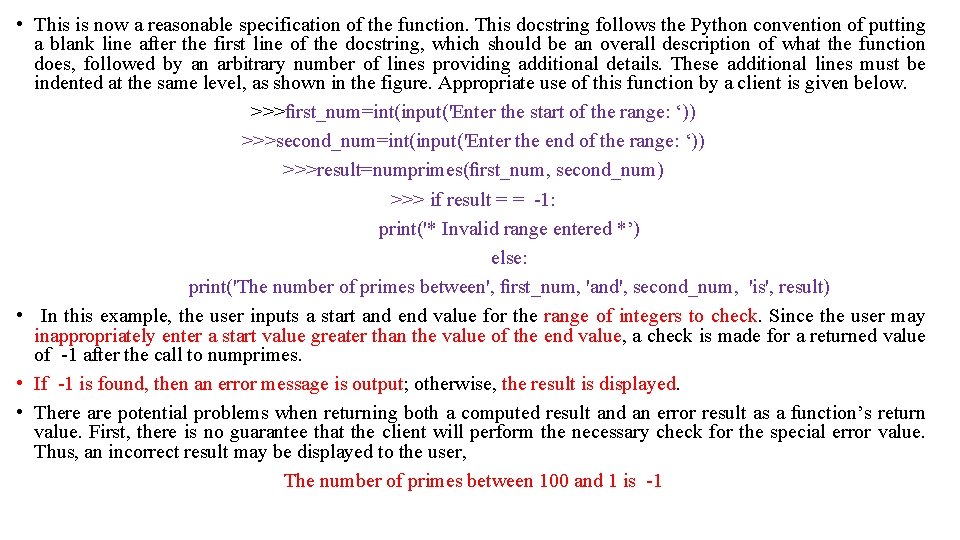
• This is now a reasonable specification of the function. This docstring follows the Python convention of putting a blank line after the first line of the docstring, which should be an overall description of what the function does, followed by an arbitrary number of lines providing additional details. These additional lines must be indented at the same level, as shown in the figure. Appropriate use of this function by a client is given below. >>>first_num=int(input('Enter the start of the range: ‘)) >>>second_num=int(input('Enter the end of the range: ‘)) >>>result=numprimes(first_num, second_num) >>> if result = = -1: print('* Invalid range entered *’) else: print('The number of primes between', first_num, 'and', second_num, 'is', result) • In this example, the user inputs a start and end value for the range of integers to check. Since the user may inappropriately enter a start value greater than the value of the end value, a check is made for a returned value of -1 after the call to numprimes. • If -1 is found, then an error message is output; otherwise, the result is displayed. • There are potential problems when returning both a computed result and an error result as a function’s return value. First, there is no guarantee that the client will perform the necessary check for the special error value. Thus, an incorrect result may be displayed to the user, The number of primes between 100 and 1 is -1
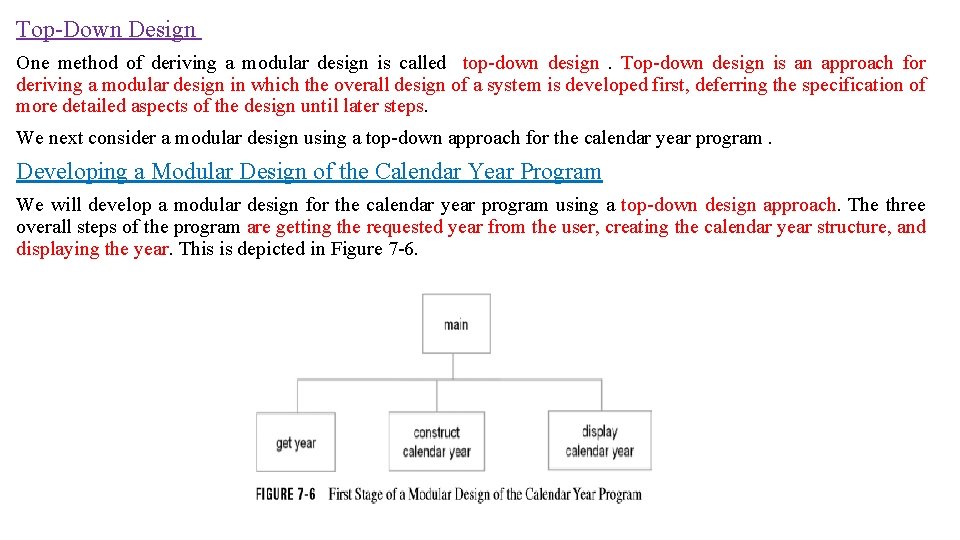
Top-Down Design One method of deriving a modular design is called top-down design . Top-down design is an approach for deriving a modular design in which the overall design of a system is developed first, deferring the specification of more detailed aspects of the design until later steps. We next consider a modular design using a top-down approach for the calendar year program. Developing a Modular Design of the Calendar Year Program We will develop a modular design for the calendar year program using a top-down design approach. The three overall steps of the program are getting the requested year from the user, creating the calendar year structure, and displaying the year. This is depicted in Figure 7 -6.
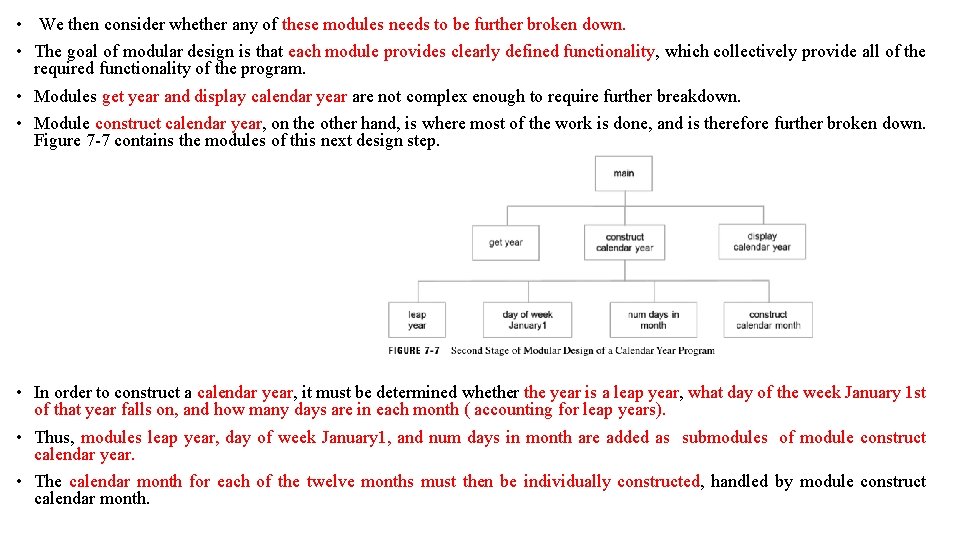
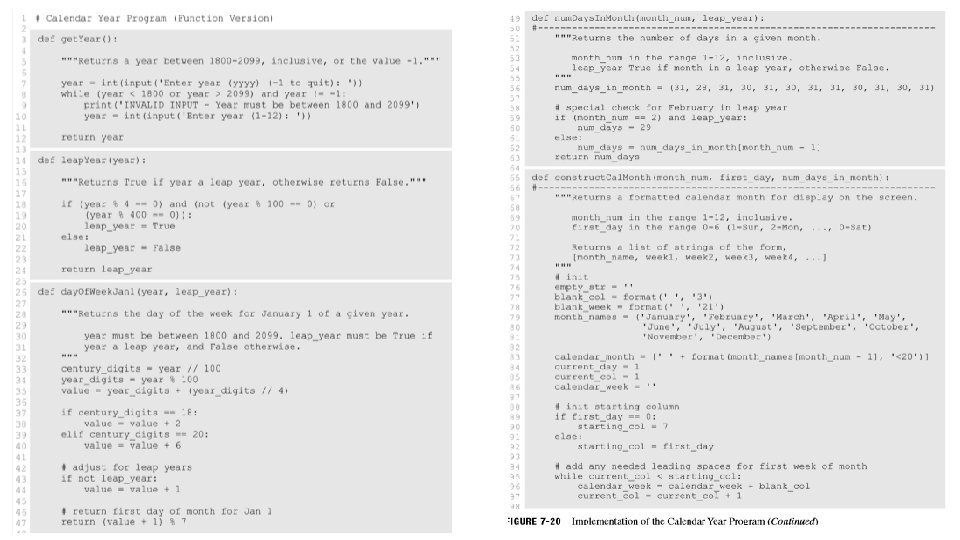
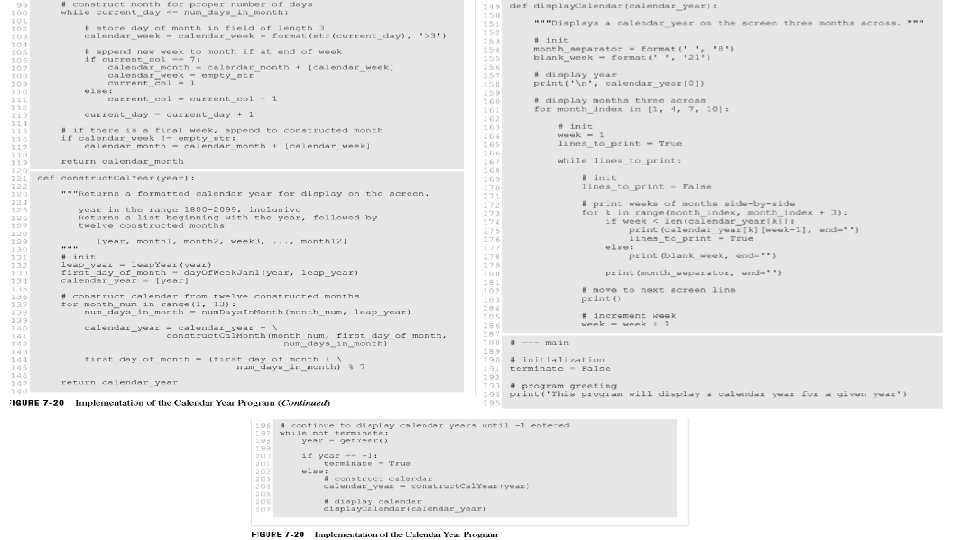
• We then consider whether any of these modules needs to be further broken down. • The goal of modular design is that each module provides clearly defined functionality, which collectively provide all of the required functionality of the program. • Modules get year and display calendar year are not complex enough to require further breakdown. • Module construct calendar year, on the other hand, is where most of the work is done, and is therefore further broken down. Figure 7 -7 contains the modules of this next design step. • In order to construct a calendar year, it must be determined whether the year is a leap year, what day of the week January 1 st of that year falls on, and how many days are in each month ( accounting for leap years). • Thus, modules leap year, day of week January 1, and num days in month are added as submodules of module construct calendar year. • The calendar month for each of the twelve months must then be individually constructed, handled by module construct calendar month.
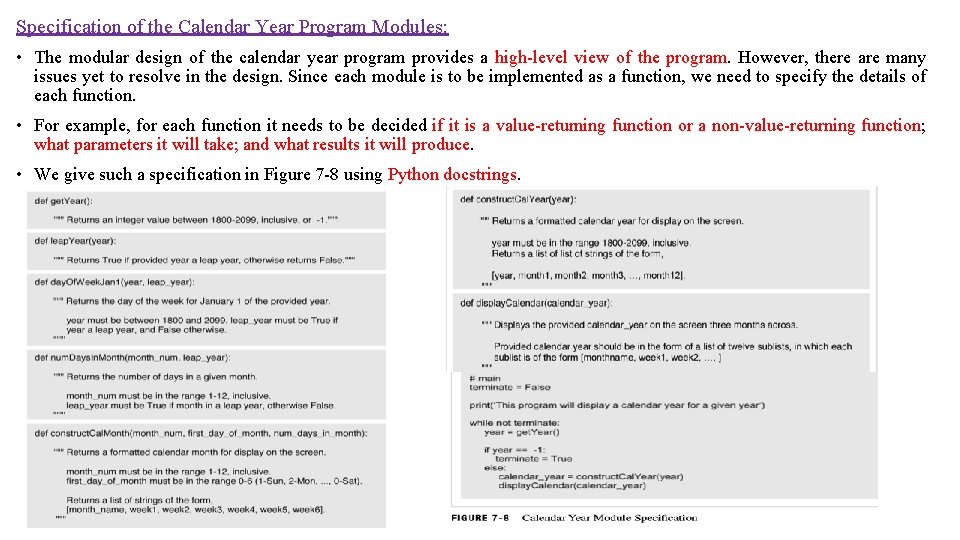
Specification of the Calendar Year Program Modules: • The modular design of the calendar year program provides a high-level view of the program. However, there are many issues yet to resolve in the design. Since each module is to be implemented as a function, we need to specify the details of each function. • For example, for each function it needs to be decided if it is a value-returning function or a non-value-returning function; what parameters it will take; and what results it will produce. • We give such a specification in Figure 7 -8 using Python docstrings.
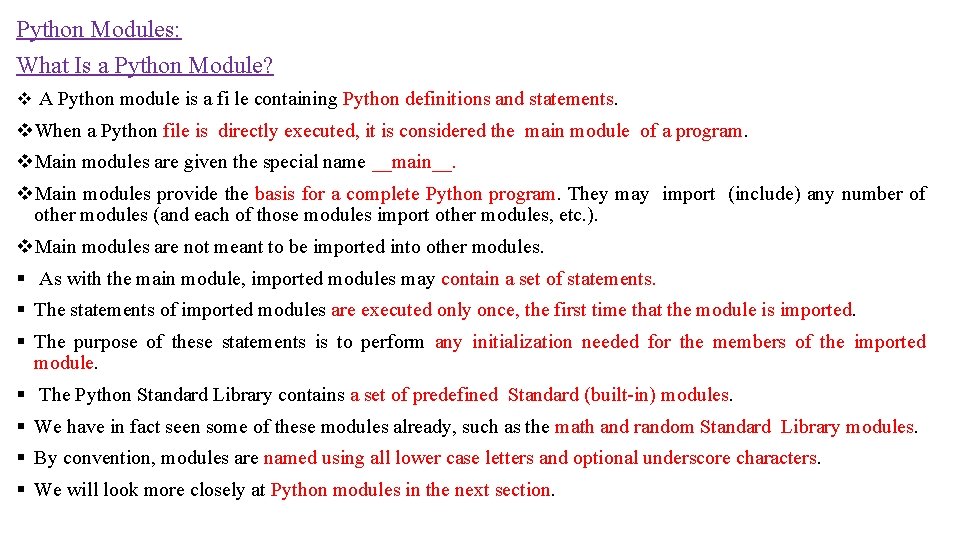
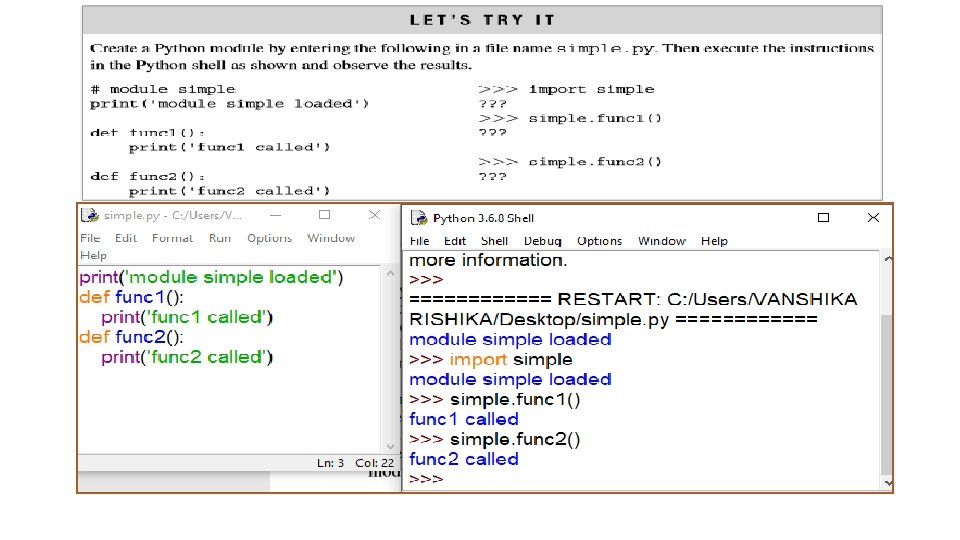
Python Modules: What Is a Python Module? v A Python module is a fi le containing Python definitions and statements. v. When a Python file is directly executed, it is considered the main module of a program. v. Main modules are given the special name __main__. v. Main modules provide the basis for a complete Python program. They may import (include) any number of other modules (and each of those modules import other modules, etc. ). v. Main modules are not meant to be imported into other modules. § As with the main module, imported modules may contain a set of statements. § The statements of imported modules are executed only once, the first time that the module is imported. § The purpose of these statements is to perform any initialization needed for the members of the imported module. § The Python Standard Library contains a set of predefined Standard (built-in) modules. § We have in fact seen some of these modules already, such as the math and random Standard Library modules. § By convention, modules are named using all lower case letters and optional underscore characters. § We will look more closely at Python modules in the next section.
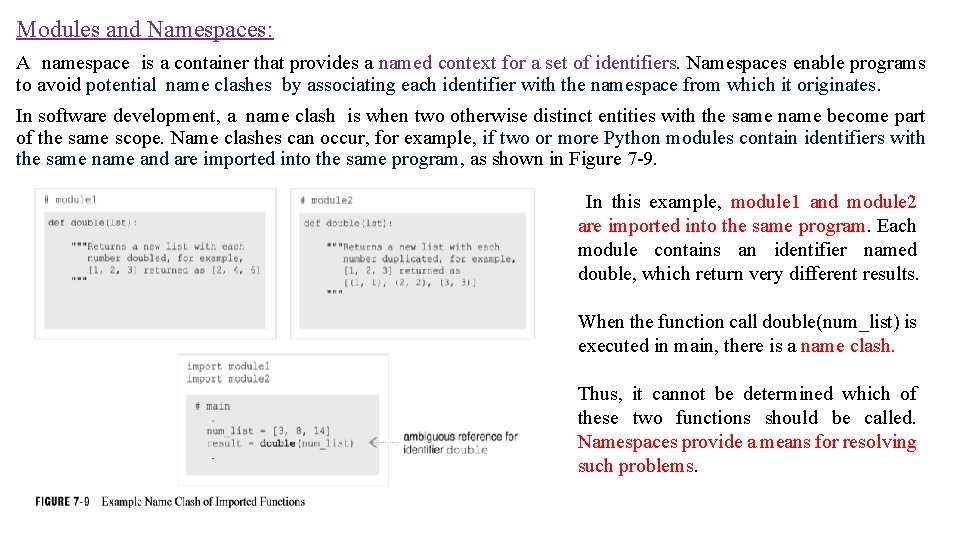
Modules and Namespaces: A namespace is a container that provides a named context for a set of identifiers. Namespaces enable programs to avoid potential name clashes by associating each identifier with the namespace from which it originates. In software development, a name clash is when two otherwise distinct entities with the same name become part of the same scope. Name clashes can occur, for example, if two or more Python modules contain identifiers with the same name and are imported into the same program, as shown in Figure 7 -9. In this example, module 1 and module 2 are imported into the same program. Each module contains an identifier named double, which return very different results. When the function call double(num_list) is executed in main, there is a name clash. Thus, it cannot be determined which of these two functions should be called. Namespaces provide a means for resolving such problems.
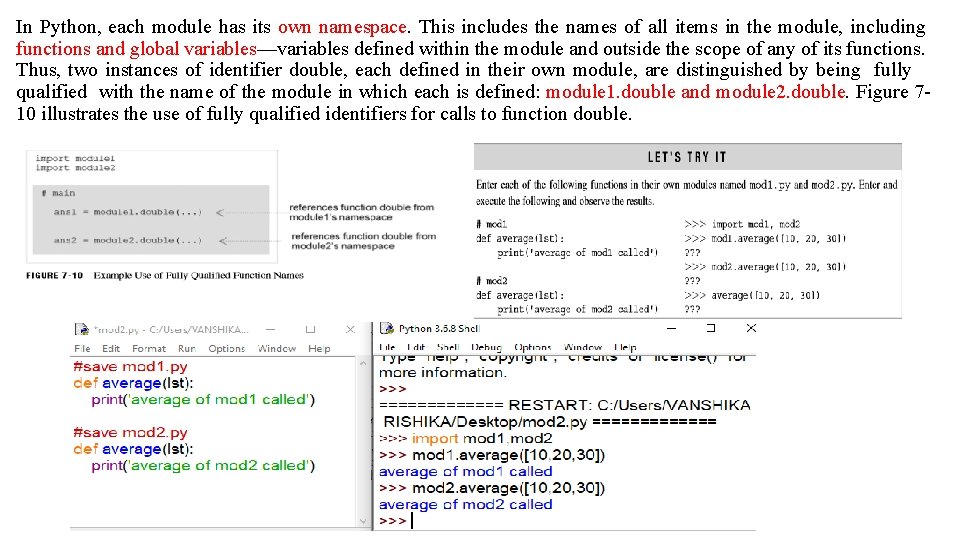
In Python, each module has its own namespace. This includes the names of all items in the module, including functions and global variables—variables defined within the module and outside the scope of any of its functions. Thus, two instances of identifier double, each defined in their own module, are distinguished by being fully qualified with the name of the module in which each is defined: module 1. double and module 2. double. Figure 710 illustrates the use of fully qualified identifiers for calls to function double.
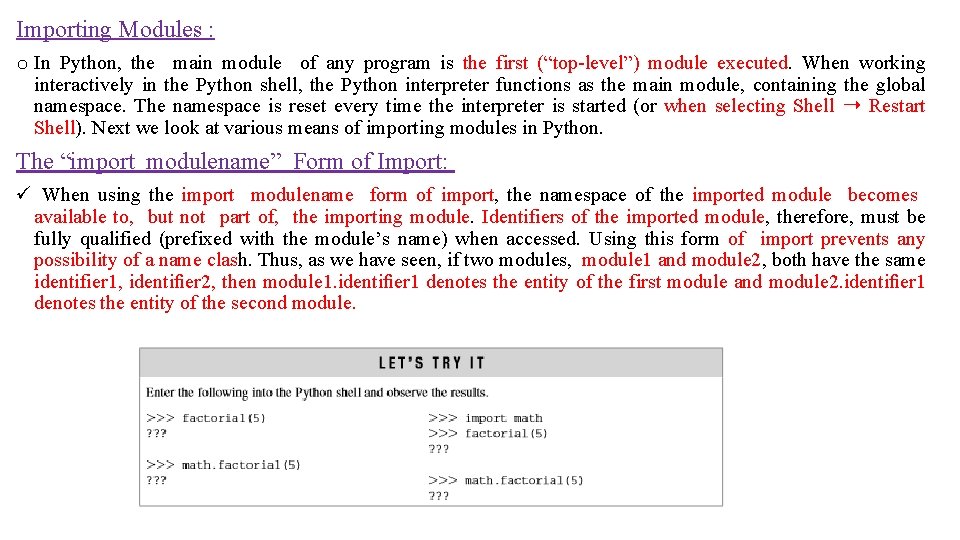
Importing Modules : o In Python, the main module of any program is the first (“top-level”) module executed. When working interactively in the Python shell, the Python interpreter functions as the main module, containing the global namespace. The namespace is reset every time the interpreter is started (or when selecting Shell ➝ Restart Shell). Next we look at various means of importing modules in Python. The “import modulename” Form of Import: ü When using the import modulename form of import, the namespace of the imported module becomes available to, but not part of, the importing module. Identifiers of the imported module, therefore, must be fully qualified (prefixed with the module’s name) when accessed. Using this form of import prevents any possibility of a name clash. Thus, as we have seen, if two modules, module 1 and module 2, both have the same identifier 1, identifier 2, then module 1. identifier 1 denotes the entity of the first module and module 2. identifier 1 denotes the entity of the second module.
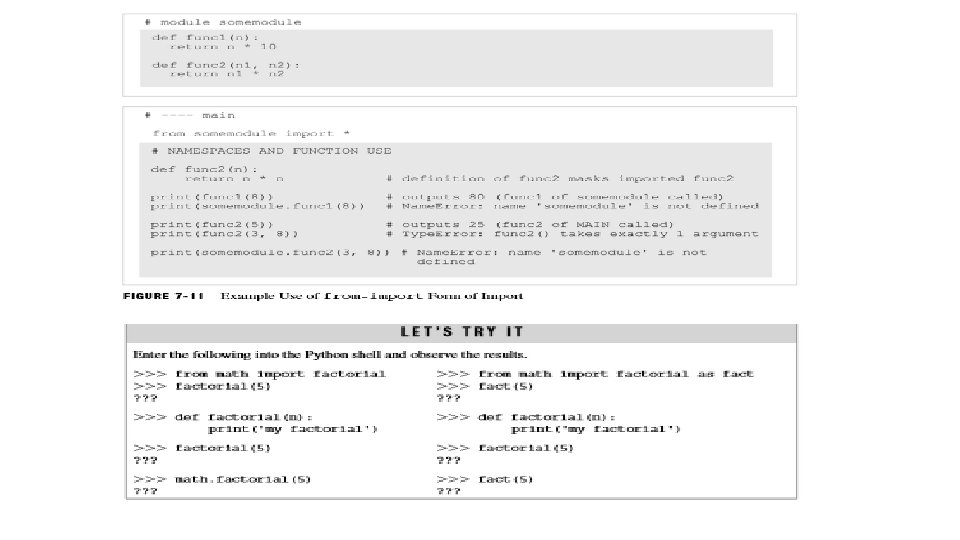
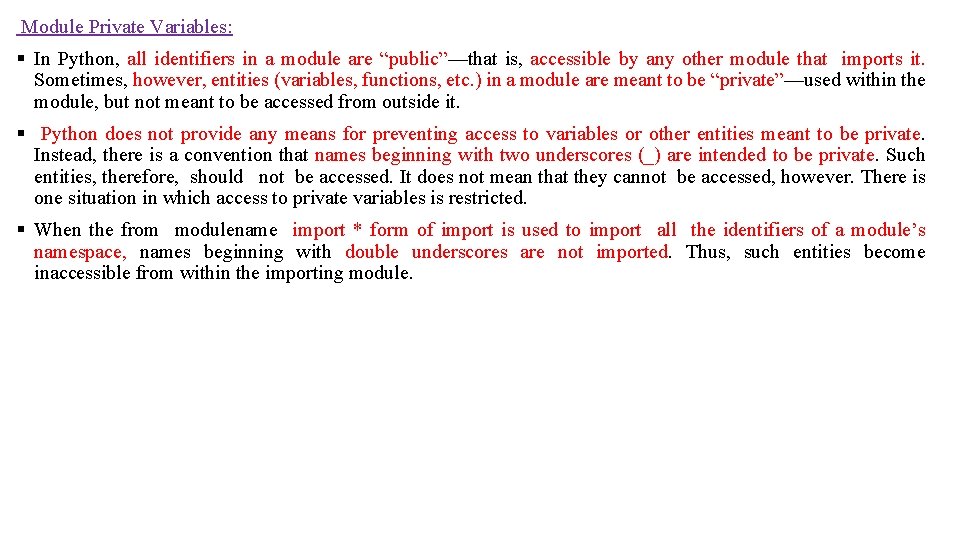
The “from-import” Form of Import: Python also provides an alternate import statement of the form from modulename import something where something can be a list of identifiers, a single renamed identifier, or an asterisk, as shown below, (a) from modulename import func 1, func 2 (b) from modulename import func 1 as new_func 1 (c) from modulename import * In example (a), only identifiers func 1 and func 2 are imported. In example (b), only identifier func 1 is imported, renamed as new_func 1 in the importing module. Finally, in example (c), all of the identifiers are imported, except for those that begin with two underscore characters, which are meant to be private in the module. There is a fundamental difference between the from modulename import and import modulename forms of import in Python: A. When using import modulename , the namespace of the imported module does not become part of the namespace of the importing module. Therefore, identifiers of the imported module must be fully qualified (e. g. , modulename. func 1) in the importing module. B. In contrast, when using from-import, the imported module’s namespace becomes part of t he importing module’s namespace. Thus, imported identifiers are referenced without being fully qualified (e. g. , func 1).
Module Private Variables: § In Python, all identifiers in a module are “public”—that is, accessible by any other module that imports it. Sometimes, however, entities (variables, functions, etc. ) in a module are meant to be “private”—used within the module, but not meant to be accessed from outside it. § Python does not provide any means for preventing access to variables or other entities meant to be private. Instead, there is a convention that names beginning with two underscores (_) are intended to be private. Such entities, therefore, should not be accessed. It does not mean that they cannot be accessed, however. There is one situation in which access to private variables is restricted. § When the from modulename import * form of import is used to import all the identifiers of a module’s namespace, names beginning with double underscores are not imported. Thus, such entities become inaccessible from within the importing module.
Module Loading and Execution: q. Each imported module of a Python program needs to be located and loaded into memory. Python first searches for modules in the current directory. If the module is not found, it searches the directories specified in the PYTHONPATH environment variable. If the module is still not found (or PYTHONPATH is not defined), a Python installation-specific path is searched (e. g. , C: Python 32Lib). q. If the program still does not find the module, an error (Import. Error exception) is reported. For our purposes, all of the modules of a program will be kept in the same directory. However, if you wish to develop a module made available to other programs, then the module can be saved in your own Python modules directory specified in the PYTHONPATH, or stored in the particular Python installation Lib directory. q Then a module is loaded, a compiled version of the module with fi le extension. pyc is automatically produced. Then, the next time that the module is imported, the compiled. pyc fi le is loaded, rather than the. py fi le, to save the time of recompiling. q. A new compiled version of a module is automatically produced whenever the compiled version is out of date with the source code version of the module when loading, based on the dates that the files were created/modified.
Built-in Function dir(): Built-in function dir() is very useful for monitoring the items in the namespace of the main module for programs executing in the Python shell. For example, the following gives the namespace of a newly started shell, >>>dir() ['__builtins__', '__doc__', '__name__', '__package__'] The following shows the namespace after importing and defi ning variables, >>>import random >>>n=0 >>>dir() ['__builtins__', '__doc__', '__name__', '__package__', 'n', 'random'] Selecting Shell ➝ Restart Shell (Ctrl-F 6) in the shell resets the namespace, (after Restart Shell selected) >>> dir() ['__builtins__', '__doc__', '__name__', '__package__']
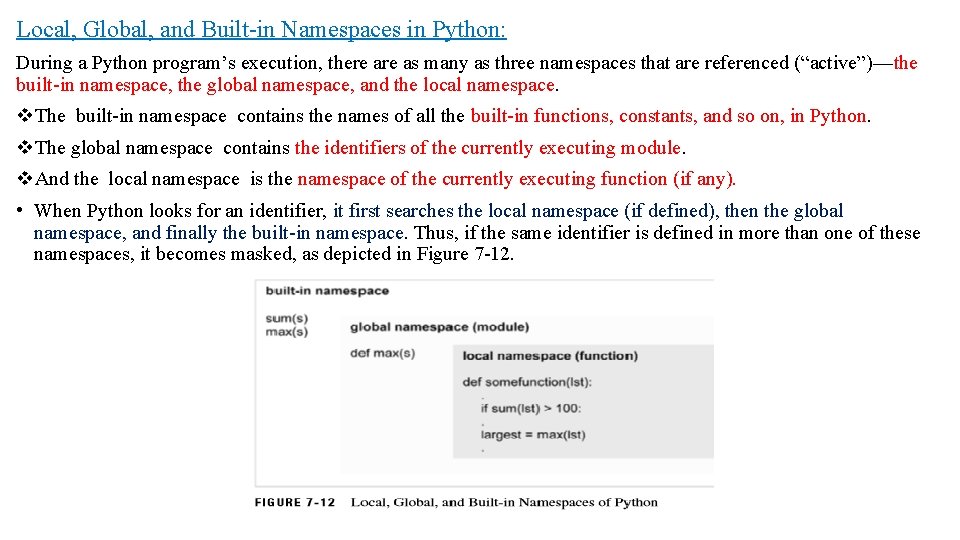
Local, Global, and Built-in Namespaces in Python: During a Python program’s execution, there as many as three namespaces that are referenced (“active”)—the built-in namespace, the global namespace, and the local namespace. v. The built-in namespace contains the names of all the built-in functions, constants, and so on, in Python. v. The global namespace contains the identifiers of the currently executing module. v. And the local namespace is the namespace of the currently executing function (if any). • When Python looks for an identifier, it first searches the local namespace (if defined), then the global namespace, and finally the built-in namespace. Thus, if the same identifier is defined in more than one of these namespaces, it becomes masked, as depicted in Figure 7 -12.
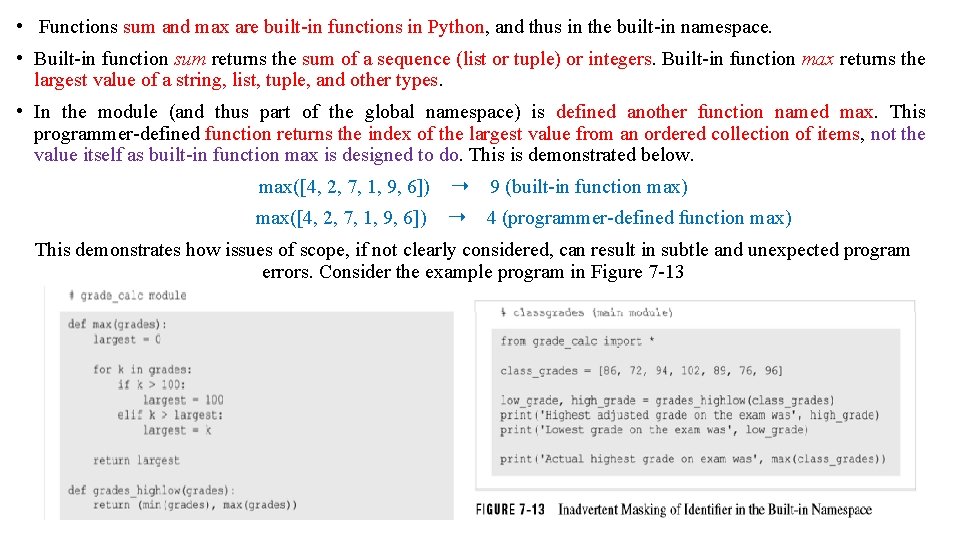
• Functions sum and max are built-in functions in Python, and thus in the built-in namespace. • Built-in function sum returns the sum of a sequence (list or tuple) or integers. Built-in function max returns the largest value of a string, list, tuple, and other types. • In the module (and thus part of the global namespace) is defined another function named max. This programmer-defined function returns the index of the largest value from an ordered collection of items, not the value itself as built-in function max is designed to do. This is demonstrated below. max([4, 2, 7, 1, 9, 6]) ➝ 9 (built-in function max) max([4, 2, 7, 1, 9, 6]) ➝ 4 (programmer-defined function max) This demonstrates how issues of scope, if not clearly considered, can result in subtle and unexpected program errors. Consider the example program in Figure 7 -13
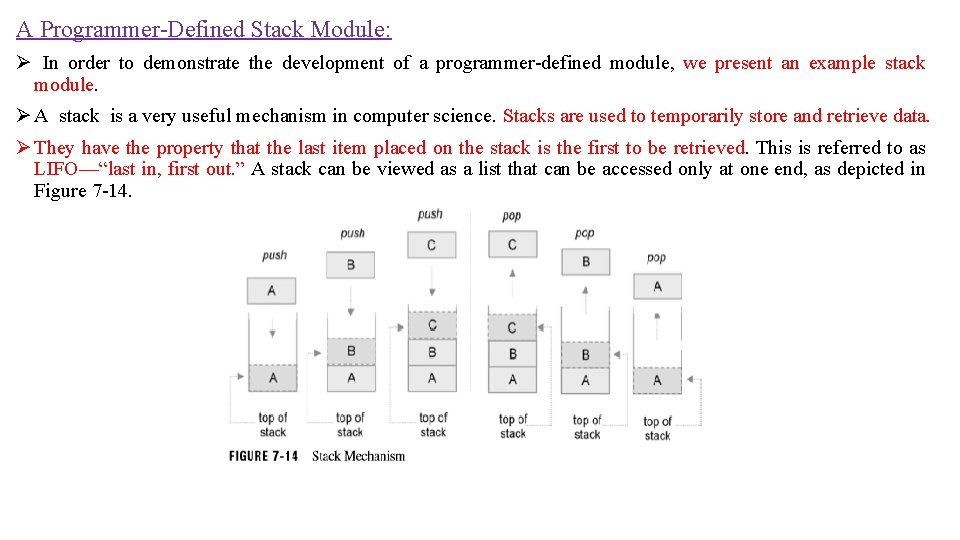
A Programmer-Defined Stack Module: Ø In order to demonstrate the development of a programmer-defined module, we present an example stack module. Ø A stack is a very useful mechanism in computer science. Stacks are used to temporarily store and retrieve data. Ø They have the property that the last item placed on the stack is the first to be retrieved. This is referred to as LIFO—“last in, first out. ” A stack can be viewed as a list that can be accessed only at one end, as depicted in Figure 7 -14.
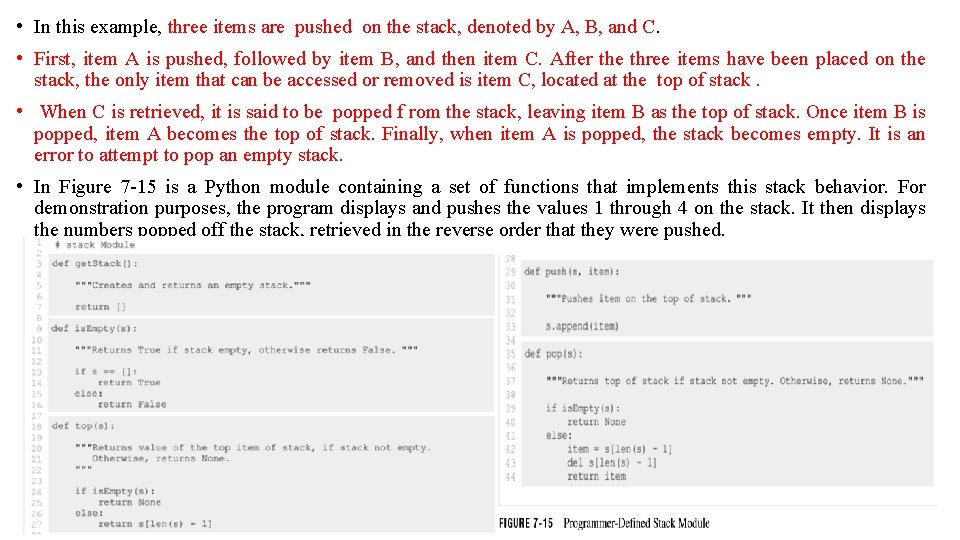
• In this example, three items are pushed on the stack, denoted by A, B, and C. • First, item A is pushed, followed by item B, and then item C. After the three items have been placed on the stack, the only item that can be accessed or removed is item C, located at the top of stack. • When C is retrieved, it is said to be popped f rom the stack, leaving item B as the top of stack. Once item B is popped, item A becomes the top of stack. Finally, when item A is popped, the stack becomes empty. It is an error to attempt to pop an empty stack. • In Figure 7 -15 is a Python module containing a set of functions that implements this stack behavior. For demonstration purposes, the program displays and pushes the values 1 through 4 on the stack. It then displays the numbers popped off the stack, retrieved in the reverse order that they were pushed.
q. The stack module consists of five functions—get. Stack, is. Empty, top, push, and pop. The stack is implemented as a list. Only the last element in the list is accessed—that is where all items are “pushed” and “popped” from. Thus, the end of the list logically functions as the “top” of stack. q. Function get. Stack ( lines 3– 7 ) creates and returns a new empty stack as an empty list. q. Function is. Empty ( lines 9– 16 ) returns whether a stack is empty or not (by checking if an empty list). q Function top ( lines 18– 27) returns the top item of a stack without removing it. q. Functions push ( lines 29– 33 ) and pop ( lines 35– 44 ) provide the essential stack operations. q. The push function pushes an item on the stack by appending it to the end of the list. q. The pop function removes the item from the top of stack by retrieving the last element of the list, and then deleting it. If either pop or top are called on an empty stack, the special value None is returned.
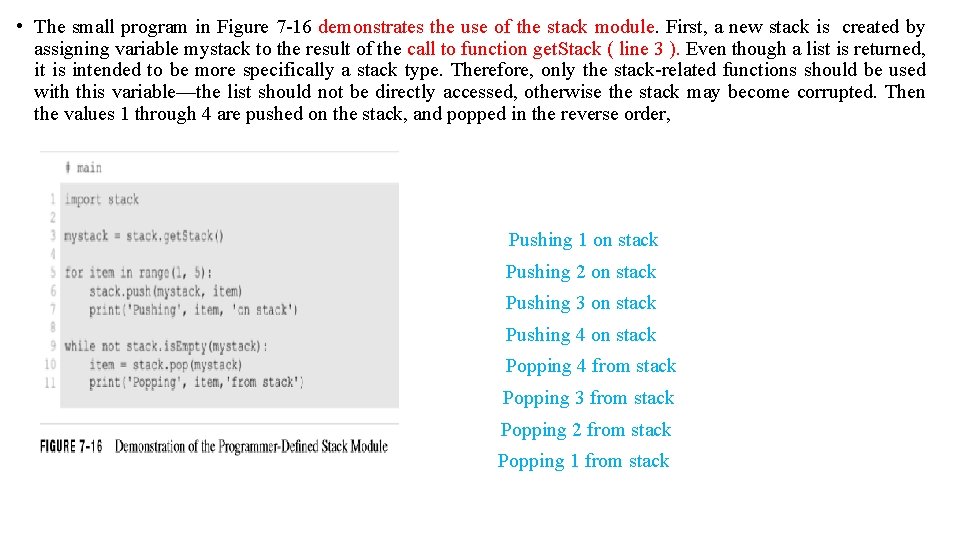
• The small program in Figure 7 -16 demonstrates the use of the stack module. First, a new stack is created by assigning variable mystack to the result of the call to function get. Stack ( line 3 ). Even though a list is returned, it is intended to be more specifically a stack type. Therefore, only the stack-related functions should be used with this variable—the list should not be directly accessed, otherwise the stack may become corrupted. Then the values 1 through 4 are pushed on the stack, and popped in the reverse order, Pushing 1 on stack Pushing 2 on stack Pushing 3 on stack Pushing 4 on stack Popping 4 from stack Popping 3 from stack Popping 2 from stack Popping 1 from stack
- Slides: 26