
Modern Computer Networks An Open Source Approach Appendices

![Taxonomy of Open Source Packages 68 Console/ GNOME/KDE/X 11 [247] Administration [019] After. Step](https://slidetodoc.com/presentation_image_h/8bcb74b71f6343d8490560b8ed3fa367/image-14.jpg "Taxonomy of Open Source Packages 68 Console/ GNOME/KDE/X 11 [247] Administration [019] After. Step")
![Taxonomy of Open Source Packages (cont) 24 Daemons [007] Anti-Virus [005] Batch Processing [030]](https://slidetodoc.com/presentation_image_h/8bcb74b71f6343d8490560b8ed3fa367/image-15.jpg "Taxonomy of Open Source Packages (cont) 24 Daemons [007] Anti-Virus [005] Batch Processing [030]")
- Slides: 59
Modern Computer Networks An Open Source Approach Appendices Ying-Dar Lin, Ren-Hung Hwang, Fred Baker Appendices 1
Content Appendix A n n n Who’s Who A. 1 IETF: Defining RFCs A. 2 Open Source Communities A. 3 Research and Other Standard Communities A. 4 History Further Readings Appendices 2
Content (cont) Appendix B n n Linux Kernel Overview B. 1 Kernel Source Tree B. 2 Source Code of Networking B. 3 Tools for Source Code Tracing Further Readings Appendices 3
Content (cont) Appendix C n n n Development Tools C. 1 Programming C. 2 Debugging C. 3 Maintaining C. 4 Profiling C. 5 Embedding Further Readings Appendices 4
Content (cont) Appendix D n n n n Network Utilities D. 1 Name-Addressing D. 2 Perimeter-Probing D. 3 Traffic-Monitoring D. 4 Benchmarking D. 5 Simulation and Emulation D. 6 Hacking Further Readings Appendices 5
Appendix A n IETF: defining RFCs q n History, process, statistics Open source communities q q q n Who’s Who Free Software Foundation Linux, BSD Open Cores History q q Good but dead Bad and gone Appendices 6
Spirit of IETF n Implement as you go q n vs. specify first and implement later “We reject kings, presidents, and voting. We believe in rough consensus and running code. ” (David Clark) Appendices 7
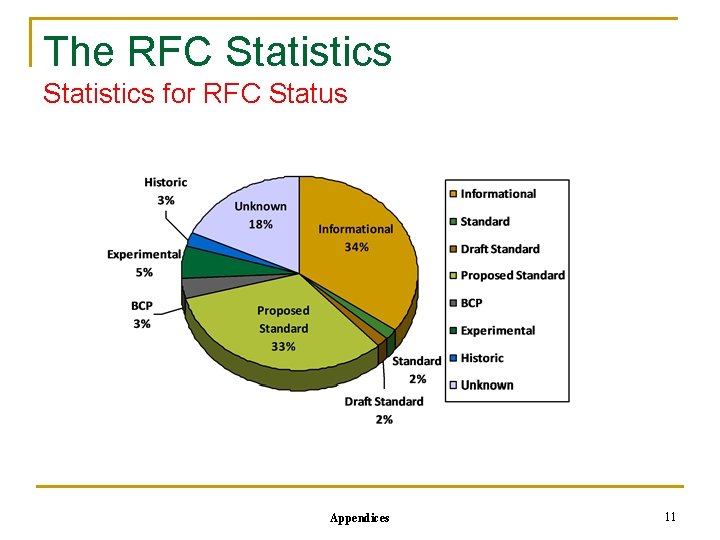
IETF: Defining RFCs n IETF (Internet Engineering Task Force) n n n The RFC (Request For Comments) process n n From ARPA WG since 1969 ISOC: IAB, IRTF, IETF 8 areas and many WGs IESG (Internet Engineering Steering Committee): area directors IETF draft reviewed by IESG, edited by RFC-Editor The RFC statistics n Over 5600 RFCs (7651 RFCs in 2015/9 already) q n n Over 8200 RFCs (8286 RFCs in 2017/10 already) RFC status: FYI, informational/experimental, BCP (best current practice), standard track Telnet: defined by 70 RFCs (with updates, options) Appendices 8
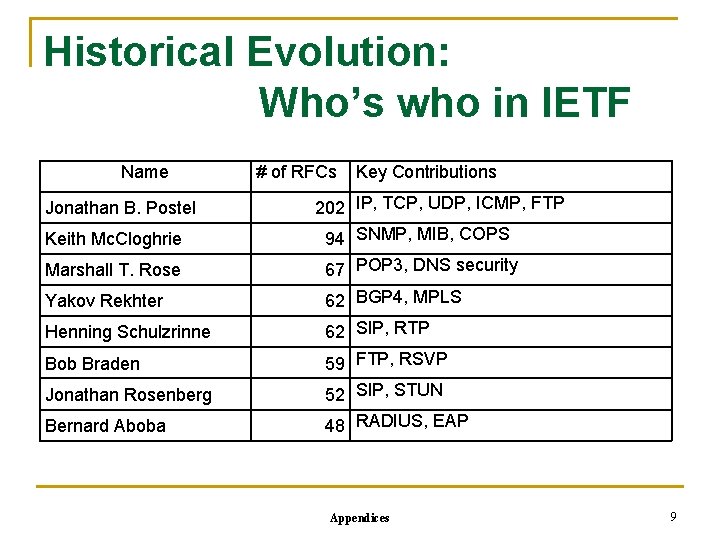
Historical Evolution: Who’s who in IETF Name Jonathan B. Postel Keith Mc. Cloghrie Marshall T. Rose Yakov Rekhter Henning Schulzrinne Bob Braden Jonathan Rosenberg Bernard Aboba # of RFCs Key Contributions 202 IP, TCP, UDP, ICMP, FTP 94 SNMP, MIB, COPS 67 POP 3, DNS security 62 BGP 4, MPLS 62 SIP, RTP 59 FTP, RSVP 52 SIP, STUN 48 RADIUS, EAP Appendices 9
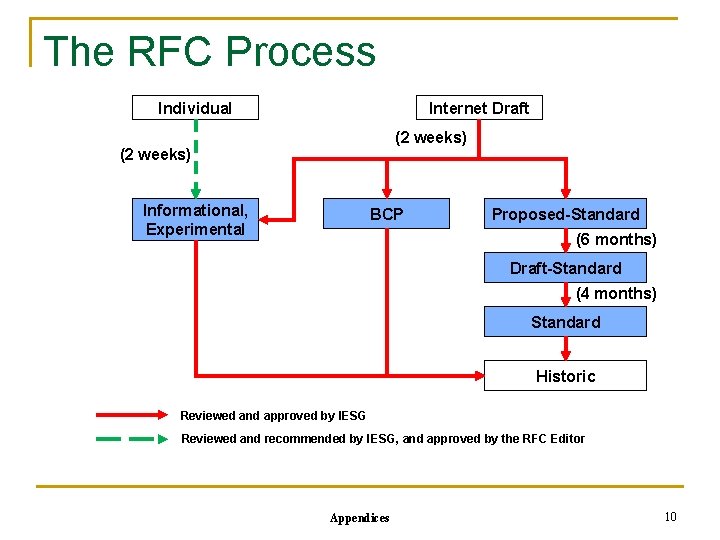
The RFC Process Internet Draft Individual (2 weeks) Informational, Experimental BCP Proposed-Standard (6 months) Draft-Standard (4 months) Standard Historic Reviewed and approved by IESG Reviewed and recommended by IESG, and approved by the RFC Editor Appendices 10
The RFC Statistics for RFC Status Appendices 11
The RFC Statistics Well-known Protocols in 5600 RFCs Layer Data Link Protocol Count ATM 46 PPP 87 ARP/RARP Protocol Count TCP 111 UDP 21 24 DNS 105 BOOTP/DHCP 69 FTP/TFTP 51 ICMP/ICMPv 6 16 HTTP/HTML 37 MIME 99 Network Layer Transport Application IP/IPv 6 259 SMTP 41 Multicast 95 SNMP/MIB 238 RIP/BGP/OSPF 154 TELNET 108 Appendices 12
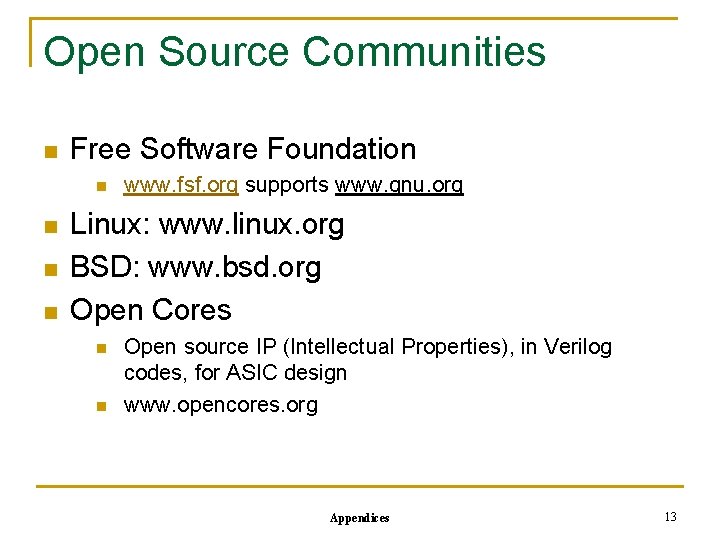
Open Source Communities n Free Software Foundation n n www. fsf. org supports www. gnu. org Linux: www. linux. org BSD: www. bsd. org Open Cores n n Open source IP (Intellectual Properties), in Verilog codes, for ASIC design www. opencores. org Appendices 13
Taxonomy of Open Source Packages 68 Console/ GNOME/KDE/X 11 [247] Administration [019] After. Step applets [019] Anti-Spam [119] Applications [048] Backup [008] Browser Addons [023] CAE [034] CD Writing Software [196] Communication [030] Compression [009] Core [130] Database [063] Desktop [027] Development [006] Dialup Networking [055] Documentation [108] Drivers [088] Editors [062] Education [165] e. Mail [008] Embedded [088] Emulators [068] Encryption [028] Enlightenment Applets [023] FTP Clients [044] File Managers [052] Filesystems [051] Financial [179] Firewall and Security [026] Fonts and Utilities [593] Games [277] Graphics [008] Home Automation [103] IRC [053] Java [074] Log Analyzers [208] MP 3 [010] Mail Clients [051] Mini Distributions [021] Mirroring [351] Misc [028] Modelling [007] Modem gettys [184] Monitoring [003] Motif Appendices [032] Multimedia [480] Networking [048] News [053] OS [048] Office Applications [042] Packaging [053] Printing [189] Scientific Applications [007] Screensavers [031] Shells [265] Sound [136] System [041] TV and Video [011] Terminals [190] Text Utilities [665] Utilities [004] VRML [033] Video [038] Viewers [684] Web Applications [038] Web Browsers [121] Window Maker Applets [039] Window Managers 14
Taxonomy of Open Source Packages (cont) 24 Daemons [007] Anti-Virus [005] Batch Processing [030] BBS [010] Chat [032] Database [026] DNS [015] Filesharing [009] Finger [022] FTP [006] Hardware [097] HTTP [013] Ident [013] IMAP 23 Development [050] IRC [015] Mailinglist Managers [231] Misc [027] MUD [009] Network Directory Service [013] NNTP [023] POP 3 [071] Proxy [031] SMTP [005] SNMP [002] Time Appendices [010] Bug Tracking [068] Compilers [014] CORBA [073] Database [038] Debugging [084] Environments [028] Game SDK [048] Interfaces [173] Java Packages [028] Kernel [001] Kernel Patches [121] Languages [485] Libraries [100] Perl Modules [008] PHP Classes [001] Pike Modules [057] Python Modules [031] Revision Control [019] Tcl extensions [017] Test Suites [558] Tools [178] Web [055] Widget Sets 15
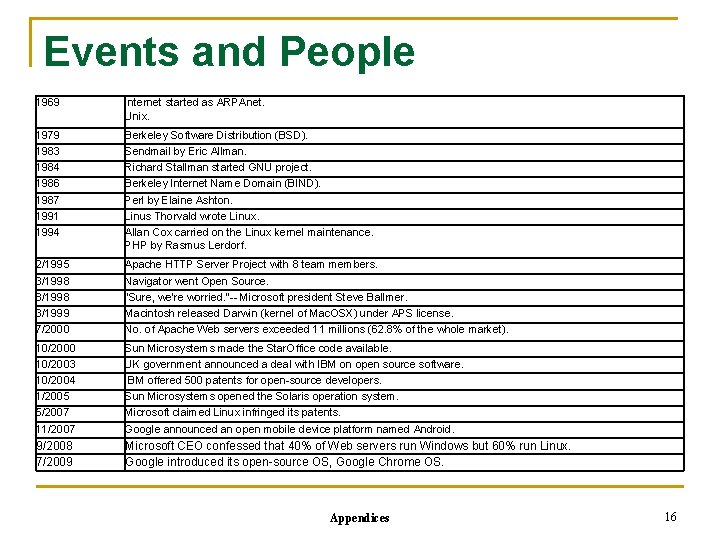
Events and People 1969 Internet started as ARPAnet. Unix. 1979 1983 1984 1986 1987 1991 1994 Berkeley Software Distribution (BSD). Sendmail by Eric Allman. Richard Stallman started GNU project. Berkeley Internet Name Domain (BIND). Perl by Elaine Ashton. Linus Thorvald wrote Linux. Allan Cox carried on the Linux kernel maintenance. PHP by Rasmus Lerdorf. 2/1995 3/1998 8/1998 3/1999 7/2000 Apache HTTP Server Project with 8 team members. Navigator went Open Source. “Sure, we're worried. ”-- Microsoft president Steve Ballmer. Macintosh released Darwin (kernel of Mac. OSX) under APS license. No. of Apache Web servers exceeded 11 millions (62. 8% of the whole market). 10/2000 10/2003 10/2004 1/2005 5/2007 11/2007 Sun Microsystems made the Star. Office code available. UK government announced a deal with IBM on open source software. IBM offered 500 patents for open-source developers. Sun Microsystems opened the Solaris operation system. Microsoft claimed Linux infringed its patents. Google announced an open mobile device platform named Android. 9/2008 7/2009 Microsoft CEO confessed that 40% of Web servers run Windows but 60% run Linux. Google introduced its open-source OS, Google Chrome OS. Appendices 16
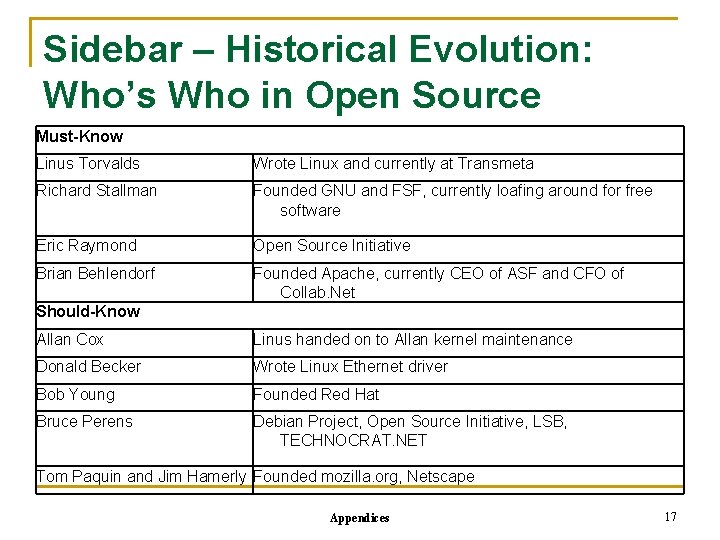
Sidebar – Historical Evolution: Who’s Who in Open Source Must-Know Linus Torvalds Wrote Linux and currently at Transmeta Richard Stallman Founded GNU and FSF, currently loafing around for free software Eric Raymond Open Source Initiative Brian Behlendorf Founded Apache, currently CEO of ASF and CFO of Collab. Net Should-Know Allan Cox Linus handed on to Allan kernel maintenance Donald Becker Wrote Linux Ethernet driver Bob Young Founded Red Hat Bruce Perens Debian Project, Open Source Initiative, LSB, TECHNOCRAT. NET Tom Paquin and Jim Hamerly Founded mozilla. org, Netscape Appendices 17
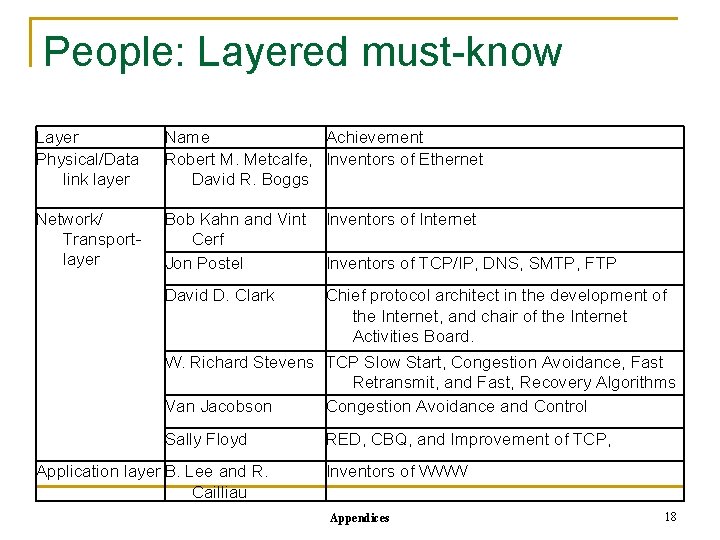
People: Layered must-know Layer Physical/Data link layer Name Achievement Robert M. Metcalfe, Inventors of Ethernet David R. Boggs Network/ Transportlayer Bob Kahn and Vint Cerf Jon Postel Inventors of Internet Inventors of TCP/IP, DNS, SMTP, FTP David D. Clark Chief protocol architect in the development of the Internet, and chair of the Internet Activities Board. W. Richard Stevens TCP Slow Start, Congestion Avoidance, Fast Retransmit, and Fast, Recovery Algorithms Van Jacobson Congestion Avoidance and Control Sally Floyd Application layer B. Lee and R. Cailliau RED, CBQ, and Improvement of TCP, Inventors of WWW Appendices 18
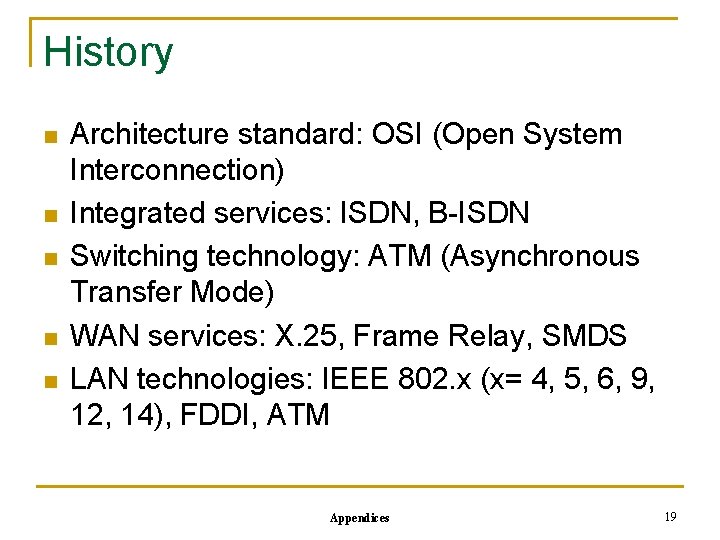
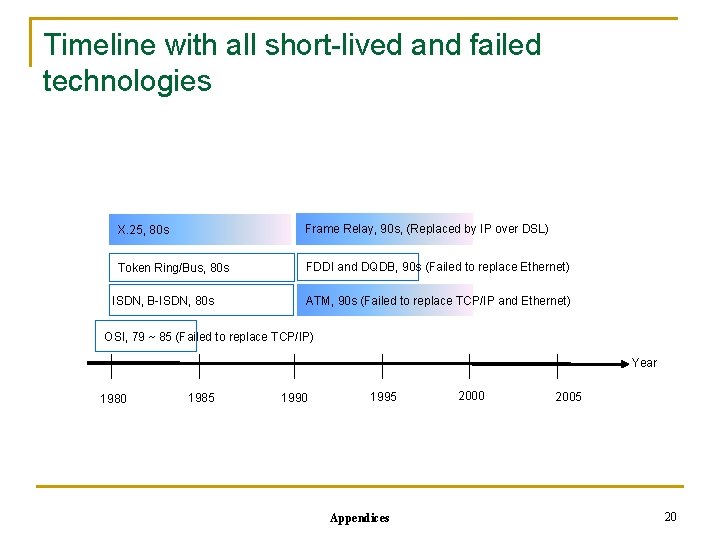
History n n n Architecture standard: OSI (Open System Interconnection) Integrated services: ISDN, B-ISDN Switching technology: ATM (Asynchronous Transfer Mode) WAN services: X. 25, Frame Relay, SMDS LAN technologies: IEEE 802. x (x= 4, 5, 6, 9, 12, 14), FDDI, ATM Appendices 19
Timeline with all short-lived and failed technologies X. 25, 80 s Frame Relay, 90 s, (Replaced by IP over DSL) Token Ring/Bus, 80 s FDDI and DQDB, 90 s (Failed to replace Ethernet) ISDN, B-ISDN, 80 s ATM, 90 s (Failed to replace TCP/IP and Ethernet) OSI, 79 ~ 85 (Failed to replace TCP/IP) Year 1980 1985 1990 1995 Appendices 2000 2005 20
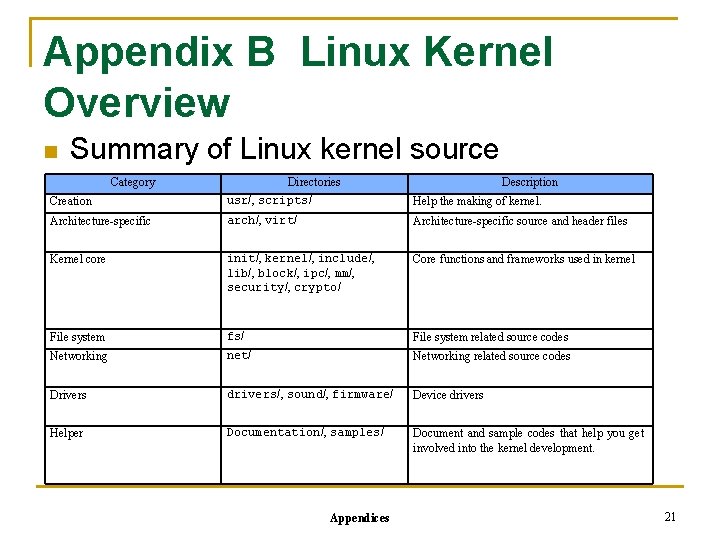
Appendix B Linux Kernel Overview n Summary of Linux kernel source Category Directories Description Creation usr/, scripts/ Help the making of kernel. Architecture-specific arch/, virt/ Architecture-specific source and header files Kernel core init/, kernel/, include/, lib/, block/, ipc/, mm/, security/, crypto/ Core functions and frameworks used in kernel File system fs/ File system related source codes Networking net/ Networking related source codes Drivers drivers/, sound/, firmware/ Device drivers Helper Documentation/, samples/ Document and sample codes that help you get involved into the kernel development. Appendices 21
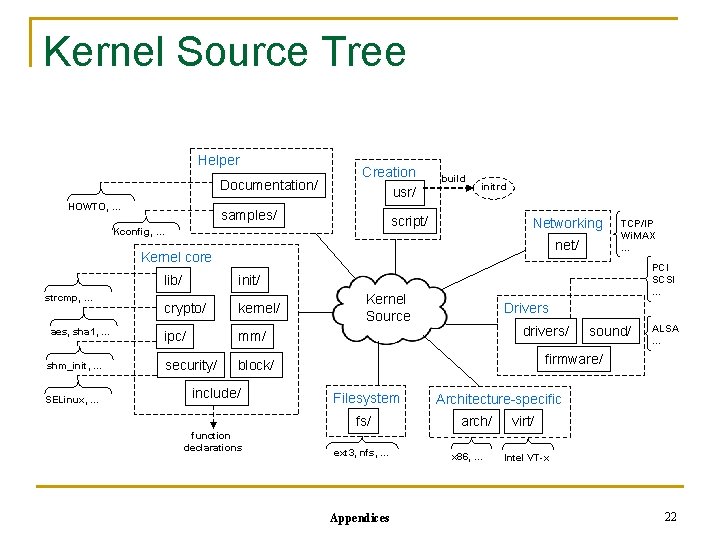
Kernel Source Tree Helper Documentation/ HOWTO, … Creation usr/ samples/ build initrd script/ Kconfig, … Networking net/ Kernel core strcmp, … aes, sha 1, … shm_init, … SELinux, … lib/ init/ crypto/ kernel/ ipc/ mm/ security/ block/ include/ PCI SCSI … Kernel Source Drivers drivers/ sound/ ALSA … firmware/ Filesystem fs/ function declarations TCP/IP Wi. MAX … ext 3, nfs, … Appendices Architecture-specific arch/ x 86, … virt/ Intel VT-x 22
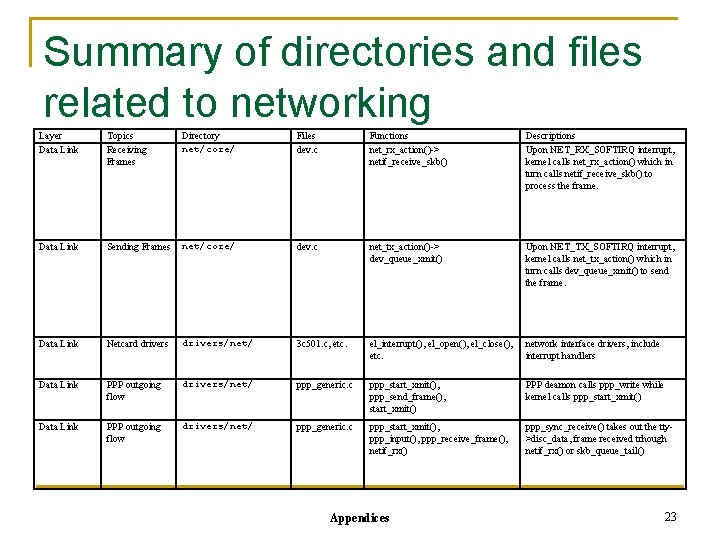
Summary of directories and files related to networking Layer Data Link Topics Receiving Frames Directory net/core/ Files dev. c Functions net_rx_action()-> netif_receive_skb() Descriptions Upon NET_RX_SOFTIRQ interrupt, kernel calls net_rx_action() which in turn calls netif_receive_skb() to process the frame. Data Link Sending Frames net/core/ dev. c net_tx_action()-> dev_queue_xmit() Upon NET_TX_SOFTIRQ interrupt, kernel calls net_tx_action() which in turn calls dev_queue_xmit() to send the frame. Data Link Netcard drivers/net/ 3 c 501. c, etc. el_interrupt(), el_open(), el_close(), etc. network interface drivers, include interrupt handlers Data Link PPP outgoing flow drivers/net/ ppp_generic. c ppp_start_xmit(), ppp_send_frame(), start_xmit() PPP deamon calls ppp_write while kernel calls ppp_start_xmit() Data Link PPP outgoing flow drivers/net/ ppp_generic. c ppp_start_xmit(), ppp_input(), ppp_receive_frame(), netif_rx() ppp_sync_receive() takes out the tty>disc_data, frame received trhough netif_rx() or skb_queue_tail() Appendices 23
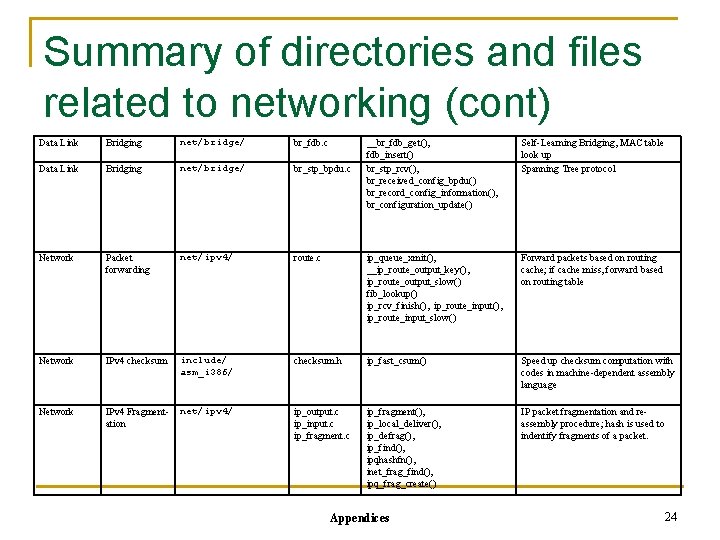
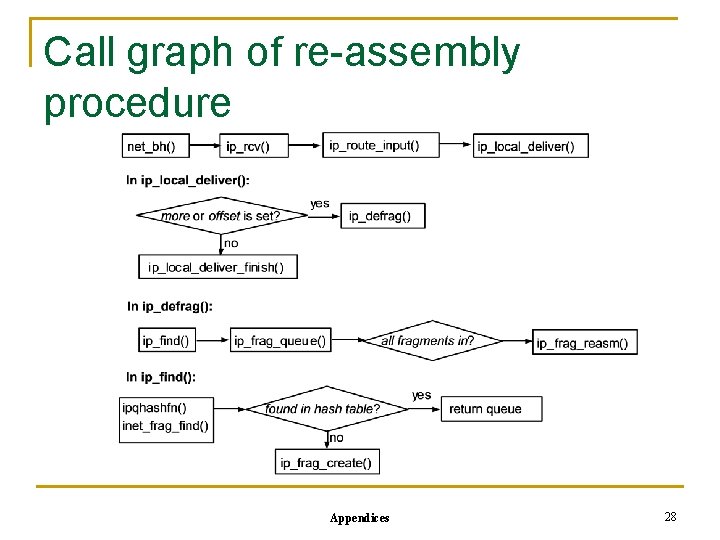
Summary of directories and files related to networking (cont) Data Link Bridging net/bridge/ br_fdb. c Data Link Bridging net/bridge/ br_stp_bpdu. c Network Packet forwarding net/ipv 4/ Network IPv 4 checksum Network IPv 4 Fragmentation __br_fdb_get(), fdb_insert() br_stp_rcv(), br_received_config_bpdu() br_record_config_information(), br_configuration_update() Self-Learning Bridging, MAC table look up Spanning Tree protocol route. c ip_queue_xmit(), __ip_route_output_key(), ip_route_output_slow() fib_lookup() ip_rcv_finish(), ip_route_input_slow() Forward packets based on routing cache; if cache miss, forward based on routing table include/ asm_i 386/ checksum. h ip_fast_csum() Speed up checksum computation with codes in machine-dependent assembly language net/ipv 4/ ip_output. c ip_input. c ip_fragment(), ip_local_deliver(), ip_defrag(), ip_find(), ipqhashfn(), inet_frag_find(), ipq_frag_create() IP packet fragmentation and reassembly procedure; hash is used to indentify fragments of a packet. Appendices 24
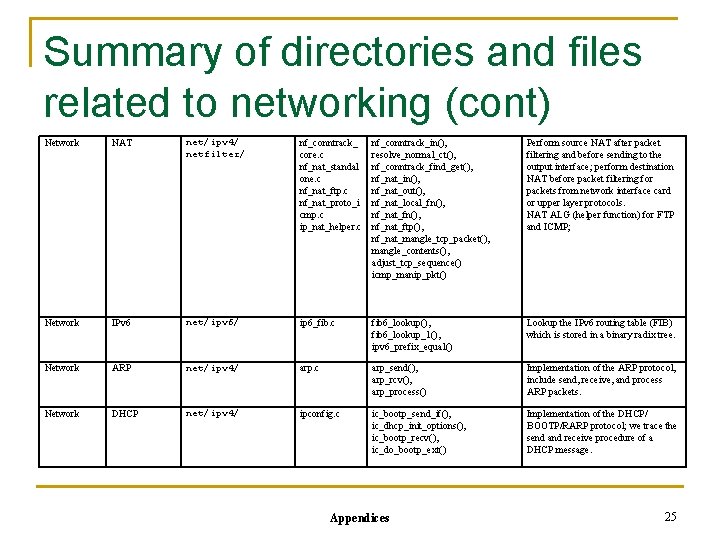
Summary of directories and files related to networking (cont) Network NAT net/ipv 4/ netfilter/ nf_conntrack_ core. c nf_nat_standal one. c nf_nat_ftp. c nf_nat_proto_i cmp. c ip_nat_helper. c nf_conntrack_in(), resolve_normal_ct(), nf_conntrack_find_get(), nf_nat_in(), nf_nat_out(), nf_nat_local_fn(), nf_nat_ftp(), nf_nat_mangle_tcp_packet(), mangle_contents(), adjust_tcp_sequence() icmp_manip_pkt() Perform source NAT after packet filtering and before sending to the output interface; perform destination NAT before packet filtering for packets from network interface card or upper layer protocols. NAT ALG (helper function) for FTP and ICMP; Network IPv 6 net/ipv 6/ ip 6_fib. c fib 6_lookup(), fib 6_lookup_1(), ipv 6_prefix_equal() Lookup the IPv 6 routing table (FIB) which is stored in a binary radix tree. Network ARP net/ipv 4/ arp. c arp_send(), arp_rcv(), arp_process() Implementation of the ARP protocol, include send, receive, and process ARP packets. Network DHCP net/ipv 4/ ipconfig. c ic_bootp_send_if(), ic_dhcp_init_options(), ic_bootp_recv(), ic_do_bootp_ext() Implementation of the DHCP/ BOOTP/RARP protocol; we trace the send and receive procedure of a DHCP message. Appendices 25
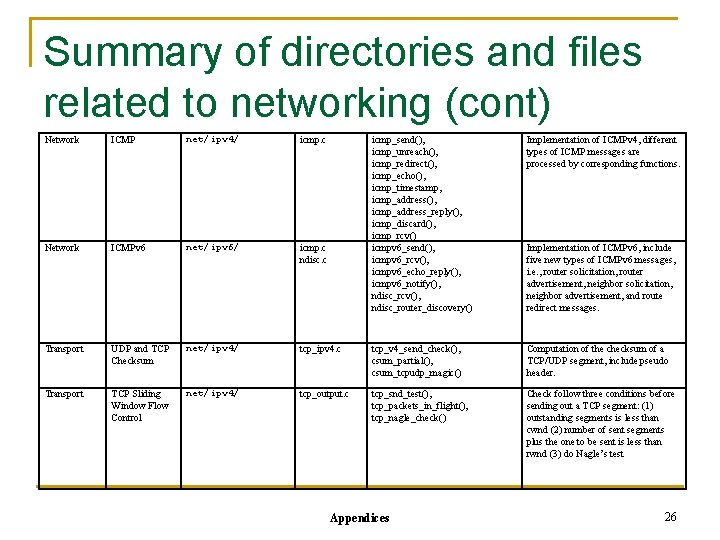
Summary of directories and files related to networking (cont) Network ICMP net/ipv 4/ icmp. c Network ICMPv 6 net/ipv 6/ icmp. c ndisc. c Transport UDP and TCP Checksum net/ipv 4/ Transport TCP Sliding Window Flow Control net/ipv 4/ icmp_send(), icmp_unreach(), icmp_redirect(), icmp_echo(), icmp_timestamp, icmp_address(), icmp_address_reply(), icmp_discard(), icmp_rcv() icmpv 6_send(), icmpv 6_rcv(), icmpv 6_echo_reply(), icmpv 6_notify(), ndisc_rcv(), ndisc_router_discovery() Implementation of ICMPv 4, different types of ICMP messages are processed by corresponding functions. tcp_ipv 4. c tcp_v 4_send_check(), csum_partial(), csum_tcpudp_magic() Computation of the checksum of a TCP/UDP segment, include pseudo header. tcp_output. c tcp_snd_test(), tcp_packets_in_flight(), tcp_nagle_check() Check follow three conditions before sending out a TCP segment: (1) outstanding segments is less than cwnd (2) number of sent segments plus the one to be sent is less than rwnd (3) do Nagle’s test Appendices Implementation of ICMPv 6, include five new types of ICMPv 6 messages, i. e. , router solicitation, router advertisement, neighbor solicitation, neighbor advertisement, and route redirect messages. 26
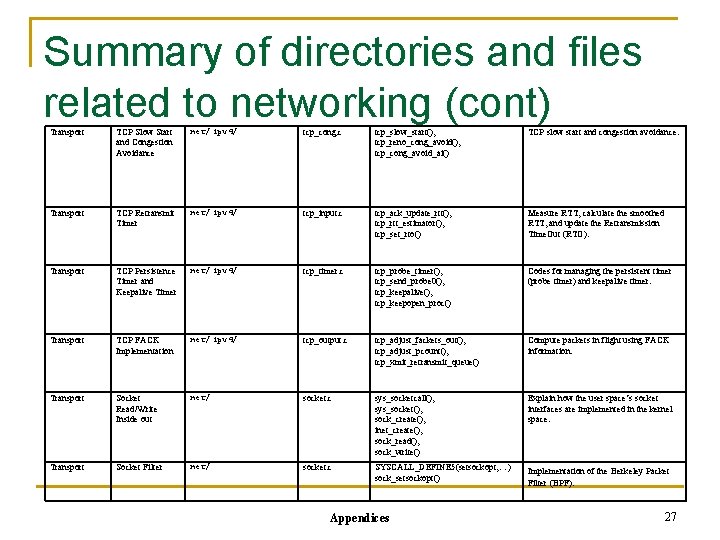
Summary of directories and files related to networking (cont) Transport TCP Slow Start and Congestion Avoidance net/ipv 4/ tcp_cong. c tcp_slow_start(), tcp_reno_cong_avoid(), tcp_cong_avoid_ai() TCP slow start and congestion avoidance. Transport TCP Retransmit Timer net/ipv 4/ tcp_input. c tcp_ack_update_rtt(), tcp_rtt_estimator(), tcp_set_rto() Measure RTT, calculate the smoothed RTT, and update the Retransmission Time. Out (RTO). Transport TCP Persistence Timer and Keepalive Timer net/ipv 4/ tcp_timer. c tcp_probe_timer(), tcp_send_probe 0(), tcp_keepalive(), tcp_keepopen_proc() Codes for managing the persistent timer (probe timer) and keepalive timer. Transport TCP FACK Implementation net/ipv 4/ tcp_output. c tcp_adjust_fackets_out(), tcp_adjust_pcount(), tcp_xmit_retransmit_queue() Compute packets in flight using FACK information. Transport Socket Read/Write Inside out net/ socket. c sys_socketcall(), sys_socket(), sock_create(), inet_create(), sock_read(), sock_write() Explain how the user space’s socket interfaces are implemented in the kernel space. Transport Socket Filter net/ socket. c SYSCALL_DEFINE 5(setsockopt, …) sock_setsockopt() Implementation of the Berkeley Packet Filter (BPF). Appendices 27
Call graph of re-assembly procedure Appendices 28
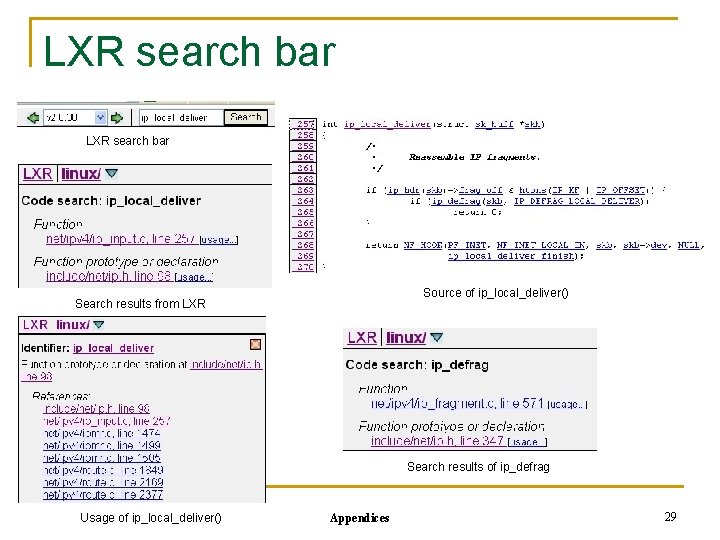
LXR search bar Source of ip_local_deliver() Search results from LXR Search results of ip_defrag Usage of ip_local_deliver() Appendices 29
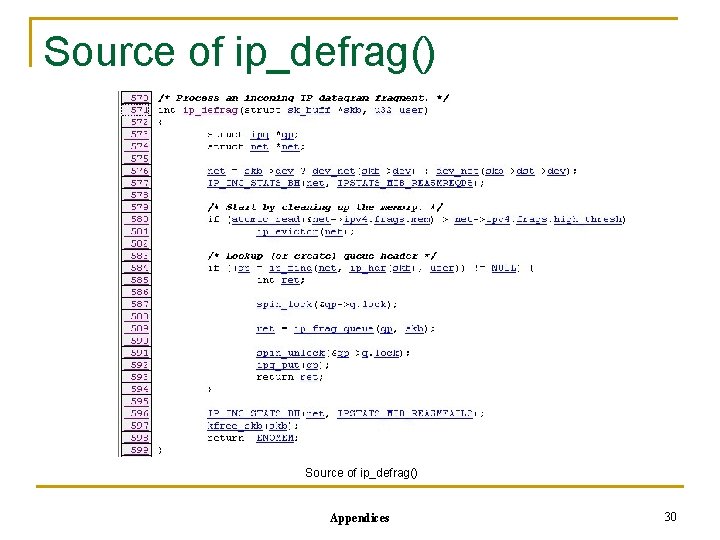
Source of ip_defrag() Appendices 30
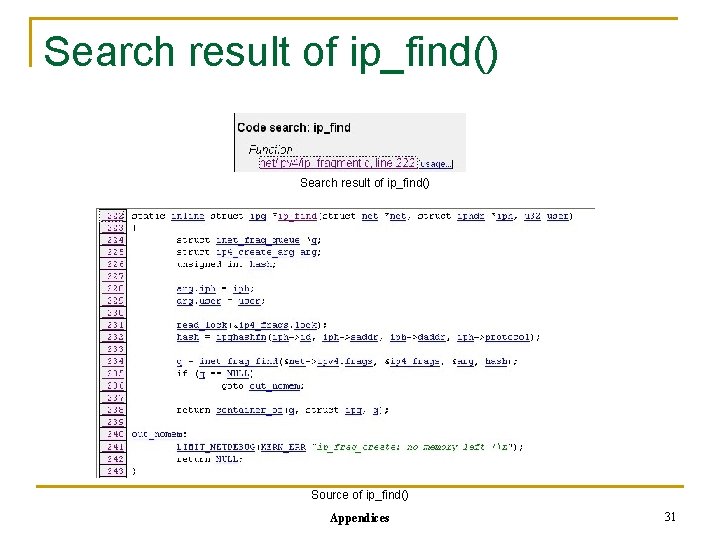
Search result of ip_find() Source of ip_find() Appendices 31
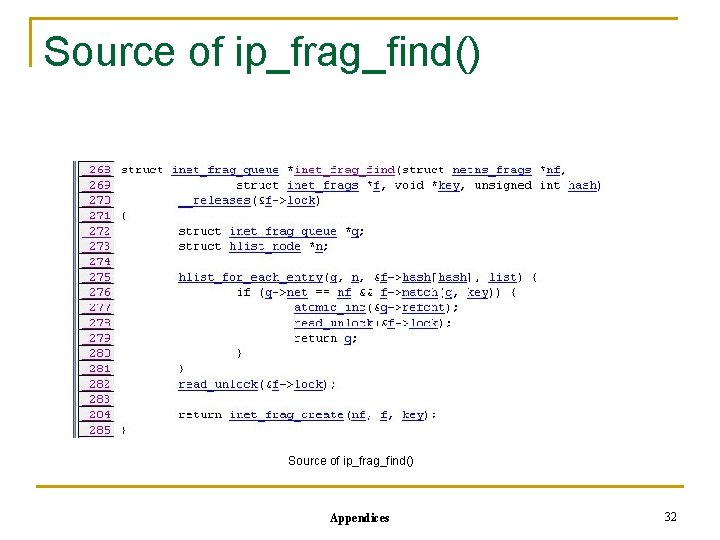
Source of ip_frag_find() Appendices 32
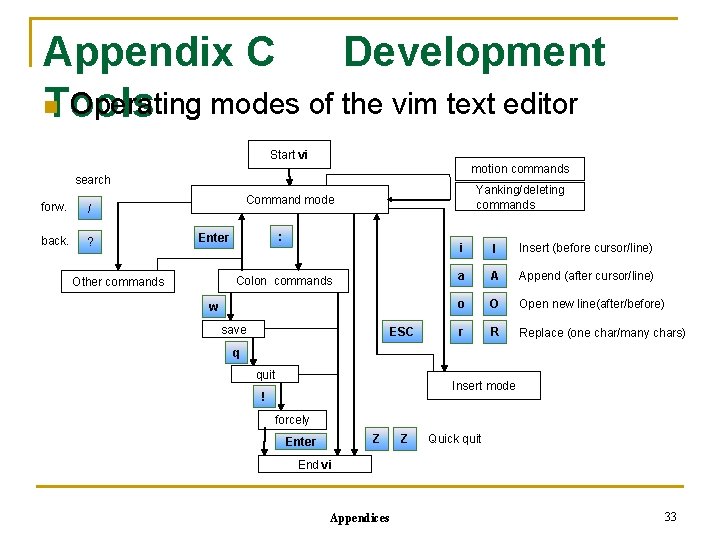
Appendix C Development n Operating modes of the vim text editor Tools Start vi motion commands search forw. / back. ? Yanking/deleting commands Command mode : Enter Colon commands Other commands w save ESC i I Insert (before cursor/line) a A Append (after cursor/line) o O Open new line(after/before) r R Replace (one char/many chars) q quit Insert mode ! forcely Z Enter Z Quick quit End vi Appendices 33
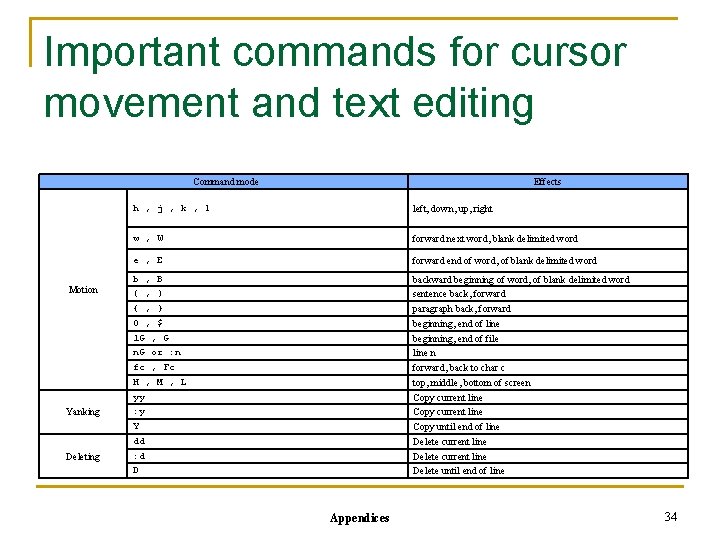
Important commands for cursor movement and text editing Command mode Motion Yanking Deleting Effects h , j , k , l left, down, up, right w , W forward next word, blank delimited word e , E forward end of word, of blank delimited word b , B ( , ) { , } 0 , $ 1 G , G n. G or : n fc , Fc H , M , L yy : y Y dd : d D backward beginning of word, of blank delimited word sentence back, forward paragraph back, forward beginning, end of line beginning, end of file line n forward, back to char c top, middle, bottom of screen Copy current line Copy until end of line Delete current line Delete until end of line Appendices 34
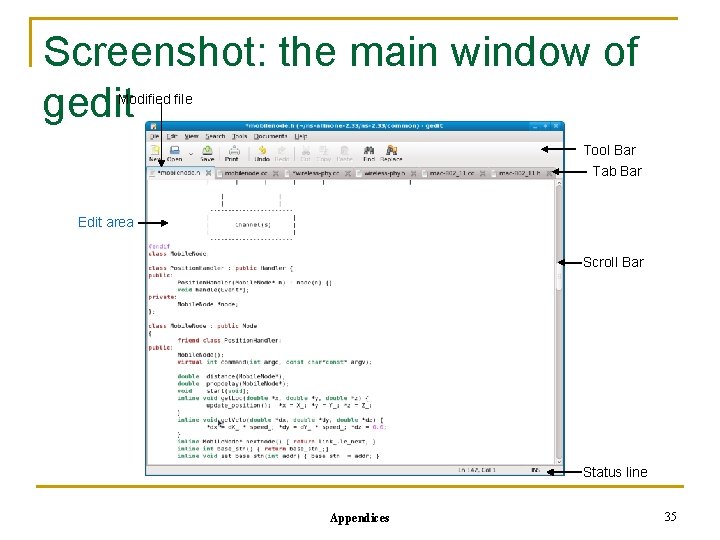
Screenshot: the main window of gedit Modified file Tool Bar Tab Bar Edit area Scroll Bar Status line Appendices 35
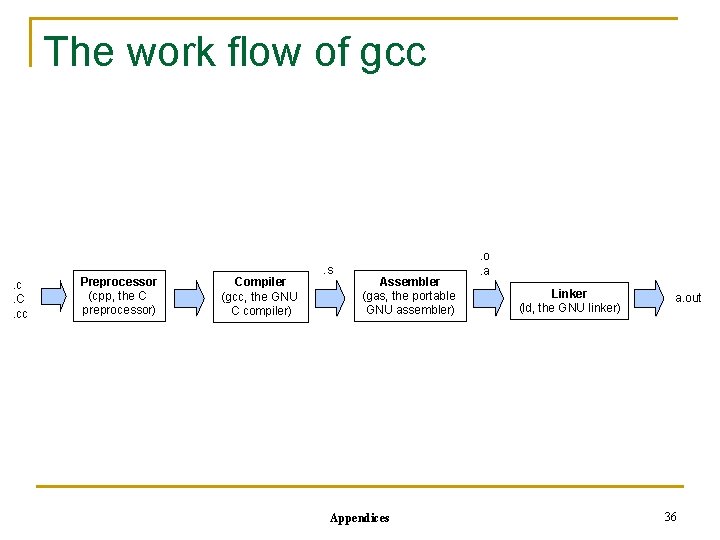
The work flow of gcc . c. C. cc Preprocessor (cpp, the C preprocessor) Compiler (gcc, the GNU C compiler) . s Assembler (gas, the portable GNU assembler) Appendices . o. a Linker (ld, the GNU linker) a. out 36
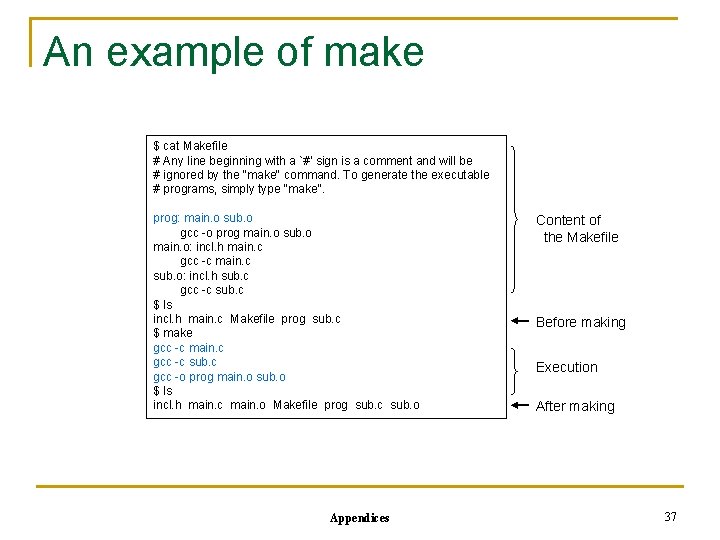
An example of make $ cat Makefile # Any line beginning with a `#' sign is a comment and will be # ignored by the "make" command. To generate the executable # programs, simply type "make". prog: main. o sub. o gcc -o prog main. o sub. o main. o: incl. h main. c gcc -c main. c sub. o: incl. h sub. c gcc -c sub. c $ ls incl. h main. c Makefile prog sub. c $ make gcc -c main. c gcc -c sub. c gcc -o prog main. o sub. o $ ls incl. h main. c main. o Makefile prog sub. c sub. o Appendices Content of the Makefile Before making Execution After making 37
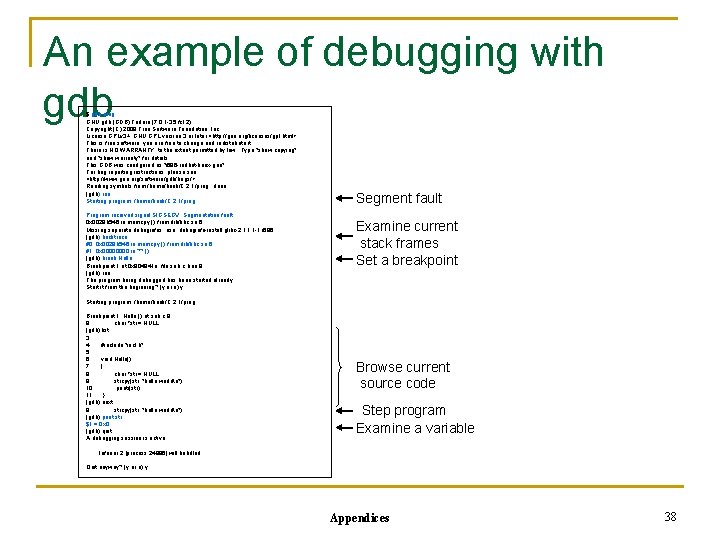
An example of debugging with gdb $ gdb prog GNU gdb (GDB) Fedora (7. 0. 1 -35. fc 12) Copyright (C) 2009 Free Software Foundation, Inc. License GPLv 3+: GNU GPL version 3 or later <http: //gnu. org/licenses/gpl. html> This is free software: you are free to change and redistribute it. There is NO WARRANTY, to the extent permitted by law. Type "show copying" and "show warranty" for details. This GDB was configured as "i 686 -redhat-linux-gnu". For bug reporting instructions, please see: <http: //www. gnu. org/software/gdb/bugs/>. . . Reading symbols from /home/book/C. 2. 1/prog. . . done. (gdb) run Starting program: /home/book/C. 2. 1/prog Program received signal SIGSEGV, Segmentation fault. 0 x 0029 b 546 in memcpy () from /libc. so. 6 Missing separate debuginfos, use: debuginfo-install glibc-2. 11. 1 -1. i 686 (gdb) backtrace #0 0 x 0029 b 546 in memcpy () from /libc. so. 6 #1 0 x 0000 in ? ? () (gdb) break Hello Breakpoint 1 at 0 x 804841 e: file sub. c, line 8. (gdb) run The program being debugged has been started already. Start it from the beginning? (y or n) y Segment fault Examine current stack frames Set a breakpoint Starting program: /home/book/C. 2. 1/prog Breakpoint 1, Hello () at sub. c: 8 8 char *str = NULL; (gdb) list 3 4 #include "incl. h" 5 6 void Hello() 7 { 8 char *str = NULL; 9 strcpy(str, "hello worldn"); 10 printf(str); 11 } (gdb) next 9 strcpy(str, "hello worldn"); (gdb) print str $1 = 0 x 0 (gdb) quit A debugging session is active. Browse current source code Step program Examine a variable Inferior 2 [process 24886] will be killed. Quit anyway? (y or n) y Appendices 38
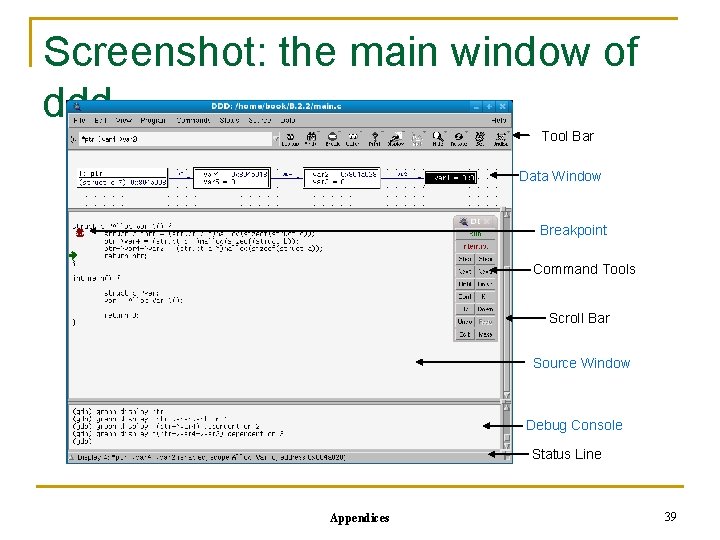
Screenshot: the main window of ddd Tool Bar Data Window Breakpoint Command Tools Scroll Bar Source Window Debug Console Status Line Appendices 39
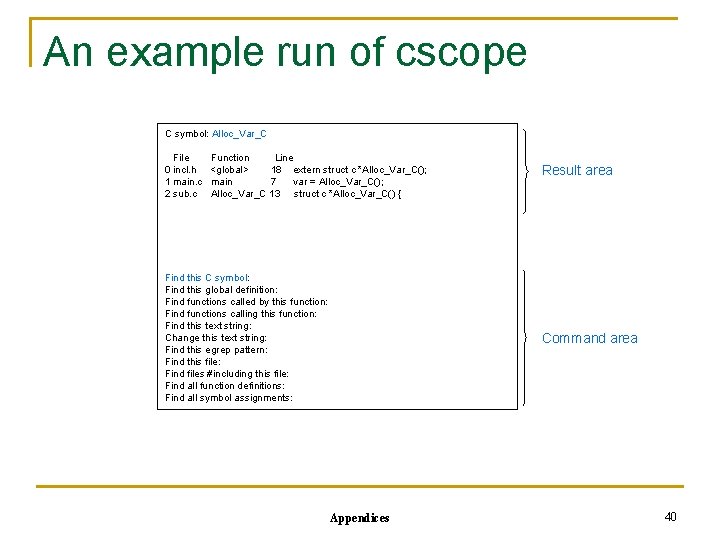
An example run of cscope C symbol: Alloc_Var_C File 0 incl. h 1 main. c 2 sub. c Function Line <global> 18 extern struct c *Alloc_Var_C(); main 7 var = Alloc_Var_C(); Alloc_Var_C 13 struct c *Alloc_Var_C() { Find this C symbol: Find this global definition: Find functions called by this function: Find functions calling this function: Find this text string: Change this text string: Find this egrep pattern: Find this file: Find files #including this file: Find all function definitions: Find all symbol assignments: Result area Command area Appendices 40
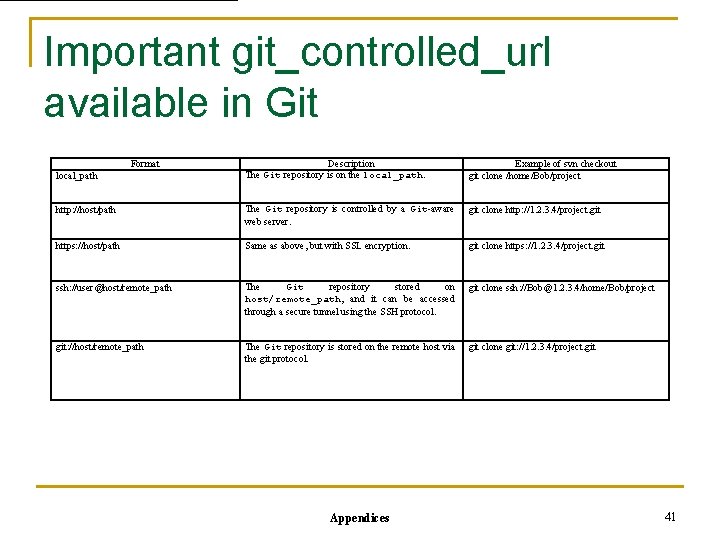
Important git_controlled_url available in Git Format Description The Git repository is on the local_path. Example of svn checkout git clone /home/Bob/project http: //host/path The Git repository is controlled by a Git-aware web server. git clone http: //1. 2. 3. 4/project. git https: //host/path Same as above, but with SSL encryption. git clone https: //1. 2. 3. 4/project. git ssh: //user@host/remote_path The Git repository stored on host/remote_path, and it can be accessed through a secure tunnel using the SSH protocol. git clone ssh: //Bob@1. 2. 3. 4/home/Bob/project git: //host/remote_path The Git repository is stored on the remote host via the git protocol. git clone git: //1. 2. 3. 4/project. git local_path Appendices 41
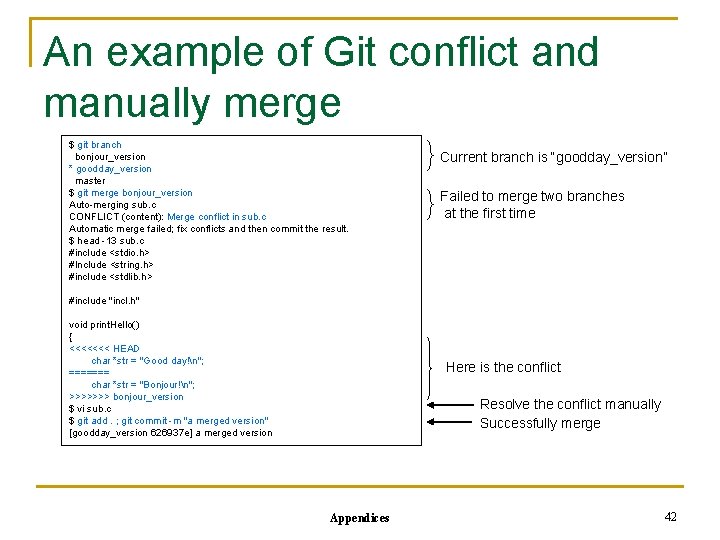
An example of Git conflict and manually merge $ git branch bonjour_version * goodday_version master $ git merge bonjour_version Auto-merging sub. c CONFLICT (content): Merge conflict in sub. c Automatic merge failed; fix conflicts and then commit the result. $ head -13 sub. c #include <stdio. h> #Include <string. h> #include <stdlib. h> Current branch is “goodday_version” Failed to merge two branches at the first time #include "incl. h" void print. Hello() { <<<<<<< HEAD char *str = "Good day!n"; ======= char *str = "Bonjour!n"; >>>>>>> bonjour_version $ vi sub. c $ git add. ; git commit -m "a merged version" [goodday_version 626937 e] a merged version Here is the conflict Resolve the conflict manually Successfully merge Appendices 42
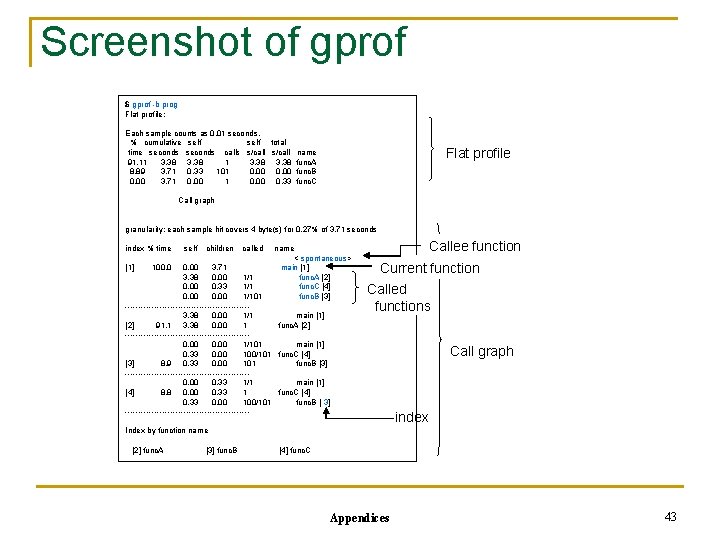
Screenshot of gprof $ gprof -b prog Flat profile: Each sample counts as 0. 01 seconds. % cumulative self total time seconds calls s/call 91. 11 3. 38 8. 89 3. 71 0. 33 101 0. 00 3. 71 0. 00 0. 33 Flat profile name func. A func. B func. C Call graph granularity: each sample hit covers 4 byte(s) for 0. 27% of 3. 71 seconds index % time [1] self children 100. 0 called name < spontaneous> main [1] func. A [2] func. C [4] func. B [3] 0. 00 3. 71 3. 38 0. 00 1/1 0. 00 0. 33 1/1 0. 00 1/101 -----------------------3. 38 0. 00 1/1 main [1] [2] 91. 1 3. 38 0. 00 1 func. A [2] -----------------------0. 00 1/101 main [1] 0. 33 0. 00 100/101 func. C [4] [3] 8. 9 0. 33 0. 00 101 func. B [3] -----------------------0. 00 0. 33 1/1 main [1] [4] 8. 8 0. 00 0. 33 1 func. C [4] 0. 33 0. 00 100/101 func. B [ 3] ------------------------ Callee function Current function Called functions Call graph index Index by function name [2] func. A [3] func. B [4] func. C Appendices 43
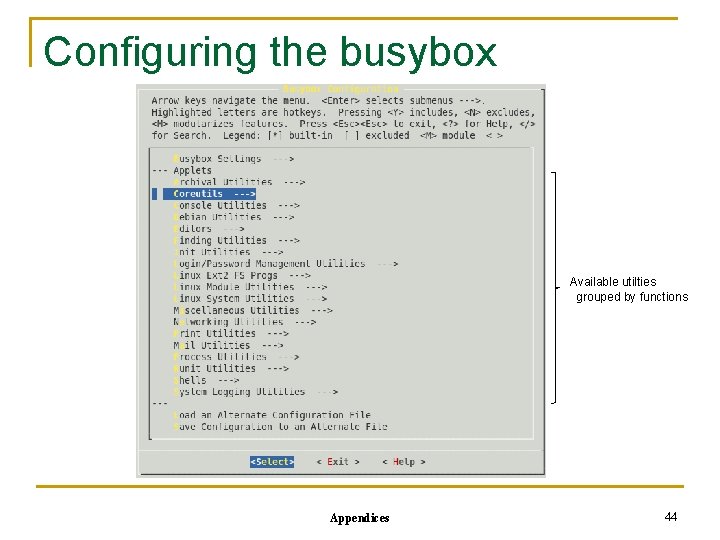
Configuring the busybox Available utilties grouped by functions Appendices 44
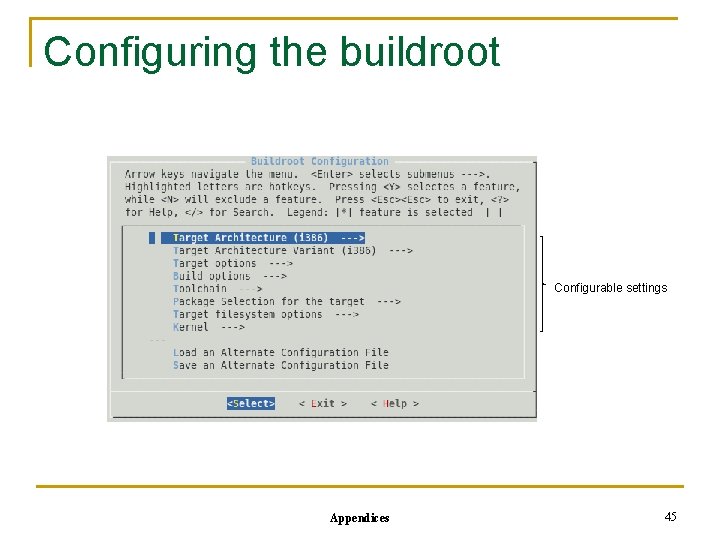
Configuring the buildroot Configurable settings Appendices 45
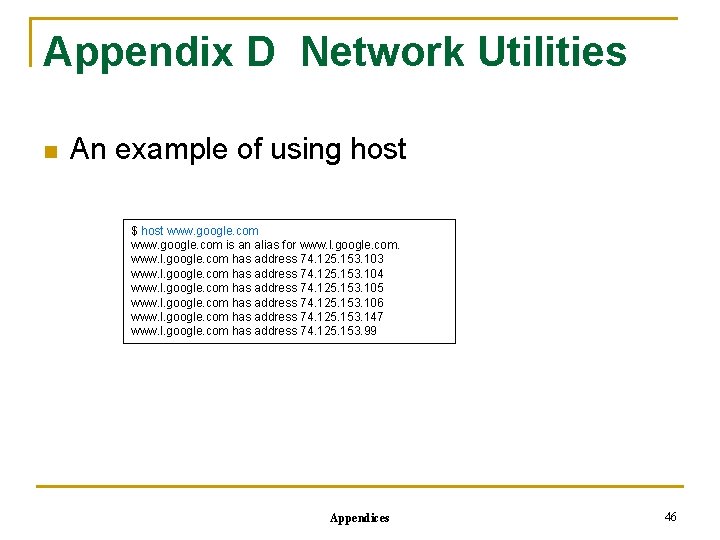
Appendix D Network Utilities n An example of using host $ host www. google. com is an alias for www. l. google. com has address 74. 125. 153. 103 www. l. google. com has address 74. 125. 153. 104 www. l. google. com has address 74. 125. 153. 105 www. l. google. com has address 74. 125. 153. 106 www. l. google. com has address 74. 125. 153. 147 www. l. google. com has address 74. 125. 153. 99 Appendices 46
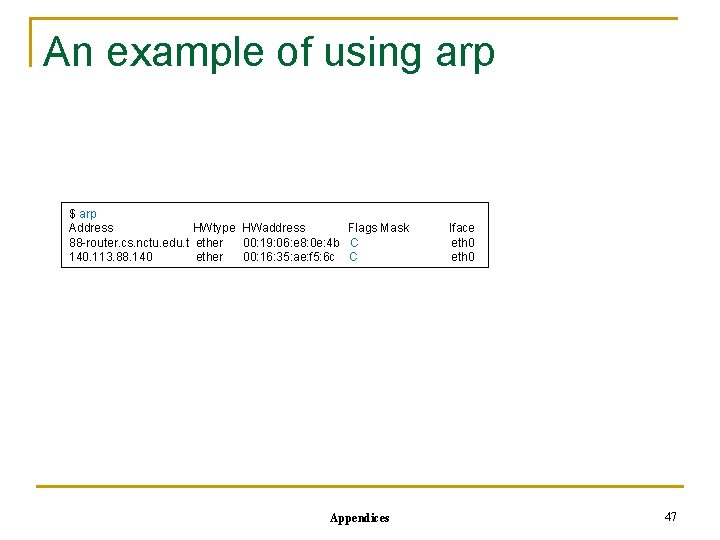
An example of using arp $ arp Address HWtype HWaddress Flags Mask 88 -router. cs. nctu. edu. t ether 00: 19: 06: e 8: 0 e: 4 b C 140. 113. 88. 140 ether 00: 16: 35: ae: f 5: 6 c C Appendices Iface eth 0 47
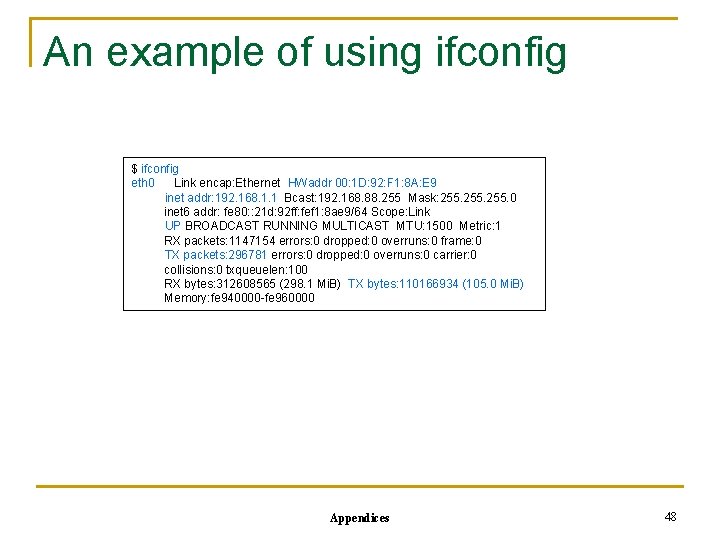
An example of using ifconfig $ ifconfig eth 0 Link encap: Ethernet HWaddr 00: 1 D: 92: F 1: 8 A: E 9 inet addr: 192. 168. 1. 1 Bcast: 192. 168. 88. 255 Mask: 255. 0 inet 6 addr: fe 80: : 21 d: 92 ff: fef 1: 8 ae 9/64 Scope: Link UP BROADCAST RUNNING MULTICAST MTU: 1500 Metric: 1 RX packets: 1147154 errors: 0 dropped: 0 overruns: 0 frame: 0 TX packets: 296781 errors: 0 dropped: 0 overruns: 0 carrier: 0 collisions: 0 txqueuelen: 100 RX bytes: 312608565 (298. 1 Mi. B) TX bytes: 110166934 (105. 0 Mi. B) Memory: fe 940000 -fe 960000 Appendices 48
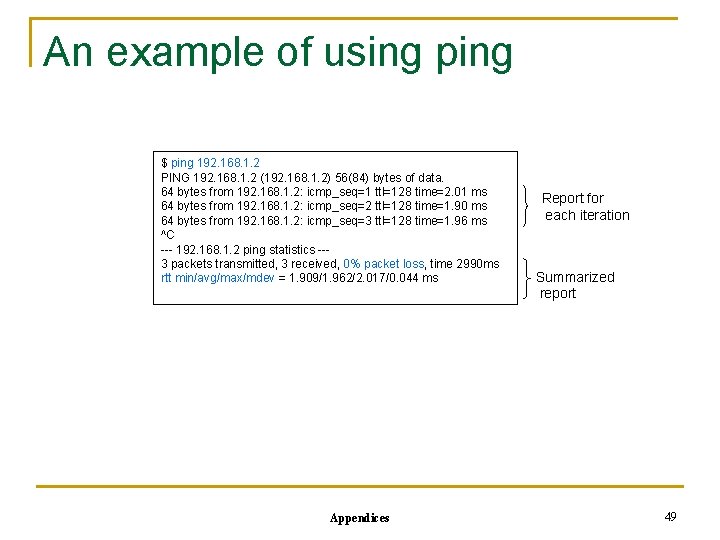
An example of using ping $ ping 192. 168. 1. 2 PING 192. 168. 1. 2 (192. 168. 1. 2) 56(84) bytes of data. 64 bytes from 192. 168. 1. 2: icmp_seq=1 ttl=128 time=2. 01 ms 64 bytes from 192. 168. 1. 2: icmp_seq=2 ttl=128 time=1. 90 ms 64 bytes from 192. 168. 1. 2: icmp_seq=3 ttl=128 time=1. 96 ms ^C --- 192. 168. 1. 2 ping statistics --3 packets transmitted, 3 received, 0% packet loss, time 2990 ms rtt min/avg/max/mdev = 1. 909/1. 962/2. 017/0. 044 ms Appendices Report for each iteration Summarized report 49
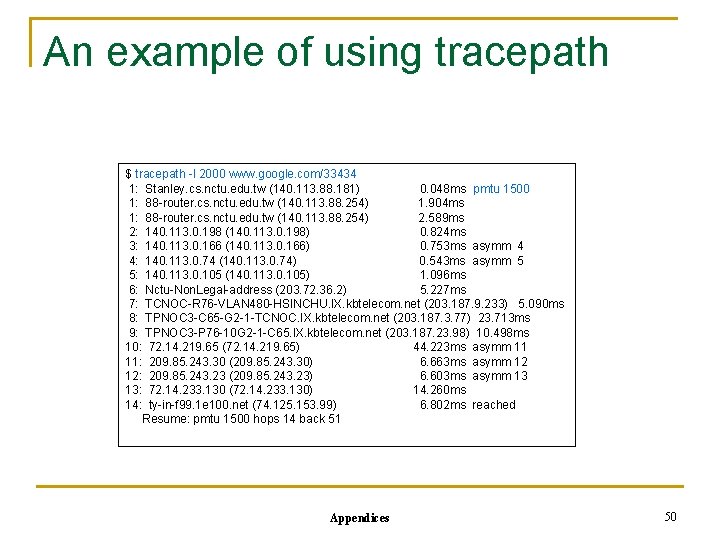
An example of using tracepath $ tracepath -l 2000 www. google. com/33434 1: Stanley. cs. nctu. edu. tw (140. 113. 88. 181) 0. 048 ms pmtu 1500 1: 88 -router. cs. nctu. edu. tw (140. 113. 88. 254) 1. 904 ms 1: 88 -router. cs. nctu. edu. tw (140. 113. 88. 254) 2. 589 ms 2: 140. 113. 0. 198 (140. 113. 0. 198) 0. 824 ms 3: 140. 113. 0. 166 (140. 113. 0. 166) 0. 753 ms asymm 4 4: 140. 113. 0. 74 (140. 113. 0. 74) 0. 543 ms asymm 5 5: 140. 113. 0. 105 (140. 113. 0. 105) 1. 096 ms 6: Nctu-Non. Legal-address (203. 72. 36. 2) 5. 227 ms 7: TCNOC-R 76 -VLAN 480 -HSINCHU. IX. kbtelecom. net (203. 187. 9. 233) 5. 090 ms 8: TPNOC 3 -C 65 -G 2 -1 -TCNOC. IX. kbtelecom. net (203. 187. 3. 77) 23. 713 ms 9: TPNOC 3 -P 76 -10 G 2 -1 -C 65. IX. kbtelecom. net (203. 187. 23. 98) 10. 498 ms 10: 72. 14. 219. 65 (72. 14. 219. 65) 44. 223 ms asymm 11 11: 209. 85. 243. 30 (209. 85. 243. 30) 6. 663 ms asymm 12 12: 209. 85. 243. 23 (209. 85. 243. 23) 6. 603 ms asymm 13 13: 72. 14. 233. 130 (72. 14. 233. 130) 14. 260 ms 14: ty-in-f 99. 1 e 100. net (74. 125. 153. 99) 6. 802 ms reached Resume: pmtu 1500 hops 14 back 51 Appendices 50
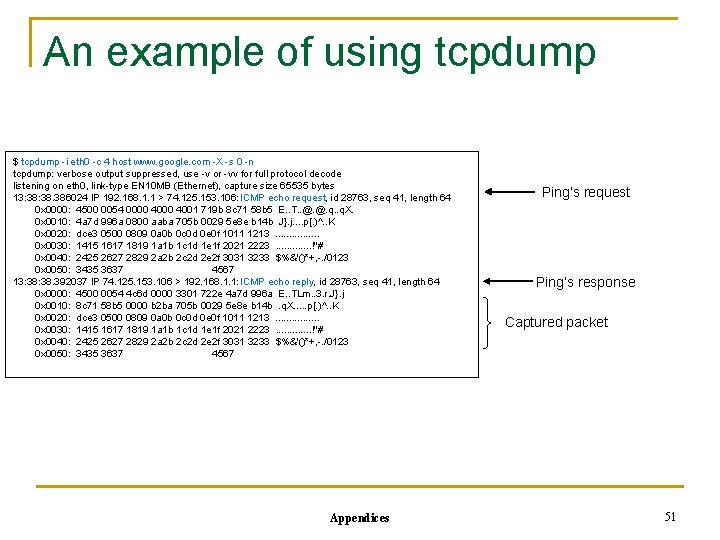
An example of using tcpdump $ tcpdump -i eth 0 -c 4 host www. google. com -X -s 0 -n tcpdump: verbose output suppressed, use -v or -vv for full protocol decode listening on eth 0, link-type EN 10 MB (Ethernet), capture size 65535 bytes 13: 38. 386024 IP 192. 168. 1. 1 > 74. 125. 153. 106: ICMP echo request, id 28763, seq 41, length 64 0 x 0000: 4500 0054 0000 4001 719 b 8 c 71 58 b 5 E. . T. . @. @. q. X. 0 x 0010: 4 a 7 d 996 a 0800 aaba 705 b 0029 5 e 8 e b 14 b J}. j. . p[. )^. . K 0 x 0020: dce 3 0500 0809 0 a 0 b 0 c 0 d 0 e 0 f 1011 1213. . . . 0 x 0030: 1415 1617 1819 1 a 1 b 1 c 1 d 1 e 1 f 2021 2223. . . !"# 0 x 0040: 2425 2627 2829 2 a 2 b 2 c 2 d 2 e 2 f 3031 3233 $%&'()*+, -. /0123 0 x 0050: 3435 3637 4567 13: 38. 392037 IP 74. 125. 153. 106 > 192. 168. 1. 1: ICMP echo reply, id 28763, seq 41, length 64 0 x 0000: 4500 0054 4 c 6 d 0000 3301 722 e 4 a 7 d 996 a E. . TLm. . 3. r. J}. j 0 x 0010: 8 c 71 58 b 5 0000 b 2 ba 705 b 0029 5 e 8 e b 14 b. q. X. . . p[. )^. . K 0 x 0020: dce 3 0500 0809 0 a 0 b 0 c 0 d 0 e 0 f 1011 1213. . . . 0 x 0030: 1415 1617 1819 1 a 1 b 1 c 1 d 1 e 1 f 2021 2223. . . !"# 0 x 0040: 2425 2627 2829 2 a 2 b 2 c 2 d 2 e 2 f 3031 3233 $%&'()*+, -. /0123 0 x 0050: 3435 3637 4567 Appendices Ping’s request Ping’s response Captured packet 51
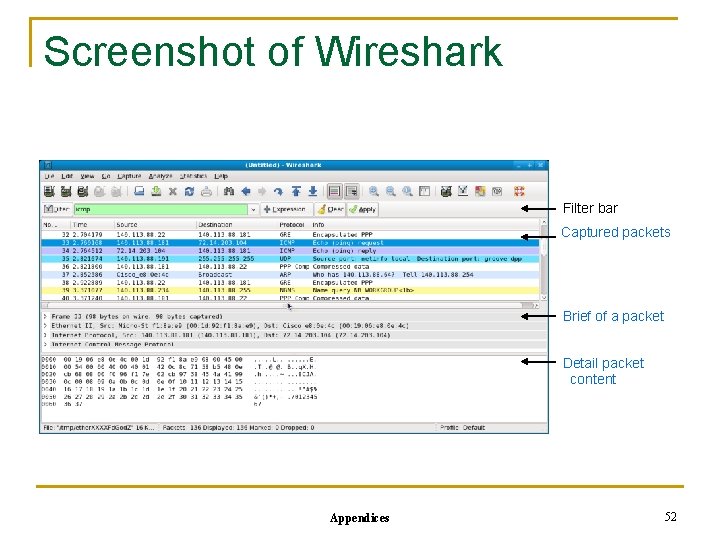
Screenshot of Wireshark Filter bar Captured packets Brief of a packet Detail packet content Appendices 52
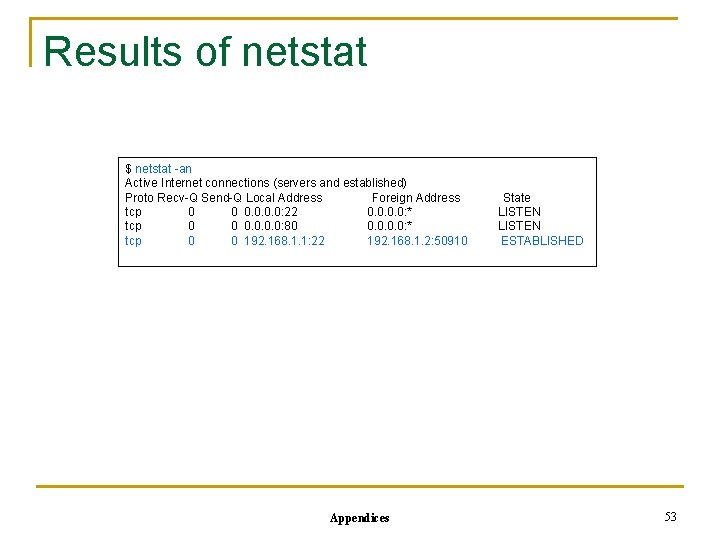
Results of netstat $ netstat -an Active Internet connections (servers and established) Proto Recv-Q Send-Q Local Address Foreign Address tcp 0 0 0. 0: 22 0. 0: * tcp 0 0 0. 0: 80 0. 0: * tcp 0 0 192. 168. 1. 1: 22 192. 168. 1. 2: 50910 Appendices State LISTEN ESTABLISHED 53
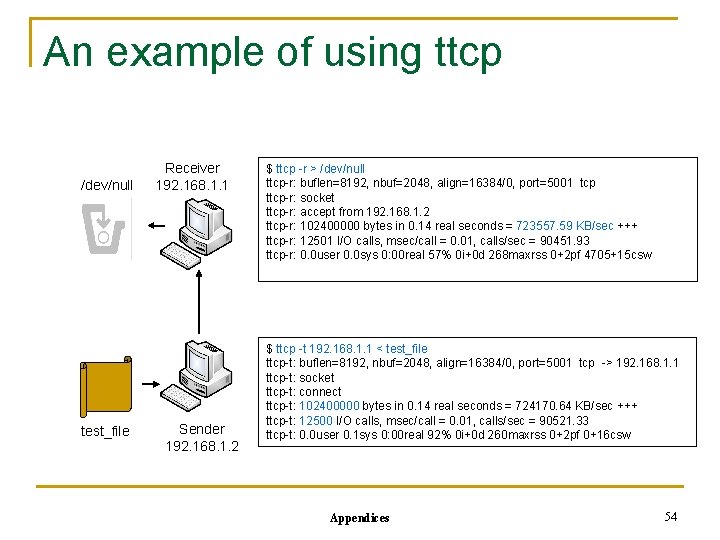
An example of using ttcp /dev/null test_file Receiver 192. 168. 1. 1 Sender 192. 168. 1. 2 $ ttcp -r > /dev/null ttcp-r: buflen=8192, nbuf=2048, align=16384/0, port=5001 tcp ttcp-r: socket ttcp-r: accept from 192. 168. 1. 2 ttcp-r: 102400000 bytes in 0. 14 real seconds = 723557. 59 KB/sec +++ ttcp-r: 12501 I/O calls, msec/call = 0. 01, calls/sec = 90451. 93 ttcp-r: 0. 0 user 0. 0 sys 0: 00 real 57% 0 i+0 d 268 maxrss 0+2 pf 4705+15 csw $ ttcp -t 192. 168. 1. 1 < test_file ttcp-t: buflen=8192, nbuf=2048, align=16384/0, port=5001 tcp -> 192. 168. 1. 1 ttcp-t: socket ttcp-t: connect ttcp-t: 102400000 bytes in 0. 14 real seconds = 724170. 64 KB/sec +++ ttcp-t: 12500 I/O calls, msec/call = 0. 01, calls/sec = 90521. 33 ttcp-t: 0. 0 user 0. 1 sys 0: 00 real 92% 0 i+0 d 260 maxrss 0+2 pf 0+16 csw Appendices 54
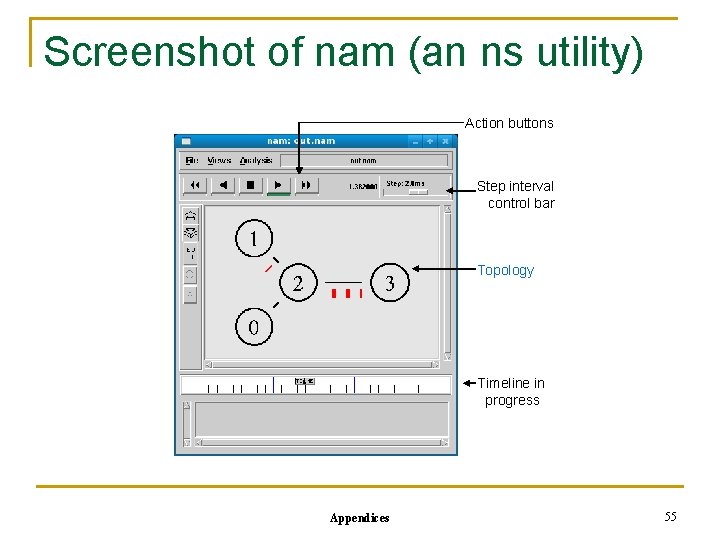
Screenshot of nam (an ns utility) Action buttons Step interval control bar Topology Timeline in progress Appendices 55
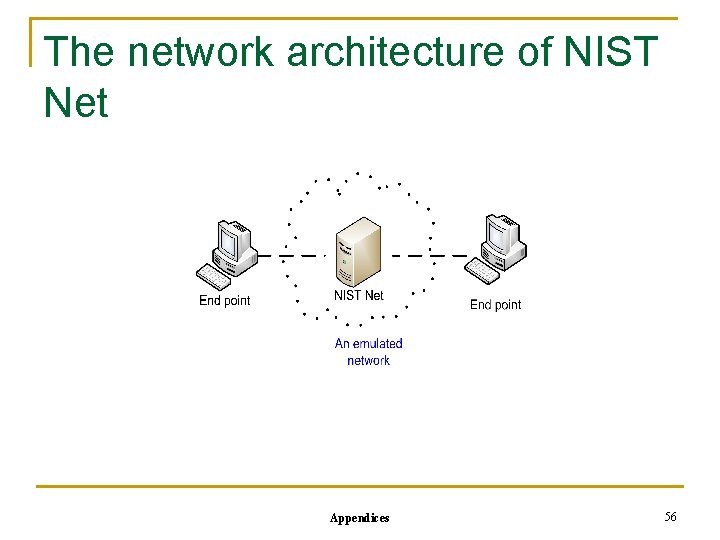
The network architecture of NIST Net Appendices 56
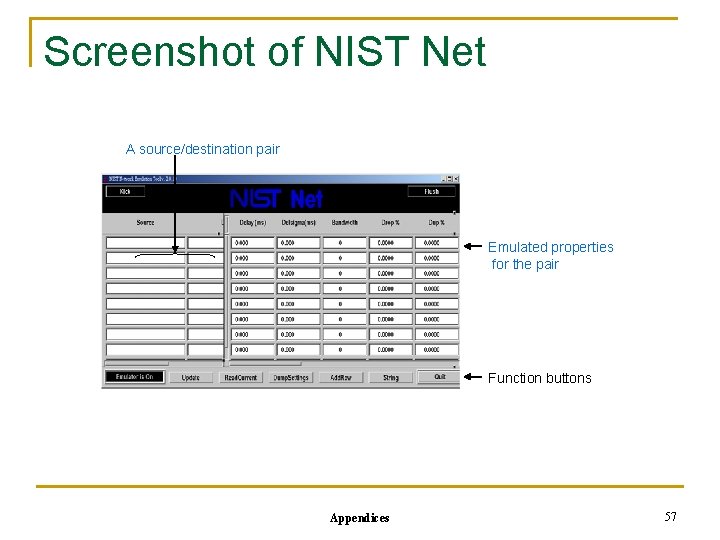
Screenshot of NIST Net A source/destination pair Emulated properties for the pair Function buttons Appendices 57
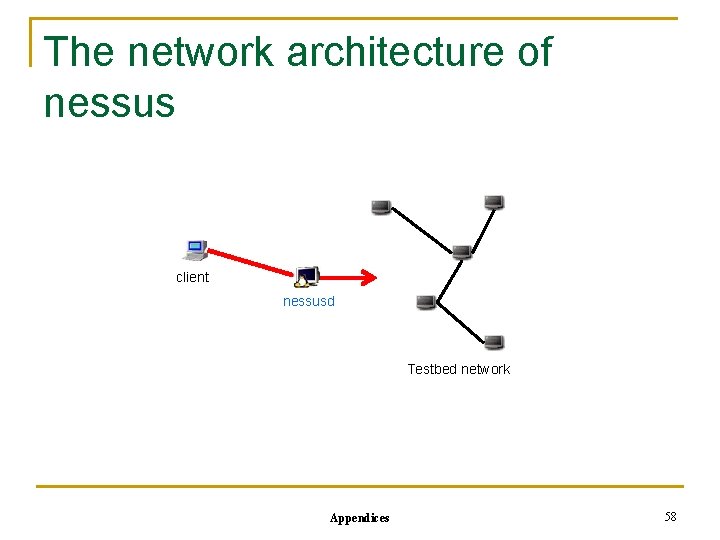
The network architecture of nessus client nessusd Testbed network Appendices 58
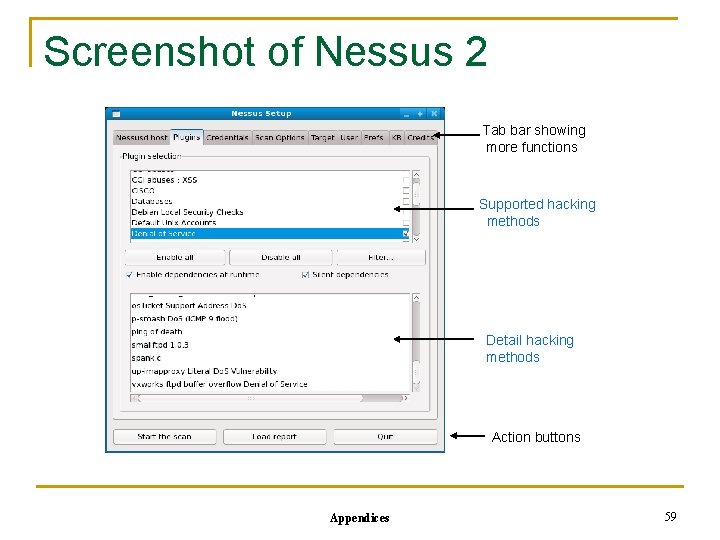
Screenshot of Nessus 2 Tab bar showing more functions Supported hacking methods Detail hacking methods Action buttons Appendices 59