
MOBILE COMPUTING CSE 4081460814 Spring 2018 Mobile Sensing
MOBILE COMPUTING CSE 40814/60814 Spring 2018
Mobile Sensing • Smartphones (and tablets, etc. ) not only serve as a key computing and communication device, but also come with a rich set of embedded sensors • Which enables new applications across a wide variety of domains, such as transportation, social networks, environmental monitoring, healthcare, etc. • Giving rise to new research areas such as mobile sensing, crowdsensing, mobile data mining, etc.
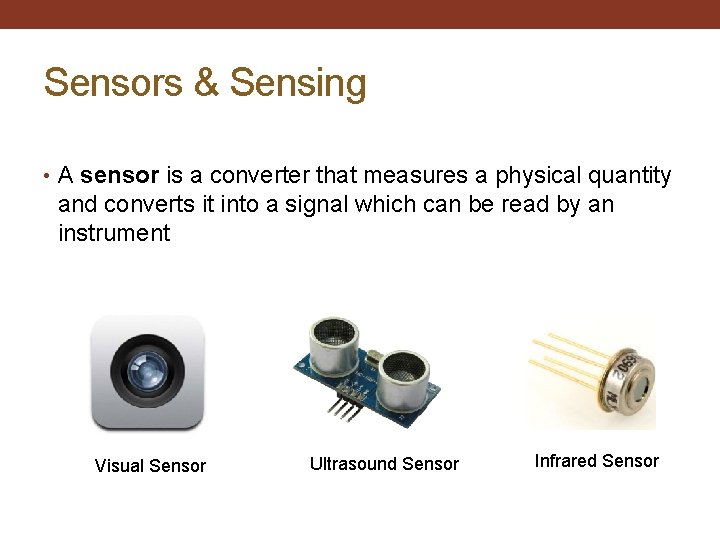
Sensors & Sensing • A sensor is a converter that measures a physical quantity and converts it into a signal which can be read by an instrument Visual Sensor Ultrasound Sensor Infrared Sensor
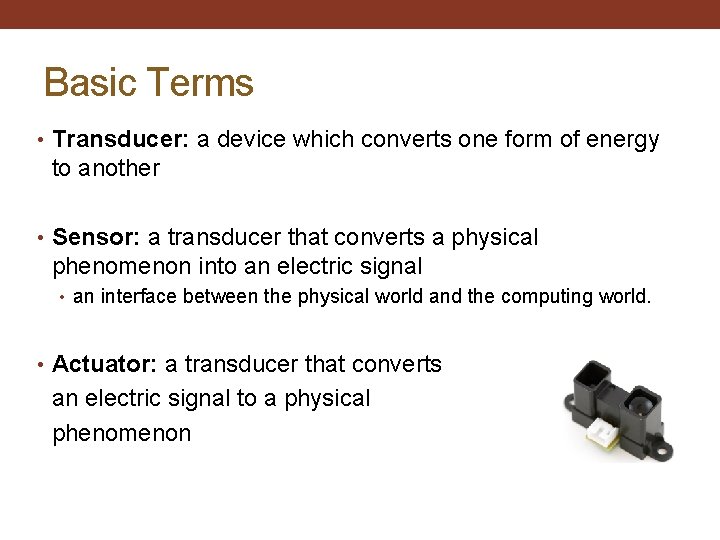
Basic Terms • Transducer: a device which converts one form of energy to another • Sensor: a transducer that converts a physical phenomenon into an electric signal • an interface between the physical world and the computing world. • Actuator: a transducer that converts an electric signal to a physical phenomenon
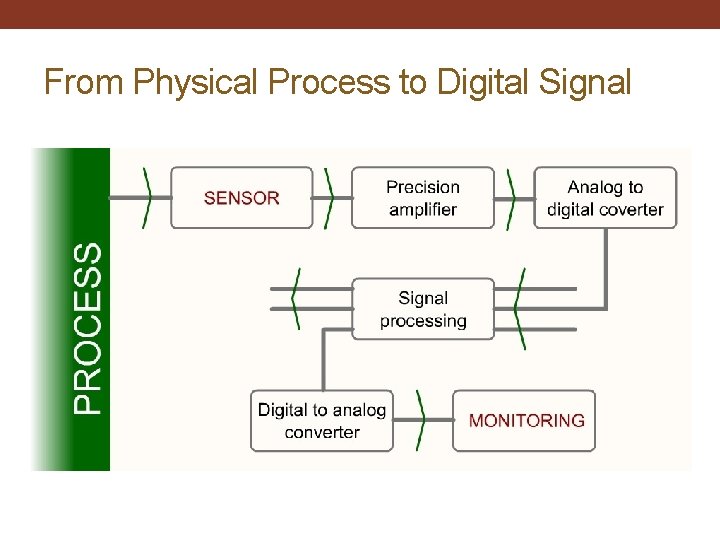
From Physical Process to Digital Signal
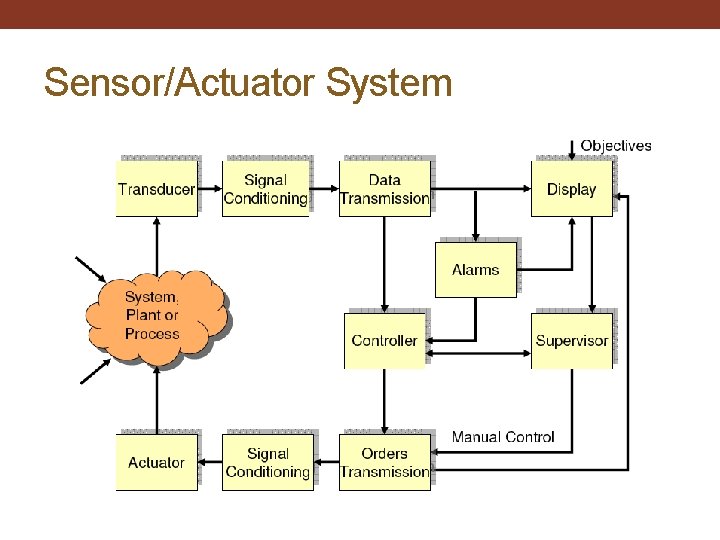
Sensor/Actuator System
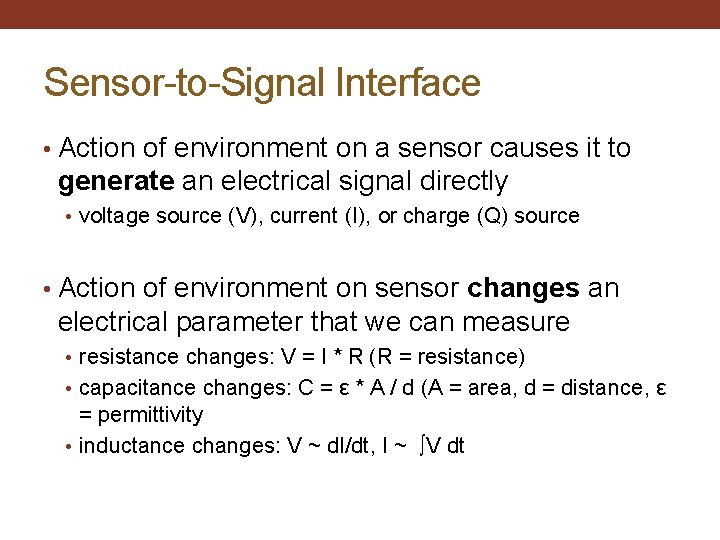
Sensor-to-Signal Interface • Action of environment on a sensor causes it to generate an electrical signal directly • voltage source (V), current (I), or charge (Q) source • Action of environment on sensor changes an electrical parameter that we can measure • resistance changes: V = I * R (R = resistance) • capacitance changes: C = ε * A / d (A = area, d = distance, ε = permittivity • inductance changes: V ~ d. I/dt, I ~ ∫V dt
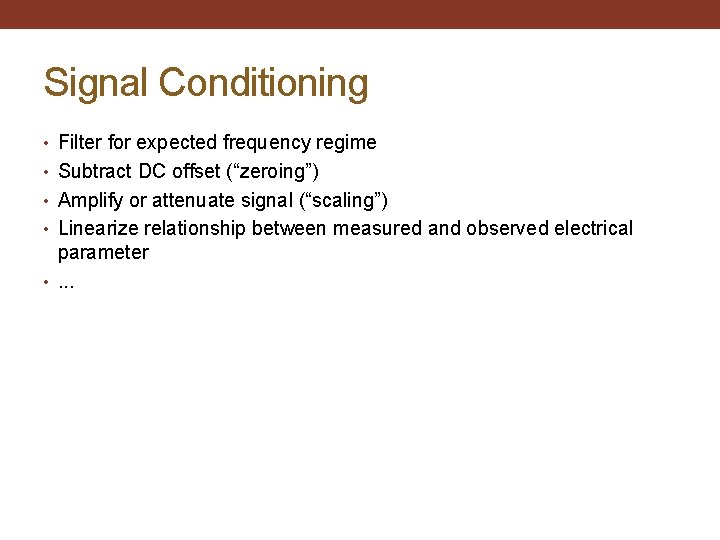
Signal Conditioning • Filter for expected frequency regime • Subtract DC offset (“zeroing”) • Amplify or attenuate signal (“scaling”) • Linearize relationship between measured and observed electrical parameter • . . .
Analog-to-Digital Converter (ADC) • Many different principles • All involve trade-offs of speed (conversion time), resolution (number of bits), and cost • “Flash converter” is the fastest, has the lowest resolution, and the highest cost • Successive approximation ADC: binary search through all possible quantization levels
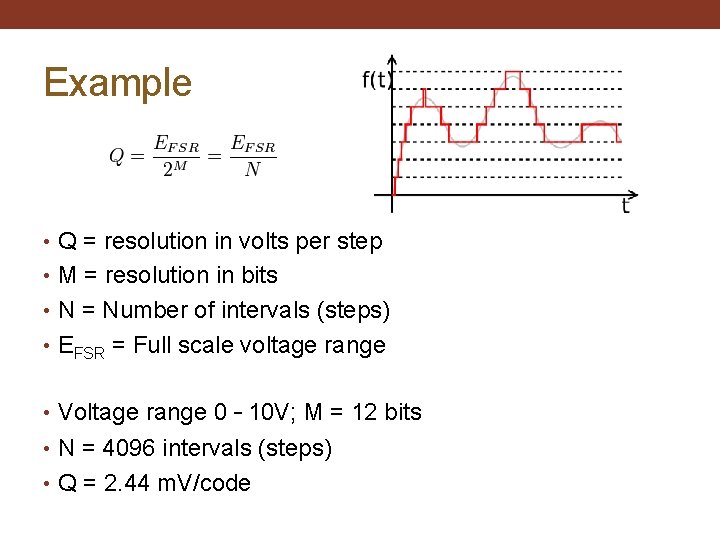
Example • Q = resolution in volts per step • M = resolution in bits • N = Number of intervals (steps) • EFSR = Full scale voltage range • Voltage range 0 – 10 V; M = 12 bits • N = 4096 intervals (steps) • Q = 2. 44 m. V/code
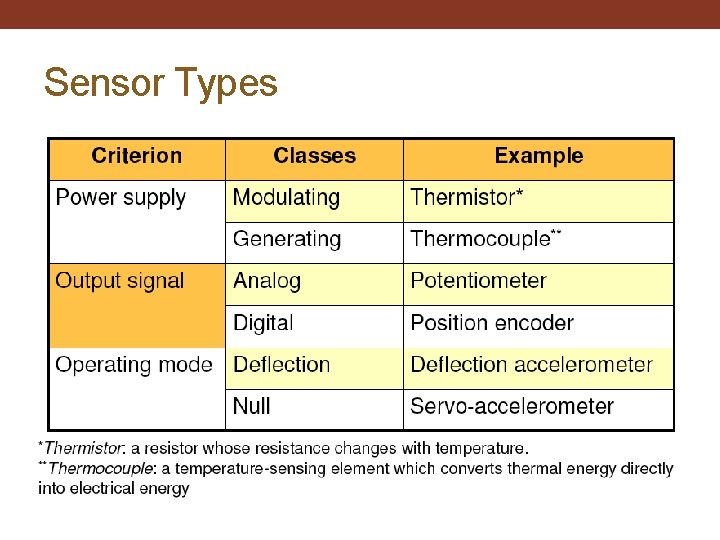
Sensor Types
Sensor Types: Power Supply • Modulating • Also known as Active Sensors • They need auxiliary power to perform functionality • Self-Generating • Also known as Passive Sensors • They derive the power from the input
Sensor Types: Operating Mode • Deflection • The measured quantity produces a physical effect • Generates an apposing effect which can be measured • Faster • Null • Applies the counter force • To balance the deflection from the null point (balance condition) • Can be more accurate but slow
Sensor Types: Physical Property • Temperature • Pressure • Humidity • Light • Microphone (sound) • Motion detector • Chemical detector • Image Sensor • Flow and level sensor • …
Sensor Types: HW & SW • Hardware-based sensors • Physical components built into a device • They derive their data by directly measuring specific environmental properties • Software-based sensors • Not physical devices, although they mimic hardware-based sensors • They derive their data from one or more hardware-based sensors
Sensor Types: Function Type • Motion sensors • Measure acceleration forces and rotational forces along three axes, e. g. , accelerometer, gyroscope, etc. • Position sensors • Measure the physical position of a device, e. g. , GPS, proximity sensor, etc. • Environmental sensors • Measure various environmental parameters, e. g. , light sensor, thermometer, etc.
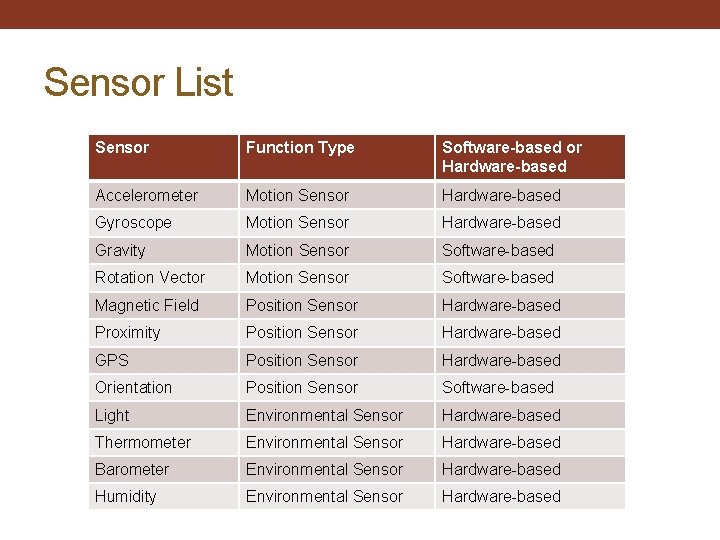
Sensor List Sensor Function Type Software-based or Hardware-based Accelerometer Motion Sensor Hardware-based Gyroscope Motion Sensor Hardware-based Gravity Motion Sensor Software-based Rotation Vector Motion Sensor Software-based Magnetic Field Position Sensor Hardware-based Proximity Position Sensor Hardware-based GPS Position Sensor Hardware-based Orientation Position Sensor Software-based Light Environmental Sensor Hardware-based Thermometer Environmental Sensor Hardware-based Barometer Environmental Sensor Hardware-based Humidity Environmental Sensor Hardware-based
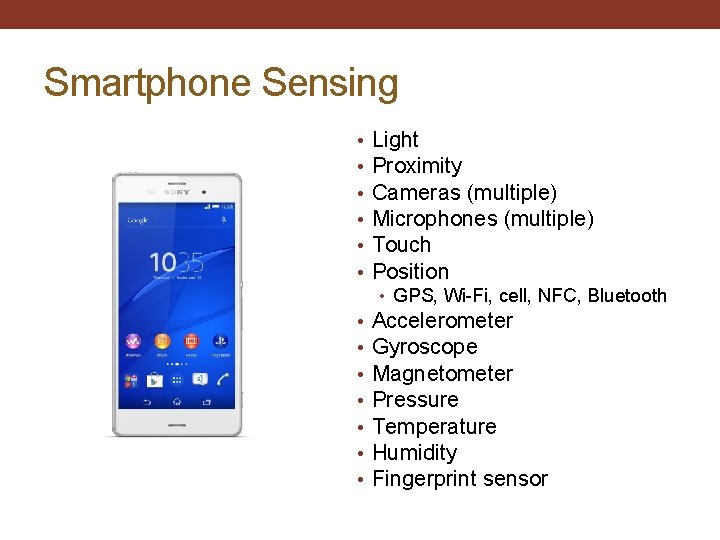
Smartphone Sensing • • • Light Proximity Cameras (multiple) Microphones (multiple) Touch Position • GPS, Wi-Fi, cell, NFC, Bluetooth • • Accelerometer Gyroscope Magnetometer Pressure Temperature Humidity Fingerprint sensor
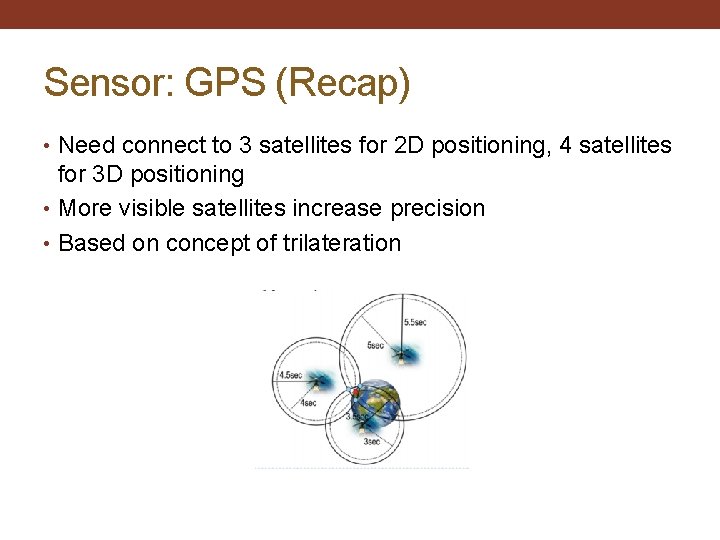
Sensor: GPS (Recap) • Need connect to 3 satellites for 2 D positioning, 4 satellites for 3 D positioning • More visible satellites increase precision • Based on concept of trilateration
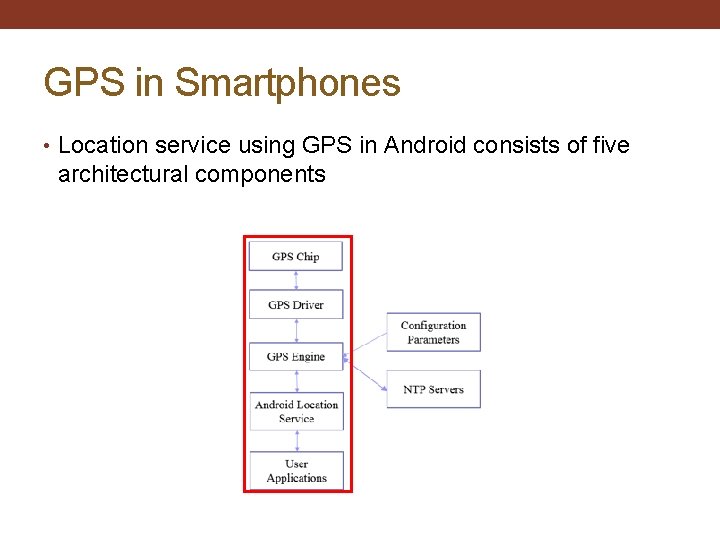
GPS in Smartphones • Location service using GPS in Android consists of five architectural components
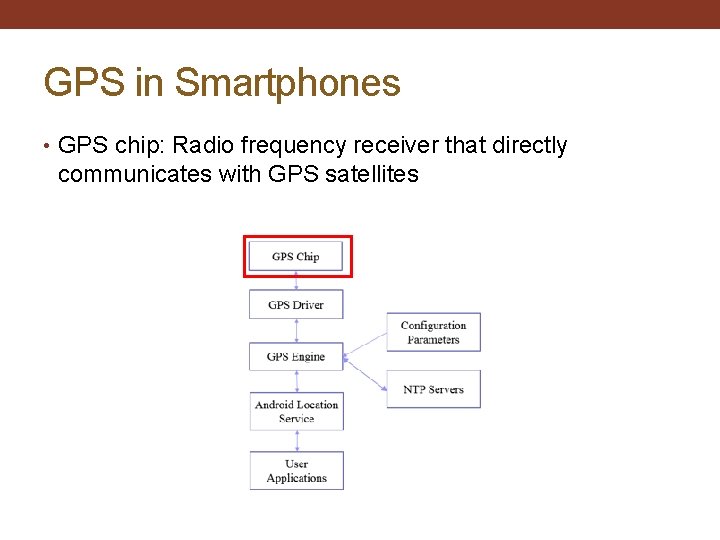
GPS in Smartphones • GPS chip: Radio frequency receiver that directly communicates with GPS satellites
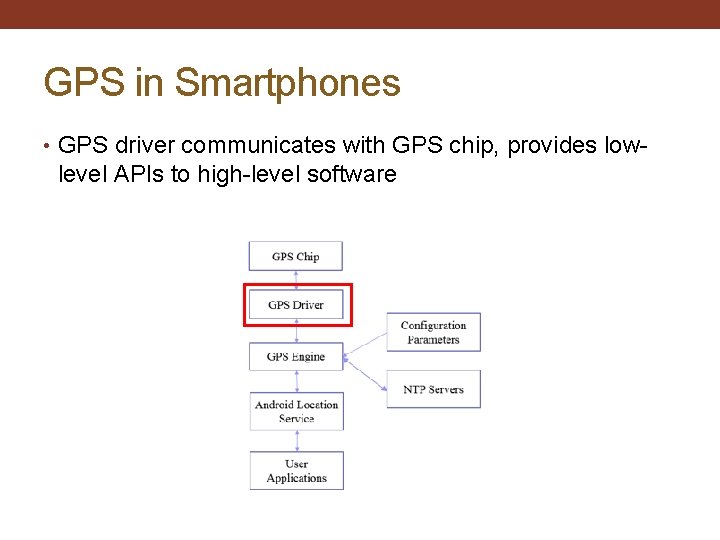
GPS in Smartphones • GPS driver communicates with GPS chip, provides low- level APIs to high-level software
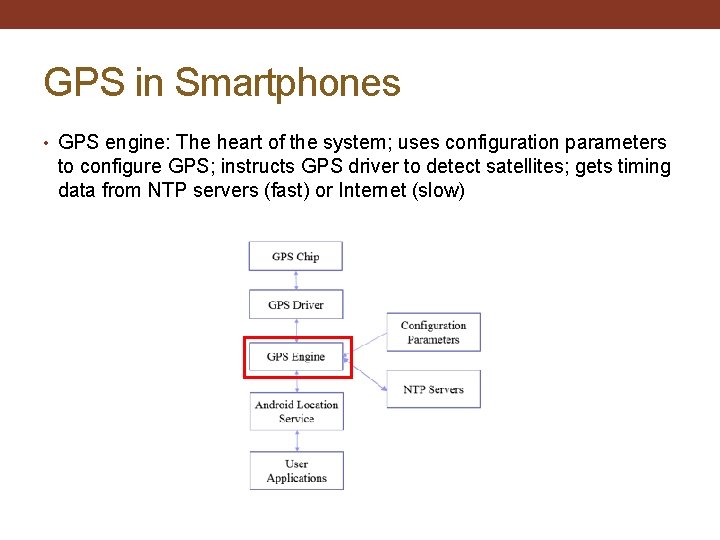
GPS in Smartphones • GPS engine: The heart of the system; uses configuration parameters to configure GPS; instructs GPS driver to detect satellites; gets timing data from NTP servers (fast) or Internet (slow)
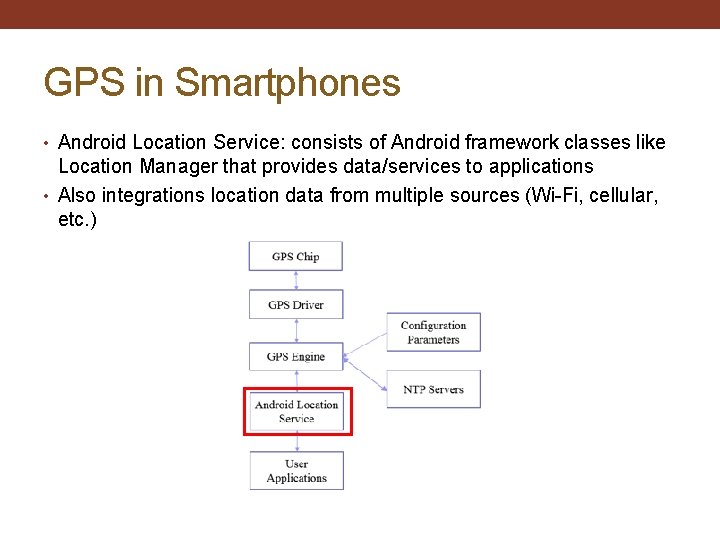
GPS in Smartphones • Android Location Service: consists of Android framework classes like Location Manager that provides data/services to applications • Also integrations location data from multiple sources (Wi-Fi, cellular, etc. )
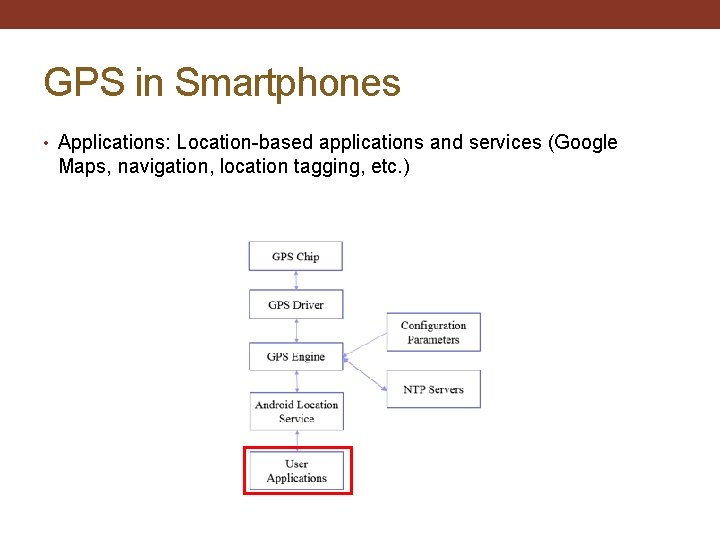
GPS in Smartphones • Applications: Location-based applications and services (Google Maps, navigation, location tagging, etc. )
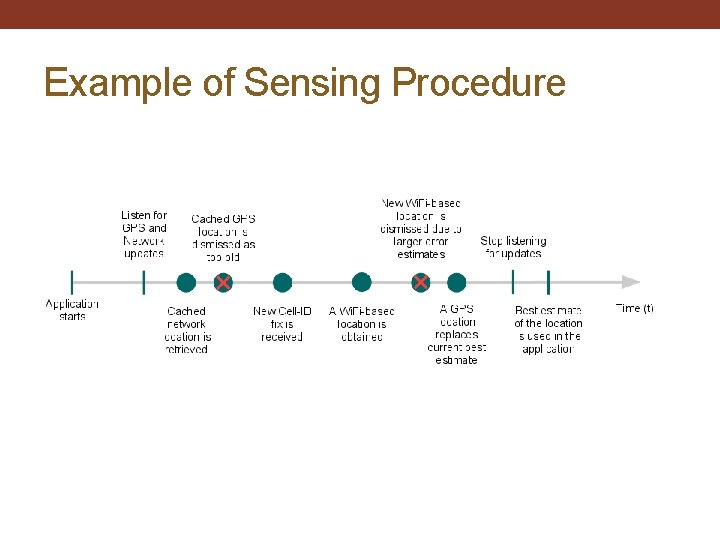
Example of Sensing Procedure
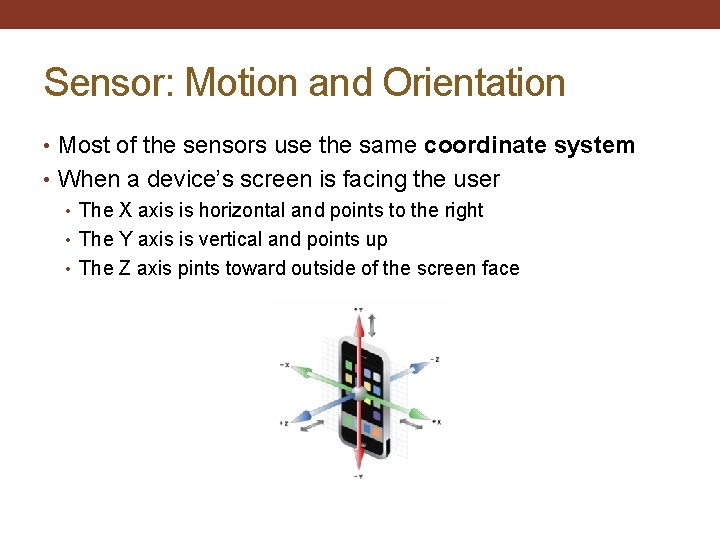
Sensor: Motion and Orientation • Most of the sensors use the same coordinate system • When a device’s screen is facing the user • The X axis is horizontal and points to the right • The Y axis is vertical and points up • The Z axis pints toward outside of the screen face
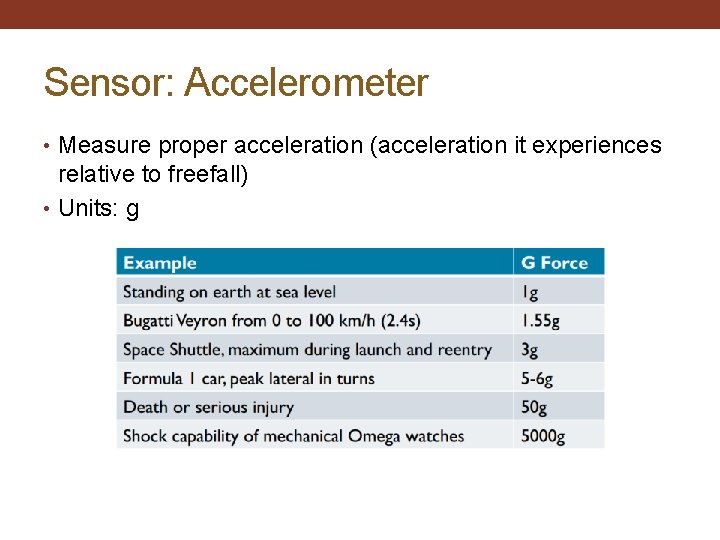
Sensor: Accelerometer • Measure proper acceleration (acceleration it experiences relative to freefall) • Units: g
Sensor: Accelerometer • Acceleration is measured on 3 axes • Note that the force of gravity is always included in the measured acceleration • When the device is sitting on the table stationary, the accelerometer reads a magnitude of 1 g • When the device is in free fall, the accelerometer reads a magnitude of 0 g • To measure the real acceleration of the device, the contribution of the force of gravity must be removed from the reading, for example, by calibration
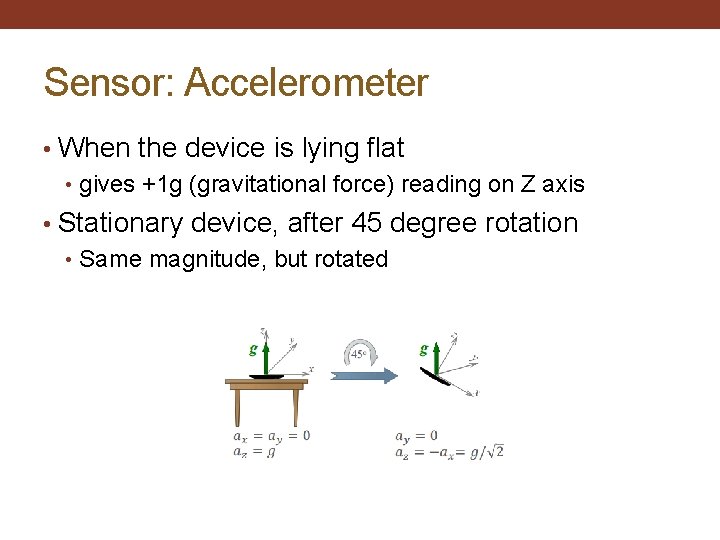
Sensor: Accelerometer • When the device is lying flat • gives +1 g (gravitational force) reading on Z axis • Stationary device, after 45 degree rotation • Same magnitude, but rotated
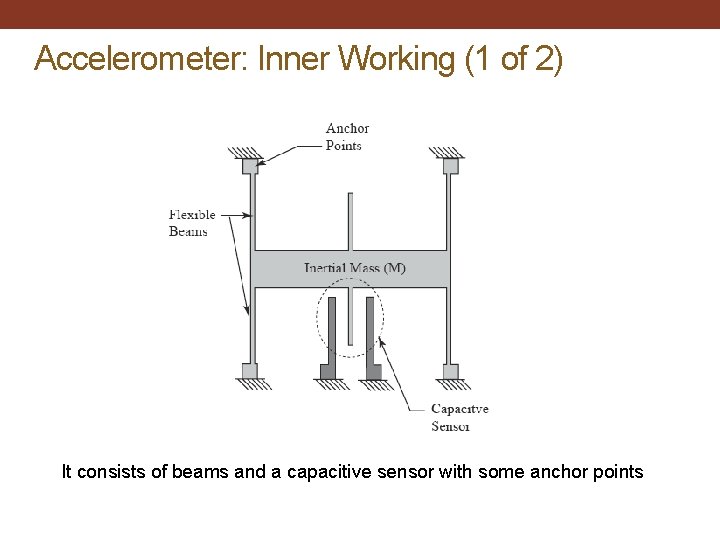
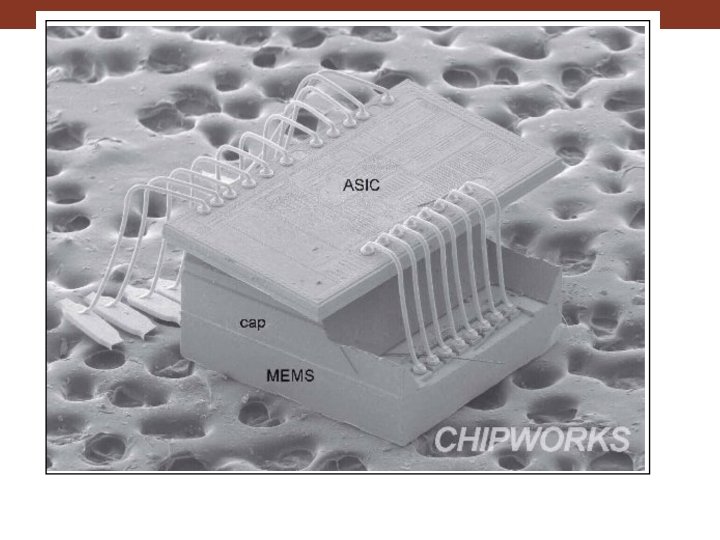
Accelerometer: Inner Working (1 of 2) It consists of beams and a capacitive sensor with some anchor points
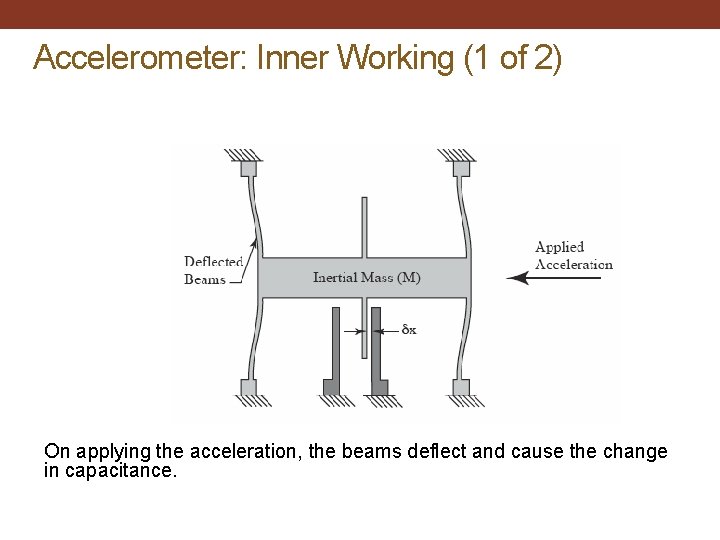
Accelerometer: Inner Working (1 of 2) On applying the acceleration, the beams deflect and cause the change in capacitance.
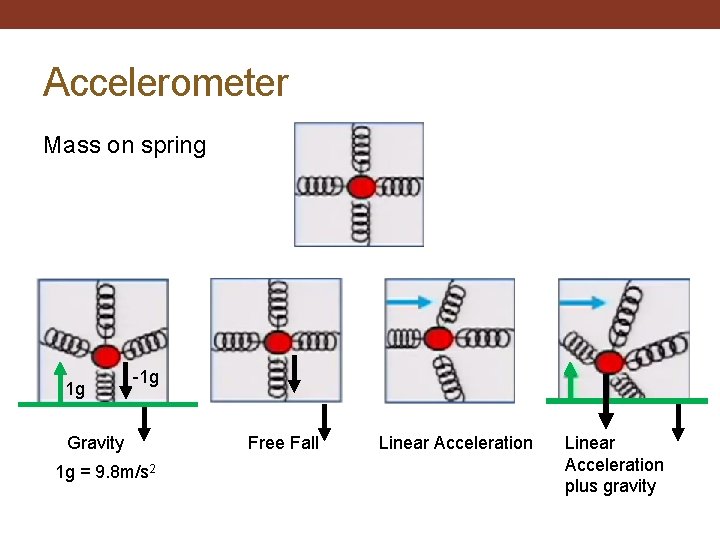
Accelerometer Mass on spring 1 g -1 g Gravity 1 g = 9. 8 m/s 2 Free Fall Linear Acceleration plus gravity
Smartphones: MEMS Sensors • Micro Electro-Mechanical Systems • Term coined in 1989 • Describes creation of mechanical elements at a scale more usually reserved for microelectronics • MEMS use cavities, channels, cantilevers, membranes, etc. to imitate traditional mechanical systems • Small enough to be integrated with the electronics
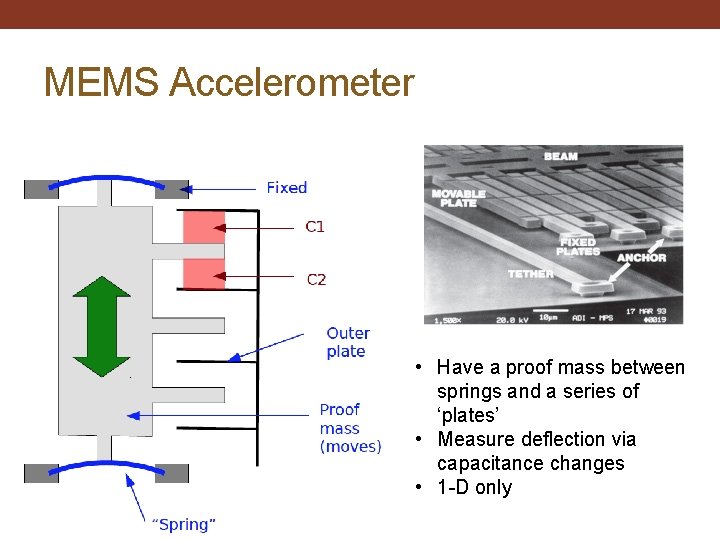
MEMS Accelerometer • Have a proof mass between springs and a series of ‘plates’ • Measure deflection via capacitance changes • 1 -D only
Sensor: Gravity • Gravity sensor is not a separate hardware • It is a virtual sensor based on the accelerometer • It is the result when real acceleration component is removed from the reading
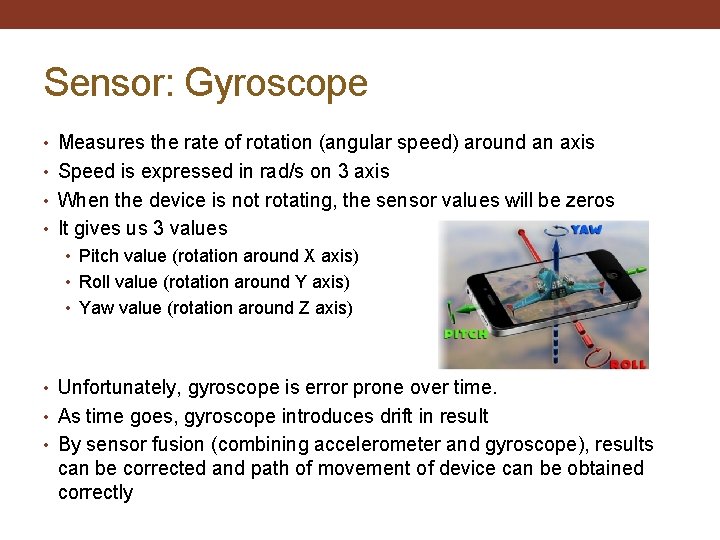
Sensor: Gyroscope • Measures the rate of rotation (angular speed) around an axis • Speed is expressed in rad/s on 3 axis • When the device is not rotating, the sensor values will be zeros • It gives us 3 values • Pitch value (rotation around X axis) • Roll value (rotation around Y axis) • Yaw value (rotation around Z axis) • Unfortunately, gyroscope is error prone over time. • As time goes, gyroscope introduces drift in result • By sensor fusion (combining accelerometer and gyroscope), results can be corrected and path of movement of device can be obtained correctly
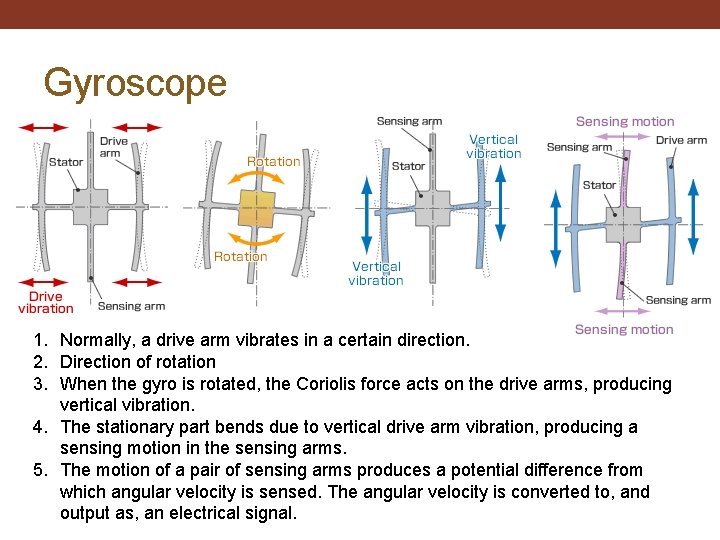
Gyroscope 1. Normally, a drive arm vibrates in a certain direction. 2. Direction of rotation 3. When the gyro is rotated, the Coriolis force acts on the drive arms, producing vertical vibration. 4. The stationary part bends due to vertical drive arm vibration, producing a sensing motion in the sensing arms. 5. The motion of a pair of sensing arms produces a potential difference from which angular velocity is sensed. The angular velocity is converted to, and output as, an electrical signal.
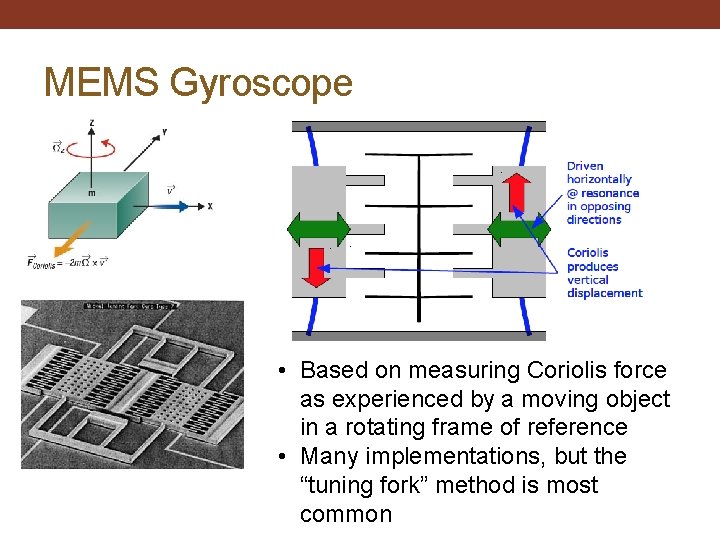
MEMS Gyroscope • Based on measuring Coriolis force as experienced by a moving object in a rotating frame of reference • Many implementations, but the “tuning fork” method is most common
Accelerometer vs. Gyroscope • Accelerometer • Senses linear movement: not good for rotations, good for tilt detection • Does not know difference between gravity and linear movement • Gyroscope • Measures all types of rotations • Not movement • A+G = both rotation and movement tracking possible
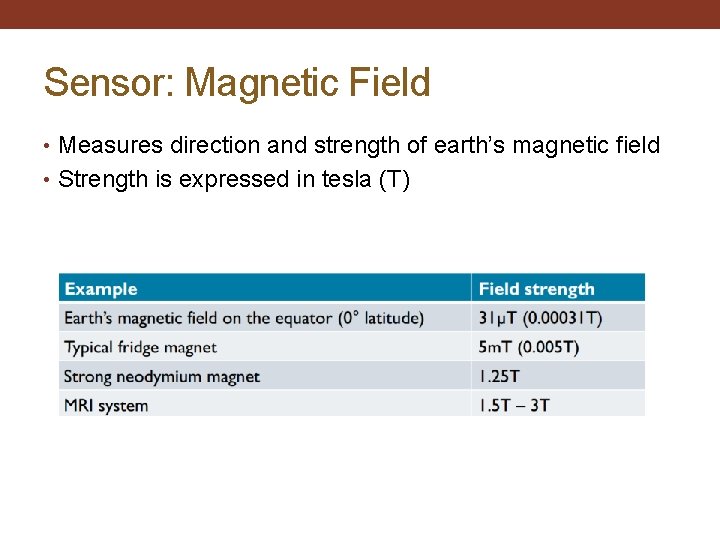
Sensor: Magnetic Field • Measures direction and strength of earth’s magnetic field • Strength is expressed in tesla (T)
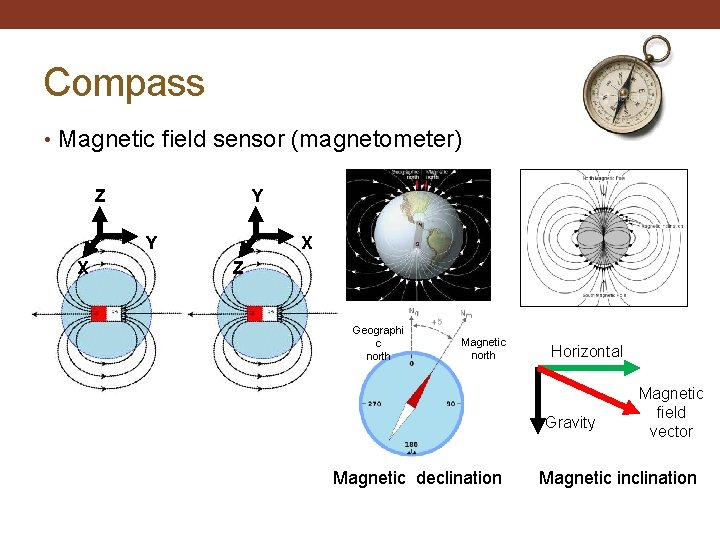
Compass • Magnetic field sensor (magnetometer) Z Y Y X X Z Geographi c north Magnetic north Horizontal Gravity Magnetic declination Magnetic field vector Magnetic inclination
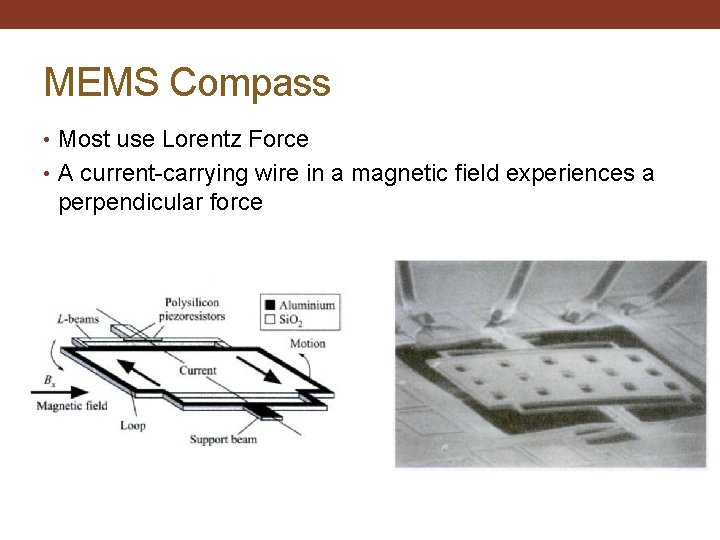
MEMS Compass • Most use Lorentz Force • A current-carrying wire in a magnetic field experiences a perpendicular force
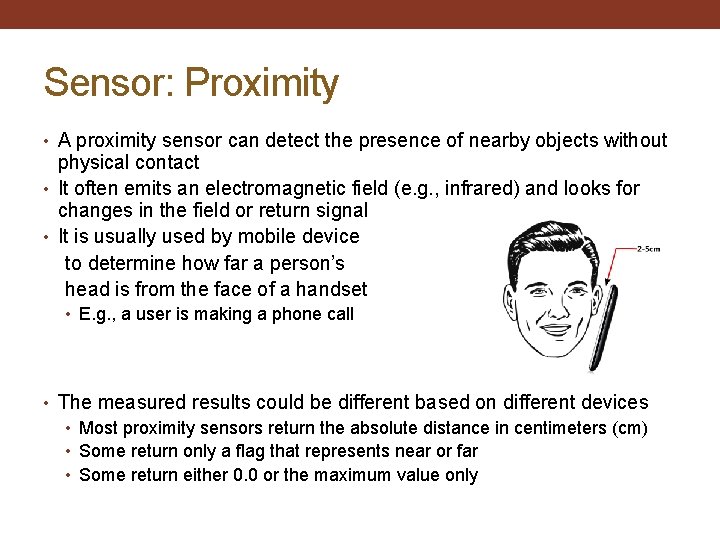
Sensor: Proximity • A proximity sensor can detect the presence of nearby objects without physical contact • It often emits an electromagnetic field (e. g. , infrared) and looks for changes in the field or return signal • It is usually used by mobile device to determine how far a person’s head is from the face of a handset • E. g. , a user is making a phone call • The measured results could be different based on different devices • Most proximity sensors return the absolute distance in centimeters (cm) • Some return only a flag that represents near or far • Some return either 0. 0 or the maximum value only
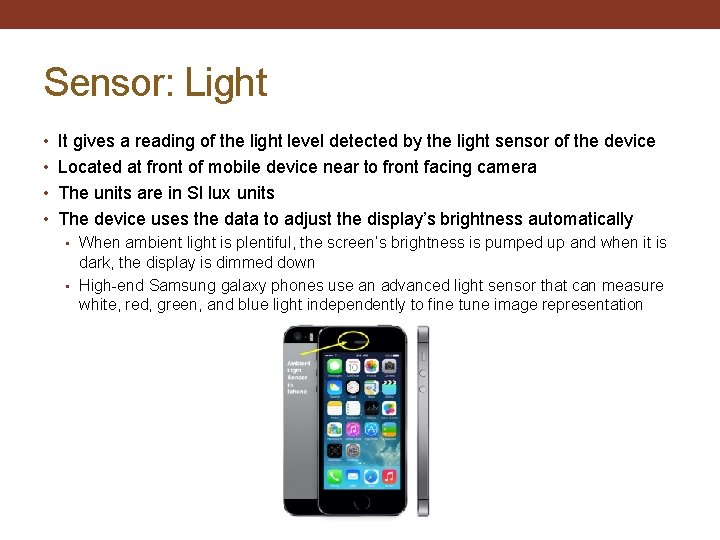
Sensor: Light • It gives a reading of the light level detected by the light sensor of the device • Located at front of mobile device near to front facing camera • The units are in SI lux units • The device uses the data to adjust the display’s brightness automatically • When ambient light is plentiful, the screen’s brightness is pumped up and when it is dark, the display is dimmed down • High-end Samsung galaxy phones use an advanced light sensor that can measure white, red, green, and blue light independently to fine tune image representation
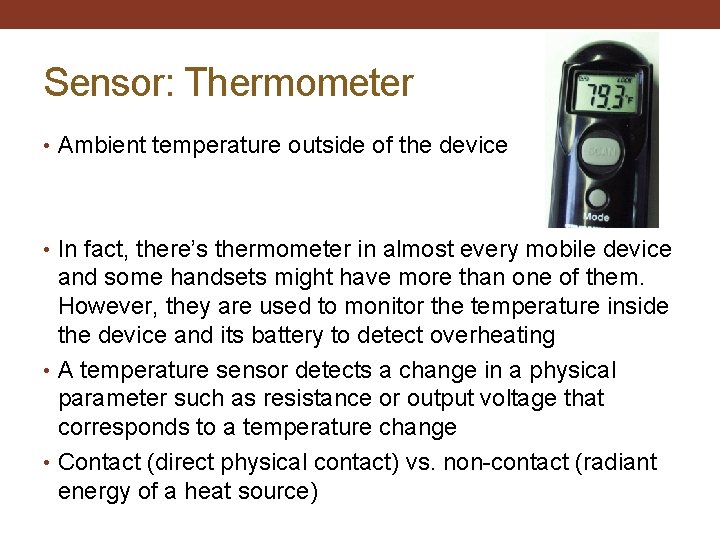
Sensor: Thermometer • Ambient temperature outside of the device • In fact, there’s thermometer in almost every mobile device and some handsets might have more than one of them. However, they are used to monitor the temperature inside the device and its battery to detect overheating • A temperature sensor detects a change in a physical parameter such as resistance or output voltage that corresponds to a temperature change • Contact (direct physical contact) vs. non-contact (radiant energy of a heat source)
Sensor: Pressure • Some higher-end mobile devices have a built-in pressure sensor (barometer) which can measure atmospheric pressure • The data is used to determine how high the device is above sea level, which in turn can help improve GPS accuracy
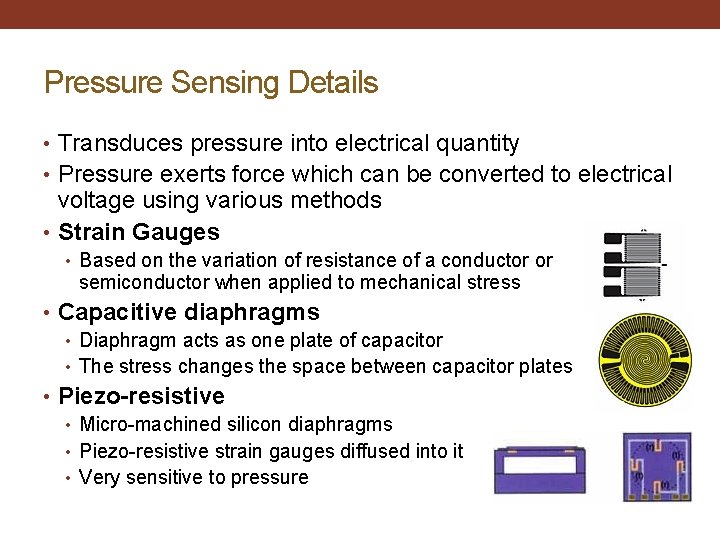
Pressure Sensing Details • Transduces pressure into electrical quantity • Pressure exerts force which can be converted to electrical voltage using various methods • Strain Gauges • Based on the variation of resistance of a conductor or semiconductor when applied to mechanical stress • Capacitive diaphragms • Diaphragm acts as one plate of capacitor • The stress changes the space between capacitor plates • Piezo-resistive • Micro-machined silicon diaphragms • Piezo-resistive strain gauges diffused into it • Very sensitive to pressure
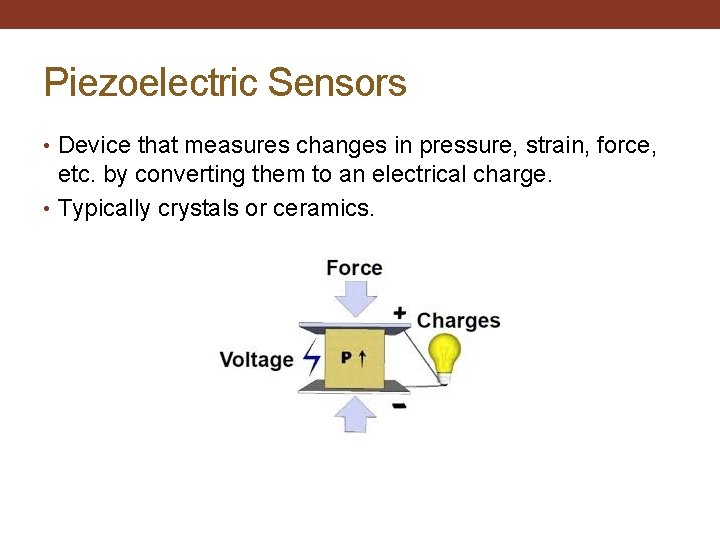
Piezoelectric Sensors • Device that measures changes in pressure, strain, force, etc. by converting them to an electrical charge. • Typically crystals or ceramics.
Sensor: Sound • A microphone is an acoustic to electric transducer that converts sound into an electrical signal. • Microphones capture sound waves with a thin, flexible diaphragm. The vibrations of this element are then converted by various methods into an electrical signal that is an analog of the original sound. • Most microphones in use today use electromagnetic generation (dynamic microphones), capacitance change (condenser microphones) or piezo-electric generation to produce the signal from mechanical vibration.
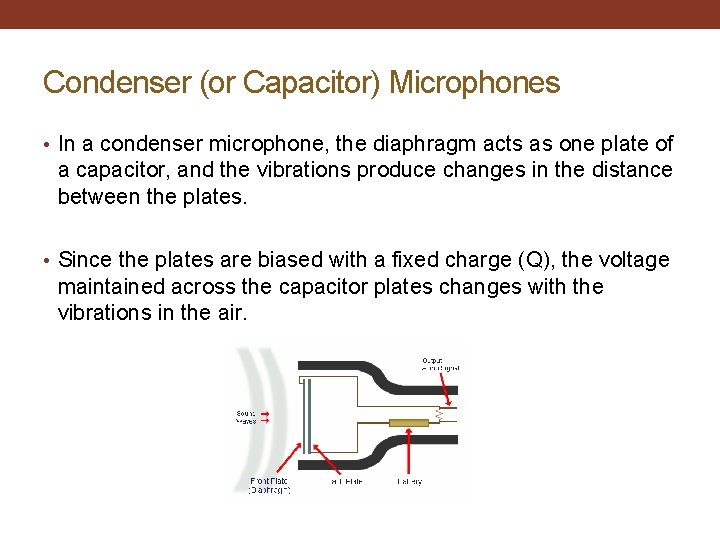
Condenser (or Capacitor) Microphones • In a condenser microphone, the diaphragm acts as one plate of a capacitor, and the vibrations produce changes in the distance between the plates. • Since the plates are biased with a fixed charge (Q), the voltage maintained across the capacitor plates changes with the vibrations in the air.
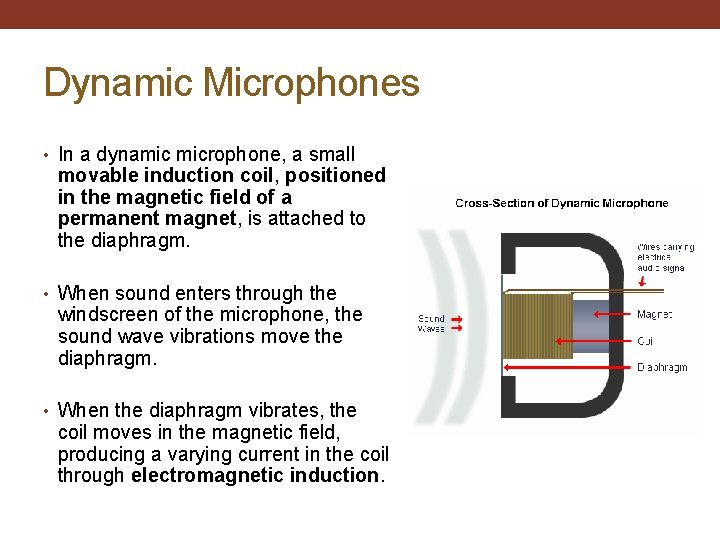
Dynamic Microphones • In a dynamic microphone, a small movable induction coil, positioned in the magnetic field of a permanent magnet, is attached to the diaphragm. • When sound enters through the windscreen of the microphone, the sound wave vibrations move the diaphragm. • When the diaphragm vibrates, the coil moves in the magnetic field, producing a varying current in the coil through electromagnetic induction.
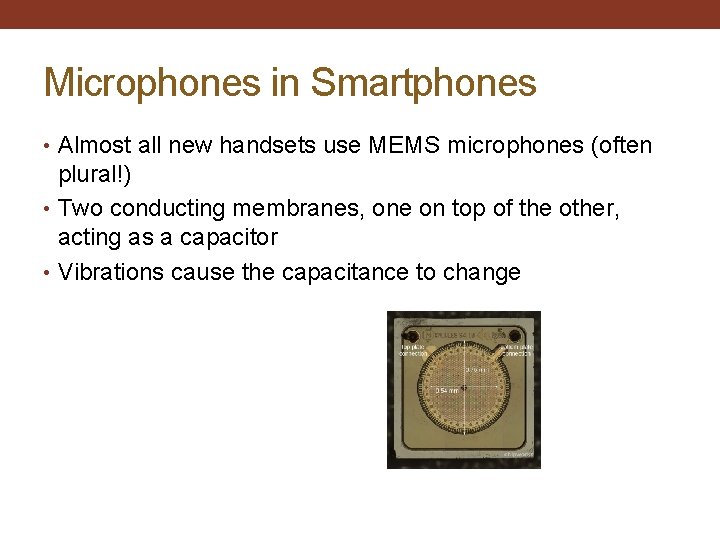
Microphones in Smartphones • Almost all new handsets use MEMS microphones (often plural!) • Two conducting membranes, one on top of the other, acting as a capacitor • Vibrations cause the capacitance to change
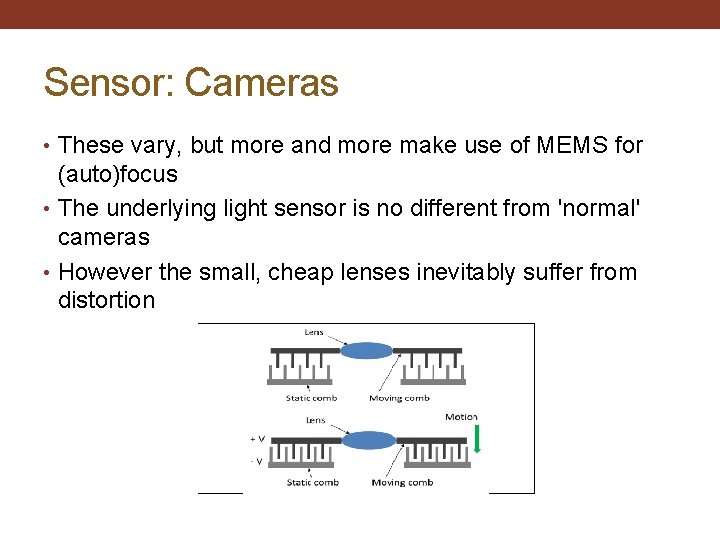
Sensor: Cameras • These vary, but more and more make use of MEMS for (auto)focus • The underlying light sensor is no different from 'normal' cameras • However the small, cheap lenses inevitably suffer from distortion
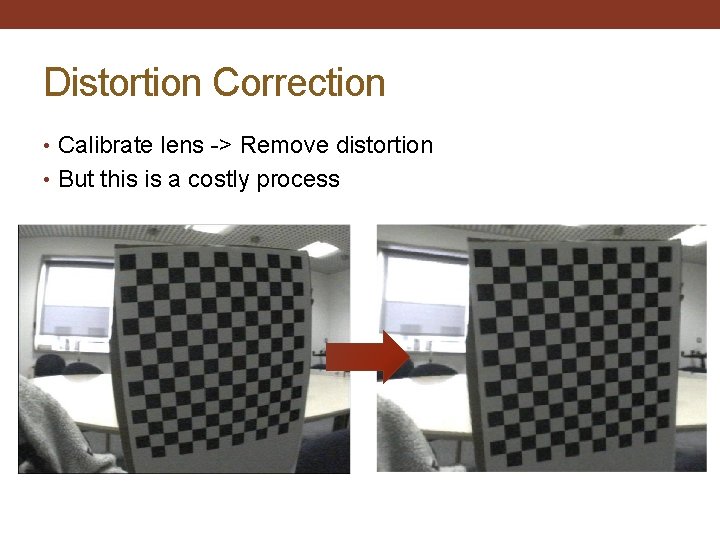
Distortion Correction • Calibrate lens -> Remove distortion • But this is a costly process
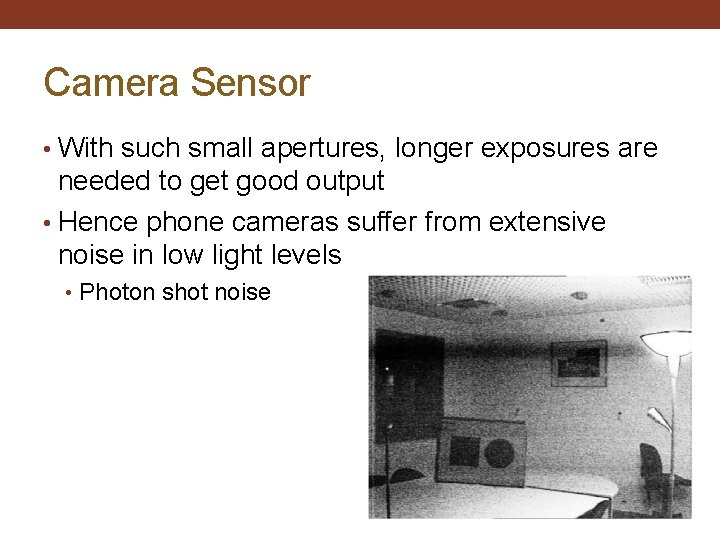
Camera Sensor • With such small apertures, longer exposures are needed to get good output • Hence phone cameras suffer from extensive noise in low light levels • Photon shot noise
Usage in Smartphones • Accelerometers • Tilt estimation, orientation, shaking • Gyroscopes • Smooth rotation tracking • Magnetometers • Global orientation (maps) • Barometer • GPS height hint • Light sensor • Proximity Detection • Camera • Imaging • Microphone • Speech capture
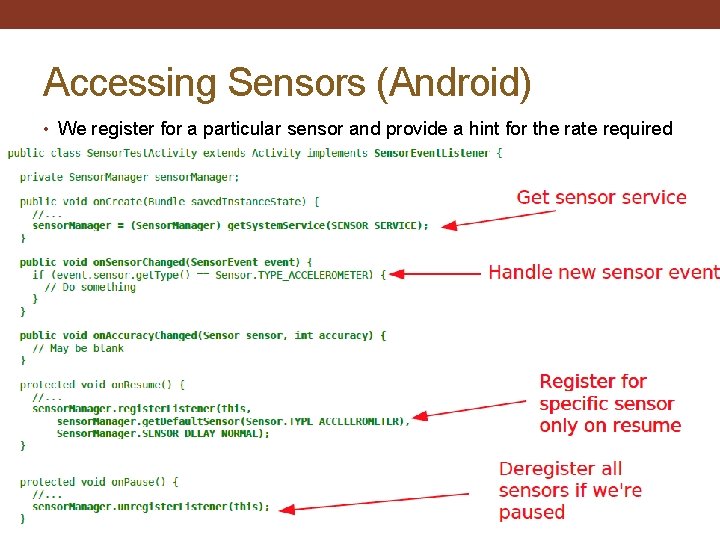
Accessing Sensors (Android) • We register for a particular sensor and provide a hint for the rate required
Continuous Sensing • Most of the smartphone OSes assume you don’t want to register for 24/7 sensing events • If you do, watch out that the OS doesn't require some extra action on your part • e. g. , some versions of Android put the CPU into a low power state after a certain time of screen inactivity. The lowest power states preclude polling the sensor data. . . ! • You might have to hold a wake lock on the CPU if you want to do this (which means the battery will deplete faster!)
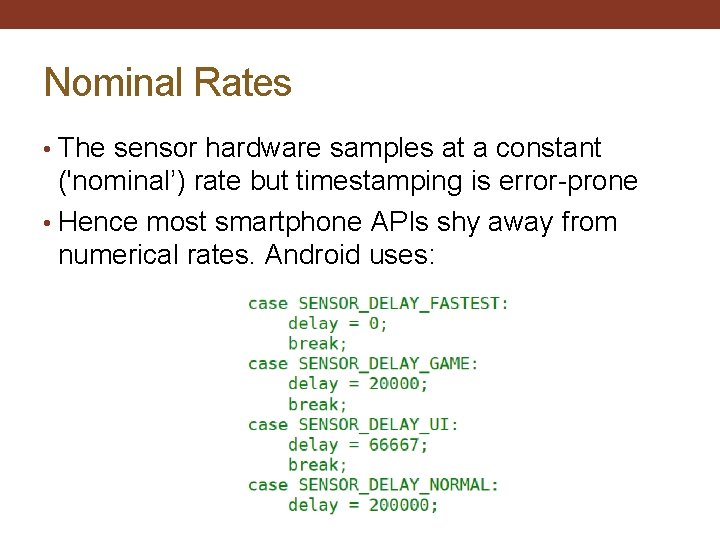
Nominal Rates • The sensor hardware samples at a constant ('nominal’) rate but timestamping is error-prone • Hence most smartphone APIs shy away from numerical rates. Android uses:
Sampling • Smartphone OSes are not real-time. Most sensors regularly update a register with values. The updates produce interrupts and eventually the OS gets around to collecting the value. • If the OS is busy already, a new value could come in before we've read the last! • Dropped readings. . . • More recent sensors use a ring buffer so we don’t drop any, but. . . • The timestamps are currently of the time the datum was collected and not the instant it was created. . .
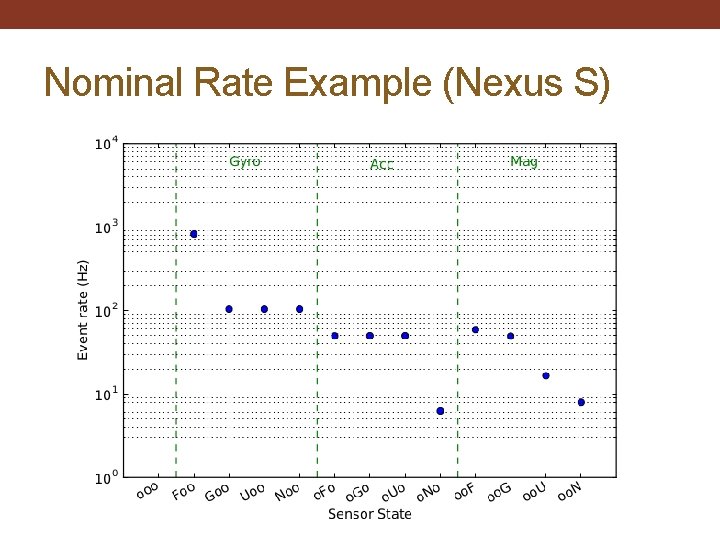
Nominal Rate Example (Nexus S)
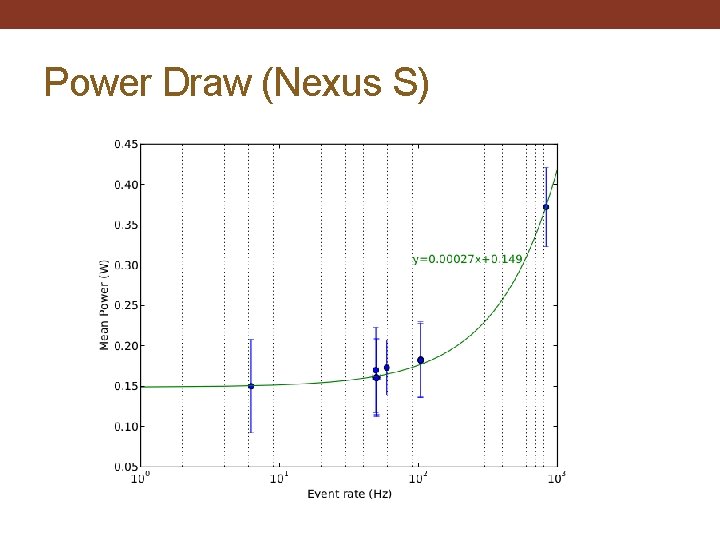
Power Draw (Nexus S)
Sensor Filtering • Warning: sometimes getting a higher sampling rate is pointless • More and more sensors now have built-in low-pass filtering, which limits the max. frequency present. So high sampling rates might just result in oversampling! • Normally not an issue (in fact a good thing) but wastes power and performance
Process Interference • Sampling consistency can also be affected by high priority resource-intensive processes. In Android 2. 3, the garbage collector ran with a higher priority than sensing. . . • And other processes may request a higher rate for the same sensor at the same time! The logical thing is to run at the highest requested rate, but this might mean your app sees significant jumps in the rate of events.
Derived Sensors • Initially the sensor access was raw, but now we have derived sensor types that fuse raw data to estimate other quantities. E. g. , in Android: • TYPE_GRAVITY – Estimates the gravity vector by low pass filtering the accelerometers • TYPE_LINEAR_ACCELERATION – Estimates the acceleration having subtracted gravity • TYPE_ROTATION_VECTOR – Estimates the full rotational pose of the sensor in a world frame • Specific implementation details vary (e. g. software/hardware, gyroscope for rotation or not) • Can ignore and fuse ourselves of course. . .
Inertial Tracking • It is very tempting to fuse the sensors together to track the phone’s trajectory → Inertial Measurement Unit • Such tracking is relative. Errors accrue over time (so called 'drift')
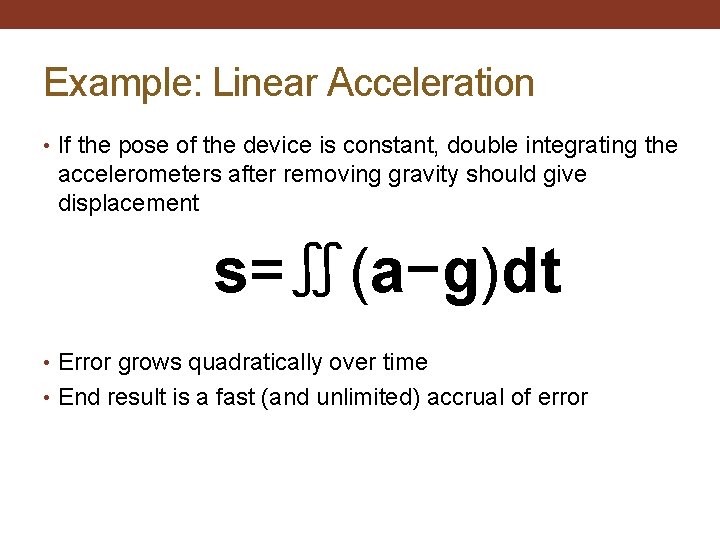
Example: Linear Acceleration • If the pose of the device is constant, double integrating the accelerometers after removing gravity should give displacement s=∬(a−g)dt • Error grows quadratically over time • End result is a fast (and unlimited) accrual of error
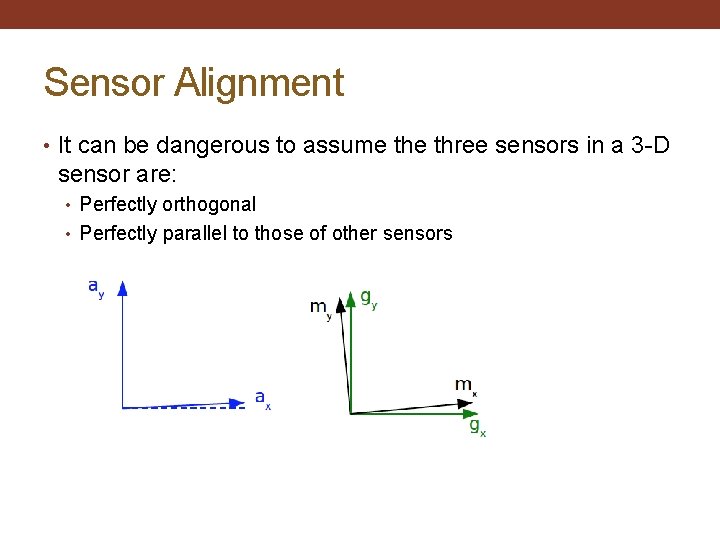
Sensor Alignment • It can be dangerous to assume three sensors in a 3 -D sensor are: • Perfectly orthogonal • Perfectly parallel to those of other sensors
Sensors: Where Next? • MEMS sensors are getting cheaper and more capable – every new flagship phone seems to contain a new sensor; possibly even multiple sensors • As programmers, look closely at the capabilities and remember: • Model/instance differences • Correctly interpret/fuse readings • Measurement errors
Activity Recognition • Sensors can collect data about users and their surroundings Accelerometer data can be used to classify a user’s movement: Running Walking Stationary Combining motion classification with GPS tracking can recognize the user’s mode of transportation: Subway, bike, bus, car, walk…
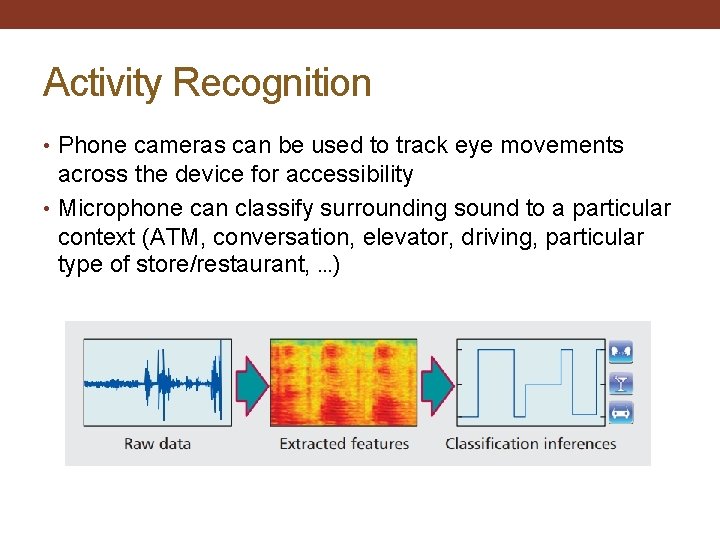
Activity Recognition • Phone cameras can be used to track eye movements across the device for accessibility • Microphone can classify surrounding sound to a particular context (ATM, conversation, elevator, driving, particular type of store/restaurant, …)
Custom Sensors Device sensors are becoming common, but lack special capabilities desired by researchers: Blood pressure, heart rate, EEG Barometer, temperature, humidity Air quality, pollution, Carbon Monoxide Specialized sensors can be embedded into peripherals: Earphones Dockable accessories / cases Prototype devices with embedded sensors
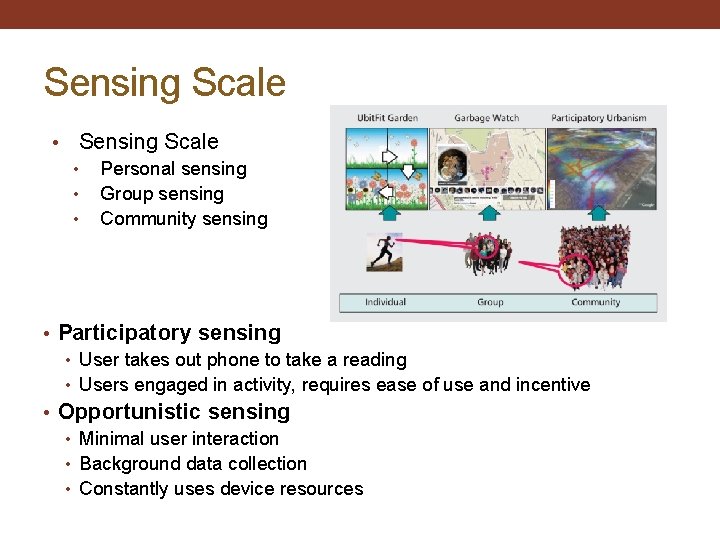
Sensing Scale • • • Personal sensing Group sensing Community sensing • Participatory sensing • User takes out phone to take a reading • Users engaged in activity, requires ease of use and incentive • Opportunistic sensing • Minimal user interaction • Background data collection • Constantly uses device resources
Participatory vs Opportunistic Manual (participatory) collection • Better, fewer data points • User is in the loop on the sensing activity, taking a picture or logging a reading • Users must have incentive to continue Automatic (opportunistic) collection • Lots of data points, but much noisy/bad data • Users not burdened by process, more likely to use the application • Application may only be active when in foreground
Personal Sensing • Tracking exercise routines • Automated diary collection • Health & wellness apps Sensing is for sole benefit of the user. • High user commitment • Direct feedback of results
Group Sensing • Sensing tied to a specific group • Users share common interest • Results shared with the group • Limited access Example: UCLA’s Garbage. Watch (2010) • Users uploaded photos of recycling bins to improve recycling program on campus
Community Sensing • Larger scale sensing • Open participation • Users are anonymous • Privacy must be protected Examples: • Tracking bird migrations, disease spread, congestion patterns • Making a noise map of a city from user contributed sound sensor readings
- Slides: 79