
Mitel VoiceMail Quick Reference Accessing Your Voice Mail
- Slides: 1
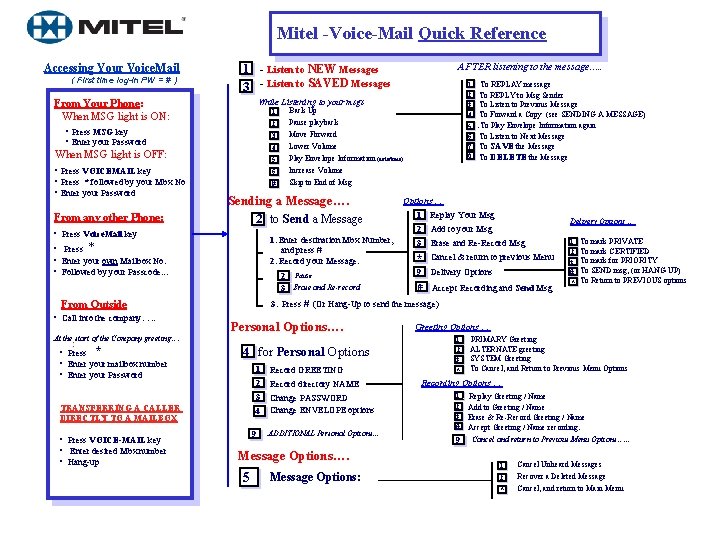
Mitel -Voice-Mail Quick Reference. Accessing Your Voice. Mail ( First time log-in PW = # ) 1 - Listen to NEW Messages 3 - Listen to SAVED Messages 1 2 • Press MSG key • Enter your Password 3 4 When MSG light is OFF: From any other Phone: 5 6 # Back Up Pause playback 1. Enter destination Mbx Number, and press # 2. Record your Message. • Press * • Enter your own Mailbox No. • Followed by your Passcode. . . 2 Pause *3 Erase and Re-record Personal Options…. At the start of the Company greeting…. : 4 for Personal Options TRANSFERRING A CALLER DIRECTLY TO A MAILBOX • Press VOICE-MAIL key • Enter desired Mbx number • Hang-up 9 . To REPLAY message To REPLY to Msg Sender To Listen to Previous Message To Forward a Copy (see SENDING A MESSAGE). To Play Envelope Information again To Listen to Next Message To SAVE the Message To DELETE the Message Options … 1 Replay Your Msg Delivery Options … 2 Add to your Msg 3 Erase and Re-Record Msg * Cancel & return to previous Menu 9 Delivery Options # Accept Recording and Send Msg . 1 To mark PRIVATE 2 To mark CERTIFIED 3 To mark for PRIORITY # To SEND msg, (or HANG-UP) * To Return to PREVIOUS options 3. Press # (Or Hang-Up to send the message) From Outside • Press * • Enter your mailbox number • Enter your Password 5 6 7 Move Forward Lower Volume Play Envelope Information (date/time) Increase Volume Skip to End of Msg Sending a Message…. 2 to Send a Message • Press Voice. Mail key • Call into the company…. . 1 2 3 4 While Listening to your msgs From Your Phone: When MSG light is ON: • Press VOICEMAIL key • Press * followed by your Mbx No • Enter your Password AFTER listening to the message…. . 1 Record GREETING 2 Record directory NAME 3 Change PASSWORD Change ENVELOPE options 4 *9 ADDITIONAL Personal Options. . . Message Options…. 5 Message Options: Greeting Options … 1 2 3 . PRIMARY Greeting ALTERNATE greeting SYSTEM Greeting To Cancel, and Return to Previous Menu Options * Recording Options … 1 2 3 . . Replay Greeting / Name Add to Greeting / Name Erase & Re-Record Greeting / Name # Accept Greeting / Name recording. *9 Cancel and return to Previous Menu Options…. . . 1 2 * Cancel Unheard Messages Recover a Deleted Message Cancel, and return to Main Menu