
Mitel Business Dashboard and Mitel Customer Service Manager
Mitel Business Dashboard and Mitel Customer Service Manager Release 5. 1 Overview and Roadmap July 2010
Mitel Business Dashboard Release 5. 1 à Exclusive to Mitel Applications Suite (MAS) à Support Mitel Communications Director (MCD) and Mitel 5000 HX integrations à Mitel Business Dashboard provides – Cradle-to-grave reporting on every internal and external call – Complete real-time and historical information on all trunk, extension and hunt group activity – Visual Wallboards provide Real-Time Stats, Audible Alarms, 200+ statistics – PIM Integration for ACT! by Sage, Maximizer™, Goldmine®, Microsoft® Outlook®, Microsoft Access® – Allows Management to indentify trends, pinpoint bottlenecks, streamline business Delivers centralized reporting and business analysis for communications Mitel | Confidential slide 2
Customer Service Manager Rel 5. 1 à Exclusive to MAS à Support MCD and 5000 HX integrations à Builds on Business Dashboard Features adding informal contact center functionality – Agent Login / Logout and Hotdesking – ACD Agent Reporting – DND, Make Busy, Agent Specific Reports – Supervisor Control – Agent Help, Change Agent state, Agent Call Monitoring – Advanced Routing Option – Skills-based routing, Email Alerts, Auto Assign Account Codes, Auto Logon / Logoff Agents at start / end of shift – Media Blending Option – Communicate with your customers via email, Fax and SMS as well as voice Combines a fully-featured informal contact center with business analysis Mitel | Confidential slide 3
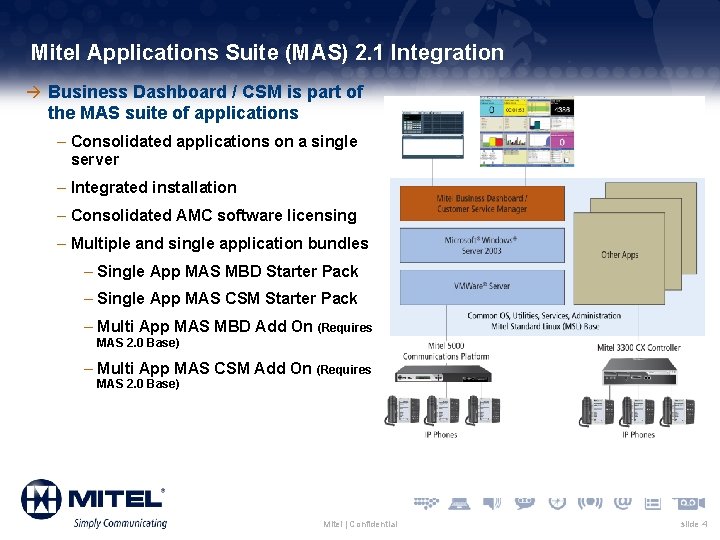
Mitel Applications Suite (MAS) 2. 1 Integration à Business Dashboard / CSM is part of the MAS suite of applications – Consolidated applications on a single server – Integrated installation – Consolidated AMC software licensing – Multiple and single application bundles – Single App MAS MBD Starter Pack – Single App MAS CSM Starter Pack – Multi App MAS MBD Add On (Requires MAS 2. 0 Base) – Multi App MAS CSM Add On (Requires MAS 2. 0 Base) Mitel | Confidential slide 4
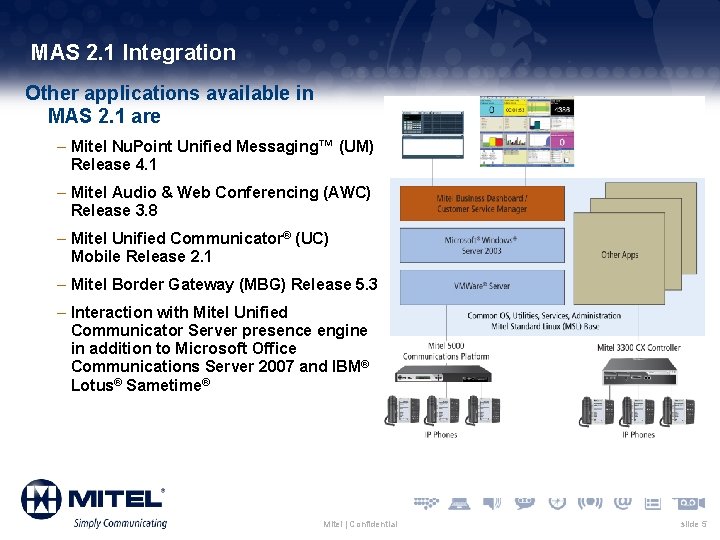
MAS 2. 1 Integration Other applications available in MAS 2. 1 are – Mitel Nu. Point Unified Messaging™ (UM) Release 4. 1 – Mitel Audio & Web Conferencing (AWC) Release 3. 8 – Mitel Unified Communicator® (UC) Mobile Release 2. 1 – Mitel Border Gateway (MBG) Release 5. 3 – Interaction with Mitel Unified Communicator Server presence engine in addition to Microsoft Office Communications Server 2007 and IBM® Lotus® Sametime® Mitel | Confidential slide 5
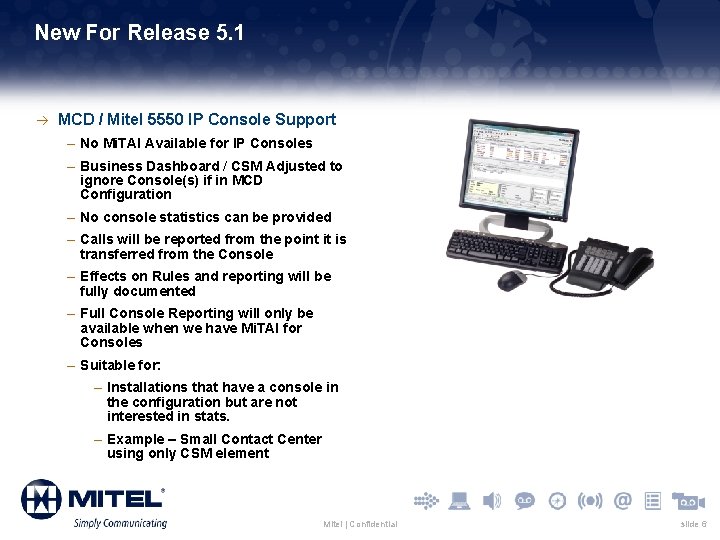
New For Release 5. 1 à MCD / Mitel 5550 IP Console Support – No Mi. TAI Available for IP Consoles – Business Dashboard / CSM Adjusted to ignore Console(s) if in MCD Configuration – No console statistics can be provided – Calls will be reported from the point it is transferred from the Console – Effects on Rules and reporting will be fully documented – Full Console Reporting will only be available when we have Mi. TAI for Consoles – Suitable for: – Installations that have a console in the configuration but are not interested in stats. – Example – Small Contact Center using only CSM element Mitel | Confidential slide 6
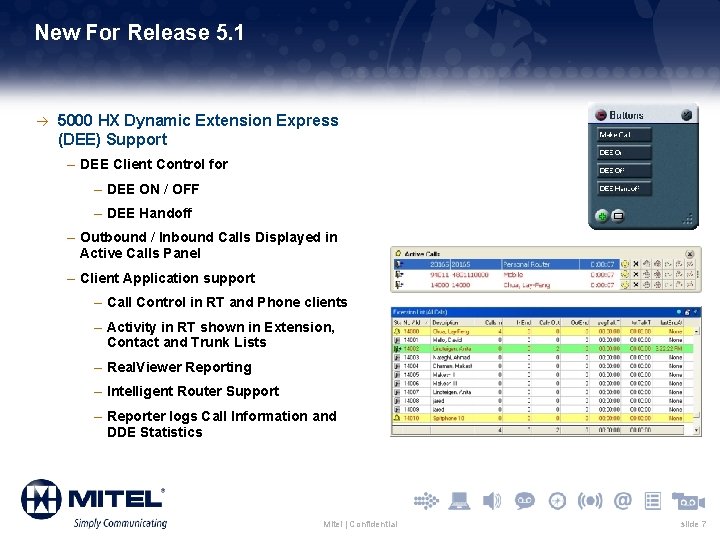
New For Release 5. 1 à 5000 HX Dynamic Extension Express (DEE) Support – DEE Client Control for – DEE ON / OFF – DEE Handoff – Outbound / Inbound Calls Displayed in Active Calls Panel – Client Application support – Call Control in RT and Phone clients – Activity in RT shown in Extension, Contact and Trunk Lists – Real. Viewer Reporting – Intelligent Router Support – Reporter logs Call Information and DDE Statistics Mitel | Confidential slide 7
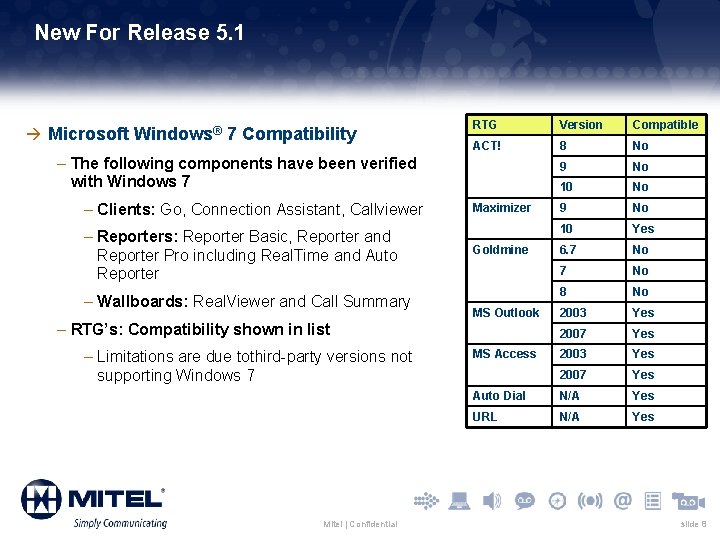
New For Release 5. 1 à Microsoft Windows® 7 Compatibility RTG Version Compatible ACT! 8 No 9 No 10 Yes 6. 7 No 8 No 2003 Yes 2007 Yes Auto Dial N/A Yes URL N/A Yes – The following components have been verified with Windows 7 – Clients: Go, Connection Assistant, Callviewer – Reporters: Reporter Basic, Reporter and Reporter Pro including Real. Time and Auto Reporter – Wallboards: Real. Viewer and Call Summary Maximizer Goldmine MS Outlook – RTG’s: Compatibility shown in list – Limitations are due tothird-party versions not supporting Windows 7 Mitel | Confidential MS Access slide 8
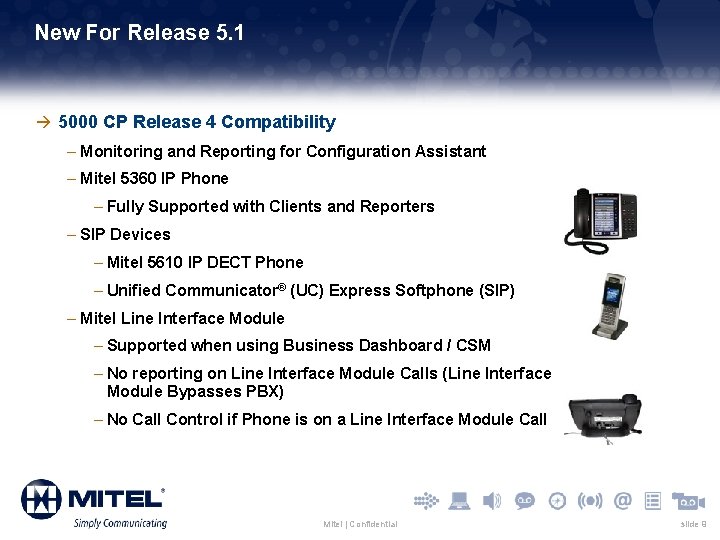
New For Release 5. 1 à 5000 CP Release 4 Compatibility – Monitoring and Reporting for Configuration Assistant – Mitel 5360 IP Phone – Fully Supported with Clients and Reporters – SIP Devices – Mitel 5610 IP DECT Phone – Unified Communicator® (UC) Express Softphone (SIP) – Mitel Line Interface Module – Supported when using Business Dashboard / CSM – No reporting on Line Interface Module Calls (Line Interface Module Bypasses PBX) – No Call Control if Phone is on a Line Interface Module Call Mitel | Confidential slide 9
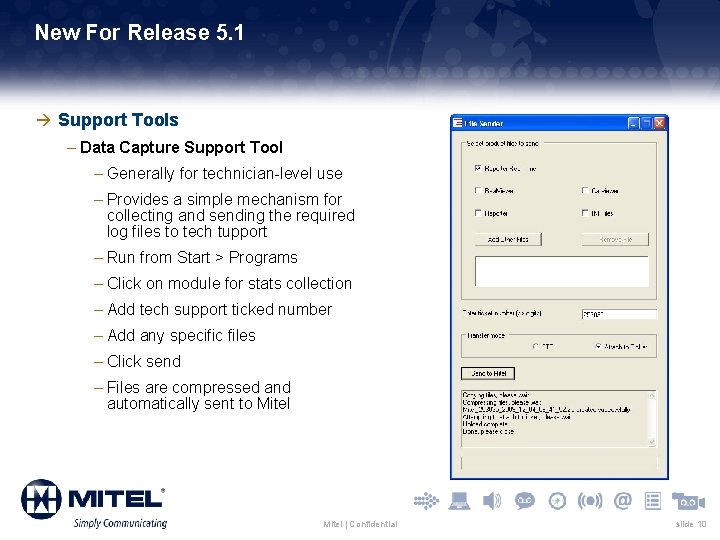
New For Release 5. 1 à Support Tools – Data Capture Support Tool – Generally for technician-level use – Provides a simple mechanism for collecting and sending the required log files to tech tupport – Run from Start > Programs – Click on module for stats collection – Add tech support ticked number – Add any specific files – Click send – Files are compressed and automatically sent to Mitel | Confidential slide 10
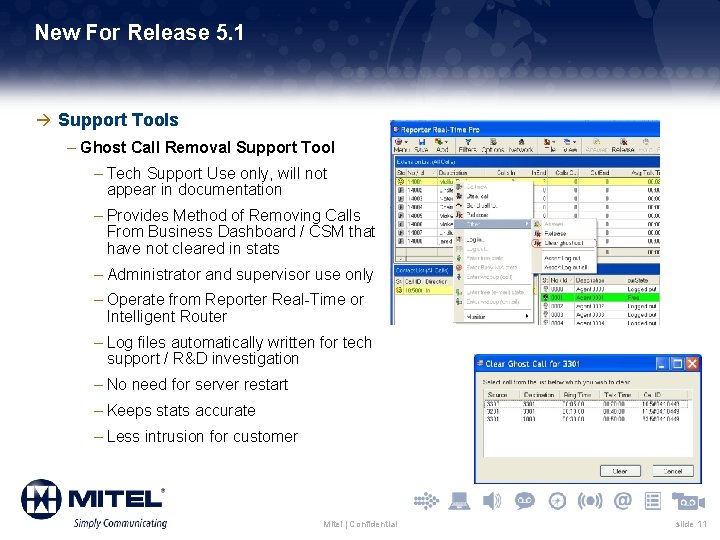
New For Release 5. 1 à Support Tools – Ghost Call Removal Support Tool – Tech Support Use only, will not appear in documentation – Provides Method of Removing Calls From Business Dashboard / CSM that have not cleared in stats – Administrator and supervisor use only – Operate from Reporter Real-Time or Intelligent Router – Log files automatically written for tech support / R&D investigation – No need for server restart – Keeps stats accurate – Less intrusion for customer Mitel | Confidential slide 11
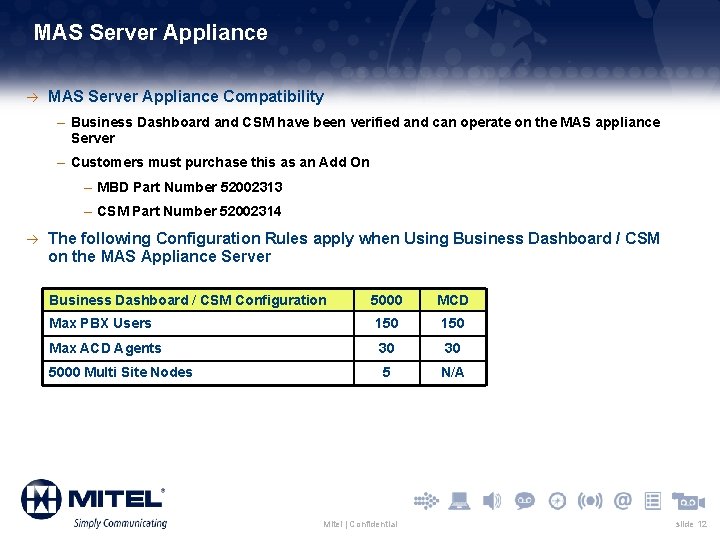
MAS Server Appliance à MAS Server Appliance Compatibility – Business Dashboard and CSM have been verified and can operate on the MAS appliance Server – Customers must purchase this as an Add On – MBD Part Number 52002313 – CSM Part Number 52002314 à The following Configuration Rules apply when Using Business Dashboard / CSM on the MAS Appliance Server Business Dashboard / CSM Configuration 5000 MCD Max PBX Users 150 Max ACD Agents 30 30 5000 Multi Site Nodes 5 N/A Mitel | Confidential slide 12
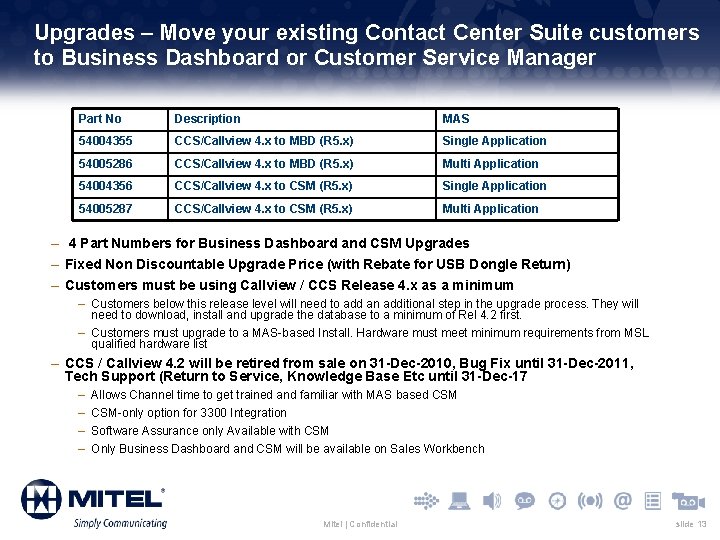
Upgrades – Move your existing Contact Center Suite customers to Business Dashboard or Customer Service Manager Part No Description MAS 54004355 CCS/Callview 4. x to MBD (R 5. x) Single Application 54005286 CCS/Callview 4. x to MBD (R 5. x) Multi Application 54004356 CCS/Callview 4. x to CSM (R 5. x) Single Application 54005287 CCS/Callview 4. x to CSM (R 5. x) Multi Application – 4 Part Numbers for Business Dashboard and CSM Upgrades – Fixed Non Discountable Upgrade Price (with Rebate for USB Dongle Return) – Customers must be using Callview / CCS Release 4. x as a minimum – Customers below this release level will need to add an additional step in the upgrade process. They will need to download, install and upgrade the database to a minimum of Rel 4. 2 first. – Customers must upgrade to a MAS-based Install. Hardware must meet minimum requirements from MSL qualified hardware list – CCS / Callview 4. 2 will be retired from sale on 31 -Dec-2010, Bug Fix until 31 -Dec-2011, Tech Support (Return to Service, Knowledge Base Etc until 31 -Dec-17 – – Allows Channel time to get trained and familiar with MAS based CSM-only option for 3300 Integration Software Assurance only Available with CSM Only Business Dashboard and CSM will be available on Sales Workbench Mitel | Confidential slide 13
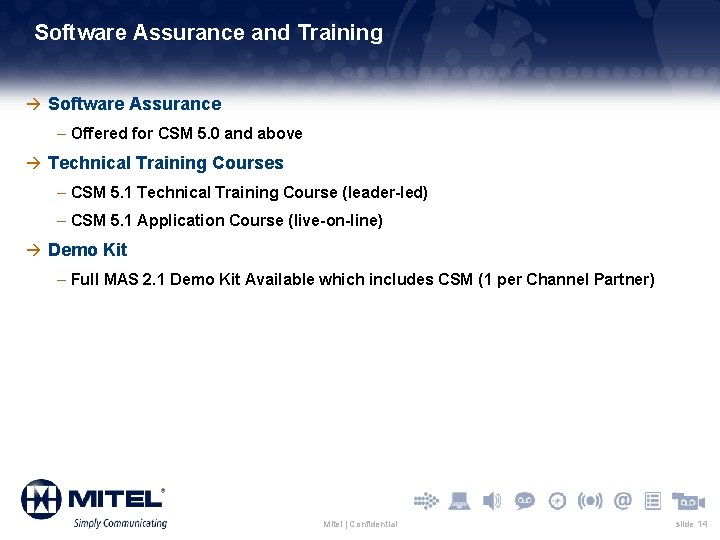
Software Assurance and Training à Software Assurance – Offered for CSM 5. 0 and above à Technical Training Courses – CSM 5. 1 Technical Training Course (leader-led) – CSM 5. 1 Application Course (live-on-line) à Demo Kit – Full MAS 2. 1 Demo Kit Available which includes CSM (1 per Channel Partner) Mitel | Confidential slide 14
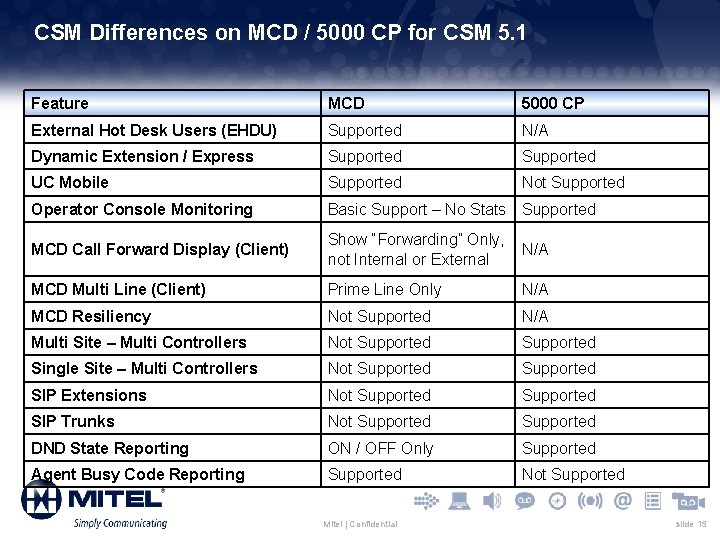
CSM Differences on MCD / 5000 CP for CSM 5. 1 Feature MCD 5000 CP External Hot Desk Users (EHDU) Supported N/A Dynamic Extension / Express Supported UC Mobile Supported Not Supported Operator Console Monitoring Basic Support – No Stats Supported MCD Call Forward Display (Client) Show “Forwarding” Only, not Internal or External N/A MCD Multi Line (Client) Prime Line Only N/A MCD Resiliency Not Supported N/A Multi Site – Multi Controllers Not Supported Single Site – Multi Controllers Not Supported SIP Extensions Not Supported SIP Trunks Not Supported DND State Reporting ON / OFF Only Supported Agent Busy Code Reporting Supported Not Supported Mitel | Confidential slide 15
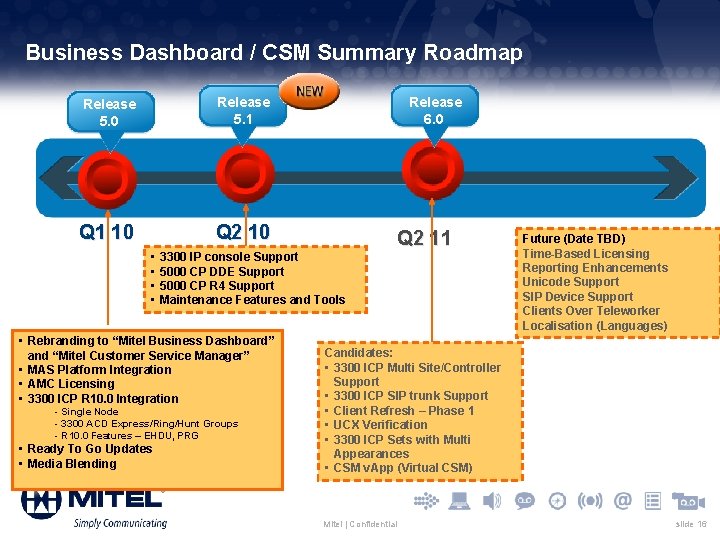
Business Dashboard / CSM Summary Roadmap Release 5. 0 Release 5. 1 Q 1 10 Q 2 10 • • Q 2 11 3300 IP console Support 5000 CP DDE Support 5000 CP R 4 Support Maintenance Features and Tools • Rebranding to “Mitel Business Dashboard” and “Mitel Customer Service Manager” • MAS Platform Integration • AMC Licensing • 3300 ICP R 10. 0 Integration - Single Node - 3300 ACD Express/Ring/Hunt Groups - R 10. 0 Features – EHDU, PRG • Ready To Go Updates • Media Blending Release 6. 0 Future (Date TBD) Time-Based Licensing Reporting Enhancements Unicode Support SIP Device Support Clients Over Teleworker Localisation (Languages) Candidates: • 3300 ICP Multi Site/Controller Support • 3300 ICP SIP trunk Support • Client Refresh – Phase 1 • UCX Verification • 3300 ICP Sets with Multi Appearances • CSM v. App (Virtual CSM) Mitel | Confidential slide 16
CSM 6. 0 Advanced Information Mitel | Confidential slide 17
CSM R 6. 0 Advanced Information à MCD Multi Site and Multi Controller Support – Monitor All Nodes in a Single MCD Cluster. Supporting – Multi Site Clustered Deployment – Resilient MCD Pair Deployment – Extension / Trunking Gateway Deployment – For All devices in the cluster CSM will provide – Historical Reporting – Real-Time Monitoring – Device control from Reporter RT or Client Applications – Same licensing model as used with 5000 CP for multi-site – Initial five-pack (monitors up to five MCDs) – Ability to add licensing for additional MCDs in the cluster Mitel | Confidential slide 18
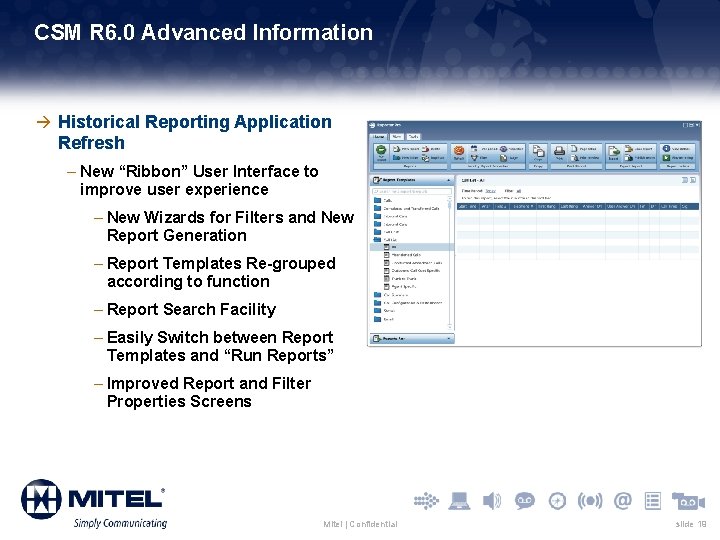
CSM R 6. 0 Advanced Information à Historical Reporting Application Refresh – New “Ribbon” User Interface to improve user experience – New Wizards for Filters and New Report Generation – Report Templates Re-grouped according to function – Report Search Facility – Easily Switch between Report Templates and “Run Reports” – Improved Report and Filter Properties Screens Mitel | Confidential slide 19
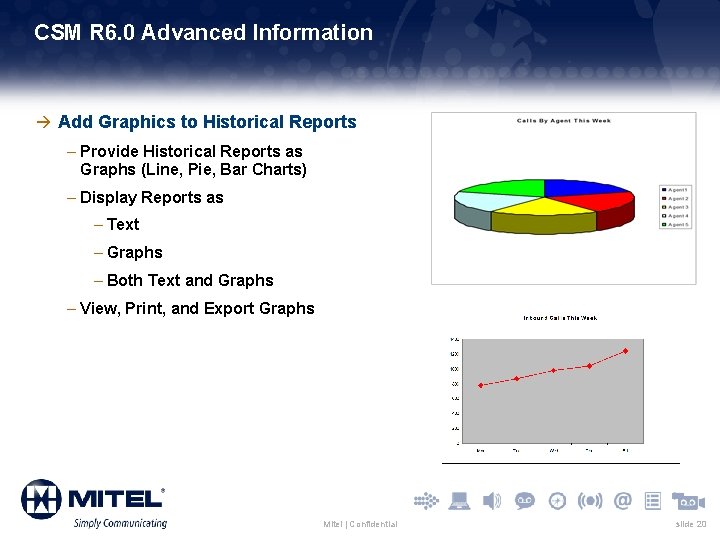
CSM R 6. 0 Advanced Information à Add Graphics to Historical Reports – Provide Historical Reports as Graphs (Line, Pie, Bar Charts) – Display Reports as – Text – Graphs – Both Text and Graphs – View, Print, and Export Graphs Mitel | Confidential slide 20
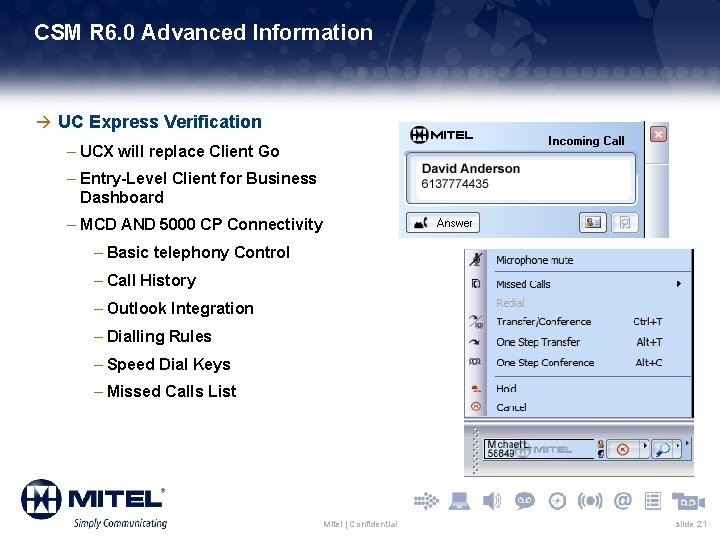
CSM R 6. 0 Advanced Information à UC Express Verification – UCX will replace Client Go – Entry-Level Client for Business Dashboard – MCD AND 5000 CP Connectivity – Basic telephony Control – Call History – Outlook Integration – Dialling Rules – Speed Dial Keys – Missed Calls List Mitel | Confidential slide 21
CSM R 6. 0 Advanced Information à MCD SIP Trunk Support – Monitor Service Provider SIP trunks connected to the MCD System – Historical Reporting – Real-Time Reporting à Allow MCD Sets with Multiline appearances of Prime Line to be used with CSM Clients à Virtualization (v. App) – Virtual Customer Service Manager (Virtual CSM) à Support for New PBX Releases – MCD R 5 – 5000 CP R 5 à Update DB 2 database to latest release Mitel | Confidential slide 22
Thank you Tony Saint Product Manager The information conveyed in this presentation, including oral comments and written materials, is confidential and proprietary to Mitel ® and is intended solely for Mitel employees and members of Mitel’s reseller channel. If you are not a Mitel employee or a Mitel authorized. PARTNER, you are not the intended recipient of this information and are not invited to the conference, and cannot participate in or listen to and/or view the presentation. Please delete or return any related material. Mitel will enforce its rights to protect its confidential and proprietary information, and failure to comply with the foregoing may result in legal action against you or your company.
- Slides: 23