
MIS BIDGOLI 6 12 MANAGEME NT SUPPORT SYSTEMS
MIS BIDGOLI 6 12 MANAGEME NT SUPPORT SYSTEMS Copyright © 2016 Cengage Learning. All Rights Reserved. May not be scanned, copied or duplicated, or posted to a publicly accessible website, in whole or in part.
LEARNING OUTCOMES 1 Describe the phases of the decision-making process in a typical organization and the types of decisions that are made 2 Describe a decision support system 3 Explain an executive information system’s importance in decision making 4 Describe group support systems, including groupware and electronic meeting systems Copyright © 2016 Cengage Learning. All Rights Reserved. May not be scanned, copied or duplicated, or posted to a publicly accessible website, in whole or in part. MIS 6 | CH 12 2
LEARNING OUTCOMES (continued) 5 Summarize the uses for a geographic information system 6 Describe the guidelines for designing a management support system Copyright © 2016 Cengage Learning. All Rights Reserved. May not be scanned, copied or duplicated, or posted to a publicly accessible website, in whole or in part. MIS 6 | CH 12 3
Types of Decisions in an Organization • Structured decisions • Can be automated because a well-defined standard operating procedure exists for these types of decisions - Known as programmable tasks • Semistructured decisions • Include a structured aspect that benefits from information retrieval, analytical models, and information systems technology Copyright © 2016 Cengage Learning. All Rights Reserved. May not be scanned, copied or duplicated, or posted to a publicly accessible website, in whole or in part. MIS 6 | CH 12 4
Types of Decisions in an Organization • Unstructured decisions • One-time decisions with no standard operating procedure • Decision maker’s intuition plays a important role as information technology offers less support for the decisions • Challenges in semistructured and unstructured decisions • Involve multiple criteria • Users have to choose between conflicting objectives Copyright © 2016 Cengage Learning. All Rights Reserved. May not be scanned, copied or duplicated, or posted to a publicly accessible website, in whole or in part. MIS 6 | CH 12 5
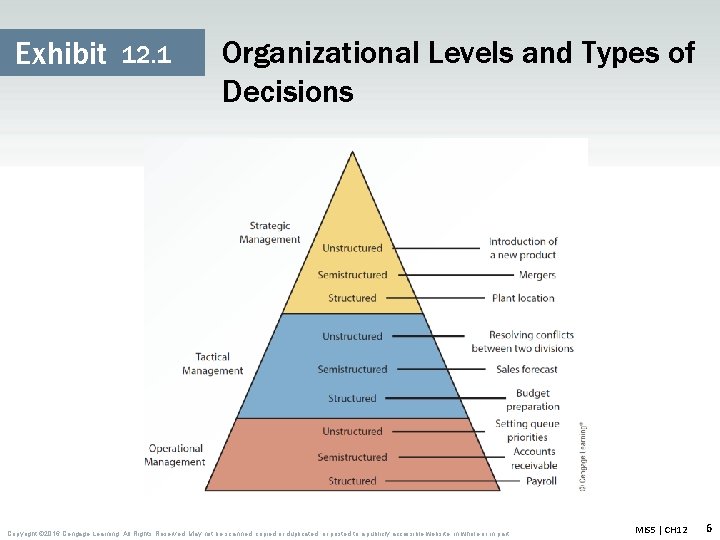
Exhibit 12. 1 Organizational Levels and Types of Decisions Copyright © 2016 Cengage Learning. All Rights Reserved. May not be scanned, copied or duplicated, or posted to a publicly accessible website, in whole or in part. MIS 5 | CH 12 6
Management Support Systems (MSSs) • Different types of information systems that have been developed to support certain aspects and types of decisions • Each type is designed with unique goals and objectives Copyright © 2016 Cengage Learning. All Rights Reserved. May not be scanned, copied or duplicated, or posted to a publicly accessible website, in whole or in part. MIS 6 | CH 12 7
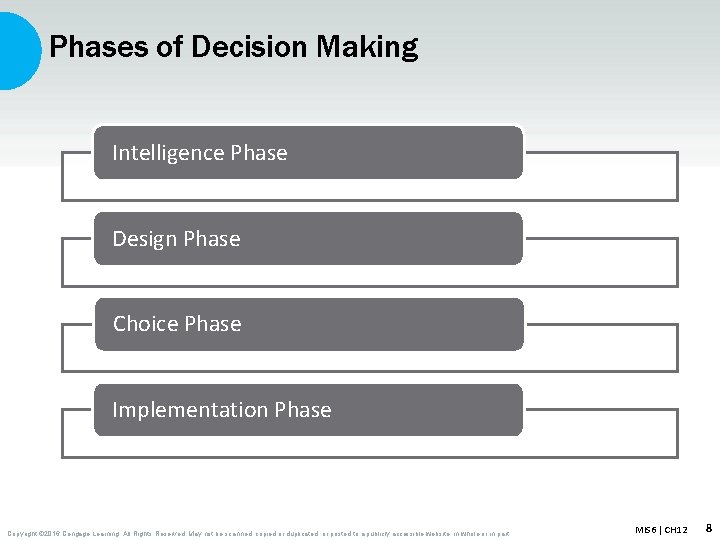
Phases of Decision Making Intelligence Phase Design Phase Choice Phase Implementation Phase Copyright © 2016 Cengage Learning. All Rights Reserved. May not be scanned, copied or duplicated, or posted to a publicly accessible website, in whole or in part. MIS 6 | CH 12 8
Intelligence Phase • Decision maker examines the organization’s environment for conditions that need decisions • Data is collected from a variety of sources and processed • Allows decision maker to discover ways to approach the problem Copyright © 2016 Cengage Learning. All Rights Reserved. May not be scanned, copied or duplicated, or posted to a publicly accessible website, in whole or in part. MIS 6 | CH 12 9
Design Phase • Defines criteria for the decision • Generates alternatives for meeting the criteria • Defines associations between the criteria and the alternatives • Requires understanding how each alternative affects the criteria • Information technology does not support this phase of decision making Copyright © 2016 Cengage Learning. All Rights Reserved. May not be scanned, copied or duplicated, or posted to a publicly accessible website, in whole or in part. MIS 6 | CH 12 10
Choice Phase • Involves selecting best and most effective course of action is from the alternatives • Analyzes each alternative and its relationship to the criteria to determine whether it is feasible • Decision support system (DSS) • Helps sort through possible solutions to choose the best one for the organization • Includes tools for calculating cost-benefit ratios Copyright © 2016 Cengage Learning. All Rights Reserved. May not be scanned, copied or duplicated, or posted to a publicly accessible website, in whole or in part. MIS 6 | CH 12 11
Implementation Phase • Organization devises a plan for carrying out the alternative selected in the choice phase and obtains the resources to implement the plan • DSS does a follow-up assessment on how well a solution is performing Copyright © 2016 Cengage Learning. All Rights Reserved. May not be scanned, copied or duplicated, or posted to a publicly accessible website, in whole or in part. MIS 6 | CH 12 12
Decision Support Systems (DSS) • Interactive information system designed to assist decision makers in an organization • Consists of: • • Hardware Software Data Mathematical and statistical models Copyright © 2016 Cengage Learning. All Rights Reserved. May not be scanned, copied or duplicated, or posted to a publicly accessible website, in whole or in part. MIS 6 | CH 12 13
Decision Support Systems (DSS) • Requirements • Be interactive and incorporate the human element as well as hardware and software • Use internal and external data • Include mathematical and statistical models • Support decision makers at all organizational levels • Emphasize semistructured and unstructured tasks Copyright © 2016 Cengage Learning. All Rights Reserved. May not be scanned, copied or duplicated, or posted to a publicly accessible website, in whole or in part. MIS 6 | CH 12 14
Components of a Decision Support System • Database • Includes internal and external data, and a database management system (DBMS) • Enables a DSS to perform data analysis operations • Model base • Includes mathematical and statistical models that enable a DSS to analyze information Copyright © 2016 Cengage Learning. All Rights Reserved. May not be scanned, copied or duplicated, or posted to a publicly accessible website, in whole or in part. MIS 6 | CH 12 15
Components of a Decision Support System • Users access the DSS through user interface • DSS engine manages and coordinates the major components Copyright © 2016 Cengage Learning. All Rights Reserved. May not be scanned, copied or duplicated, or posted to a publicly accessible website, in whole or in part. MIS 6 | CH 12 16
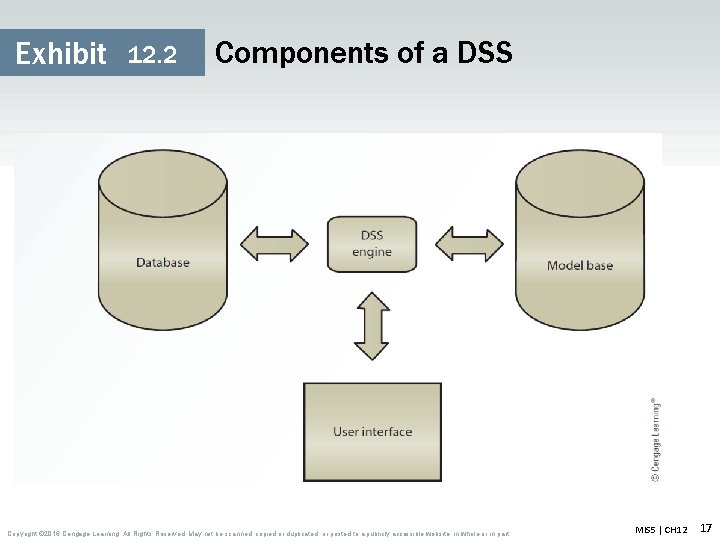
Exhibit 12. 2 Components of a DSS Copyright © 2016 Cengage Learning. All Rights Reserved. May not be scanned, copied or duplicated, or posted to a publicly accessible website, in whole or in part. MIS 5 | CH 12 17
DSS Capabilities • DSS includes following features to support decision making • • What-if analysis Goal-seeking Sensitivity analysis Exception reporting analysis • Other capabilities • Graphical analysis, forecasting, simulation, statistical analysis, and modeling analysis Copyright © 2016 Cengage Learning. All Rights Reserved. May not be scanned, copied or duplicated, or posted to a publicly accessible website, in whole or in part. MIS 6 | CH 12 18
Roles in the DSS Environment • User • Crucial because they use the DSS • Include department or organizational units in addition to people • Managerial designer • Defines the management issues in designing and using a DSS • Issues are related to management’s goals and needs Copyright © 2016 Cengage Learning. All Rights Reserved. May not be scanned, copied or duplicated, or posted to a publicly accessible website, in whole or in part. MIS 6 | CH 12 19
Roles in the DSS Environment • Technical designer • Focuses on how the DSS is implemented • Addresses questions about data storage, file structure, user access, response time, and security measures Copyright © 2016 Cengage Learning. All Rights Reserved. May not be scanned, copied or duplicated, or posted to a publicly accessible website, in whole or in part. MIS 6 | CH 12 20
Roles in the DSS Environment • Model builder • Liaison between users and designers • Responsible for supplying information on: - What the model does - What data inputs the model accepts - How the model’s output should be interpreted - What assumptions go into creating and using the model Copyright © 2016 Cengage Learning. All Rights Reserved. May not be scanned, copied or duplicated, or posted to a publicly accessible website, in whole or in part. MIS 6 | CH 12 21
Benefits of a DSS Outlined by Peter G. Keen Increase in the number of alternatives examined Fast response to unexpected situations Ability to make one-of-a-kind decisions New insights and learning Improved communication and control over operations Copyright © 2016 Cengage Learning. All Rights Reserved. May not be scanned, copied or duplicated, or posted to a publicly accessible website, in whole or in part. MIS 6 | CH 12 22
Benefits of a DSS Outlined by Peter G. Keen Cost savings from making better decisions and analyze several scenarios in a short period Better decisions Effective teamwork Time savings Better use of data resources Copyright © 2016 Cengage Learning. All Rights Reserved. May not be scanned, copied or duplicated, or posted to a publicly accessible website, in whole or in part. MIS 6 | CH 12 23
Executive Information Systems (EISs) • Branch of DSSs • Interactive information systems that give executives easy access to internal and external data • Include drill-down features and a digital dashboard for examining and analyzing information • Designers should focus on simplicity when developing a user interface Copyright © 2016 Cengage Learning. All Rights Reserved. May not be scanned, copied or duplicated, or posted to a publicly accessible website, in whole or in part. MIS 6 | CH 12 24
Executive Information Systems (EISs) • Adding features such as multimedia, virtual reality, and voice input and output increases ease of use • Require access to both internal and external data • Designed to provide information related to an organization’s critical success factors • Includes a digital dashboard Copyright © 2016 Cengage Learning. All Rights Reserved. May not be scanned, copied or duplicated, or posted to a publicly accessible website, in whole or in part. MIS 6 | CH 12 25
Digital Dashboard • Integrates information from multiple sources and presents it in a unified, understandable format as charts and graphs • Offers up-to-the minute snapshots of information • Assists decision makers in identifying trends and potential problems • Example of Web-based digital dashboard • Microsoft Share. Point Copyright © 2016 Cengage Learning. All Rights Reserved. May not be scanned, copied or duplicated, or posted to a publicly accessible website, in whole or in part. MIS 6 | CH 12 26
Reasons for Using EISs • Provides managers with analytical and decision-making tools • Includes graphical representations of data that helps executives make critical decisions • Used by executives to share information with others quickly and easily • Used by managers to improve efficiency and effectiveness of decision making Copyright © 2016 Cengage Learning. All Rights Reserved. May not be scanned, copied or duplicated, or posted to a publicly accessible website, in whole or in part. MIS 6 | CH 12 27
Factors Leading to a Failed EIS • Organizational resistance to the project or perception that the project is unimportant • Lack of interest or commitment from management • Inability to define objectives and information requirements clearly • System’s objectives are not linked to factors critical to the organization’s success • Project’s costs can not be justified Copyright © 2016 Cengage Learning. All Rights Reserved. May not be scanned, copied or duplicated, or posted to a publicly accessible website, in whole or in part. MIS 6 | CH 12 28
Factors Leading to a Failed EIS • Developing applications takes too much time or the system is too complicated • Vendor support has been discontinued • Senior executives lack computer proficiency • Senior executives being unlikely to use systems that need training and regular use to learn • Lack of understanding about what executives’ work involves Copyright © 2016 Cengage Learning. All Rights Reserved. May not be scanned, copied or duplicated, or posted to a publicly accessible website, in whole or in part. MIS 6 | CH 12 29
EIS Packages and Tools • Consist of following components: • Administrative module for managing data access • Builder module for developers to configure data mapping and screen sequencing • Runtime module for using the system Copyright © 2016 Cengage Learning. All Rights Reserved. May not be scanned, copied or duplicated, or posted to a publicly accessible website, in whole or in part. MIS 6 | CH 12 30

Tasks Performed by Managers Using EIS Tracking performance Flagging exceptions Ranking Investigating Comparing Spotting trends Copyright © 2016 Cengage Learning. All Rights Reserved. May not be scanned, copied or duplicated, or posted to a publicly accessible website, in whole or in part. or exploring MIS 6 | CH 12 31
Group Support Systems (GSSs) • Assist decision makers working in groups • Use computer and communication technologies to formulate, process, and implement a decision-making task • Help overcome the limitations of group interactions • Reduce communication barriers • Introduce order and efficiency into situations that are inherently unsystematic and inefficient Copyright © 2016 Cengage Learning. All Rights Reserved. May not be scanned, copied or duplicated, or posted to a publicly accessible website, in whole or in part. MIS 6 | CH 12 32
Group Support Systems (GSSs) • Success depends on following factors • Matching the GSS’s level and sophistication to the group’s size and the scope of the task • Management support Copyright © 2016 Cengage Learning. All Rights Reserved. May not be scanned, copied or duplicated, or posted to a publicly accessible website, in whole or in part. MIS 6 | CH 12 33
Group Support Systems (GSSs) • Useful for: • • • Committees Review panels Board meetings Task forces Decision-making sessions that require input from several decision makers Copyright © 2016 Cengage Learning. All Rights Reserved. May not be scanned, copied or duplicated, or posted to a publicly accessible website, in whole or in part. MIS 6 | CH 12 34
Groupware • Assist groups in communicating, collaborating, and coordinating their activities • Collection of applications that supports decision makers by providing access to a shared environment and information Copyright © 2016 Cengage Learning. All Rights Reserved. May not be scanned, copied or duplicated, or posted to a publicly accessible website, in whole or in part. MIS 6 | CH 12 35
Groupware • Intended for teamwork than for decision support • Software that helps a group of decision makers work with the same application • Regardless of their location Copyright © 2016 Cengage Learning. All Rights Reserved. May not be scanned, copied or duplicated, or posted to a publicly accessible website, in whole or in part. MIS 6 | CH 12 36
Capabilities of Groupware (GSSs) • • • Audio and video conferencing Automated appointment books Brainstorming Database access E-mail Online chat Scheduling To-do lists Workflow automation Copyright © 2016 Cengage Learning. All Rights Reserved. May not be scanned, copied or duplicated, or posted to a publicly accessible website, in whole or in part. MIS 6 | CH 12 37
Electronic Meeting Systems • Enable decision makers in different locations to participate in a group decisionmaking process • Features • Real-time computer conferencing • Video teleconferencing • Desktop conferencing Copyright © 2016 Cengage Learning. All Rights Reserved. May not be scanned, copied or duplicated, or posted to a publicly accessible website, in whole or in part. MIS 6 | CH 12 38
Advantages of GSSs • Costs and stress are reduced due to less travel by decision makers • Increased time to talk with each other and solve problems since: • Decision makers do not travel long distances • Increasing collaboration improves the effectiveness of decision makers Copyright © 2016 Cengage Learning. All Rights Reserved. May not be scanned, copied or duplicated, or posted to a publicly accessible website, in whole or in part. MIS 6 | CH 12 39
Disadvantages of GSSs Lack of the human touch Unnecessary meetings Security problems Costs of implementation are high Copyright © 2016 Cengage Learning. All Rights Reserved. May not be scanned, copied or duplicated, or posted to a publicly accessible website, in whole or in part. MIS 6 | CH 12 40
Geographic Information Systems (GIS) • Captures, stores, processes, and displays geographic information • Shows the location of all city streetlights on a map • Uses spatial and nonspatial data • Uses geographic objects • Points • Lines • Areas Copyright © 2016 Cengage Learning. All Rights Reserved. May not be scanned, copied or duplicated, or posted to a publicly accessible website, in whole or in part. MIS 6 | CH 12 41
Geographic Information Systems (GIS) • Example of a GIS: Getting driving directions from Google Maps • Interactive GIS that identifies routes from start to destination • User-friendly interface that helps you visualize the route Copyright © 2016 Cengage Learning. All Rights Reserved. May not be scanned, copied or duplicated, or posted to a publicly accessible website, in whole or in part. MIS 6 | CH 12 42
GIS Applications Education planning Urban planning Government Insurance Marketing Real estate Transportation and logistics Copyright © 2016 Cengage Learning. All Rights Reserved. May not be scanned, copied or duplicated, or posted to a publicly accessible website, in whole or in part. MIS 6 | CH 12 43
Factors in Designing a Management Support System Support from the top management Objectives and benefits clearly defined Identifying executives’ information needs Keeping lines of communication open System’s complexity hidden; interface kept simple • Maintaining consistency in the approach of designing • Designing a flexible system • • • Copyright © 2016 Cengage Learning. All Rights Reserved. May not be scanned, copied or duplicated, or posted to a publicly accessible website, in whole or in part. MIS 6 | CH 12 44
KEY TERMS • Choice phase • Decision support system (DSS) • Design phase • Digital dashboard • Electronic meeting systems • Executive information systems (EISs) • Geographic information system (GIS) • Group support systems (GSSs) Copyright © 2016 Cengage Learning. All Rights Reserved. May not be scanned, copied or duplicated, or posted to a publicly accessible website, in whole or in part. MIS 5 | CH 12 45
KEY TERMS • Groupware • Implementation phase • Intelligence phase • Management support systems (MSSs) • Managerial designer • Model base • Model builder Copyright © 2016 Cengage Learning. All Rights Reserved. May not be scanned, copied or duplicated, or posted to a publicly accessible website, in whole or in part. MIS 5 | CH 12 46
KEY TERMS • Semistructured decisions • Structured decisions • Technical designer • Unstructured decisions Copyright © 2016 Cengage Learning. All Rights Reserved. May not be scanned, copied or duplicated, or posted to a publicly accessible website, in whole or in part. MIS 5 | CH 12 47
SUMMARY • Different types of information systems are developed to support certain aspects and types of decisions • Decision support system (DSS) is designed to assist decision makers in an organization • EIS designers should focus on simplicity when developing a user interface • GIS uses spatial and nonspatial data and techniques for storing coordinates of complex geographic objects Copyright © 2016 Cengage Learning. All Rights Reserved. May not be scanned, copied or duplicated, or posted to a publicly accessible website, in whole or in part. MIS 5 | CH 12 48

Copyright © 2016 Cengage Learning. All Rights Reserved. May not be scanned, copied or duplicated, or posted to a publicly accessible website, in whole or in part. MIS 5 | CH 12 49
- Slides: 49