
MIPS IO and Interrupt Review Floating point instructions

- Slides: 19
MIPS I/O and Interrupt
Review • Floating point instructions are carried out on a separate chip called coprocessor 1 • You have to move data to/from coprocessor 1 to do most common operations such as printing, calling functions, converting number, etc • There are 32 floating point registers, $f 0 - $f 31 • You can access all 32 with single precision instructions • You can only access even numbered registers with double precision instructions
Review • Floating point instructions use the following abbreviations: – – – – s – single precision d – double precision w – integer (word) c 1 – coprocessor 1 mt/mf – move to / move from cvt – convert bc 1 t / bc 1 f – branch if true/false c – compare
Review • Questions that were asked last class: – What delimiter is used to construct an array of double precision numbers? • . double • Also, . byte and. half construct arrays of 8 bit and 16 bit values respectively – Can you move a double precision number to a word in the main processor? • Yes. • There is a psudo instruction that moves the values from two floating point registers (a double) to two main registers. The first parameter is a main register and the floating point number is stored here and in the main register immediately following it. E. g if you specify $t 0, it will store into $t 0 and $t 1 – mfc 1. d $v 0, $f 0 • Other choices available: • Convert to single precision then move – cvt. s. d $f 9, $f 0 – mtc 1 $v 0, $f 9 • Same as the psudo instruction, but can pick the registers you want – mtc 1 $s 0, $f 0 – mtc 1 $t 0, $f 1 – Are there other flags you can use in coprocessor 1? • Yes, there are 8 flags you can use from 0 to 7 • Ex. c. le. s 4 $f 0, $f 1
SPIM I/O and MIPS Interrupts • The materials of this lecture can be found in A 7 -A 8 (3 rd Edition) and B 7 -B 8 (4 th Edition). • The material covered here will only make a brief appearance on the midterm and won’t be on the final nor any exercises / homeworks • It is mainly used to give you a background for future classes such as Computer Organization II and Operating Systems
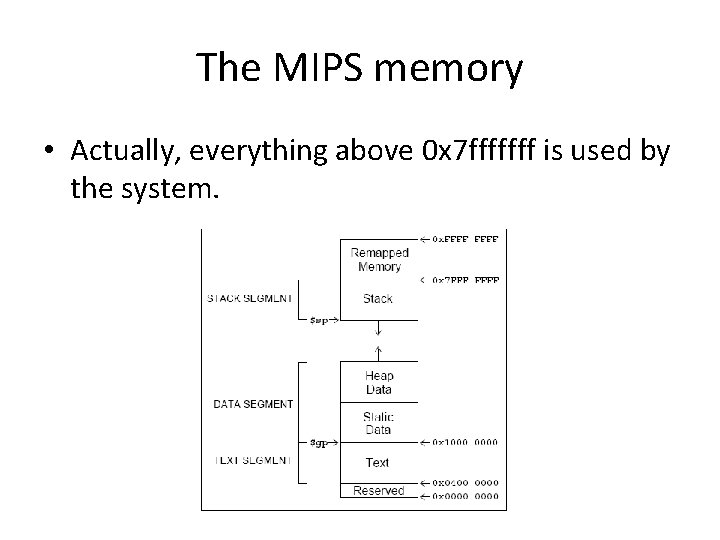
The MIPS memory • Actually, everything above 0 x 7 fffffff is used by the system.
What is in there? • • Special operating system functions I/O registers mapped to memory addresses Kernel data …
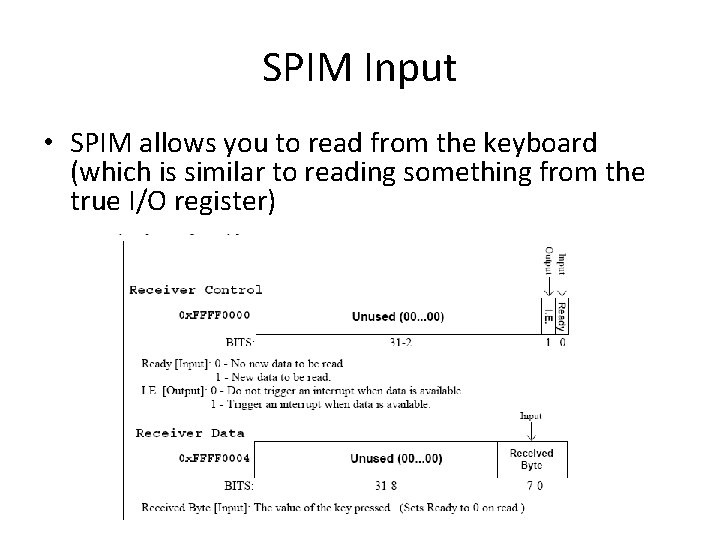
SPIM Input • SPIM allows you to read from the keyboard (which is similar to reading something from the true I/O register)
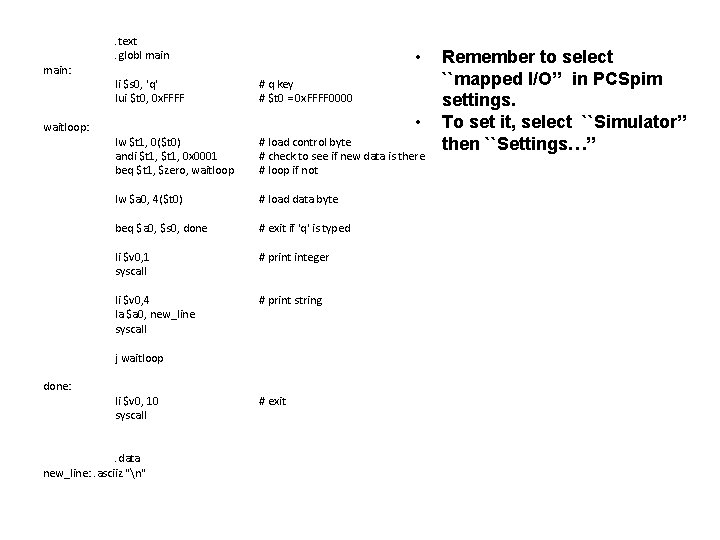
main: waitloop: . text. globl main li $s 0, 'q' lui $t 0, 0 x. FFFF • # q key # $t 0 = 0 x. FFFF 0000 • lw $t 1, 0($t 0) andi $t 1, 0 x 0001 beq $t 1, $zero, waitloop # load control byte # check to see if new data is there # loop if not lw $a 0, 4($t 0) # load data byte beq $a 0, $s 0, done # exit if 'q' is typed li $v 0, 1 syscall # print integer li $v 0, 4 la $a 0, new_line syscall # print string j waitloop done: li $v 0, 10 syscall . data new_line: . asciiz "n" # exit Remember to select ``mapped I/O’’ in PCSpim settings. To set it, select ``Simulator’’ then ``Settings…’’
SPIM output • Similar to the input, SPIM has two memory locations for output – 0 xffff 0008: Transmitter control. • Bit 1: interrupt enable • Bit 0: ready – 0 xffff 000 c: Transmitter data. • Bit 0 -7: data byte
SPIM output • If you need to show something on the console, do the following: 1. Check if ready bit is 1. If yes, proceed. Otherwise, wait. 2. Write to the data. The ready bit will be reset to 0, and will be set to 1 after the byte is transmitted.
question • Is this the most efficient way to do it? • Remember that the processor usually has a lot of things to do simultaneously
Interrupt • The key problem is that the time when the input occurs cannot be predicted by your program • Wouldn’t it be nice if you could “focus on what you are doing” while be “interrupted” if some inputs come?
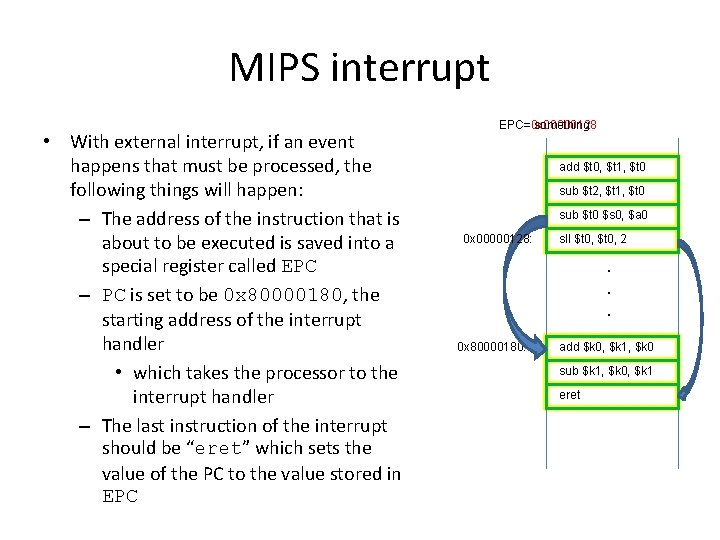
MIPS interrupt • With external interrupt, if an event happens that must be processed, the following things will happen: – The address of the instruction that is about to be executed is saved into a special register called EPC – PC is set to be 0 x 80000180, the starting address of the interrupt handler • which takes the processor to the interrupt handler – The last instruction of the interrupt should be “eret” which sets the value of the PC to the value stored in EPC= something EPC=0 x 00000128 add $t 0, $t 1, a $t 0 sub $t 2, $t 1, a $t 0 sub $t 0 $s 0, a $a 0 0 x 00000128: sll $t 0, a 2 . . . 0 x 80000180: add $k 0, a $k 1, $k 0 sub $k 1, a $k 0, $k 1 eret a
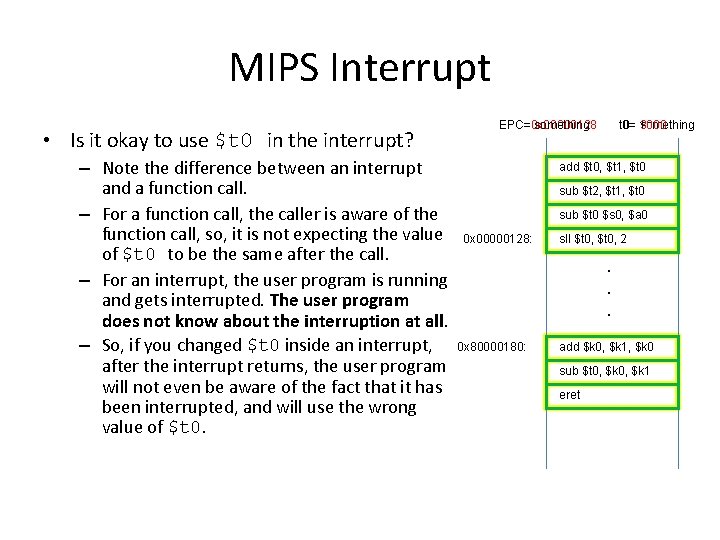
MIPS Interrupt • Is it okay to use $t 0 in the interrupt? – Note the difference between an interrupt and a function call. – For a function call, the caller is aware of the function call, so, it is not expecting the value of $t 0 to be the same after the call. – For an interrupt, the user program is running and gets interrupted. The user program does not know about the interruption at all. – So, if you changed $t 0 inside an interrupt, after the interrupt returns, the user program will not even be aware of the fact that it has been interrupted, and will use the wrong value of $t 0. EPC= something EPC=0 x 00000128 t 0= 10 something 3000 add $t 0, $t 1, a $t 0 sub $t 2, $t 1, a $t 0 sub $t 0 $s 0, a $a 0 0 x 00000128: sll $t 0, a 2 . . . 0 x 80000180: add $k 0, a $k 1, $k 0 sub $t 0, $k 0, a $k 1 eret a
MIPS Interrupt • $k 0 and $k 1 are both used as temporary variables in interrupt servicing routines.
Interrupt • Interrupt handlers should be short. – Usually should just use the interrupt to set some flags, and let the main program to check the flags – Flags can be registers and can be checked much faster than reading the value of an external pin or reading data from other chips
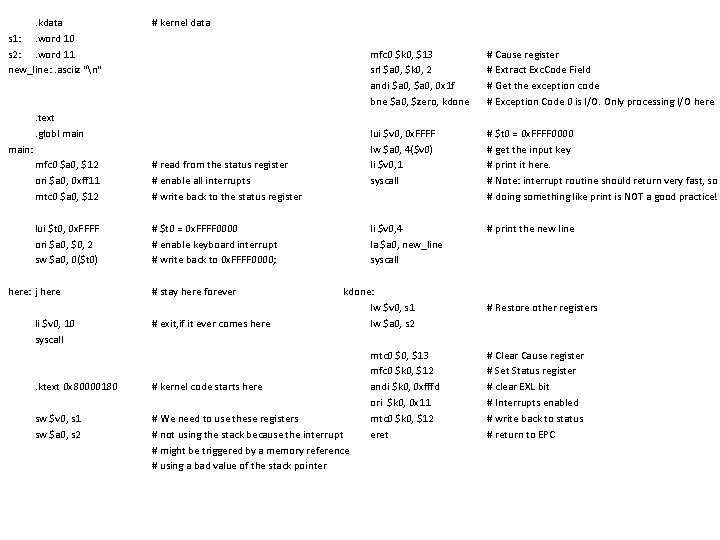
. kdata s 1: . word 10 s 2: . word 11 new_line: . asciiz "n" # kernel data . text. globl main: mfc 0 $a 0, $12 ori $a 0, 0 xff 11 mtc 0 $a 0, $12 # read from the status register # enable all interrupts # write back to the status register lui $t 0, 0 x. FFFF ori $a 0, $0, 2 sw $a 0, 0($t 0) # $t 0 = 0 x. FFFF 0000 # enable keyboard interrupt # write back to 0 x. FFFF 0000; here: j here li $v 0, 10 syscall # stay here forever # exit, if it ever comes here mfc 0 $k 0, $13 srl $a 0, $k 0, 2 andi $a 0, 0 x 1 f bne $a 0, $zero, kdone # Cause register # Extract Exc. Code Field # Get the exception code # Exception Code 0 is I/O. Only processing I/O here lui $v 0, 0 x. FFFF lw $a 0, 4($v 0) li $v 0, 1 syscall # $t 0 = 0 x. FFFF 0000 # get the input key # print it here. # Note: interrupt routine should return very fast, so # doing something like print is NOT a good practice! li $v 0, 4 la $a 0, new_line syscall # print the new line kdone: lw $v 0, s 1 lw $a 0, s 2 . ktext 0 x 80000180 # kernel code starts here sw $v 0, s 1 sw $a 0, s 2 # We need to use these registers # not using the stack because the interrupt # might be triggered by a memory reference # using a bad value of the stack pointer mtc 0 $0, $13 mfc 0 $k 0, $12 andi $k 0, 0 xfffd ori $k 0, 0 x 11 mtc 0 $k 0, $12 eret # Restore other registers # Clear Cause register # Set Status register # clear EXL bit # Interrupts enabled # write back to status # return to EPC
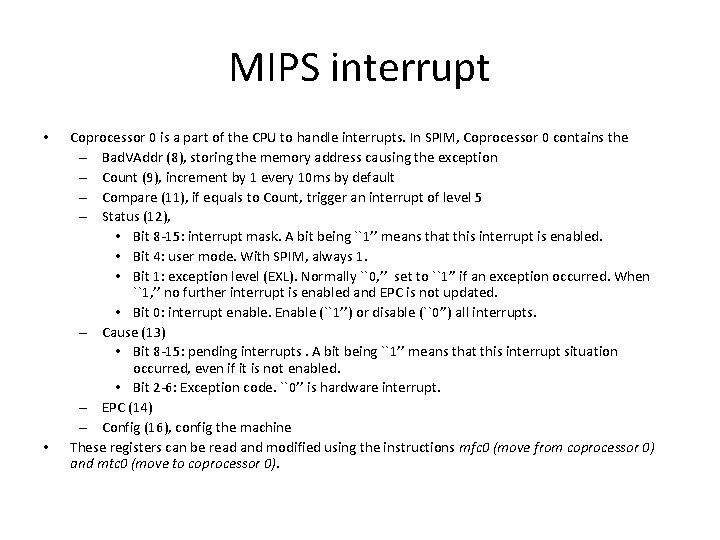
MIPS interrupt • • Coprocessor 0 is a part of the CPU to handle interrupts. In SPIM, Coprocessor 0 contains the – Bad. VAddr (8), storing the memory address causing the exception – Count (9), increment by 1 every 10 ms by default – Compare (11), if equals to Count, trigger an interrupt of level 5 – Status (12), • Bit 8 -15: interrupt mask. A bit being ``1’’ means that this interrupt is enabled. • Bit 4: user mode. With SPIM, always 1. • Bit 1: exception level (EXL). Normally ``0, ’’ set to ``1’’ if an exception occurred. When ``1, ’’ no further interrupt is enabled and EPC is not updated. • Bit 0: interrupt enable. Enable (``1’’) or disable (``0’’) all interrupts. – Cause (13) • Bit 8 -15: pending interrupts. A bit being ``1’’ means that this interrupt situation occurred, even if it is not enabled. • Bit 2 -6: Exception code. ``0’’ is hardware interrupt. – EPC (14) – Config (16), config the machine These registers can be read and modified using the instructions mfc 0 (move from coprocessor 0) and mtc 0 (move to coprocessor 0).