
MIPS Assembly with MARS First Instructions and execution

MIPS Assembly with MARS
First Instructions and execution of an Assembly Simple program to compute 7+9 Inorder to perform this operation, we need to initialize two registers with these values, and perform addition with add instruction.
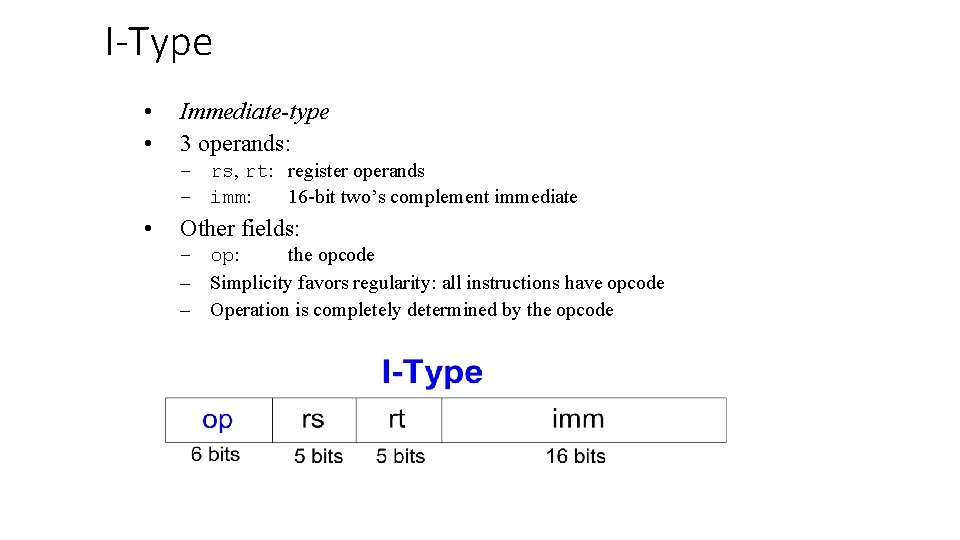
I-Type • • Immediate-type 3 operands: – rs, rt: register operands – imm: 16 -bit two’s complement immediate • Other fields: – op: the opcode – Simplicity favors regularity: all instructions have opcode – Operation is completely determined by the opcode
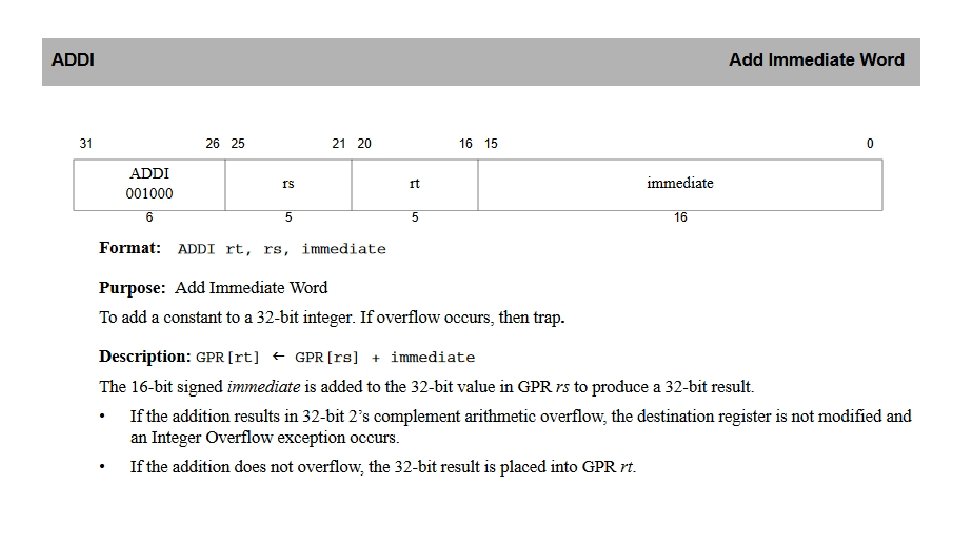
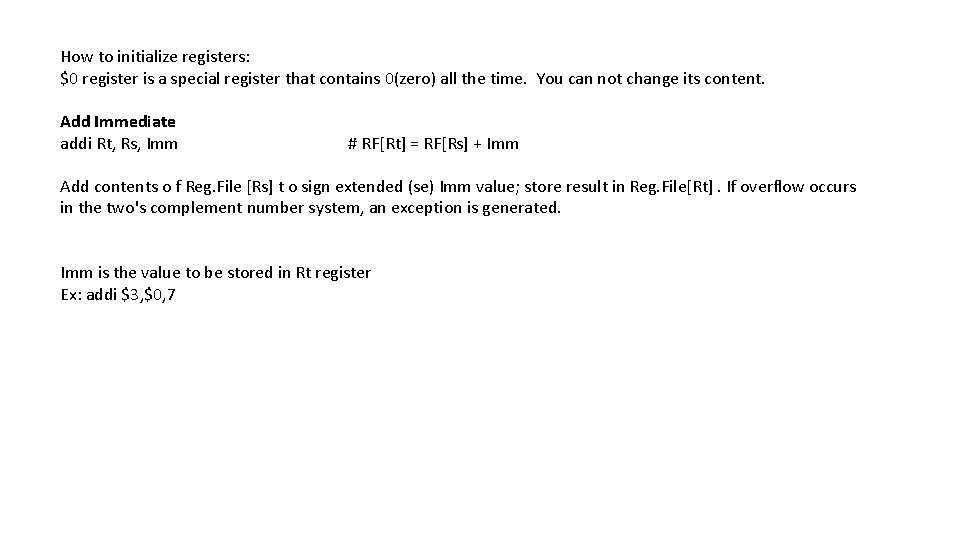
How to initialize registers: $0 register is a special register that contains 0(zero) all the time. You can not change its content. Add Immediate addi Rt, Rs, Imm # RF[Rt] = RF[Rs] + Imm Add contents o f Reg. File [Rs] t o sign extended (se) Imm value; store result in Reg. File[Rt]. If overflow occurs in the two's complement number system, an exception is generated. Imm is the value to be stored in Rt register Ex: addi $3, $0, 7
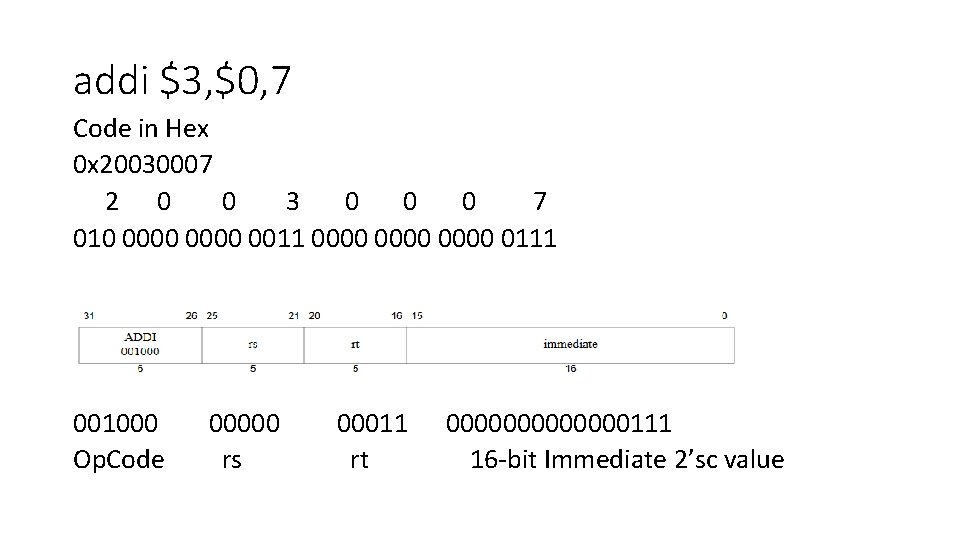
addi $3, $0, 7 Code in Hex 0 x 20030007 2 0 0 3 0 0 0 7 010 0000 0011 0000 0111 001000 Op. Code 00000 rs 00011 rt 0000000111 16 -bit Immediate 2’sc value
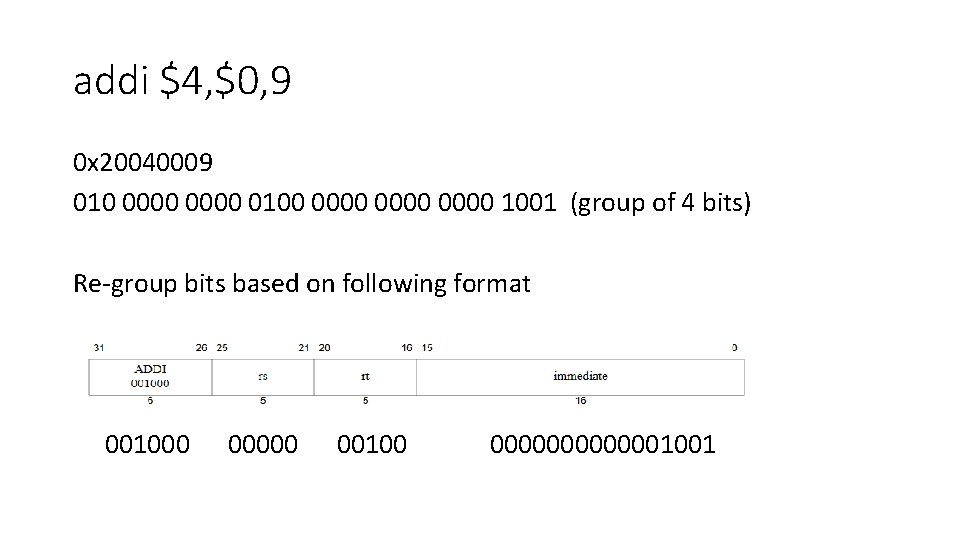
addi $4, $0, 9 0 x 20040009 010 0000 0100 0000 1001 (group of 4 bits) Re-group bits based on following format 001000 00100 0000001001
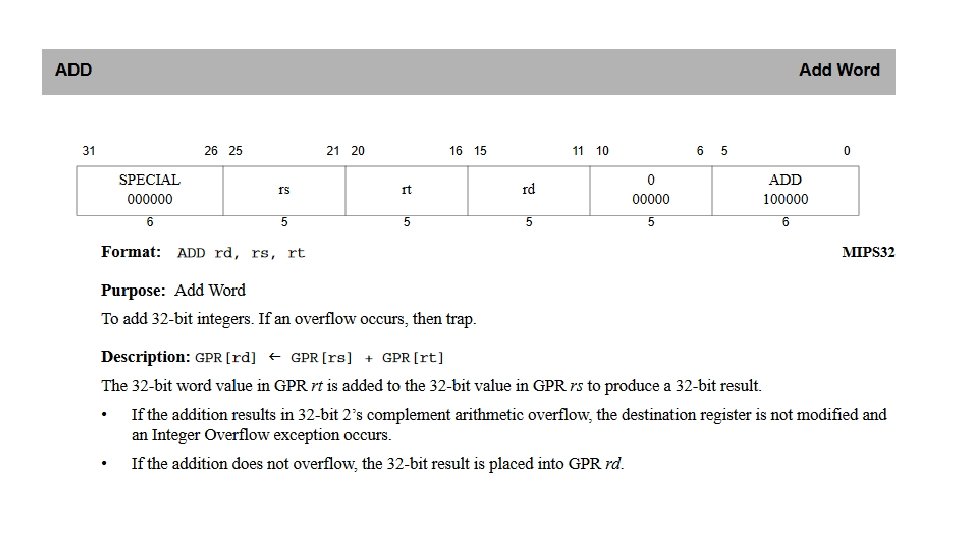
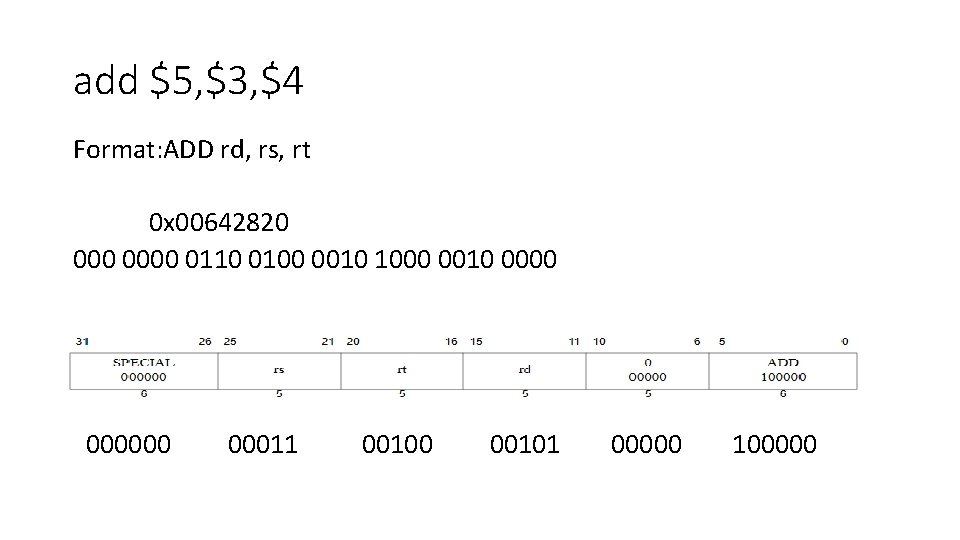
add $5, $3, $4 Format: ADD rd, rs, rt 0 x 00642820 0000 0110 0100 0010 1000 0010 000000 00011 00100 00101 00000 100000
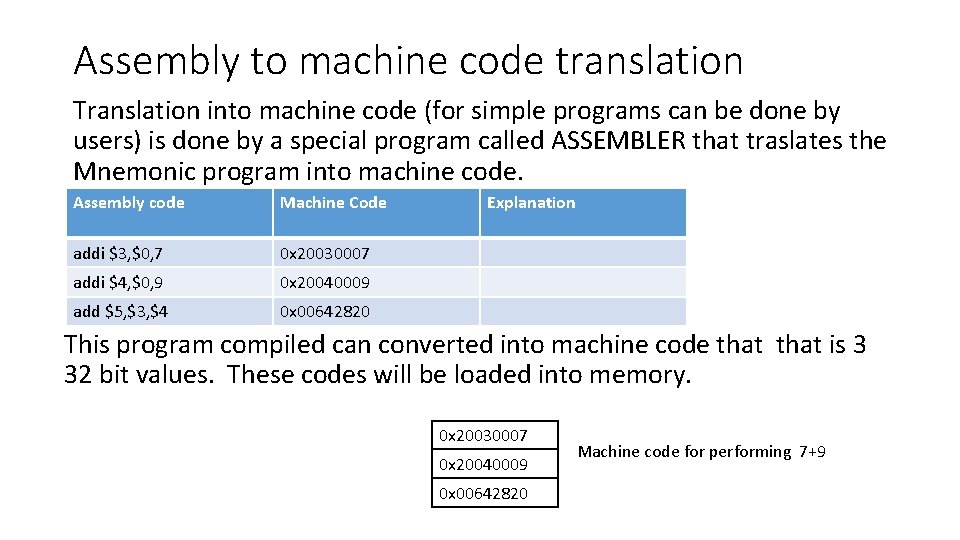
Assembly to machine code translation Translation into machine code (for simple programs can be done by users) is done by a special program called ASSEMBLER that traslates the Mnemonic program into machine code. Assembly code Machine Code addi $3, $0, 7 0 x 20030007 addi $4, $0, 9 0 x 20040009 add $5, $3, $4 0 x 00642820 Explanation This program compiled can converted into machine code that is 3 32 bit values. These codes will be loaded into memory. 0 x 20030007 0 x 20040009 0 x 00642820 Machine code for performing 7+9
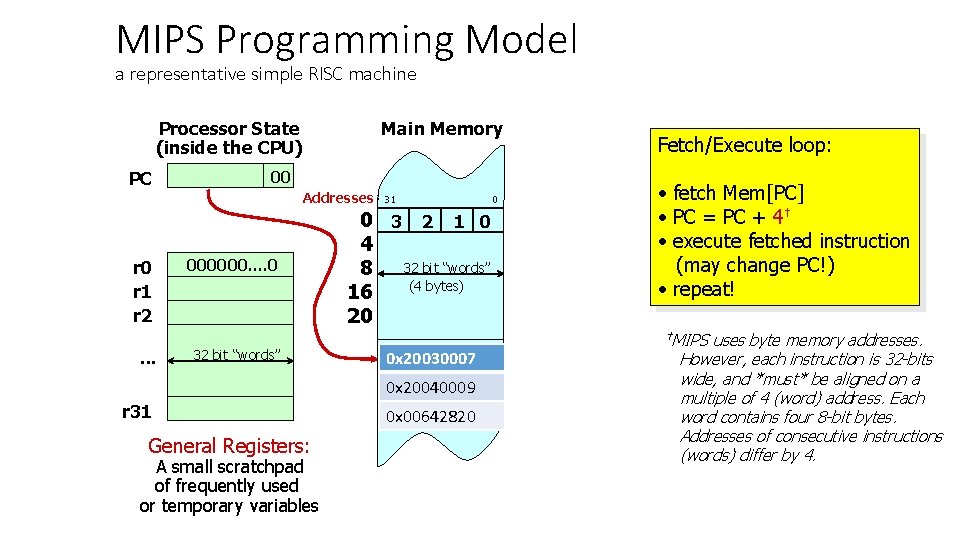
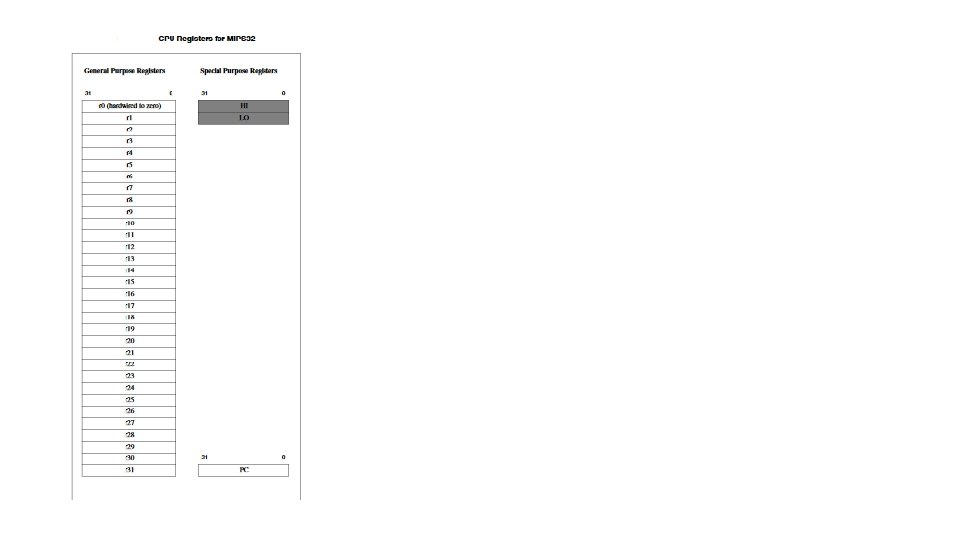
MIPS Programming Model a representative simple RISC machine Processor State (inside the CPU) PC Main Memory 00 Addresses r 0 r 1 r 2. . . 000000. . 0 32 bit “words” 31 0 3 2 1 0 4 32 bit “words” 8 (4 bytes) 16 20 next instruction 0 x 20030007 0 x 20040009 r 31 General Registers: A small scratchpad of frequently used or temporary variables 0 x 00642820 0 Fetch/Execute loop: • fetch Mem[PC] • PC = PC + 4† • execute fetched instruction (may change PC!) • repeat! †MIPS uses byte memory addresses. However, each instruction is 32 -bits wide, and *must* be aligned on a multiple of 4 (word) address. Each word contains four 8 -bit bytes. Addresses of consecutive instructions (words) differ by 4.
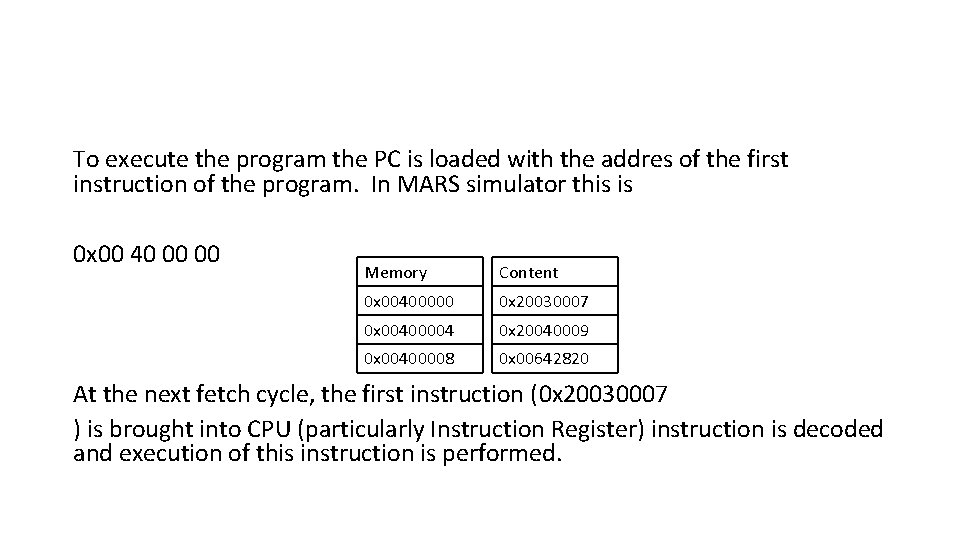
To execute the program the PC is loaded with the addres of the first instruction of the program. In MARS simulator this is 0 x 00 40 00 00 Memory Content 0 x 00400000 0 x 20030007 0 x 00400004 0 x 20040009 0 x 00400008 0 x 00642820 At the next fetch cycle, the first instruction (0 x 20030007 ) is brought into CPU (particularly Instruction Register) instruction is decoded and execution of this instruction is performed.
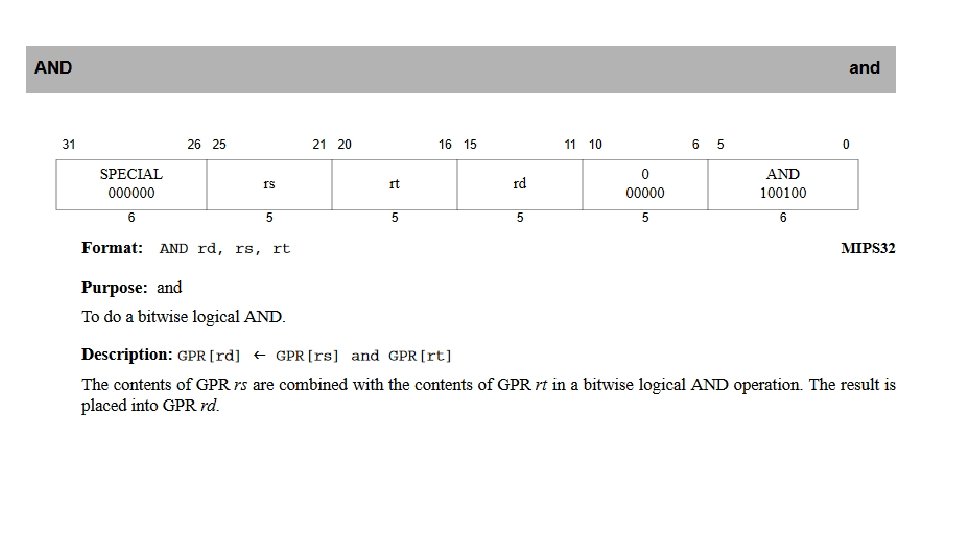
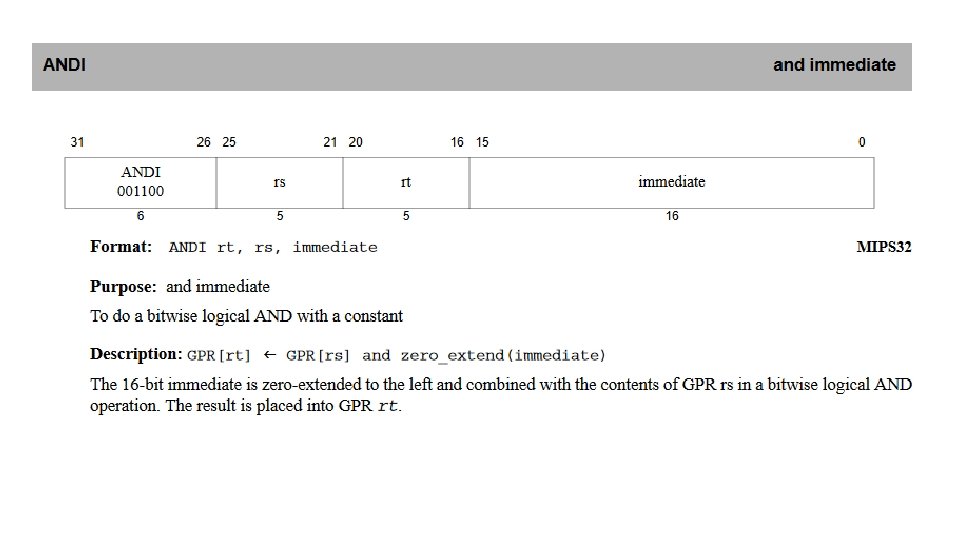
The Power of the Stored Program • • • 32 -bit instructions and data stored in memory Sequence of instructions: only difference between two applications (for example, a text editor and a video game) To run a new program: – No rewiring required – Simply store new program in memory • The processor hardware executes the program: – fetches (reads) the instructions from memory in sequence – performs the specified operation • • The program counter (PC) keeps track of the current instruction In MIPS, programs typically start at memory address 0 x 00400000
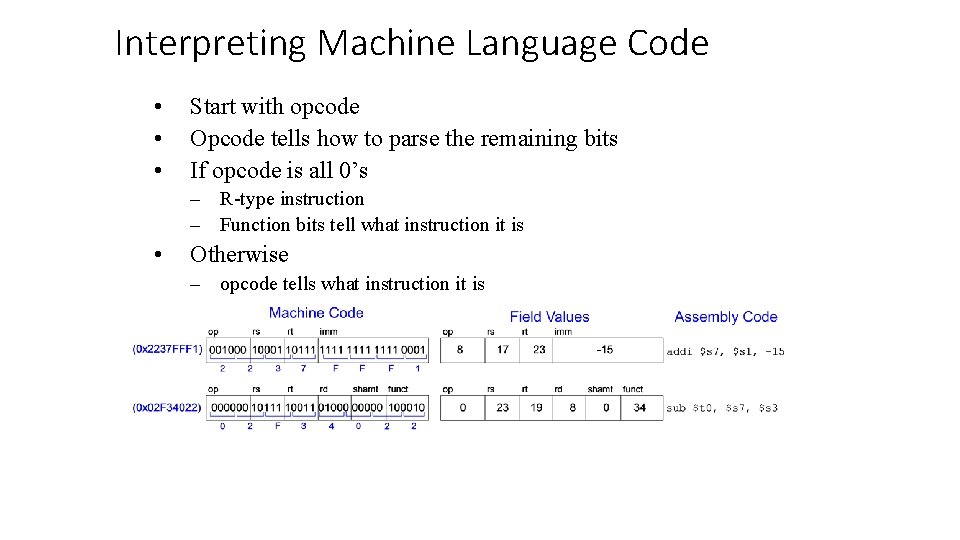
Interpreting Machine Language Code • • • Start with opcode Opcode tells how to parse the remaining bits If opcode is all 0’s – R-type instruction – Function bits tell what instruction it is • Otherwise – opcode tells what instruction it is
Logical Instruction Examples
Logical Instruction Examples
Logical Instruction Examples
Logical Instruction Examples
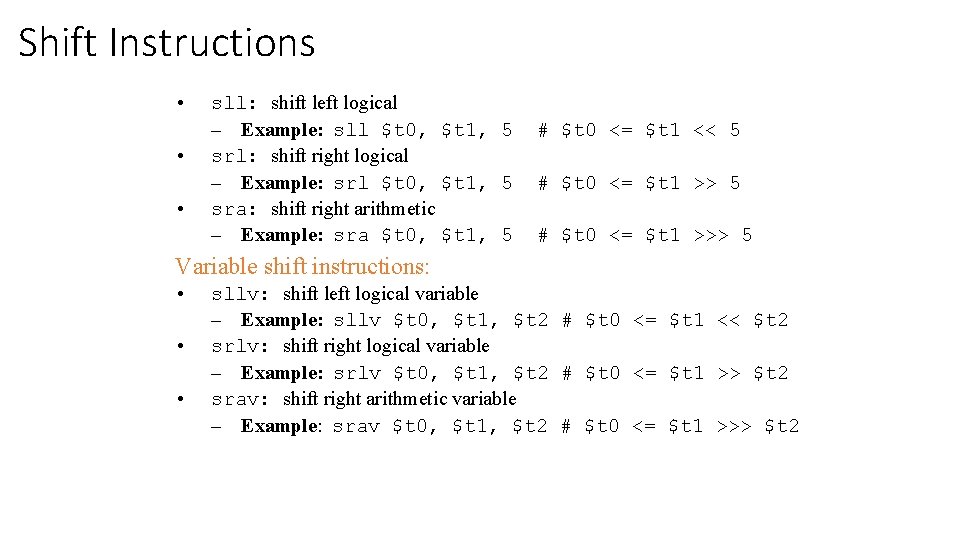
Shift Instructions • • • sll: shift left logical – Example: sll $t 0, $t 1, 5 srl: shift right logical – Example: srl $t 0, $t 1, 5 sra: shift right arithmetic – Example: sra $t 0, $t 1, 5 # $t 0 <= $t 1 << 5 # $t 0 <= $t 1 >>> 5 Variable shift instructions: • • • sllv: shift left logical variable – Example: sllv $t 0, $t 1, $t 2 # $t 0 <= $t 1 << $t 2 srlv: shift right logical variable – Example: srlv $t 0, $t 1, $t 2 # $t 0 <= $t 1 >> $t 2 srav: shift right arithmetic variable – Example: srav $t 0, $t 1, $t 2 # $t 0 <= $t 1 >>> $t 2
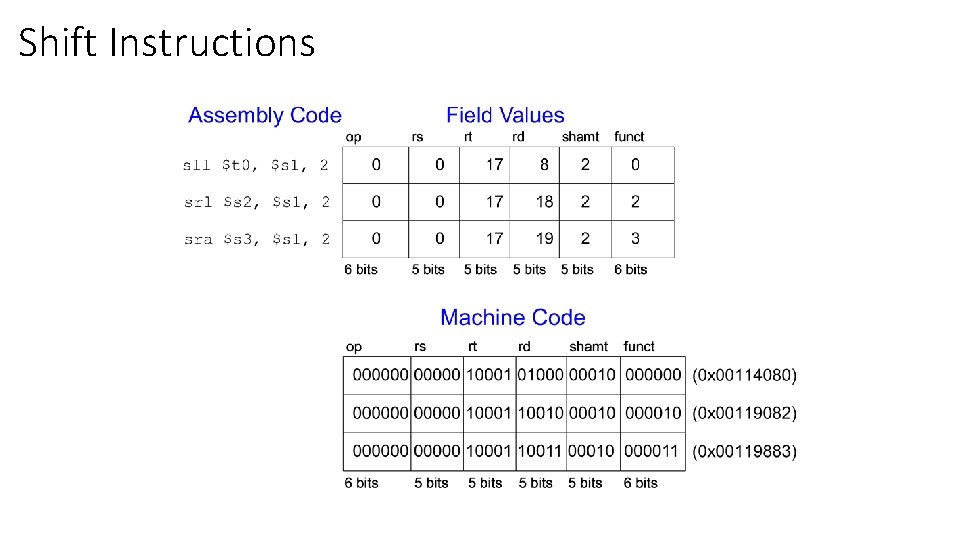
Shift Instructions
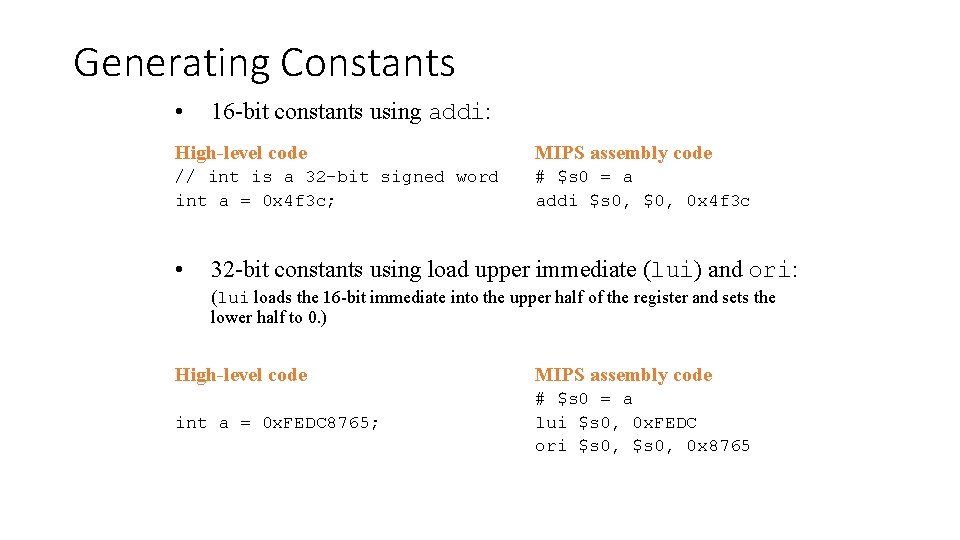
Generating Constants • 16 -bit constants using addi: High-level code MIPS assembly code // int is a 32 -bit signed word int a = 0 x 4 f 3 c; # $s 0 = a addi $s 0, $0, 0 x 4 f 3 c • 32 -bit constants using load upper immediate (lui) and ori: (lui loads the 16 -bit immediate into the upper half of the register and sets the lower half to 0. ) High-level code MIPS assembly code int a = 0 x. FEDC 8765; # $s 0 = a lui $s 0, 0 x. FEDC ori $s 0, 0 x 8765
Memory Access Instructions How to copy data from memory into registers, and how to copy data to memory from registers.
Load and Store instructions The MIPS architecture is a Load/Store architecture, which means that the only instructions that access main memory are the load and store instructions. Only one addressing mode is implemented in the hardware.
Load and Store The operands for all arithmetic and logic operations are contained in registers. To operate on data in main memory, the data is first copied into registers. A load operation copies data from main memory into a register. A store operation copies data from a register into main memory. When a word (4 bytes) is loaded or stored the memory address must be a multiple of four. This is called an alignment restriction. Addresses that are a multiple of four are called word aligned. This restriction makes the hardware simpler and faster.
word aligned How can you multiply by four in binary? By shifting left 2 positions. Therefore a multiple of 4 looks like some N shifted left two positions. So the low order two bits of a multiple of 4 are both 0. 0 x 000 AE 430 0 x 00014432 0 x 000 B 0737 0 x 0 E 0 D 8844 Yes. No. Yes.
lw and sw instructions The lw instruction loads a word into a register from memory. The sw instruction stores a word from a register into memory. Each instruction specifies a register and a memory address.
MIPS Addresses The MIPS instruction that loads a word into a register is the lw instruction. The store word instruction is sw. Each must specify a register and a memory address. A MIPS instruction is 32 bits (always). A MIPS memory address is 32 bits (always). How can a load or store instruction specify an address that is the same size as itself? An instruction that refers to memory uses a base register and an offset(ordisplacement). The base register is a general purpose register that contains a 32 -bit address. The offset is a 16 -bit signed integer contained in the instruction. The sum of the address in the base register with the (sign-extended) offset forms the memory address.
Example Load word instruction in assembly language: lw $d, off($b) # $d <-- Word from memory address b+off # $b is a register. off is 16 -bit two's complement. # (The data from memory is available in $d after # a one machine cycle delay. ) At execution time two things happen: 1. an address is calculated by adding the base register b with the offset off, and 2. data is fetched from memory at that address. The base address is always the content of one of the registers in the register file. The displacement is always a 16 -bit constant. The constant value can range from - 32, 768 (-2^16 ) to + 32, 764 ( (2^16) - 4 )
Example Following example the instruction loads the word at address 0 x 00400060 into register $6. Assume that register $7 contains 0 x 00400000. 0 x 00400060 --- address of data 0 x 00400000 --- address in $10 $8 --- destination register The instruction is: lw $6, 0 x 60($7) # $6<----Memory[0 x 60+$7]
store word instruction sw $s 1, 12( $a 0 ) • When the hardware executes this instruction it will compute the effective address of the destination memory location by adding together the contents of register $a 0 and the constant value 12 Mem [ $a 0 + 12] <- $s 1 • A copy of the contents of register $s 1 is stored in memory at the effective address.
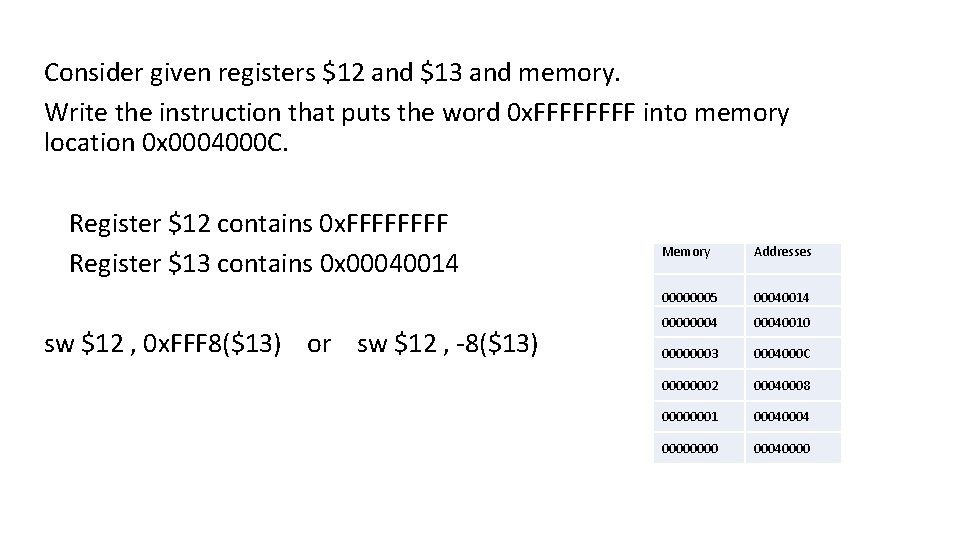
Consider given registers $12 and $13 and memory. Write the instruction that puts the word 0 x. FFFF into memory location 0 x 0004000 C. Register $12 contains 0 x. FFFF Register $13 contains 0 x 00040014 sw $12 , 0 x. FFF 8($13) or sw $12 , -8($13) Memory Addresses 00000005 00040014 000000040010 00000003 0004000 C 00000002 00040008 00000001 0004 0000 00040000
How to initialize the Base Register(32 -bits) By using a 32 -bit base register and an offset a 32 -bit lw or sw instruction can reference all of memory. But how does the base address get into the base register? This is where the lui (load upper immediate) instruction is useful. It copies its 16 -bit immediate operand to the upper two bytes of the designated register. lui $d, const # upper two bytes of $d <— two byte const # lower two bytes of $d <— 0 x 0000
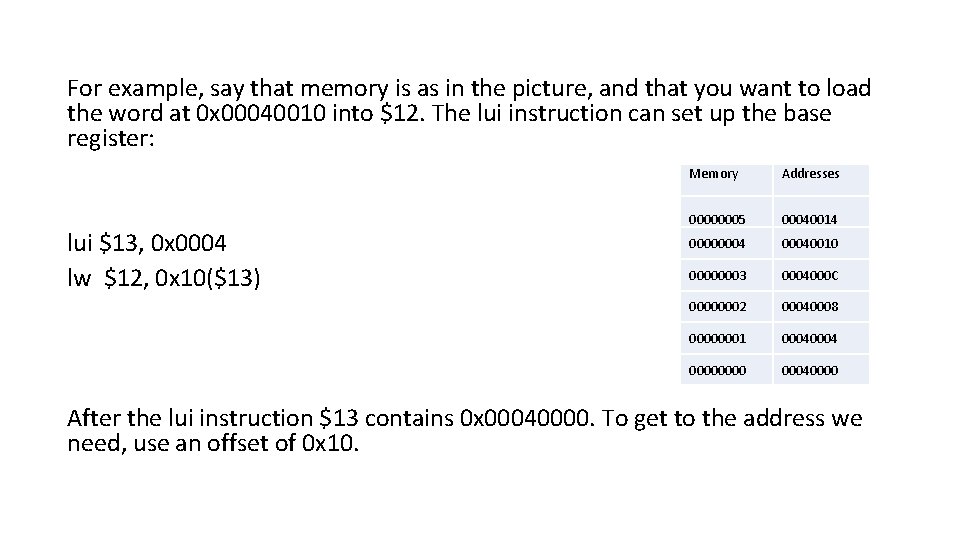
For example, say that memory is as in the picture, and that you want to load the word at 0 x 00040010 into $12. The lui instruction can set up the base register: lui $13, 0 x 0004 lw $12, 0 x 10($13) Memory Addresses 00000005 00040014 000000040010 00000003 0004000 C 00000002 00040008 00000001 0004 0000 00040000 After the lui instruction $13 contains 0 x 00040000. To get to the address we need, use an offset of 0 x 10.
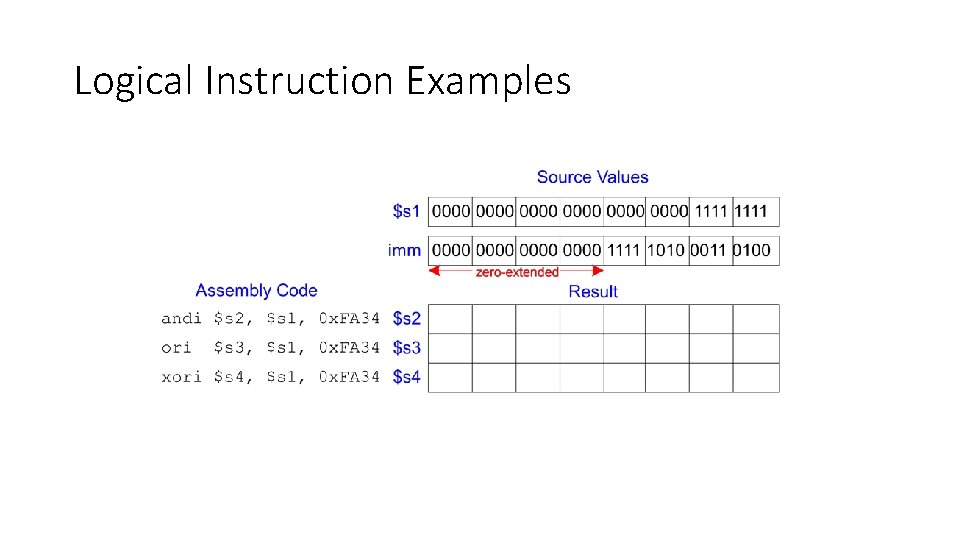
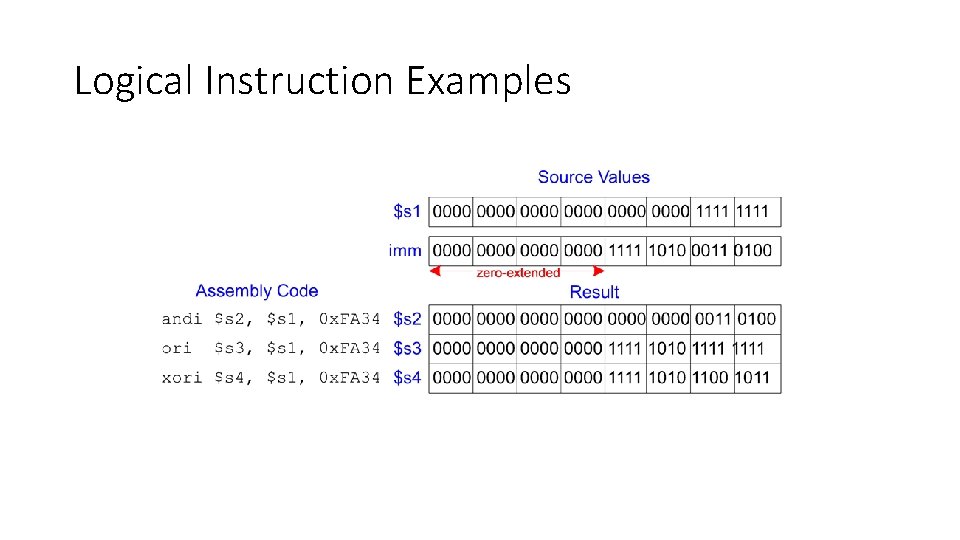
Filling in the bottom Half By using the lui instruction, the base register can be loaded with multiples of 0 x 00010000. But often you want a more specific address in the base register. Use the ori instruction to fill the bottom 16 bits. ori $d, $s, imm zero-extends imm to 32 bits then does a bitwise OR of that with the contents of register $s. The result goes into register $d.
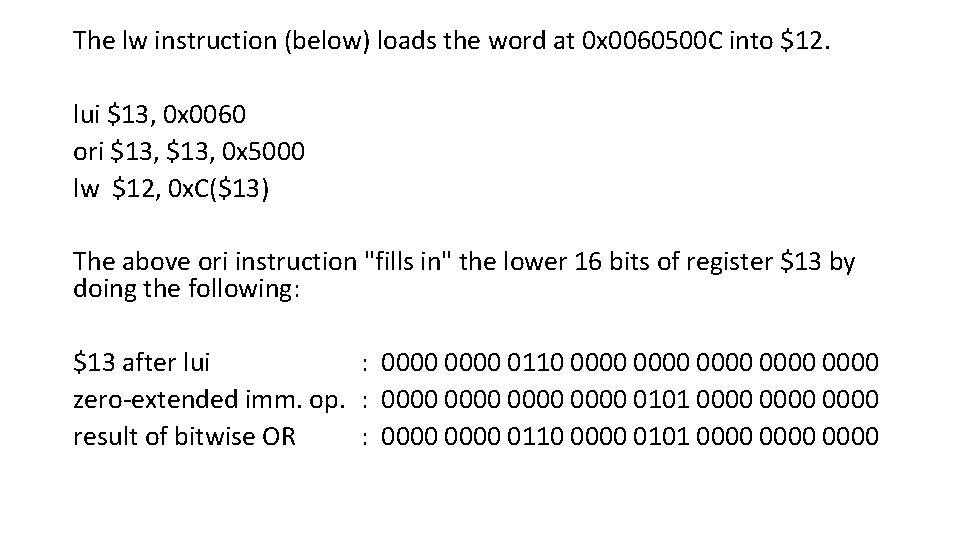
The lw instruction (below) loads the word at 0 x 0060500 C into $12. lui $13, 0 x 0060 ori $13, 0 x 5000 lw $12, 0 x. C($13) The above ori instruction "fills in" the lower 16 bits of register $13 by doing the following: $13 after lui : 0000 0110 0000 0000 zero-extended imm. op. : 0000 0101 0000 result of bitwise OR : 0000 0110 0000 0101 0000
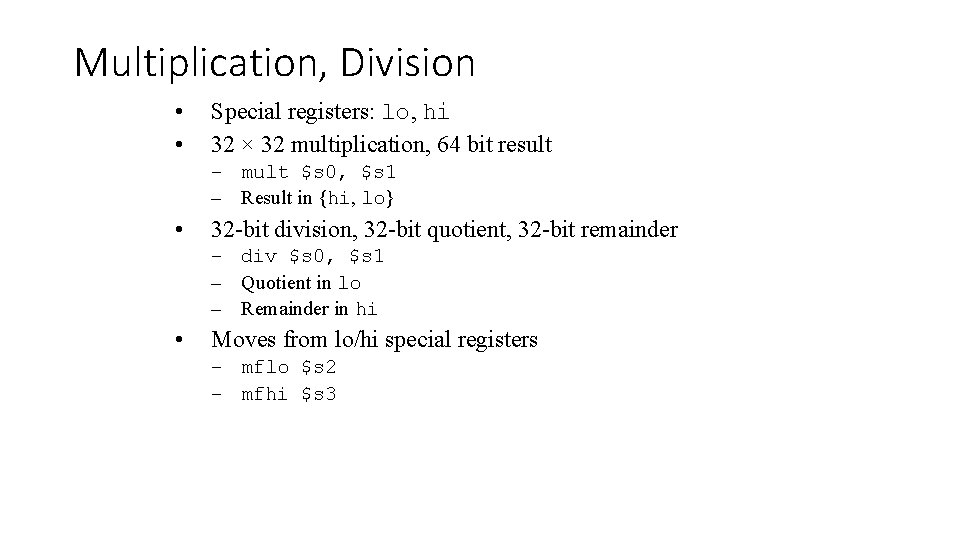
Multiplication, Division • • Special registers: lo, hi 32 × 32 multiplication, 64 bit result – mult $s 0, $s 1 – Result in {hi, lo} • 32 -bit division, 32 -bit quotient, 32 -bit remainder – div $s 0, $s 1 – Quotient in lo – Remainder in hi • Moves from lo/hi special registers – mflo $s 2 – mfhi $s 3
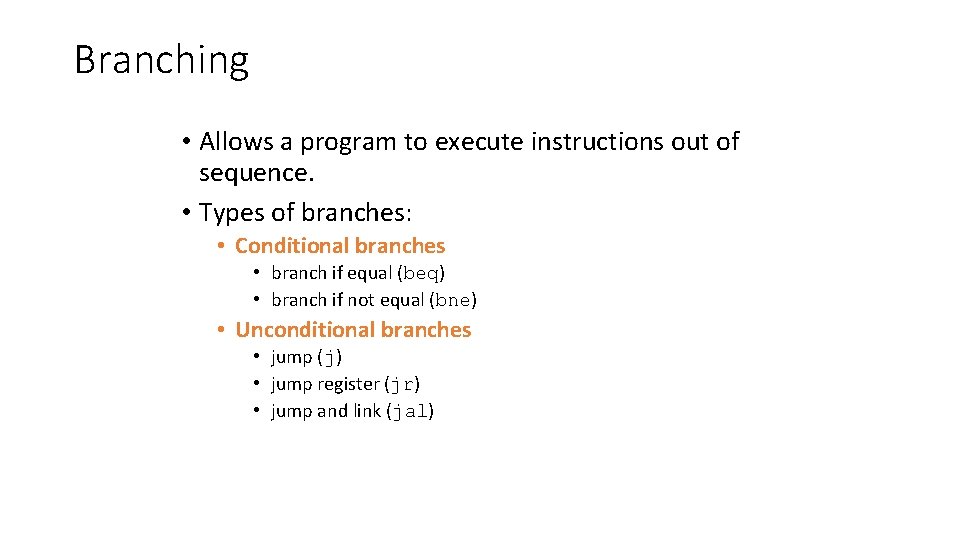
Branching • Allows a program to execute instructions out of sequence. • Types of branches: • Conditional branches • branch if equal (beq) • branch if not equal (bne) • Unconditional branches • jump (j) • jump register (jr) • jump and link (jal)
Review: The Stored Program
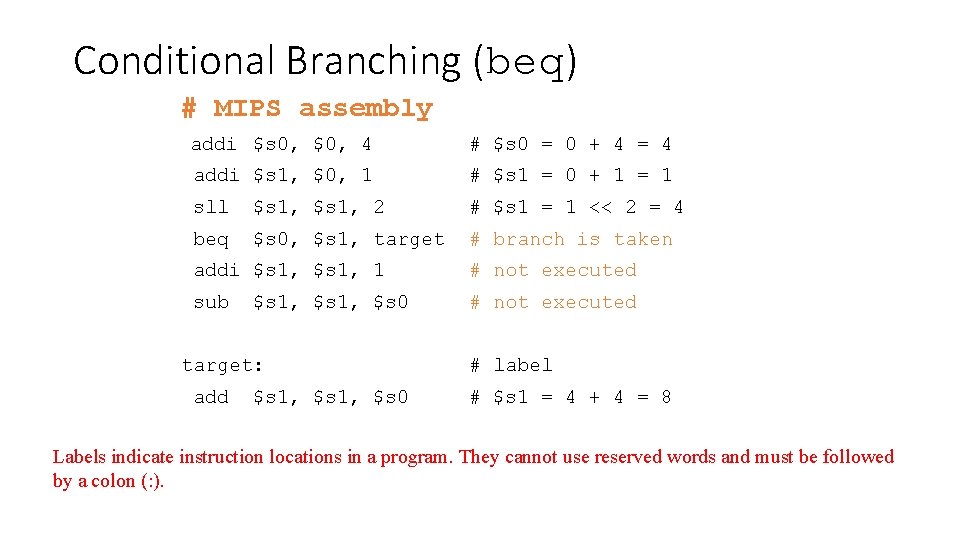
Conditional Branching (beq) # MIPS assembly addi $s 0, $0, 4 # $s 0 = 0 + 4 = 4 addi $s 1, $0, 1 # $s 1 = 0 + 1 = 1 sll $s 1, 2 # $s 1 = 1 << 2 = 4 beq $s 0, $s 1, target # branch is taken addi $s 1, 1 # not executed sub # not executed $s 1, $s 0 target: add $s 1, $s 0 # label # $s 1 = 4 + 4 = 8 Labels indicate instruction locations in a program. They cannot use reserved words and must be followed by a colon (: ).
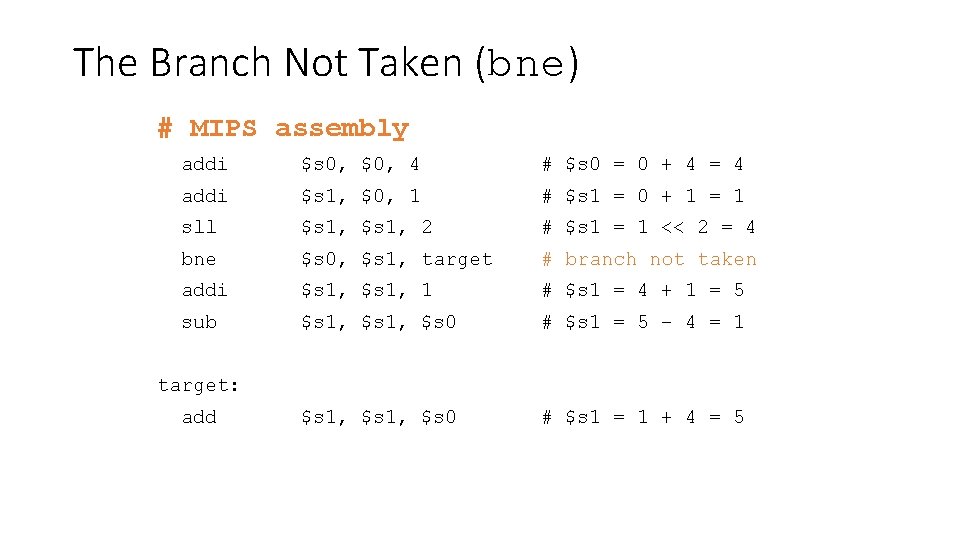
The Branch Not Taken (bne) # MIPS assembly addi $s 0, $0, 4 # $s 0 = 0 + 4 = 4 addi $s 1, $0, 1 # $s 1 = 0 + 1 = 1 sll $s 1, 2 # $s 1 = 1 << 2 = 4 bne $s 0, $s 1, target # branch not taken addi $s 1, 1 # $s 1 = 4 + 1 = 5 sub $s 1, $s 0 # $s 1 = 5 – 4 = 1 $s 1, $s 0 # $s 1 = 1 + 4 = 5 target: add
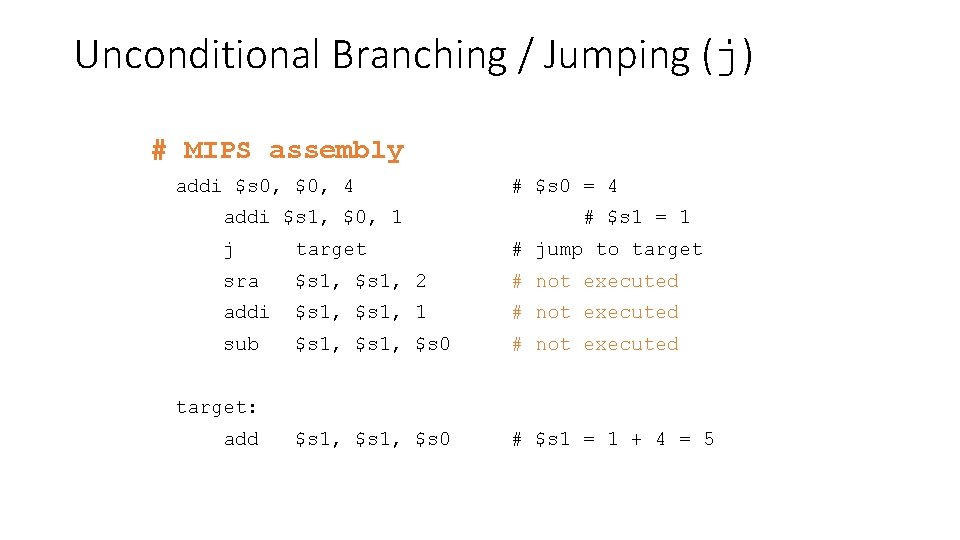
Unconditional Branching / Jumping (j) # MIPS assembly addi $s 0, $0, 4 addi $s 1, $0, 1 # $s 0 = 4 # $s 1 = 1 j target # jump to target sra $s 1, 2 # not executed addi $s 1, 1 # not executed sub $s 1, $s 0 # not executed $s 1, $s 0 # $s 1 = 1 + 4 = 5 target: add
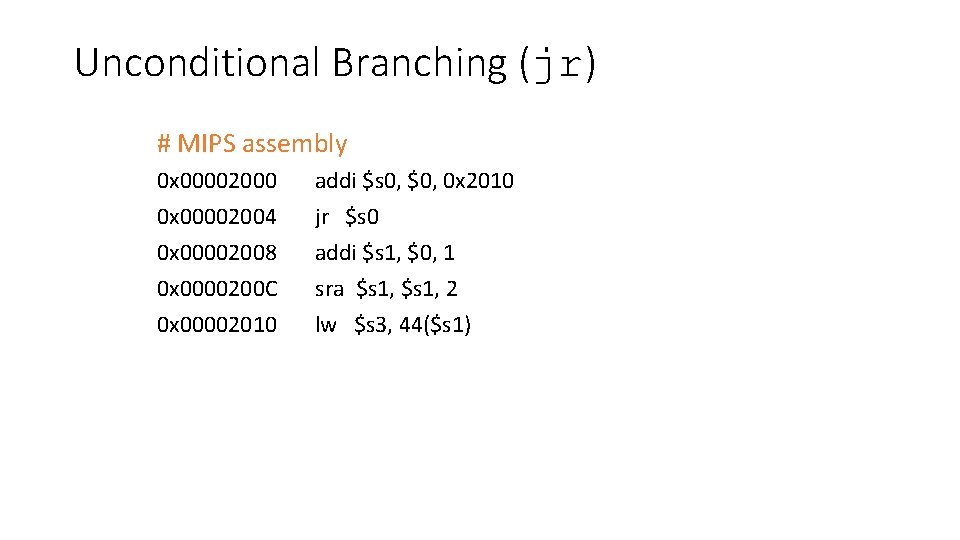
Unconditional Branching (jr) # MIPS assembly 0 x 00002000 0 x 00002004 0 x 00002008 0 x 0000200 C 0 x 00002010 addi $s 0, $0, 0 x 2010 jr $s 0 addi $s 1, $0, 1 sra $s 1, 2 lw $s 3, 44($s 1)
High-Level Code Constructs • if statements • if/else statements • while loops • for loops
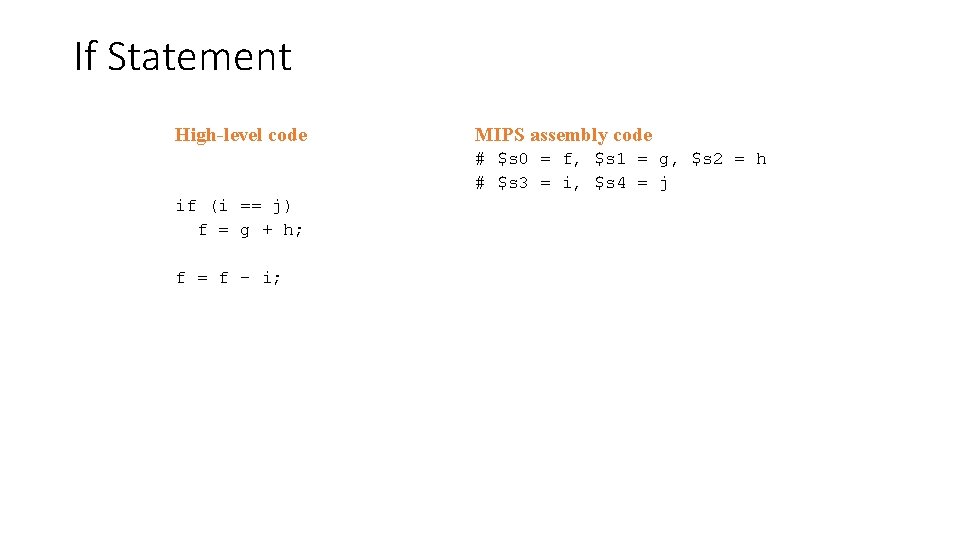
If Statement High-level code MIPS assembly code # $s 0 = f, $s 1 = g, $s 2 = h # $s 3 = i, $s 4 = j if (i == j) f = g + h; f = f – i;
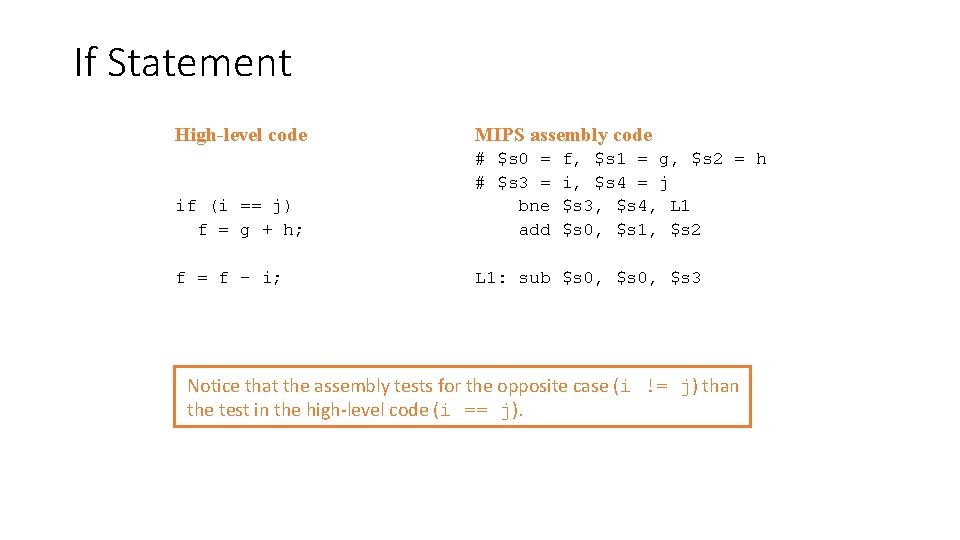
If Statement High-level code MIPS assembly code if (i == j) f = g + h; # $s 0 = # $s 3 = bne add f = f – i; L 1: sub $s 0, $s 3 f, $s 1 = g, $s 2 = h i, $s 4 = j $s 3, $s 4, L 1 $s 0, $s 1, $s 2 Notice that the assembly tests for the opposite case (i != j) than the test in the high-level code (i == j).
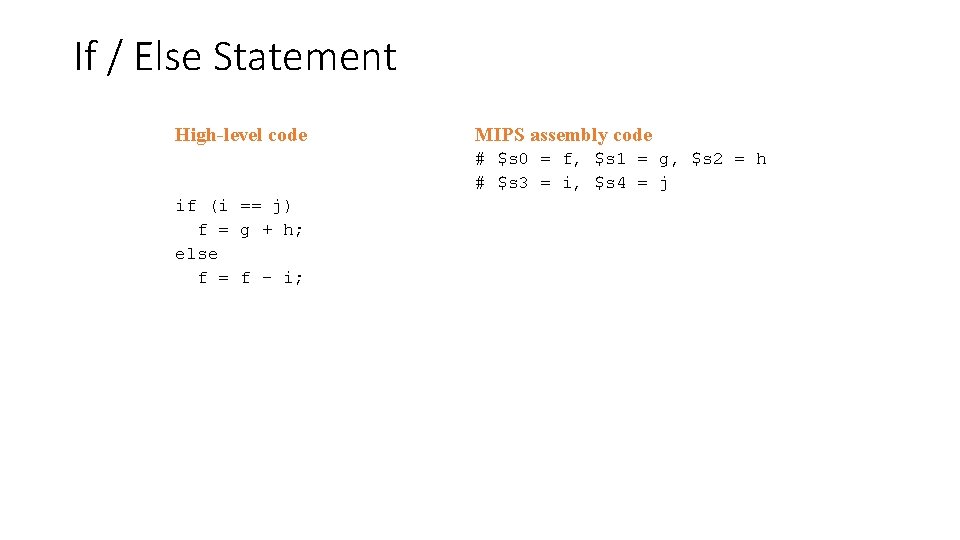
If / Else Statement High-level code MIPS assembly code # $s 0 = f, $s 1 = g, $s 2 = h # $s 3 = i, $s 4 = j if (i == j) f = g + h; else f = f – i;
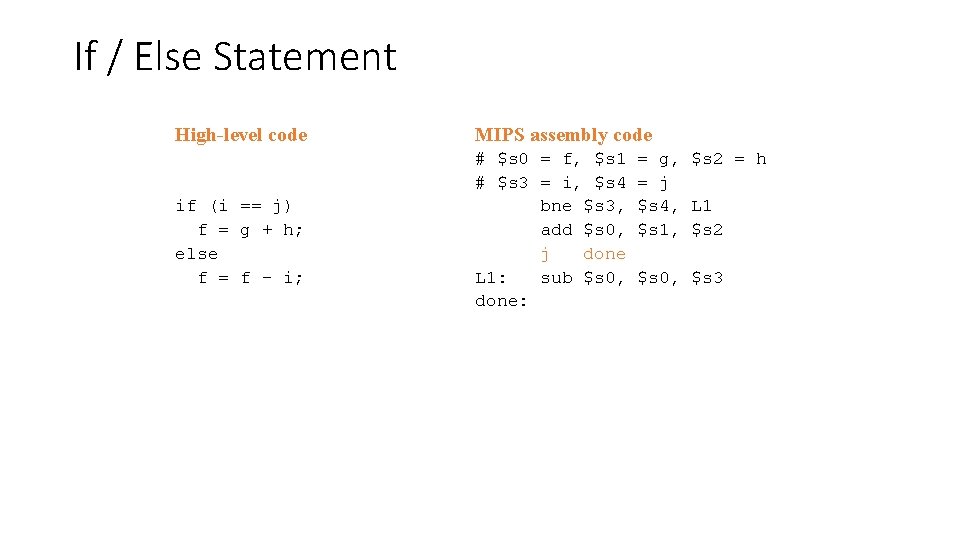
If / Else Statement High-level code if (i == j) f = g + h; else f = f – i; MIPS assembly code # $s 0 = f, $s 1 # $s 3 = i, $s 4 bne $s 3, add $s 0, j done L 1: sub $s 0, done: = g, $s 2 = h = j $s 4, L 1 $s 1, $s 2 $s 0, $s 3
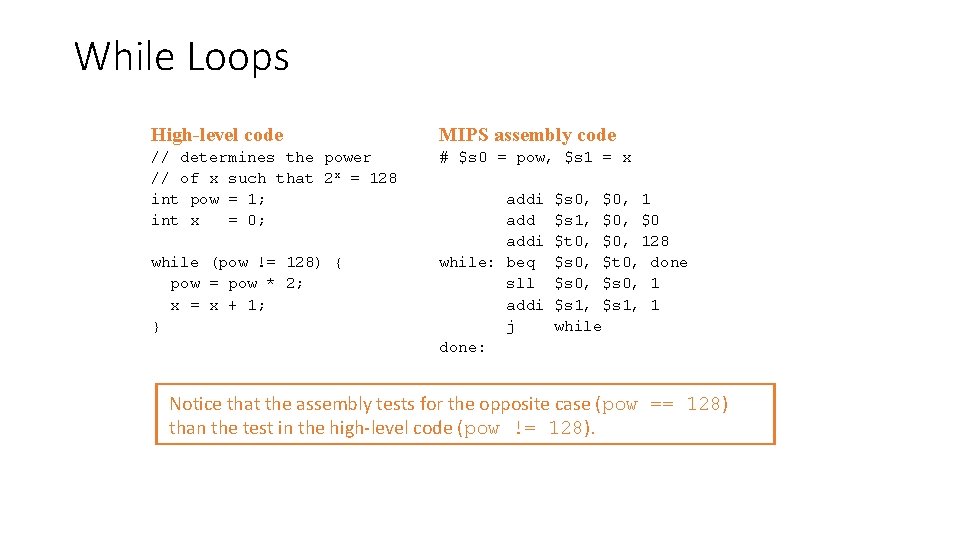
While Loops High-level code MIPS assembly code // determines the power // of x such that 2 x = 128 int pow = 1; int x = 0; # $s 0 = pow, $s 1 = x while (pow != 128) { pow = pow * 2; x = x + 1; } addi while: beq sll addi j done: $s 0, $0, 1 $s 1, $0 $t 0, $0, 128 $s 0, $t 0, done $s 0, 1 $s 1, 1 while Notice that the assembly tests for the opposite case (pow == 128) than the test in the high-level code (pow != 128).
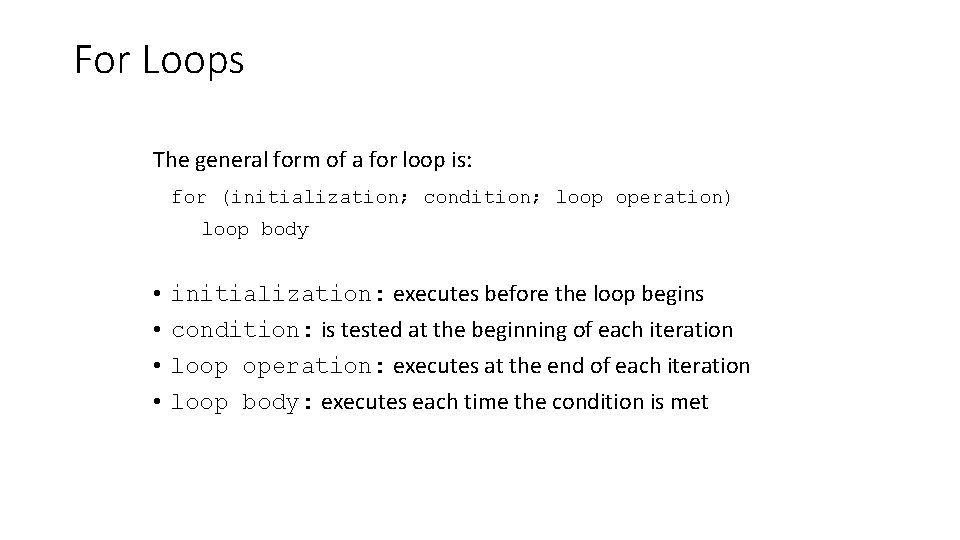
For Loops The general form of a for loop is: for (initialization; condition; loop operation) loop body • • initialization: executes before the loop begins condition: is tested at the beginning of each iteration loop operation: executes at the end of each iteration loop body: executes each time the condition is met
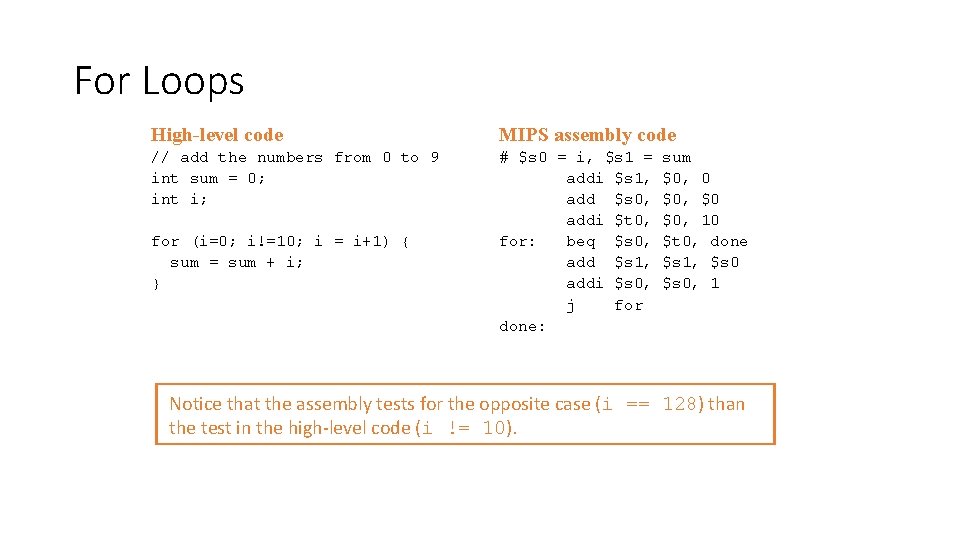
For Loops High-level code MIPS assembly code // add the numbers from 0 to 9 int sum = 0; int i; # $s 0 = i, $s 1 = addi $s 1, add $s 0, addi $t 0, for: beq $s 0, add $s 1, addi $s 0, j for done: for (i=0; i!=10; i = i+1) { sum = sum + i; } sum $0, 0 $0, $0 $0, 10 $t 0, done $s 1, $s 0, 1 Notice that the assembly tests for the opposite case (i == 128) than the test in the high-level code (i != 10).
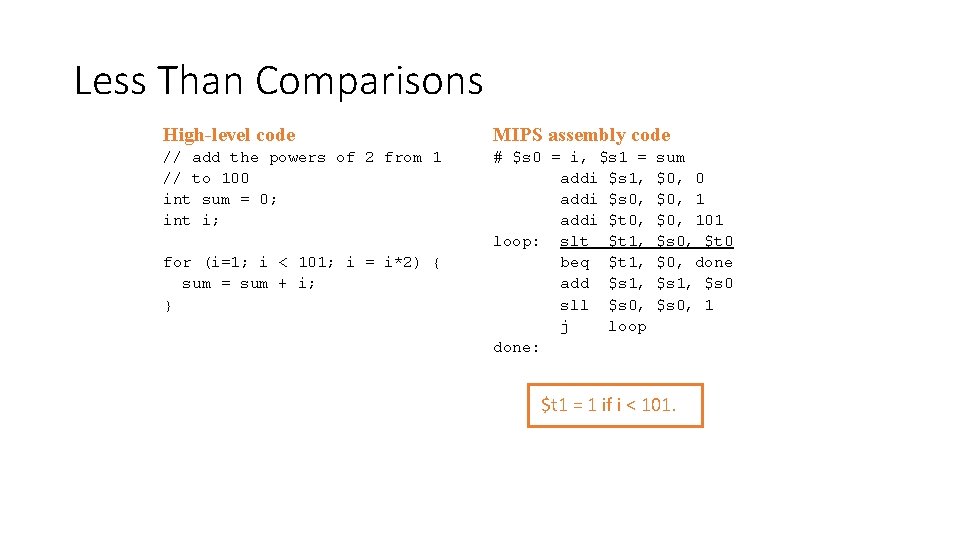
Less Than Comparisons High-level code MIPS assembly code // add the powers of 2 from 1 // to 100 int sum = 0; int i; # $s 0 = i, $s 1 = addi $s 1, addi $s 0, addi $t 0, loop: slt $t 1, beq $t 1, add $s 1, sll $s 0, j loop done: for (i=1; i < 101; i = i*2) { sum = sum + i; } sum $0, 0 $0, 101 $s 0, $t 0 $0, done $s 1, $s 0, 1 $t 1 = 1 if i < 101.
Arrays • Useful for accessing large amounts of similar data • Array element: accessed by index • Array size: number of elements in the array
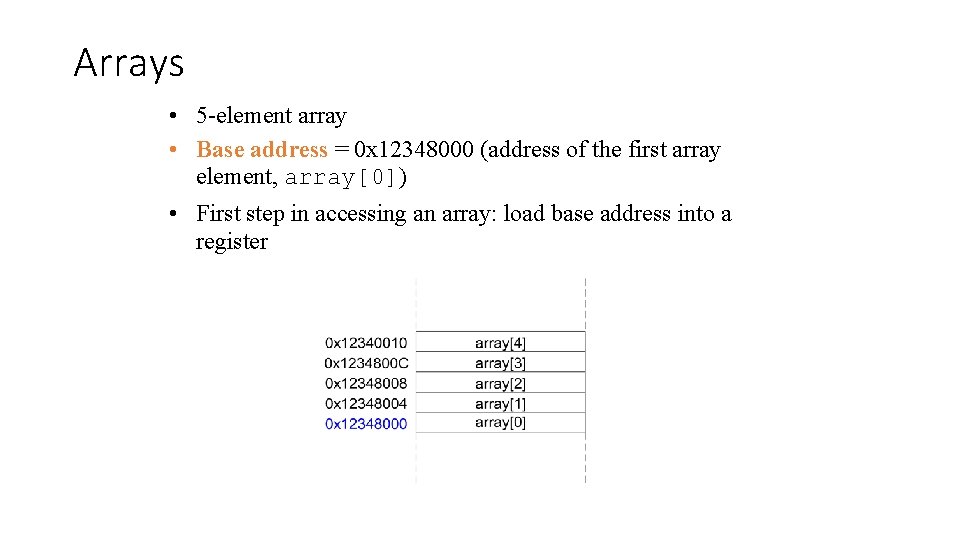
Arrays • 5 -element array • Base address = 0 x 12348000 (address of the first array element, array[0]) • First step in accessing an array: load base address into a register
![Arrays // high-level code int array[5]; array[0] = array[0] * 2; array[1] = array[1]](http://slidetodoc.com/presentation_image_h2/9635a0c0892ff17f6041551424949935/image-57.jpg "Arrays // high-level code int array[5]; array[0] = array[0] * 2; array[1] = array[1]")
Arrays // high-level code int array[5]; array[0] = array[0] * 2; array[1] = array[1] * 2; # MIPS assembly code # array base address = $s 0 lui $s 0, 0 x 1234 # put 0 x 1234 in upper half of $S 0 ori $s 0, 0 x 8000 # put 0 x 8000 in lower half of $s 0 lw $t 1, 0($s 0) # $t 1 = array[0] sll $t 1, 1 # $t 1 = $t 1 * 2 sw $t 1, 0($s 0) # array[0] = $t 1 lw $t 1, 4($s 0) # $t 1 = array[1] sll $t 1, 1 # $t 1 = $t 1 * 2 sw $t 1, 4($s 0) # array[1] = $t 1
![Arrays Using For Loops // high-level code int array[1000]; int i; for (i=0; i](http://slidetodoc.com/presentation_image_h2/9635a0c0892ff17f6041551424949935/image-58.jpg "Arrays Using For Loops // high-level code int array[1000]; int i; for (i=0; i")
Arrays Using For Loops // high-level code int array[1000]; int i; for (i=0; i < 1000; i = i + 1) array[i] = array[i] * 8; # MIPS assembly code # $s 0 = array base address, $s 1 = i
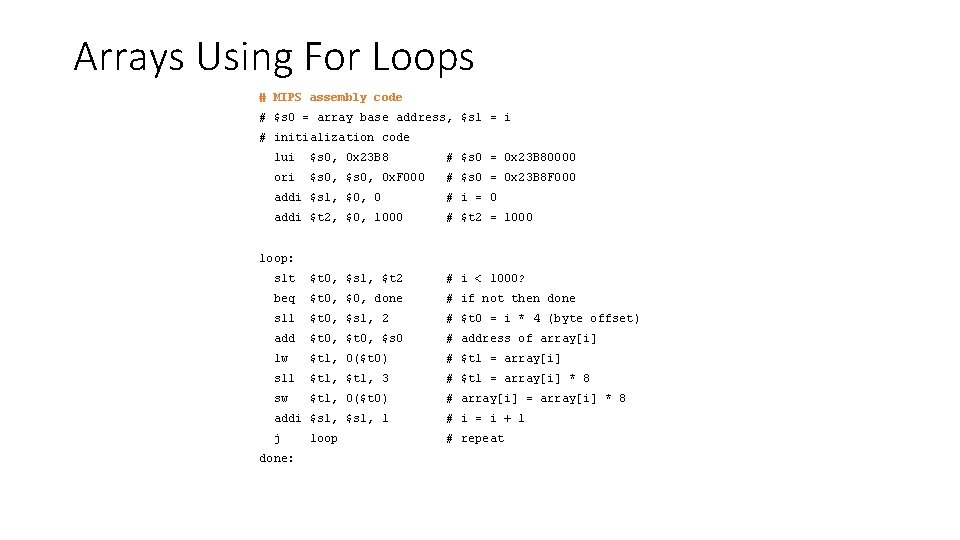
Arrays Using For Loops # MIPS assembly code # $s 0 = array base address, $s 1 = i # initialization code lui $s 0, 0 x 23 B 8 # $s 0 = 0 x 23 B 80000 ori $s 0, 0 x. F 000 # $s 0 = 0 x 23 B 8 F 000 addi $s 1, $0, 0 # i = 0 addi $t 2, $0, 1000 # $t 2 = 1000 loop: slt $t 0, $s 1, $t 2 # i < 1000? beq $t 0, $0, done # if not then done sll $t 0, $s 1, 2 # $t 0 = i * 4 (byte offset) add $t 0, $s 0 # address of array[i] lw $t 1, 0($t 0) # $t 1 = array[i] sll $t 1, 3 # $t 1 = array[i] * 8 sw $t 1, 0($t 0) # array[i] = array[i] * 8 addi $s 1, 1 # i = i + 1 j # repeat done: loop
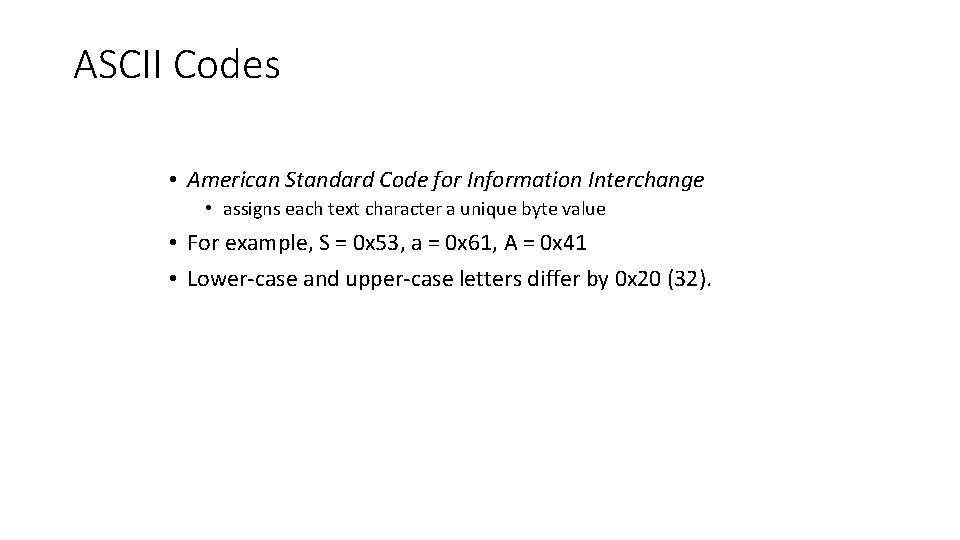
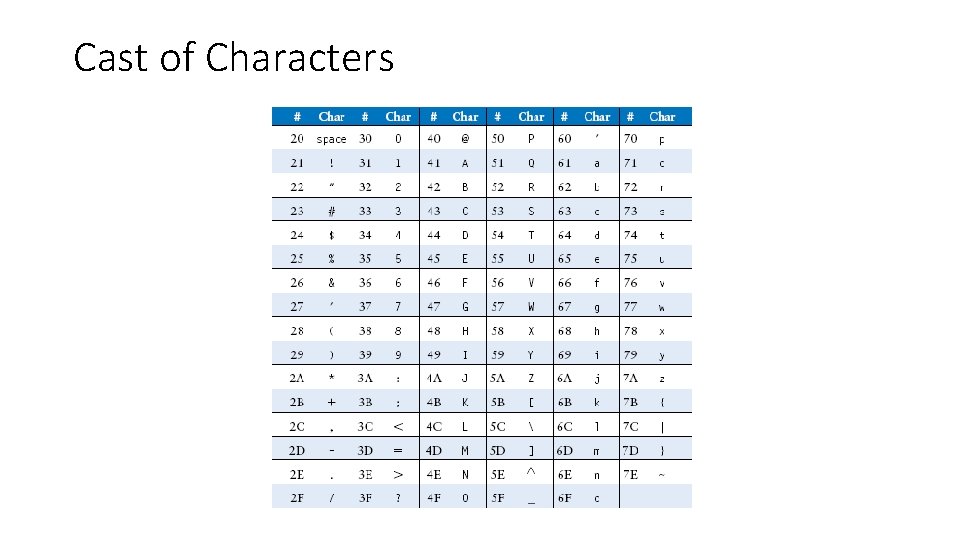
ASCII Codes • American Standard Code for Information Interchange • assigns each text character a unique byte value • For example, S = 0 x 53, a = 0 x 61, A = 0 x 41 • Lower-case and upper-case letters differ by 0 x 20 (32).
Cast of Characters 6 -<61>
- Slides: 61