
Mindmaps Graphical representation of the model and grid
- Slides: 2
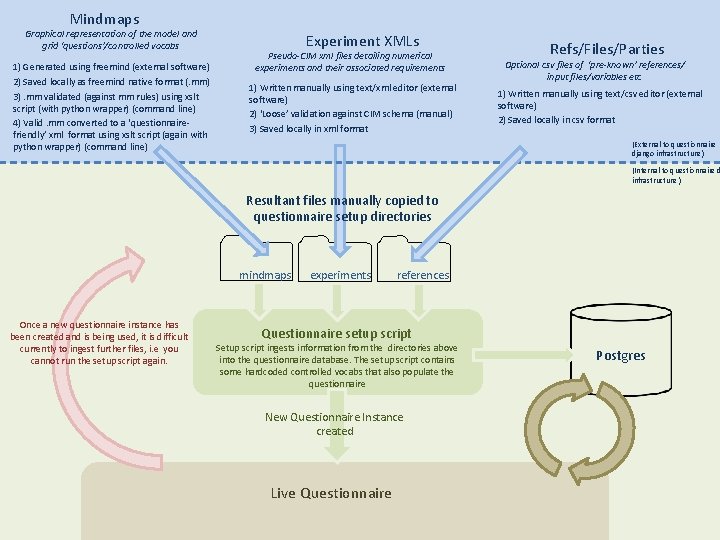
Mindmaps Graphical representation of the model and grid ‘questions’/controlled vocabs 1) Generated using freemind (external software) 2) Saved locally as freemind native format (. mm) 3). mm validated (against mm rules) using xslt script (with python wrapper) (command line) 4) Valid. mm converted to a ‘questionnairefriendly’ xml format using xslt script (again with python wrapper) (command line) Experiment XMLs Pseudo-CIM xml files detailing numerical experiments and their associated requirements 1) Written manually using text/xml editor (external software) 2) ‘Loose’ validation against CIM schema (manual) 3) Saved locally in xml format Refs/Files/Parties Optional csv files of ‘pre-known’ references/ input files/variables etc 1) Written manually using text/csv editor (external software) 2) Saved locally in csv format (External to questionnaire django infrastructure ) (Internal to questionnaire d infrastructure ) Resultant files manually copied to questionnaire setup directories mindmaps Once a new questionnaire instance has been created and is being used, it is difficult currently to ingest further files, i. e you cannot run the setup script again. experiments references Questionnaire setup script Setup script ingests information from the directories above into the questionnaire database. The setup script contains some hardcoded controlled vocabs that also populate the questionnaire New Questionnaire Instance created Live Questionnaire Postgres
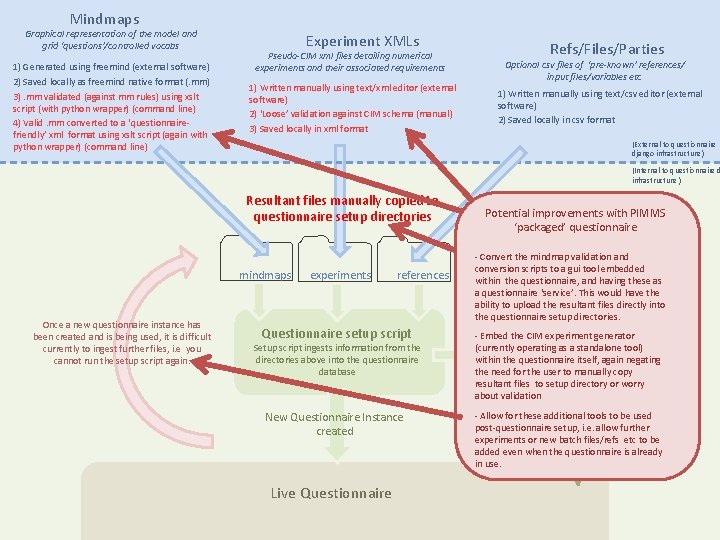
Mindmaps Graphical representation of the model and grid ‘questions’/controlled vocabs 1) Generated using freemind (external software) 2) Saved locally as freemind native format (. mm) 3). mm validated (against mm rules) using xslt script (with python wrapper) (command line) 4) Valid. mm converted to a ‘questionnairefriendly’ xml format using xslt script (again with python wrapper) (command line) Experiment XMLs Pseudo-CIM xml files detailing numerical experiments and their associated requirements 1) Written manually using text/xml editor (external software) 2) ‘Loose’ validation against CIM schema (manual) 3) Saved locally in xml format Refs/Files/Parties Optional csv files of ‘pre-known’ references/ input files/variables etc 1) Written manually using text/csv editor (external software) 2) Saved locally in csv format (External to questionnaire django infrastructure ) (Internal to questionnaire d infrastructure ) Resultant files manually copied to questionnaire setup directories mindmaps Once a new questionnaire instance has been created and is being used, it is difficult currently to ingest further files, i. e you cannot run the setup script again. experiments references Questionnaire setup script Setup script ingests information from the directories above into the questionnaire database New Questionnaire Instance created Live Questionnaire Potential improvements with PIMMS ‘packaged’ questionnaire - Convert the mindmap validation and conversion scripts to a gui tool embedded within the questionnaire, and having these as a questionnaire ‘service’. This would have the ability to upload the resultant files directly into the questionnaire setup directories. - Embed the CIM experiment generator (currently operating as a standalone tool) within the questionnaire itself, Postgres again negating the need for the user to manually copy resultant files to setup directory or worry about validation - Allow for these additional tools to be used post-questionnaire setup, i. e. allow further experiments or new batch files/refs etc to be added even when the questionnaire is already in use.