
MIKOGO WEB CONFERENCING SOFTWARE New Internet functionality available
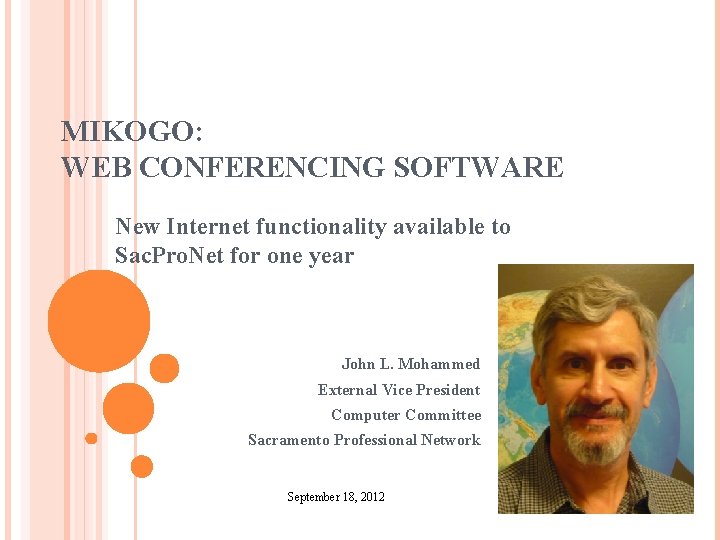
MIKOGO: WEB CONFERENCING SOFTWARE New Internet functionality available to Sac. Pro. Net for one year John L. Mohammed External Vice President Computer Committee Sacramento Professional Network September 18, 2012
9/18/2012 WHAT IS WEB CONFERENCING? Mikogo Web Conferencing It's a way for geographically separated people to interact over the web Generally, one person at a time can let all the other participants see the application(s) running on their computer Participants can also communicate via telephone conference, and chat windows Useful for: John L. Mohammed Meetings Presentations Technical Support 2
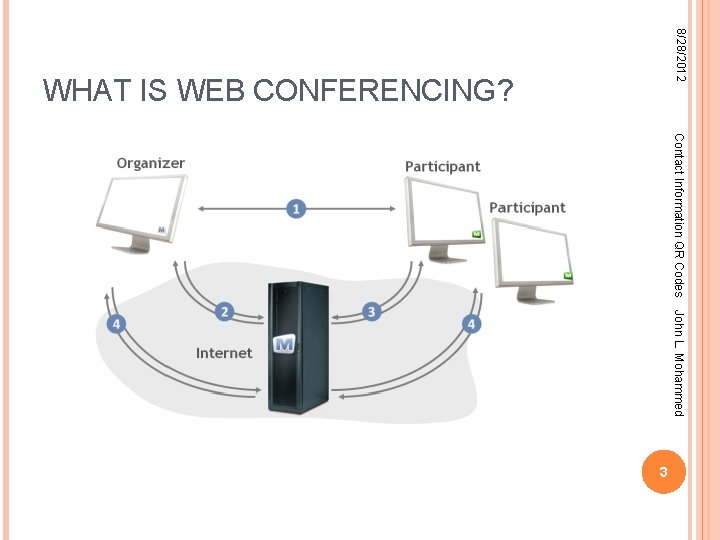
8/28/2012 WHAT IS WEB CONFERENCING? Contact Information QR Codes John L. Mohammed 3
9/18/2012 MIKOGO FEATURES Mikogo Web Conferencing Desktop Sharing ("presenter's" desktop is viewed by many other participants) Multiple Meeting Participants (up to 25) Switch Presenter Participants Remote keyboard and mouse control John L. Mohammed can take turns sharing their screens One participant can control the computer of another whose desktop is being shared HTML viewer participants do not have to download software using the HTML viewer reduces functionality 4
9/18/2012 MIKOGO FEATURES Whiteboard Mikogo Web Conferencing Presenter can draw and type text on the shared screen Presenter can allow other participants to draw and type text on the shared screen Useful for: highlighting areas of the document or application being viewed having "chalkboard" discussions John L. Mohammed Whiteboard drawings can be saved to keep a record of the discussion 5
9/18/2012 MIKOGO FEATURES Chat Mikogo Web Conferencing Participants can type notes into a chat window that are immediately shared with other users Notes can be shared with all participants, or directed at a particular participant Participant Pointer can use their own mouse to "point" at things on the shared screen: when they click their mouse a large pointer appears where they clicked that is visible to all participants John L. Mohammed Participants Emoticons Participants can set an emoticon that appears next to their name in the participant list 6
9/18/2012 MIKOGO FEATURES Session recording and playback Mikogo Web Conferencing Any participant can record the meeting for later playback, using a free "session player" Audio conferencing Participants John L. Mohammed can speak to each other via a free teleconference Involves a long-distance call to a within-state number: for some users, such calls are not free 7
9/18/2012 USING MIKOGO - DOWNLOAD SOFTWARE Mikogo Web Conferencing People can participate without downloading software, using the HTML Viewer Such participants can't become presenters or controllers, or use chat They CAN use the Participant Pointer and Whiteboard features For full functionality, the meeting organizer and primary presenter should download the Mikogo software John L. Mohammed 8

8/28/2012 DOWNLOAD MIKOGO SOFTWARE Contact Information QR Codes www. mikogo. com click Download John L. Mohammed 9
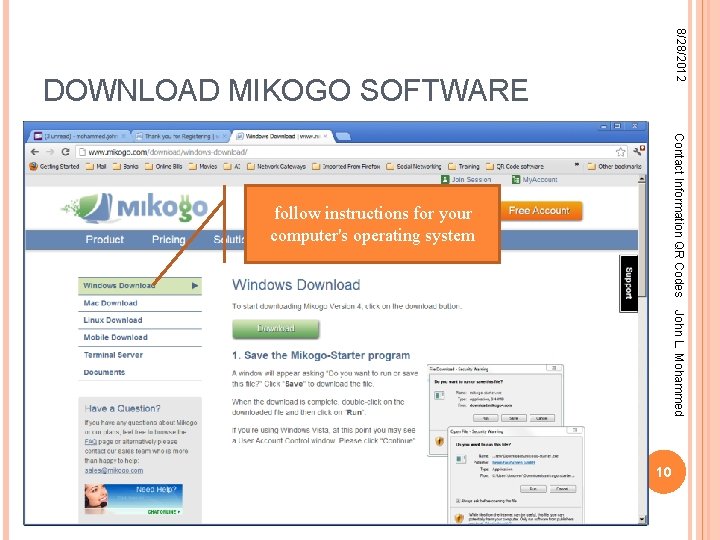
8/28/2012 DOWNLOAD MIKOGO SOFTWARE Contact Information QR Codes follow instructions for your computer's operating system John L. Mohammed 10
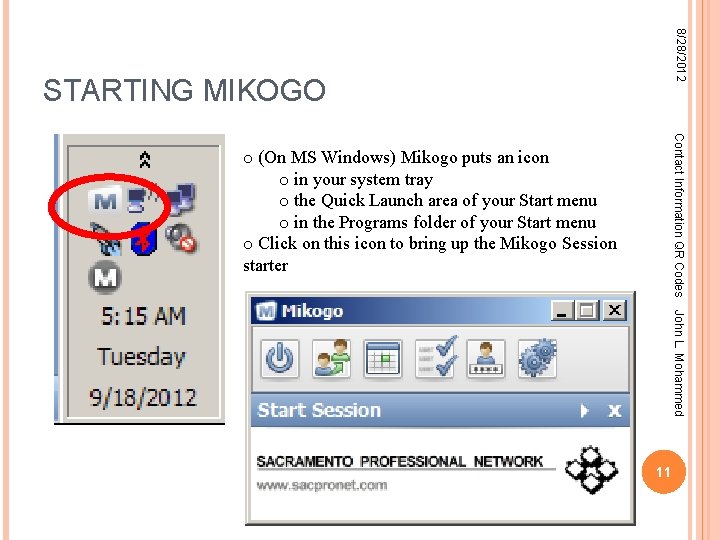
8/28/2012 STARTING MIKOGO Contact Information QR Codes o (On MS Windows) Mikogo puts an icon o in your system tray o the Quick Launch area of your Start menu o in the Programs folder of your Start menu o Click on this icon to bring up the Mikogo Session starter John L. Mohammed 11
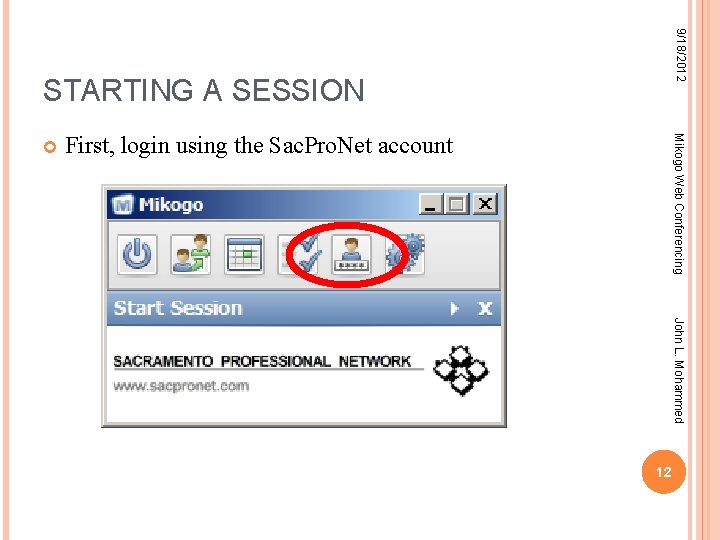
9/18/2012 STARTING A SESSION First, login using the Sac. Pro. Net account Mikogo Web Conferencing John L. Mohammed 12
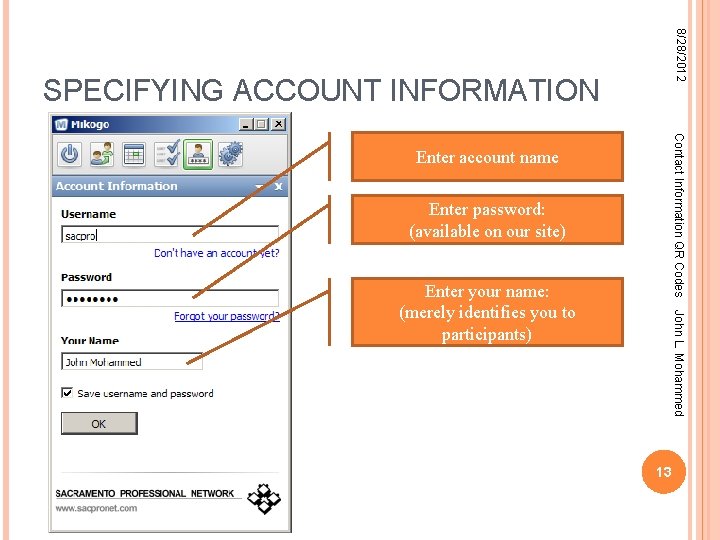
8/28/2012 SPECIFYING ACCOUNT INFORMATION Contact Information QR Codes Enter account name Enter password: (available on our site) John L. Mohammed Enter your name: (merely identifies you to participants) 13
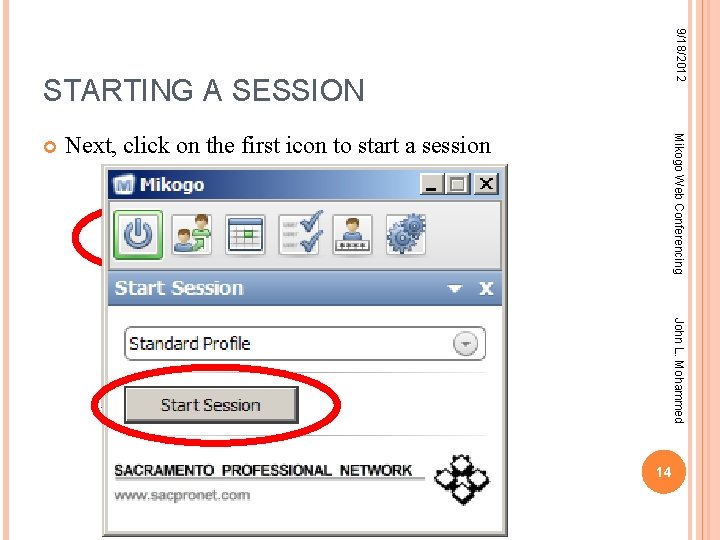
9/18/2012 STARTING A SESSION Next, click on the first icon to start a session Mikogo Web Conferencing John L. Mohammed 14
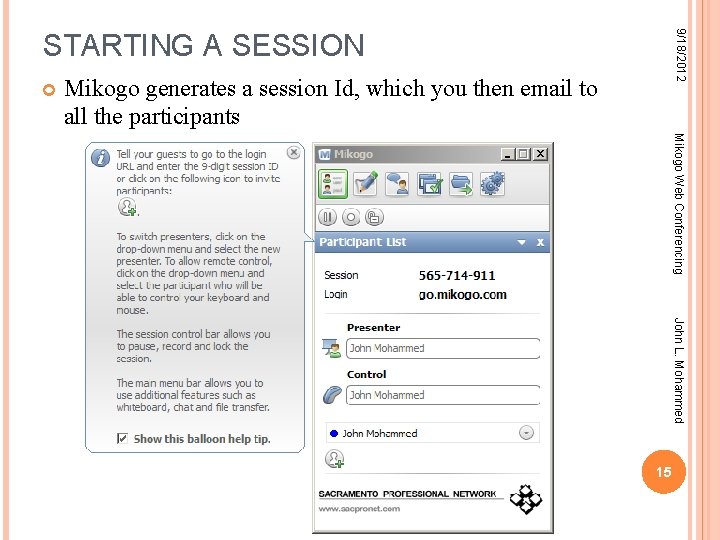
9/18/2012 STARTING A SESSION Mikogo generates a session Id, which you then email to all the participants Mikogo Web Conferencing John L. Mohammed 15
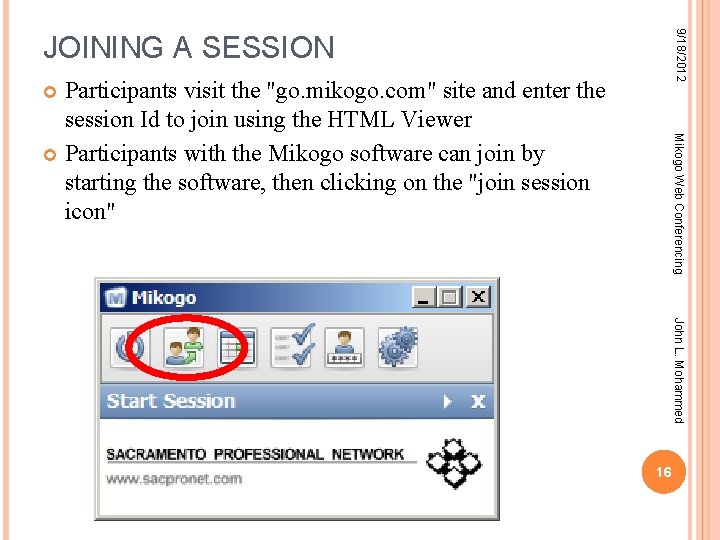
9/18/2012 JOINING A SESSION Participants visit the "go. mikogo. com" site and enter the session Id to join using the HTML Viewer Participants with the Mikogo software can join by starting the software, then clicking on the "join session icon" Mikogo Web Conferencing John L. Mohammed 16
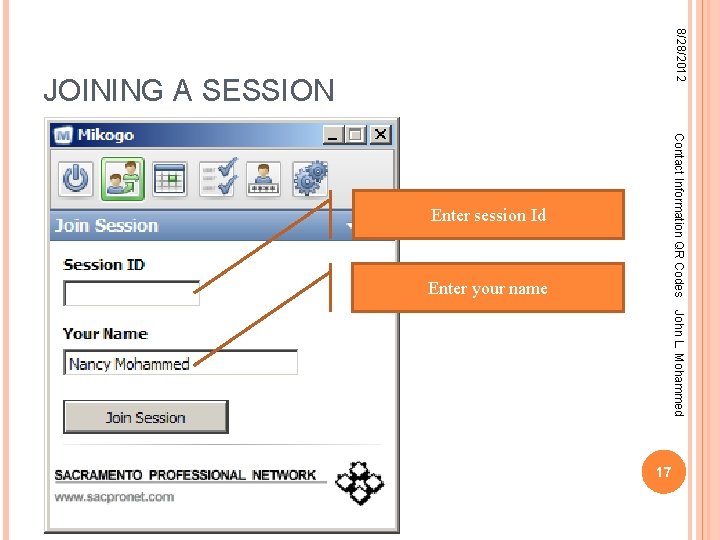
8/28/2012 JOINING A SESSION Contact Information QR Codes Enter session Id Enter your name John L. Mohammed 17
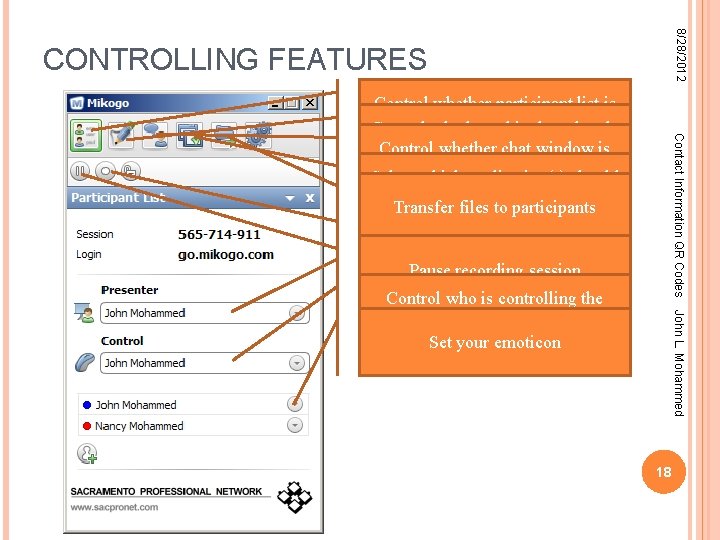
8/28/2012 CONTROLLING FEATURES Contact Information QR Codes Control whether participant list is visible Control whether white board tools Control whether chat window is are visible Select which application(s) should be shared Transfer files to participants Start/stop recording session Pausewhose recording session Control screen is being Control whoshared is controlling the John L. Mohammed shared screen Set your emoticon 18
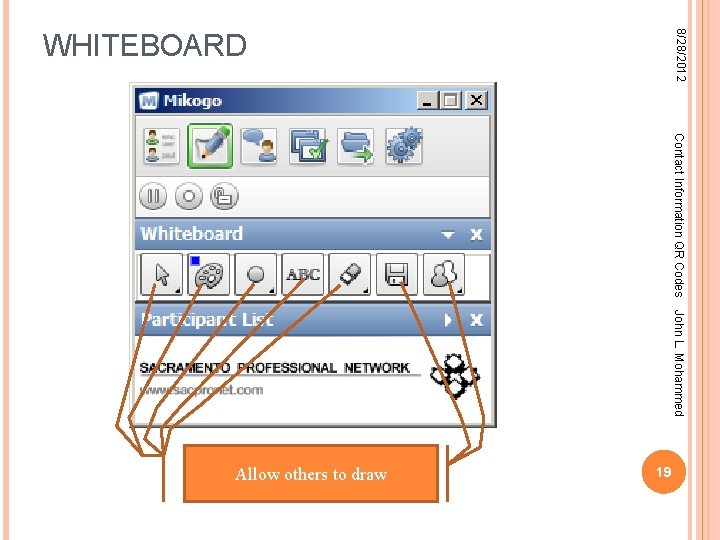
8/28/2012 WHITEBOARD Contact Information QR Codes John L. Mohammed Save Allow Select whiteboard Choose Select others line text eraser color tool width to tool draw to file 19
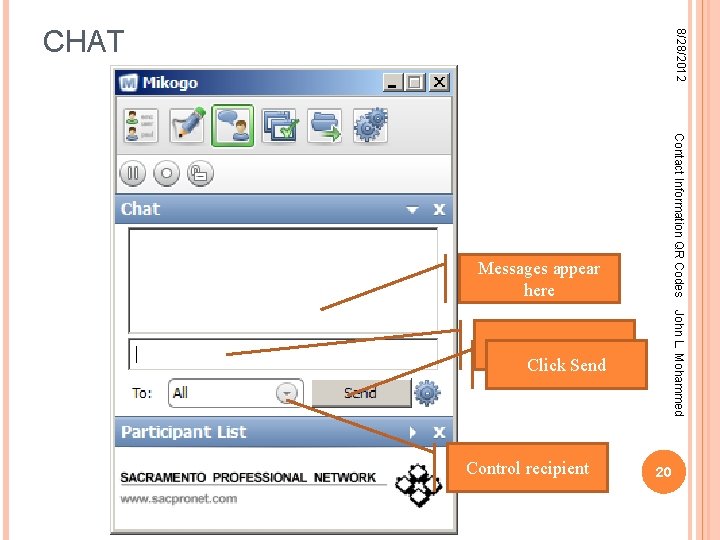
8/28/2012 CHAT Contact Information QR Codes Messages appear here John L. Mohammed Type Message here Click Send Control recipient 20
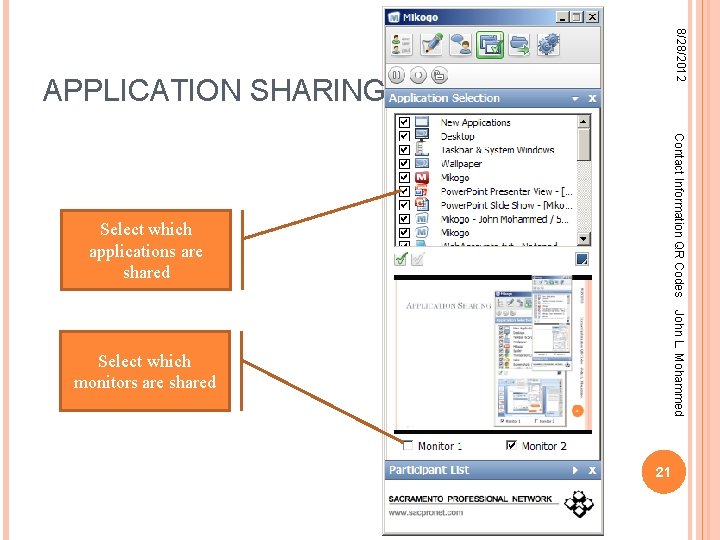
8/28/2012 APPLICATION SHARING Contact Information QR Codes Select which applications are shared John L. Mohammed Select which monitors are shared 21
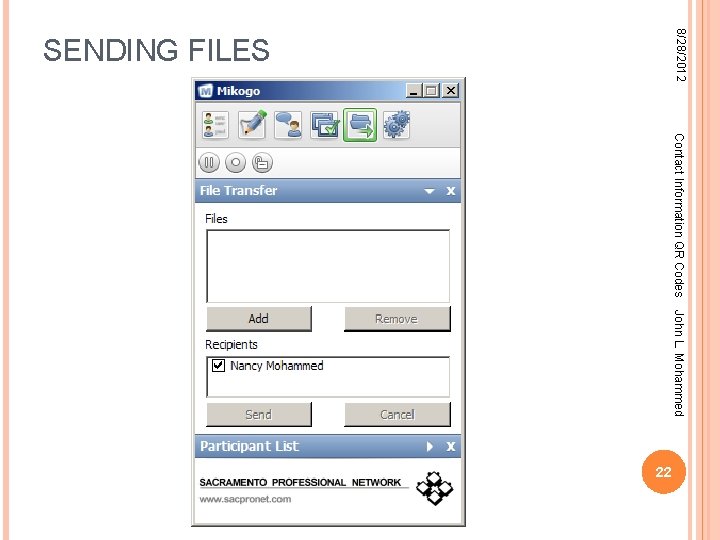
8/28/2012 SENDING FILES Contact Information QR Codes John L. Mohammed 22
9/18/2012 CONSIDERATIONS Mikogo Web Conferencing Audio: is the conference call a toll-free call for all participants? Internet connection: do your participants have a sufficiently fast connection? Screen size: different Preparation: you can create and email the session id well ahead of the meeting John L. Mohammed participants have different screen sizes Mikogo will automatically resize for each participant but want to be sure that your screen isn't so much larger than your followers that they can't see anything 23
9/18/2012 WHY MIKOGO? Mikogo Web Conferencing Mikogo is more stable and reliable than other web conferencing software we've tried Mikogo has unique useful features (remote control, participant pointer, whiteboard) not found in other software For presentations, Mikogo can be used without requiring that participants download any software Mikogo is becoming a Sac. Pro. Net sponsor, making their service available to us for free for one year. John L. Mohammed 24
9/18/2012 MISSING FEATURES Web Cam: Web Cam feature enables participants that have web cameras to see other's faces during meetings, making the meeting more like an in-person meeting Mikogo Web Conferencing the Computer microphone & speaker Mikogo Any. Meeting. com has a free service that includes these two features, but not the Mikogo features, and it requires users to install Java John L. Mohammed requires a telephone conference for audio some other web conferencing software allow audio to be carried over the internet using the computer's microphone and speaker avoids telephone tolls, but unless people use earbuds or headsets there can be audio problems, such as echos 25
9/18/2012 ADDENDUM: NEW WEBSITE FUNCTIONALITY Mikogo Web Conferencing Created a simple Module ("Mikogologin") that displays a page that facilitates using Mikogo Appearance is different depending on the member's role: Ordinary members are helped to join sessions Executive Committee members are additionally helped to start sessions using the Sac. Pro. Net account John L. Mohammed Additional page (and list within the page) enables management of recurring sessions Also configured Mikogo to display Sac. Pro. Net logo on controls, Sac. Pro. Net banner in waiting room 26
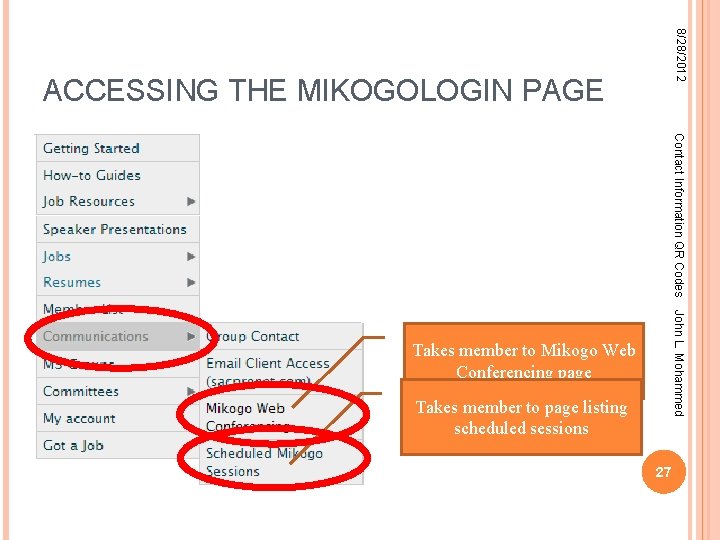
8/28/2012 ACCESSING THE MIKOGOLOGIN PAGE Contact Information QR Codes John L. Mohammed Takes member to Mikogo Web Conferencing page Takes member to page listing scheduled sessions 27
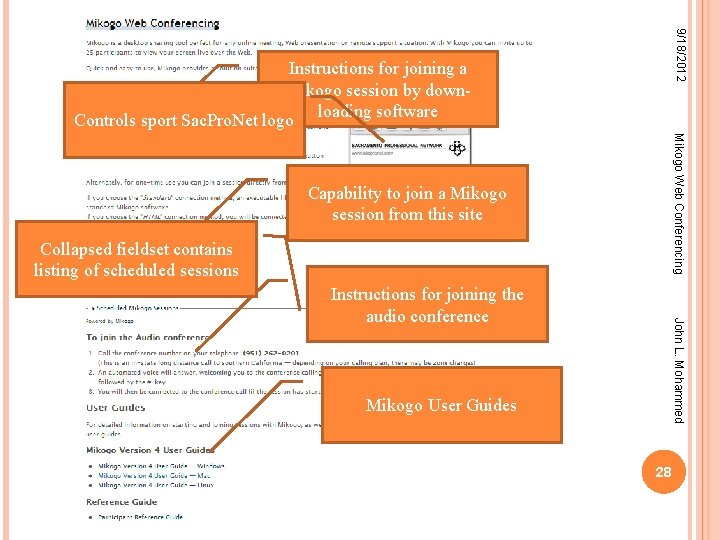
9/18/2012 Instructions for joining a Mikogo session by down. Controls sport Sac. Pro. Net logo loading software Mikogo Web Conferencing Capability to join a Mikogo session from this site Collapsed fieldset contains listing of scheduled sessions John L. Mohammed Instructions for joining the audio conference Mikogo User Guides 28
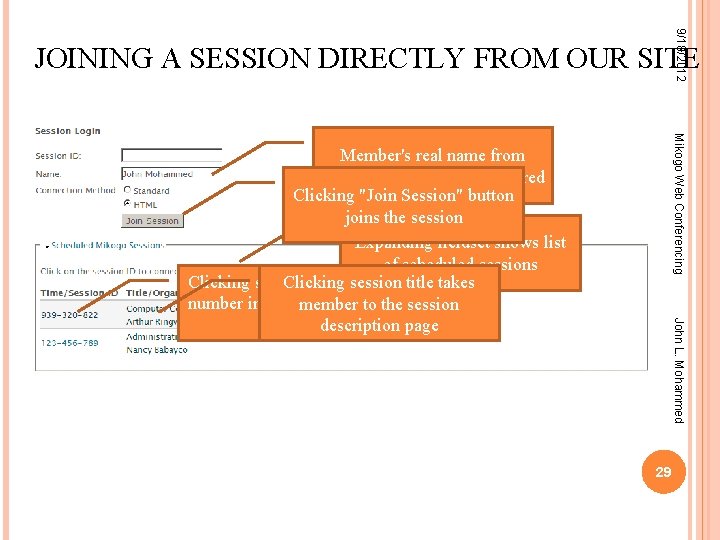
9/18/2012 JOINING A SESSION DIRECTLY FROM OUR SITE Mikogo Web Conferencing John L. Mohammed Member's real name from profile is automatically entered Clicking "Join Session" button joins the session Expanding fieldset shows list of scheduled sessions Clicking session ID inserts thetitle takes Clicking session number in the Session member. IDtofield the session abovedescription page 29
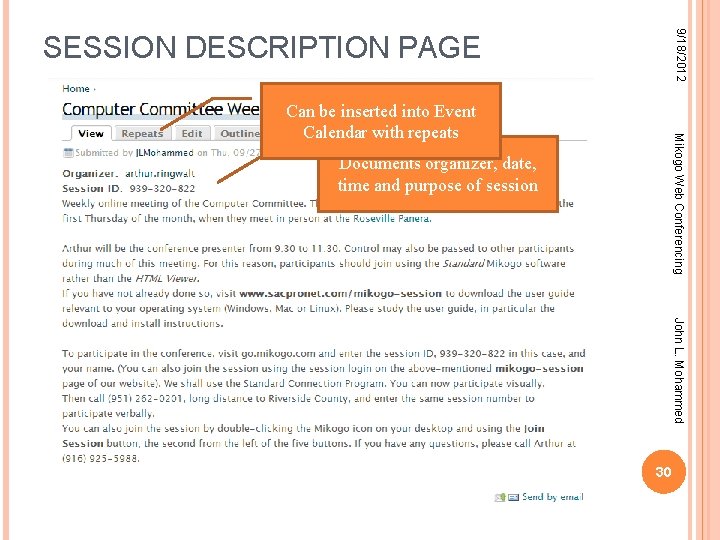
9/18/2012 SESSION DESCRIPTION PAGE Mikogo Web Conferencing Can be inserted into Event Calendar with repeats Documents organizer, date, time and purpose of session John L. Mohammed 30
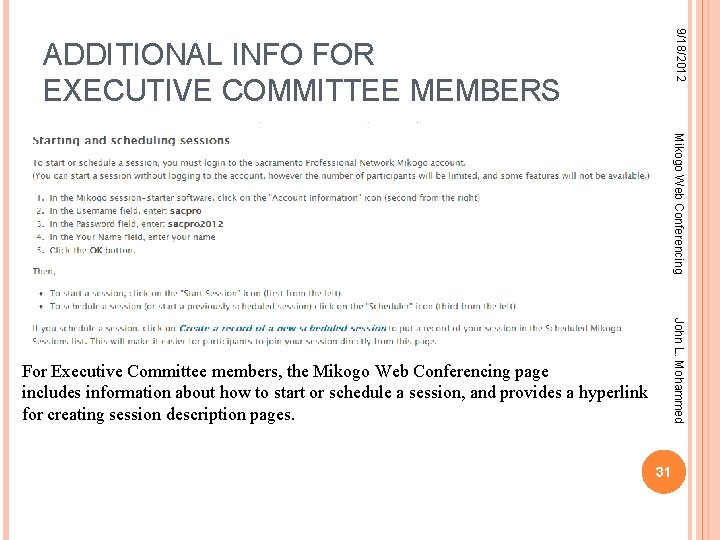
9/18/2012 ADDITIONAL INFO FOR EXECUTIVE COMMITTEE MEMBERS Mikogo Web Conferencing John L. Mohammed For Executive Committee members, the Mikogo Web Conferencing page includes information about how to start or schedule a session, and provides a hyperlink for creating session description pages. 31
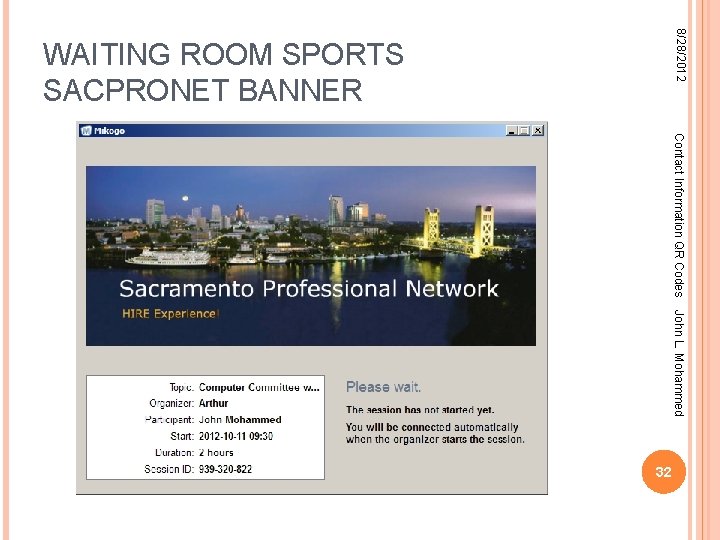
8/28/2012 WAITING ROOM SPORTS SACPRONET BANNER Contact Information QR Codes John L. Mohammed 32
- Slides: 32