
Migrating and Upgrading to Oracle Database 12 c
Migrating and Upgrading to Oracle Database 12 c Quickly With Near-Zero Downtime Session ID: 1344 Prepared by: Jim Czuprynski On. X Enterprise Solutions April 11, 2016 @Jim. The. Why. Guy
My Credentials • 35+ years of database-centric IT experience • Oracle DBA since 2001 • Oracle 9 i, 10 g, 11 g OCP • Oracle ACE Director • 100+ articles on databasejournal. com and ioug. org • Oracle-centric blog (Generally, It Depends) • Regular speaker at Oracle Open. World, IOUG COLLABORATE, and OTN ACE Tours • Oracle University instructor – core Oracle DBA courses

Assess. Design. Build. Manage. Who We Are > Solution Provider focused on >Technology Solutions >Comprehensive Service Offerings > Extensive reach — U. S. , Canada, and the U. K. > $700 M annual revenue with over $100 M in Services > Industry Certifications across a broad selection of best-in-class IT manufacturers and technologies > Significant investment in technical staff and facilities to support our clients’ projects 3
Our Agenda • Migration Planning: Not a Trivial Subject! • Migration Via Oracle Golden. Gate (OGG) • Piecemeal Migration and Conversion Via Transportable Tablespace Sets (TTS) • Pre-12 c to 12 c Database Migration Techniques – Cross-Platform Transportable Tablespace Sets (XTTS) – Fully Transportable Export/Import (FTE/I) – Cross-Platform Transfer (CPT) • Q+A
Database Migration Planning • • Windows of Inopportunity Reversibility, Repeatability, and the Rule of Three Migratibility Potential Migration Approaches
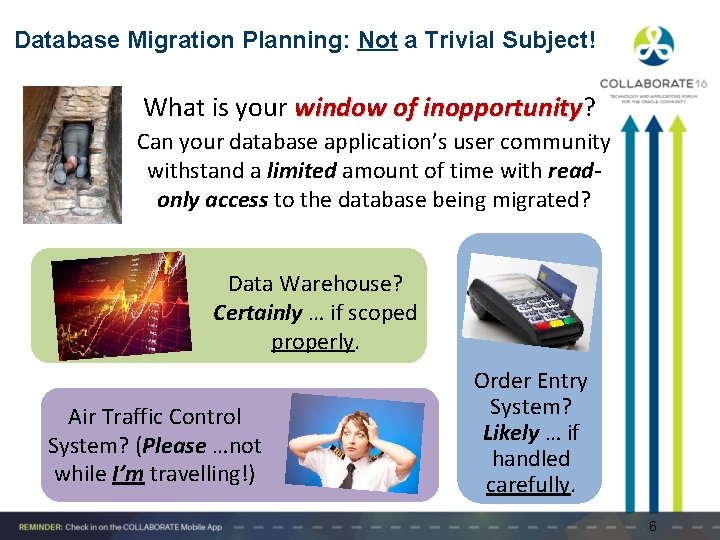
Database Migration Planning: Not a Trivial Subject! What is your window of inopportunity? inopportunity Can your database application’s user community withstand a limited amount of time with readonly access to the database being migrated? Data Warehouse? Certainly … if scoped properly. Air Traffic Control System? (Please …not while I’m travelling!) Order Entry System? Likely … if handled carefully. 6
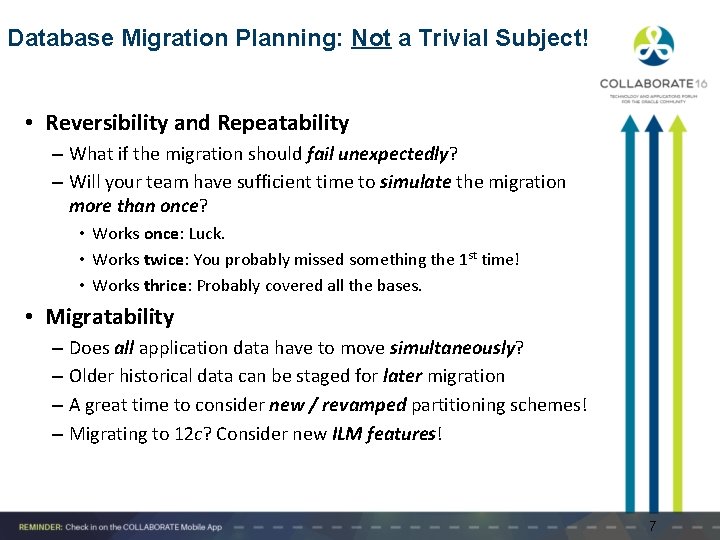
Database Migration Planning: Not a Trivial Subject! • Reversibility and Repeatability – What if the migration should fail unexpectedly? – Will your team have sufficient time to simulate the migration more than once? • Works once: Luck. • Works twice: You probably missed something the 1 st time! • Works thrice: Probably covered all the bases. • Migratability – Does all application data have to move simultaneously? – Older historical data can be staged for later migration – A great time to consider new / revamped partitioning schemes! – Migrating to 12 c? Consider new ILM features! 7
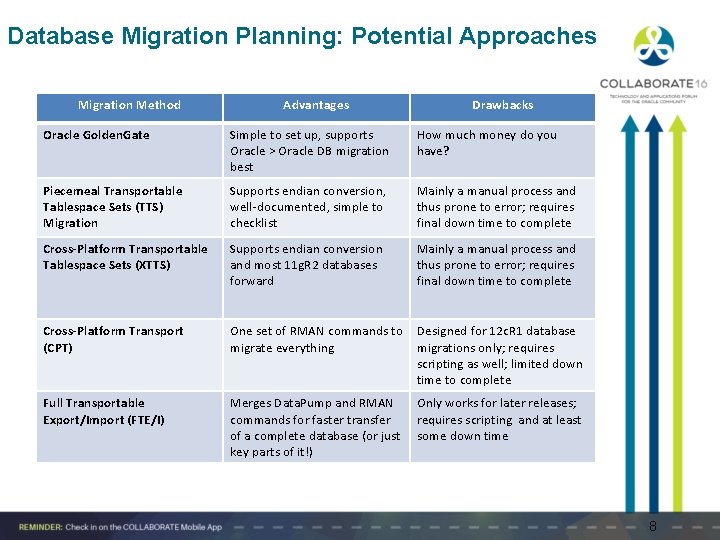
Database Migration Planning: Potential Approaches Migration Method Advantages Drawbacks Oracle Golden. Gate Simple to set up, supports Oracle > Oracle DB migration best How much money do you have? Piecemeal Transportable Tablespace Sets (TTS) Migration Supports endian conversion, well-documented, simple to checklist Mainly a manual process and thus prone to error; requires final down time to complete Cross-Platform Transportable Tablespace Sets (XTTS) Supports endian conversion and most 11 g. R 2 databases forward Mainly a manual process and thus prone to error; requires final down time to complete Cross-Platform Transport (CPT) One set of RMAN commands to migrate everything Designed for 12 c. R 1 database migrations only; requires scripting as well; limited down time to complete Full Transportable Export/Import (FTE/I) Merges Data. Pump and RMAN commands for faster transfer of a complete database (or just key parts of it!) Only works for later releases; requires scripting and at least some down time 8
Leveraging Oracle Golden. Gate • • You Down With OGG? Yeah, You Know Me!
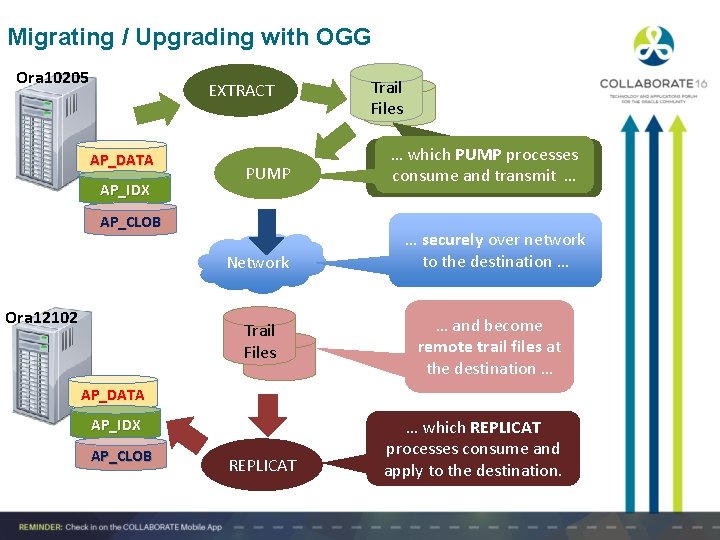
Migrating / Upgrading with OGG Ora 10205 EXTRACT AP_DATA AP_IDX PUMP … which PUMP processes EXTRACT processes create consume local and trail transmit files … … Network … securely over network to the destination … AP_CLOB Ora 12102 Trail Files … and become remote trail files at the destination … AP_DATA AP_IDX AP_CLOB REPLICAT … which REPLICAT processes consume and apply to the destination.
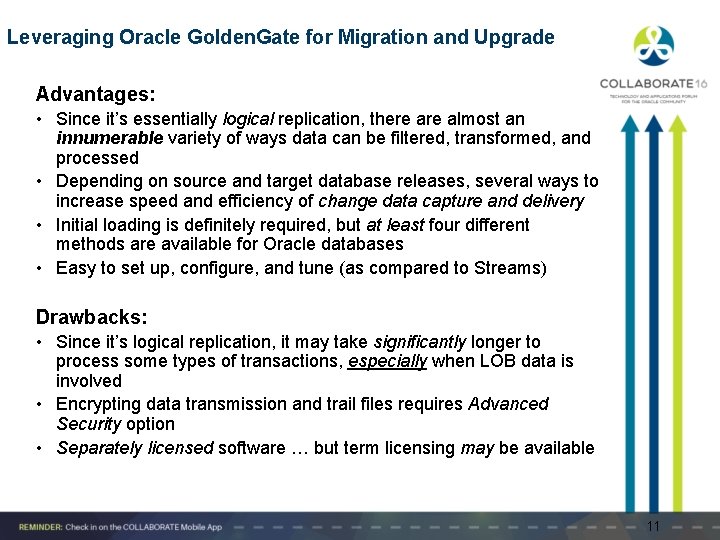
Leveraging Oracle Golden. Gate for Migration and Upgrade Advantages: • Since it’s essentially logical replication, there almost an innumerable variety of ways data can be filtered, transformed, and processed • Depending on source and target database releases, several ways to increase speed and efficiency of change data capture and delivery • Initial loading is definitely required, but at least four different methods are available for Oracle databases • Easy to set up, configure, and tune (as compared to Streams) Drawbacks: • Since it’s logical replication, it may take significantly longer to process some types of transactions, especially when LOB data is involved • Encrypting data transmission and trail files requires Advanced Security option • Separately licensed software … but term licensing may be available 11
Piecemeal Migration and Conversion: RMAN and Transportable Tablespace Sets (TTS)
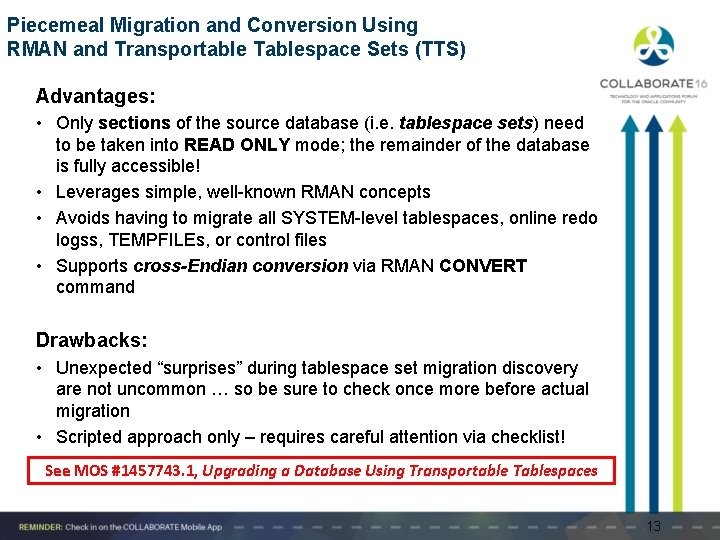
Piecemeal Migration and Conversion Using RMAN and Transportable Tablespace Sets (TTS) Advantages: • Only sections of the source database (i. e. tablespace sets) need to be taken into READ ONLY mode; the remainder of the database is fully accessible! • Leverages simple, well-known RMAN concepts • Avoids having to migrate all SYSTEM-level tablespaces, online redo logss, TEMPFILEs, or control files • Supports cross-Endian conversion via RMAN CONVERT command Drawbacks: • Unexpected “surprises” during tablespace set migration discovery are not uncommon … so be sure to check once more before actual migration • Scripted approach only – requires careful attention via checklist! See MOS #1457743. 1, Upgrading a Database Using Transportable Tablespaces 13
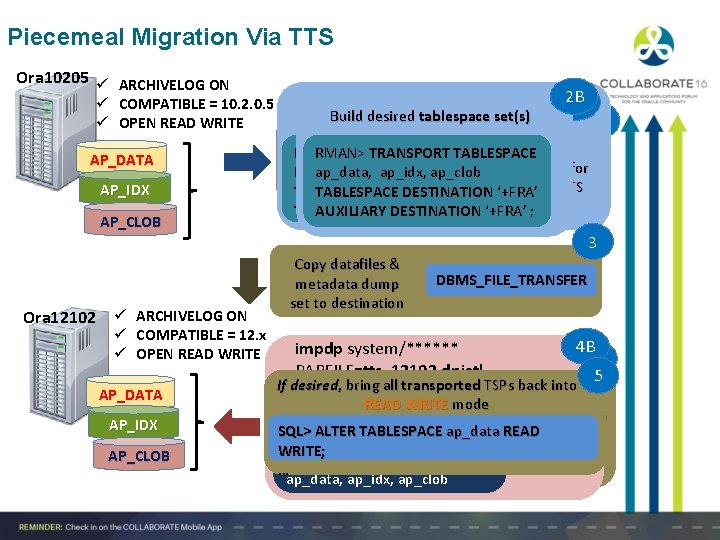
Piecemeal Migration Via TTS Ora 10205 ü ARCHIVELOG ON ü COMPATIBLE = 10. 2. 0. 5 ü OPEN READ WRITE AP_DATA AP_IDX AP_CLOB Ora 12102 ü ARCHIVELOG ON ü COMPATIBLE = 12. x ü OPEN READ WRITE AP_DATA AP_IDX AP_CLOB expdp system/****** Build desired tablespace set(s) PARFILE=tts_10205. dpectl 2 B 2 A Make desired TTS tablespaces READ ONLY Export RMAN> TRANSPORT TABLESPACE DUMPFILE=tts_10205. dmp SQL>ap_data, ALTER TABLESPACE ap_data READ for metadata ap_idx, ap_clob LOGFILE=tts_10205. log ONLY; desired TTS TABLESPACE DESTINATION ‘+FRA’ TRANSPORT_TABLESPACE=Y ALTER TABLESPACE ap_idx READ ONLY; AUXILIARY DESTINATION TABLESPACES=ap_data, … ‘+FRA’ ; 1 3 Copy datafiles & metadata dump set to destination DBMS_FILE_TRANSFER 4 B 4 A 5 If desired, bring all transported TSPs back into impdp system/****** PARFILE=tts_12102. dpictl If RMAN> desired, CONVERT bring all transported TSPs back Plug into TTS If necessary, DIRECTORY=DPDIR READ WRITE mode datafiles DATAFILE ‘<dfname>’ convert datafiles to DUMPFILE=tts_10205. dmp FROM PLATFORM SQL> ALTER TABLESPACE ap_data destination’s READinto LOGFILE=tts_12102. log 12. 1. 0. 2 <platform type>’ WRITE; endian-ness TRANSPORT_DATAFILES= database … FORMAT ‘<new_dfname>’; ap_data, ap_idx, ap_clob
Cross-Platform Transportable Tablespaces (XTTS) Via Incremental Backups: Nearly Real-Time Migration
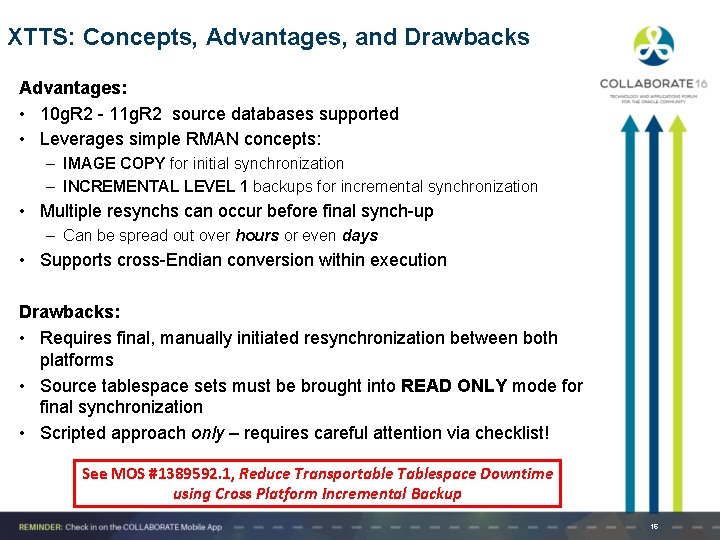
XTTS: Concepts, Advantages, and Drawbacks Advantages: • 10 g. R 2 - 11 g. R 2 source databases supported • Leverages simple RMAN concepts: – IMAGE COPY for initial synchronization – INCREMENTAL LEVEL 1 backups for incremental synchronization • Multiple resynchs can occur before final synch-up – Can be spread out over hours or even days • Supports cross-Endian conversion within execution Drawbacks: • Requires final, manually initiated resynchronization between both platforms • Source tablespace sets must be brought into READ ONLY mode for final synchronization • Scripted approach only – requires careful attention via checklist! See MOS #1389592. 1, Reduce Transportable Tablespace Downtime using Cross Platform Incremental Backup 16
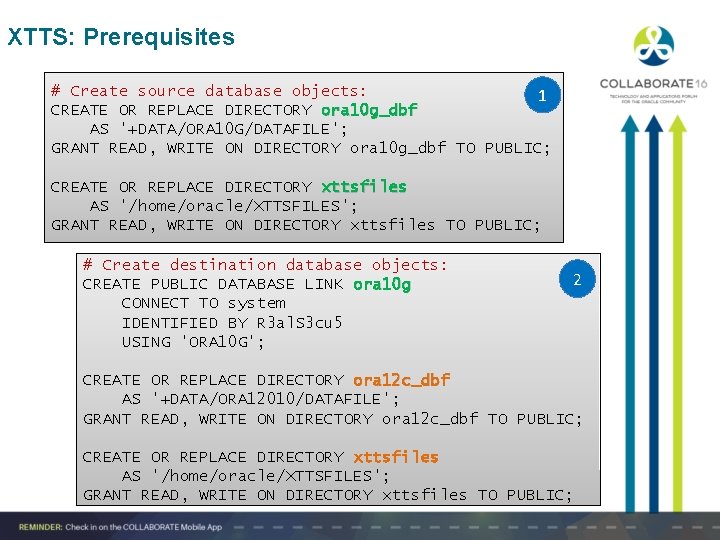
XTTS: Prerequisites # Create source database objects: 1 CREATE OR REPLACE DIRECTORY ora 10 g_dbf AS '+DATA/ORA 10 G/DATAFILE'; GRANT READ, WRITE ON DIRECTORY ora 10 g_dbf TO PUBLIC; CREATE OR REPLACE DIRECTORY xttsfiles AS '/home/oracle/XTTSFILES'; GRANT READ, WRITE ON DIRECTORY xttsfiles TO PUBLIC; # Create destination database objects: CREATE PUBLIC DATABASE LINK ora 10 g CONNECT TO system IDENTIFIED BY R 3 al. S 3 cu 5 USING 'ORA 10 G'; 2 CREATE OR REPLACE DIRECTORY ora 12 c_dbf AS '+DATA/ORA 12010/DATAFILE'; GRANT READ, WRITE ON DIRECTORY ora 12 c_dbf TO PUBLIC; CREATE OR REPLACE DIRECTORY xttsfiles AS '/home/oracle/XTTSFILES'; GRANT READ, WRITE ON DIRECTORY xttsfiles TO PUBLIC;
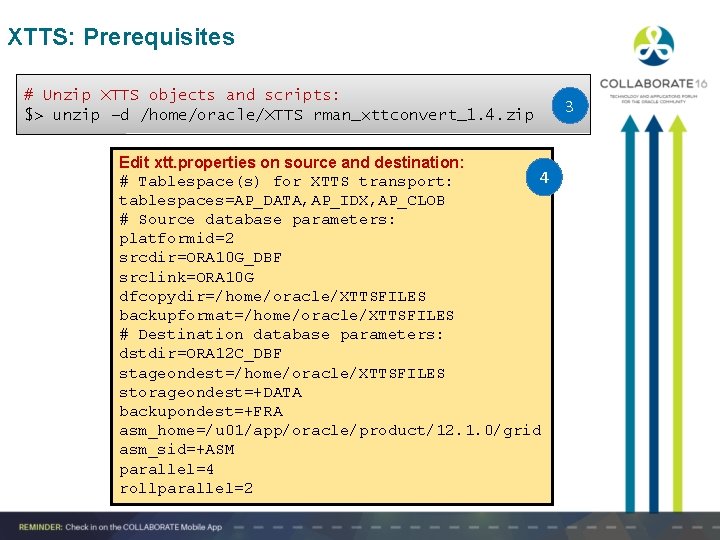
XTTS: Prerequisites # Unzip XTTS objects and scripts: $> unzip –d /home/oracle/XTTS rman_xttconvert_1. 4. zip Edit xtt. properties on source and destination: 4 # Tablespace(s) for XTTS transport: tablespaces=AP_DATA, AP_IDX, AP_CLOB # Source database parameters: platformid=2 srcdir=ORA 10 G_DBF srclink=ORA 10 G dfcopydir=/home/oracle/XTTSFILES backupformat=/home/oracle/XTTSFILES # Destination database parameters: dstdir=ORA 12 C_DBF stageondest=/home/oracle/XTTSFILES storageondest=+DATA backupondest=+FRA asm_home=/u 01/app/oracle/product/12. 1. 0/grid asm_sid=+ASM parallel=4 rollparallel=2 3
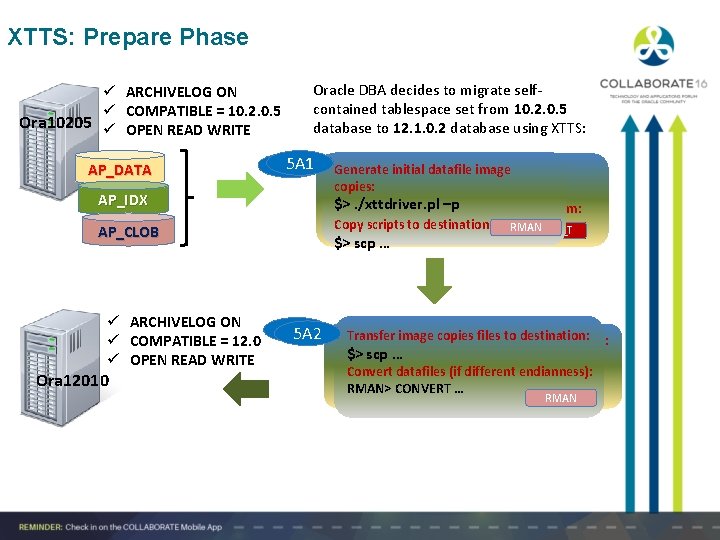
XTTS: Prepare Phase ü ARCHIVELOG ON ü COMPATIBLE = 10. 2. 0. 5 Ora 10205 ü OPEN READ WRITE AP_DATA Oracle DBA decides to migrate selfcontained tablespace set from 10. 2. 0. 5 database to 12. 1. 0. 2 database using XTTS: 5 A 1 5 B 1 AP_IDX $>. /xttdriver. pl –pdestination platform: Copy scripts & files to Copy $> scpscripts … to destination: RMAN D_F_T AP_CLOB ü ARCHIVELOG ON ü COMPATIBLE = 12. 0 ü OPEN READ WRITE Ora 12010 Generateinitialdatafileimagecopies: Generate copies: $>. /xttdriver. pl –S $> scp … 5 B 2 5 A 2 Transfer image copies to destination: Pull initial datafile imagefiles copies to destination: scp … $>$>. /xttdriver. pl –G Convert datafiles different endianness): Conversion handled(ifimplicitly! D_F_T RMAN> CONVERT … RMAN
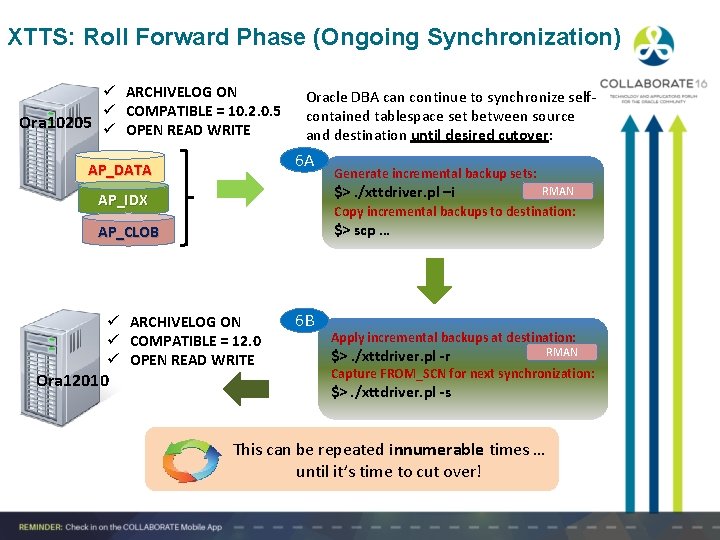
XTTS: Roll Forward Phase (Ongoing Synchronization) ü ARCHIVELOG ON ü COMPATIBLE = 10. 2. 0. 5 Ora 10205 ü OPEN READ WRITE Oracle DBA can continue to synchronize selfcontained tablespace set between source and destination until desired cutover: 6 A AP_DATA $>. /xttdriver. pl –i AP_IDX RMAN Copy incremental backups to destination: $> scp … AP_CLOB ü ARCHIVELOG ON ü COMPATIBLE = 12. 0 ü OPEN READ WRITE Ora 12010 Generate incremental backup sets: 6 B Apply incremental backups at destination: $>. /xttdriver. pl -r RMAN Capture FROM_SCN for next synchronization: $>. /xttdriver. pl -s This can be repeated innumerable times … until it’s time to cut over!
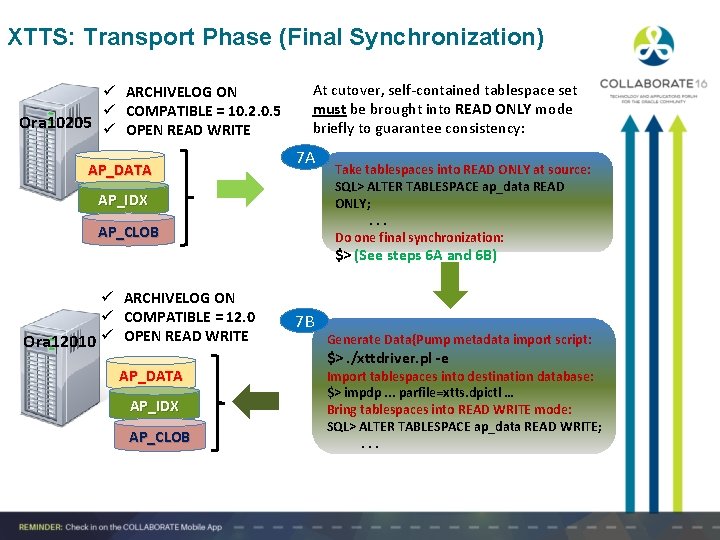
XTTS: Transport Phase (Final Synchronization) ü ARCHIVELOG ON ü COMPATIBLE = 10. 2. 0. 5 Ora 10205 ü OPEN READ WRITE AP_DATA At cutover, self-contained tablespace set must be brought into READ ONLY mode briefly to guarantee consistency: 7 A AP_IDX AP_CLOB Take tablespaces into READ ONLY at source: SQL> ALTER TABLESPACE ap_data READ ONLY; . . . Do one final synchronization: $> (See steps 6 A and 6 B) ü ARCHIVELOG ON ü COMPATIBLE = 12. 0 Ora 12010 ü OPEN READ WRITE AP_DATA AP_IDX AP_CLOB 7 B Generate Data{Pump metadata import script: $>. /xttdriver. pl -e Import tablespaces into destination database: $> impdp. . . parfile=xtts. dpictl … Bring tablespaces into READ WRITE mode: SQL> ALTER TABLESPACE ap_data READ WRITE; . . .
12 c. R 1 Migration Techniques • • Cross-Platform Transport (CPT) Full Transportable Export/Import (FTE/I)
Cross-Platform Transport (CPT) Advantages: • Merges Data Pump and RMAN into one complete bundle • Simple and familiar syntax – easy to learn and implement • Fewer steps than XTTS method (its ancestor) Drawbacks: • Source and destination databases must be at least 12. 1. 0. 1 • Source tablespaces must be taken into READ ONLY mode See also: MOS #2013540. 1, Cross-Platform Database Migration (Across Same Endian) Using RMAN Backupset In 12 c MOS # 2013271. 1, 12 c How To Perform Cross-Platform Database Transport To Different Endian Platform With RMAN Backup Sets 23
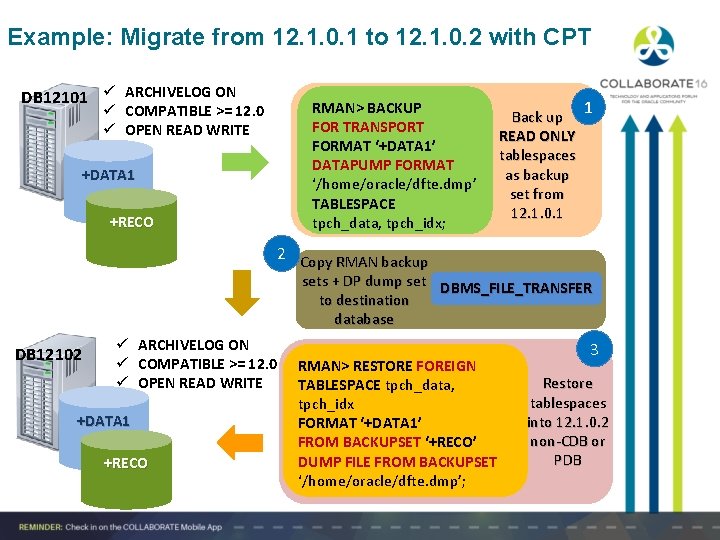
Example: Migrate from 12. 1. 0. 1 to 12. 1. 0. 2 with CPT DB 12101 ü ARCHIVELOG ON ü COMPATIBLE >= 12. 0 ü OPEN READ WRITE +DATA 1 +RECO RMAN> BACKUP FOR TRANSPORT FORMAT ‘+DATA 1’ DATAPUMP FORMAT ‘/home/oracle/dfte. dmp’ TABLESPACE tpch_data, tpch_idx; Back up READ ONLY tablespaces as backup set from 12. 1. 0. 1 1 2 Copy RMAN backup sets + DP dump set DBMS_FILE_TRANSFER to destination database DB 12102 ü ARCHIVELOG ON ü COMPATIBLE >= 12. 0 ü OPEN READ WRITE +DATA 1 +RECO RMAN> RESTORE FOREIGN TABLESPACE tpch_data, tpch_idx FORMAT ‘+DATA 1’ FROM BACKUPSET ‘+RECO’ DUMP FILE FROM BACKUPSET ‘/home/oracle/dfte. dmp’; 3 Restore tablespaces into 12. 1. 0. 2 non-CDB or PDB
Full Transportable Export/Import (FTE/I) Advantages: • Leverages well-known migration concepts • Non-user-defined tablespaces remain in READ WRITE mode • Excellent way to migrate a smaller database with a reasonable window of inopportunity – If network bandwidth is sufficient, transporting over network will limit downtime – Import is significantly faster at destination using this method • If transformation to Multitenant is the goal, the source database is automatically translated to PDB status at the existing CDB destination Drawbacks: • Source database must be at least Release 11. 2. 0. 3 • At the source, the entire tablespace set must be brought into READ ONLY mode … • … but remember: Intent is to migrate to new platform / environment! See Oracle Database 12 c Administrator’s Guide, Chapter 15: Transporting Data 25
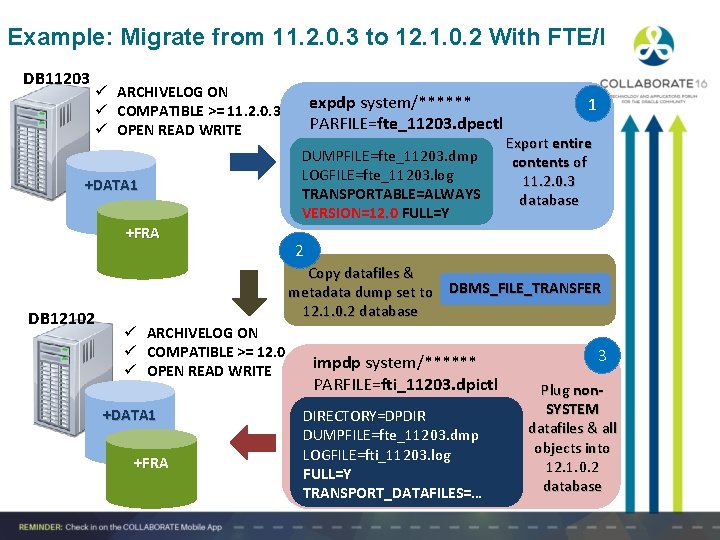
Example: Migrate from 11. 2. 0. 3 to 12. 1. 0. 2 With FTE/I DB 11203 ü ARCHIVELOG ON ü COMPATIBLE >= 11. 2. 0. 3 ü OPEN READ WRITE +DATA 1 +FRA DB 12102 expdp system/****** PARFILE=fte_11203. dpectl DUMPFILE=fte_11203. dmp LOGFILE=fte_11203. log TRANSPORTABLE=ALWAYS VERSION=12. 0 FULL=Y 1 Export entire contents of 11. 2. 0. 3 database 2 Copy datafiles & metadata dump set to DBMS_FILE_TRANSFER 12. 1. 0. 2 database ü ARCHIVELOG ON ü COMPATIBLE >= 12. 0 ü OPEN READ WRITE +DATA 1 +FRA impdp system/****** PARFILE=fti_11203. dpictl DIRECTORY=DPDIR DUMPFILE=fte_11203. dmp LOGFILE=fti_11203. log FULL=Y TRANSPORT_DATAFILES=… 3 Plug non. SYSTEM datafiles & all objects into 12. 1. 0. 2 database
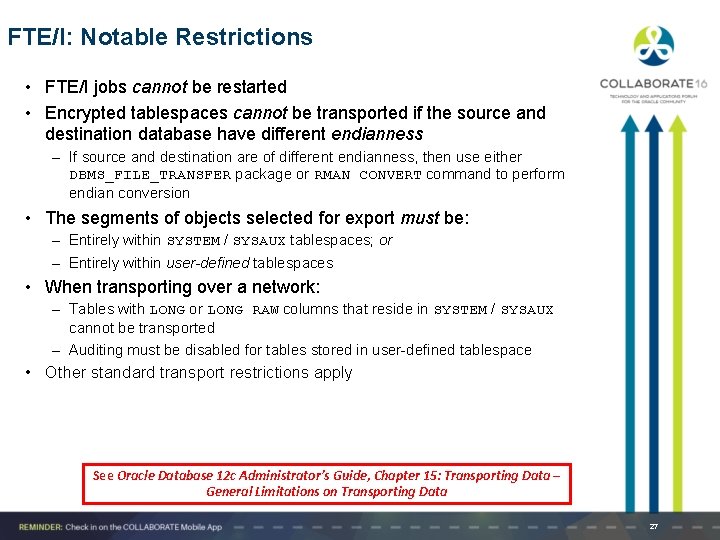
FTE/I: Notable Restrictions • FTE/I jobs cannot be restarted • Encrypted tablespaces cannot be transported if the source and destination database have different endianness – If source and destination are of different endianness, then use either DBMS_FILE_TRANSFER package or RMAN CONVERT command to perform endian conversion • The segments of objects selected for export must be: – Entirely within SYSTEM / SYSAUX tablespaces; or – Entirely within user-defined tablespaces • When transporting over a network: – Tables with LONG or LONG RAW columns that reside in SYSTEM / SYSAUX cannot be transported – Auditing must be disabled for tables stored in user-defined tablespace • Other standard transport restrictions apply See Oracle Database 12 c Administrator’s Guide, Chapter 15: Transporting Data – General Limitations on Transporting Data 27
Q+A
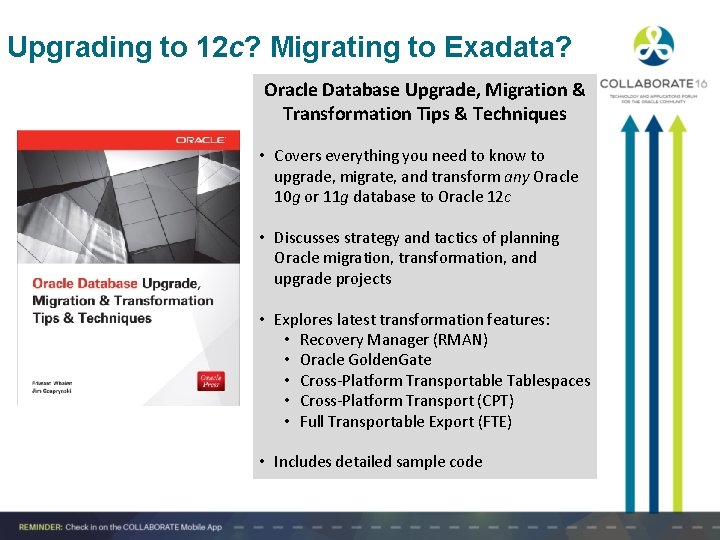
Upgrading to 12 c? Migrating to Exadata? Oracle Database Upgrade, Migration & Transformation Tips & Techniques • Covers everything you need to know to upgrade, migrate, and transform any Oracle 10 g or 11 g database to Oracle 12 c • Discusses strategy and tactics of planning Oracle migration, transformation, and upgrade projects • Explores latest transformation features: • Recovery Manager (RMAN) • Oracle Golden. Gate • Cross-Platform Transportable Tablespaces • Cross-Platform Transport (CPT) • Full Transportable Export (FTE) • Includes detailed sample code
Please complete the session evaluation We appreciate your feedback and insights! Session #1344: Migrating and Upgrading to Oracle Database 12 c Quickly With Near-Zero Downtime If you have any questions or comments, feel free to: ØE-mail me at jim. czuprynski@onx. com ØFollow my blog (Generally, It Depends): http: //jimczuprynski. wordpress. com ØFollow me on Twitter (@Jim. The. Why. Guy) ØConnect with me on Linked. In (Jim Czuprynski)
Get Published in IOUG SELECT Journal Quarterly journal of peer-reviewed technical articles and news published by the Independent Oracle Users Group We are always looking for new authors, interested? – – Technical Tip – ~500 words Column – ~ 500 – 1000 words Technical Article – ~ 1500 – 2500 words Blog posting – ~ 500 – 2500 words Visit http: //ioug. org/select for more information. Questions? select@ioug. org IOUG Members have unlimited access to the current and archives of SELECT Journal Including more than 3, 000 papers and presentations in the IOUG Library 31
- Slides: 31