
MidTerm Presentation Team Icon Table of Contents 1

Mid-Term Presentation Team Icon
Table of Contents 1 INTRODUCTION 2 PROJECT OVERVIEW 3 DEMONSTRATION Team Icon 4 PROJECT MGMT
1 INTRODUCTION STAKEHOLDERS THE TEAM Team Icon 3
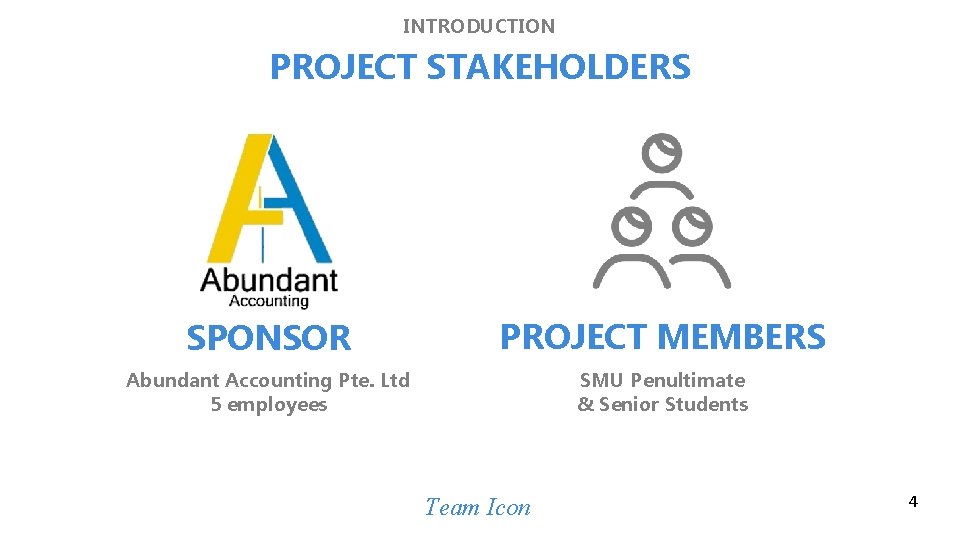
INTRODUCTION PROJECT STAKEHOLDERS SPONSOR PROJECT MEMBERS Abundant Accounting Pte. Ltd 5 employees SMU Penultimate & Senior Students Team Icon 4
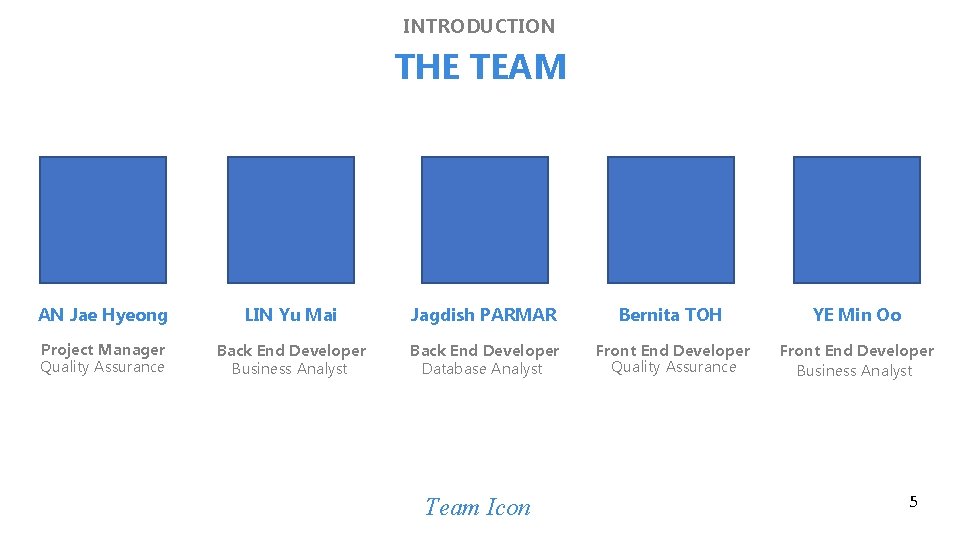
INTRODUCTION THE TEAM AN Jae Hyeong LIN Yu Mai Jagdish PARMAR Bernita TOH YE Min Oo Project Manager Quality Assurance Back End Developer Business Analyst Back End Developer Database Analyst Front End Developer Quality Assurance Front End Developer Business Analyst Team Icon 5
2 PROJECT OVERVIEW PROBLEM SOLUTION Team Icon SCOPE TECHNOLOGIES
PROJECT OVERVIEW PROBLEM STATEMENTS 1. Not easy to track if the projects are profitable 2. Inefficient capture of expense data due to high volume and different formats 3. Inefficient process to track and assign projects to the employees Team Icon
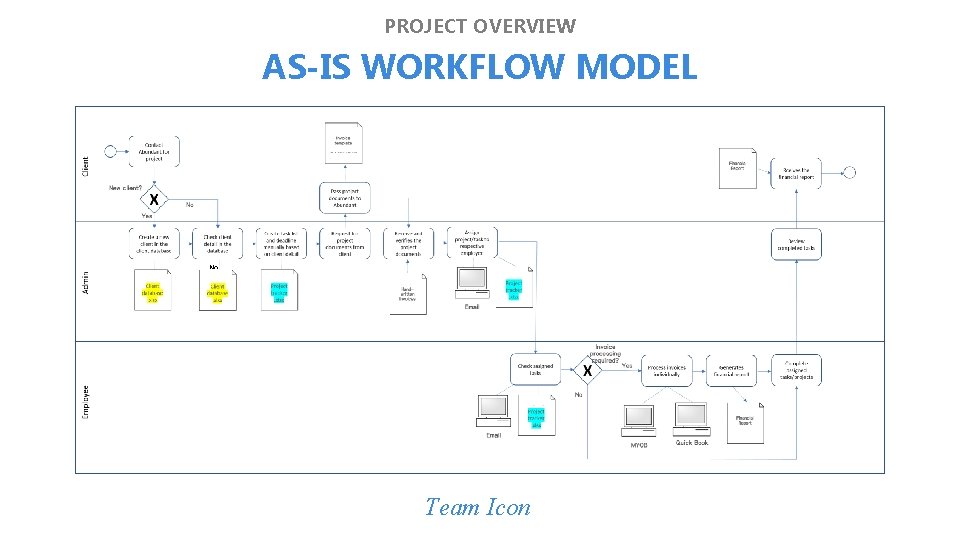
PROJECT OVERVIEW AS-IS WORKFLOW MODEL No Yes Team Icon
PROJECT OVERVIEW SOLUTION 1. Remove bottlenecks to increase efficiency in processing projects 2. Enhance the management’s information to assess the profitability 3. Introduction of the following KPIs to the business: - Man hours spent - Number of invoices processed monthly - Number of delayed invoices per month Team Icon
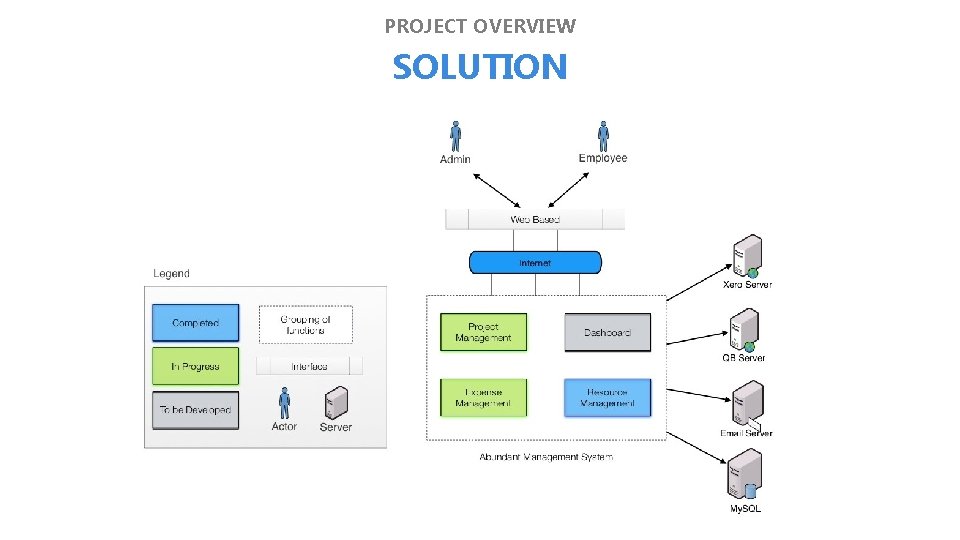
PROJECT OVERVIEW SOLUTION
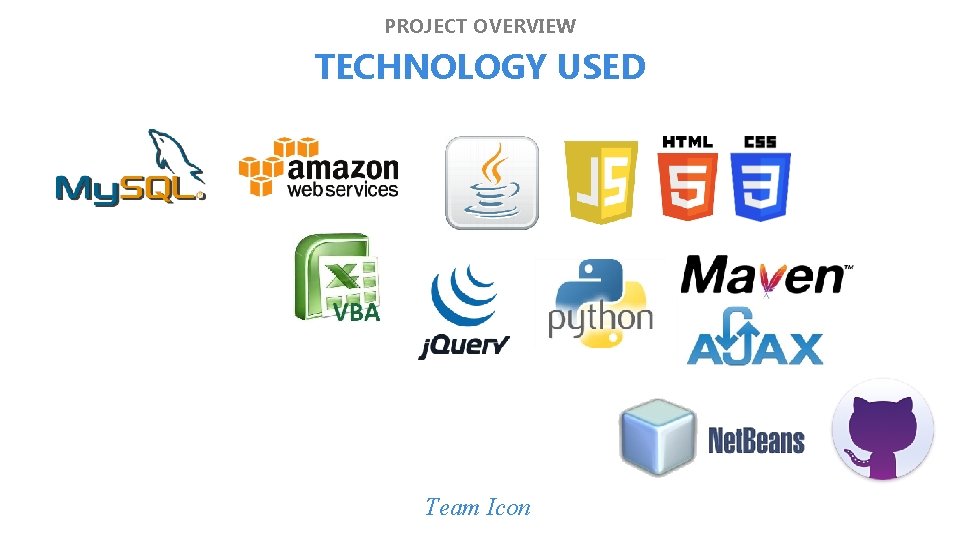
3 PROJECT OVERVIEW TECHNOLOGY USED Team Icon
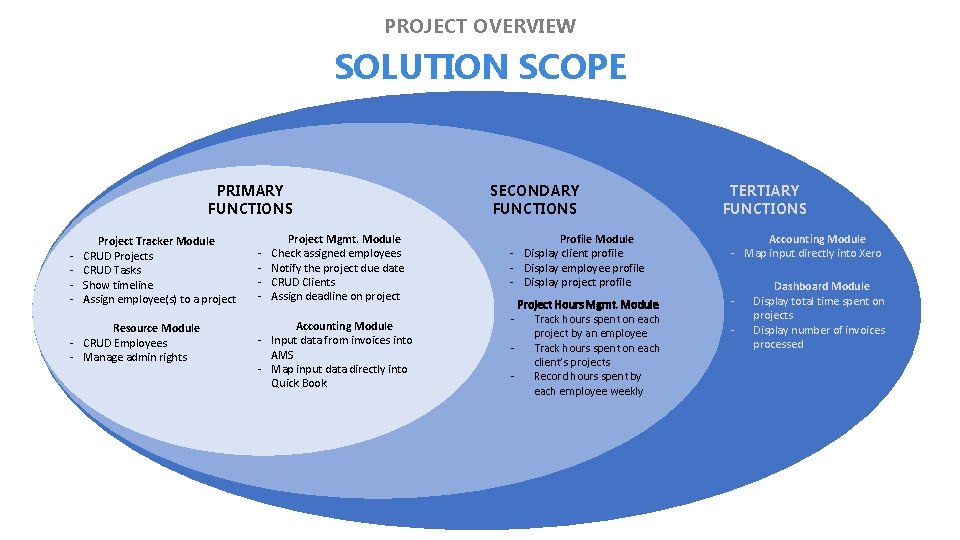
PROJECT OVERVIEW SOLUTION SCOPE PRIMARY FUNCTIONS - Project Tracker Module CRUD Projects CRUD Tasks Show timeline Assign employee(s) to a project Resource Module - CRUD Employees - Manage admin rights - Project Mgmt. Module Check assigned employees Notify the project due date CRUD Clients Assign deadline on project Accounting Module - Input data from invoices into AMS - Map input data directly into Quick Book SECONDARY FUNCTIONS TERTIARY FUNCTIONS Profile Module - Display client profile - Display employee profile - Display project profile Accounting Module - Map input directly into Xero Project Hours Mgmt. Module - Track hours spent on each project by an employee - Track hours spent on each client’s projects - Record hours spent by each employee weekly - Dashboard Module Display total time spent on projects Display number of invoices processed
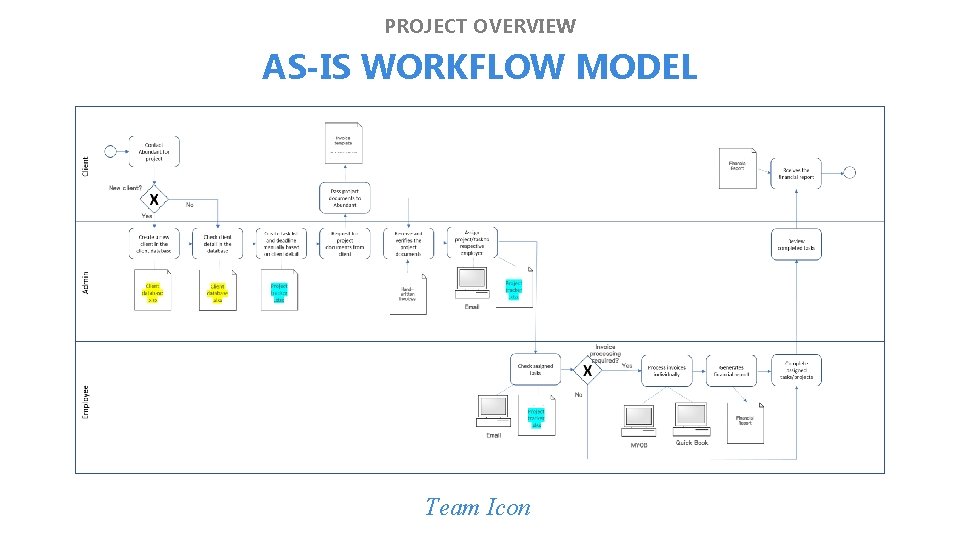
PROJECT OVERVIEW AS-IS WORKFLOW MODEL Team Icon
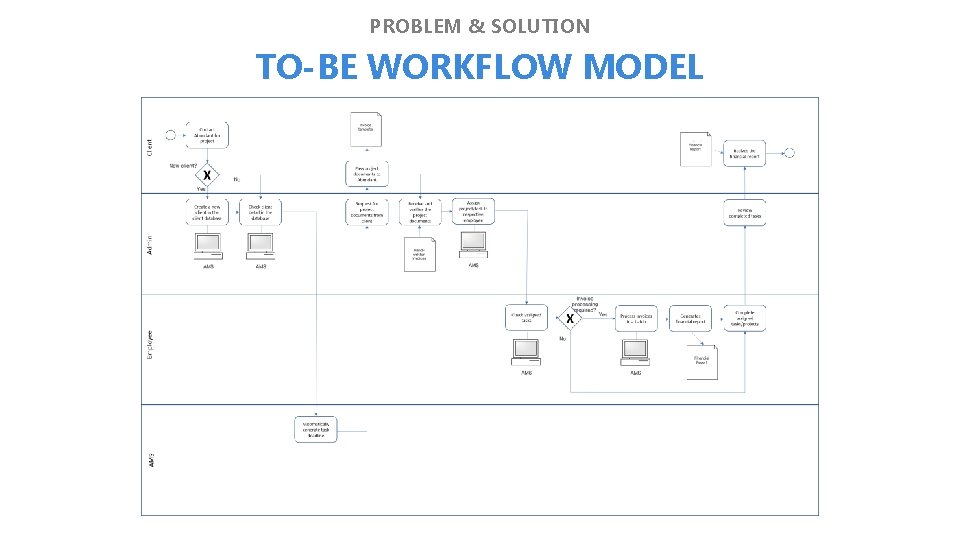
PROBLEM & SOLUTION TO-BE WORKFLOW MODEL
PROBLEM & SOLUTION X-FACTOR (Midterms) 1. 150 active projects & tasks listed on the system for tracking 2. 150 invoices processed through Abundant Management System Team Icon
3 DEMONSTRATION TECH. COMPLEXITY Team Icon USER TESTINGS
3 DEMONSTRATION PERSONAS 1. Personas from Jag Team Icon
3 DEMONSTRATION SCENARIO 1. Scenario from Jag Team Icon
3 DEMONSTRATION SCOPE 1. Project Tracker Module 2. Project Management Module 3. Project Hours Management Module 4. Accounting Module Team Icon
DEMONSTRATION SCOPE Any additional slide required for demo?
3 DEMONSTRATION TECHNICAL COMPLEXITY 1. Integration of Quick. Book 2. Data validation to minimize human error 3. Automatic generation of project/task deadlines based on client’s business type and accounting requirements Team Icon
3 DEMONSTRATION TECHNICAL COMPLEXITY Slide on Integration of Quick Book (from Mai) Team Icon
3 DEMONSTRATION TECHNICAL COMPLEXITY Slide on Integration of Quick Book (from Mai) Team Icon
3 DEMONSTRATION TECHNICAL COMPLEXITY Slide data validation (from Mai) Team Icon
3 DEMONSTRATION TECHNICAL COMPLEXITY Slide on data validation (from Mai) Team Icon
3 DEMONSTRATION TECHNICAL COMPLEXITY Slide on auto deadline generation (from Mai) Team Icon
3 DEMONSTRATION TECHNICAL COMPLEXITY Slide on auto deadline generation (from Mai) Team Icon
3 DEMONSTRATION USER TESTING 2 1. Major changes required in the fields for data entry 2. The Interface and the design of the system is acceptable Team Icon
DEMONSTRATION USER TESTING 3 1. Key changes required by the client from UT 2 have been reflected 2. Overall, the client is confident that the system will be extremely useful for their work process 3. The design as well as the usability of the system has also improved 4. Minor changes in fields required for certain data entry required Team Icon
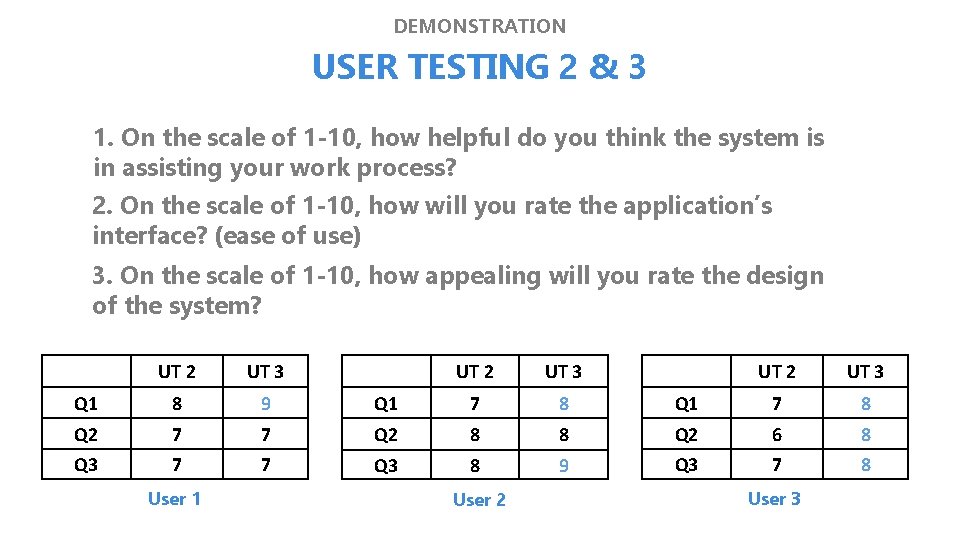
DEMONSTRATION USER TESTING 2 & 3 1. On the scale of 1 -10, how helpful do you think the system is in assisting your work process? 2. On the scale of 1 -10, how will you rate the application’s interface? (ease of use) 3. On the scale of 1 -10, how appealing will you rate the design of the system? UT 2 UT 3 Q 1 8 9 Q 2 7 Q 3 7 User 1 UT 2 UT 3 Q 1 7 8 8 Q 2 6 8 9 Q 3 7 8 UT 2 UT 3 Q 1 7 8 7 Q 2 8 7 Q 3 8 User 2 User 3
4 PROJECT MANAGEMENT TIMELINE METRICS CHANGE MGMT. Team Icon RISK MGMT.
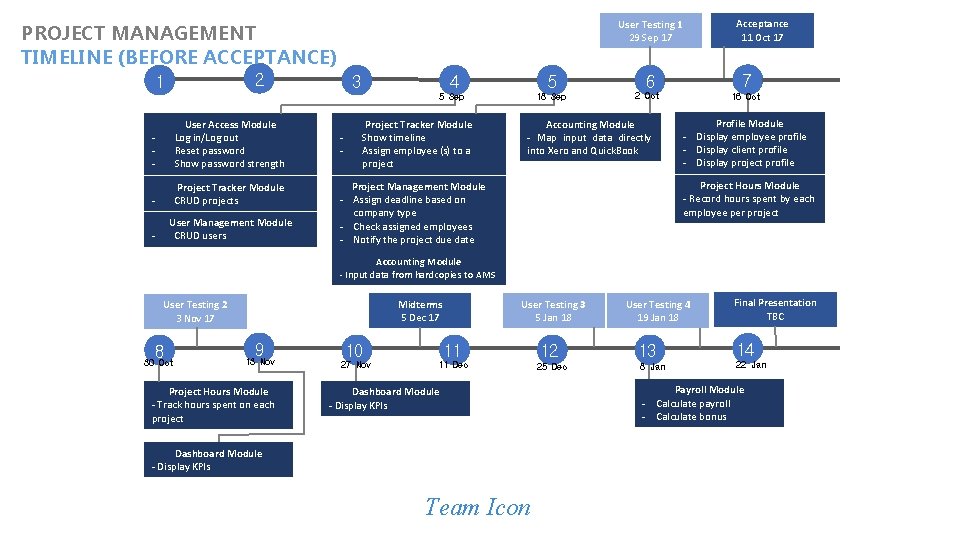
2 1 - User Access Module Log in/Log out Reset password Show password strength - Project Tracker Module CRUD projects - User Management Module CRUD users Acceptance 11 Oct 17 User Testing 1 29 Sep 17 PROJECT MANAGEMENT TIMELINE (BEFORE ACCEPTANCE) 3 - 4 5 5 Sep 18 Sep Project Tracker Module Show timeline Assign employee (s) to a project 7 6 2 Oct Accounting Module - Map input data directly into Xero and Quick. Book 16 Oct Profile Module - Display employee profile - Display client profile - Display project profile Project Hours Module - Record hours spent by each employee per project Project Management Module - Assign deadline based on company type - Check assigned employees - Notify the project due date Accounting Module - Input data from hardcopies to AMS 8 30 Oct User Testing 3 5 Jan 18 Midterms 5 Dec 17 User Testing 2 3 Nov 17 9 13 Nov Project Hours Module - Track hours spent on each project 11 12 11 Dec 25 Dec 10 27 Nov Dashboard Module - Display KPIs Team Icon User Testing 4 19 Jan 18 Final Presentation TBC 13 14 8 Jan 22 Jan Payroll Module - Calculate payroll - Calculate bonus
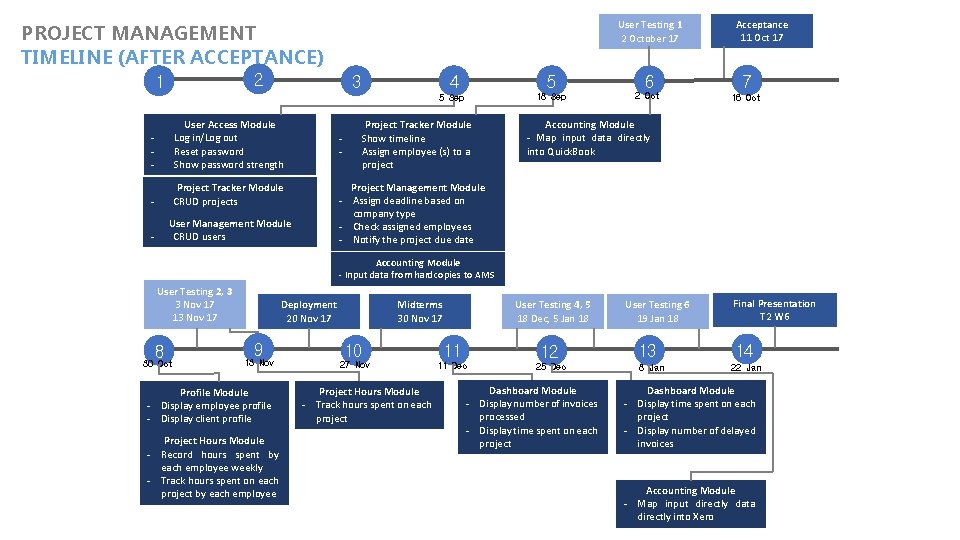
3 User Testing 1 2 October 17 PROJECT MANAGEMENT TIMELINE (AFTER ACCEPTANCE) 2 1 - User Access Module Log in/Log out Reset password Show password strength - Project Tracker Module CRUD projects - User Management Module CRUD users - 3 4 5 5 Sep 18 Sep Project Tracker Module Show timeline Assign employee (s) to a project 6 2 Oct Acceptance 11 Oct 17 7 16 Oct Accounting Module - Map input data directly into Quick. Book Project Management Module - Assign deadline based on company type - Check assigned employees - Notify the project due date Accounting Module - Input data from hardcopies to AMS User Testing 2, 3 3 Nov 17 13 Nov 17 8 30 Oct 9 13 Nov Profile Module - Display employee profile - Display client profile Project Hours Module - Record hours spent by each employee weekly - Track hours spent on each project by each employee User Testing 4, 5 18 Dec, 5 Jan 18 Midterms 30 Nov 17 Deployment 20 Nov 17 10 27 Nov Project Hours Module - Track hours spent on each project 11 12 11 Dec 25 Dec Dashboard Module - Display number of invoices processed - Display time spent on each project User Testing 6 19 Jan 18 13 8 Jan Final Presentation T 2 W 6 14 22 Jan Dashboard Module - Display time spent on each project - Display number of delayed invoices Accounting Module - Map input directly data directly into Xero
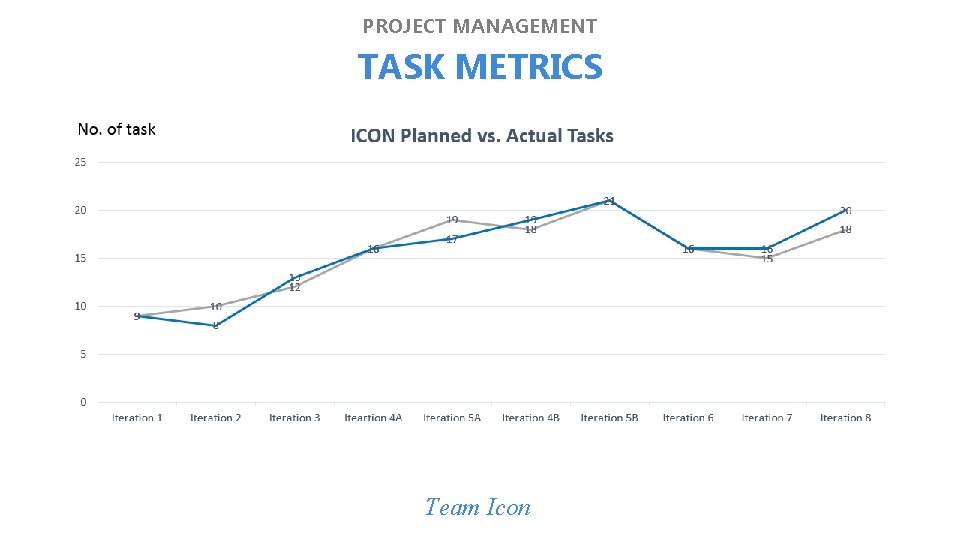
3 PROJECT MANAGEMENT TASK METRICS Team Icon
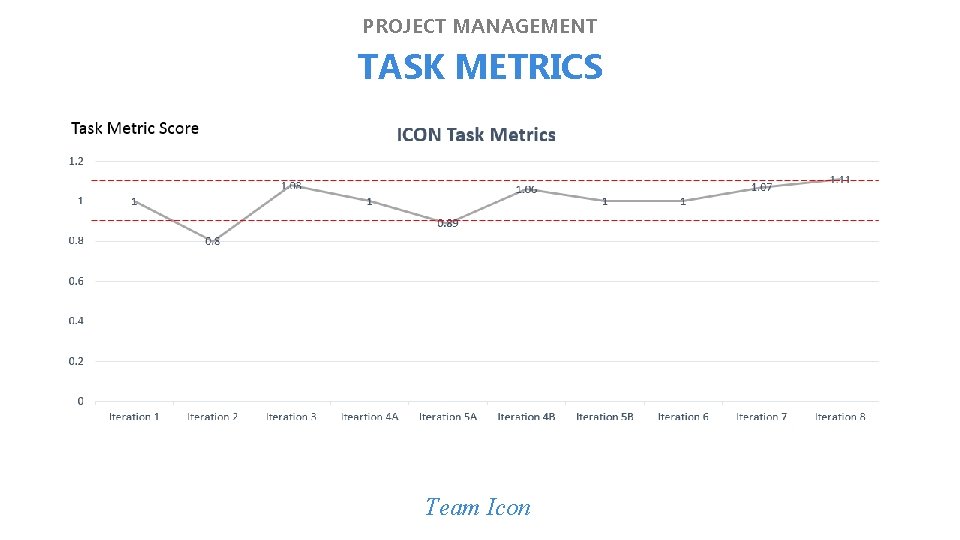
3 PROJECT MANAGEMENT TASK METRICS Team Icon
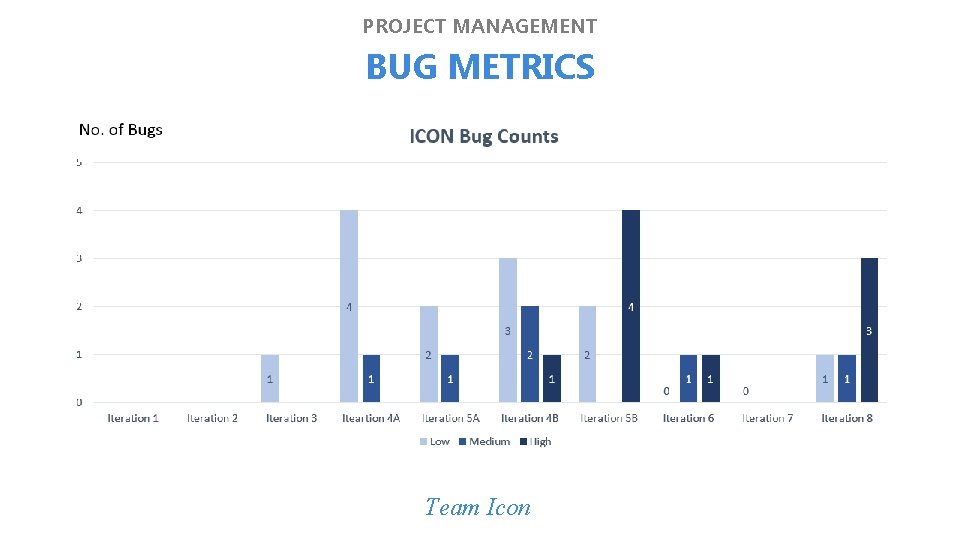
PROJECT MANAGEMENT BUG METRICS Team Icon
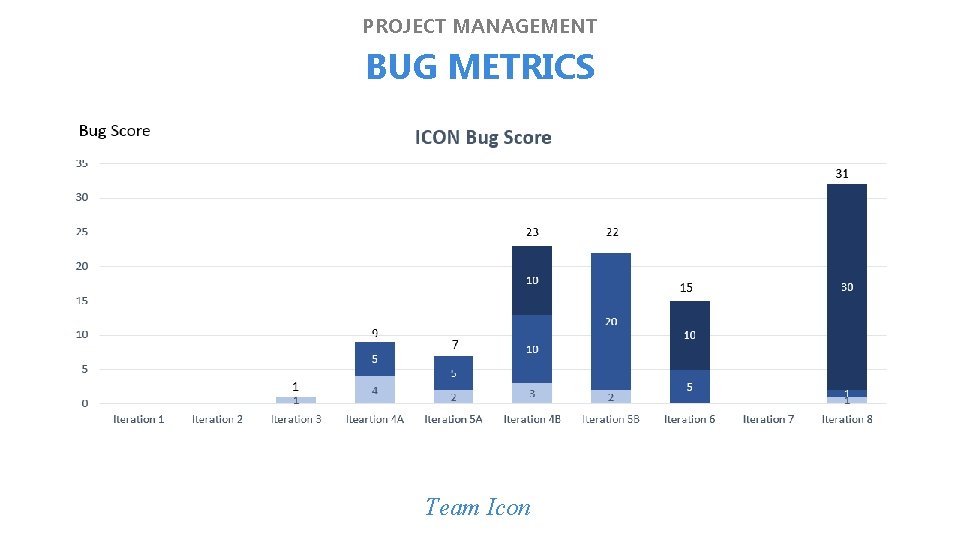
PROJECT MANAGEMENT BUG METRICS Team Icon
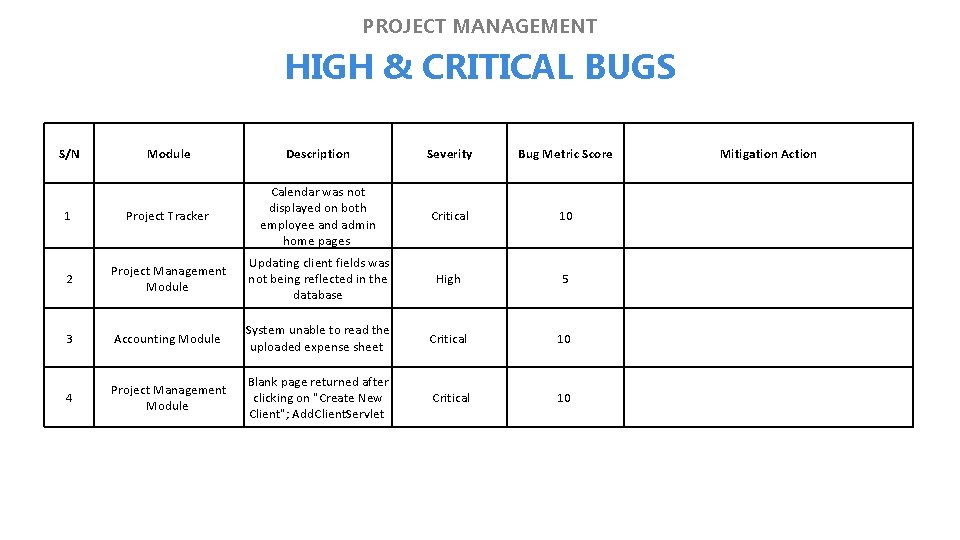
3 PROJECT MANAGEMENT HIGH & CRITICAL BUGS S/N Module Description Severity Bug Metric Score 1 Project Tracker Calendar was not displayed on both employee and admin home pages Critical 10 2 Project Management Module Updating client fields was not being reflected in the database High 5 3 Accounting Module System unable to read the uploaded expense sheet Critical 10 4 Project Management Module Blank page returned after clicking on "Create New Client"; Add. Client. Servlet Critical 10 Mitigation Action
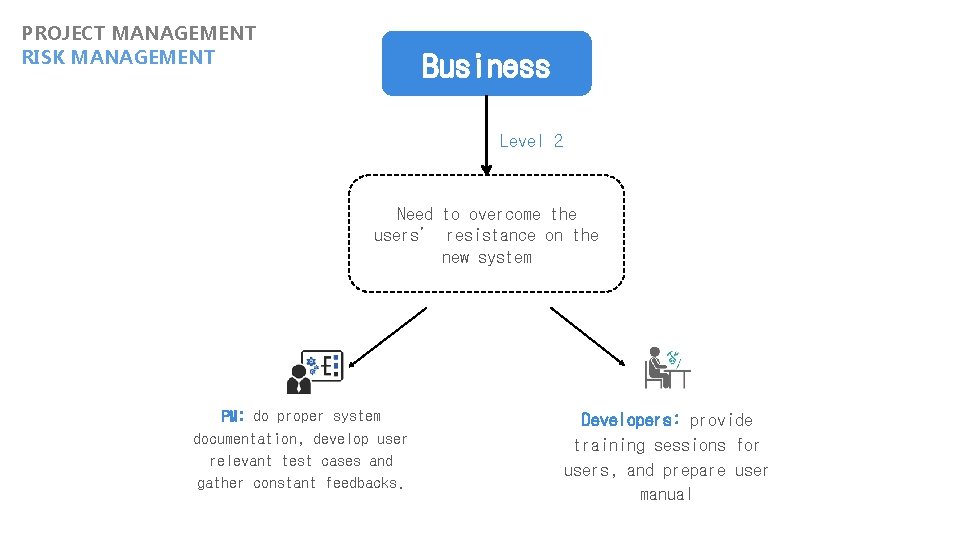
PROJECT MANAGEMENT RISK MANAGEMENT Business Level 2 Need to overcome the users’ resistance on the new system PM: do proper system documentation, develop user relevant test cases and gather constant feedbacks. Developers: provide training sessions for users, and prepare user manual
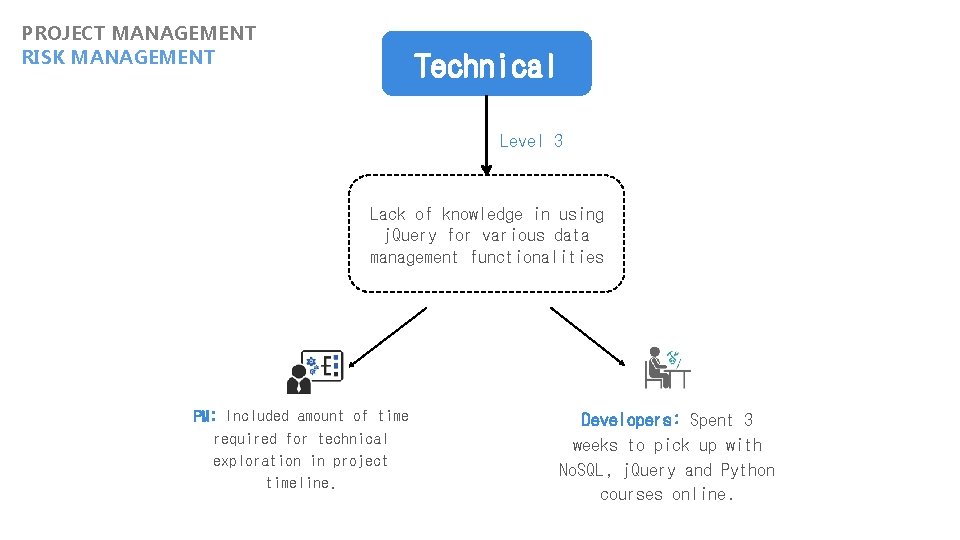
PROJECT MANAGEMENT RISK MANAGEMENT Technical Level 3 Lack of knowledge in using j. Query for various data management functionalities PM: Included amount of time required for technical exploration in project timeline. Developers: Spent 3 weeks to pick up with No. SQL, j. Query and Python courses online.
CLIENT TESTIMONIAL CLIENT FEEDBACK Team Icon
3 CLIENT TESTIMONIAL CLIENT FEEDBACK Team Icon
REFLECTIONS TEAM REFLECTION INDIVIDUAL REFLECTION Team Icon

REFLECTIONS TEAM REFLECTION
3 REFLECTIONS AN JAE HYEONG 1. Managing the expectations of the client, SMU faculty as well as the team is the key to ensure that we have the support for the project to progress Team Icon Project Manager Quality Assurance
3 REFLECTIONS LIN YU MAI 1. When developing complex code, instead of trying to make all the functionality work at once, start with the skeletal code and iterate from there 2. Always clarify the requirements with the client, if possible set up a direct channel to communicate with the client. Team Icon Lead Backend Developer Quality Assurance
3 REFLECTIONS BERNITA TOH 1. I was able to improve on my management, communication and technical skills whilst managing requests from the client to deliver a quality application that serves practical purpose to our client. 2. Learnt that it is easy to go fast alone, but it’s also very easy to burnout that way. Team Icon Lead Frontend Developer Quality Assurance
REFLECTIONS YE MIN OO 1. Always empathize and think of the users when creating UI/UX. Instead of looking for an easy way out, it is important to understand the user's requirements in order to enhance the user experience. Team Icon Deputy Frontend Developer Business Analyst
3 REFLECTIONS JAGDISH SINGH PARMAR 1. The 4 C's: Consider, Communicate, Clarify, Code. 2. The strength of the team is each individual member. The strength of each member is the team. Team Icon Deputy Backend Developer Database Analyst
Thank you! Team Icon
- Slides: 50