
Microsoft Virtual Server 2005 By Joseph P Mahr
Microsoft Virtual Server 2005 By: Joseph P. Mahr For: CPSC 550 Operating Systems II March 2005 Virtual Server 2005 - Case Study
Introduction to Microsoft Virtual Server 2005 n Business needs … (tight competition) n Increase efficiency n Reduce operating expenses n Process & Procedure - always candidates for improvement Look to leverage technology n n Introducing Microsoft Virtual Server 2005 n “a real world distributed operating system” n Max performance of Legacy Hardware & Software n Integration made easy Virtual Server 2005 - Case Study 2

History of Microsoft Virtual Server 2005 n Released - Summer 2004 n “Release Candidate” Free Download - 31 January 2005 n Beta testing by Community of Interest • Sys Admin’s, Developers, Testers n Purchased technology … • Connectix Corporation on February 18, 2003. • And - Virtual PC: Mac & OS 2 to run Windows apps Virtual Server 2005 - Case Study 3
History of Microsoft Virtual Server 2005 n Deep Past n n n 1968 - Virtual Machine technology Effectively since 1988 – introduced by IBM • Mainframe Op Sys to operate concurrent physical H/W • That’s why it’s attractive Today n n Not sole virtualization offering VMware GSX Server was 1 st in 2001 BUT, VS 2 K 5 is primarily for ……………… Windows AND, VMware GSX Server 3. 1 for ……. . Unix/Linux Virtual Server 2005 - Case Study 4
History of Microsoft Virtual Server 2005 n Other common form of virtualization n Java Virtual Machine • Promotes portability • Run apps in JVM, it rides on host O/S BUT, a very different purpose. Virtual Server 2005 - Case Study 5
Goal of Microsoft Virtual Server 2005 n Why go Virtual ? n IT Pro’s deal with… • • • n Legacy Integration Testing Deployment Heterogeneous Environments IBM - “Strategic virtualization technologies can: 2” • • • Reduce financial pressures Improve security and operational resiliency Protect sensitive data Accelerate time to market Deploy new capabilities Reduce “islands of information” Virtual Server 2005 - Case Study 6
Goal of Microsoft Virtual Server 2005 n Real cost savings n n Capacity n n n Run up to 32 CPUs Divide that into 64 instances Limitation n Host multiple virtual servers on common existing hardware System resources Random Access Memory Flexibility n n n Multiple virtual OS’s can run on 1 CPU Multiple CPUs can be run to support 1 OS And, Many to Many configurations Virtual Server 2005 - Case Study 7
Goal of Microsoft Virtual Server 2005 n Legacy application n Do in parallel w/ new business apps • Helps protect sensitive data as capital assest n Server Consolidation n System resource drive limitations on performance (RAM) Resources can be dynamically allocated & added Disparate Oss • Windows & Non-Windows alike n n System Isolation n n Equitable sharing of resources Development & testing Reduces risk Recreate system scenarios – easily Provide courseware & Training scenarios Virtual Server 2005 - Case Study 8

Definition of Microsoft Virtual Server 2005 n. Architecture n. Emulates where virtual server is on top of host OS physical system n. Guest OS(s) on top of that n. This provides isolation btwn Guest OSs n. Component Object Model (COM) APIs. n. Core methodology of VS 2 K 5 n. Windows Server 2003 is only supported host “A server … that shares computer resources with other virtual servers. In this context, the virtual part simply means that it is not a dedicated server -- that is, the entire computer is not dedicated to running the server software. ” 5 Virtual Server 2005 - Case Study 9
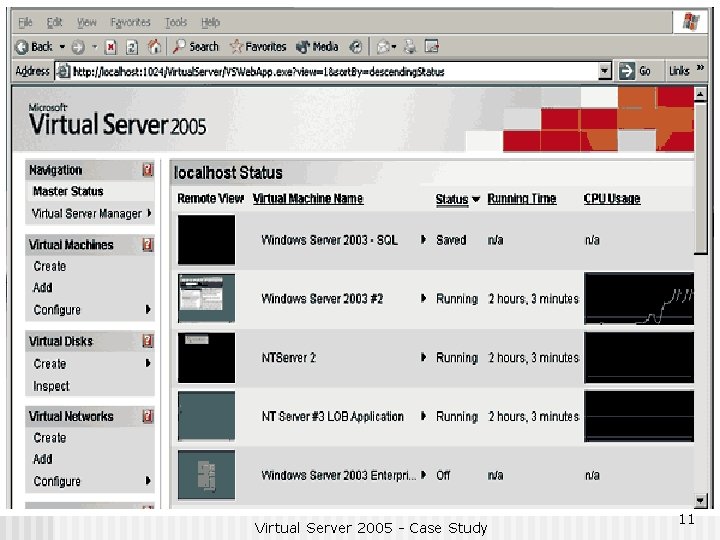
Features of Microsoft Virtual Server 2005 n Flavors of VS 2 K 5 n n Standard Edition (supports up to four CPUs) Enterprise Edition (supports up to 32 CPUs) Runs only on Windows Server 2003 Other OSs will work…But, not documented • Novell's Net. Ware or Unix variations [plus other x 86 operating systems] n Requires Internet Information Server (IIS) n n n Web based GUI – easy to use Most tasks are wizard-based – easy to use Internet Explorer works best, if not only (not other browsers) Virtual Server 2005 - Case Study 10
Virtual Server 2005 - Case Study 11
Features of Microsoft Virtual Server 2005 n Create pseudo virtual networks n n n Isolated from host Create Virtual discs On-demand resize during sessions n n A primary benefit Default is dynamic allocation of resources • Add or subtract as needed … any given time. n n n Robust disaster recovery Back-up to virtual machines Define fail-over using COM APIs n n Automate archiving business data Thru COM APIs, scripting event controls • choice of scripting langauges Virtual Server 2005 - Case Study 12
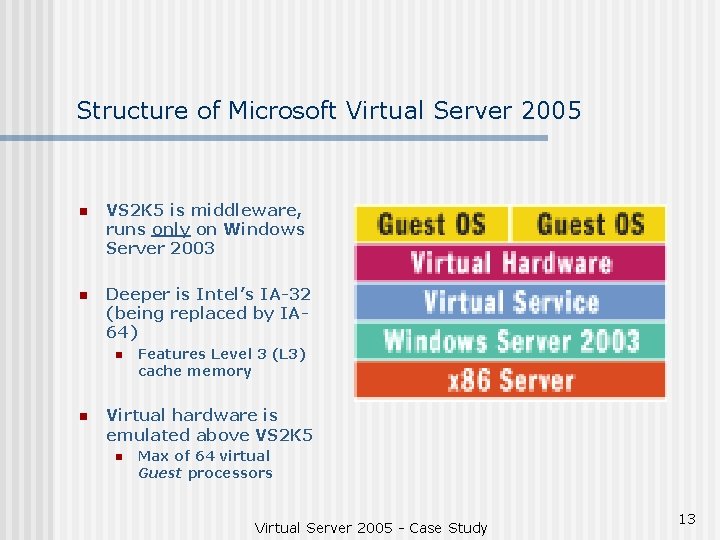
Structure of Microsoft Virtual Server 2005 n VS 2 K 5 is middleware, runs only on Windows Server 2003 n Deeper is Intel’s IA-32 (being replaced by IA 64) n n Features Level 3 (L 3) cache memory Virtual hardware is emulated above VS 2 K 5 n Max of 64 virtual Guest processors Virtual Server 2005 - Case Study 13
Structure of Microsoft Virtual Server 2005 “Virtual Server 2005 is a multithreaded application that runs as a system service, with each virtual machine running in its own thread of execution; I/O occurs in child threads. Virtual Server derives two core functions from the host operating system: The underlying host operating system kernel schedules CPU resources, and the device drivers of the host operating system provide access to system devices. The Virtual Server VMM [Virtual Machine Monitor] provides the software infrastructure to create virtual machines, manage instances, and interact with guest operating systems. ” 8 Virtual Server 2005 - Case Study 14
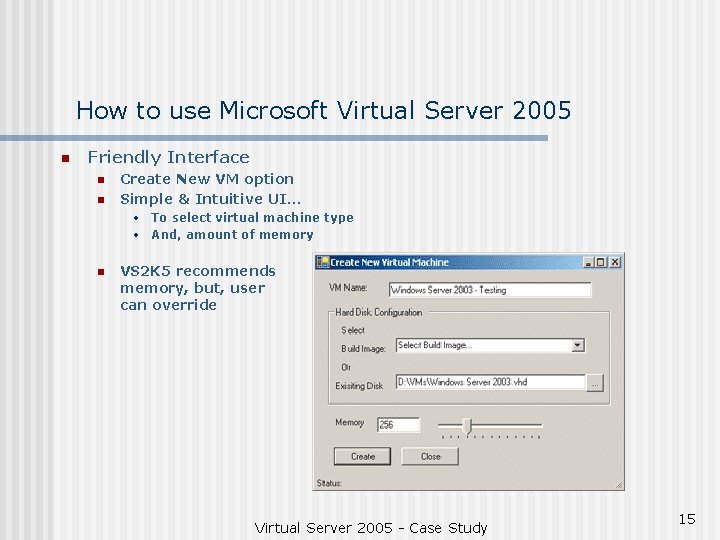
How to use Microsoft Virtual Server 2005 n Friendly Interface n n Create New VM option Simple & Intuitive UI… • To select virtual machine type • And, amount of memory n VS 2 K 5 recommends memory, but, user can override Virtual Server 2005 - Case Study 15
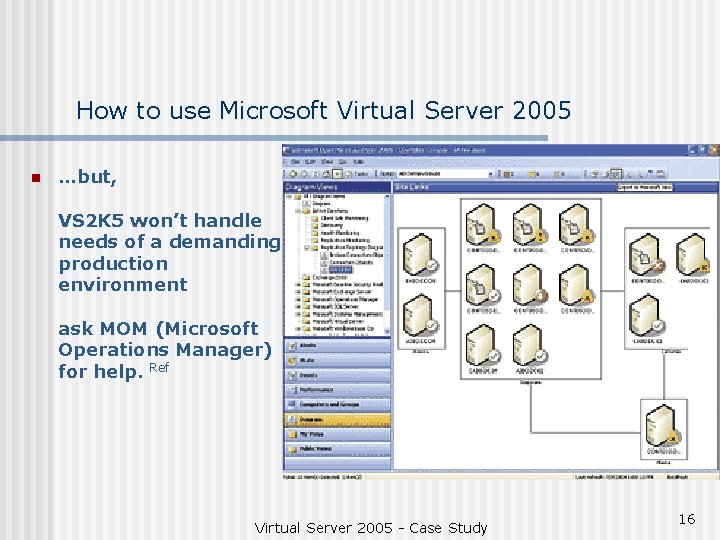
How to use Microsoft Virtual Server 2005 n …but, VS 2 K 5 won’t handle needs of a demanding production environment ask MOM (Microsoft Operations Manager) for help. Ref Virtual Server 2005 - Case Study 16
Applications of Microsoft Virtual Server 2005 n 4 Suggested Scenarios 1. 2. 3. 4. Consolidate & Automate Software Test & Development Environments Migrate Legacy Applications Consolidate Multiple Server Workloads Simulate Distributed Server Applications on a Single Physical Server Virtual Server 2005 - Case Study 17
Applications of Microsoft Virtual Server 2005 n Consolidate & Automate Software Test & Development Environments n Speeds up ‘time to market’ • derived by efficiency gains • without sacrificing QA n Reduce Dynamic & Fixed costs n Virtualizing test networks reduces risk n Reduces Sys Admin tasks • Example - ability to rapidly reset a testing environment Virtual Server 2005 - Case Study 18
Applications of Microsoft Virtual Server 2005 1. Migrate Legacy Applications n Legacy Apps have their place & must be maintained • The problem - they outlive H/W & S/W base • Sustain by re-hosting • Takes pressure off a business to re-capitalize, allows better budget planning • Reduces retraining requirement n Notion about unsupported environments • Windows NT is Microsoft’s They decide when to declare EOL BUT - Progress and change are important AND - Should be embraced Virtual Server 2005 - Case Study 19
Applications of Microsoft Virtual Server 2005 n Consolidate Multiple Server Workloads n Less is m o r e • Reduced capital investment required to operate • VS 2 K 5 runs instances of server bases on consolidated physical H/W n Less H/W = Less maintenance & management time n Disaster recovery is enhanced • Fail over capability performed thru COM APIs • Automated archiving & data duplication Virtual Server 2005 - Case Study 20
Applications of Microsoft Virtual Server 2005 n Simulate Distributed Server Applications on a Single Physical Server n Reduced physical H/W needs n Reduced Time to set up physical H/W & network components n Simulate Complex server based scenarios • Time & Cost effective for Dev & Test Virtual Server 2005 - Case Study 21
Significant Points of Microsoft Virtual Server 2005 n Virtualization IS n Reduces risk in… • Development • Testing • Product Deployment Virtual Server 2005 - Case Study 22
Significant Points of Microsoft Virtual Server 2005 n Virtualization IS n O/S Selection n Business Driven Combinations of • Legacy apps • Contemporary apps (i. e. currently supported) Virtual Server 2005 - Case Study 23
Significant Points of Microsoft Virtual Server 2005 n Virtualization IS n Reduces H/W footprint • Expands • Contracts • Resizes As Needed Virtual Server 2005 - Case Study 24
Significant Points of Microsoft Virtual Server 2005 n Virtualization IS n Unfortunately • Only works on 1 host • That sets physical H/W requirements • Licensing is tricky Virtual Server 2005 - Case Study 25
Significant Points of Microsoft Virtual Server 2005 n Virtualization IS n Sys Admin types may enjoy • Script based operations • Web-Based GUI • COM API functionality Virtual Server 2005 - Case Study 26
Summary n A strong resurging technology that has been around n This study makes the case for Virtual Server 2005 BUT - not w/o exception: No documentation for Non-Microsoft guest OSes THUS – VMware GSX Server 3. 1 is better for Unix/Linux BOTTOM LINE – A great solution to the right problem, …deciding that is up to business. Virtual Server 2005 - Case Study 27
Key References 1) Edstrom, Waggener Ed. , “Microsoft Acquires Connectix Virtual Machine Technology, Move Eases Consolidation and Migration to New Operating Systems for Customers” Press Pass – Information for Journalists, 19 February 2003, “n. pag” Microsoft, 2 March 2005. <http: //www. microsoft. com/presspass/press/2003/Feb 03/02 -19 Partition. PR. asp> 2) Dickson, Michael and Zander, Andrea M. , “The z. Series platform continues its virtualization leadership and provides a foundation for the IBM Virtualization Engine” Mainframe edition, Virtual Virtuosity September 2004, “n. pag” e. Server Magazine, 28 February 2005. <http: //www. eservercomputing. com/mainframe/articles/index. asp? id=1044&dir=/mainframe/articles/> 3) Otey, Michael, “Compare the two titans of virtualization: Microsoft Virtual Server 2005 and VMware GSX Server” Windows. ITPro, Virtual-Server Face-Off, Instant. Doc #45253, March 2005, “n. pag” Windows. ITPro, 4 March 2005 <http: //www. windowsitpro. com/Articles/Print. cfm? Article. ID=45253> 4) MSDN Library, “COM: Component Object Model Technologies” 2005, “n. pag” Microsoft Developer Network (MSDN) 2 March 2005. <http: //msdn. microsoft. com/library/default. asp? url=/library/en-us/dnanchor/html/componentobjectmodelanchor. asp> 5) Webopedia, “Virtual Server” August 05, 2002 , “n. pag” internet. com 28 February 2005. <http: //www. webopedia. com/TERM/V/virtual_server. html> 6) Bekker, Scott, “Virtual Server 2005 Released to Manufacturing” ENT News August 5, 2004, “n. pag” 101 Communications, 28 February 2005. <http: //www. entmag. com/news/article. asp? Editorials. ID=6322> 7) Ohlhorst, Frank J. , “Review: Microsoft Virtual Server 2005” CRN, Daily News Archive, 10: 00 AM EDT Tue. Jun. 15, 2004, “n. pag” CMP Media LLC, 28 February 2005. <http: //www. crn. com/sections/breakingnews/dailyarchives. jhtml? article. Id=21800334> 8) Hale, Mark Comp. , “Microsoft Virtual Server 2005 Technical Overview” Niemann, Casey, Microsoft Education, Major Account Manager 29 September 2004, 12 pages, Microsoft, 28 February 2005. <http: //cio. uiowa. edu/events/MS 20040728/VS 2005 Tech. WP. doc> 9) Waldron, Ben, “Program Customized Testing Environments Without Trashing Your Machine” MSDN Virtual Server 2005, August 2004, “n. pag” Microsoft 28 February 2005 <http: //msdn. microsoft. com/msdnmag/issues/04/08/Virtual. Server 2005/default. aspx> 10) Yager, Tom, “Virtual Server 2005 offers Windows upon Windows” IT PRODUCT GUIDE BETA Microsoft Virtual Server 2005, 5 November 2004, “n. pag” Info. World 28 February 2005. <http: //www. infoworld. com/Microsoft_Virtual_Server_2005/product_50685. html? view=1&cur. Node. Id=40> …The End Joseph P. Mahr Virtual Server 2005 - Case Study 28
- Slides: 28