
Microsoft Virtual Academy Ranger Due Cloud Solution Architect

- Slides: 85
Microsoft Virtual Academy Ranger Due | Cloud Solution Architect, Health & Life Sciences Brett Hacker | Cloud Solution Architect, Health & Life Sciences
Meet Ranger Due | @Ranger 80919 • Cloud Solution Architect, Health & Life Sciences – BSCS, MBA, USPTO Bar – Responsible for HLS client architectures • Over 30 years of industry experience – Microsoft, Avanade, Booz • Allen & Hamilton – COO of private firm – Speaker at EBC, WW Partner Conference, Tech. Ready & Industry events
Meet Brett Hacker | @Middle. Brownie • Cloud Solution Architect, Microsoft Health & Life Sciences – Assist with large customer cloud architecture and implementations in Microsoft Azure • Over 20 years of technology experience – Health Care, E-Commerce, Content Management – MCSE, former MCT, multiple Microsoft Partners – Former CIO of startup health care clearinghouse – Experience in systems, development, infrastructure, networking, and databases
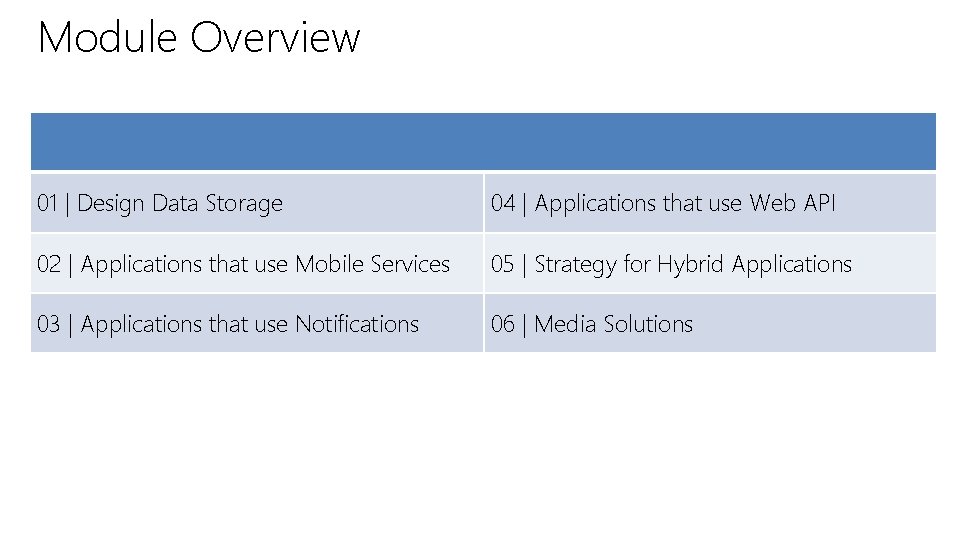
Module Overview 01 | Design Data Storage 04 | Applications that use Web API 02 | Applications that use Mobile Services 05 | Strategy for Hybrid Applications 03 | Applications that use Notifications 06 | Media Solutions
Microsoft Virtual Academy 01 | Design Data Storage Ranger Due | Cloud Solution Architect, Health & Life Sciences Brett Hacker | Cloud Solution Architect, Health & Life Sciences
Section Overview • Storage 101 – Azure Blob, Queues, Tables and File Service • The Test!
Microsoft Virtual Academy Storage 101 Ranger Due | Cloud Solution Architect, Health & Life Sciences Brett Hacker | Cloud Solution Architect, Health & Life Sciences
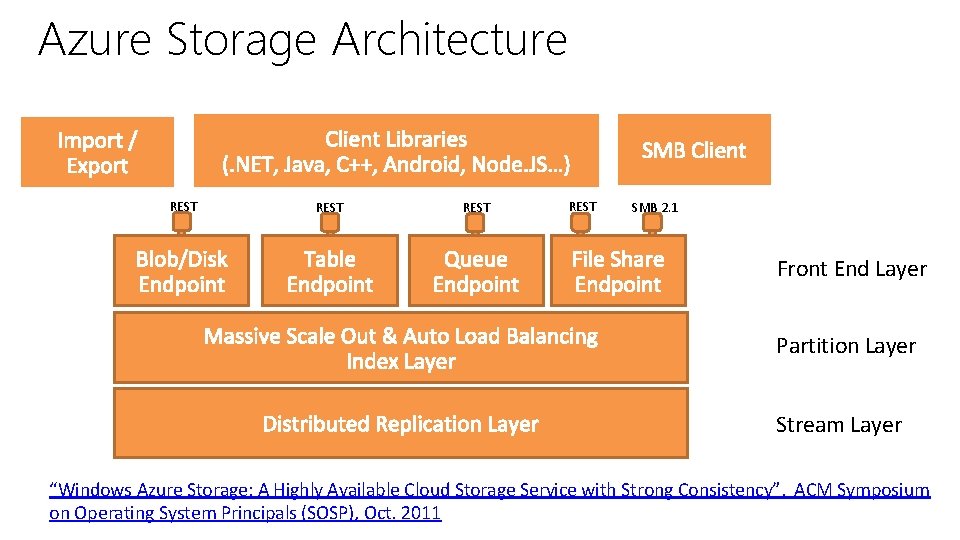
Azure Storage Architecture REST SMB 2. 1 Front End Layer Partition Layer Stream Layer “Windows Azure Storage: A Highly Available Cloud Storage Service with Strong Consistency”, ACM Symposium on Operating System Principals (SOSP), Oct. 2011
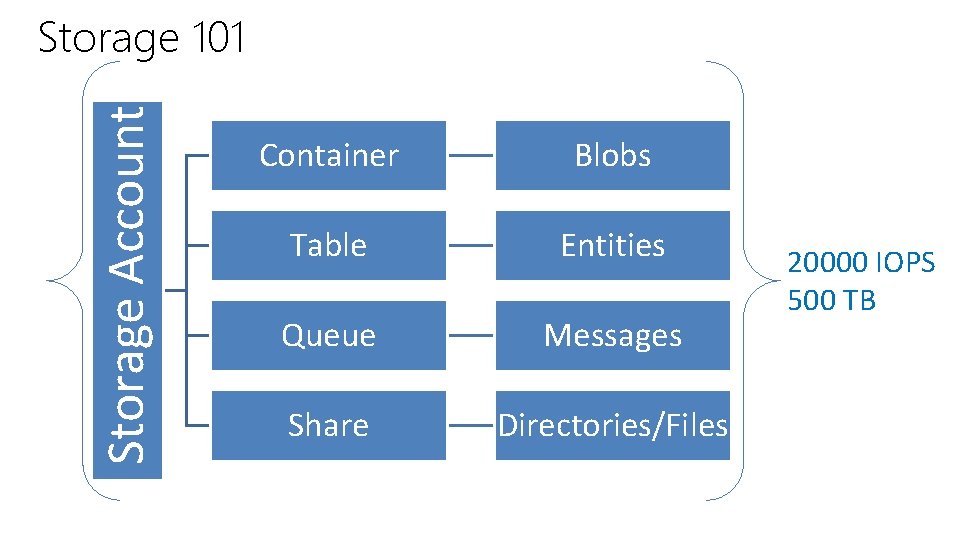
Storage Account Storage 101 Container Blobs Table Entities Queue Messages Share Directories/Files 20000 IOPS 500 TB
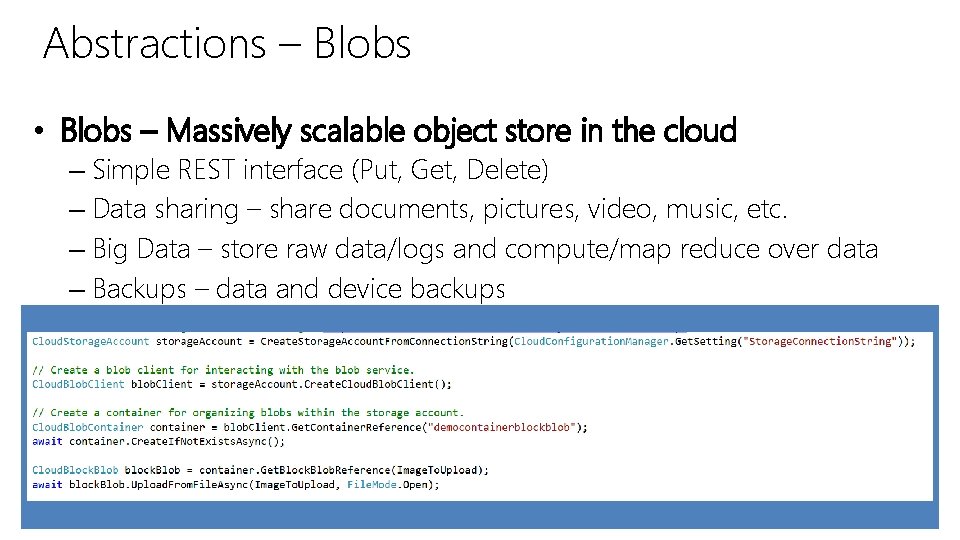
Abstractions – Blobs • Blobs – Massively scalable object store in the cloud – Simple REST interface (Put, Get, Delete) – Data sharing – share documents, pictures, video, music, etc. – Big Data – store raw data/logs and compute/map reduce over data – Backups – data and device backups
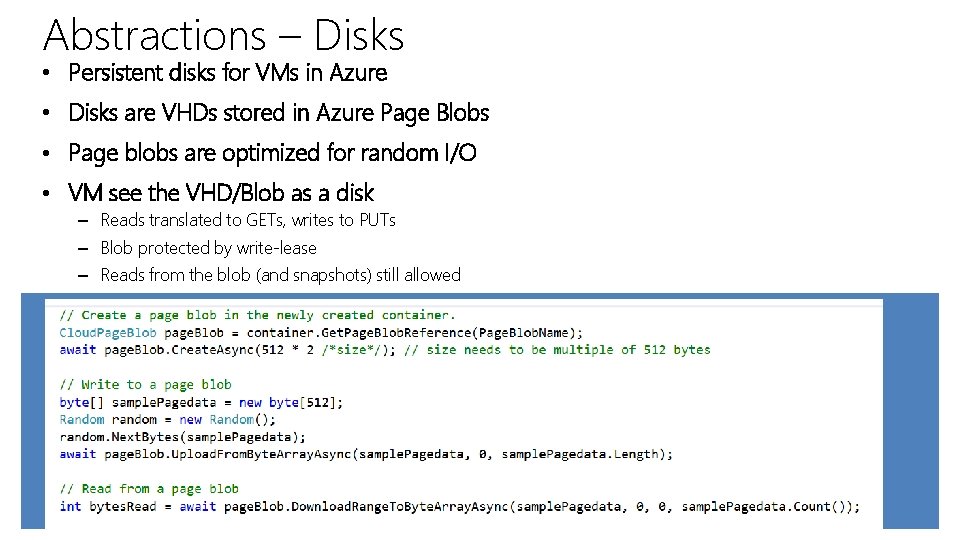
Abstractions – Disks • Persistent disks for VMs in Azure • Disks are VHDs stored in Azure Page Blobs • Page blobs are optimized for random I/O • VM see the VHD/Blob as a disk – Reads translated to GETs, writes to PUTs – Blob protected by write-lease – Reads from the blob (and snapshots) still allowed
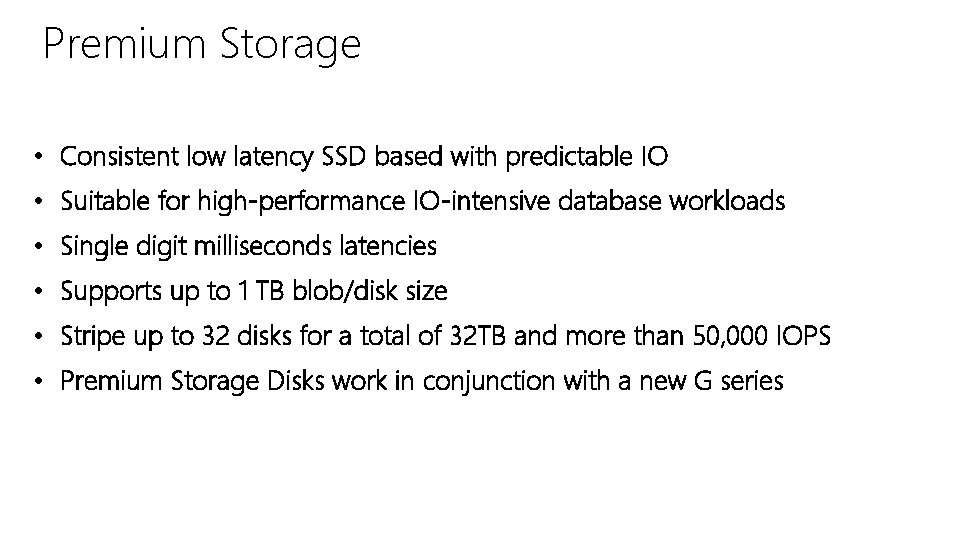
Premium Storage • Consistent low latency SSD based with predictable IO • Suitable for high-performance IO-intensive database workloads • Single digit milliseconds latencies • Supports up to 1 TB blob/disk size • Stripe up to 32 disks for a total of 32 TB and more than 50, 000 IOPS • Premium Storage Disks work in conjunction with a new G series
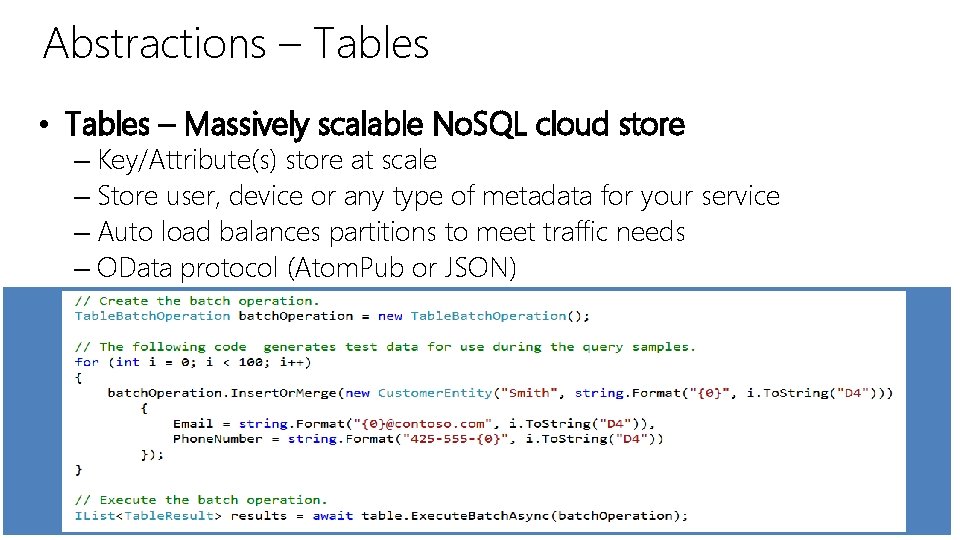
Abstractions – Tables • Tables – Massively scalable No. SQL cloud store – Key/Attribute(s) store at scale – Store user, device or any type of metadata for your service – Auto load balances partitions to meet traffic needs – OData protocol (Atom. Pub or JSON)
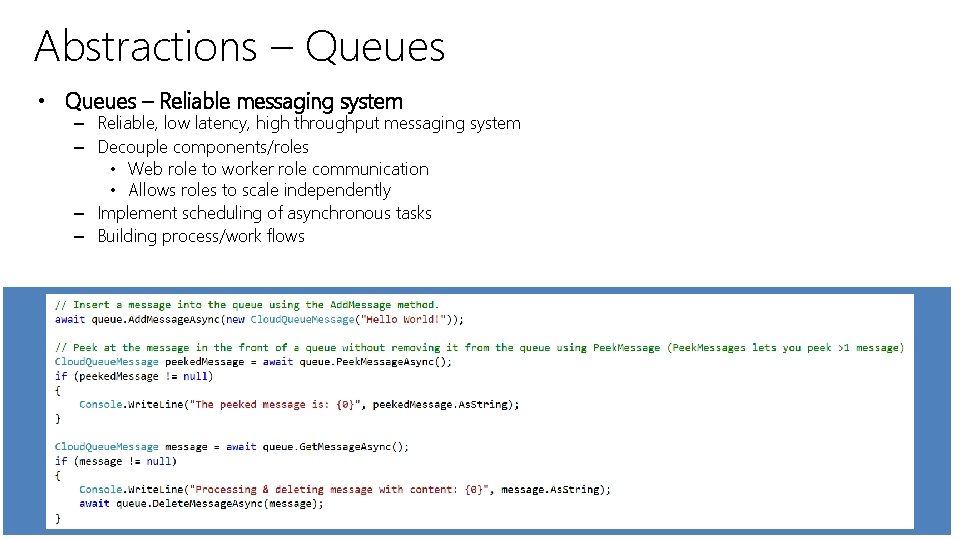
Abstractions – Queues • Queues – Reliable messaging system – Reliable, low latency, high throughput messaging system – Decouple components/roles • Web role to worker role communication • Allows roles to scale independently – Implement scheduling of asynchronous tasks – Building process/work flows
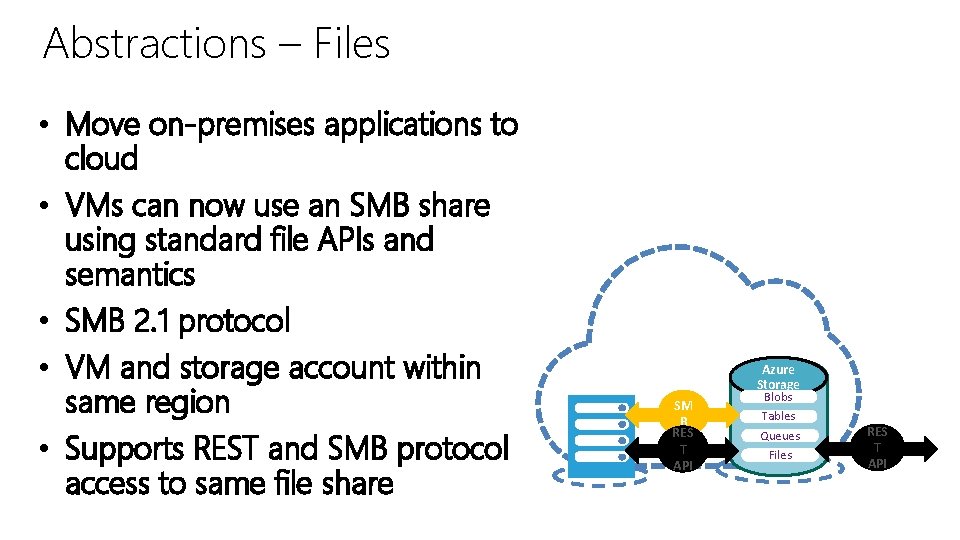
Abstractions – Files • Move on-premises applications to cloud • VMs can now use an SMB share using standard file APIs and semantics • SMB 2. 1 protocol • VM and storage account within same region • Supports REST and SMB protocol access to same file share Microsoft Share data stored in Azure Files among Azure VMs via SMB SM B RES T API Azure Storage Blobs Tables Queues Files RES T API
Additional Services, Tools and Libraries Azure Import/Export • Move TBs of data into and out of Azure Blobs by shipping disks • Submit and monitor jobs via REST and Portal • All disks encrypted with Bit. Locker Client Libraries • Simplify interaction with REST services • Convenience capabilities – retry logic, parallelization, SAS tokens, … • . NET (Desktop, Phone, Windows), Java, C++, Android, Node. JS, Python, PHP, Ruby, IOS (Coming Soon) Tools • Power. Shell commands • CLI tools • Az. Copy 3. 0 – Copy blobs and disks (Tables and Files in Preview Release)
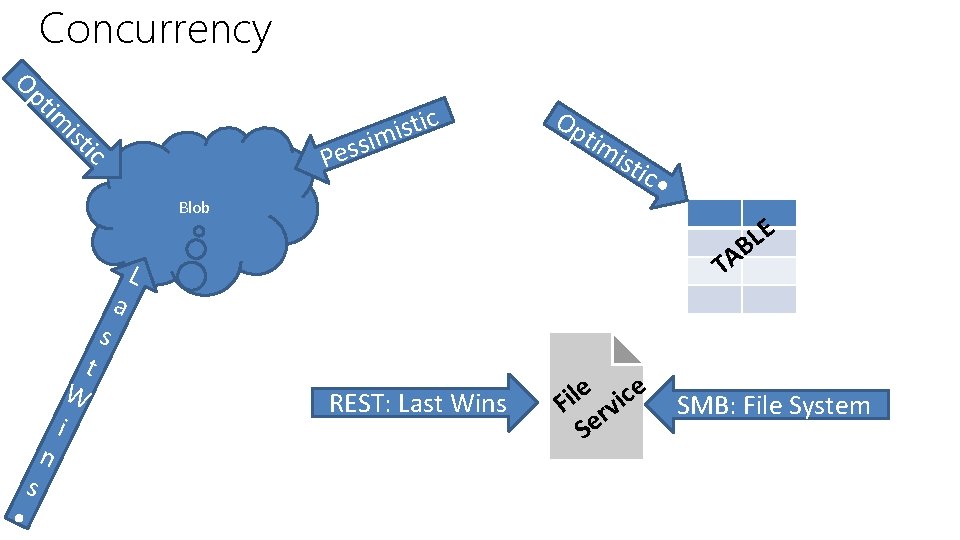
Concurrency tim Op tic s i im ist ess ic P Blob t W • s n i s a Op tim ist ic • T L REST: Last Wins e ice l i F rv Se E L AB SMB: File System
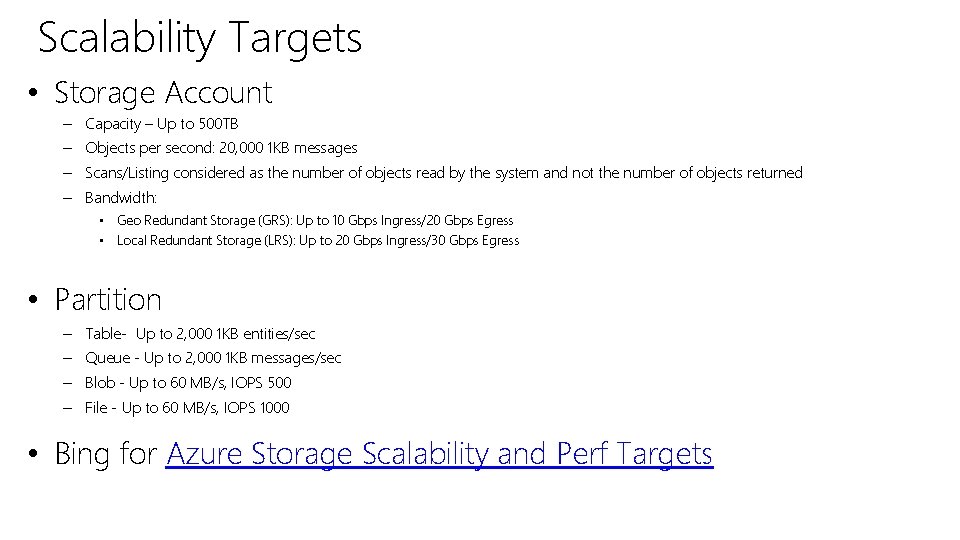
Scalability Targets • Storage Account – Capacity – Up to 500 TB – Objects per second: 20, 000 1 KB messages – Scans/Listing considered as the number of objects read by the system and not the number of objects returned – Bandwidth: • Geo Redundant Storage (GRS): Up to 10 Gbps Ingress/20 Gbps Egress • Local Redundant Storage (LRS): Up to 20 Gbps Ingress/30 Gbps Egress • Partition – Table- Up to 2, 000 1 KB entities/sec – Queue - Up to 2, 000 1 KB messages/sec – Blob - Up to 60 MB/s, IOPS 500 – File - Up to 60 MB/s, IOPS 1000 • Bing for Azure Storage Scalability and Perf Targets
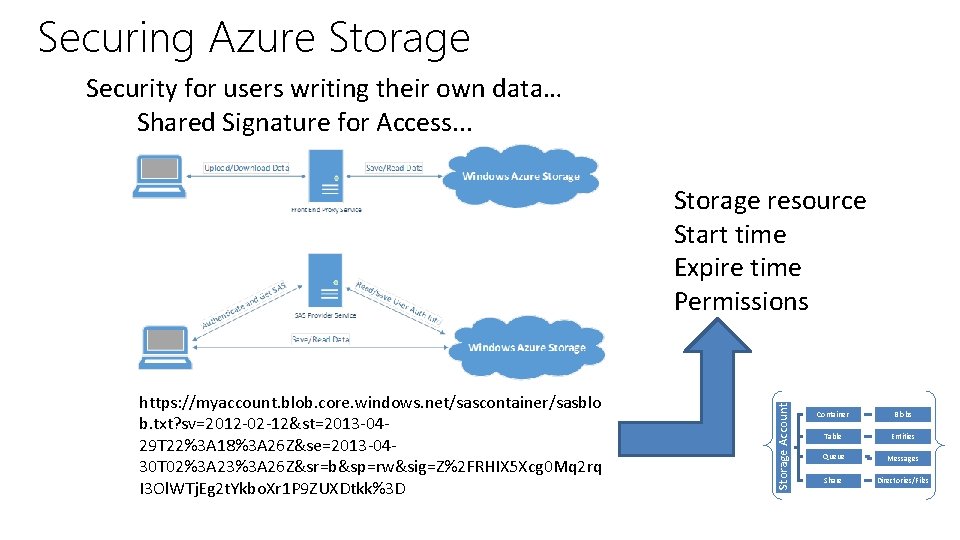
Securing Azure Storage Security for users writing their own data… Shared Signature for Access. . . https: //myaccount. blob. core. windows. net/sascontainer/sasblo b. txt? sv=2012 -02 -12&st=2013 -0429 T 22%3 A 18%3 A 26 Z&se=2013 -0430 T 02%3 A 23%3 A 26 Z&sr=b&sp=rw&sig=Z%2 FRHIX 5 Xcg 0 Mq 2 rq I 3 Ol. WTj. Eg 2 t. Ykbo. Xr 1 P 9 ZUXDtkk%3 D Storage Account Storage resource Start time Expire time Permissions Container Blobs Table Entities Queue Messages Share Directories/Files
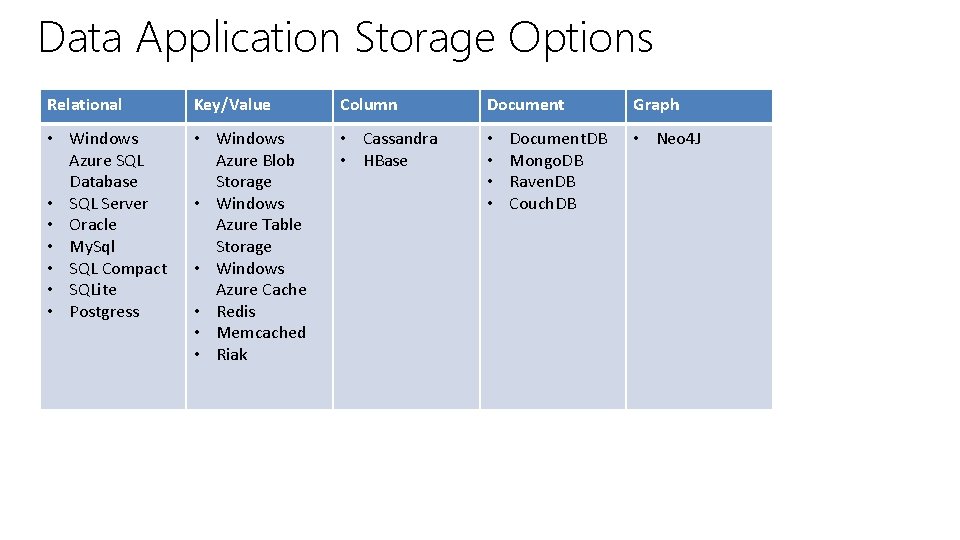
Data Application Storage Options Relational Key/Value Column Document • Windows Azure SQL Database • SQL Server • Oracle • My. Sql • SQL Compact • SQLite • Postgress • Windows Azure Blob Storage • Windows Azure Table Storage • Windows Azure Cache • Redis • Memcached • Riak • Cassandra • HBase • • Document. DB Mongo. DB Raven. DB Couch. DB Graph • Neo 4 J
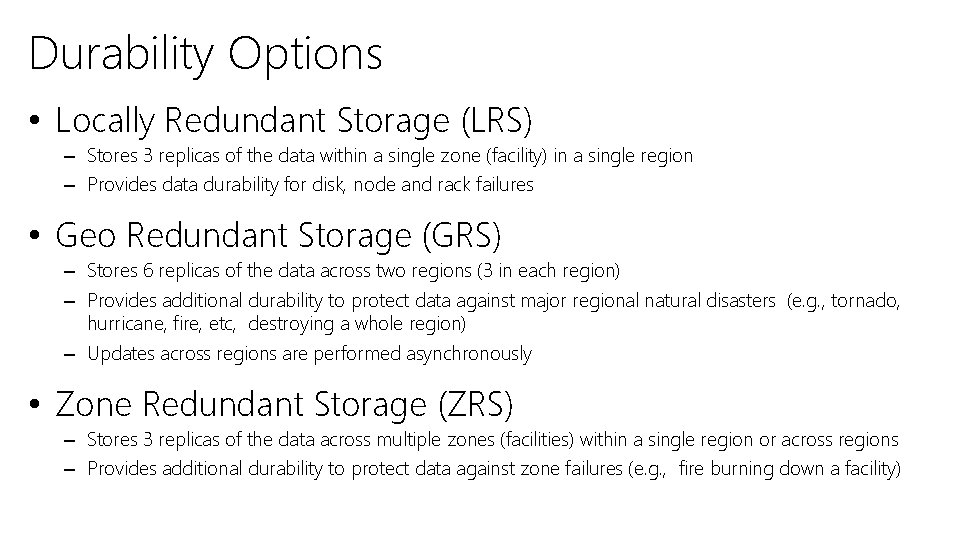
Durability Options • Locally Redundant Storage (LRS) – Stores 3 replicas of the data within a single zone (facility) in a single region – Provides data durability for disk, node and rack failures • Geo Redundant Storage (GRS) – Stores 6 replicas of the data across two regions (3 in each region) – Provides additional durability to protect data against major regional natural disasters (e. g. , tornado, hurricane, fire, etc, destroying a whole region) – Updates across regions are performed asynchronously • Zone Redundant Storage (ZRS) – Stores 3 replicas of the data across multiple zones (facilities) within a single region or across regions – Provides additional durability to protect data against zone failures (e. g. , fire burning down a facility)
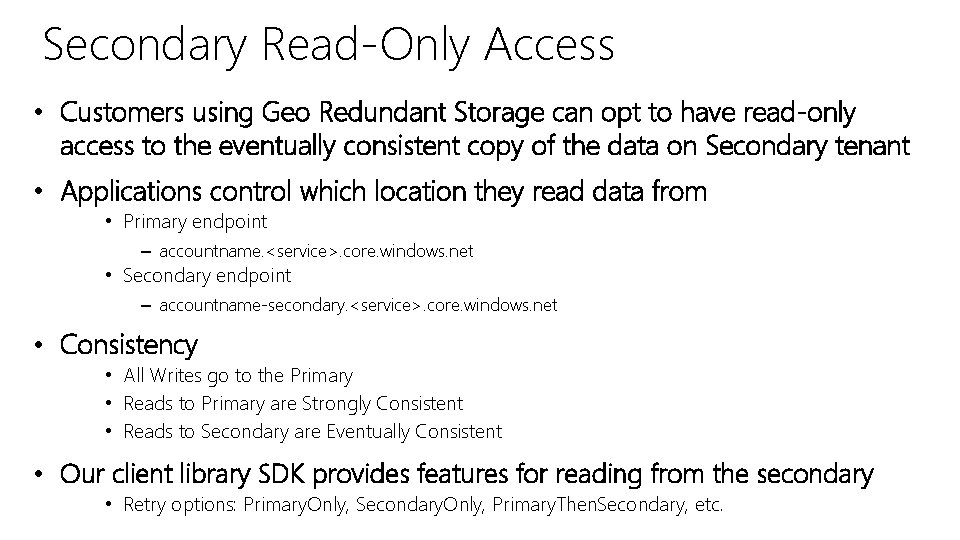
Secondary Read-Only Access • Customers using Geo Redundant Storage can opt to have read-only access to the eventually consistent copy of the data on Secondary tenant • Applications control which location they read data from • Primary endpoint – accountname. <service>. core. windows. net • Secondary endpoint – accountname-secondary. <service>. core. windows. net • Consistency • All Writes go to the Primary • Reads to Primary are Strongly Consistent • Reads to Secondary are Eventually Consistent • Our client library SDK provides features for reading from the secondary • Retry options: Primary. Only, Secondary. Only, Primary. Then. Secondary, etc.
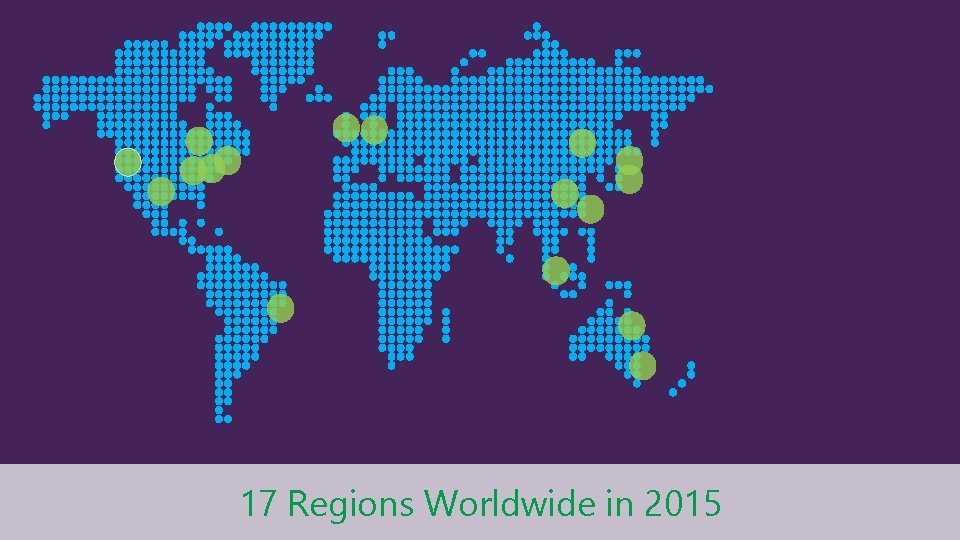
17 Regions Worldwide in 2015
Microsoft Virtual Academy A Look at a Blob Ranger Due | Cloud Solution Architect, Health & Life Sciences Brett Hacker | Cloud Solution Architect, Health & Life Sciences
Microsoft Virtual Academy The Test! Ranger Due | Cloud Solution Architect, Health & Life Sciences Brett Hacker | Cloud Solution Architect, Health & Life Sciences
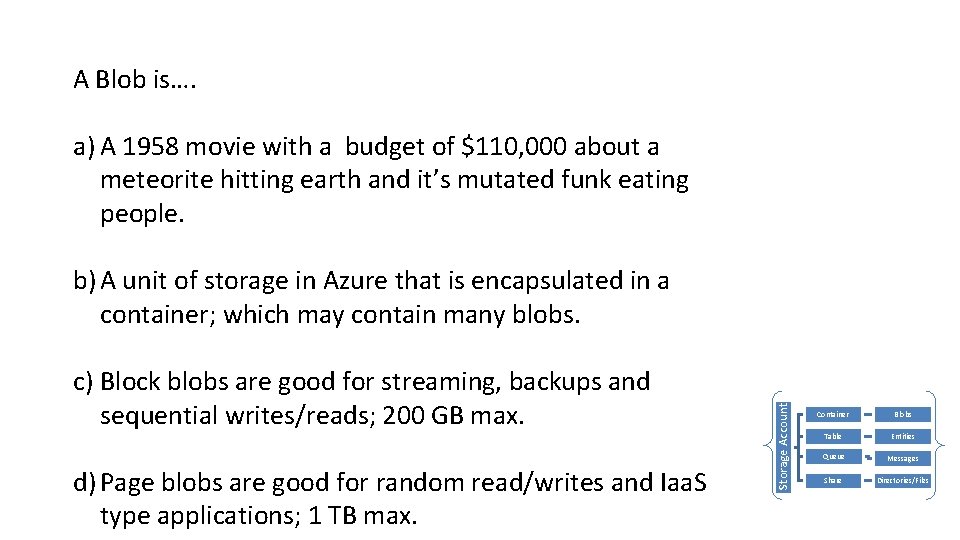
A Blob is…. a) A 1958 movie with a budget of $110, 000 about a meteorite hitting earth and it’s mutated funk eating people. c) Block blobs are good for streaming, backups and sequential writes/reads; 200 GB max. d) Page blobs are good for random read/writes and Iaa. S type applications; 1 TB max. Storage Account b) A unit of storage in Azure that is encapsulated in a container; which may contain many blobs. Container Blobs Table Entities Queue Messages Share Directories/Files
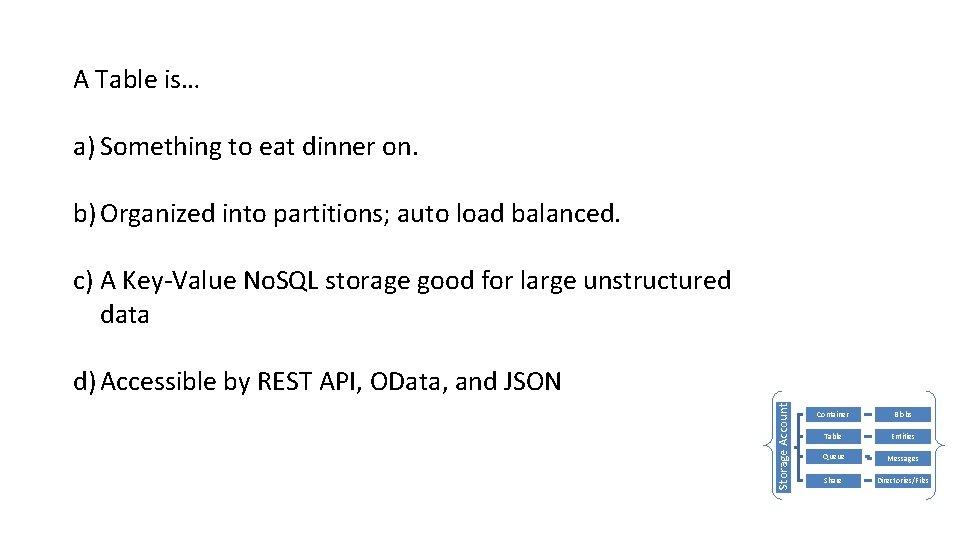
A Table is… a) Something to eat dinner on. b) Organized into partitions; auto load balanced. c) A Key-Value No. SQL storage good for large unstructured data Storage Account d) Accessible by REST API, OData, and JSON Container Blobs Table Entities Queue Messages Share Directories/Files
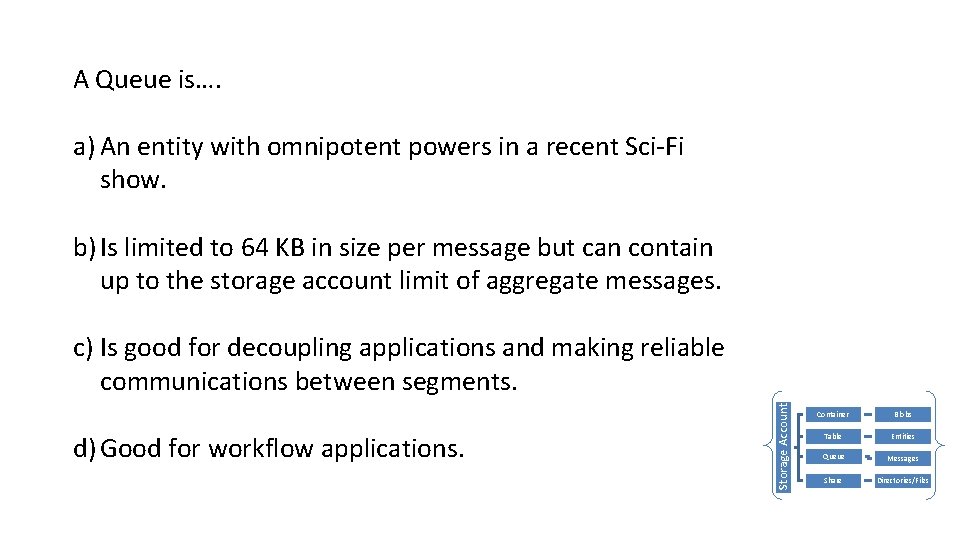
A Queue is…. a) An entity with omnipotent powers in a recent Sci-Fi show. b) Is limited to 64 KB in size per message but can contain up to the storage account limit of aggregate messages. d) Good for workflow applications. Storage Account c) Is good for decoupling applications and making reliable communications between segments. Container Blobs Table Entities Queue Messages Share Directories/Files
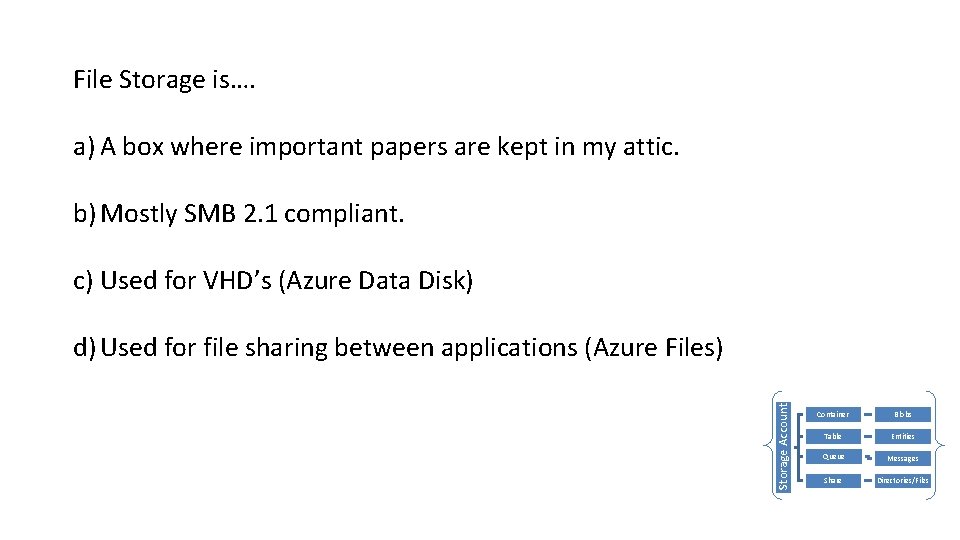
File Storage is…. a) A box where important papers are kept in my attic. b) Mostly SMB 2. 1 compliant. c) Used for VHD’s (Azure Data Disk) Storage Account d) Used for file sharing between applications (Azure Files) Container Blobs Table Entities Queue Messages Share Directories/Files
Microsoft Virtual Academy 02 | Design applications that use mobile services Ranger Due | Cloud Solution Architect, Health & Life Sciences Brett Hacker | Cloud Solution Architect, Health & Life Sciences
Section Overview • What is Azure Mobile Services – Cross Platform – Java. Script Backend – Offline Scenarios
Microsoft Virtual Academy What is Azure Mobile Services Ranger Due | Cloud Solution Architect, Health & Life Sciences Brett Hacker | Cloud Solution Architect, Health & Life Sciences
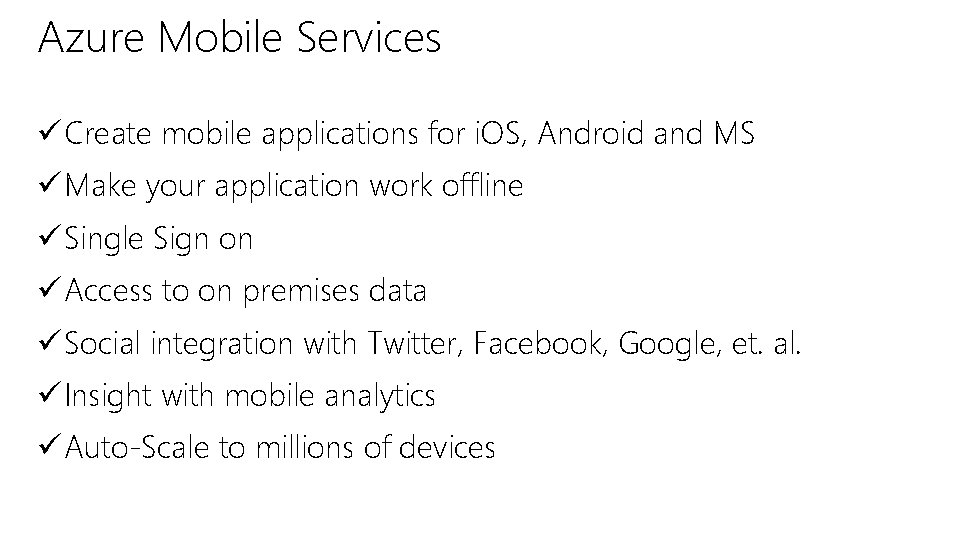
Azure Mobile Services ü Create mobile applications for i. OS, Android and MS ü Make your application work offline ü Single Sign on ü Access to on premises data ü Social integration with Twitter, Facebook, Google, et. al. ü Insight with mobile analytics ü Auto-Scale to millions of devices
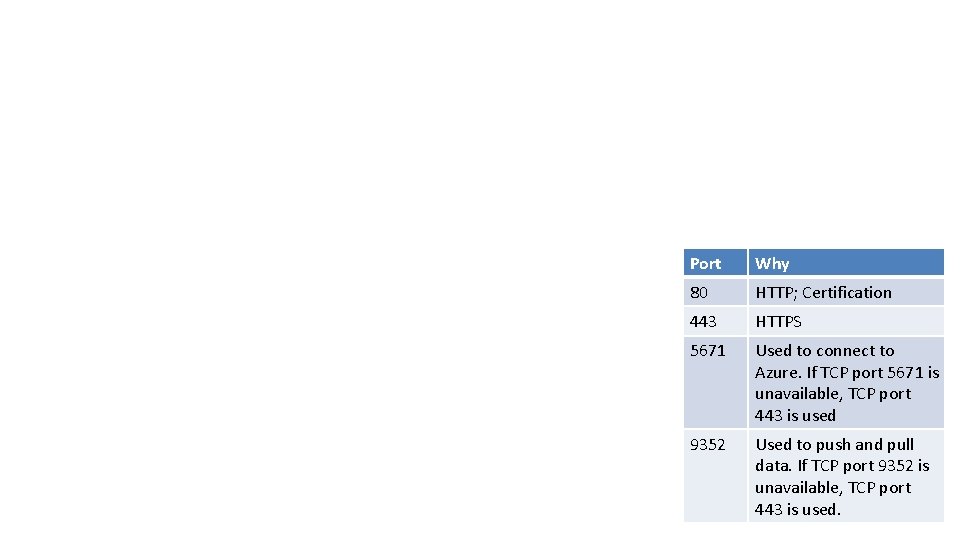
Port Why 80 HTTP; Certification 443 HTTPS 5671 Used to connect to Azure. If TCP port 5671 is unavailable, TCP port 443 is used 9352 Used to push and pull data. If TCP port 9352 is unavailable, TCP port 443 is used.
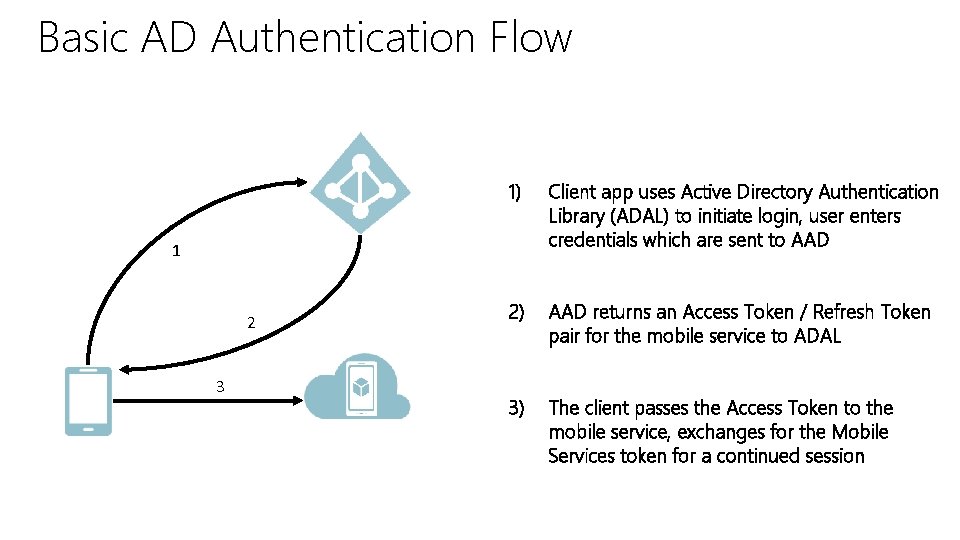
Basic AD Authentication Flow 1) Client app uses Active Directory Authentication Library (ADAL) to initiate login, user enters credentials which are sent to AAD 2) AAD returns an Access Token / Refresh Token pair for the mobile service to ADAL 3) The client passes the Access Token to the mobile service, exchanges for the Mobile Services token for a continued session 1 2 3
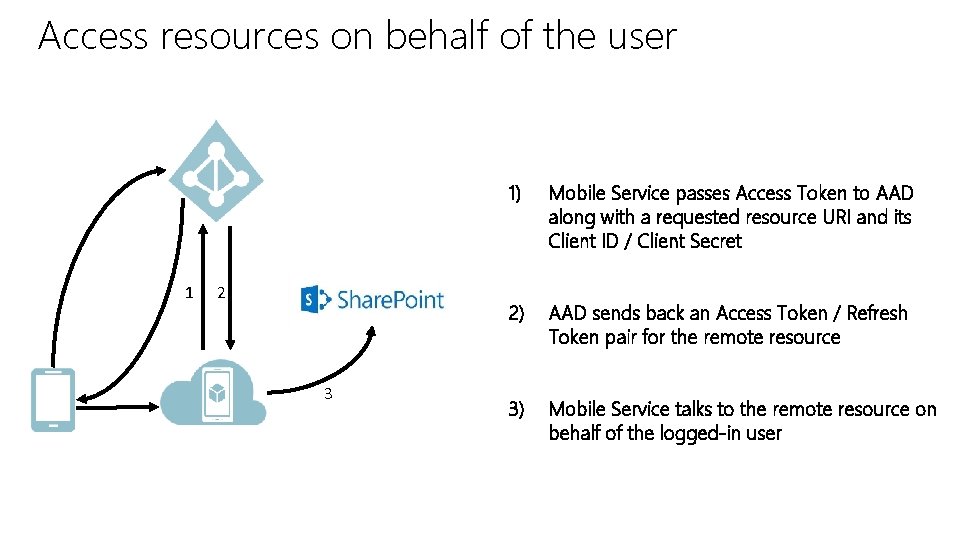
Access resources on behalf of the user 1 2 3 1) Mobile Service passes Access Token to AAD along with a requested resource URI and its Client ID / Client Secret 2) AAD sends back an Access Token / Refresh Token pair for the remote resource 3) Mobile Service talks to the remote resource on behalf of the logged-in user
Microsoft Virtual Academy 03 | Design Applications that use Notifications Ranger Due | Cloud Solution Architect, Health & Life Sciences Brett Hacker | Cloud Solution Architect, Health & Life Sciences
Section Overview • Push Notifications • Azure Notification Hub • Push Patterns
Microsoft Virtual Academy Push Notifications Ranger Due | Cloud Solution Architect, Health & Life Sciences Brett Hacker | Cloud Solution Architect, Health & Life Sciences
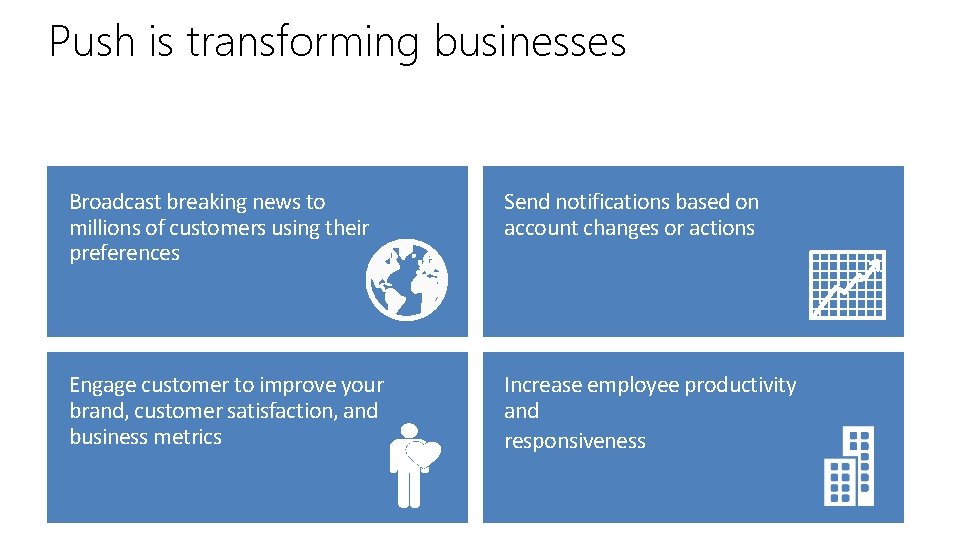
Push is transforming businesses Broadcast breaking news to millions of customers using their preferences Send notifications based on account changes or actions Engage customer to improve your brand, customer satisfaction, and business metrics Increase employee productivity and responsiveness
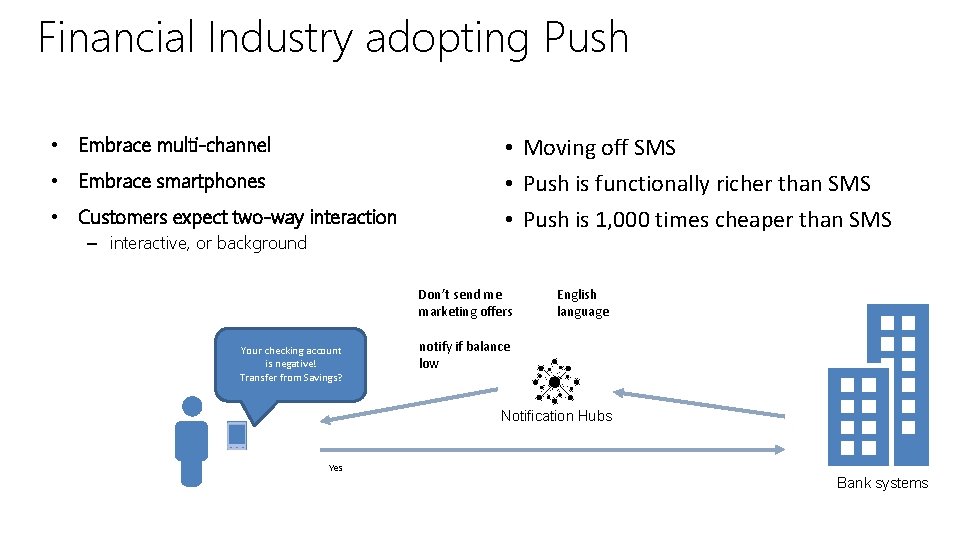
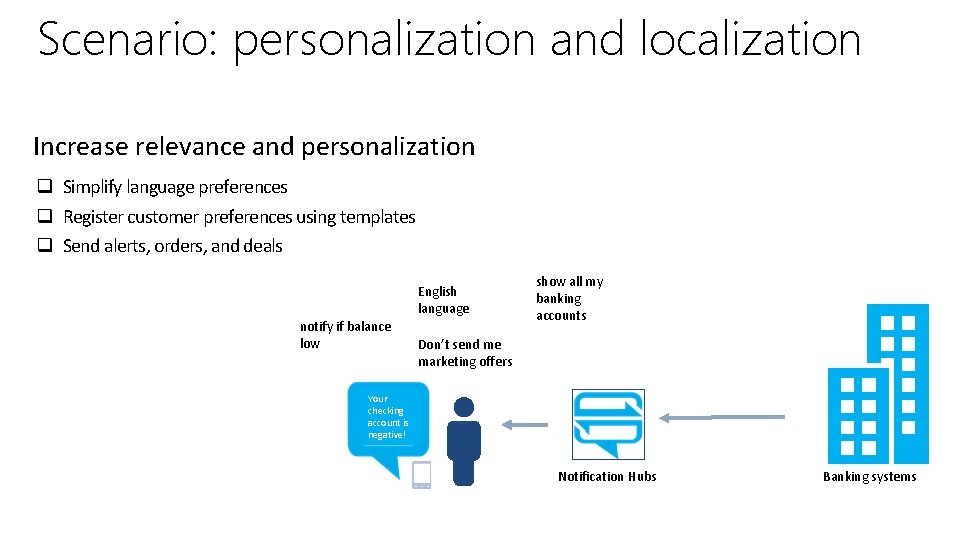
Financial Industry adopting Push • Embrace multi-channel • Embrace smartphones • Customers expect two-way interaction – interactive, or background • Moving off SMS • Push is functionally richer than SMS • Push is 1, 000 times cheaper than SMS Don’t send me marketing offers Your checking account is negative! Transfer from Savings? English language notify if balance low Notification Hubs Yes Bank systems
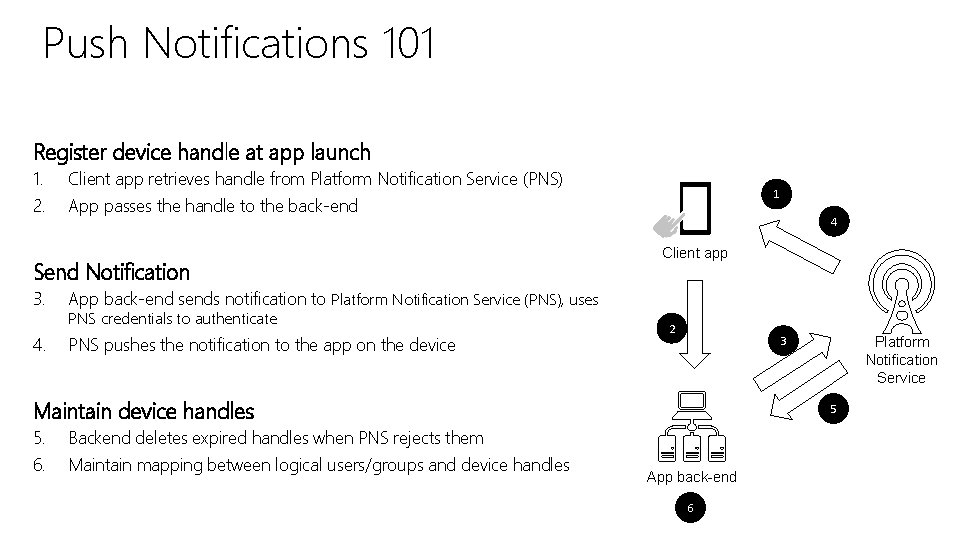
Push Notifications 101 Register device handle at app launch 1. 2. Client app retrieves handle from Platform Notification Service (PNS) App passes the handle to the back-end Send Notification 3. 4. 1 4 Client app App back-end sends notification to Platform Notification Service (PNS), uses PNS credentials to authenticate PNS pushes the notification to the app on the device 2 3 Maintain device handles 5. 6. 5 Backend deletes expired handles when PNS rejects them Maintain mapping between logical users/groups and device handles Platform Notification Service App back-end 6
Microsoft Virtual Academy Azure Notification Hubs Ranger Due | Cloud Solution Architect, Health & Life Sciences Brett Hacker | Cloud Solution Architect, Health & Life Sciences
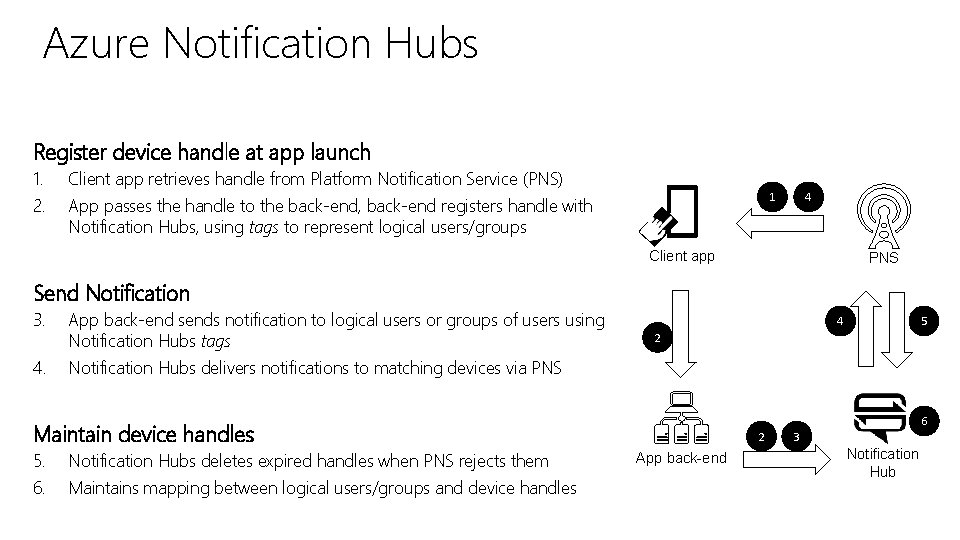
Azure Notification Hubs Register device handle at app launch 1. 2. Client app retrieves handle from Platform Notification Service (PNS) 1 App passes the handle to the back-end, back-end registers handle with Notification Hubs, using tags to represent logical users/groups 4 Client app PNS Send Notification 3. App back-end sends notification to logical users or groups of users using Notification Hubs tags 4. Notification Hubs delivers notifications to matching devices via PNS 4 2 Maintain device handles 5. 6. Notification Hubs deletes expired handles when PNS rejects them Maintains mapping between logical users/groups and device handles 5 2 App back-end 6 3 Notification Hub
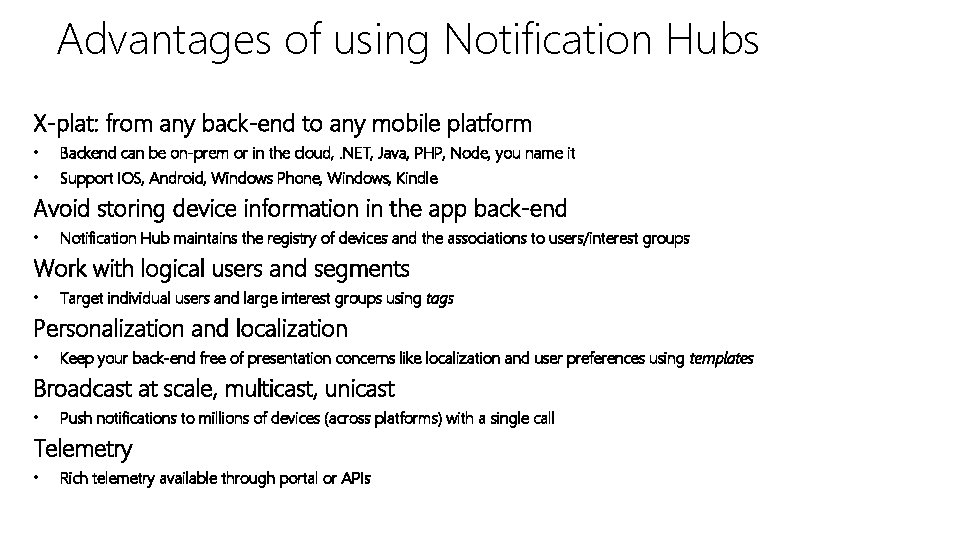
Advantages of using Notification Hubs X-plat: from any back-end to any mobile platform • Backend can be on-prem or in the cloud, . NET, Java, PHP, Node, you name it • Support IOS, Android, Windows Phone, Windows, Kindle Avoid storing device information in the app back-end • Notification Hub maintains the registry of devices and the associations to users/interest groups Work with logical users and segments • Target individual users and large interest groups using tags Personalization and localization • Keep your back-end free of presentation concerns like localization and user preferences using templates Broadcast at scale, multicast, unicast • Push notifications to millions of devices (across platforms) with a single call Telemetry • Rich telemetry available through portal or APIs
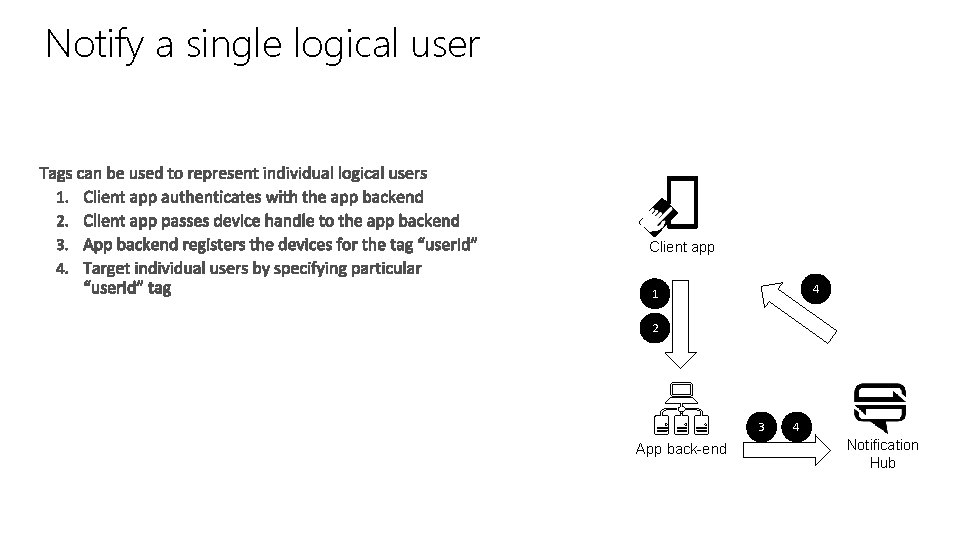
Notify a single logical user Client app 4 1 2 3 App back-end 4 Notification Hub
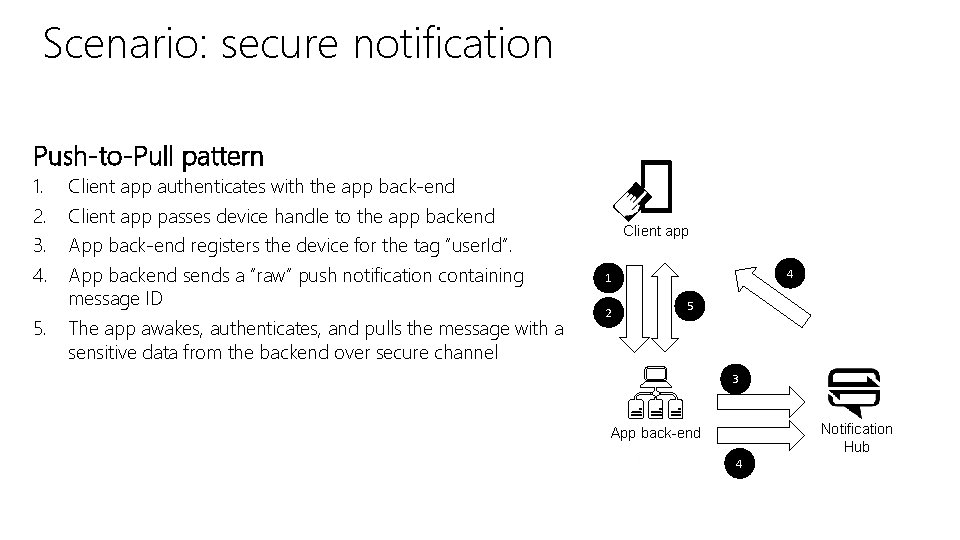
Scenario: secure notification Push-to-Pull pattern 1. 2. 3. 4. 5. Client app authenticates with the app back-end Client app passes device handle to the app backend Client app App back-end registers the device for the tag “user. Id”. App backend sends a “raw” push notification containing message ID The app awakes, authenticates, and pulls the message with a sensitive data from the backend over secure channel 4 1 2 5 3 Notification Hub App back-end 4
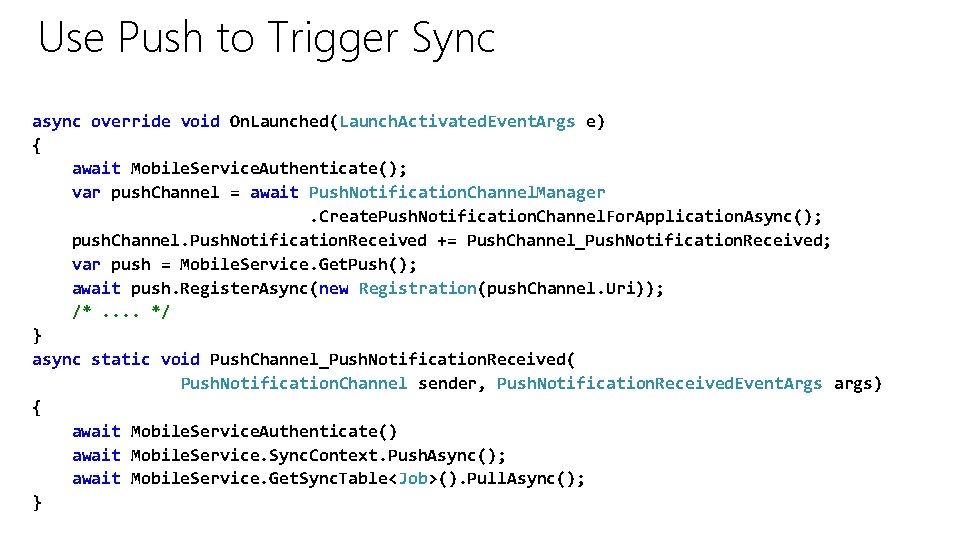
Use Push to Trigger Sync async override void On. Launched(Launch. Activated. Event. Args e) { await Mobile. Service. Authenticate(); var push. Channel = await Push. Notification. Channel. Manager. Create. Push. Notification. Channel. For. Application. Async(); push. Channel. Push. Notification. Received += Push. Channel_Push. Notification. Received; var push = Mobile. Service. Get. Push(); await push. Register. Async(new Registration(push. Channel. Uri)); /*. . */ } async static void Push. Channel_Push. Notification. Received( Push. Notification. Channel sender, Push. Notification. Received. Event. Args args) { await Mobile. Service. Authenticate() await Mobile. Service. Sync. Context. Push. Async(); await Mobile. Service. Get. Sync. Table<Job>(). Pull. Async(); }
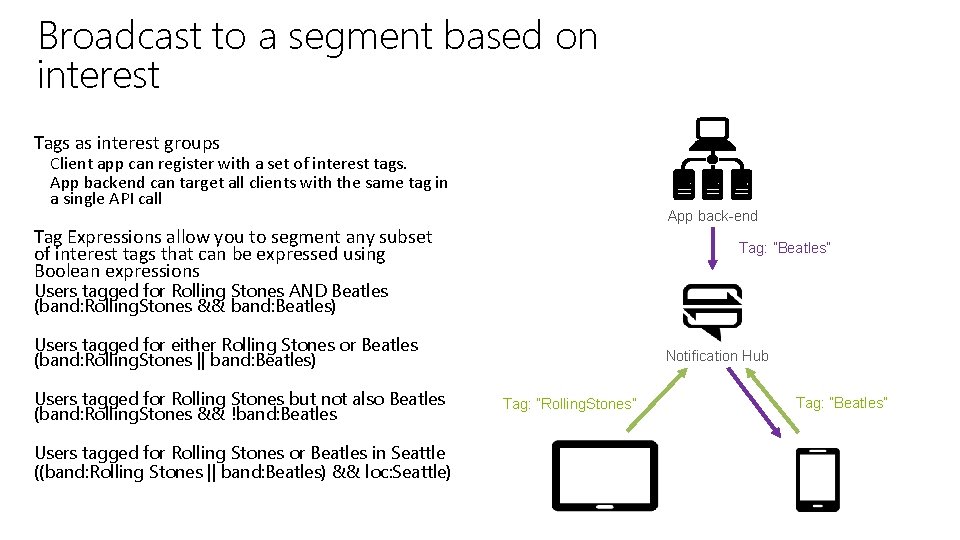
Broadcast to a segment based on interest Tags as interest groups Client app can register with a set of interest tags. App backend can target all clients with the same tag in a single API call App back-end Tag Expressions allow you to segment any subset of interest tags that can be expressed using Boolean expressions Tag: ”Beatles” Users tagged for Rolling Stones AND Beatles (band: Rolling. Stones && band: Beatles) Users tagged for either Rolling Stones or Beatles (band: Rolling. Stones || band: Beatles) Users tagged for Rolling Stones but not also Beatles (band: Rolling. Stones && !band: Beatles Users tagged for Rolling Stones or Beatles in Seattle ((band: Rolling Stones || band: Beatles) && loc: Seattle) Notification Hub Tag: ”Rolling. Stones” Tag: ”Beatles”
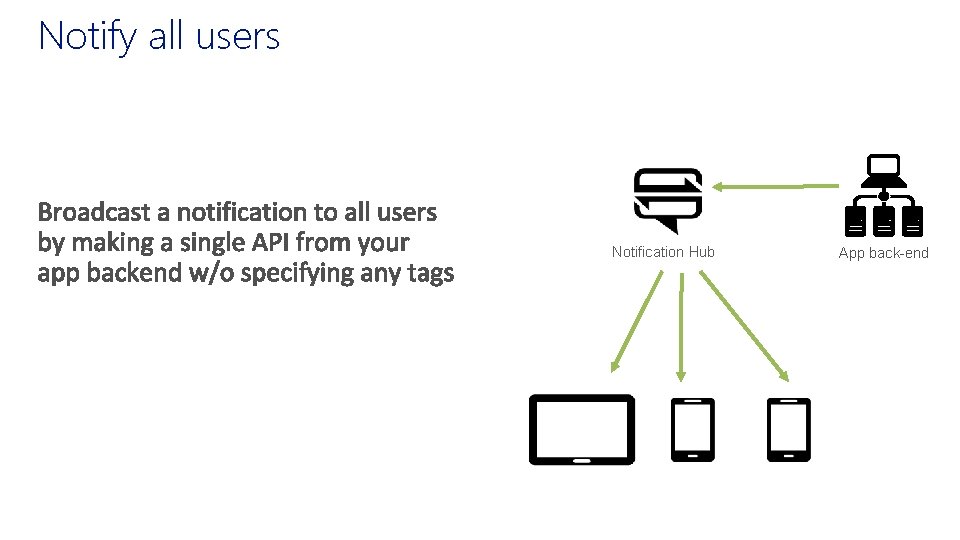
Notify all users App back-end Notification Hub App back-end
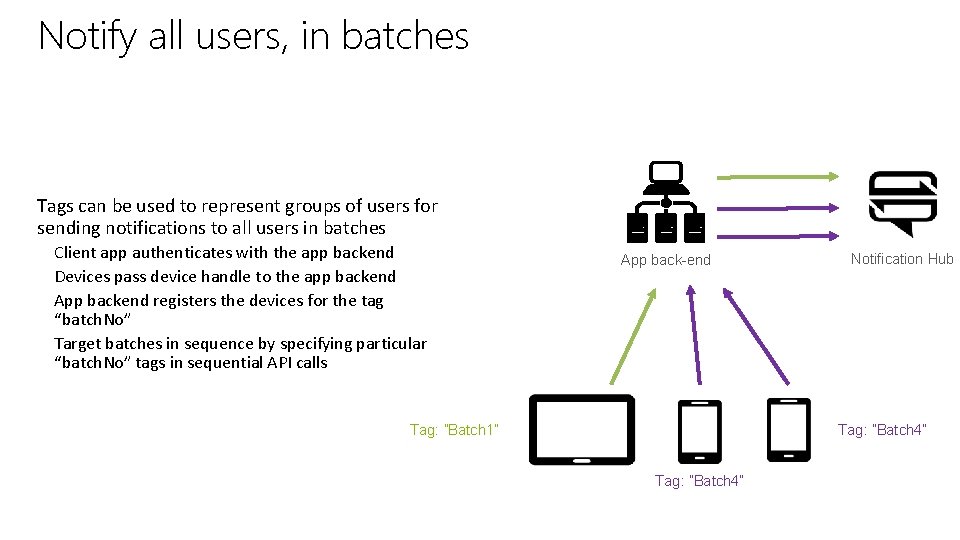
Notify all users, in batches App back-end Tags can be used to represent groups of users for sending notifications to all users in batches Client app authenticates with the app backend Devices pass device handle to the app backend App backend registers the devices for the tag “batch. No” Target batches in sequence by specifying particular “batch. No” tags in sequential API calls App back-end Notification Hub Tag: ”Batch 4” Tag: ”Batch 1” Tag: ”Batch 4”
Microsoft Virtual Academy Push Patterns Ranger Due | Cloud Solution Architect, Health & Life Sciences Brett Hacker | Cloud Solution Architect, Health & Life Sciences
Scenario: personalization and localization Increase relevance and personalization q Simplify language preferences q Register customer preferences using templates q Send alerts, orders, and deals English language notify if balance low show all my banking accounts Don’t send me marketing offers Your checking account is negative! Notification Hubs Banking systems Bank systems
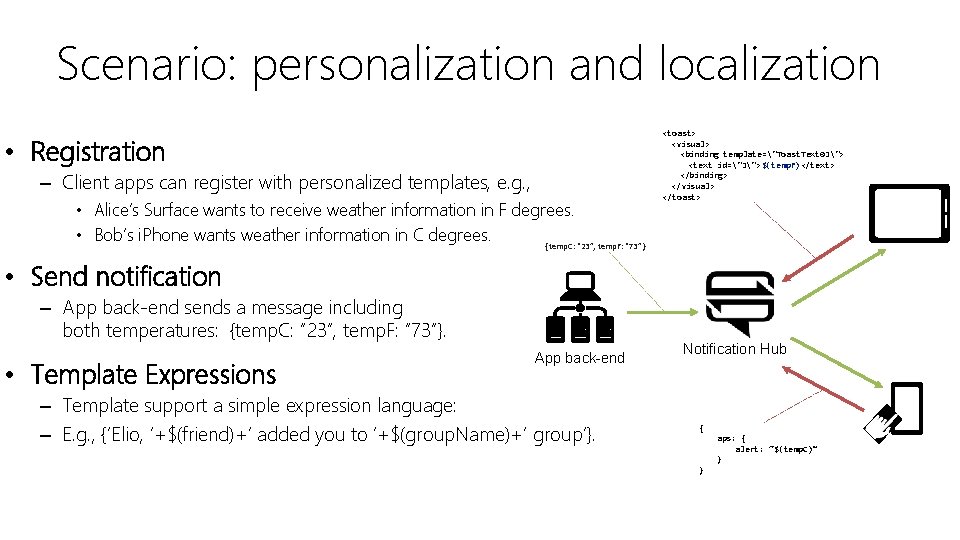
Scenario: personalization and localization • Registration – Client apps can register with personalized templates, e. g. , • Alice’s Surface wants to receive weather information in F degrees. • Bob’s i. Phone wants weather information in C degrees. {temp. C: “ 23”, temp. F: “ 73”} <toast> <visual> <binding template="Toast. Text 01"> <text id="1">$(temp. F)</text> </binding> </visual> </toast> 73 • Send notification – App back-end sends a message including both temperatures: {temp. C: “ 23”, temp. F: “ 73”}. • Template Expressions App back-end – Template support a simple expression language: – E. g. , {‘Elio, ’+$(friend)+’ added you to ’+$(group. Name)+‘ group’}. Notification Hub 23 { aps: { alert: “$(temp. C)” } }
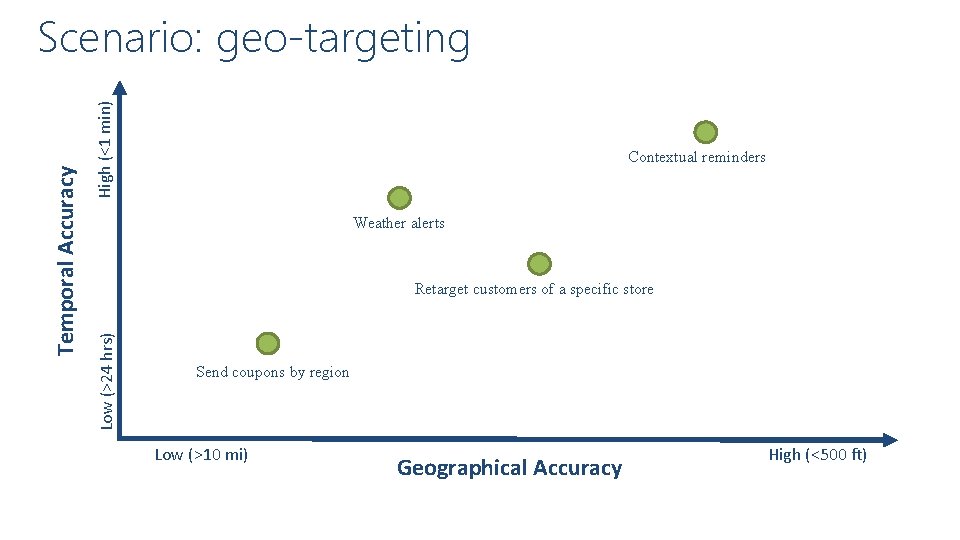
High (<1 min) Contextual reminders Weather alerts Retarget customers of a specific store Low (>24 hrs) Temporal Accuracy Scenario: geo-targeting Send coupons by region Low (>10 mi) Geographical Accuracy High (<500 ft)
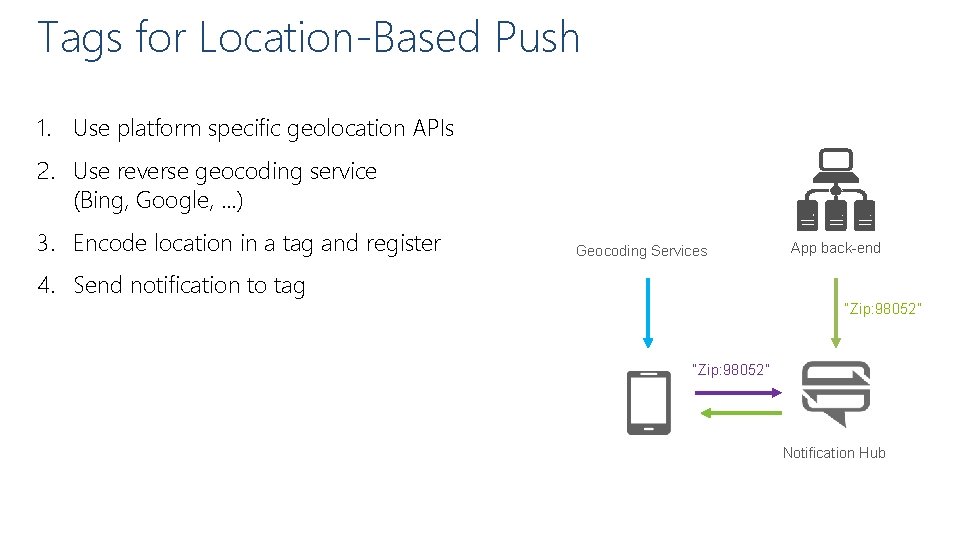
Tags for Location-Based Push 1. Use platform specific geolocation APIs 2. Use reverse geocoding service (Bing, Google, …) 3. Encode location in a tag and register Geocoding Services App back-end 4. Send notification to tag “Zip: 98052” Notification Hub
Microsoft Virtual Academy 04 | Design Applications that use Web API Ranger Due | Principal Advisor, Health & Life Sciences Brett Hacker | Cloud Solutions Architect, Health & Life Sciences
Section Overview • Application Scenarios • Scale using Azure websites • Offload long-running applications using Web. Jobs • Secure Website using Windows Azure AD (WAAD)
Microsoft Virtual Academy Application Scenarios Ranger Due | Cloud Solution Architect, Health & Life Sciences Brett Hacker | Cloud Solution Architect, Health & Life Sciences
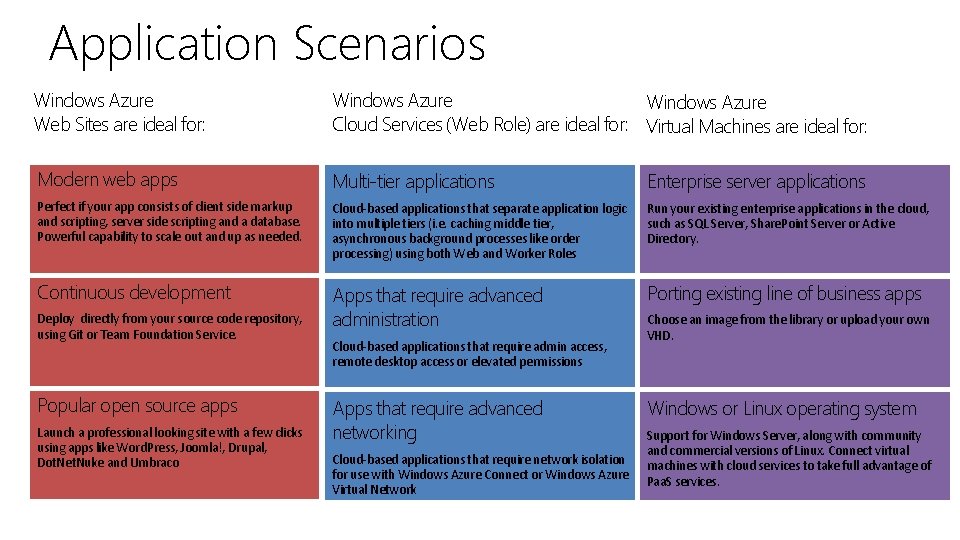
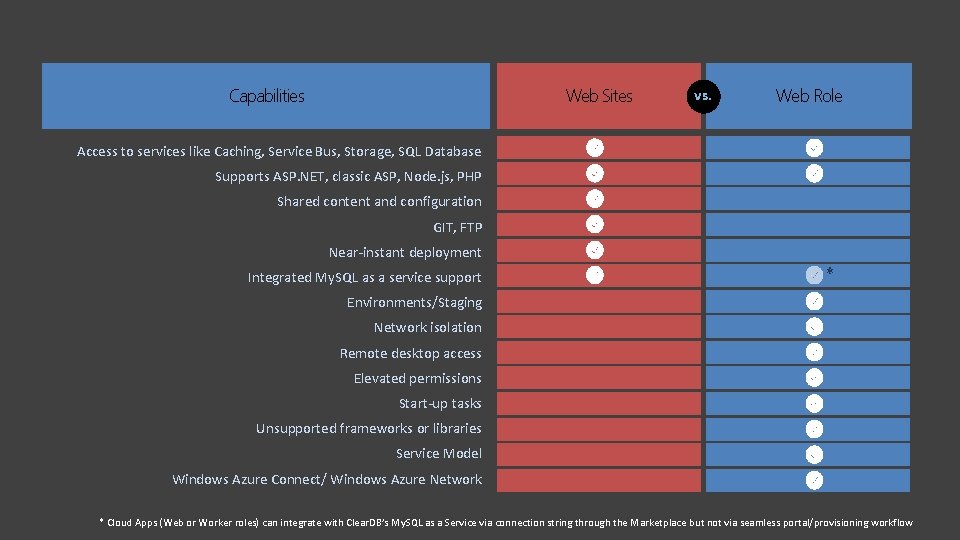
Application Scenarios Windows Azure Web Sites are ideal for: Windows Azure Cloud Services (Web Role) are ideal for: Virtual Machines are ideal for: Modern web apps Multi-tier applications Enterprise server applications Perfect if your app consists of client side markup and scripting, server side scripting and a database. Powerful capability to scale out and up as needed. Cloud-based applications that separate application logic into multiple tiers (i. e. caching middle tier, asynchronous background processes like order processing) using both Web and Worker Roles Run your existing enterprise applications in the cloud, such as SQL Server, Share. Point Server or Active Directory. Continuous development Apps that require advanced administration Porting existing line of business apps Deploy directly from your source code repository, using Git or Team Foundation Service. Popular open source apps Launch a professional looking site with a few clicks using apps like Word. Press, Joomla!, Drupal, Dot. Net. Nuke and Umbraco Cloud-based applications that require admin access, remote desktop access or elevated permissions Apps that require advanced networking Cloud-based applications that require network isolation for use with Windows Azure Connect or Windows Azure Virtual Network Choose an image from the library or upload your own VHD. Windows or Linux operating system Support for Windows Server, along with community and commercial versions of Linux. Connect virtual machines with cloud services to take full advantage of Paa. S services.
Web Sites Capabilities vs. Web Role Access to services like Caching, Service Bus, Storage, SQL Database Supports ASP. NET, classic ASP, Node. js, PHP Shared content and configuration GIT, FTP Near-instant deployment Integrated My. SQL as a service support * Environments/Staging Network isolation Remote desktop access Elevated permissions Start-up tasks Unsupported frameworks or libraries Service Model Windows Azure Connect/ Windows Azure Network * Cloud Apps (Web or Worker roles) can integrate with Clear. DB’s My. SQL as a Service via connection string through the Marketplace but not via seamless portal/provisioning workflow
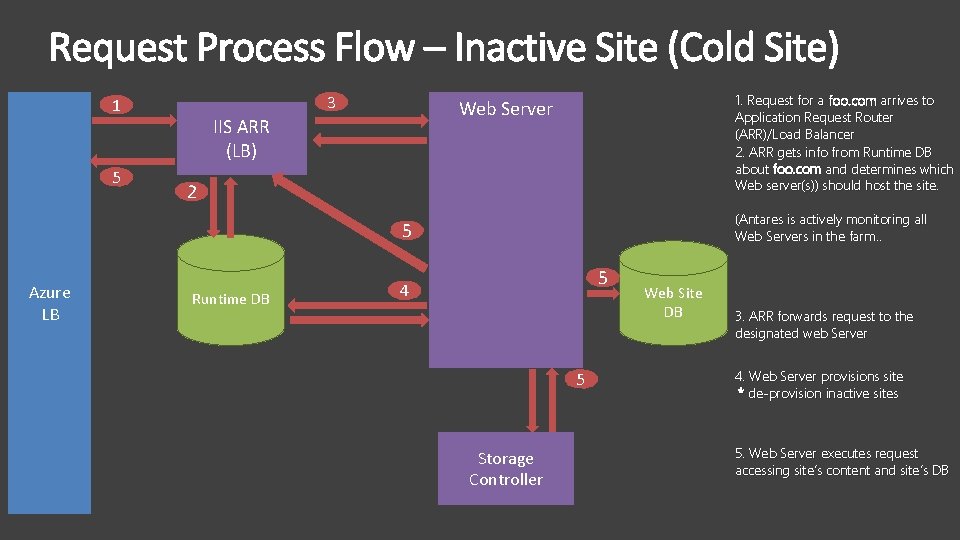
3 1 5 1. Request for a foo. com arrives to Application Request Router (ARR)/Load Balancer 2. ARR gets info from Runtime DB about foo. com and determines which Web server(s)) should host the site. Web Server IIS ARR (LB) 2 (Antares is actively monitoring all Web Servers in the farm. . 5 Azure LB Runtime DB 5 4 5 Storage Controller Web Site DB 3. ARR forwards request to the designated web Server 4. Web Server provisions site * de-provision inactive sites 5. Web Server executes request accessing site’s content and site’s DB
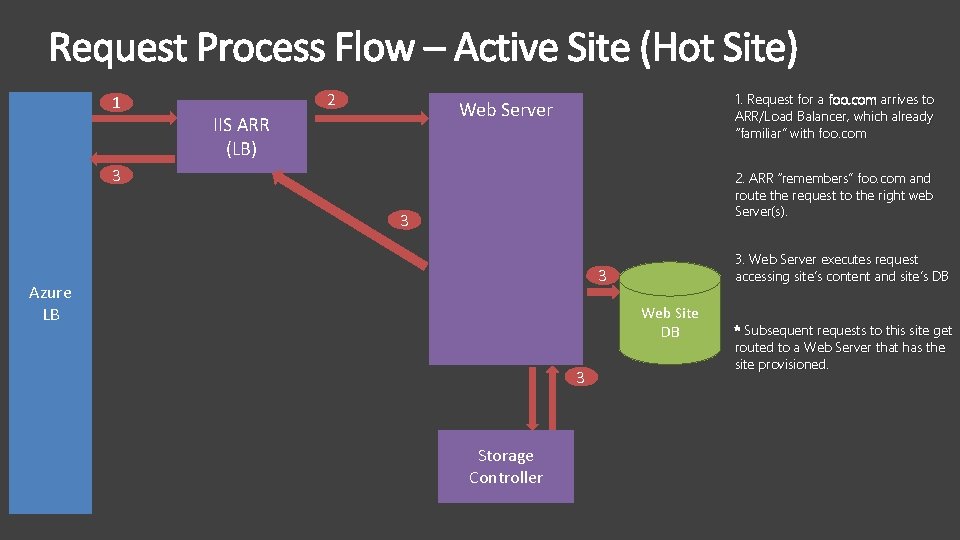
1 2 1. Request for a foo. com arrives to ARR/Load Balancer, which already “familiar” with foo. com Web Server IIS ARR (LB) 3 2. ARR “remembers” foo. com and route the request to the right web Server(s). 3 3. Web Server executes request accessing site’s content and site’s DB 3 Azure LB Web Site DB 3 Storage Controller * Subsequent requests to this site get routed to a Web Server that has the site provisioned.
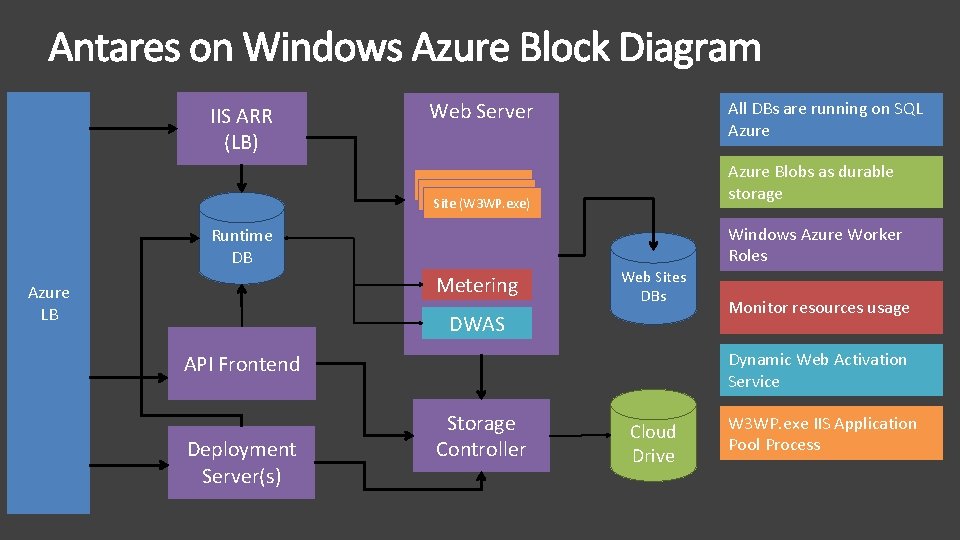
IIS ARR (LB) Web Server All DBs are running on SQL Azure Blobs as durable storage Site (W 3 WP. exe) Windows Azure Worker Roles Runtime DB Metering Azure LB Web Sites DBs DWAS Dynamic Web Activation Service API Frontend Deployment Server(s) Monitor resources usage Storage Controller Cloud Drive W 3 WP. exe IIS Application Pool Process
Microsoft Virtual Academy Scale Using Azure Websites Ranger Due | Cloud Solution Architect, Health & Life Sciences Brett Hacker | Cloud Solution Architect, Health & Life Sciences
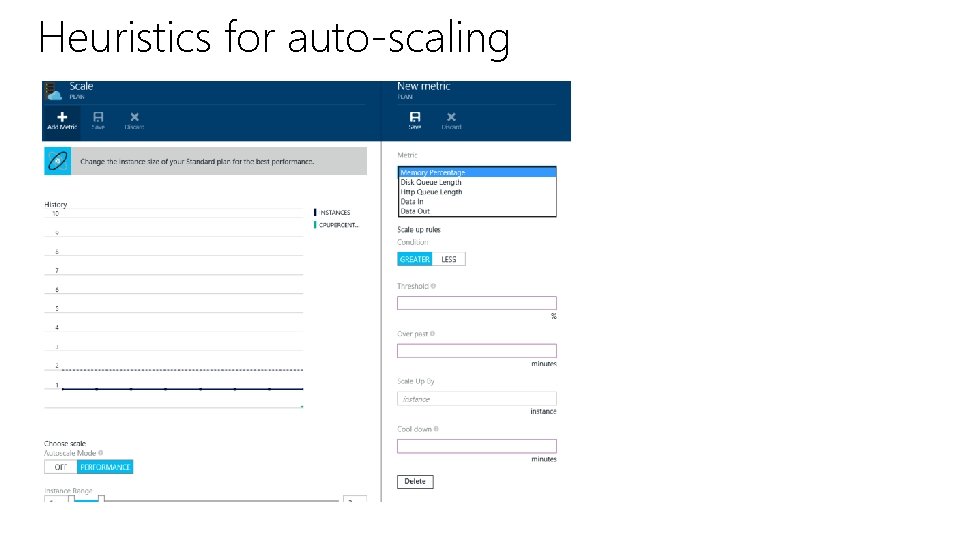
Heuristics for auto-scaling
Microsoft Virtual Academy Offload long-running applications using Web. Jobs Ranger Due | Cloud Solution Architect, Health & Life Sciences Brett Hacker | Cloud Solution Architect, Health & Life Sciences
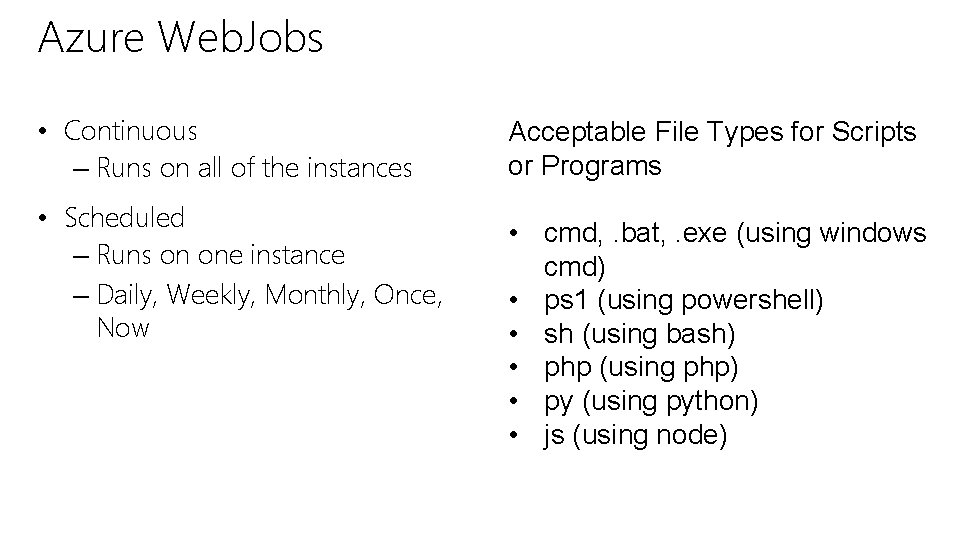
Azure Web. Jobs • Continuous – Runs on all of the instances • Scheduled – Runs on one instance – Daily, Weekly, Monthly, Once, Now Acceptable File Types for Scripts or Programs • cmd, . bat, . exe (using windows cmd) • ps 1 (using powershell) • sh (using bash) • php (using php) • py (using python) • js (using node)
Microsoft Virtual Academy Secure Website using Windows Azure AD (WAAD) Ranger Due | Cloud Solution Architect, Health & Life Sciences Brett Hacker | Cloud Solution Architect, Health & Life Sciences
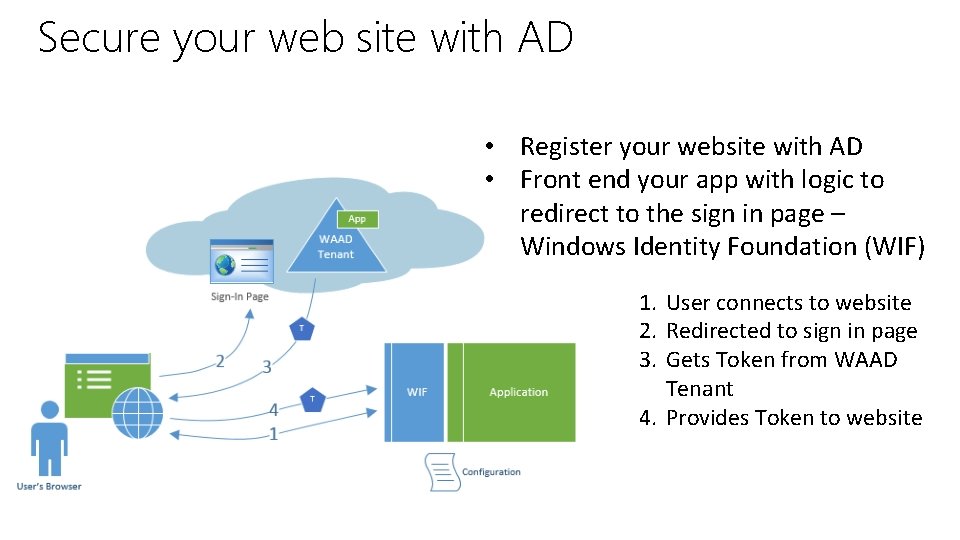
Secure your web site with AD • Register your website with AD • Front end your app with logic to redirect to the sign in page – Windows Identity Foundation (WIF) 1. User connects to website 2. Redirected to sign in page 3. Gets Token from WAAD Tenant 4. Provides Token to website
Microsoft Virtual Academy 05 | Design a data access strategy for hybrid applications Ranger Due | Cloud Solution Architect, Health & Life Sciences Brett Hacker | Cloud Solution Architect, Health & Life Sciences
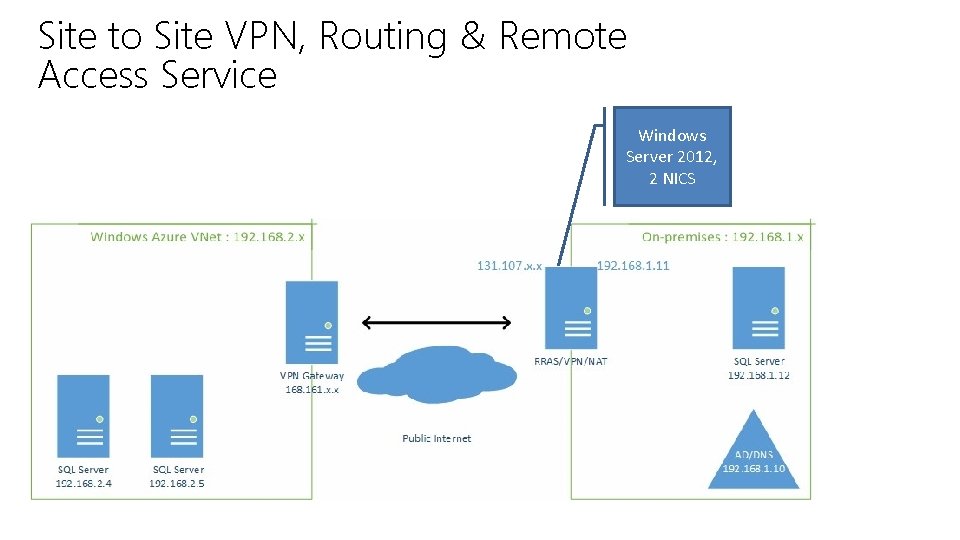
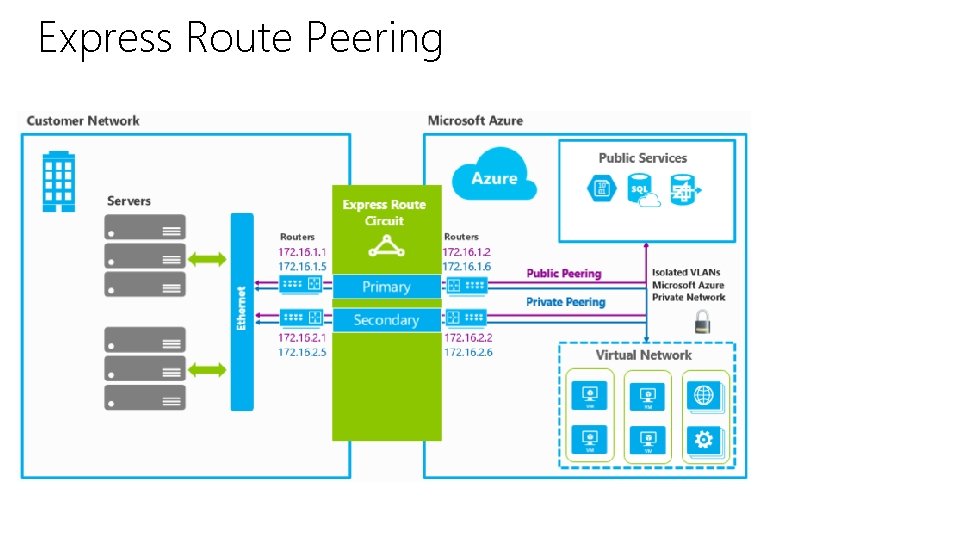
Section Overview • Connect to on-premises data from Azure applications – Azure Service Bus Relay – Site to Site VPN through Windows Server 2012 Routing and Remote Access Service (RRAS) – Express Route
Microsoft Virtual Academy Connect to On-Premise data from Azure Applications Ranger Due | Cloud Solution Architect, Health & Life Sciences Brett Hacker | Cloud Solution Architect, Health & Life Sciences
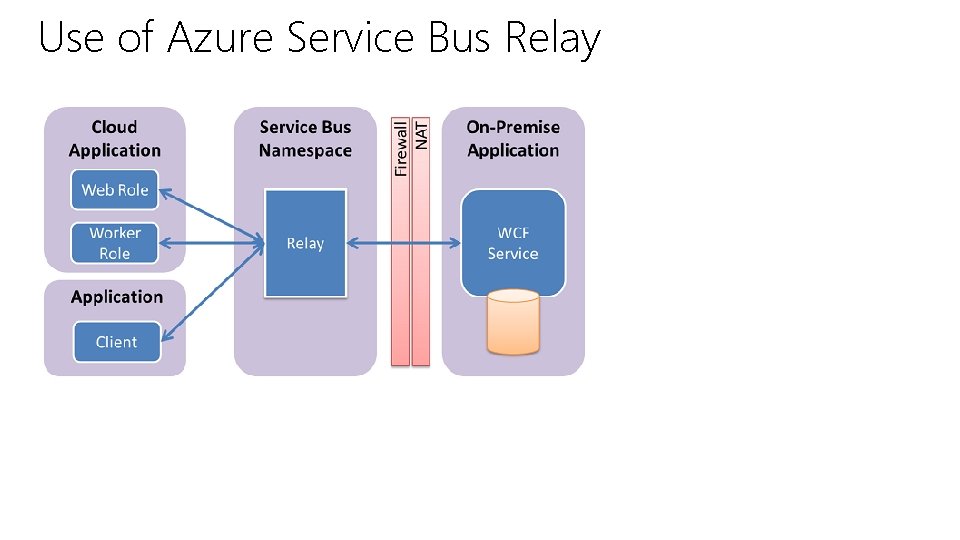
Use of Azure Service Bus Relay
Site to Site VPN, Routing & Remote Access Service Windows Server 2012, 2 NICS
Express Route Peering
Microsoft Virtual Academy 06 | Design a media solution Ranger Due | Principal Advisor, Health & Life Sciences Brett Hacker | Cloud Solutions Architect, Health & Life Sciences
Section Overview • Media Services Lifecycle • Indexer (MAVIS)
Microsoft Virtual Academy Media Services Lifecycle Ranger Due | Cloud Solution Architect, Health & Life Sciences Brett Hacker | Cloud Solution Architect, Health & Life Sciences
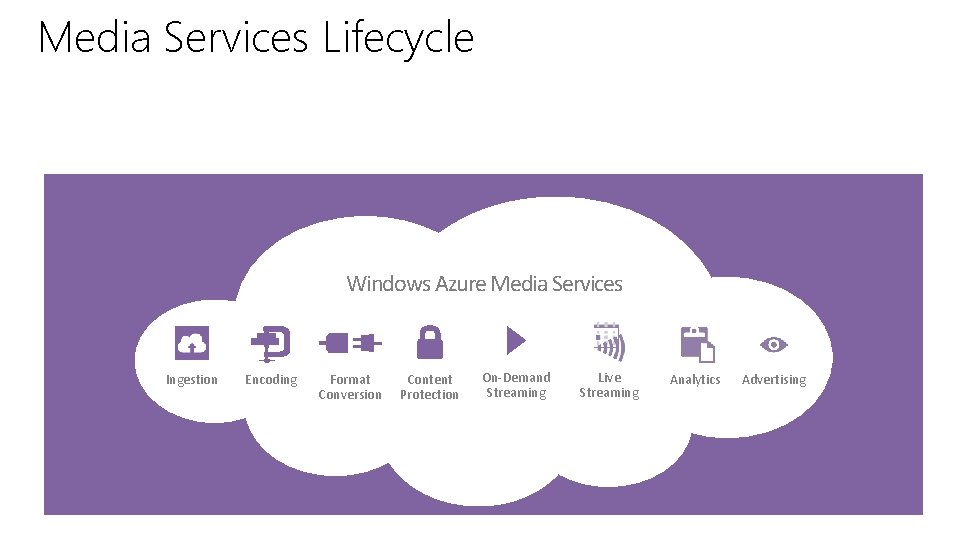
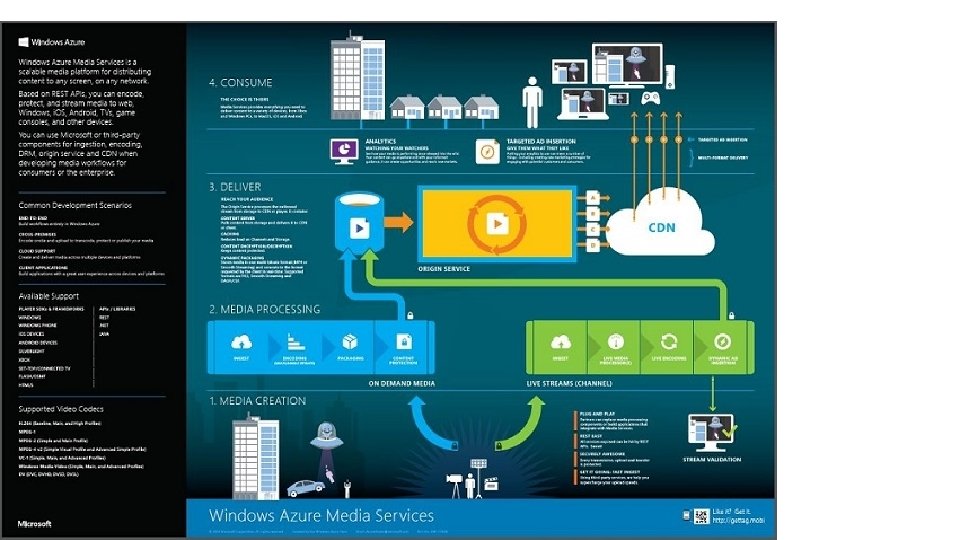
Media Services Lifecycle Windows Azure Media Services Ingestion Encoding Format Conversion Content Protection On-Demand Streaming Live Streaming Analytics Advertising
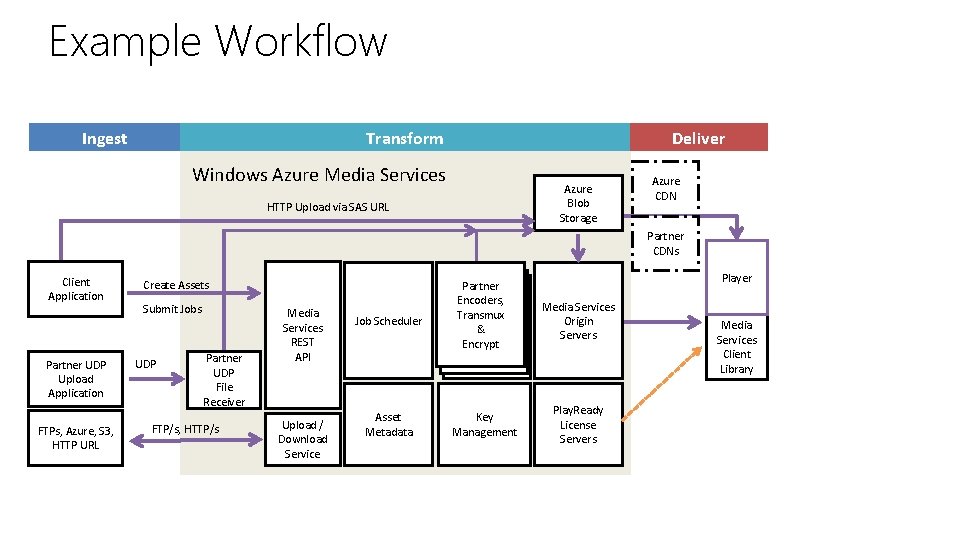
Example Workflow Ingest Transform Deliver Windows Azure Media Services Azure Blob Storage HTTP Upload via SAS URL Azure CDN Partner CDNs Client Application Partner UDP Upload Application FTPs, Azure, S 3, HTTP URL Create Assets Submit Jobs UDP Partner UDP File Receiver FTP/s, HTTP/s Media Services REST API Upload / Download Service Player Job Scheduler Partner Encoders, Transmux &&& Encrypt Media Services Origin Servers Asset Metadata Key Management Play. Ready License Servers Media Services Client Library
Microsoft Virtual Academy Indexer (MAVIS) Ranger Due | Cloud Solution Architect, Health & Life Sciences Brett Hacker | Cloud Solution Architect, Health & Life Sciences
© 2014 Microsoft Corporation. All rights reserved. Microsoft, Windows, Office, Azure, System Center, Dynamics and other product names are or may be registered trademarks and/or trademarks in the U. S. and/or other countries. The information herein is for informational purposes only and represents the current view of Microsoft Corporation as of the date of this presentation. Because Microsoft must respond to changing market conditions, it should not be interpreted to be a commitment on the part of Microsoft, and Microsoft cannot guarantee the accuracy of any information provided after the date of this presentation. MICROSOFT MAKES NO WARRANTIES, EXPRESS, IMPLIED OR STATUTORY, AS TO THE INFORMATION IN THIS PRESENTATION.