
Microsoft Expression Web Site Authoring Program WYSIWYG What
Microsoft Expression Web Site Authoring Program
WYSIWYG • What you see is what you get – Aka: point-and-click – You can see exactly what you are making as you design it.
Views Design View Code View • Lets you see exactly what you are creating as you make it • Shows you the html code as you create it
Tags <p> tag Definition and Usage • The <p> tag defines a • The <div> tag defines a paragraph. division or a section in an • The p element automatically HTML document. creates some space before • The <div> tag is often used to group block-elements to and after itself. The space is automatically applied by the format them with styles. browser, or you can specify it in a style sheet. <div> tag
More Tags <style> tag Definition and Usage • The <style> tag is used to define style information for an HTML document. • Inside the style element you specify how HTML elements should render in a browser. • The required type attribute defines the content of the style element. The only possible value is "text/css". • The style element always goes inside the head section.
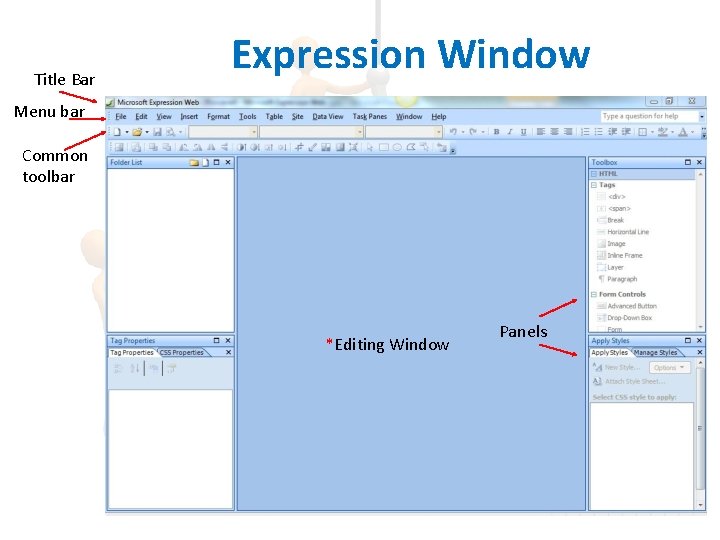
Title Bar Expression Window Menu bar Common toolbar *Editing Window Panels
Reset Workspace Layout Do this every time you start work on a new project 1. Task Panes Menu 2. Select “Reset Workspace Layout”
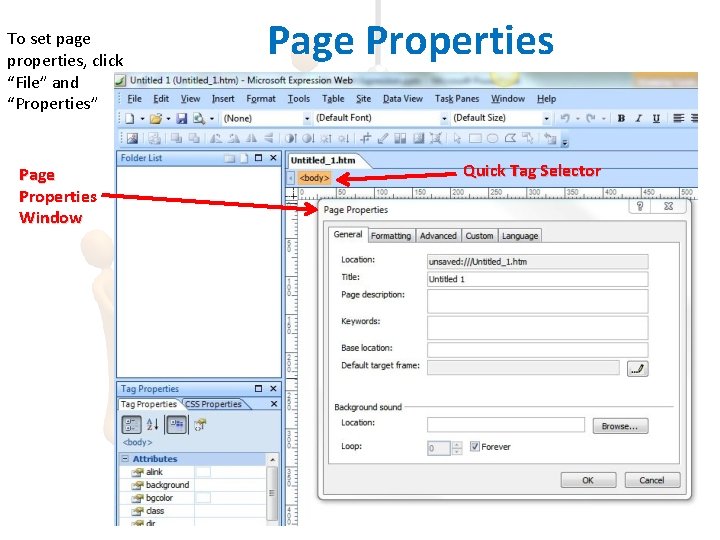
To set page properties, click “File” and “Properties” Page Properties Window Page Properties Quick Tag Selector
- Slides: 8