
Microsoft Education Empowering every student to create the
- Slides: 17
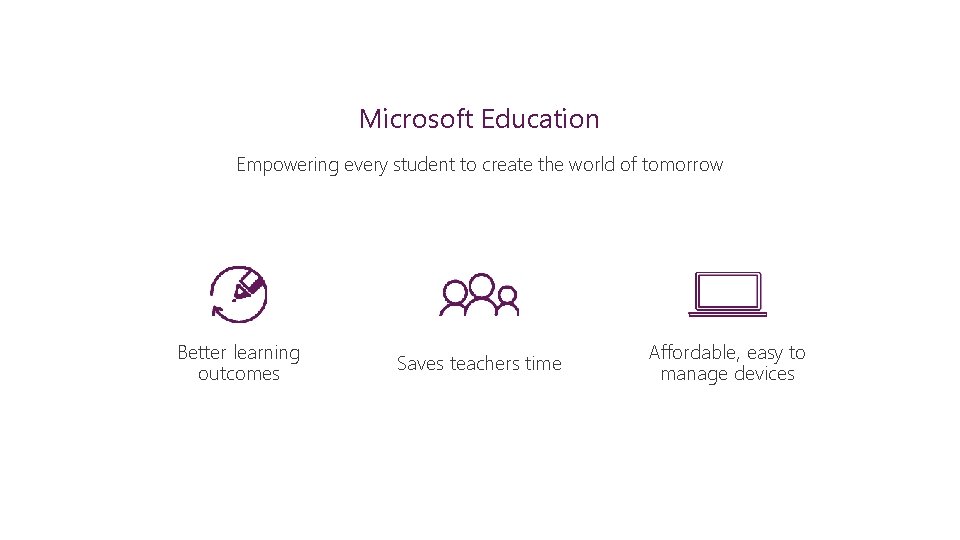
Microsoft Education Empowering every student to create the world of tomorrow Better learning outcomes Saves teachers time Affordable, easy to manage devices
Affordable, easy to manage devices • Stretch your budget with more choices at affordable prices • Set up a classroom in under an hour and easily manage devices, users, and apps • Make the most of class time with secure, reliable devices
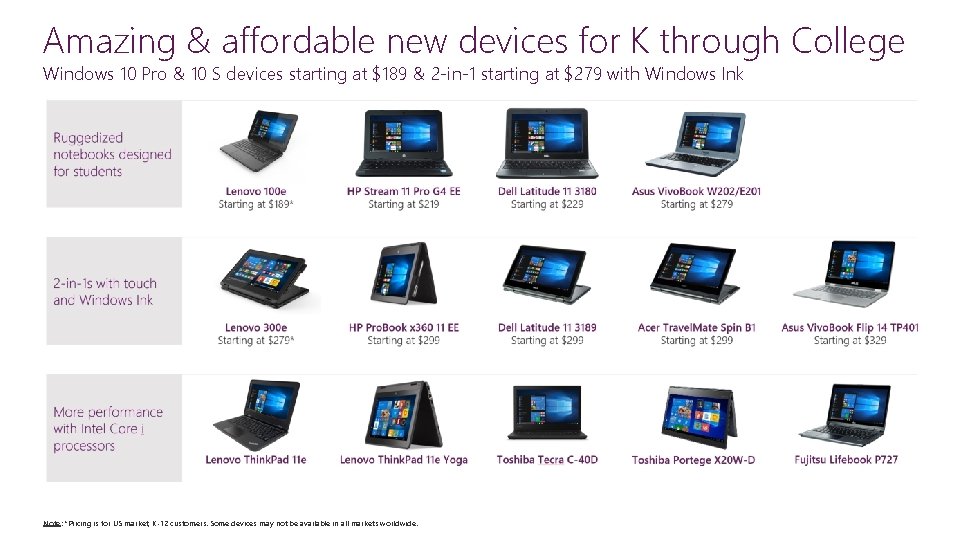
Stretch your budget with more choices at affordable prices SCENARIO “Having the Windows 10 laptops gives my students ownership of their learning and motivates them to create quality work. Students show excitement as they get to personalize their learning. ” - Meagan Jones Third Grade Teacher Wieland Elementary School SOLUTIONS Give more students access to devices and technology Choose from a great selection of devices with Windows 10 Pro Education and Windows 10 S
Amazing & affordable new devices for K through College Windows 10 Pro & 10 S devices starting at $189 & 2 -in-1 starting at $279 with Windows Ink Note: *Pricing is for US market, K-12 customers. Some devices may not be available in all markets worldwide.
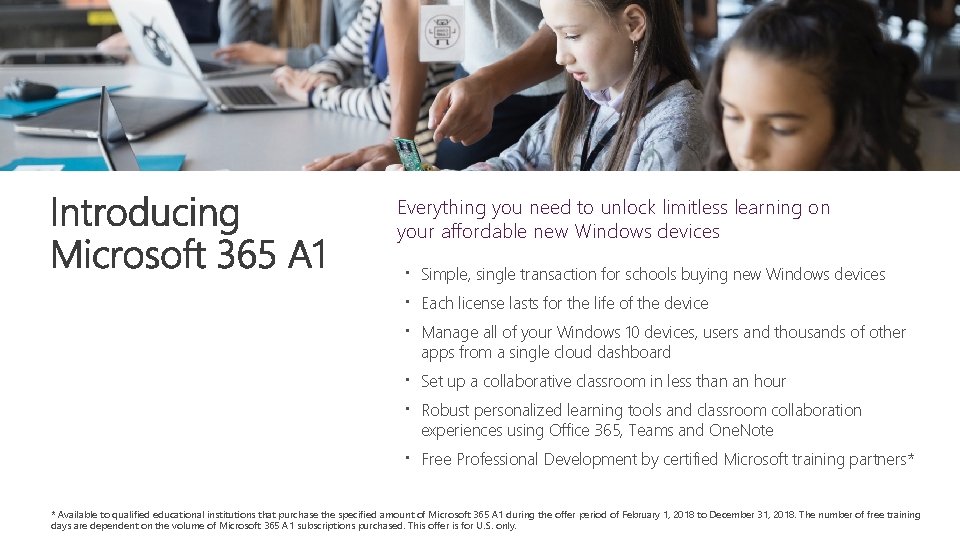
Everything you need to unlock limitless learning on your affordable new Windows devices Simple, single transaction for schools buying new Windows devices Each license lasts for the life of the device Manage all of your Windows 10 devices, users and thousands of other apps from a single cloud dashboard Set up a collaborative classroom in less than an hour Robust personalized learning tools and classroom collaboration experiences using Office 365, Teams and One. Note Free Professional Development by certified Microsoft training partners* * Available to qualified educational institutions that purchase the specified amount of Microsoft 365 A 1 during the offer period of February 1, 2018 to December 31, 2018. The number of free training days are dependent on the volume of Microsoft 365 A 1 subscriptions purchased. This offer is for U. S. only.
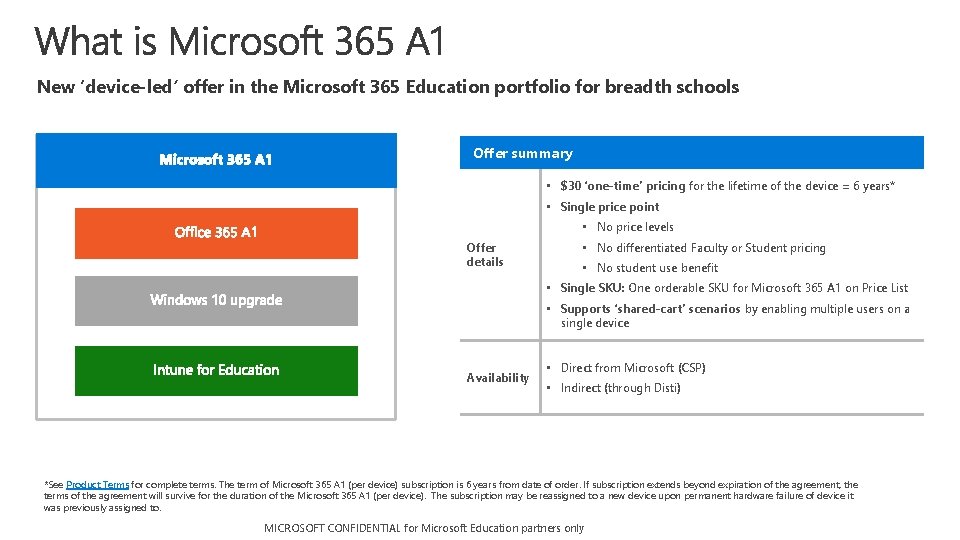
New ‘device-led’ offer in the Microsoft 365 Education portfolio for breadth schools Offer summary • $30 ‘one-time’ pricing for the lifetime of the device = 6 years* • Single price point • No price levels Offer details • No differentiated Faculty or Student pricing • No student use benefit • Single SKU: One orderable SKU for Microsoft 365 A 1 on Price List • Supports ‘shared-cart’ scenarios by enabling multiple users on a single device Availability • Direct from Microsoft (CSP) • Indirect (through Disti) *See Product Terms for complete terms. The term of Microsoft 365 A 1 (per device) subscription is 6 years from date of order. If subscription extends beyond expiration of the agreement, the terms of the agreement will survive for the duration of the Microsoft 365 A 1 (per device). The subscription may be reassigned to a new device upon permanent hardware failure of device it was previously assigned to. MICROSOFT CONFIDENTIAL for Microsoft partners only Microsoft. Education Confidential
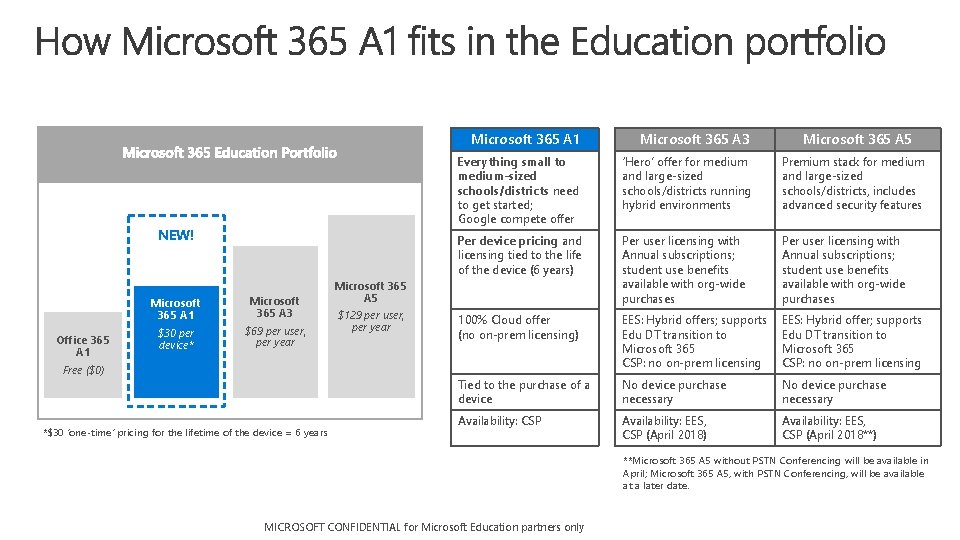
NEW! Office 365 A 1 Microsoft 365 A 3 $30 per device* $69 per user, per year Free ($0) *$30 ‘one-time’ pricing for the lifetime of the device = 6 years Microsoft 365 A 1 Microsoft 365 A 3 Everything small to medium-sized schools/districts need to get started; Google compete offer ‘Hero’ offer for medium and large-sized schools/districts running hybrid environments Premium stack for medium and large-sized schools/districts, includes advanced security features Per device pricing and licensing tied to the life of the device (6 years) Per user licensing with Annual subscriptions; student use benefits available with org-wide purchases 100% Cloud offer (no on-prem licensing) EES: Hybrid offers; supports Edu DT transition to Microsoft 365 CSP: no on-prem licensing EES: Hybrid offer; supports Edu DT transition to Microsoft 365 CSP: no on-prem licensing Tied to the purchase of a device No device purchase necessary Availability: CSP Availability: EES, CSP (April 2018) Availability: EES, CSP (April 2018**) Microsoft 365 A 5 $129 per user, per year Microsoft 365 A 5 **Microsoft 365 A 5 without PSTN Conferencing will be available in April; Microsoft 365 A 5, with PSTN Conferencing, will be available at a later date. MICROSOFT CONFIDENTIAL for Microsoft partners only Microsoft. Education Confidential
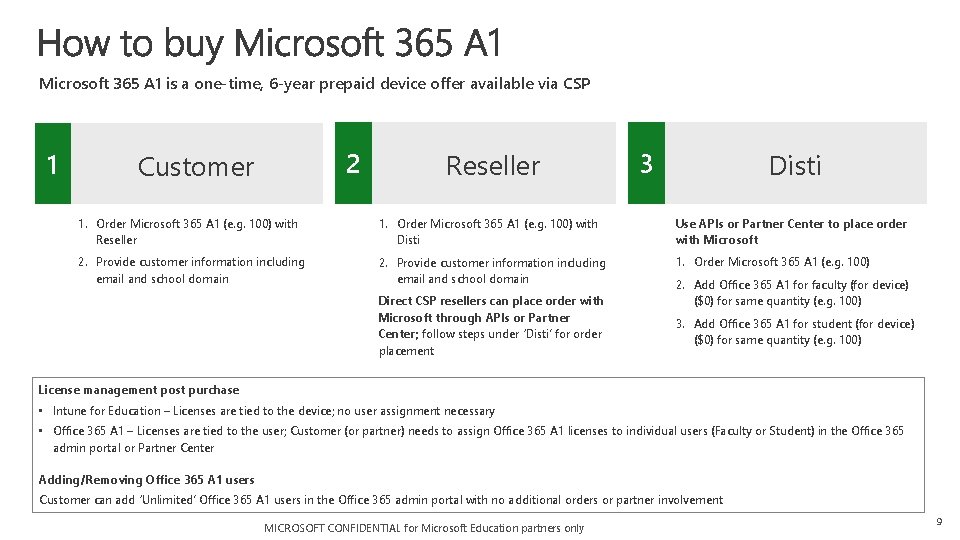
Microsoft 365 A 1 is a one-time, 6 -year prepaid device offer available via CSP 1 2 Customer Reseller 3 Disti 1. Order Microsoft 365 A 1 (e. g. 100) with Reseller 1. Order Microsoft 365 A 1 (e. g. 100) with Disti Use APIs or Partner Center to place order with Microsoft 2. Provide customer information including email and school domain 1. Order Microsoft 365 A 1 (e. g. 100) Direct CSP resellers can place order with Microsoft through APIs or Partner Center; follow steps under ‘Disti’ for order placement 2. Add Office 365 A 1 for faculty (for device) ($0) for same quantity (e. g. 100) 3. Add Office 365 A 1 for student (for device) ($0) for same quantity (e. g. 100) License management post purchase • Intune for Education – Licenses are tied to the device; no user assignment necessary • Office 365 A 1 – Licenses are tied to the user; Customer (or partner) needs to assign Office 365 A 1 licenses to individual users (Faculty or Student) in the Office 365 admin portal or Partner Center Adding/Removing Office 365 A 1 users Customer can add ‘Unlimited’ Office 365 A 1 users in the Office 365 admin portal with no additional orders or partner involvement MICROSOFT CONFIDENTIAL for Microsoft Education partners only 9
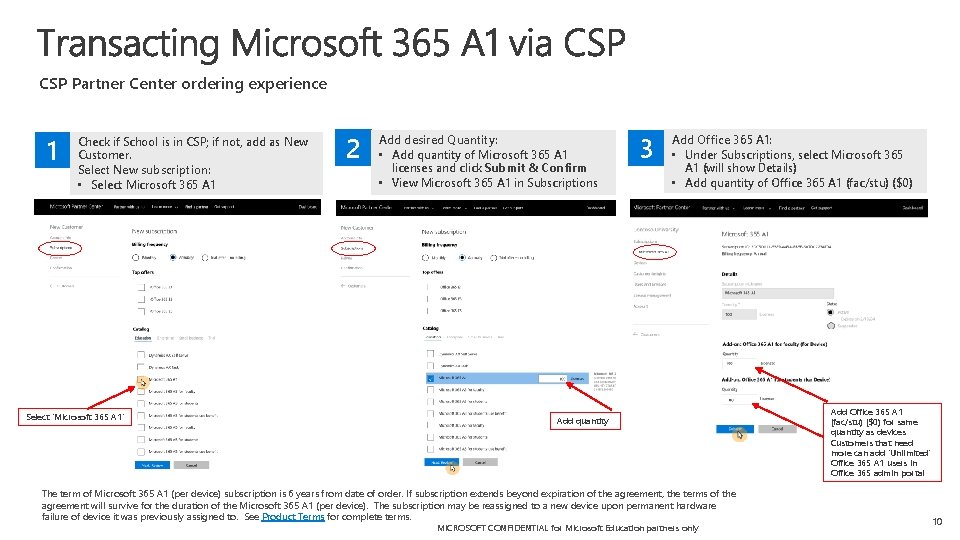
CSP Partner Center ordering experience 1 Check if School is in CSP; if not, add as New Customer. Select New subscription: • Select Microsoft 365 A 1 Select ‘Microsoft 365 A 1’ 2 Add desired Quantity: • Add quantity of Microsoft 365 A 1 licenses and click Submit & Confirm • View Microsoft 365 A 1 in Subscriptions 3 Add Office 365 A 1: • Under Subscriptions, select Microsoft 365 A 1 (will show Details) • Add quantity of Office 365 A 1 (fac/stu) ($0) Add quantity The term of Microsoft 365 A 1 (per device) subscription is 6 years from date of order. If subscription extends beyond expiration of the agreement, the terms of the agreement will survive for the duration of the Microsoft 365 A 1 (per device). The subscription may be reassigned to a new device upon permanent hardware failure of device it was previously assigned to. See Product Terms for complete terms. MICROSOFT CONFIDENTIAL for Microsoft Education partners only Add Office 365 A 1 (fac/stu) ($0) for same quantity as devices Customers that need more can add ‘Unlimited’ Office 365 A 1 users in Office 365 admin portal 10
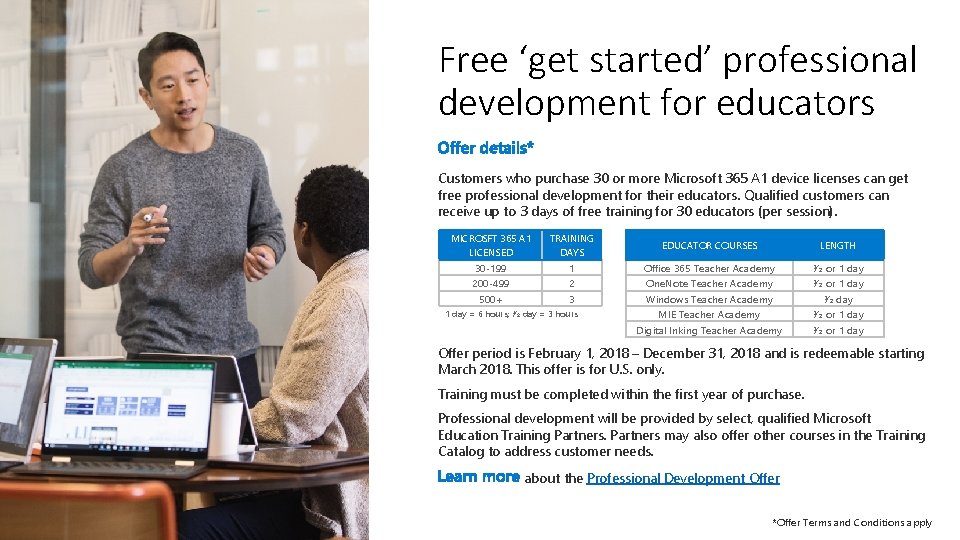
Free ‘get started’ professional development for educators Customers who purchase 30 or more Microsoft 365 A 1 device licenses can get free professional development for their educators. Qualified customers can receive up to 3 days of free training for 30 educators (per session). MICROSFT 365 A 1 LICENSED TRAINING DAYS 30 -199 200 -499 500+ 1 2 3 1 day = 6 hours; ½ day = 3 hours EDUCATOR COURSES LENGTH Office 365 Teacher Academy One. Note Teacher Academy Windows Teacher Academy MIE Teacher Academy Digital Inking Teacher Academy ½ or 1 day ½ or 1 day Offer period is February 1, 2018 – December 31, 2018 and is redeemable starting March 2018. This offer is for U. S. only. Training must be completed within the first year of purchase. Professional development will be provided by select, qualified Microsoft Education Training Partners may also offer other courses in the Training Catalog to address customer needs. about the Professional Development Offer *Offer Terms and Conditions apply
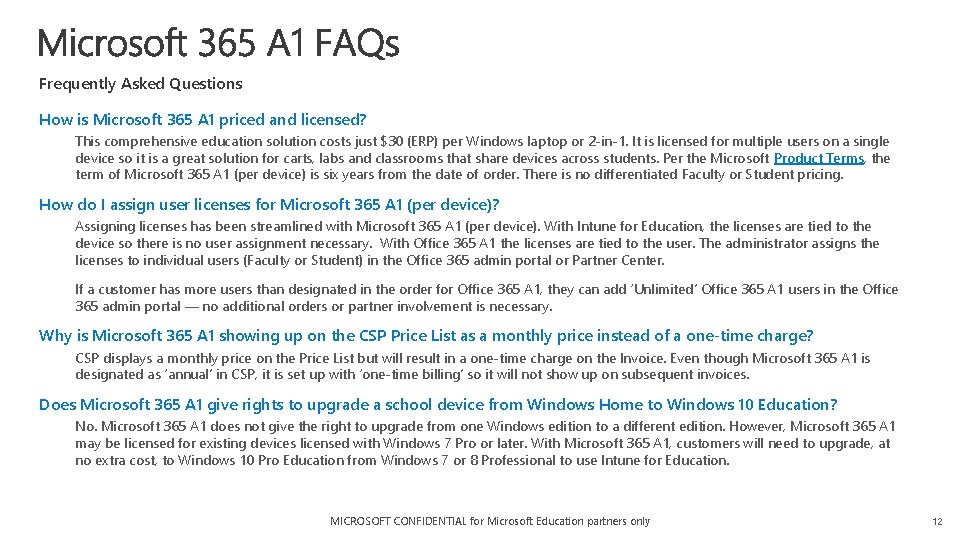
Frequently Asked Questions How is Microsoft 365 A 1 priced and licensed? This comprehensive education solution costs just $30 (ERP) per Windows laptop or 2 -in-1. It is licensed for multiple users on a single device so it is a great solution for carts, labs and classrooms that share devices across students. Per the Microsoft Product Terms, the term of Microsoft 365 A 1 (per device) is six years from the date of order. There is no differentiated Faculty or Student pricing. How do I assign user licenses for Microsoft 365 A 1 (per device)? Assigning licenses has been streamlined with Microsoft 365 A 1 (per device). With Intune for Education, the licenses are tied to the device so there is no user assignment necessary. With Office 365 A 1 the licenses are tied to the user. The administrator assigns the licenses to individual users (Faculty or Student) in the Office 365 admin portal or Partner Center. If a customer has more users than designated in the order for Office 365 A 1, they can add ‘Unlimited’ Office 365 A 1 users in the Office 365 admin portal — no additional orders or partner involvement is necessary. Why is Microsoft 365 A 1 showing up on the CSP Price List as a monthly price instead of a one-time charge? CSP displays a monthly price on the Price List but will result in a one-time charge on the Invoice. Even though Microsoft 365 A 1 is designated as ‘annual’ in CSP, it is set up with ‘one-time billing’ so it will not show up on subsequent invoices. Does Microsoft 365 A 1 give rights to upgrade a school device from Windows Home to Windows 10 Education? No. Microsoft 365 A 1 does not give the right to upgrade from one Windows edition to a different edition. However, Microsoft 365 A 1 may be licensed for existing devices licensed with Windows 7 Pro or later. With Microsoft 365 A 1, customers will need to upgrade, at no extra cost, to Windows 10 Pro Education from Windows 7 or 8 Professional to use Intune for Education. MICROSOFT CONFIDENTIAL for Microsoft Education partners only 12
Next Steps Learn more about Microsoft 365 A 1 Help your customers receive free Professional Development Find the latest news on the MEPN Yammer Visit MEPN for readiness & marketing materials Unlock limitless learning.
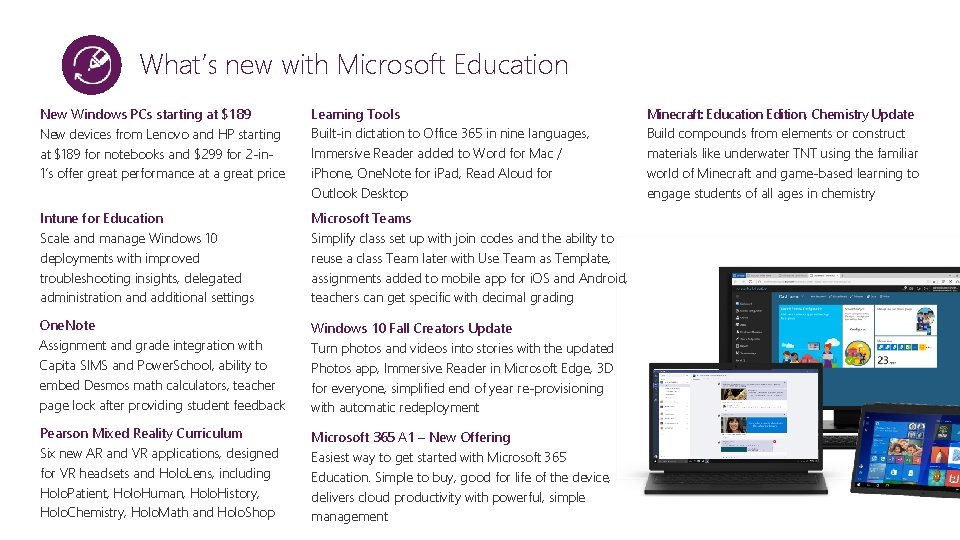
What’s new with Microsoft Education New Windows PCs starting at $189 New devices from Lenovo and HP starting at $189 for notebooks and $299 for 2 -in 1’s offer great performance at a great price Learning Tools Built-in dictation to Office 365 in nine languages, Immersive Reader added to Word for Mac / i. Phone, One. Note for i. Pad, Read Aloud for Outlook Desktop Intune for Education Scale and manage Windows 10 deployments with improved troubleshooting insights, delegated administration and additional settings Microsoft Teams Simplify class set up with join codes and the ability to reuse a class Team later with Use Team as Template, assignments added to mobile app for i. OS and Android, teachers can get specific with decimal grading One. Note Assignment and grade integration with Capita SIMS and Power. School, ability to embed Desmos math calculators, teacher page lock after providing student feedback Windows 10 Fall Creators Update Turn photos and videos into stories with the updated Photos app, Immersive Reader in Microsoft Edge, 3 D for everyone, simplified end of year re-provisioning with automatic redeployment Pearson Mixed Reality Curriculum Six new AR and VR applications, designed for VR headsets and Holo. Lens, including Holo. Patient, Holo. Human, Holo. History, Holo. Chemistry, Holo. Math and Holo. Shop Microsoft 365 A 1 – New Offering Easiest way to get started with Microsoft 365 Education. Simple to buy, good for life of the device, delivers cloud productivity with powerful, simple management Minecraft: Education Edition, Chemistry Update Build compounds from elements or construct materials like underwater TNT using the familiar world of Minecraft and game-based learning to engage students of all ages in chemistry
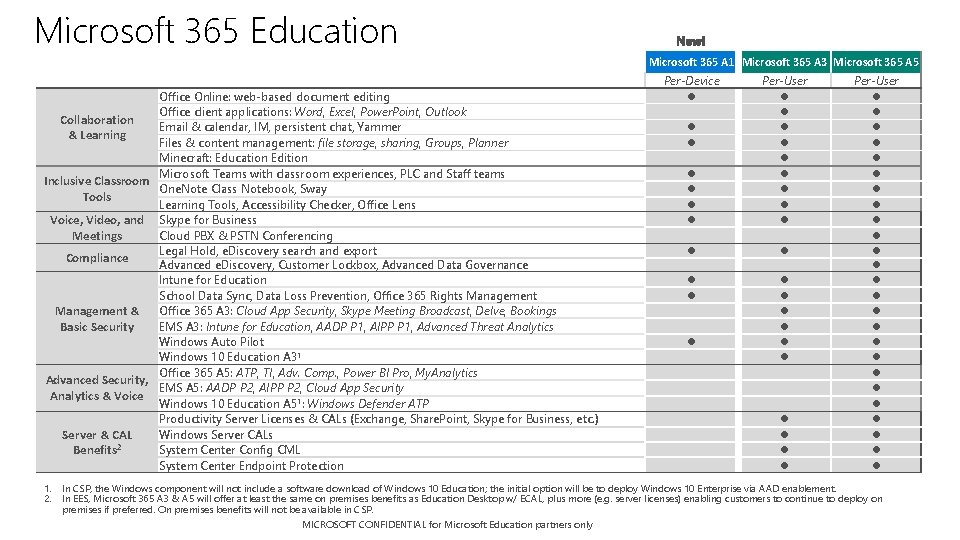
Microsoft 365 Education Microsoft 365 A 1 Microsoft 365 A 3 Microsoft 365 A 5 Office Online: web-based document editing Office client applications: Word, Excel, Power. Point, Outlook Collaboration Email & calendar, IM, persistent chat, Yammer & Learning Files & content management: file storage, sharing, Groups, Planner Minecraft: Education Edition Microsoft Teams with classroom experiences, PLC and Staff teams Inclusive Classroom One. Note Class Notebook, Sway Tools Learning Tools, Accessibility Checker, Office Lens Voice, Video, and Skype for Business Cloud PBX & PSTN Conferencing Meetings Legal Hold, e. Discovery search and export Compliance Advanced e. Discovery, Customer Lockbox, Advanced Data Governance Intune for Education School Data Sync, Data Loss Prevention, Office 365 Rights Management & Office 365 A 3: Cloud App Security, Skype Meeting Broadcast, Delve, Bookings Basic Security EMS A 3: Intune for Education, AADP P 1, AIPP P 1, Advanced Threat Analytics Windows Auto Pilot Windows 10 Education A 31 Office 365 A 5: ATP, TI, Adv. Comp. , Power BI Pro, My. Analytics Advanced Security, EMS A 5: AADP P 2, AIPP P 2, Cloud App Security Analytics & Voice Windows 10 Education A 51: Windows Defender ATP Productivity Server Licenses & CALs (Exchange, Share. Point, Skype for Business, etc. ) Server & CAL Windows Server CALs 2 Benefits System Center Config CML System Center Endpoint Protection Per-Device Per-User 1. In CSP, the Windows component will not include a software download of Windows 10 Education; the initial option will be to deploy Windows 10 Enterprise via AAD enablement. 2. In EES, Microsoft 365 A 3 & A 5 will offer at least the same on premises benefits as Education Desktop w/ ECAL, plus more (e. g. server licenses) enabling customers to continue to deploy on premises if preferred. On premises benefits will not be available in CSP. MICROSOFT CONFIDENTIAL for Microsoft Education partners only
Microsoft 365 A 1 includes right to upgrade devices from Windows Professional 7/8. 1 to Windows 10 Pro Education upgrade is available for devices owned by K-12 academic institutions who have purchased Microsoft 365 A 1 which includes an upgrade from Windows 7 Pro or Windows 8. 1 Pro to Windows 10 Pro Education. Criteria • Your Windows device must currently be running Windows 7 Pro, Windows 7 Ultimate, Windows 8 Pro, or Windows 8. 1 Pro • The number of seats/devices requested must be equal to or less than the number of seats/devices on your proof of purchase • You must provide proof of purchases for both Microsoft 365 A 1 and your qualifying Windows devices To receive your Windows 10 Pro Education upgrade product keys you must: 1. Go to https: //www. microsoft. com/en-us/cssedurequest to complete and submit the Windows 10 Pro Education Product Request Form, including uploading proof of purchases a) Provide proof of purchase for Microsoft 365 A 1 b) Provide proof of purchase for devices that qualify for the upgrade (Windows 7 Pro, Windows 7 Ultimate, Windows 8 Pro, or Windows 8. 1 Pro) 2. If approved, you will receive an email with your institution’s Windows 10 Pro Education product upgrade key(s) within 72 hours For more information on Windows 10 editions for education customers, see Tech. Net article here. MICROSOFT CONFIDENTIAL for Microsoft Education partners only 17