
Microsoft 365 Business Technical Fundamentals Module 1 Introduction
Microsoft 365 Business Technical Fundamentals Module 1: Introduction Speaker Name Date
Microsoft 365 Business Technical Fundamentals Objectives Build an understanding of product strategy and targeting Learn how to deploy across different environments Learn how to effectively manage devices See tangible examples of how to build an offer Structure Time Topic 30 mins Introduction 60 mins Configuring users and policies 90 mins Configuring security policies 45 mins Deploying Office 365 workloads 90 mins Deploying and managing Windows 10 45 mins Ongoing management 60 mins Bringing it together: lab based training
Partner introduction Trends & product Programs Licensing
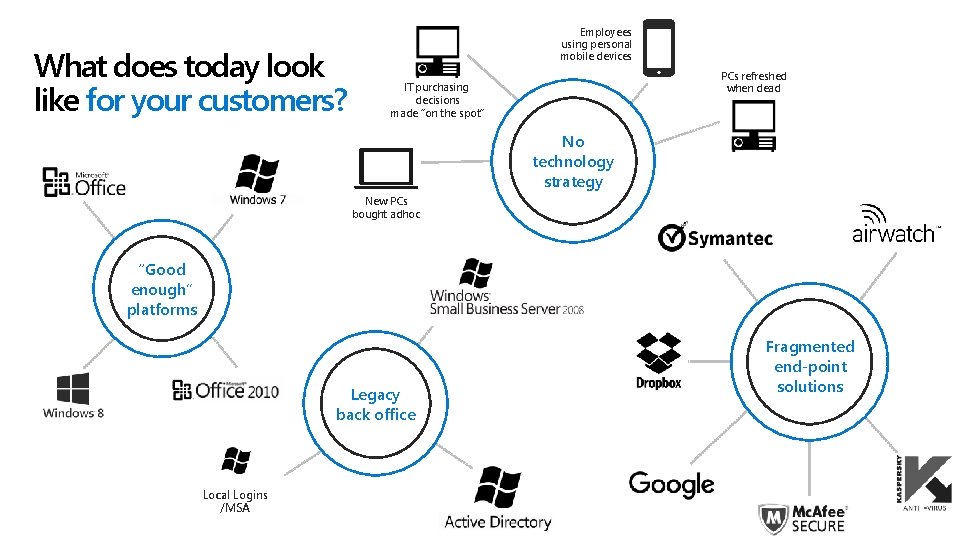
What does today look like for your customers? Employees using personal mobile devices PCs refreshed when dead IT purchasing decisions made “on the spot” No technology strategy New PCs bought adhoc “Good enough” platforms Legacy back office Local Logins /MSA Fragmented end-point solutions
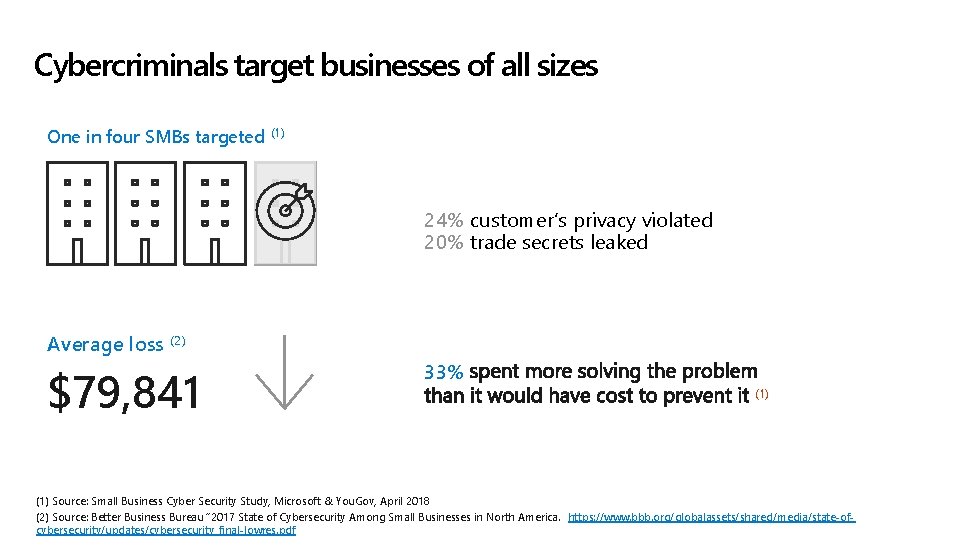
Cybercriminals target businesses of all sizes One in four SMBs targeted (1) 24% customer’s privacy violated 20% trade secrets leaked Average loss (2) $79, 841 33% (1) Source: Small Business Cyber Security Study, Microsoft & You. Gov, April 2018 (2) Source: Better Business Bureau “ 2017 State of Cybersecurity Among Small Businesses in North America. https: //www. bbb. org/globalassets/shared/media/state-ofcybersecurity/updates/cybersecurity_final-lowres. pdf
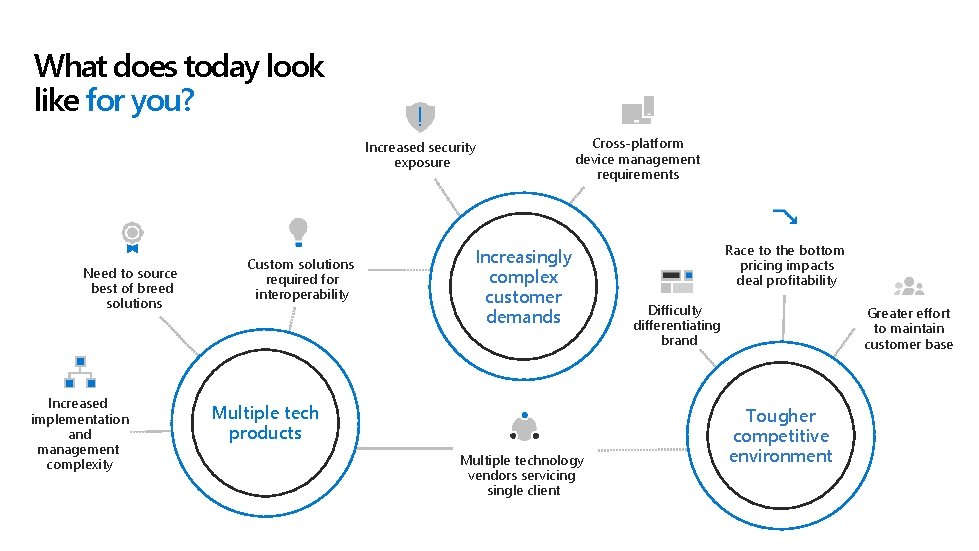
What does today look like for you? Increased security exposure Need to source best of breed solutions Increased implementation and management complexity Custom solutions required for interoperability Cross-platform device management requirements Increasingly complex customer demands Multiple tech products Multiple technology vendors servicing single client Race to the bottom pricing impacts deal profitability Difficulty differentiating brand Greater effort to maintain customer base Tougher competitive environment

Word Office Excel Exchange Power. Point Share. Point Outlook Lync Server Office 365 Advanced Security Device Management Microsoft 365
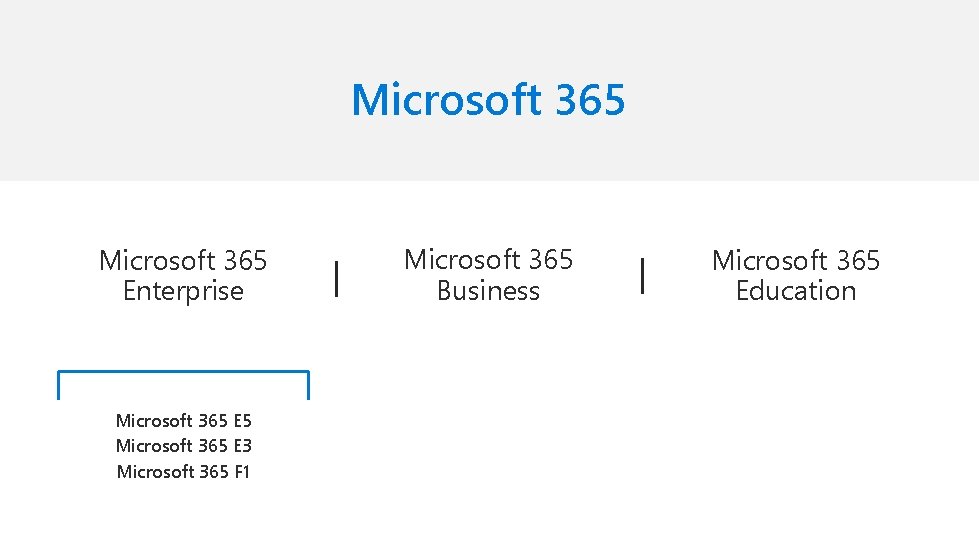
Microsoft 365 Enterprise Microsoft 365 E 5 Microsoft 365 E 3 Microsoft 365 F 1 Microsoft 365 Business Microsoft 365 Education

What is Microsoft 365 Business Productivity Office Applications Word, Excel, Power. Point, Outlook, and more Online Services Exchange, One. Drive (1 TB), Teams, and more Advanced Services Exchange Online Archiving Advanced Security + External Threat Protection Office 365 Advanced Threat Protection Multi-Factor Authentication Enforce Windows Defender Exploit Guard Enforce Bit. Locker encryption Internal data leak prevention Data Loss Prevention Azure Information Protection Device management + Device management Microsoft Intune Single Sign On (SSO) > 10 apps Deployment assistance Windows Autopilot Auto-installation of Office apps AAD Auto-enroll Additional benefits Consistent security configuration across Windows 10, mac. OS, Android, and i. OS devices Upgrade from Windows 7 Pro or Windows 8. 1 Pro to Windows 10 Pro ad no additional cost 99. 9% financially-backed uptime guarantee; 24 x 7 online and phone support
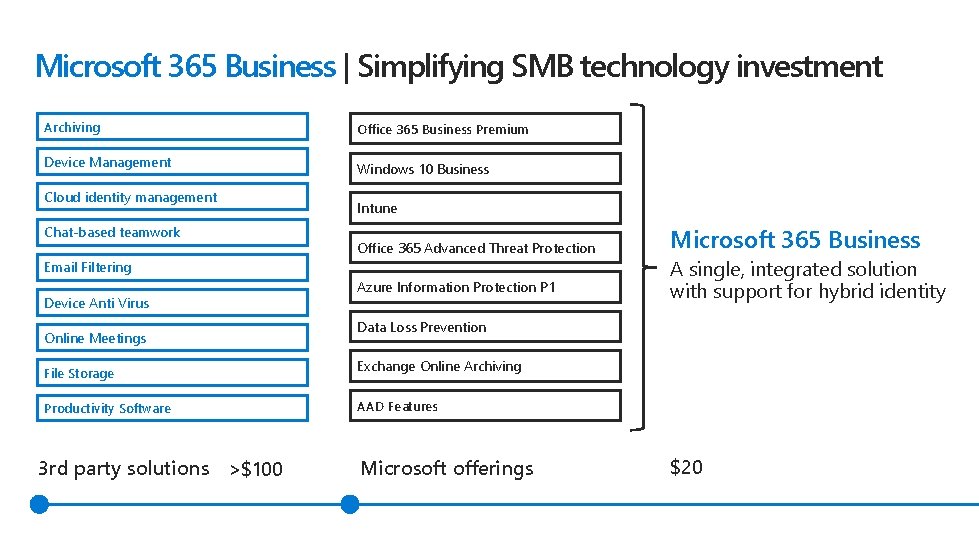
Microsoft 365 Business | Simplifying SMB technology investment Archiving Office 365 Business Premium Device Management Windows 10 Business Cloud identity management Chat-based teamwork Intune Office 365 Advanced Threat Protection Email Filtering Device Anti Virus Online Meetings Azure Information Protection P 1 A single, integrated solution with support for hybrid identity Data Loss Prevention File Storage Exchange Online Archiving Productivity Software AAD Features 3 rd party solutions >$100 Microsoft 365 Business Microsoft offerings $20
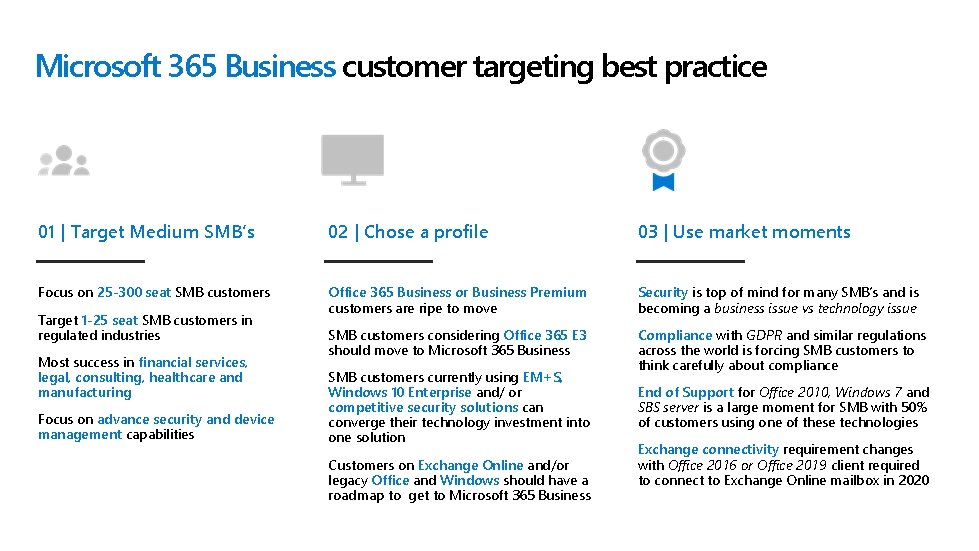
Microsoft 365 Business customer targeting best practice 01 | Target Medium SMB’s 02 | Chose a profile 03 | Use market moments Focus on 25 -300 seat SMB customers Office 365 Business or Business Premium customers are ripe to move Security is top of mind for many SMB’s and is becoming a business issue vs technology issue SMB customers considering Office 365 E 3 should move to Microsoft 365 Business Compliance with GDPR and similar regulations across the world is forcing SMB customers to think carefully about compliance Target 1 -25 seat SMB customers in regulated industries Most success in financial services, legal, consulting, healthcare and manufacturing Focus on advance security and device management capabilities SMB customers currently using EM+S, Windows 10 Enterprise and/ or competitive security solutions can converge their technology investment into one solution Customers on Exchange Online and/or legacy Office and Windows should have a roadmap to get to Microsoft 365 Business End of Support for Office 2010, Windows 7 and SBS server is a large moment for SMB with 50% of customers using one of these technologies Exchange connectivity requirement changes with Office 2016 or Office 2019 client required to connect to Exchange Online mailbox in 2020

Microsoft 365 Business customer scenarios SMB customer scenario Move to… Pitch value 1 Office 365 Business Premium Office 365 E 3 Office 365 Business Essentials Microsoft 365 Business Focus on advanced security and device management capabilities in Microsoft 365 Business 2 EM+S E 3 customer Other security vendors Microsoft 365 Business Pitch customers on ability to consolidate into one, integrated solution @ $20 price point. If the customer needs conditional access, consider attaching AAD P 1 3 Exchange Online Plan 1 Office 365 Business Premium then Microsoft 365 Business Pitch modern way to experience Office client and opportunity to transform Teamwork and Security scenarios within the organization 4 Office perpetual (eg Office 2010) Windows 7 Office 365 Business Premium then Microsoft 365 Business Pitch opportunity to modernize their business using end of support for Office 2010 and Windows 7 as key moment. Attach move to Office 365 with new Windows 10 Pro device
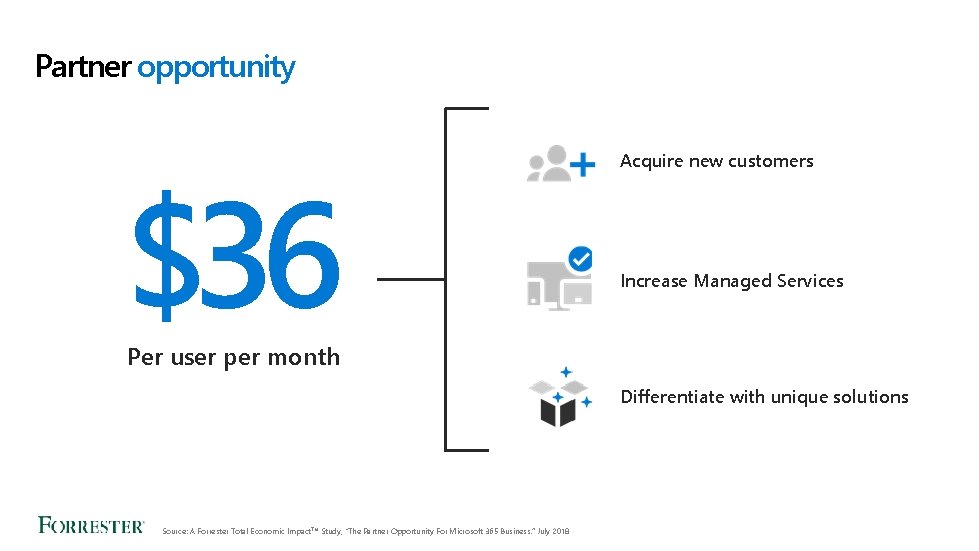
Partner opportunity $36 Acquire new customers Increase Managed Services Per user per month Differentiate with unique solutions Source: A Forrester Total Economic Impact. TM Study, "The Partner Opportunity For Microsoft 365 Business. ” July 2018

Building a roadmap to Microsoft 365 Business Deploying advanced security value New Services Delivered Enable security (ATP, DLP, AIP) Move to Microsoft 365 Business Windows Defender Exploit Guard New Services Delivered Monitoring of 3 rd party security add-ons Windows 10 rollout Transition to Office 365 BP Introduce Teams Services Delivered Managed Tenant Service Email Migration & deploy Office Device Management Policies Share. Point & Skype Continuing Services 24*7 Support GDPR Consultancy Continuing Services Managed Tenant Service 24*7 Support Ongoing education to drive usage Deployment @ $100 per user $17 per user/month 180% Increase vs. Hosted Exchange Stage 1 9 -12 months Windows deployment @ $100 per user $28 per user/month 65% Increase vs. Stage 1 Security Enablement @ $1, 500/day GDPR Workshop @ $2, 500 $28 per user/month Stage 2 Stage 3 3 -6 months
Partner introduction Trends & product Programs Licensing
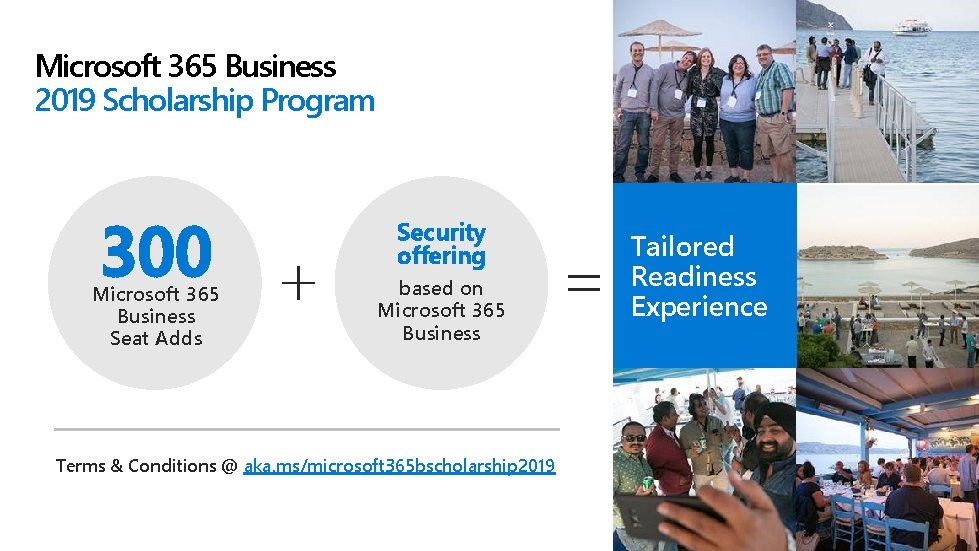
Microsoft 365 Business 2019 Scholarship Program 300 Microsoft 365 Business Seat Adds Security offering based on Microsoft 365 Business Terms & Conditions @ aka. ms/microsoft 365 bscholarship 2019 Tailored Readiness Experience
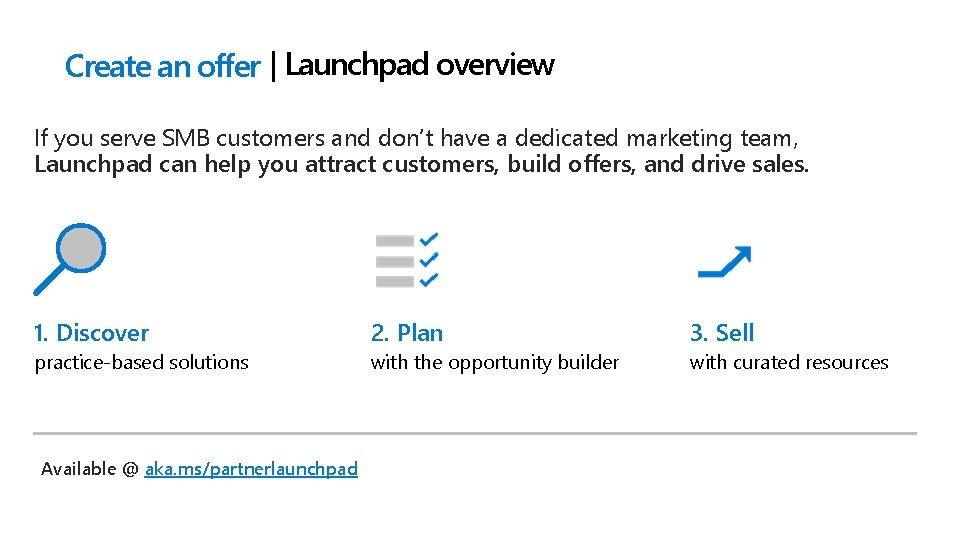
Create an offer | Launchpad overview If you serve SMB customers and don’t have a dedicated marketing team, Launchpad can help you attract customers, build offers, and drive sales. 1. Discover 2. Plan 3. Sell practice-based solutions with the opportunity builder with curated resources Available @ aka. ms/partnerlaunchpad

2 Sales plays | SMB Sales Journey Why Cloud? Build a practice by using basic cloud offerings to acquire customers and capitalizing on legacy opportunity Teamwork Extend profitability of your existing Office 365 practice and acquire at scale with a teamwork practice Security Maximize your profitability through enabling SMBs to safeguard their data with a security offering BOM available @ aka. ms/m 365 bpartners Start with email Bundle Migration File storage & sharing Online Meetings & Conferencing Protect from external threats Secure data from accidental leaks Extend to Devices Company wide data handling Get and stay compliant
Partner introduction Trends & product Programs Licensing
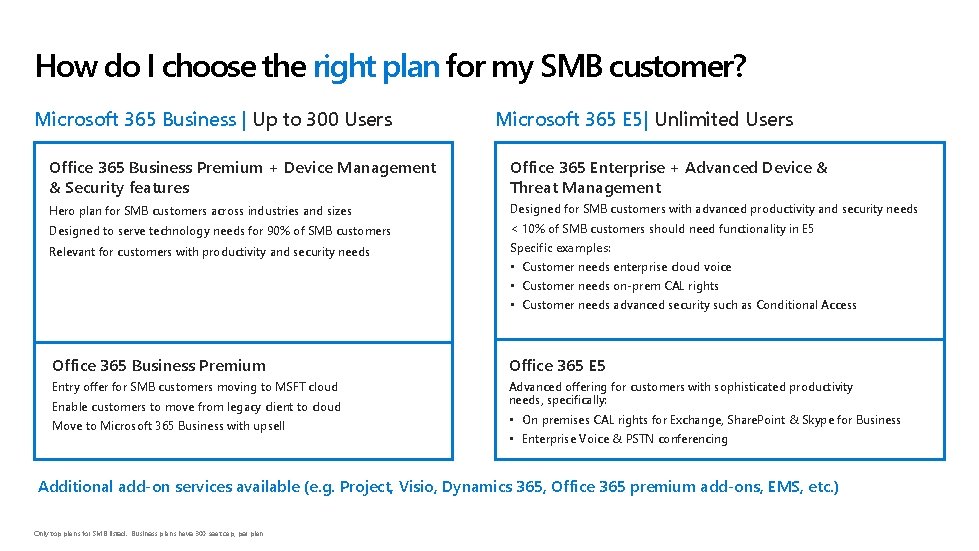
How do I choose the right plan for my SMB customer? Microsoft 365 Business | Up to 300 Users Microsoft 365 E 5| Unlimited Users Office 365 Business Premium + Device Management & Security features Office 365 Enterprise + Advanced Device & Threat Management Hero plan for SMB customers across industries and sizes Designed for SMB customers with advanced productivity and security needs Designed to serve technology needs for 90% of SMB customers < 10% of SMB customers should need functionality in E 5 Relevant for customers with productivity and security needs Specific examples: • Customer needs enterprise cloud voice • Customer needs on-prem CAL rights • Customer needs advanced security such as Conditional Access Office 365 Business Premium Office 365 E 5 Entry offer for SMB customers moving to MSFT cloud Advanced offering for customers with sophisticated productivity needs, specifically: Enable customers to move from legacy client to cloud Move to Microsoft 365 Business with upsell • On premises CAL rights for Exchange, Share. Point & Skype for Business • Enterprise Voice & PSTN conferencing Additional add-on services available (e. g. Project, Visio, Dynamics 365, Office 365 premium add-ons, EMS, etc. ) Only top plans for SMB listed. Business plans have 300 seat cap, per plan
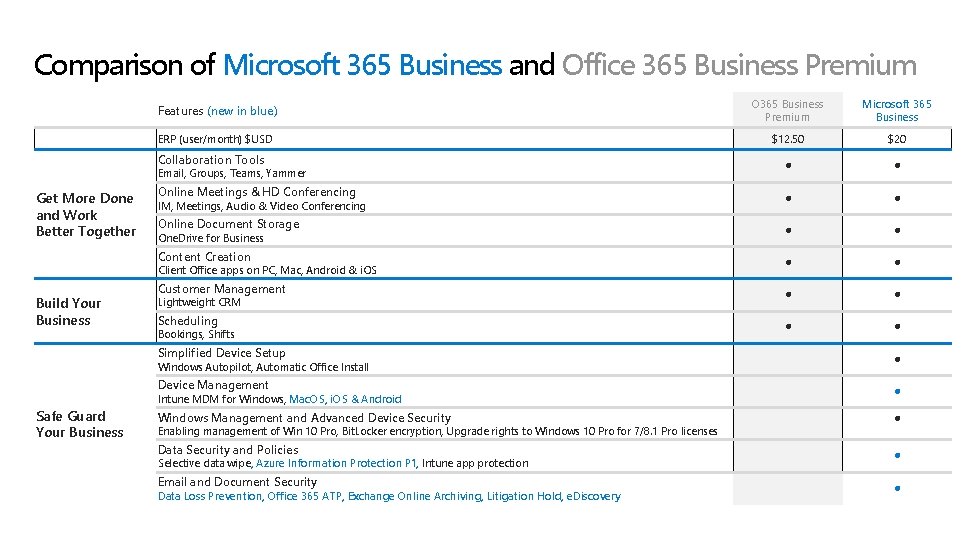
Comparison of Microsoft 365 Business and Office 365 Business Premium Features (new in blue) O 365 Business Premium Microsoft 365 Business ERP (user/month) $USD $12. 50 $20 Collaboration Tools Online Meetings & HD Conferencing Online Document Storage Content Creation Customer Management Scheduling Email, Groups, Teams, Yammer Get More Done and Work Better Together IM, Meetings, Audio & Video Conferencing One. Drive for Business Client Office apps on PC, Mac, Android & i. OS Build Your Business Lightweight CRM Bookings, Shifts Simplified Device Setup Device Management Windows Management and Advanced Device Security Data Security and Policies Email and Document Security Windows Autopilot, Automatic Office Install Safe Guard Your Business Intune MDM for Windows, Mac. OS, i. OS & Android Enabling management of Win 10 Pro, Bit. Locker encryption, Upgrade rights to Windows 10 Pro for 7/8. 1 Pro licenses Selective data wipe, Azure Information Protection P 1, Intune app protection Data Loss Prevention, Office 365 ATP, Exchange Online Archiving, Litigation Hold, e. Discovery
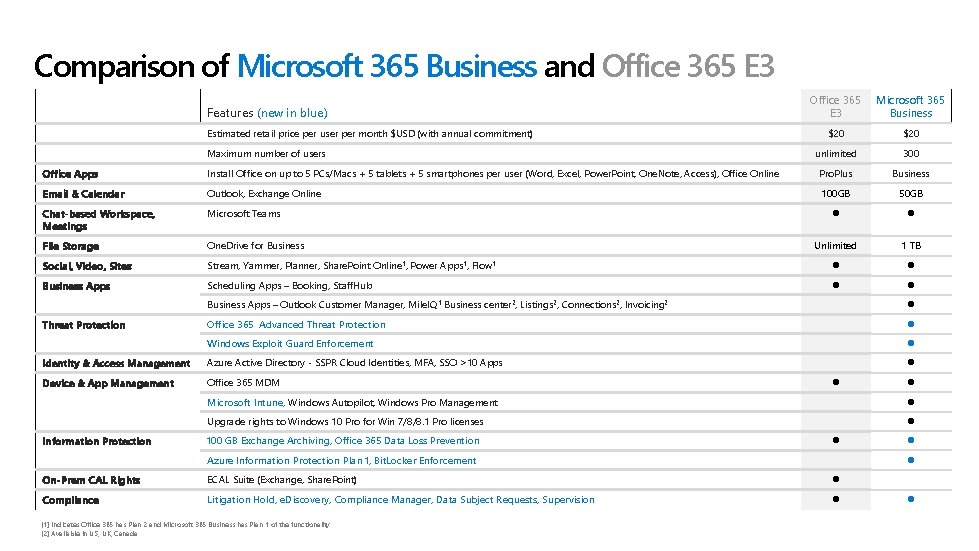
Comparison of Microsoft 365 Business and Office 365 E 3 Features (new in blue) Estimated retail price per user per month $USD (with annual commitment) Maximum number of users Office 365 E 3 Microsoft 365 Business $20 unlimited 300 Office Apps Install Office on up to 5 PCs/Macs + 5 tablets + 5 smartphones per user (Word, Excel, Power. Point, One. Note, Access), Office Online Pro. Plus Business Email & Calendar Outlook, Exchange Online 100 GB 50 GB Chat-based Workspace, Meetings Microsoft Teams File Storage One. Drive for Business Unlimited 1 TB Social, Video, Sites Stream, Yammer, Planner, Share. Point Online 1, Power Apps 1, Flow 1 Business Apps Scheduling Apps – Booking, Staff. Hub Business Apps – Outlook Customer Manager, Mile. IQ 1 Business center 2, Listings 2, Connections 2, Invoicing 2 Office 365 Advanced Threat Protection Windows Exploit Guard Enforcement Identity & Access Management Azure Active Directory - SSPR Cloud Identities, MFA, SSO >10 Apps Device & App Management Office 365 MDM Threat Protection Information Protection Microsoft Intune, Windows Autopilot, Windows Pro Management Upgrade rights to Windows 10 Pro for Win 7/8/8. 1 Pro licenses 100 GB Exchange Archiving, Office 365 Data Loss Prevention Azure Information Protection Plan 1, Bit. Locker Enforcement On-Prem CAL Rights ECAL Suite (Exchange, Share. Point) Compliance Litigation Hold, e. Discovery, Compliance Manager, Data Subject Requests, Supervision [1] Indicates Office 365 has Plan 2 and Microsoft 365 Business has Plan 1 of the functionality [2] Available in US, UK, Canada
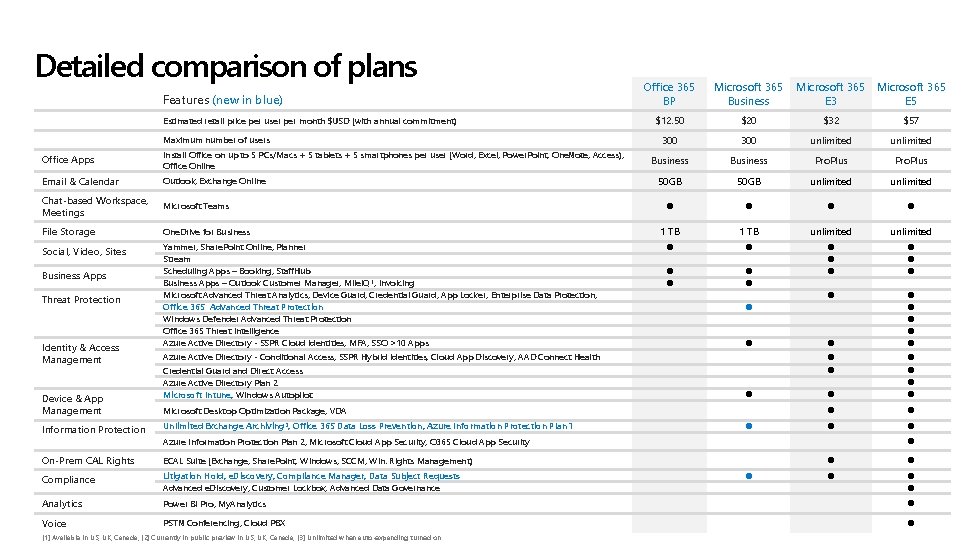
Detailed comparison of plans Features (new in blue) Estimated retail price per user per month $USD (with annual commitment) Maximum number of users Office Apps Install Office on up to 5 PCs/Macs + 5 tablets + 5 smartphones per user (Word, Excel, Power. Point, One. Note, Access), Office Online Email & Calendar Outlook, Exchange Online Chat-based Workspace, Meetings Microsoft Teams File Storage One. Drive for Business Social, Video, Sites Yammer, Share. Point Online, Planner Stream Scheduling Apps – Booking, Staff. Hub Business Apps – Outlook Customer Manager, Mile. IQ 1, Invoicing Microsoft Advanced Threat Analytics, Device Guard, Credential Guard, App Locker, Enterprise Data Protection, Office 365 Advanced Threat Protection Windows Defender Advanced Threat Protection Office 365 Threat Intelligence Azure Active Directory - SSPR Cloud Identities, MFA, SSO >10 Apps Business Apps Threat Protection Identity & Access Management Device & App Management Information Protection Office 365 BP Microsoft 365 Business $12. 50 $20 $32 $57 300 unlimited Business Pro. Plus 50 GB unlimited 1 TB unlimited Azure Active Directory - Conditional Access, SSPR Hybrid Identities, Cloud App Discovery, AAD Connect Health Credential Guard and Direct Access Azure Active Directory Plan 2 Microsoft Intune, Windows Autopilot Microsoft Desktop Optimization Package, VDA Unlimited Exchange Archiving 3, Office 365 Data Loss Prevention, Azure Information Protection Plan 1 Microsoft 365 E 3 E 5 Azure Information Protection Plan 2, Microsoft Cloud App Security, O 365 Cloud App Security On-Prem CAL Rights ECAL Suite (Exchange, Share. Point, Windows, SCCM, Win. Rights Management) Compliance Litigation Hold, e. Discovery, Compliance Manager, Data Subject Requests Advanced e. Discovery, Customer Lockbox, Advanced Data Governance Analytics Power BI Pro, My. Analytics Voice PSTN Conferencing, Cloud PBX [1] Available in US, UK, Canada; [2] Currently in public preview in US, UK, Canada; [3] Unlimited when auto-expanding turned on

Office 365 Premium add-ons Add-ons are SKUs that can be added to an existing suite or service Voice Analytics Security Business Essentials 1 There or Business Premium Microsoft 365 Business Office 365 Enterprise E 3 Microsoft 365 Enterprise E 3 Office 365 Enterprise E 5 Microsoft 365 Enterprise E 5 Price (USD) Advanced Threat Protection Add-on Included $2 Office 365 Cloud App Security Add-on Included $3 Advanced Compliance Add-on Included $8 Threat Intelligence Add-on Included $8 N/A Add-on Included $6/$2 My. Analytics Add-on Included $4 Power BI Pro Add-on Included $10 Audio Conferencing Add-on Included $4 Phone System N/A Add-on Included $8 Calling Plan (Select countries) N/A Add-on $12/$24** Workplace Analytics Phone System Required are no technical blockers for customers to purchase Office 365 Cloud App Security, but usage can only be achieved if an Office 365 workload is deployed. conferencing capabilities may incur additional per minute Communications Credits charges. Customers can disable these features to avoid additional billing. $24 includes both International and Domestic calling plans. Domestic only calling plans are available for $12. Tax is included in price in the US. Service usage limits exist to manage fraud, abuse, excessive use, and maintain service performance. Further details about these services can be found in our recently published Service Use Terms. 35, 000 Seat Minimum. $6 pupm for E 1/E 3, $2 pupm for E 5 2 Dial-out
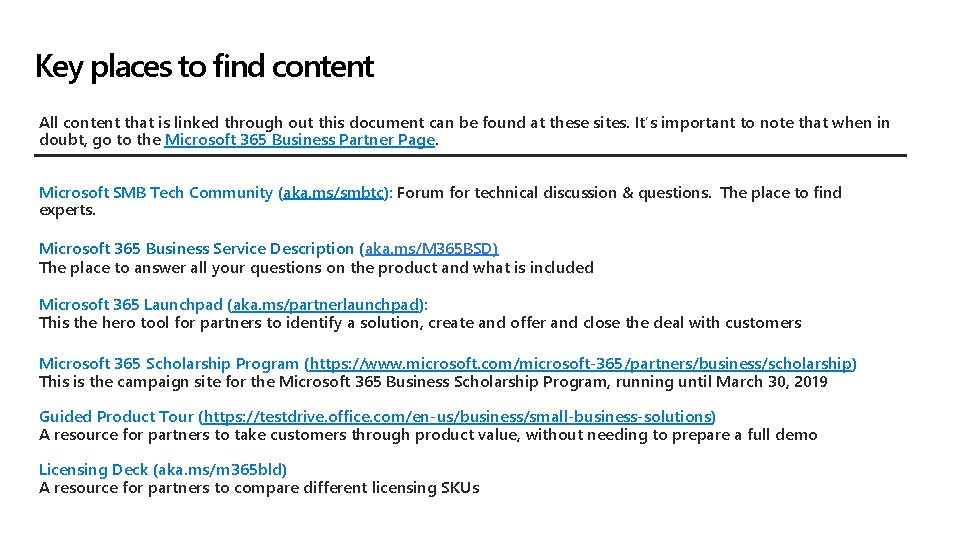
Key places to find content All content that is linked through out this document can be found at these sites. It’s important to note that when in doubt, go to the Microsoft 365 Business Partner Page. Microsoft SMB Tech Community (aka. ms/smbtc): Forum for technical discussion & questions. The place to find experts. Microsoft 365 Business Service Description (aka. ms/M 365 BSD) The place to answer all your questions on the product and what is included Microsoft 365 Launchpad (aka. ms/partnerlaunchpad): This the hero tool for partners to identify a solution, create and offer and close the deal with customers Microsoft 365 Scholarship Program (https: //www. microsoft. com/microsoft-365/partners/business/scholarship) This is the campaign site for the Microsoft 365 Business Scholarship Program, running until March 30, 2019 Guided Product Tour (https: //testdrive. office. com/en-us/business/small-business-solutions) A resource for partners to take customers through product value, without needing to prepare a full demo Licensing Deck (aka. ms/m 365 bld) A resource for partners to compare different licensing SKUs
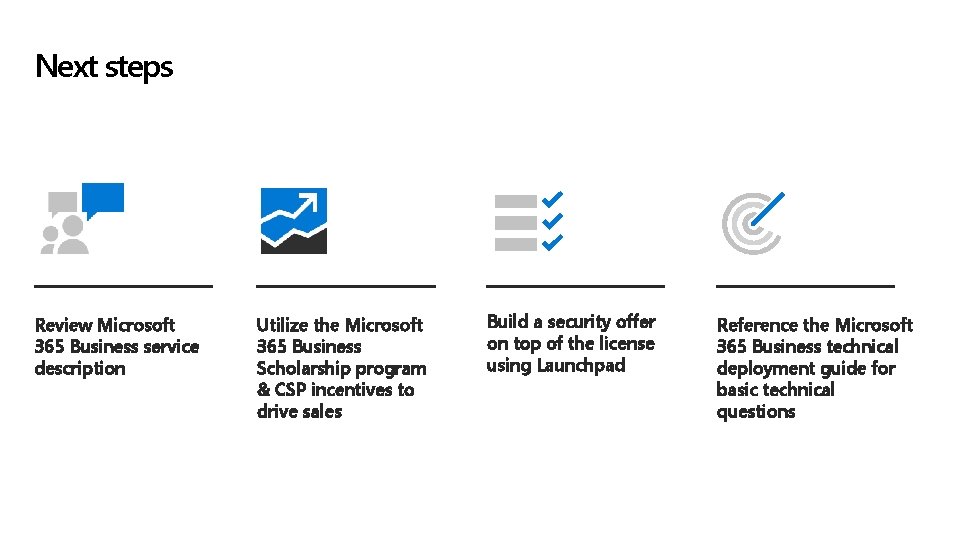
Next steps Review Microsoft 365 Business service description Utilize the Microsoft 365 Business Scholarship program & CSP incentives to drive sales Build a security offer on top of the license using Launchpad Reference the Microsoft 365 Business technical deployment guide for basic technical questions

Thank you © Copyright Microsoft Corporation. All rights reserved.
- Slides: 27