
Microfocus Adjustment EXIF Data Background What is it

Micro-focus Adjustment

EXIF Data

Background What is it? Almost all digital cameras save image files with EXIF (Exchangeable Image File) data. Camera settings and scene information are recorded by the camera into the image file. Examples of stored information are shutter speed, date and time a photo was taken, focal length, exposure compensation, metering pattern and if a flash was used Photographers can add information to the EXIF data through the SETUP menu
Available on ALL Cameras? Most (NEWER) DSLR and some Mirrorless cameras automatically record EXIF data NIKON: D 4, D 3 X, D 3 S, D 3, D 810, D 800, D 700, D 610, D 600 CANON: 1 DX, 1 DE, 1 D 4 1 Ds. Mk 3, 5 D 2, 5 D 3, 50 D, 7 D PENTAX: K 20 SONY: A 900 Others may support it, check your manual NOTE: Not all cameras let you add information (copyright or artist)
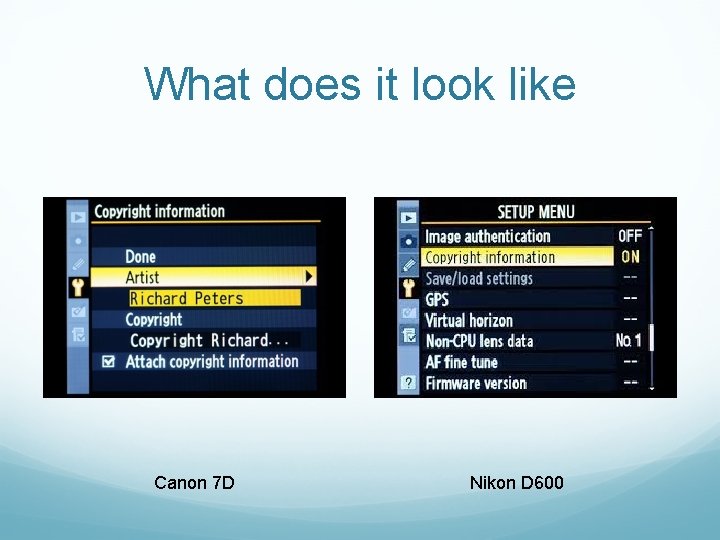
What does it look like Canon 7 D Nikon D 600
What can you do with it? Most photo editing tools allow you to view/edit EXIF data EXIF viewers / editors are available on-line (software not required) Jeffrey’s EXIF Viewer http: //regex. info/exif. cgi Ver. EXIF http: //www. verexif. com/en/ EXIFData. com http: //exifdata. com

Ver. EXIF Example
Wrapping It Up Study the EXIF data of images you like or want to learn from to see how the photographer did it Set your information following your Users Manual Check your photo editing software to VIEW, EDIT, or REMOVE EXIF data Take advantage of on-line tools
- Slides: 8