
MFCL 8900 CDW Brother ALLINONE COLOUR LASER PRINTER
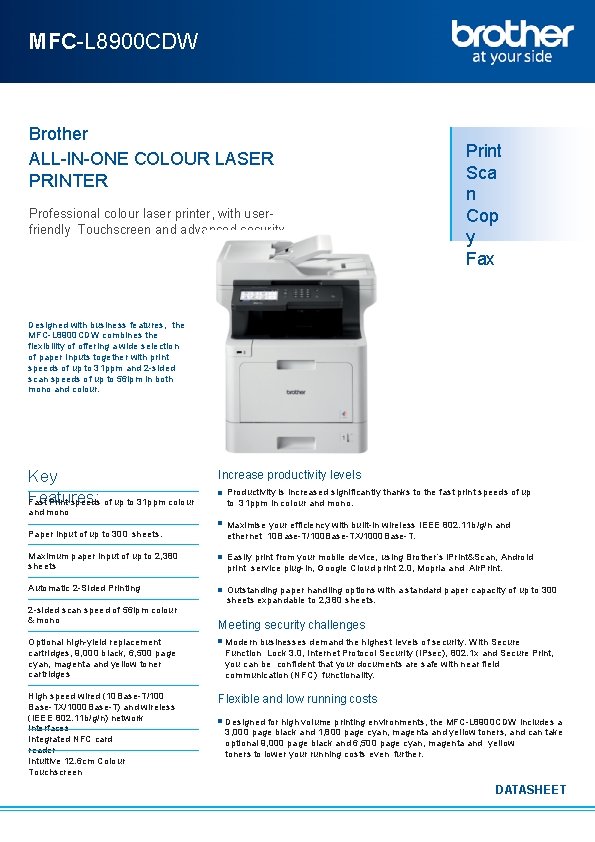
MFC-L 8900 CDW Brother ALL-IN-ONE COLOUR LASER PRINTER Professional colour laser printer, with userfriendly Touchscreen and advanced security Print Sca n Cop y Fax Designed with business features, the MFC-L 8900 CDW combines the flexibility of offering a wide selection of paper inputs together with print speeds of up to 31 ppm and 2 -sided scan speeds of up to 56 ipm in both mono and colour. Key Features: Fast Print speeds of up to 31 ppm colour and mono Increase productivity levels Productivity is increased significantly thanks to the fast print speeds of up to 31 ppm in colour and mono. Paper input of up to 300 sheets. Maximise your efficiency with built-in wireless IEEE 802. 11 b/g/n and ethernet 10 Base-T/100 Base-TX/1000 Base-T. Maximum paper input of up to 2, 380 sheets Easily print from your mobile device, using Brother’s i. Print&Scan, Android print service plug-in, Google Cloud print 2. 0, Mopria and Air. Print. Automatic 2 -Sided Printing Outstanding paper handling options with a standard paper capacity of up to 300 sheets expandable to 2, 380 sheets. 2 -sided scan speed of 56 ipm colour & mono Optional high-yield replacement cartridges, 9, 000 black, 6, 500 page cyan, magenta and yellow toner cartridges High speed wired (10 Base-T/100 Base-TX/1000 Base-T) and wireless (IEEE 802. 11 b/g/n) network interfaces Integrated NFC card reader Intuitive 12. 6 cm Colour Touchscreen Meeting security challenges Modern businesses demand the highest levels of security. With Secure Function Lock 3. 0, Internet Protocol Security (IPsec), 802. 1 x and Secure Print, you can be confident that your documents are safe with near field communication (NFC) functionality. Flexible and low running costs Designed for high volume printing environments, the MFC-L 8900 CDW includes a 3, 000 page black and 1, 800 page cyan, magenta and yellow toners, and can take optional 9, 000 page black and 6, 500 page cyan, magenta and yellow toners to lower your running costs even further. DATASHEET
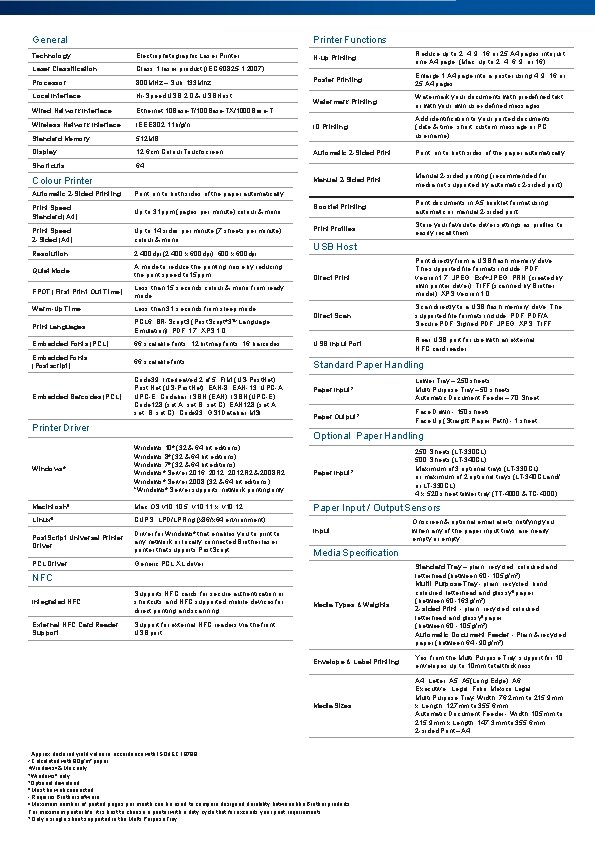
Printer Functions General Technology Electrophotographic Laser Printer Laser Classification Class 1 laser product (IEC 60825 -1: 2007) Processor 800 MHz – Sub: 133 Mhz Local Interface Hi-Speed USB 2. 0 & USB Host Wired Network Interface Ethernet 10 Base-T/100 Base-TX/1000 Base-T Wireless Network Interface IEEE 802. 11 b/g/n Standard Memory 512 MB Display 12. 6 cm Colour Touchscreen Shortcuts 64 Colour Printer Automatic 2 -Sided Printing Print on to both sides of the paper automatically Print Speed Standard (A 4) Up to 31 ppm (pages per minute) colour & mono Print Speed 2 -Sided (A 4) Up to 14 sides per minute (7 sheets per minute) colour & mono Resolution 2, 400 dpi (2, 400 x 600 dpi), 600 x 600 dpi Quiet Mode A mode to reduce the printing noise by reducing the print speed to 15 ppm FPOT (First Print Out Time) Less than 15 seconds colour & mono from ready mode Warm-Up Time Less than 31 seconds from sleep mode Print Languages PCL 6, BR-Script 3 (Post. Script 3 Language Emulation), PDF 1. 7, XPS 1. 0 Embedded Fonts (PCL) N-up Printing Reduce up to 2, 4, 9, 16 or 25 A 4 pages into just one A 4 page (Mac, up to 2, 4, 6, 9, or 16) Poster Printing Enlarge 1 A 4 page into a poster using 4, 9, 16 or 25 A 4 pages Watermark Printing Watermark your documents with predefined text or with your own user-defined messages ID Printing Add identification to your printed documents (date & time, short custom message or PC username) Automatic 2 -Sided Print on to both sides of the paper automatically Manual 2 -Sided Print Manual 2 -sided printing (recommended for media not supported by automatic 2 -sided print) Booklet Printing Print documents in A 5 booklet format using automatic or manual 2 -sided print Profiles Store your favourite driver settings as profiles to easily recall them USB Host Direct Print directly from a USB flash memory drive. The supported file formats include: PDF version 1. 7, JPEG, Exif+JPEG, PRN (created by own printer driver), TIFF (scanned by Brother model), XPS version 1. 0 Direct Scan directly to a USB flash memory drive. The supported file formats include: PDF, PDF/A, Secure PDF, Signed PDF, JPEG, XPS, TIFF 66 scalable fonts, 12 bitmap fonts, 16 barcodes USB Input Port Rear USB port for use with an external NFC card reader Embedded Fonts (Postscript) 66 scalable fonts Standard Paper Handling Embedded Barcodes (PCL) Code 39, Interleaved 2 of 5, FIM (US-Post. Net), Post Net (US-Post. Net), EAN-8, EAN-13, UPC-A, UPC-E, Codabar, ISBN (EAN), ISBN (UPC-E), Code 128 (set A, set B, set C), EAN 128 (set A, set B, set C), Code 93, GS 1 Databar, MSI ® TM Printer Driver Paper Input 2 Lower Tray – 250 sheets Multi Purpose Tray – 50 sheets Automatic Document Feeder – 70 Sheet Paper Output 2 Face Down - 150 sheets Face Up (Straight Paper Path) - 1 sheet Optional Paper Handling Windows® Windows 10® (32 & 64 bit editions) Windows 8® (32 & 64 bit editions) Windows 7® (32 & 64 bit editions) Windows® Server 2016, 2012 R 2 & 2008 R 2 Windows® Server 2008 (32 & 64 bit editions) *Windows® Server supports network printing only Macintosh 5 Mac OS v 10. 5, v 10. 11. x, v 10. 12 Linux 5 CUPS, LPD/LPRng (x 86/x 64 environment) Post. Script Universal Printer Driver for Windows® that enables you to print to any network or locally connected Brother laser printer that supports Post. Script PCL Driver Generic PCL XL driver Paper Input 2 Paper Input / Output Sensors Input Supports NFC cards for secure authentication or shortcuts and NFC supported mobile devices for direct printing and scanning External NFC Card Reader Support for external NFC readers via the front USB port Media Types & Weights Standard Tray – plain, recycled, coloured and letterhead (between 60 - 105 g/m 2) Multi Purpose Tray - plain, recycled, bond, coloured, letterhead and glossy 9 paper (between 60 -163 g/m 2) 2 -sided Print - plain, recycled, coloured, letterhead and glossy 9 paper (between 60 - 105 g/m 2) Automatic Document Feeder - Plain & recycled paper (between 64 - 90 g/m 2) Envelope & Label Printing Yes, from the Multi Purpose Tray: support for 10 envelopes up to 10 mm total thickness Media Sizes A 4, Letter, A 5(Long Edge), A 6, Executive, Legal, Folio, Mexico Legal Multi Purpose Tray- Width: 76. 2 mm to 215. 9 mm x Length: 127 mm to 355. 6 mm Automatic Document Feeder - Width: 105 mm to 215. 9 mm x Length: 147. 3 mm to 355. 6 mm 2 -sided Print – A 4 Approx declared yield value in accordance with ISO/IEC 19798 Calculated with 80 g/m² paper 3 Windows ® & Mac only 4 Windows ® only 5 Optional download 6 Must be web connected 7 Requires Brother software 8 Maximum number of printed pages per month can be used to compare designed durability between like Brother products. For maximum printer life, it is best to choose a printer with a duty cycle that far exceeds your print requirements 9 Only a single sheet supported in the Multi Purpose Tray 1 2 Onscreen & optional email alerts notifying you when any of the paper input trays are nearly empty or empty Media Specification NFC Integrated NFC 250 Sheets (LT-330 CL) 500 Sheets (LT-340 CL) Maximum of 3 optional trays (LT-330 CL) or maximum of 2 optional trays (LT-340 CL and/ or LT-330 CL) 4 x 520 sheet tower tray (TT-4000 & TC-4000)
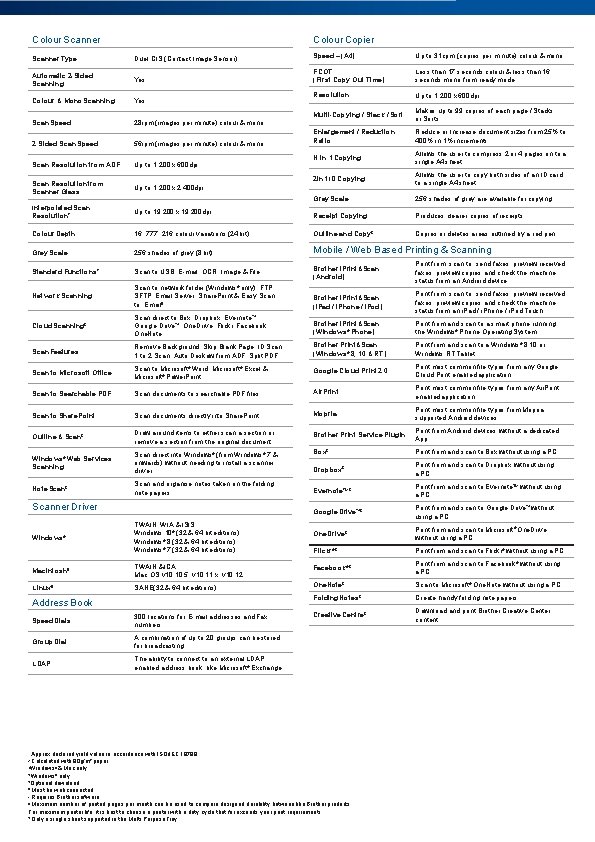
Colour Copier Colour Scanner Type Duel CIS (Contact Image Sensor) Speed – (A 4) Up to 31 cpm (copies per minute) colour & mono Automatic 2 -Sided Scanning Yes FCOT (First Copy Out Time) Less than 17 seconds colour & less than 16 seconds mono from ready mode Colour & Mono Scanning Yes Resolution Up to 1, 200 x 600 dpi Scan Speed 28 ipm (images per minute) colour & mono Multi-Copying / Stack / Sort Makes up to 99 copies of each page / Stacks or Sorts 2 Sided Scan Speed 56 ipm (images per minute) colour & mono Enlargement / Reduction Ratio Reduce or Increase document sizes from 25% to 400% in 1% increments Scan Resolution from ADF Up to 1, 200 x 600 dpi N in 1 Copying Allows the user to compress 2 or 4 pages on to a single A 4 sheet Scan Resolution from Scanner Glass 2 in 1 ID Copying Up to 1, 200 x 2, 400 dpi Allows the user to copy both sides of an ID card to a single A 4 sheet Grey Scale 256 shades of grey are available for copying Interpolated Scan Resolution 7 Up to 19, 200 x 19, 200 dpi Receipt Copying Produces clearer copies of receipts Colour Depth 16, 777, 216 colour variations (24 bit) Outline and Copy 6 Copies or deletes areas outlined by a red pen Grey Scale 256 shades of grey (8 bit) Mobile / Web Based Printing & Scanning Standard Functions 7 Scan to USB, E-mail, OCR, Image & File Brother i. Print&Scan (Android) Network Scanning Scan to network folder (Windows® only), FTP, SFTP, Email Server, Share. Point & Easy Scan to Email 6 Print from, scan to, send faxes, preview received faxes, preview copies and check the machine status from an Android device Brother i. Print&Scan (i. Pad / i. Phone / i. Pod) Cloud Scanning 6 Scan direct to Box, Dropbox, Evernote ™, Google Drive™, One. Drive, Flickr, Facebook, One. Note Print from, scan to, send faxes, preview received faxes, preview copies and check the machine status from an i. Pad / i. Phone / i. Pod Touch Brother i. Print&Scan (Windows® Phone) Print from and scan to a smart phone running the Windows® Phone Operating System Scan Features Remove Background, Skip Blank Page, ID Scan, 1 to 2 Scan, Auto Deskew from ADF, Split PDF Brother Print&Scan (Windows® 8, 10 & RT) Print from and scan to a Windows® 8, 10 or Windows RT Tablet Scan to Microsoft Office Scan to Microsoft® Word, Microsoft® Excel & Microsoft® Power. Point Google Cloud Print 2. 0 Print most common file types from any Google Cloud Print enabled application Scan to Searchable PDF Scan documents to searchable PDF files Air. Print most common file types from any Air. Print enabled application Scan to Share. Point Scan documents directly into Share. Point Mopria Print most common file types from Mopria supported Android devices Outline & Scan 6 Draw around items to either scan a section or remove a section from the original document Brother Print Service Plugin Print from Android devices without a dedicated App Windows® Web Services Scanning Scan direct into Windows® (from Windows® 7 & onwards) without needing to install a scanner driver Box 6 Print from and scan to Box without using a PC Dropbox 6 Print from and scan to Dropbox without using a PC Note Scan 6 Scan and organise notes taken on the folding note papers Evernote. TM 6 Print from and scan to Evernote. TM without using a PC Google Drive™ 6 Print from and scan to Google Drive™ without using a PC One. Drive 6 Print from and scan to Microsoft® One. Drive without using a PC Flickr® 6 Print from and scan to Flickr® without using a PC Print from and scan to Facebook® without using a PC Scanner Driver Windows® TWAIN, WIA & ISIS Windows 10® (32 & 64 bit editions) Windows® 8 (32 & 64 bit editions), Windows® 7 (32 & 64 bit editions), Macintosh 5 TWAIN & ICA Mac OS v 10. 5, v 10. 11. x, v 10. 12 Facebook® 6 Linux 5 SANE(32 & 64 bit editions) One. Note 6 Speed Dials 300 locations for E-mail addresses and Fax numbers Group Dial A combination of up to 20 groups can be stored for broadcasting LDAP The ability to connect to an external LDAP enabled address book, like Microsoft® Exchange Creative Centre Approx declared yield value in accordance with ISO/IEC 19798 Calculated with 80 g/m² paper 3 Windows ® & Mac only 4 Windows ® only 5 Optional download 6 Must be web connected 7 Requires Brother software 8 Maximum number of printed pages per month can be used to compare designed durability between like Brother products. For maximum printer life, it is best to choose a printer with a duty cycle that far exceeds your print requirements 9 Only a single sheet supported in the Multi Purpose Tray 2 Create handy folding note papers Folding Notes Address Book 1 Scan to Microsoft® One. Note without using a PC 6 6 Download and print Brother Creative Center content
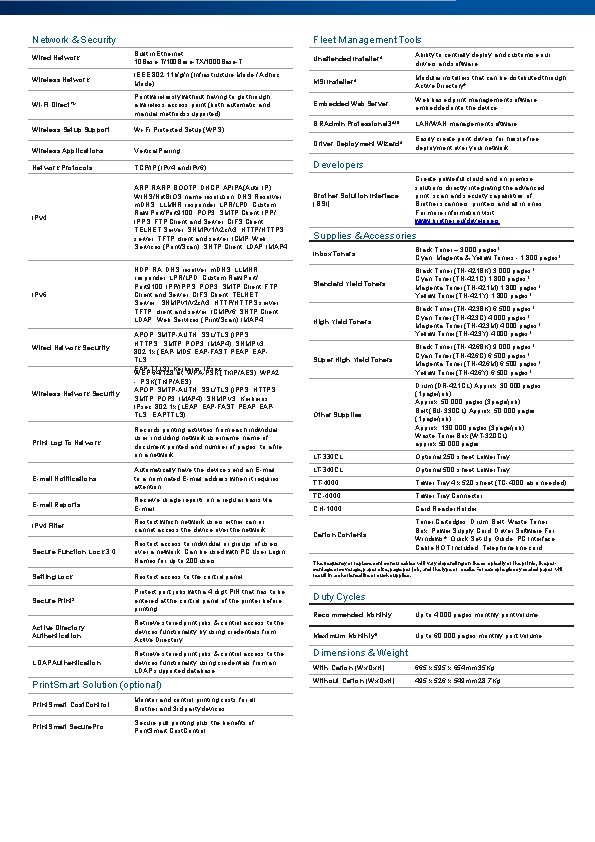
Network & Security Fleet Management Tools Wired Network Built in Ethernet 10 Base-T/100 Base-TX/1000 Base-T Unattended Installer 4 Ability to centrally deploy and customise our drivers and software Wireless Network IEEE 802. 11 b/g/n (Infrastructure Mode / Adhoc Mode) MSI Installer 4 Modular installers that can be distributed through Active Directory® Wi-Fi Direct. TM Print wirelessly without having to go through a wireless access point (both automatic and manual methods supported) Embedded Web Server Web based print management software embedded onto the device Wireless Setup Support Wi-Fi Protected Setup (WPS) BRAdmin Professional 34&5 LAN/WAN management software Wireless Applications Vertical Pairing Driver Deployment Wizard 4 Easily create print drivers for hassle free deployment over your network Network Protocols TCP/IP (IPv 4 and IPv 6) IPv 4 ARP, RARP, BOOTP, DHCP, APIPA(Auto IP), WINS/Net. BIOS name resolution, DNS Resolver, m. DNS, LLMNR responder, LPR/LPD, Custom Raw Port/Port 9100, POP 3, SMTP Client, IPP/ IPPS, FTP Client and Server, CIFS Client, TELNET Server, SNMPv 1/v 2 c/v 3, HTTP/HTTPS server, TFTP client and server, ICMP, Web Services (Print/Scan), SNTP Client, LDAP, IMAP 4 IPv 6 Wired Network Security Wireless Network Security Print Log To Network E-mail Notifications NDP, RA, DNS resolver, m. DNS, LLMNR responder, LPR/LPD, Custom Raw Port/ Port 9100, IPP/IPPS, POP 3, SMTP Client, FTP Client and Server, CIFS Client, TELNET Server, SNMPv 1/v 2 c/v 3, HTTP/HTTPS server, TFTP client and server, ICMPv 6, SNTP Client, LDAP, Web Services (Print/Scan), IMAP 4 APOP, SMTP-AUTH, SSL/TLS (IPPS, HTTPS, SMTP, POP 3, IMAP 4), SNMP v 3 802. 1 x (EAP-MD 5, EAP-FAST, PEAP, EAPTLS, EAP-TTLS), Kerberos, IPsec WEP 64/128 bit, WPA-PSK (TKIP/AES), WPA 2 - PSK (TKIP/AES) APOP, SMTP-AUTH, SSL/TLS (IPPS, HTTPS, SMTP, POP 3, IMAP 4), SNMP v 3, Kerberos, IPsec, 802. 1 x (LEAP, EAP-FAST, PEAP, EAPTLS, EAPTTLS) Records printing activities from each individual user, including network username, name of document printed and number of pages, to a file on a network Automatically have the device send an E-mail to a nominated E-mail address when it requires attention E-mail Reports Receive usage reports on a regular basis via E-mail IPv 4 Filter Restrict which network users either can or cannot access the device over the network Secure Function Lock 3. 0 Restrict access to individual or groups of users over a network. Can be used with PC User Login Names for up to 200 users Setting Lock Restrict access to the control panel Secure Print 3 Protect print jobs with a 4 digit PIN that has to be entered at the control panel of the printer before printing Active Directory Authentication Retrieve stored print jobs & control access to the devices functionality by using credentials from Active Directory LDAP Authentication Retrieve stored print jobs & control access to the devices functionality using credentials from an LDAP supported database Print. Smart Solution (optional) Print. Smart Cost. Control Monitor and control printing costs for all Brother and 3 rd party devices Print. Smart Secure. Pro Secure pull printing plus the benefits of Print. Smart Cost. Control Developers Brother Solution Interface (BSI) Create powerful cloud and on premise solutions directly integrating the advanced print, scan and security capabilities of Brother scanners, printers and all in ones. For more information visit: www. brother. eu/developers Supplies & Accessories Inbox Toners Black Toner – 3, 000 pages 1 Cyan, Magenta & Yellow Toners - 1, 800 pages 1 Standard Yield Toners Black Toner (TN-421 BK) 3, 000 pages 1 Cyan Toner (TN-421 C) 1, 800 pages 1 Magenta Toner (TN-421 M) 1, 800 pages 1 Yellow Toner (TN-421 Y) 1, 800 pages 1 High Yield Toners Black Toner (TN-423 BK) 6, 500 pages 1 Cyan Toner (TN-423 C) 4, 000 pages 1 Magenta Toner (TN-423 M) 4, 000 pages 1 Yellow Toner (TN-423 Y) 4, 000 pages 1 Super High Yield Toners Black Toner (TN-426 BK) 9, 000 pages 1 Cyan Toner (TN-426 C) 6, 500 pages 1 Magenta Toner (TN-426 M) 6, 500 pages 1 Yellow Toner (TN-426 Y) 6, 500 pages 1 Other Supplies Drum (DR-421 CL) Approx. 30, 000 pages (1 page/job) Approx. 50, 000 pages (3 page/job) Belt (BU-330 CL) Approx. 50, 000 pages (1 page/job) Approx. 130, 000 pages (3 page/job) Waste Toner Box (WT-320 CL) approx 50, 000 pages LT-330 CL Optional 250 sheet Lower Tray LT-340 CL Optional 500 sheet Lower Tray TT-4000 Tower Tray 4 x 520 sheet (TC-4000 also needed) TC-4000 Tower Tray Connector CH-1000 Card Reader Holder Carton Contents Toner Cartridges, Drum, Belt, Waste Toner Box, Power Supply Cord, Driver Software For Windows®, Quick Set-Up Guide, PC Interface Cable NOT Included, Telephone line cord The frequency of replacement consumables will vary depending on the complexity of the prints, the percentage of coverage, paper size, page per job, and the type of media. For example glossy coated paper will result in a shortened life of such supplies. Duty Cycles Recommended Monthly Up to 4, 000 pages monthly print volume Maximum Monthly 8 Up to 60, 000 pages monthly print volume Dimensions & Weight With Carton (Wx. Dx. H) 665 x 595 x 654 mm 35 Kg Without Carton (Wx. Dx. H) 495 x 526 x 549 mm 28. 7 Kg
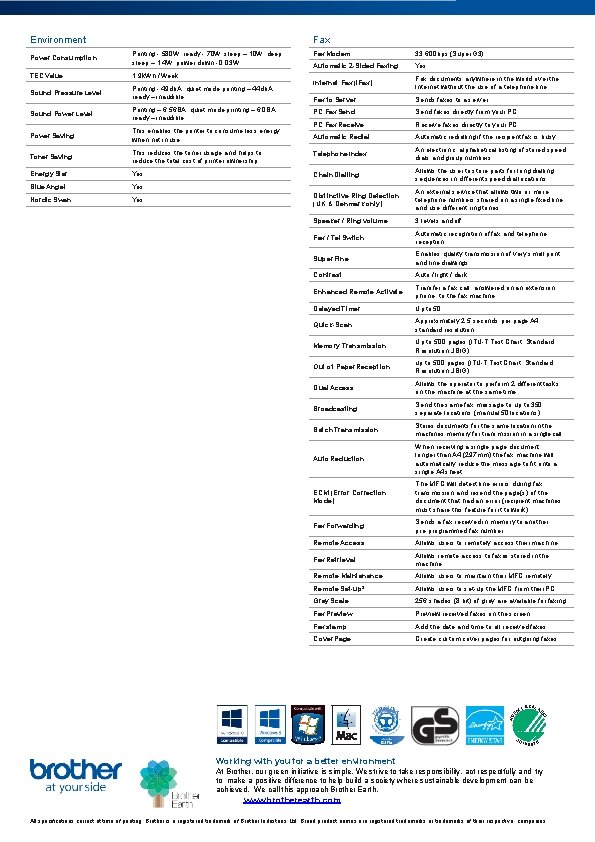
Environment Fax Modem 33, 600 bps (Super G 3) Automatic 2 -Sided Faxing Yes Internet Fax (i. Fax) Fax documents anywhere in the world over the Internet without the use of a telephone line Fax to Server Sends faxes to a server PC Fax Send faxes directly from your PC PC Fax Receive faxes directly to your PC Automatic Redial Automatic redialling if the recipient fax is busy This reduces the toner usage and helps to reduce the total cost of printer ownership Telephone Index An electronic, alphabetical listing of stored speed dials and group numbers Energy Star Yes Chain Dialling Allows the user to store parts for long dialling sequences in different speed dial locations Blue Angel Yes Nordic Swan Yes Distinctive Ring Detection (UK & Denmark only) An external service that allows two or more telephone numbers shared on a single fixed line and use different ring tones Speaker / Ring volume 3 levels and off Fax / Tel Switch Automatic recognition of fax and telephone reception Super Fine Enables quality transmission of very small print and line drawings Contrast Auto / light / dark Enhanced Remote Activate Transfer a fax call, answered on an extension phone, to the fax machine Delayed Timer Up to 50 Quick-Scan Approximately 2. 5 seconds per page A 4 standard resolution Memory Transmission Up to 500 pages (ITU-T Test Chart, Standard Resolution, JBIG) Out of Paper Reception up to 500 pages (ITU-T Test Chart, Standard Resolution, JBIG) Dual Access Allows the operator to perform 2 different tasks on the machine at the same time Broadcasting Send the same fax message to up to 350 separate locations (manual 50 locations) Batch Transmission Stores documents for the same location in the machines memory for transmission in a single call Auto Reduction When receiving a single page document longer than A 4 (297 mm) the fax machine will automatically reduce the message to fit onto a single A 4 sheet ECM (Error Correction Mode) The MFC will detect line errors during fax transmission and resend the page(s) of the document that had an error (recipient machines must share this feature for it to work) Fax Forwarding Sends a fax received in memory to another pre-programmed fax number Remote Access Allows users to remotely access their machine Fax Retrieval Allows remote access to faxes stored in the machine Remote Maintenance Allows users to maintain their MFC remotely Remote Set-up 3 Allows users to set-up the MFC from their PC Grey Scale 256 shades (8 bit) of grey are available for faxing Fax Preview received faxes on the screen Fax stamp Add the date and time to all received faxes Cover Page Create custom cover pages for outgoing faxes Printing - 580 W, ready - 70 W, sleep – 10 W, deep sleep – 1. 4 W, power down - 0. 03 W TEC Value 1. 9 k. Wh / Week Sound Pressure Level Printing - 49 db. A, quiet mode printing – 44 db. A, ready – inaudible Sound Power Level Printing – 6. 56 BA, quiet mode printing – 6. 0 BA, ready – inaudible Power Saving This enables the printer to consume less energy when not in use Toner Saving 30 ECOL A EL C DI R B NO Power Consumption 150025 Working with you for a better environment At Brother, our green initiative is simple. We strive to take responsibility, act respectfully and try to make a positive difference to help build a society where sustainable development can be achieved. We call this approach Brother Earth. www. brotherearth. com All specifications correct at time of printing. Brother is a registered trademark of Brother Industries Ltd. Brand product names are registered trademarks or trademarks of their respective companies.
- Slides: 5