
Methods for Dummies Preprocessing Realigning and Unwarping Rashmi





- Slides: 33
Methods for Dummies Preprocessing: Realigning and Unwarping Rashmi Gupta and Luke Palmer
Overview • Motion in f. MRI − Motion Prevention − Motion Correction • Realignment – Two Steps Rashmi Gupta − Registration − Transformation • Realignment in SPM • Unwarping Luke Palmer
Why Preprocess? • • • Data is noisy! Subjects move Inhomogeneity in MF Physiological noise: heart beat, respiration Etc etc…
Preprocessing: Two principal goals • To remove uninteresting variability from the data and to prepare the data for statistical analysis. • If done correctly, preprocessing steps can greatly increase the functional resolution of an f. MRI experiment.
f. MRI • f. MRI data as consisting of a 3 D matrix of voxels that is repeatedly sampled over time. • A single experiment might have an imaging volume of 64 x 30 voxels that is sampled every 2 seconds for a total of 10 minutes, resulting in 300 time points per voxel. • f. MRI data analysis assumptions Each voxel represents a unique and unchanging location in the brain • - Subject head motion
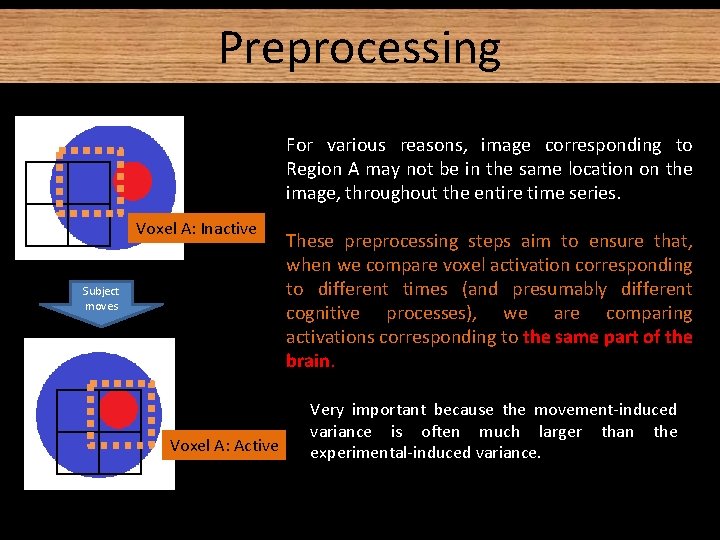
Preprocessing For various reasons, image corresponding to Region A may not be in the same location on the image, throughout the entire time series. Voxel A: Inactive Subject moves Voxel A: Active These preprocessing steps aim to ensure that, when we compare voxel activation corresponding to different times (and presumably different cognitive processes), we are comparing activations corresponding to the same part of the brain. Very important because the movement-induced variance is often much larger than the experimental-induced variance.
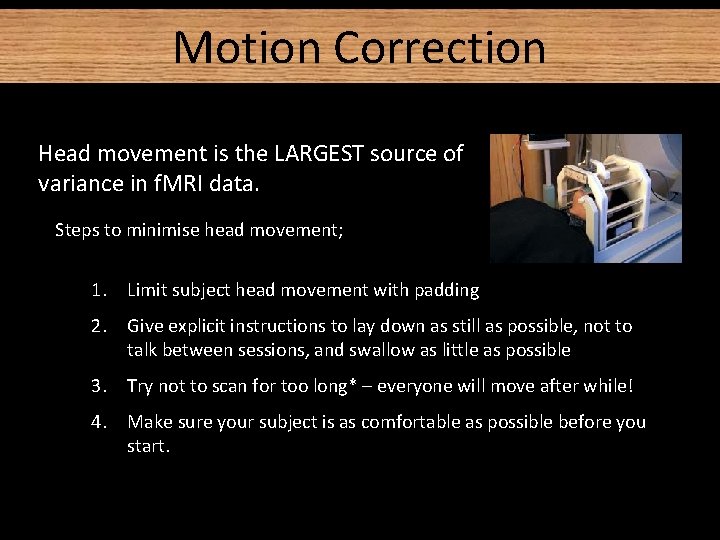
Motion Correction Head movement is the LARGEST source of variance in f. MRI data. Steps to minimise head movement; 1. Limit subject head movement with padding 2. Give explicit instructions to lay down as still as possible, not to talk between sessions, and swallow as little as possible 3. Try not to scan for too long* – everyone will move after while! 4. Make sure your subject is as comfortable as possible before you start.
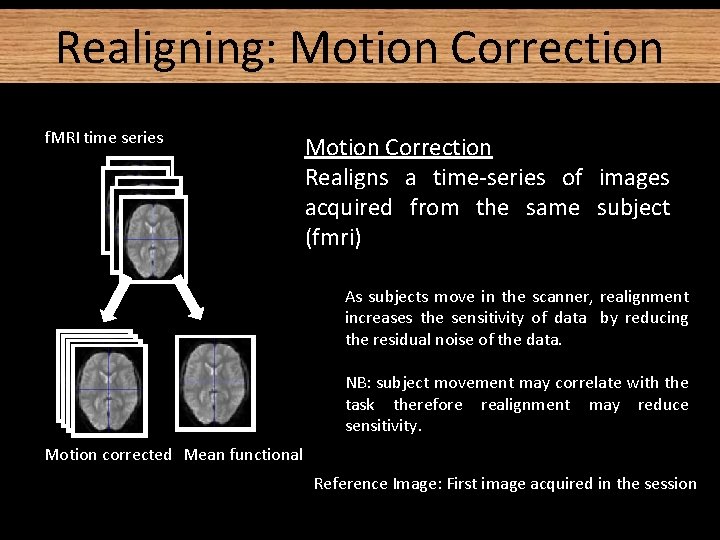
Realigning: Motion Correction f. MRI time series Motion Correction Realigns a time-series of images acquired from the same subject (fmri) As subjects move in the scanner, realignment increases the sensitivity of data by reducing the residual noise of the data. NB: subject movement may correlate with the task therefore realignment may reduce sensitivity. Motion corrected Mean functional Reference Image: First image acquired in the session
Realignment - Two Steps Realignment (of same-modality images from same subject) involves two stages: 1. Registration − Estimate the 6 parameters that describe the rigid body transformation between each image and a reference image (first image acquired in the session) 2. Transformation − Re-sample each image according to the determined transformation parameters
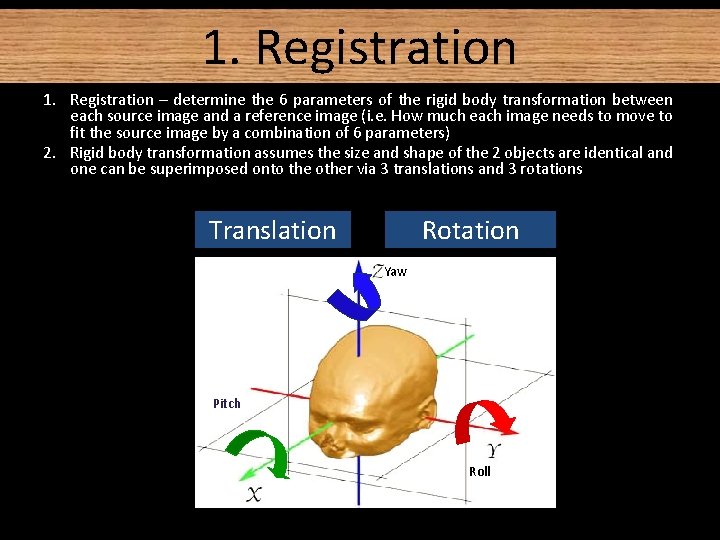
1. Registration – determine the 6 parameters of the rigid body transformation between each source image and a reference image (i. e. How much each image needs to move to fit the source image by a combination of 6 parameters) 2. Rigid body transformation assumes the size and shape of the 2 objects are identical and one can be superimposed onto the other via 3 translations and 3 rotations Translation Rotation Yaw Pitch Roll
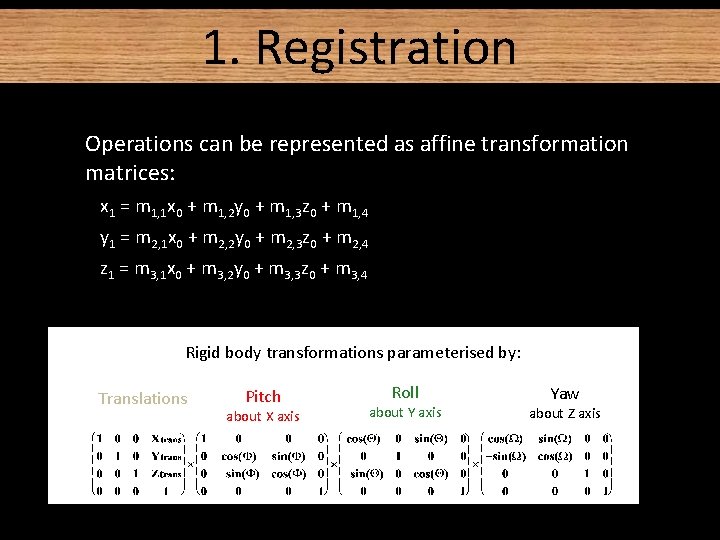
1. Registration • Operations can be represented as affine transformation matrices: x 1 = m 1, 1 x 0 + m 1, 2 y 0 + m 1, 3 z 0 + m 1, 4 y 1 = m 2, 1 x 0 + m 2, 2 y 0 + m 2, 3 z 0 + m 2, 4 z 1 = m 3, 1 x 0 + m 3, 2 y 0 + m 3, 3 z 0 + m 3, 4 Rigid body transformations parameterised by: Translations Pitch about X axis Roll about Y axis Yaw about Z axis
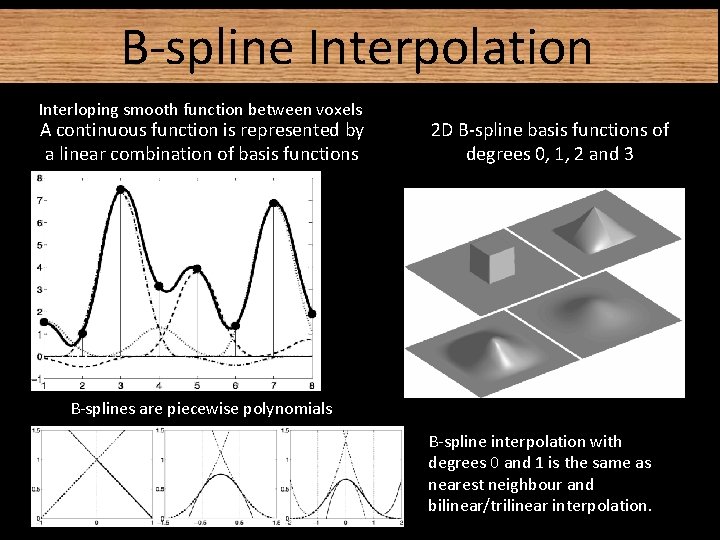
2. Transformation • Reslice/resample a series of registered images such that they match the first image selected onto the same grid of voxels • We need to take the value of the voxels from the original image and put it in our new, re-aligned image. • Various methods of transformation / interpolation: − Nearest neighbour − Linear interpolation − B-Spline
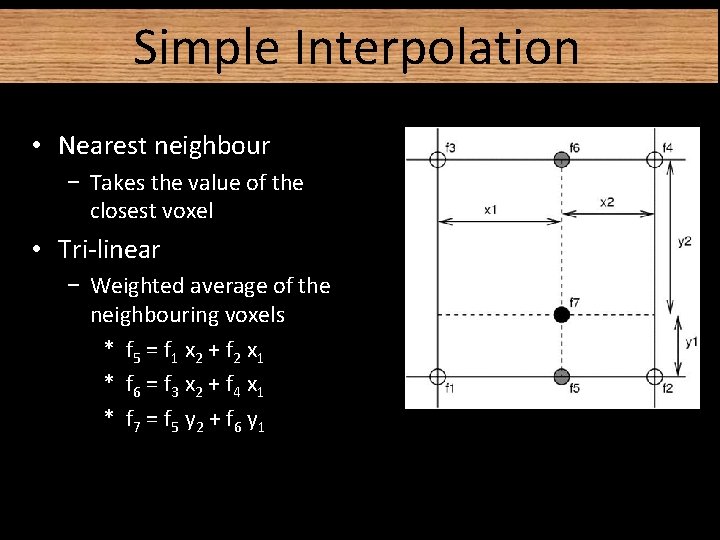
Simple Interpolation • Nearest neighbour − Takes the value of the closest voxel • Tri-linear − Weighted average of the neighbouring voxels * f 5 = f 1 x 2 + f 2 x 1 * f 6 = f 3 x 2 + f 4 x 1 * f 7 = f 5 y 2 + f 6 y 1
B-spline Interpolation Interloping smooth function between voxels A continuous function is represented by a linear combination of basis functions 2 D B-spline basis functions of degrees 0, 1, 2 and 3 B-splines are piecewise polynomials B-spline interpolation with degrees 0 and 1 is the same as nearest neighbour and bilinear/trilinear interpolation.
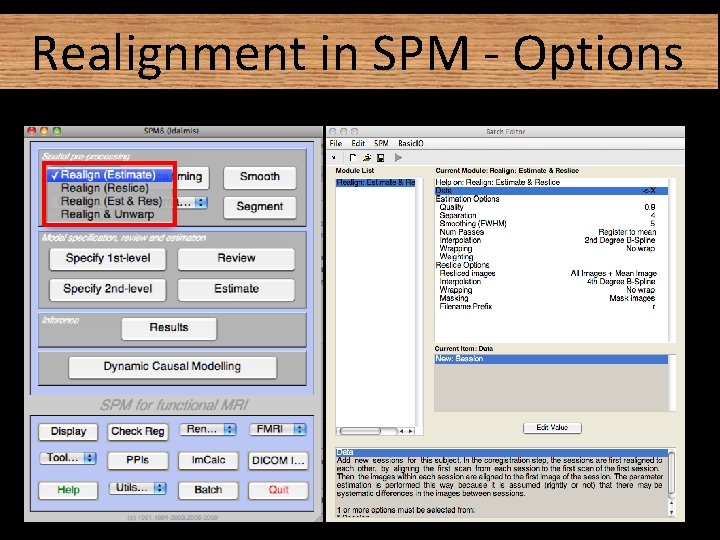
Realignment in SPM - Options
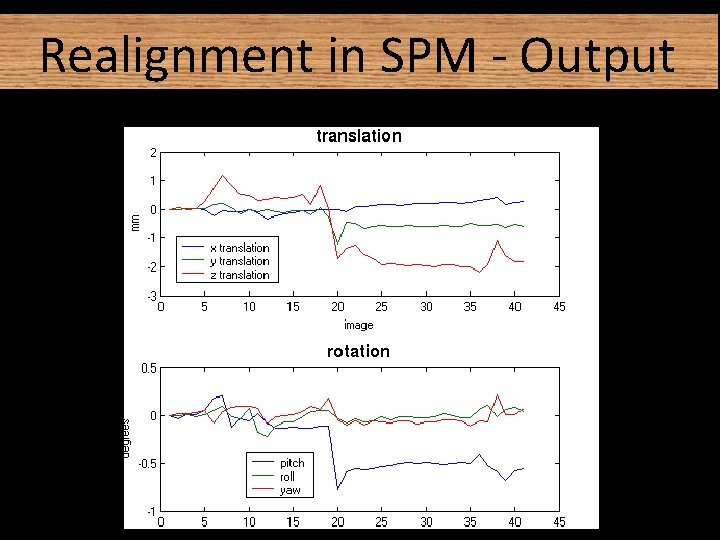
Realignment in SPM - Output
Residual Errors in Realigned f. MRI Even after realignment a considerable amount of the variance can be accounted for by effects of movement This can be caused by e. g. : 1. Movement between and within slice acquisition 2. Interpolation artefacts due to resampling 3. Non-linear distortions and drop-out due to inhomogeneity of the magnetic field ➠ Incorporate movement parameters as confounds in the statistical model
Unwarping Non-linear distortions due to inhomogeneities in the magnetic field Luke Palmer
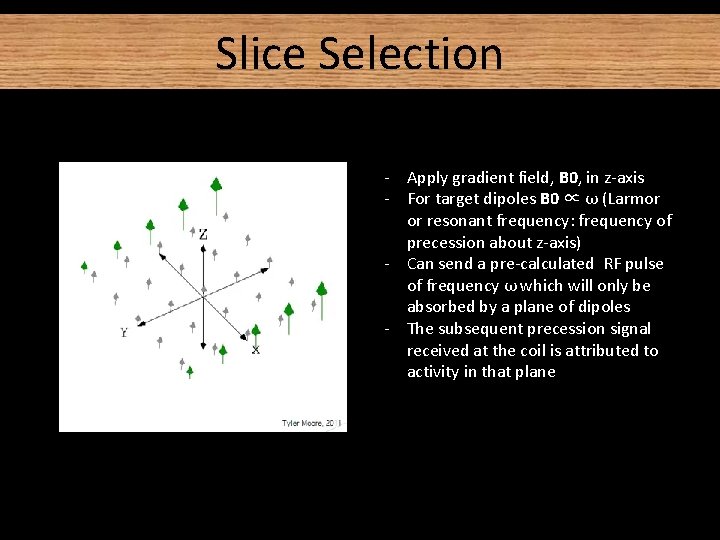
Slice Selection - Apply gradient field, B 0, in z-axis - For target dipoles B 0 ∝ ω (Larmor or resonant frequency: frequency of precession about z-axis) - Can send a pre-calculated RF pulse of frequency ω which will only be absorbed by a plane of dipoles - The subsequent precession signal received at the coil is attributed to activity in that plane
Slice Selection in Practice BUT! Unlike our homogenous substance, the brain is differentially susceptible to magnetization in different areas This makes the field inhomogeneous, breaking the homogeneity assumption used in slice selection The signal/image obtained is therefore distorted
Magnetic Susceptibility Some common susceptibilities. They describe the magnetisation of a material in response to an applied magnetic field Distortion of a uniform magnetic field
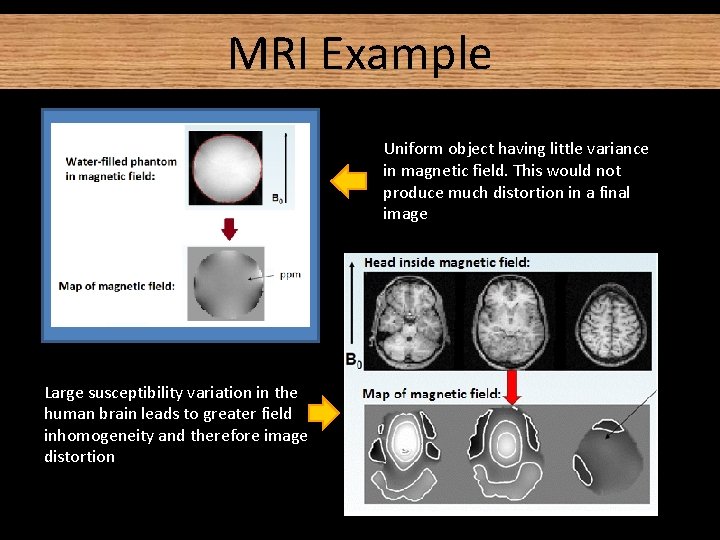
MRI Example Uniform object having little variance in magnetic field. This would not produce much distortion in a final image Large susceptibility variation in the human brain leads to greater field inhomogeneity and therefore image distortion
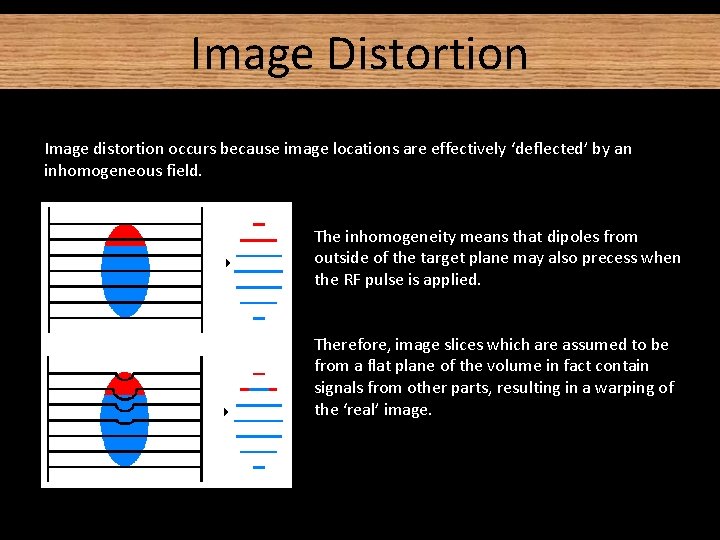
Image Distortion Image distortion occurs because image locations are effectively ‘deflected’ by an inhomogeneous field. The inhomogeneity means that dipoles from outside of the target plane may also precess when the RF pulse is applied. Therefore, image slices which are assumed to be from a flat plane of the volume in fact contain signals from other parts, resulting in a warping of the ‘real’ image.
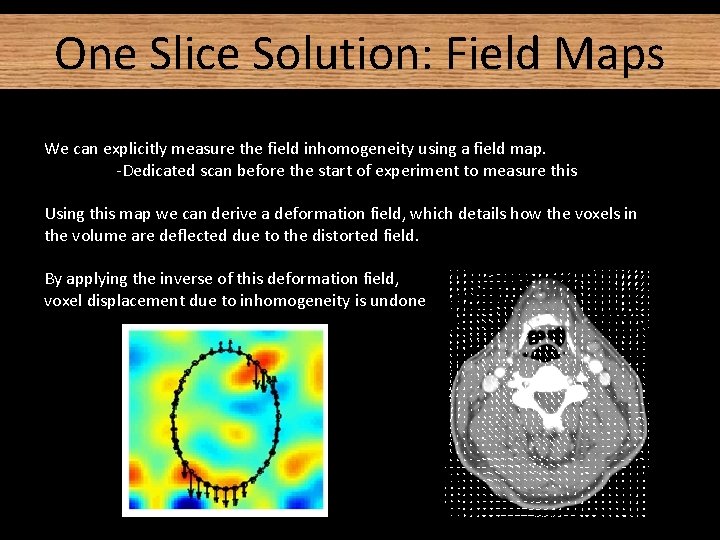
One Slice Solution: Field Maps We can explicitly measure the field inhomogeneity using a field map. -Dedicated scan before the start of experiment to measure this Using this map we can derive a deformation field, which details how the voxels in the volume are deflected due to the distorted field. By applying the inverse of this deformation field, voxel displacement due to inhomogeneity is undone
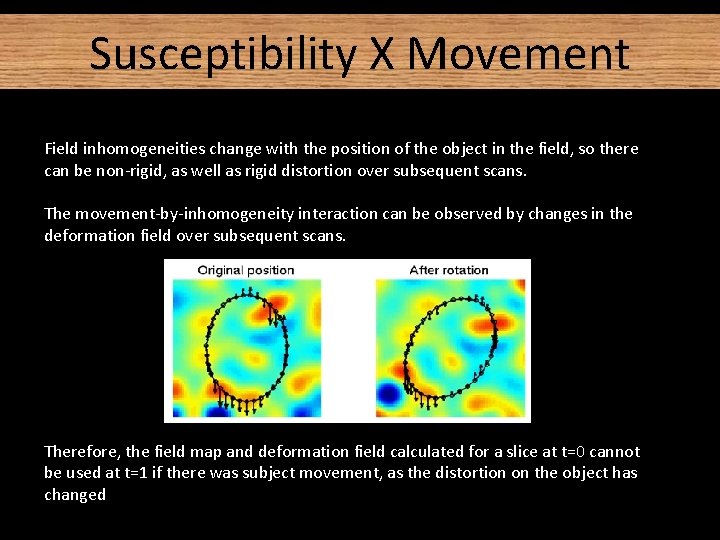
Susceptibility X Movement Field inhomogeneities change with the position of the object in the field, so there can be non-rigid, as well as rigid distortion over subsequent scans. The movement-by-inhomogeneity interaction can be observed by changes in the deformation field over subsequent scans. Therefore, the field map and deformation field calculated for a slice at t=0 cannot be used at t=1 if there was subject movement, as the distortion on the object has changed
Accounting for the Interaction One possibility would be to measure the field inhomogeneity explicitly and generate a field/deformation map for each scan in the series. Measurement of field-maps is complicated by noise, and rapid loss of signal towards the edges of the object. BETTER SOLUTION: Calculate a deformation field from a single field map at the beginning of the series, then use the pre-calculated (from the realign procedure) rigid movement parameters to estimate the warping of that field map for each time point in the series. Now we can apply inverse deformation fields to each slice in the volume
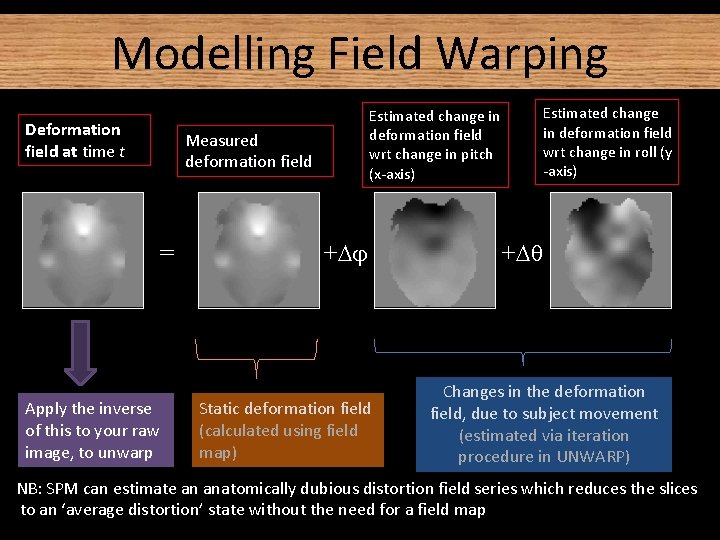
Modelling Field Warping Deformation field at time t Estimated change in deformation field wrt change in pitch (x-axis) Measured deformation field = Apply the inverse of this to your raw image, to unwarp + Static deformation field (calculated using field map) Estimated change in deformation field wrt change in roll (y -axis) + Changes in the deformation field, due to subject movement (estimated via iteration procedure in UNWARP) NB: SPM can estimate an anatomically dubious distortion field series which reduces the slices to an ‘average distortion’ state without the need for a field map
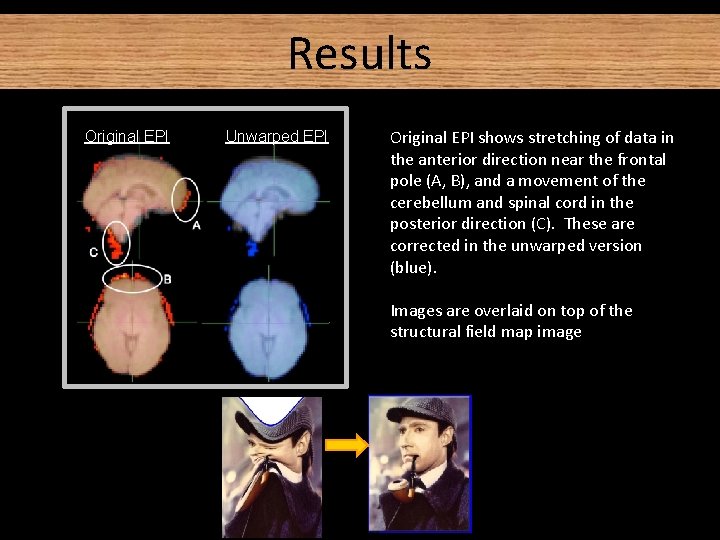
Results Original EPI Unwarped EPI Original EPI shows stretching of data in the anterior direction near the frontal pole (A, B), and a movement of the cerebellum and spinal cord in the posterior direction (C). These are corrected in the unwarped version (blue). Images are overlaid on top of the structural field map image
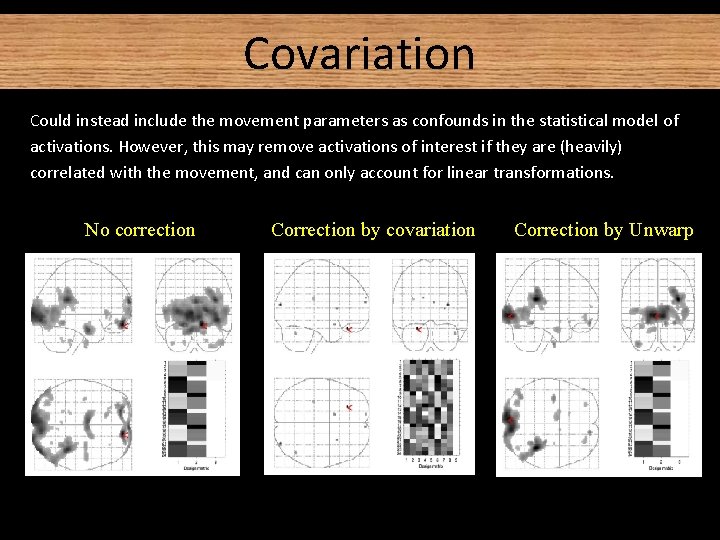
Covariation Could instead include the movement parameters as confounds in the statistical model of activations. However, this may remove activations of interest if they are (heavily) correlated with the movement, and can only account for linear transformations. No correction Correction by covariation Correction by Unwarp tmax=13. 38 tmax=5. 06 tmax=9. 57
Summary The problem: Different substances differentially modify the magnetic field Inhomogeneity in the magnetic field (which interacts with subject movement) Distortion of image The solution: 1) Measure the field inhomogeneities (with the field map), given a known subject position. 2) Use this info about field inhomogeneities to predict how the image is distorted/deflected at each time point (the ‘deformation map’). 3) Using subject movement parameters, estimate the deformation map for each time point (since the deformation map changes with subject movement) 4) Re-slices your data, using the deformation map to ensure that the same portion of the brain is always found in the same location of the image, throughout all your scans.
References • A detailed explanation of EPI distortion (the problem): ww. fil. ion. ucl. ac. uk/~mgray/Presentations/Unwarping. ppt http: //cast. fil. ion. ucl. ac. uk/documents/physics_lectures/Hutton_epi_distortion_300408. pdf • • SPM material on unwarping (rationale, limitations, toolbox, sample data set) http: //www. fil. ion. ucl. ac. uk/spm/toolbox/unwarp/ http: //www. fil. ion. ucl. ac. uk/spm/data/ • The physics wiki: step-by-step instructions on how to go about everything http: //intranet. fil. ion. ucl. ac. uk/pmwiki/ (only accessible to FIL/ICN) • SPM manual: http: //www. fil. ion. ucl. ac. uk/spm/doc/manual. pdf • Last year’s MFD slides
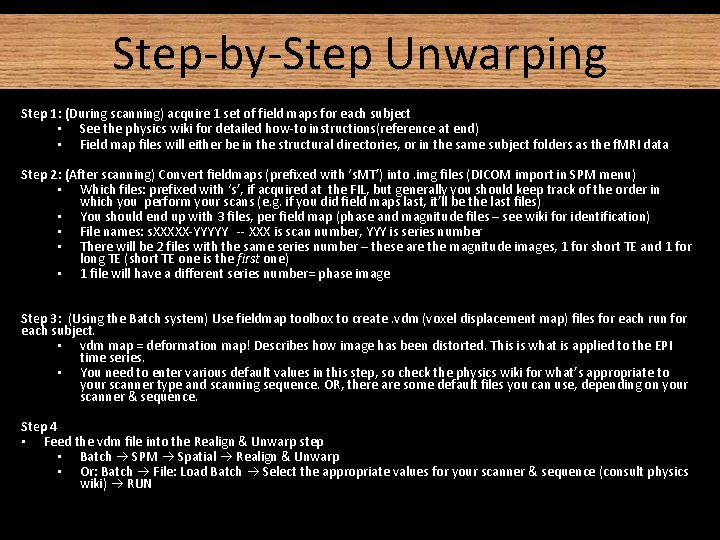
Step-by-Step Unwarping References Step 1: (During scanning) acquire 1 set of field maps for each subject • See the physics wiki for detailed how-to instructions(reference at end) • Field map files will either be in the structural directories, or in the same subject folders as the f. MRI data Step 2: (After scanning) Convert fieldmaps (prefixed with ‘s. MT’) into. img files (DICOM import in SPM menu) • Which files: prefixed with ‘s’, if acquired at the FIL, but generally you should keep track of the order in which you perform your scans (e. g. if you did field maps last, it’ll be the last files) • You should end up with 3 files, per field map (phase and magnitude files – see wiki for identification) • File names: s. XXXXX-YYYYY -- XXX is scan number, YYY is series number • There will be 2 files with the same series number – these are the magnitude images, 1 for short TE and 1 for long TE (short TE one is the first one) • 1 file will have a different series number= phase image Step 3: (Using the Batch system) Use fieldmap toolbox to create. vdm (voxel displacement map) files for each run for each subject. • vdm map = deformation map! Describes how image has been distorted. This is what is applied to the EPI time series. • You need to enter various default values in this step, so check the physics wiki for what’s appropriate to your scanner type and scanning sequence. OR, there are some default files you can use, depending on your scanner & sequence. Step 4 • Feed the vdm file into the Realign & Unwarp step • Batch SPM Spatial Realign & Unwarp • Or: Batch File: Load Batch Select the appropriate values for your scanner & sequence (consult physics wiki) RUN
A special thanks to Dr. Guillaume Flandi n