
Mesh Ethernet Bridging Why Native Vlan 1 The
Mesh Ethernet Bridging: Why Native Vlan 1?

The mesh config and deployment guides state: “The RAP must always connect to the native VLAN ID 1 on a switch. The RAP's primary Ethernet interface is by default the native VLAN of 1. “ http: //www. cisco. com/en/US/docs/wireless/technology/mesh/7. 0/design/guide/Mesh. AP_70. html#wp 1749968 http: //www. cisco. com/en/US/docs/wireless/controller/7. 0 MR 1/configuration/guide/cg_mesh. html#wp 1858032 Why does it matter? Let’s closely and methodically look at an initial config with ethernet bridging with a single Rap and Map, both with an attached switch.
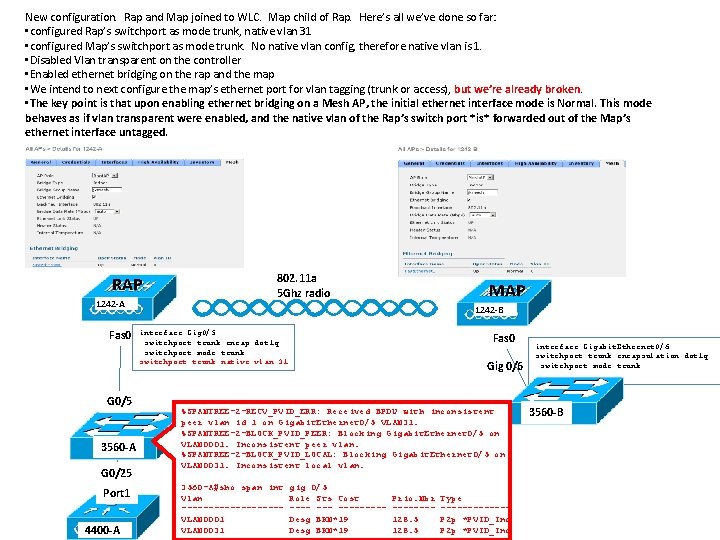
New configuration. Rap and Map joined to WLC. Map child of Rap. Here’s all we’ve done so far: • configured Rap’s switchport as mode trunk, native vlan 31 • configured Map’s switchport as mode trunk. No native vlan config, therefore native vlan is 1. • Disabled Vlan transparent on the controller • Enabled ethernet bridging on the rap and the map • We intend to next configure the map’s ethernet port for vlan tagging (trunk or access), but we’re already broken. • The key point is that upon enabling ethernet bridging on a Mesh AP, the initial ethernet interface mode is Normal. This mode behaves as if vlan transparent were enabled, and the native vlan of the Rap’s switch port *is* forwarded out of the Map’s ethernet interface untagged. RAP 1242 -A Fas 0 G 0/5 3560 -A G 0/25 Port 1 4400 -A 802. 11 a 5 Ghz radio MAP 1242 -B interface Gig 0/5 switchport trunk encap dot 1 q switchport mode trunk switchport trunk native vlan 31 Fas 0 Gig 0/6 %SPANTREE-2 -RECV_PVID_ERR: Received BPDU with inconsistent peer vlan id 1 on Gigabit. Ethernet 0/5 VLAN 31. %SPANTREE-2 -BLOCK_PVID_PEER: Blocking Gigabit. Ethernet 0/5 on VLAN 0001. Inconsistent peer vlan. %SPANTREE-2 -BLOCK_PVID_LOCAL: Blocking Gigabit. Ethernet 0/5 on VLAN 0031. Inconsistent local vlan. 3560 -A#sho span int Vlan ---------VLAN 0001 VLAN 0031 gig 0/5 Role Sts Cost ----Desg BKN*19 Prio. Nbr -------128. 5 Type ------P 2 p *PVID_Inc interface Gigabit. Ethernet 0/6 switchport trunk encapsulation dot 1 q switchport mode trunk 3560 -B
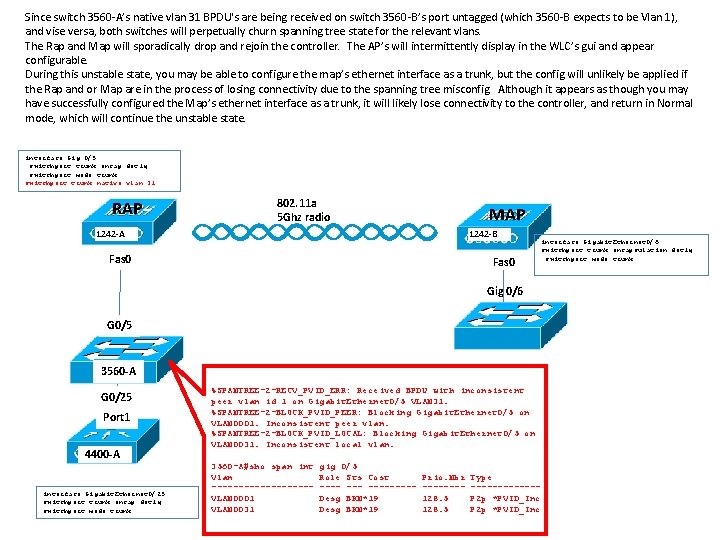
Since switch 3560 -A’s native vlan 31 BPDU's are being received on switch 3560 -B’s port untagged (which 3560 -B expects to be Vlan 1), and vise versa, both switches will perpetually churn spanning tree state for the relevant vlans. The Rap and Map will sporadically drop and rejoin the controller. The AP’s will intermittently display in the WLC’s gui and appear configurable. During this unstable state, you may be able to configure the map’s ethernet interface as a trunk, but the config will unlikely be applied if the Rap and or Map are in the process of losing connectivity due to the spanning tree misconfig. Although it appears as though you may have successfully configured the Map’s ethernet interface as a trunk, it will likely lose connectivity to the controller, and return in Normal mode, which will continue the unstable state. interface Gig 0/5 switchport trunk encap dot 1 q switchport mode trunk switchport trunk native vlan 31 RAP 802. 11 a 5 Ghz radio MAP 1242 -A 1242 -B Fas 0 Gig 0/6 G 0/5 3560 -B 3560 -A G 0/25 Port 1 4400 -A interface Gigabit. Ethernet 0/25 switchport trunk encap dot 1 q switchport mode trunk %SPANTREE-2 -RECV_PVID_ERR: Received BPDU with inconsistent peer vlan id 1 on Gigabit. Ethernet 0/5 VLAN 31. %SPANTREE-2 -BLOCK_PVID_PEER: Blocking Gigabit. Ethernet 0/5 on VLAN 0001. Inconsistent peer vlan. %SPANTREE-2 -BLOCK_PVID_LOCAL: Blocking Gigabit. Ethernet 0/5 on VLAN 0031. Inconsistent local vlan. 3560 -A#sho span int Vlan ---------VLAN 0001 VLAN 0031 gig 0/5 Role Sts Cost ----Desg BKN*19 Prio. Nbr -------128. 5 Type ------P 2 p *PVID_Inc interface Gigabit. Ethernet 0/6 switchport trunk encapsulation dot 1 q switchport mode trunk
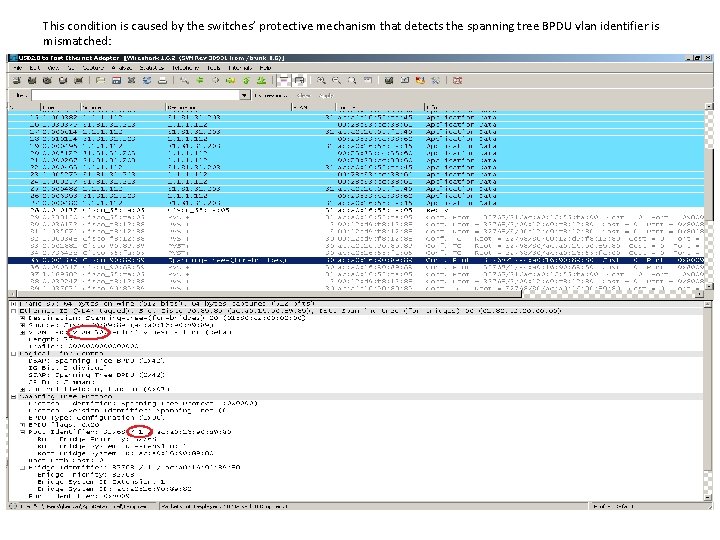
This condition is caused by the switches’ protective mechanism that detects the spanning tree BPDU vlan identifier is mismatched:
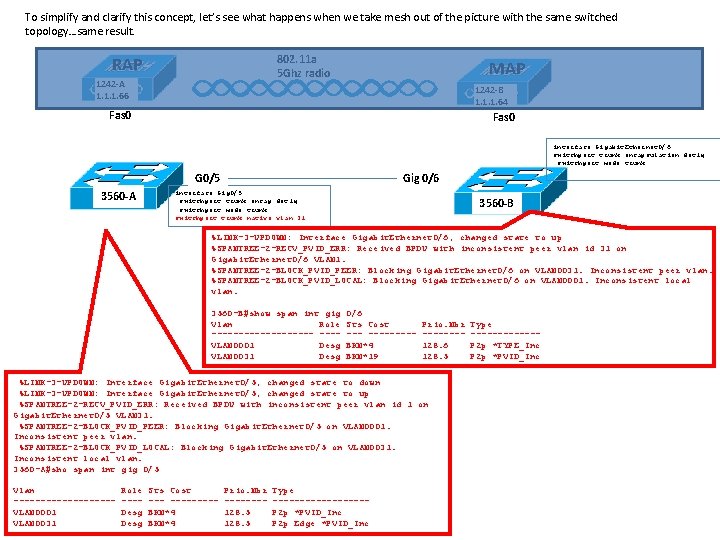
To simplify and clarify this concept, let’s see what happens when we take mesh out of the picture with the same switched topology…same result. 802. 11 a 5 Ghz radio RAP 1242 -A 1. 1. 1. 66 MAP 1242 -B 1. 1. 1. 64 Fas 0 interface Gigabit. Ethernet 0/6 switchport trunk encapsulation dot 1 q switchport mode trunk G 0/5 3560 -A Gig 0/6 interface Gig 0/5 switchport trunk encap dot 1 q switchport mode trunk switchport trunk native vlan 31 3560 -B %LINK-3 -UPDOWN: Interface Gigabit. Ethernet 0/6, changed state to up %SPANTREE-2 -RECV_PVID_ERR: Received BPDU with inconsistent peer vlan id 31 on Gigabit. Ethernet 0/6 VLAN 1. %SPANTREE-2 -BLOCK_PVID_PEER: Blocking Gigabit. Ethernet 0/6 on VLAN 0031. Inconsistent peer vlan. %SPANTREE-2 -BLOCK_PVID_LOCAL: Blocking Gigabit. Ethernet 0/6 on VLAN 0001. Inconsistent local vlan. 3560 -B#show span int gig Vlan Role ---------- ---VLAN 0001 Desg VLAN 0031 Desg 0/6 Sts Cost --------BKN*4 BKN*19 Prio. Nbr -------128. 6 128. 5 %LINK-3 -UPDOWN: Interface Gigabit. Ethernet 0/5, changed state to down %LINK-3 -UPDOWN: Interface Gigabit. Ethernet 0/5, changed state to up %SPANTREE-2 -RECV_PVID_ERR: Received BPDU with inconsistent peer vlan id 1 on Gigabit. Ethernet 0/5 VLAN 31. %SPANTREE-2 -BLOCK_PVID_PEER: Blocking Gigabit. Ethernet 0/5 on VLAN 0001. Inconsistent peer vlan. %SPANTREE-2 -BLOCK_PVID_LOCAL: Blocking Gigabit. Ethernet 0/5 on VLAN 0031. Inconsistent local vlan. 3560 -A#sho span int gig 0/5 Vlan ---------VLAN 0001 VLAN 0031 Role ---Desg Sts Cost --------BKN*4 Prio. Nbr -------128. 5 Type ---------P 2 p *PVID_Inc P 2 p Edge *PVID_Inc Type ------P 2 p *TYPE_Inc P 2 p *PVID_Inc
So how do we make this work? • It’s all about the conditions in place to cause the problem. As shown in the previous slide (back to back switch example), if we introduce the scenario in which both switches can communicate with each other, but with different native vlans, we’re broken. Ways to make this work 1) Configure BPDU filtering on both switch ports 3560 -A(config-if)#spanning-tree bpdufilter enable This command prevents a switchport from sending or processing received BPDU’s, effectively disabling spanning tree. This allows the Rap and Map to stay up as the initial Vlan mismatched BPDU’s won’t be present to cause the spanning tree protective mechanism to kick in (‘Broken’, ‘Type Inconsistent’). Use with caution. As long as there’s not a ‘back door’ path back to the switched network (e. g. , another Map connected to the same switch), this shouldn’t cause any problems. Once the Map’s correct trunk configuration has been implemented via the controller, BPDU filtering can be disabled. As long as the administrator is certain that another map or other ‘back door’ path to the switched network will exist, BPDU filtering could be left enabled (still probably not a good idea).
Ways to make this work (continued) 2) Don’t connect the Map via Ethernet until WLC configs are complete We won’t run into the native vlan mismatch issue if the Map’s ethernet interface is configured for trunk or access mode before connecting its switch. One key point is that with vlan transparent disabled, the Rap’s native vlan traffic won’t be forwarded out of any Map ethernet ports that are in trunk or access mode. Even with vlan transparent disabled, Map ethernet mode ‘Normal’ (default) will forward untagged packets to and from the Mesh management vlan (e. g. the Rap’s native vlan).
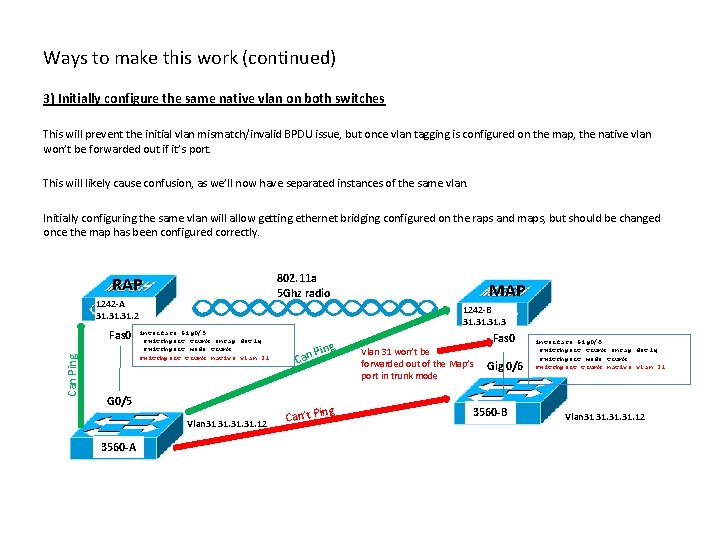
Ways to make this work (continued) 3) Initially configure the same native vlan on both switches This will prevent the initial vlan mismatch/invalid BPDU issue, but once vlan tagging is configured on the map, the native vlan won’t be forwarded out if it’s port. This will likely cause confusion, as we’ll now have separated instances of the same vlan. Initially configuring the same vlan will allow getting ethernet bridging configured on the raps and maps, but should be changed once the map has been configured correctly. 802. 11 a 5 Ghz radio RAP 1242 -A 31. 31. 2 Can Ping Fas 0 1242 -B 31. 31. 3 interface Gig 0/5 switchport trunk encap dot 1 q switchport mode trunk switchport trunk native vlan 31 G 0/5 Vlan 31 31. 31. 12 3560 -A MAP Ping Can g in Can’t P Fas 0 Vlan 31 won’t be forwarded out of the Map’s port in trunk mode Gig 0/6 3560 -B interface Gig 0/6 switchport trunk encap dot 1 q switchport mode trunk switchport trunk native vlan 31 Vlan 31 31. 31. 12
- Slides: 9