
Memory Management OSTEP Book See Schedule Page http
Memory Management OSTEP Book (See Schedule Page) http: //pages. cs. wisc. edu/~remzi/OSTEP/ Chapter 12 -16 Address Spaces, Memory API, Address Translation, Segmentation Instructors: Haryadi Gunawi CMSC 15400 1
Intro to Memory Management/Virtual Memory Uniprogramming 2
Why Study Memory Management q Code and Data location § Open Excel - Where’s excel code in memory § Function(int A, int B) {…} - Where’s A, B? - Where’s the stack? § int *P = malloc(1000); - Where’s P? - Where’s the heap? q Resource management § Sharing: How memory is shared across many processes 3
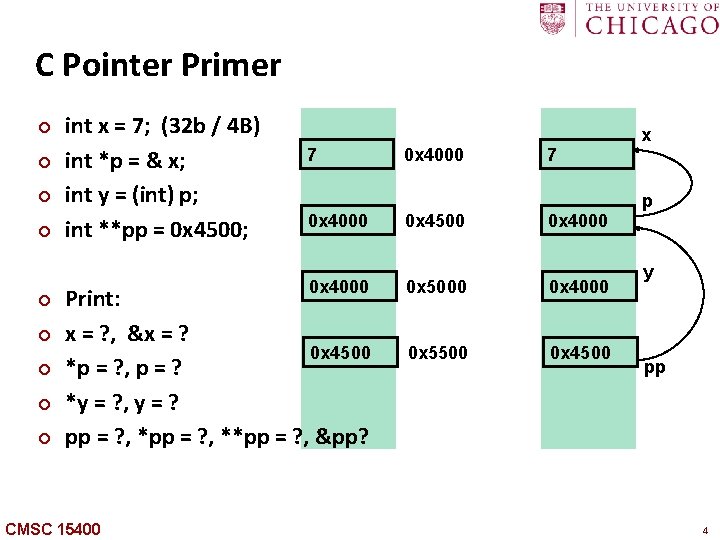
C Pointer Primer ¢ ¢ ¢ ¢ ¢ int x = 7; (32 b / 4 B) int *p = & x; int y = (int) p; int **pp = 0 x 4500; 7 0 x 4000 Print: x = ? , &x = ? 0 x 4500 *p = ? , p = ? *y = ? , y = ? pp = ? , **pp = ? , &pp? CMSC 15400 0 x 4000 0 x 4500 7 0 x 4000 0 x 5000 0 x 4000 0 x 5500 0 x 4500 x p y pp 4
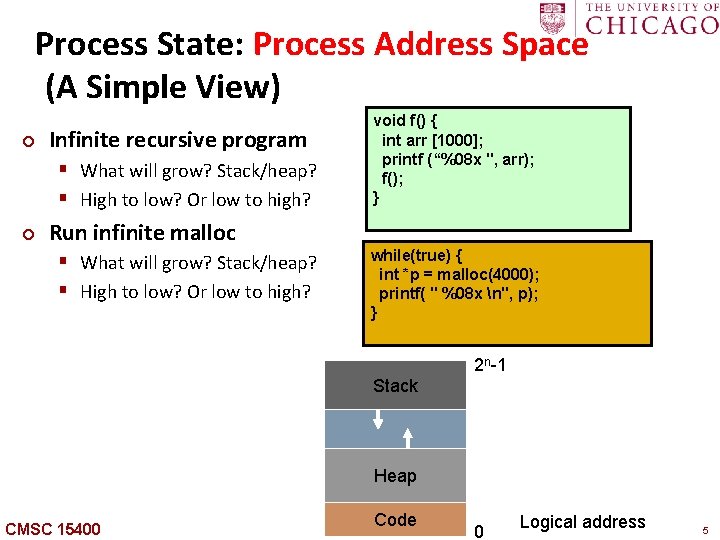
Carnegie Mellon Process State: Process Address Space (A Simple View) ¢ Infinite recursive program § What will grow? Stack/heap? § High to low? Or low to high? ¢ void f() { int arr [1000]; printf (“%08 x ", arr); f(); } Run infinite malloc § What will grow? Stack/heap? § High to low? Or low to high? while(true) { int *p = malloc(4000); printf( " %08 x n", p); } 2 n-1 Stack Heap CMSC 15400 Code 0 Logical address 5
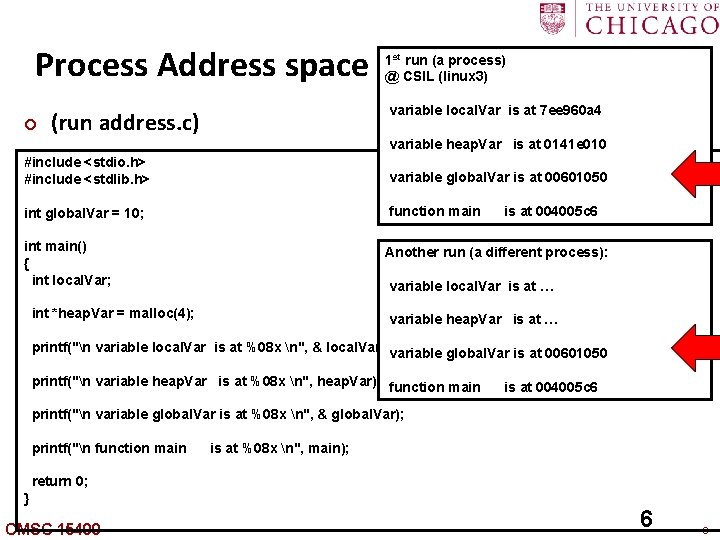
Carnegie Mellon Process Address space ¢ (run address. c) 1 st run (a process) @ CSIL (linux 3) variable local. Var is at 7 ee 960 a 4 variable heap. Var is at 0141 e 010 #include <stdio. h> #include <stdlib. h> variable global. Var is at 00601050 int global. Var = 10; function main is at 004005 c 6 int main() { int local. Var; Another run (a different process): int *heap. Var = malloc(4); variable heap. Var is at … variable local. Var is at … printf("n variable local. Var is at %08 x n", & local. Var); variable global. Var is at 00601050 printf("n variable heap. Var is at %08 x n", heap. Var); function main is at 004005 c 6 printf("n variable global. Var is at %08 x n", & global. Var); printf("n function main is at %08 x n", main); return 0; } CMSC 15400 6 6
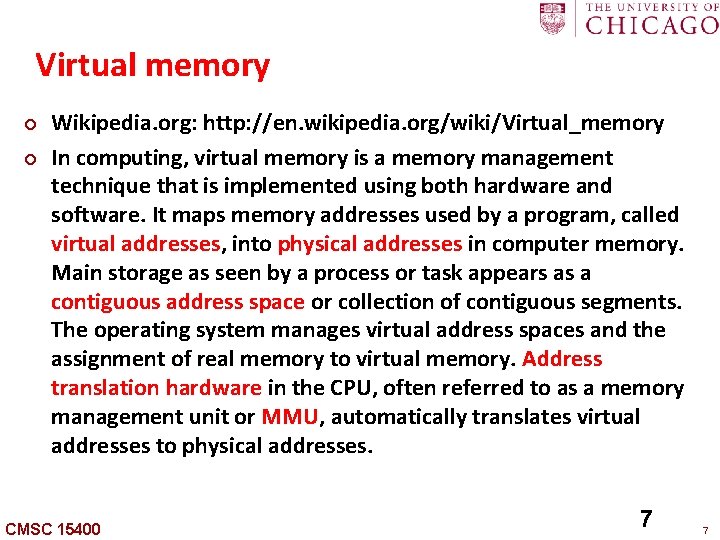
Carnegie Mellon Virtual memory ¢ ¢ Wikipedia. org: http: //en. wikipedia. org/wiki/Virtual_memory In computing, virtual memory is a memory management technique that is implemented using both hardware and software. It maps memory addresses used by a program, called virtual addresses, into physical addresses in computer memory. Main storage as seen by a process or task appears as a contiguous address space or collection of contiguous segments. The operating system manages virtual address spaces and the assignment of real memory to virtual memory. Address translation hardware in the CPU, often referred to as a memory management unit or MMU, automatically translates virtual addresses to physical addresses. CMSC 15400 7 7
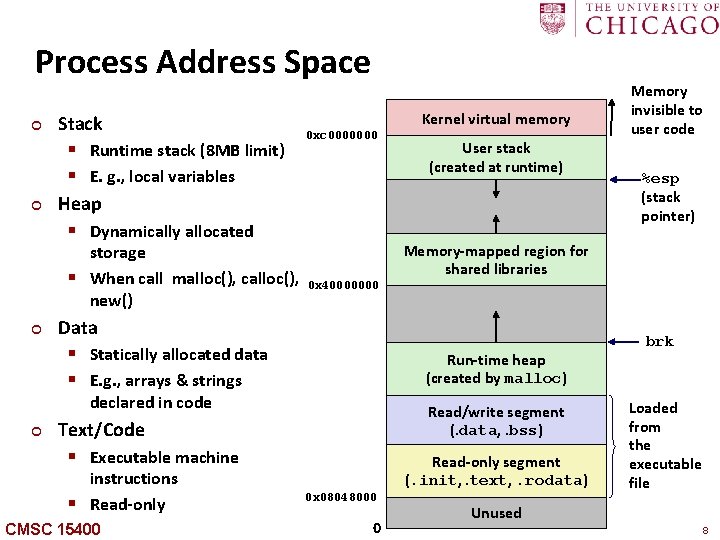
Carnegie Mellon Process Address Space ¢ ¢ Stack § Runtime stack (8 MB limit) § E. g. , local variables Heap § Dynamically allocated storage § When call malloc(), calloc(), new() ¢ Kernel virtual memory 0 xc 0000000 0 x 40000000 Data § Statically allocated data § E. g. , arrays & strings Run-time heap (created by malloc) Read/write segment (. data, . bss) Text/Code § Executable machine instructions § Read-only CMSC 15400 %esp (stack pointer) Memory-mapped region for shared libraries declared in code ¢ User stack (created at runtime) Memory invisible to user code Read-only segment (. init, . text, . rodata) 0 x 08048000 0 brk Loaded from the executable file Unused 8
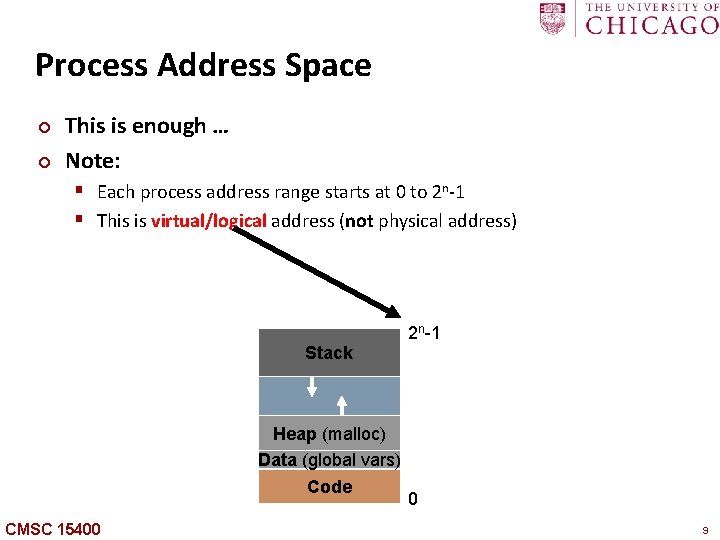
Carnegie Mellon Process Address Space ¢ ¢ This is enough … Note: § Each process address range starts at 0 to 2 n-1 § This is virtual/logical address (not physical address) 2 n-1 Stack Heap (malloc) Data (global vars) Code CMSC 15400 0 9
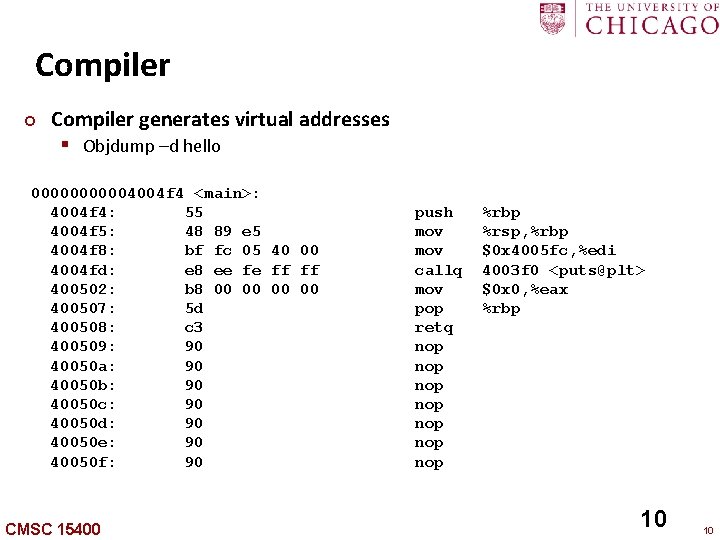
Carnegie Mellon Compiler ¢ Compiler generates virtual addresses § Objdump –d hello 000004004 f 4 <main>: 4004 f 4: 55 4004 f 5: 48 89 e 5 4004 f 8: bf fc 05 40 00 4004 fd: e 8 ee fe ff ff 400502: b 8 00 00 400507: 5 d 400508: c 3 400509: 90 40050 a: 90 40050 b: 90 40050 c: 90 40050 d: 90 40050 e: 90 40050 f: 90 CMSC 15400 push mov callq mov pop retq nop nop %rbp %rsp, %rbp $0 x 4005 fc, %edi 4003 f 0 <puts@plt> $0 x 0, %eax %rbp 10 10
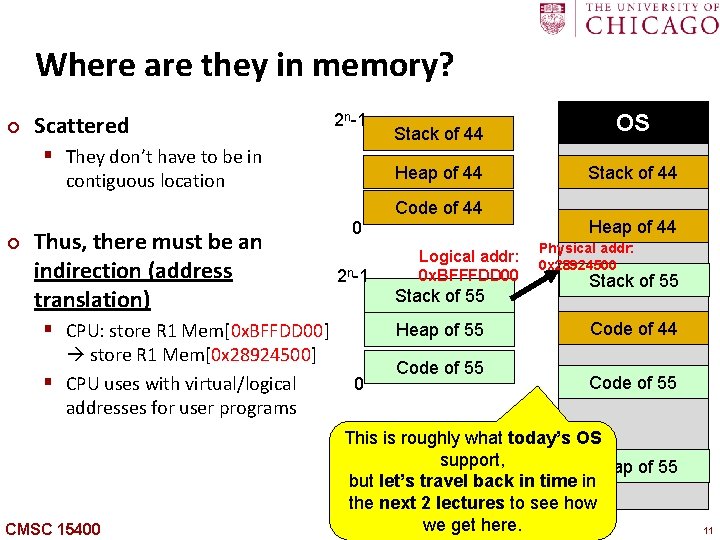
Carnegie Mellon Where are they in memory? ¢ Scattered 2 n-1 § They don’t have to be in contiguous location ¢ Thus, there must be an indirection (address translation) 0 2 n-1 § CPU: store R 1 Mem[0 x. BFFDD 00] store R 1 Mem[0 x 28924500] § CPU uses with virtual/logical addresses for user programs CMSC 15400 Stack of 44 OS Heap of 44 Stack of 44 Code of 44 Logical addr: 0 x. BFFFDD 00 Stack of 55 Heap of 55 0 Code of 55 Heap of 44 Physical addr: 0 x 28924500 Stack of 55 Code of 44 Code of 55 This is roughly what today’s OS support, Heap of 55 but let’s travel back in time in the next 2 lectures to see how we get here. 11
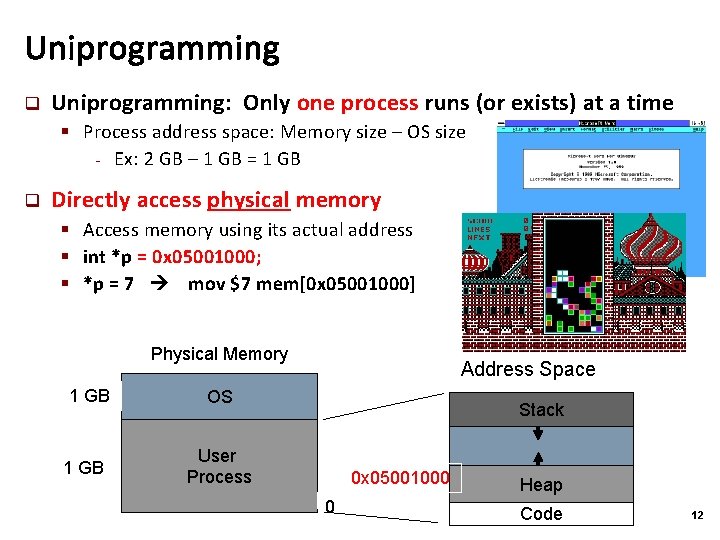
Uniprogramming q Uniprogramming: Only one process runs (or exists) at a time § Process address space: Memory size – OS size - Ex: 2 GB – 1 GB = 1 GB q Directly access physical memory § Access memory using its actual address § int *p = 0 x 05001000; § *p = 7 mov $7 mem[0 x 05001000] Physical Memory 1 GB Address Space OS Stack User Process 0 x 05001000 0 Heap Code 12
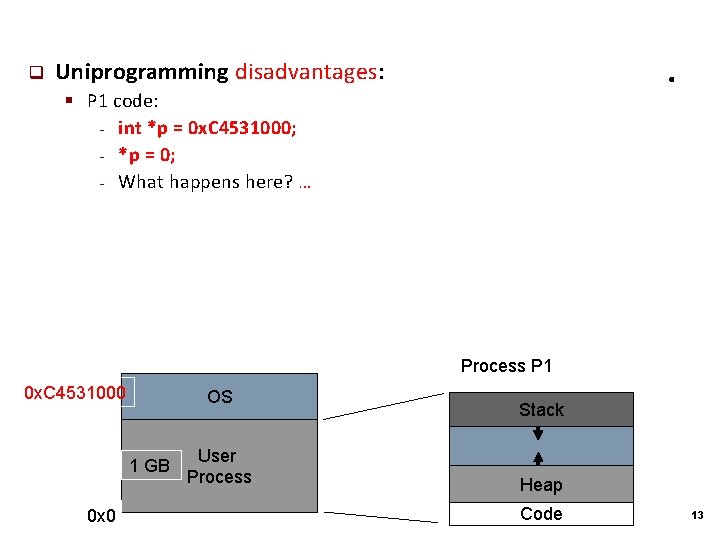
q . Uniprogramming disadvantages: § P 1 code: - int *p = 0 x. C 4531000; - *p = 0; - What happens here? … Process P 1 0 x. C 4531000 OS 1 GB 0 x 0 User Process Stack Heap Code 13
Dynamic Relocation (Base and Bound) q Today: OS supports multiprogramming standard § One simple solution: dynamic relocation (base and bound) 14
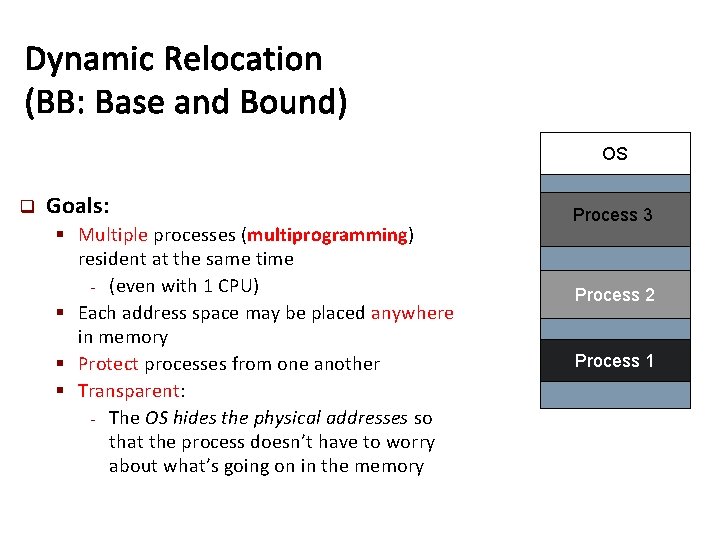
Dynamic Relocation (BB: Base and Bound) OS q Goals: § Multiple processes (multiprogramming) resident at the same time - (even with 1 CPU) § Each address space may be placed anywhere in memory § Protect processes from one another § Transparent: - The OS hides the physical addresses so that the process doesn’t have to worry about what’s going on in the memory Process 3 Process 2 Process 1
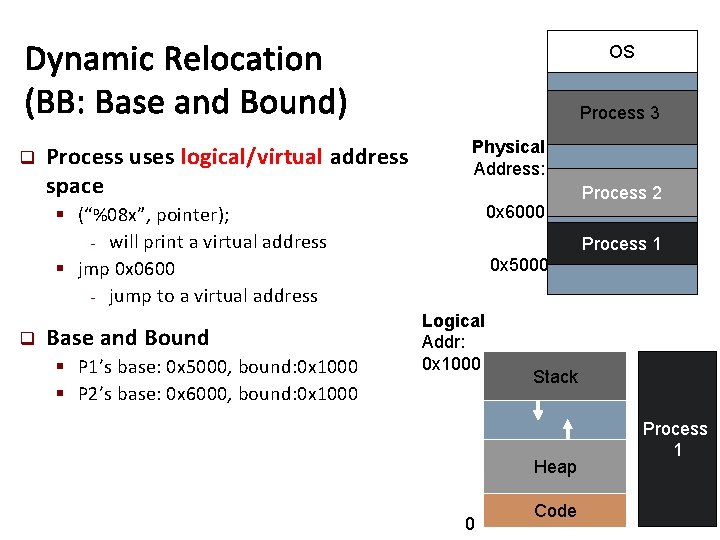
Dynamic Relocation (BB: Base and Bound) q Process uses logical/virtual address space OS Process 3 Physical Address: 0 x 6000 § (“%08 x”, pointer); - will print a virtual address § jmp 0 x 0600 - jump to a virtual address q Base and Bound § P 1’s base: 0 x 5000, bound: 0 x 1000 § P 2’s base: 0 x 6000, bound: 0 x 1000 Process 2 Process 1 0 x 5000 Logical Addr: 0 x 1000 Stack Heap 0 Code Process 1
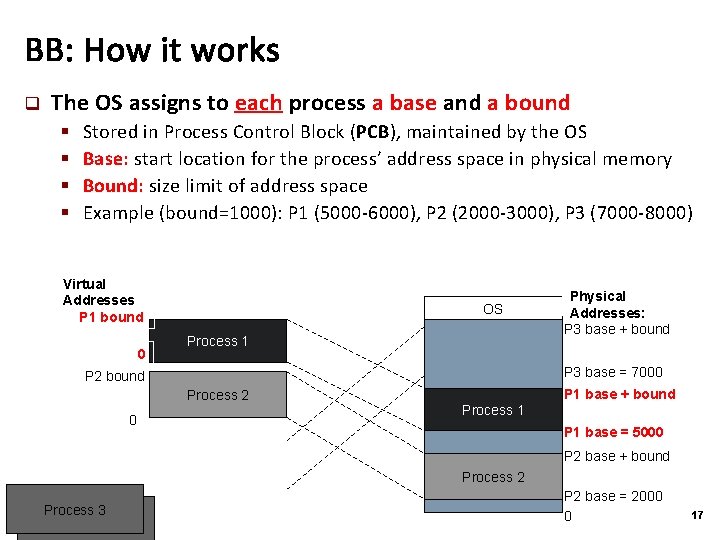
BB: How it works q The OS assigns to each process a base and a bound § § Stored in Process Control Block (PCB), maintained by the OS Base: start location for the process’ address space in physical memory Bound: size limit of address space Example (bound=1000): P 1 (5000 -6000), P 2 (2000 -3000), P 3 (7000 -8000) Virtual Addresses P 1 bound 0 OS Process 1 P 3 base = 7000 P 2 bound Process 2 0 Physical Addresses: P 3 base + bound P 1 base + bound Process 1 P 1 base = 5000 P 2 base + bound Process 2 Process 3 P 2 base = 2000 0 17
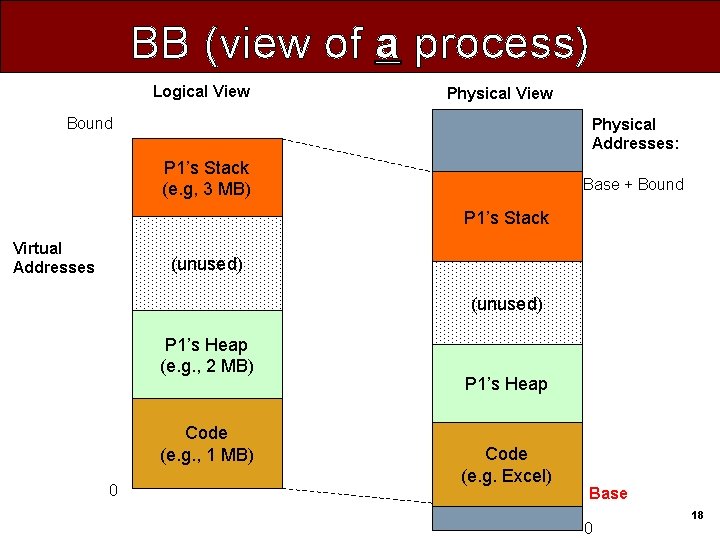
BB (view of a process) Logical View Physical View Bound Physical Addresses: P 1’s Stack (e. g, 3 MB) Base + Bound P 1’s Stack Virtual Addresses (unused) P 1’s Heap (e. g. , 2 MB) Code (e. g. , 1 MB) 0 P 1’s Heap Code (e. g. Excel) Base 0 18
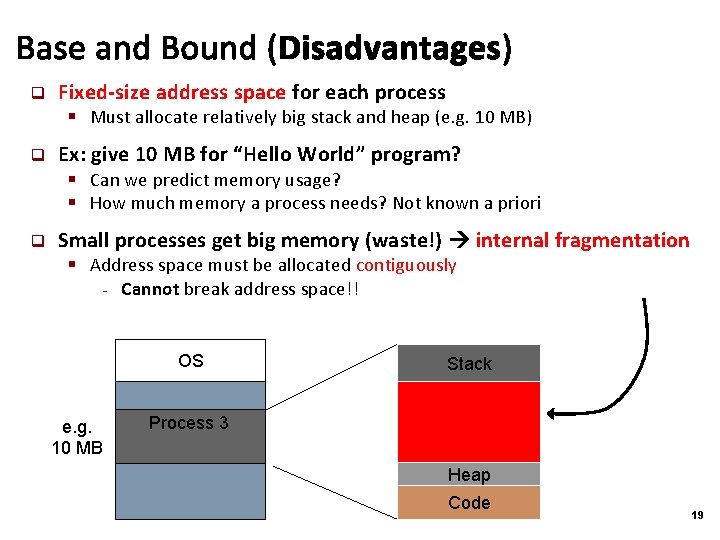
Base and Bound (Disadvantages) q Fixed-size address space for each process § Must allocate relatively big stack and heap (e. g. 10 MB) q Ex: give 10 MB for “Hello World” program? § Can we predict memory usage? § How much memory a process needs? Not known a priori q Small processes get big memory (waste!) internal fragmentation § Address space must be allocated contiguously - Cannot break address space!! OS e. g. 10 MB Stack Process 3 Heap Code 19
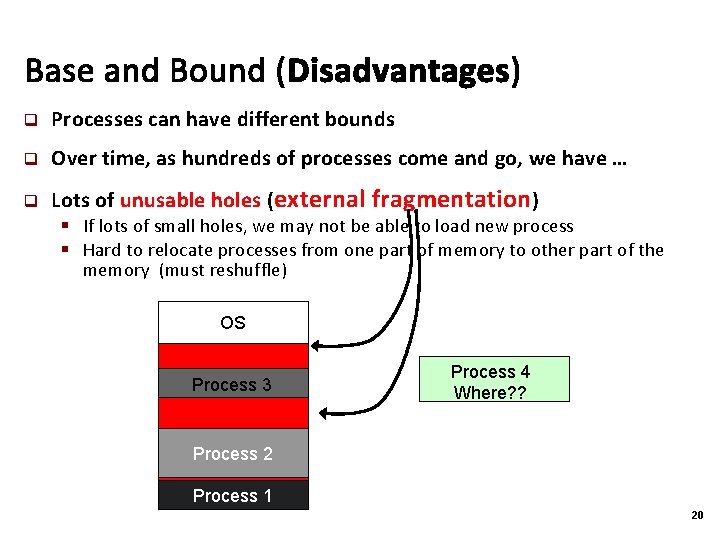
Base and Bound (Disadvantages) q Processes can have different bounds q Over time, as hundreds of processes come and go, we have … q Lots of unusable holes (external fragmentation) § If lots of small holes, we may not be able to load new process § Hard to relocate processes from one part of memory to other part of the memory (must reshuffle) OS Process 3 Process 4 Where? ? Process 2 Process 1 20
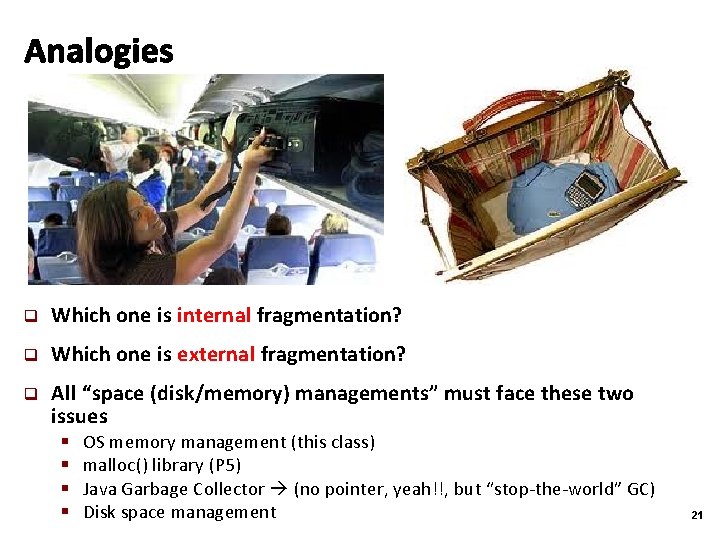
Analogies q Which one is internal fragmentation? q Which one is external fragmentation? q All “space (disk/memory) managements” must face these two issues § § OS memory management (this class) malloc() library (P 5) Java Garbage Collector (no pointer, yeah!!, but “stop-the-world” GC) Disk space management 21
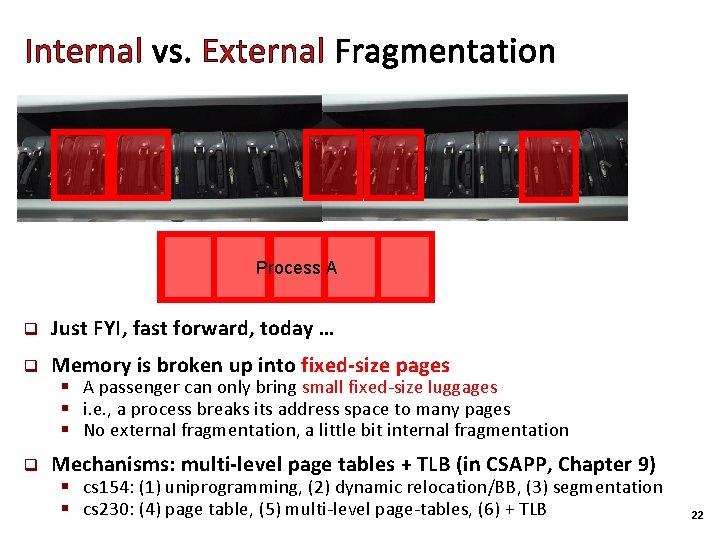
Internal vs. External Fragmentation Process A q Just FYI, fast forward, today … q Memory is broken up into fixed-size pages § A passenger can only bring small fixed-size luggages § i. e. , a process breaks its address space to many pages § No external fragmentation, a little bit internal fragmentation q Mechanisms: multi-level page tables + TLB (in CSAPP, Chapter 9) § cs 154: (1) uniprogramming, (2) dynamic relocation/BB, (3) segmentation § cs 230: (4) page table, (5) multi-level page-tables, (6) + TLB 22
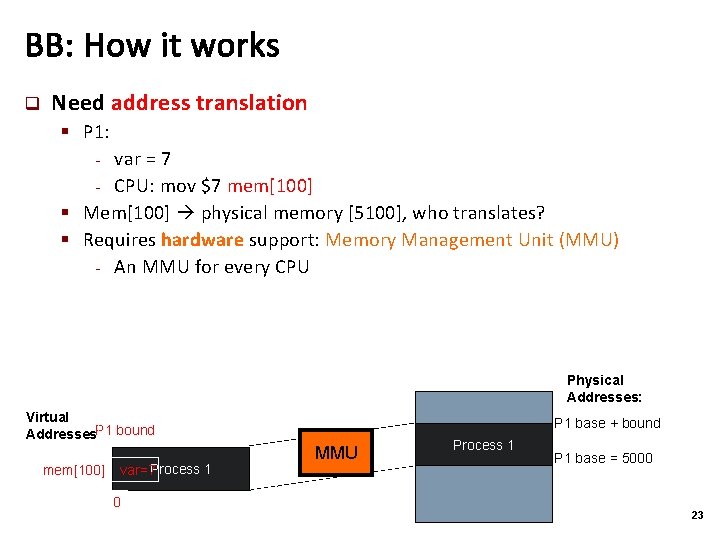
BB: How it works q Need address translation § P 1: var = 7 - CPU: mov $7 mem[100] § Mem[100] physical memory [5100], who translates? § Requires hardware support: Memory Management Unit (MMU) - An MMU for every CPU - Physical Addresses: Virtual Addresses. P 1 bound mem[100] var=7 Process 1 0 P 1 base + bound MMU Process 1 P 1 base = 5000 23
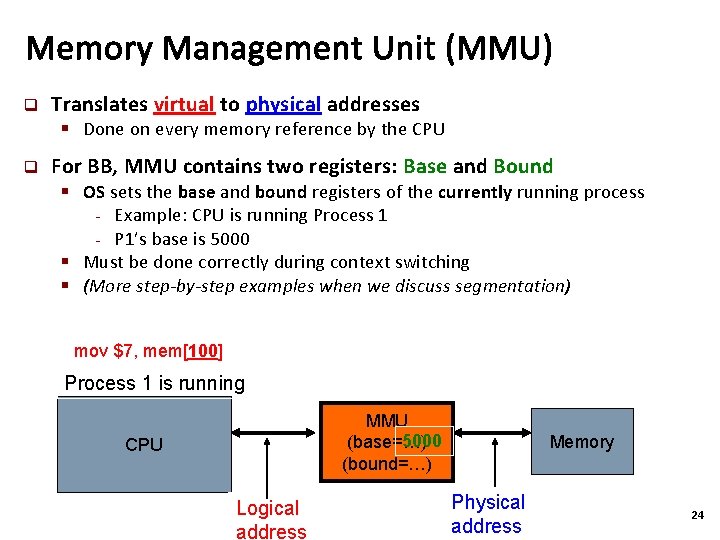
Memory Management Unit (MMU) q Translates virtual to physical addresses § Done on every memory reference by the CPU q For BB, MMU contains two registers: Base and Bound § OS sets the base and bound registers of the currently running process - Example: CPU is running Process 1 - P 1’s base is 5000 § Must be done correctly during context switching § (More step-by-step examples when we discuss segmentation) mov $7, mem[100] Process 1 is running MMU 5000 (base=…) (bound=…) CPU Logical address Memory Physical address 24
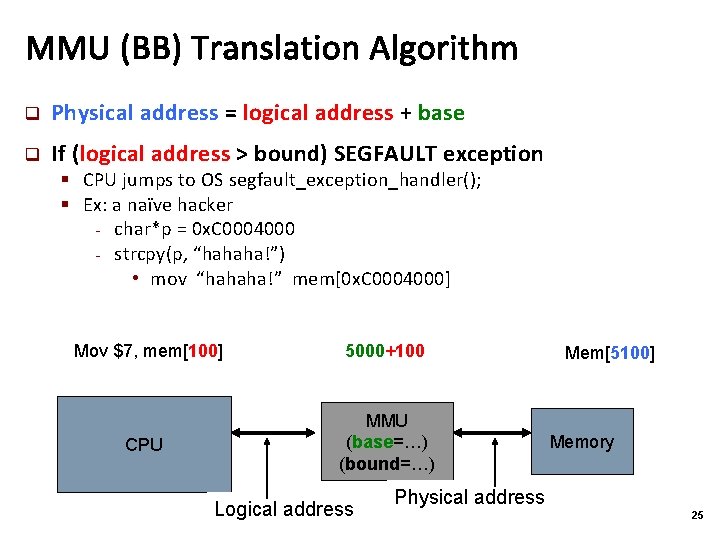
MMU (BB) Translation Algorithm q Physical address = logical address + base q If (logical address > bound) SEGFAULT exception § CPU jumps to OS segfault_exception_handler(); § Ex: a naïve hacker - char*p = 0 x. C 0004000 - strcpy(p, “hahaha!”) • mov “hahaha!” mem[0 x. C 0004000] Mov $7, mem[100] 5000+100 CPU MMU (base=…) (bound=…) Logical address Mem[5100] Memory Physical address 25
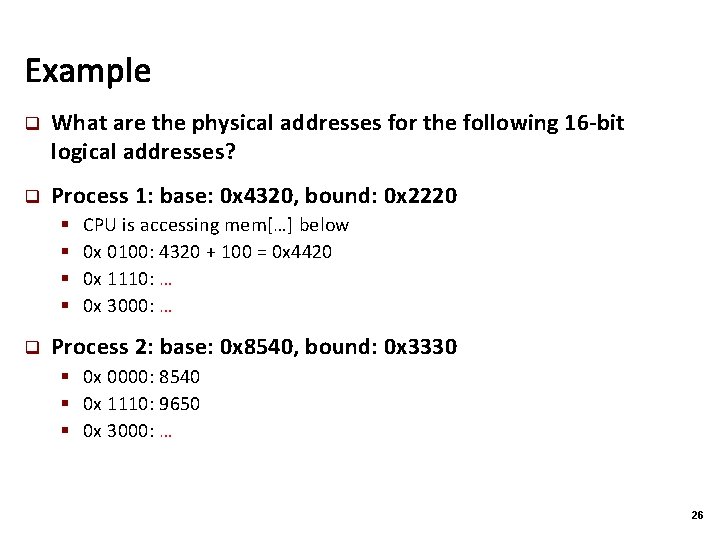
Example q What are the physical addresses for the following 16 -bit logical addresses? q Process 1: base: 0 x 4320, bound: 0 x 2220 § § q CPU is accessing mem[…] below 0 x 0100: 4320 + 100 = 0 x 4420 0 x 1110: … 0 x 3000: … Process 2: base: 0 x 8540, bound: 0 x 3330 § 0 x 0000: 8540 § 0 x 1110: 9650 § 0 x 3000: … 26
![Context switching CPU: Running P 1 Read Mem[100] to eax (eax=? ? ? )](http://slidetodoc.com/presentation_image_h/252344c754ccf60d3d9a084dbc663014/image-27.jpg "Context switching CPU: Running P 1 Read Mem[100] to eax (eax=? ? ? )")
Context switching CPU: Running P 1 Read Mem[100] to eax (eax=? ? ? ) Mem[5100]=88 MMU: base=5000 Mem[? ? ? ] Physical Addresses: Timer interrupt (10 ms) – must save P 1’s context to P 1’s PCB!! Running OS Mem[0 x. C 001] Base=X OS space P 1. pcb { eax=? ? ? ebx, etc. …. base=5000; bound=…; } P 2. pcb { eax=777; ebx, etc. …. base=2000; bound=…. ; } Mem[? ? ? ] (reschedule processes, give CPU to P 2) must load P 2’s context from P 2’s PCB!! eax = ? ? ? Process 1 P 1 base = 5000 Process 2 Running P 2 Base=? ? ? eax Mem[200] ? ? ? P 2 base = 2000 Mem[? ? ? ] 0 Physical Addresses: 27
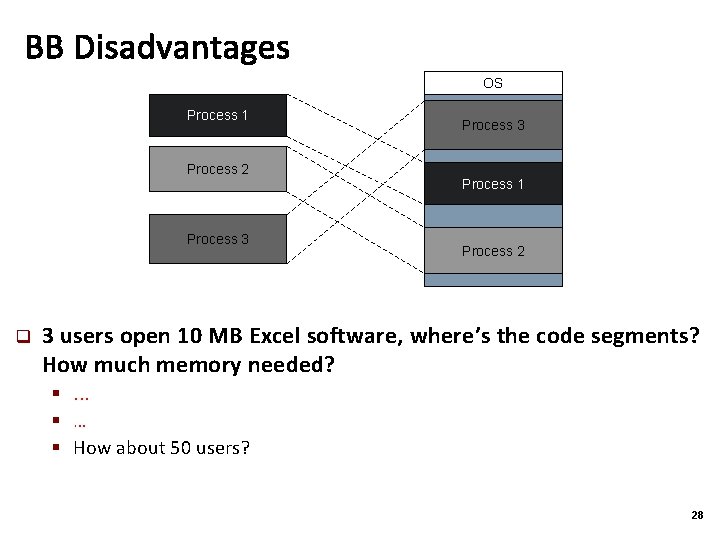
BB Disadvantages OS Process 1 Process 2 Process 3 q Process 3 Process 1 Process 2 3 users open 10 MB Excel software, where’s the code segments? How much memory needed? §. . . § … § How about 50 users? 28
![BB Advantages [Read offline, if no time] q Provides memory protection § (via virtual](http://slidetodoc.com/presentation_image_h/252344c754ccf60d3d9a084dbc663014/image-29.jpg "BB Advantages [Read offline, if no time] q Provides memory protection § (via virtual")
BB Advantages [Read offline, if no time] q Provides memory protection § (via virtual address) q Supports dynamic relocation § Easy relocation / move address spaces § Move P 2? Simply change P 2’s base and bound in P 2’s PCB q Simple, inexpensive implementation § Two registers, little logic in MMU § OS sets the two registers on kernel-to-user mode switching OS P 1 bound Process 1 0 Process 2 Process 3 Process 1 P 1 base Process 3 Process 2 29
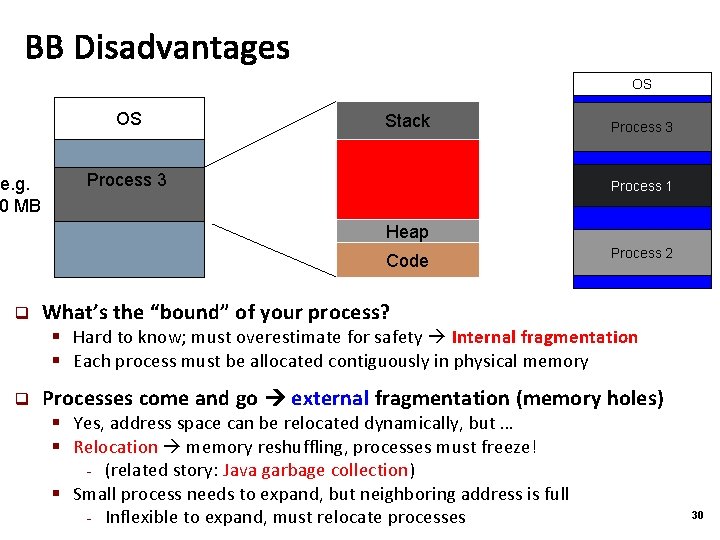
BB Disadvantages OS OS e. g. 0 MB Stack Process 3 Process 1 Heap Code q Process 2 What’s the “bound” of your process? § Hard to know; must overestimate for safety Internal fragmentation § Each process must be allocated contiguously in physical memory q Processes come and go external fragmentation (memory holes) § Yes, address space can be relocated dynamically, but … § Relocation memory reshuffling, processes must freeze! - (related story: Java garbage collection) § Small process needs to expand, but neighboring address is full - Inflexible to expand, must relocate processes 30
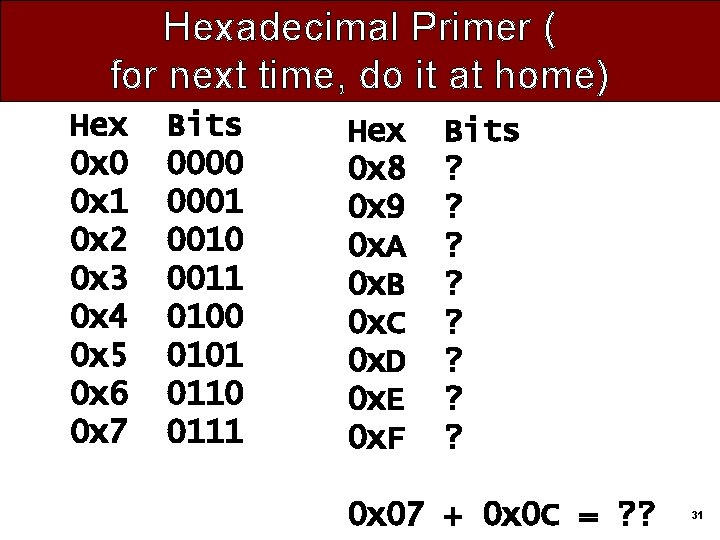
Hexadecimal Primer ( for next time, do it at home) Hex 0 x 0 0 x 1 0 x 2 0 x 3 0 x 4 0 x 5 0 x 6 0 x 7 Bits 0000 0001 0010 0011 0100 0101 0110 0111 Hex 0 x 8 0 x 9 0 x. A 0 x. B 0 x. C 0 x. D 0 x. E 0 x. F Bits ? ? ? ? 0 x 07 + 0 x 0 C = ? ? 31
END 32
- Slides: 32