
Memory and Data Storage Devices LSU rev 20
- Slides: 11
Memory and Data Storage Devices LSU rev 20 AUG 2020 L 15. 02 1
Memory Devices Memory devices are electronic devices that store information for immediate use in electronic hardware. Memory devices utilize digital logic to perform their operations. Examples: • EEPROM • RAM • Flash Memory LSU rev 20 AUG 2020 L 15. 02 2
Building Blocks of Memory devices are often constructed with logic gates and simple memory circuits such as latches and flip-flops. Types of Logic Gates: • AND, OR, NOT, NAND, NOR Types of Latches • SR NOR, SR NAND, SR AND-OR Types of Flip-Flops • D Flip-Flop, T Flip-Flop, JK Flip-Flop LSU rev 20 AUG 2020 L 15. 02 3
Memory Types There are two main types of memory devices: volatile and non-volatile Volatile Memory is memory that requires power to maintain stored information (Ex. RAM) By contrast, Non-Volatile Memory is computer memory that stores information even after power has been cycled. (Ex. Flash memory) LSU rev 20 AUG 2020 L 15. 02 4
ROM • Read-Only Memory (ROM) is a type of non-volatile memory used to store programs and data • Traditional ROM cannot be changed after it has been written • EEPROM and EPROM are types of ROM that can be changed after the initial programming. The write time for such devices is often relatively slow • EEPROMs have a finite amount of times it be erased and rewritten • Often used to store software or data that is rarely changed (ex. firmware, lookup tables) LSU rev 20 AUG 2020 L 15. 02 5
Flash Memory • Flash memory is a type of non-volatile computer memory that can be erased and reprogrammed • Flash memory is a type of EEPROM with larger memory block sizes – This means it also has a limited number of times it can be erased and rewritten • Flash memory is often used for large solid-state digital storage • Solid-state hard drives are often made using flash memory LSU rev 20 AUG 2020 L 15. 02 6
RAM • Random Access Memory (RAM) is a type of volatile computer memory where memory cells can be accessed in any order • Since programs do not need to look up addresses for memory, RAM is significantly faster than other memory devices • RAM is often used for programs or software that are actively being used LSU rev 20 AUG 2020 L 15. 02 7
Magnetic Hard Disk Drive • Hard disk drives are non-volatile memory devices used for storing large amount of data • Data is stored in individual blocks of memory that can be stored or retrieved in any order • Data is saved by magnetizing ferromagnetic material on a disk using a magnetic lever. The encoding allows for data to be stored even when power is lost • Primarily used as secondary storage devices for computers. LSU rev 20 AUG 2020 L 15. 02 8
SD Cards • Secure Digital (SD) cards are a type of nonvolatile memory devices used for portable devices • SD cards utilize flash memory to store large quantities of data in a small physical size • SD Cards are available in multiple storages size ranging from 512 MB to 1 TB • SD cards are frequently used in cameras, personal computers, and embedded systems LSU rev 20 AUG 2020 L 15. 02 9
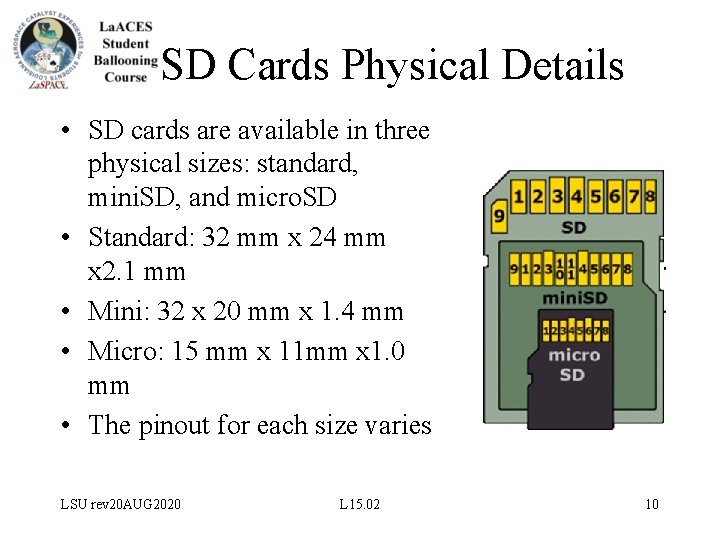
SD Cards Physical Details • SD cards are available in three physical sizes: standard, mini. SD, and micro. SD • Standard: 32 mm x 24 mm x 2. 1 mm • Mini: 32 x 20 mm x 1. 4 mm • Micro: 15 mm x 11 mm x 1. 0 mm • The pinout for each size varies LSU rev 20 AUG 2020 L 15. 02 10
SD Cards File Systems Most SD cards are formatted to contain a single file system. The capacity of the SD card is limited by the partition size. It is possible to change the partition size by reformatting the card. • By default, most SD cards under 2 GB have FAT 16 partitioning. FAT 16 allows for up to 2 GB of storage • FAT 32 partitioning allows for up to 4 GB of storage • ex. FAT (FAT 64) partitioning allows for up to 2 TB of storage, but is often limited by the amount of memory on the card itself LSU rev 20 AUG 2020 L 15. 02 11