
Memes Project By To create your own meme
Memes Project By:

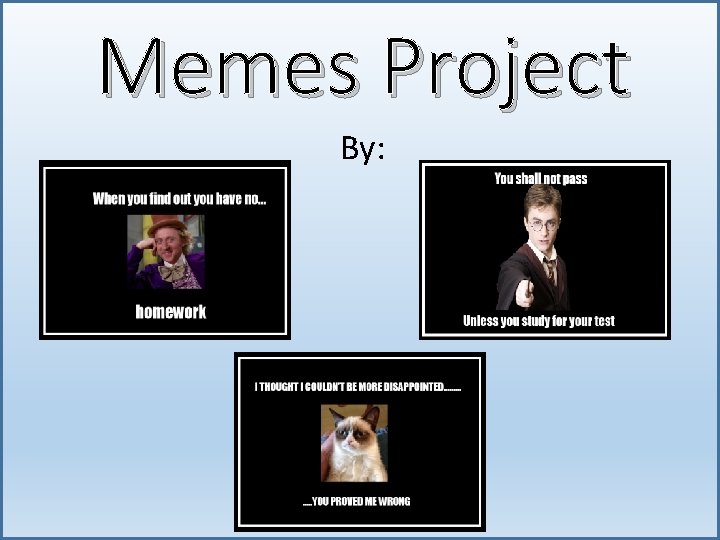
To create your own meme: • Start with one blank slide. Give it a solid black background [Design Tab – Customize Group - Format Background – Solid Fill – Color = Black] • Insert a rectangle shape covering most of the slide interior. Give the shape a fill of No Fill. [Shape Format Tab – Shape Styles Group - Shape Fill – No Fill] • Give it a shape outline color – white [Shape Format Tab – Shape Styles Group - Shape Outline = White] • Give the shape outline a weight of 6 pt. Insert a picture in the center of the slide. [Shape Format Tab – Shape Styles Group - Shape Outline - weight = 6 pt. ] ©Tech. Check. Lessons, 2019 2
To create your own meme: • Insert a picture copied from the internet – Align it to the center [Picture Format – Arrange Tab - Align – Align Center] • Align it to the middle as well [Picture Format – Arrange Tab - Align – Align Middle] • Type in big white letters (must use Impact font) a funny (School appropriate humor) saying above and below the picture. Done, you have made a meme. Now make one more!!!! • Save the file as “Last Name + First Name + Meme” and send it to your teacher for grading ©Tech. Check. Lessons, 2019 3
Materials & Objective • Materials • Computer with Microsoft Power. Point 2016 or 2019 • Internet Access • Objective • Using Power. Point, students will create a meme using the pictures, shapes and formatting skills ©Tech. Check. Lessons, 2019 4
Enrichment • Make some more memes if you have time and have other classes vote on the best ones, unveil the winners… ©Tech. Check. Lessons, 2019 5



Skills Taught • Slide Background • Inserting Shapes • Shape Fill & Outline • Inserting Pictures • Centering Pictures Horizontally and Vertically • Inserting Textboxes • Font Formatting ©Tech. Check. Lessons, 2019 9
- Slides: 9